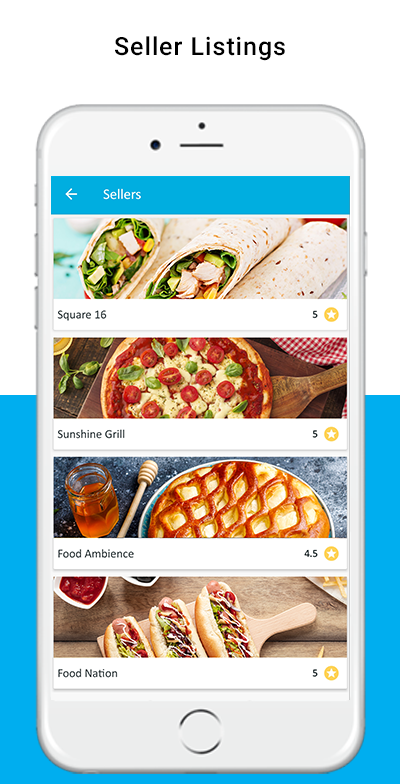
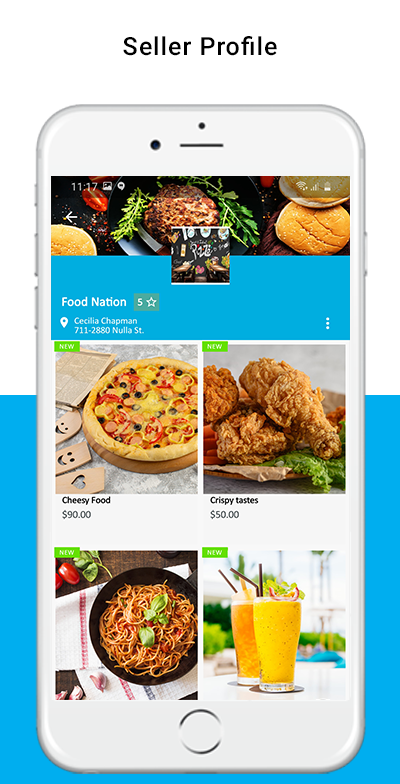
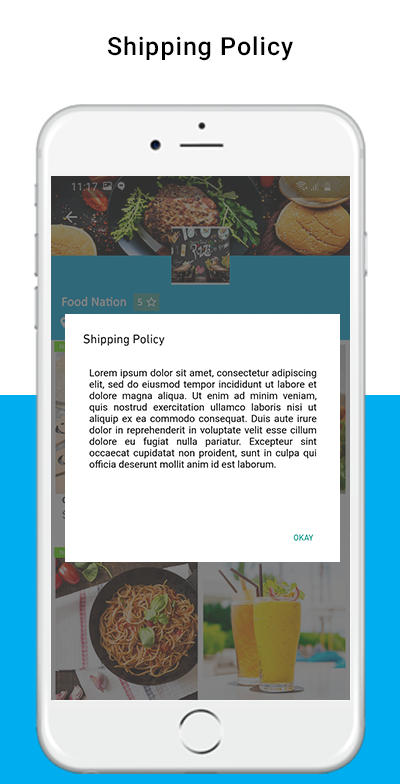
The eCommerce industry is well-known for the huge potential for newcomers. It offers various business segment options to new online merchants.
For example, you can start your online website or you can even start your Mobile App based eCommerce business. On the other hand, the other option for eCommerce merchants is to create multi-vendor marketplaces like eBay, Etsy, or, Amazon. Although it takes huge efforts and costs to rank the marketplace business in the market. Yet, somehow if you can make a well-known image in the market, it will not take much time to skyrocket your portfolio.
Especially, multi-vendor marketplaces are of 2 types: The first one is a normal marketplace where sellers can register their shops on a particular platform. And can present the same in front of a vast audience. Then there comes the second one.
Hyperlocal Marketplace:
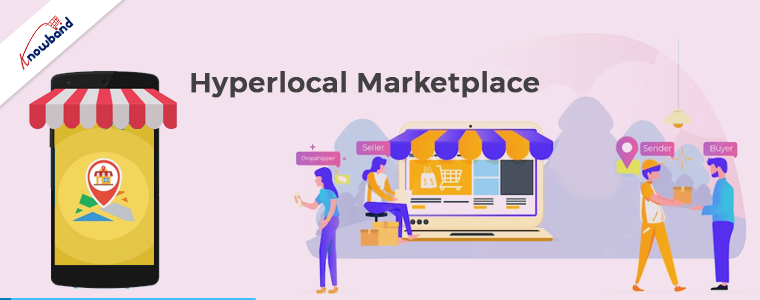
Hyperlocal Marketplace is a kind of multi-vendor marketplace. The normal difference between hyperlocal and standard multi-vendor marketplaces is that the hyperlocal marketplace has its wings spread to a limited area. In other words, hyperlocal marketplaces mainly focus on particular locations.
Instance, Livre-Express is one of the most famous food-based Hyperlocal marketplaces in France.
About Livre-Express:
The Livre-Express is a Prestashop-based Hyperlocal eCommerce marketplace. The brand deals in food, beverages, and groceries categories. Not only Livre-Express is one of the top-ranked hyperlocal businesses in France but also is well known for its variety of sellers.
Along with its products, the Livre-Express hyperlocal marketplace also offers the products of 100+ sellers.
The major advantage of why customers prefer Livre-Express for their food and snack delivery is that. The Prestashop-based Hyperlocal Marketplace offers numerous options for customers to choose from. The customers can choose their favorite products from more than 100 different sellers. They can simply analyze compare and choose the best option for themselves.
What Empowers Livre-Express: Journey with Knowband!!
Livre-Express is an online website based on the Prestashop eCommerce platform. The eCommerce marketplace uses Knowband’s Prestashop Hyperlocal Marketplace Extension for managing the entire sitemap. The Livre-Express offers rich features to customers. For example, the customers can select their live location and check out the sellers which are specifically available for that particular location only.
On top of that, the brand offers same-day delivery to the customer base to fulfill gourmet needs.
Along with the website, the business also offers Flutter-based Android and iOS App to the customers. Thanks to Knowband’s Prestashop Hyperlocal Marketplace Mobile App Builder.
Moreover, the brand does exceed the basic features limits of both Hyperlocal and Mobile App Builder addon by tons of customizations.
About Knowband’s Hyperlocal Marketplace and Mobile App!!
As a well-known fact, multi-vendor marketplaces like eBay, Amazon, Etsy, and Walmart combined rule over one-third of the entire eCommerce market. Following the same, the marketplace segment is one of the most potential ones in the eCommerce industry. On the hand, hyperlocal marketplaces are becoming the modern trend in the market. Why? Because people’s lifestyles are getting busier and they are getting less time for shopping for their daily needs. Thus, the same factor is building the need for hyperlocal marketplaces in the eCommerce industry.
For the same reason, Knowband Offers a Hyperlocal marketplace module for the Prestashop platform. Not only just the module but also, eCommerce merchants can launch their white-labeled mobile App with Knowband’s Prestashop Hyperlocal Marketplace Mobile App Maker.
Moreover, it takes zero coding and technical knowledge to turn your single-vendor Prestashop store into a fully channeled Hyperlocal Marketplace.
What’s Livre-Express Says about Knowband: Customer Feedback!!
These guys are awesome. I am familiar with Java but not PHP at all. The technical guys have supported me from the begging to the end. Planning to purchase some customizations and other modules may be.
A hyperlocal marketplace provides delivery services to the shops and sellers who are in the vicinity and not so far. To pick up and deliver goods to specified consumers, it has the necessary workers and drivers. By facilitating quick and easy product deliveries, hyperlocal marketplaces assist businesses in growing and succeeding. These companies can provide a variety of products in the smallest amount of time, including groceries, meals, medicines, and a variety of other goods.
On a website or application for the hyperlocal marketplace, many business owners can sign up and offer their goods to customers. As a result, an eCommerce hyperlocal marketplace has been created to provide services in limited geographical boundaries. You can find all the necessities if you stroll through your neighborhood market. All of your needs will be met in the neighborhood market.
If you think that the idea of creating a hyperlocal marketplace is vague then by looking around you will find out it is gaining appeal every day. The hyperlocal company sounds convenient and reasonably priced. Moreover, you can create a business model and organize it accordingly. The Geo-location feature, on-time delivery, safety, and convenience are a few key reasons why the hyperlocal industry is expanding.
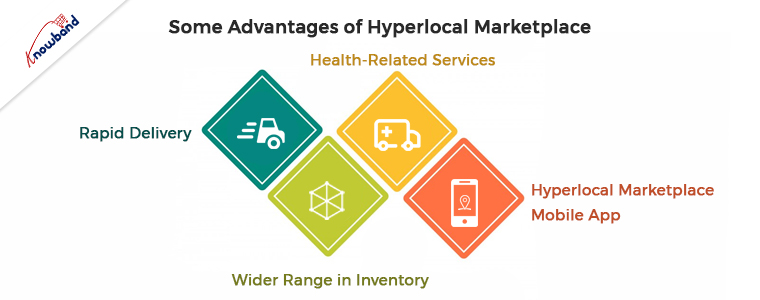
Some Advantages of Hyperlocal Marketplace
Rapid Delivery
When it comes to delivering items to clients within a few hours or the same day, hyperlocal marketplaces are very helpful for merchants. If sellers want to build a presence online then they need to deliver swiftly in response to the rising demand for local delivery. They can gain a platform through a hyperlocal marketplace to carry out the activities.
Wider Range in Inventory
Geographical restrictions apply to hyperlocal markets for providing service. As a result, if you launch a hyperlocal market, you can combine different vendors onto one platform and provide delivery services in an area quickly.
You can have access to a wide range of merchandise through a hyperlocal marketplace. Hence, it will be advantageous to both your company and the vendors who use your platform.
Health-Related Services
Services in the healthcare sector are now receiving much more attention than they did before the outbreak. After COVID-19, people are more conscious about their health and well-being. Furthermore, there will be a need for medical services, child care, elderly care, and other medical facilities. The need for home health care services is growing as the capacity of hospitals is not enough for the pandemic situation.
The best choice is to hire a home caregiver or nurse because developing nations cannot provide the necessary medical facilities. Hyperlocal marketplace firms provide enormous potential to the healthcare sector.
Hyperlocal Marketplace Mobile App
As a result of businesses’ ability to save money, time, and resources, the hyperlocal model has taken over the retail industry. People now choose to use mobile apps that make their lives more controllable and convenient as a result of the growth in technology.
An excellent approach that satisfies the needs of the modern-day market is to create a hyperlocal mobile app. Some technological benefits of hyperlocal marketplace mobile apps are below:
Customers can follow their orders in real-time, which encourages transparency and fosters customer loyalty. This is one of the hyperlocal mobile app’s technological advantages.
With the help of the hyperlocal network, which can recognize different locales and help users find merchants nearby, reaching a larger audience with an app is simple.
Businesses can serve a variety of markets and offer services by using an app. A hyperlocal app can be made for any market, not just one particular industry.
With just one click, contactless delivery and payments are available thanks to app technology, which enables businesses to take advantage of a variety of local channels. An app facilitates management and improves effectiveness, in other words.
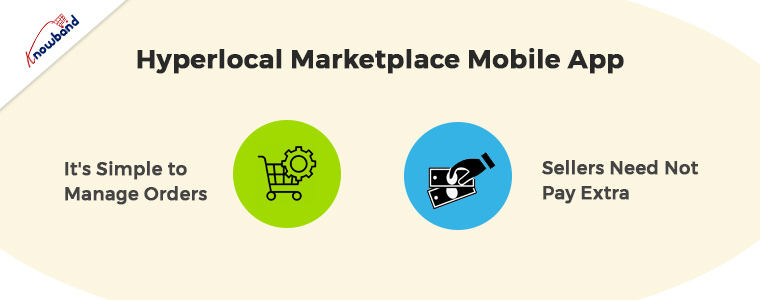
It’s Simple to Manage Orders
As soon as you set a system for managing inventory and orders your products will be in sync with the catalog. In this manner, you may methodically process orders and have precise inventory data. Also, the majority of the products in hyperlocal orders are either perishable or have a short shelf life. Furthermore, an efficient order management system can help you efficiently replenish your inventory.
Sellers Need Not Pay Extra
Local vendors can sell their wares on a platform without opening an internet business thanks to hyperlocal marketplaces. Additionally, customers are given a variety of options at once. Consequently, everyone benefits from it.
In the End
In this article, we have discussed the benefits of setting up a Hyperlocal marketplace for websites and mobile apps. We can assist you in setting up the Hyperlocal Marketplace for your business for which you need to contact us at support@knowband.com. In case you have any concerns related to the hyperlocal marketplace module then kindly let us know. We are here to assist you with the issues and concerns of our products. Moreover, we also assist with custom developments in the module or in adding new functionalities to the module. Additionally, we can also assist with customized developments as per your business requirement. Please revert to us for our assistance with the issues and concerns related to the services provided by us.
Purchasing dynamics have changed completely with the outbreak of COVID19. Currently, people are focusing more on health, hygiene as well as safety-related items. Instead of waiting for the standard 56-day delivery, people have started ordering from a local store in their neighborhood. As a result, Hyperlocal companies are emerging back with a twist.
What is Hyperlocal Marketplace?
The hyperlocal marketplace is defined as an online multi-vendor marketplace for a small geographic zone. Furthermore, the stores listed will be specific to the area as well as the delivery range. Moreover, this helps end-users delegate their daily tasks more conveniently. Not only on-demand delivery will be beneficial for small retailers and merchants but will even offer them new opportunities.
Understanding the function of Hyperlocal Marketplace:
The functionality of Hyperlocal Marketplace is quite simple. Following are the steps that will make you understand it better-
Marketplace allows sellers to upload their inventory on both- marketplace websites or apps.
Allows buyers to browse desired products and add them to the cart.
Make payment via online or cash-on-delivery modes.
Helps seller receive the order on its marketplace website/app. Further, the seller can accept the order.
To avoid any shipping and transportation damage, the order is being packed.
To pick up the order, the delivery agent will visit the store.
The customer receives their order at the doorstep.
Separate apps or website fronts are provided to customers and sellers for these setups. These applications provide different and various features as per the requirements. With the assistance of this process, orders can get processed quickly, and the customer can also be provided with order tracking information through different mediums, either within the app or via email, or through SMS updates.
The benefits of Hyperlocal Marketplace you must know
Hyperlocal Marketplace leads to faster delivery
With the assistance of Hyperlocal Marketplace, customers can receive their orders quickly. This is helpful for sellers who want to deliver their orders to their customers within hours or on the same day. Moreover, with the growing demand for local delivery, sellers want to have an online presence for faster delivery and with a hyperlocal marketplace, you get the platform to do the same.
Sell your products directly to customers
Now, sellers will be able to browse as well as shop conveniently due to the availability of products on one platform. Further, this would provide your sellers more visibility and allow them to sell their items directly to customers without the involvement of mediators. Hence, no commissions.
Ways of Getting Started with Hyperlocal Marketplace
Step 1: Create your website
To begin with the hyperlocal marketplace, it’s important to create an efficient and full-fledged website that can easily accommodate stores of multiple sellers. Furthermore, it is similar to a multi-vendor marketplace. Ensure to have a location tagging feature. Once enabled, customers can order their products based on their location.
Step 2: Seller Login
It’s important to have two faces on your eCommerce website, one for the seller and the second for the buyer. Speaking about the seller end, optionsto upload inventory, list products, add discounts, etc must be there. Along with that, dedicated credentials are essential to ensure security.
The seller must receive a notification regarding the order placement and the assigned delivery partner.
Step 3: Buyer Login
The customer-facing front is another important feature that a hyperlocal marketplace must-have. Further, this should contain auto-detection of the customer’s location, categories as well as product display. It should even include various payment modes (online & offline), delivery slots, order confirmation as well as tracking details.
Step 4: Payment Gateway
For a successful eCommerce business having multiple payment options is important. Similarly, for buyers’ convenience, your hyperlocal marketplace should provide multiple payment options. A suitable payment gateway integrated into the website to give payment options such as credit card, debit card, net banking, UPI payments, etc. Cash on delivery and vouchers are also important.
Step 5: Delivery Partners
A hyperlocal marketplace’s shipping and delivery are critical. It can be done in one of two ways: the marketplace owner can arrange for delivery, or merchants can do it themselves.
If you want to do it for all of your vendors, shipping tools like Shiprocket can help. They have a number of delivery partners, including Dunzo, Shadowfax, and Wefast. You won’t have any problems with delays due to a lack of agents if you work with a variety of partners. You can schedule pickups and deliveries while your sellers manage their stores and listings for as little as Rs 37.
Step 6: Tracking Details
Finally, you must give tracking information for all orders. If you ship with Shiprocket, you can provide buyers with projected arrival dates, delivery agent contact information, and precise order tracking information.
With the assistance of Prestashop Hyperlocal Marketplace Addon, Prestashop owners can swiftly convert their store into a fully functional marketplace. Furthermore, this will allow other sellers to sell their products in the marketplace. Customers can experience a great shopping experience with the module.
Key features of Prestashop Hyperlocal Marketplace Addon:
Allows customers to check the availability of the product.
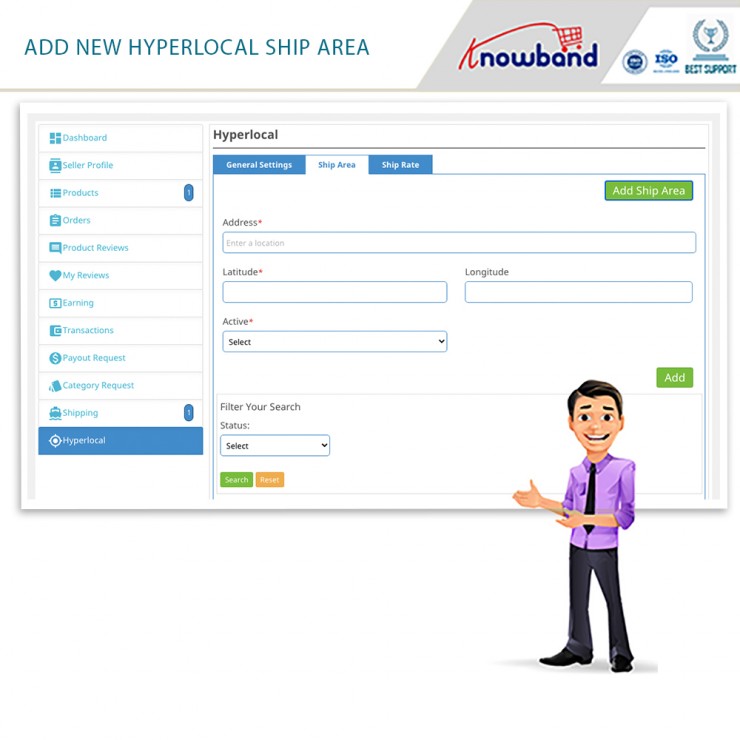
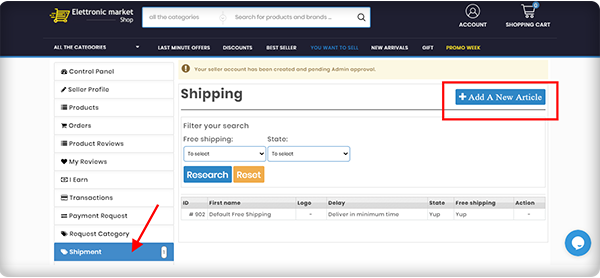
Help sellers to add locations where they can ship products.
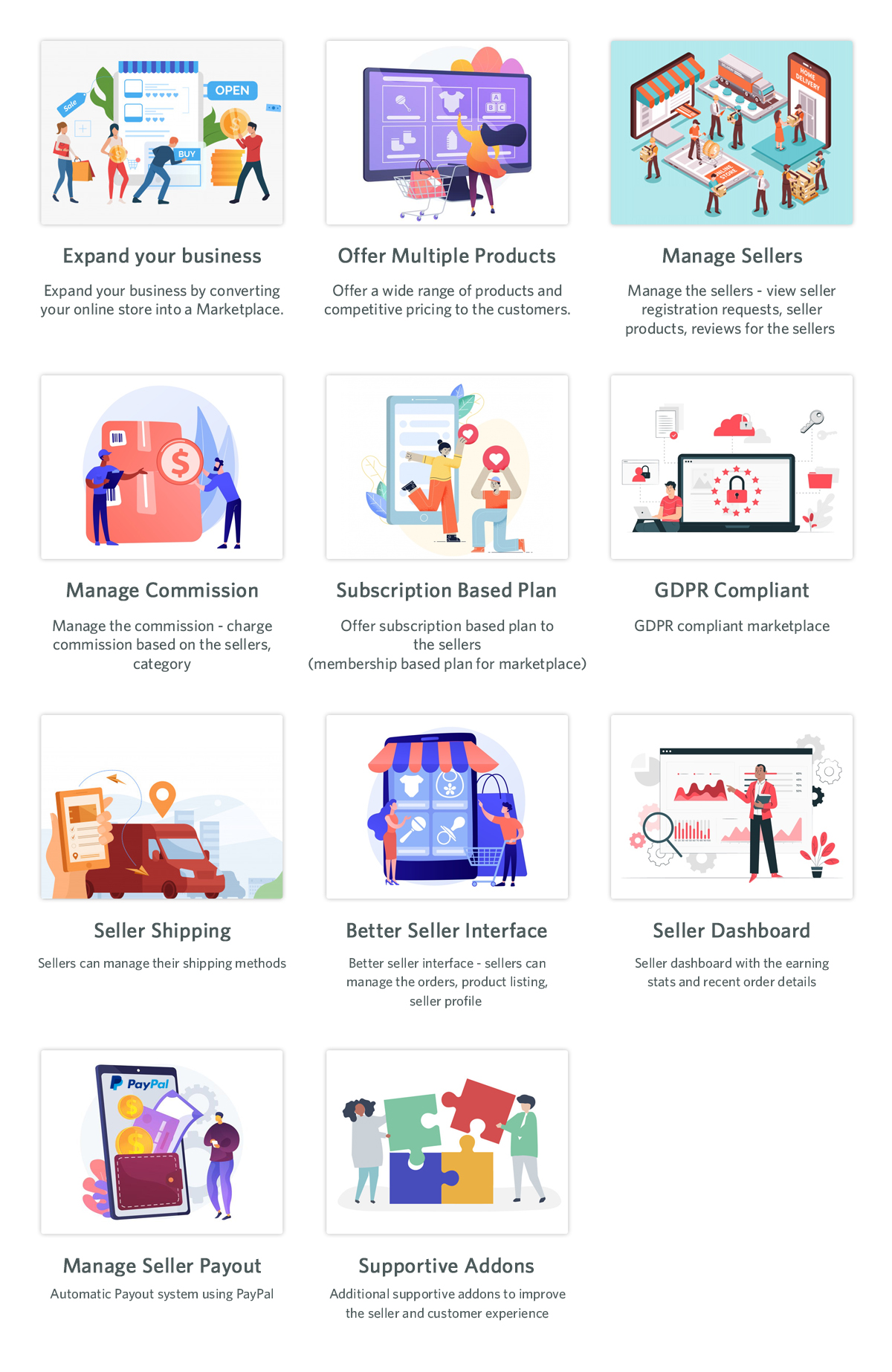
Sellers managed easily.
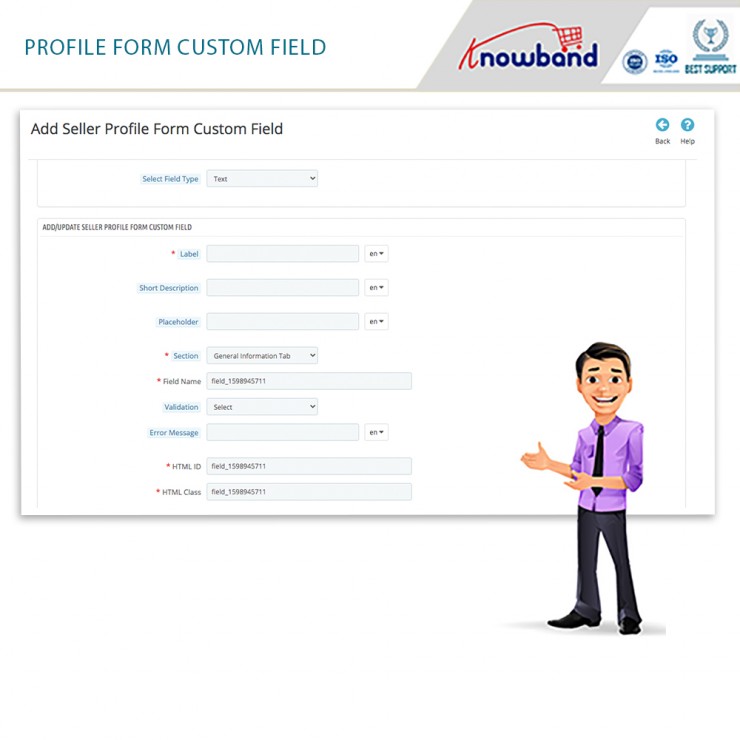
Offers custom profile fields and effortless commission management.
Provide membership plans for sellers.
For Notification, email templates are offered.
Final Note
To broaden your reach inside a small geographic zone, Hyperlocal marketplaces are the best way. Along with local shop owners, you can work with small eCommerce companies as well to make things more accessible to your target market.
The marketplace has become the most visited eCommerce store in the last few years. You get products at competent prices with hundreds of choices from multiple sellers. Out of two ways of creating a marketplace, some chose to make it from scratch while others use marketplace extensions.
In this article, we are celebrating the success of the Elettronic Market, an Italian marketplace that trusted KnowBand’s PrestaShop Multi-vendor Marketplace Module and created a full-fledged multi-vendor store where anyone can register as a seller and expand their business.
About Elettronic Market Shop:
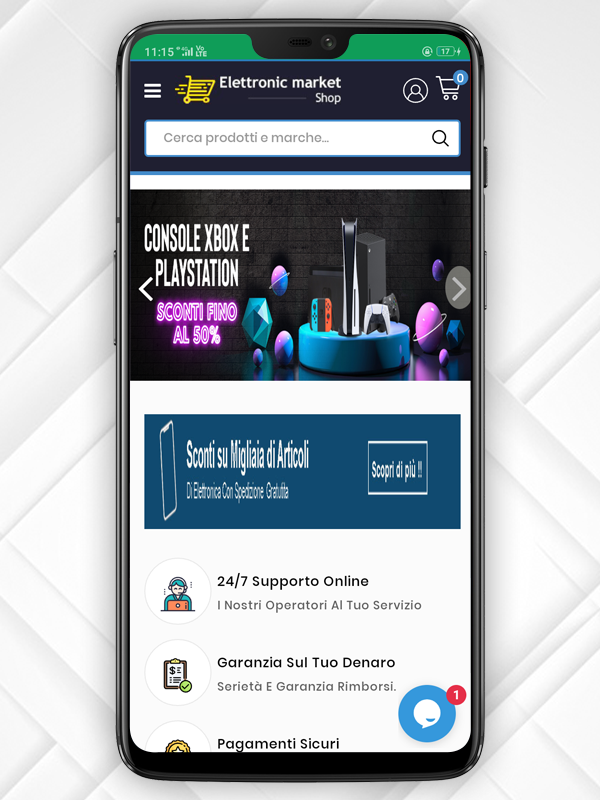
ELETTRONIC MARKET is a young and vibrant e-Commerce business that specializes in selling millions of goods. It sells lighting goods, DIY hardware, perfumery, clothes, beauty items, games for the little ones, personal care items, and much more thanks to a refined and unmistakable theme.
<em>"Our products are made with top quality materials and one goal: to offer design solutions with the best possible quality/price ratio."</em>

<em>-Elettronic Market</em>
Combined with attention to quality and design, the range of goods has helped their shop to become an industry leader with thousands of regular shipments throughout Italy.
The Elettronic marketplace has a functional website with a user-friendly interface. Along with that, they strive to provide an exclusive customer experience in every aspect of the shopping process. Elettronic Marketplace is actively working with big worldwide search engines such as Google, Bing, and Yahoo to guarantee all customers an exclusive and constantly changing shopping experience.
Services offered by Elettronic Market Shop:
Elettronic Market also pays close attention to all things related to logistics. Excellent logistics must enable the selling of even large goods. To always intercept the quickest route to get the goods to their destination as quickly as possible, we have agreed to focus on the best professionals in the logistics sector located in plants and warehouses in different Italian locations.
All the essentials and quality products are available at Elettronic Market Shop. It offers its customers products that are already chosen by a team of experts, bypassing the sifting of soulless products across endless websites. They examine the right products for you and this benefits the store; the customer satisfaction is more important and they watch it every day with the success of their products on the whole Italian market.
They have a 24/7 customer assistance service facility for customer communication which improves the customer experience.
Also, Elettronic Market provides the best shipping and payment options to the customers. Every transaction is secured with PayPal Gateway. The inventories are updated regularly and all the products are analyzed by the expert’s team before making them available online for the shoppers.
-> Click here to visit the Elettronic Market Shop Marketplace Website.
The Elettronic Market Shop at a glance:
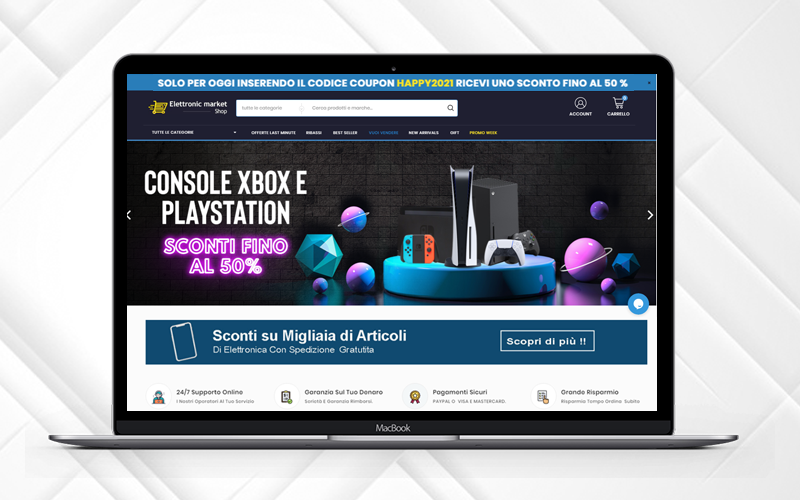
The marketplace has a sleek and clear UI with a streamlined design. The Promo code bar runs at the top of the page with a discount code that can be availed by visitors. All the sidebars are separate and give a great soothing look to the front end of the website.
Features that make it to the top
The Elettronic Market Shop is created using PrestaShop Marketplace Module developed by KnowBand. The marketplace features are very well utilized and can be observed throughout the website.
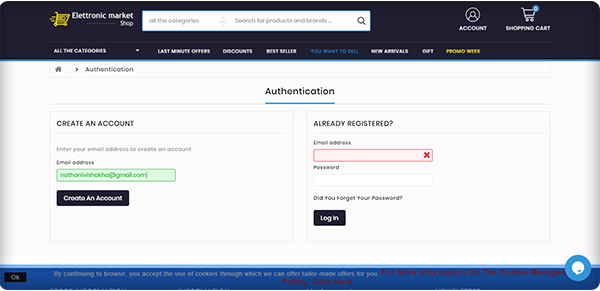
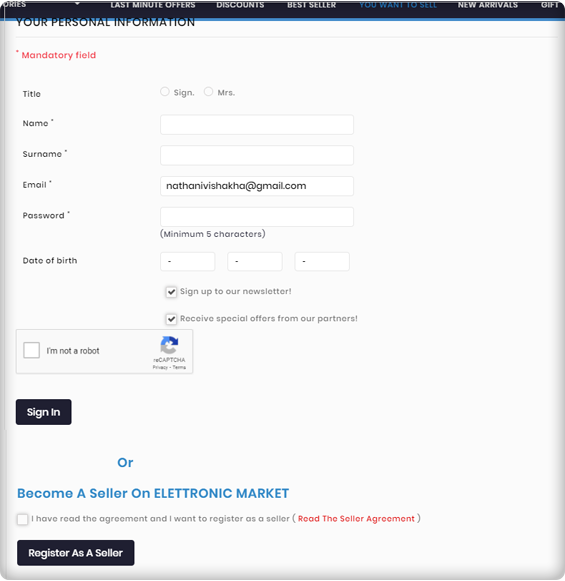
Seller Registration is easy
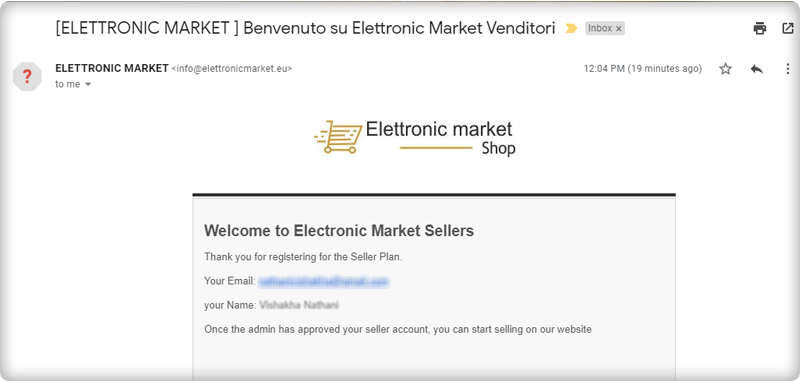
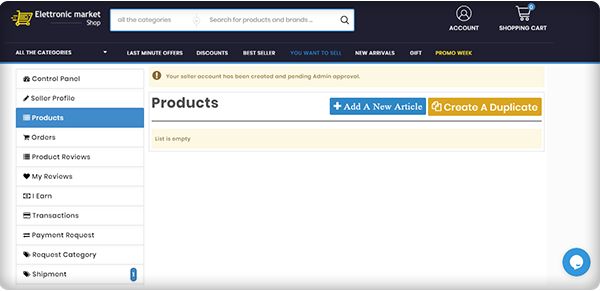
You can become a seller by simply registering yourself but it requires the admin’s approval to start selling on PrestaShop Elettronic Marketplace.
Email Templates for every event
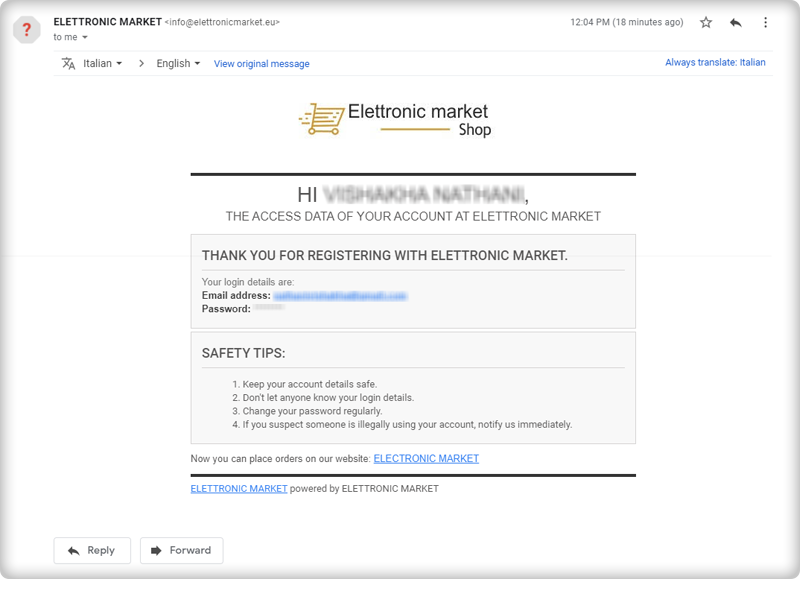
After the successful seller registration, you will receive an email with log-in credentials. Several email templates are available on the marketplace module for various events.
Seller Dashboard for every seller
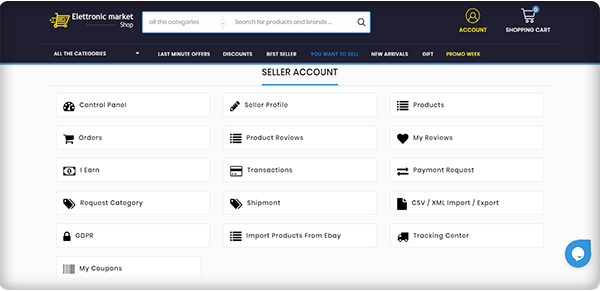
The seller dashboard is another appealing feature of the PrestaShop Elettronic Marketplace. The seller gets a lot of options for managing orders, product upload, and inventory.
Product Approval
All the products uploaded by sellers can be reviewed from the backend and requires admin’s approval, a feature offered by KnowBand’s Marketplace Module!
Elettronic Market pays special attention to all aspects of logistics
Excellent logistics must enable the selling of even large goods. Since the Elettronic Market is a well-established name in the market, their operational structure ensures the delivery of even large quantities of the products. Sellers on the Elettronic Marketplace can add custom shipping choices.
Super-Fast Delivery
With the automated efficient shipping and logistic system, In order to always intercept the quickest route to get the goods to their destination in the shortest possible period, they rely on the best professionals in the logistics sector located in plants and warehouses in different Italian locations.
In reality, thanks to this functional organization, we are always in a position to deliver our products to Italy within 24-48 working hours.
Hassle-free Inventory Management
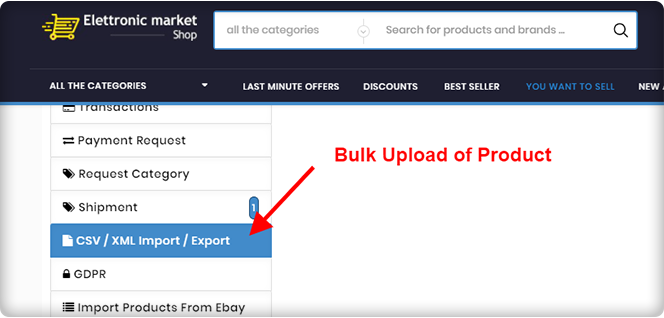
With technical systems and software developed specifically for Elettronic Market, the entire management of the products available in the warehouse takes place. They have always paid attention to the forefront of optimizing order management and processing times. Bulk upload of products from the seller’s dashboard is possible.
Ensure Packaging before Shipment
To guarantee customers impeccable service, the quality control department inspects all pre-shipment packaging and products to ensure the integrity of the goods and packages shipped. With absolute control, they handle the entire company operation.
Efficient Customer Assistance Service
They provide an effective ‘Customer Assistance’ service that assists customers of all nationalities in their mother tongue with highly skilled resources, where they are present at all levels, from the moment of selection to the delivery of the products.
Secured by PayPal Transactions
Elettronic Marketplace is certified and verified PayPal website and all online credit card transactions are carried out in maximum security environments, being attentive to online fraud and the safety of personal data.
Request Invoice Feature
Customers can send a request for the invoice and an email will be sent to the email address which is already linked to the order number.
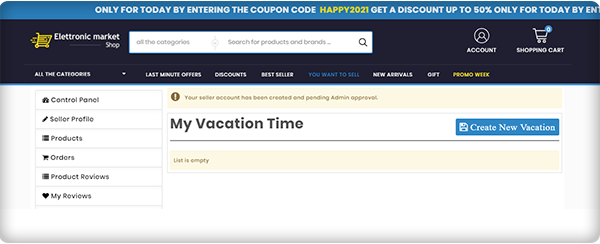
Vacation Mode
A seller can go on vacation mode when he/she is not available.
The Elettronic Market Shop makes life simpler
With a catalog the Elettronic Marketplace aims to enhance and extend on a daily basis, the list of offers includes a wide range of thousands of products.
Marketplace feature that helps in quality assurance
The greater strength of the Elettronic Marketplace has always been the richness of the bid. A team of experts continuously reviews the latest products to be included on the website and chooses only the best ones to provide customers with a superior product concerning quality, manufacturing methods, and aesthetics.
About PrestaShop Marketplace Module:
The PrestaShop Marketplace Module developed by KnowBand transforms your existing website into a multi-vendor marketplace. It is feature-rich and supports all the PrestaShop themes.
KnowBand has created several PrestaShop Modules for eCommerce websites that enhance the shopping experience and helps you bring more business to your store.
The marketplace needs a revenue model and PrestaShop Marketplace Modules supports two of the most accepted revenue models: The commission model and Membership Plans. It has a proficient admin panel with a functional seller dashboard. Customers can drop reviews for the products as well as the seller.
Every product-related activity by seller and placed orders can be monitored by the store manager from the backend. It supports multiple shipping and payment methods. The PrestaShop Marketplace module is also compatible with the mobile app builder. It supports multiple languages and currency.
Customization, email templates, seller management, inventory management, and many such features are incorporated in the Marketplace Module.
Click here to explore the Multi-Vendor Marketplace features
Click here to explore the Gold Plan of Multi-Vendor Marketplace Module
Support
For those who need a quote, specialized support is also available. In the appropriate section of the site, simply send an email at support@knowband.com and our Customer Service team will respond within a few hours.
Recently, the Hyperlocal Delivery Model is trending in the eCommerce industry and the main features of on-demand hyperlocal delivery are efficiency and features. Along with a website, the demand for an application like a hyperlocal marketplace mobile app is empowering the home delivery model.
People pay extra for doorstep delivery and they do it willingly. They are already paying extra for food delivery services offered by Uber Eats and DoorDash.
Providing delivery services on the e-store can be the best service company for both seasoned and inexperienced entrepreneurs. Since 2014, digital ordering and delivery have risen 300% faster than dine-in traffic. The concept is appealing because it does not entail significant investments and maintains a sufficiently high profit at the same time.
You can start with minimal resources and grow your company gradually. In addition, delivery services are more important than ever with the rise of e-commerce. That’s why it’s an excellent solution for an entrepreneur to start a courier service. Knowband offers a Hyperlocal Delivery Package solution to start a delivery business with ease.
Do you know how Hyperlocal Delivery Model Works?
The hyperlocal delivery model is an ideal example of the fusion of age-old shopping methods and technical advancement. The hyperlocal on-demand delivery services work in a limited region and deliver products in the given time.
A hyperlocal company’s service scope could drop anywhere from a few meters to a few kilometers from the company’s location.
Think not only of FMCG, but also of house maintenance, grooming, and other customer-worthy services. So a hyperlocal company can step in and do the job if there is a restaurant nearby that does not provide home delivery for food.
You can refer to these articles for starting your hyperlocal delivery business:
Hyperlocal Mobile App for On-demand Delivery Business
Create your delivery application following the hyperlocal delivery model. Build various applications for different characters for this scenario, such as drivers, shippers, and customers.
Knowband’s hyperlocal delivery app is a robust solution for creating a delivery app for local home delivery services.
What is the ‘Hyperlocal Mobile Delivery Complete Package’?
The complete solution for Hyperlocal Marketplace is a combination of the Hyperlocal Marketplace Module and the Mobile Application. It has all the marketplace features for the website and gives you the mobile app advantages that are the major highlights of this article.
For PrestaShop Hyperlocal Marketplace Module, you can refer to our previous article:
Features of Hyperlocal Marketplace Application (Complete Package)
The Hyperlocal Marketplace Mobile App developed for the PrestaShop platform converts a hyperlocal online marketplace into a mobile app for native Android & iOS e-stores.
The Hyperlocal Mobile App allows users to select a specific location and shop for items in a specific region. By only selling goods from nearby vendors, the PrestaShop Hyperlocal Smartphone App makes deliveries quicker. It is ideal for services like online food delivery, grocery delivery, and medication.
1. Integrated with Google Map
In the PrestaShop Hyperlocal Marketplace module admin panel, the store admin can add a Google API key and retrieve worldwide locations. Also listed is the step-by-step guide for creating an API key.
It enables the store owner to pick locations for both its goods and sellers.
2. How sellers can register on Hyperlocal Marketplace?
The PrestaShop Hyperlocal Marketplace has an easy seller registration feature. Admin will approve your request and you are ready to sell.
3. Admin and seller can define shipping area and location
The PrestaShop Hyperlocal Marketplace Mobile App helps the owner and other registered sellers to offer their services. It offers various functionalities to admin and seller for setting up the price rules for different locations. The region in which they are going to deliver their products can be defined.
4. The UI of Hyperlocal Marketplace Mobile App
The user interface has various functionalities that provide a better customer experience and engagement in the marketplace. Customers can input their location by themselves or they can allow the app to auto-detect by providing GPS access.
Once it has been set, they will see products available in their location but it allows them to explore more products available in the store.
5. Customize your Hyperlocal Mobile App and give it a dynamic appearance
There is some very prominent functionality the app offers that enhances the UX in your store. A personalized app can be created as per your requirements. You can make some custom changes and update its look and feel accordingly.
The PrestaShop Hyperlocal App Builder module provides the store owners with a very powerful backend that allows them to edit & manage their applications effectively.
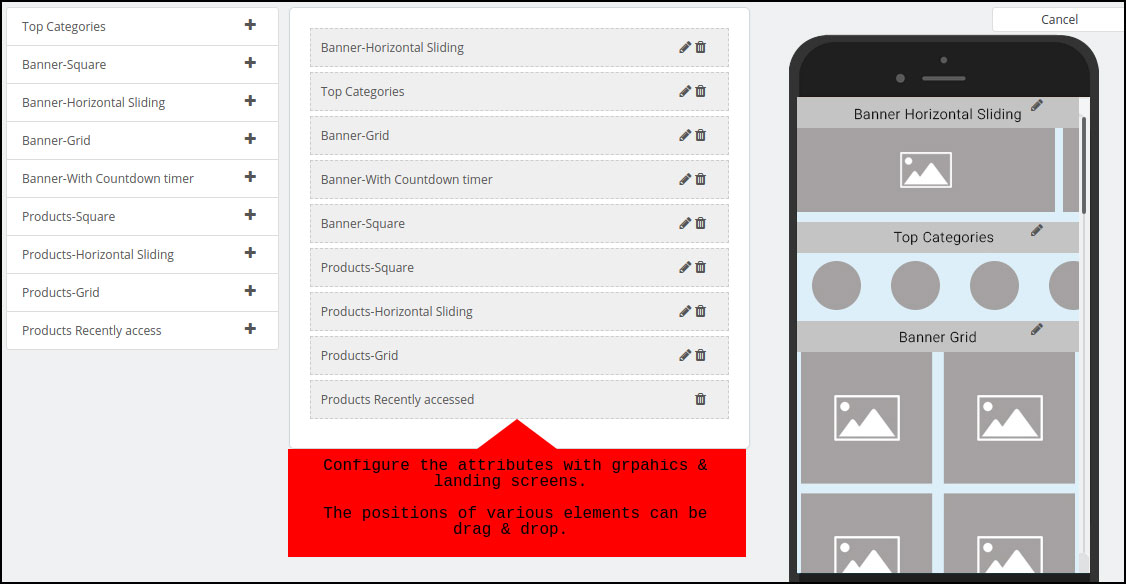
Home-page is the most important element of the app that abstractly represents everything about the app. It has a DIY drag and drops option for layout changes and various other features for banner, product display pattern, countdown timer, etc.
It is possible to set the App name, logo design, splash screen, theme, colors, font styles & much more as desired. The final applications on the website will have their unique brand identity. You can customize anything from color options to tab bar elements like home, category, cart, scan, etc.
6. Social proof helps in decision making
Reviews from customers play a huge role in improving reputation and boosting sales as well. The Mobile App Builder of the PrestaShop Hyperlocal Marketplace allows users of the app to post ratings & reviews of the products/services they buy. To improve cross-selling, the apps are made compatible with PrestaShop Related Products.
7. Deals and discounts are a game-changer
On the PrestaShop Hyperlocal Marketplace Mobile App, users of the app get the advantages of using website coupons & vouchers. Discount coupons/vouchers excite online shopping consumers as they get some cash off on the items to be bought.
8. Give your customers a smooth purchase flow
The Mobile App PrestaShop Hyperlocal Marketplace remains in full sync with the inventory of the website like categories, products, data, etc. As the inventory updates and adjustments will be automatically updated on the app simultaneously, you can sit back and relax.
9. Marketing is easy with Hyperlocal Marketplace Mobile App
Push notifications are the mechanism for getting users of the app back to the app by attracting ongoing deals& offers. The PrestaShop Hyperlocal Marketplace Mobile App does the same and enables store managers to configure and deliver to app users an infinite number of personalized templates push notifications.
App users have the option to share any product’s connection to any of their favorite platforms on social media. Social networking networks can add more new customers to the Mobile App Industry & sales can be boosted.
10. Automated order tracking notification system
What most app users don’t like is being confused about when the order is going to be shipped. Thus the PrestaShop Hyperlocal Marketplace Mobile App enables push alerts for order status updates to ensure accountability of order deliveries. It is possible to highlight new promotional deals along with these.
The complete Hyperlocal package benefits
The PrestaShop complete hyperlocal marketplace package has several benefits for the owner, seller, and customers.
The app is GDPR compatible and supports multiple languages that allow you to sell globally.
It has social login functionality that increases the number of registrations
In case of slow or no internet connectivity, the PrestaShop Hyperlocal Marketplace Mobile App offers offline browsing for app users.
Chat Support is the ideal medium for customers to communicate with the store manager via WhatsApp chat or Zopim chat support.
It supports all the shipping and payment gateways which are necessary for customer conversion.
Additional benefits with the Hyperlocal Marketplace Mobile App package:
Incorporated with one-page checkout
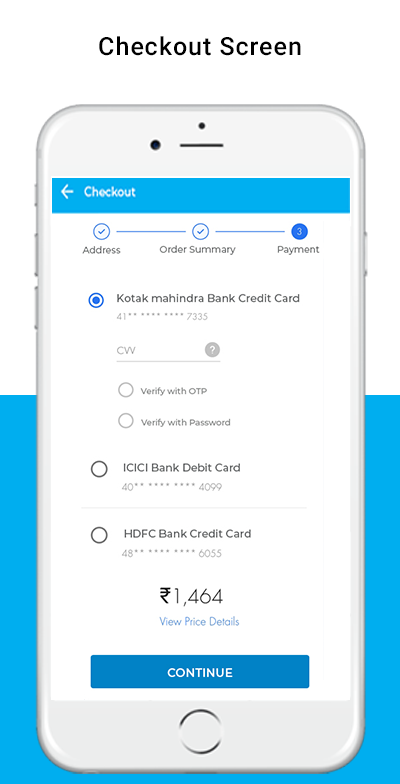
A single-page checkout screen provides the Hyperlocal Marketplace Smartphone App for PrestaShop. This makes it hassle-free for the purchasing process & keeps the user experience at par. Only the requisite inputs are taken from the app users during the one-page checkout.
Spin Win Email Subscription functionality
Compatible with the PrestaShop Spin Win extension is the PrestaShop Hyperlocal Marketplace Mobile App. If the store administrator uses both in the store, the pop-up gamified spin wheel can be seen only by opening the app with useful discounts. With email subscriptions, re-marketing can be aimed at consumers.
Conclusion: We believe this is the right time to invest in a hyperlocal business as individuals become more and more open to the idea of online delivery. The idea behind these is very simple and without huge amounts of capital, it can be implemented. Once the simple items are sorted, the only thing you need is to keep on top of your customer service game.
All in all, the hyperlocal industry has given all stakeholders a great push and made them play their best game to represent consumers in the best possible way.
The marketplace modules are available for Magento, OpenCart, and PrestaShop platform and the Hyperlocal Marketplace module is available for PrestaShop platform.
The hyperlocal delivery business model is spreading its wings in the food and grocery market. Experts assume that in the coming future, the Grocery home delivery business will expand remarkably, and incorporating the hyperlocal delivery business model is a win-win for all the focuses involved. If you are looking for a solution to start a marketplace for grocery or food delivery business then KnowBand has exactly what you are looking for.
The modules developed for creating a hyperlocal marketplace are very well curated by the technical experts and analyzed by industry specialists to empower local businesses with the online grocery store or a food delivery marketplace. Online grocery shops have high profitability and the majority of people prefer online shopping rather than visiting the stores.
Bring your store on a digital platform and start your home delivery business with Hyperlocal Marketplace Module. For the beginners’ guide, you can refer to this article on on-demand Grocery Marketplace. To deliver grocery, food, personal care products, or any services you need to make a plan and this article will be a step-by-step guide for launching your online home delivery store or an online marketplace. The hyperlocal delivery business model gives a platform to small businesses; they can become a seller on a marketplace and start selling immediately.
Companies like Amazon, Flipkart, Alibaba, Airbnb, etc, have established their brands in the marketplace industry and it is not easy to compete with these hotshots. Still, you have an opportunity to grow as people are supporting small businesses locally.
Step-by-step guide for a hyperlocal delivery business
Finding difficulty in deciding the right industry?
Don’t worry!
We have a plan.
Step 1- Select the industry you want to work in:
To finalize the industry for your hyperlocal home delivery business, do some market research. ECommerce has a lot of potentials if you do it right. Before establishing your hyperlocal marketplace business talk to industry experts, take help from the consultants or you can conduct surveys nearby.
Make good survey forms including all the necessary questions for the sellers and customers. List the benefits you will have and the sellers can enjoy. This will help you in finalizing your domain for the home delivery business.
Step 2- Decide your niche:
Once, you have decided on the industry, now it is time to determine the niche. The specific area you want to focus on. The hyperlocal delivery model for the food industry starts when you begin to think about the product and service you will deliver. You can choose basic needs products like dairy and bakery items, packaged food from a restaurant, lunch box delivery, essential grocery, or fresh vegetable delivery in local areas.
Money comes next! Do not tempt the idea and dispose of your savings. Look into your budget and see what you have and how much you have to spend? Market research is important if you are putting your step into the hyperlocal delivery business. In my opinion, food and grocery delivery businesses are the best choices out there because this comes in the essentials and the essentials never go off the market. We already have witnessed the COVID 19 crisis scenario and boom in the hyperlocal grocery marketplace.
Step 4- Time to develop a website
Since you have to start your store online, you will need a website to enlist your products and services. You can either start a grocery, food, or personal care delivery business of your own, or you can create a marketplace web store and provide a platform to other small businesses.
A website can be created in a few simple steps:
Buy a domain and cloud hosting for your online home delivery business.
Decide the eCommerce platform on which you want to create your store.
If you want to create a marketplace then you have to choose the marketplace plugin which can be used.
Sellers are the most important part of a marketplace. If you are planning to start a food delivery marketplace similar to UberEats then you need to contact multiple restaurants and show them the benefits they can have if they sell on your marketplace. The food delivery marketplaces follow the hyperlocal delivery business model and we know how they are flourishing globally.
In a marketplace, customers and sellers are interdependent. If you succeed in attracting sellers you will automatically invite a large customer base. Grocery home delivery and food delivery from their favorite food stall is the preference of every person as this gives them convenience and save time.
You can use Social Media to attract the audience by creating pages on different platforms. Read these articles for some of the best ways to attract more customers to a hyperlocal marketplace.
Step 7- Make delivery set-up and tie-up with courier services
The success of an online grocery company depends heavily on how easily you can deliver the goods to the home/office of your client.
This makes it a vital factor in the entire start-up process to set up an effective distribution system.
Most consumers in India prefer delivery on the same day, more so for food and grocery products, and any unreasonable delay in this specific segment is generally frowned upon.
This is also not feasible, however, solely because of a shortage of human capital or the unavailability of vehicles to transport goods.
Deliveries often seem to come at a large cost-to-company, accounting for almost 30-40 % of total company costs. You can reduce shipping costs with some of the pro tips suggested in this article.
Step 8- Develop a Marketing strategy
The marketing strategies for the home delivery business can be a game-changer. You can use various social media platforms, go for email marketing, run campaigns; offer discounts, and a lot more can be done. You can attract sellers and customers by writing blogs and sharing success stories.
Although major online grocery players such as Big Basket and Amazon have the budgets on many media fronts to afford high-profile celebrity campaigns, you don’t have to follow the same path.
Instead, you can choose to market your online grocery store using local avenues that are equally successful, such as;
Putting a commercial in the local newspaper
Running a campaign on social media.
Sending SMS in bulk.
Putting up hoardings at famous places in your local area
Word of mouth is the best you can do
You can also hire food bloggers
Step 9- Allow Buy online In-store pick-up
It is a new trend to follow. Set up your Online Grocery Business with Store Pick-up Facility. This can save you from extra shipping charges and people sometimes prefer this to maintain safety and hygiene. COVID 19 outbreak expanded the market for BOPIS.
Before starting a hyperlocal delivery model for a food business you need to take care of some legal requirements and documentation work.
You need to form a legal entity
Register your firm or company for taxes
Open a business account to handle business transactions
Accomplish your licenses and permits as per your country’s policy and take the licenses according to state & local Business requirements
Since you are selling food products, follow all the food safety measures and regulations
Do vehicle’s registration and hire a licensed driver for transportation
Create a Mobile App:
Considering the numbers, the smartphone consumer base is wide and about 80% of the smartphone users did online shopping through mobile phones in the year 2020.
After the successful launch of your home delivery website, you can create a mobile app as the number of smartphone users is more than the desktop user. Built a grocery store mobile app for eCommerce and you can refer to this article to read the success story of our happy clients.
This article and the attached reads are sufficient to guide you on starting a hyperlocal home delivery business and a food delivery marketplace. The successful food delivery apps like DoorDash, UberEats, Zomato, etc. created a marketplace for small and big restaurants and increased their customer base and sales. Gear up for the new venture! You tell us what you want and let us think.
You can write to us at support@knowband.com or visit our website for further assistance. Our technical experts will guide you and help you throughout the journey.
Are you planning to start your own clothing business online? Well, thanks to the innovators and web developers. Now you can start an online merchandising business with minimal cost without any physical brick and mortar store.
Online clothing business is an opportunity if you are looking for a breakthrough idea. Strategic planning, the right approach, and excellent marketing can make you a dominator in the clothing industry.
Finding a good idea to work on is the first step to starting an online clothing business. You’re going to spend a lot of time, probably money, and effort on it, so make sure that you work on something that has real potential to earn you passive income, allow you to leave your job and do it full-time, provide value and use your skills and talents, or else.
You can sell anything like kids’ clothing, designer, vintage, or anything in between. It is now simpler than ever to set up an online clothing store, thanks to the invention of online store builders, such as OpenCart, Shopify, Wix, and PrestaShop, and the best part is you don’t even need to know how to code!
Since you have reached this far imagining about this new clothing business idea, now you require a plan which can help you start your new venture.
Before that starting a clothing business, ask yourself these questions: Are you skilled enough to start this? If you are passionate enough for starting a clothing business? Will you be able to deal with the new situations coming? Is it profitable? If your answers are in favor then you are preceding in the right direction.
1. Choose the business model
It’s time to choose a business model for your online clothing store business, now that you know your niche and have an idea of the types of items you want to sell. Online clothing and fashion stores fall into the following categories of business models:
Retail
Wholesaling
Manufacturing
After choosing a business model, one has to select the type of clothing they want to sell:
Fast Fashion
Traditional Fashion
Custom Personalised Clothing
Designer Apparels
Each business model has its pros and cons and your ultimate aim, budget, and skills should be focused on choosing between them.
2. Launch your Website:
Starting a clothing business online is a profitable business as 80% of millennials prefer shopping online.
It is important to have your website. It’s the only place you can sell clothes online and it’s where you’re going to develop your brand, get traffic, and implement all your knowledge to earn a profit. Your website will always be there, at the heart of your business, no matter how much your business expands over the years, and how many monetization methods you pursue.
A website consists of a domain name (the name of your clothing store website), a hosting provider (the company that provides the server to support online business), and a content management system such as Shopify, OpenCart, PrestaShop, Magento, etc. The online platform is the program that allows you to build an online store for selling clothes, creating content, and adding the product, email marketing, and much more.
For starting a clothing business you need an attractive name that should be easy to remember. You can hire a website development service provider to create the best to compete in this rapidly evolving world of fashion.
3. Find your Target audience:
There is a target audience for every company, so make sure to do your research before settling on a niche. The more you understand your clients and what they want, the more are your chances of delivering the goods they want.
It isn’t easy to start an online clothing business but if you know your customer and have studied their consumer behavior then you can make this difficult task an easy one.
Start blogging:
I can’t emphasize enough how important content is to your overall online clothing business strategy.
You need to build content in multiple ways to start the online clothing business flourish. Writing blog posts, comprehensive guides, videos, social media posts, podcasts, courses, etc. can support every potential lead. Repurposing content is simple as once you have published a blog post, you can easily convert it into a series of emails, a free guide for your subscribers to download, several social media posts, and what not!
Conduct Online Surveys:
To know your target audience and to understand their demands you can conduct online surveys with free available Google forms or any other means. Surveying before starting an online clothing business has added benefits. For the starter, this can help you in deciding the type of product you can sell in your store.
4. Build Your Clothing Brand
What shapes your brand is you and everything you do online. You need to make sure your brand is compatible with all the elements of your online clothing business.
It means:
Using the matching colors, photos, products, etc. on your web.
To build all types of graphics for your clothing brand, use a free tool, and capture interactive pictures of the clothes you want to sell.
Create a logo with a tagline to stand out
Writing an awesome page about telling your brand story and what you will be selling on an online clothing store;
Be on every platform of social media and get involved. That’s a way to connect, build up your followers and generate brand recognition with your audience and other business owners;
Capture professional images and add them to your website and social media pages for your product;
Ask them for reviews and display these testimonials on your website once you have some clients and email subscribers.
5. Register Your Online Business
In your country, how to start an online business? You have built the foundation of your brand when your clothing website is launched and you have started making your first cash. That’s something you’re going to need to remember.
It’s an easy procedure to register an online company, but you need to follow your country’s rules. After making the lawful registration for paying taxes you will receive all the required details like company registration number, VAT number, etc. Start your online clothing company and register it as per your country’s laws.
6. Design Your Products:
Let’s look at the things in more detail that go into creating a product.
You have to choose any available service provider companies as your fulfillment service to design a product. Assume that you have created your online shop. You all know what it takes for fashion lovers to find something pleasant to wear, so imagine what it’s like to design it. Lots of things to take into consideration:
The creator of the designs cannot just imagine but are capable of making it a reality.
The survey which you have conducted before setting up your online clothing store will now help you as you know what your target audience like.
It is needful to keep an eye on the quality of the product you are going to sell. The cut and material of the garment is something you need to take care of. The fabric you will be using, its stretch and fit, all are important factors to start selling clothes online.
For the final result, from A to Z-the fit, the color, the design, you have to be sure about everything. You have to develop a product which makes them buy it. Otherwise, selling isn’t worth it. Before going live, be sure to order a copy.
Getting your store up and running is the first step, but you will need to market your clothing store to make sure that you start (and continue) selling clothes online.
You can simply allow your customers to like your company on Facebook or follow you on Twitter with share and win schemes, which means they can keep up with all brand promotions, industry news that you can share, and any upcoming deals.
Affiliate and referral programs can help you with spreading brand awareness. It is the sneakiest way of bringing new potential customers. Another marketing tool is email marketing. You can send follow-up emails, promotional emails using apps, email marketing tools, and plugins to your customers who have visited your online clothing store before.
Your online clothing store will be making big bucks in no time at all with these easy, powerful, and inexpensive marketing methods.
It’s time to track success.
Conclusion:
When you start your online clothing store, you’ll need to find the middle ground between your quality standards, manufacturing costs, and making a profit.
Almost nobody is born with the full stack of expertise to start and run a successful business, so make the effort to learn about the pieces that you don’t know as much about, whether that’s how to connect in the fashion world, or how to build a growth-oriented business plan.
Be ambitious, understand your brand, and keep your set-up costs down! Good luck!
A marketplace must stand out from the competition to achieve a reasonable solution that would benefit everyone. Many physical stores have been converted to online stores to ramp-up the eCommerce operations. There is a silver lining to the COVID outbreak for the marketplace businesses that flourished throughout the pandemic.
Magento 2 Multi vendor Marketplace extension has several features that will advantage the admin, seller, and the customer. You don’t have to add other modules for raising a ticket or to run a discount deal. The Knowband’s Marketplace module for Magento 2 platform is fully configurable and any non-coder can install it in few simple steps.
Many visitors, guest customers, or current customers face issues while shopping in a marketplace. Not only customers but sellers do face issues and to solve it, you must have a customer seller ticket system. This is not it but with Magento 2 multi-seller marketplace your customer can easily return products.
This article is to highlight the features which make the Magento 2 Multi vendor marketplace a complete package amid the marketplace modules available.
The seller can go on a vacation mode
Yes, you read that right! If a seller wants to take a break from the marketplace then he can. The multi-seller marketplace extension allows the seller to go on vacation mode. The sellers have to raise a request to the admin of the marketplace to temporarily disable their marketplace store after the admin’s approval.
The seller will submit the vacation request from a separate section of the seller’s dashboard. After the approval, the profile will get inactive for that time of vacation.
The single invoice even if the customer shop from different sellers
The invoice management functionality of the Marketplace module for Magento 2 is very useful. The customers will not always like the products from a single seller but they generally buy from different ones.
Getting so many invoices can confuse them so the invoice management process is simplified by the Magento multi-vendor marketplace plugin. The customer will get only one invoice for the order placed in one go.
The seller can run deals on Magento 2 Multi vendor Marketplace
For their products on Magento 2 Multivendor Marketplace, sellers can create several discount coupons. The coupons created will enable the seller to encourage customers to buy more to take advantage of the discounts.
Seller is free to add banners, shop logo, and custom HTML content on the seller page for a separate product range. Seller enhances the exposure of the brand by incorporating banners, logos, and shop info. There is no need for any other module to run deals on a marketplace.
Isn’t it a rewarding feature!
Bulk upload of the products from seller dashboard
What will happen if a seller has to list the products individually? It will take much time and effort for this simple task. Now, the seller can save their time and efforts as the Magento 2 Multivendor Marketplace allows bulk upload of the products.
The seller can upload a product list in .CSV format and this will enlist the products in a few clicks. The Time Saver Module!
Easy return and refund functionality
What happens when a product you bought from an online store does not fit you? Either you will exchange it or raise a return request. What if the eCommerce store does not have a return option? This makes you feel disgusted and you will never look back to that very same website due to the poor customer experience.
With the aid of Magento 2 Multi vendor Marketplace, customers do not need to undertake any special procedure for return/refund/replacement requests. This can be accomplished classically. Even if the consumer purchases the products from different vendors and returns the products of a specific vendor, the invoice will be sent only to that respective vendor.
Customer can raise tickets
Any customer can directly raise a customer-seller request in case of queries or questions regarding products or services. Customers can do it from the front end of the marketplace and see the status of the previous tickets.
Final Words:
The Magento 2 Multi vendor marketplace can be an advantageous platform to start a marketplace as it does not require any additional module to manage the invoices, running deals, or to bulk upload the product list. It helps you handle all the sellers and customer orders effortlessly. Inventories are no more a headache as every seller can manage it from the seller dashboard.
To see the demo you can visit the marketplace website or click here to see the tutorial video. KnowBand team has developed solutions related to every eCommerce business and is always available to assist you with your online business website issues.
The marketplace Module is now available for OpenCart and PrestaShop Platforms.
With the rise in marketplace demand, the Hyperlocal Marketplace PrestaShop module is a solution for all the startups that are planning on a new venture. The module is developed to provide complete assistance to the admin, seller, and customers who are willing to take the advantage of nearby delivery models.
Hyperlocal concept work on geolocation and near-me delivery which is flourishing these days. PrestaShop Hyperlocal Marketplace can convert the eCommerce website into a multi-vendor marketplace with no extra efforts. Hyperlocal Marketplace PrestaShop module is developed by Knowband which has several functionalities and benefits.
To connect customers with local sellers and shops, the Hyperlocal Marketplace PrestaShop module can be used. Using this module, owners of the PrestaShop store can turn their eCommerce website into a fully functioning marketplace and allow other sellers to sell their products.
Since location is important, sellers can add locations where their products can be delivered and customers can enter their location to verify the availability of the sellers and products. It is time to explore new business opportunities with the PrestaShop Hyperlocal Marketplace module because it is incorporated with all the necessary features required.
Features of a hyperlocal marketplace PrestaShop module
Hyperlocal Functionality
Geolocation data is incorporated and the PrestaShop Hyperlocal Marketplace module is integrated by Google Maps. Shipping areas where their food, grocery, personal care products, etc. can be delivered can be introduced using the hyperlocal feature. Admin can add various localities for sellers to register and sellers can add places where they can deliver the products.
If the shipping distance is out of sight, then a default price for their shipping may also be applied by the seller. Sellers can conduct different operations using this feature, such as adding shipping prices, adding multiple shipping areas, adding bulk ship rates, etc.
Manage Sellers easily:
It is easy to approve or disapprove of the sellers from the admin panel of the Hyperlocal marketplace.
Product Approval List:
Any registered seller can sell whatever they want to but the admin can approve the list of products and categories from the seller lists. Inventory management for food delivery, grocery home delivery, and other local delivery products can be done effortlessly in a few steps.
Effortless Commission Management:
The admin can easily break the commission according to the type of the commodity. The admin may also create new categories accordingly.
By entering a default committee, the admin may set a new category. This allows managers to charge different commission rates for different types of items.
Easy Transactions
The module offers effortless transaction options for customers, sellers, and the admin.
Seller Transactions
The system does not automatically move the amount into the account of the seller, so the owner of the store must keep records for all the sellers and manually pass money to the seller and enter the transaction information later to keep a record of the same.
The PrestaShop Hyperlocal Marketplace module allows the administrator to view two types of sellers’ transactions, namely Seller Balance History and Transaction History.
The PrestaShop Hyperlocal Marketplace addon’s Seller Transactions page keeps track of the transactions of the seller and the remaining balance of sellers.
Payout Request
For their profits, the sellers may make a compensation offer. These payout requests can be viewed from the Hyperlocal Marketplace PrestaShop Module’s transaction payout request section.
Vendors may specify the sum and purpose for the payout and may choose any of the payment methods specified. With a single mouse click, the admin may approve or disagree with the payout requests.
Email Templates for Notification
For multiple events, such as vendor registration, seller account approval, product approval, review updates, payout request warning, and many more, the PrestaShop Hyperlocal Marketplace addon offers different ready-made email templates.
The PrestaShop sellers will be updated with these email updates about different activities at the PrestaShop Hyperlocal Marketplace.
Membership plans
By adding filters, sellers can review their membership plan history. To verify the background of the membership plans, sellers have to fill in the plan name and the status of the membership plan under the philters.
Multiple payment and shipping methods:
Store admin can set multiple shipping and payment methods. Sellers can specify their methods of shipping or the default shipping methods specified by the administrator will be displayed in the Ship tab of the seller’s dashboard. To introduce his customized shipping methods, the seller has to add the required methods.
GDPR Compatibility:
The Hyperlocal PrestaShop Marketplace is GDPR compatible. I allow customers to opt-out from the customer list. Customers can see the seller details if the admin allows the settings and sellers can close their shop whenever they want to.
Admin Benefits of Hyperlocal Marketplace PrestaShop Module:
Easy commissions:
The marketplace is a source of passive income and supporting local businesses can be advantageous. The module allows the admin to set the commission for every seller. The commission can be different or the same depending upon the admin’s choice.
No need for stocking up an inventory:
Since it allows multiple sellers and let them sell at one platform, the Hyperlocal Marketplace PrestaShop Module has the functionality to manage the inventories. Both admin and seller can add or remove products and categories.
A profitable business model:
It is a scalable business model with the benefits of eCommerce marketplaces. In contrast to a standalone eCommerce shop, it entails less financial risks. A rising customer count comes with growing suppliers, ultimately resulting in an increasingly growing business.
Helps increase revenue
Sellers come to hyperlocal marketplaces to sell because it allows them access to a large client base. The risk of consumers stumbling on goods they did not originally want to buy is higher when searching through goods on marketplaces.
Hence, this increases the chances of better sales as a wide range of goods are presented for them to choose from various vendors.
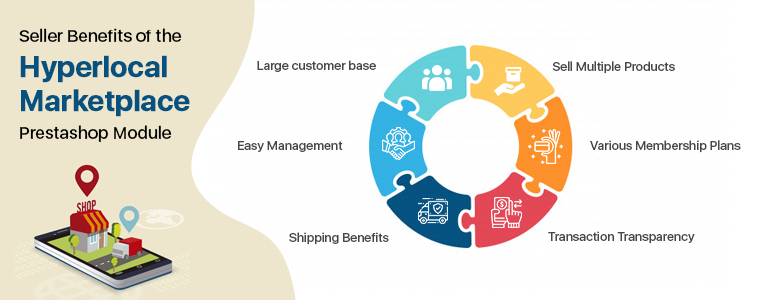
Seller Benefits of the Hyperlocal Marketplace PrestaShop Module:
Large customer base:
The Marketplace has a major advantage as it brings more new customers to the seller. A seller gets regular orders because of a larger customer base.
Easy Management:
It has a front end seller dashboard which allows the vendors to view their profile, products, and orders. The module provides a separate seller’s page which makes it easier for the vendors to promote their business.
Shipping Benefits:
The shipping methods can help you reduce cart abandonment. As per the requirements, the vendor may add multiple ship areas. The seller will edit the areas of the ship. They can also delete areas for ships. For different areas, the seller can list multiple shipping rates. If the distance is beyond the range, the seller will set the default price for shipping.
Sell Multiple Products:
Any type of product can be introduced to the marketplace by vendors. The Hyperlocal Marketplace PrestaShop module supports all kinds of products categorized by the admin. It can be any product, virtual, or bundle products.
Various Membership Plans:
Sellers can take any membership plans as per the requirements. Hyperlocal Marketplace PrestaShop module allows the seller to choose the membership plans like a monthly plan, yearly plan, or other as needed.
Transaction Transparency:
The entire transaction is transparent as the commission charges are fixed and the seller can ask for payouts whenever needed or as per the marketplace policy.
Buyer Benefits of Hyperlocal Delivery Addon
Faster Delivery: By entering the location, buyers can check the availability of items and sellers easily. They can add Pincode and all the products which are available in their area will be displayed in the marketplace. Faster delivery can be done after buying from a nearby store.
Get a better deal: From a broader range of product choices, customers can now select the perfect items. Due to the competency factor, customers can get amazing deals on less expenditure.
Reviews can help: There is an opportunity for customers to give the seller reviews. By using Product Review Alert or Default Product Comment Addon, customers may also review the goods.
Buy from seller’s page: The hyperlocal marketplace for PrestaShop allows customers to visit the seller page and buy directly from there.
Become a seller: If you are a customer and planning to sell on a marketplace then it is super easy on a PrestaShop Multi-vendor Hyperlocal Marketplace in fewer steps.
Improved customer engagement and segmentation: Marketplace is the ultimate destination for not only consumer interaction, but also improved consumer targeting strategies and efficient study of customer segmentation. These markets provide space for a tailored consumer sales strategy and improved overall customer experiences as well.
Final words:
In the past, online hyperlocal marketplaces have shown rapid growth and capacity for the same in the future. With the tremendous opportunities it provides, marketplaces have progressively become a lucrative place for sellers from which their product scope can be extended far and wide. The path to offer excellent shopping experiences has just started for hyperlocal marketplaces. In the industry, the journey ahead is exciting and full of potential for inventive innovations.
The PrestaShop Hyperlocal Marketplace Mobile App Builder is for converting online hyperlocal multi-vendor marketplace into native Android and iOS shopping app without any coding/programming knowledge. The readymade plugin is a pre-designed framework for all PrestaShop store owners out there who are somewhere willing to launch mobile apps.
1.1 What is a Hyperlocal Multi-vendor Marketplace?
A Hyperlocal Marketplace Module is a simple way to turn a regular PrestaShop marketplace into a multi-vendor marketplace with an inbuilt hyperlocal system. Hyperlocal functionality allows the store owner to allow himself or sellers on the marketplace to sell in a specific location. On a PrestaShop Hyperlocal Marketplace store, the owner can define the radius value (to be evaluated on the map) and set the location for product availability. Once customers onboard the e-store website or mobile applications, they will be asked to choose the location and browse products as per the availability. Based on the entered location of each individual user, they are presented with the products and sellers that are available nearby to them (as per the radius circle specified in the admin panel).
Hence, in simple words, a hyperlocal marketplace is a local ecosystem allowing peoples of a specific zone to shop or order products. These kinds of online shopping medium are great for ‘same-day delivery’ or ‘one-hour delivery’ kinds of models. Examples of some of such online marketplaces are online grocery stores, food delivery stores, medicine stores, gift shops, malls, etc.
1.2 What is a Hyperlocal Marketplace Mobile App?
The majority of the online shopping audience is on mobile. Considering the same, we have created a complete Hyperlocal Marketplace and Mobile shopping apps package for the PrestaShop e-store owners. Android and iOS shopping apps will be in sync with the PrestaShop hyperlocal marketplace. Both Admin and seller products will be available on the PrestaShop Hyperlocal Mobile App for customer browsing and purchasing products. Offering a localized PrestaShop Marketplace Mobile App in your native language will attract a wide range of users from the local market.
The users just need to choose a current location with inbuilt GPS in the app and view products and sellers available in that location.
Here are some of the snapshots for a better idea:
2.0 Hyperlocal Marketplace Admin Panel
Refer below link for PrestaShop Hyperlocal Module admin panel configurations:
The below snapshots with a detailed explanation will make the module configurations and settings more clear. Check the step by step settings tab with details. After installing the PrestaShop Mobile App Builder module on the store, click on the “Configure ” option. You will get the following tab with simple-to-use interfaces.
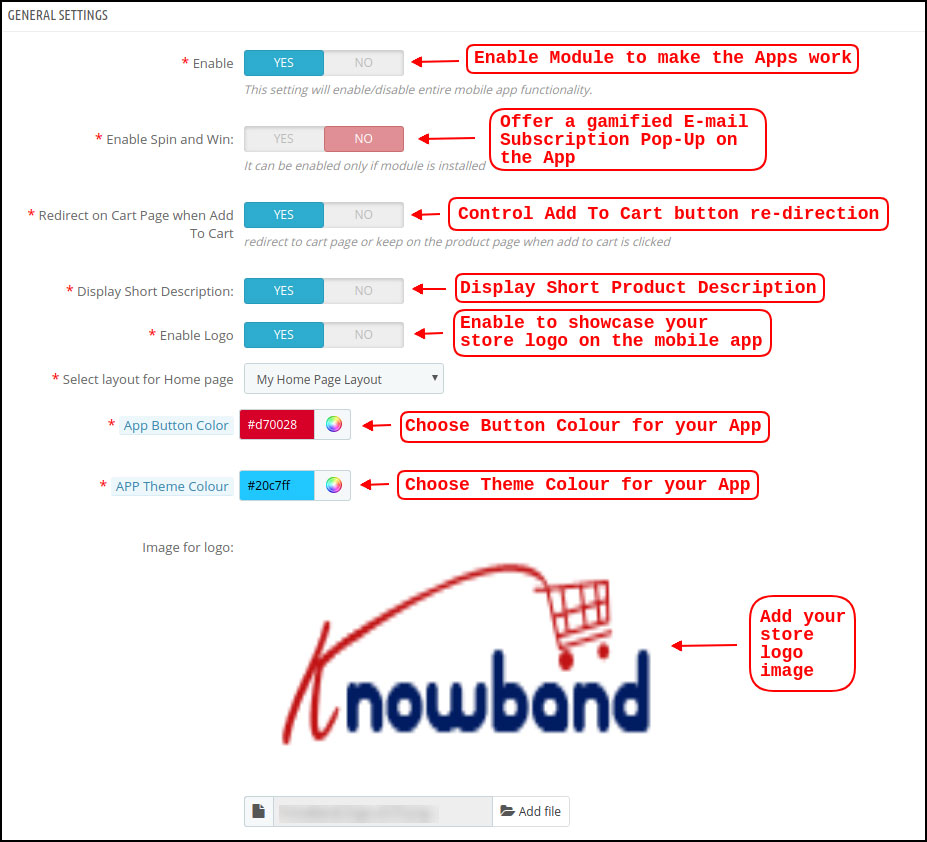
3.1 General Settings
a) Enable/Disable Plugin: Enable PrestaShop Hyperlocal Marketplace Mobile App Builder to make mobile apps work on mobile devices. In case, you ever need to stop the app working, just disable this option.
b) Enable Spin and Win: This option is to display a gamified spin-win email subscription on the home screen of the PrestaShop Nearby Shopping App. The spinning wheel pop-up interface will be displayed on the home screen once the user opens the app. The store admin can set the discounts and other settings in spin-win extension and capture user emails for remarketing purposes and promotional strategies.
Note: To use the spin win functionality, you need to add the KnowBand Spin win extension on the Prestashop store.
c) Redirect on Cart Page when Add To Cart: This tab lets the store admin control the “Add To Cart” functionality in PrestaShop Hyperlocal Marketplace Mobile App. The users can be redirected directly to the cart screen or can stay on the product page for more shopping.
d) Display Short Description: Enable to display the short description on the product screen along with full description & other details. The short description will only be displayed if the same is added to the website inventory.
e) Select Layout for Home Page: Create a home screen look & design of the PrestaShop Hyperlocal Marketplace Mobile App as per your choice. (Same can be added from the Home Page Layout section). In this option, there will be all layouts available in the dropdown and chosen as per the requirement. Multiple app home screen layouts can be pre-designed and saved as per various festivals, sales, offers, deals, etc.
f) App Button Color: Choose the desired button color for PrestaShop Hyperlocal Marketplace Mobile App. This color will be for all the buttons available on the Android and iOS apps.
g) App Theme Color: Choose the desired theme/header color for PrestaShop Hyperlocal Marketplace Mobile App.
h) Image for logo: Upload your website/marketplace logo image to be displayed on the top header of hyperlocal shopping apps. This will be a simple way to offer apps branded to your business only. Our PrestaShop Hyperlocal Marketplace Mobile App Maker is a complete white label solution.
i) Disabled Shipping Methods: This option allows you to disable the shipping methods from PrestaShop Hyperlocal Marketplace Mobile App. (In case any shipping methods needs to be disabled from the app)
j) Enabled CMS Pages: Add desired CMS pages like About Us, Terms & Conditions, Privacy Policy, etc. (available on the website) on PrestaShop Hyperlocal Marketplace Mobile App.
k) Enable Request Log Reporting: Add an option on the PrestaShop Mobile App to enable error log. The log file can be used to identify and rectify any abnormal behavior of your app.
l) Enable Live Chat Support: Enable/disable Zopim (Zendesk) chat option on PrestaShop Hyperlocal Marketplace Mobile Apps. The chat API key will be provided with the final app that can be used to activate the live chat on mobile apps.
m) Enable WhatsApp Chat Support: Enable/disable WhatsApp chat option on your PrestaShop Nearby Shopping Mobile Apps. This option simply allows the users to connect with the store admin via Whatsapp chat option.
Note: Either Zopim chat or Whatsapp chat can be enabled from the admin panel.
n) Enable Fingerprint Login: Enable/disable Fingerprint login option in PrestaShop Hyperlocal Mobile App.
o) Enable/disable Phone Number Registration: Enable phone number login option (OTP) in PrestaShop Hyperlocal Marketplace Mobile App & allow users to authenticate using OTP verification.
3.2 Push Notifications Settings
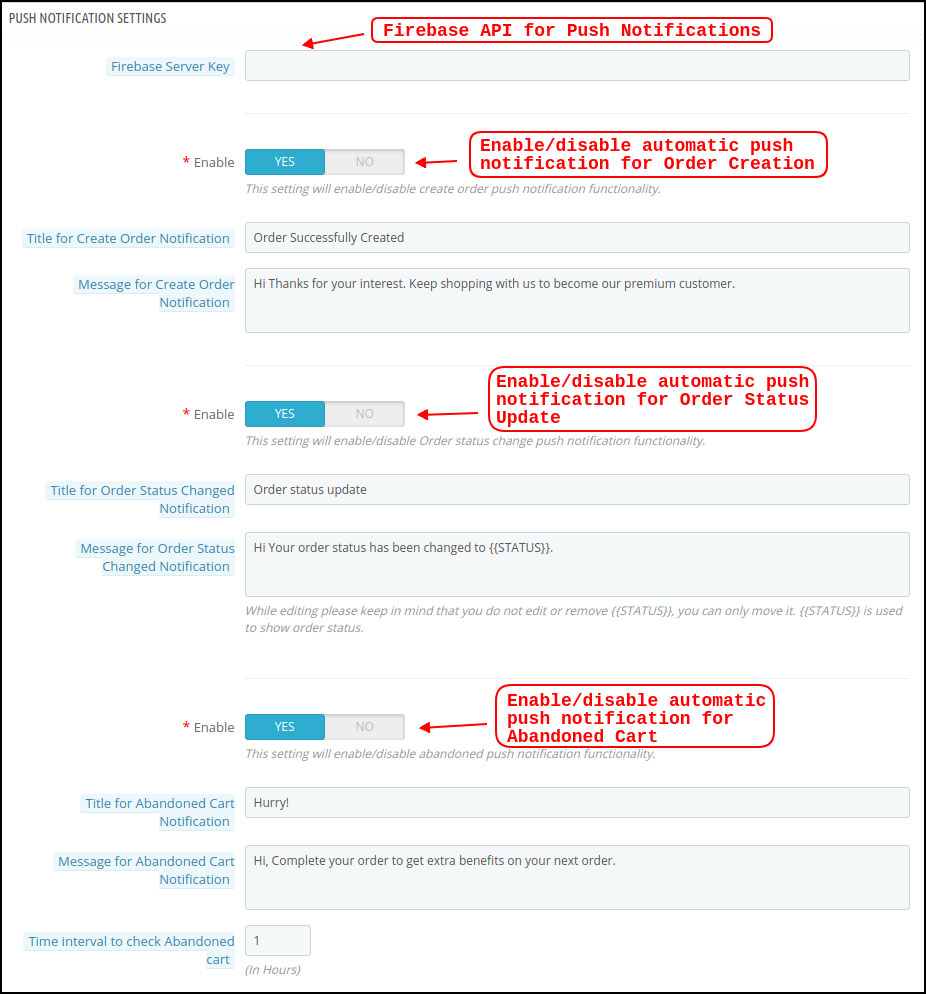
The Hyperlocal Marketplace Mobile App Creator offers unlimited push notifications to be sent from the admin panel of extension. The store admin can configure the push notifications template (Use own text, image, redirection link) and send it to Android and iOS app users. This can be an effective tool to market or promote the store deals, offers, and boost sales in the store.
a) Firebase Server Key: This key can be used to send the push notifications on PrestaShop Hyperlocal Mobile App. The firebase project will be created while marketplace mobile app development. Once entered, it makes sure that the push notifications will be received to all mobile app users.
b) Create Order Notification: Enable/Disable automated successful order push notification sent to the app users. The template for the notification is fully editable like title, message, image, etc.
c) Order Status Change Notification: Enable/Disable automated order status change push notification sent to the app users. The template of the notification can be edited like title, message, image, etc.
d) Abandoned Cart Notification: Enable/Disable automated abandoned cart push notification sent to the users who have left products in the cart without successful purchase. Enter the title & message of the push notification. For Abandoned cart notification, enter the time interval (in hours) after which push notifications will be sent.
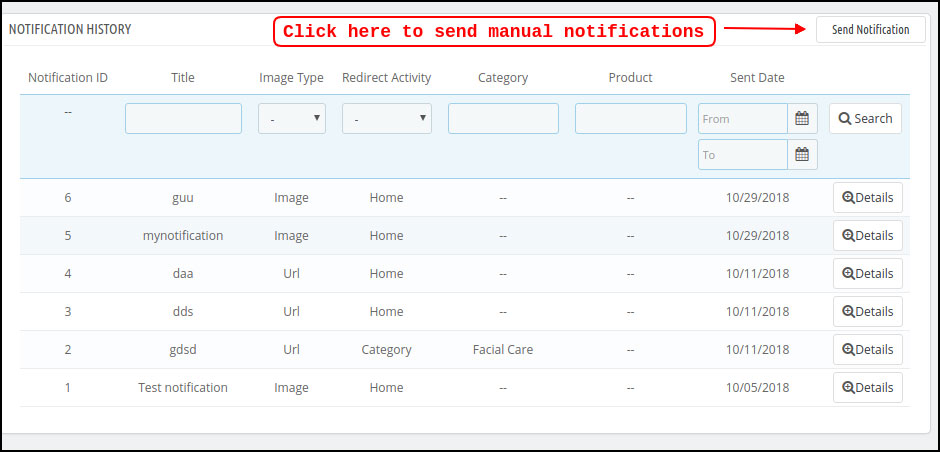
3.3 Push Notification History
This settings tab contains the history of all push notifications sent to the PrestaShop Hyperlocal Marketplace Mobile App. The store admin can view the details of every sent notification.
Send Manual Notification:
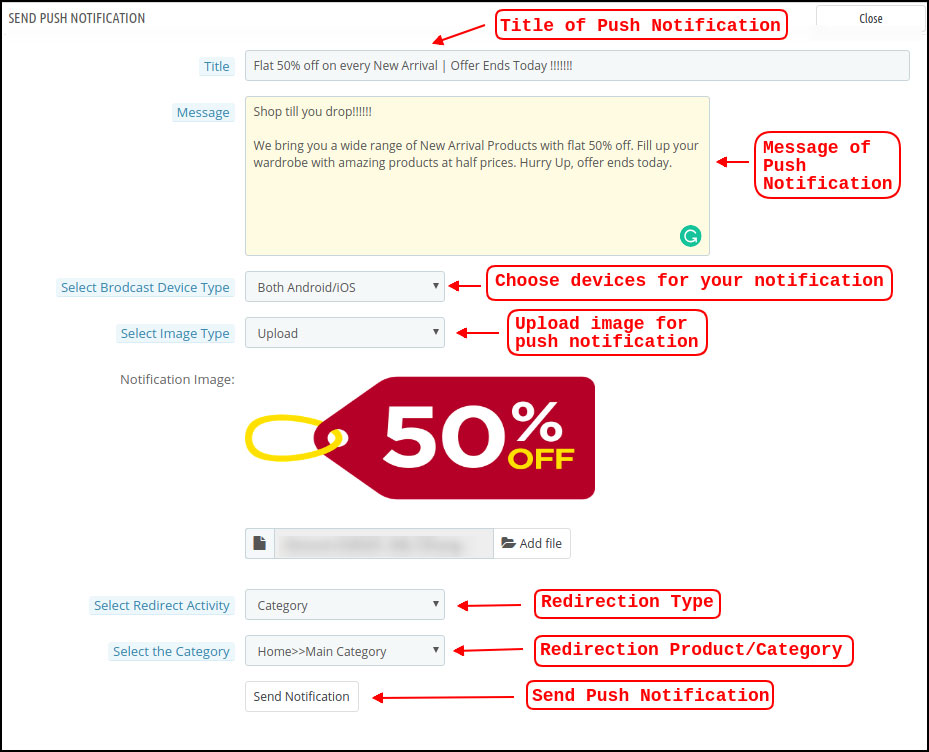
The store owner can craft and design push notification and sent it manually to app users. Configure the title, message, redirection link, image, etc. and send a push notification of choice:
a) Title: Enter the title of Push Notification that is to be manually sent to the app users.
b) Message: Enter the message of manual notification to be sent to the app users.
c) Select Device Type: Choose an Android or iOS device on which push notification is to be sent.
d) Image Type: Upload the push notification image as per the requirement. Image URLs can also be used instead of uploading images.
e) Select Redirect Activity: Set redirection of push notification on the app by choosing Home/Category/Product. Whatever redirection is set from the admin panel, app users will be redirected to the same screen.
f) Send Notification: Once configured, tap this button and send the push notification.
3.4 Payment Methods
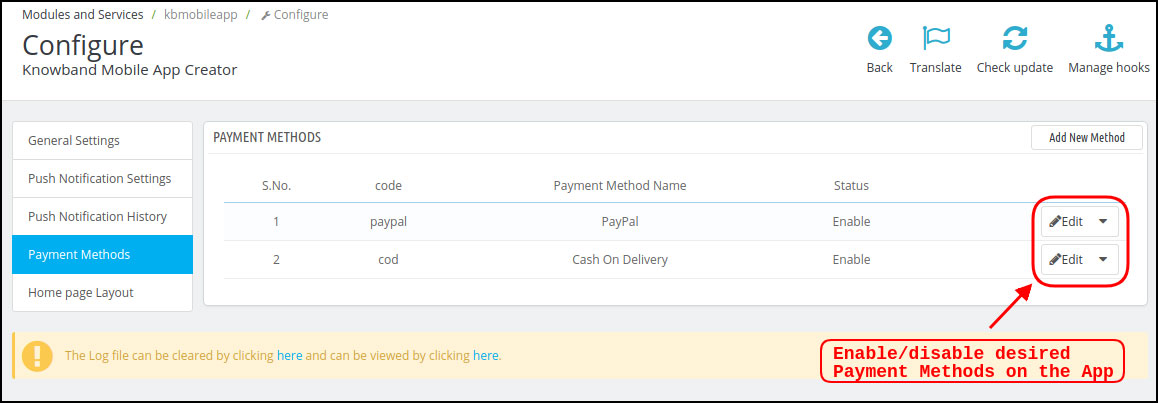
The PrestaShop Hyperlocal Marketplace Mobile App Creator supports all sorts of website payment methods. If you disable payment options (COD & PayPal) from the module, all website payments will be enabled on the Android and iOS apps.
3.5 Home Page Layout
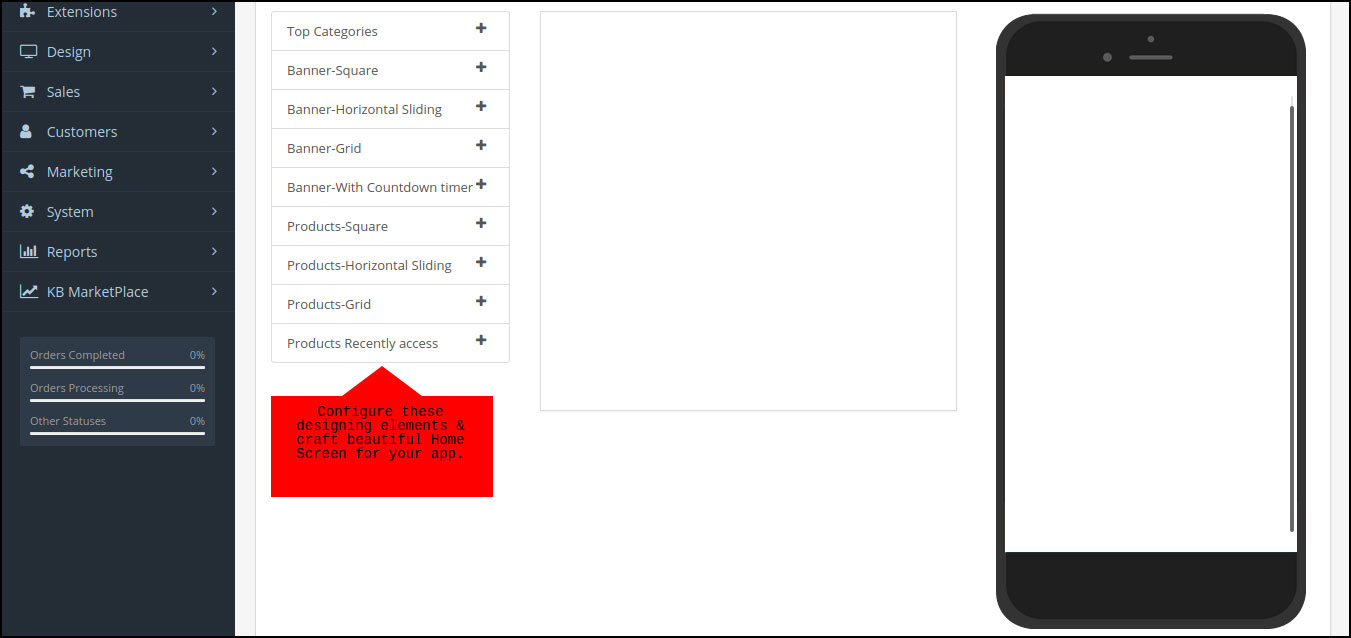
The PrestaShop Hyperlocal Marketplace Mobile App comes with a flexible home screen layout allowing store admin to use predefined elements and configure the look of the home screen. Multiple festivals, sale, promotional, etc. layouts can be created and saved in the admin panel and also used on the app as per the requirement. Here is the step by step process to create their own layout:
Top categories
Square Banner
Horizontal Sliding Banner
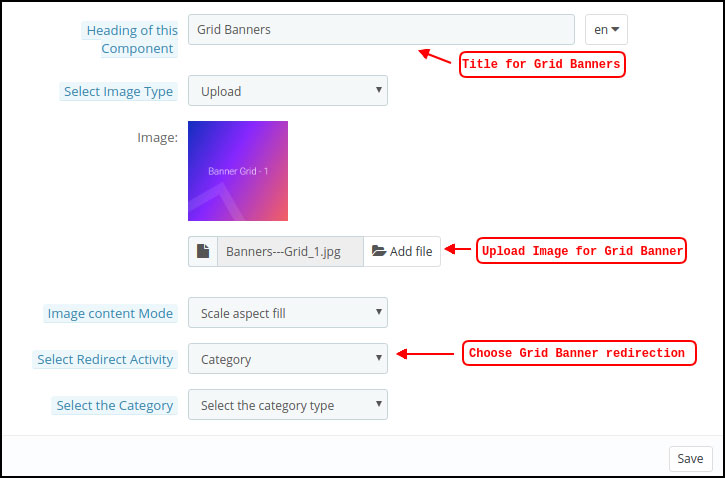
Grid Banners
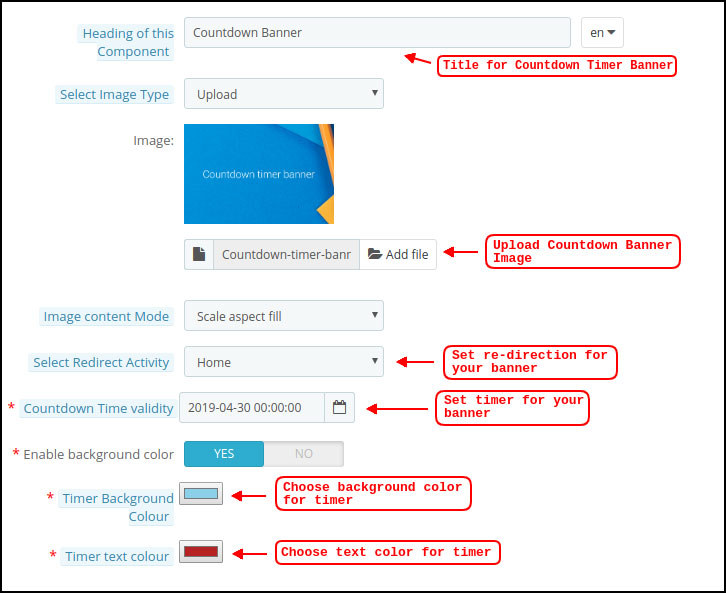
Countdown Banner
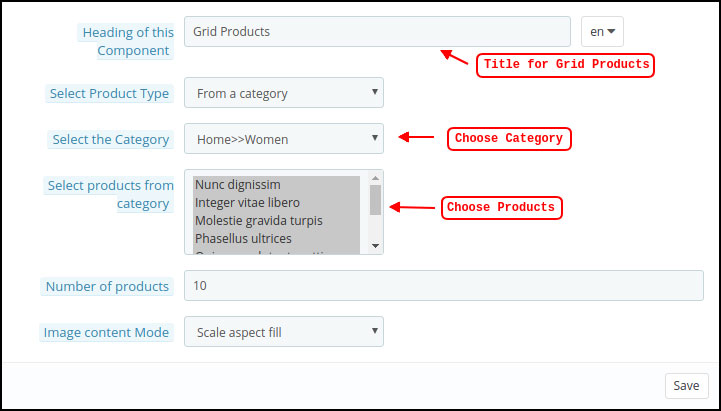
Grid Products
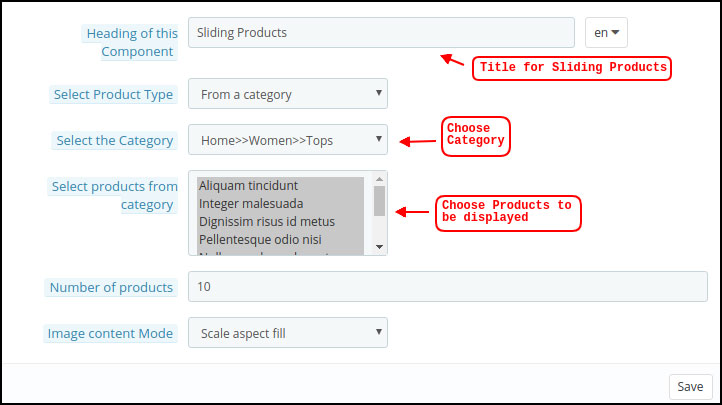
Horizontal Sliding Products
Recently Accessed Products
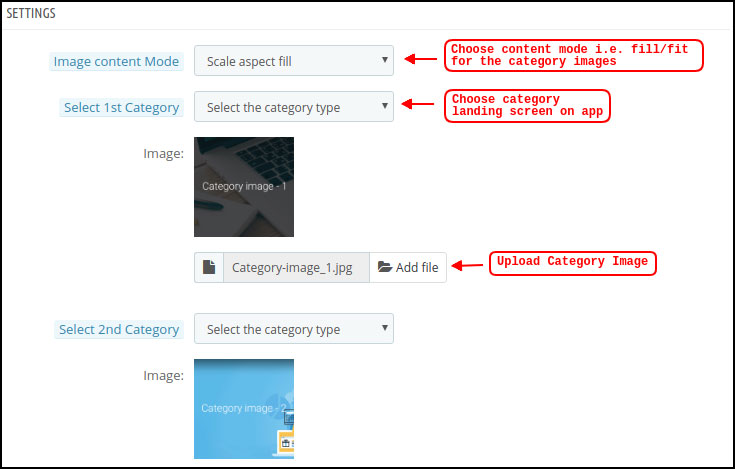
Top Categories:
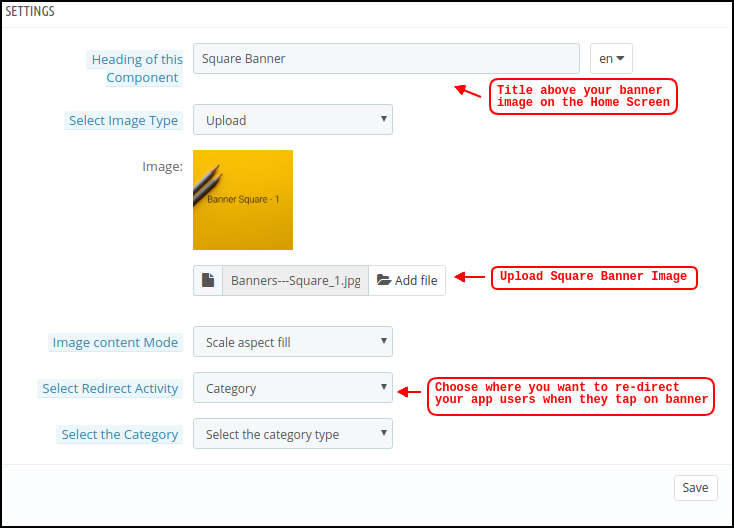
Square Banner:
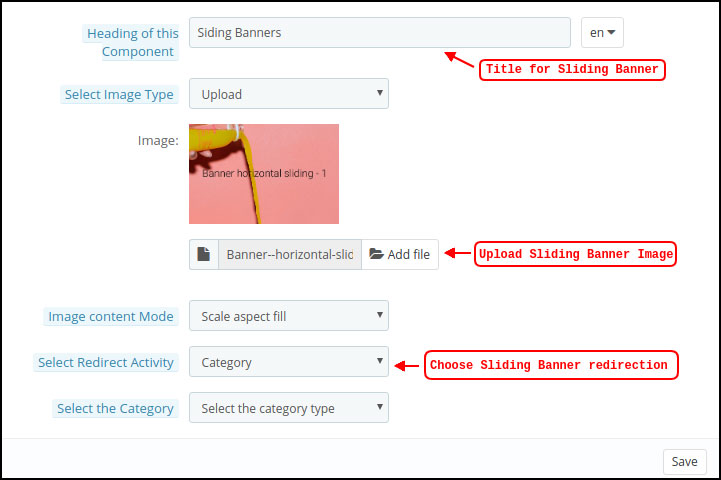
Horizontal Sliding Banner:
Grid Banners:
Countdown Timer Banner:
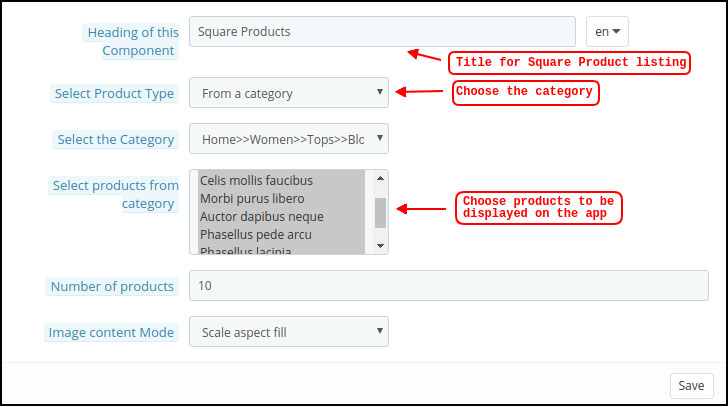
Square Products:
Horizontal Sliding Products
Grid Products:
3.6 Tab Bar Layout
Customize & showcase the bottom Tab Bar on Hyperlocal Mobile App (Android & iOS). This tab has the following options:
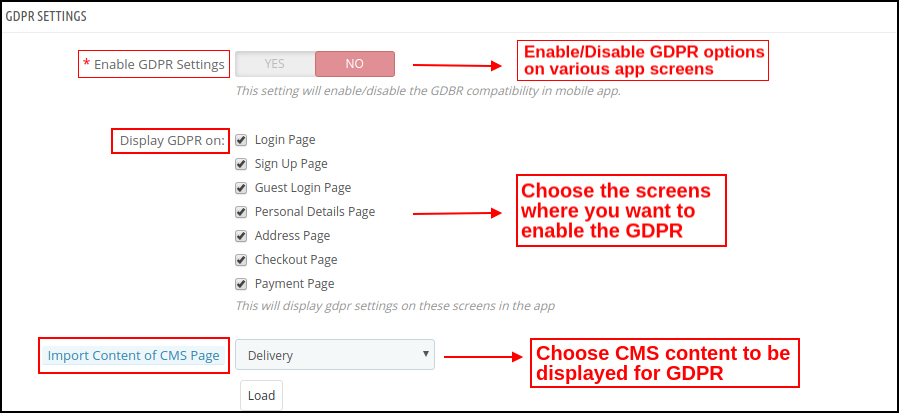
3.7 GDPR Compliance
The PrestaShop Hyperlocal Multivendor Mobile App comes with inbuilt GDPR compliance. The store admin can even GDPR settings to stop GDPR functionalities in mobile apps.
4.0 Hyperlocal Marketplace Mobile App Screens
4.1 Home Screen
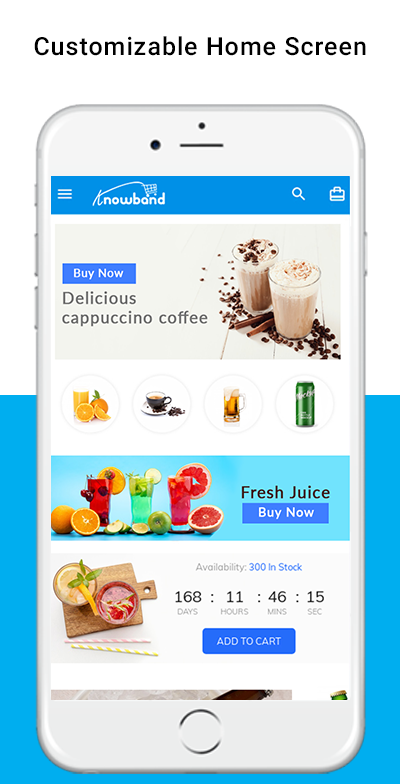
The PrestaShop Hyperlocal Marketplace Mobile App home screen consists of editable banners, images, blocks, colors, fonts, etc. With DIY editor in the admin panel, the entire home screen design can be changed anytime even after the apps are live.
The colors can be chosen from the admin panel. The store logo can be added to the header of the app. The following elements can be used for designing the home screen:
Top Categories
Square Banners
Grid Banners
Horizontal Sliding Banners
Square Products
Grid Products
Horizontal Sliding Products
The customizable home screen of the PrestaShop Nearby Marketplace Mobile App can be transformed into general stores, food delivery, grocery delivery, medicines, or any local level marketplace business. No matter what you sell, the app can fit perfectly for all sorts of business domains.
4.2 Choose Location
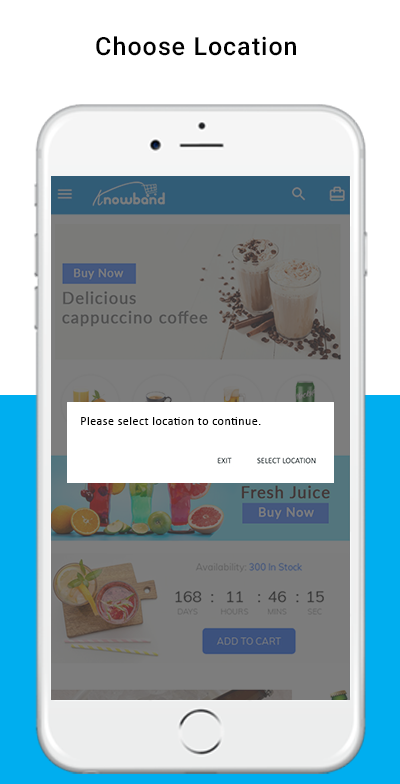
The Hyperlocal Mobile App for PrestaShop comes with the option to choose the location in the front end. The mobile app users can simply set the current location or enter the same manually.
Select Current Location
Enter Manual Location
Once the location is selected, the users can browse the products available in that location and place orders. Also, they can access nearby products at one screen from the navigation menu.
The mobile app user taps the Select location button, another screen opens with Google map and pointer. In case of choosing the current location, the pointer automatically selects the location and asks for confirmation.
Once the location is confirmed by the user of the PrestaShop Hyperlocal Marketplace Mobile App, the app will be redirected to the home screen. All the products under that location will be available for browsing and purchase.
4.3 Category Screen
The Hyperlocal Multi-vendor Mobile App comes with an impressive design with “Add To Cart” and “+/- Quantity Stepper” for all product blocks. The users can simply browse the products with infinite scrolling functionality. No need to hassle between pages with regular pagination. Browse simply by navigating from top to bottom and products will be loaded gradually.
List/Grid View
Sort Option
Filter Option
With the sort option, the users get to narrow down the products based or available sorting options like – High to Low, Low to High, etc.
With the inbuilt filter option, the user gets to filter down the products based on the category, brand, price, etc. This layered navigation in PrestaShop Hyperlocal Marketplace Mobile App can be much fruitful in finding the right product for purchase.
A green color “New” badge will be stuck on the product blocks for all new products added in website inventory.
4.4 Product Screen
The product screen of the PrestaShop Hyperlocal Marketplace App is simple yet very appealing. Right from showcasing multiple product images to name and both short as well as the long description. The availability of the product is displayed with the “In Stock” and “Out Of Stock” label. This label will be automatically set on the Android and iOS apps based on inventory status.
Product Options
Wishlist Functionality
Short Description
Long Description
Quantity Stepper
Continue Shopping
Add To Cart button
Social Sharing of Products
The users can simply go to the product screen, choose the option, select quantity, and tap the Add To Cart button to add the product in the shopping bag. There is also an option to share products on various social media channels like Whatsapp, Facebook, Email, etc.
4.5 Checkout Screen
The Hyperlocal Multivendor Mobile Apps for PrestaShop comes with a one-page simplified checkout screen with all requiring information. The mobile shopper can view the complete order and product-related details on a single screen like –
Shipping Details
Billing Details
Order Summary
Shipping Methods
Order Comment
Payment Summary
This screen shows the selected shipping & billing details for the purchase. The user gets to edit the addresses if required and even add a new one. The total cost of the chosen product will be shown as per the shipping methods.
The app users get to view purchased product details in this section before making the final purchase. All available shipping methods are displayed under this section of the checkout screen. The users can choose the desired one from here.
This section displays the complete breakdown of the total payment details. The app users will be re-directed to the Payment screen after tapping the “Proceed To Payment” button.
4.6 My Account Screen
My account screen of the PrestaShop Hyperlocal Marketplace Mobile App allows app users to view the complete account details including a list of previous orders. My Account screen offers the following options:
Order Details
Personal Information
Shipping Addresses
Order Details
Reorder
4.7 Seller Screens
The seller panel on PrestaShop Hyperlocal Mobile App allows the users to access all available sellers on the marketplace. The listing shows all sellers on the single screen and users can simply make the choice. Once the seller is accessed, the user is redirected to the seller profile where all products under the seller are displayed. Even seller reviews, shipping policy, return policy is displayed for sellers on the app.