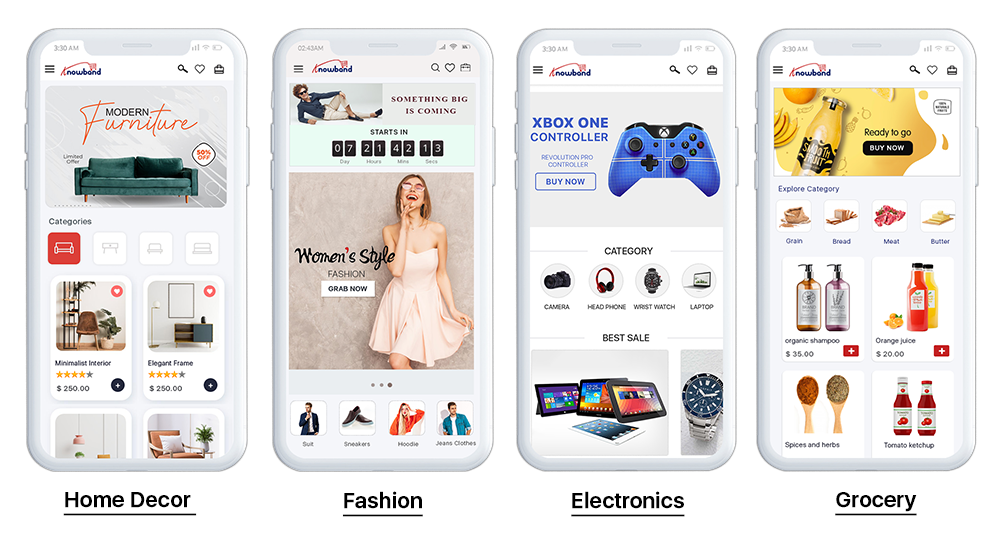
The Prestashop Progressive Web App is the new hype – Know more!


It wasn’t long ago that having a successful business was linked to having a well-designed website that attracted people and encouraged them to buy from you. That was, without a doubt, a long time ago. Now things have changed.

At the moment, the market is all about staying ahead of the curve in terms of technology advancements. After the website transitioned to native applications, things became a lot easier for users and more valuable for shop merchants. Regardless, with fast internet, native apps shot off like a rocket. However, if the web speed is slow, native apps would fail. This is where Progressive Web Apps (also popular as eCommerce PWA) come into play.

What exactly are Progressive Web Apps (PWAs)?

An eCommerce Progressive Web App isn’t equivalent to some other web application. It works much the same way as a customary versatile site in that you access it utilizing your cell phone’s product. Notwithstanding, truly, the PWA incorporates front-end innovation that permits it to capacity and feels like a local application.

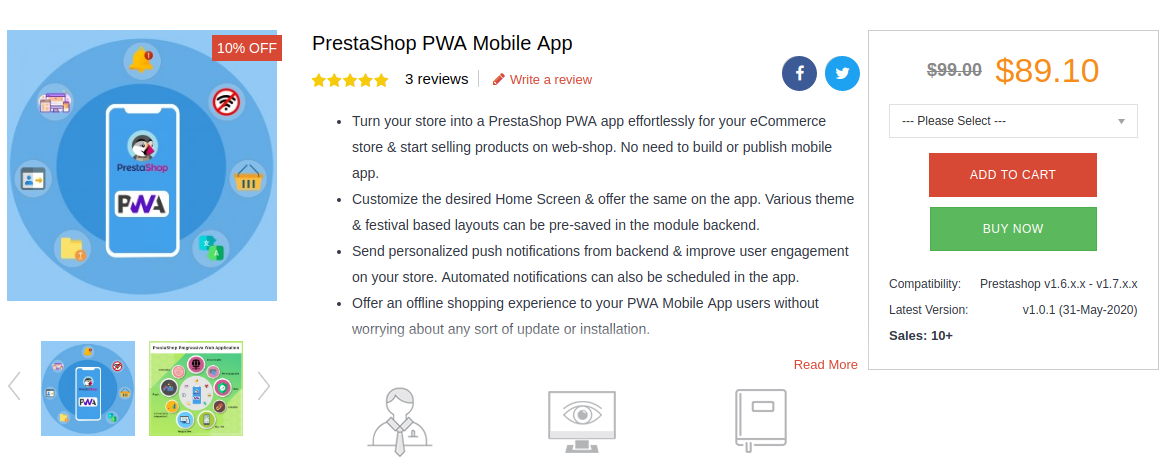
If you have a Prestashop store, the Prestashop PWA Mobile App can help you grow your eCommerce business faster than before. The Progressive Web App for Prestashop provides your clients with a consistent shopping experience. Moreover, access to your content regardless of whether there is a weak or non-existent internet connection.
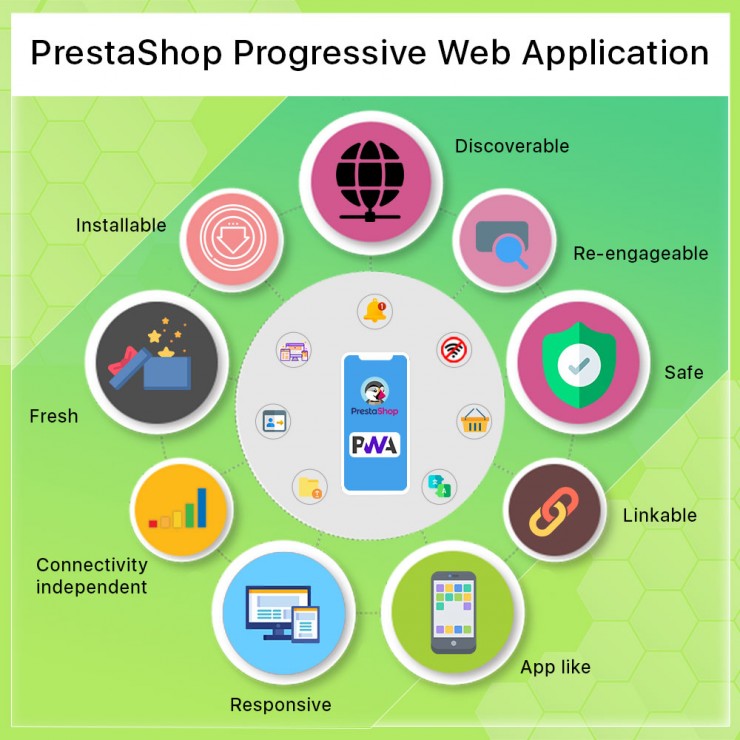
Prestashop PWA Mobile App Builder Highlights

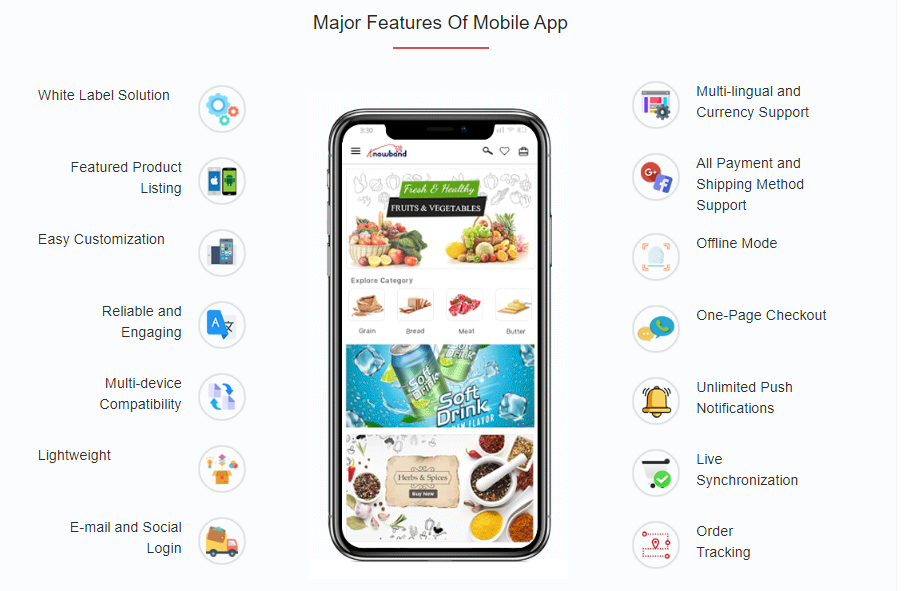
Arrangement with a white label

When a store owner creates an eCommerce mobile app, the app must be labeled with the brand’s name. With Knowband’s eCommerce PWA, the admin may be certain that the output will be under the brand name and have nothing to do with Knowband, as per the white label agreement.

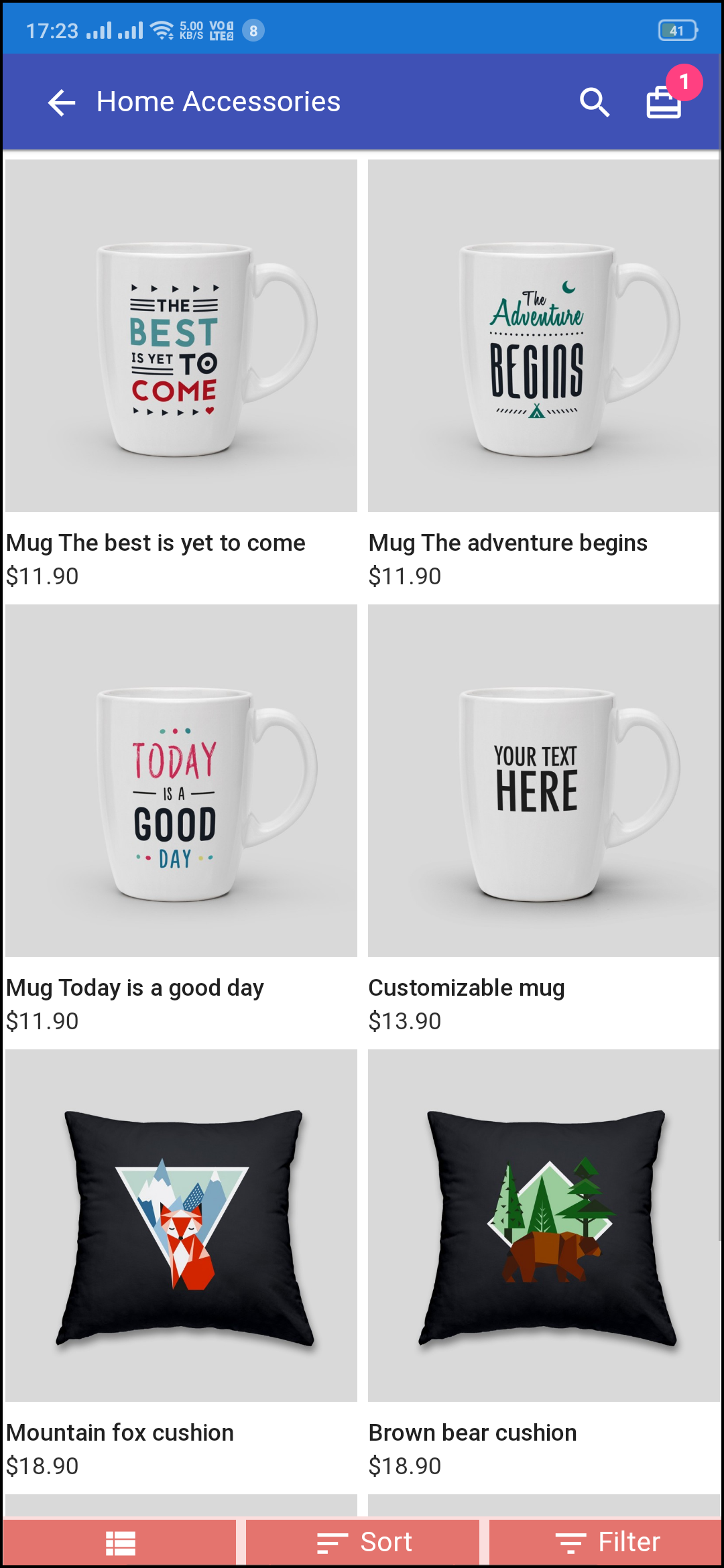
Product listing is available

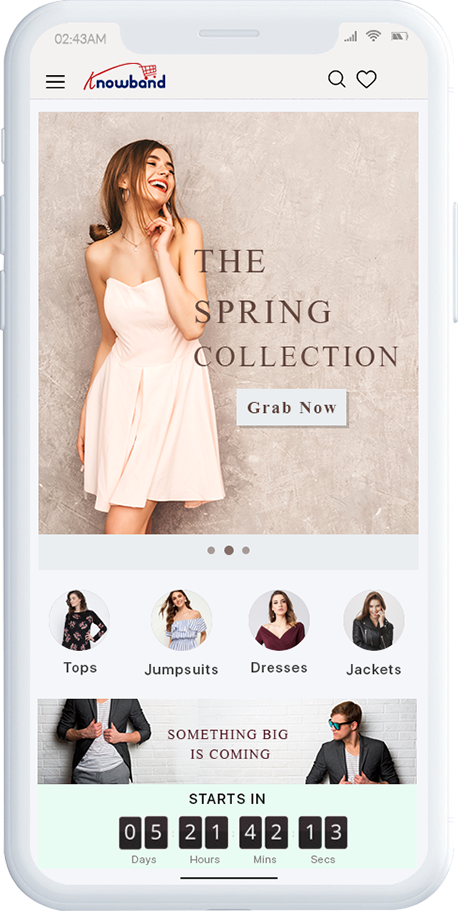
The eCommerce Progressive Web App’s highlighted product listing functionality allows you to add different product/class-based components. Using redirection, these components may efficiently update with the standards. The top goods will feature on the first page of the web application by the shop vendor.

Customization is simple

By visiting the website, customers may easily add the PWA for Prestashop to their Home Screen. From the back-end, the shop administrator may easily build and customize the home screen.

It improves engagement and is dependable

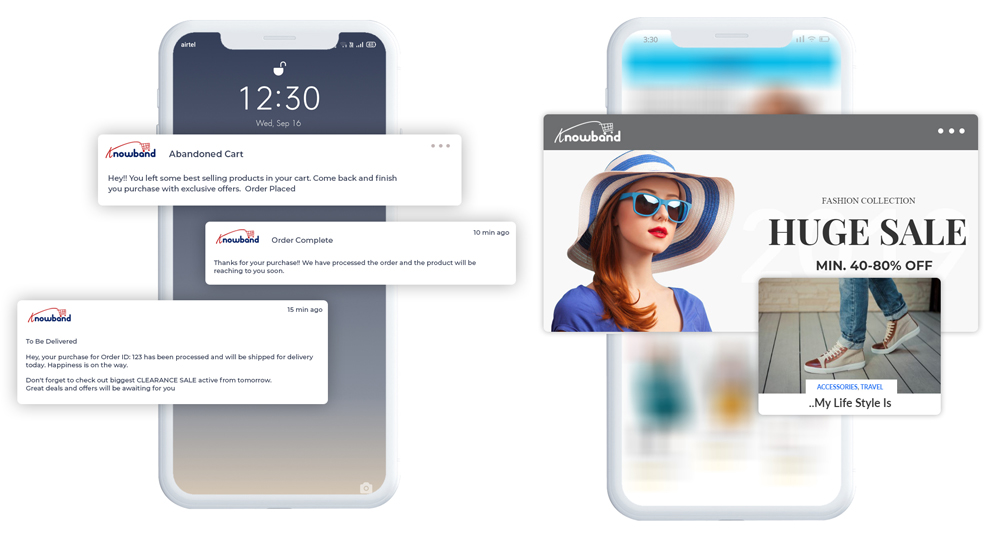
In terms of dependability/reliability, the Prestashop eCommerce PWA App operates even when there is no or a shaky internet connection. Whereas native applications require a stable internet connection, eCommerce PWAs may surely function without it. Because of the Push Notifications feature, the equivalent is thought to boost consumer engagement. With the Prestashop PWA Mobile App Creator, the shop admin may send an unlimited number of push alerts to users.

Similarity across several devices

Prestashop PWA Mobile App Maker is fully compatible with all hand-held devices. For instance, mobile phones, iPhones, iPads, and more.

Lightweight

The Prestashop Progressive Web App does not require downloading from the Google Play Store or the App Store, unlike native applications. The former can be in MegaBytes or GigaBytes. However, the Prestashop PWA Mobile App is lightweight and does not require downloading. Instead, the customer should install on the mobile phone’s Home Screen to access the content.

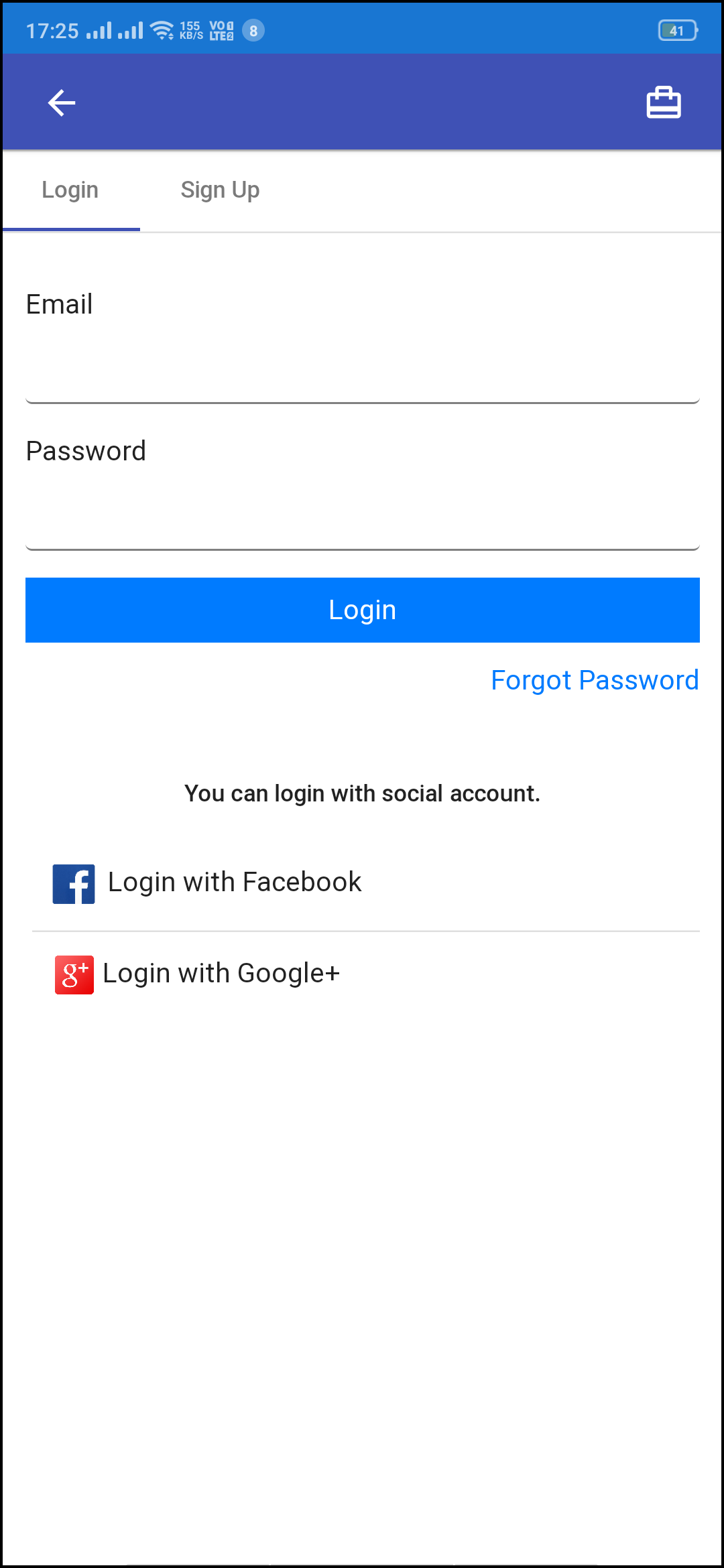
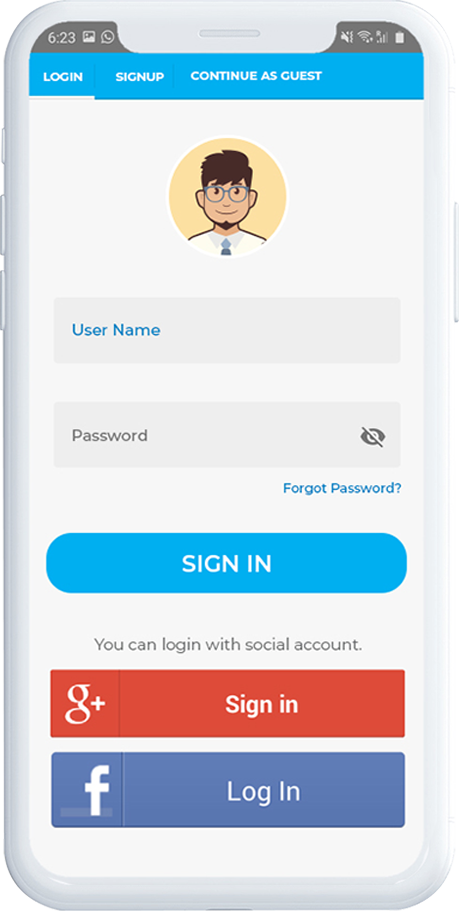
Log in using email and social media

The store administrator may utilize PWA for Prestashop to allow users to register or log in using their email addresses, exactly as they do with social login ids. Users will find it much easier to go to the business as a result of this.

Synchronization in real-time

The Prestashop PWA Mobile App is your best option when you require your website and applications’ content to be in sync with one another. The live synchronization allows everything that happens on the website for viewing on the app as well. For instance, the admin can remove unavailable items, products can expand, orders can place, and more.

Mode for use when you’re not connected to the internet

The offline feature of the Prestashop Progressive Web App ensures that consumers may access the store’s content even if they have a poor internet connection.

All payment and shipping methods are accepted

Regardless of the payment options available on your eCommerce store, you’ll want to use Prestashop to integrate them into your eCommerce PWA. Similarly, the plugin will provide all of the delivery options available in the eCommerce shop.

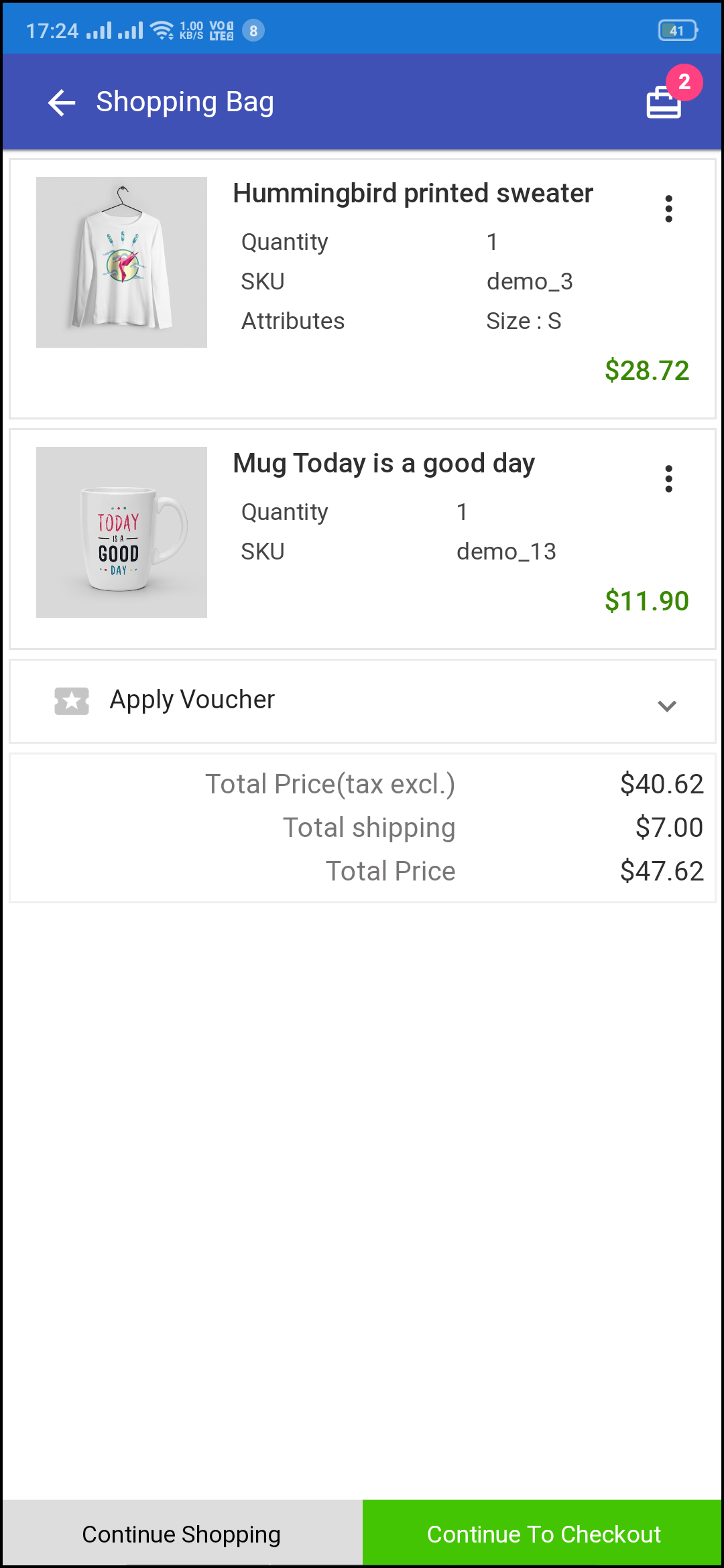
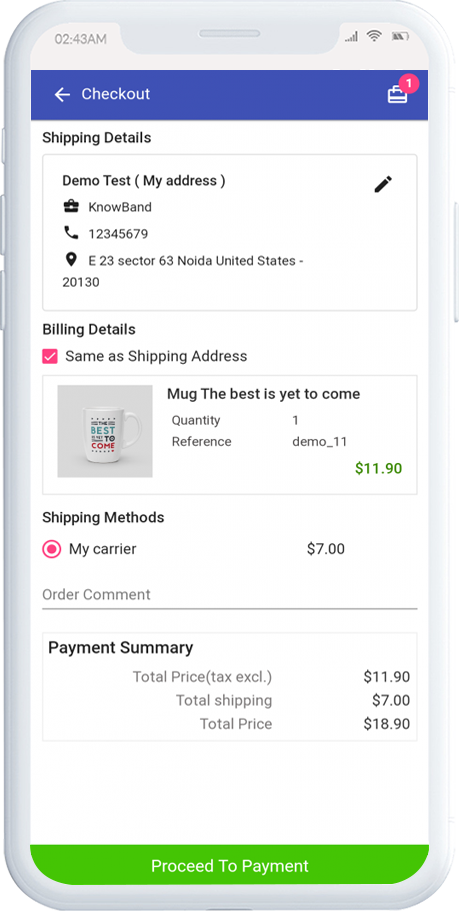
Checkout on a single page

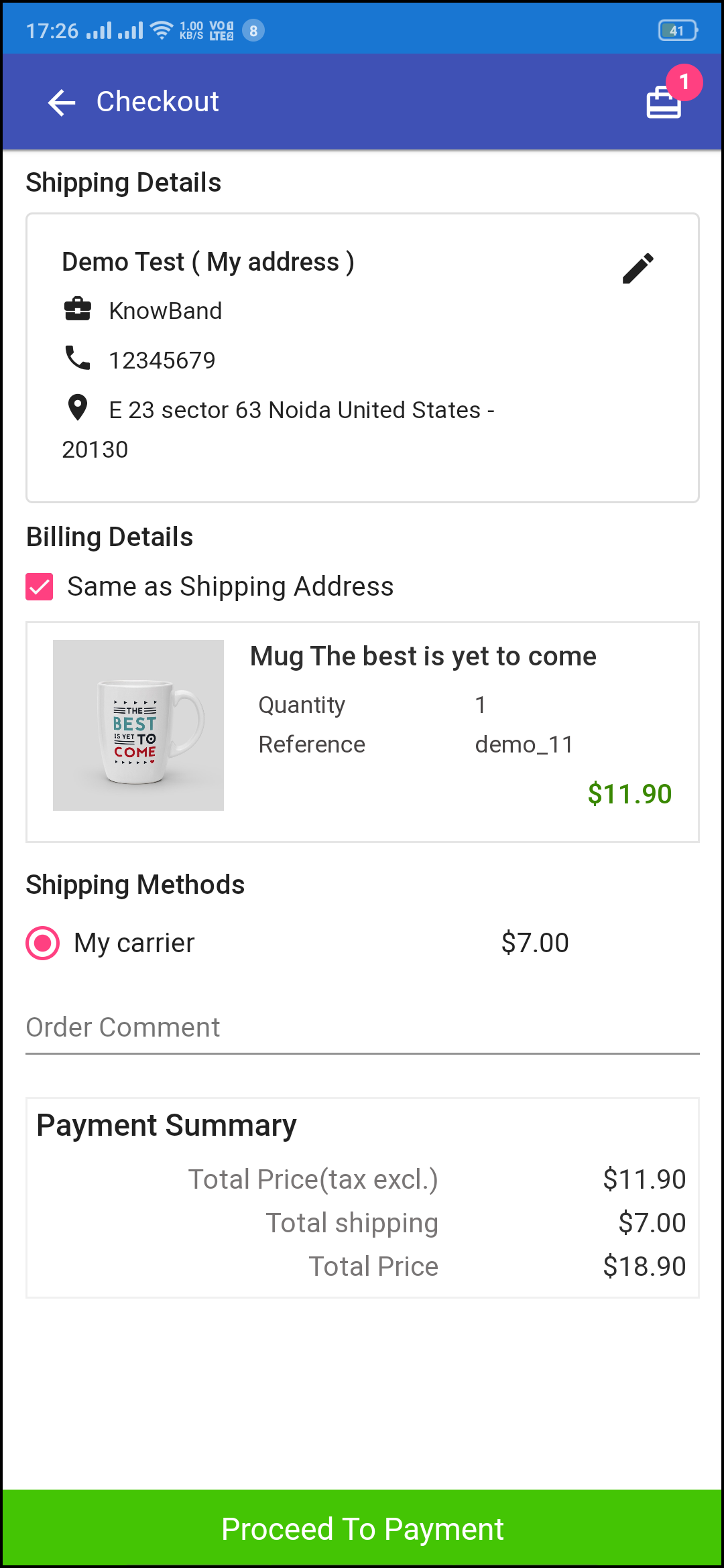
The Prestashop plugin comes with a built-in single-page checkout that just asks for the most basic information from the user. It also allows you to evaluate the entire order details before completing the payment.

Add to Cart button the Home Page and Category Page

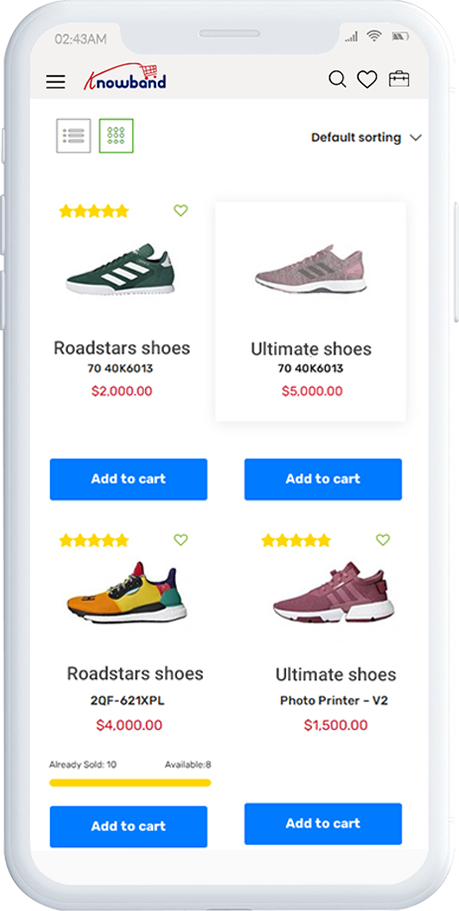
The customers can effortlessly add products to the cart from the Homepage and Category pages. Using the plugin, the customers don’t have to think twice before adding the products because the home screen and category pages now have the Add to Cart button available.

Related products availability

With the compatibility of the Prestashop Automatic Related Products addon, the Prestashop Progressive Web App allows the admin to upsell items. Furthermore, he can display related products on the website for the customers to choose and shop more. Therefore, more potential sales and revenues.

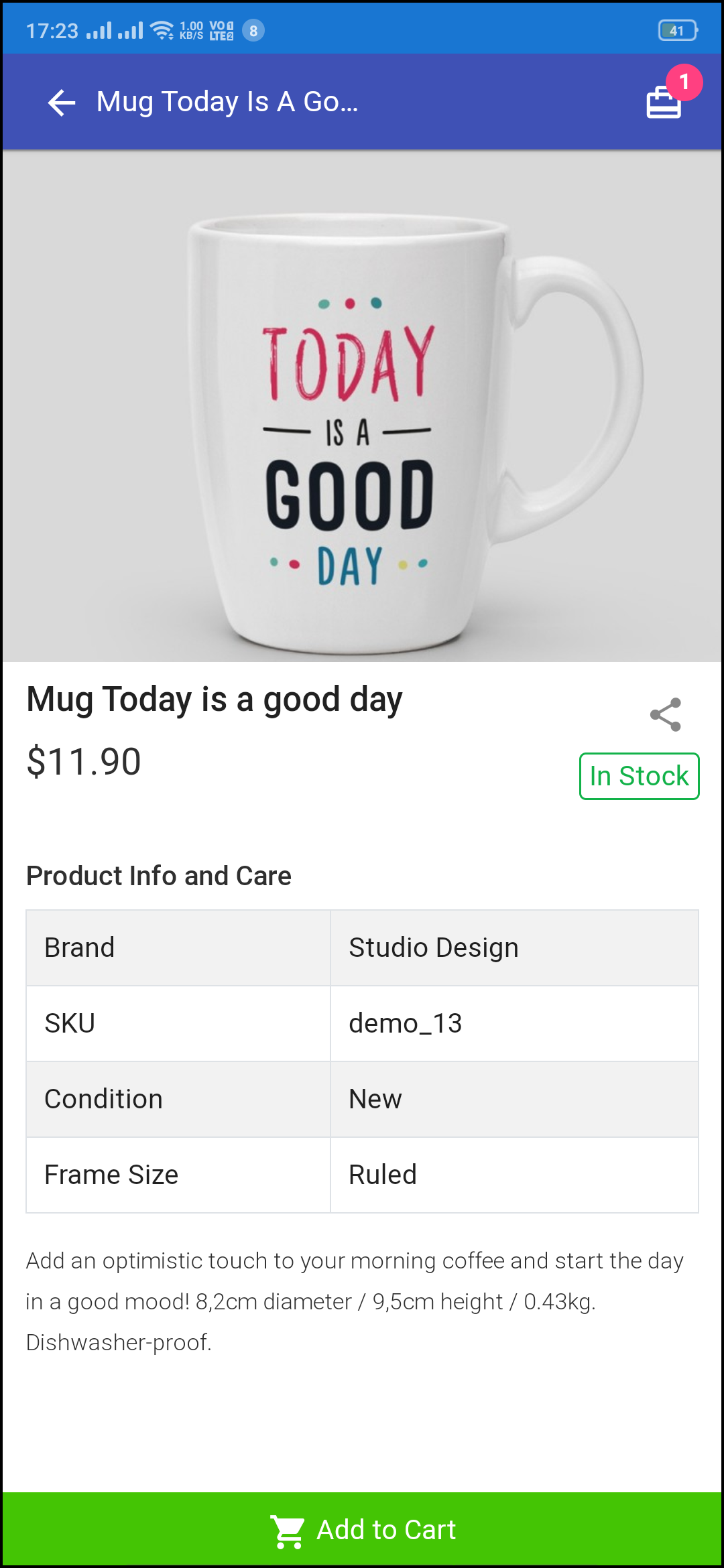
Quantity Stepper On the Product page

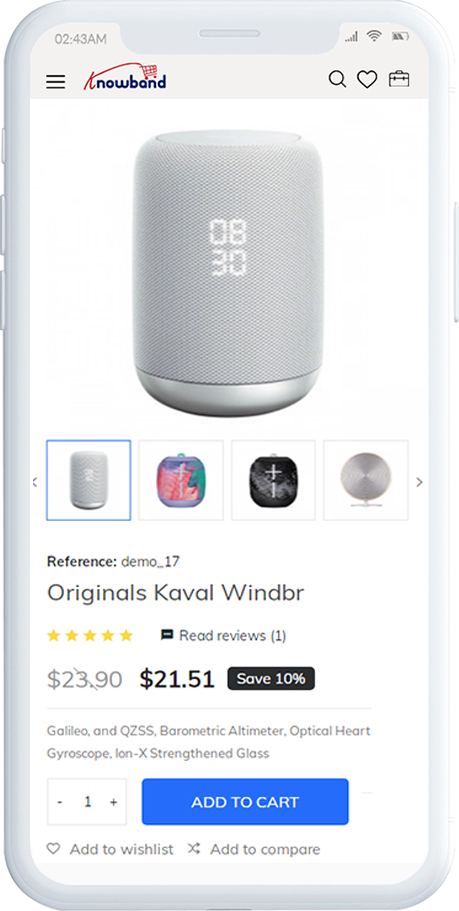
The quantity stepper is a new addition that lets customers of the Prestashop PWA Mobile App raise or lower the number of individual products before submitting them to their basket. The +/- button on the product screen of the Prestashop addon is all that is required of consumers.

Benefits of the Prestashop Progressive Web App by Knowband

Apps for iOS and Android are less costly

When compared to distributing content for iOS, Android, and a website independently, it saves time and money because material only needs to be created once. Additionally, the Prestashop eCommerce PWA App does not require any updates. No new material is likely to be downloaded by users. If a Prestashop PWA works, you won’t have to worry about developing it anymore. This makes eCommerce PWA a financially viable option.

Optimization for SEO purposes

The contents of an eCommerce Progressive Web App feature in search results. Thus, helping to enhance SEO. With Google Tools, you can see how your Progressive Web App for Prestashop works in the SERPs. A Prestashop Progressive Web App’s security and loading performance are important considerations. Furthermore, as is typically the case with SEO, the material must be distinctive and applicable. Because so many services and goods can now be found online, SEO is becoming increasingly important.

Page speed improves

When upgrading to a Prestashop eCommerce PWA App, you must first do a complete website upgrade. This ensures that you don’t just benefit from the advantages of caching services employees, but that you can also get rid of scar tissue that limits your sitting. By upgrading to best practices, you may make your website a speed devil, providing you a significant advantage over your competitors.

When the guest returns, the cached resources reduce latencies in the organization, increasing your regular probability to the first byte and making page loading faster. With the aid of the Prestashop PWA Mobile App Builder, it will be a lot easier.

Low storage requirements

The competition for a seat on the gadgets is still going on. It’s also becoming increasingly difficult for native shopping applications to gain traction in consumers’ lives. As a result, the eCommerce Progressive Web App shouldn’t have a large use restriction. Above all, there is no compelling motive to download any new app, hence the edge is modest. As a result, your selected group is permitted to test the Prestashop Progressive Web App. They can also make use of the Offline app. It also uses less memory than native programs, which is an important consideration for certain users.

Functioning without an internet connection

eCommerce PWAs are far more useful than websites that need a legal Internet connection since they can function offline or in unreliable networks. As a result, built-in service workers save basic highlights and information from progressive web apps, avoiding the need to download them and allowing users to access them even when they are not connected to the internet.

It is based, for example, on the storing of information from recently visited pages by users. This is important for retailers since it encourages shoppers to stay in their shops and increases customer retention.

No need for App Stores

Progressive Web App for Prestashop is available via a search engine and other websites. You could also be able to provide a Prestashop PWA Mobile App through a social networking site, your homepage, or another part of your environment. You are no longer reliant on app stores. App stores, on the other hand, offer the advantage of being able to reach a large audience all at once.

Check the demo here:

Front demo.

Back Demo.

Conclusion

Prestashop Progressive Web App is adaptable, and best of all, we receive all of the crucial business aspects. This Knowband module will be beneficial to your eCommerce business and will broaden your horizons. Moreover, the Prestashop plugin helps you increase sales and revenues. If you want to know more about the module, you can check out the product page at Knowband. Or, you can drop an email to us at support@knowband.com with your queries and we’ll help you through.
Future of PWAs for Ecommerce and Online Marketplace

Progressive Web Application is nothing more than a website or web app that looks and functions like a native mobile app but incorporates the advantages of both frameworks. Technically speaking, to offer a mobile experience, PWAs reuse the code from your website. Playing with new technologies can be frightening; will it be a good idea to implement the PWA in an online marketplace?

Through integrating PWA into it, an online marketplace that comes under the eCommerce umbrella, a website, or an app that allows customers to purchase various types of goods from different vendors, can be made reasonably easy to use. The Progressive Web App is creating a fuss in the marketplace industry, and the praise for its advantages has no end, yet the skepticism forms in our head when it comes to investing in it and forces us to rethink it.

It is relatively easier to create & launch Progressive Web Apps than to do the same with Native Smartphone Apps. We have gathered the most popular examples of PWAs for e-commerce marketplaces in this blog post. This will give you a perspective on the implementation and benefits of PWAs for eCommerce Marketplace.

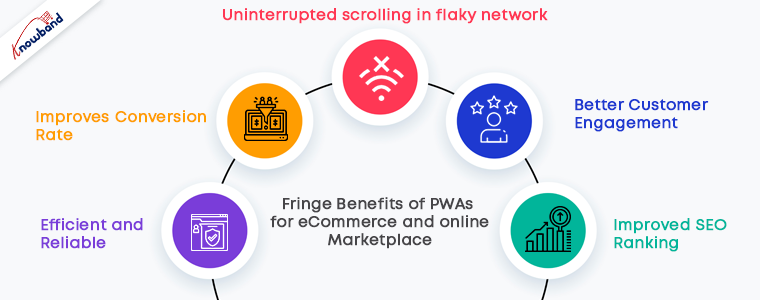
Fringe Benefits of PWAs for eCommerce and online Marketplace

For a multi-vendor e-commerce marketplace, PWAs can offer fast and engaging mobile web experiences. PWA runs right within the mobile browser. Run along with the website- No need to install it separately from the store.

The PWAs are tailor-made for both iOs and Android mobile phones. Unlike mobile apps, No headache of creating a different design as it is already curated in that way. Google allows adding PWA to the Google Play store and providing greater support to responsive web apps.

  • Efficient and Reliable

The specifications of all endpoints on which it operates are fulfilled by PWA itself. There’s no need to build various versions of it for different devices. Plus, you get the look and feel of mobile apps and the best output of websites in one.

PWA remains on the server, so it uses a very limited proportion of cache-only system storage for the user.

  • Improves Conversion Rate

In terms of pace, there was a decent competitor for native apps and daily websites. PWAs are known for high speed, which simplifies all primary tasks on marketplace platforms for e-commerce. Users can find a product that is needed, add it to a shopping cart, or buy an item online much faster.

PWAs user interaction is excellent as companies can connect with their site users in a more tailored and personalized manner with the web push alerts role in it.

They are progressive, sensitive, quick loading, and highly safe, what’s more, to say.

  • Better customer engagement 

Compared to native/hybrid software, the PWA app is very lightweight. This makes your Progressive Web App on the devices of users use less space. This variable is also behind the explanation that PWA does not crash and offers an improved user experience.

You periodically update native apps to their new versions, while PWAs update automatically from the browser.

  • Uninterrupted scrolling in flaky network 

When scrolling on a browser it sometimes happens that the marketplace website takes longer than usual time and the poor network connectivity is the reason behind this.

PWAs are independent of internet networks. Even in a flaky network, it uses the catch and enables you to browse the saved content. They allow users, even in offline mode, to continue browsing to achieve a high level of efficiency.

  • Improved SEO ranking

Google supports PWAs and its SEO crawls the PWA-rich marketplace websites on the top. Besides, PWAs are conveniently shareable and connectable, making them more discoverable than native applications.

Google prioritizes fast and mobile-friendly websites since initiating mobile-first indexing in 2018. This means that in search engine page results, your online marketplace site should have these characteristics to be rated higher. That’s when a PWA development firm’s services would be helpful for your company.

Recommended Read:

How Progressive Web Apps (PWA) can improve mobile conversions of an eCommerce store?

Success Stories of PWAs for eCommerce and Online Marketplace

Various online marketplaces and eCommerce stores have developed their PWAs and are benefited from their advantages. The PWAs add app icons on the home screen and clicking on an icon is always easier than type and browse.

With a simultaneous increase in content consumption and sharing, growth in conversion rates, and revenue, the objective of every eCommerce and online marketplace website is the same, irrespective of the scale and sector they are constantly working on to minimizing the consumer acquisition costs. Fortunately, PWA cellular stores endorse them all.

The world-famous brands and other eCommerce businesses that have grown rapidly in previous years can give some credits to PWAs. Are PWAs truly that exciting? Yes, they are.

Jumia

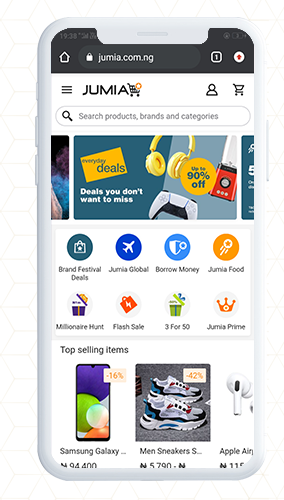
Jumia is taking advantage of PWA technology for its marketplace platform. This became the default mobile web experience in 2018 when it was launched in Nigeria and it has been expanded in 14 countries with 6.7 million users by now!

Jumia’s targeted audience was dominantly using the 2G network, which forced the eCommerce company to look for a more effective and smooth website experience even in flaky network connectivity. Then Jumia’s PWA came into the picture which was an immediate hit.

The benefits of using the Jumia eCommerce platform are many. Statistically, it takes up 25X less storage and two times fewer data to start. The conversion rate was increased by 33% and it reduced the bounce rate by 50% with 5 times lower data consumption. Isn’t it a huge success!

AliExpress

AliExpress is a renowned eCommerce company launched in China in 2010. Almost everything from clothes, shoes, electronics, and pet items to home appliances can be found. They have also adopted the Progressive Web App (PWA) strategy and have seen a lot of good results since they are part of the Alibaba Group.

From the case study, conversions from AliExpress increased dramatically by 104% immediately after the launch of the Progressive Web App. In addition, its users started visiting more pages per visit and on average. Users begin to spend 74% more time on the AliExpress eCommerce store. Hence, PWAs are highly engaging!

Flipkart

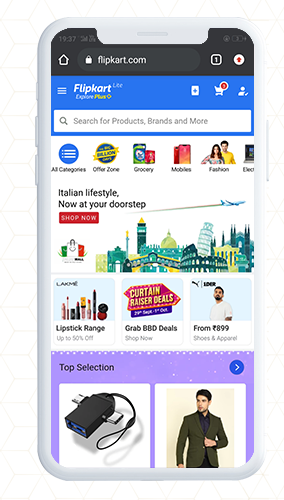
Flipkart is the biggest commercial enterprise in India, competing with Amazon. The big giant, Flipkart chose to merge their online presence with their native app into a Progressive Web Application, resulting in a conversion increase of 70%. That’s huge!

The company abandoned its mobile website in 2015, which could not compete in terms of a quick and responsive user interface with a native app.

Some stats to look out for:

  • Flipkart Lite consumer time on site now is 3.5 minutes vs. previous mobile experience: 70sec
  • 3x more on-site time spent
  • 40% Re-engagement rate increased
  • 70%higher conversion rate among those who visit via home screen icon
  • 3x lower data consumption

Trivago

Trivago! The hotel App! The world’s leading hotel search engine compares 175 booking websites with more than 700,000 hotels worldwide. Surprisingly, Trivago has more smartphone viewers than desktop viewers.

Their PWA, with home screen shortcuts, push notifications and offline access, is just like a native app. It turned out to raise user interaction by 150%.

Trivago’s hotel search engine reported a significantly higher conversion rate than its native app with the power of PWA. Also, the click-through rate of its hotel bookings experienced a dramatic 97% rise. Wow!-Wow!

MakeMyTrip

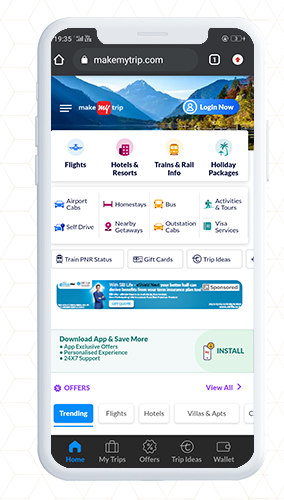
The leading online travel agency in India is MakeMyTrip. They went through continuous high-bound prices and costly consumer acquisition costs before releasing the Progressive Web App(PWA). To cope with that, MakeMyTrip wanted to invest in PWA to take their user experience to the next level while more efficiently investing their budget.

Fortunately, its consumers are really interested in technological innovations, according to a three-fold rise in conversion rates and traffic growth of over 150%. Try not to love it!

How can KnowBand help you with progressive web app development?

We at KnowBand are ardent PWA technology fans. Our team believes strongly that it has enough capacity to replace mobile applications. Hence we have designed, the Progressive Web App that converts your slow ad boring website into a dynamic Progressive Web App.

The PWAs have various advantages like smooth experiences, no installation efforts, lower storage consumption, substantially faster loading times, etc.

Also, improved conversion rates, engagement rates, and increased mobile sales are exciting benefits! That’s what switching to PWA frequently leads to.

The Progressive Web App is available for various eCommerce platforms and is easy to install on your existing eCommerce store and online marketplace.

Magento 2 PWA Mobile App

OpenCart PWA Mobile App

PrestaShop PWA Mobile App

WooCommerce PWA Mobile App

Top features of PWA Mobile App


Conclusion: Hopefully, those five wonderful examples of major brands using Progressive Web Apps (PWA) should have encouraged you to do the same!

It will take less time to create an application with the PWA creation strategy, as you will now have only one cross-platform app to launch.
In this respect, the creation of progressive web applications is a fantastic way to reduce the cost of developing a mobile app. Hence it is cost-effective and that’s why you should give PWAs a try.

If you think Progressive Web App technology could support your company, then we’d love to help. Today, get in touch.
OpenCart Progressive Web Application (PWA) Extension for your eCommerce Store

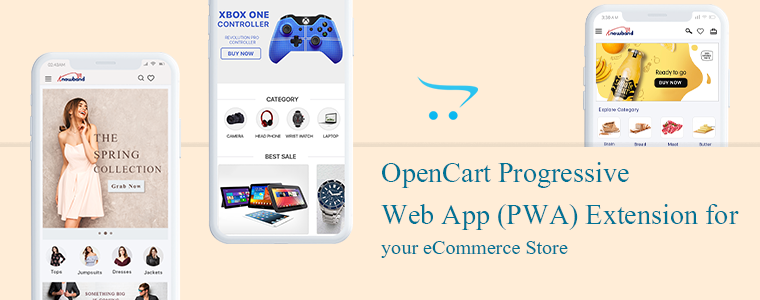
The Progressive Web Applications turn your regular website into a fast-loading web app that behaves like a mobile application in a browser. The OpenCart Progressive Web Application extension is integrated with all the needful features and converts your website into a dynamic PWA. The Progressive Web Application extension will give your eCommerce customer a feel of using a mobile application when they are actually using the internet browser.
Why is PWA important for an eCommerce website? There are many famous brands like Starbucks, Flipkart, MakeMyTrip, Trivago, Jumia, etc. have seen tremendous growth in customer engagement and conversion rate after launching PWAs. The PWAs are highly reliable and provide customers a smooth user experience.

The PWA technology is not very old but the term was coined by Google in 2015 and then many followed it as it showed positive results in many ways. The OpenCart PWA extension has various features and those will benefit the store owners in various ways.

Some of the features and benefits are discussed in this article. Let’s look at it in depth.

The OpenCart Progressive Web Application

To offer an app-like experience to consumers, a Progressive Web App (PWA) uses modern web technologies.

Our OpenCart Progressive Web Application gives the impression of a native app that keeps them engaged and enhances the overall user experience. It supports push notification very well which improves the accessibility of your website further.

Why is PWA a must-have extension for the OpenCart store?

If you want to provide your visitors with an app-like experience on the mobile web, well then OpenCart Progressive Web App (PWA) is the best solution for your needs.

  • The Progressive Web App supports push notification that improves the conversion rate.
  • PWAs are fast loading that keeps the user engaged and reduces the bounce rate
  • Offline support: They work well in poor network connectivity and even in offline mode(uses cache)
  • These are cost-effective because it saves the cost you require to create a native app
  • PWAs are highly reliable and engaging
  • The OpenCart PWA is a top-notch option for you because it does not require to be uploaded on Apple & Google Play stores.
  • Gadget Friendly: OpenCartProgressive Web Application works well on all mobile devices.
  • It occupies low storage& hardly faces any crash or lag.

Recommended Read: How Progressive Web Apps (PWA) can improve mobile conversions of an eCommerce store?

How does an OpenCart Progressive Web App (PWA) extension works?

This OpenCart Progressive App (PWA) is just like every other OpenCart extension. When this extension is installed on an open cart website, it creates a customizable PWA derived from the website’s data.

There is a real-time synchronization maintained between both, the website and the PWA.

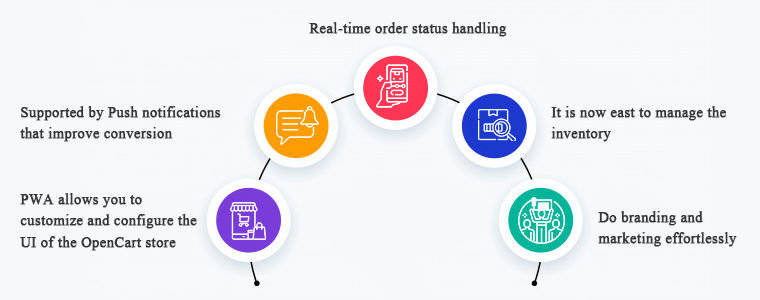
1.     PWA allows you to customize and configure the UI of the OpenCart store

To manage the PWA user interface, you need not to a professional coder. It is that simple to customize and configure. The OpenCart store owners can select & customize their application name, app icon, logo, splash screen, font styles, etc.

On mobile browser, website users can connect your OpenCart PWA App to their devices’ home screen. Get full power over your app from the extension’s backend panel that to over a few clicks and button toggles.

The appearance of the store will be inspired by the theme and the domain name as you desire it to be.

2.     Supported by Push notifications that improve conversion

For eCommerce mobile apps, push notifications are a benefit driver, if used wisely. The OpenCart PWA Mobile App also helps you to directly give your app users personalized push notifications on their smartphones. The store admin can also schedule the updates listed below from the admin panel:

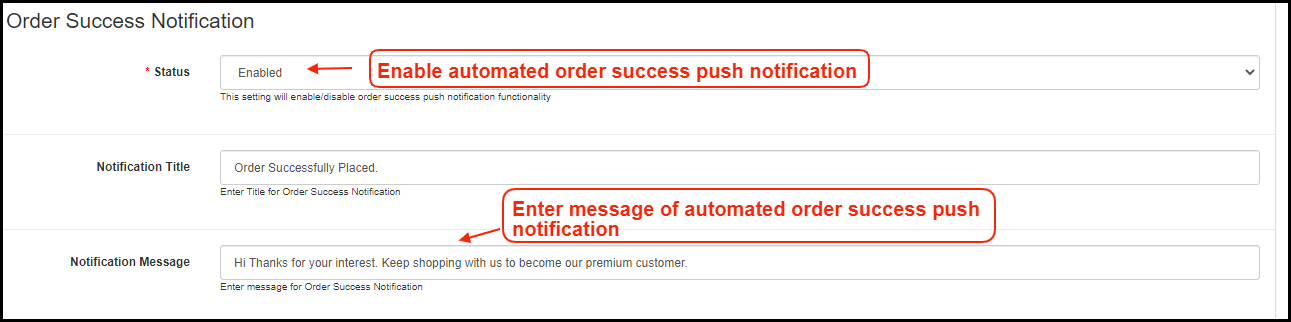
  • Notification for a successful order
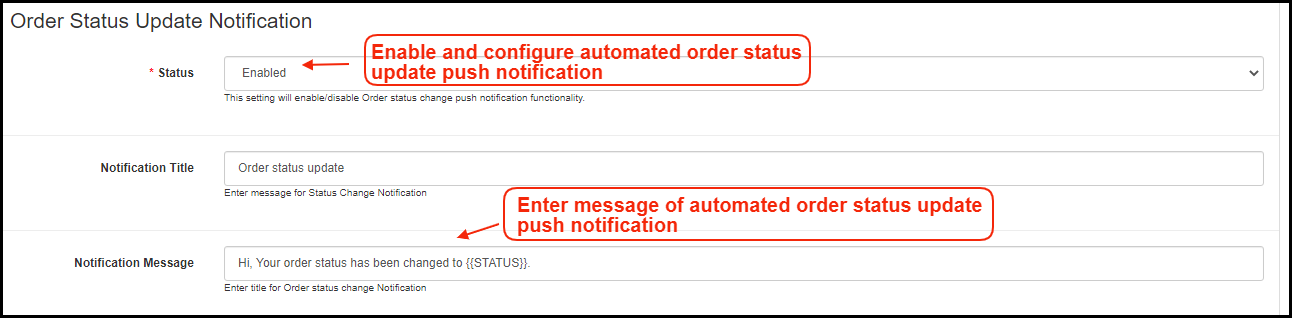
  • Order status updates
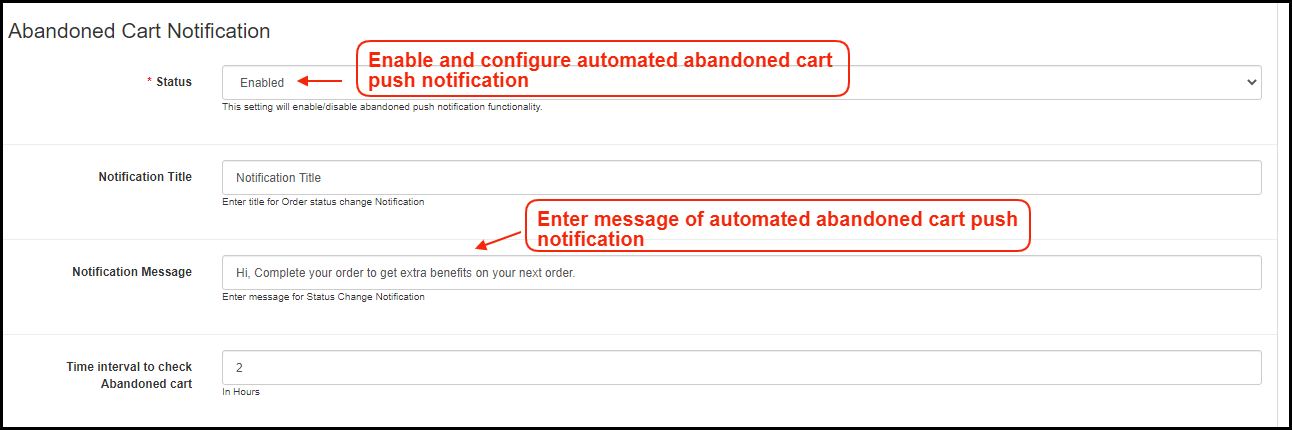
  • Follow up notification for abandoned cart

3.     Real-time order status handling

In the OpenCart Progressive Web Application, the order status is changed in real-time. Users of the app will be able to keep eye on the fulfillment of successful orders. The order details remain in sync with the shop.

4.     It is now easy to manage the inventory

The entire inventory of the website will be in automatic synchronization to the app. Also, manual control is not required when it comes to the inventory of apps. Any updates or new additions to the software will also be modified only by refreshing them.

5.     Do branding and marketing effortlessly

If PWA is installed in your OpenCart store, you will be benefited from its handy promotional tools that help you with marketing and running deals in your store. It is a cost-effective extension because you don’t need any extra modules for running deals in your store.

Campaigns & Promotions for Sale

To raise sales you can run different promotional selling deals. Using the home-intuitive screen’s campaign graphics and promote further purchases for users. The admin can also run a flash sale based on a timer and create an emergency for quick purchases.

Works well with other coupons and deals running in store

The PWA app also works for all coupons & vouchers activated on your OpenCart website. It will provide Progressive Web App users with the same discount coupons and vouchers as website users.

Allows Product Sharing on Social Media

A customer believes the other customers. The OpenCart Progressive Web App allows app users to share their choice of beneficial products on various social media with their friends and relatives and inspire them to buy products.

Give your OpenCart customers a seamless shopping experience

Every store owner is looking for the right strategies to provide a better customer experience to their existing and new customers. The PWA has some advanced features that effectively provide a unique and great customer experience.

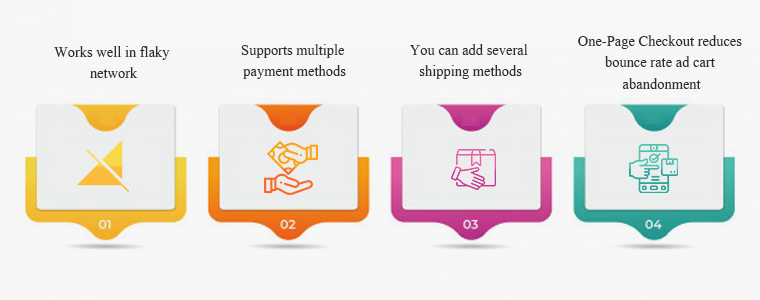
#1- Works well in flaky network

Even with a sluggish & no Internet connection, this OpenCart PWA App will work. Any time they want to search for items or shortlist them, users would not have to wait for good internet connectivity. Not magic though! This happens because of the saved cache files.

#2- Supports multiple payment methods

On your OpenCart PWA app, all the payment options available on your OpenCart website will be active as well. This plugin for the app creator synchronizes all the web-view payment methods.

#3- You can add several shipping methods

On your PWA app, any kind of shipping method active in your OpenCart store also works flawlessly. The OpenCart Progressive Web App means that the shipment & distribution of goods can be managed easily by the users.

#4- One-Page Checkout reduces bounce rate ad cart abandonment

Additionally, the OpenCart Progressive Web Application comes with an integrated One Page Checkout where only the requisite entries are obtained from the customers. Before placing successful orders, it also helps them to review the complete order information in one go and thus minimize cart abandonment.

Conclusion: You might be okay with the website you are using but making it a Progressive Web Application can do wonders! There are several success stories of big brands who converted their stores into PWA and the changes they have observed were remarkable.

Recommended Read:

You can click here and take a demo tour of the OpenCart Progressive Web Application. We at KnowBand create custom mobile apps for almost all the major eCommerce platforms. You can discuss your project ideas with our experts at support@knowband.com. And, drop a comment and let us know if you find this article helpful.

Recommended Read:

How Progressive Web Apps (PWA) can improve mobile conversions of an eCommerce store?

Nowadays people are spending a lot more time using mobile devices to access the internet and consuming twice the data they consume on desktop websites. That goes for online shopping standards as well. Using an eCommerce website to bring sales is challenging when you have flaky internet connectivity. And, asking users to install a mobile app is again a conversion killer. PWA (Progressive Web App) fits in between the native mobile app and the website browser and is more likely designed to boost the mobile conversions for eCommerce stores.

Progressive Web App is the new must-have format for the mobile branding of your business. PWA mobile apps have overcome the most alarming problem of distribution. Do you ever go to your browser for Google Maps navigation? Probably not! Research says that most of the users, around 87% choose to browse on native apps. That makes it mandatory to have the app installed on the user’s device.

PWA mobile app gets derived directly from the mobile browser of the website and no need to visit any third-party app store or medium to install the app. Actually, whenever any user opens a PWA active website on a mobile browser, a prompt message asks to “Add App To Home Screen”.

App developers and service workers (Script files) in combination create PWAs for offering a dynamic, smooth user experience while accessing the content through a website/web-app.

Introduction to Progressive Web App

The Progressive Web Applications, also known as PWA are enhanced versions of web apps, developed with javascript. PWAs have extra capabilities like the user can access them offline and also receive push notifications based on the marketing standards.

PWA improves your website’s performance, security, accessibility, and SEO features. It enhances your reliability and workflow. They allow you to work offline and on flaky networks. Progressive web apps are fast and engaging. The PWA’s have seamless navigation and are packed with smooth animations, jank-free scrolling which makes it faster.

Major Advantages Of Progressive Web App

In order to create efficient web applications, progressive web applications (PWAs) are more of a technique that includes a mix of technologies. With an enhanced user interface, individuals can spend more time on websites and see more advertising. They prefer to buy more, and more likely to return regularly with warning notifications.

#1. Reliable Performance

A typical website forces users to wait while it is busy making trips to the server, doing nothing. Each request from the network to fetch an asset or piece of data passes through a service worker, who first checks if the answer to a specific request is already in the cache. As users immediately get real content, even on a bad link, they trust the app more and see it as more reliable.

#2. Fast Loading

This UI isn’t flaky. Scrolling is seamless and the app reacts to user interaction easily. Your Progressive Web App will naturally be faster than the native apps, being lightweight & having a fast loading mechanism. This provides the app users with an exceptional user experience that keeps the services at par.

#3. More Engaging

It looks and feels like a native application. Over the user’s home screen, a PWA can earn a location. By offering a full-screen work environment, it provides a native app-like experience. To keep users active, it makes use of push notifications.

#4. Offline Usage

The pattern of “offline first or “cache first” is the most common technique for serving the user with content. If a resource is cached and offline accessibility can be checked before you download the content. Download it if it’s not already in the cache and save it for future use.

#5. Push Notifications

Push notifications effectively increase the conversion rate of your eCommerce store. PWAs allow the owners of the store to configure and submit unlimited push notifications. They have in-built functionality to automate & schedule them. Using catchy titles & graphics in your notifications can do wonders.

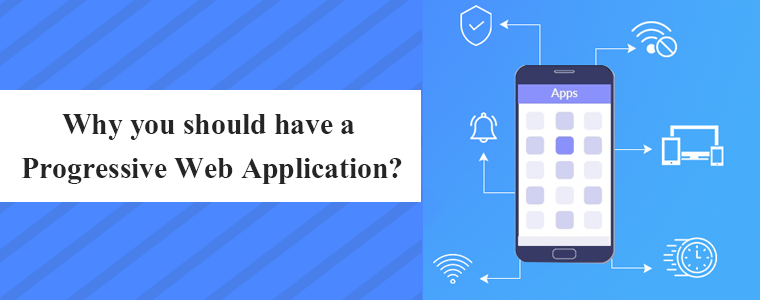
Why you should have a Progressive Web Application?

While a PWA is not a must-have functionality but it is a way to improve your relationship with current and potential customers while also overcoming the difficult challenge of visitors driving away from the website.

Many people become oblivious to the prompts to enter an email list and sometimes do not take the next step to open and read the emails, but you can build real brand loyalty if you can get a customer to use your Progressive Web App.

Google is supporting the PWAs since 2015 and now iOS also allowing them on their web browser. Google scores the Progressive Web Applications better while crawling and other practices. Various Google Chrome extensions are created to support the PWAs.

PWA can be a good idea if you are starting up your new website. It makes sense to distribute your web app to users, in the beginning, to get their feedback before creating your responsive mobile app.

The Progressive Web App cannot be replaced with responsive mobile applications but in a way when you are planning to launch your mobile app, it is a good option to start with.

KnowBand developed PWA for various eCommerce Platforms:

The Progressive Web App Builder extension is available for almost all major eCommerce platforms. The store admin just needs to choose the right plugin and install it to follow the simple guideline for the configuration.

Magento 2 PWA Mobile App

OpenCart PWA Mobile App

PrestaShop PWA Mobile App

WooCommerce PWA Mobile App

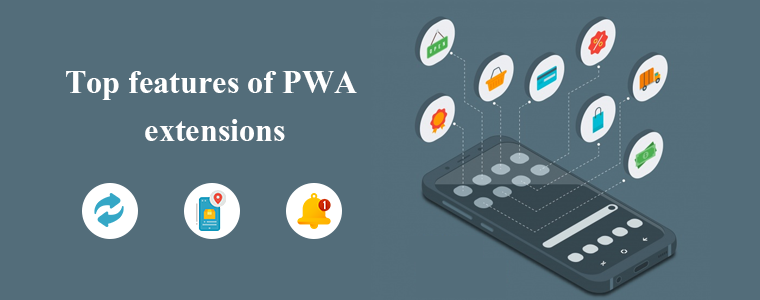
Top features of Progressive Web App extensions

The below-mentioned features are the most prominent ones and are all put together and our Knowband experts developed the Progressive Web Application. The app is lightweight and faster loading and enhanced performance. The PWA Mobile app supports multi-lingual and various currencies that allow you to expand your business globally.

1. Change the Look and feel of the PWA- The store owner can change the colors, add a brand logo and various designs to make it look good. Even the complete home screen design can be edited and changed via a DIY editor. The changes will be reflected in the actual app anytime.

2. Featured Product Listing- Designed in a way that the user can add different product/category-based elements. The store admin can showcase the best sellers, featured products, recently purchased, etc. on the home screen.

3. Easy Installation- The users do not need to visit any third-party app store. Instead, the PWA Mobile App can be added on the phone directly by opening the website on a mobile browser.

4. Reliable and Engaging- The eCommerce PWA Mobile App works flawlessly under no/slow internet connectivity. Even in offline mode, the cached data & previously loaded pages make the content available to app users.

5. E-mail and Social Login- The store owner can allow users to sign up by adding an email address or with their social media accounts.

6. All Payment and Shipping Method Support- Customer often bounces back due to limited shipping and payment methods but with PWA, this is not a challenge anymore. All website payment and shipping methods will be actively functioning on PWA Mobile App.

7. Offline Mode- Even without an internet connection or on a sluggish network, your PWA App will work properly. Users will not have to rely on the internet at all times to shop for app items.

8. One-Page Checkout, Unlimited Push Notifications, Live Synchronization, and Order Tracking like features are the additional advantages of PWA.

9. Cross-selling– It allows you to showcase related products to improve sales on PWA. It also allows the store manager to select the CMS pages from the website and will be optimized automatically.

Here is a list of benefits offered by PrestaShop PWA (Progressive Web App).

We have developed the PWAs for many clients and some of the success stories for 2020 are discussed in our previous article.

Conclusion:

Turn the online eCommerce website into the PWA Smartphone App and give mobile visitors a seamless web shopping app. The highly engaging PWAs can be launched from the home screen as you can add an icon for it and they even send push notifications. This is a great example of technology development and has a lot of scope in future advancement.

Progressive Web Apps are still in their infancy, as described, but it’s an exciting time to experiment with the methodologies behind them and see how well they can relate to your web applications.

Please feel free to comment on-thread if you have input on places that you would like to see covered.

Recommended Reads:

How PrestaShop Store can benefit from eCommerce PWA (Progressive Web App)?

We have always been somewhere looking for an alternative to Google Play and Apple store publishing. PWA (Progressive Web Apps) seems to be emerging as the prime option for the same. This technology is the latest trend and becoming more popular with passing time. Even various experts and tech geniuses are referring to PWA as the future.

The Progressive Web App is useful in replicating the exact native-like experience in-browser applications. The major benefit is that the store owner needs not to handle the app store or play store publishing, but rather, the PWA Mobile Apps can be simply installed by opening the website URL on a mobile browser. The customers get the option of adding the PWA app to the home screen as they open the store URL on mobile chrome.

PrestaShop PWA Mobile App Builder

With the automated PWA Mobile App Builder framework, it becomes way simpler to launch the Progressive Web App for PrestaShop stores. Just three simple steps are required for the job:

Step 1: Purchase Extension: https://www.knowband.com/prestashop-pwa-mobile-app
Step 2: Share PrestaShop Admin/FTP details.
Step 3: Review the test PWA version and confirm to make life.

Major Advantages of PrestaShop Progressive Web App:

Not just the launch process, the PWA mobile apps even come with many features and benefits. Let’s check how useful these PrestaShop PWA Mobile App could be for eCommerce stores:

1. Preferred Choice for Businesses

If we consider the big enterprise names in the eCommerce world, the idea of the Progressive Web App would be much clear. Twitter, Walmart, Alibaba, etc. have already chosen Progressive Web App to improve conversions and revenue. All worldwide small as well as big PrestaShop eCommerce stores can choose PWA Mobile Apps and started growing the sales from mobile audiences instantly.

2. Wider Mobile Audience Targeting

The PrestaShop PWA works perfectly with both Android and iOS(All versions), making it a top-notch choice for eCommerce stores. Worldwide as well as the regional mobile audiences can be covered with this solution. More users visit the website, more will be Progressive Web App installations. The apps will be added to the application drawer along with other apps. The performance will be fully native-like and the users can simply open the app whenever they want to shop products.

3. Less Development Efforts & Cost

With native apps, the eCommerce merchant needs to input huge cost and time in order to get Android and iOS apps developed and published. The publishing process on Google Play and Apple App store is quite tricky and sometimes becomes a headache for non-techie business owners. PrestaShop PWA Mobile App Maker comes as a savior in this situation. The PWA mobile app can be derived directly by opening the store URL on a mobile browser. Your mobile version will be converted into a PWA app, keeping the desktop version working as usual.

4. Handy Admin Panel Control

The PrestaShop PWA Mobile Apps come up with an easy-to-use admin panel to manage & configure the live Progressive Web App. No need to ask the developers or learn to code. The store admin can simply make the required changes and the same will be instantly updated on the live PWA Mobile App. The home page layout configuration allows the store admin to change the look and feel of the live Progressive Web App anytime without any code change.

5. Marketing via Push Notifications

Push notifications have been used for all eCommerce mobile apps in order to achieve marketing and revenue goals. We all would have witnessed the push notifications being received in our mobiles for installed apps. The PrestaShop Progressive App Maker makes this possible in your PWA apps as well. The store merchant will be allowed to configure and send the custom as well as predefined push notifications on mobile devices.

6. Faster Working with Offline Accessibility

The Progressive Web Apps are very lightweight and hardly crash or stops on mobile devices. The technology to create PrestaShop PWA Mobile Apps is advanced and keeps the loading and performance faster when compared with native apps. The faster loading & smooth working can improve the shopping experience of mobile users at par. Another major highlight is that PrestaShop PWA Mobile Apps can work under offline mode (No/slow internet connectivity).

7. More Conversions & Sales

The PWA for PrestaShop can improve mobile conversions for eCommerce businesses. Offering a simplified process to install the app directly from the mobile website directs the users to the Progressive Web App. With layered navigation and simplified checkout, the apps can be a major revenue source for eCommerce business. If we go for Alibaba reference, their PWA app increased conversions by 76%.

Conclusion:

Shift to better tomorrow with eCommerce PWA Mobile App. Your competitors have already moved to the Progressive Web App league and started getting more revenue. Considering the mass adoption of PWA, it’s right time to take your PrestaShop store into a mobile application. Offer an amazing shopping experience with enhanced features like fast performance, offline working, push notifications, SEO, and much more.

Visit for more details: https://www.knowband.com/prestashop-pwa-mobile-app

Also Read:

Top PWA apps for PrestaShop developed by KnowBand in 2020

Build A Lightweight PWA App For Your PrestaShop Store | Benefits & How-To’s?

PWA For Magento 2: Grow Your Business With This Readymade Tool

It’s 2020 & by now most online businesses have realized the importance of mobile applications. Mobile devices, especially smartphones, always remain switched on & connected to the internet & more importantly, they are in quick reach of the smartphone users. For businesses, this makes mobile devices the best medium to be present.

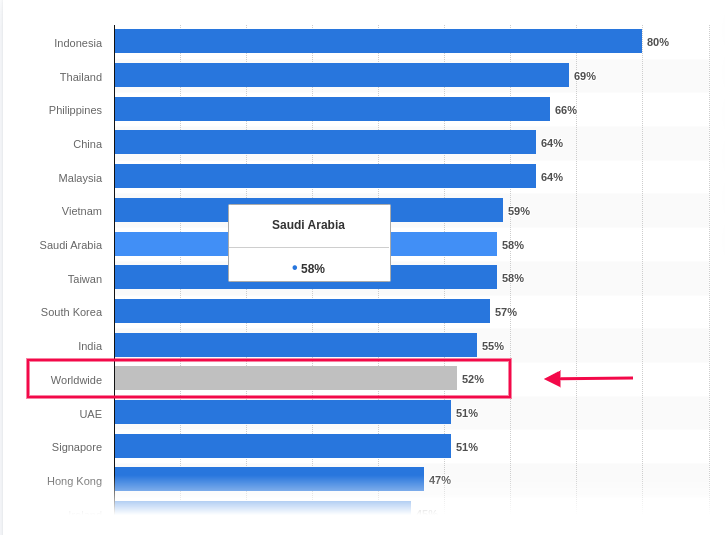
Based on a report by Statista, the global average percentage of online shoppers, who used their mobile devices to shop online, was 52%. This clearly states the urgency to provide a better shopping experience on mobile devices. Native Mobile Applications & Progressive Web Apps are a great solution to this.

Out of these, Progressive Web Apps (PWA) have been around for only 5 years now but in just a short amount of time, they have gained huge popularity among smartphone users as well as businesses. Upon transitioning to PWA, almost every eCommerce business has reported an exponential increase in conversion rates, app downloads & a lot more. You can check out the reports of Starbucks, Flipkart, Alibaba, etc. for your reference.

Building & launching is indeed very convenient for e-merchants now because of technological advancements & automated tools. In this write-up, we will elaborate on how you can also grow your eCommerce business, built on Magento 2, using a readymade tool.

The Magento 2 PWA Mobile App Creator extension is that ultimate tool. Whether you have a single-vendor Magento 2 website or a multi-vendor Magento 2 website, you can easily use this PWA maker tool on your website to automatically build a PWA Mobile App for your online store.

Doesn’t it seem magical? Well, it’s just the perfect use of web technologies.

How Does A Magento PWA Mobile App Builder Tool Work?

Just like any other Magento 2 extension, this PWA Maker tool is also a Magento 2 extension. Upon installing this extension on a Magento 2 website, it builds a customizable PWA derived from the data of that website. This keeps both the website & the PWA in live synchronization with each other.

Speaking of a customizable PWA, the Magento 2 PWA Maker tool provides the store-admins with various easy-to-use editing tools on the backend using which they can customize their PWA while it’s live. There is no need to worry about any downtime. Also, on the user-end, all the best & latest UI/ UX elements are equipped to provide an excellent user experience.

How Can Netizens Install A PWA?

Progressive Web Apps aren’t published in any of the app stores. Instead, they are made live on the website (on which this extension is installed). This means whenever netizens visit such a PWA active mobile-website, they are greeted with an ‘Add-To-HomeScreen’ popup at the bottom of the screen. Once they click it, the PWA automatically gets installed on their mobile device & appears to work just like any other mobile app on the mobile device.

How Store Owners Can Launch A PWA Using The Magento 2 PWA Builder?

Step 1: Purchase the Magento 2 PWA Mobile App Creator extension.

Step 2: Install this extension on your Magento 2 website.

Step 3: Fill the app pre-requisite form & review your app before making it live on your mobile website.

Features Of The Magento 2 PWA Builder Plugin:

#1. Simplified PWA Admin Panel:

The store owners and admins can easily configure their PWA App, set its color theme, logo, design the home-page layout, & do a lot more without a hassle. For their home-page, they can use any of the predefined components (like sliders, banners, product blocks, countdown-timer banner, etc.), configure it & rearrange them the way they want.

#2. Unlimited Push Notifications:

Store admins can send an unlimited number of push notifications to their app users and keep them engaged. Admins can also send personalized notifications & also automate & schedule some of the common ones like the abandoned cart notifications, order status notification. Admins can also use relevant graphics and catchy messages with desired redirect links on your Push Notifications.

#3. Multi-lingual & Multi-currency Support:

The Magento 2 PWA App built using this tool supports multiple currencies and multiple languages including RTL scripts like Arabic, Persian, etc. The Progressive Web Apps are capable of expanding your business reach across borders simply without any additional effort. 

#4. Offline Accessibility:

By default, the Progressive Web Apps support offline access. Because of data caching, PWA Apps work even when the app user is offline or under slow internet connection.

#5. All Payment & Shipment Methods:

All of the payment and shipment methods active on your Magento 2 website will automatically be active and fully functional on your Magento 2 PWA App.

#6. Social Login & Quick Sharing:

App users can easily onboard your Magento 2 PWA App with hassle-free social login options i.e. via Facebook & Google accounts. The PWA App built using this readymade tool also has a quick sharing link on the product pages. App users can hence easily share their choice of products on any of their social media handles.

#7. Order Tracking:

App users can also track all of their active orders and stay updated with the status of their order’s delivery. Any changes/ updates in the status of the order instantly reflect on the app & in the form of an order status push notification.

#8. Quick Login Options:

With traditional E-mail sign up & login options, the Magento 2 PWA Mobile App comes with inbuilt Google and Facebook login allowing users to seamlessly access the app in no time.

#9. Customizable Home Screen:

The PWA mobile app for Magento 2 comes with a customizable home screen whose layout can be designed from the admin panel. The store admin gets to craft and makes changes in the home screen as per any festival, sales or any other occasion.

Check all the features in detail from here.

Concluding:

Apart from just having a mobile-optimized eCommerce website &/or native mobile application (on the app store), having a PWA gives businesses more opportunity to reach all kinds of audiences with fewer efforts. With the use of a powerful ready-made tool like the Magento 2 PWA Mobile App Builder, building, launching & managing a PWA becomes a thousand times more convenient than building one from scratch.

So why wait longer? If you have a Magento 2 website for which you need a PWA, reach out to our experts at support@knowband.com or simply own your PWA maker tool from the Knowband e-store.

WooCommerce PWA Mobile App Plugin (v1.0.1) | New Feature Upgrades

Mobile Applications have become a major source of leads for almost every kind of eCommerce business. Whether it’s a native or hybrid or a PWA app, being available to the customers on their most used device is always a great approach.

In the past 5 years, Progressive Web Apps (PWA) have become very popular among the app users & very profitable for eCommerce businesses. Various eCommerce platforms are allowing easier mediums to build & launch a PWA Mobile App. To bring the WooCommerce store owners into this landscape, our experts at KnowBand have developed & launched an automated WooCommerce PWA Mobile App Builder plugin which simply integrates with your website & gives you a fully customizable WooCommerce PWA.

This PWA maker plugin is a no-code solution although it still provides easy-to-use DIY tools using which store admins can modify their PWA without any efforts. Also, on the user-end, the app users get the best in class UI & UX just like any high-end mCommerce store.

Check it out from below link:

https://www.knowband.com/woocommerce-pwa-mobile-app

New Feature Upgrades in WooCommerce PWA Builder (v1.0.1)

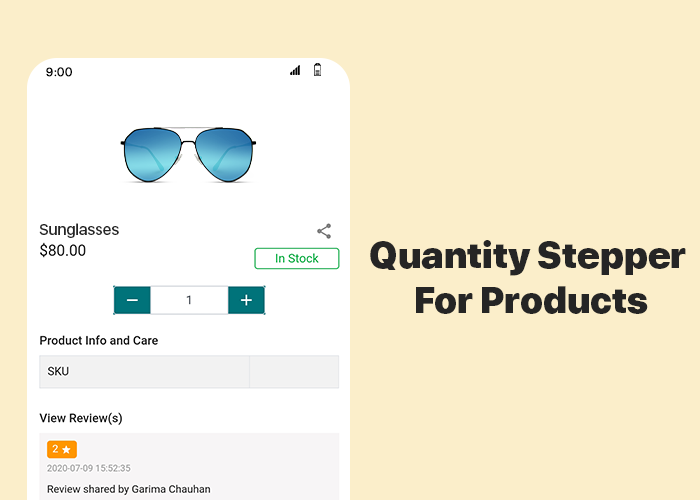
#1 Quantity Stepper For Products:

As usual, for convenience, online Shoppers like a simpler but feature-rich interface on an e-store. Things like adding multiple quantities of products or changing the quantity at the time of checkout & while being on the cart, improve the shopping experience of the app users. All such features are by default added in the PWA build using the WooCommerce PWA plugin. This newly added feature allows the app users to change the product quantity by stepping it up (+) or down by one unit.

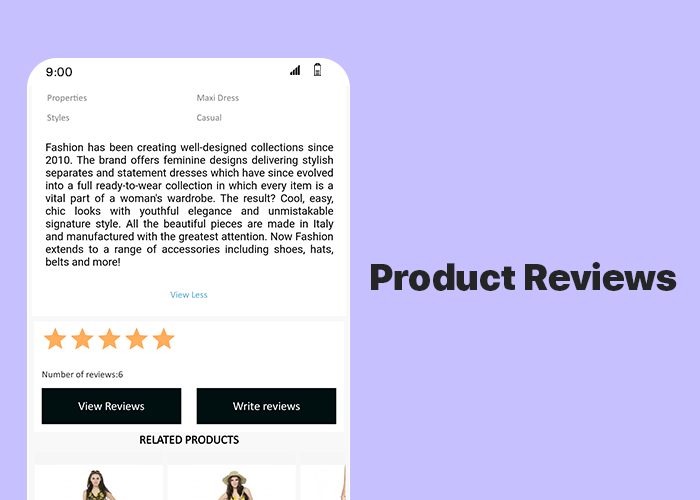
#2 Product Reviews:

This feature allows the app users to write & submit reviews of the products that they bought from your store. Reviews play a huge role in the eCommerce apps & websites. They can motivate others to purchase the products & increase your sales & revenue.

Simple Steps To Launch WooCommerce Progressive Web App:

  1. Purchase the WooCommerce PWA Mobile App Builder Plugin.
  2. Install the plugin on your WooCommerce website.
  3. Fill the app pre-requisite form & review your PWA before making it live.

How Are PWA Installed On Users’ Devices?

A PWA Mobile app is simply made live on the company’s website. There is no need of publishing it on the Google Play Store or Apple App Store. Whenever shoppers visit such a website on their mobile internet browsers, they are shown an ‘Add-To-HomeScreen’ popup on their screen. Once they click it, the PWA automatically gets installed on that user’s mobile device. The PWA then appears to work just like any regular mobile apps on a mobile device.

Major Features Of WooCommerce PWA Builder Plugin:

1. Simplified PWA Admin Panel:

The store owners and admins can easily configure their WooCommerce PWA App, design its home-page layout, manage push notifications & do a lot more without a hassle.

2. Unlimited Push Notifications:

It allows the store admins to send an unlimited number of push notifications to their app users and keep them engaged. Admins can also send personalized notifications and automate and schedule some of the common ones like the abandoned cart notifications, order status & order confirmation notifications. Use relevant graphics and catchy messages with desired redirect links on your Push Notifications.

3. Multi-lingual & Multi-currency Support:

The eCommerce PWA Apps built using these plugins support multiple currencies and multiple languages including RTL scripts like Arabic, Persian, etc.

4. Offline Accessibility:

By default, the Progressive Web Apps support offline access. Because of data caching, PWA Apps work even when the app user is offline or under slow internet connection.

5. All Payment & Shipment Methods:

All of the payment and shipment methods active on your website will automatically be active and fully functional on WooCommerce PWA App.

6. Social Login & Quick Sharing:

App users can easily onboard your WooCommerce PWA App with hassle-free social login options i.e. via their Facebook & Google accounts.

The PWA Apps built using this WooCommerce PWA plugin also provides a quick sharing link on the product pages. App users can hence easily share their choice of products on any of their social media handles.

7. Order Tracking:

App users can also track all of their active orders and stay updated with the status of orders’ delivery. Any changes/ updates in the status of the order instantly reflect on the app & also in the form of the automated order status notification.

Concluding:

With such a powerful tool available in the market, WooCommerce store merchants can stop worrying about the hassle & time involved in building a PWA. Grab your own WooCommerce PWA Mobile App Maker Plugin & launch your new PWA asap. 

For any assistance or query, feel free to reach out to our experts at support@knowband.com. Our team would be happy to help you.

Top PWA apps for PrestaShop developed by KnowBand in 2020

Nowadays almost every online business is transitioning its mobile website to a Progressive Web App for all the good reasons. For online shopping, the usage of mobile devices has already surpassed desktops & laptops. Globally, on an average 52% of netizens used their smartphones to shop for something online, based on a report by Statista. To cater to such audiences, Progressive Web Apps are a great medium.

Building & launching Progressive Web Apps is comparatively more convenient than doing the same with Native Mobile Apps. This is also because PWAs are compatible with every kind of mobile device. KnowBand offers a readymade tool to transform your regular eCommerce store into featured PWA shopping apps with:

–> PrestaShop PWA Mobile App

Available for other platforms as well:

–> OpenCart PWA Mobile App

–> Magento 2 PWA Mobile App

–> WooCommerce PWA Mobile App

KnowBand, a leading eCommerce solution provider, has developed & launched a bunch of eCommerce PWA Mobile Apps for its clients & in this writeup, we are briefing on some of the top PrestaShop PWAs that have been developed by KnowBand in 2020. Here are those web apps:

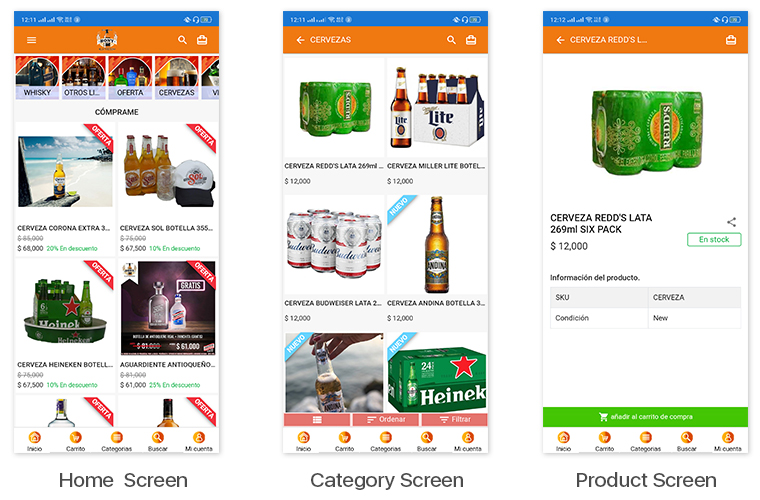
1. Bony Liquors:

Bony Liquor is an online store based in Spain selling beverages, drinks, cigarettes & complimentary snacks to its customers. With the help of experts at KnowBand, they launched their PrestaShop Progressive Web App on their mobile website. Their PWA has many of the latest UI elements that keep the user experience at par. It also has social login options via Facebook & Google accounts. App users can easily shop for the products they need & pay via various payment modes.

The best thing about PWA is that mobile website visitors can install their web app from their mobile website itself. The installed PWA then looks & appears to work just like every other app on users’ mobile devices.

Check out PWA from below link: 

https://www.licoresbony.com/ (Copy and paste URL in the mobile browser and “Add To Home Screen”)

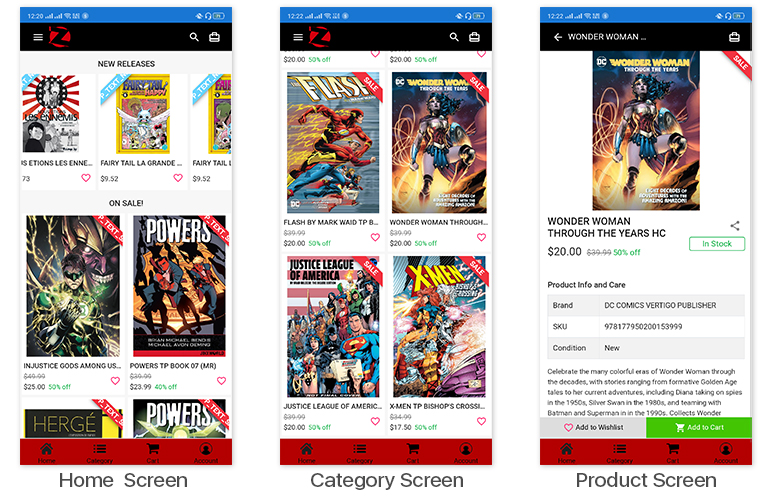
2. LibrairieZbookstore:

LibreairieZbookstore is an online PrestaShop store where customers can buy books & comics from a wide range of collections available at their store. KnowBand’s PWA module helped them launch their PrestaShop PWA that their store admin can customize anytime as per their needs. The PWAs built using KnowBand’s modules are white-label apps that allow the store owners to modify their apps by themselves without the need for coding.

Check out PWA from below link: 

https://librairiezbookstore.com/ (Copy and paste URL in the mobile browser and “Add To Home Screen”)

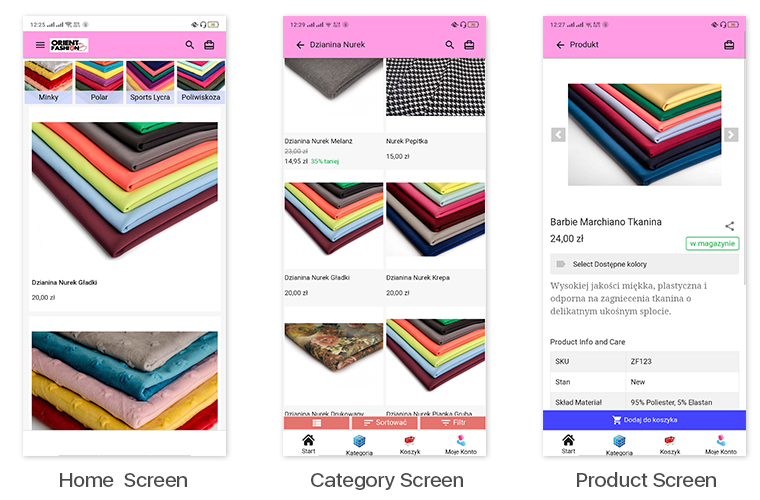
3. Orient Fashion:


This eCommerce store is a multi-lingual & multi-currency store that sells fabrics & its cutouts to its customers. Their Progressive Web App built by KnowBand also supports all of the languages & currencies of their website. All of their coupons & vouchers on their website are also supported on their PrestaShop PWA.

Check out PWA from below link: 

https://orientfashion.pl/ (Copy and paste URL in the mobile browser and “Add To Home Screen”)

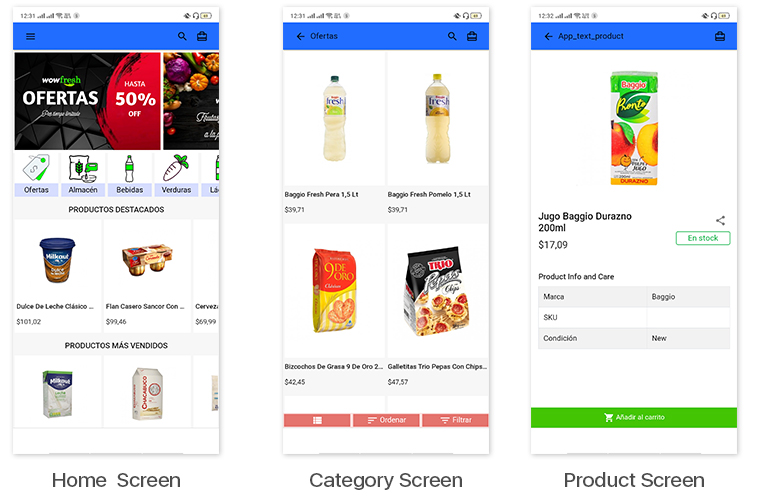
4. WowFresh:

WowFresh is an online store built on PrestaShop that sells groceries, snacks & beverages. The store is mainly in the language Spanish. Its mobile site visitors can download its PWA from the ‘Add To Homescreen’ popup /tab on the mobile website.

Check out PWA from below link: 

https://wowfresh.com.ar/ (Copy and paste URL in the mobile browser and “Add To Home Screen”)

5. Kittags:

Kittags is a UK based eCommerce website that sells regular & customizable tags that can be attached to backpacks, strolley bags, luggage, etc. Its website is built on PrestaShop & the store admins at Kittags used the PrestaShop PWA Builder module, developed by KnowBand, on the backend of their website to automatically build & launch their Progressive Web App.

Check out PWA from below link: 

https://www.kittags.co.uk/ (Copy and paste URL in the mobile browser and “Add To Home Screen”)

PrestaShop PWA Builder Module By KnowBand:


The PrestaShop PWA Mobile App Maker module is an automated plugin that can be used on a PrestaShop website just like any other regular module. Upon installing the PrestaShop PWA module, the store admins get a full-fledged PWA on their mobile website (frontend) & its configuration dashboard on the website backend. They can hence customize their web app using the DIY tools provided on the backend dashboard.

Once the PWA mobile app is made live on the website, mobile website visitors can simply install the Progressive Web App on their mobile device by clicking on the ‘Add To HomeScreen’ button displayed on that mobile website.

The PrestaShop PWA Mobile App module is laced with a number of frontend & backend features. Some of those features include-

#1. Multi-Lingual & Multi-Currency App:

The web apps built using this PrestaShop PWA Maker module by default support multiple international currencies & languages including the RTL scripts like Arabic.

#2. Offline Mode Accessibility:

App users can seamlessly use your PWA even when they are unable to connect to the internet. This allows offline browsing of the pages & even the category pages that users had already visited before.

#3. Unlimited Push Notifications:

The PrestaShop PWA module by KnowBand keeps no limitations on the Push Notifications. Store admins can send an unlimited number of notifications to their app users. These notifications can be created from the backend of this module (installed on the website).

#4.  DIY Home-Page Layout Editor:

This DIY tool gives immense control to the store owners & admins when it comes to changing the home-page layout. Multiple components like sliders, banners & grids for product display & banner images are provided. Even the countdown-timer banner tool & recently accessed products slider is included in the list of components. Just drag & drop them to rearrange & configure each of the components without a hassle.

#5. Live-Synchronization:

This module keeps your PWA as well as your PrestaShop website in real-time synchronization with each other. It exempts you from having to manage your PWA manually.

#6. Social Login & Sharing:

App users can login into the app using their Facebook or Google accounts. Also, on every product page, quick sharing links are provided for multiple social media platforms.

#7. All Payment & Shipment Methods Support:

All of the Payment & Shipment methods active on your PrestaShop website will by default be active on your eCommerce PrestaShop PWA.

#8. One-Page Checkout:

To make the checkout experience convenient for the app users, a single page checkout screen is provided on which the app users can even select a pre-saved address. They can easily update the quantity of the product & add or remove coupon codes etc without having to navigate to any other page.

#9. Order Tracking:

This PrestaShop PWA Creator module even offers an order tracking feature to the app users. They can track their active orders from within the web app.

WooCommerce PWA Mobile App – User Manual

1.0 Introduction

This readymade plugin is designed & developed by KnowBand to convert your running WooCommerce store into a feature-rich Progressive Web Application. Once the eCommerce store is transformed into PWA Application, whenever any user opens the store URL in the mobile browser, the concerned person will be asked to “Add PWA To Home Screen”. Once the WooCommerce PWA Mobile App is added to the home screen of the mobile device, the user can browse the store on the app like any other application.

The WooCommerce PWA Mobile App is a web application that actually doesn’t rely on app publish on Google Play and Apple App Store. The users can simply add the Progressive Web App to the mobile device and use like any other application.

1.1 Compelling Features to Choose WooCommerce PWA:

– Faster loading & quick performance
– Fully customizable home screen with the DIY editor
– All website shipping & payment methods support
– Engaging user-friendly interface
– No dependency on App stores
– Fully branded to your store
– Email & Social Login (Google & Facebook)
– Multi-lingual & RTL support
– Offline mode working
– Live synchronization b/w website & app
– Both android and iOS compatible
– One page checkout
– Lightweight application
– CMS pages management

1.2 View WooCommerce PWA Demo

Explore module and PWA app features from the below demo links:

Module Admin Panel: https://wcdemo1.knowband.com/pwa/wp-login.php
PWA Demo App: https://wcdemo1.knowband.com/pwa/pwa-app/
Note- Copy-paste URL in the mobile browser and “Add To Home Screen”.

[IMP] Notes For iOS:

–> iOS devices do not offer any inbuilt “Add To Home Screen” prompt, so users need to manually add the PWA Mobile App to the home screen of iPhone or iPad.

–> iOS does not support web push notifications. Hence the push notifications won’t be received on the PWA installed on the iPhone or iPad.

[NEW UPDATE] WooCommerce PWA supports RTL Language Scripts:

The WooCommerce Progressive Web App Creator now supports all worldwide languages including RTL (Right To Left) ones like Arabic, Hebrew, Persian, etc. The store admin can now even add RTL languages on WooCommerce PWA Mobile App.

2.0 Admin Panel Screens:

Explore all settings under Admin Panel of WooCommerce PWA Mobile App and check how they work with the help below detailed screenshots:

2.1 General Settings:

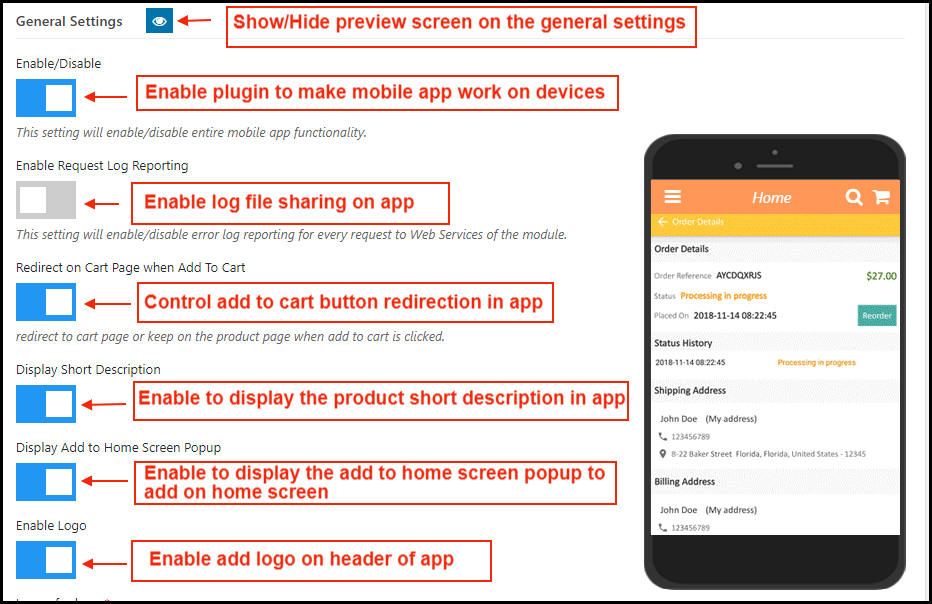
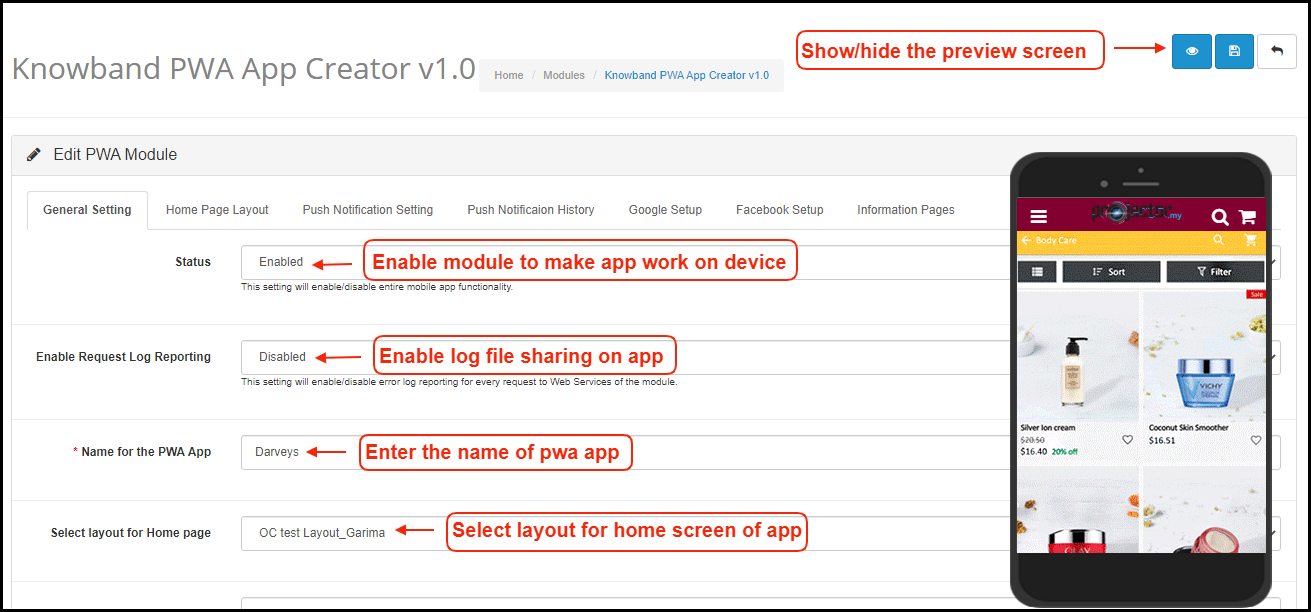
a) Show/hide Preview: Tap on the eye button to display/hide preview phone in the admin panel.
b) Enable/Disable: Enable the module to PWA work on mobile devices.
c) Enable Request Log Reporting: Enable error log on mobile.
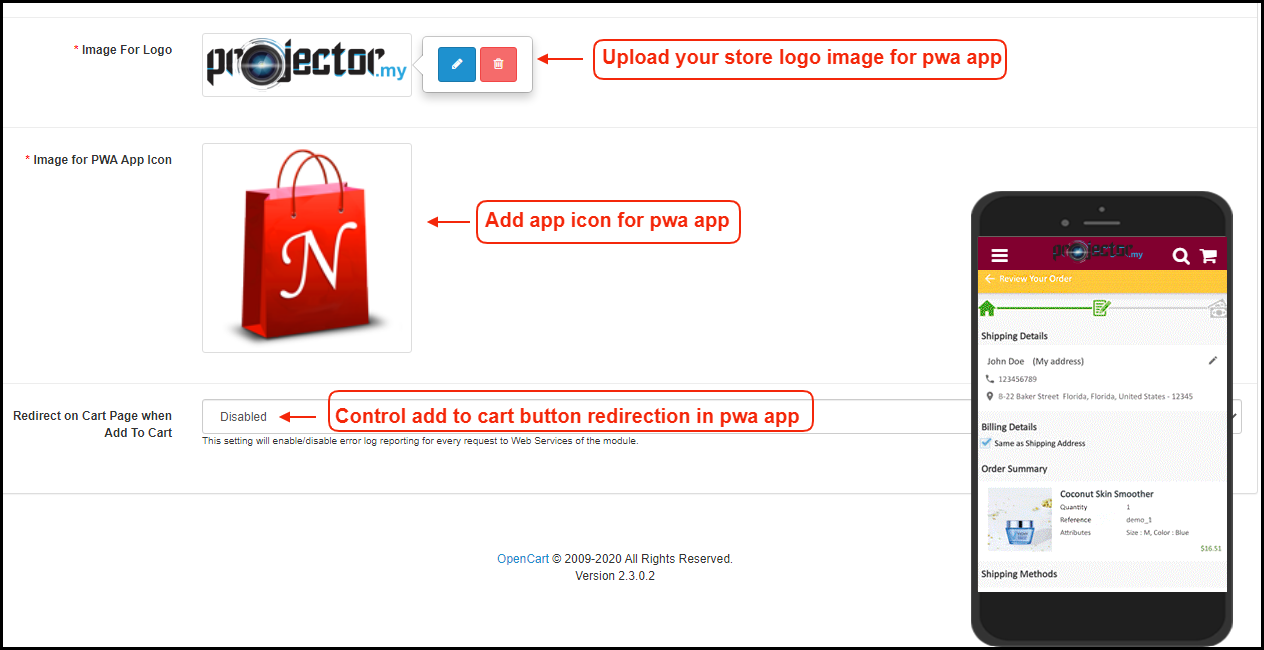
d) Redirect on Cart Page when Add To Cart: Control redirection of Add To Cart button whenever any user taps Add To Cart button.
e) Display Short Description: Enable and display a short description for the product (if added on the website product page).
f) Display Add To Home Screen Pop Up: Offer pop-up message “Add To Home Screen” and allow users to add the PWA app on the mobile devices.
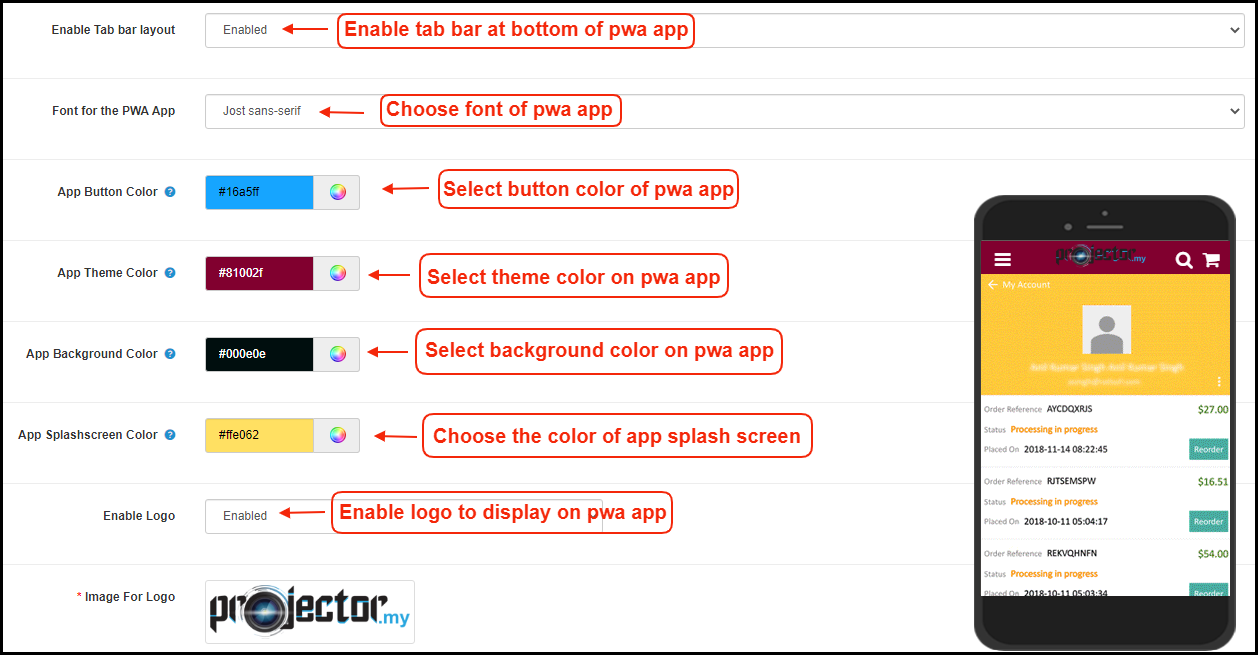
g) Enable Logo: Add your brand logo on the header of the WooCommerce PWA Mobile App.

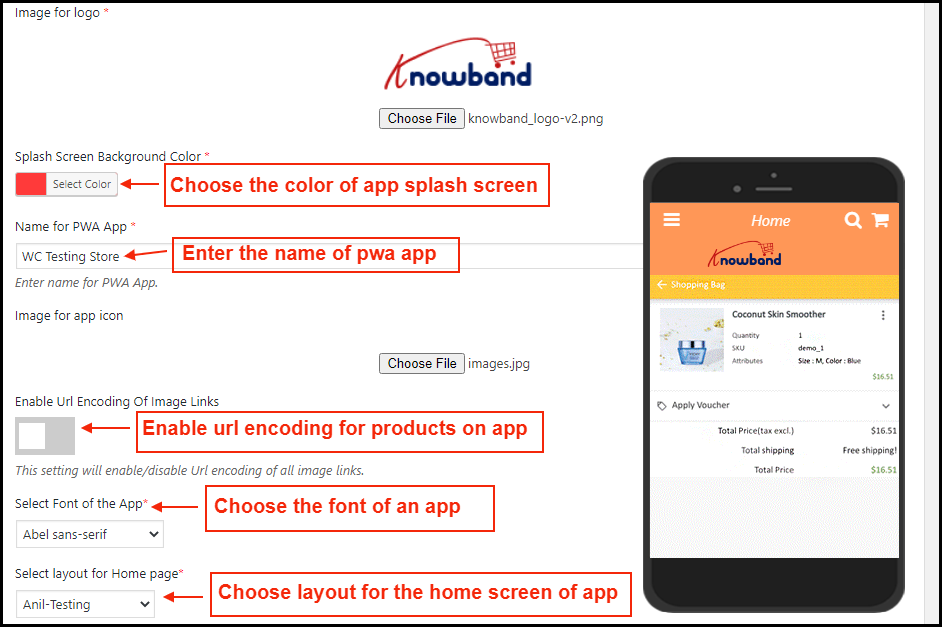
h) Splash Screen Background Color: Choose and set the color for the splash screen of the WooCommerce Progressive Web App.
i) Name for PWA App: Enter the desired name for WooCommerce PWA App. It will be displayed once the user add app on the mobile devices.
j) Image for App Icon: Add app icon image in the admin panel.
k) Select Font of the App: Choose the font for your WooCommerce PWA Mobile App.
l) Select Layout for Home Page: Choose from pre-added home screen layout for the WooCommerce PWA App.

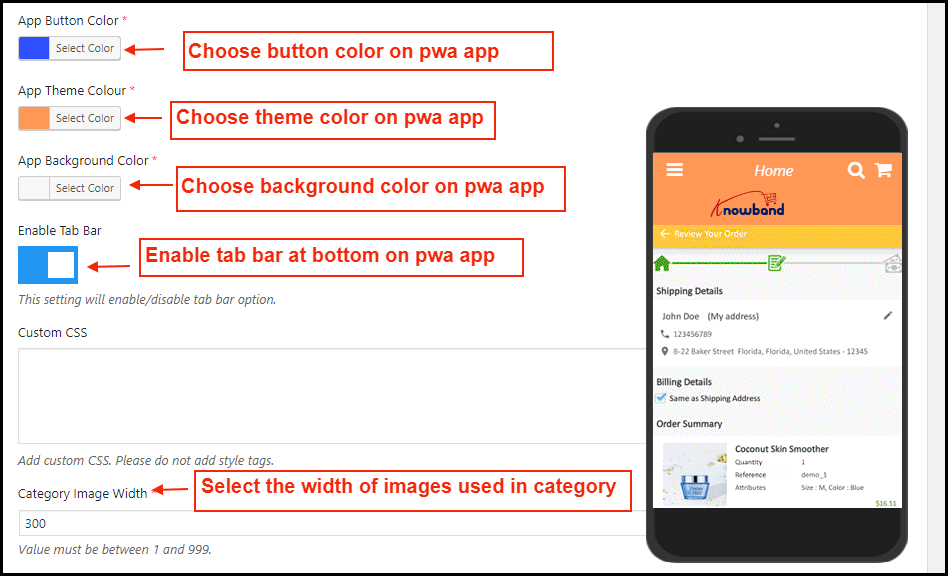
m) App Button Color: Choose button color for PWA Mobile App.
n) App Theme Color: Choose theme color for PWA App.
o) App Background Color: Choose the background color for the PWA App.
p) Enable Tab Bar: Enable tab bar on the bottom of the PWA App for quick and easier navigation.
q) Custom CSS: Enter CSS code to improve look and feel of web-view pages of PWA App like web-view payment, CMS pages, etc.

2.2 Push Notifications Settings

Push notifications are the best marketing tool for the PWA app for WooCommerce. The store admin can simply promote the store products and deals to app users and bring more sales and revenue. Enter all details in push notification settings by creating a Firebase project:

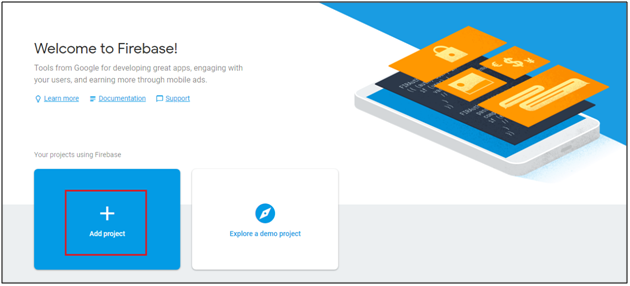
How to set up a Firebase Account?

Step 1: Login Google Firebase

Step 2: Create a New Project
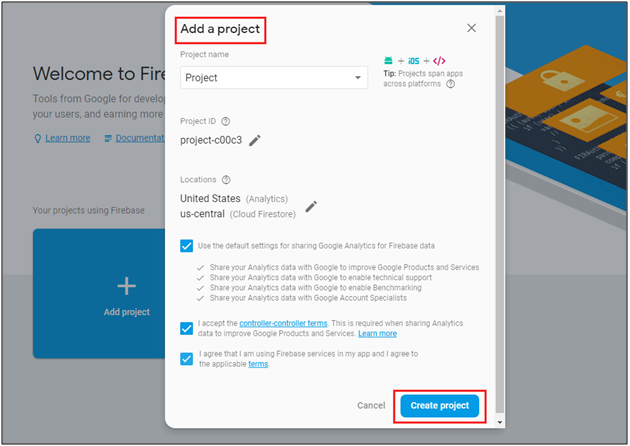
As you click on Add Project, the following dialog box will pop up:


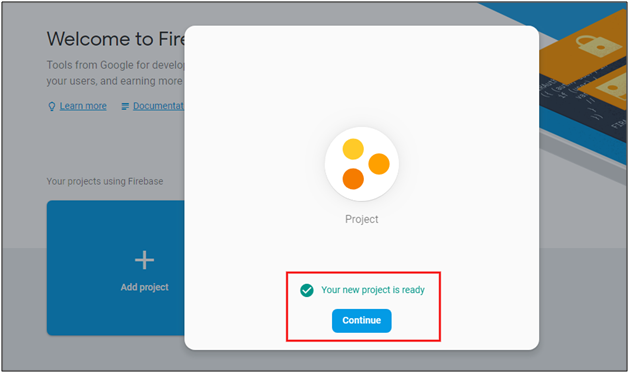
It will take a few seconds to create the project. Once the project is ready, click continue.

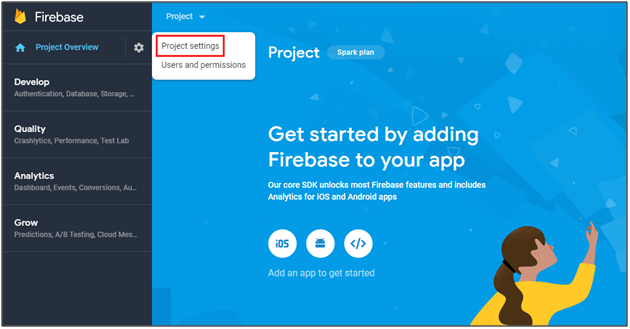
Step 3: Manage Project Settings
Once the project is created, click on Project Settings.

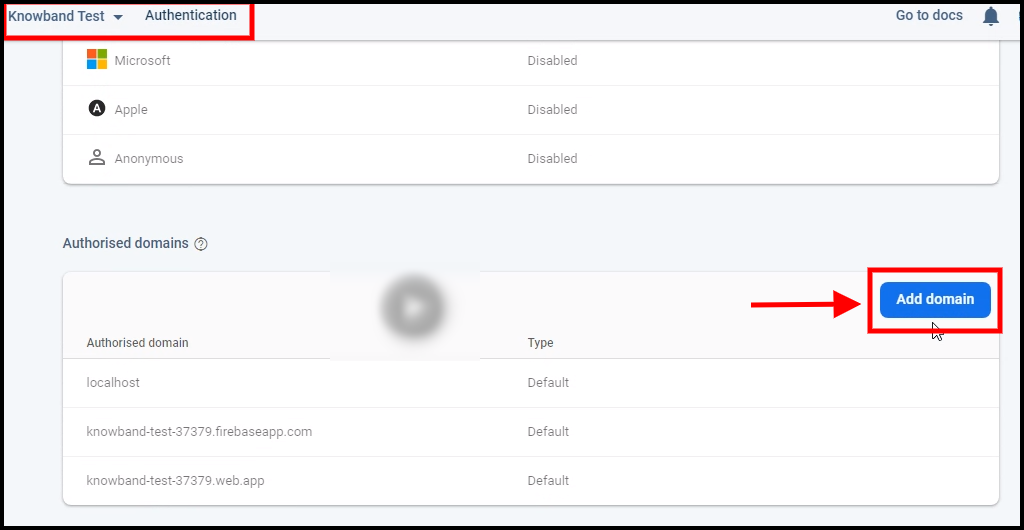
Step 4: Go to Authentication options:


Step 5: Find Firebase Keys
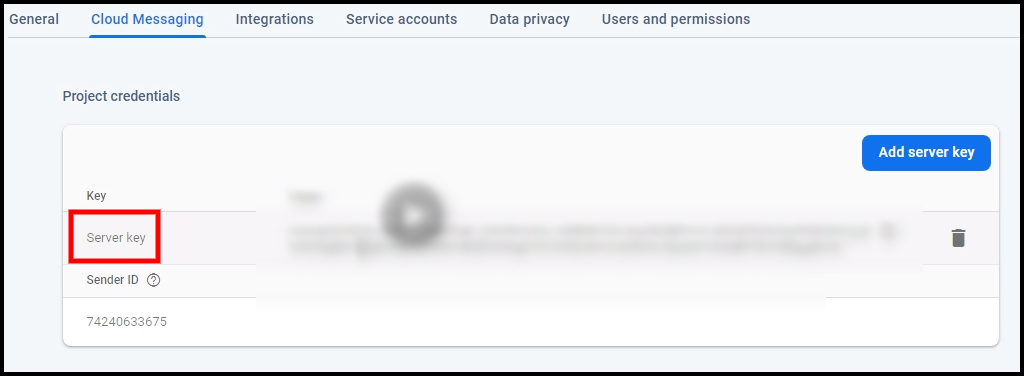
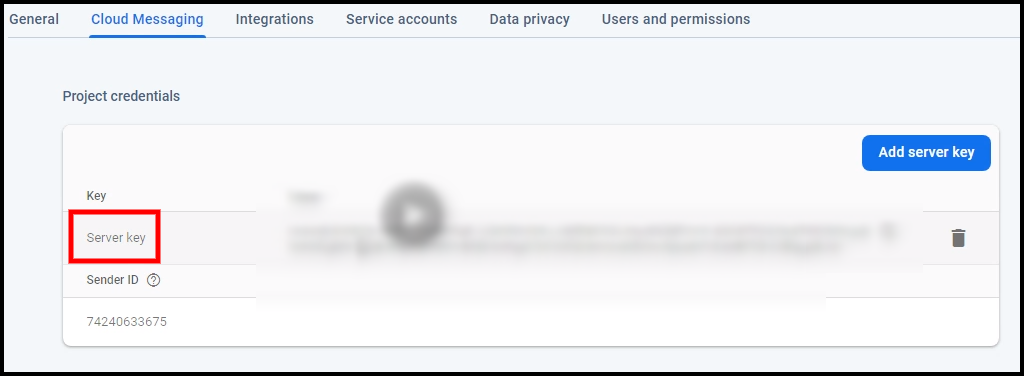
In the project settings, click on Cloud messaging settings. From here, you can directly get the server key.


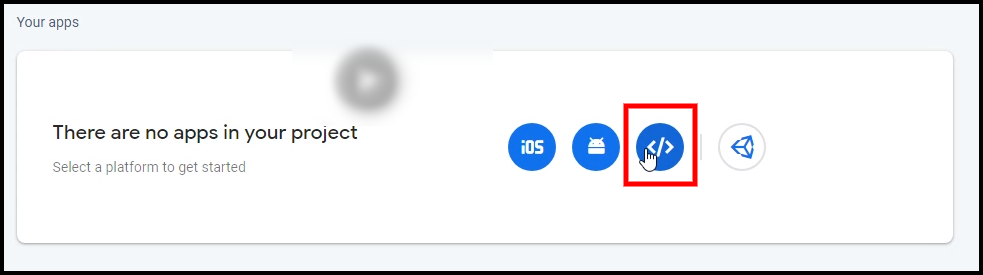
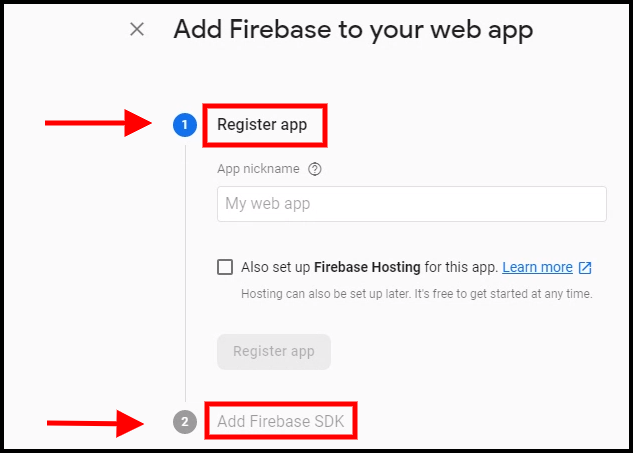
Step 6: Add your Web-App to Firebase

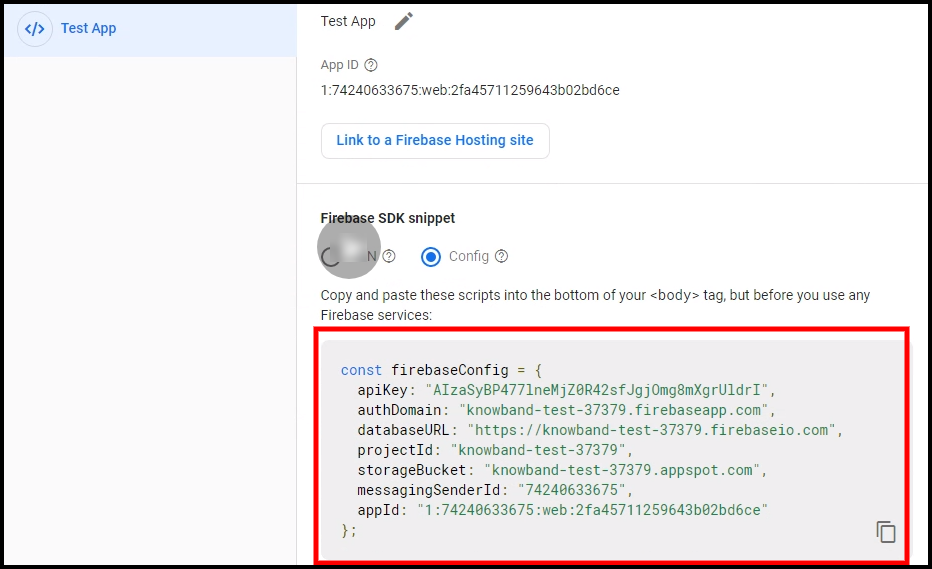
Step 7: Get other firebase related details and paste the same in PWA module admin panel.

Step 8: Get firebase server key from cloud messaging tab in Settings:

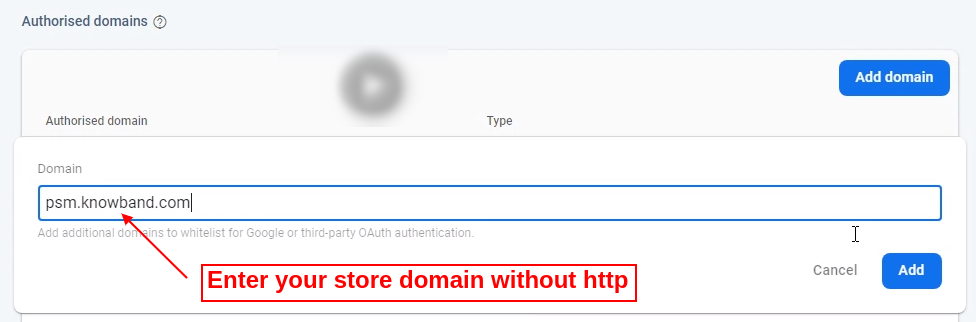
Step 9: Add your domain in authentication>>sign-in.

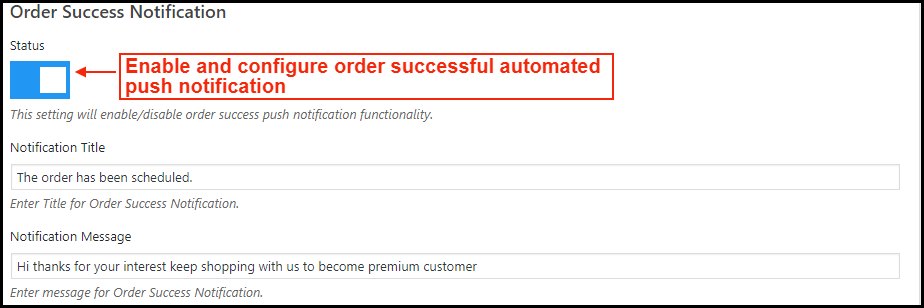
A) Successful Order Push Notification:

Enable/Disable automated Push Notification to be sent to app users whenever they place successful order from the WooCommerce PWA app.

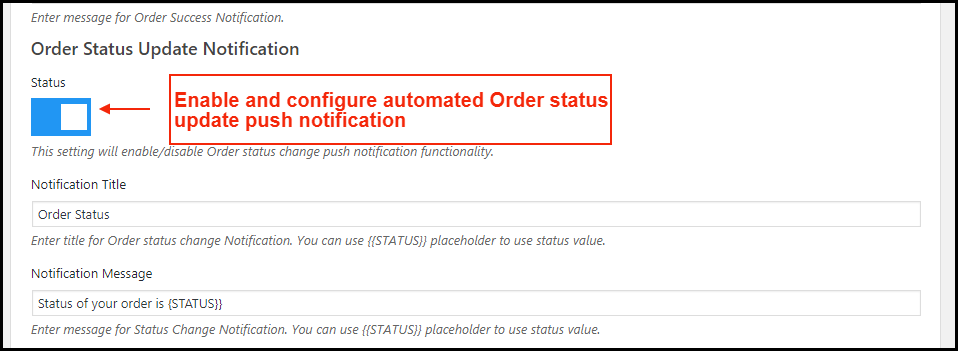
B) Order Status Update Push Notification:

Enable/Disable automated Push Notification sent whenever order status from the app gets updated. The WooCommerce PWA mobile app users can keep an eye on the details of previous orders.

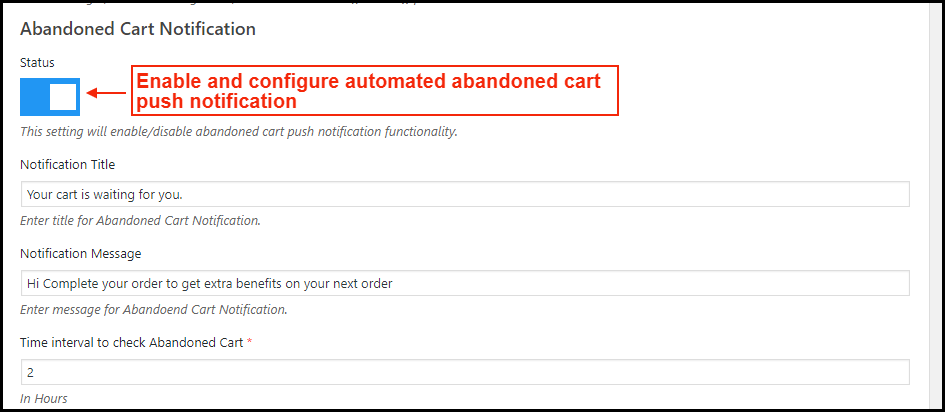
C) Abandoned Cart Push Notification:

Enable/Disable automated push notification sent to users abandoning products in cart without successful purchase. This push notification will be sent to users automatically after the entered time interval.

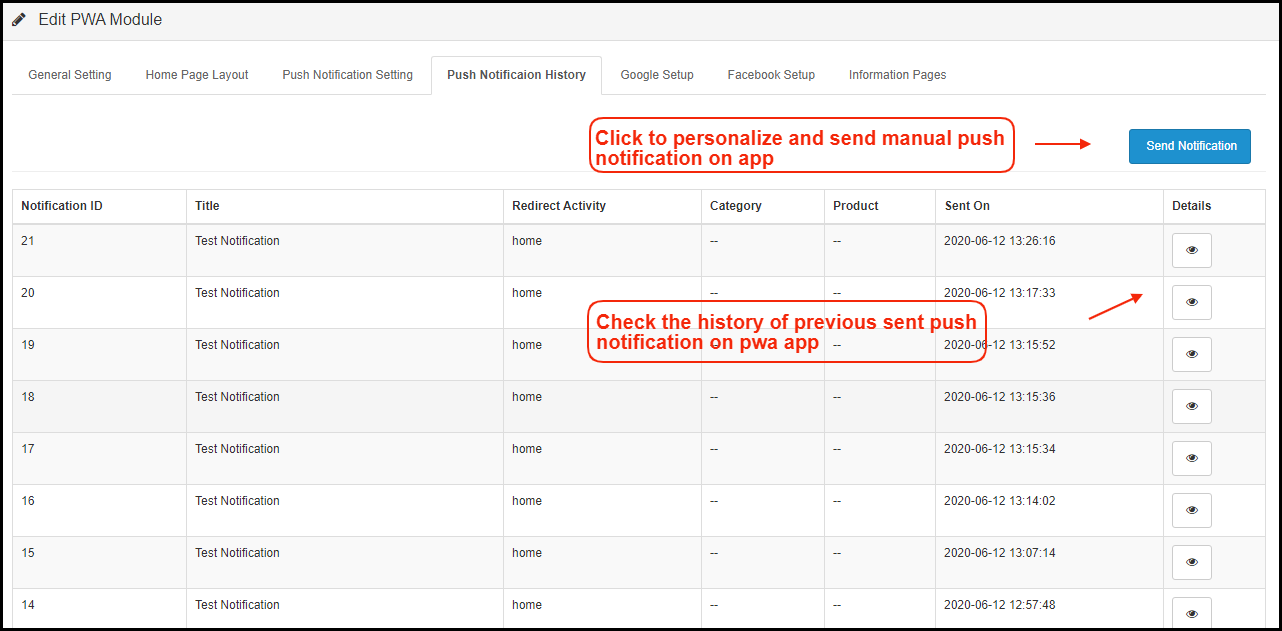
2.3 Push Notifications History

Complete push notification history of successfully sent push notifications will be seen here. The store admin can keep a track of previously sent push notifications from here.

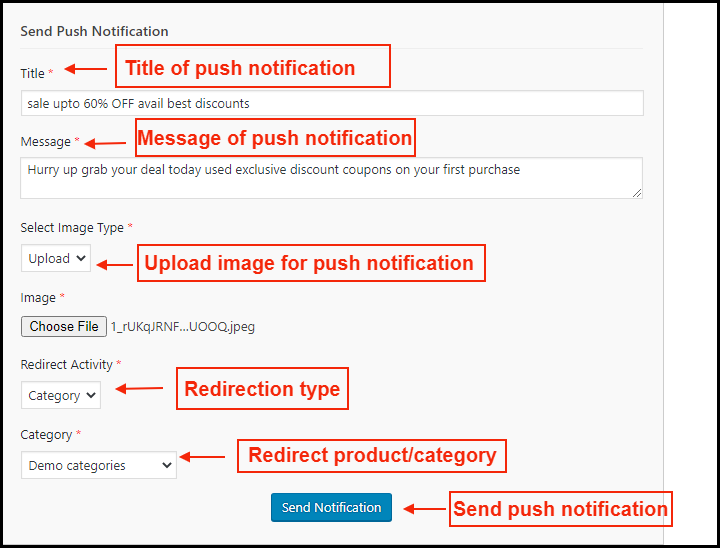
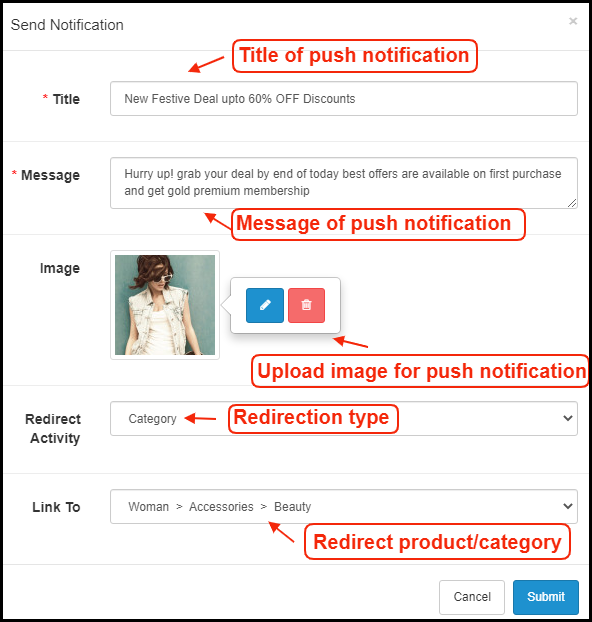
A) Send Notification:

Personalize and send push notification manually to PWA app users as per the need. The store admin can configure these notifications on their own & send them to WooCommerce PWA app users.

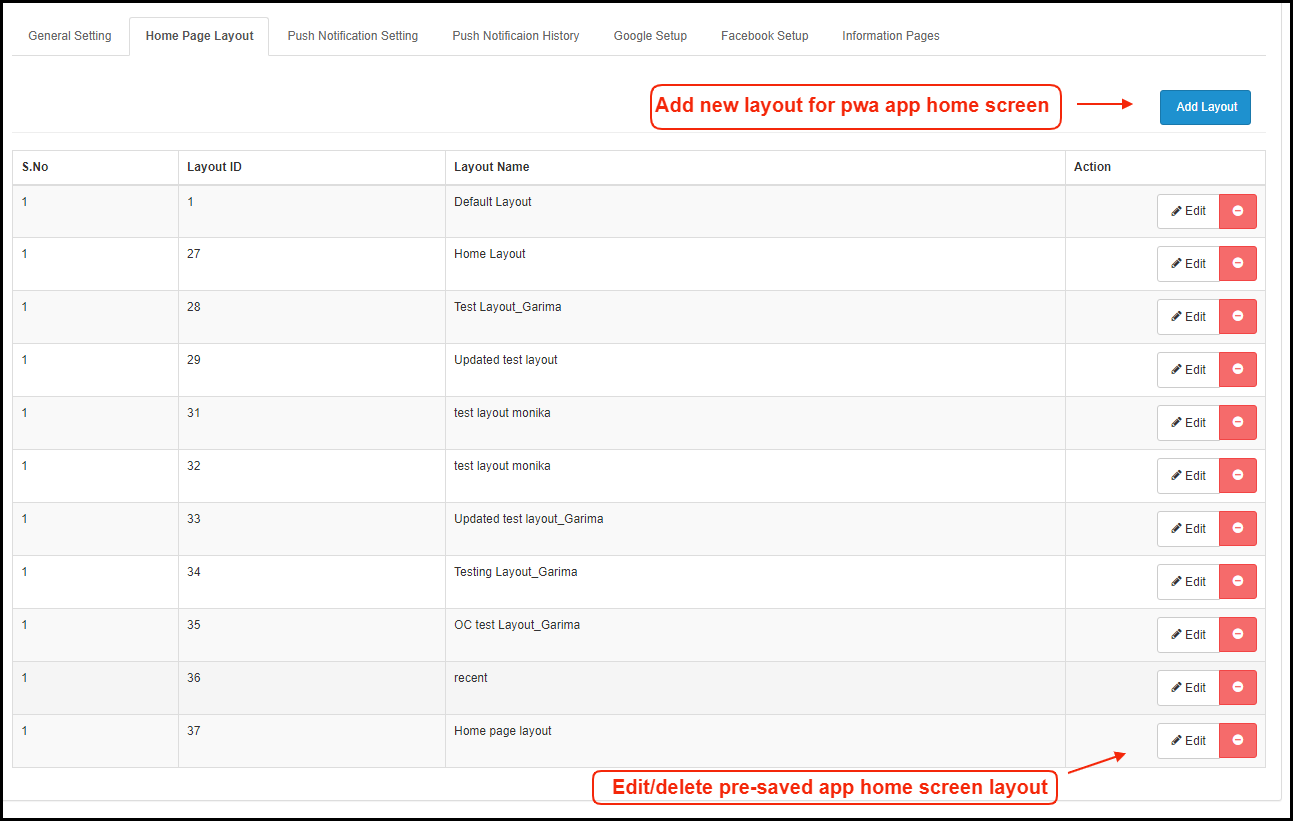
2.4 Home Page Layout:

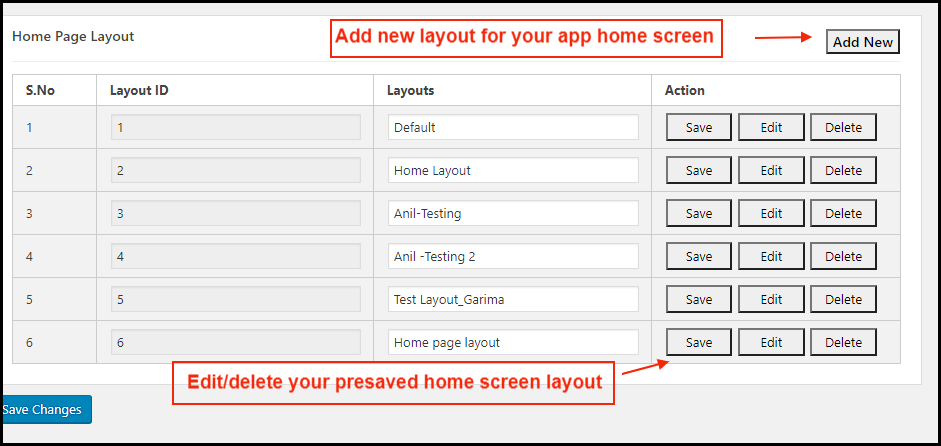
The WooCommerce PWA Mobile App offers a customizable Home Screen whose layout can be designed from the admin panel with a few mouse clicks and drag-drop. The attractive layout as per running festival, sale, occasion etc. can surely help in improving sales through WooCommerce PWA Mobile Apps.

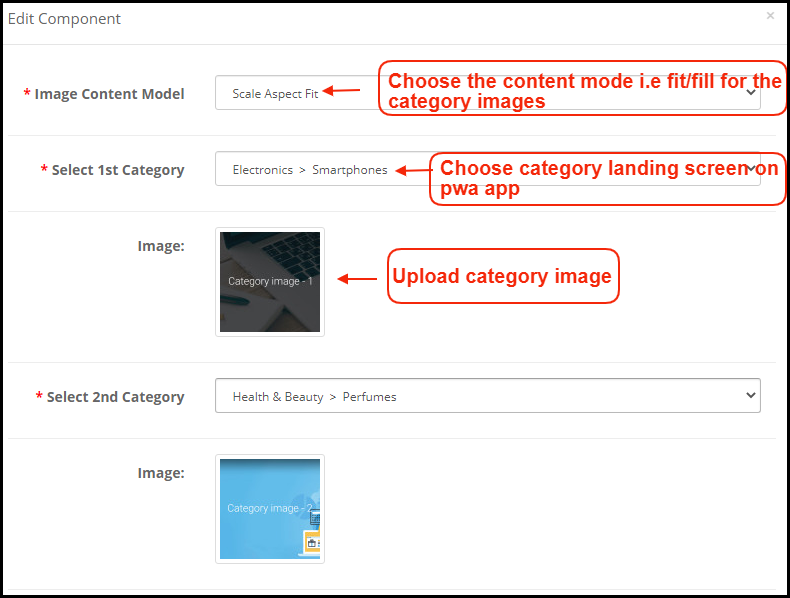
Add a new layout from this tab or edit the previously added ones. The home page configuration settings offers the following elements:

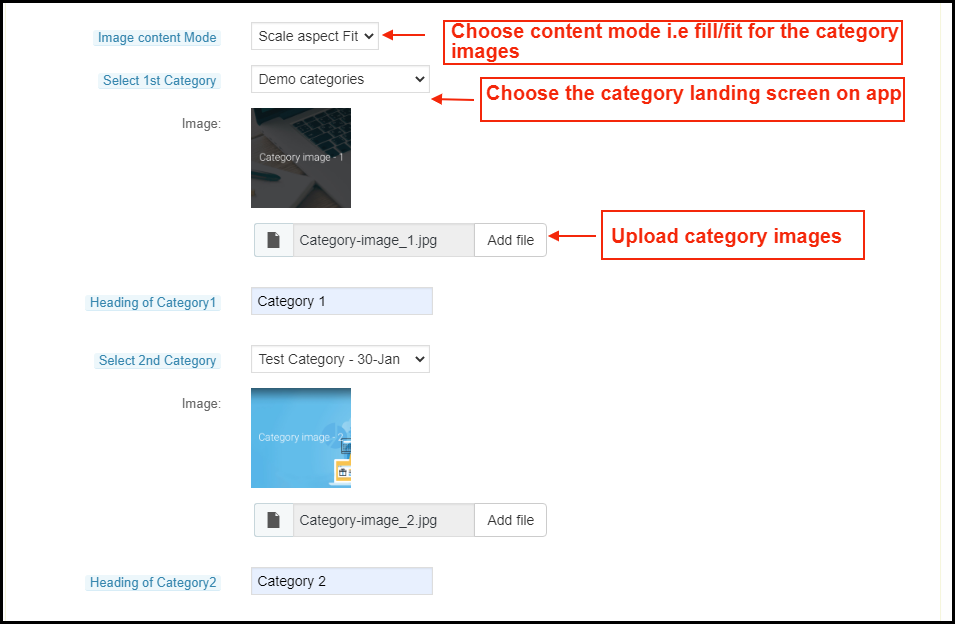
a) Top Categories: 

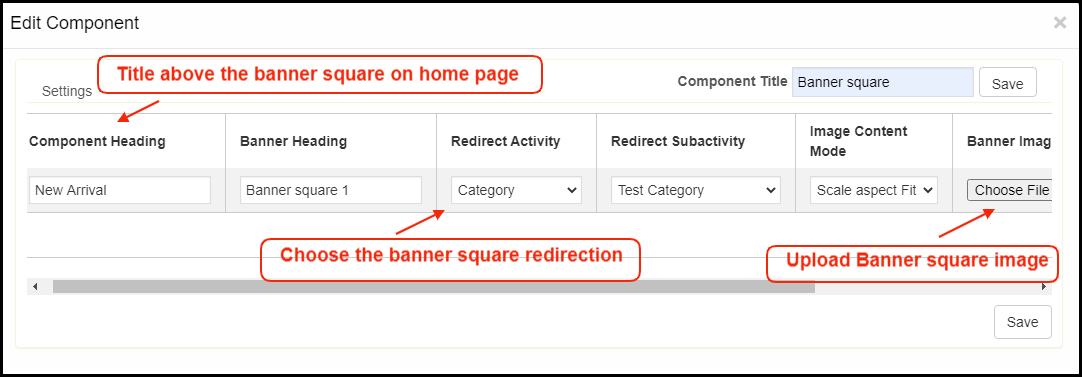
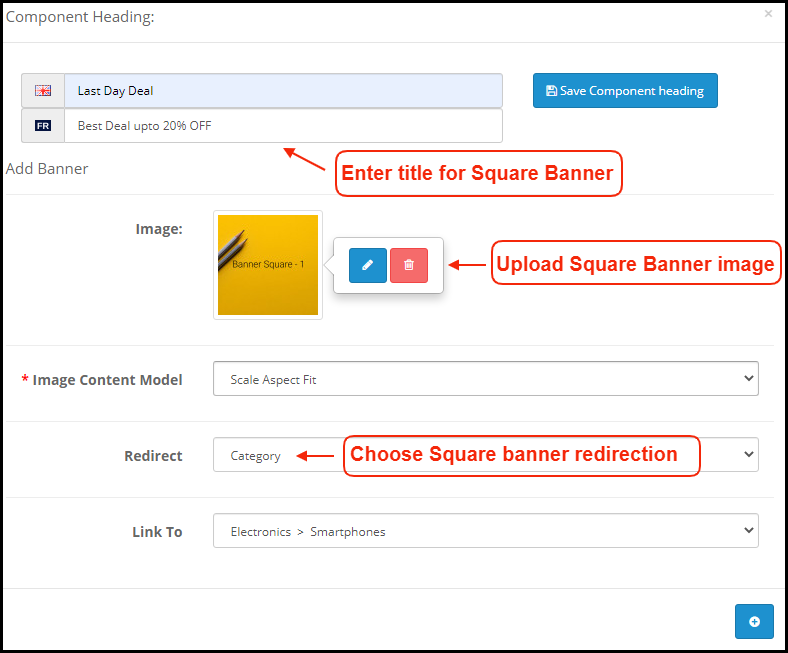
b) Square Banner: 

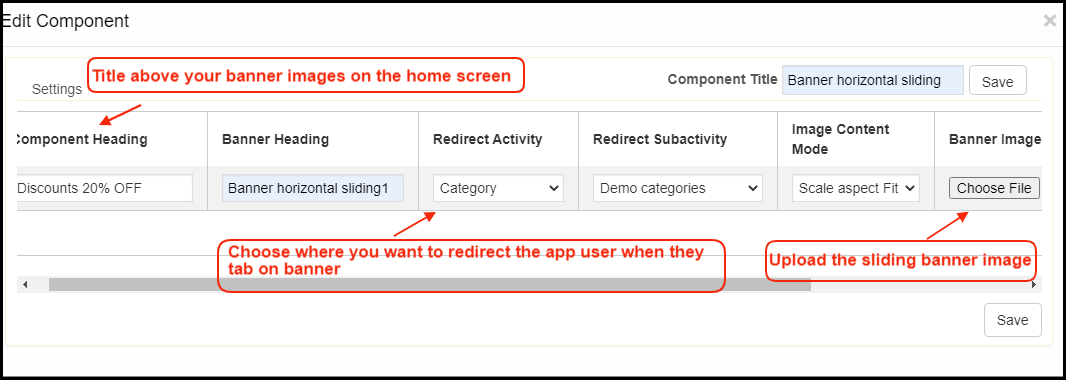
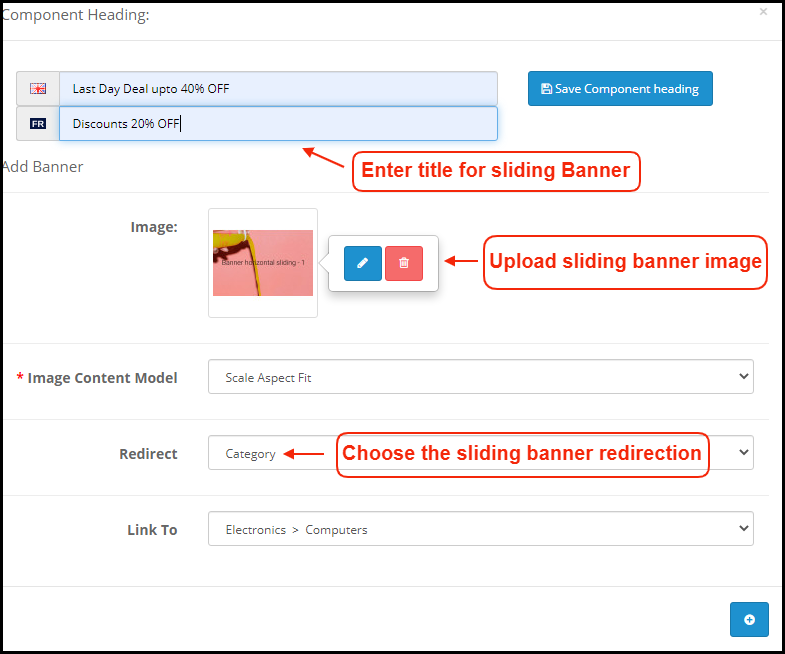
c) Horizontal Sliding Banner: 

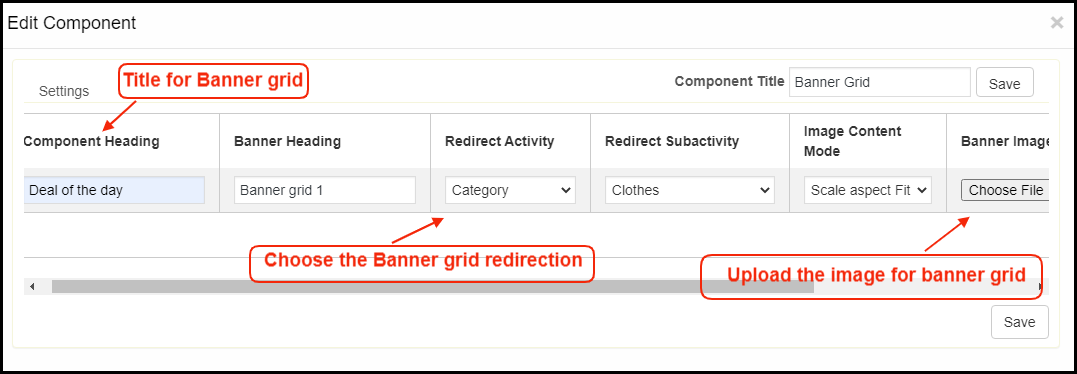
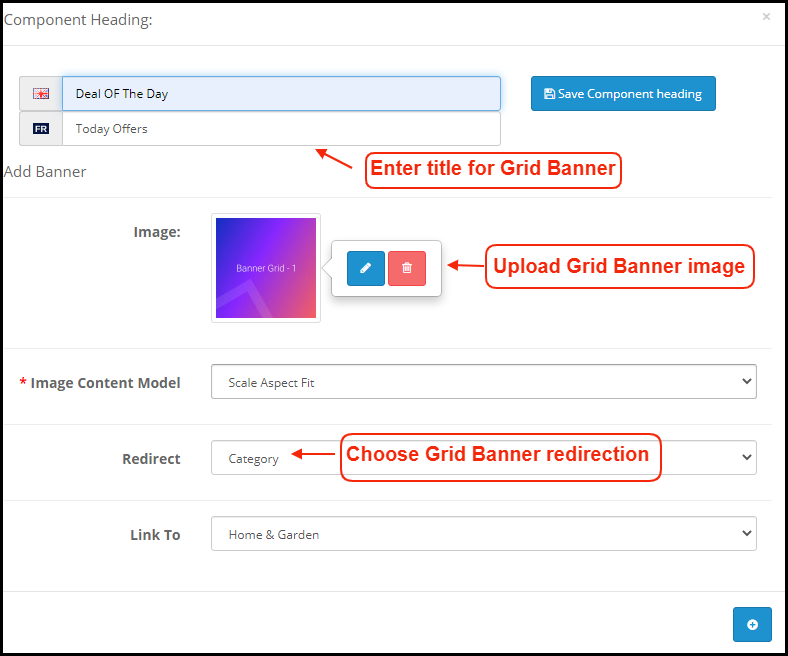
d) Grid Banners: 

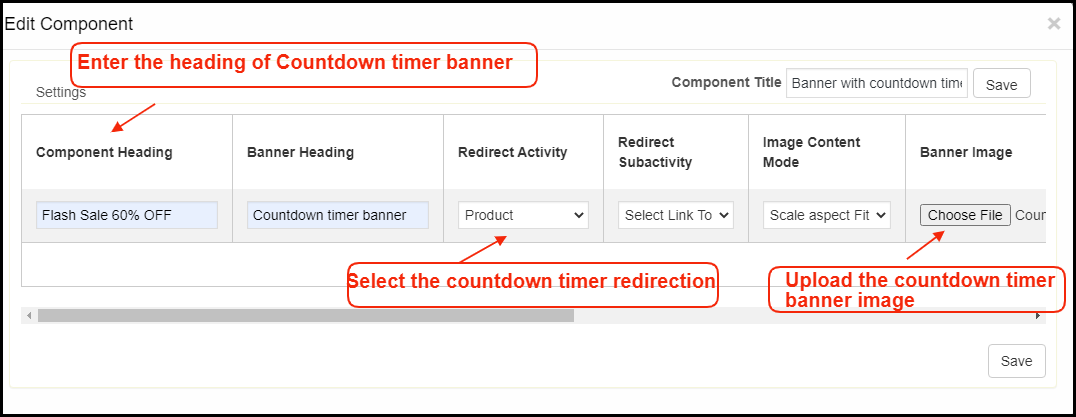
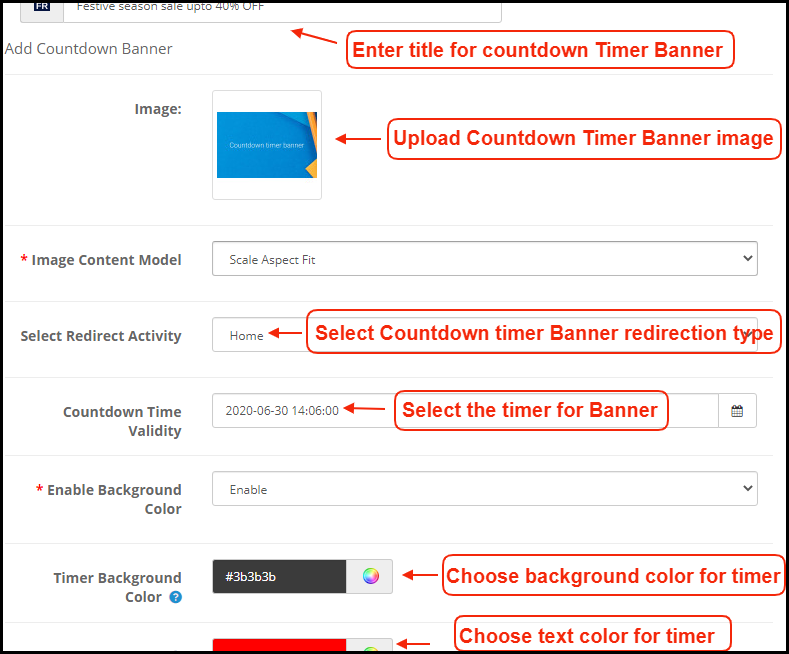
e) Countdown Timer Banner: 

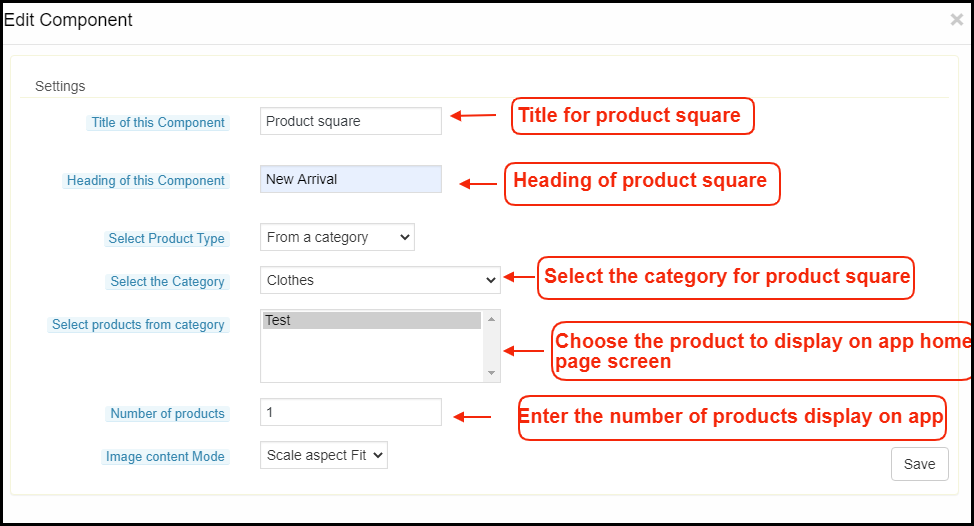
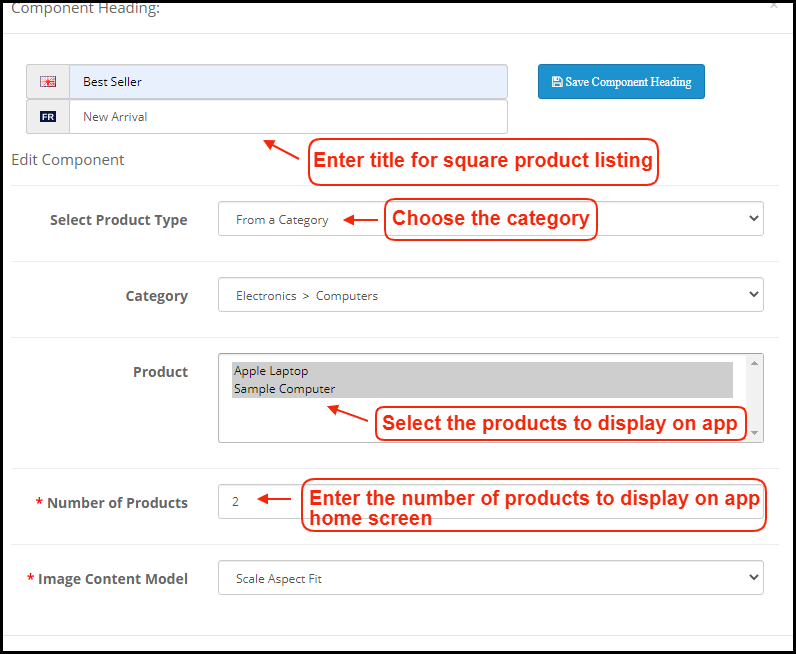
f) Square Products: 

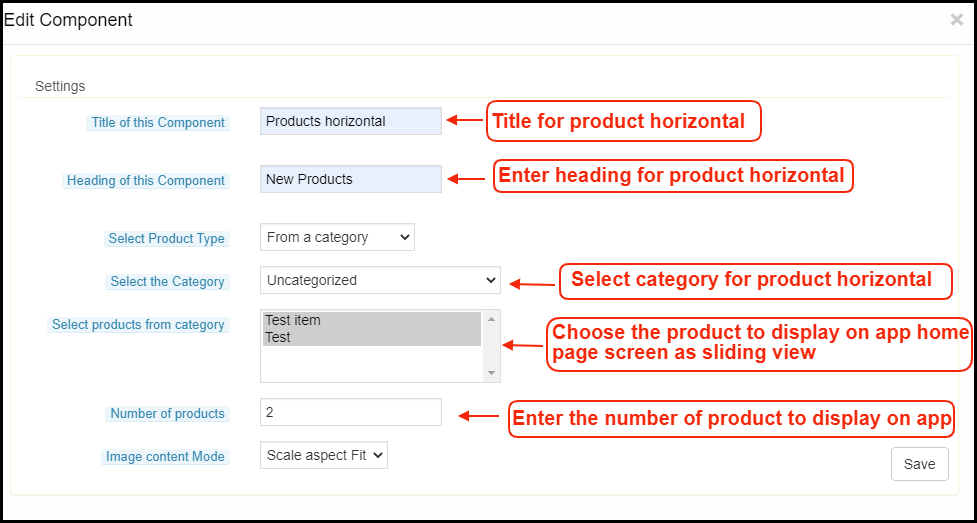
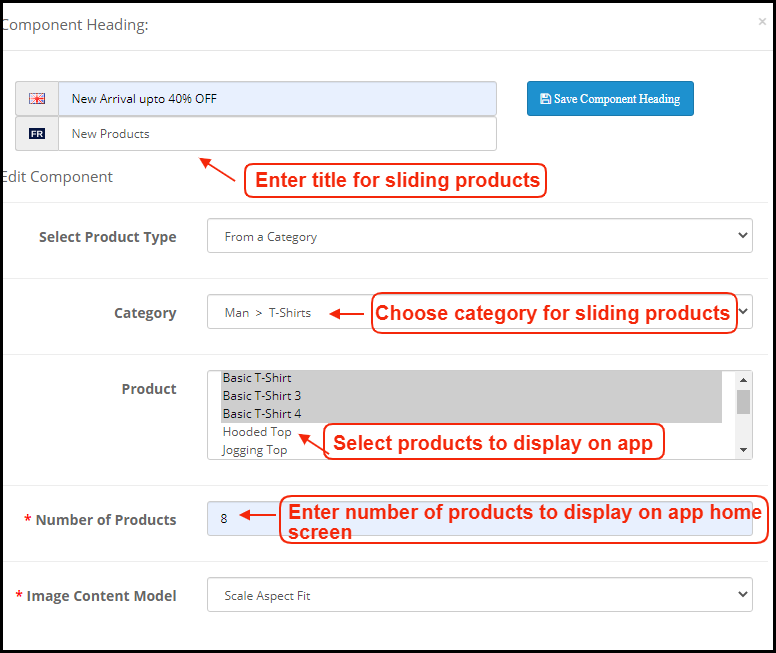
g) Sliding Products: 

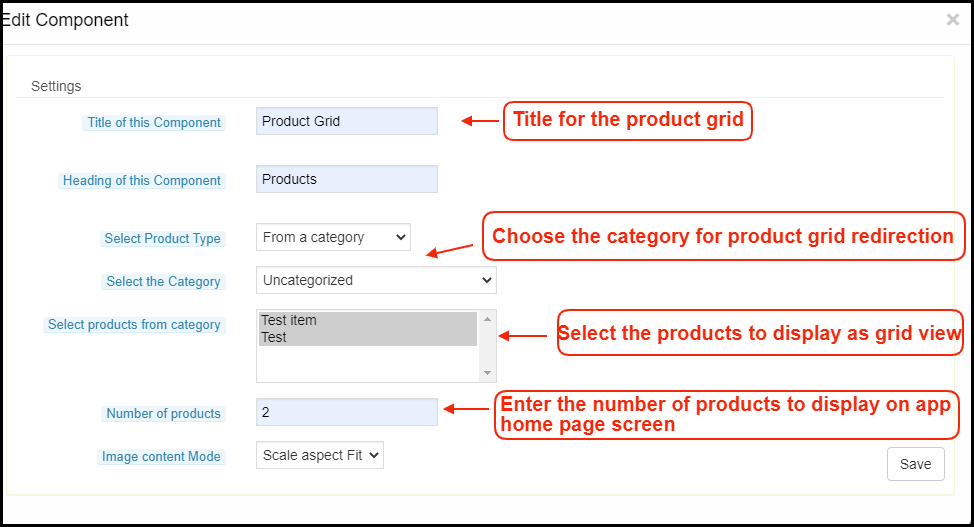
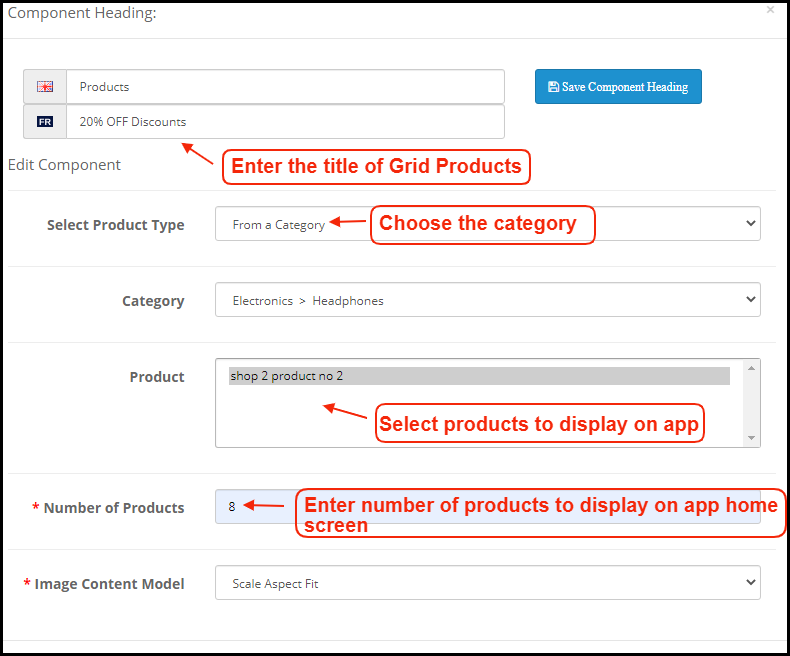
h) Grid Products: 

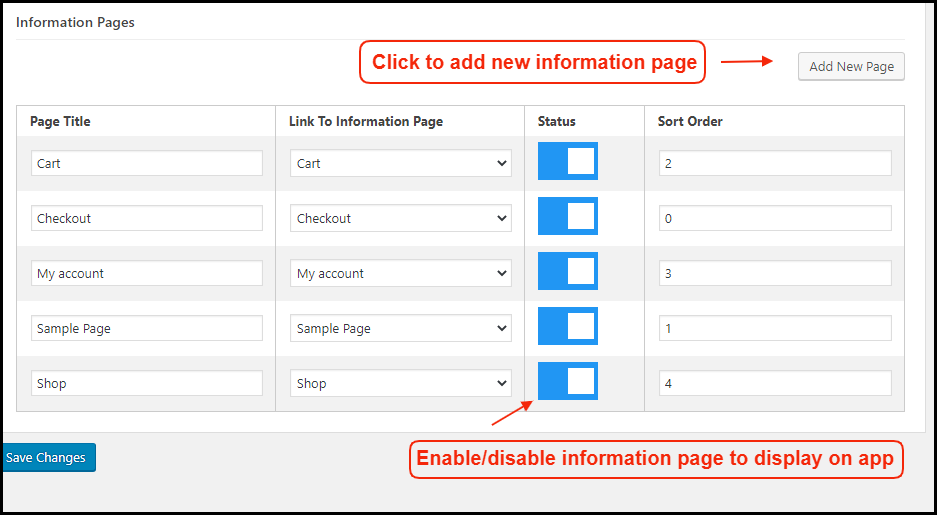
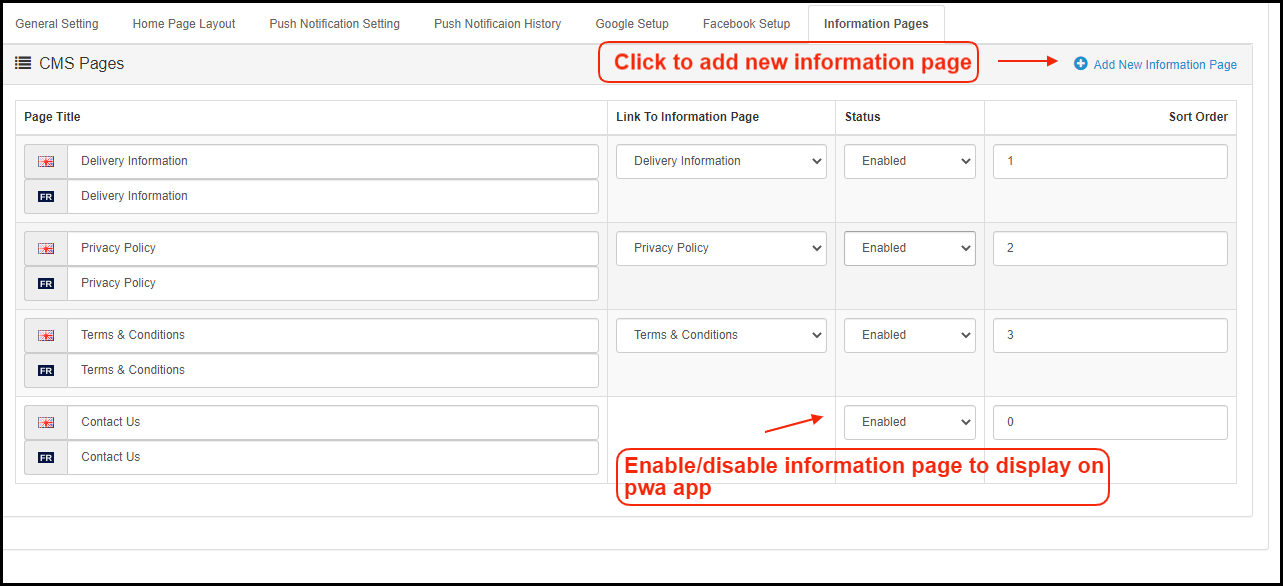
2.5 Information Pages:

Add CMS pages on the app and offer informative content to WooCommerce PWA Mobile App users.

How to get Facebook App details?

Facebook App can be created by following below-mentioned steps:-

Step 1: Go to given URL: https://developers.facebook.com/apps/

Step 2: Click on the “Add a New App” button.

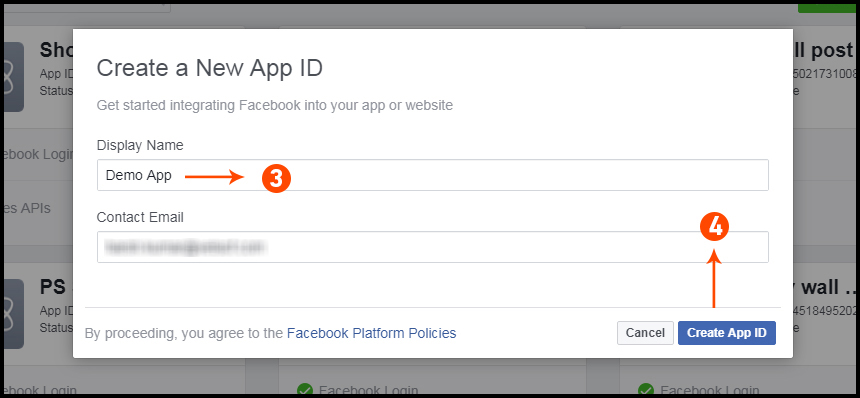
Step 3&4: Enter your App name and email id, then click on “Create App ID” button.

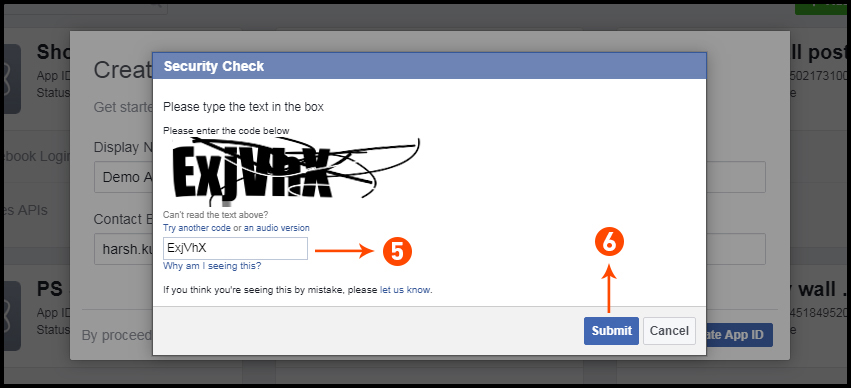
Step 5&6: After clicking on Create App ID you will have to go through a security check as shown:

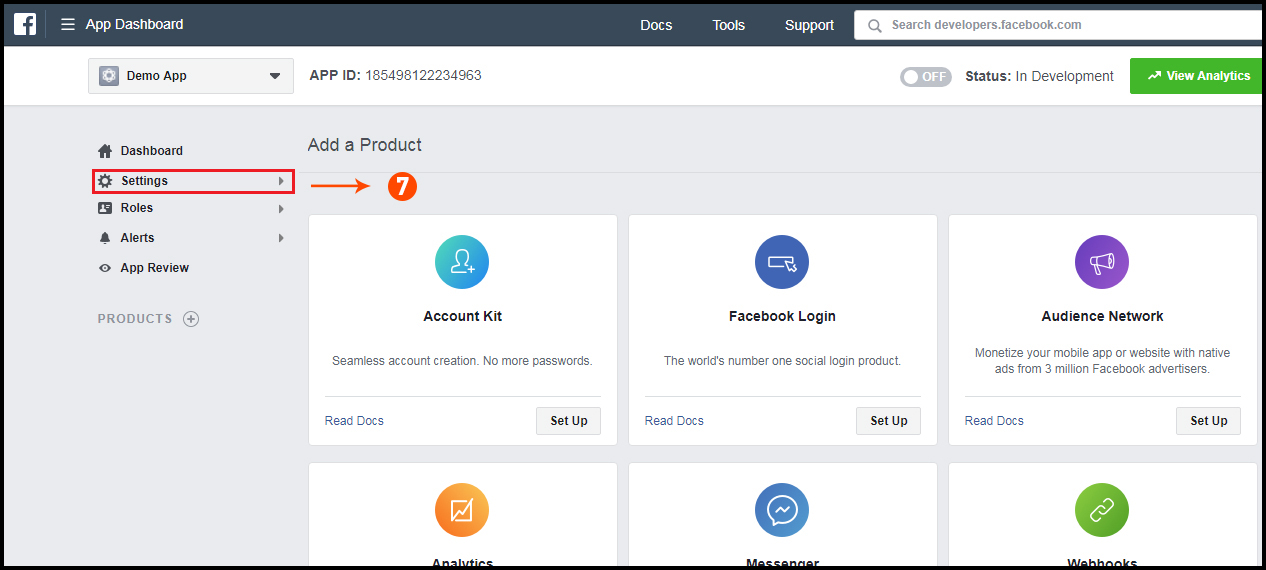
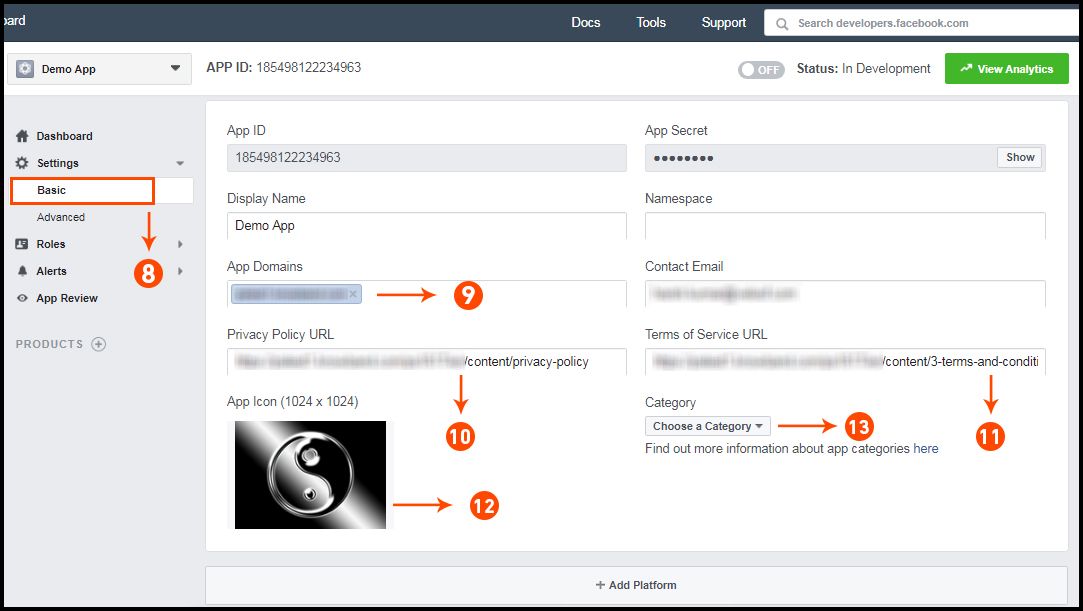
Step 7: Click on “Setting” tab.

Step 8-13: Two option will be available in the dropdown, Basic and Advanced, click on “Basic”. And then enter your “App Domain”, “Contact Email”, ”Privacy URL”, ”Terms and Conditions URL”, ”Add Logo”, ”Select Category” and click on “Save Changes” button.
App Domains:
yourdomain.com is correct
yourdomain.com/store is incorrect
www.domain.com is incorrect

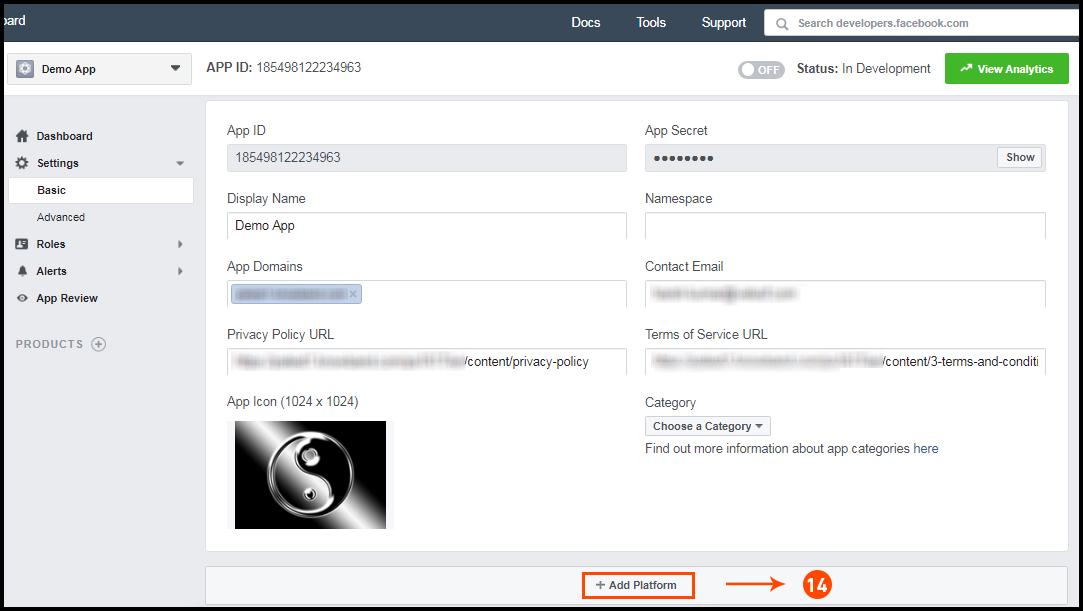
Step 14: Now click on “+Add Platform”.


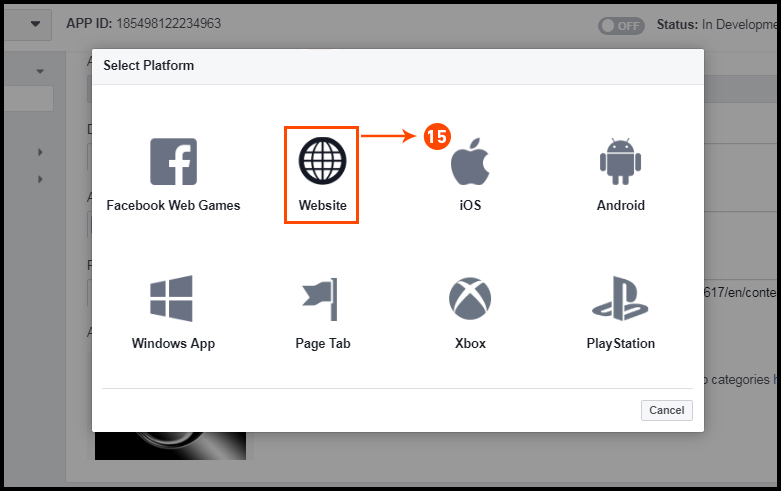
Step 15: 
And select Website as Platform.

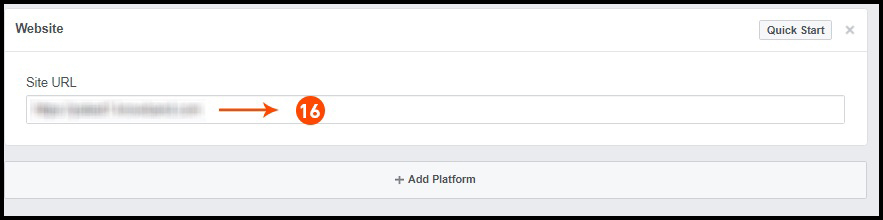
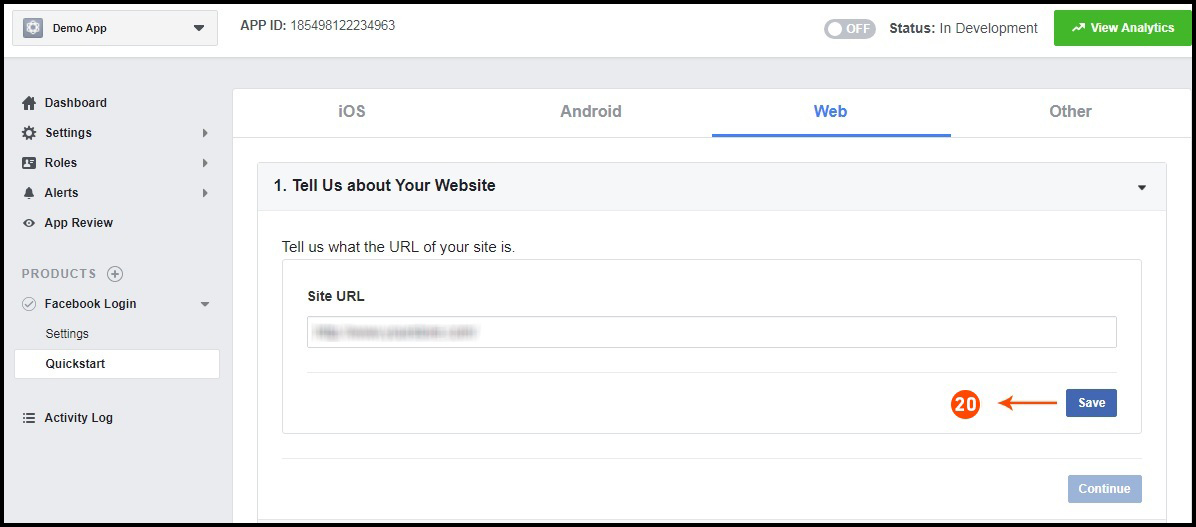
Step 16: Now Enter your site URL.


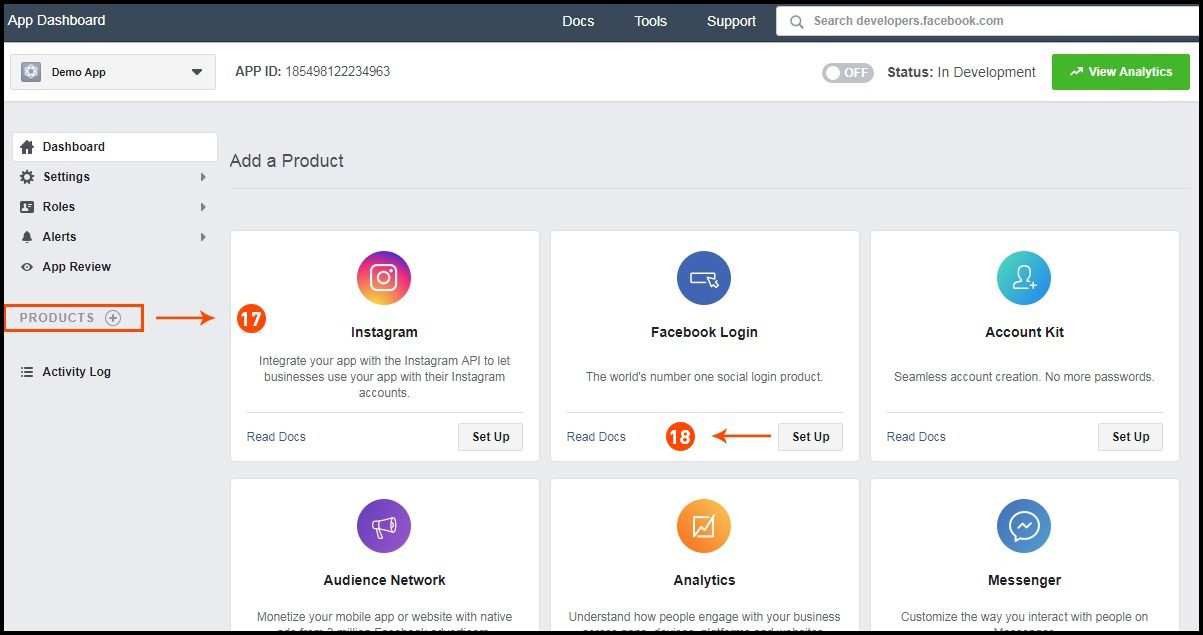
Step 17&18: Click on “Products+” and select Facebook login.


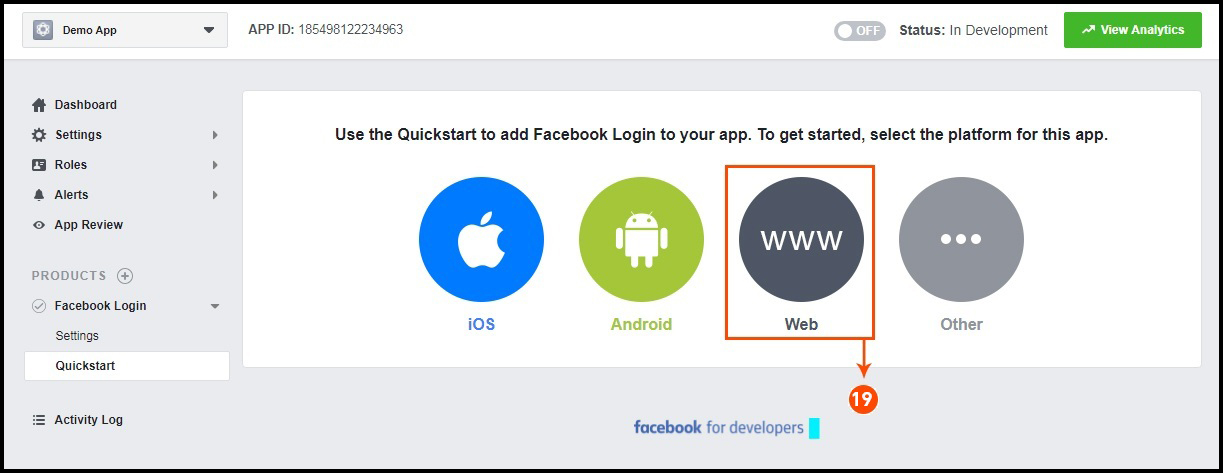
Step 19: Select web as the platform for the app.

Step 20: Now click on save.


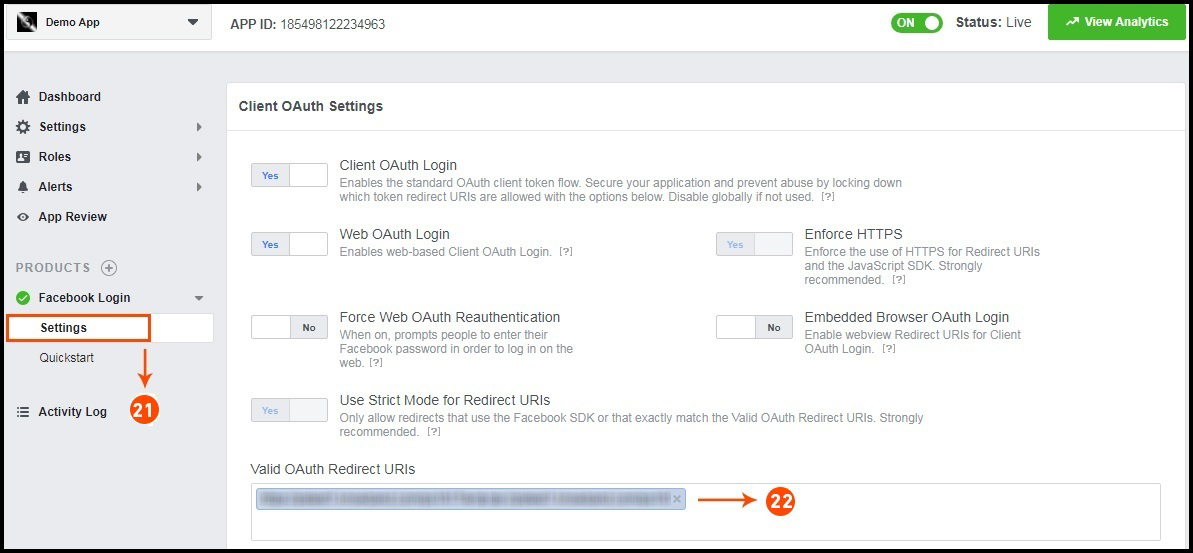
Step 21&22: Click on Settings and add a Valid OAuth Redirect URIs.
Valid OAuth Redirect URIs:
https://example.com/pwa-app/login

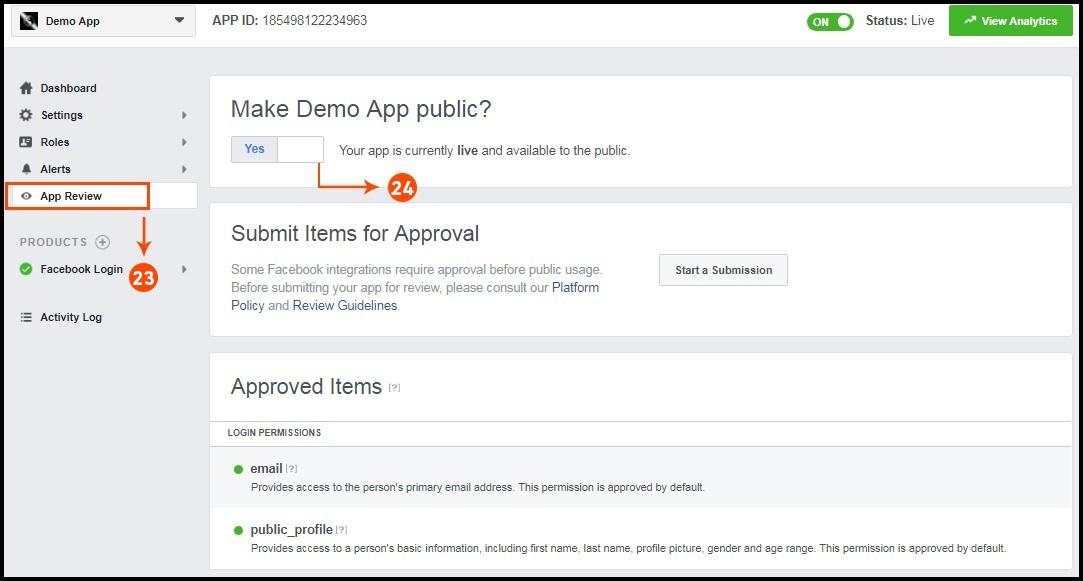
Step 23&24: Click on “App review”. And mark “Make ‘your app name’ Public” to Yes.


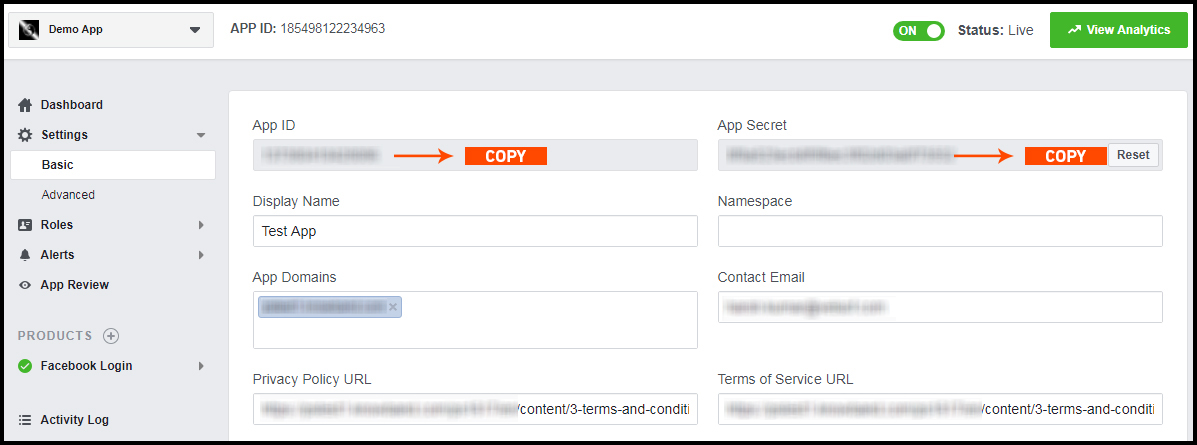
Final Step: Copy the App ID and App Secret and paste it into the fields provided in the module.

How to get Google App details?

  • Go to Google Developers Console
    (https://console.developers.google.com/project) or click on link given top right of the respective tab in module configuration page.
  • Now click on  Create Project on the left of the page.
  • Enter a name for your project and proceed to the next step.
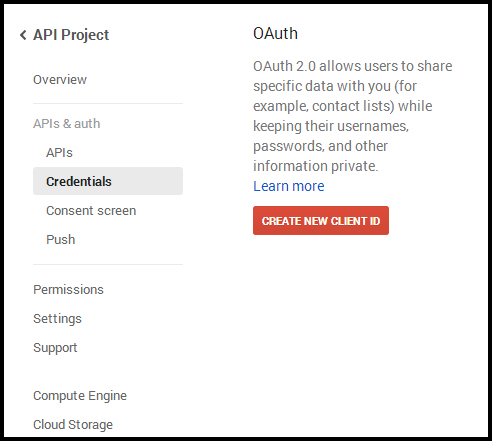
  • Now click on APIs and auth-> Credentials from the left menu as shown below.

  • Click Create New Client ID button from the right panel of the screen.
  • You may have to fill the form for Consent Screen before proceeding. To do so, that you have to click on Consent Screen in the left menu as shown in the image above.
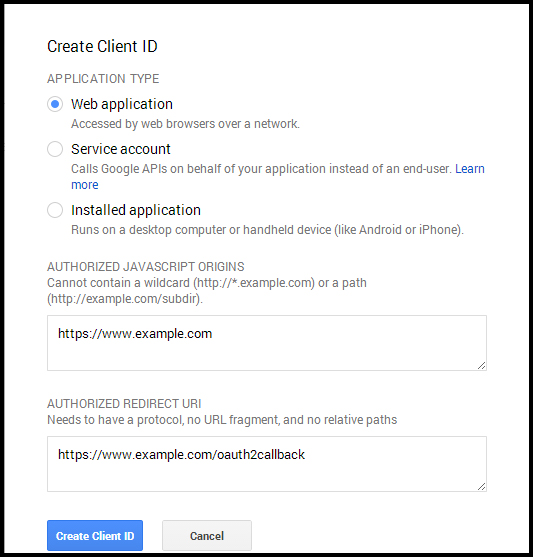
  • Fill the pop-up form with below details:

Application Type: Web Application.
Authorized JavaScript Origins: Your store domain name (https://www.yourstore.com).
Authorized redirect URI or URI of Loginizer redirect page:
https://example.com/pwa-app/login

  • Now click Create Client ID button to get your Client ID and Client Secret Key.
  • Now you can use the client secret and client ID to let your customers login to your store using their Google account.

3.0 Front End PWA Screens:

3.1 Home Screen:

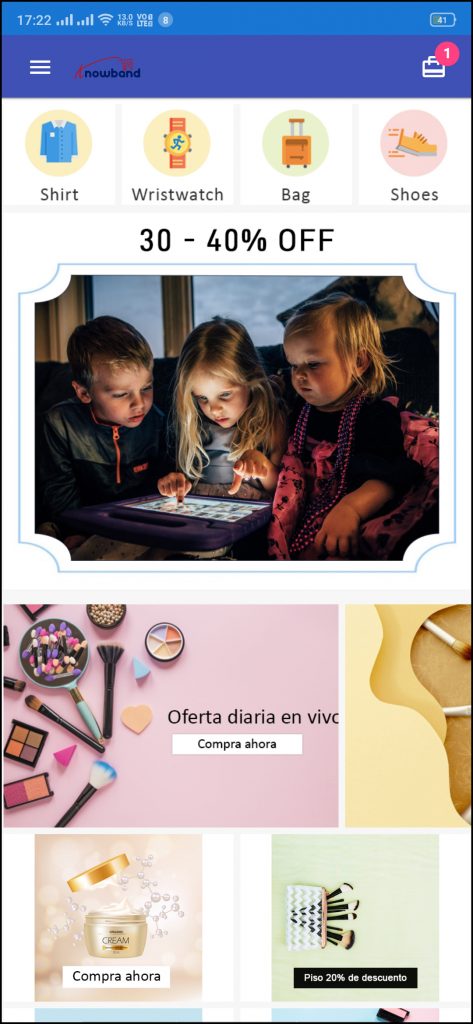
The home screen of the WooCommerce PWA Mobile App is fully customizable with the DIY editor as explained above in Admin Panel screens. Change app home screen look & feel anytime and offer more user-friendly & sale driven appearance.

1. Custom Layout:

Using various banner, slider, product elements, the store admin can create dynamic layout as per the need.

2. Brand Logo:

Use your store logo on the top header of the WooCommerce PWA app.

3. Shopping Cart Bag:

The shopping cart icon on the top-right corner of the home screen allows users to access cart screen and check added products.

4. Left Navigation Menu:

Browse the categories displayed in the PWA app with left navigation menu browsing.

3.2 Accordion Menu (Navigation Bar):

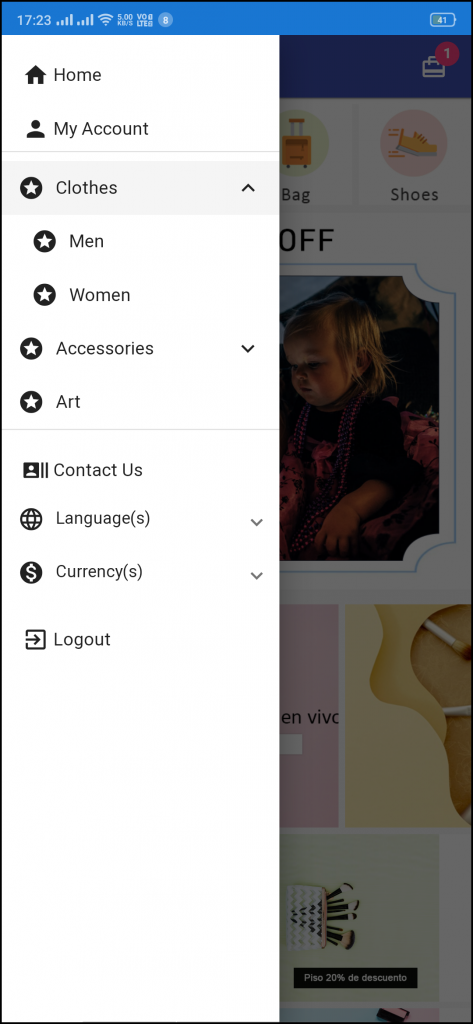
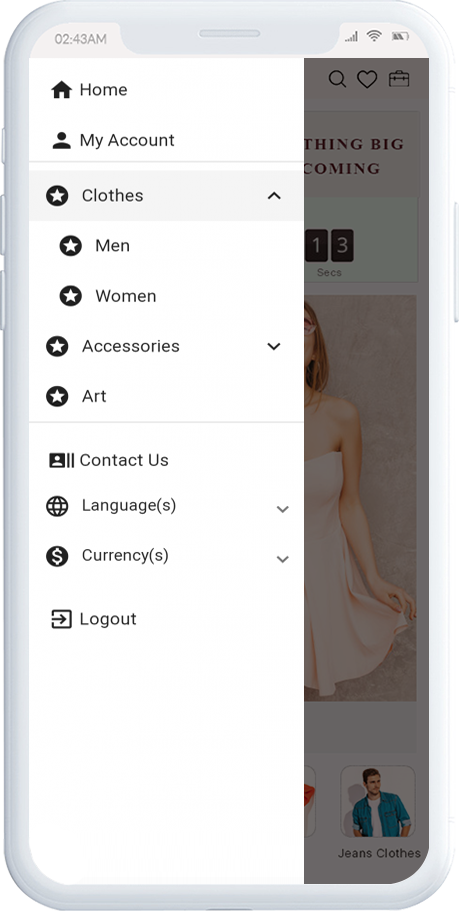
The WooCommerce PWA Mobile Apps comes with seamless and proper categorization available. The users can find relevant categories from the left navigation menu and browse products. Various CMS pages can also be added in the menu offering relevant content on App.

1. My Account

My Account option contains all the users’ personal information including shipping and order. The WooCommerce Progressive Web App shoppers can view and update the saved information.

2. Categories

Categories displayed in the left navigation menu of the WooCommerce Progressive Web App are the same as available on the eCommerce store.

3. CMS Pages

Various CMS pages like About Us, Contact Us, Terms & Conditions, etc. can be accessed from here. These information pages can be added from the admin panel of the extension.

4. Language(s)

The language option allows PWA app users to view the web-app in their desired language.

5. Currency(s)

All available currencies on your website are displayed here on the WooCommerce PWA app.

6. Login/Logout

Users can easily sign-in/sign-out from the WooCommerce PWA app via this option.

3.3 Category Screen:

Clutter-free category screens with the list and grid view allow the users to choose what’s best for them from a specific category. The entire store inventory will remain in-sync with WooCommerce PWA Mobile App and new additions and changes even get updated in real-time.

1. List & Grid View:

The categories on the PWA app for WooCommerce can be browsed in both list and grid view.

2. Product Sorting:

The sorting option allows online shoppers to narrow down the products in the desired sort order and find the right one.

3. Product Filter:

The WooCommerce PWA Mobile App offers the option to filter products simplifying the product search. Online shoppers can find the desired products under categories using filters for various attributes like size, color, price, etc.

3.4 Product Screen:

The product screen of the WooCommerce Progressive Web App is as simple & intriguing as it could get. With all the necessary options and information about the product, it becomes a matter of minutes for users to be sure about the product which he/she is about to purchase. Multi-images are available for the product with In stock and Out of stock options.

1. Product Info & Care:

The complete product information as available in the inventory will be displayed here.

2. Short Description:

Users get to read the short description of your product to quickly make up their minds about the purchase.

3. Product Options:

All the options related to the product like size, color, etc. are displayed here.

5. Add To Cart:

This button allows users to add products into the cart. The users can further process the cart for purchase.

6. Product Social Sharing:

The sharing option for the product allows users to share products on multiple social channels.

3.5 Login Screen

The WooCommerce PWA Mobile App offers one-tap social login options & make the sign-in/registration process more seamless. The WooCommerce Progressive Web App offers Google and Facebook login.

1. Login:

The app users can easily authenticate & login to PWA apps using their previous email login credentials.

2. Sign Up:

All the new app users can sign-up & create their account on the store from the WooCommerce PWA App. The sign-up form asks for only the necessary details to create an account.

3. Login with Facebook:

The users can log in to the PWA app using their Facebook Account Credentials.

4. Login with Google:

The users can log in to the PWA app using their Google Account Credentials.

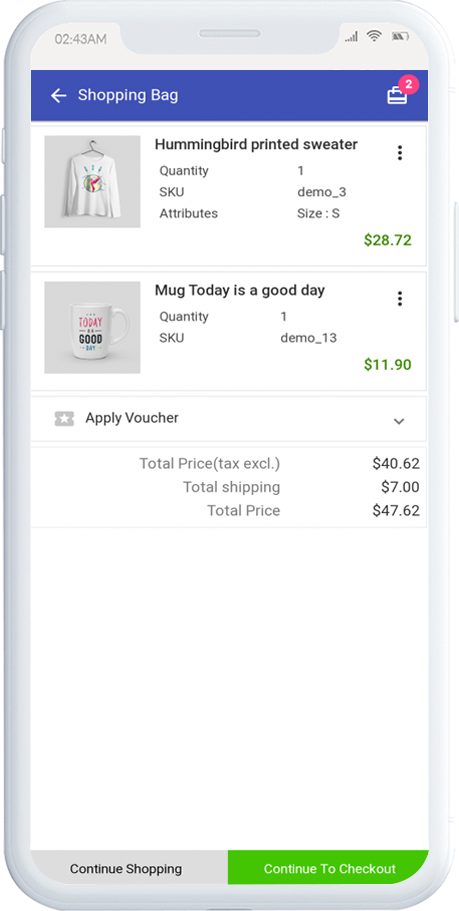
3.6 Shopping Cart Screen:

The Shopping Cart screen of the WooCommerce PWA Mobile App will display all products added into the shopping cart. The app users can view Product name, quantity, total price & shipping cost. This screen has the following options:

1. Apply Voucher:

This option allows users to use website coupons and grab discount offers.

2. Total Product Price:

The users get to view the complete cost of their shopping bag before proceeding further. It is automatically updated according to any update with product quantity or new addition.

3. Update Product Quantity:

The PWA app users can even update the product quantity with the “Update Quantity” option.

4. Remove Product:

The app users can simply remove the product from the cart by simply tapping the “Remove” option.

5. Continue Shopping:

The app users can leave the cart to browse more products on your app.

6. Continue To Checkout:

The PWA app users can proceed further to the checkout & payment screens just by tapping the “Continue To Checkout” option.

3.7 Checkout Screen

The Progressive Web App for WooCommerce has a simplified single-screen checkout with only relevant information. The app users can view complete checkout details like shipping details, billing details, order summary, order comment, payment summary.

1. Shipping & Billing Details:

This screen provides details of the shipping & billing addresses saved by the user. The user can also edit/save the new shipping address if needed.

2. Order Summary:

The app users get to view product details before making payment.

3. Shipping Methods:

All available shipping methods are displayed here. Users can choose the one suiting their needs.

4. Order Comment:

Users can also add any comment related to their order which will be visible to store admin on the order web-page in the backend.

5. Payment Summary:

This section displays the complete breakdown payment details involved with the purchase.

6. Proceed To Payment:

The PWA app users will be re-directed to the Payment screen after tapping the “Proceed To Payment” button.

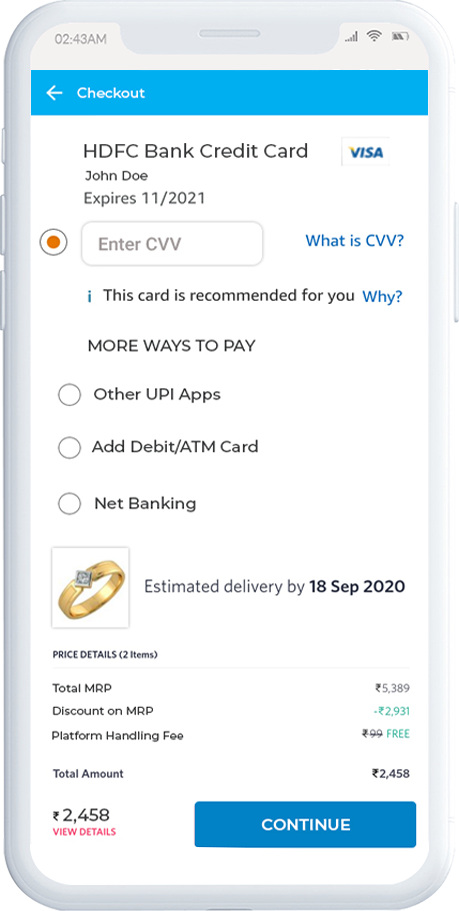
3.8 Payment Screen:

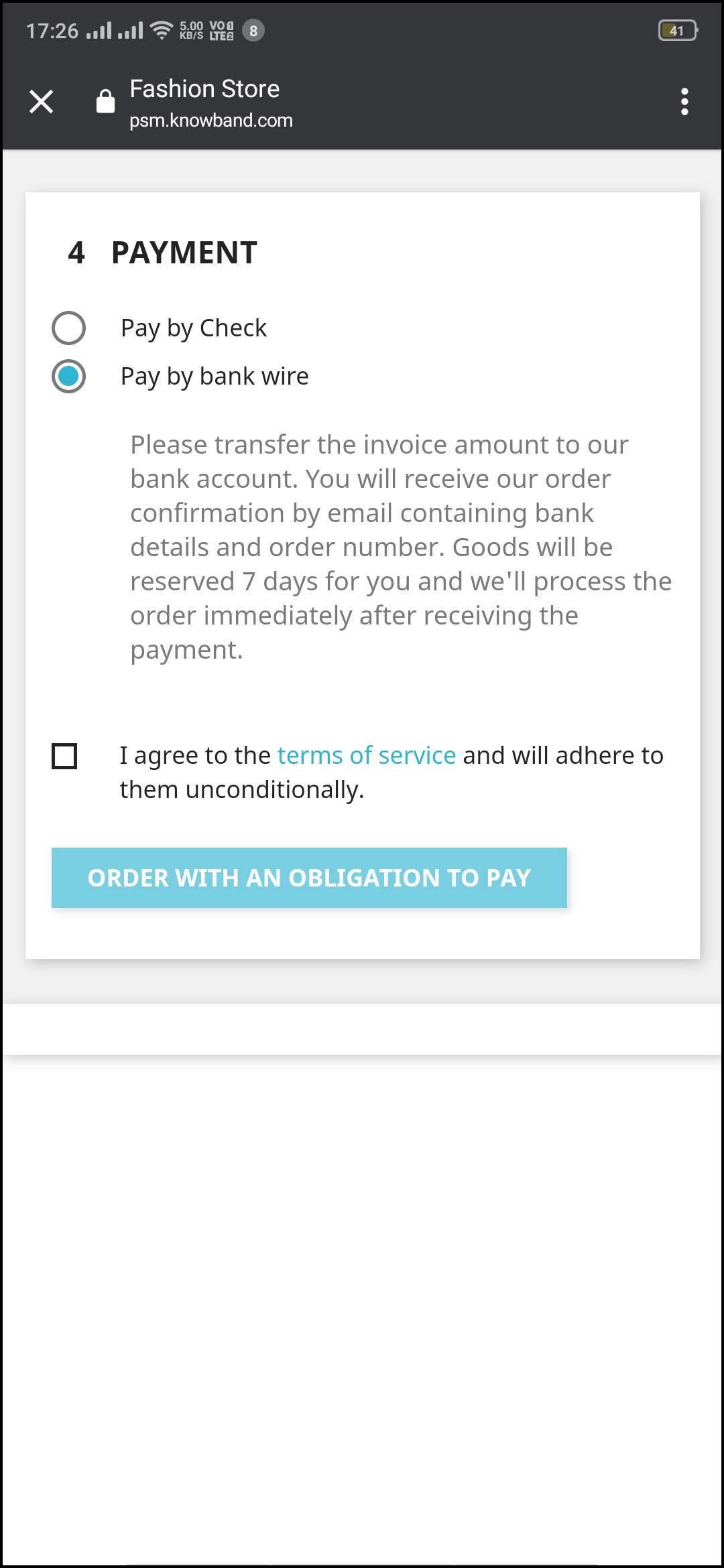
The payment screen of the WooCommerce PWA App has all web-view payments available on the store. Online shoppers can find similar payment experiences on both websites and apps.

3.9 My Account Screen

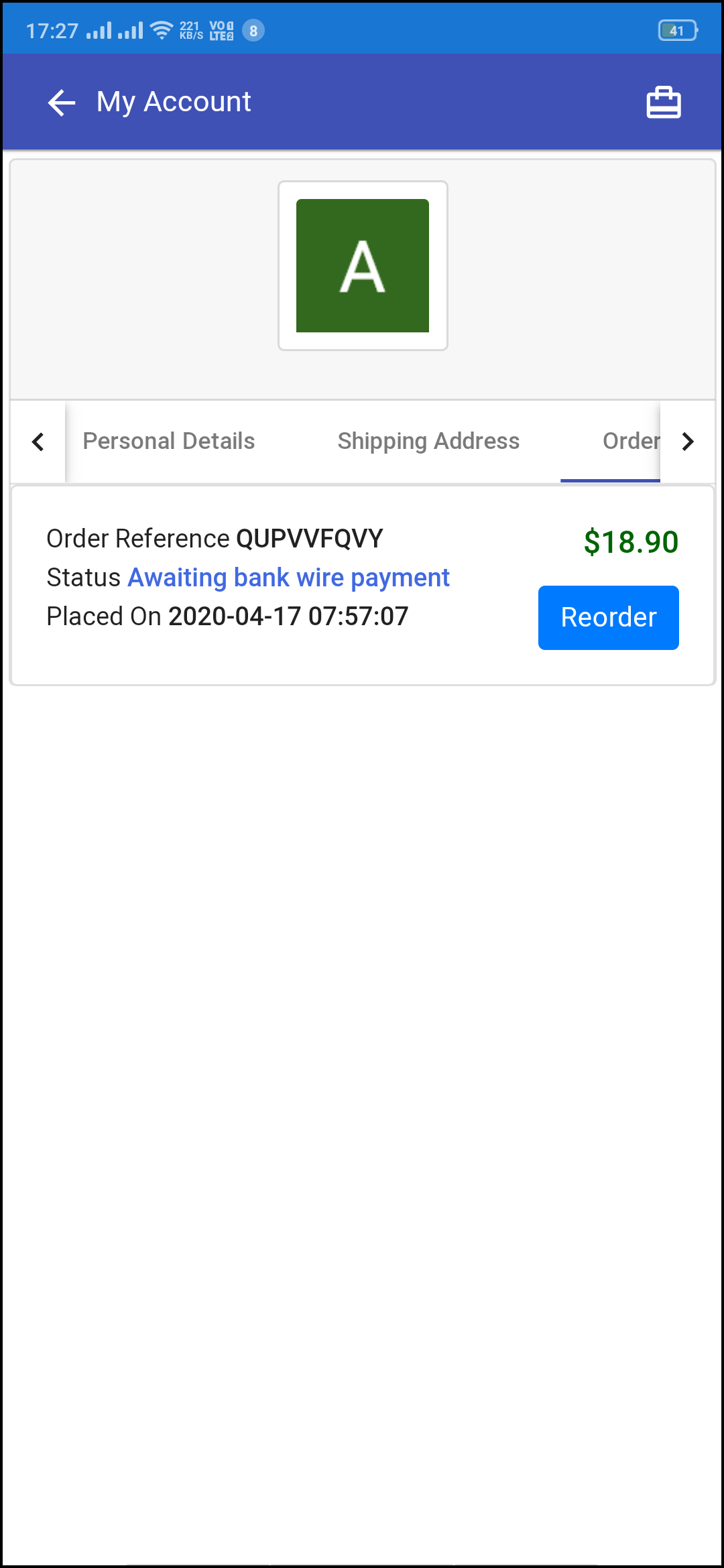
My account screen of the WooCommerce PWA Mobile App allows online shoppers to view their complete details saved on the Progressive Web App. This screen also displays a list of previous app orders as well.

1. Personal Details:

Users get to view & update their pre-saved personal details on PWA Mobile App.

2. Shipping Address(s):

The app users can see the complete list of pre-saved shipping addresses in the PWA app.

3. Order Details:

The app users can get to view the complete list of the previously placed orders from the PWA app and their details.

4. Re-order feature:

There is a direct re-order button on the My Account screen of the PWA app. All the previous products under this order will be added into the cart with just a single button.

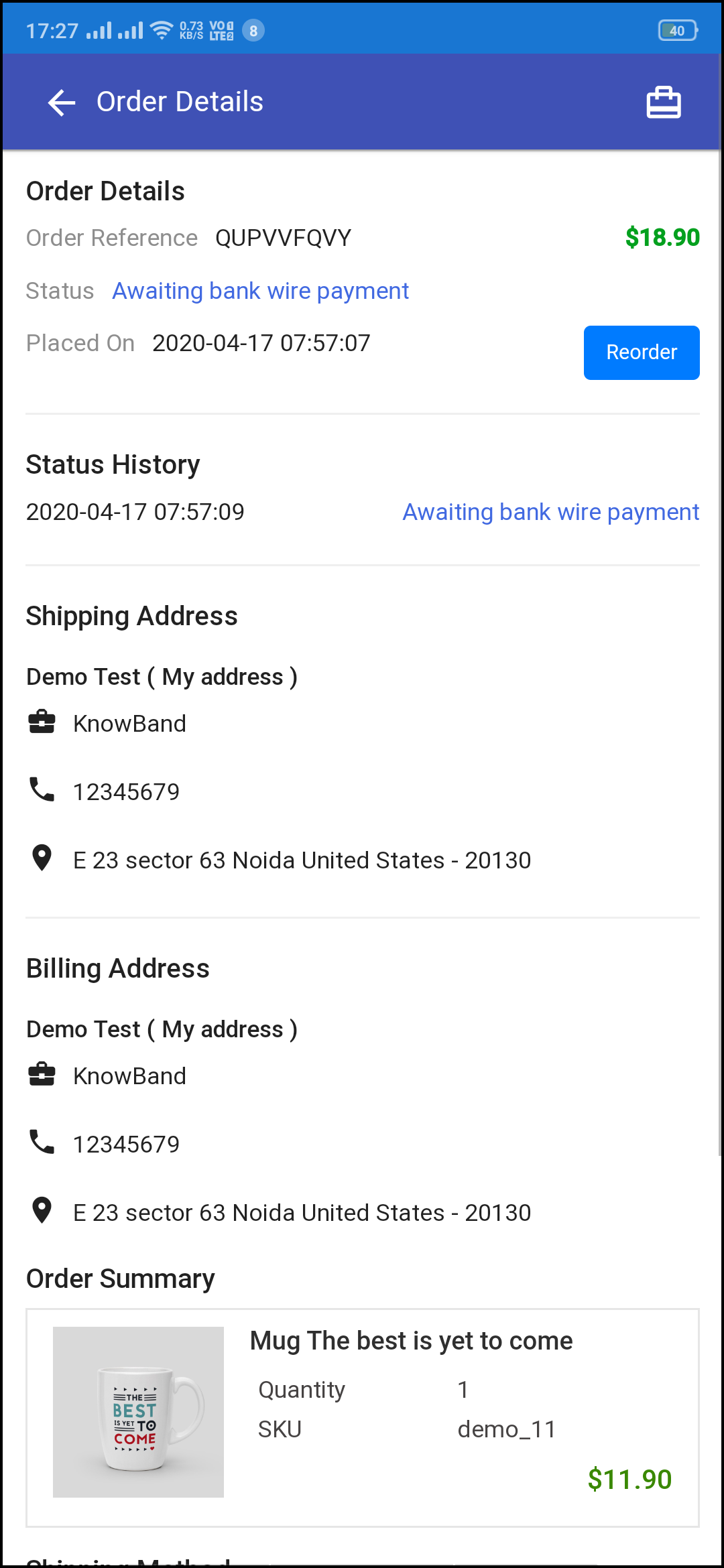
3.91 Order Detail Screen

The order details screen of the WooCommerce Progressive Web App provides complete details of specific orders from the PWA app. Users can easily view shipping address, product summary, shipping and payment method, and total cost summary, etc. It even offers the option to keep a track of status of order and delivery.

OpenCart Progressive Web App(PWA) – User Manual

1.0 Introduction

This automated OpenCart extension is built with the motive to provide ease for online store owners to transform their store into a Progressive Web Application. The eCommerce store into PWA is one of the major advanced technologies that every eCommerce business should look for. The OpenCart PWA Mobile App is actually a web application that doesn’t rely on the third-party App stores (Google Play and Apple App Store). Online shoppers can easily “Add PWA App To Home Screen” and shop products on the go like any other application.

1.1 How OpenCart Progressive Web App (PWA) Works?

Once the eCommerce store is converted to OpenCart PWA Mobile App, whenever any user opens the store URL in the mobile browser, users will be asked to “Add PWA To Home Screen”. It’s that simple to install and use OpenCart Progressive Web App.

1.2 Top Features to Choose OpenCart PWA:

  • Faster loading & quick performance
  • Fully customizable home screen with DIY editor
  • All website shipping & payment methods support
  • Unlimited push notifications (Both Automated & Custom notifications)
  • Abandoned cart push notification
  • Zopim and WhatsApp chat support
  • Engaging user-friendly interface
  • No dependency on App stores
  • Fully branded to your store (White Label)
  • Email & Social Login (Google & Facebook)
  • Multi-lingual & RTL support
  • Offline mode working
  • Inbuilt Wishlist Functionality
  • Live synchronization b/w website & app
  • Automatic Inventory Update
  • Multiple devices compatibility
  • One-page checkout
  • Lightweight application
  • CMS pages management
  • Related products on Progressive Web App
  • User reviews for products on PWA
  • Multicurrency Support
  • Coupons/Vouchers Support

[IMP] Notes For iOS PWA:

–> iOS devices (iPhone, iPad, etc.) do not offer any inbuilt “Add To Home Screen” prompt. Hence, the PWA Mobile App users need to manually add OpenCart PWA Mobile App to the home screen of iPhone or iPad.

–> iOS does not support web push notifications. Hence, the store admin can only send the push notifications to the Android device, not on iOS.

[NEW UPDATE] OpenCart PWA supports RTL Languages (Arabic, Hebrew, etc.):

The OpenCart PWA Mobile App Creator now supports multiple languages including RTL (Right To Left) scripts like Arabic, Hebrew, Persian, etc. All languages of the OpenCart store will be on the Progressive Web App and other required languages can also be added. The users can choose the language on the Progressive web app and the entire app content will be translated accordingly.

Fully Compatible With KnowBand Multi-vendor Marketplace:

Our OpenCart PWA Mobile App is compatible with OpenCart Multi-vendor Marketplace. Convert your OpenCart eCommerce store into a full-fledged marketplace and launch PWA mobile app for the same. The marketplace sellers will be available on your Progressive Web App and users can simply browse them as well.

Note: OpenCart PWA Mobile Apps are only customer-centric i.e. the users can visit the browse PWA app along with sellers. There won’t be any seller dashboard or management via OpenCart Progressive Web App. The admin can manage the sellers from marketplace web and same will be updated automatically on the PWA Mobile App.

1.3 View OpenCart PWA Demo:


Explore module and PWA app features from the below demo links:

Module Admin Panel: https://opencartdemo.knowband.com/3.0/pwa/admin/
PWA Demo App: https://opencartdemo.knowband.com/3.0/pwa/pwa-app/

(Copy-paste URL in the mobile browser and “Add To Home Screen”)

2.0 Admin Panel Screens:

Explore all settings of Admin panel of OpenCart PWA Mobile App extension along with functionality and work with the below-shared snapshots :

2.1 General Settings:

a) Show/hide Preview: Tap on the eye button to display/hide preview phone in the admin panel.
b) Status: Enable the module to PWA work on mobile devices.
c) Enable Request Log Reporting: Enable error log on mobile.
d) Name for PWA App: Enter name for OpenCart PWA App.
e) Select Layout for Home Page: Choose from pre-added home screen layout for OpenCart Progressive Web App.

f) Enable Tab Bar: Enable tab bar on the bottom of the OpenCart PWA App for seamless navigation.
g) Font for PWA App: Choose a font for OpenCart Progressive Web App(PWA).
h) App Button Color: Choose button color for PWA Mobile App.
i) App Theme Color: Choose theme color for PWA App.
j) App Background Color: Choose the background color for the PWA App.
k) App Splash Screen Color: Choose a splash screen for PWA Mobile App.
l) Enable Logo: Add your brand logo on the header of the OpenCart PWA Mobile App.

m) Image for App Icon: Add app icon image in the admin panel of OpenCart PWA extension.
n) Redirect on Cart Page when Add To Cart: Control redirection of Add To Cart button whenever any user taps Add To Cart button.

2.2 Push Notifications Settings

Push notifications are the best marketing tool for the Progressive Web App(PWA) for OpenCart. The store admin can simply promote the store products and deals to app users and bring more sales and revenue. Enter all details in push notification settings by creating a Firebase project:

How to set up a Firebase Account?

Step 1: Login Google Firebase

Step 2: Create a New Project
As you click on Add Project, the following dialog box will pop up:


It will take a few seconds to create the project. Once the project is ready, click continue.

Step 3: Manage Project Settings
Once the project is created, click on Project Settings.

Step 4: Go to Authentication options:


Step 5: Find Firebase Keys
In the project settings, click on Cloud messaging settings. From here, you can directly get the server key.


Step 6: Add your Web-App to Firebase

Step 7: Get other firebase related details and paste the same in PWA module admin panel.

Step 8: Get firebase server key from cloud messaging tab in Settings:

Step 9: Add your domain in authentication>>sign-in.

A) Successful Order Push Notification:

Enable/Disable automated Push Notification to be sent to app users whenever they place successful order from the OpenCart Progressive Web App (PWA).

B) Order Status Update Push Notification:

Enable/Disable automated Push Notification sent whenever order status from the app gets updated. The OpenCart PWA mobile app users can keep an eye on the details of previous orders.

C) Abandoned Cart Push Notification:

Enable/Disable automated push notification sent to users abandoning products in cart without successful purchase. This push notification will be sent to users automatically after the entered time interval.

2.3 Push Notifications History

Complete push notification history of successfully sent push notifications will be seen here. The store admin can keep a track of previously sent push notifications from here.

A) Send Notification:

Personalize and send push notification manually to OpenCart Progressive Web App(PWA) users as per the need. The store admin can configure these notifications on their own & send it to OpenCart Progressive Web App (PWA) users.

2.4 Home Page Layout:

Design and save multiple layouts designs (sale, festivals etc.) and just choose right one from admin panel to update on OpenCart Progressive Web App. 

The OpenCart Progressive Web App(PWA) offers a customizable Home Screen whose layout can be designed from the admin panel with a few mouse clicks and drag-drop. The attractive layout as per running festival, sale, occasion, etc. can surely help in improving sales through OpenCart PWA Mobile Apps.

Add a new layout from this tab or edit the previously added ones. The home page configuration settings offer the following elements:

Top Categories: 

Square Banner:

Horizontal Sliding Banner:

Grid Banner: 

Countdown Timer Banner: 

Square Products: 

Sliding Products: 

Grid Products: 

How to get Facebook App details?

Facebook App can be created by following below-mentioned steps:-

Step 1: Go to given URL: https://developers.facebook.com/apps/

Step 2: Click on the “Add a New App” button.

Step 3&4: Enter your App name and email id, then click on “Create App ID” button.

Step 5&6: After clicking on Create App ID you will have to go through a security check as shown:

Step 7: Click on “Setting” tab.

Step 8-13: Two option will be available in the dropdown, Basic and Advanced, click on “Basic”. And then enter your “App Domain”, “Contact Email”, ”Privacy URL”, ”Terms and Conditions URL”, ”Add Logo”, ”Select Category” and click on “Save Changes” button.
App Domains:
yourdomain.com is correct
yourdomain.com/store is incorrect
www.domain.com is incorrect

Step 14: Now click on “+Add Platform”.


Step 15: 
And select Website as Platform.

Step 16: Now Enter your site URL.


Step 17&18: Click on “Products+” and select Facebook login.


Step 19: Select web as the platform for the app.

Step 20: Now click on save.


Step 21&22: Click on Settings and add a Valid OAuth Redirect URIs.
Valid OAuth Redirect URIs:
https://example.com/pwa-app/login

Step 23&24: Click on “App review”. And mark “Make ‘your app name’ Public” to Yes.


Final Step: Copy the App ID and App Secret and paste it into the fields provided in the module.

How to get Google App details?

  • Go to Google Developers Console
    (https://console.developers.google.com/project) or click on link given top right of the respective tab in module configuration page.
  • Now click on  Create Project on the left of the page.
  • Enter a name for your project and proceed to the next step.
  • Now click on APIs and auth-> Credentials from the left menu as shown below.

  • Click Create New Client ID button from the right panel of the screen.
  • You may have to fill the form for Consent Screen before proceeding. To do so, that you have to click on Consent Screen in the left menu as shown in the image above.
  • Fill the pop-up form with below details:

Application Type: Web Application.
Authorized JavaScript Origins: Your store domain name (https://www.yourstore.com).
Authorized redirect URI or URI of Loginizer redirect page:
https://example.com/pwa-app/login

  • Now click Create Client ID button to get your Client ID and Client Secret Key.
  • Now you can use the client secret and client ID to let your customers login to your store using their Google account.

2.7 Information Pages:

Add CMS pages on the app and offer informative content to OpenCart PWA Mobile App users.

3.0 Front End PWA App Screens:

3.1 Home Screen:

The home screen of the OpenCart Progressive Web App (PWA) is fully customizable with a DIY editor as explained above in Admin Panel screens. Change app home screen look & feel anytime and offer more user-friendly & sale driven appearance.

1. Custom Layout:

Using various banner, slider, product elements, the store admin can create a dynamic layout as per the need.

2. Brand Logo:

Use your store logo on the top header of the OpenCart Progressive Web App(PWA).

3. Shopping Cart Bag:

The shopping cart icon on the top-right corner of the home screen allows users to access cart screen and check added products.

4. Left Navigation Menu:

Browse the categories displayed in the PWA app with left navigation menu browsing.

3.2 Accordion Menu (Navigation Bar)

The OpenCart PWA Mobile Apps comes with seamless and proper categorization available. The users can find relevant categories from the left navigation menu and browse products. Various CMS pages can also be added to the menu offering relevant content on the App.

1. My Account:

My Account option contains all the users’ personal information including shipping and order. The OpenCart Progressive Web App shoppers can view and update the saved information.

2. Categories:

Categories displayed in the left navigation menu of the OpenCart Progressive Web App are the same as available on the eCommerce store.

3. CMS Pages:

Various CMS pages like About Us, Contact Us, Terms & Conditions, etc. can be accessed from here. These information pages can be added from the admin panel of the extension.

4. Language(s):

The language option allows PWA app users to view the web-app in their desired language.

5. Currency(s):

All available currencies on your website are displayed here on the OpenCart Progressive Web App (PWA) app.

6. Login/Logout:

Users can easily sign-in/sign-out form the OpenCart PWA app via this option.

3.3 Category Screen:

Clutter-free category screens with the list and grid view allow the users to choose what’s best for them from a specific category. The entire store inventory will remain in-sync with OpenC Progressive Web App(PWA) Mobile App and new additions and changes even get updated in real-time.

1. List & Grid View:

The categories on the PWA app for OpenCart can be browsed in both list and grid view.

2. Product Sorting:

The sorting option allows online shoppers to narrow down the products in the desired sort order and find the right one.

3. Product Filter:

The OpenCart PWA Mobile App offers the option to filter products simplifying the product search. Online shoppers can find the desired products under categories using filters for various attributes like size, color, price, etc.

3.4 Product Screen:

The product screen of the OpenCart Progressive Web App is as simple & intriguing as it could get. With all the necessary options and information about the product, it becomes a matter of minutes for users to be sure about the product which he/she is about to purchase. Multi-images are available for the product with In stock and Out of stock options.

1. Product Info & Care:

The complete product information as available in the inventory will be displayed here.

2. Short Description:

Users get to read the short description of your product to quickly make up their minds about the purchase.

3. Product Options:

All the options related to the product like size, color, etc. are displayed here.

4. Add To Cart:

This button allows users to add products into the cart. The users can further process the cart for purchase.

5. Product Social Sharing:

The sharing option for the product allows users to share products on multiple social channels.

3.5 Login Screen

The OpenCart PWA Mobile App offers one-tap social login options & make the sign-in/registration process more seamless. The OpenCart Progressive Web App offers Google and Facebook login.

1. Login:

The app users can easily authenticate & login to PWA apps using their previous email login credentials.

2. Sign Up:

All the new app users can sign-up & create their account on the store from the OpenCart PWA App. The sign-up form asks for only the necessary details to create an account.

3. Login with Facebook:

The users can log in to the PWA app using their Facebook Account Credentials.

4. Login with Google:

The users can log in to the PWA app using their Google Account Credentials.

3.6 Shopping Cart Screen:

The Shopping Cart screen of the OpenCart PWA Mobile App will display all products added into the shopping cart. The app users can view Product name, quantity, total price & shipping cost. This screen has the following options:

1. Apply Voucher:

This option allows users to use website coupons and grab discount offers.

2. Total Product Price:

The users get to view the complete cost of their shopping bag before proceeding further. It is automatically updated according to any update with product quantity or new addition.

3. Update Product Quantity:

The PWA app users can even update the product quantity with the “Update Quantity” option.

4. Remove Product:

The app users can simply remove the product from the cart by simply tapping the “Remove” option.

5. Continue Shopping:

The app users can leave the cart to browse more products on your app.

6. Continue To Checkout:

The PWA app users can proceed further to the checkout & payment screens just by tapping the “Continue To Checkout” option.

3.7 Checkout Screen

The Progressive Web App for OpenCart has a simplified single-screen checkout with only relevant information. The app users can view complete checkout details like shipping details, billing details, order summary, order comment, payment summary.

1. Shipping & Billing Details:

This screen provides details of the shipping & billing addresses saved by the user. The user can also edit/save the new shipping address if needed.

2. Order Summary:

The app users get to view product details before making payment.

3. Shipping Methods:

All available shipping methods are displayed here. Users can choose the one suiting their needs.

4. Order Comment:

Users can also add any comment related to their order which will be visible to store admin on the order web-page in the backend.

6. Payment Summary:

This section displays the complete breakdown payment details involved with the purchase.

7. Proceed To Payment:

The PWA app users will be re-directed to the Payment screen after tapping the “Proceed To Payment” button.

3.8 Payment Screen:

The payment screen of the OpenCart PWA App has all web-view payments available on the store. Online shoppers can find similar payment experiences on both websites and apps.

3.9 My Account Screen

My account screen of the OpenCart PWA Mobile App allows online shoppers to view their complete details saved on the Progressive Web App. This screen also displays a list of previous app orders as well.

1. Personal Details:

Users get to view & update their pre-saved personal details on PWA Mobile App.

2. Shipping Address(s):

The app users can see the complete list of pre-saved shipping addresses in the PWA app.

3. Order Details:

The app users can get to view the complete list of the previously placed orders from the PWA app and their details.

4. Re-order feature:

There is a direct re-order button on the My Account screen of the OpenCart Progressive Web App (PWA). All the previous products under this order will be added into the cart with just a single button.

3.91 Order Detail Screen

The order details screen of the OpenCart Progressive Web App provides complete details of specific orders from the PWA app. Users can easily view shipping address, product summary, shipping and payment method, and total cost summary, etc. It even offers the option to keep a track of status of order and delivery.