Skip to content

Knowband Blog | Ecommerce Modules

Magento, Prestashop, Opencart, Shopify

Tag: Abandoned cart email follow-up extension

Know How OpenCart Abandoned Cart Extension can Spike up your Sales

Know How OpenCart Abandoned Cart Extension can Spike up your Sales

Are you among the OpenCart sellers who are facing a lot of cart abandonment? It is difficult to avoid shopping cart abandonment when customers have a variety of products available online.

The mood of the people is very unpredictable and it is difficult to keep them engaged in an online store for a long time.

If visitors don’t find the desired product or service on a site, they will not think twice about leaving a site.

This gives rise to shopping cart abandonments that can create a severe impact on the business fortunes of your OpenCart store.

Although, there is no guarantee to avoid abandoned carts on an online store you can take the help of the OpenCart Abandoned Cart module from the Knowband store for minimizing the effect of this problem.

Here are the various features and functionalities of OpenCart Abandoned Cart Extension that can be a great help for your online store.

Provides Freedom to store admin

The module offers a wide range of functionality to store admin such as, check abandoned carts, customization in an email template, view information about abandoned orders, number of orders, setting the delay time of reminder emails, and other such activities. With a wide range of features for site admin, it will not be much difficult to improve sales and conversions on your site.

Investigate User Behavior

With the OpenCart Abandoned Cart extension, you can keep track of your abandoned carts, better understand your customers’ buying preferences and needs, and present them with a useful solution.

Increase the number of conversions

You can potentially enhance conversions on your site by lowering the high cart abandonment rate with the OpenCart Abandoned Cart addon.

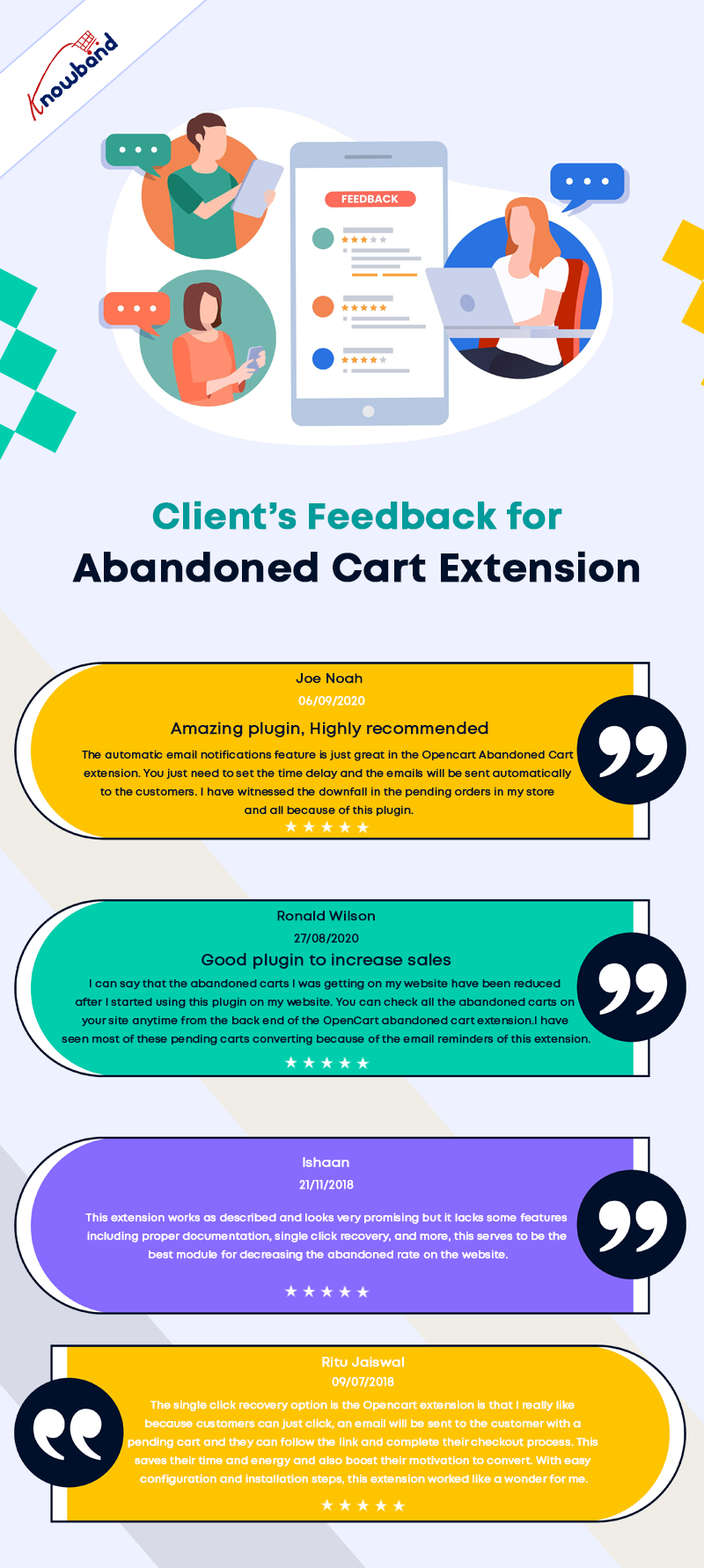
Customer Feedback of OpenCart Abandoned Cart Extension
Fantastic Analytical View

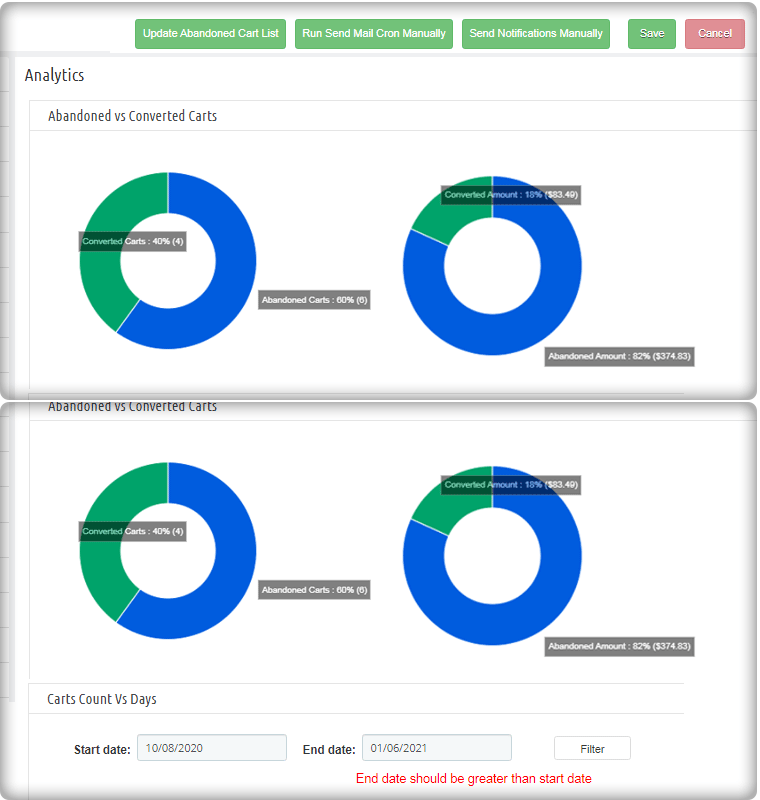
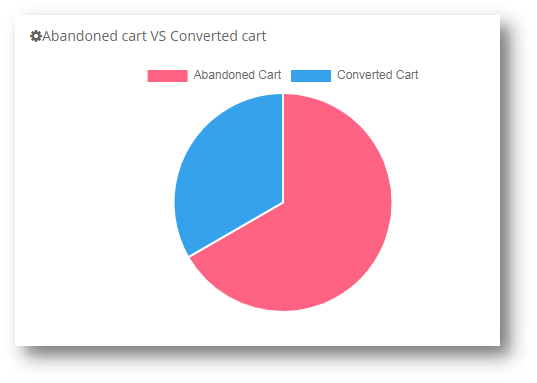
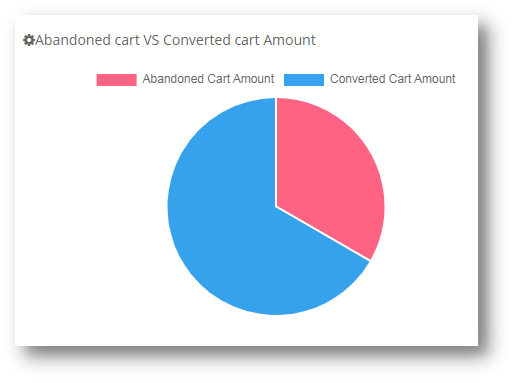
Abandoned Cart vs Converted Cart and Abandoned Cart Amount vs Converted Cart Amount are two comparisons provided by the OpenCart Abandoned Cart plugin in the form of pie charts.
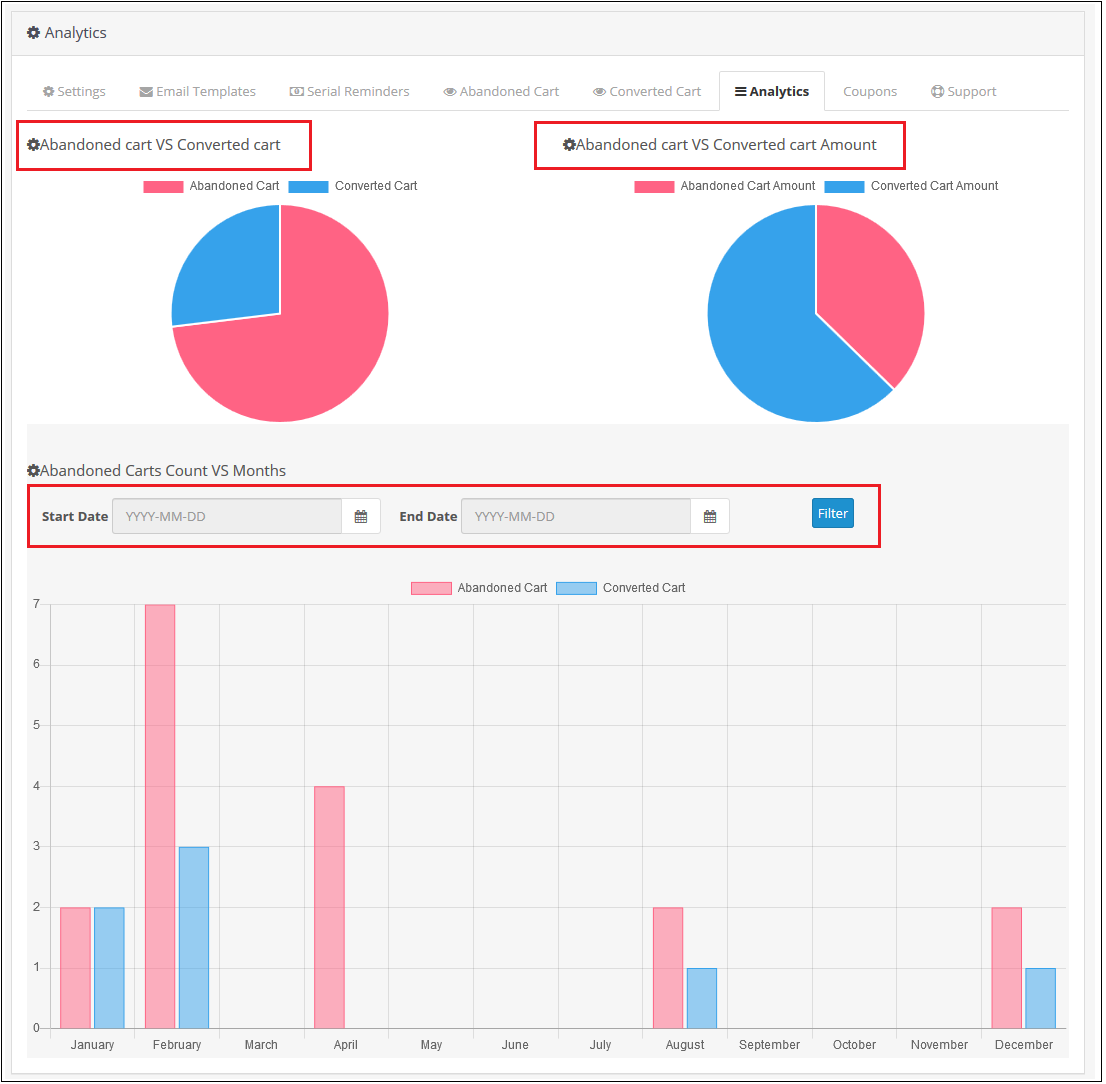
It also shows a bar graph of abandoned and converted carts throughout the year. You can also exclude data from a certain time period.

Increase the efficiency of reminder emails through custom settings
Sending Reminder emails is easy with ready-made templates

For informing customers about their pending orders, you need to send them reminder emails at a regular time interval. With OpenCart Abandoned Cart Extension, it is easy to do customization in your email templates as desired.

This helps you in grabbing maximum customer attention and to recover sales quickly. Store admin can easily add various variables like customer name, product information, discount, and other related offers into their reminder emails to improve their overall impact.

Set the time limit for marking the cart as abandoned

You can define a time interval after which the cart is automatically designated as abandoned using the OpenCart abandoned cart reminder plugin. Hours or days could be chosen as the duration.

Email Follow-Ups on Autopilot

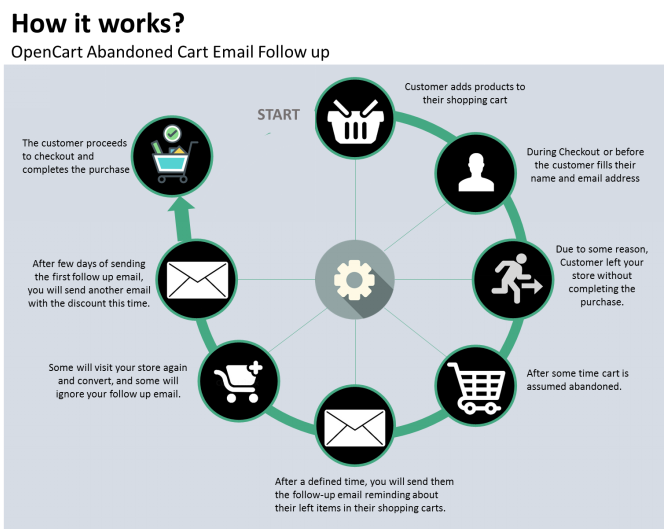
The OpenCart Abandoned Cart email follow-up extension allows you to automatically send reminder emails after a certain amount of time has passed.

Send discounted and Non-discounted emails

You can create discounted and non-discounted emails with the OpenCart Abandoned Cart Serial Reminder addon. The first email is a generic reminder, whereas the second includes a promotional code to entice the consumer to make a purchase.

The discounted email includes all of the non-discounted email choices. In addition, you can select the discount type (fixed or %), the coupon value, the coupon validity, and the free shipping option.

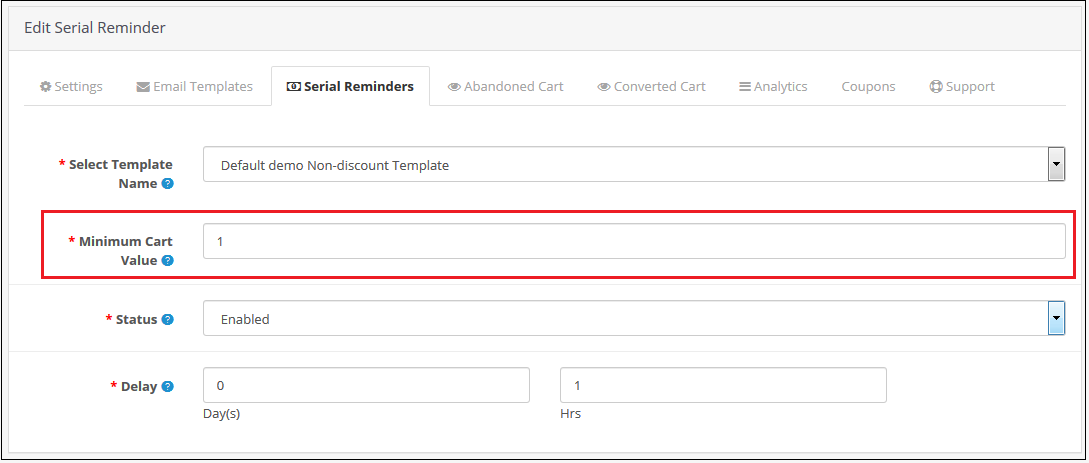
Set the minimum cart value as well as the delay time.

You can select the minimum cart value required to send a specific email type. Also, you can fix a delay time after which the emails will be sent automatically to abandoned carters. This is the best extension to send reminder emails to your customers.

Customers get quick access to abandoned shopping carts in a single click

To recover abandoned carts on a store quickly, you can divert abandoned customers towards their shopping cart with a single click. To do that, the module provides you the freedom to send email alerts with the cart link. Moreover, they don’t have to add products into their shopping carts from scratch which saves a lot of their time and effort.

Keeps a track of the abandoned carts on your site

Tracking abandoned carts on your OpenCart store is now much easy with the help of this OpenCart Abandoned cart module. It can provide important information such as the number of abandoned carts/orders, order numbers. Also, number of abandoned carts that have been converted, and other such details can help in minimizing the shopping cart abandonments on a site.

This module can ensure gold mine of information that can play a critical role in the recovery of abandoned carts.
Wrapping-up

It is now much easy to reduce abandoned carts on an eCommerce site due to the presence of this feature-loaded module for OpenCart stores. Don’t just wait and watch to reduce abandoned carts on your site but take the right steps with the help of this OpenCart Abandoned Cart extension. You have to take the final call by purchasing this OpenCart module from the Knowband store as things won’t fix for themselves.

For better conversion on your eCommerce store, click here.

If you want to know how you can improve customer engagement during holidays, click here.

Posted on August 27, 2021August 13, 2022Author Vishakha NathaniCategories EcommerceTags Abandoned cart email follow-up extension, abandoned cart serial reminder, OpenCart Abandoned Cart, opencart abandoned cart reminder module

Creative Abandoned Cart Recovery Strategies Your Competitors Aren’t Using

Abandoned cart recovery emails are one of the toughest to do right, mainly because you don’t really know why your customer left your website before the order was finalized – wasn’t the item, right? Was its cost of shipping too much? Haven’t they had enough time?

Looking at all those possibilities, instead of one single email, I highly recommend building an email chain. Also, do not presume that it would be resolved automatically by applying a discount to your retargeting email!

What is an Abandoned Cart Email?

One of the most successful ways to get your customers to go back and buy is the recovery or abandoned cart email. You can create FOMO or influence the customer with the ‘Discounts Only for Them’.

Abandoned cart emails are sent in a customized manner to consumers to connect with them about their previous intent to purchase a product. They are one of the most successful ways to handle abandoned cart problems, considering the more personal approach of abandoned cart emails.

Why do people abandon their carts?

For various purposes, various individuals will abandon your cart. Someone who first visits your site and leaves the cart may have different reasons than a loyal customer who does not buy. Similarly, there might be those that visit your site frequently and leave the cart repeatedly.

You can help determine what the underlying concerns really are by segmenting your email list when you get customer details into a few high-level categories, and then define a suitable solution to fix them.

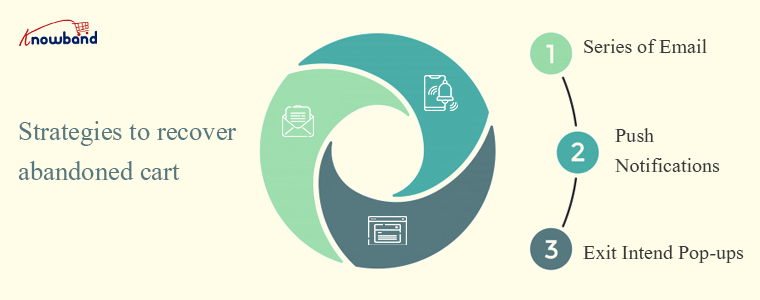
Strategies to recover abandoned cart

It isn’t easy to convert customers with a mere email.

However, you will need to go through the entire thing strategically, in addition to having the text right in the individual emails to convert people.

  • Send emails to bring them back

It’s no secret that the most powerful way to meet lots of people at once is by email. They give you access to a personal space that is 40 times more powerful than Facebook or Twitter for attracting new customers.

Customers who have left the cart must know who you are and why you are sending an update.

Sending an email will allow you to recover some of your previously lost sales and potentially convert more of the traffic to the website that you attract.

  • Create your own abandoned cart email sequence

One email may not be enough to allow people to behave on abandoned cart emails.

As such, to get people to complete a purchase, it is smart to put together a short series.

Up to three emails in total are perfect. For some of the earlier emails, you cannot get the customer at the right moment, so a later email is worthwhile to ensure that you can get them to communicate with you.

  • Push notifications will push them to make a purchase

Using push notifications as opposed to text messages to reach the customers is certainly easier. Only make sure you’re not sending them too much, or else users will opt-out of receiving them.

To boost their experience and add value, submit push notifications based on the user’s position. Boost your interaction with Push Notifications and help you improve your conversion rates.

You can give them abandoned cart details, offer deals, discounts, and more once the visitor has opted in to be a subscriber.

  • An exit pop up before they leave

Another effective way to grab customer attention is by reminding them about the abandoned cart just before they leave.

A pop-up window with cart details and a discount coupon can do wonders! You can show a discounted or not discounted pop up window on the exit page.

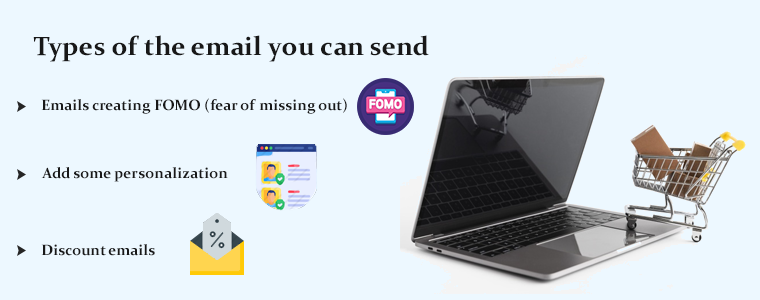
Types of the email you can send

No customer thinks the same way and all types of customers have different requirements. Treating them as a unique customer will give a personalized experience to them and that may lead to conversion.

To attract different brains, you need different strategies. Here are some ways you can do this.

  • Emails creating FOMO (fear of missing out)

A list of the items left behind in the cart will include most of the abandoned cart emails you encounter. These emails provide all the basics you would expect: the name, picture, and price of the product.

You can make the goods more convincing by adding the number of reviews along with the average ranking.

Seeing something like the number of purchases or a high rating will give you an instant dose of FOMO to complete that purchase ASAP.

  • Add some personalization

More than 60% of customers enjoy reacting to their favorite retailers’ personalized emails.

As much as you can, you can always try to personalize emails. The above segmentation helps with this, but other information can accompany it. The obvious one is the use of the name of the client in correspondence. Many providers of email services allow for this.

  • Discount emails can bring them back

If you have segmented your list of abandoned cart emails, there is a possibility that you would have a clear idea of why the customer has abandoned the cart.

Because the deal (i.e. free delivery, coupon code, free returns, etc.) is more likely to be tailored to the individual’s reasons for not purchasing, this adds customization again and will engage the consumer to communicate with you again.

When it comes to your most loyal clients, discounts are extremely counter-intuitive.

They are familiar with your brand and have shown a willingness to regularly buy from you before; so with another discount, you probably don’t have to risk your profit margin.

How to Write a Follow-up email?

There are some important rules that you should remember before writing a recovery email.

  1. Add a catchy subject line that sways
  2. Adding colors will influence emotions
  3. Beautiful font pairing play off each other
  4. Build trust with appropriate email and website branding
  5. Minimal design helps you to concentrate on key functions
  6. Animated GIFs are trending
  7. A tailored experience goes a long way
  8. You can also add a product recommendation

There are plenty of variations in architecture to explore. That’s why knowing who your subscribers are and what they need from you is vital.
The reaction that you get from readers will give you an indicator of how well your campaigns are going, such as open and click-through rates. For custom emails, check out:

5 Best Practices for Abandoned Cart Emails

How to write an abandoned cart email to bounced customers?

PrestaShop Abandoned Cart Module

The PrestaShop Abandoned Cart Module offers features that you can use to recover the lost sales. It has a functional backend with several email templates and it allows you to send push notifications as well.

Another super cool feature of the abandoned cart module by KnowBand is that it can show an exit-intent popup with a discount. Some of the features are discussed below:

Auto triggered emails

After a fixed wait for corresponding emails, PrestaShop Abandoned Cart email follow-up addon sends discounted notification emails automatically.

Also, you can manually run cron jobs to update the abandoned cart list and send follow-up emails to the respective customers.

Push notification

It lets you create and change as many push-up reminder templates as you like. The admin may also customize the popup’s content accordingly.

Serial Remider Settings

Exit Pop up

A notification popup shows the Prestashop Abandoned cart module to remind customers about the things they left without purchasing in their carts. The popup contains the list of abandoned cart products and the discount coupon code which the customers can use to get discounts.

Email with templates

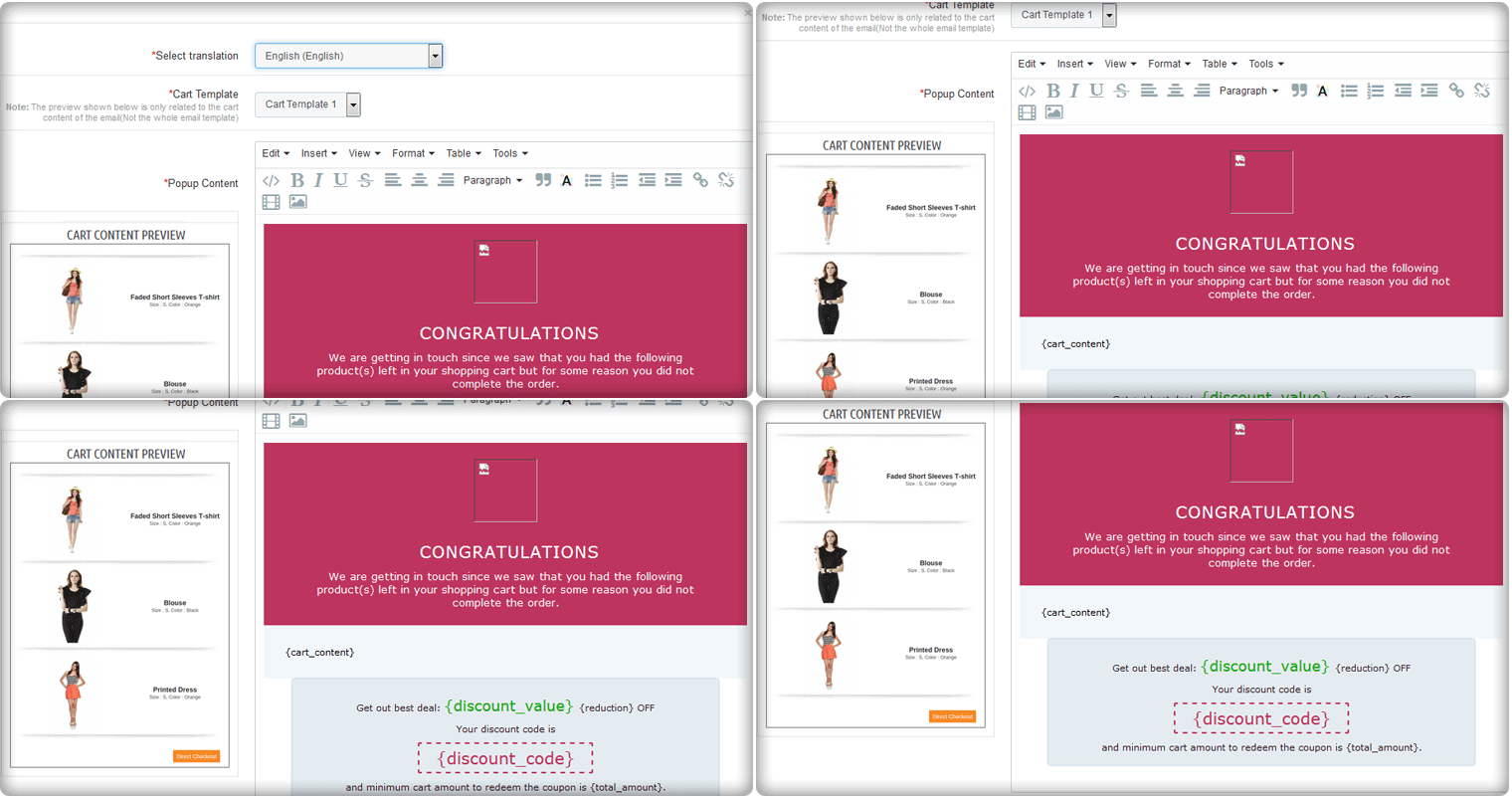
Flexibility to select from ready-made discount and non-discount models is provided by the Prestashop Email Follow-Up addon. As per business requirements, you can change the topic and content.

Custom email

You can create custom emails like discounted and non discounted emails.

You can offer a discount coupon of 10% discount to all the customers while for a specific cart value like above $100, an email with a discount of 15% can be sent. Additional discounts can be offered as per the cart value and this can be done with few clicks.

Analyze the behavior of carter

You can understand the shopping choices and needs of your customers by monitoring pending carts using Prestashop Cart Abandoned addon, which allows you to better market your items. The cart analysis will give you a better understanding of abandoned carts and converted carts.

Additional features

Well, understanding that a large number of people abandon carts from a specific country might tell you that shipping costs are a key obstacle that they only see when they get to the purchasing point.

As a consequence, you could fix this by providing reduced or even free shipping to visitors from that country in your cart recovery email for that list of people.

Conclusion: The abandoned cart recovery email is your chance to redeem clients who, for whatever reason, almost bought from you but then bailed. Rising conversions and ROI means there is something right you’re on.

If you need some explanation about the topics I described, please let me know, I’d be happy to help! Cheers

You can check out the articles below if you would like to learn more about coping with cart abandonment.

  • 5 Best Practices for Abandoned Cart Emails
  • 6 Surefire Abandoned Cart Tips for eCommerce Marketers
  • How to Tackle Abandoned Cart Killing your Business?
Posted on January 8, 2021January 8, 2021Author Vishakha NathaniCategories Ecommerce, PrestashopTags Abandoned Cart, Abandoned cart email follow-up extension, Addon Prestashop, eCommerce Conversions, Underrated PrestaShop Modules

OpenCart Abandoned Cart Extension – User Manual

1.0 Introduction

As a shopper, you’ve probably abandoned plenty of carts yourself. As a retailer, you often wish that more people would actually complete a purchase instead of leaving their carts behind. But can you do anything about eCommerce cart abandonment, and win back some of those lost sales?
You certainly can, but there are a lot of different areas to navigate and improve.

What is cart abandonment?

Cart abandonment is when an online shopper adds at least one product to their cart and then exits without making a purchase. Abandonment rates are staggeringly high — demonstrating the huge revenue opportunity to win back these shoppers and make a sale.

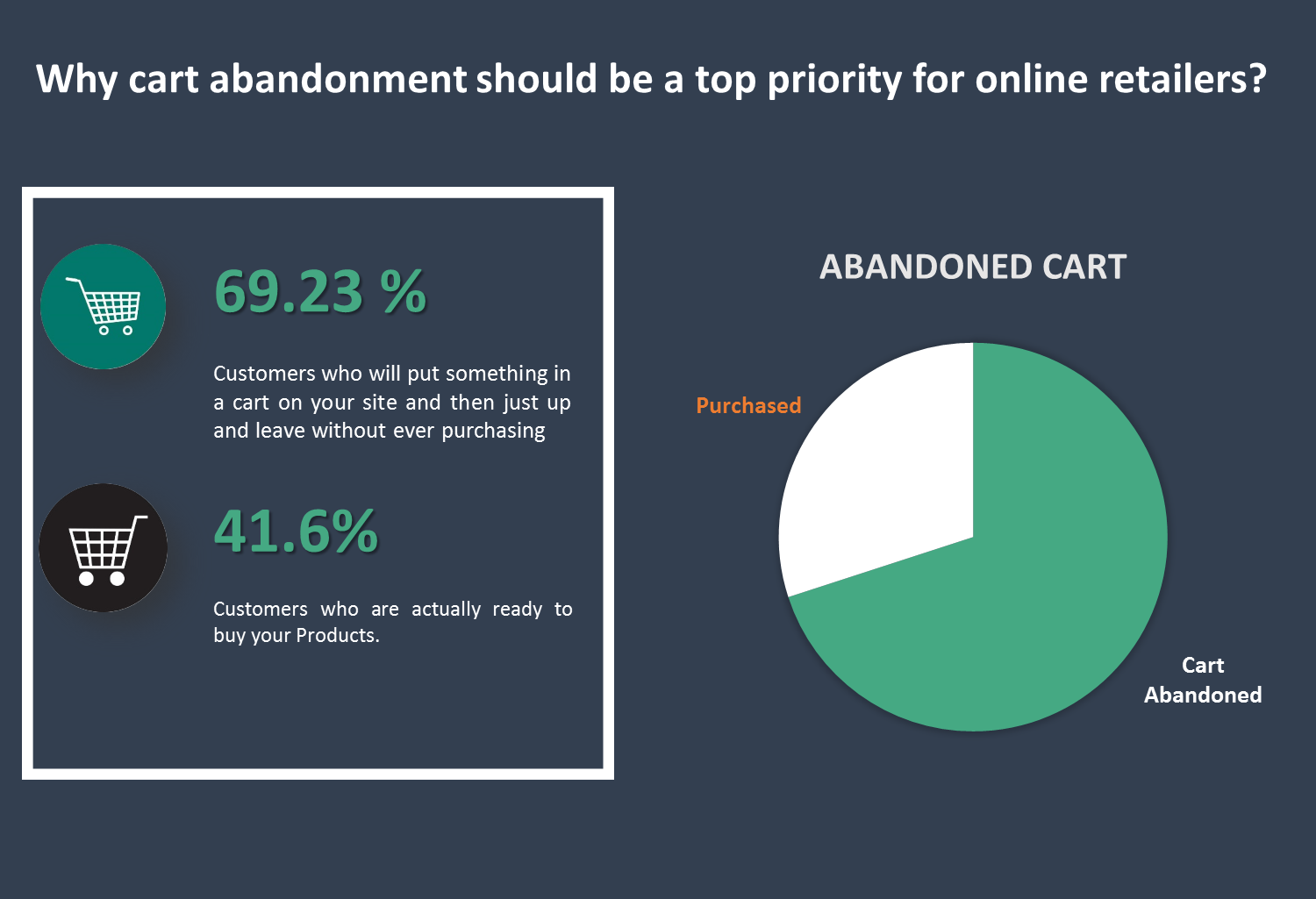
Why cart abandonment should be a top priority for online retailers?
69.23% –– that’s the average percentage of the customers who will put something in a cart on your site and then just up and leave without ever purchasing.
58.6% –– that’s the percentage of people who say they’ve abandoned a cart within the last 3 months because “I was just browsing / not ready to but”.  These people likely won’t ever even initiate your checkout flow.
But for the 41.6% of other abandoned carts, many people will begin your checkout flow. Why does this matter? Because when a customer begins the checkout flow, they must first enter their email. And, when you have their email, you can trigger an abandoned cart series to bring that customer back and earn their sale.

To convert the abandoned cart into purchases is a difficult task and requires a lot of efforts.

Here by Opencart Abandoned cart module we simplify this process for you. This module allows the Admin to view all the abandoned carts and take actions accordingly. Admin can create their own e-mail template, be it a discounted e-mail or non-discounted e-mail and send it to the customer automatically through this module.

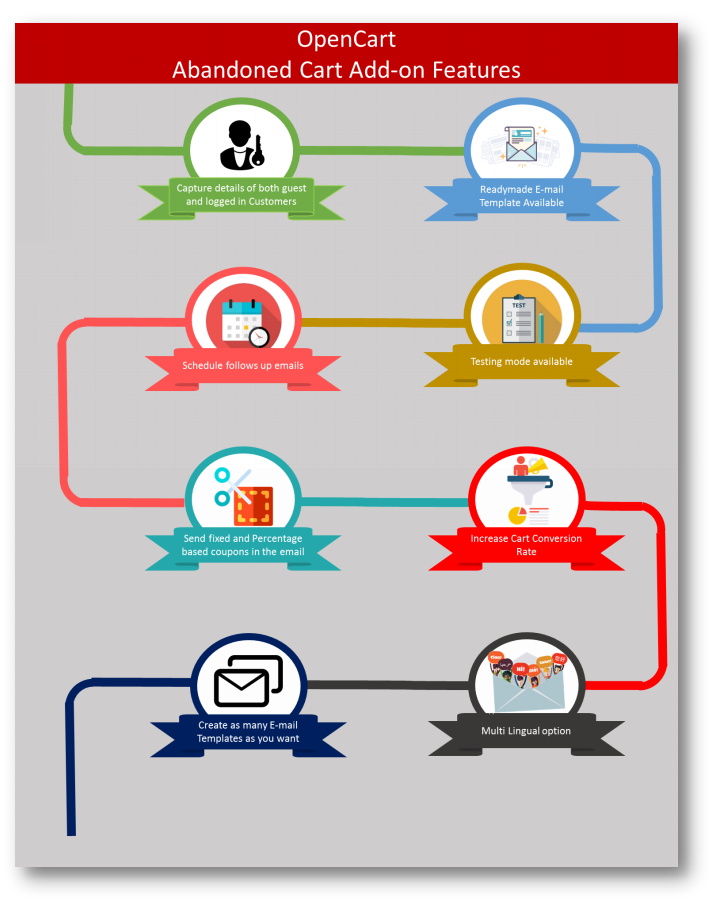
Salient Features of the OpenCart Abandoned Cart extension:

  1. The extension analyzes the behavior of the online shoppers and tracks and marks the abandoned carts on the online store.
  2. With the extension, the store admin can modify the follow-up email templates and can make as many new templates as he wants from the admin interface.
  3. The extension offers discounted and non-discounted email templates. The admin can highlight an attractive discount and a coupon code in the email to convince buyers to purchase the products.
  4. The store admin has to set a time-delay after which the extension automatically sends the follow-up email to the customers. The store admin doesn’t have to send the reminder emails manually.
  5. The e-merchant can check and see all the captured abandoned carts and the converted carts through sending emails in the back-end of the extension.
  6. With the awesome Analytics tab, the store owner can compare the total abandoned carts with the total converted carts and can make new strategies to increase the converted carts.
  7. The extension offers a Test mode option by which the store admin can test and review the reminder emails by sending them to a given test email address.
  8. The extension is mobile responsive and offers multi-language support.
  9. The e-merchant can also view and check all the coupons which are generated by the extension. The admin can check how many coupons have been used by the customers and how many are still unused.

2.0 Installation Guide

Before starting the installation process, you have to buy the Abandoned Cart Serial Reminders by the Knowband store. Once purchased, you will receive the following files on your registered email.
Source code of Opencart Abandoned cart extension in zipped file format.
User Manual of Opencart Abandoned cart extension.
Now in order to install this on your online shop, follow the given steps:

Step 1: Unzip the zip file. You will get the folders as shown in the image below


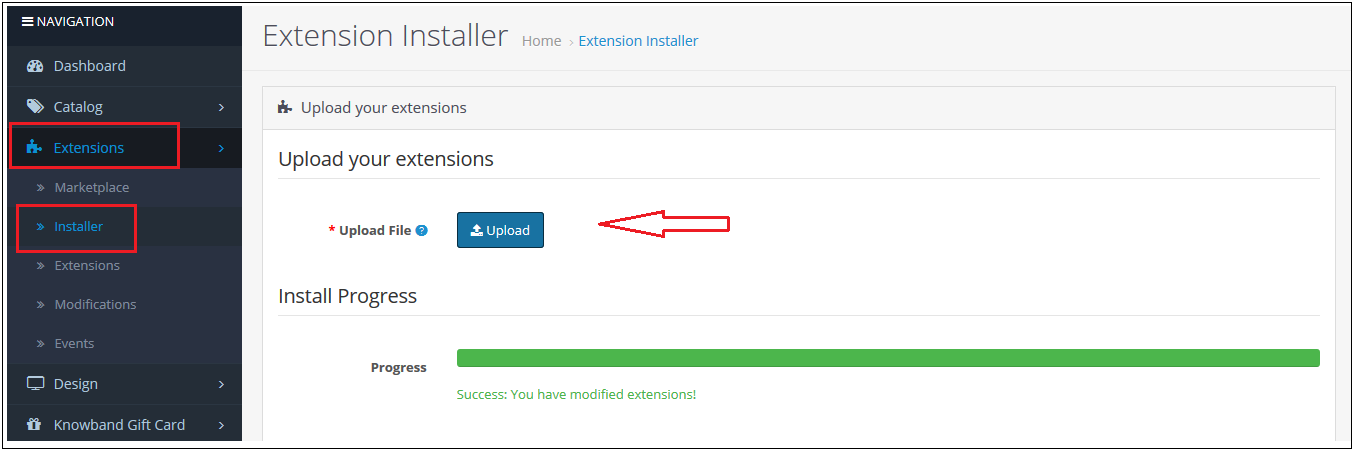
Step 2: Go to Extensions and then Installer. From here, you can upload the “kbabandoned_cart.ocmod” file and install the extension.

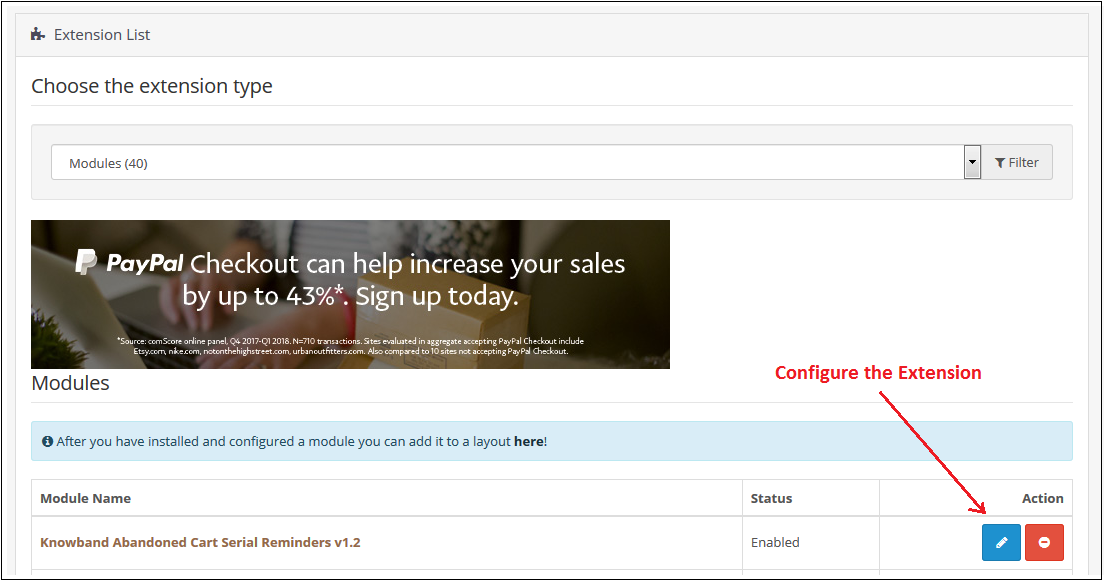
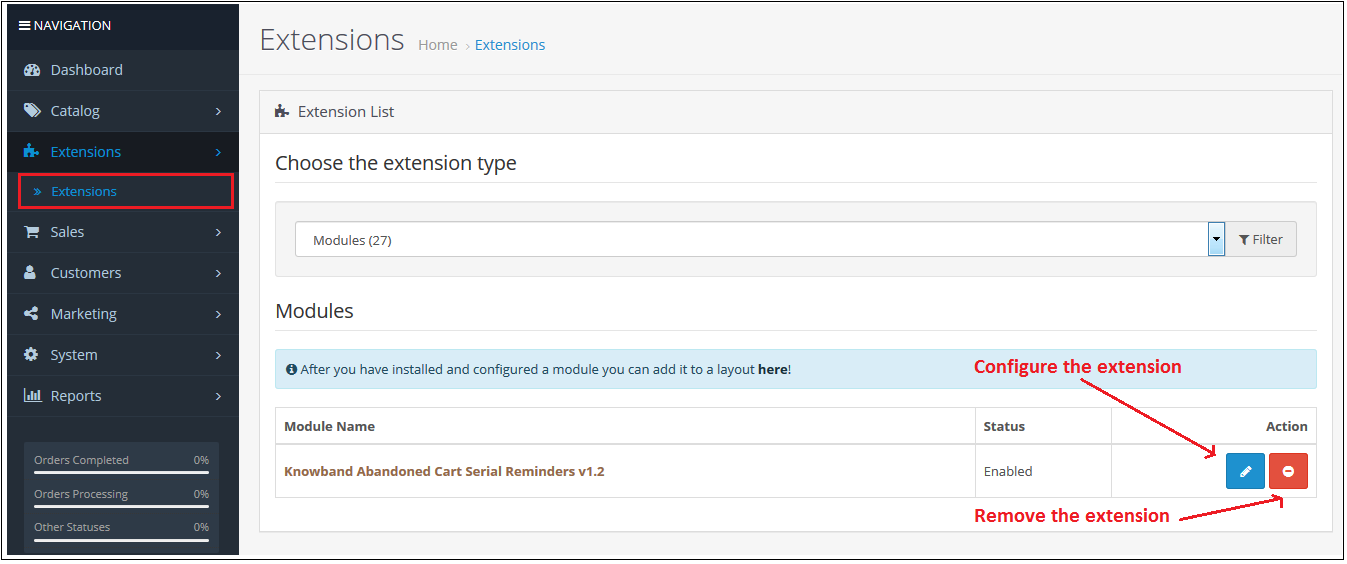
So Opencart Abandoned cart Module, is now successfully installed and is ready to use at your store. Go to the admin menu and click on the extensions. Choose the Extension Type as Modules. You will find a list of modules. Select the Knowband Abandoned Cart Serial Reminders.

3.0 Useful Cron Instructions

3.1 Reasons/Cases when the email is not sent to the customers

A. Email Id is not available (Guest customer)

B. If the cart does not satisfy the condition of serial reminders

If the minimum cart value is greater than the abandoned cart value. For example, the minimum cart amount is $50 and the abandoned cart amount is $45. It will not send a reminder in this case.

If the delay is set to one day, so the reminders will not be sent to the customers whose carts are abandoned for less than a day.
C. If you have not setup the Cron properly or if the Cron is not working.

3.2 Types of Crons

There are two types of cron that run every hour.

1. Cron to update the Abandoned cart: This cron runs every hour.
For example, suppose if the cron runs at 11:05, 12:05…..and so on and you have set “Mark Abandoned Cart” as 1 hour. When cron runs at 11:05 it will add all the abandoned cart created between 9:05 to 10:05. If you have set “Mark Abandoned Cart” as 0 hours then it will add all the abandoned cart created between 10:05 to 11:05.

2. Cron to send a reminder email: This cron also runs after every hour.
For example, suppose the cron runs at 11:11, 12:11…..and so on and you have set the Reminder for 1 day and ‘Mark Abandoned Cart’ as 1 Hour. When cron runs at 11:11 then the emails will be sent to all the abandoned carts between 9:11 to 10:11 of the previous day. If you have set Reminder for 2 days and ‘Mark Abandoned Cart’ as 0 hour then the emails will be sent to all the abandoned cart between 10:11 to 11:11 of the day before yesterday.

3.3 Procedure to configure CRON job

3.3.1 What is a cron?

A cron is a service that allows a user to automatically execute a script at a specific time.
For example, you can set a particular PHP script to be automatically executed every day at midnight.
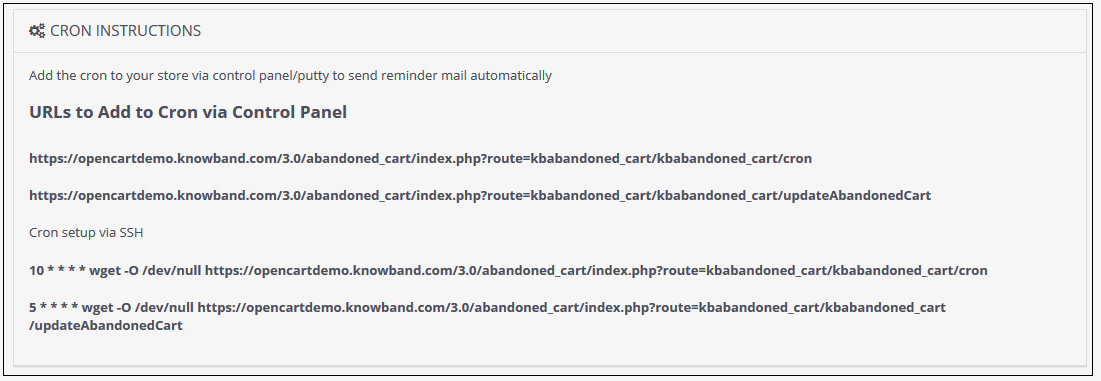
Add the cron to your store via control panel/putty to send reminder mail automatically
Example URLs to Add the Cron via Control Panel

https://octest1.knowband.com/2.3/index.php?route=kbabandoned_cart/kbabandoned_cart/cron
https://octest1.knowband.com/2.3/index.php?route=kbabandoned_cart/kbabandoned_cart/updateAbandonedCart

Cron setup via SSH

10 * * * * wget -O /dev/null https://octest1.knowband.com/2.3/index.php?route=kbabandoned_cart/kbabandoned_cart/cron
5 * * * * wget -O /dev/null https://octest1.knowband.com/2.3/index.php?route=kbabandoned_cart/kbabandoned_cart/updateAbandonedCart


4.0 Admin Interface of OpenCart Abandoned cart extension

To configure the Abandoned cart email follow-up extension for OpenCart, Navigate the settings in the following order:
Admin Panel > Extensions >Modules> Abandoned Cart Serial Reminders

The Admin Interface of OpenCart Abandoned cart recovery email extension includes the following main settings:

  • General Settings
  • E-mail Templates
  • Serial Reminders
  • View Abandoned Cart
  • View Converted Cart
  • Analytics
  • Coupons
  • Support

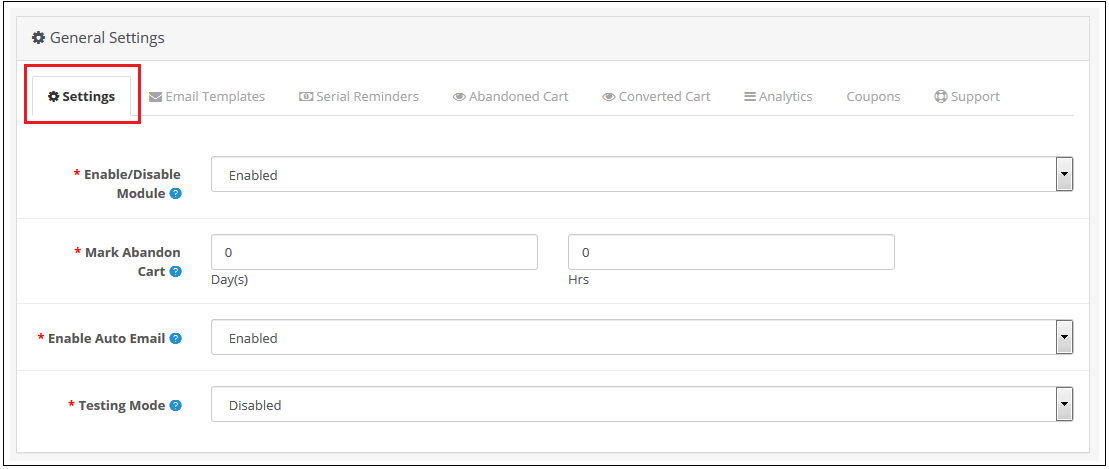
4.0.1 General Settings

Through this setting of OpenCart Abandoned Cart Serial Reminder, you can enable/disable the whole module by just one click. The screen will look like as shown below:

4.0.2 E-mail Templates

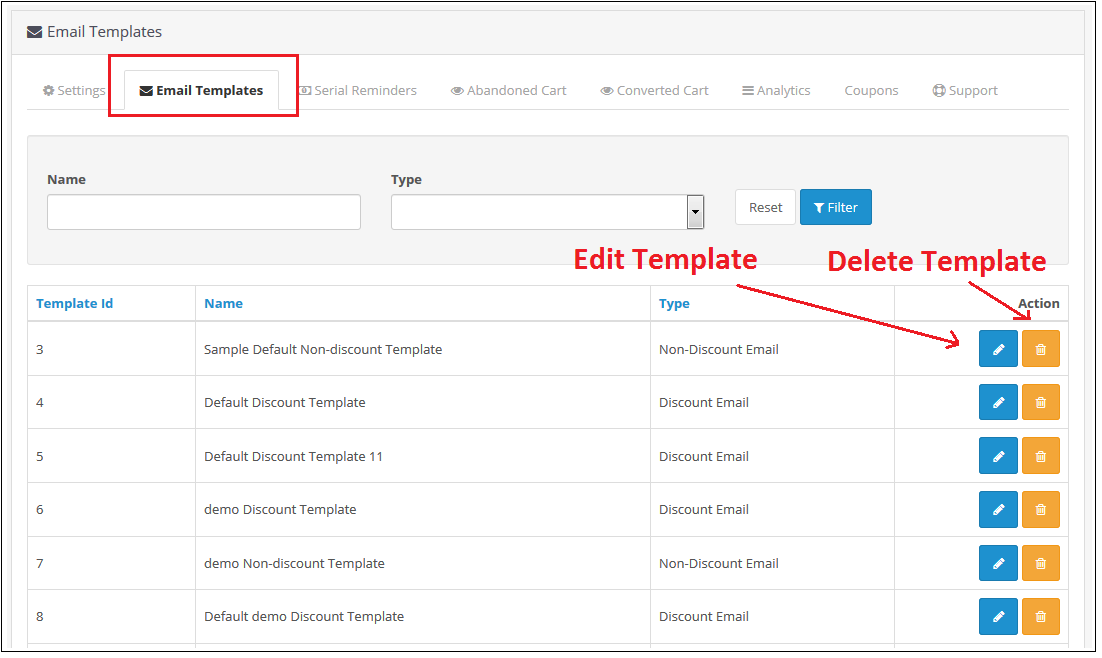
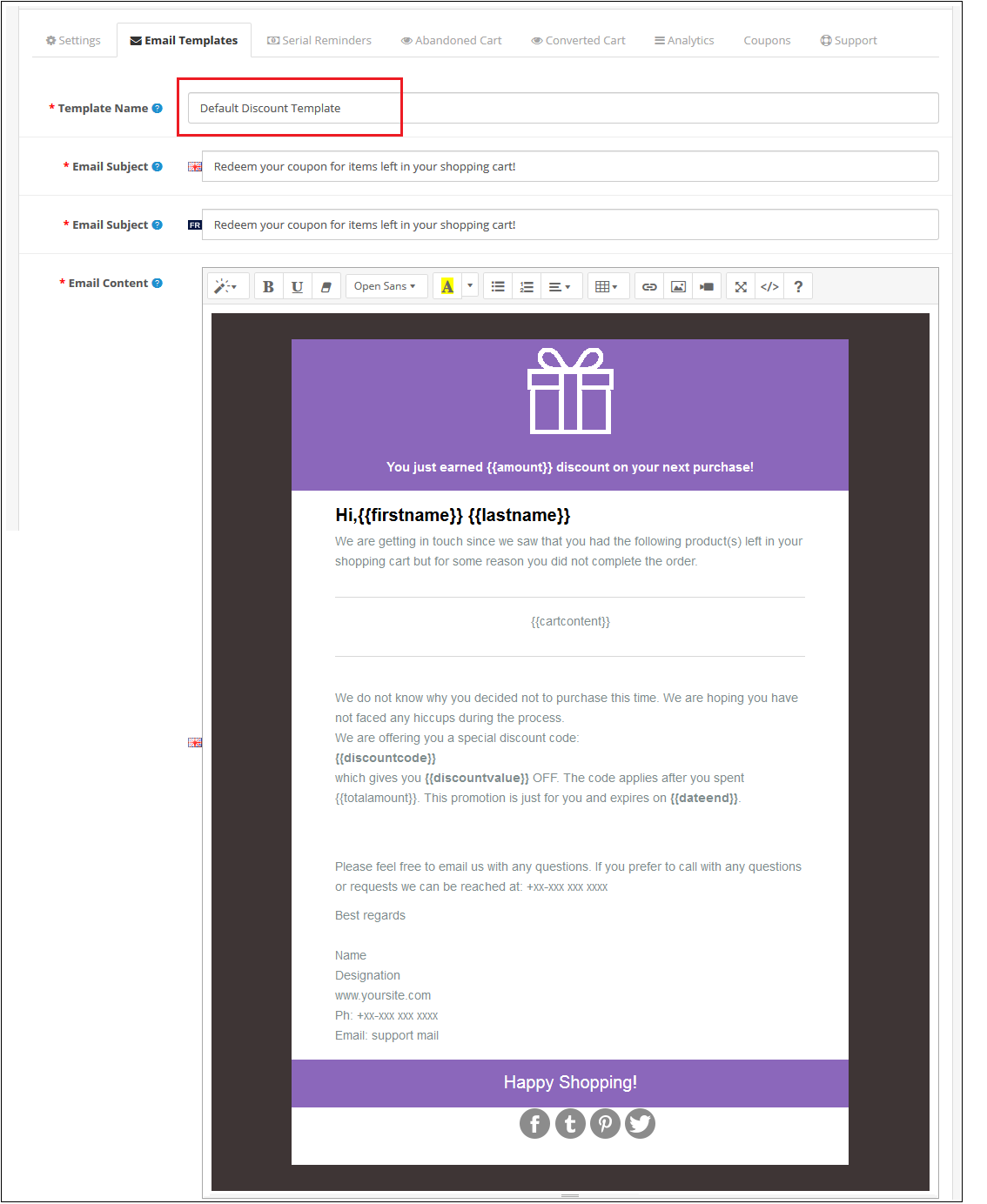
Through this setting of OpenCart Abandoned Cart Serial Reminder, you can add an e-mail Template in the module which will be used when you sent an e-mail reminder to your customers. The screen will look like as shown below:

Edit an E-mail Template: You can Edit an existing E-mail Template using the Edit option. The screens for Editing E-mail Template will be same as Adding an E-mail Template. The only difference will be that Edit will have the fields already filled.
Delete an E-mail Template: You can delete an E-mail Template by clicking on the ‘Trash’ Icon. A pop up will show up asking for the Confirmation. You can click yes and the E-mail Template will be deleted.
Add an E-mail Template: You can add an E-mail Template by Clicking on the option provided on the Top of the Page. The following screen will show up:

4.0.3 Serial Reminders

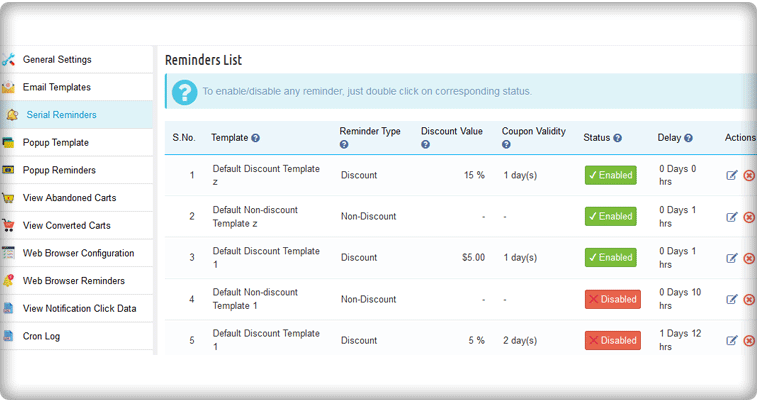
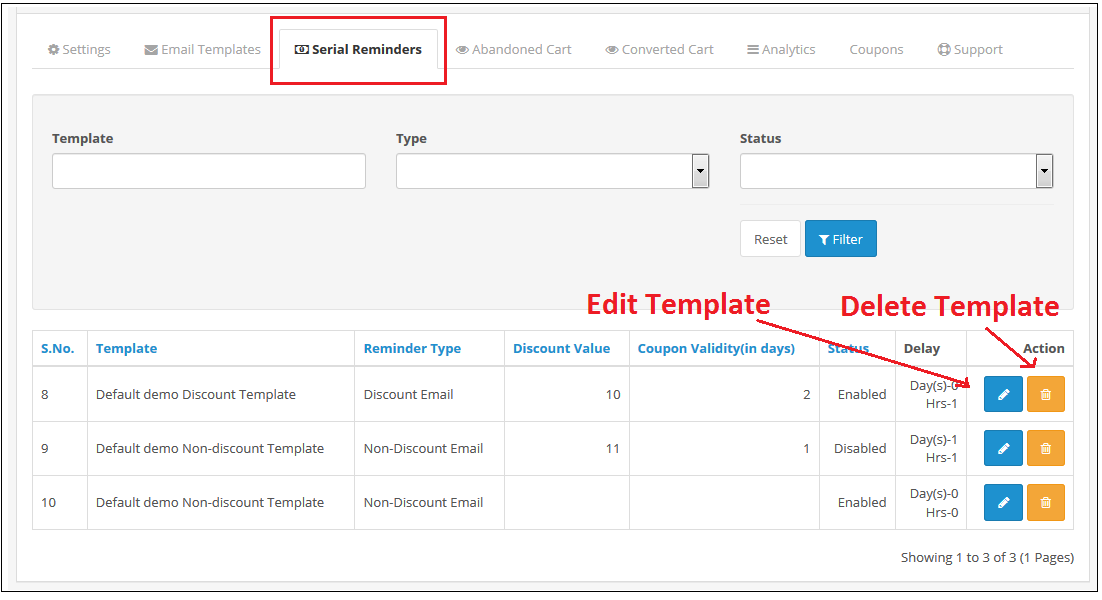
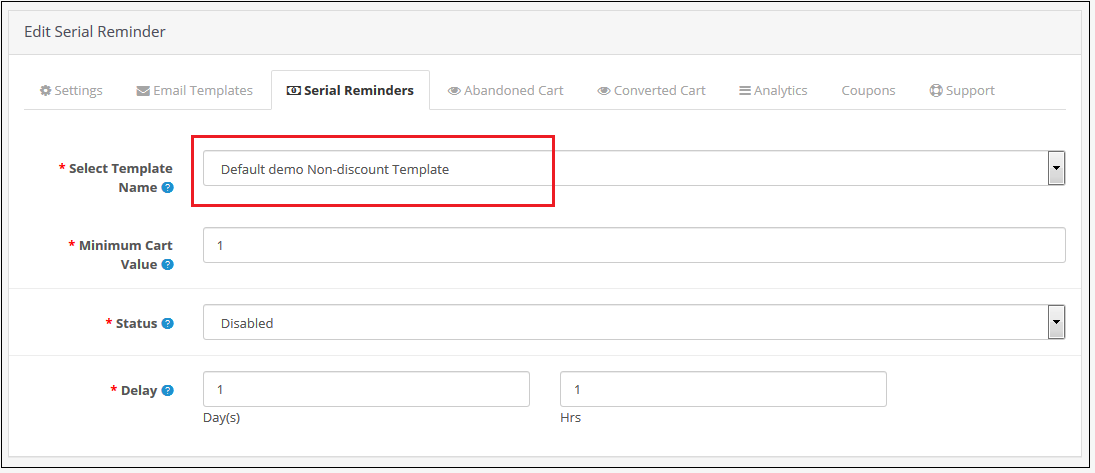
This setting of OpenCart Abandoned Cart Serial Reminder allows you to send e-mail reminders to your customers after a specific time (which will be set by you) of their Cart Abandonment.
The screen will look like as shown below:

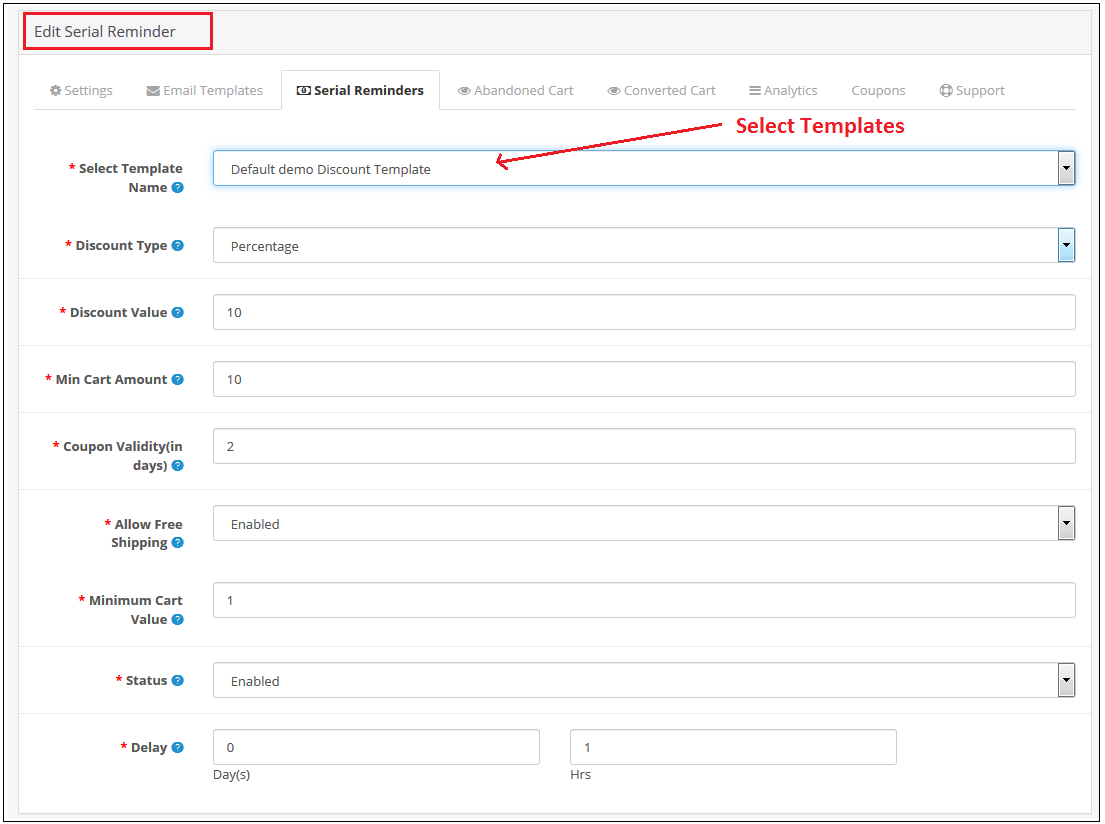
Edit a Serial Reminder: You can Edit an existing Serial Reminder using the Edit option. The screens for Editing Serial Reminder will be same as Adding a Serial Reminder. The only difference will be that Edit will have the fields already filled.
Delete a Serial Reminder: You can delete a Serial Reminder by clicking on the ‘Trash’ Icon. A pop up will show up asking for the Confirmation. You can click yes and the Serial Reminder will be deleted.
Add a Serial Reminder: You can add a Serial Reminder by Clicking on the option provided on the Top of the Page. The following screen will show up if the E-mail Type is Discount:

The following screen will show up to Add a Serial Reminder in Opencart Abandoned cart email follow-up extension if the E-mail Template type is Non-Discount:

4.0.4 Abandoned Cart

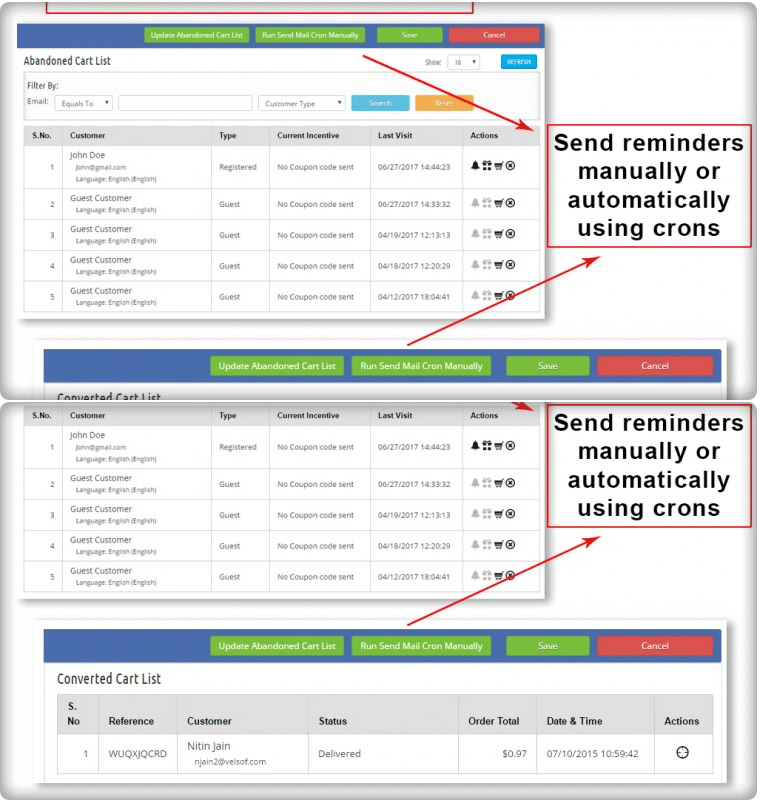
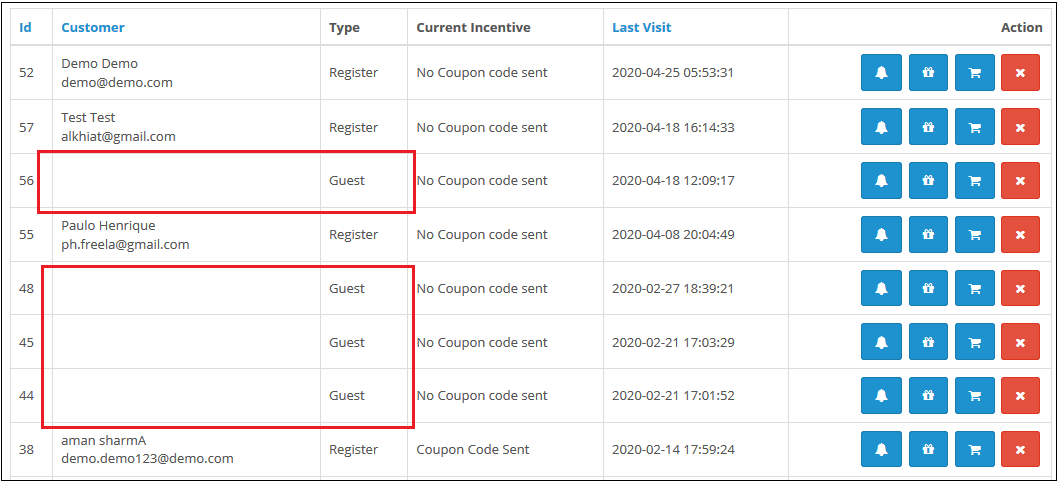
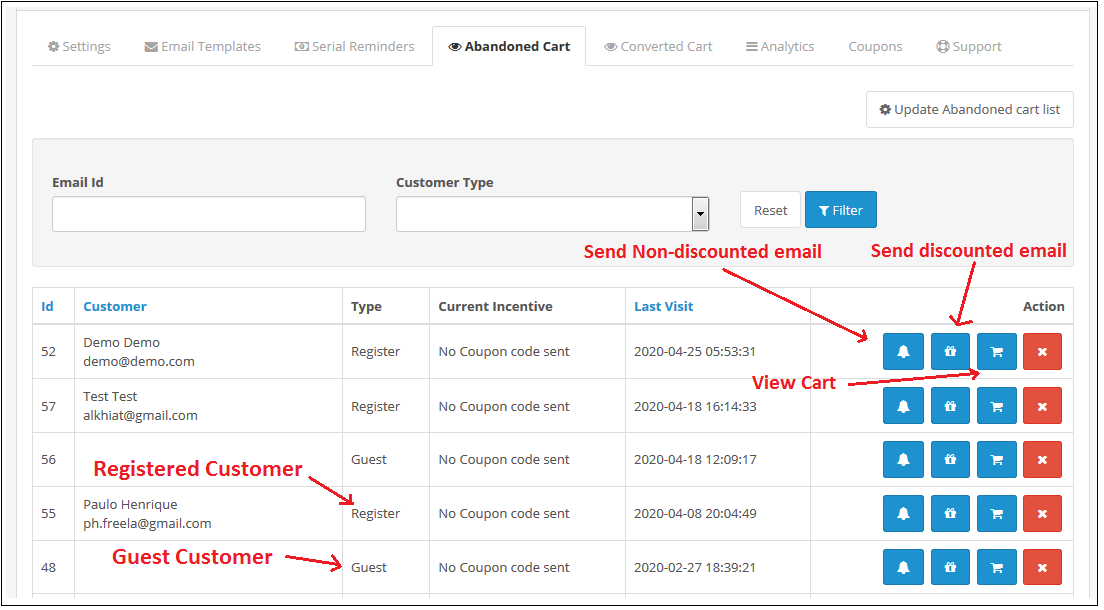
Through this setting of OpenCart Abandoned cart recovery email extension, you can send e-mails to the customers who have left their cart abandoned. You can view the list of all the abandoned cart customers in this setting and send them Discounted/ Non-Discounted E-mails. The screen will look like as shown below:

Update Abandoned Cart: This button is given at the Top of the Settings. You can click on this button to run Cron and the number of Products in abandoned cart will be shown to you. This number will be the updated number since you last updated the Abandoned Cart List.
After clicking on the Button you need to refresh the Page and the updated list will be shown to you.

Send Non-Discounted E-mail: When you will click on the bell Icon, then a pop up will show on the screen from where you can send a Non-Discounted e-mail to the customer. This e-mail will act as a reminder to the customer reminding them of the products they have left in their cart. The following screen will show up when you will click on the Icon:


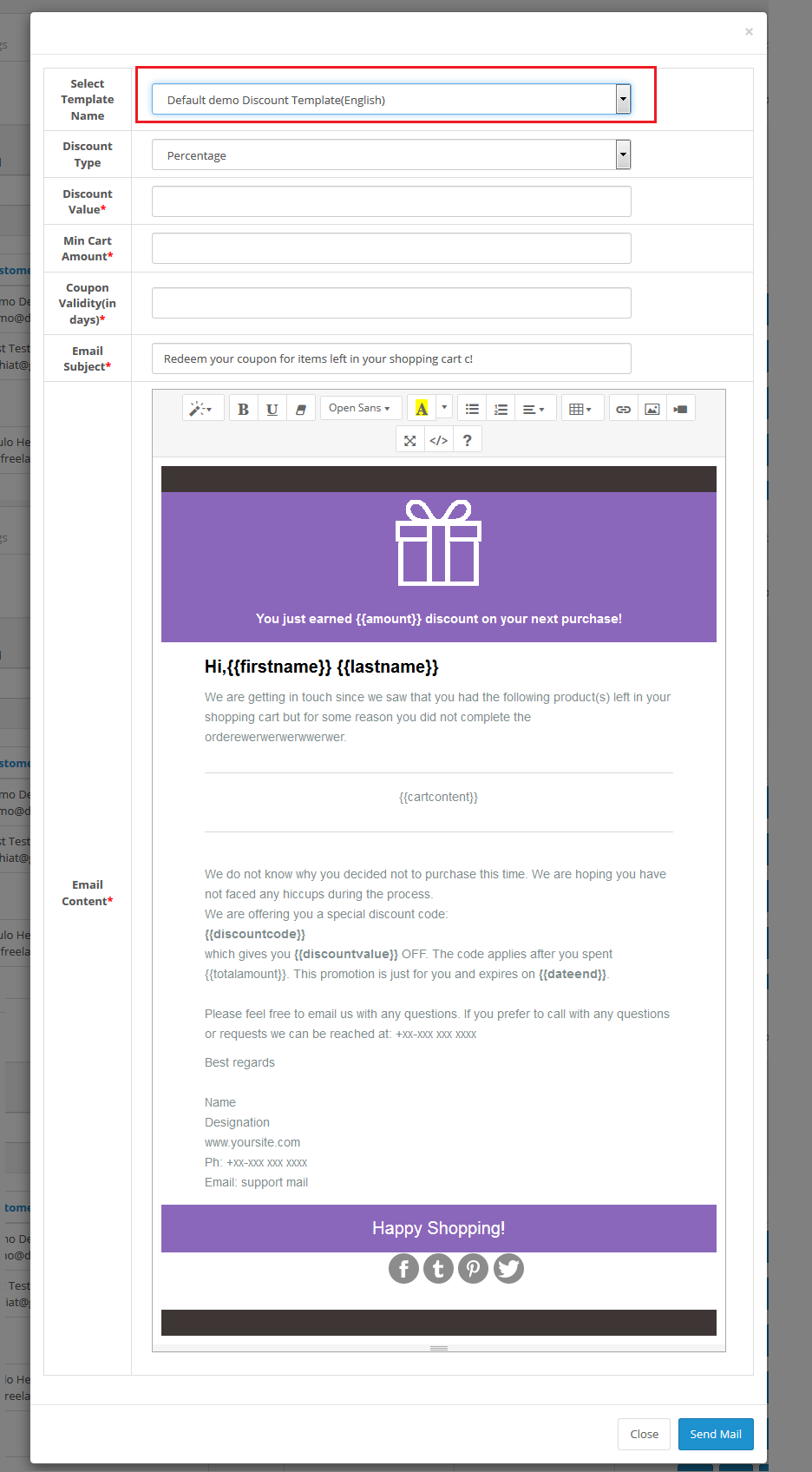
Send Discounted E-mail: When you will click on the Gift Icon, then a pop up will show on the screen from where you can send a Discounted e-mail to the customer. The following screen will show up when you will click on the Icon:


View Customer’s Cart: When you will click on the cart Icon of OC Abandoned Cart Serial Reminder, then a pop up will show on the screen from where you can view the products in the customer’s Cart. The following screen will show up when you will click on the Icon:

Delete an Abandoned Cart: You can delete an Abandoned Cart by clicking on the ‘Cross’ Icon. A pop up will show up asking for the Confirmation. You can click yes and the Abandoned Cart will be deleted.

4.0.5 Converted Carts

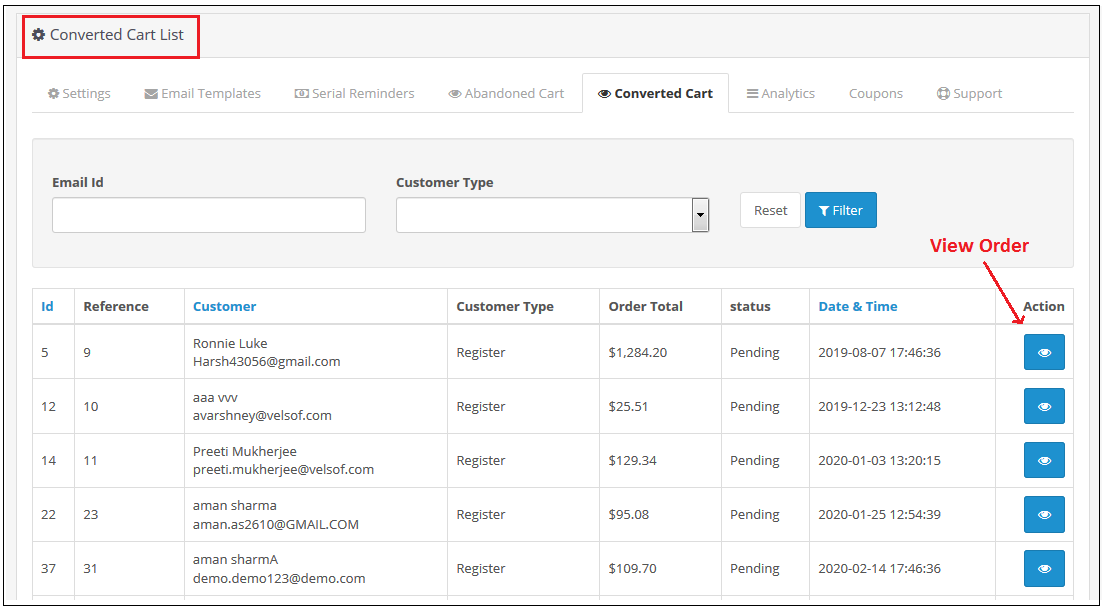
The Converted Cart tab of Opencart Cart Abandoned extension by Knowband, enlists all converted orders for registered customers or we can say that the abandoned carts for whom order has been placed after the reminder mail are sent. The screen will look like as shown below:


You can also view the details of the order that is placed using the abandoned cart by clicking on the “Action Button” in front of the desired converted cart.

4.0.6 Analytics

Analytics setting of OpenCart Abandoned cart recovery email extension will show the graphical representation of comparison for Abandoned Vs Converted Cart. Through this setting, you will not have to calculate anything, you can view the comparison in easy graphical format. The following graphs will be show to you:

Number of Abandoned Cart Vs Converted Carts:


Abandoned Cart Amount Vs Converted Cart Amount:

Abandoned Cart Count Vs Converted Cart Count Monthwise:


4.0.7 Coupons

Through this setting of Opencart Abandoned cart email follow-up extension, you can view the list of all the coupons which are sent to the customers in the E-mail.
You can filter out the Coupons on the basis of Used and Unused. The screen will look like as shown below:


4.0.8 Support

In case of any issue, drop an email to support@knowband.com OR click here to raise the ticket.

Tutorial: Watch the Video Guide

To help you set up and use the Opencart Abandoned Cart Extension, we have prepared a detailed tutorial video. This video walks you through the installation, configuration, and usage of the extension step by step.

Watch the tutorial here:

Buy OpenCart Abandoned Cart extension: https://www.knowband.com/opencart-abandoned-cart

Admin Demo: https://opencartdemo.knowband.com/3.0/abandoned_cart/admin/

Front Demo: https://opencartdemo.knowband.com/3.0/abandoned_cart/

OpenCart Abandoned Cart extension from the OpenCart Marketplace: https://www.opencart.com/index.php?route=marketplace/extension/info&extension_id=37523

Posted on August 3, 2019December 4, 2025Author Joe ParkerCategories Opencart User Manual, User ManualTags Abandoned cart email follow-up extension, abandoned cart serial reminder, OpenCart Abandoned Cart, opencart abandoned cart reminder module

5 Tips to avoid abandoned carts and win conversions through emails

Retaining customers is the biggest challenge for any business and it is not a child’s play anymore to grab higher conversions. Online shoppers have multiple options to choose from, which makes the customer retention process more complicated. They are in no mood to wait for few more extra seconds on a site and often leave a site in the middle leading to shopping cart abandonment. One of the most effective strategies that can yield more conversions and sales to any store is email marketing.
Tailored abandoned cart reminder emails are sent with the purpose of achieving more sales and grabbing customers on an eCommerce site. It is important to make your abandoned cart recovery email more personalized, engaging, and powerful for achieving maximum site conversions. If you are unable to grab the customer’s attention through your targeted abandoned cart recovery emails, it is time to try out these helpful tips.

1.     Personalization is a key element-

It definitely makes sense to call your targeted customers by their first name or informing them about a specific event or occasion. Making your customer realize their self-importance is the best way to encourage them for completing any email action. This personalization can even work wonders in case of reminder emails that are sent with the purpose of recovering lost sales. There are certain plugins to recover abandoned cart that allows site owners to give a personal touch to their reminder emails for grabbing maximum conversions and sales. So don’t forget to make your reminder emails more personalized and relevant.

2. Dynamic content can make your emails more important

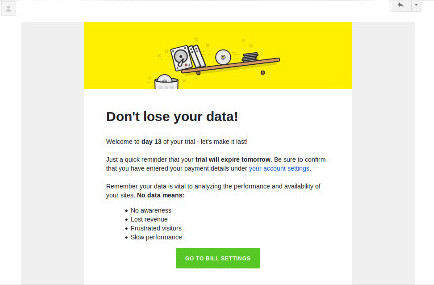
Simple texts are boring and not helpful in any manner. To increase the USP of your emails, you need to include dynamic content like images, links, videos, or other such content that also grabs the instant attention of your targeted customers towards your abandoned cart recovery emails. It increases customer engagement as well. Check out the screenshot of the email given below that makes use of dynamic content to persuade customers for purchasing the paid version of this Pingdom, a website speed optimization tool.
Including a direct CTA is necessary to achieve your goal. The addition of an effective cart recovery link can be a great step in optimizing the sales of your eCommerce store.

3. Send reminder emails at a regular interval of time-

Reminder emails are not a one-time process and need to be done at a regular instance of time for maximum business results. You need to employ effective email marketing software such as Constant Contact, Aweber, MailChimp, and others that can help in sending reminder emails at a regular interval of time.

There is no sure-shot guarantee that your reminder emails will be opened and read for the first time only. It is important to send these abandoned cart recovery emails at a regular instance of time for reducing the chances of “being missed out” if the user is too busy at that moment.

  1. You can plan your reminder emails or reminder alerts like send your first notification immediately when the customer leaves your website leaving a cart full of items.
  2. The second to recover abandoned cart can be sent within 24 hours and must include the items they have left in their cart.
  3. That didn’t work! It’s time to lead them with a sense of urgency and FOMO. What’s that? We will come to this later and for that keep reading.
  4. In your next abandoned cart recovery email, you can include discount coupons and offers to entice them and this works wonders.

4. Include exciting offers in your emails

An important question arises in the mind that even if a reminder email is read, what are the chances of converting readers through it. The answer to this critical question is that you need to include exciting offers and deals in your reminder emails.

This will help in tempting your readers to complete their pending shopping orders. This ability to grab the customer’s attention through exciting deals is best utilized in the reminder emails sent by HDFC bank to its customers as shown below. The email urges the customers to avail the displayed offer, which is both engaging and unique.

5. Convey the urgency to your customers

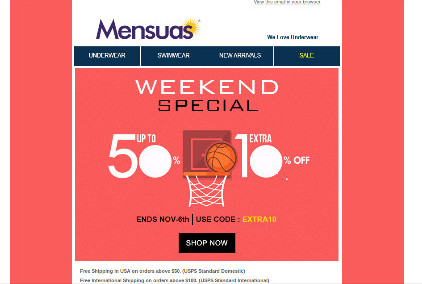
Take the case of this Mensuas site email that informs customers about exciting shopping offers and also conveys the deadline to avail this amazing offer simultaneously.

You need to remember the fact that the recipient of your email is a busy person and is involved in a range of other activities. It will not be worth surprising if your reminder email is left out by your targeted customers due to their busy schedules. There are online stores that use terms like “last chance to grab”, “sales offers ending midnight”, “one last opportunity to get the desired products”, and other such phrases in their reminder emails to grab the immediate attention of the recipients.

In the last

You are very well aware of the situation that the mailbox of a user is flooded with numerous emails, which may or may not be useful for the recipient. It is just a matter of few seconds that can determine whether your email will be read by your targeted customer or will be sent in the spam or trash. If you are able to make the most out of your emails, you can surely help in recovering abandoned carts for your store. So, learn to keep visitors engaged with your emails for getting maximum conversions and sales.

Liked This? You’ll Like These Too

  • 5 Checkout optimization that can Reduce Abandoned Carts and Boost Sales
  • How to avoid Cart Abandonment on an eCommerce store?
  • How to use Google Analytics for tracking Shopping cart abandonment?
  • How to write an abandoned cart email to bounced customers?
  • Methods by which you can minimize cart abandonment on your store
Posted on November 7, 2016April 5, 2021Author Vishakha NathaniCategories EcommerceTags Abandoned Cart, Abandoned cart email follow-up extension, Abandoned Cart Emails, Abandoned Cart Emails Best Practices, higher conversion
Proudly powered by WordPress
Please wait...

Newsletter Subscription

Subscribe With Us and Get Latest Updates
SUBSCRIBE
Exit mobile version