Notifique os clientes quando os produtos estiverem em estoque e sua receita da PrestaShop aumentará rapidamente. Use o PrestaShop Back-in-Stock módulo para começar a recapturar a receita perdida. Envie notificações aos consumidores assim que os produtos voltem ao estoque. Leva apenas 5 minutos para configurar.
PrestaShop Back-in-Stock Addon – abordagem única para capturar vendas perdidas
Alertas de estoque são uma maneira perfeita para as lojas PrestaShop aumentarem as vendas. Não perca as vendas porque os produtos estão em falta. Aumente suas vendas com notificações push na web para produtos em estoque. Você pode enviar um email inicial quando um cliente se inscreve para um alerta de estoque, alertas de estoque baixo, e um e-mail de notificação final com o Mensagem de estoque. Todos nós descobrimos coisas que estavam fora de estoque, mas não voltamos à loja para ver se ainda está lá. Por que você espera que seus clientes façam isso? Influencie-os usando e-mails e envie notificações push para trazê-los de volta à sua loja online. Você obterá mais vendas e observará um aumentar a taxa de conversão.
Adicionar um email opt-in à sua lista de assinantes irá ajudá-lo a aumentar sua lista
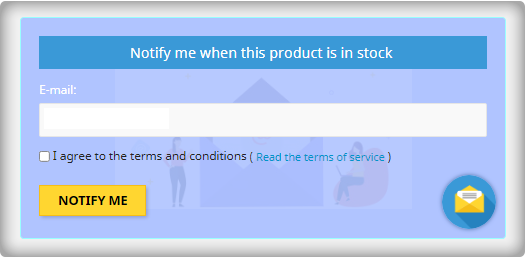
A maioria dos formulários de aviso de volta ao estoque obtém apenas o endereço de e-mail do cliente para informá-lo quando um produto retorna ao estoque. Aproveite o fato de que eles estão prestando atenção e peça-lhes que entrem na sua lista de e-mail ao mesmo tempo. Os vendedores que usam essa estratégia veem uma grande melhoria em seus lista de assinantes de e-mail tamanho, o que leva ao aumento das vendas.
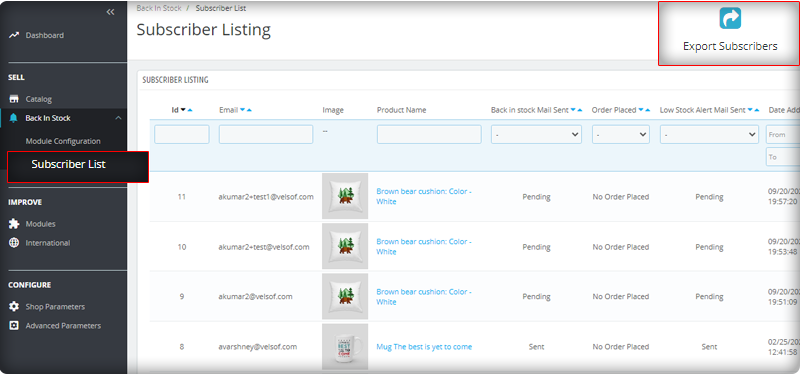
Você pode observar a lista de assinantes no painel de administração no menu à esquerda, onde todos os módulos instalados são listados.
Envie e-mails automatizados para estoque baixo e em estoque
O Módulo Back-in-stock PrestaShop é uma ferramenta para e-mail marketing. Os clientes geralmente recebem centenas de e-mails promocionais e a maioria deles é ignorada, mas um e-mail com um assunto atraente tem mais chances de ser aberto. O módulo permite que os vendedores enviem um e-mail personalizado com texto e linhas de assunto sob medida. Junto com uma inicial e-mail de boas-vindas, você pode enviar alertas de estoque baixo aos assinantes e notificá-los sobre os produtos reabastecidos.
Adicione produtos relacionados ao modelo de e-mail e venda cruzada
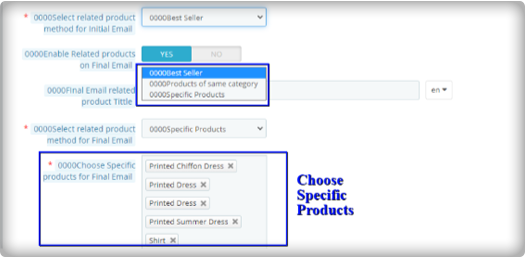
Ouviu a frase ‘matando dois coelhos com uma cajadada só, o módulo funciona da mesma forma. Ele permite que você envie alertas de estoque, bem como tem a opção de enviar produtos relacionados. Um vendedor pode adicionar detalhes como best-sellers, produtos da mesma categoria, produtos específicos, etc. Se um vendedor optar pela opção Produtos específicos, ele terá que especificar os produtos na respectiva guia, conforme mostrado na imagem abaixo.
Envie alertas através do seu provedor de e-mail como Mailchimp
É fundamental que você construa sua marca e uma maneira de fazer isso é garantir que os e-mails que você envia sejam enviados de seu domínio. Você poderá usar uma variedade de recursos para impulsionar o sucesso de suas campanhas de volta ao estoque se usar um provedor de e-mail de comércio eletrônico avançado como Mailchimp, Klavio ou Sendinblue. E o módulo de retorno em estoque do PrestaShop permite que você faça isso.
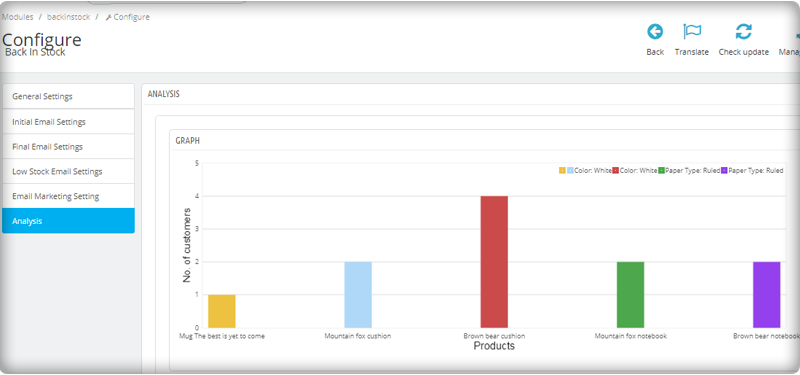
Análise em tempo real para PrestaShop
Visualize um relatório completo sobre os clientes que se inscreveram em alertas push da web para produtos em estoque. Para aumentar as vendas, identifique os itens de maior sucesso, maximize o estoque e execute campanhas promocionais.
A nova versão possui parâmetros UTM
Os parâmetros UTM são códigos de texto curtos que você insere em URLs (ou links) para monitorar o sucesso de uma página da web ou campanha. Análises integradas estão disponíveis em sites de mídia social. Isso permite que você acompanhe as principais métricas, como curtidas, compartilhamentos e cliques no site. Você pode adicionar parâmetros UTM ao PrestaShop Módulo de volta ao estoque e aproveite.
Para encerrar: Os e-mails em estoque são alertas únicos, pois geram curiosidade, influenciam os motivos de compra e aumentam as chances de vendas. Se você não está enviando alertas como estoque baixo ou em falta para seus clientes, você está cometendo um grande erro. Consiga seu Módulo ‘Back-in-stock’ hoje para agarrar suas vendas perdidas. Para desenvolvimento de site de comércio eletrônico, requisitos de módulo ou desenvolvimento de aplicativo móvel para sua loja online, a KnowBand tem especialistas e ferramentas prontas para uso. Visite-nos em www.knowband.com ou deixe uma mensagem em support@knowband.com.
As estratégias de retenção de clientes permitem que você forneça e obtenha mais benefícios de sua base de clientes atual. Para qualquer empresa de comércio eletrônico, atrair novos clientes é o objetivo final e manter os existentes é a base para o sucesso a longo prazo. Você deve ter ouvido repetidas vezes que atrair um novo cliente é mais agitado do que fazer o existente repetir a compra. Você deseja garantir que os clientes que tanto trabalhou para atrair permaneçam com você, tenham uma melhor experiência do cliente e tendam a obter valor de seus produtos. Os clientes fiéis que fazem uma compra repetida são a força motriz de qualquer negócio. Nesta postagem, compartilhamos nossos 5 principais módulos comprovados de retenção de clientes para a loja PrestaShop que o ajudarão a manter relacionamentos benéficos com seus clientes e a cultivar sua fidelidade. Vamos dar uma olhada em como proceder.
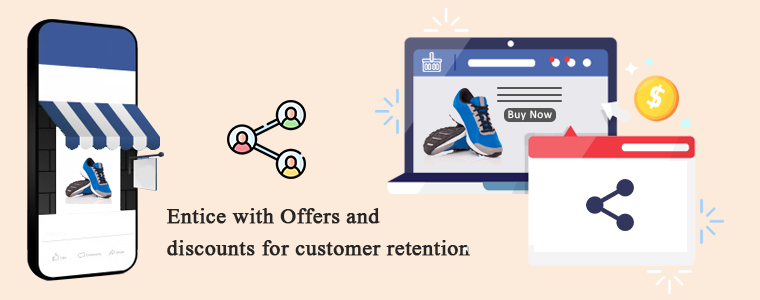
1. Incentive com ofertas e descontos para retenção de clientes
Para atrair um cliente potencial, descontos e vendas são as estratégias mais estimulantes. Em sua loja PrestaShop, adicione o módulo compartilhar e ganhar do Facebook que pode permitir ao cliente compartilhar o produto na conta do Facebook e, em troca, ganhar um cupom de desconto que pode ser resgatado em compras repetidas. Você também pode fazer uma venda relâmpago em sua loja de comércio eletrônico para aumentar a retenção de clientes. As vendas podem atrair qualquer tipo de cliente porque as pessoas adoram comprar seus produtos favoritos a preços baratos.
2. Implementar um programa de fidelidade pode aumentar a retenção de clientes
Outra estratégia comprovada para aumentar a retenção de clientes é lançar um programa de fidelidade em sua loja online. o Módulo de pontos de fidelidade e Módulo de Pontos de Recompensa são projetados para oferecer uma recompensa aos clientes em cada compra que fizerem. Esses pontos podem ser usados na próxima compra na loja PrestaShop de acordo com as regras definidas pela loja.
3. A satisfação do cliente é a chave para a retenção do cliente
Se você deseja que os clientes comprem de você novamente, dê a eles a satisfação que eles merecem. A jornada começa na página inicial e termina quando o cliente recebe o produto de qualidade esperado. Às vezes acontece que o produto não cabe bem ou o cliente não gostou e deseja devolvê-lo. A sua loja está pronta para gerenciar a situação dos pedidos de devolução? Se não, instale o Gerente de Devolução PrestaShop módulo para sua loja que pode ajudá-lo a lidar com o cancelamento de pedidos e devoluções de pedidos sem esforço. Não é isso. Se o seu cliente precisar levantar uma dúvida ou solicitar ajuda, é importante ter um bom sistema de suporte ao cliente. Existem várias maneiras de oferecer suporte ao cliente para sua loja de comércio eletrônico. Providenciar suporte por chat com helpdesk deskoid, suporte por e-mail, chat ao vivo, suporte por telefone, etc.
4. Adicionar elemento de personalização
Você já ouviu o termo experiência personalizada? Essa é a nova tendência nos negócios. Trate seus clientes como um indivíduo e cuide de sua experiência, pois cada cliente tem um sabor único. A retenção de clientes pode ser alcançada se você souber como tratar seus clientes potenciais. Você pode vender produtos personalizados sob demanda, como canecas de café impressas personalizadas, camisetas, relógios de parede ou qualquer coisa que as pessoas gostem de comprar com novos designs personalizados. o Designer / Customizador de Produto PrestaShop O módulo permite que os clientes adicionem o texto, as imagens e o código QR desejados de um produto. Comece hoje e aumente suas vendas para o próximo nível.
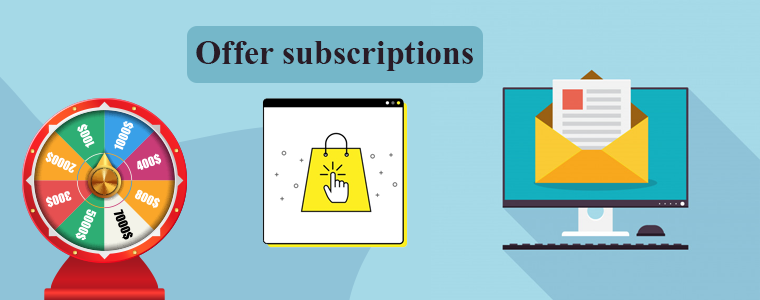
5. Ofertas de assinaturas:
Incentive os clientes com um e-mail a repetir a compra e, para isso, você pode adicionar um módulo de assinatura de e-mail gamificado em sua loja no lugar do enfadonho popup de assinatura. A diversão e Roda da sorte girar e ganhar lúdico vai lhe trazer mais assinantes e você pode oferecer alguns descontos, cupons para seus novos assinantes. O marketing por email pode ser usado para seguir seus clientes atuais. Você pode compartilhar os detalhes dos carrinhos abandonados com eles, receber feedback após a compra e também compartilhar atualizações periódicas da loja. Alerta de preço, novos detalhes de estoque podem fornecer mais retenção de clientes e aumentar suas vendas gerais.
Palavras finais: Se, após a venda, você ainda não vendeu para os clientes existentes, agora é uma boa hora para desenvolver um plano coerente de retenção de clientes. Para aumentar suas vendas e retenção de clientes, você deve cuidar de cada cliente que visita sua loja. Ofereça ofertas, descontos, pontos de fidelidade e incentive-os a assinar seu boletim informativo. Seja claro com as políticas do cliente e não se esqueça de fornecer canais de suporte ao cliente para proporcionar a satisfação do cliente.
AI é a indústria de tecnologia de crescimento mais rápido e, recentemente, Mailchimp adicionou alguns recursos e atualizações impressionantes para tornar a jornada do cliente mais inteligente com algumas soluções inteligentes. Eles citaram este comunicado à imprensa com o slogan: 'Se você tem grandes objetivos, temos grandes atualizações'. Existem milhões de empresas registradas e dados de bilhões de clientes estão disponíveis no Mailchimp. Para construir a solução inteligente, Mailchimp usou todos os dados disponíveis. A nova atualização
Redesenho do aplicativo:
A equipe de desenvolvimento do Mailchimp redesenhou o aplicativo com toda a nova experiência de desenvolvedor com bibliotecas de cliente nativas e SDKs móveis. As APIs Mailchimp?can manage audience data, send campaigns, activate event-based messages, and more. The global infrastructure of Mailchimp can be utilised to send fast, personalised transactional emails, high deliverability rates, and scalable analytics through API or SMTP.
Assistente de criação:
Mailchimp usou IA para dar o melhor experiência de personalização para os clientes. Ele cria ativos para design automaticamente com designs pré-existentes e os altera de acordo com o comando. Considere uma imagem com uma legenda que você criou anteriormente e agora deseja usar o mesmo conteúdo para outros aplicativos com layout diferente. Com Mailchimp, você pode fazer um novo design com apenas alguns cliques.
Construtor de automação visual:
O foco principal da construção dessa solução inteligente foi improvisar a jornada do cliente. Ele ajuda os usuários com o próximo melhor conselho para ação, dando recomendações para melhorar o desempenho da campanha. Ele pode aumentar os negócios e elevar as vendas com recomendações personalizadas de produtos. Os usuários podem enviar e-mails a qualquer momento com a funcionalidade de disparo automático. Mailchimp envia campanhas direcionadas para leads futuros. A nova versão sugere alguns slogans cativantes e linhas de assunto para marketing por email. Inclui entrada em tempo real na contagem de palavras, contagem de caracteres, pontuação e uso de emoticons.
Construindo sua presença online:
Com Mailchimp, as pequenas empresas podem marcar presença online. Desde que a pandemia atingiu a economia, muitas dúvidas foram levantadas e isso forçou Mailchimp a criar recursos com uma abordagem baseada em IA. Eles incorporaram opções de compra de domínio para adicioná-lo ao marketing por email. Outra ferramenta que será lançada em breve é uma ferramenta de construção de sites que não exigirá nenhuma codificação, mencionada no Versão mais recente do Mailchimp. Os usuários podem incorporar botões de compra e muito mais para trazer seu tijolo e argamassa para a plataforma online.
Novas ferramentas para personalizar marketing para e-commerce:
Mailchimp e e-commerce: Mailchimp tem dados de todos os clientes possíveis, então eles construíram a solução que pode ser usada por um público crescente se você conectar sua loja de comércio eletrônico a Mailchimp.
Páginas de destino para celular– A integração de aplicativos móveis é outra ferramenta importante que foi adicionada à atualização do Mailchimp AI. Agora os usuários podem adicionar mais contatos novos ou fazer upload de novos contatos da lista de endereços.
Executar pesquisas com formulários pop-up Possui formulários pop-up de pesquisa atraentes para atrair mais visitantes para a coleta de informações que podem ser usadas para melhorar a experiência do cliente com marketing personalizado.
Aumente o público com a integração de comércio eletrônico Complemento G-Suite com o software comercial e os endereços de e-mail técnicos do Google.
Opinião do autor
Mailchimp é a plataforma de marketing mais poderosa fundada em 2001. Já se passaram duas décadas e ainda está florescendo. Essas novas soluções e atualizações de software permitirão que muitas pequenas empresas trabalhem de maneira inteligente. O e-commerce pode tirar proveito de ferramentas baseadas em inteligência criativa, um construtor de automação visual com um aplicativo redesenhado criado para ajudar as empresas a expandir junto com suas ambições. Vamos ver o que a integração mágica Mailchimp AI expulsa no e-commerce nos próximos anos.
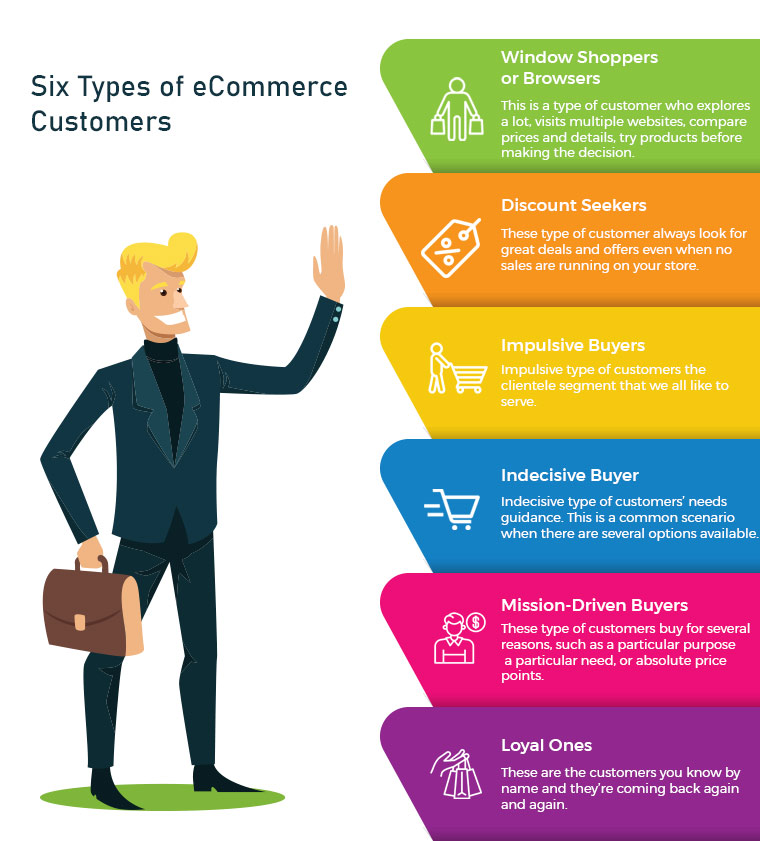
Online shopping is increasing, and customers who are enamoured with eCommerce sites spend countless hours researching the goods they want. There are some very popular quotes which make shopping, therapy, cardio or a hobby. It makes evident just how fixated people can be. There are many different types of eCommerce customers, therefore business owners need to keep each one not just entertained but also motivated to make purchases.
Some eCommerce customers like exploring before buying and some have a focused approach with a to-buy list which makes them good customers. But, being a retailer or eCommerce store owner, you cannot rely on one type of customer. Every shopper is different and they follow a certain pattern of buying with different priorities. Being a retailer, you must have gone to a lot of stores or manufacturers before choosing the item for sale. You also have a pattern which makes you a type of customer. I’m going to talk about some distinct categories of consumers that store owners frequently deal with and offer some expert advice on how to handle various types of eCommerce customers in your business to increase conversions.
1. Window Shoppers or Browsers
The number one on the list is servers or browsers. This is a type of customer who explores a lot, visits multiple websites, compares prices and details, try products before making a decision. They add products to their cart but never intended to shop from them. Yes, there are many such buyers and you may call them a pain. Can you do something about it? Yes, I guess. There can be ways to attract such visitors and encourage them to buy products from your store.
Greet them well:
If you are a retailer, you must remember to greet them well. Even if they are not asking for any assistance you can provide them one. eCommerce store owners can add any entry or exit popup such as Better Thank you Page module to their store for greeting these types of customers.
Entry or Exit Popup:
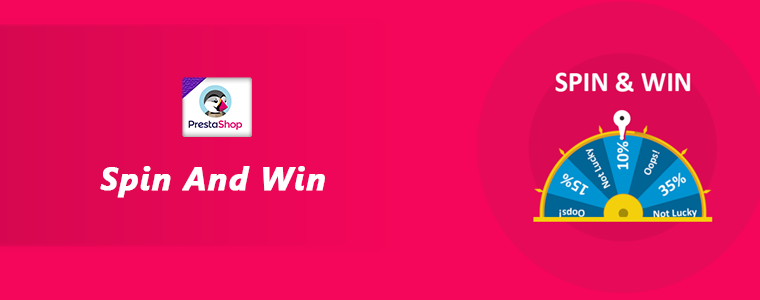
Some of the easiest ways to engage your consumers are by the use of innovative methods. The customer’s attention must be drawn to the digital interface and manner of presentation. The gamified interface of Spin and Win Pop-up attracts shoppers to your store. This is a 3-in-one pop-up which is used as an entry pop-up, exit pop up or an email subscription pop-up.
Don’t ignore the browsers, they can become your loyal eCommerce customers if treated right.
2. Discount Seekers
These types of eCommerce Customers respond well to pushy sale tactics. They always look for great deals and offers even when no sales are running in your store. For attracting such buyers you should focus on highlighting what they will save on that particular deal.
Host Clearance or Flash Sales:
These discount seekers can give you huge sales if provided with flat discounts. Clearance sales can be a good option. The products that have been stocked in your store for months can be sold out, and customers looking for discounts will benefit from it.These sales can be a key contributor to your cash flow which will make room for the new products by removing the older ones.
Scratch Card:
You can provide your customers with Scratch Cards while having a purchase. Customers will be attracted to the alluring coupons which can save their deal a lot.
Free Shipping:
Free shipping encourages customers to buy more from your store. A fixed amount of purchase is to be made by the shopper to get free delivery.
Impulsive types of customers are the clientele segment that we all like to serve. Nothing is more exciting than helping the impulse shopper to respond favourably to your recommendations. Impulse shoppers, also known as emotional shoppers, make unplanned purchases based on items that are currently appealing to them. Online shopping is a popular example of pulse or emotional buying. They look for products which attract them and you can do that by showing related products or by offering personalisation.
Show Related Products:
If you are dealing with an impulse buyer then make this chance an opportunity. Because they shop when they like it without giving a second thought. Show them what’s new in the store and let them feel, that they will be out of the race if they don’t own it. This can be done with modules like related products.
4. Indecisive Buyer
This is a common scenario when there are several options available. For instance, search for a floral top and the results will blow your mind. hundreds of products will start appearing in various stores. Deciding one will be difficult. Indecisive type of customers needs guidance. Ask them questions and give honest advice. A flexible return policy can also help them with their shopping.
Ask Questions:
Shop owners can help them decide what they want. Provide them with chat support or in-store assistance for choosing the right product. This effort can turn them into loyal eCommerce Customers.
Product Custom Field:
You can add a product custom field with the product description. You can add a field with related questions which can help you understand the need of the buyer. Advance Product Feld extension can be a good fit to improve UX.
Return Manager:
An indecisive customer will be encouraged if he/she knows that the product can be returned if they don’t like it. The Return Manager is a good module to add to your eCommerce store.
5. Mission-Driven Buyers
These can be called researchers or need-based customers. These customers buy for several reasons, such as a particular purpose, a particular need, or absolute price points. As difficult as it can be to please these individuals, they may still become regular customers if they are well taken care of. Provided with a good customer experience which is not available online or on other retailers stores can turn them into loyal customers.
Offer buy-online, Pick Up In-Store:
These types of buyers do not have much time to spend in window shopping or i-store shopping. They can make the purchase online and pick up the product from the store. Implement this new pick-up and drop option in your store to attract mission-driven buyers.
Cross-Selling:
Retailers can help the need-based customer with cross-selling techniques. You can place bread in related products while they are buying milk or a mobile cover if they are purchasing a mobile. The Automatic Related Product module can help you show relevant products on various pages such as the product page, the home page, the shopping cart page, etc.
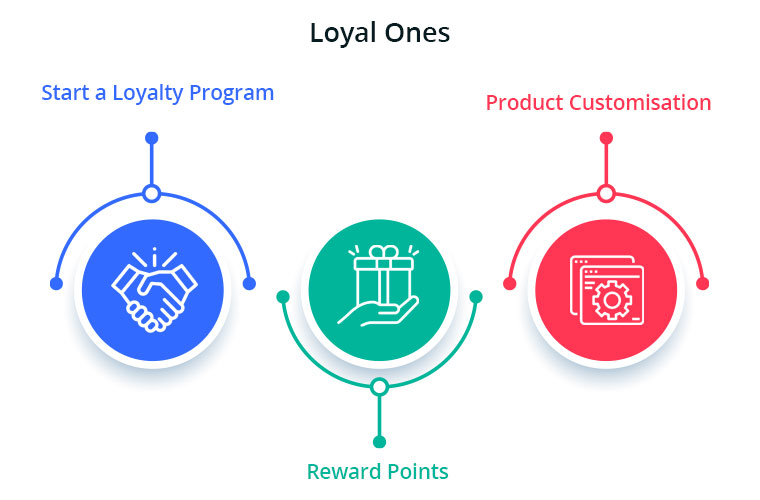
These are the customers you know by name and they’re coming back again and again. Loyal eCommerce Customers already know and enjoy your shop, so now you need to keep them happy. Offer customisation and personalised experience and never lose them to others. The best ones are difficult to find and it is your responsibility to give them your best services. You can give them reward points or loyalty points on every purchase. These types of customers are the best marketers for your store as the more they shop, the more will be the word of mouth communication.
Start a Loyalty Program:
Choose a module or plugin for your eCommerce Store to give loyalty points to your loyal ones. This will motivate these types of buyers to shop again and again from your store. During checkout, the loyalty points can be redeemed for a discount.
Reward points:
You can also give them reward points on various purchases like first purchase, on a fixed amount order, on particular products etc. The reward points encourage the buyer to make more purchases. It helps the admin boost customer engagement and creates loyal customers.
Product Customisation:
Product customisation and personalisation can turn your sales to the next level. this is one of the most accepted trends. Help them get a personalised product of their taste. The best module for giving a customisation experience is Product Designer/Customization which can provide several choices to you and shoppers.
Using this understanding to help turn deals, desires, needs-based and even casual customers into loyal ones will help the business expand. At the same time, ensuring that your loyal customers have a good experience every time they visit your store would only boost your bottom-line income.
It is often observed that customers want to return or cancel their orders. Managing orders and fulfilling customer’s demands isn’t an easy task. Considering consumer rights in the EU, every eCommerce platform needs an easy return manager to maintain the records and meeting customer’s needs. EU has a policy that a consumer can request a return or refund for a faulty product within 14 days after purchase. As an eCommerce owner, it may sound tedious and time taking.
Don’t worry! PrestaShop Return Manager Addon takes care of all the functions required to cancel or order returns. With additional features described below, this new version gives a user-friendly experience to eCommerce store owners and customers.
What’s New in PrestaShop Return Manager Addon?
Customer retention is a merchant’s need and this can be achieved with customer satisfaction. PrestaShop Return Manager module comes with an easy cancel request format with multiple return and cancellation methods for a customer.
1. Decide when to start calculating Policy time
Imagine a situation when the product is delivered after the expiry of the return date. What impression this will create on your customer? Sometimes the return date expires if the product delivery is delayed, to resolve this issue, the addon now provides a drop-down menu for selecting a product status after which the return policy time will be calculated.
2. Quick Access of Return Listing from Dashboard
You don’t have to find the module from a long list of installed modules in the admin panel, instead, you can configure the PrestaShop Return Manager Addon from the left menu of the admin panel.
Additionally, a new option to access all the return listing counts has been added on top of the admin panel. All the return listings like order returns, canceled orders, etc can be seen in one place.
3. Custom features for email templates
In the updated version of Return Manager, the admin is provided with an option in the admin panel to add a custom text for each Return Status and created a placeholder that can be used in the Return Status Email templates. The updated version provides an option in the admin panel to ‘send a Test Email’.
4. Search and Filter all the Listing Tabs
With the latest version, the store manager can easily sort and filter the listing tabs on the basis of date, customer ID, Return ID, Customer Name, etc. This makes the task easier for the admin.
Features that enhance admin’s power
5. Allows Partial or complete order replacement
The online store administrator can now allow online customers to pick items from their orders for replacement. Online customers can even request for returning the whole order if they want to do so. They can now choose all the products from the list. This increases the usability rate.
6. Admin can add Custom Field
This updated version of PrestaShop Return Manager Addon allows an online merchant to create custom fields. Online store owners can build several custom fields from the PrestaShop Refund Order Addon admin interface. The store owner may set custom field block names, apply validations, and also set default values (if required). Admin can make any field as required. Admin can set a default value and validation type.
Why choose PrestaShop RMA over other Order Return Module?
The RMA plays a vital role in the eCommerce store. The Customer sometimes raises the request for the product return, refund, and replacement. To improve customer retention and usability the online merchant needs a flawless RMA interface. Other eCommerce like the Magento Return Manager plugin does not come with these new features. This rejuvenated tool provides both a user-friendly experience and customer satisfaction.
1. Increased Customer Conversion Rate
Easy refund and return policy builds trust and makes the customer believe in the merchant. This eventually increases the word-of-mouth publicity of the website and brings more traffic to the site. From this, you can expect a good conversion rate. This one small change will catapult your conversion rate and this way you can keep the complaints zero.
2. Customer Satisfaction
The front-end easy ‘return’ option lets them believe if they are not completely satisfied with their purchase, they may return it or replace it. This assurance lets your visitor believe in your product policy and allows them to shop more. The easy email template functionality sends an email to both parties which enhances your business relationship. A happy customer always comes back to you without any pause.
Benefits of PrestaShop Return Manager for the merchants:
PrestaShop Order Return Manager Addon makes it easy to handle the returns of customers.
The possibility of receiving “Store Credits” for a faulty product helps to improve consumer retention.
The product issues can be fixed by knowing the return reasons.
With the aid of the PrestaShop Consumer Return Manager, you will find out the exact problem in the product by providing customers with the option of uploading the picture of the faulty product.
Email template makes you craft a mail for your customer at every return stage.
With RMA quick return addon, by adding custom fields you can collect more information from the customer.
Benefits of PrestaShop RMA return module for the customers:
A ‘Return’ button allows the existing customer or guest customer to return or cancel the placed order completely or partially.
PrestaShop Order Return Manager provides an easy cancel request format with credit, refund, and replacement options
Customers can upload an image of a faulty product highlighting the defect.
An email with custom text will be sent to the customer at every stage for their order cancellation or return request.
PrestaShop Order Return Manager allows customers to select a nearby store address for shipping the damaged product.
Customers can return partial or whole orders by easy select option.
Customers will have the option to cancel the order for a short period. The customers need to go to the My Account >> Return Manager section to cancel the order.
Other useful features of order return or cancellation addon
Easy Return Request Option
There are some other features that make this addon more convenient and user-oriented. It helps you identify the return reasons for customers and lets you raise a return request on behalf of your customer. Thanks to a quick and effective cancellation method, customers are more likely to go back to your platform.
Crafted Email-Templates
Well-designed email Templates emerged as an attractive feature. This pre-formatted email template option gives the admin a hassle-free experience at the backend and directly sends an email to both the parties as soon as the query is raised and updates the customer at every stage of their request. There are 14 different email templates as per the requirements. It is a timesaver for both merchants and customers.
Managing Return Requests at one place
Managing an eCommerce store with fewer efforts is like a cherry on the cake and this amazing addon does that. It helps you manage all the return requests in one place. You can find pending return lists, active return lists, and canceled return lists on the admin panel as well as on the dashboard. This information is also available to export in .csv format in case you want the compiled data.
Compatible with GDPR Module
PrestaShop Return Manager is compliant with GDPR. When you are using the Knowband GDPR module, both the customer and the administrator will be able to access the information of the return request. Besides, the Customer can request the admin to remove personal data from their shop.
Final Words
PrestaShop Return Manager addon is an interesting and helpful tool for the eCommerce store owner to manage the return and cancel the request at the backend. A hassle-free return policy attracts buyers and gains the customer’s trust.
For more information or to shop the PrestaShop Return Manager for your PrestaShop store, you can visit Knowband store or reach out to us at support@knowband.com. Return Manager Extension is also available for Magento and Magento 2 stores.
When exploring your Instagram or Facebook, you always see feeds that are of interest. Google’s discover feed also shows you the content which you like and would like to spend time on. Naturally, this makes you feel exclusive, and you spend more time without keeping the time track.
Can you give the same experience to your customers while shopping? Ecommerce brands like Myntra or Amazon try to target their inactive leads with personalized email marketing. Giving your customer a personalized shopping experience in this competitive environment could be the right plan to survive in a long race.
Understand the shopping journey of buyers with data and use it well for customer experience personalization. With that, customers who get exclusive treatment will do word-of-mouth marketing.
As an eCommerce store owner, you might have given thought to this. But, you may struggle with How to do it?
Know your customer personally
When you are spending a lot of time and money on focused target marketing, you just don’t need a customer who will make a one-time purchase but your business demands a loyal one. For target marketing, you can consider gathering demographic and psychographic details from a customer. The demographic information can be collected from registration forms but for psychographic information you need more data. To get the details like the interests, values, profession, and lifestyle, you can add custom fields to your registration page.
Proving your customer with loyalty points or rewards at every step of the form filling process will encourage them to fill it. This way, you can get more relevant information for future marketing and product personalization.
You can always ask for:
Their first name
Birthday
products they’re interested in
A preferred channel of communication
Some might like receiving emails but in a limited number while other millennials prefer receiving an SMS just after the purchase is made. It is good to ask the preferred channel of communication for targeted marketing. You can even ask for their interests and genre if a person is buying a book from your store.
A large number of people have no issues if a company spoof into the customer’s information which can provide them with a wow experience. From a report, it has been found that 76% of customers expect companies to understand their demands and requirements. So, people like getting a personalized experience, and it is now a trend that can be followed by an eCommerce store owner to compete with others in the market. Personalization can lead to impulsive buying.
Better to communicate with your customers
Remind your customers about the products they liked to buy or visited but did not make the purchase. You can send a push notification for back-in-stock products. You can ask them to look into their wishlist to reduce the abandoned cart.
It is crucial to choose the right means of communication for interacting with your customer. The selection of a communication channel should be based on the data you have collected. Customers often receive promotional emails and notifications which grab their attention and make them shop more.
Putting efforts in the right direction can help you boost conversion rates and customer retention. Millennials prefer texting overcall. You can use a chat app to provide a solution to their queries. This will be a great deal to give them more customer experience personalization.
Effective use of data for persona
You have the data in your system and what a waste if you are not using it well. Your system knows your customer better than you do.
Have you ever been in a situation when you called a person with the wrong name? This happened to me once, and I never want that to happen again. It instantly loses trust in a relationship. Send emails or greet them in-store by calling their name. This builds up an interactive connection between you and your customer.
You can take the help of segment email marketing by categorizing your customers according to their psychographic data
Understand the need of your customer as per their geographic location. Implement geolocation-based marketing strategies. Add a store locator to your website. In-store shopping is still a trend in millennials.
PrestaShop modules you should not miss on
Do you know that you can enhance the personalized customer experience by adding extensions to it?
It is challenging to keep your customers at a checkout page or the product page when they are doing two things at a time. You must have some striking, captivating website features which will keep them attentive and focused on their purchase. Why not with personalized features that you can add with these modules?
Collect more information
With PrestaShop Custom Registration Fields, the owner of the PrestaShop store will collect information about the customer by adding custom fields to the registration form of the website. Additional Order Forms/Field Manager addon for PrestaShop is another module that can help you gather more information. Custom fields on the order form can be generated with this PrestaShop Additional Order Forms Manager without making any adjustments to the code on the web page.
How to use it?
You can ask your customer to fill up the details which can be optional. You can add this field to the registration form. This way you can collect information about birthdays, anniversaries, or any of the interests which can help you promote your products. You can send a personalized message on their birthday with a greeting or any discount coupon. Store owners can use additional information to develop their services and eventually make more profit from their company.
Celebrate birthdays or anniversaries
You can give discount vouchers or coupons to your customers on their Birthday. Birthday Coupon -PrestaShop addon is a module that can inspire your customers to shop from your store on their birthdays.
How to use it?
You can send an email with a personalized message on their special day. This email will include the birthday coupon or discount voucher. The voucher sent through the mail will be valid for a limited time. The addon comes with multiple default templates. You can use it for various occasions.
Make them loyal customers
It is a dream for brands to have loyal customers. From research, it is found that about 30% of people like to buy the same brand and around 40% choose the same brand if they are offering personalized products. For customer retention and conversions, you can give loyalty points or reward points to your customers.
The PrestaShop Reward Points addon incorporates the reward points feature into your PrestaShop store and allows the admin to offer the rewards point to online shoppers every time they purchase items.
How to use it?
Store owners can give reward points to the customer after every purchase they do. This comes with a set of terms and conditions. The module helps the admin to add multiple rules for redeeming those points. Customers can redeem those points at some point of purchase which will keep them engaged in your store.
There are some rules like Cart Rule, Product Rule, and Behaviour rule for loyalty points. Store owners can offer loyalty points on a specific cart amount, product quantity, based on the payment method, particular product or category, shipping services, etc. It can be given to new customers while placing their first order.
Display recently viewed items
Automatic Related Products addon for the PrestaShop store can help you show the relevant products to your customers. This feature can be added to multiple pages of your eCommerce store.
How to use it?
The feature will show related products to your customers, and this will motivate them to see more and more on your eCommerce store. If they are not satisfied with the one product, they can see more until they get the one.
It has a simple configuration, and the admin can ask customers to provide more information about the product. If they like the product or not? If they need any modifications? By collecting additional customer details, the sellers can better represent them. As a result, online shoppers will have the same user experience with this PrestaShop Additional Field Module on the Product tab.
Attractive email subscription module
Spin And Win – Entry, Exit, and Email Subscription Popup by PrestaShop have a gamified interactive look. It attracts the buyer’s attention and allows them to win offers like discount coupons or free shipping. This is one of the best sellers of PrestaShop and a fantastic module to collect the email addresses of your customer.
How to use it?
You can Get Personal in Email Marketing and send personalized Emails using the information which is provided by the customers. The emails should be sent based on customer behavior. You can go for a personal recommendation to offer a personalized customer experience to your customer. Try to re-engage your leads with promotional messages or pop-up notifications. Email marketing is a free and reliable option to give a customer personalization experience to users.
Greet your customer
Greetings are most valuable when you are building a relationship. Customer-trader relationship is most important when it comes to business. You can use a Better thank you page module for your PrestaShop store.
How to use it?
Add a Better thank you page module to your PrestaShop store and use it to show a pop-up when the customer is leaving your store or after the successful purchase. Also, you can add customized banners or discount coupons for their next purchase. This way, it can help you boost customer retention and make your customer satisfied.
Final thoughts
Increase your sale by providing a personalized shopping experience to your customers. In this era of millennials, Personalisation is the only way to attract a loyal customer base to your store. Create Special Campaigns Based on user behavior and make them feel unique. They don’t like to be treated as a number but an individual. So, It’s time to boost your sales with a customer experience by providing personalization.