Manage Order Returns and Order Cancellation with PrestaShop RMA Module

It is often observed that customers want to return or cancel their orders. Managing orders and fulfilling customer’s demands isn’t an easy task. Considering consumer rights in the EU, every eCommerce platform needs an easy return manager to maintain the records and meeting customer’s needs.  EU has a policy that a consumer can request a return or refund for a faulty product within 14 days after purchase. As an eCommerce owner, it may sound tedious and time taking.

Don’t worry! PrestaShop Return Manager Addon takes care of all the functions required to cancel or order returns. With additional features described below, this new version gives a user-friendly experience to eCommerce store owners and customers.

What’s New in PrestaShop Return Manager Addon?

Customer retention is a merchant’s need and this can be achieved with customer satisfaction. PrestaShop Return Manager module comes with an easy cancel request format with multiple return and cancellation methods for a customer.

whats-new-in-prestashop-return-manager-addon

1.          Decide when to start calculating Policy time

Imagine a situation when the product is delivered after the expiry of the return date. What impression this will create on your customer? Sometimes the return date expires if the product delivery is delayed, to resolve this issue, the addon now provides a drop-down menu for selecting a product status after which the return policy time will be calculated.

2.         Quick Access of Return Listing from Dashboard

You don’t have to find the module from a long list of installed modules in the admin panel, instead, you can configure the PrestaShop Return Manager Addon from the left menu of the admin panel.

Additionally, a new option to access all the return listing counts has been added on top of the admin panel. All the return listings like order returns, canceled orders, etc can be seen in one place.

3.         Custom features for email templates

In the updated version of Return Manager, the admin is provided with an option in the admin panel to add a custom text for each Return Status and created a placeholder that can be used in the Return Status Email templates. The updated version provides an option in the admin panel to ‘send a Test Email’.

4.         Search and Filter all the Listing Tabs

With the latest version, the store manager can easily sort and filter the listing tabs on the basis of date, customer ID, Return ID, Customer Name, etc. This makes the task easier for the admin.

Features that enhance admin’s power

5.     Allows Partial or complete order replacement

The online store administrator can now allow online customers to pick items from their orders for replacement. Online customers can even request for returning the whole order if they want to do so. They can now choose all the products from the list. This increases the usability rate.

6.     Admin can add Custom Field

This updated version of PrestaShop Return Manager Addon allows an online merchant to create custom fields. Online store owners can build several custom fields from the PrestaShop Refund Order Addon admin interface. The store owner may set custom field block names, apply validations, and also set default values (if required). Admin can make any field as required. Admin can set a default value and validation type.

Why choose PrestaShop RMA over other Order Return Module?

The RMA plays a vital role in the eCommerce store. The Customer sometimes raises the request for the product return, refund, and replacement. To improve customer retention and usability the online merchant needs a flawless RMA interface. Other eCommerce like the Magento Return Manager plugin does not come with these new features.  This rejuvenated tool provides both a user-friendly experience and customer satisfaction.

1.     Increased Customer Conversion Rate
Easy refund and return policy builds trust and makes the customer believe in the merchant. This eventually increases the word-of-mouth publicity of the website and brings more traffic to the site. From this, you can expect a good conversion rate. This one small change will catapult your conversion rate and this way you can keep the complaints zero.

2.     Customer Satisfaction

The front-end easy ‘return’ option lets them believe if they are not completely satisfied with their purchase, they may return it or replace it. This assurance lets your visitor believe in your product policy and allows them to shop more. The easy email template functionality sends an email to both parties which enhances your business relationship. A happy customer always comes back to you without any pause.

Benefits of PrestaShop Return Manager for the merchants:

  • PrestaShop Order Return Manager Addon makes it easy to handle the returns of customers.
  • PrestaShop RMA easy return module boosts customer loyalty.
  • The possibility of receiving “Store Credits” for a faulty product helps to improve consumer retention.
  • The product issues can be fixed by knowing the return reasons.
  • With the aid of the PrestaShop Consumer Return Manager, you will find out the exact problem in the product by providing customers with the option of uploading the picture of the faulty product.
  • Email template makes you craft a mail for your customer at every return stage.
  • With RMA quick return addon, by adding custom fields you can collect more information from the customer.

Benefits of PrestaShop RMA return module for the customers:

  • A ‘Return’ button allows the existing customer or guest customer to return or cancel the placed order completely or partially.
  • PrestaShop Order Return Manager provides an easy cancel request format with credit, refund, and replacement options
  • Customers can upload an image of a faulty product highlighting the defect.
  • An email with custom text will be sent to the customer at every stage for their order cancellation or return request.
  • PrestaShop Order Return Manager allows customers to select a nearby store address for shipping the damaged product.
  • Customers can return partial or whole orders by easy select option.
  • Customers will have the option to cancel the order for a short period. The customers need to go to the My Account >> Return Manager section to cancel the order.

Other useful features of order return or cancellation addon

Easy Return Request Option

There are some other features that make this addon more convenient and user-oriented. It helps you identify the return reasons for customers and lets you raise a return request on behalf of your customer. Thanks to a quick and effective cancellation method, customers are more likely to go back to your platform.

Crafted Email-Templates

Well-designed email Templates emerged as an attractive feature. This pre-formatted email template option gives the admin a hassle-free experience at the backend and directly sends an email to both the parties as soon as the query is raised and updates the customer at every stage of their request. There are 14 different email templates as per the requirements. It is a timesaver for both merchants and customers.

Managing Return Requests at one place

Managing an eCommerce store with fewer efforts is like a cherry on the cake and this amazing addon does that. It helps you manage all the return requests in one place. You can find pending return lists, active return lists, and canceled return lists on the admin panel as well as on the dashboard. This information is also available to export in .csv format in case you want the compiled data.

Compatible with GDPR Module

PrestaShop Return Manager is compliant with GDPR. When you are using the Knowband GDPR module, both the customer and the administrator will be able to access the information of the return request. Besides, the Customer can request the admin to remove personal data from their shop.

Final Words

PrestaShop Return Manager addon is an interesting and helpful tool for the eCommerce store owner to manage the return and cancel the request at the backend.  A hassle-free return policy attracts buyers and gains the customer’s trust.

For more information or to shop the PrestaShop Return Manager for your PrestaShop store, you can visit Knowband store or reach out to us at support@knowband.com. Return Manager Extension is also available for Magento and Magento 2 stores.

You May Like To Read:

5 ways to Manage eCommerce Returns

8 Simple Tips to Reduce Product Returns in eCommerce

Compel the Customer to Return to your Store with Back in Stock Module

12 Ways to Reduce Shopping Cart Abandonment

9 Checkout Conversion Killers Driving Your Buyers Away

GTranslate – Error 402: Payment Requiredhtml{height:100%;margin:0;padding:0}body{margin:0;padding:0;height:100%;background:url(https://gtranslate.io/assets/images/header-bg.png) no-repeat center center fixed;-webkit-background-size:cover;-moz-background-size:cover;-o-background-size:cover;background-size:cover}.wrapper{height:100%;margin:0;padding:0;background:rgba(25,26,29,0.8);background:-moz-linear-gradient(left, rgba(25,26,29,0.8) 0%, rgba(25,26,29,0.8) 100%);background:-webkit-gradient(left top, right top, color-stop(0%, rgba(25,26,29,0.8)), color-stop(100%, rgba(25,26,29,0.8)));background:-webkit-linear-gradient(left, rgba(25,26,29,0.8) 0%, rgba(25,26,29,0.8) 100%);background:-o-linear-gradient(left, rgba(25,26,29,0.8) 0%, rgba(25,26,29,0.8) 100%);background:-ms-linear-gradient(left, rgba(25,26,29,0.8) 0%, rgba(25,26,29,0.8) 100%);background:linear-gradient(to right, rgba(25,26,29,0.8) 0%, rgba(25,26,29,0.8) 100%);filter:progid:DXImageTransform.Microsoft.gradient( startColorstr=’#191a1d’, endColorstr=’#191a1d’, GradientType=1 )}.dialog{font-family:”proxima-nova”,”helvetica”;text-align:center;color:#fff;margin-top:10%;box-sizing:border-box;padding:0.5em}.logo{width:180px;padding:0.6em;margin-bottom:0.5em}.icon{width:6em;height:6em;margin-bottom:0.5em}h1{font-size:4em}a{color:#fff;text-decoration:underline;font-weight:bold} Error 402: Payment RequiredGTranslate subscription is inactive or expired for this website.If you are the owner go to gtranslate.io

Giving Customers a Personalized Shopping Experience can Boost Online Sales

When exploring your Instagram or Facebook, you always see feeds that are of interest.  Google’s discover feed also shows you the content which you like and would like to spend time on.  Naturally, this makes you feel exclusive, and you spend more time without keeping the time track. 

Can you give the same experience to your customers while shopping? Ecommerce brands like Myntra or Amazon try to target their inactive leads with personalized email marketing. Giving your customer a personalized shopping experience in this competitive environment could be the right plan to survive in a long race.

Understand the shopping journey of buyers with data and use it well for customer experience personalization. With that, customers who get exclusive treatment will do word-of-mouth marketing.

As an eCommerce store owner, you might have given thought to this. But, you may struggle with How to do it? 

Know your customer personally

When you are spending a lot of time and money on focused target marketing, you just don’t need a customer who will make a one-time purchase but your business demands a loyal one. For target marketing, you can consider gathering demographic and psychographic details from a customer. The demographic information can be collected from registration forms but for psychographic information you need more data. To get the details like the interests, values, profession, and lifestyle, you can add custom fields to your registration page.

Proving your customer with loyalty points or rewards at every step of the form filling process will encourage them to fill it. This way, you can get more relevant information for future marketing and product personalization.

You can always ask for:

  •         Their first name 
  •         Birthday  
  •         products they’re interested in
  •         A preferred channel of communication

Some might like receiving emails but in a limited number while other millennials prefer receiving an SMS just after the purchase is made. It is good to ask the preferred channel of communication for targeted marketing. You can even ask for their interests and genre if a person is buying a book from your store.

A large number of people have no issues if a company spoof into the customer’s information which can provide them with a wow experience. From a report, it has been found that 76% of customers expect companies to understand their demands and requirements. So, people like getting a personalized experience, and it is now a trend that can be followed by an eCommerce store owner to compete with others in the market. Personalization can lead to impulsive buying.

Better to communicate with your customers

Remind your customers about the products they liked to buy or visited but did not make the purchase. You can send a push notification for back-in-stock products. You can ask them to look into their wishlist to reduce the abandoned cart.

It has been found that 95% of millennials do shopping while doing other things. Most of them shopped while watching TV or chatting with a friend. Half of the people bought when they are bored with waiting for someone, and some do it when they are traveling.

It is crucial to choose the right means of communication for interacting with your customer. The selection of a communication channel should be based on the data you have collected. Customers often receive promotional emails and notifications which grab their attention and make them shop more.

Putting efforts in the right direction can help you boost conversion rates and customer retention. Millennials prefer texting overcall. You can use a chat app to provide a solution to their queries. This will be a great deal to give them more customer experience personalization.

Effective use of data for persona

You have the data in your system and what a waste if you are not using it well. Your system knows your customer better than you do.

  •         Have you ever been in a situation when you called a person with the wrong name? This happened to me once, and I never want that to happen again. It instantly loses trust in a relationship. Send emails or greet them in-store by calling their name. This builds up an interactive connection between you and your customer.
  •         You can take the help of segment email marketing by categorizing your customers according to their psychographic data
  •         You can enhance the customer experience by offering them products related to their last purchase. A study says, 44% of the customers intended to buy from the same brand or company after getting a personalized shopping experience.
  •         Understand the need of your customer as per their geographic location. Implement geolocation-based marketing strategies. Add a store locator to your website. In-store shopping is still a trend in millennials.

PrestaShop modules you should not miss on

Do you know that you can enhance the personalized customer experience by adding extensions to it?

It is challenging to keep your customers at a checkout page or the product page when they are doing two things at a time. You must have some striking, captivating website features which will keep them attentive and focused on their purchase. Why not with personalized features that you can add with these modules?

Collect more information

With PrestaShop Custom Registration Fields, the owner of the PrestaShop store will collect information about the customer by adding custom fields to the registration form of the website. Additional Order Forms/Field Manager addon for PrestaShop is another module that can help you gather more information. Custom fields on the order form can be generated with this PrestaShop Additional Order Forms Manager without making any adjustments to the code on the web page.

How to use it?

You can ask your customer to fill up the details which can be optional. You can add this field to the registration form. This way you can collect information about birthdays, anniversaries, or any of the interests which can help you promote your products. You can send a personalized message on their birthday with a greeting or any discount coupon. Store owners can use additional information to develop their services and eventually make more profit from their company.

Celebrate birthdays or anniversaries

You can give discount vouchers or coupons to your customers on their Birthday. Birthday Coupon -PrestaShop addon is a module that can inspire your customers to shop from your store on their birthdays.

How to use it?

You can send an email with a personalized message on their special day. This email will include the birthday coupon or discount voucher. The voucher sent through the mail will be valid for a limited time. The addon comes with multiple default templates. You can use it for various occasions.

Make them loyal customers

It is a dream for brands to have loyal customers. From research, it is found that about 30% of people like to buy the same brand and around 40% choose the same brand if they are offering personalized products.  For customer retention and conversions, you can give loyalty points or reward points to your customers.

The PrestaShop Reward Points addon incorporates the reward points feature into your PrestaShop store and allows the admin to offer the rewards point to online shoppers every time they purchase items. 

How to use it?

Store owners can give reward points to the customer after every purchase they do. This comes with a set of terms and conditions. The module helps the admin to add multiple rules for redeeming those points. Customers can redeem those points at some point of purchase which will keep them engaged in your store.

Another extension that can help you with customer retention and customer conversion is PrestaShop Loyalty Point Module.

How to use it?

There are some rules like Cart Rule, Product Rule, and Behaviour rule for loyalty points. Store owners can offer loyalty points on a specific cart amount, product quantity, based on the payment method, particular product or category, shipping services, etc. It can be given to new customers while placing their first order.

Display recently viewed items

Automatic Related Products addon for the PrestaShop store can help you show the relevant products to your customers. This feature can be added to multiple pages of your eCommerce store.

How to use it?

The feature will show related products to your customers, and this will motivate them to see more and more on your eCommerce store. If they are not satisfied with the one product, they can see more until they get the one.

Add more product details

Admin can add n number of details for a product with Advance Product Attribute/Field – PrestaShop Addon. This module allows you to show descriptive information about the product. 


How to Use it?

It has a simple configuration, and the admin can ask customers to provide more information about the product. If they like the product or not? If they need any modifications?  By collecting additional customer details, the sellers can better represent them. As a result, online shoppers will have the same user experience with this PrestaShop Additional Field Module on the Product tab.

Attractive email subscription module

Spin And Win – Entry, Exit, and Email Subscription Popup by PrestaShop have a gamified interactive look. It attracts the buyer’s attention and allows them to win offers like discount coupons or free shipping. This is one of the best sellers of PrestaShop and a fantastic module to collect the email addresses of your customer.

 How to use it?

You can Get Personal in Email Marketing and send personalized Emails using the information which is provided by the customers. The emails should be sent based on customer behavior. You can go for a personal recommendation to offer a personalized customer experience to your customer. Try to re-engage your leads with promotional messages or pop-up notifications. Email marketing is a free and reliable option to give a customer personalization experience to users.

Greet your customer

Greetings are most valuable when you are building a relationship. Customer-trader relationship is most important when it comes to business. You can use a Better thank you page module for your PrestaShop store.


How to use it?

Add a Better thank you page module to your PrestaShop store and use it to show a pop-up when the customer is leaving your store or after the successful purchase. Also, you can add customized banners or discount coupons for their next purchase. This way, it can help you boost customer retention and make your customer satisfied.

Final thoughts

Increase your sale by providing a personalized shopping experience to your customers. In this era of millennials, Personalisation is the only way to attract a loyal customer base to your store. Create Special Campaigns Based on user behavior and make them feel unique. They don’t like to be treated as a number but an individual. So, It’s time to boost your sales with a customer experience by providing personalization. 

Recommended Reads:

How to Simplify the Online Shopping Experience of Customers?

Give Best Infinite/Endless Scrolling Experience to Your eCommerce Customers

9 Eliminadores de conversão de checkout, afastando seus compradores

O proprietário de uma loja de comércio eletrônico observa o abandono máximo do carrinho quando um comprador chega à página de checkout. Quais fatores são responsáveis ​​pelo abandono do carrinho e agem como assassinos de conversão? Falando em estatísticas, observa-se que sessenta e nove em cada cem pessoas abandonaram o carrinho na página de checkout.

Pode haver muitos visitantes em suas postagens de blog ou páginas de produtos. Mas, eles estão lhe dando algum negócio? Se não, a seguir estão os nove assassinos de conversão de checkout mais comuns que afastam seus clientes.

1.???? Mandatory Registration during Checkout:

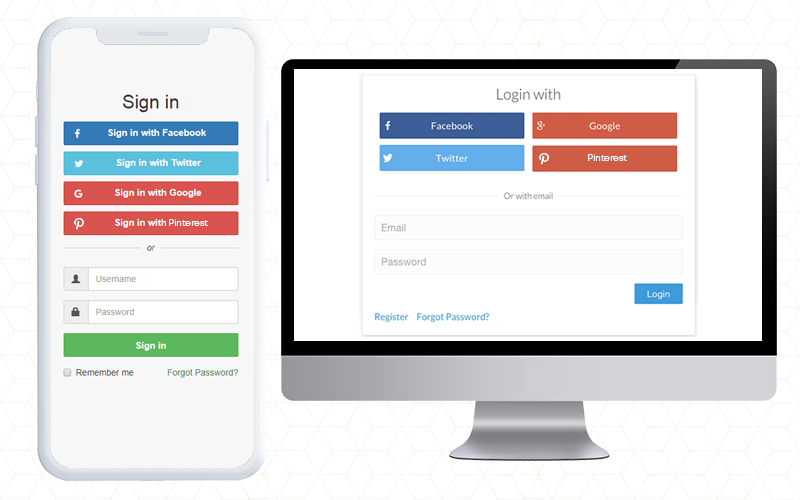
Forçar seus clientes a criar uma conta antes que eles possam concluir a transação pode matar suas conversões. Portanto, certifique-se de que seu site sempre permite que os clientes comprem como visitantes, sem a necessidade de se registrar. Você pode fornecer a eles a facilidade de check-out ou a opção de login social, o que tornará tudo mais fácil para eles sem levar muito tempo.

2.???? Long and complicated Process:

Nada é mais irritante do que preencher formulários superlongos com campos complicados antes de fazer uma compra. Pare de estimular os consumidores a comprar itens adicionais com pop-ups. Às vezes, eles interrompem o processo de checkout e acabam causando mais danos do que benefícios. Portanto, torne o seu formulário de inscrição simples e rápido. Certifique-se de que eles incluem menus suspensos, botões de opção e uma indicação de informações opcionais relevantes. Mais importante ainda, segure rótulos de campo para que os consumidores possam preencher rapidamente o que precisam.

3.???? Lacking or Weak Product Details:

É apenas palavrões! Como você imagina alguém comprando de você quando você não tem uma explicação convincente e completa do produto? Esqueça aquilo. As compras online são como uma atividade impessoal. A melhor maneira de persuadir um cliente a comprar é por meio de palavras e imagens incríveis! Comece a colocar algumas imagens fascinantes na descrição do produto para não fazer seus clientes perderem a cabeça.

4.???? Never-ending loading time:

Você gosta de esperar por alguém ou alguma coisa? Nem você nem seus clientes gostariam disso. Otimize sua página de checkout para velocidade. Analise e elimine os campos e gráficos extras da página, que podem ser um assassino de conversão. O longo tempo de carregamento desmotiva seu cliente e o incentiva a deixar o site.

5.???? Lack of payment options:

Você pode fornecer várias opções de pagamento já disponíveis para a finalização da compra. O modo de pagamento é um elemento necessário para focar. No mercado competitivo, você deve ter uma opção de pagamento online, mas ter vários modos pode ser vantajoso. Você pode colocar algumas opções comuns de pagamento seguro em sua página de checkout. Os gateways de pagamento fornecem criptografia para manter as informações do cliente seguras. Ele fornece uma experiência mais simples e conveniente para eles

6.???? Not being mobile-responsive:

Uma quantidade crescente de transações online está ocorrendo em dispositivos móveis. Praticamente de qualquer maneira que você olhe para os números, a geração do milênio está mais aberta a aceitar e mais propensa a participar em dispositivos móveis do que suas contrapartes mais antigas. Os clientes que compram em seus smartphones e tablets têm menos tempo do que em desktops. Os botões precisam ser maiores e mais fáceis de alcançar, os campos de forma precisam ser minimizados para acelerar o processo de checkout e os rótulos e o texto precisam estar claramente visíveis. É importante garantir que o processo de checkout seja projetado para compradores móveis. Você pode perder muitos se o seu site não funcionar bem com dispositivos móveis.

7.???? Extra Shipping and Hidden Costs:

Imagem, você está comprando algo online. O produto custa $ 20 e você vai para a página de checkout, onde vê o custo aumentado em $ 5. Esse era o custo que eles estavam cobrando como tributação. Você ficará desanimado e poderá deixar o processo de finalização da compra imediatamente. Se você não revelar todas as despesas com antecedência, estará rejeitando seus clientes. 23 por cento dos clientes cancelam suas compras porque não percebem os custos adicionais com antecedência. Portanto, certifique-se de exibir todos os custos diretamente na página do produto para tornar a experiência do cliente mais fácil. Se você estiver cobrando a mais pelo frete, certifique-se de destacá-lo com o custo do produto na página do produto. Isso pode ser um assassino de conversão e adicionará outro pedido ao seu carrinho abandonado Lista.

8.???? Not enough Product reviews:

As análises de produtos são uma parte essencial da marca e do marketing de uma loja online. Eles ajudam a criar confiança e lealdade e geralmente definem o que diferencia os produtos dos outros. Os comentários ajudam sua loja a aumentar as vendas e você pode persuadir os clientes a deixar mais deles. Quando os comentários forem considerados confiáveis ​​e corretos, eles certamente os ouvirão.

9.???? Website isn’t Secure:

Os clientes nem sempre gostam de usar seus cartões de crédito online, então pode ser ainda mais difícil se você for uma pequena empresa nova que ainda constrói a confiança de seu público. Como um varejista online, você precisa fazer com que os clientes se sintam confortáveis ​​com a segurança do seu processo de checkout. O lado positivo de incorporar o PayPal Checkout é que o PayPal é uma marca de pagamento reconhecida internacionalmente. Uma simples menção de pagamento seguro na seção de pagamento tranquilizará seus compradores de que não haverá nenhum jogo sujo.

Considerações finais:

Para impedir o abandono do carrinho, você pode instalar um módulo de checkout em sua loja de comércio eletrônico que será incorporado com todos os gateways de pagamento importantes, campos personalizáveis, opções de login social e muito mais. Adicionando Complemento One Page Checkout para sua loja, você pode se livrar de todos esses assassinos de conversão. A Knowband oferece módulos One Page Checkout para lojas PrestaShop, OpenCart e Magento.

Check-out em uma página – Complementos do PrestaShop

One Page Checkout Pro – Extensões OpenCart

Check-out em uma página – Magento

Check-out em uma página – Magento 2

Você consegue pensar em algum outro assassino de caixa que pode assustar os consumidores? Por favor, deixe-me saber nos comentários abaixo. Você pode gostar de ler:

Benefícios de ter várias opções de pagamento na página Finalizar compra

10 dicas para dobrar suas conversões de comércio eletrônico em 2020

Uma página de check-out para lojas de comércio eletrônico, é uma solução única para todos os seus problemas?

Tudo o que você precisa saber sobre o PrestaShop Advanced One Page Checkout