Powiadom klientów, gdy produkty będą ponownie dostępne, a Twoje przychody PrestaShop szybko wzrosną. Użyj Back-in-Stock PrestaShop moduł aby zacząć odzyskiwać brakujące przychody. Wysyłaj powiadomienia do konsumentów, gdy tylko produkty wrócą do magazynu. Konfiguracja zajmuje tylko 5 minut.
PrestaShop Back-in-Stock Addon – unikalne podejście do przechwytywania utraconej sprzedaży
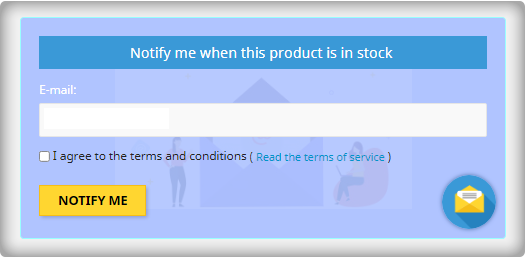
Powiadomienia o dostępności towaru to doskonały sposób na zwiększenie sprzedaży w sklepach PrestaShop. Nie przegap wyprzedaży, ponieważ produktów nie ma w magazynie. Zwiększ sprzedaż dzięki powiadomieniom web push dla produktów, które są w magazynie. Możesz wysłać początkowy e-mail gdy klient zasubskrybuje alert o stanie zapasów, alerty o niskim stanie zapasów, i końcowe powiadomienie e-mail z Wiadomość z powrotem w magazynie. Wszyscy odkryliśmy rzeczy, których brakowało w magazynie, ale nie wracamy do sklepu, aby sprawdzić, czy nadal tam są. Dlaczego oczekujesz, że zrobią to Twoi klienci? Wpływaj na nich za pomocą e-maili i wysyłaj powiadomienia push, aby sprowadzić ich z powrotem do Twojego sklepu internetowego. Zyskasz większą sprzedaż i będziesz obserwować a wzrost współczynnika konwersji.
Dodanie e-mail opt-in do listy subskrybentów pomoże Ci rozwinąć listę
Większość formularzy ostrzeżeń o powrocie do magazynu uzyskuje adres e-mail klienta tylko w celu poinformowania go, gdy produkt wróci do magazynu. Skorzystaj z tego, że zwracają uwagę, prosząc ich o jednoczesne dołączenie do Twojej listy e-mailowej. Sprzedawcy, którzy stosują tę strategię, widzą dużą poprawę swoich e-mailowa lista subskrybentów rozmiar, co prowadzi do zwiększonej sprzedaży.
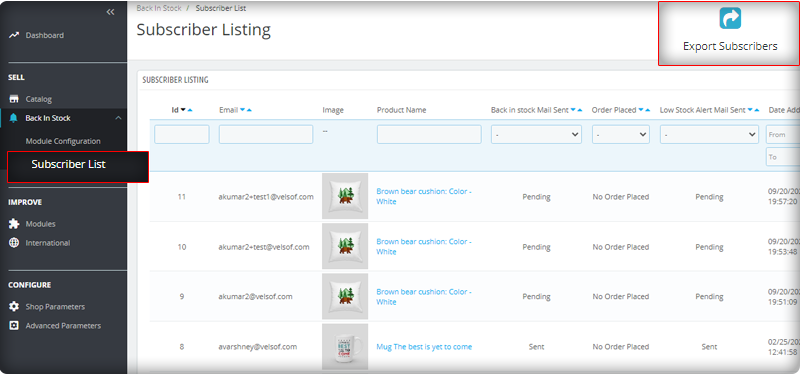
Listę subskrybentów można obserwować w panelu administracyjnym w lewym menu, gdzie znajdują się wszystkie zainstalowane moduły.
Wysyłaj automatyczne wiadomości e-mail o niskim stanie i stanie zapasu
Moduł Back-in-stock PrestaShop to narzędzie do e-mail marketingu. Klienci zazwyczaj otrzymują setki promocyjnych wiadomości e-mail i większość z nich jest ignorowana, ale wiadomość z chwytliwym tematem ma większe szanse na otwarcie. Moduł umożliwia sprzedawcom wysyłanie spersonalizowanych wiadomości e-mail z dopasowanym tekstem i tematem. Wraz z inicjałem powitalny e-mail, możesz wysyłać do subskrybentów alerty o niskim stanie magazynowym i powiadamiać ich o uzupełnionych produktach.
Dodaj powiązane produkty do szablonu wiadomości e-mail i sprzedawaj krzyżowo
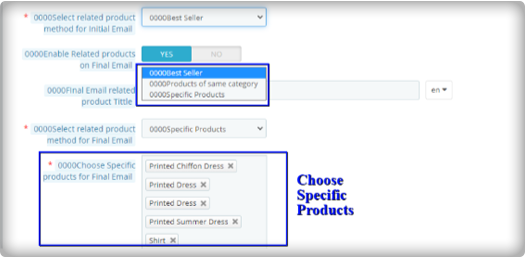
Słyszałem frazę „zabicie dwóch ptaków z jednego kamienia, moduł działa w ten sam sposób. Umożliwia odesłanie alertów o stanie magazynowym, a także opcję wysyłania powiązanych produktów. Sprzedawca może dodawać szczegóły, takie jak bestsellery, produkty z tej samej kategorii, określone produkty itp. Jeśli sprzedawca wybierze opcję Określone produkty, będzie musiał określić produkty w odpowiedniej zakładce, jak pokazano na poniższym obrazku.
Wysyłaj alerty za pośrednictwem swojego dostawcy poczty e-mail, takiego jak Mailchimp
Budowanie marki jest niezwykle ważne, a jednym ze sposobów na to jest upewnienie się, że wysyłane e-maile są wysyłane z Twojej domeny. Będziesz mógł korzystać z różnych funkcji, aby zwiększyć sukces swoich kampanii z powrotem w magazynie, jeśli korzystasz z zaawansowanego dostawcy poczty e-commerce, takiego jak MailChimp, Klavio lub Sendinblue. A moduł Back-in-stock PrestaShop pozwala to zrobić.
Analityka w czasie rzeczywistym dla PrestaShop
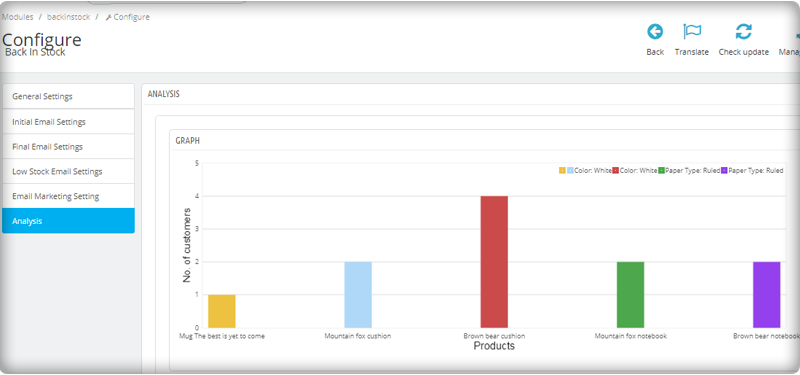
Zobacz pełny raport na temat klientów, którzy zasubskrybowali alerty web push dotyczące produktów, które są ponownie w magazynie. Aby zwiększyć sprzedaż, zidentyfikuj produkty odnoszące największe sukcesy, zmaksymalizuj zapasy i prowadź kampanie promocyjne.
Nowa wersja posiada parametry UTM
Parametry UTM to krótkie kody tekstowe, które wstawiasz do adresów URL (lub linków), aby monitorować sukces strony internetowej lub kampanii. Wbudowane analizy są dostępne w serwisach społecznościowych. Pozwalają one śledzić kluczowe wskaźniki, takie jak polubienia, udostępnienia i kliknięcia w witrynie. Możesz dodać parametry UTM do PrestaShop Z powrotem w magazynie! i skorzystaj.
Owinąć: e-maile Back-in-Stock są jedynymi w swoim rodzaju alertami, ponieważ wzbudzają ciekawość, wpływają na motywy zakupowe i zwiększają szanse sprzedaży. Jeśli nie wysyłasz do klientów alertów, takich jak niski stan lub brak zapasów, popełniasz ogromny błąd. Weź swój Moduł „Powrót w magazynie” dzisiaj, aby zdobyć utraconą sprzedaż. Do tworzenia stron internetowych eCommerce, wymagań dotyczących modułów lub tworzenia aplikacji mobilnych dla Twojego sklepu internetowego, KnowBand ma ekspertów i gotowe narzędzia. Odwiedź nas w www.knowband.com lub upuść wiadomość na support@knowband.com.
Strategie utrzymania klientów pozwalają zarówno zapewnić, jak i uzyskać więcej korzyści z aktualnej bazy klientów. Dla każdej firmy zajmującej się handlem elektronicznym pozyskanie nowych klientów jest celem nadrzędnym, a utrzymanie istniejących to podstawa długoterminowego sukcesu. Być może wielokrotnie słyszałeś, że przyciągnięcie nowego klienta jest bardziej gorączkowe niż zmuszanie istniejącego do ponownego zakupu. Chcesz mieć pewność, że klienci, na których przyciągnięcie tak ciężko pracowałeś, pozostaną przy Tobie, będą mieli lepsze doświadczenia z klientami i mają tendencję do czerpania wartości z twoich towarów. Lojalni klienci dokonujący powtórnych zakupów są siłą napędową każdej firmy. W tym poście udostępniamy 5 najlepszych sprawdzonych modułów utrzymania klientów w sklepie PrestaShop, które pomogą Ci utrzymać korzystne relacje z klientami i pielęgnować ich lojalność. Zobaczmy, jak postępować.
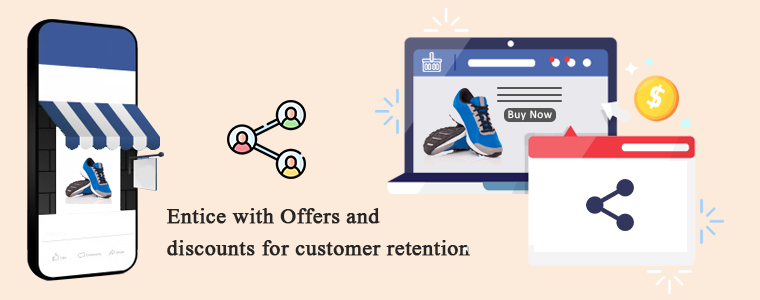
1. Zachęcaj do ofert i rabatów na utrzymanie klientów
Aby przyciągnąć potencjalnego klienta, rabaty i wyprzedaże to najbardziej ekscytujące strategie. W swoim sklepie PrestaShop dodaj moduł udostępniania i wygrywania na Facebooku co pozwala klientowi udostępnić produkt na koncie na Facebooku, aw zamian otrzyma kupon rabatowy, który można zrealizować przy kolejnych zakupach. Możesz też przeprowadzić błyskawiczną wyprzedaż w Twoim sklepie eCommerce, aby zwiększyć retencję klientów. Sprzedaż może przyciągać każdego rodzaju klientów, ponieważ ludzie uwielbiają kupować swoje ulubione rzeczy po niskich cenach.
2. Wdrożenie programu lojalnościowego może zwiększyć retencję klientów
Inną sprawdzoną strategią zwiększania retencji klientów jest uruchomienie programu lojalnościowego w Twoim sklepie internetowym. Plik Moduł punktów lojalnościowychModuł punktów nagród mają na celu oferowanie klientom nagrody za każdy dokonany przez nich zakup. Punkty te można wykorzystać przy kolejnym zakupie w sklepie PrestaShop na zasadach określonych przez sklep.
3. Zadowolenie klienta jest kluczem do jego utrzymania
Jeśli chcesz, aby klienci znowu robili u Ciebie zakupy, daj im satysfakcję, na jaką zasługują. Podróż rozpoczyna się na stronie głównej i kończy się, gdy klient otrzyma produkt o oczekiwanej jakości. Czasami zdarza się, że produkt nie pasuje lub klientowi się to nie podoba i chce go zwrócić. Czy Twój sklep jest gotowy do obsługi zamówienia zwrotów? Jeśli nie, zainstaluj Menedżer zwrotów PrestaShop moduł do Twojego sklepu, który pomoże Ci bez wysiłku obsłużyć anulowanie zamówienia i zwroty zamówień. To nie to. Jeśli klient chce zadać pytanie lub potrzebuje pomocy, ważne jest, aby mieć dobry system obsługi klienta. Istnieje wiele sposobów oferowania obsługi klienta w swoim sklepie eCommerce. Zapewniać wsparcie przez czat z helpdeskiem deskoid, wsparcie przez e-mail, czat na żywo, wsparcie telefoniczne itp.
4. Dodaj element personalizacji
Czy słyszałeś termin spersonalizowane doświadczenie? To nowy trend w biznesie. Traktuj swoich klientów indywidualnie i dbaj o ich doświadczenie, ponieważ każdy klient ma wyjątkowy gust. Utrzymanie klienta można osiągnąć, jeśli wiesz, jak traktować potencjalnych potencjalnych klientów. Możesz sprzedawać spersonalizowane produkty na żądanie, takie jak niestandardowe drukowane kubki do kawy, t-shirty, zegary ścienne lub cokolwiek, co ludzie będą chcieli kupić, z nowymi niestandardowymi projektami. Plik Projektant / konfigurator produktów PrestaShop Moduł umożliwia klientom dodanie żądanego tekstu, zdjęć i kodu QR produktu. Zacznij już dziś i zwiększ swoją sprzedaż na wyższy poziom.
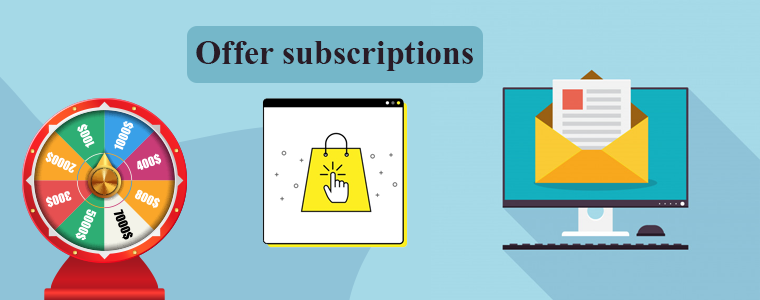
5. Oferta subskrypcji:
Zachęcaj klientów e-mailem do dokonywania ponownych zakupów, a w tym celu możesz dodać do swojego sklepu moduł subskrypcji e-mail z gamifikacją zamiast nudnego wyskakującego okienka subskrypcji. Zabawa i zabawne koło fortuny Spin and Win przyniesie Ci więcej subskrybentów i będziesz mógł zaoferować swoim nowym subskrybentom pewne rabaty, kupony. Marketing e-mailowy można wykorzystać do śledzenia obecnych klientów. Możesz udostępniać im szczegóły porzuconych koszyków, zbierać opinie po zakupie, a także co jakiś czas udostępniać aktualizacje ze sklepu. Alert cenowy, nowe szczegóły zapasów mogą zapewnić większe utrzymanie klientów i zwiększyć ogólną sprzedaż.
Słowa końcowe: Jeśli po sprzedaży nie sprzedałeś jeszcze dotychczasowym klientom, teraz jest dobry moment, aby opracować spójny plan utrzymania klientów. Aby zwiększyć sprzedaż i utrzymać klienta, musisz zadbać o każdego klienta odwiedzającego Twój sklep. Oferuj oferty, rabaty, punkty lojalnościowe i zachęcaj ich do subskrypcji newslettera. Jasno określaj zasady dotyczące klientów i nie zapomnij zapewnić kanałów obsługi klienta, aby zapewnić jego satysfakcję.
AI to najszybciej rozwijająca się branża technologiczna, a ostatnio Mailchimp dodał kilka uderzających funkcji i aktualizacji, aby usprawnić podróż klienta dzięki inteligentnym rozwiązaniom. Zacytowali ten komunikat prasowy ze sloganem: „Jeśli masz duże cele, mamy duże aktualizacje”. W Mailchimp są zarejestrowane miliony firm, a miliardowe dane klientów są dostępne. Aby zbudować inteligentne rozwiązanie, Mailchimp wykorzystał wszystkie dostępne dane. Nowa aktualizacja
Przeprojektowanie aplikacji:
Zespół programistów Mailchimp przeprojektował aplikację z nowym doświadczeniem programisty z natywnymi bibliotekami klienta i mobilnymi SDK. API Mailchimp?can manage audience data, send campaigns, activate event-based messages, and more. The global infrastructure of Mailchimp can be utilised to send fast, personalised transactional emails, high deliverability rates, and scalable analytics through API or SMTP.
Kreatywny asystent:
Mailchimp wykorzystał sztuczną inteligencję, aby dać z siebie wszystko doświadczenie personalizacji do klientów. Tworzy zasoby do projektowania automatycznie z wcześniej istniejących projektów i zmienia je zgodnie z poleceniem. Rozważ obraz z podpisem, który zaprojektowałeś wcześniej, a teraz chcesz użyć tej samej zawartości w innych aplikacjach o innym układzie. Dzięki Mailchimp możesz stworzyć nowy projekt za pomocą kilku kliknięć.
Kreator automatyzacji wizualnej:
Głównym celem tworzenia tego inteligentnego rozwiązania było zaimprowizowanie podróży klienta. Pomaga użytkownikom w uzyskaniu następnej najlepszej porady dotyczącej działania, podając zalecenia dotyczące poprawy skuteczności kampanii. Może rozwijać biznes i podnosić sprzedaż dzięki personalizowaniu rekomendacji produktów. Użytkownicy mogą wysyłać e-maile w dowolnym momencie z funkcją automatycznego wyzwalania. Mailchimp wysyła ukierunkowane kampanie do przyszłych potencjalnych klientów. Nowa wersja sugeruje chwytliwe slogany i tematy do marketingu e-mailowego. Obejmuje wprowadzanie w czasie rzeczywistym liczby słów, liczby znaków, interpunkcji i używania emotikonów.
Budowanie swojej obecności w Internecie:
Dzięki Mailchimp małe firmy mogą zaistnieć w Internecie. Odkąd pandemia uderzyła w gospodarkę, pojawiło się wiele zapytań, co zmusiło Mailchimp do stworzenia funkcji opartych na sztucznej inteligencji. Włączyli opcje zakupu domeny, aby dodać ją do marketingu e-mailowego. Innym narzędziem, które zostanie wkrótce uruchomione, jest narzędzie do tworzenia stron internetowych, które w ogóle nie będzie wymagało kodowania, o czym mowa w Najnowsza wersja Mailchimp. Użytkownicy mogą dodawać przyciski kupna i wiele więcej, aby przenieść swoje cegły i zaprawy na platformę internetową.
Nowe narzędzia do personalizacji marketingu dla e-commerce:
Mailchimp i e-commerce: Mailchimp ma dane wszystkich potencjalnych klientów, więc stworzył rozwiązanie, które może być używane dla rosnącej liczby odbiorców, jeśli połączysz swój sklep eCommerce z Mailchimp.
Mobilne strony docelowe– Integracja aplikacji mobilnej to kolejne kluczowe narzędzie, które zostało dodane do aktualizacji Mailchimp AI. Teraz użytkownicy mogą dodawać więcej nowych kontaktów lub przesyłać nowe z książki adresowej.
Przeprowadzaj ankiety za pomocą formularzy wyskakujących Ma przyciągające wzrok wyskakujące formularze ankiet, aby przyciągnąć więcej odwiedzających do zbierania informacji, które można wykorzystać do poprawy jakości obsługi klienta dzięki spersonalizowanemu marketingowi.
Zdobądź odbiorców dzięki integracji e-commerce Dodatek do G Suite z oprogramowaniem biznesowym Google i technicznymi adresami e-mail.
Opinia autora
Mailchimp to najpotężniejsza platforma marketingowa założona w 2001 roku. Minęły już dwie dekady i wciąż się rozwija. Te nowe rozwiązania, aktualizacje oprogramowania, pozwolą wielu małym firmom pracować inteligentnie. E-commerce może korzystać z narzędzi wspomaganych kreatywną inteligencją, narzędzia do wizualnej automatyzacji z przeprojektowaną aplikacją stworzoną, aby pomóc firmom rozwijać się zgodnie z ich ambicjami. Zobaczmy, co magiczna integracja Mailchimp AI wyniesie w handlu elektronicznym w nadchodzących latach.
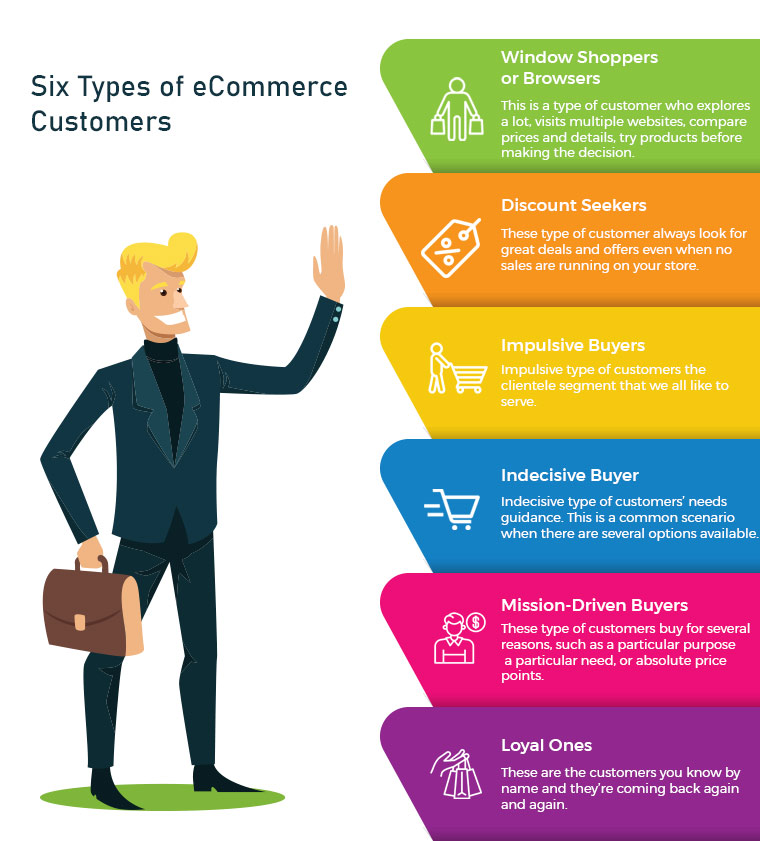
Online shopping is increasing, and customers who are enamoured with eCommerce sites spend countless hours researching the goods they want. There are some very popular quotes which make shopping, therapy, cardio or a hobby. It makes evident just how fixated people can be. There are many different types of eCommerce customers, therefore business owners need to keep each one not just entertained but also motivated to make purchases.
Some eCommerce customers like exploring before buying and some have a focused approach with a to-buy list which makes them good customers. But, being a retailer or eCommerce store owner, you cannot rely on one type of customer. Every shopper is different and they follow a certain pattern of buying with different priorities. Being a retailer, you must have gone to a lot of stores or manufacturers before choosing the item for sale. You also have a pattern which makes you a type of customer. I’m going to talk about some distinct categories of consumers that store owners frequently deal with and offer some expert advice on how to handle various types of eCommerce customers in your business to increase conversions.
1. Window Shoppers or Browsers
The number one on the list is servers or browsers. This is a type of customer who explores a lot, visits multiple websites, compares prices and details, try products before making a decision. They add products to their cart but never intended to shop from them. Yes, there are many such buyers and you may call them a pain. Can you do something about it? Yes, I guess. There can be ways to attract such visitors and encourage them to buy products from your store.
Greet them well:
If you are a retailer, you must remember to greet them well. Even if they are not asking for any assistance you can provide them one. eCommerce store owners can add any entry or exit popup such as Better Thank you Page module to their store for greeting these types of customers.
Entry or Exit Popup:
Some of the easiest ways to engage your consumers are by the use of innovative methods. The customer’s attention must be drawn to the digital interface and manner of presentation. The gamified interface of Spin and Win Pop-up attracts shoppers to your store. This is a 3-in-one pop-up which is used as an entry pop-up, exit pop up or an email subscription pop-up.
Don’t ignore the browsers, they can become your loyal eCommerce customers if treated right.
2. Discount Seekers
These types of eCommerce Customers respond well to pushy sale tactics. They always look for great deals and offers even when no sales are running in your store. For attracting such buyers you should focus on highlighting what they will save on that particular deal.
Host Clearance or Flash Sales:
These discount seekers can give you huge sales if provided with flat discounts. Clearance sales can be a good option. The products that have been stocked in your store for months can be sold out, and customers looking for discounts will benefit from it.These sales can be a key contributor to your cash flow which will make room for the new products by removing the older ones.
Scratch Card:
You can provide your customers with Scratch Cards while having a purchase. Customers will be attracted to the alluring coupons which can save their deal a lot.
Free Shipping:
Free shipping encourages customers to buy more from your store. A fixed amount of purchase is to be made by the shopper to get free delivery.
Impulsive types of customers are the clientele segment that we all like to serve. Nothing is more exciting than helping the impulse shopper to respond favourably to your recommendations. Impulse shoppers, also known as emotional shoppers, make unplanned purchases based on items that are currently appealing to them. Online shopping is a popular example of pulse or emotional buying. They look for products which attract them and you can do that by showing related products or by offering personalisation.
Show Related Products:
If you are dealing with an impulse buyer then make this chance an opportunity. Because they shop when they like it without giving a second thought. Show them what’s new in the store and let them feel, that they will be out of the race if they don’t own it. This can be done with modules like related products.
4. Indecisive Buyer
This is a common scenario when there are several options available. For instance, search for a floral top and the results will blow your mind. hundreds of products will start appearing in various stores. Deciding one will be difficult. Indecisive type of customers needs guidance. Ask them questions and give honest advice. A flexible return policy can also help them with their shopping.
Ask Questions:
Shop owners can help them decide what they want. Provide them with chat support or in-store assistance for choosing the right product. This effort can turn them into loyal eCommerce Customers.
Product Custom Field:
You can add a product custom field with the product description. You can add a field with related questions which can help you understand the need of the buyer. Advance Product Feld extension can be a good fit to improve UX.
Return Manager:
An indecisive customer will be encouraged if he/she knows that the product can be returned if they don’t like it. The Return Manager is a good module to add to your eCommerce store.
5. Mission-Driven Buyers
These can be called researchers or need-based customers. These customers buy for several reasons, such as a particular purpose, a particular need, or absolute price points. As difficult as it can be to please these individuals, they may still become regular customers if they are well taken care of. Provided with a good customer experience which is not available online or on other retailers stores can turn them into loyal customers.
Offer buy-online, Pick Up In-Store:
These types of buyers do not have much time to spend in window shopping or i-store shopping. They can make the purchase online and pick up the product from the store. Implement this new pick-up and drop option in your store to attract mission-driven buyers.
Cross-Selling:
Retailers can help the need-based customer with cross-selling techniques. You can place bread in related products while they are buying milk or a mobile cover if they are purchasing a mobile. The Automatic Related Product module can help you show relevant products on various pages such as the product page, the home page, the shopping cart page, etc.
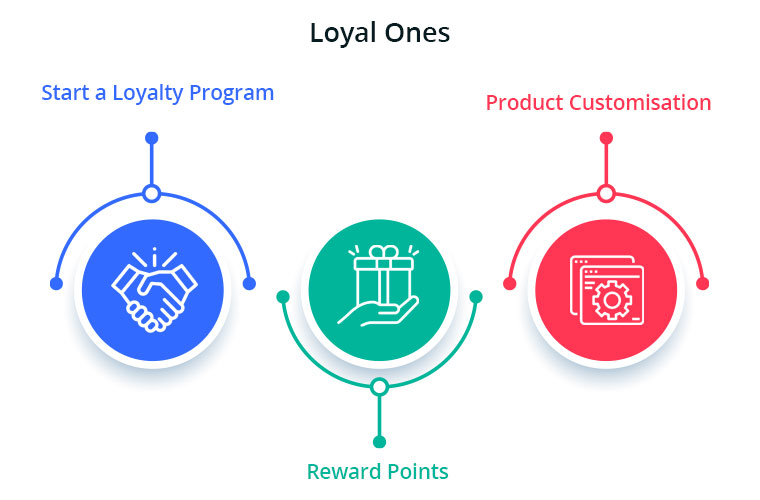
These are the customers you know by name and they’re coming back again and again. Loyal eCommerce Customers already know and enjoy your shop, so now you need to keep them happy. Offer customisation and personalised experience and never lose them to others. The best ones are difficult to find and it is your responsibility to give them your best services. You can give them reward points or loyalty points on every purchase. These types of customers are the best marketers for your store as the more they shop, the more will be the word of mouth communication.
Start a Loyalty Program:
Choose a module or plugin for your eCommerce Store to give loyalty points to your loyal ones. This will motivate these types of buyers to shop again and again from your store. During checkout, the loyalty points can be redeemed for a discount.
Reward points:
You can also give them reward points on various purchases like first purchase, on a fixed amount order, on particular products etc. The reward points encourage the buyer to make more purchases. It helps the admin boost customer engagement and creates loyal customers.
Product Customisation:
Product customisation and personalisation can turn your sales to the next level. this is one of the most accepted trends. Help them get a personalised product of their taste. The best module for giving a customisation experience is Product Designer/Customization which can provide several choices to you and shoppers.
Using this understanding to help turn deals, desires, needs-based and even casual customers into loyal ones will help the business expand. At the same time, ensuring that your loyal customers have a good experience every time they visit your store would only boost your bottom-line income.
It is often observed that customers want to return or cancel their orders. Managing orders and fulfilling customer’s demands isn’t an easy task. Considering consumer rights in the EU, every eCommerce platform needs an easy return manager to maintain the records and meeting customer’s needs. EU has a policy that a consumer can request a return or refund for a faulty product within 14 days after purchase. As an eCommerce owner, it may sound tedious and time taking.
Don’t worry! PrestaShop Return Manager Addon takes care of all the functions required to cancel or order returns. With additional features described below, this new version gives a user-friendly experience to eCommerce store owners and customers.
What’s New in PrestaShop Return Manager Addon?
Customer retention is a merchant’s need and this can be achieved with customer satisfaction. PrestaShop Return Manager module comes with an easy cancel request format with multiple return and cancellation methods for a customer.
1. Decide when to start calculating Policy time
Imagine a situation when the product is delivered after the expiry of the return date. What impression this will create on your customer? Sometimes the return date expires if the product delivery is delayed, to resolve this issue, the addon now provides a drop-down menu for selecting a product status after which the return policy time will be calculated.
2. Quick Access of Return Listing from Dashboard
You don’t have to find the module from a long list of installed modules in the admin panel, instead, you can configure the PrestaShop Return Manager Addon from the left menu of the admin panel.
Additionally, a new option to access all the return listing counts has been added on top of the admin panel. All the return listings like order returns, canceled orders, etc can be seen in one place.
3. Custom features for email templates
In the updated version of Return Manager, the admin is provided with an option in the admin panel to add a custom text for each Return Status and created a placeholder that can be used in the Return Status Email templates. The updated version provides an option in the admin panel to ‘send a Test Email’.
4. Search and Filter all the Listing Tabs
With the latest version, the store manager can easily sort and filter the listing tabs on the basis of date, customer ID, Return ID, Customer Name, etc. This makes the task easier for the admin.
Features that enhance admin’s power
5. Allows Partial or complete order replacement
The online store administrator can now allow online customers to pick items from their orders for replacement. Online customers can even request for returning the whole order if they want to do so. They can now choose all the products from the list. This increases the usability rate.
6. Admin can add Custom Field
This updated version of PrestaShop Return Manager Addon allows an online merchant to create custom fields. Online store owners can build several custom fields from the PrestaShop Refund Order Addon admin interface. The store owner may set custom field block names, apply validations, and also set default values (if required). Admin can make any field as required. Admin can set a default value and validation type.
Why choose PrestaShop RMA over other Order Return Module?
The RMA plays a vital role in the eCommerce store. The Customer sometimes raises the request for the product return, refund, and replacement. To improve customer retention and usability the online merchant needs a flawless RMA interface. Other eCommerce like the Magento Return Manager plugin does not come with these new features. This rejuvenated tool provides both a user-friendly experience and customer satisfaction.
1. Increased Customer Conversion Rate
Easy refund and return policy builds trust and makes the customer believe in the merchant. This eventually increases the word-of-mouth publicity of the website and brings more traffic to the site. From this, you can expect a good conversion rate. This one small change will catapult your conversion rate and this way you can keep the complaints zero.
2. Customer Satisfaction
The front-end easy ‘return’ option lets them believe if they are not completely satisfied with their purchase, they may return it or replace it. This assurance lets your visitor believe in your product policy and allows them to shop more. The easy email template functionality sends an email to both parties which enhances your business relationship. A happy customer always comes back to you without any pause.
Benefits of PrestaShop Return Manager for the merchants:
PrestaShop Order Return Manager Addon makes it easy to handle the returns of customers.
The possibility of receiving “Store Credits” for a faulty product helps to improve consumer retention.
The product issues can be fixed by knowing the return reasons.
With the aid of the PrestaShop Consumer Return Manager, you will find out the exact problem in the product by providing customers with the option of uploading the picture of the faulty product.
Email template makes you craft a mail for your customer at every return stage.
With RMA quick return addon, by adding custom fields you can collect more information from the customer.
Benefits of PrestaShop RMA return module for the customers:
A ‘Return’ button allows the existing customer or guest customer to return or cancel the placed order completely or partially.
PrestaShop Order Return Manager provides an easy cancel request format with credit, refund, and replacement options
Customers can upload an image of a faulty product highlighting the defect.
An email with custom text will be sent to the customer at every stage for their order cancellation or return request.
PrestaShop Order Return Manager allows customers to select a nearby store address for shipping the damaged product.
Customers can return partial or whole orders by easy select option.
Customers will have the option to cancel the order for a short period. The customers need to go to the My Account >> Return Manager section to cancel the order.
Other useful features of order return or cancellation addon
Easy Return Request Option
There are some other features that make this addon more convenient and user-oriented. It helps you identify the return reasons for customers and lets you raise a return request on behalf of your customer. Thanks to a quick and effective cancellation method, customers are more likely to go back to your platform.
Crafted Email-Templates
Well-designed email Templates emerged as an attractive feature. This pre-formatted email template option gives the admin a hassle-free experience at the backend and directly sends an email to both the parties as soon as the query is raised and updates the customer at every stage of their request. There are 14 different email templates as per the requirements. It is a timesaver for both merchants and customers.
Managing Return Requests at one place
Managing an eCommerce store with fewer efforts is like a cherry on the cake and this amazing addon does that. It helps you manage all the return requests in one place. You can find pending return lists, active return lists, and canceled return lists on the admin panel as well as on the dashboard. This information is also available to export in .csv format in case you want the compiled data.
Compatible with GDPR Module
PrestaShop Return Manager is compliant with GDPR. When you are using the Knowband GDPR module, both the customer and the administrator will be able to access the information of the return request. Besides, the Customer can request the admin to remove personal data from their shop.
Final Words
PrestaShop Return Manager addon is an interesting and helpful tool for the eCommerce store owner to manage the return and cancel the request at the backend. A hassle-free return policy attracts buyers and gains the customer’s trust.
For more information or to shop the PrestaShop Return Manager for your PrestaShop store, you can visit Knowband store or reach out to us at support@knowband.com. Return Manager Extension is also available for Magento and Magento 2 stores.
When exploring your Instagram or Facebook, you always see feeds that are of interest. Google’s discover feed also shows you the content which you like and would like to spend time on. Naturally, this makes you feel exclusive, and you spend more time without keeping the time track.
Can you give the same experience to your customers while shopping? Ecommerce brands like Myntra or Amazon try to target their inactive leads with personalized email marketing. Giving your customer a personalized shopping experience in this competitive environment could be the right plan to survive in a long race.
Understand the shopping journey of buyers with data and use it well for customer experience personalization. With that, customers who get exclusive treatment will do word-of-mouth marketing.
As an eCommerce store owner, you might have given thought to this. But, you may struggle with How to do it?
Know your customer personally
When you are spending a lot of time and money on focused target marketing, you just don’t need a customer who will make a one-time purchase but your business demands a loyal one. For target marketing, you can consider gathering demographic and psychographic details from a customer. The demographic information can be collected from registration forms but for psychographic information you need more data. To get the details like the interests, values, profession, and lifestyle, you can add custom fields to your registration page.
Proving your customer with loyalty points or rewards at every step of the form filling process will encourage them to fill it. This way, you can get more relevant information for future marketing and product personalization.
You can always ask for:
Their first name
Birthday
products they’re interested in
A preferred channel of communication
Some might like receiving emails but in a limited number while other millennials prefer receiving an SMS just after the purchase is made. It is good to ask the preferred channel of communication for targeted marketing. You can even ask for their interests and genre if a person is buying a book from your store.
A large number of people have no issues if a company spoof into the customer’s information which can provide them with a wow experience. From a report, it has been found that 76% of customers expect companies to understand their demands and requirements. So, people like getting a personalized experience, and it is now a trend that can be followed by an eCommerce store owner to compete with others in the market. Personalization can lead to impulsive buying.
Better to communicate with your customers
Remind your customers about the products they liked to buy or visited but did not make the purchase. You can send a push notification for back-in-stock products. You can ask them to look into their wishlist to reduce the abandoned cart.
It is crucial to choose the right means of communication for interacting with your customer. The selection of a communication channel should be based on the data you have collected. Customers often receive promotional emails and notifications which grab their attention and make them shop more.
Putting efforts in the right direction can help you boost conversion rates and customer retention. Millennials prefer texting overcall. You can use a chat app to provide a solution to their queries. This will be a great deal to give them more customer experience personalization.
Effective use of data for persona
You have the data in your system and what a waste if you are not using it well. Your system knows your customer better than you do.
Have you ever been in a situation when you called a person with the wrong name? This happened to me once, and I never want that to happen again. It instantly loses trust in a relationship. Send emails or greet them in-store by calling their name. This builds up an interactive connection between you and your customer.
You can take the help of segment email marketing by categorizing your customers according to their psychographic data
Understand the need of your customer as per their geographic location. Implement geolocation-based marketing strategies. Add a store locator to your website. In-store shopping is still a trend in millennials.
PrestaShop modules you should not miss on
Do you know that you can enhance the personalized customer experience by adding extensions to it?
It is challenging to keep your customers at a checkout page or the product page when they are doing two things at a time. You must have some striking, captivating website features which will keep them attentive and focused on their purchase. Why not with personalized features that you can add with these modules?
Collect more information
With PrestaShop Custom Registration Fields, the owner of the PrestaShop store will collect information about the customer by adding custom fields to the registration form of the website. Additional Order Forms/Field Manager addon for PrestaShop is another module that can help you gather more information. Custom fields on the order form can be generated with this PrestaShop Additional Order Forms Manager without making any adjustments to the code on the web page.
How to use it?
You can ask your customer to fill up the details which can be optional. You can add this field to the registration form. This way you can collect information about birthdays, anniversaries, or any of the interests which can help you promote your products. You can send a personalized message on their birthday with a greeting or any discount coupon. Store owners can use additional information to develop their services and eventually make more profit from their company.
Celebrate birthdays or anniversaries
You can give discount vouchers or coupons to your customers on their Birthday. Birthday Coupon -PrestaShop addon is a module that can inspire your customers to shop from your store on their birthdays.
How to use it?
You can send an email with a personalized message on their special day. This email will include the birthday coupon or discount voucher. The voucher sent through the mail will be valid for a limited time. The addon comes with multiple default templates. You can use it for various occasions.
Make them loyal customers
It is a dream for brands to have loyal customers. From research, it is found that about 30% of people like to buy the same brand and around 40% choose the same brand if they are offering personalized products. For customer retention and conversions, you can give loyalty points or reward points to your customers.
The PrestaShop Reward Points addon incorporates the reward points feature into your PrestaShop store and allows the admin to offer the rewards point to online shoppers every time they purchase items.
How to use it?
Store owners can give reward points to the customer after every purchase they do. This comes with a set of terms and conditions. The module helps the admin to add multiple rules for redeeming those points. Customers can redeem those points at some point of purchase which will keep them engaged in your store.
There are some rules like Cart Rule, Product Rule, and Behaviour rule for loyalty points. Store owners can offer loyalty points on a specific cart amount, product quantity, based on the payment method, particular product or category, shipping services, etc. It can be given to new customers while placing their first order.
Display recently viewed items
Automatic Related Products addon for the PrestaShop store can help you show the relevant products to your customers. This feature can be added to multiple pages of your eCommerce store.
How to use it?
The feature will show related products to your customers, and this will motivate them to see more and more on your eCommerce store. If they are not satisfied with the one product, they can see more until they get the one.
It has a simple configuration, and the admin can ask customers to provide more information about the product. If they like the product or not? If they need any modifications? By collecting additional customer details, the sellers can better represent them. As a result, online shoppers will have the same user experience with this PrestaShop Additional Field Module on the Product tab.
Attractive email subscription module
Spin And Win – Entry, Exit, and Email Subscription Popup by PrestaShop have a gamified interactive look. It attracts the buyer’s attention and allows them to win offers like discount coupons or free shipping. This is one of the best sellers of PrestaShop and a fantastic module to collect the email addresses of your customer.
How to use it?
You can Get Personal in Email Marketing and send personalized Emails using the information which is provided by the customers. The emails should be sent based on customer behavior. You can go for a personal recommendation to offer a personalized customer experience to your customer. Try to re-engage your leads with promotional messages or pop-up notifications. Email marketing is a free and reliable option to give a customer personalization experience to users.
Greet your customer
Greetings are most valuable when you are building a relationship. Customer-trader relationship is most important when it comes to business. You can use a Better thank you page module for your PrestaShop store.
How to use it?
Add a Better thank you page module to your PrestaShop store and use it to show a pop-up when the customer is leaving your store or after the successful purchase. Also, you can add customized banners or discount coupons for their next purchase. This way, it can help you boost customer retention and make your customer satisfied.
Final thoughts
Increase your sale by providing a personalized shopping experience to your customers. In this era of millennials, Personalisation is the only way to attract a loyal customer base to your store. Create Special Campaigns Based on user behavior and make them feel unique. They don’t like to be treated as a number but an individual. So, It’s time to boost your sales with a customer experience by providing personalization.