Knowband: A Leading Ecommerce Service Provider

Knowband is well known as a provider of eCommerce solutions and as a business that develops modules for eCommerce platforms. The business is famous for offering top-tier development services and effective post-sales support.

Knowband has a registered company name, Velocity Software Solutions Pvt. Ltd. In the face of competition from nations like China, Japan, Australia, New Zealand, Singapore, South Korea, and others. Afterward, the company had a growth streak, which marks our presence in the market.

We take pride in offering the top plugins for Shopify, Magento, Prestashop, OpenCart, WooCommerce, and others. As a Prestashop partner, Knowband has established itself in the eCommerce industry. Also, we create mobile eCommerce applications, online store extensions, and marketplace extensions.

The thing that sets Knowband apart from the competition is our dedication to “Customer Delight”. Moreover, the company offers a variety of services, including eCommerce modules and custom development. Further, pre-and post-sales support provided is also remarkable. Also, we can deliver more than the customer’s expectations, and their satisfaction is our utmost priority.

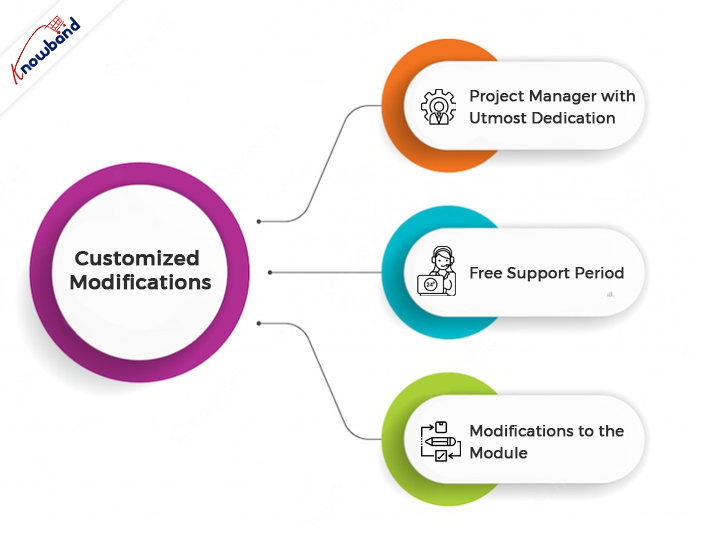
Customized Modifications
You may count on us to meet your needs for custom development. We provide custom development based on the business needs of our customers.

Developers with more than 10 years of expertise make up our team at Knowband. Additionally, with the help of our specialized services, you can construct a website and customize a module to suit your requirements. Moreover, we are here to create something based on the unique requirements of your company.

For online stores, our Prestashop Plugin Development services offer the expertise needed. You may rely on us to create plugins that are distinctive and cleverly designed functionality.

Project Manager with Utmost Dedication

From start to finish, one of our experts will be responsible for the development. Additionally, they’ll make sure you obtain the functionalities you need on time.

Free Support Period

For the first month following the completion of your bespoke development, we offer free support. Moreover, this is to make sure everything is operating as you had hoped. We will resolve your issues and concerns related to the custom changes within this period. Additionally, we will also discuss the issues in a meeting with you when required.

Modifications to the Module

Any feature which is not the default functionality of the module and whose implementation is in demand is a custom change. Further, if the client requires any additional feature in the module, then it is a custom change. Also, if there are any issues in our module due to third-party modules and our assistance is needed to fix them, then it is also done as a custom change.

If there is any demand for the addition of new features to the module, based on customers’ needs, then we treat it as a custom change. Further ahead, we analyze our effort and provide the new development charges to the customers. If the customer is unable to adequately describe the changes, we will meet with them via Skype or in a meeting to discuss the matter. Moreover, always prioritize the customer’s demand and see it through to its completion.

We never back down from the work that comes to us. Furthermore, our professionals will see through the changes until their implementation. We provide support for these changes for one month to know if the changes delivered are running as per the customer’s requirements or not. Additionally, if there are issues and the issues need detailed discussion, we will connect in a meeting. In meeting with our customers we analyze and then resolve the issues.

Module Purchase
We offer different modules on various platforms. Secondly, the modules offered on our website are easy to use and support the maximum number of platforms. We are present here to provide answers to the queries of the customers before the module purchase.

After purchasing the module, we help with the installation and configuration of the module on the customer’s end. Our team of experts will assist you with the post-sales service. We assist with the module issues if any issues occur 3 months after the module purchase. We provide support with the module issues and will resolve them at your end. If the issues are not resolved, we connect with the customers on Skype, WhatsApp, or in a meeting. Our end goal is customer satisfaction, which we have never failed to attain.

Support Services

In the case of quick support, there is an option on the website for a chat in the lower right corner. By using the chat option, customers can connect with us and can get their non-technical issues resolved. This feature is useful to guide our customers through the various issues and concerns the quickest.

Although support for the module issue is generally provided on our ticket interface. The customer can reach out to our technical team from this interface. To reach out for module support, it is very important to generate the tickets. The customer can simply send an email to generate tickets, or else they can generate tickets from their account section. On tickets, we reply to all the queries and issues of the customer the quickest.

Our Best-Sellers
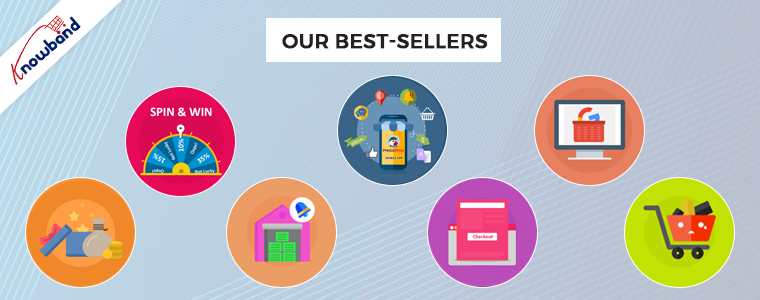
We offer the top plugins for systems like Magento 2, Prestashop, OpenCart, and WooCommerce. The plugins for these platforms are available on our website. We provide plugins keeping in mind that they enhance the customer’s experience on the website.

The checkout process becomes easy and fast with the help of our one-page checkout plugin. If the checkout process is fast and easy, then it will reduce the cart abandonment rate on the website. Everyone wants the checkout to be straightforward and quick.

Cart abandonment in online stores is one of the major issues which sellers are facing. The abandoned cart module helps follow up with the customers and bring them back to complete their purchases. With this module, we can send various emails with or without discounts to customers.

“Back in Stock” is a great module that helps in restoring lost sales. Further, it notifies the customers when the products they want are back in stock. This enhances sales and helps with customer retention in the store.

The Loyalty Points module can award points to customers when they make purchases in your store. The module allows you to set up some conditions according to which the customers receive award points. These rules are set up easily from the admin panel.

Using Google Shopping, selling products on the major marketplace gets easy. Including Google Shopping in your sales channel can increase your customer base and expand your reach. As per the reports, almost 70% of total orders start from a Google Search, so it always sounds good to be visible at the top of the Google Search list.

Some of Our Top Modules, which are having a top rating by our customers are below:

Furthermore, assisting our customers to achieve what they desire, depending on their business goals, is our aim. Also at Knowband, we help with the eCommerce plugins and also assist with custom changes. If you have any ideas in mind, we will help you bring them to reality. You can contact us at support@knowband.com regarding any kind of help or concerns.

Related Post:

Knowband Makes it to the List of Top eCommerce Tool Market Players

KnowBand receives the Superhero Seller Badge on the Official PrestaShop Platform
WooCommerce eBay Integration Module– User Manual

eBay WooCommerce Integrator plugin is the modern solution if you are planning to sell on eBay Marketplace. In fact, eBay is one of the major marketplaces that rule over the entire online business industry. Moreover, not only eBay is known for Business-to-Business Market but also these days eBay is a great platform for individuals for shopping. On top of that, eBay has its wings spread over 30+ countries. Furthermore, merchants around the globe gather on eBay to present their inventory to a huge eBay audience base. Likewise, for making eBay selling easy, the Knowband WooCommerce eBay Integration Module module allows WooCommerce shop owners to sell their products on eBay Marketplace. Therefore, in other simple words, the WooCommerce eBay Marketplace Integration Extension allows the WooCommerce admins to set up a connection between WooCommerce and eBay Marketplace.

1.0 Features offered to WooCommerce Online Retailers:

  • The WooCommerce eBay Integration Plugin allows WooCommerce online merchants to enjoy an API-based integration between WooCommerce and eBay.
  • Moreover, WooCommerce online sellers can list their shop inventory in bulk on the eBay Marketplace. In fact, all thanks to the Profile based listing offered by Knowband eBay WooCommerce Integrator.
  • The WooCommerce store admins will get an option to add, remove and re-list their eBay listings from their WooCommerce shop backend.
  • eBay WooCommerce Connector offers an Inventory Management feature to the WooCommerce shop admins.
  • In other words, WooCommerce online retailers can sell their WooCommerce shop products even with the same stock as they are having on their shop.
  • eBay WooCommerce API Integrator offers a Log reporting option to the sellers. Further, the same feature will show a detailed activity log to the online sellers.
  • WooCommerce eBay Integrator allows the WooCommerce admins to manage their eBay orders right from their WooCommerce shop back end.
  • WooCommerce eBay Integration Plugin allows the WooCommerce merchants to validate order hooks to hook product inventory data on both eBay and WooCommerce.
  • If you are planning to sell on eBay and are just hesitating about the commission charges, we got you.
  • KnowbandWooCommerce eBay Integration Extension offers a unique feature of price variation. In fact, by using the same, WooCommerce online sellers can sell their shop products on eBay at an increased price.

2.0 Installation Guide:

After completing the purchase, all the WooCommerce admins will have to install and connect the Knowband WooCommerce eBay Integration Plugin with eBay Marketplace.

In the downloadable package, the store admins will get 2 files.

  • Zip File (Containing Source Code of WooCommerce eBay Marketplace Integration).
  • User Guide.

Here are the steps to install the eBay WooCommerce Integrator.

  1. Unzip the zip file containing Files and Folders related to the source code of the module.
  2. Copy the same into the root directory of your WooCommerce back end.
  3. And that’s all. The WooCommerce store admins can find the Knowband eBay WooCommerce Connector at their shop back-end just by following the above-mentioned steps.

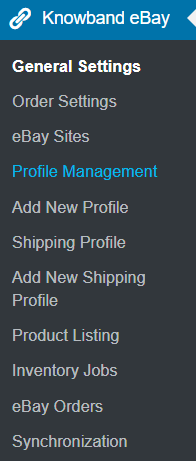
After Installing the eBay WooCommerce API Integrator, the admins can find the module in the side menu of their WooCommerce online shop as mentioned in the below image.

3.0 Connection Guide:

It is required to set up the connection between eBay Marketplace and WooCommerce shop before starting to sell on the Marketplace. In fact, now, WooCommerce online sellers will have to follow some steps by step guidelines.

Here is a detailed description of them.

3.1 eBay Seller Account Set Up:

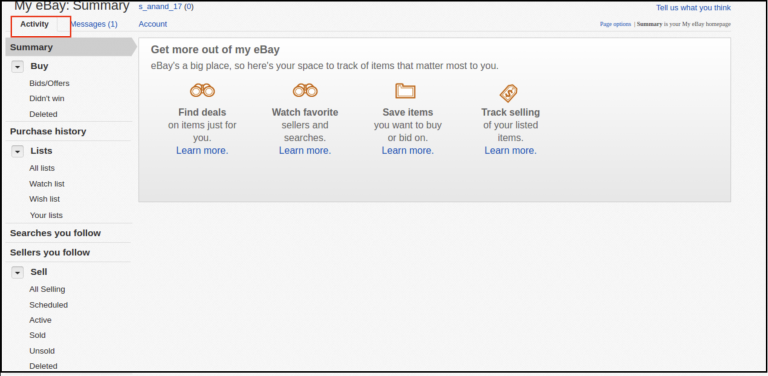
Before putting selling on eBay on the list, it will require an eBay seller account. Moreover, individuals can create their eBay seller account by following the steps mentioned here.

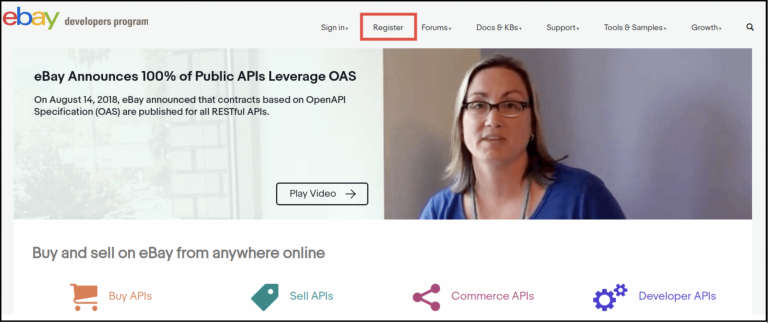
  • Click on the register button on the page.

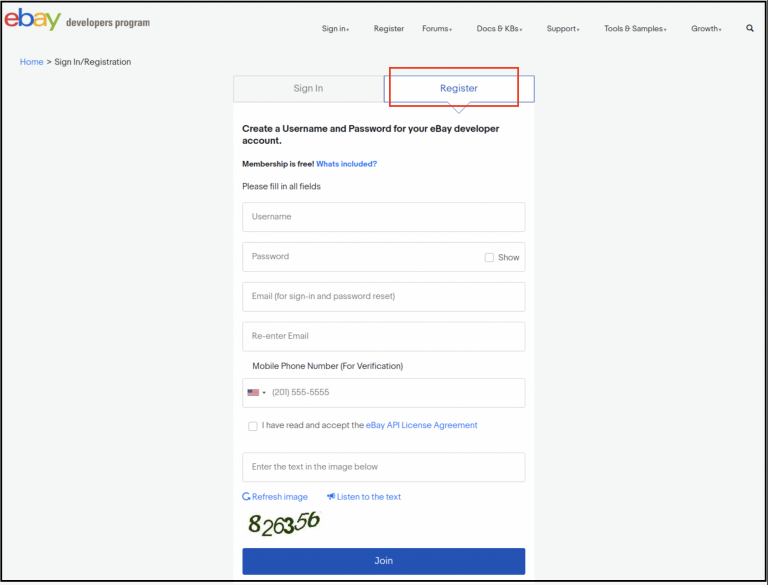
  • After entering all the valid data, you will be headed to the join option.
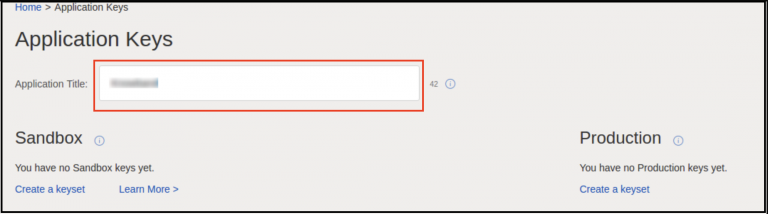
  • In this very next step, eBay will redirect you to the application creation page.

  • In the newly opened form, enter the application name and click on create a key set.

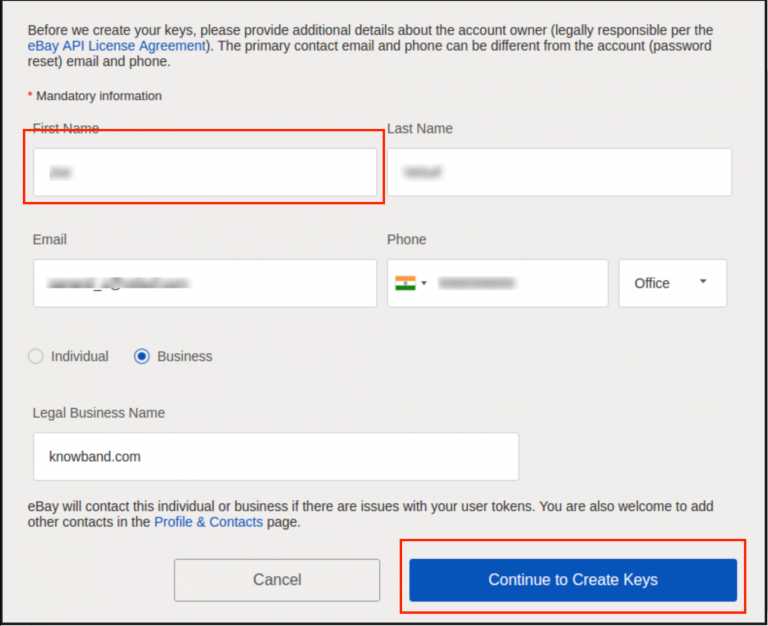
  • Fill out the appeared form and click on continue to create keys.
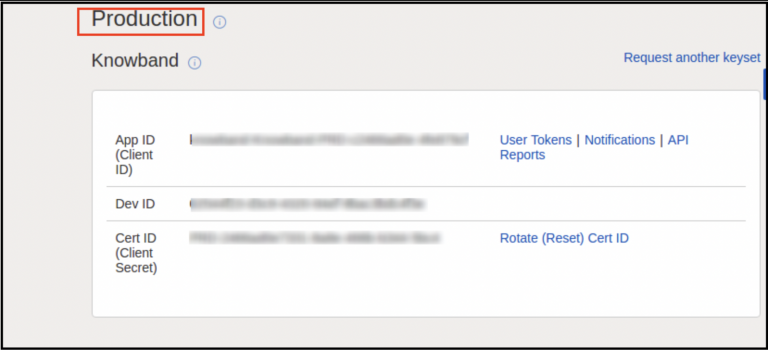
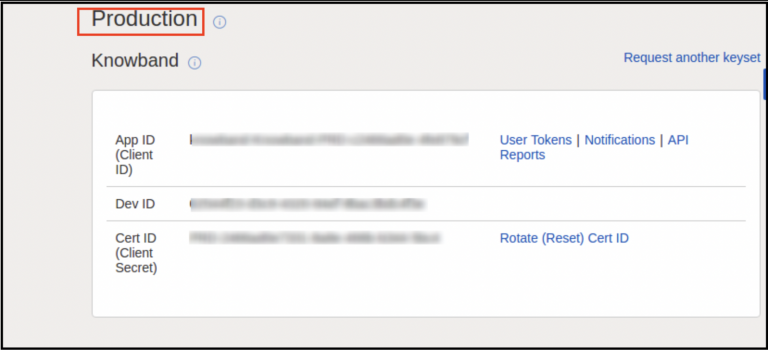
  • You can find the Application ID, Developer ID, and Client Secret on this page.

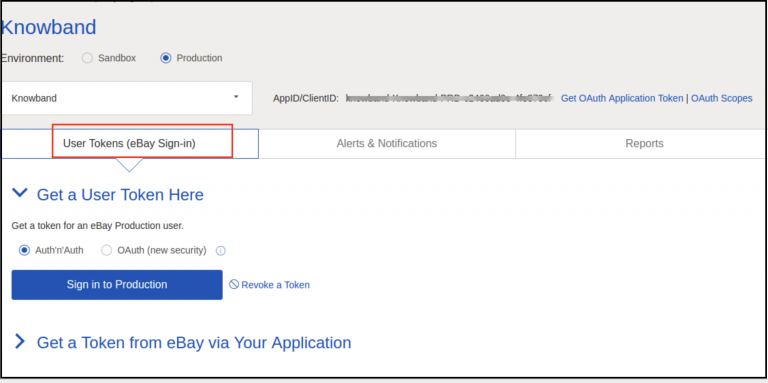
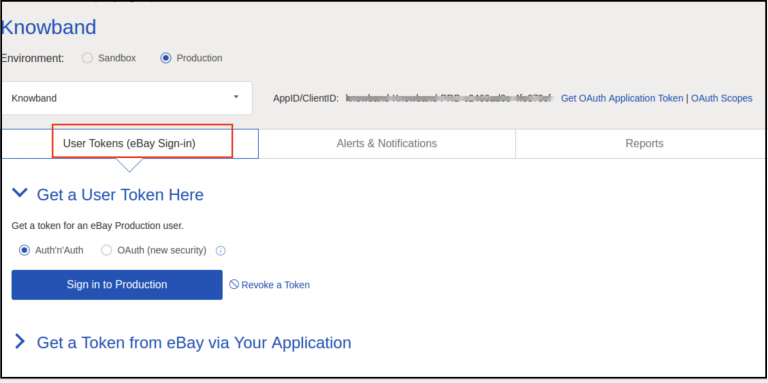
  • For the further step, you will require to generate the user token. Click on the button mentioned in the below image.

  • Click on sign-in to production for getting the token.
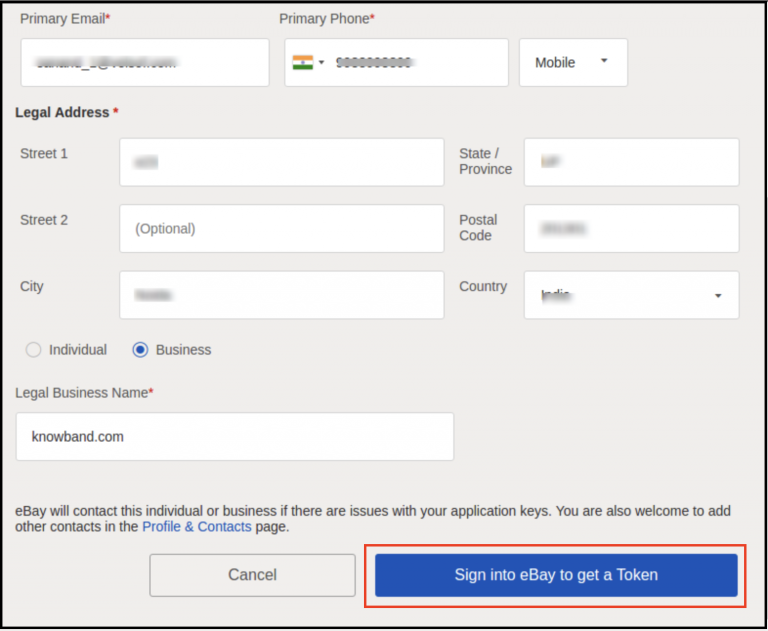
  • Fill in all the validated data, and click on sign-in to get a token.

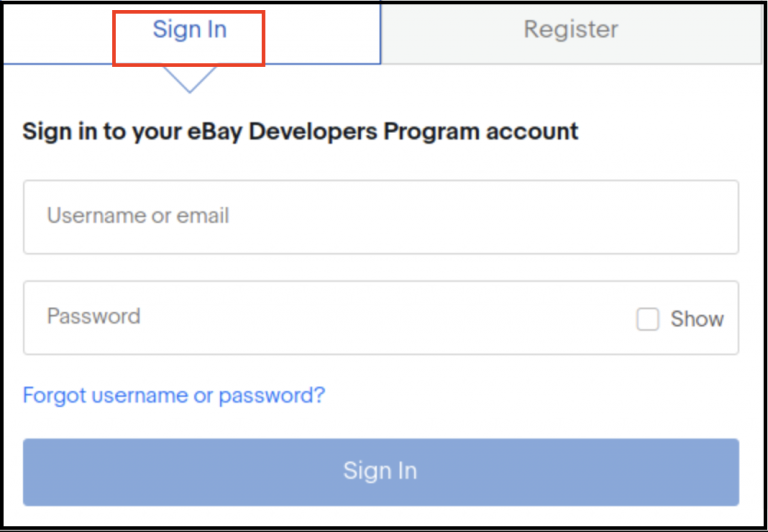
  • After clicking on the above-mentioned option, the users will redirect to eBay sign-in. Further, if you are already having an account, log in with the same, or you can always register a new one.

  • All done. If everything went nice and perfect, you will be headed to eBay.

4.0 Token generation via Your Application:

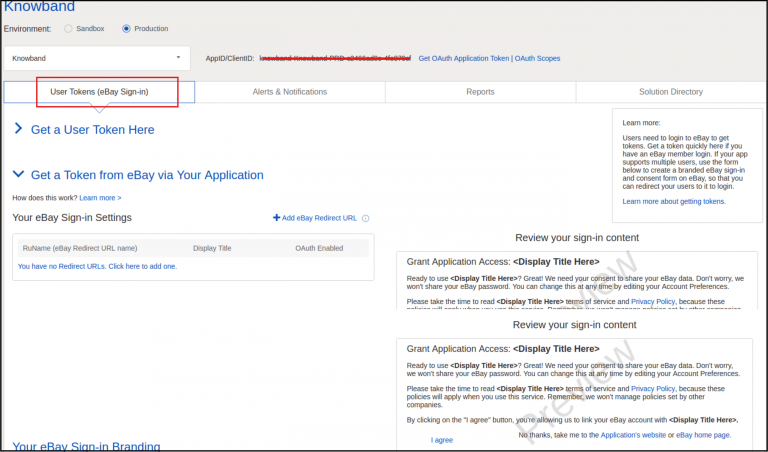
  • For this option, you will have to click on the user token in the below image.

  • On the appeared page, click on Get a token from eBay via your Application.

  • You will find here the option for adding an eBay redirect URL. Further, click on the same, fill out the form and save.

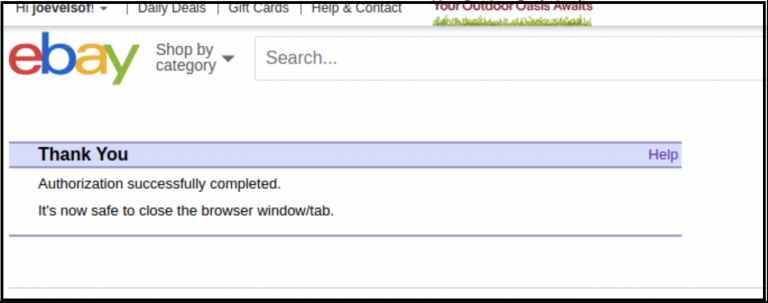
  • Done. All you need to do now is click on I agree from the right side of the form. Moreover, if you have followed the process completely, you will receive a successful authentication message.

5.0 Default Settings:

  1. In the initial phase, all the products will have default categories while listed on eBay.

2. By default, the online sellers will get a free shipping option with the following detail.

  • Shipping Service: UPS Ground.
  • Shipping Type: Flat.

Later the sellers can also change the same from eBay Account.

3. The sellers will find the return policy added by default.

  • Refund Option: Money Back.
  • Days: 30 days.
  • Description: If you are not satisfied, return the item for a refund.
  • Shipping Cost Paid By: Buyer

Note: The online sellers can also change the same later from their eBay Accounts.

6.0 Admin End of Knowband WooCommerce eBay API Integration Module:

WooCommerce online sellers will have options to manage their eBay business with the following options offered by WooCommerce eBay Integrator Extension.

  • General Setting.
  • Order Setting.
  • eBay Sites.
  • Profile Management.
  • Add a new Profile.
  • Shipping Profile.
  • Add a new Shipping Profile.
  • Product Listing.
  • Inventory Jobs.
  • eBay Orders.
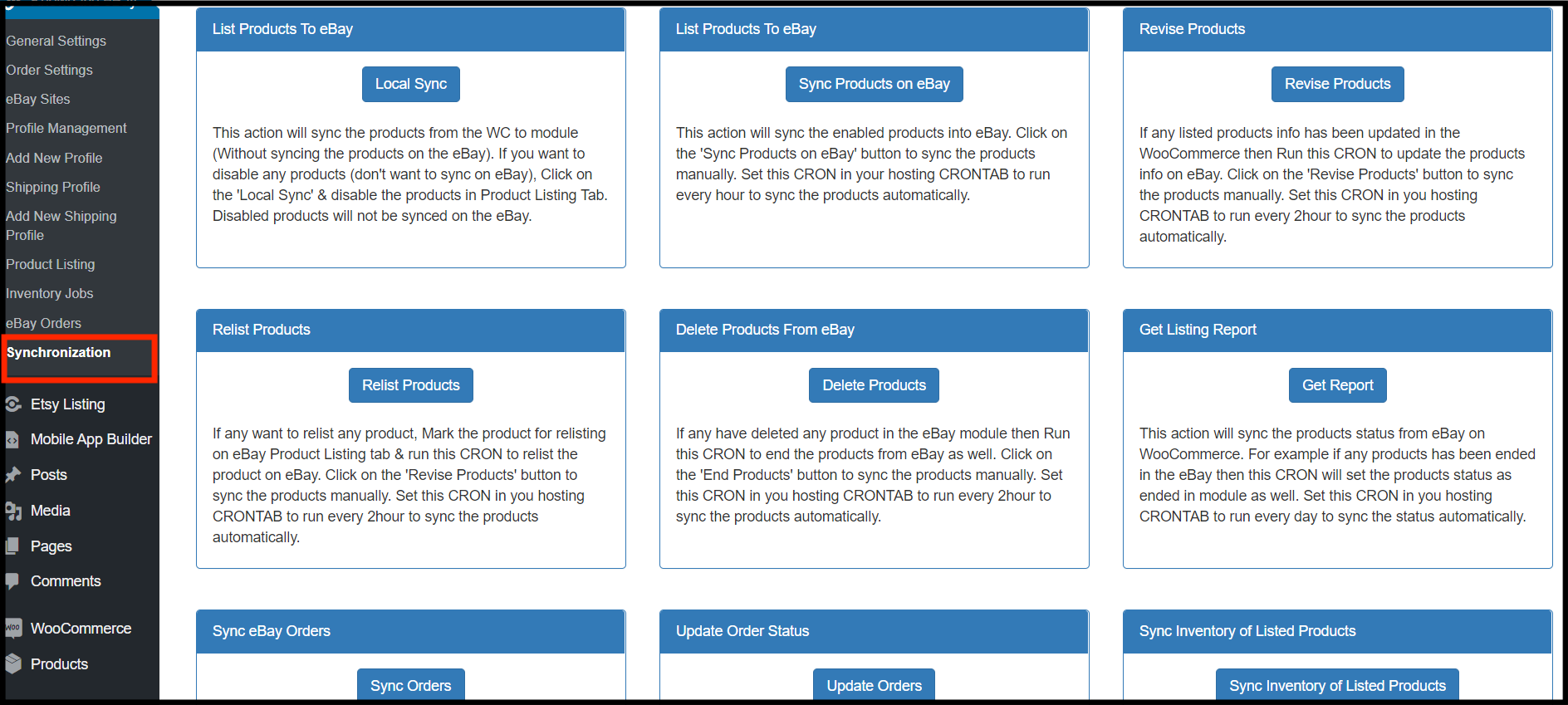
  • Synchronization

Not only the WooCommerce online vendors can manage their eBay shop with the help of these tabs but also they can do many more.

Let’s find out, what these tabs are designed for.

6.1 General Settings:

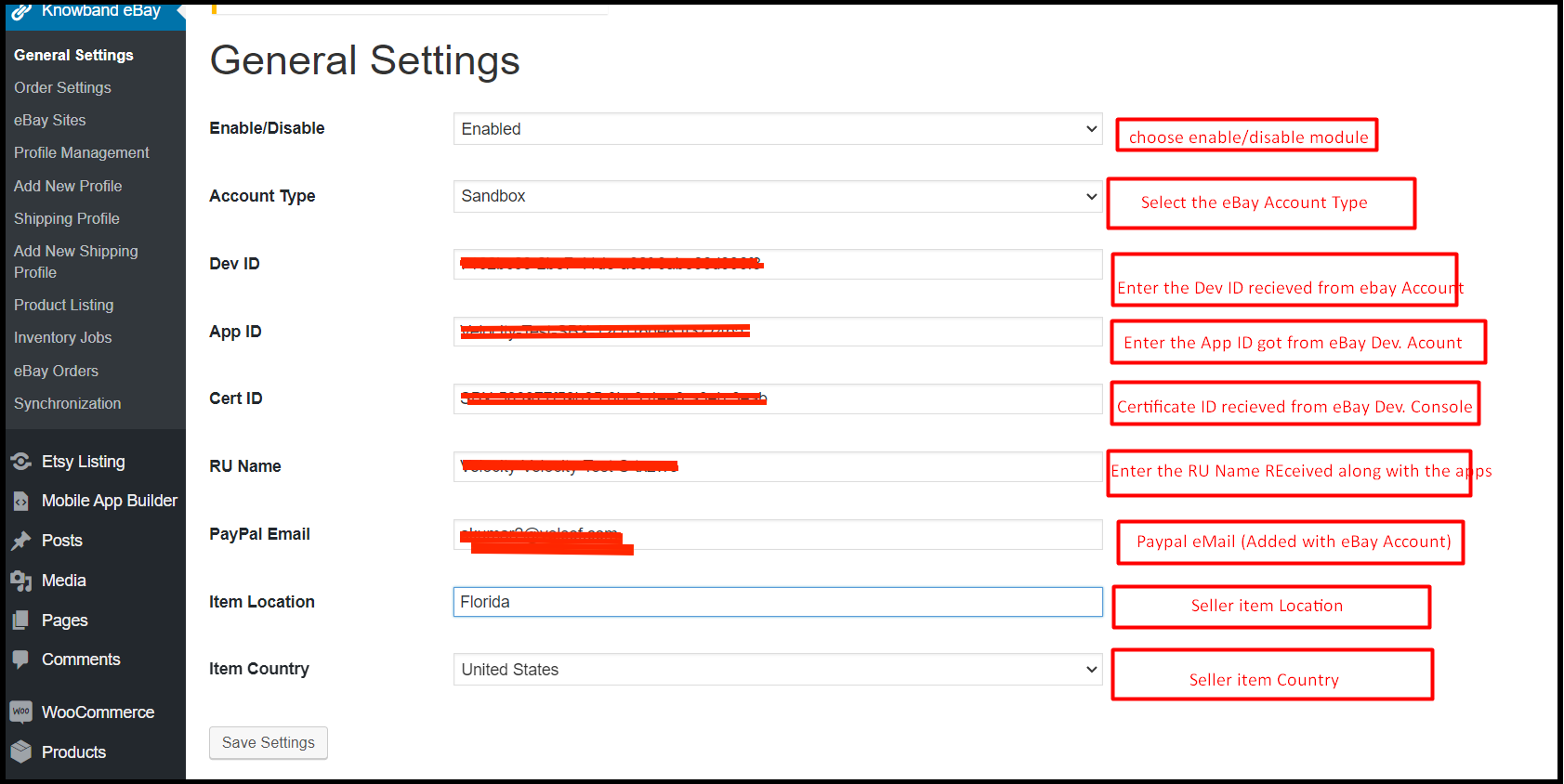
In this section, the WooCommerce admins will get options for entering the essential details for the connection. Further, you will find the General setting tab of the Knowband WooCommerce eBay Integration Module as mentioned in the below image. In fact, to set up the connection between eBay and WooCommerce shop, the admins will have to fill in the data in all of the mentioned fields.

  • Enable/Disable: By turning on this option the online WooCommerce sellers will be able to connect or disconnect their shop from eBay.
  • Account Type: This option is provided for choosing the account type. In case you want to test the module first, you can always choose the option of a sandbox. However, choose the production option from the dropdown list.
  • ID: In this field, enter the dev ID. Generated on the eBay developer console (Follow the steps mentioned above to get the Dev. ID).
  • Cert ID: Enter the cert. ID. In this field, that was generated while generating the token.
  • RU Name: Likewise, for App ID and Cert ID, the sellers can find their RU name also on the eBay Developer Console.
  • PayPal Email: In this field, enter the PayPal email which you are using on your eBay seller account.
  • Item Location: This field was designed for choosing the item location. Furthermore, enter the location from where you will be managing to ship for eBay orders.
  • Item Country: For item location, enter the item country you want to choose for shipping handling.

6.2. Order Setting:

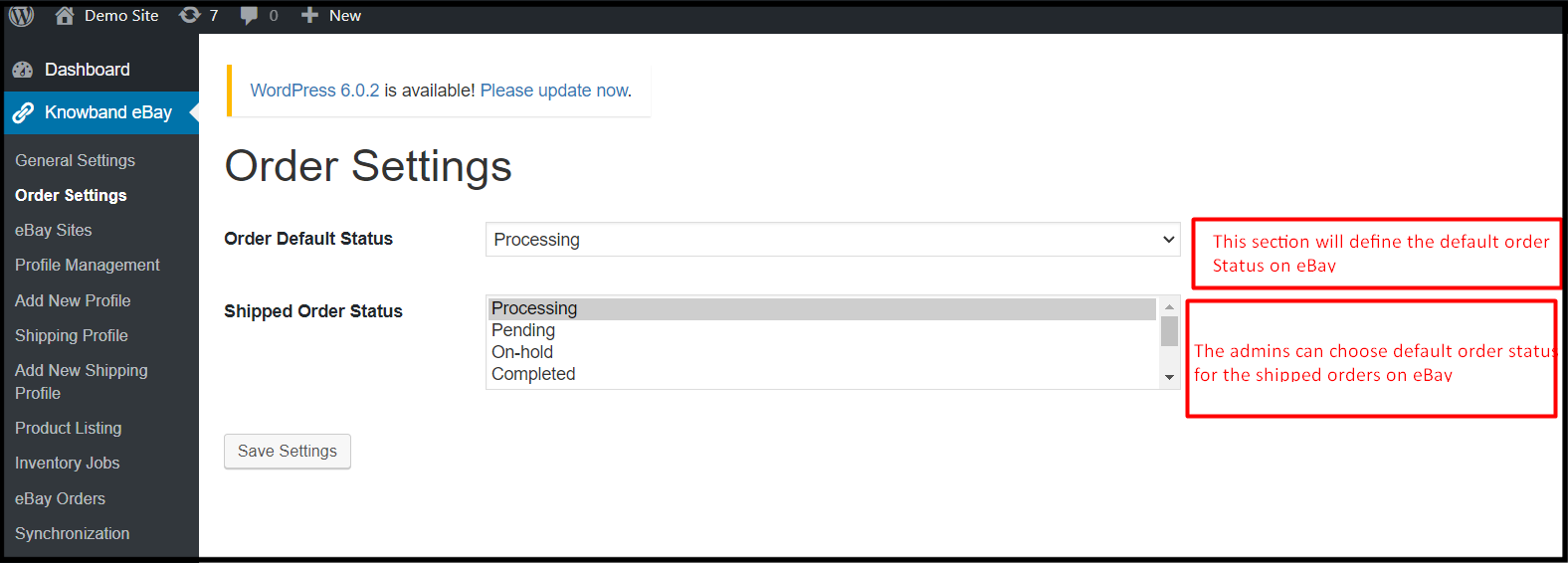
Knowband WooCommerce eBay Marketplace Integration Extension offers a separate tab for order management. Further, in this tab, the WooCommerce store admins can select the default order status for the default orders and shipped orders.

  • Order Default Status: The default order status stands for the first order status the online sellers want to show on eBay as soon as they get an order.
  • Shipped Order Status: The WooCommerce shop admins can select the order statuses for the shipped products.

6.3 eBay sites:

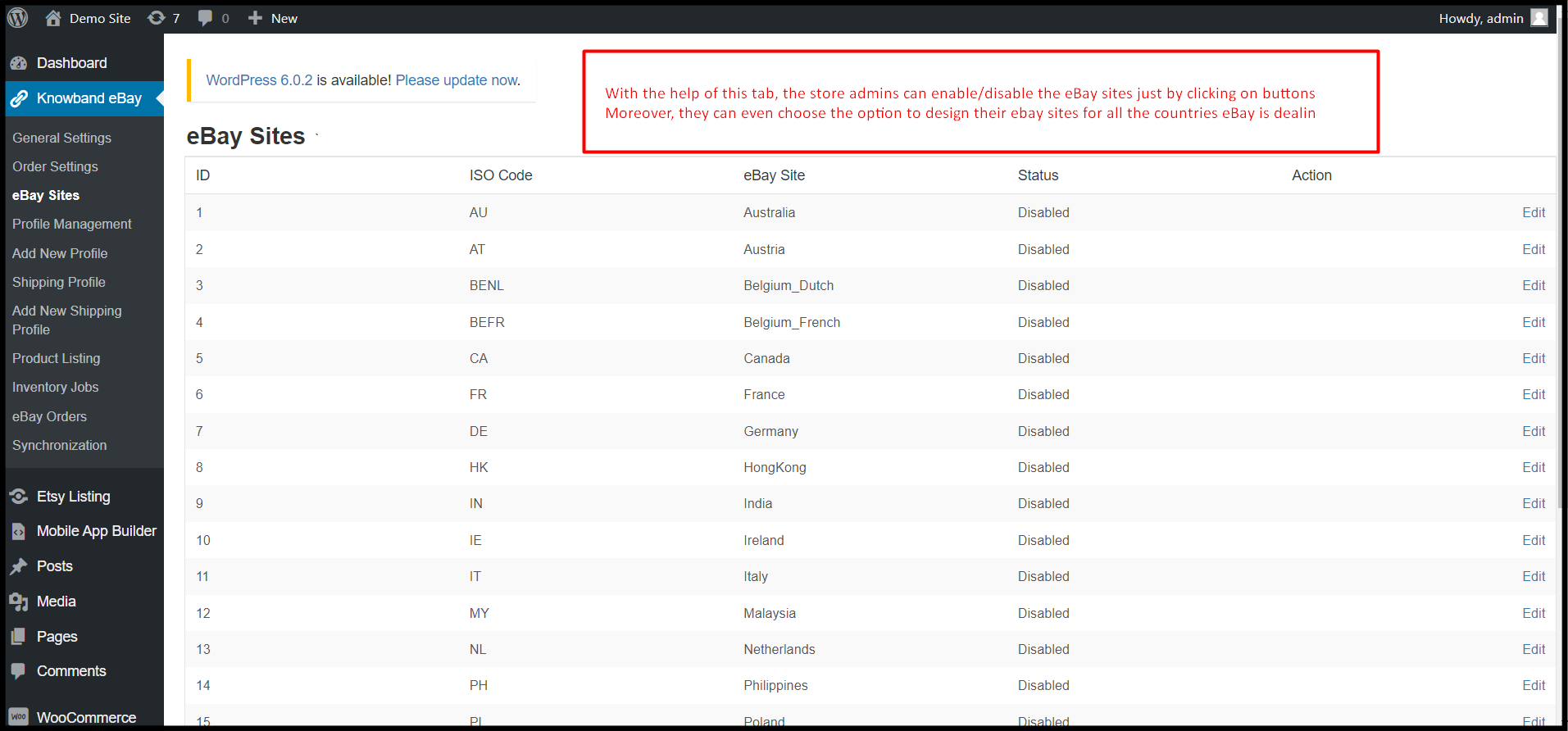
Not only the WooCommerce eBay Integration Plugin allows the sellers to list their products on eBay. However, also they can create various eBay sites from the module backend. In fact, as shown in the below-described image, the WooCommerce store admins can enable as many eBay sites as they want for selling their products in multiple countries.

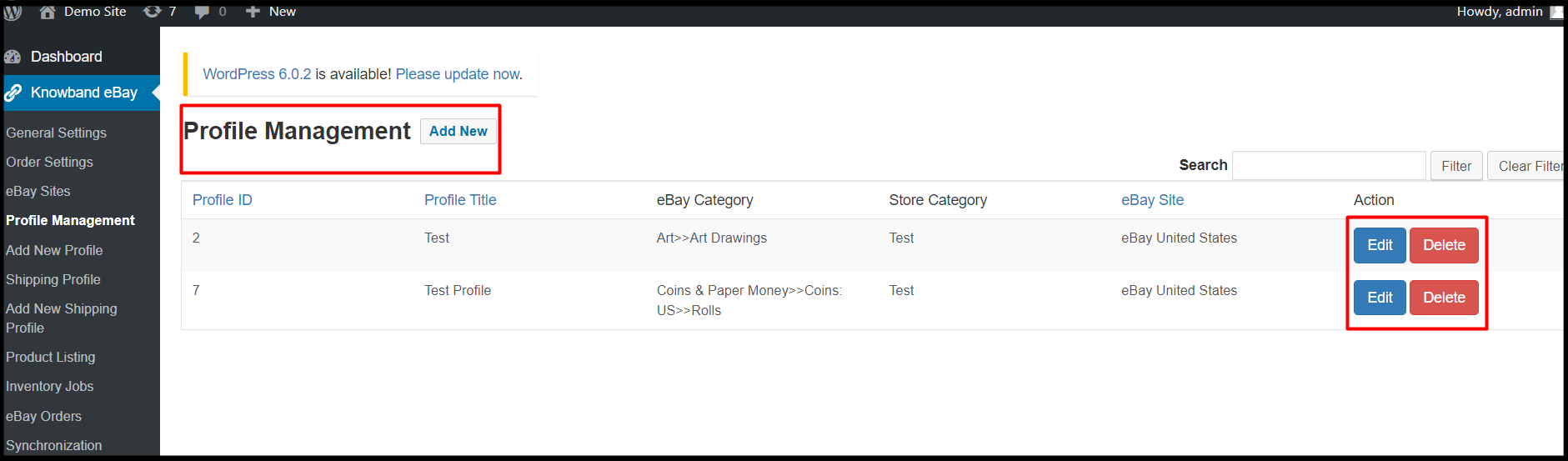
6.4 Profile Management:

The WooCommerce online vendors can design their eBay profiles right from their WooCommerce back-end. Moreover, Knowband eBay WooCommerce Integrator allows the admin to edit and delete the created profiles even after profile creation.

  • Edit: Choosing the following option will allow online sellers to edit their already created profiles.
  • Delete: If you want to delete the eBay profile, just a single click on this button will erase all the data from that particular profile.

6.5 Add New Profile:

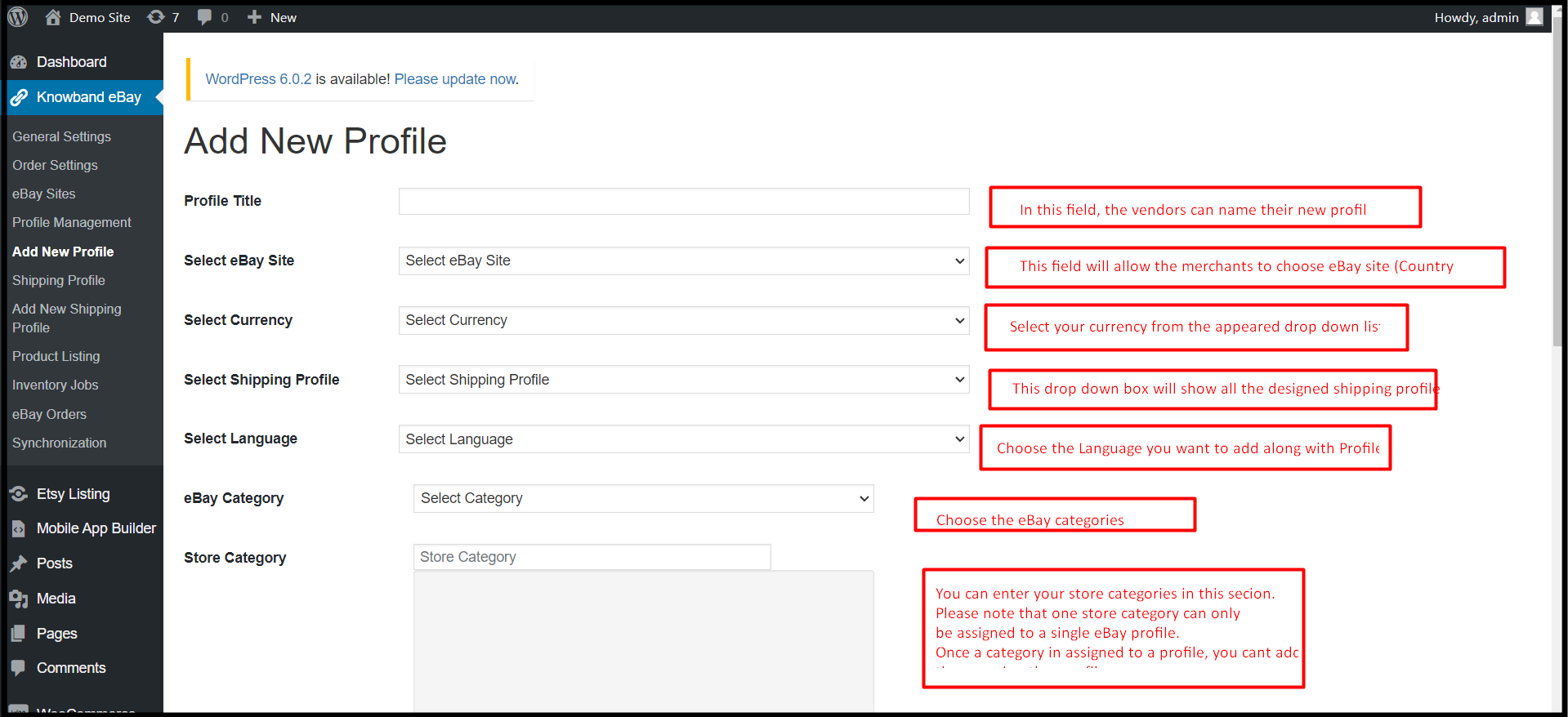
In this very section, the WooCommerce eBay Integrator module offers admins to create their eBay profiles. In fact, not only the store admin can create their eBay profiles but also if they want to, they can also add modifications in the same at a later time.

  • Profile Title: Enter the most suitable eBay profile title in the following field.
  • Select eBay Sites: WooCommerce store admins can add eBay sites in this field.
  • eBay Category: Admins can choose the eBay categories from the appearing drop-down. In simple words, they can map for which eBay category, their profile will appear.
  • Select Currency: Choose the currency you want to deal in on the eBay Marketplace.
  • Select Shipping Profile: In this drop-down field, all the created shipping profiles will appear. Moreover, the admins can choose any of the shipping profiles for their eBay profile.
  • Select Languages: The WooCommerce store admins can choose the languages they want to go on eBay with. Moreover, for every eBay Profile, they can choose a different language.
  • Store Category: The WooCommerce store admins can choose their store categories for the profile. Moreover, they can add as many store categories as they want into a single profile. Furthermore, once a category will be assigned to a profile, admins cannot use the same in other profiles.

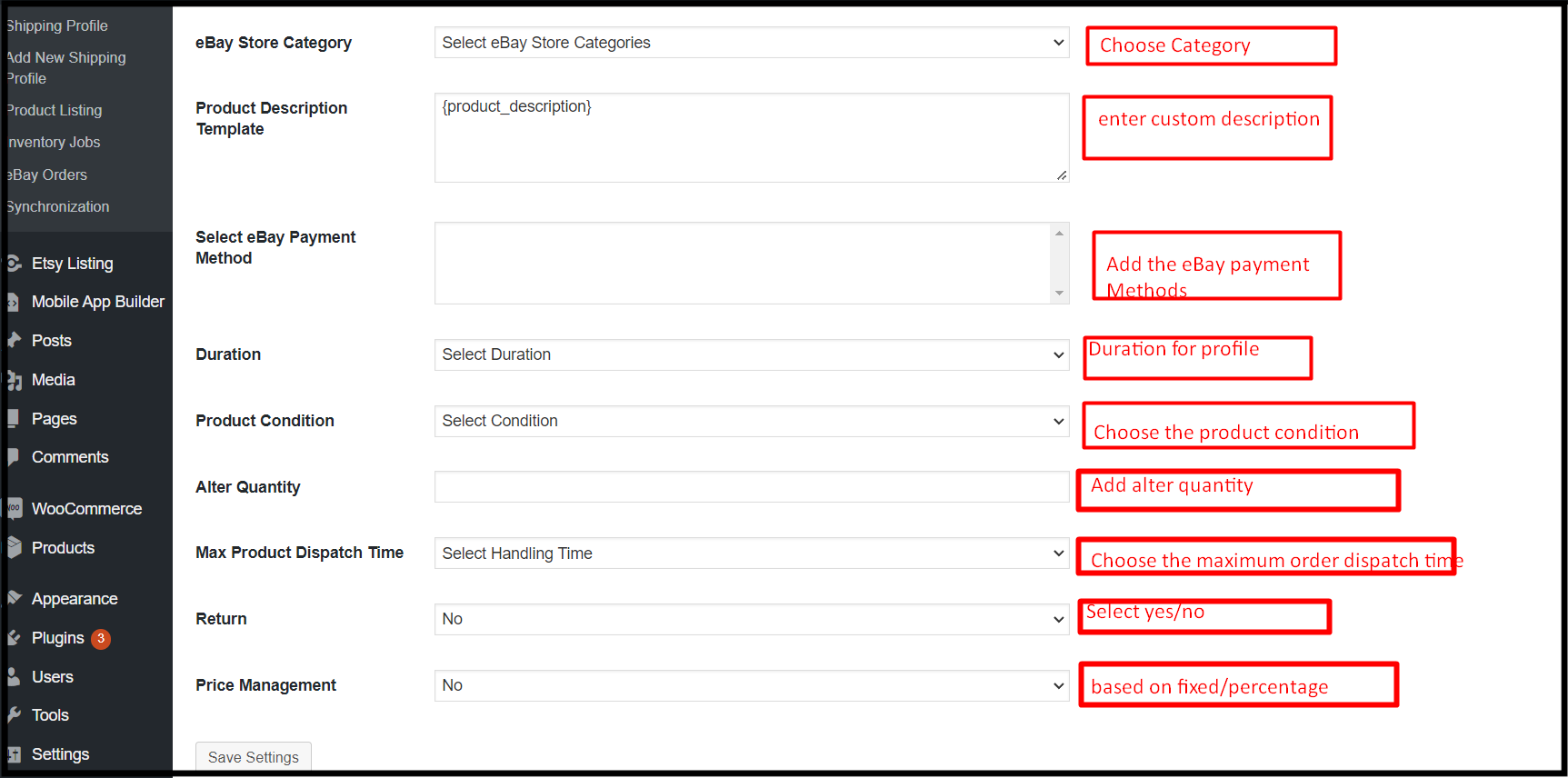
  • eBay store Category: Admins can choose eBay store categories from this option.
  • Product Description Template: The admins can design custom product description templates for their eBay listings.
  • Select eBay Payment Method: Choose the eBay Payment Method from the help of this option.
  • Duration: The store merchants can choose the duration for the profiles with the help of the following option.
  • Product Condition: From the appeared dropdown, like eBay, the vendors can choose the product condition. For instance, they can select the options such as used, new, old, etc.
  • Alter Quantity: Using the following option, WooCommerce online sellers can list their WooCommerce inventory with altered quantity on eBay Marketplace.
  • Maximum Product Dispatch Time: Enter the maximum product dispatch time on eBay in the following text field.
  • Return: This option will allow the sellers to enable/disable return management. Moreover, if the sellers want to enable returns on their listings, the eBay WooCommerce Connector allows vast options for return management.
  • Price Management: This feature helps the admins to stand against the eBay commission. Furthermore, not only the WooCommerce sellers can increase their listing price based on percentage but also can increase with a fixed value amount.

6.6. Shipping Profile:

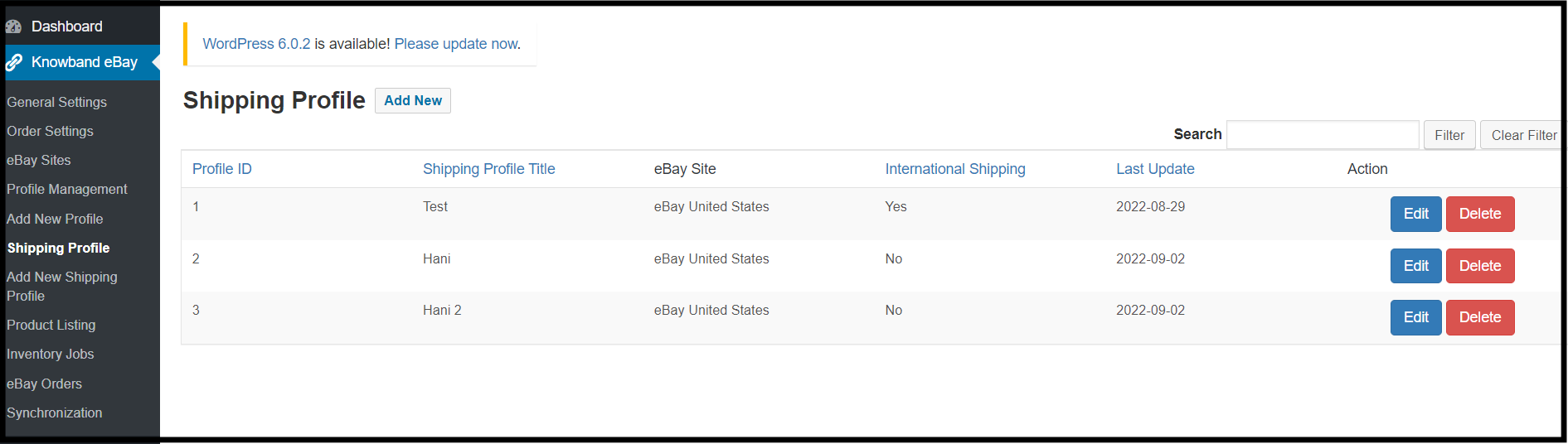
The next tab Knowband WooCommerce eBay Connector addon offers shipping profiles. Moreover, WooCommerce online sellers can choose the shipping profile they want to assign to the eBay Profiles. Also, they can even edit or delete the already-added shipping profiles.

6.7. Add a New Shipping Profile:

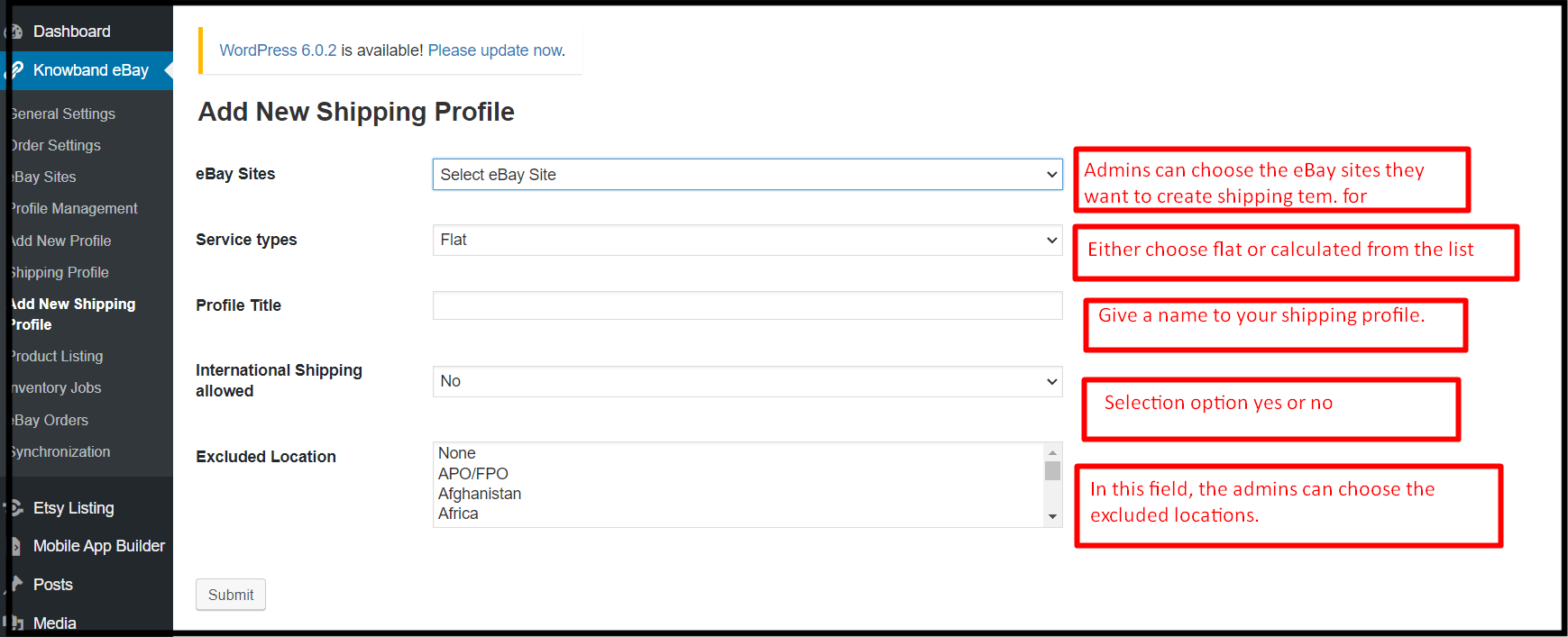
In add new shipping profile tab the WooCommerce online vendors will get an option for adding new shipping profiles. These shipping profiles can later be used for eBay order management.

  • eBay Sites: The WooCommerce store admins can choose eBay sites from the appearing dropdown.
  • Service Type: In this option,eBay WooCommerce API Integrator offers 2 options, flat and calculated. If you want to charge a flat fee from the customers you can choose the flat. Moreover, if you are planning to charge according to the locations of customers, you will also have the option for the same.
  • Profile Name: The store retailers can give a reasonable name to their shipping profile by entering values in this field.
  • International Shipping Allowed: This is a Boolean button that allows WooCommerce sellers to choose the yes and no options. The admins can allow/disallow international buyers from completing purchases.
  • Excluded Locations: The admins can prohibit the users for special locations from orderings the products. All they need to do is to enter the locations they want to exclude from their selling list.

6.8. Product Listings:

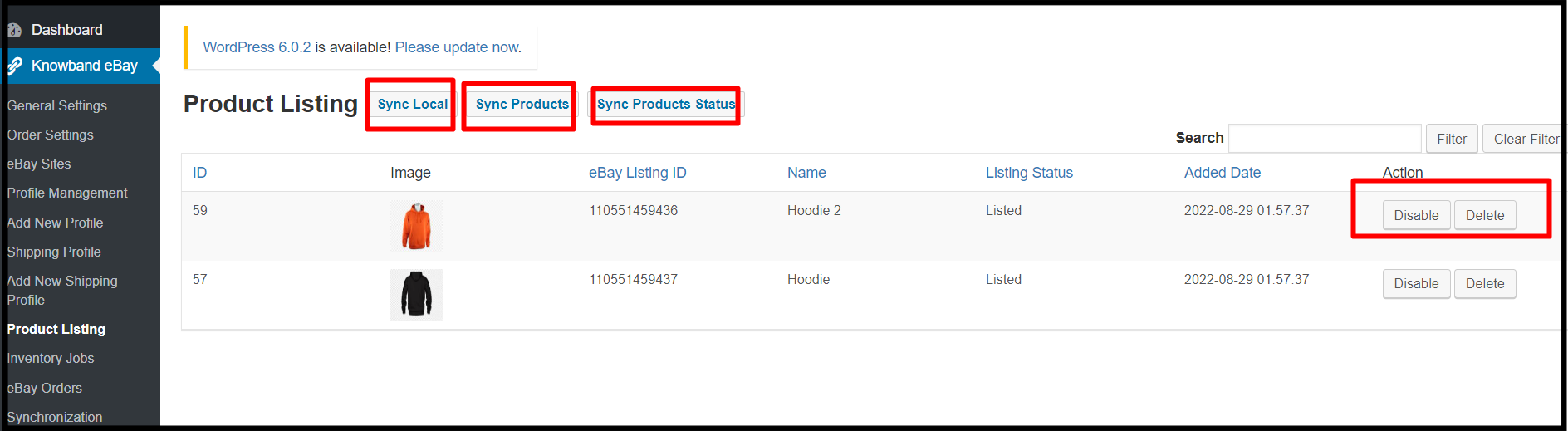
Knowband WooCommerce eBay API Integration Module offers a different tab for managing product listings. In this tab, the store admins can keep track of all of their eBay listings and can manage the same easily.

  • Sync Local: The admins can locally synchronize by hitting the same button.
  • Products Sync: Online WooCommerce sellers can synchronize products with the help of the sync product button.
  • Sync Product Status: In case you have added or removed a new product on eBay Marketplace, you can check the same here if that is listed or not.

6.9. Inventory Jobs:

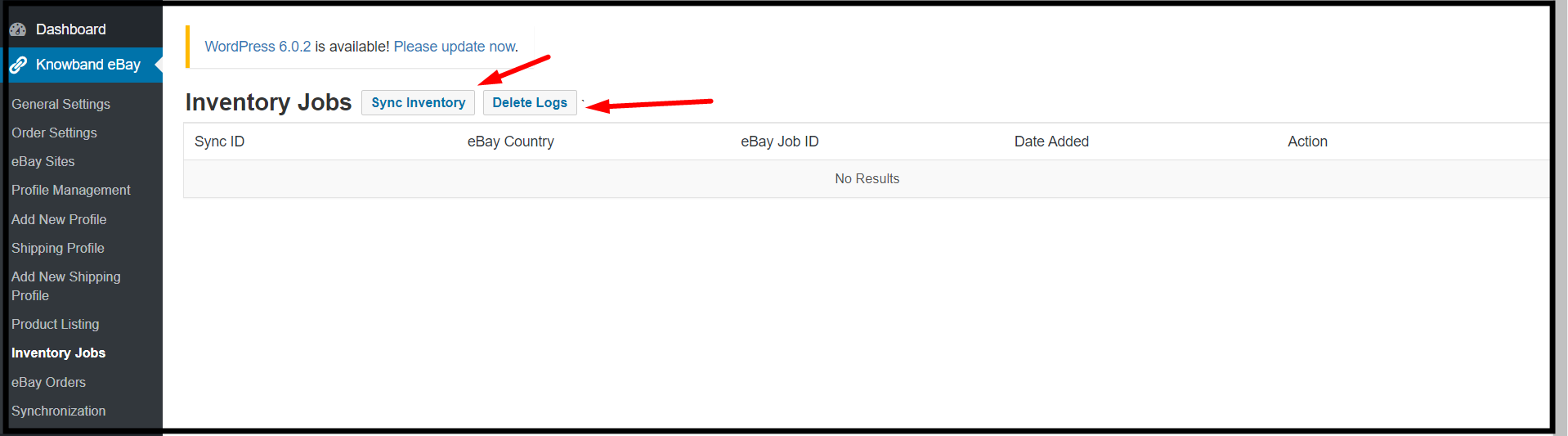
In this tab offered by the Knowband WooCommerce eBay Marketplace Integrator addon, the admins can keep track of their data. Moreover, they can check eBay inventory and logs. Further, in simple words, the back store admins can have a look at all of the activities in the inventory jobs table.

6.10. eBay Orders:

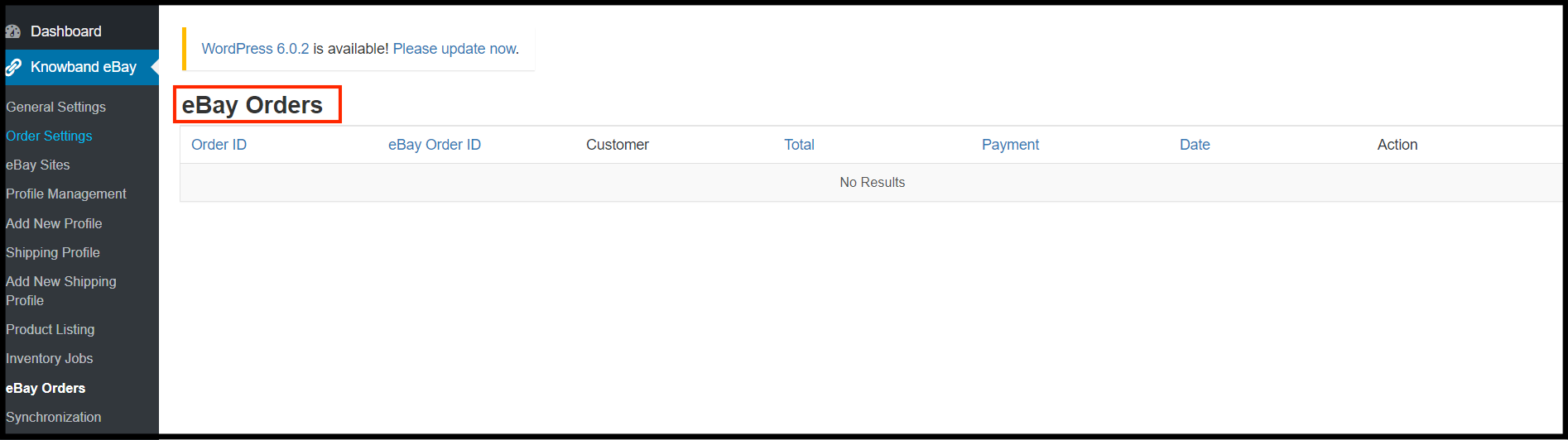
This particular tab is specially designed for keeping up track of eBay Orders. In fact, not only the WooCommerce admins can keep the track of their eBay orders from this tab but also, they can even update the same.

6.11. Synchronization:

The following tab is loaded with one-tap cron buttons. Knowband WooCommerce eBay Integrator offers the following tab to take care of all of the manual selling essentials in automated ways. Further, not only the sellers can use this cron with a single click but also the same works on most advanced API-based technologies.

  1. Local Sync: This cron button will load the module with all of the products from the WooCommerce shop. Furthermore, this button could come in handy for you if you want to edit a profile before publishing it to eBay.
  2. Sync Products on eBay: The following cron button will synchronize the store products on the eBay Marketplace.
  3. Revise Products: Do you have recently updated any product information on your WooCommerce store and want to update the same on eBay? In fact, the revise products button simply updates the details of the product on eBay Marketplace within no time.
  4. Relist Products: When you wish to relist a product on the eBay Marketplace, you can use the Relist Products cron.
  5. Delete Products: This feature is useful if you want to remove a product from eBay Marketplace after removing it from the module.
  6. Get Listing Report: The listing Report cron will load all the listing reports and will show them in the admin panel.
  7. Sync Orders: Synchronize Orders button will help the admins to get all the eBay orders on the WooCommerce shop back end.
  8. Update Order: Synchronize Order Status cron button will update the modified order status on the eBay Marketplace.
  9. Sync Inventory of the Listed Products: The stock levels of all the items posted on the eBay Marketplace will be updated by this cron. In fact, running this cron will automatically adjust the stock to 99 on both eBay and WooCommerce if you have 100 on both sites and one product sells through either one.

In the End,

Since more than ten years ago, Knowband has been offering services to its cherished community of internet sellers. Further, all we have accomplished in this lovely trip is a family of more than 80,000 content online retailers. In fact, a smooth connection between an online seller’s business and the eBay Marketplace is also made possible by our most sophisticated WooCommerce eBay Integration module.

Find out some more related stories:

Understanding Walmart Store’s Hours: Everything You Need to Know

A large variety of goods are available at Walmart Store at regular affordable costs. But given that Walmart has so many divisions and stores throughout the US, you might be curious about its operating hours. If you want to get the most out of your Walmart shopping excursion, keep reading.

The Working hours of Walmart Store

The whole week, from 6 a.m. to 11 p.m., Walmart is open. The same hours apply Monday through Sunday at all Walmart locations, including supercenters, neighborhood markets, and regular stores. Except for some holidays, you can shop at your neighborhood Walmart any day of the week from 6 a.m. to 11 p.m. However, during the early or later hours, some facilities might be unavailable. People with all kinds of schedules can shop at their neighborhood Walmart thanks to these store hours.

There are three distinct store types at Walmart:

  • Conventional Walmart stores
  • Neighborhood Supercenter Markets
  • The standard Walmart locations are retail stores with a typical selection of home goods.

Neighborhood markets are merely grocery stores that specialize in selling food and items related to food. Walmart Supercenters, which provide a vast selection of goods from all product categories and foodstuffs, are essentially a hybrid of the two.

The excellent thing is that you may still shop between 6 a.m. and 11 p.m. regardless of which type of Walmart you visit.

These hours apply to all 50 states’ worth of Walmart locations.

Monday to Sunday: 6 am – 11 pm

The holiday timings of Walmart Store

With the exception of Thanksgiving Day and Christmas Day, when all Walmart locations are closed, Walmart is typically open from 6 am to 11 pm. Additionally, Walmart’s timings on Black Friday and Christmas Eve vary. Every other significant holiday sees most stores open as usual. In contrast to many businesses that close their stores around the holidays, Walmart is open almost every day of the year. Only on Thanksgiving Day and Christmas Day does Walmart remain entirely closed. Due to the popularity of Black Friday as a shopping day, Walmart operates somewhat earlier on this day. Instead of opening at 6 am, many stores do so at 5, and some might open even earlier.

Despite opening earlier on this holiday, Walmart also closes early on Christmas Eve. The majority of Walmart sites are open on Christmas Eve from 12 a.m. to 6 p.m. Visit Walmart if you require any last-minute household goods or food on Easter or the Fourth of July. Your best bet is one of the Walmart Supercenters because they have the most products available. To be on the safe side, you should call ahead to make sure your neighborhood Walmart is open on a holiday.

The Store Locator indicates whether a Walmart location is open as well as its operating hours.

Can we expect the Walmart Store to reopen for 24 hours?

Walmart probably won’t operate continuously again. In recent years, many sites have discontinued their 24-hour operations, and all Walmart outlets have lowered their hours following the start of the COVID-19 pandemic. Since this change has brought Walmart many advantages, it is unlikely that the stores will resume offering 24-hour service. Numerous customers praised the 24-hour service at some Walmart shops. Unfortunately, none of the Walmart locations offer this anymore. The expense of keeping a store open all night surpasses any potential revenue and customer advantages.

Since the COVID-19 pandemic began, the majority of people have worked from home and minimized their time spent in public. As a result, Walmart was only sometimes used by customers late at night, so Walmart didn’t have to remain open around the clock. To protect both consumers and employees, many establishments likewise shortened their hours. Additionally, maintaining a business continuously, especially one as big as a Walmart Supercenter, costs money. When few people were shopping, it was probably not in the company’s best interest to keep the stores open. Additionally, retailers are having trouble filling open positions.

Even if Walmart insisted on having its stores open 24/7, the management might not be able to find enough employees to work all the required shifts. One significant advantage of Walmart discontinuing its 24-hour service is that staff will be better able to meet consumer needs. The majority of Walmart sites have an adequate number of personnel to assist customers all day. Walmart has not explicitly declared that it will never again offer 24-hour hours. The round-the-clock service won’t likely be back anytime soon, though.

Walmart Customer Service Timings

On all days of the week, from 8 am to 11 pm CST, Walmart Customer Service is open. To chat with an agent, use the Live Chat feature on the Walmart website or give their customer service department a call at 1-800-925-6278. Additionally, you can stop by the Walmart Customer Service counter in person, often from 8 am to 10 pm. Given how many locations Walmart has, some customers may run into problems or have inquiries. This is why Walmart Customer Service may be reached in a variety of ways. Calling Walmart Customer Service is recommended between 8 and 9 AM CST.

It will be easier for you to avoid getting added to a long call queue if you call as soon as customer assistance is available. While shopping in-store, you can also get instant assistance by going to the service desk. The normal hours for the Walmart service desk are 8 am to 10 pm, but they can change depending on the location. Walmart’s return hours coincide with the service desk’s hours because returns can be made there.

Use the Live Chat feature if you require assistance after regular Walmart Customer Service hours. You can utilize Walmart’s Live Chat at any time to find answers to a variety of questions. And lastly, Walmart maintains a strong social media presence. Contact Walmart on Facebook or Twitter to obtain assistance. The easiest approach to getting help is frequently through direct messages.

Furthermore, we have specifically tailored a top-notch article about how to get in touch with Walmart customer service. Check it out here.

Walmart Pharmacy Timings

The majority of Walmart pharmacies are open from Monday through Saturday from 9 am to 7 pm and from 10 am to 6 pm on Sunday. Since these hours can differ from area to area, you might wish to phone the shop or look up the hours online before traveling. Make sure your medication is ready before you go to pick it up.

It’s a wonderful idea to fill your medicines at Walmart Pharmacy. Generic medicines, which are far less expensive than brand-name prescriptions, can frequently be obtained through the drugstore. Every year, they are also given flu shots. In addition, several of the often-advised vaccinations for children can be obtained at a Walmart Pharmacy by parents bringing their children there.

What are the timings of the Walmart Money Center?

The majority of Walmart Money Centers are open daily from 6 am to 11 p.m. The store will be open during these times as well. You might wish to call your local Walmart to double-check the opening and closing times since Walmart does not post the Money Center hours online. The Walmart Money Center can assist with a variety of financial transactions. There are various reasons why you might need to go to the Walmart Money Center.

The Money Center provides a range of services to assist you in managing your finances. Money transfers, check-to-cash, credit card applications, debit card reloads, and more services are available.

Here is a list of every service provided by Walmart Money Centers:

  • Request a credit card
  • Clear your credit card balance
  • Update the account for your Walmart credit card
  • Obtain a debit card
  • Charge up your debit card
  • Transfer money to a foreign country
  • Send money to a household address
  • Buy gift certificates
  • Cash and check printing
  • Repay multiple debts
  • For major purchases, installment financing should be set up.
  • Get ready to file your taxes
  • Buying money orders

Applying for the CapitalOne® Walmart RewardsTM Card at the Walmart Money Center is a great option if you’re looking for a new credit card. With this credit card, you can obtain fantastic cash back benefits, such as 5% cash back at Walmart.com.

Additionally, the credit card provides 1% cash back everywhere and 2% cash back at retailers. To apply for the Walmart MoneyCard, you can also go to the Walmart Money Center. This card offers excellent cash-back incentives and is a debit card as opposed to a credit card. Additionally, the Walmart Money Center provides a variety of services, including domestic and international money transfers. Making these easy and fast financial transactions frequently comes at a low cost. Users can interact with a Jackson Hewitt tax expert through Walmart’s tax preparation service to acquire the assistance they require while completing their taxes. The Walmart Money Center offers a variety of additional fantastic services. Consult a Walmart staff member when you go shopping the next time to learn about all the amenities the Money Center has to offer.

Walmart Deli Timings

Every day of the week, the majority of Walmart Deli stores are open at 8 am and close at 8 or 9 p.m. Food is always freshly prepared each day and typically available by 10 am. Holidays like Christmas Eve may have an impact on Walmart Deli hours. Additionally, on Thanksgiving and Christmas, the Walmart Deli shutters along with the main shop. At the Walmart Deli, you may get a wide variety of delicious delicacies.

Gourmet meats and cheeses, sandwiches, soups, and appetizers are all available at the Walmart Deli. Check out the ordering possibilities at Walmart Deli if you require a sizable party tray or platter filled with freshly prepared meals. The food will taste fantastic, and ordering deli goods online is a practical convenience.

You may pick up your purchase easily because Walmart Delis is open almost every day of the year. Spend some time looking through all the wonderful options at your neighborhood Walmart Deli.

How to Locate the Nearby Walmart Store Hours?

Utilizing Walmart’s store finder will enable you to locate local Walmart hours. The quickest way to locate a nearby Walmart is to use the store finder, which lets you search for a certain town or zip code.

Discovering the nearest Walmart facility is the initial step in determining its hours. You’ll need to use Walmart’s store locator to accomplish this. Use the store finder and input your area to look for a Walmart nearby. You can enter either a zip code or a city and state.

The search results will appear, displaying all of the Walmart stores nearby. Both a list and a map are used to display them. You must click “Details” to see the store hours. If you are still unable to see the store hours, click “Store Details” in the info box’s right-hand corner. This will direct you to a different website that contains all the details about that particular Walmart location. If you have already created an account on Walmart.com, your preferred location may already be saved. You may find the address stated in the website’s upper left-hand corner if you access the Walmart homepage (under the Walmart logo).

Clicking on this location will inform you if it is open, albeit it does not provide a comprehensive list of the store’s hours throughout the week.

In the end!!

Walmart is available to many people thanks to its long operating hours. Each day of the week, you can go to the deli, pharmacy, and money center. To validate the timings of the Walmart store closest to you, check the Walmart site after using this information to learn the store’s hours.

Walmart Marketplace Integration

Discover seamless integration solutions for your Walmart store with Knowband’s Walmart Integration module compatible with Prestashop, Opencart, and Magento platforms.

VISIT HERE

Apart from that, if you are willing to be a part of the Walmart seller community, we have something special for you. We provide eBay, Etsy, and Walmart marketplace integration extensions for various eCommerce platforms. With our multi-seller marketplace connectors, you can integrate your existing e-commerce shop with major marketplaces at ease.

Want to find out how? Drop us an email at our official email address support@knowband.com and the team will get back to you with more details.

Take a look at our bestseller module One Page Supercheckout for Prestashop and Opencart Android and iOS Mobile App Builder Plugin:

How to Easily Get in Touch with Walmart Customer Service?

A lot of customers frequent Walmart because of its consistently low costs. There are numerous ways to contact Walmart Customer Service to get the assistance you require when problems or inquiries arise. Every day from 8 am to 11 pm CST, call Walmart’s customer service line at 1-800-925-6278.

Tips for Calling:

  • Best times: 8-9 a.m. or 9-10 p.m. to avoid long wait times.
  • Keep your order number or account info handy for faster assistance.
  • Use the Help section online first for quick solutions to common issues.

The typical store hours for the Walmart Customer Service Desk are 8 am to 10 pm.

In addition to sending an email or using Live Chat, you can reach Walmart Customer Service.

Additionally, Twitter and Facebook are used by Walmart’s customer service.

We’ll go over several ways to contact Walmart Customer Service in this blog so you can do so fast and effectively!

What is the Customer Care number of Walmart?

The customer service line for Walmart is 1-800-WALMART (1-800-925-6278).

The corporate offices of Walmart are only open Monday through Friday from 8 a.m. to 5 p.m. CST.

Customer service is available from 8 a.m. to 11 p.m. CST. Users can reach Walmart’s corporate office or ask price questions by calling the company’s customer service line.

Every day of the week between 8 am and 11 pm CST, you can phone Walmart Customer Service. Contact the corporate headquarters on weekdays between 8 am and 5 pm if you need to get in touch with them.

The optimum time to call Walmart’s customer service line is immediately after the company’s doors open, between 8 and 9 am CST. You can also give them a call later on, around 9 or 10 p.m. CST.

There are typically a few other callers waiting in line to talk with an agent when you call around the opening or closing of Customer Service. Various queries and issues can be addressed by Walmart Customer Service.

Any inquiries you may have regarding the products and their prices can be answered by the representatives. Additionally, they can assist you in contacting Walmart corporate offices or other divisions.

To discuss a retail experience, you can also contact Walmart Customer Service. They value all feedback, positive or negative.

A Help Section with solutions to numerous Frequently Asked Questions is also available on the Walmart website.

A Help Section with solutions to numerous Frequently Asked Questions is also available on the Walmart website.

Before calling Customer Service, you might wish to perform a search here first because it might be quicker. Walmart Customer Service is available to assist with more complicated inquiries or issues.

What are the Customer Service Desk Hours at Walmart?

The Walmart Customer Service Desk is typically open from 8 am to 10 pm.

Every day that the shop is open, the customer service desk is also open. The Service Desk’s hours coincide with standard store hours, although some Walmart locations may open or close at various times. 

If you need assistance with returns, exchanges, or product location, stop by the customer service desk at your neighborhood Walmart.

As long as you have the documentation from your initial purchase, the majority of things can be readily exchanged or returned to the desk. The customer service desk can get in touch with an expert to assist you in locating a certain item if you require it.

You might occasionally need to pick up an order at the Customer Service Desk as well. The majority of Walmart Pickup orders can be delivered directly to your vehicle in the allotted parking space. Some clients, however, might be told to go to the store’s pickup area. Typically, the Customer Service Desk area is located near to or includes the Pickup area. Explore the Walmart Store Directory to see the operating hours of your neighborhood store. By choosing your state and then your town or city, you may use this tool to find the Walmart that is nearest to you. You may find the main store hours in the Store Directory, along with the hours for each store’s departments.

Also read: The Pluses and Minuses of becoming a Walmart Marketplace seller

Regarding online purchases, how can I get in touch with Walmart customer support?

For online orders, you can reach Walmart Customer Service by phone at (1-800-WALMART) or on their website. If you need to make small changes, like changing your online order, using the website is the simplest option. Contact the Customer Service number to interact with a live employee, nevertheless, if you have more complicated inquiries. The entire procedure of completing an order online at Walmart is supported by assistance.

If you want support with tracking, amending, or canceling an online order, you can get in touch with Walmart Customer Service. You can make any necessary modifications while the order is still in the “Processing” phase, and Customer Service can assist you with that.

On rare occasions, staff members will deliver or assemble an online item incorrectly. Call Customer Service if you get all the shipments for your order but discover one is missing. The agent may provide a replacement or refund you for the lost item.

The order status could sometimes be incorrectly displayed as delivered even though you never got any packages.

Walmart advises delaying approaching Customer Service for two days in this circumstance. Calling customer service will also be necessary if you need to return a large, bulky item from an online order.

Normally, you can either bring any returns to a nearby shop or send them back to Walmart. It becomes challenging, though, if the object is bulky and cumbersome to ship or carry.

You can get advice from a customer service agent about how to make the return most effectively.

Has Live Chat Been Implemented by Walmart Customer Service?

On its website, Walmart Customer Service offers a live chat feature that is accessible around the clock. The chatbot can answer a lot of queries, but if it is unable to, describe the problem in detail, and the bot will link you with a live agent with who you can communicate.

  • Start on the Walmart website’s primary Help page to access the live chat for customer service. 
  • Find the blue “Contact us” button by scrolling down until you see it. The lower right-hand corner of the screen will change to a chat box when you click this button. The talk always begins with a short introduction and a list of possible subjects.
  • The chatbot will ask you a series of questions and provide you with directions to help you solve your problem if you see an option that accurately describes your situation. The chatbot can assist you in getting in touch with a real person if you keep exploring the topics and don’t find what you’re looking for.
  • The virtual assistant will ask you to explain your issue in your own words after you’ve specified that your topic of interest is “something else.”
  • You will soon be in contact with a live representative who can assist you if you type this into the chat box. If you have selected one of the recommended issues and the chatbot’s responses are insufficient, you will also be put in touch with a real agent.
  • Walmart Live Chat can assist with a wide range of topics. It can help with things like orders placed, returns and refunds, and your online account, for instance.

The chatbot can also respond to inquiries concerning Walmart Plus and out-of-stock items. Even details regarding the COVID-19 vaccine can be found there. Additionally, you can offer feedback through Walmart’s Live Chat.

In particular, you can utilize the chatbot to give feedback to a driver who delivered your Walmart Delivery order or to share a retail experience you had.

Is there an Email option to contact Customer Service at Walmart?

Email is one way to reach Walmart Customer Service. There is a link on the corporate website’s main contact page that you may use to send an email. You must pick a topic, add comments or an explanation of your inquiry, supply contact information, and select your nearby store before you can email Walmart Customer Service.

Customer comments are accepted at Walmart.

Start on the “Contact Us” page of the main Walmart site if you wish to send an email with comments or a question.

You can start the procedure by clicking the “Email Customer Service” link, which will direct you to another website.

Before sending out an email, you must supply some essential information. You must first pick a subject that relates to your comment or question. This makes it easier to send the email to the appropriate department or person who can assist you.

Select from the following six main classifications:

  • Store Experience
  • Discontinued Item/Brand
  • Company Feedback and Questions
  • Product Question/Product Feedback
  • Investor Information
  • Community & Giving

You can then put any comments or inquiries in the supplied text box. You have a maximum of 3000 characters, so you should have enough room to properly elucidate your ideas. For a Walmart Customer Service representative to contact you, you must also enter your contact information. Finally, you will decide which store your email is about. You can use a zip code or address to find the store. If you had a poor experience, be sure to choose the correct store so that your criticism is forwarded to the appropriate parties.

Is Walmart’s Customer Service available on Social Media?

To serve consumers via social media, Walmart Customer Service mostly uses Twitter and Facebook. By using @walmarthelp in your Tweet, you can post a query on Twitter. A virtual assistant that can respond to many of your inquiries will initiate a dialogue with you on the Walmart Facebook page when you use Messenger to initiate a conversation.

On Twitter, the Walmart Help account is often used. Customer service representatives are frequently available to respond quickly to your Tweets. The 280-character limit on Twitter ensures that you will receive your response concisely as well! You may ask questions to Walmart at any moment via their Twitter accounts, which is an additional perk. Even if you might not get a response right away in the middle of the night, you can always Tweet @walmarthelp.

Additionally, Walmart has a lively Facebook page. You can use Facebook Messenger to start a chat with Walmart Customer Service on their page. A chatbot will first provide some alternatives for helping subjects and explain how to get assistance. If the chatbot is unable to respond to your query, you might eventually be put in touch with a live agent. Although Walmart has an Instagram account, there is no way to contact customer service there.

Similar to the official Walmart Twitter account (@walmart), marketing and crucial communications are the main uses of the Instagram account. The finest social media channels to use to contact Walmart Customer Service are Twitter and Facebook.

The best way to contact Walmart

Utilizing the Live Chat function on the Help Page is the easiest way to get in touch with Walmart. The majority of straightforward questions can be promptly answered in the Live Chat with just a few keystrokes. You can still connect to a human agent in the same chat window if the automated responses don’t adequately address your query.

You receive nearly quick responses when you use the Walmart Live Chat feature. Topics can be easily chosen from the menu options that appear, and the chatbot can offer direct links to specific website pages. In general, browsing alternatives online is quicker than waiting to hear them read out over the phone. Additionally, if you do need to speak to a real person, working on your computer while you wait is considerably more convenient than waiting for a call to be answered. While keeping the chat open, you can browse the remainder of the Walmart website.

In the End

Furthermore, to swiftly and efficiently address any concerns, Walmart Customer Service can be reached through multiple avenues. Customers can contact them via a 24/7 phone line at 1-800-WALMART. This ensures timely support outside typical business hours. Alternatively, the Live Chat feature on Walmart’s website offers immediate assistance through an intuitive interface, Moreover, the social media platforms like Twitter and Facebook also provide responsive customer support, where queries are handled promptly. This multi-channel approach ensures that customers receive the help they need through their preferred mode of communication, reflecting Walmart’s commitment to customer satisfaction.

Therefore, over 4,700 Walmart locations in the US offer customer service to customers. There are several ways to get in touch with an agent, and even more internet resources are available to assist you in finding the answers you need.

Walmart Marketplace Integration

Discover seamless integration solutions for your Walmart store with Knowband’s Walmart Integration module compatible with Prestashop, Opencart, and Magento platforms.

VISIT HERE

We provided Walmart integration with all major CMS platforms like Prestashop, Opencart, Magento, and Shopify. You can easily sync your store with Walmart and have one common inventory and order management system for both.

About Knowband
At Knowband, we specialise in web and app development and provide ready-to-use solutions for e-commerce platforms, including PrestaShop, OpenCart, Shopify, WooCommerce, and Magento. Whether you are managing a Walmart Marketplace store or any online shop, our modules and integrations can help you streamline order management, improve customer experience, and boost sales.

In case you have queries/suggestions, you can reach out to our technical support portal at our email address support@knowband.com.

You can also check out our top-selling Prestashop Mobile App Builder.

To Know more, visit the product page of Prestashop Walmart Integration Addon:


What Are the Different Payment Methods Used in E-commerce?

A payment method is undoubtedly one of the most important aspects that all successful e-commerce sites must have. Your online store can’t provide customers with value and you can’t make money without a simple and efficient means to get paid. Websites’ payment information is possible with online payment gateways, which are eCommerce services.

By providing customers with a selection of payment options that they wish to use, eCommerce businesses may prevent cart abandonments. The majority of internet payments made in the past were through money orders, checks, or bank deposits. But we now have a variety of payment methods that consumers can use.

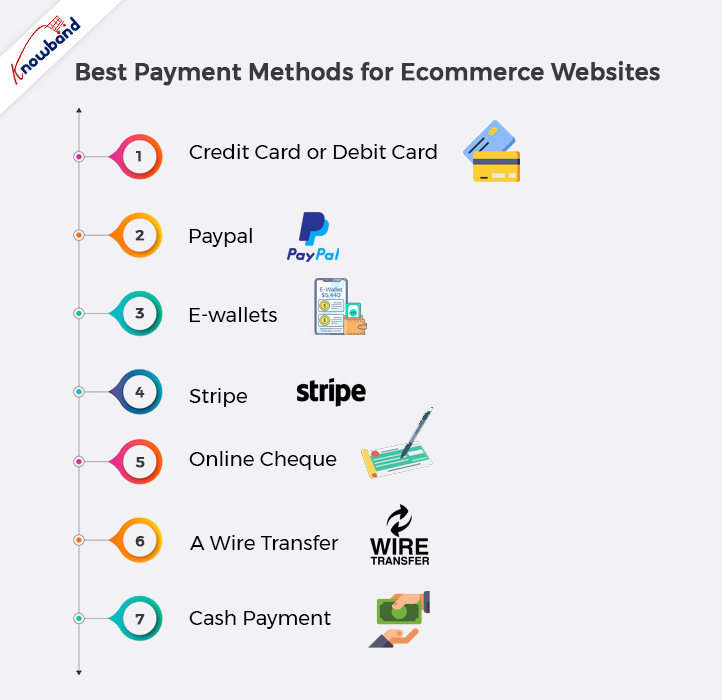
Best Payment Methods for Ecommerce Websites

Credit Card or Debit Card

As mentioned, the majority of contemporary e-commerce payment methods are depending on credit and debit cards. Customers often use credit cards to load money into digital wallets and other payment methods. They might also use the money they already have to have their bank allow debit card payments.

The widespread preference of B2B clients for tried-and-true payment methods justifies this method’s consideration in another way. American Express, Visa, and MasterCard are just a few of the long-established card issuers and payment processors. Because of this, small businesses and other B2B purchasers trust them, which supports e-commerce merchants’ inclusion of them.

Paypal

One of the most well-known and popular methods of internet payment is PayPal. Over 254 million people use the website. If you allowed PayPal checkout, then it will ease the customers to make a buy on your website. The company claims that over 17 million businesses presently use its services. Clients who choose PayPal as their payment method at the checkout convert at an 82% greater rate than those who use alternative methods.

That’s a fairly good justification for using PayPal. Fortunately, it’s rather easy to integrate a PayPal button into your checkout process. For each PayPal-facilitated purchase, be ready to pay 30 cents plus 2.9%.

E-wallets

Electronic wallets, often known as E-wallets or digital wallets, make it easier and quicker for customers to make purchases online. The entire shopping process simply takes one or two clicks to complete, so it completes in a matter of seconds. Both the customer’s information and the money is present in e-wallets. If consumers choose to pay online with their e-wallets after connecting their bank accounts to them, they are directed to the e-wallet website. After this providing their password will be sufficient for purchasing goods. E-wallets are increasingly popular with people since they eliminate the need to enter your login details and credit/debit card information each time you purchase online. E-wallets that are most widely used are Amazon Pay, Apple Pay, Google Pay, etc. Other popular payment systems include Samsung Pay and Ali Pay.

Stripe

Despite only being founded in 2010, Stripe has grown to be a prominent online payment processor. The platform offers feature-rich payment services that permit payments from a variety of sources, including digital wallets, credit cards, internet transfers, etc. As a result, Stripe is useful for companies who like having a variety of payment options in one solution.

With just one line of JavaScript, Stripe enables non-technical online merchants to integrate the service into their stores. Additionally, the platform gives vendors who are more technically inclined access to a rich API that permits deeper customization. For payments made with domestic credit cards, Stripe costs 30 cents + 2.99%.

Online Cheques

Electronic cheques, or e-cheques, are essentially the same as regular paper checks. They can be used online, and at any potential time and location-related issues are not present, speeding up the payment process. Customers that use them can approve the payment straight from their online bank accounts. E-cheques were the first form of online payment in North America and remain a popular choice. They are also frequently used in Europe. E-cheques are a better and more inexpensive payment option for higher sale quantities and are simple to use.

A Wire Transfer

For almost a century, wire transfers have been a mainstay of the corporate sector, and they still have a significant place in B2-B transactions. When a firm needs to send an urgent transfer or make a sizable payment, a wire transfer is the best option.

However, keep in mind that these transactions can be pricey. International transfers involving multiple currencies may incur fees of up to $40, whereas single currency transfers are less expensive. Transfers made through this medium reflect in one to two business days. But international transfers can occasionally take up to seven days.

Cash Payment 

When making online purchases, Cash Cards are better. Cash is becoming a less acceptable payment option as more cutting-edge competitors emerge since it is a tangible object in a virtual environment. But it is still used, particularly in developing nations like Brazil, Mexico, and India. For cash-on-delivery purchases, online customers employ this technique. Cash payments might be dangerous since certain cash-on-delivery companies might send you invoices after you pay them. You can never be sure if the invoicing was done correctly. However, for individuals who don’t use any cards, purchasing with cash is a convenience.

Conclusion

Make sure your eCommerce store is accessible to everyone if you desire a large customer base. People don’t have the same tastes when making purchases online. It is your responsibility to understand what your target audience needs and wants in terms of payment alternatives. To provide them with those options you should include the payment methods mentioned above on your website. 

If you face any problems then our Knowband team will assist you with your concerns. We can also help you with custom changes to your business. Also, you can reach out to us to learn more about the modules and for any concerns or issues related to them.

We provide the One Page Checkout module that is compatible with all payment and shipping methods and has a track record of higher conversion than standard multi-step checkout. This module is available for all major CMS platforms like Prestashop, Opencart, Magento and Magento 2. Know more about it here:

Also read: Different Types of Payment Methods in eCommerce


How to Request Refund for Apple App Store Purchase?

You can use your iPhone, iPad, Mac, or any online browser to ask for a refund for an Apple purchase. Apple offers refunds for purchases purchased through the App Store or iTunes, much like any other online merchant. You must provide a good justification for the refund request for its approval. Apple will deny you access to the product or service you are asking for a refund. You can use your iPhone, iPad, Mac, or any online browser to ask for a refund for an Apple purchase. 

On your iPhone, iPad, Mac, or through a browser on a Windows PC, requesting a refund is simple, but it’s not immediately clear where to start. In this article, we will tell you the stepwise process to request a refund from Apple App Store.

How to get an iPhone or iPad refund from Apple?

Regardless of whether you’re using an iPhone, iPad, Mac, or Windows PC, the procedure for asking for a refund on an app buy is roughly the same. These specifics are accessible with an iPhone or iPad.

  1. Start your iPhone or iPad’s App Store first.
  1. Tap the account sign on top of the right corner.
  1. On the Account tab, select Purchased. If you are a family plan member, select My Purchases as well.
  1. Locate the item for which you want a refund, then tap it.
  1. Click Report a Problem at the bottom of the page. Your Apple ID will be required to log in.
  1. Under What can we do to assist you? , tap I want to… and then select Ask for a refund.
  1. Tap Select the explanation for the refund and provide more information.
  1. Select Next, then finish the submission.

It can take Apple a few days to examine your request and decide whether to grant (or deny) the refund.

Also read: How to get refund for your Apple App Store Purchase?

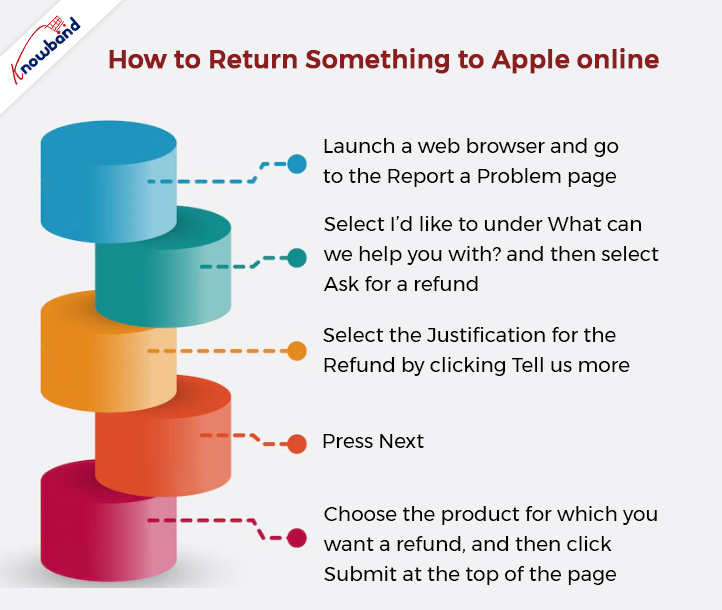
How to return something to Apple online?

You must use a web browser to request a refund for any type of media purchase, such as a song or movie. Refund requests for apps are also possible online.

  1. Launch a web browser and go to the Report a Problem page.
  1. Select I’d like to under What can we help you with? and then select Ask for a refund.
  1. Select the justification for the refund by clicking Tell us more…
  1. Press Next.
  1. Choose the product for which you want a refund, and then click Submit at the top of the page.

Apple needs a few days to consider or deny your refund request.

How to request a Mac refund from Apple?

On a Mac, the procedure for requesting a refund from Apple for an app is quite similar to how it is done on an iPhone or iPad.

  1. Open the Mac App Store, then click the account symbol in the bottom left.
  1. Click the item you want a refund for on the Account page.
  1. Locate the Report a Problem link at the bottom of the page. Your Apple ID will be required to log in.
  1. Under What can we do to assist you? tap I want to… and then select Ask for a refund.
  1. Select the justification for the refund by clicking Tell us more…
  1. Press Next.
  1. Press Submit on the top right of the screen.

If you face any difficulty or issues with any of the above processes then you can contact our team from www.knowband.com. We will be happy to assist you with the same. Also, if you need any support with our modules or you need to modify your online business then contact us at support@knowband.com. 

Knowband also offers Android and iOS app development for eCommerce CMS stores like Prestashop, Opencart, Magento, Magento 2 and Woocommerce.

Learn more about it here:


The Best Ways to Improve Your App Ranking on the Google Play Store

Having a good number of downloads is one of the best feelings ever for every online business. The true problem is figuring out how to surpass the 3.4 million mark and get your mobile app at the top of the list. The term “ASO” stands for “App Store Optimization.”App Store Optimisation is the process of adding a boost to the rank of mobile apps by applying various strategies. Various factors help an app rank higher on the Google Play store. Here are some of the most important aspects of making the app rank higher.

According to solid Google statements, there are 3.4 million mobile apps available on the Google Play store. Without a doubt, the figure is massive and continues to rise. There is a vast variety of mobile apps available on the Google Play store. For example, you can find millions of games, eCommerce apps, fitness-related apps, banking apps, and much more. Setting your mobile apps anywhere near the top of the Google Play store search list is a difficult task due to the big amount.

Understand the Beat of Market Competition:

It is frequently asserted that to excel in competition, one must fully understand it. The same saying applies to the ASO process. The first important aspect for a successful mobile app to rank highly is to do some market research.

Take a look at the customer segment you are targeting and the keyword search on the Google Play store for the apps they are looking for.

Apart from that, there are a few aspects of market understanding that play an important role in the ASO, such as keywords that should be highlighted, customers’ behavior, how easy it is to use your mobile app, and all the keywords your competitors are using, and much more.

Pick the Perfect Application Name:

The second and most important aspect of improving the ASO factor is to start with an authentic application name. The number of searchers who visit the app page increases every time the name is associated with the company category. Furthermore, reports have clearly shown that 67% of users tend to download apps that have names that are related to their search terms.

Management of Application Ratings:

Ratings are the first thing that appears in front of users as soon as they enter your mobile app. Moreover, it is always an ideal idea to have ratings maintained over 4.

The reason for this is that users attempt to analyze mobile apps based on the ratings they have received.

In simple words, it is a must to offer users the opportunity to experience their best while using your mobile apps, and later convert that experience into positive ratings.

Translation Factor:

The one element that many developers overlook in addition to the app posting is the missing translation. For instance, it is always good to add the translated description along with the mobile apps.

The reason behind it is to attract the targeted user base by adding the required information in their favorite language on the Google Play store.

Additional Promotional Events:

Apart from the on-page ASO activities, other off-page activities add value to the customer traffic of mobile apps. For example, the developers can promote their Mobile Apps on their websites, social accounts, and other platforms.

Certainly, the promotional activities show an instant boost in the download number of mobile apps.

SEO Activities:

The ranking and download of mobile apps can be simply improved by enlisting the aid of SEO operations, despite what could seem like a difficult task. The developers can post their related content targeted to the search keyword based on their business, and the generated backlink can help the mobile app rank higher.

Here are a few of the tactics that various app developers most frequently employ to rank their mobile apps higher on the Google Play store. Furthermore, did you know that you can create your mobile apps without any coding or technical skills with the Knowband Mobile App Builder?

Knowband offers the No Code Mobile App Development solution for eCommerce mobile app creation. Furthermore, eCommerce shops merchants on OpenCart, PrestaShop, WooCommerce, and Magento 2 can take advantage of the Knowband Mobile App Builder. They can post their apps to Google Play and Apple App Stores within a week using the Mobile App Maker.

In the End

Mobile Apps are one of the most relevant aspects of any business or organization. Being at the top of the list not only improves the reputation of the brand but also benefits businesses. Furthermore, in this article, we have discussed some of the most useful strategies followed by the Most Successful Mobile Apps. Additionally, if you want to work with us to create your no-code mobile apps, you may contact us at support@knowband.com to have a thorough conversation.

The Ultimate Guide to AliExpress Dropshipping Center

Every successful owner of an online store knows that AliExpress is the best place to start a dropshipping business without making a significant financial commitment. After all, dropshipping from AliExpress is the most secure business model for managing an online store without maintaining the inventory. Your dropshipping store can benefit from the fresh, wonderful products you discover through the AliExpress dropshipping center. It enables you to examine things before selling them and makes it possible for you to locate new AliExpress suppliers that you might not have otherwise discovered. Even if you aren’t dropshipping through AliExpress, you can utilize the dropshipping center for nothing.

How do you get to the center, though? And what does it accomplish for your dropshipping shop? If you continue reading, you’ll learn how to add it to your AliExpress account and how to utilize it effectively in 2022 to locate fantastic things for your shop.

What is AliExpress Dropshipping Center?

So, what exactly are the “AliExpress Booster Program” and the AliExpress dropshipping center? To make dropshipping with AliExpress simpler, the company created this tool. It aids in product discovery, product analysis, and the search for fresh dropship suppliers for your shop. But do you know what the dropshipping center’s best feature is? Use of it is free! Even if you do not dropship from AliExpress, you can still use it.

With AliExpress, managing inventory and paying for catalogs for your online store won’t be a concern for you. Simply put, you may dropship from AliExpress without having to purchase the items.

Using AliExpress to dropship is quite simple. All you have to do is include the goods in your store that you want to sell. Set up a marked-up price point now (remember to include your commission here). You are now prepared to advertise your store so that customers will place orders.

You simply pay the product’s wholesale price after receiving an order from a consumer, and the relevant merchant ships the item directly to the buyer.

What is Required of a Beginner Dropshipping on AliExpress?

Every dropshipping business owner should buy their products from AliExpress.com. because the platform has an endless list of providers and doesn’t charge startup fees. (and is currently growing)
Here are a few things concerning dropshipping on AliExpress that you should be aware of if you’re just getting started:

  1. You don’t need to make any investments to establish an AliExpress dropshipping business, similar to other dropshipping models.
  2. The best place to start dropshipping is AliExpress. Its attributes, such as its credit card payment connection and lack of minimum order criteria, are perfect for seller validation.
  3. To begin your dropshipping business on AliExpress, you will require your online store.
  4. While it may be tempting to choose the supplier with the lowest price, it is possible to uphold quality control for your company’s long-term needs. You’ll always have a pool of merchants to fall back on if you purchase from reputable sources.
  5. Be specific about your store’s shipping and return policies. Indicate the expected delivery date (depending on the chosen shipping method) and the conditions for accepting returns. Customer service is essential to every business, but especially to dropshipping on AliExpress.
  6. You don’t need to invest any money in your company up until you receive an order from your store.
  7. It helps a lot if your store has clear product photographs and detailed product descriptions. Your store will gain from all the work you put into writing clear product descriptions and uploading high-quality product images and videos.
  8. If a particular niche isn’t doing well, don’t become attached to it. As long as your business concept is in place, there is nothing prohibiting you from changing your dropshipping focus. Dropshipping on AliExpress is essentially a waiting game that involves researching potential customers for your products.
  9. It takes time for dropshipping businesses to grow. Don’t give up trying because you’re frustrated. Dropshipping is a skill that takes time to learn, but the benefits are worthwhile.
  10. Avoid selling branded counterfeits. In the future, it might result in legal issues.

When identical goods are available on AliExpress, why would someone choose to purchase from your store?

With an AliExpress dropshipping business, your advantage over the competition won’t be your price or unique original products. Your competitive advantage will be the ability to reach and serve your customers more quickly and effectively than your existing rivals.

A competitive edge might come just from good marketing. In addition to generating sales, marketing is the process through which you assist clients in discovering, evaluating, and purchasing your goods.

Last but not least, your customer service is a crucial distinction, particularly if your rivals’ present service is subpar or their shopping experiences are unpleasant. By promptly responding to client inquiries and making it a point to thoroughly assist them with any problems they have when making purchases from your store, you can greatly raise the quality of your customer service.

Setup your drop-shipping store on AliExpress

Let’s move on to setting up your store now that we’ve discussed how AliExpress could help you as a dropshipper with product sourcing and why it’s critical to position your store successfully.

How to Decide Which Dropship Items to Market?

Choosing a specialty, or the range of goods you plan to sell is the first step in building up your store. If you’re unsure of where to begin, start with the product categories that AliExpress offers and list possibilities depending on your hobbies or what you feel most comfortable selling.

It’s time to start selecting a few things you want to resell on your site once you have a clear idea of your niche.

On AliExpress, there is a big assortment of products to pick from, as with many other categories. If you don’t choose a high-quality item from a reputable seller, it might be overwhelming and perhaps cause issues.

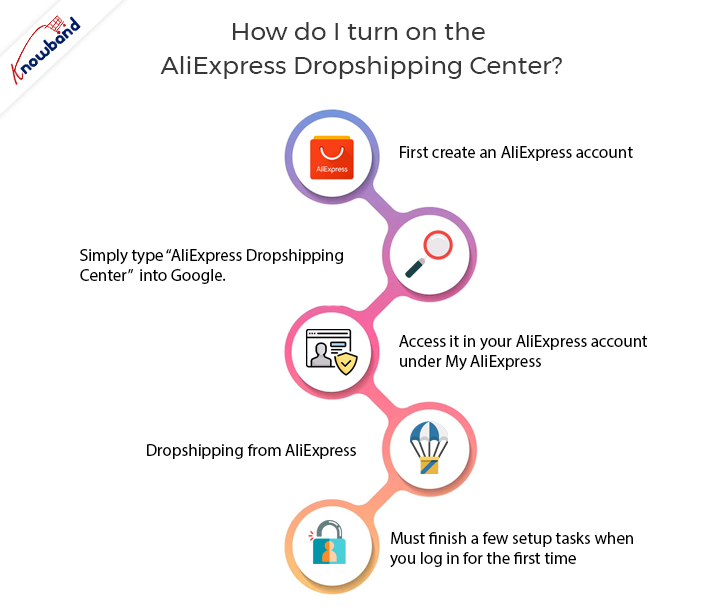
How do I turn on the AliExpress dropshipping center?

  • You must first create an AliExpress account. Once you activate it by performing one of the following actions, you will not be able to access the AliExpress dropship center from your account:
  • You can access it by clicking this link or by pasting the entire address here: https://home.aliexpress.com/dropshipper/ds_center.html or even by simply typing “AliExpress Dropshipping Center” into Google.
  • You can access it in your AliExpress account under My AliExpress by adding AliExpress to one of its official partner apps.
  • When you begin dropshipping from AliExpress, they will automatically recognize you as a dropshipper, and it will show up in your account under My AliExpress.
  • Before you can access it for the first time, you must finish a few setup tasks when you log in for the first time. They take roughly two minutes to finish.

You can enable your distribution center as soon as you finish these steps. Let’s look at each of the tools it offers in more detail so you can see how powerful it is.

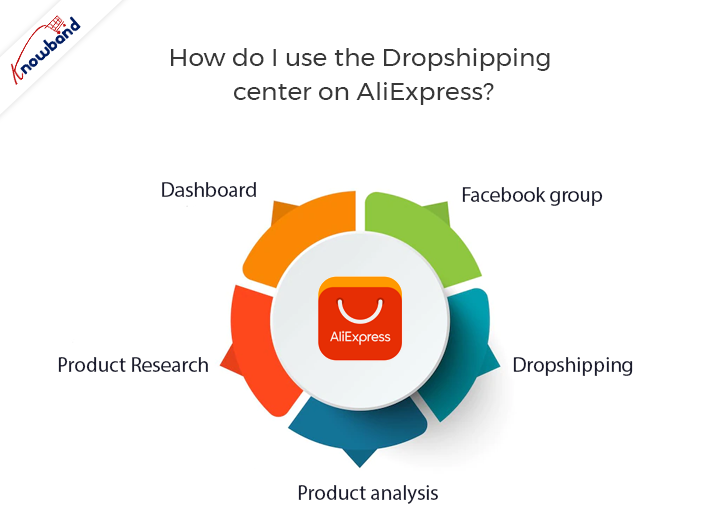
How do I use the dropshipping center on AliExpress? 

There are many tools and services available through the AliExpress dropshipping center:

  • The dashboard provides a summary of your dropshipping account’s performance information on Ali Express. The level is a volume-discount scheme.
  • Product research is a tool that provides an overview of all of AliExpress’s product categories.
  • Product analysis is a tool that examines the performance pattern of a particular product from a particular dropshipping vendor.
  • Dropshipping is a logistics-handling service offered by AliExpress at discounted rates.
  • Facebook group- to interact with other dropshippers and ask questions.

Conclusion

Comparatively to other product research tools, the AliExpress dropship center’s best feature is arguably the fact that it is free to use. It includes a wholesale service, a bulk discount program, and even a free tool for product research. When used in collaboration with Google Trends, it can do wonders, but it’s tough to say whether it should or could be used as a stand-alone tool for product research.

In the comments section, please let me know how long it took you to locate a hot product after reading this post. Additionally, feel free to ask any questions; a list of frequently asked questions is provided below.

We are what?

We at Knowband are glad to have more than 11 years of expertise developing eCommerce plugins. Our Marketplace connectors are also used to connect eCommerce platforms to marketplaces like eBay, Etsy, and Google Shopping. We currently take pride in having over 60 thousand satisfied customer families. Additionally, we provide marketplace Connector plugins for OpenCart, PrestaShop, WooCommerce, and Magento 2.

Recommended Read:

A Complete Seller’s Guide to Selling on Wish Marketplace

7 Amazing Tips and Tricks to Boost Alibaba Sales in 2022

Some Most Common Advantages of Product Customization

Recently, the demand from customers for things that are uniquely manufactured has skyrocketed. A few years ago, this was mostly restricted to personalized mobile cases and mugs, where people would have their images printed on their mobile cases or give customized mugs to their loved ones, and it was more or less seen at brick-and-mortar establishments.

Today, there is a sizable internet market for product customization, which is available for a range of goods. While some firms build their whole operation on product customization, others are incorporating customization trends throughout their enterprise to improve the customer experience.

How does product customization work?

Delivering personalized products and services to clients per their needs and preferences is known as product customization or product personalization. Customers can either ask a seller to modify a product in a certain way or customize the products themselves exactly how they desire. The latter is what the internet shops provide, allowing buyers to alter the goods online.

Product personalization has gained traction in the eCommerce space and the interest of online retailers. Let’s look at the factors that have contributed to the Product Configuration service’s rise in popularity with online retailers.

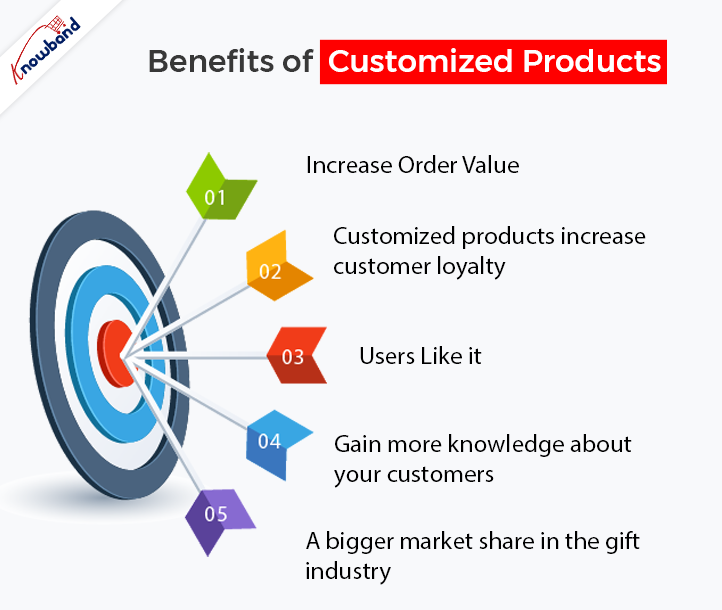
Benefits of Customized Products

Increase Order Value

Moving on to the benefits of product customization, you get sales from it.

The quantity of sales is the only factor that matters in the end. If you have cultivated brand loyalty among your clients, sales won’t decline.

Because people view a personalized item as their own, rather than merely a product, customers are willing to spend more for it as compared to a normal product.

Customized products increase customer loyalty.

The ability to customize products increases consumer loyalty, which is one of its main advantages. Offering customers the freedom to customize the product to their tastes is the best approach to win their loyalty. The satisfaction of the customer is the main factor in gaining that loyalty.

Product personalization improves brand loyalty in addition to customer loyalty. If you provide your clients with a lot of personalization possibilities, they are more likely to be drawn to your brand and choose it over your rivals in the future.

Product personalization creates a bond between a brand and its customers and significantly boosts customer retention.

Users Like it

Starting a business heavily depends on how well it is received by the public, and clients have embraced the concept of personalization.

Product customization gives the item a unique touch. Whether buyers develop something for themselves or someone else, the finished product no longer only remains a product; it also acquires an emotion.

Customers enjoy the idea of personalization; thus, it gives brands a great chance to succeed in the eCommerce industry.

Gain more knowledge about your customers

A tailored purchase gives you a more in-depth understanding of your customer’s preferences, likes, and tastes than a regular buy, which further enhances the advantages of product customization.

Brands can use the data they gather when customers buy customized products to offer them products based on their past choices.

We may therefore conclude that product personalization gives you an advantage over your rivals and helps you learn more about your clients.

A bigger market share in the gift industry

India’s gifting industry has changed as a result of the introduction of technology. Online gifting has become incredibly popular recently, with a market value predicted to reach $84 billion by 2024.

People like giving their loved ones personalized gifts. And customizing a product transforms a commonplace thing into a thoughtful gift!

With more and more transactions taking place online, having a capacity for product customization helps you dominate the gift product market.

Also read: 6 Benefits of Product Customization

KnowBand’s Product Customization Module

You can offer customization services to your customers by using the Product Customization module that Knowband offers. It includes a customization option on your product pages and enables buyers to add their customizations.

The Product Designer module has a range of tools to enable clients to design the products precisely how they want, from adding the desired photographs to adding personalized text and QR codes.

Additionally, it gives retailers access to a wide range of customization choices, including the ability to select the customization pricing and provide customers with a design preview. So, if you want to provide your business with the option of customization, I strongly urge you to try this module. You have a fantastic opportunity to raise the average order value thanks to it. You may test it out if you have a website powered by PrestaShop or OpenCart.

PrestaShop Product Customization

OpenCart Product Customization

I hope reading about the advantages of product customization was enjoyable. Please feel free to drop a comment if you would like to add something. You can reach us at support@knowband.com as well.