6 OpenCart Extensions for Shipping and Delivery Purpose

If you are looking for shipping and delivery related extensions for your OpenCart based website, you have landed at the right place.

In this write-up, I have compiled a list of six OpenCart extensions that would not only add shipping and delivery related features on your website but also enhance the customer shopping journey at the same time.

Let’s take a look.

1. Product Availability Check by Zip Code

OpenCart Product Availability Check by Zip Code extension allows your customers to confirm the product availability before they head towards the checkout page.

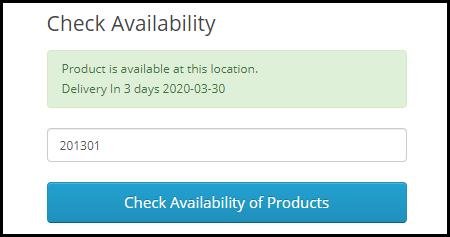
The extension adds a “Check Availability” section on your product pages where shoppers can enter their area zip code and check if their desired product is available for delivery at their location or not.

If the business doesn’t deliver to that area, it displays that the product is not available at the specified zip code. If available, customers are displayed the estimated delivery date.

From the back-end, you can add multiple zones and map products accordingly, and adjust other settings.

2. Preferred Delivery Time

OpenCart Preferred Delivery Time extension allows your customers to pick up the desired date and time slot for their order.

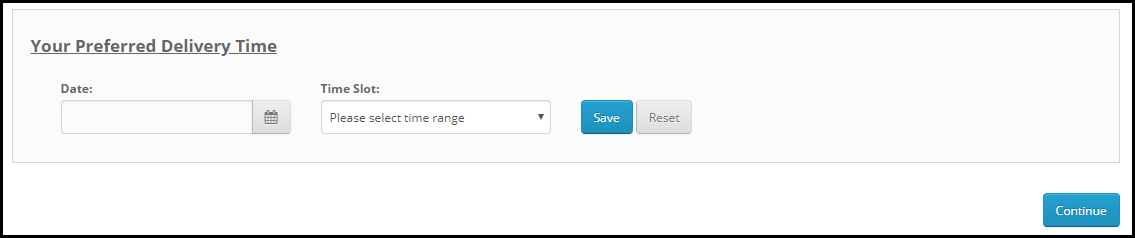
On the checkout page (under delivery method), a new section is added named “Your Preferred Delivery Time” where customers can choose the desired date and time slot if they want to receive the order at a specific date and time.

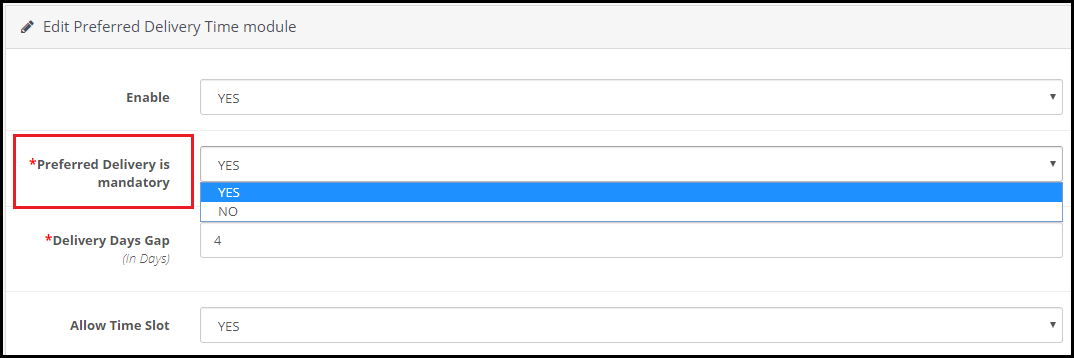
From the back-end, you can specify the minimum delivery gap (in days) for preferred delivery. You can also adjust the time slots, set the delivery time, specify delivery days and also allow customers to update the delivery date and time even after placing the order.

3. Free Shipping Manager

OpenCart Free Shipping Manager lets you offer free shipping to customers only if they match the eligibility criteria set by you from the back-end.

This module is helpful since customers now look to get free shipping on their order. From the back-end configurations, you can specify the minimum amount for which a customer needs to shop if he or she wants to get free shipping on his/her order.

Similarly, you can specify the weight which must watch if the customer wants to enjoy the free shipping benefit.

The extension also lets you disable the free shipping facility for specific countries.

Free shipping increases the chances of conversion to a significant extent and also helps you increase your average order value.

4. Store Locator

OpenCart Store Locator and Pickup extension helps you register your local stores on the website so that customers can easily locate and navigate to those stores and examine the product physically.

At the same time, the extension also encourages the in-store pickup facility that allows customers to self-pickup their order at the desired date and time.

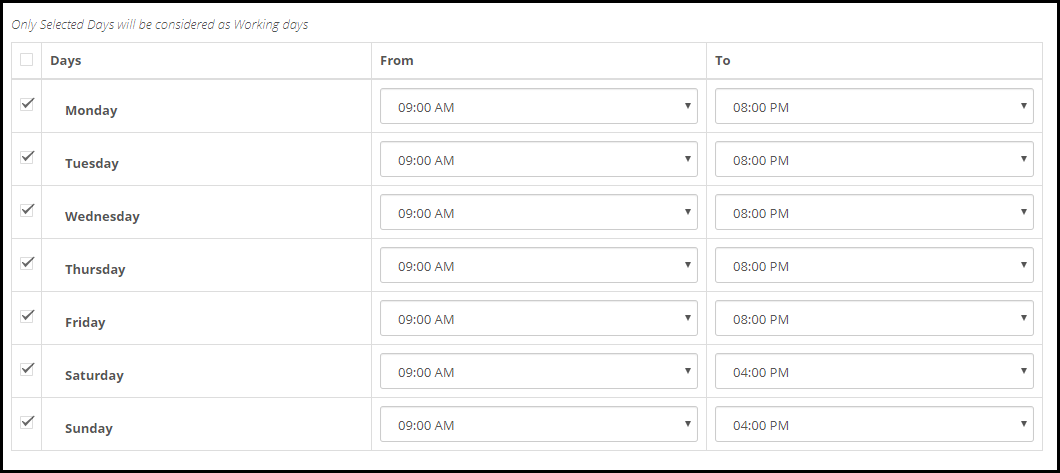
You can add multiple stores from the back-end with their complete information and also specify the days and timings on which the stores remain open.

When customers are on the checkout page, they can choose the pickup option and select the nearby store from where they can pick-up their item.

5. Shipping Timer

OpenCart Shipping Timer extension integrates a shipping timer on your product pages through which customers are displayed the time within which they need to shop if they want their product to get shipped on the same day.

You can set the timer validity for a single day or multiple days and also set the start and end time of the countdown timer.

Besides, you can specify the days on which the timer would be displayed to the users. You can also customize the shipping timer banner.

6. Cash on Delivery with Fee

OpenCart Cash on Delivery with Fee extension allows merchants to charge an additional fee on cash on delivery option.

This is basically to encourage customers to make the online payment right at the checkout page instead of choosing to pay later at the time of delivery. But since many consumers hesitate to share their card details online, you can provide them with the Cash on Delivery (COD) option along with some additional charge.

You can set up different charges for the different order amount. There are many other customizations you can make from the back-end.

For any kind of assistance regarding the above-mentioned shipping and delivery related OpenCart extensions, kindly reach out to us at support@knowband.com


9 Underrated OpenCart Extensions To Look Out For

When we go through OpenCart forum, we come across many such questions where merchants put forward their requirements which we feel can be fulfilled by the extensions which aren’t popular or which they are not aware of.

Popular extensions are always on demand while other extensions get unnoticed. In this write-up, I will be covering those useful but highly underrated extensions that can be fruitful for the OpenCart merchants.

1. Preferred Delivery Time

OpenCart Preferred Delivery Time extension allows customers to pick a desired date and time slot for their order delivery. Many times, it happens that customers want to receive the product on a fixed date and time slot; majorly when they want to gift someone or when they do not want to miss on the product due to their unavailability. With this module, you can encourage users to choose the preferred delivery date and time as per their convenience and availability.

From the back-end configurations, you can adjust the time-slots, specify the non-delivery days and also allow consumers to update the delivery date and time even after they have placed the order.

2. Advanced One Page Checkout

If you do not want your customers to go through a multi-step checkout process and want to offer a short and seamless checkout experience, OpenCart Advanced One Page Checkout is the extension you need.

The extension adds a responsive one page checkout popup on your website and allows customers to switch between the checkout fields without requiring to load multiple pages or getting the URL changed. It offers guest checkout, social login, option to customize checkout fields, etc. and encourages a quick checkout.

3. Store Locator and Pickup

OpenCart Store Locator and Pickup extension encourages the in-store pickup facility and allows your customers to self-pickup the items from your stores at their desired date and time slot. They can locate the nearby stores and choose the pickup date and time accordingly.

You can add (manually or through CSV upload) multiple stores, adjust the pick-up timings and perform various other tasks from the back-end.

4. Spam Blocker

On the forum, many OpenCart merchants complain about receiving spam traffic on their website. This can be avoided by OpenCart Spam Blocker.

OpenCart Blocker lets you restrict bots coming to your website from various IP addresses. You can specify those IP addresses and block them. Similarly, you can prevent spammers from different countries or User agents (Mozilla, Chrome, etc).

In case if you block a genuine customer, they can raise an unblock request which you can check from the back-end. The extension helps you keep your website safe and secure with real users.

5. Free Shipping Manager

Consumers crave free shipping. They get delighted if they do not have to pay the shipping price but offering free shipping isn’t easy especially for small and mid-scale companies.

With OpenCart Free Shipping Manager, you can create certain free shipping rules, such as Free shipping on a certain amount and certain weight. You can specify the amount and weight of the order which needs to be matched for a customer to get free shipping on his/her order. You can also specify countries which will be restricted from the free shipping rules.

The extension helps in increasing the average order value on your store.

6. Private Shop

OpenCart Private Shop extension allows merchants to make their shop or store private. They can restrict access to their store and let only selected customers or wholesale members explore it.

You can privatize the entire store or restrict access to some specific pages only. Users are required to sign-up initially and only after the admin’s approval from the back-end, they will be able to access the store.

7. Product Availability Check by Zipcode

OpenCart Zipcode Validator extension adds a “Check Availability” tab on your product pages, using which shoppers can check whether the product is available for delivery at their location or not by specifying their area zip code.

This saves a customer’s time as they do not need to head to the checkout page, put their address and then confirm whether it is eligible for delivery or not at your location. A customer cannot proceed to the checkout page without checking the product availability.

8. PDF Invoice

OpenCart PDF Invoice extension allows merchants to send customers their order’s invoice in the PDF format in the order confirmation email. They can also download it from their order history.

The extension comes with multiple options to customize the invoice.

9. Cash on Delivery with Fee

OpenCart Cash on Delivery with Fee extension lets you charge some additional fee to your customers on their COD order. It is helpful for those shoppers who do not want to share their card details with the website and are ready to pay some additional amount for cash-on-delivery mode. You can charge customers with a fixed or percentage-based fee.

For any queries or assistance regarding these OpenCart extensions, kindly contact us at support@knowband.com

Understanding OpenCart Image Search Extension

What do we do when we want to buy a product online? We open an eCommerce website, type the product’s name in the search bar, add the desired product to the cart, and checkout. It’s way too simple, right?

But let’s say you are browsing Instagram and saw a cool outfit on your feed. You liked it in the very first look and feel the desire to have the same outfit. How will you search for it?

It will be very difficult to find the exact outfit. This is where the Image search option helps, and if you have a store on the OpenCart platform and want to provide your users with the option to conduct image search and get related results, OpenCart Image Search extension is all you need.

OpenCart Image Search

The extension adds the image search functionality on your website with the help of which consumers can upload an image and check if the similar product is available on your store. The extension uses machine learning to recognize the image and presents relevant results in front of the customer.

Description

1. Incorporates an image upload option right next to the search bar, allowing users to perform an image search. The extension detects the image and accordingly the products that match the image are displayed to the customers.

2. The extension also adds a “Search Visually Same Product” tab on your product pages right below the “Add to Cart” button. This is helpful when customers want to explore different variants or designs of the product. This setting can be disabled.

3. There is also the option to set the “threshold percentage” which indicates the accuracy of the product. Higher the accuracy, better the results! You can add the range between 50-100. It is recommended to keep the threshold percentage to 95 for best results.

4. OpenCart Image Search module displays the total number of images on the website, and how many out of them are mapped, unmapped and need to be synced. You can also know the reason behind the unmapped images. Newly added images are automatically synced.

Benefits

1. OpenCart Image Search extension improves the search functionality of your website.

2. The extension enhances user experience.

3. It makes online shopping more convenient as shoppers can look for a similar product by uploading the product image.

4. An easy way to search the desired product.

5. Saves customers’ time and efforts.

6. Easy to install and configure without requiring any technical knowledge.

For any assistance regarding the module, contact us at support@knowband.com

Protect your OpenCart Store from Bots and Spammers

If you have a website, you will have to deal with spammers. They leave no opportunity to attack a website and OpenCart is no exception.

Spammers try to degrade your website by posting spam links, comments, fake registrations, etc. Go through the OpenCart forum once and you will see many users complaining about the spam activities on their website.

Scrapping this wanted traffic is important so that your website’s performance on the search engine is not affected. To help you get rid of spammers, we present you with two modules that could prove to be effective in restricting bots and spammers from entering your website and doing malicious activities.

Before we begin, let’s try to understand a few spam activities that you could witness on your OpenCart website.

Few Spam Activities That You Could Witness on Your Opencart Website

1. Spam Comments

You would often get excited to see too many comments on your blog posts only to realize that they are just spam links and have no relation to the content whatsoever. These irrelevant comments are not only annoying but they also hurt your SEO as they pass on the link juice to the spammers’ websites.

2. Fake Sign-Ups

In this spam activity, bots bombard your website with multiple fake registrations. They take up a lot of storage on your server and intend to slow or harm your website’s performance.

Recommended Read:  Two Effective Modules to Keep Away Spammers and Bots from PrestaShop store

How to Prevent Your Opencart Website from Spammers and Bots?

As I said above, we have two extensions specially designed to deal with this. Let’s take a look.

1. OpenCart Spam Blocker

OpenCart Spam Blocker extension lets you block a store visitor by his/her IP address, country, or user agent.

From the back-end, you can specify the IP addresses from which you don’t receive traffic or which you suspect to be sending spam to your website. You can insert multiple IPs at once. Or instead of blocking, you can allow only certain IPs to access your OpenCart store.

Similar to this, you can add nations to your block list if they consistently send you large amounts of spam.

The next feature it has is blocking spammers/bots that are landing on your website from a specific user agent. (Firebox, Chrome, Mozilla, Android, Windows, etc.)

It may happen sometimes that you block a genuine user. This module enables blocked users to submit a request for unblocking to the website’s owner. The admin can track the requests from the back-end and take decisions accordingly.

Knowband OpenCart Block User Extension provides a spam blocker solution. The OpenCart Block User Extension enables the e-merchant to block particular IP addresses, nations, or user agents. The anti-bot solution offered by OpenCart Spam Blocker Extension is a clever technique to stop malicious users from accessing the website, enhancing the shopping experience of the store’s legitimate customers. You have a lot of options with the OpenCart Spam Blocker module to filter out suspected bot traffic in the store. Consequently, the possibility of unwanted threats and spam in the store is eliminated.

Recommended Read:  OpenCart Block Bot/User by IP, Country or User Agent Extension – User Manual

2. OpenCart Google reCaptcha

OpenCart Google reCaptcha is the best way to counter fake registrations on your website. It adds a security layer to your website. You can enable reCaptcha on the Login page, Registration Page, Contact Us page and Forgot password page. For each page, you can specify the reCaptcha that you want to set: v2 reCaptcha or v3 reCaptcha.

In contrast to the new reCaptcha (v3), which employs machine learning and extensive risk analysis to distinguish between bots and humans, the old reCaptcha (i.e., v2) is a basic “I am not a robot” checkbox that allows individuals to quickly navigate that particular website. With the OpenCart Google reCaptcha extension from Knowband, your customers may pass the human verification test without providing any additional website inputs. You allow free registration for your users, just like websites like Gmail, Hotmail, Facebook, Twitter, and others. Therefore, it is crucial to safeguard your store’s registration and login process. You may verify that specified actions are actually carried out by real humans and not by automated programmes by using Opencart Google Captcha.

Recommended Read: How to Attract Sellers on OpenCart Marketplace

Final Word

The combat between spammers and websites goes on forever. They will try to spread spam by any means. I am sure these two OpenCart extensions will be extremely beneficial in getting rid of spammers and bots on your website.  If you need any kind of assistance with these two modules, feel free to reach out to us at support@knowband.com.

We have a dedicated support team that is always available to aid customers to deliver the best and most effective post-sale support to our customers. Moreover, even on weekends, we continue to fulfil our obligations to customers who need assistance with urgent website problems.

OpenCart Extensions to prepare your store for Father’s Day

With Father’s Day just around the corner, website owners would be looking to prepare their store accordingly to capture high sales on the occasion. If you have an eCommerce website on the OpenCart platform and are also looking to boost Father’s Day sales, you can consider using the below-mentioned 8 OpenCart extensions.

1. Spin and Win

OpenCart Spin and Win module displays a gamified popup to your visitors as soon as they enter your website. Coming with multiple occasional themes, it lets you personalize the popup for the Father’s Day occasion as well.

Users get to spin the wheel and earn some exciting rewards but they need to provide their name and email address before they could spin it. This helps you grow your email subscribers and boosts user engagement.

Besides, by offering rewards which are usually the discount code, customers can be encouraged to shop by using the coupon code on the checkout. This increases your conversion rate.

You can make certain customizations to the popup and adjust the display settings as per your requirements.

2. Gift Card Manager

OpenCart Gift Card Manager adds a gift card section on your website and offers multiple pre-existing gift card templates for various occasions like Halloween, Christmas, New Year, etc. Similarly, you can create gift cards for Father’s Day too and boost sales.

Many online shoppers who find shopping a tedious task would find it comfortable to quickly purchase a gift card rather than spending hours in deciding what to gift.

You can create gift cards of different price values so that customers can purchase a gift card according to their budget. The module offers various customization features and also lets you track gift card orders.

3. Countdown Sales Timer

OpenCart Countdown Sales Timer extension places a timer on the header of your website through which your store visitors are informed about the upcoming sale. You can make use of this module to highlight Father’s Day sale as well.

A countdown timer keeps reminding customers how much time is left before the sale begins and creates an urgency to purchase. The look and feel of the timer can be customized and you can display it on multiple web pages.

4. Abandoned Cart

OpenCart Abandoned Cart extension helps you track the abandoned carts on your store and recover lost sales. The module provides you with an opportunity to convert the abandoned cart users into customers.

With many customers coming to your store on Father’s Day sale, you will surely witness a few abandoned carts. Failing to convert them could result in a loss in sales.

Thanks to the Abandoned Cart extension using which you can create an abandoned cart alert (setting a duration after which the cart is automatically marked abandoned) and remind those users about the pending items in their cart and even persuade them to complete the purchase by offering a discount code inside the email.

5. Price Alert

Many online shoppers would be hoping to see a price drop on some products during Father’s Day sale. With OpenCart Price Alert extension, you can ask customers to subscribe to price alert so that they are immediately informed and do not miss out on the opportunity to grab the product whenever the product price drops below.

This module helps you drive those users to your website and boost sales. So if you are looking to bring down the product price a bit on this Father’s Day, this extension would be of great help.

6. One Page Checkout

Customers crave convenience, and convenience at the checkout page is vital else it may lead to cart abandonment. Consumers do not like websites that offer a troublesome checkout experience. This is why it would be ideal to change your default checkout process with One Page Checkout for the coming Father’s Day.

OpenCart One Page Checkout extension simplifies your checkout process by converting the multi-step checkout process into a single page checkout. It offers various features such as Guest Checkout, Social Login, Multiple Layouts, Multiple Payment methods and Shipping support. Besides, it provides you with certain customization options to make your checkout smooth and user-friendly.

7. Accelerated Mobile Pages

Most of the consumers prefer mobile devices to shop online and your store is no exception. You will witness a majority of the traffic coming from hand-held devices on this Father’s Day. If your website takes time to load on mobiles, it can severely affect your conversions. This is where AMP proves beneficial.

OpenCart Accelerated Mobile Pages (AMP) extension converts the normal mobile pages of your website into AMP pages. It offers faster loading of web pages and reduces bounce rate by a significant margin.

The module aims to enhance the browsing/shopping experience of your mobile users and can make an impact on your sales.

8. Preferred Delivery Time

OpenCart Preferred Delivery is a perfect extension for the users who want to receive the product on a specific day.

There will be many customers who would want to receive their order specifically on Father’s Day. For such customers, you can place a preferred delivery tab on the checkout page where they can specify the desired date and time slot on which they want their product to get delivered. This ensures customers that their product reaches them at the right time.

For any kind of query or assistance with the above-mentioned modules, you can contact us at support@knowband.com and our support team will try to resolve your concerns to the earliest.

OpenCart Modules Compatible with the Journal Theme

Journal theme is arguably one of the best OpenCart themes available in the market today. Launched in 2013, it is now amongst the best selling and highest-rated OpenCart themes.

Thousands of eCommerce stores build on the OpenCart platform have been designed with the Journal theme, and while purchasing any OpenCart extension, marketers or website owners do ensure that it is compatible with the Journal theme.

At Knowband, we also have some modules that are made compatible with the Journal theme and we will be adding more to the list in the future.

So, if you are looking for some OpenCart extensions with Journal theme support, check out-

1. OpenCart Gift Card

OpenCart Gift Card extension helps you incorporate a gift card section on your website. The extension offers multiple pre-existing gift card templates for various occasions such as Halloween, Christmas, New Year, etc. These can be customized or you can add new ones if you want. You can also create gift cards of different values.

Do check out this module for more features and benefits.

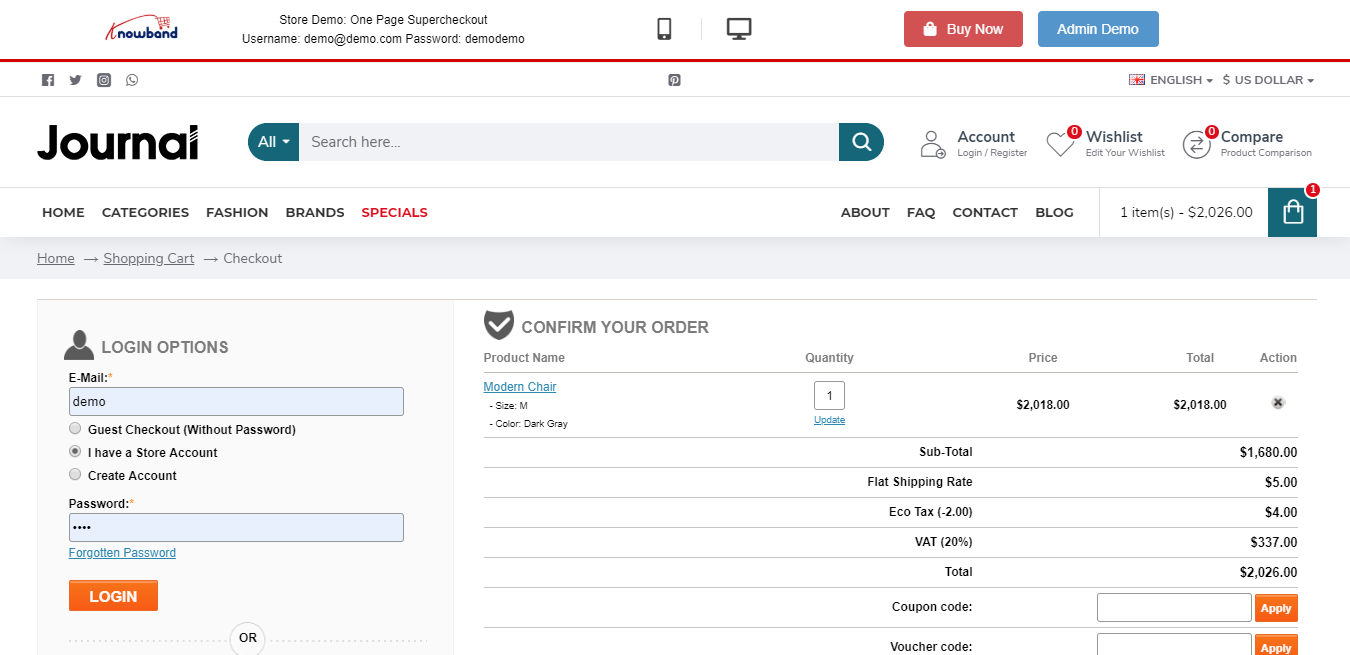
2. OpenCart One Page Checkout Pro

OpenCart One Page Checkout extension replaces the default checkout of your website with single page checkout. The extension offers various features such as Guest Checkout, Social Login, Checkout customization, multiple shipping and payment methods support, etc., thus encouraging a quick checkout and increasing your conversion rate.

3. OpenCart Marketplace

OpenCart Multi-vendor Marketplace helps you easily convert your store into a fully-functional marketplace that enables you to add more sellers. By adding more sellers to your marketplace, you can offer more variety of products to your customers and also earn commission on each transaction of your sellers.

OpenCart Extensions not dependent on store theme

We often get queries from our visitors and customers about extensions that are not dependent on the store theme. So, here is a list of them.

1. OpenCart Mobile App Builder

OpenCart Mobile App Builder is one of our best-selling modules that helps you build a native mobile app for your website without any requirement of coding and other technical stuff, and improves your mobile conversions.

It offers some amazing features such as Home Page Layout Optimization, Social Login & Fingerprint & OTP login, Unlimited Push Notifications, Zopim and WhatsApp Chat support, Simplified Checkout, Multiple Payment and Shipping support, Real-time synchronization.

It is also compatible with our Marketplace module.

2. OpenCart Accelerated Mobile Pages

Independent of any store theme, the OpenCart Accelerated Mobile Pages or simply Amp extension improves the loading speed of your mobile web pages, hence reducing your website’s bounce rate to a certain extent.

The extension provides various customization options such as home page customization, product page customization, category page customization, helping you improve your website’s performance on mobile devices.

3. OpenCart Abandoned Cart

OpenCart Abandoned Cart extension helps you reduce the cart abandonment rate on your store. The extension provides pre-existing discount and non-discount email templates through which you can not only remind shoppers about the pending items in their cart but also entice them to complete the purchase by offering a discount coupon code inside the email.

4. OpenCart eBay Integration

OpenCart eBay Integration extension helps the store owners to integrate their OpenCart store with the eBay marketplace. This helps them save time and effort. This extension automates the product listing process with the help of which store owners can list their products on eBay under various categories. Store owners can list the products in bulk and also manage the eBay orders easily.

5. OpenCart Etsy Integration

OpenCart Etsy Integration extension helps you integrate your OpenCart Store with Etsy Marketplace. This extension provides an effective way to list your products on the Etsy marketplace from the OpenCart store itself.

With the help of this extension, store owners can create multiple profiles for listing their products on Etsy Marketplace. Store owners can change their product prices, auto-renew their products, and easily manage their orders using this extension.

6. OpenCart Walmart Integration

OpenCart Walmart Integration extension helps the OpenCart Store owners to connect their store with the Walmart marketplace. With the help of this extension, store owners can upload products in bulk using the profile-based listing. Store admins can manage their orders and inventory from OpenCart admin panel and admin can also map OpenCart attributes with the corresponding Walmart attributes at the time of product listing.

Knowband offers 3 months of free support for each extension purchased from the Knowband store. If you encounter an issue with the installation or find it difficult to configure the module, feel free to contact us at support@knowband.com. Our support team will try to resolve your issues to the earliest.

Everything You Need to Know About OpenCart Exit Pop up Extension

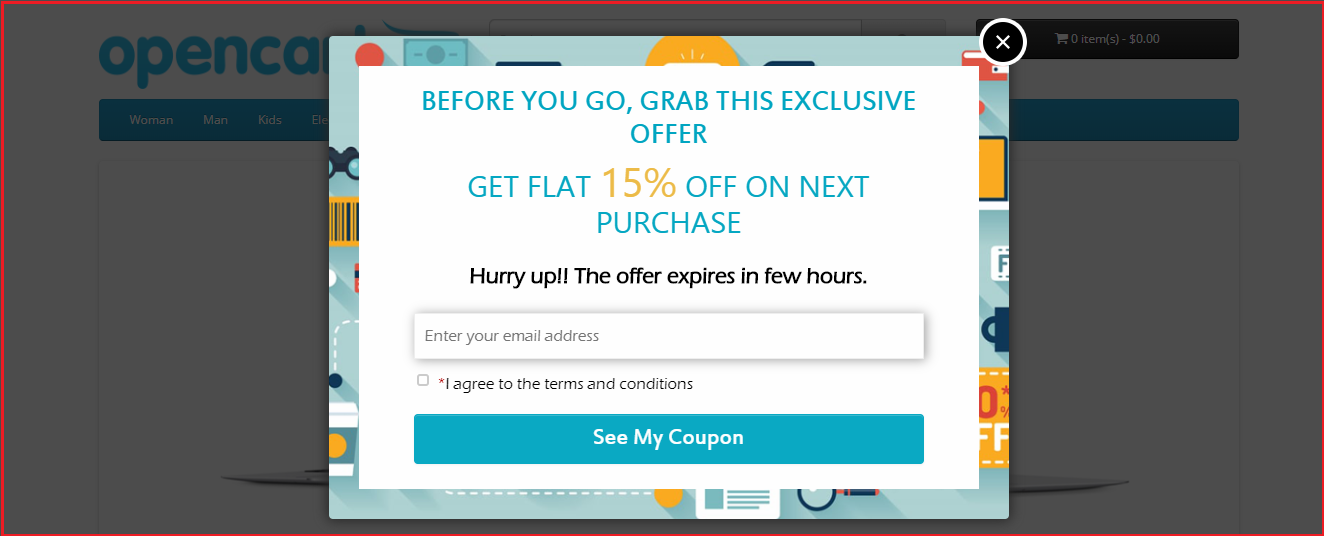
OpenCart Exit Pop up also known as OpenCart Exit Intent Pop up is a powerful extension that helps you draw visitors’ attention when they are about to leave your website.

A pop up appears promptly as soon as it is noticed that the visitor is trying to take an exit. The extension provides you with an opportunity to stop your visitors at the very last moment from leaving your website. It is up to you how you make the best use of the pop up to make visitors stay on your website.

Overview

1. Works as both Entry and Exit Pop up

2. Design Popup | Adjust the look and feel

3. Multiple Popup themes

4. Customize the Popup Display Settings

5. Set up discount coupon value

6. Email Recheck

7. Email Synchronization through MailChimp and Constant Contact

8. Multi-lingual Support

Description

1. OpenCart Exit Intent Pop up offers pre-existing appealing popup themes. You can choose the desired one from the drop-down list.

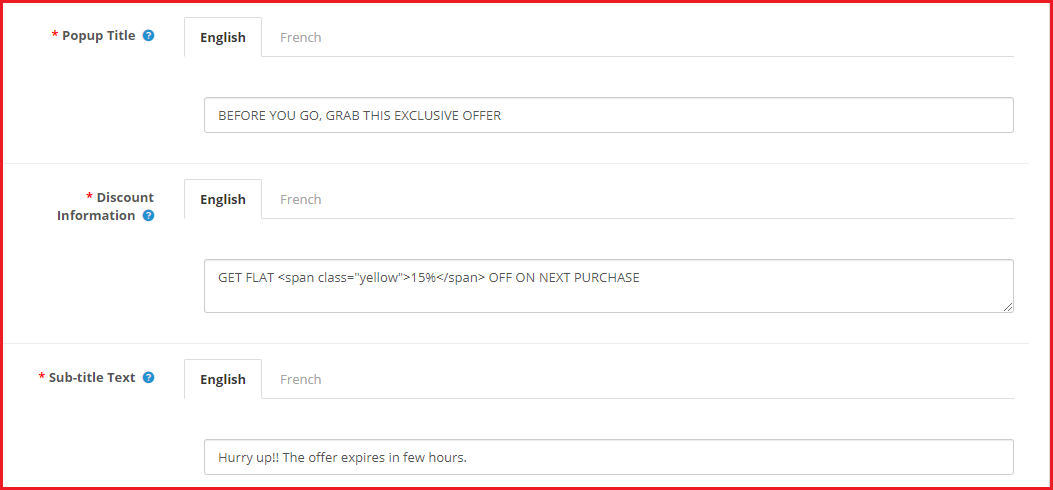
2. OpenCart Exit Pop up allows admin to modify the popup content according to the goals they want to achieve through that popup. The extension offers three sections to specify the popup content.

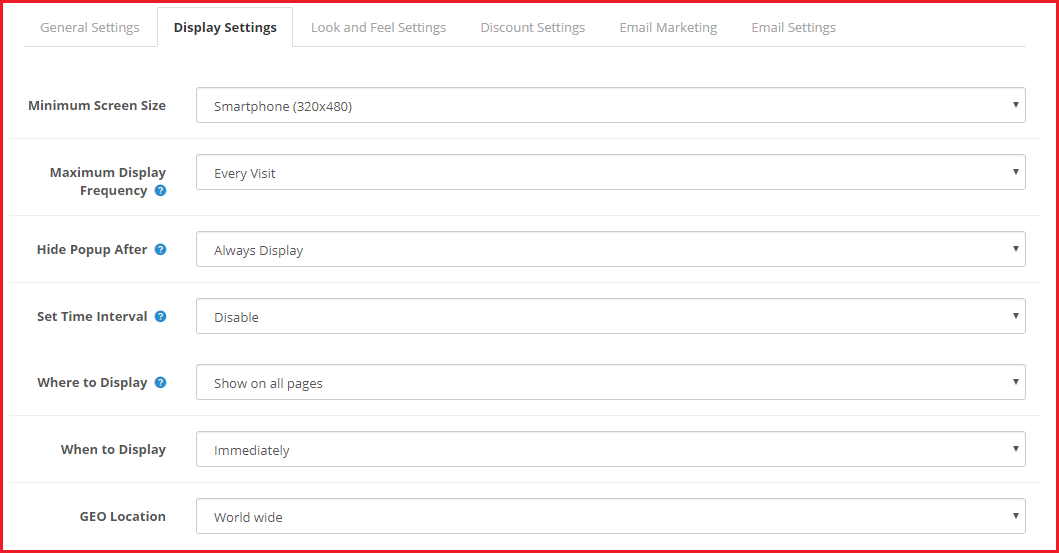
OpenCart Exit Popup comes up with various options to configure the popup display settings.

3. The extension lets you specify the minimum screen size on which the popup will be displayed.

4. You can set the display frequency of the popup which can be: on every visit, one visit per hour, one visit per day, one visit per week or one visit per month.

5. You can set a duration (in seconds) after which the popup disappears automatically. The duration can be 10 seconds, 20 seconds, 30 seconds or 40 seconds.

6. The exit pop up extension also lets you enable the popup functionality for a certain time period only. For example, if you are running any campaign or providing a limited time offer and want to promote it through the popup, you can set the start and end date of the exit popup accordingly.

7. With OpenCart Exit Popup Email Subscription extension, you can select the pages where you want to display or where you do not want to display the popup.

8. OpenCart Exit-Intent Pop up extension also provides you with the option to display the pop up immediately, after a few seconds, after a visitor has scrolled down to some percentage or when the user is trying to exit.

9. You can also limit the popup display for selected countries. You can either show to visitors coming from worldwide or select the countries where you want to display or hide the popup.

10. OpenCart Exit Pop up extension has the email recheck functionality which, if enabled, would not allow a user to claim the coupon code twice. It simply means that a single email address cannot be used again.

11. You can set the pop-up display interval (in days). The defined period will be the number of days after which the pop up will be displayed to the same user again.

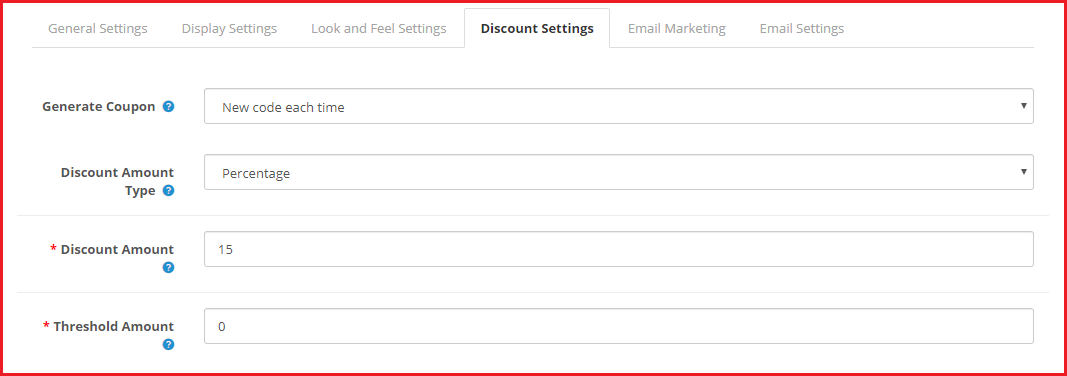
12. You can set the popup functionality to either generate a fixed coupon code or generate a new coupon code every time.

13. The coupon code can be set to provide a flat discount value or a percentage discount. You can also set a threshold cart amount to redeem the coupon code at the checkout.

14. OpenCart Exit Popup also offers MailChimp and Constant Contact Integrator, enabling which the email address of the visitor would be captured in the respective amount.

15. With OpenCart Exit-intent Popup, the admin can customize the email that would be sent to the user when they submit their email address. You can also test the email to check how it will deliver to the users.

16. The extension also displays the coupon statistics in the form of line graphs. The email address of the user, coupon code and the status of the coupon code is displayed inside the statistics section.

17. The module provides multi-lingual support.

Benefits of OpenCart Exit Pop up Extension

1. Make a last-minute effort to convince users to stay on your website.

2. Increase email subscriptions and grow your email list

3. Encourage users to purchase by providing them with a coupon code and boost your conversions

4. Reduce the bounce rate of your website.

5. Reduce shopping cart abandonment

For any queries or assistance, you can contact us at support@knowband.com

You May Also Like:

Exit Popup: What is it? How it works? Example, Best Practices and Benefits

8 Email Popup Best Practices to Grow Email List and Boost Conversions

Trigger Impulse Buying with PrestaShop Exit Popup Addon

Encourage In-store Pickup with OpenCart Store Locator and Pickup Extension

Due to the COVID-19 pandemic, many retail businesses, primarily the grocery business owners, have marked their online presence to help customers get the grocery items without any hassle. Otherwise, there is a massive gathering of people at grocery stores which we strictly want to avoid in this particular time.

Hence, to ensure social distancing is maintained and consumers do not feel troubled to get essentials, retail businesses shifted their business on the online platform as well.

If you have just set your online grocery business or already have one on the OpenCart platform and looking for a module that could provide the in-store pickup facility to the customers, OpenCart Store Locator and Pickup module will fulfill your requirements.

OpenCart Store Locator | In-store Pickup

OpenCart Store Locator and In-store Pickup extension encourages the online pickup facility. It lets you add your business stores on your websites and helps customers pick up their items by selecting their nearby store.

Overview

1. Add multiple stores

2. Specify the store timings

3. Set time slots for pickup

4. Customers can choose the desired date and time-slot

5. Customers can check the nearby stores by setting distance filter

6. Set maximum days pickup period

7. Notify store about pickup orders via email

8. Embed Google Maps for easy navigation

Description

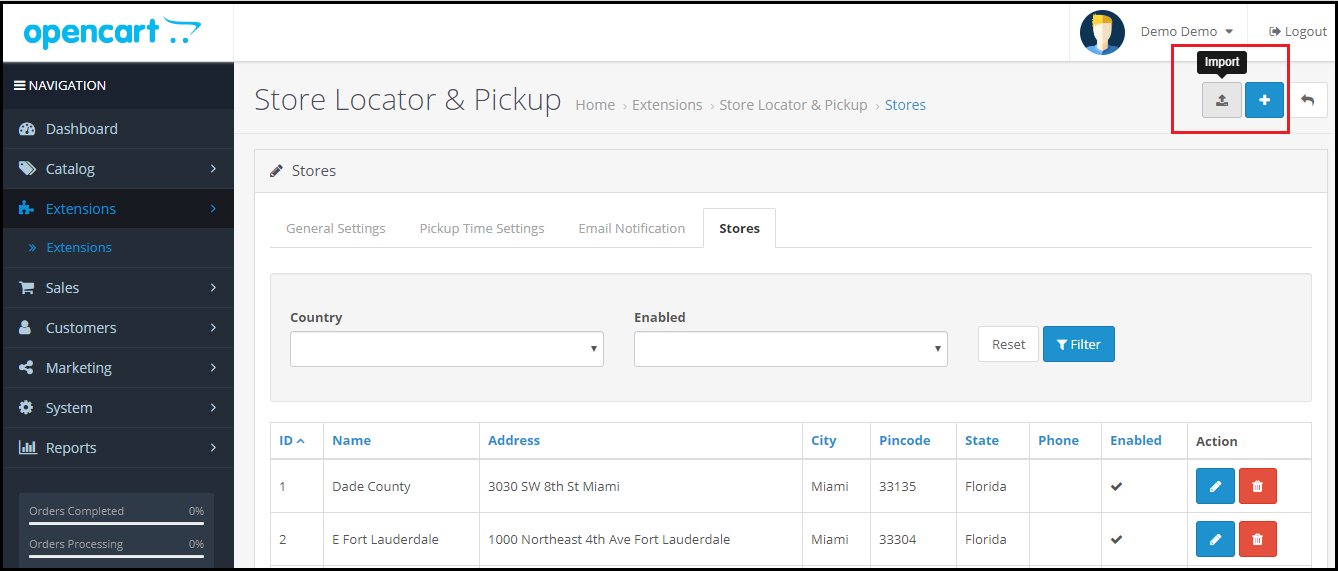
1. OpenCart Store Locator module lets you list multiple stores on your website. You can either add stores manually or through CSV upload. The stores are displayed to the customers on the checkout page.

When adding a new store, you need to mention some mandatory details like store name, address, map coordinates (latitude and longitude), store email address and the store picture.

2. For a particular store, you can specify its working days and timings, for example, if a store remains closed on a specific day, that day can be disabled. For the rest of the days, the timings can be adjusted accordingly. It does not need to be same for every day.

3. The store timings can be split into multiple pick-up time slots. You can specify the gap (in hours) that should remain between two consecutive time slots. For example, if the store timing is 10 am to 8 pm and the gap defined is 2 hours, then the available time slots would be 10 am to 12 pm, 12 pm to 2 pm, and so on till 6 pm to 8 pm.

4. With OpenCart In-store Pickup extension, you can define the maximum days’ pickup period. Let’s say the period is set for a maximum 15 days, then a customer will have to choose the desired pickup date within 15 days from the date of order.

5. To let customers easily locate the store, you can embed Google maps by specifying its API key and then specify the location coordinates of a particular store. This ensures easy navigation to the store address.

6. The customers can look for the stores in their area by specifying their address or they can sort the store results by distance (in km) to locate their nearby stores.

7. You can also add a separate section of the store locator on the header.

8. OpenCart Store Locator and Pickup extension lets you notify the stores about the pickup orders via email. The email can be customized.

9. Customers can also add any important comments related to their order pickup.

10. OpenCart In-store Pickup extension offers multi-lingual support.

Final Thoughts

The in-store pickup facility is probably the best idea currently considering that social distancing needs to be maintained strictly.

So, by incorporating the OpenCart Store Locator and Pickup extension on your website, you are not ensuring that social distancing is maintained but also saving a lot of time of you and your customers.

Considering other benefits, customers do not need to worry about the shipping or delivery cost and you make it easy for them to get the essentials at their desired time.

You May Also Like:

Advantages of eCommerce over Traditional Retail

COVID-19 and Its Impact on eCommerce Businesses

Knowband Comes Up With Some Free Modules To Help eCommerce Businesses

OpenCart Preferred Delivery Time Extension

OpenCart Preferred Delivery Time Extension allows your customers to choose the desired delivery date and time on the checkout page.

When a customer places an order, the estimated delivery time is usually 3-4 days. Since they are not sure about the exact arrival date and time, they have to adjust their other plans accordingly. Because of this, many times, customers miss out on the order pick up when it arrives.

Besides, there are times when customers want the order to get delivered at a certain time, mostly seen in the cases of birthday gifts.

In such cases, if you can provide customers with the option to choose a fixed date and time for the order delivery, they will rejoice. OpenCart Preferred Delivery Time module does exactly that.

OpenCart Preferred Delivery Date and Time extension allows customers to choose a date and a time slot on the checkout page as per their desire so that they could get the item on their specified day.

Overview

1. Allow customers to select the desired delivery date and time

2. Set a minimum delivery gap between the order placement date and preferred delivery date

3. Define the delivery time interval [Start time and End time]

4. Set up multiple delivery slots

5. Specify non-delivery days

6. Customers can update the delivery date and time even after placing the order

Detailed Description

1. On the checkout page (delivery method), the user is asked to pick his/her desired date and time slot for the order delivery. This can also be made optional hence allowing shoppers to follow the standard delivery procedure if they do not wish to choose a preferred delivery date and time. In the module configurations, admin can choose “Yes or No” for the “Preferred delivery day is mandatory” option.

2. OpenCart Preferred Delivery Date Extension lets you define the time interval within which the order delivery will take place. For example, it can be from 9 am to 5 pm or 10 am to 6 pm.

3. OpenCart Preferred Delivery Time slot Extension lets you set up multiple time slots by specifying the time slot range. For example, if the delivery happens between 9 am to 6 pm in a day is and the time slot range is 2 hours, then a customer would be provided with time slots like 9 to 11, 11 to 1, 1 to 3 and so on.

4. In such cases where time slots do not adjust well with the delivery timing, for example, let’s say the delivery time is between 10 to 3 and time slot defined is 2 hours, then 10 to 12, 12 to 2 would be too. But then we would be left with only 1 hour right? How does that get fit into this?

Well, inside the configuration, there’s an option that says “Allow incomplete time range.” Enabling it would display that remaining 1-hour slot in the time slot else it would not be displayed if disabled.

5. You can define a minimum delivery gap for a customer to pick the desired delivery date and time. For example, if the order is placed on 1stth of April and the delivery gap defined by the admin is 4 days, then the customers would be allowed to pick the desired date and time for or after the 4th of April.

6. You can also specify the maximum delivery period. For example, if the defined period is 30 days, then the shopper would have to pick a date and time from 30 days of the order placement date.

7. OpenCart Preferred Delivery Date and Time Extension lets you specify the days on which delivery won’t take place.

8. With the help of this module, you can also allow your customers to update their delivery date and time even after they have placed their order. You can also set the time limit (in hours) within which the changes can be made.

9. You can specify the order status on which change in the delivery date and time would be applicable.

10. OpenCart Preferred Delivery Date and Time extension also lets you notify customers regarding any info if they update their delivery date.

Benefits

1. Improve customer shopping experience.

2. Gain customer loyalty by delivering the product on the desired date and time.

3. Easy to install and configure.

Tutorial: Watch the Video Guide of Opencart Preferred Delivery

To help you set up and use the Opencart Preferred Delivery Time Extension, we’ve created a detailed YouTube tutorial. The video walks you through the installation process, configuration options, and step-by-step instructions to manage preferred delivery dates and times effectively.

Watch the tutorial here:

For any kind of assistance with this module, you can contact us at support@knowband.com
OpenCart Product Availability Check by Zip Code Extension (Buy Now at zero cost)

“OpenCart Product Availability Check by Zip Code extension lets your customers check whether or not a product is available for delivery at their region. For this, they need to enter their area zip code.” The module is sometimes also referred to as OpenCart Zip Code Validator or OpenCart Zip Code verification.

The module adds “Check availability of products” tab on the product pages. And upon entering the zip code, for available products, it displays that the product is available along with the estimated delivery date else it displays that the product is not available at that location.

Note: Due to the COVID-19 outbreak, we have made this module free for our customers. Related information and download link are given at the end of this post.

Overview

1. Allow customers to check product availability by their area zip code

2. Display the delivery day and the time interval for the specified zip code

3. Add to Cart button is disabled if product not available

4. Disable zip code check functionality on selected products

5. Add multiple zip codes either manually or through CSV upload

6. Specify the delivery time interval for a particular zone

7. Product mapping for different zones

Description

1. OpenCart Zip code Validator Extension requires customers to enter the zip code on the product page before proceeding further. They would not be able to add the product to the cart and checkout without checking the product availability.

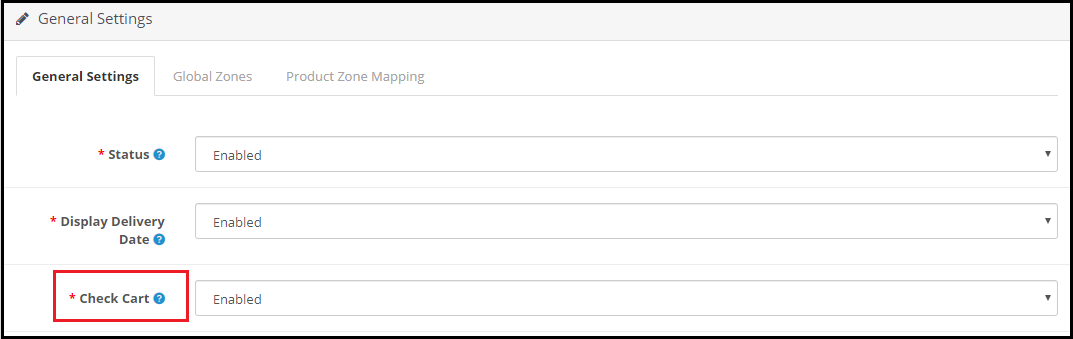
2. The Zipcode verification extension consists of a “Check Cart” option enabling which the “add to cart” button will disappear from the product page if that product is not available for the specified postal code.
3. If the product is available in the specified area zip code, OpenCart Product Zipcode Extension displays the estimated delivery time interval along with the delivery date. (Refer to the image in point 1)

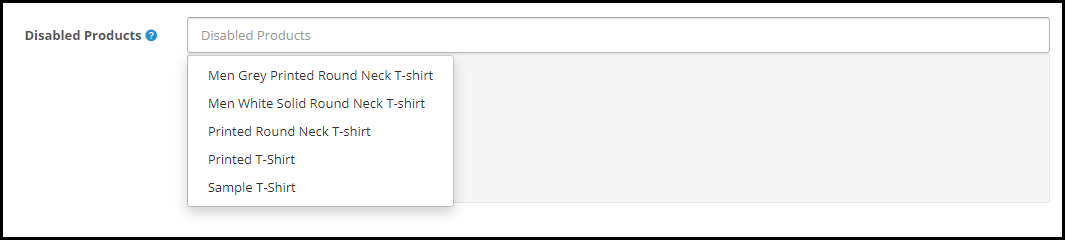
4. OpenCart Product Availability Extension provides you with the option to disable the zip code check functionality on some products. You can choose those products from the drop-down list under the “Disabled products” option.

5. OpenCart Zipcode Validator Extension lets you add multiple zones from the back end configurations. You can specify the zip codes for every zone and define the delivery time interval. The zip codes can be added either manually or by uploading a CSV file.

6. You can map your store products for different zones, after which the products will be available only on those zones for which they have been mapped.

7. OpenCart Zip code verification module is easy to install and configure and offers multi-store compatibility

Benefits

1. Enhance the shopping experience of your customers.

2. Helps you with product page optimization

3. Makes it easy to manage products delivery.

4. It saves the customer’s time as they are informed about the product availability right on the product page.

Special note: The module has an actual cost of around $36 with free 3 months of support but following the corona pandemic, we have currently made it free for our customers. During these hard times, we are making sure that we do best for our customers in whatever way possible.

For the time being, download this module for free. We will keep you updated with new free modules.

Download the module from here.

If you have any query regarding this, you can reach out to us at support@knowband.com