Top 3 Questions Online Retailers Ask Before Investing in Marketplaces

Marketplaces serve as a platform where one can organize product information, manage payments and reach loyal customers easily.

In this post, I have answered some of the top questions which every online retailer wants to get answered before growing their presence on marketplaces-

1.  How important is it for retailers to sell products on multiple marketplaces?

To begin the process, you must first select the type of marketplace you want to sell in. After doing so, you need to understand your customer demographics and their buying behavior. Selling on multiple marketplaces improves credibility and can draw more customers to your site leading to increased traffic.

2.  What are the common mistakes sellers make while selling on marketplaces?

Selling on online marketplace is not that simple as it sounds. It’s certainly very easy to get started but it does not mean it is that easy to attain success. Listed below are some of the mistakes sellers make which should be avoided-

  • Failing to understand terms and condition of website where you selling on- You need to follow all the rules related to product listing right from registering for account to update products quantity. These rules vary from one marketplace to another and if you want to succeed in marketplaces, you need to follow them wisely.
  • Providing incomplete product description- Product descriptions gives an identity to your products. A well written product description should be used which provides every detail to the customer. Use lesser words and try to be focused while writing product descriptions.
  • Pointing Marketplace buyers to your site- If you have an eCommerce website and you are trying to use marketplace to promote your business, remember you are committing a mistake. Marketplace detectors are very strong and they will track you in case you promote your website URL on these marketplaces. Everything is closely moderated, from product description to reviews and comments.

3.  What strategies one must adopt to boost sales on marketplaces?

In order to succeed in eCommerce marketplaces, you need to follow the guidelines for listing products strictly as mentioned above. This will not only help your products rank on search engines but also improve navigation. Similarly, if you provide product descriptions that are accurate, informative and detailed, you will be able to attract more customers for your products, leading to increased number of purchases.

Related Stories:

Top 3 Plugins for Maximizing Conversions on your Magento Store

Every eCommerce business is aimed at encouraging sales any this can only be made possible if your website has the capabilities to convert visitors into all time customers. For doing so, we bring you one step closer to the conversion process by providing some of the excellent plugins, installing which you will not only be able to engage visitors but also increase conversions and sales on your eCommerce website.

Let’s give a deeper look into the functionality of these plugins and see how you can use these to maximize visitor engagement on your site.

1. Magento One Page Supercheckout

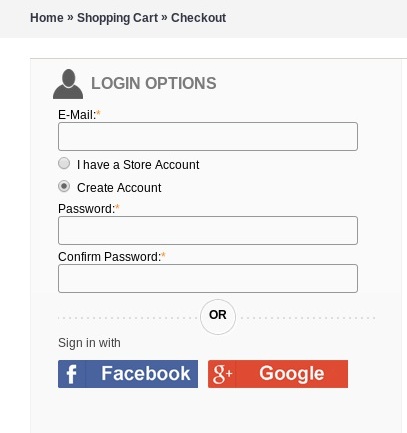
The One Page Supercheckout extension for Magento is designed to provide a simple, quick and hassle-free checkout experience to shoppers. With this extension installed on the store, you will be able to convert a multi step checkout into one page or single step. The checkout process being simple and clear to understand in turn encourages visitors to make the purchase faster without any confusion in mind.

In order to reduce the stress of creating account for registration, Magento One Page Supercheckout designed by developers at Velocity also gives users an option  to login via social media accounts where users will get a choice to log in via Facebook or Google+ account directly from the checkout page. Having this feature in your website will allow more and more consumers to get encouraged to buy from your store and this would further increase user engagement.

Magento One page checkout is a highly functional plugin and is designed with a “responsive feature, ie. It allows your website to get easily displayed on all devices by adapting to the screen size.

The best part about this plugin is that it gives customers a choice to view the image of their product under the tab “image preview. Besides, customers will also get a choice to enter any coupon code on the checkout page and get discount. In short, this plugin provides everything under one roof to convert your store into a money making machine. Know more about the features of this plugin.

2. Magento Abandoned Cart

According to reports generated by Sale Cycle, the average cart abandonment rate is approx 73%.  There are multiple reasons because of which customers abandon their shopping cart. But, just because a customer has abandoned their shopping cart doesn’t mean you have lost the order.

So, what is the best solution to this. How do you go about saving your website sales?

A simple solution is using Magento Abandoned Cart module. This extension functions to recover the lost sales by sending automated emails to shoppers who added their products to the cart but did not complete the purchase.

With attractively designed email templates, you can easily draw customer’s attention to their abandoned carts. Using customized email templates, you can structure the content within to highlight the most important information which you want users to get attracted to.

Similarly, the module also allows inserting discount coupons to any of the cart reminders in order to motivate customers to come back and complete the purchase.

To know more about the functionalities of this plugin.

Benefits-

Boost conversions by encouraging shoppers to come back and complete the purchase.

Gain more loyal customers by offering tempting incentives  via Mangento Abandoned Cart Email

3. Magento Facebook Loginizer

Facebook Login by Magento allows your customers to connect with your store in just a single click by logging in via their Facebook account credentials. The advantages of installing this plugin on your eCommerce site are just amazing. Want to have a look?

  • Provides opportunity for increased user engagement- Seriously, no one in this world would prefer wasting time, especially if it comes to shop online. In fact people do prefer online shopping because it is quick and convenient. Having social loginizer plugin installed on your website, you prevent your visitors from the hassle of going through a lengthy registration process. Just a single click and people will be right into the middle of their shopping activity. This will encourage them to come back frequently to your store and in a way it will promote more and more user engagement.
  • Increases customer acquisition by simplifying the login process- Offering the option of signing in with Facebook also helps in increasing user acquisition rates by making sign up process more clear. Your customers do not require remembering usernames and passwords as they can connect with your website by using their own Facebook account.
  • Provides Transparency- Prohibit anonymous ratings, reviews and comments to bring a level of authenticity to user generated content on your site. Adding social login to these features goes the extra mile to ensure there is real person on the other end.
  • Personalize Online Experiences- Installing Facebook loginizer makes personalization more effective as website owners get access to demographic details of users available on the social network, based on their location, interests, preferences, place of work, gender, age and so on.  Advertisements targeted with such information results in acquiring customers for repeat purchases and conversions.

Conclusion

Are you still looking to improve conversions on your store? If yes, there is a need to install these plugins which comes with packed in functionalities to help you create a responsive, interactive and feature-rich eCommerce website.

Related Stories:

Google Analytics Enhanced Ecommerce for Magento

Using this extension, site owners can boost the conversions by tracking the number of visitors as well as their behavior on your site.

Advantages of Enhanced eCommerce Extension

  • Better Retargeting
  • Improvise marketing effectiveness
  • Understanding exactly where customers are leaving you
  • Access to visitor’s browsing behavior
  • Find out how many new and return visitors your site is getting
  • Where visitors are coming from
  • How long people stay on your site
  • Tracks users by location, browser, device and operating system

Features of Magento Google Analytic Enhanced Ecommerce Extension

  1. Implements latest Google Universal Analytic Enhanced Ecommerce
  2. Tracks user behavior flow
  3. Tracks user by location, browser, device and OS
  4. Track Order Coupon
  5. Track Order Transactions
  6. Supports five new reports in Enhanced Ecommerce
  • Supports Ecommerce Shopping behavior
  • Supports Ecommerce Checkout behavior
  • Supports Ecommerce Product Performance
  • Supports Ecommerce Sales Performance
  • Supports Ecommerce Product List Performance

7. Free Support

8. View reports for all properties and view associated with your Google Analytic Account in Magento Admin Console.

How to add Google Analytics to your Magento Store?

  1. Log on to (https://www.google.co.uk/analytics/) for creating an account.
  2. After submitting the required information, you will be allotted with Google Analytics account number. This number will be further used to integrate the service with your Magento store.
  3. To set up Google Analytics in Magento, go to System>Configuration and then find the sales tab. From there, click on Google API. Here you will be able to view a section named Google Analytics.
  4. Now choose “Yes” to enable Google Analytics and type in your Google Analytics account number in the box. Once done with this, press “˜Safe Config’ and you will have added Google Analytics to your Magento website.

As long as you keep on following the steps outlined above, your Magento website will be optimized for full tracking and analysis.

So, if you have a Magento store, it’s time to integrate it with Google analytics by installing this extension. Monitoring your website by installing this plugin will give you in depth knowledge about your visitors and their interests. It comes out to be extremely useful, when testing new features and will give you an idea of what you can do to improve conversions on your site.

You Might Also Like:

Ready to Sell Products on MarketPlace
eCommerce marketplace has opened up so many opportunities for plucky people make serious money from the comfort of their home. Amazon, eBay, Etsy, Flipkart and Snapdeal are one of the most popular marketplaces in India where over 50,000 merchants sell their goods. According to StatsCrop- “Amazon gets about 20-21 million visitors per day” and with such a huge amount of traffic it becomes quite easy to reach new customers and start selling products almost instantly.

Why sell on MarketPlace

The most obvious reason to sell on eCommerce marketplace is because these websites attract million of buyers worldwide. Therefore, linking your store to these marketplaces makes a perfect sense and will help you target your brand to people in different demographics, thereby enhancing brand exposure internationally.

As per the data collected by Forrester

“About 30 percent of online shoppers start their product research on Amazon”, therefore the biggest advantage that marketplaces provide is online visibility.

How Do You Sell On eCommerce Marketplace

A lot of you might be asking themselves this question. Below are some useful tips on how to make money selling on marketplace-

Register- The initial step is to create an account. Actually it is quite likely that you already have an account established, if you have ever bought anything from this website you can literally start selling away.

Find items you want to sell- Now that you are registered and ready to sell, you need to search through the vast amount of goods on website to find the product that you are looking for.

List items for sale- Once you have found the item that you want to sell all you need to do is listing your items for sale. You will be asked several questions such as condition of the item and price you would like to offer for it and so on.

Conclusion

Do you have a website build on Magento as a shopping cart platform? If yes, then its time to add an extra feature to your store and turn it into a shopping mall by installing MarketPlace Extensions for Magento. This extension gives your store the capability to run with multiple vendors selling on it. Here vendors can easily add, update and sell products from a single store. The most important thing is that even buyers can register here as a seller and market their products.

Buy this plugin from our store and turn your shop into a money making machine simultaneously.

Related Stories: