In today’s fast-paced eCommerce world, sellers need to be everywhere their customers are. From search engines to marketplaces, the ability to sell across multiple channels is not just a luxury but a necessity. Therefore, if you’re using Magento 2 to power your online store, multi-channel selling might seem challenging—but it doesn’t have to be! With the right tools, you can seamlessly manage your product listings, orders, and customer communication across different platforms, all while staying within your Magento 2 dashboard.
In this guide, we’ll walk you through the essential Magento 2 tools you need for multi-channel selling, and how Knowband’s specialized connectors simplify the process for Google Shopping, eBay, and Etsy. Furthermore, by integrating these key platforms with Magento 2, you can maximize your sales potential and streamline your workflow, so you can focus more on growing your business and less on managing operations.
Why Multi-Channel Selling is Essential?
Multi-channel selling allows businesses to reach a wider audience by listing products on multiple platforms. Whether your customers are searching for products on Google, browsing through eBay listings, or shopping for handmade items on Etsy, being present on these channels increases your visibility and enhances your chances of making sales.
Advantages of Multi-Channel Selling:
Increased Sales Opportunities: Each platform you integrate with becomes a new sales channel.
Broader Audience Reach: Reach potential customers who prefer different platforms.
Improved Brand Recognition: Your brand becomes more familiar as customers see your products across multiple channels.
Diversified Risk:Selling on multiple platforms reduces dependency on one sales source.
However, managing these channels manually can be time-consuming and error-prone. That’s why it’s crucial to automate and synchronize your operations with powerful Magento 2 integrations.
Knowband’s Magento 2 Extensions for Multi-Channel Selling!
Google Shopping is one of the most popular platforms for product discovery. Shoppers often turn to Google when searching for products, and appearing in Google’s Shopping results can drastically increase your chances of conversion.
Key Features of the Google Shopping Connector:
Automated Product Syncing: The Magento 2 Google Merchant Feed extension allows you to automatically sync your Magento 2 products with Google Shopping. Thus, you don’t have to manually update listings when products go out of stock or when prices change.
Bulk Product Uploads: Easily upload your entire product catalog to Google Shopping in bulk, saving time.
Smart Mapping of Attributes: Seamlessly map your product attributes to Google Shopping’s requirements, ensuring that your listings meet platform standards.
Product Feed Generation: It automatically generates and updates your product feed for Google Shopping, ensuring that your listings remain current.
With Magento 2 Google Shopping Connector, you can reach a huge audience that uses Google to search for products. The automation features reduce manual work, allowing you to manage your product listings and updates directly from your Magento store.
eBay is a global online marketplace with millions of active buyers. Listing your products on eBay opens up opportunities to tap into an international market, and the Magento 2 eBay Marketplace Integration Extension helps you manage eBay sales without leaving your Magento dashboard.
Key Features of the eBay Integration Extension:
Inventory and Order Management: Sync your inventory between Magento 2 and eBay. Orders placed on eBay are automatically imported into Magento, ensuring consistent stock levels across both platforms.
Real-Time Updates:The extension provides real-time updates for orders, product information, and inventory levels.
Product Listing Templates: Create customizable product listing templates for eBay, allowing you to streamline the listing process.
Multi-Store Support: If you’re running multiple stores, you can use this extension to manage listings and orders across all your eBay accounts.
Thus, with the Magento 2 eBay Marketplace Integration Extension, you can expand your reach into eBay’s massive user base. Furthermore, it simplifies the entire process of listing products, managing orders, and syncing inventory, reducing the chances of errors and mismanagement.
3. Magento 2 Etsy Connector Plugin:
Etsy is the go-to marketplace for handmade, vintage, and unique products. If your Magento 2 store features these types of items, the Etsy marketplace is the perfect platform to attract niche buyers. On the other hand, the Magento 2 Etsy Connector Plugin helps you effortlessly manage your Etsy store without needing to log in to the platform separately.
Key Features of the Etsy Connector Plugin:
Product and Order Synchronization: Sync your Magento 2 product listings with Etsy, and automatically import Etsy orders into Magento for centralized management.
Bulk Product Uploads:Easily upload multiple products to Etsy in one go, making it simple to manage large inventories.
Category Mapping:Map your Magento categories to Etsy’s marketplace, ensuring that products are properly listed in the right categories.
Price and Stock Synchronization:Keep your prices and inventory in sync between Magento 2 and Etsy, reducing the risk of overselling or pricing errors.
For sellers of creative and handmade products, the Etsy Connector Plugin offers a direct way to tap into Etsy’s specialized market. It simplifies the process of managing your Etsy listings and orders while keeping everything integrated within your Magento dashboard.
Knowband’s Magento 2 Marketplace Extensions
Transform your Magento 2 store into a thriving marketplace with the Marketplace Modules, enabling multiple sellers to manage their own products and orders effortlessly.
Conclusion: Streamlining Your Multi-Channel Strategy!
Managing multiple sales channels doesn’t have to be complicated. With Knowband’s Magento 2 Google Shopping Connector, eBay Marketplace Integration Extension, and Etsy Connector Plugin, you can streamline the process of listing products, managing orders, and maintaining inventory across platforms. These extensions help you stay on top of every sale, regardless of where it’s coming from.
Multi-channel selling is essential for modern eCommerce success. With these Magento 2 tools, you can maximize your reach, automate key tasks, and focus on growing your business. Whether you’re targeting Google’s search engine shoppers, eBay’s global marketplace, or Etsy’s niche buyers, Knowband has the tools to make multi-channel selling a breeze!
One of the most common questions we get from users is, ‘Which extensions do people normally use on Magento 2 store?’ You often struggle when exploring for the extension which matches your store’s requirement. The holiday season is right around the corner and extensions like One Page checkout, Spin and Win email subscription module, Multi-Vendor Marketplace and Abandoned Cart are the popular Magento 2 plugins which you are already aware with.
In this article, I’ll be highlighting some ‘not so famous’ but best Magento 2 plugins that might help you with your sales, conversions, bounce rate or abandon cart issues.
Let’s dive into it.
1. Custom Registration Fields
I am adding Custome Registration Fields Magento 2 extension at the top of the list. If you want to give personalised customer experience to your users and need more information from the user then you need to add some custom fields. A Magento 2 plugin, Custom Registration Fields is developed to help you add custom fields on the registration page of your eCommerce store. This can be useful to gather more information for providing custom personalisation experience to customers.
2. Earn Loyalty Points- Magento 2 Extension
Online shop owners can now attract more customers by giving them loyalty points on various occasions. You must offer loyalty points to your existing customers or on the new registration because it can get you to achieve customer acquisition. Loyalty Points – Magento 2 Plugin will increase customer engagement and boosts customer retention.
3. Become an Affiliate or Referral
Affiliate and referral programs are sources of passive income. The affiliate and referral program plugin for Magento 2 is highly customisable and feature-rich. Any customer can register as an affiliate and an affiliate customer earn money in exchange for the purchase done through their channel.
The Magento 2 Customer Affiliate and Referral program allow the store owner to display social media icons for sharing the referral link on social media platforms like Facebook, Twitter and Pinterest.
4. Gift Card Manager
One of the best ways to call new customers on your store to shop is by offering them a dynamic product called Gift Card. It is the new preferred way of showering love on special ones on special occasions. Gift Card saves the time of the indecisive user and gives them a choice to present the best on any event.
With Magento 2 Gift Card Manager extension, you can increase your customer base, generate advance revenue and increase brand awareness. The gift card can be sent via email on the desired date or the sender can print it for delivering it physically.
If the customer shares the store product on Facebook, it allows the e-marketer to offer a fixed or percentage-based discount. Customers will get a coupon code. It is the sneakiest way of advertising without any additional effort. This Magento 2 plug-in multiplies the customer base, brings new customer and increases brand awareness.
6. Return manager
If you are looking for a solution to manage your cancelled orders and return orders then Magento 2 Return Manager Extension is all that you need. It allows the customers to raise a return request and add a reason for the return. Customers can ask for a return, refund or replacement.
It reduces the extra efforts and manages the return requests flawlessly. Admin can place the order return button in different sections of the front end. Do not miss out on potential customers because a return policy on eCommerce store brings more loyal customers to your store.
7. Product Size Chart- Magento 2 Plugin
When it comes to buying an outfit, online shoppers mostly have concerns about the size of the product. They aren’t sure which size will fit them perfectly. This inevitably causes customers to place a return request later due to the size issue.
You can incorporate a Product Size Chart extension in your Magento 2 store. A size chart allows you to improve the purchase experience of shoppers and also makes your product page user-friendly. You will observe a downfall in product return or exchange rate.
Incorporate social login option in your checkout page because it reduces cart abandonment by improving the conversion rate graph.
9. Preferred delivery time
Some of our users ask for an extension through which the product can be delivered to their customer on the desired date and time. The Preferred Delivery Time extension for Magento 2 is the one you need.
By installing this extension you can allow customers to pick a desired date and time slot for the delivery of their order. Be it a birthday or an anniversary, now you can deliver a gift on their special day.
Final Thought:
These are the extensions that can reduce cart abandonment, boost the conversion rate, increase your eCommerce sales and give your customers a user-friendly experience. Install these extensions to your Magento 2 store and enhance the customer experience.
Knowband provides Magento plugin development services to enhance the functionality of your eCommerce stores. There are many extensions available on Knowband store for Magento, Magento 2, PrestaShop and OpenCart store. www.knowband.com
Magento 2 Return Manager extension by Knowband adds the functionality to manage return requests for any order placed by a customer as well as a guest customer. The Magento 2 order return module adds a link to the front-end through which any customer/guest customer can apply for return of any product contained in an order placed earlier.
This Magento 2 return manager extension is a very flexible plugin and the customer can return any product in a order completely or partially, that means the customer can also return half or less quantity of any product in the order.
For a logged in user (if the Magento 2 product return manager extension is enabled from backend) the return manager link appears in Account options list (near the cart link) and in the quick links shown in the footer and opens a page containing the list of all the orders placed by that particular customer and the products that are eligible for return have a link to apply for return. This page also contains the history of returns applied by the logged in customer.
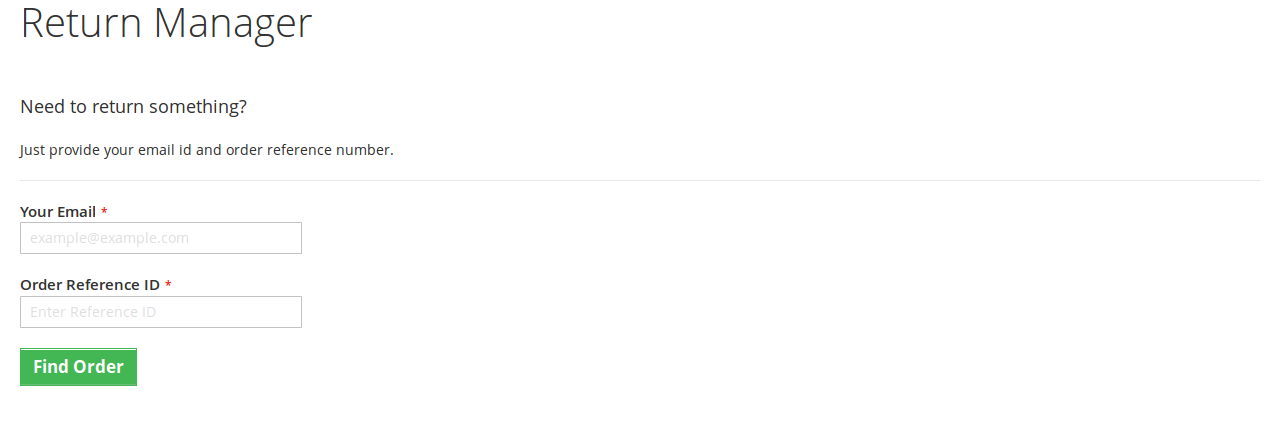
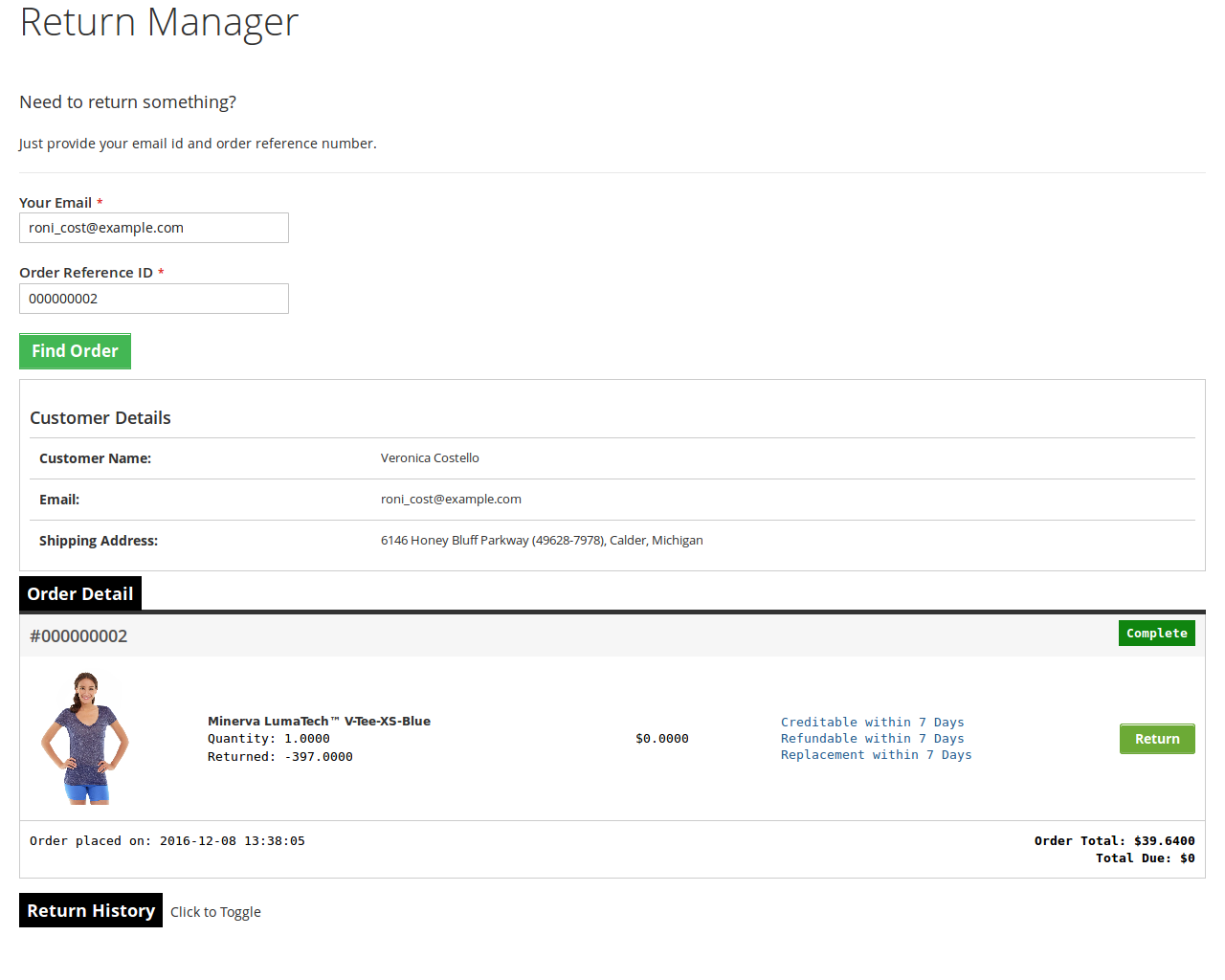
In case the user is not logged in the return manager link opens a page containing a form to find any order. After finding an order using the form the order detail appear and the products from that particular order that are eligible for return have a link to apply for a return. This page also contains the history of returns applied by the customer who has placed this particular order.
What’s New in the updated version:
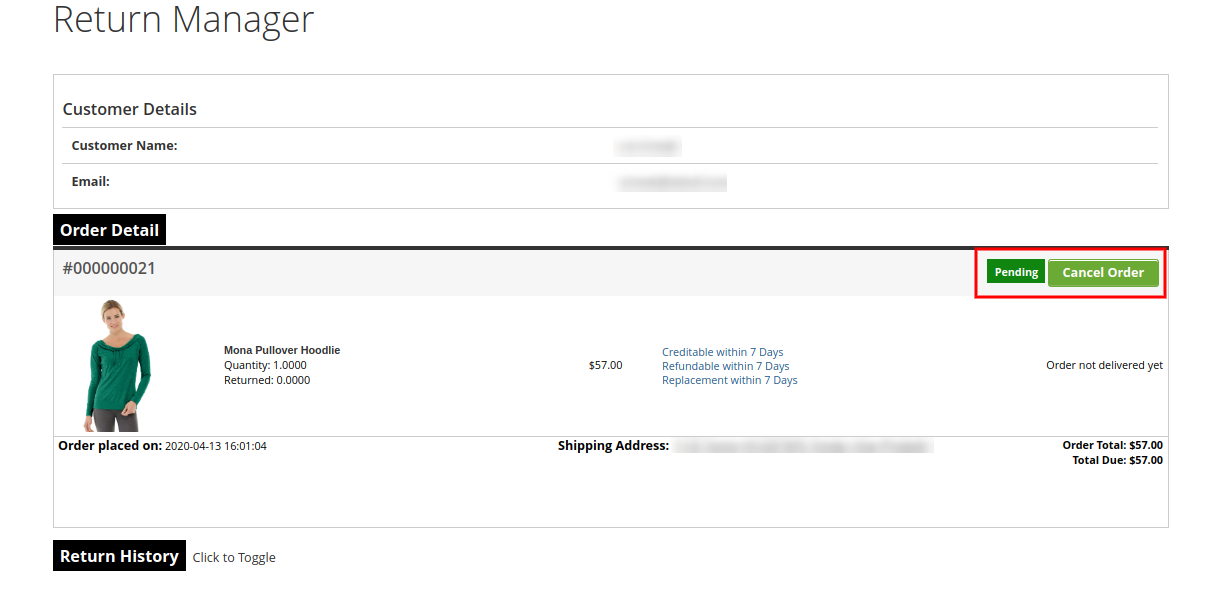
In the updated version of the Magento 2 return manager extension, the online merchant gets an option to add custom CSS and JS codes for the look and feel related settings. The e-merchant can also allow online users to cancel their orders and return requests if they wish to do so. Admin just needs to activate the related settings from the admin interface of this Magento 2 return product extension.
Apart from this, admin can also show or hide multiple return methods like a replacement, refund or product return. Online store merchants can add multiple return addresses from the admin interface and also update it as per the requirements.
1.1 Merchant Benefits of the Magento 2 Return Manager Extension
The Magento 2 return manager extension by Knowband allows the store admin to enable/disable the extension as per the desires.
Magento 2 product return module provides an option the merchant to create the own return policy.
With the help of the Magento 2 order refund module, the store merchant to add the N of return reasons.
The Online retailer can view the customer pending request from the back-end of the Magento 2 return manager extension.
The admin allows the Guest customer to initiate the return request for the purchases product from the back-end of the Magento 2 return manager module.
Magento 2 return manager extension by Knowband enables the attachment file option. Apart from this, the admin can limit the size of any attachment.
The Magento 2 product return extension provides an option for the seller to customize the return slip settings and guidelines attached to the customer email.
The eCommerce vendor can customize the email template subject and title from the admin interface of the Magento 2 RMA extension.
The Admin can add the own return policy.
Knowband Magento 2 order return extension allows the store admin to change the return status of the placed request.
With the help of the Magento 2 product return extension, the Magento 2 store admin can create the RMA request on behalf of the customer.
The Magento store merchant can view all pending return request from the back-end of the Magento 2 return extension.
The Online store retailer can be approved or deny the shopper’s return request only just button click.
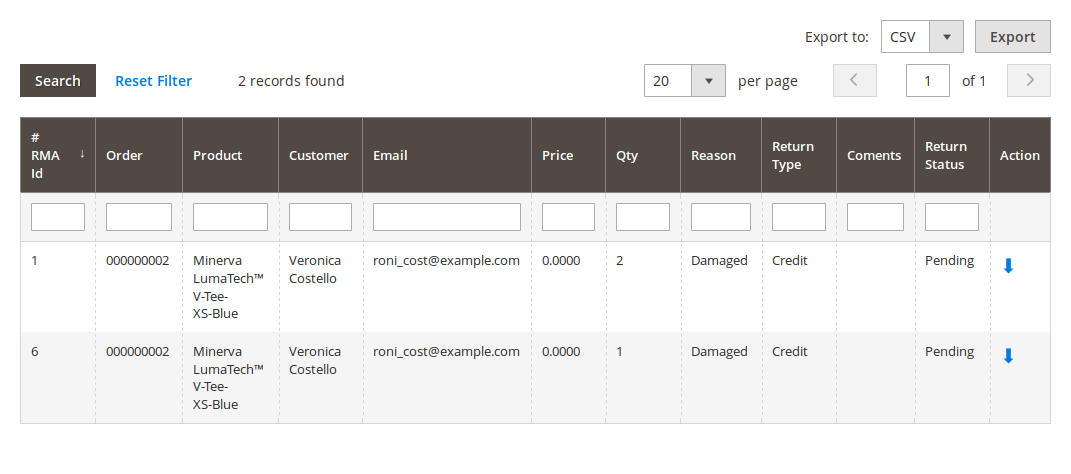
The Admin can export the all return request via CSV format from the backend of the Magento 2 order return module.
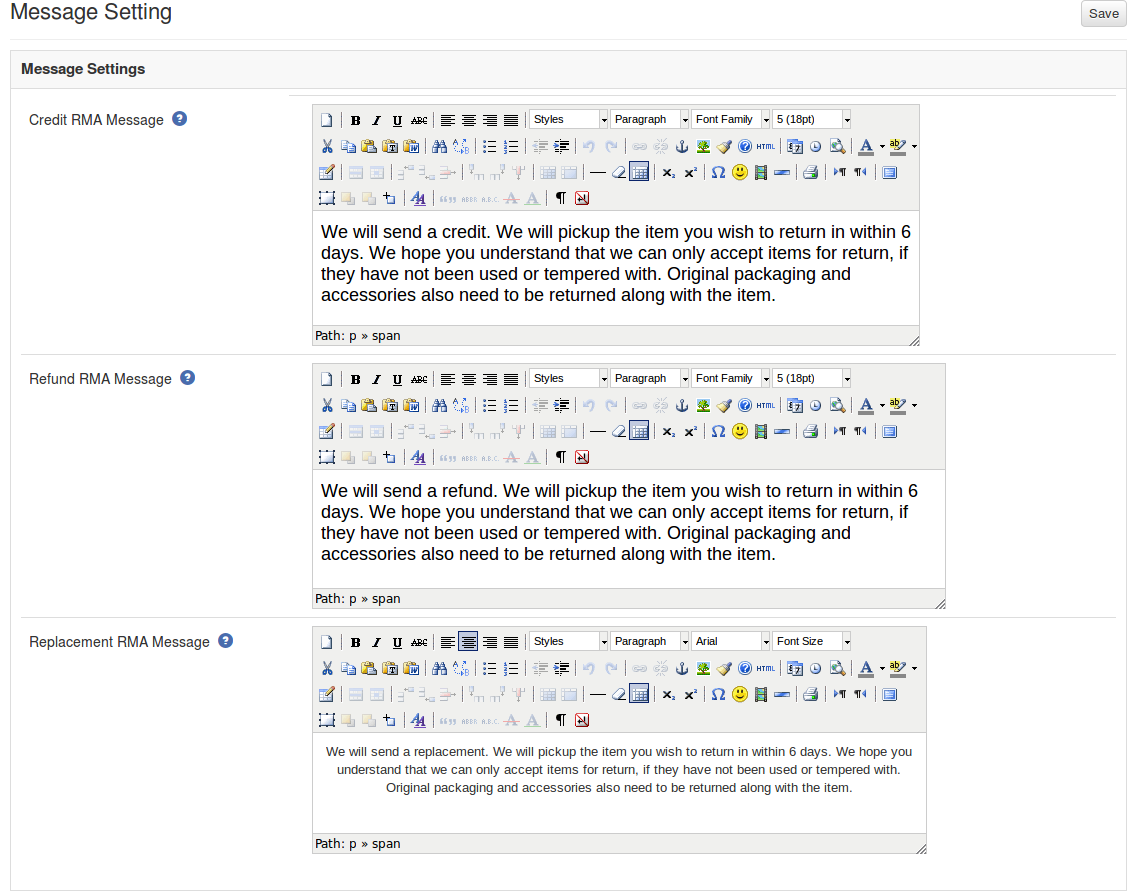
The Admin can also change the success message of the Credit RMA, Refund RMA and Replacement.
The online merchant can allow online users to delete their orders and return requests.
There is an option to add custom CSS and JS codes for the look and feel related customization.
The online merchant can allow online users to return, refund and replace the products.
There is an option to add multiple addresses from the Magento 2 refund order Extension admin interface.
2.0 Technology for Development
Language: PHP
Frame Work: Magento
3.0 Installation Guide
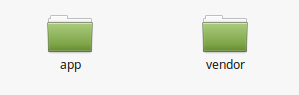
1. The folder structure of the Magento return manager extension folder.
2. Copy all the folders into Magento root directory and clear the cash (if enabled).
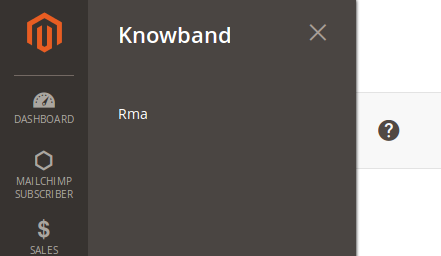
3. You will be able to find the “RMA” option inside the “Knowband” option.
4. Now you need to install tcpdf library (Only if not already installed). TCPDF is a library to generate pdf.
5. Make sure that composer is installed on your device.
6. To install tcpdf library, go to the Magento 2 installation directory root and run following command from the terminal:
Sudo composer require tecnickcom/tcpdf
7. After this command, it will ask for credentials.
8. If you don’t have credentials then go to the following site and create a new account.
9. After logging in, go to the Connect tab and click on Developers, then click on the “Secure Keys” option and generate a new key.
10. Now use the public key as the username and private key as password (look step 7). These are the credentials you have to enter.
11. Sit back and relax. TCPDF library will be installed on your device soon.
12. It may ask you to run upgrade command when any page is opened. To do that, go to Magento 2 root folder, open terminal there and run following command
sudo bin/magento setup:upgrade
After this command run next command
sudo bin/magento setup: static-content:deploy
And then provide permissions (read, write, execute) to the all magento directories.
Eg. chmod -R 777 <root_installation_directory>
13. Now you are ready to go.
4.0 Admin Module
After installing Magento 2 return manager extension into thestore, the Magento 2 return module will provide following interfaces inside “RMA” option:
General Configuration
RMA Configuration
Return Slip Settings
Pending Requests List
Approved Requests List
Archived Requests List
Canceled Requests List
Each interface is in the form of a tab and each tab contains some specific settings/functionality that can be changed according to the need. Each tab is explained below.
4.1 General Configuration
In general settings, there are two different configuration tabs available, both are described below:
4.1.1 General Settings
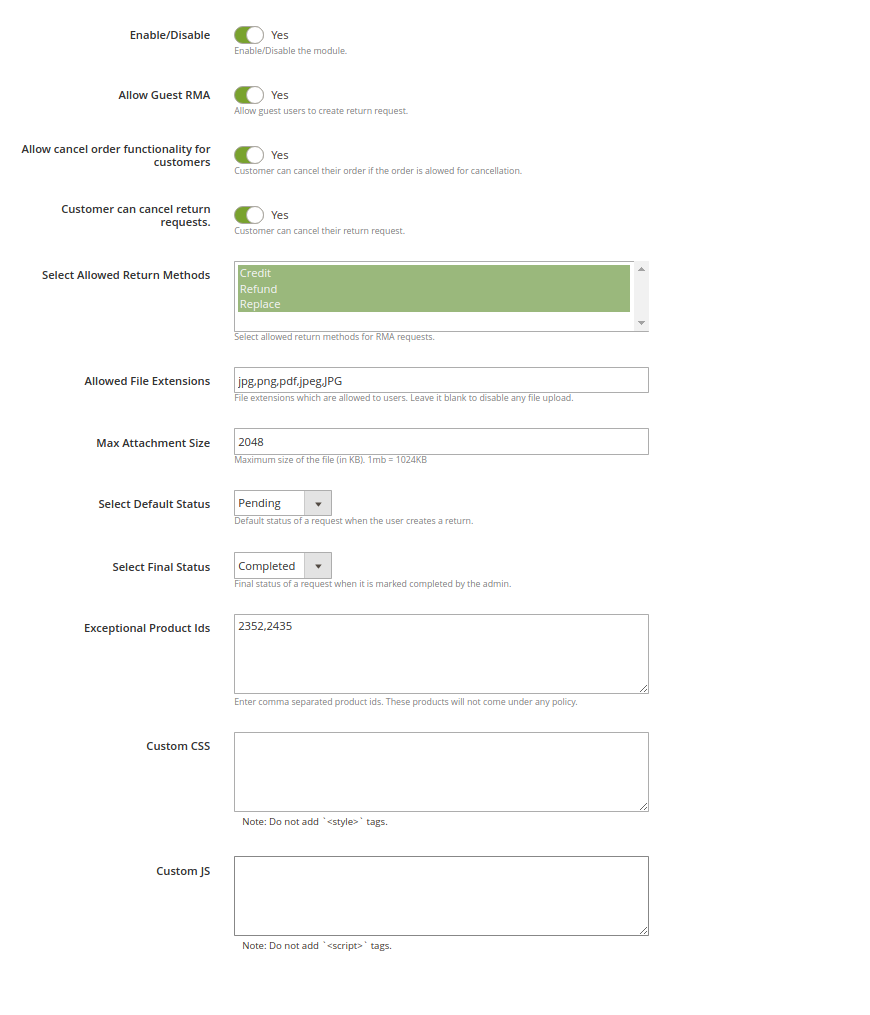
After clicking on the RMA tab, the system will open general settings tabs by default as shown in the screen below:
Initially, fields in the above form will be already filled with their default values.
Enable/Disable: Initially, this will be “OFF”. Admin can enable/disable Magento 2 return manager extension by turning ON/OFF in this setting.
Allow Guest RMA: This drop-down contains “Yes” and “No” options. Set this as “Yes” to enable the return feature for those users also who are not logged in.
Allow Cancel Order Functionality for Customers: Activate this option for allowing the users to cancel their orders.
Customers can cancel return requests: Users can cancel the return request if this option is enabled from the admin interface of this Magento 2 order return manager Module.
Select Allowed Return methods: Select from the credit, refund and replacement options.
Allowed File Extensions: This option accepts the comma (,) separated file extensions (without space) which can be uploaded when customer uploads file related to the return request.
Max Attachment Size: In this field maximum allowed file size is accepted. The file size will be in KB. Eg- To allow files up to 1MB set this field as 1024.
Select Default Status: Admin can set the default status of the customer’s return requests.
Select Final Status: Admin can select the final status of return request.
Exception product Ids: Enter the product ids which you don’t want to map with any return policy.
Custom CSS: Enter Custom CSS code for the look and feel management.
Custom JS: Enter JS codes for the look and feel settings.
To save the settings, click on the “Save” button shown in the right upper area.
4.1.2 Success Messages
This tab contains three text areas having html editors. Using the editors, the admin can set the style of the success message to be shown in the pop-up whenever the request is successful.
There are three messages.
Credit
Refund
Replacement
4.2 RMA Configuration
In RMA Configuration, there are multiple configuration options as shown below:
4.2.1 Email Template Settings
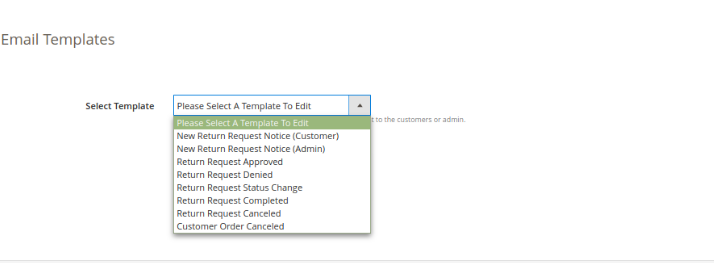
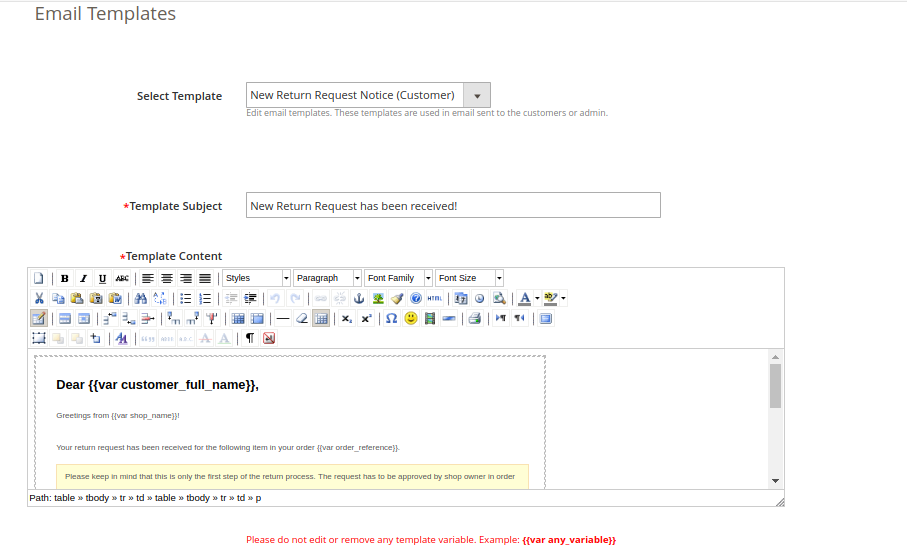
This tab contains an interface through which the admin can edit any email template that is used in this system.
There are 8 email templates available that are used by this plugin:
New Return Request Notice (Customer): This mail template is used to notify the customer regarding the new Return Request generated by the customer itself. The customer who has created the return request will only receive this mail.
New Return Request Notice (Admin): This mail template is used to notify the Store Owner regarding the new Return Request generated by any customer.
Return Request Approved: This mail template is used to notify the customer regarding the Approval of the Return Request that is created by the customer earlier.
Return Request Dis-Approved: This mail template is used to notify the customer regarding the Dis-Approval of the Return Request that is created by the customer earlier.
Return Request Status Change: This mail template is used to notify the customer regarding the update in status of the Return Request that is created by the customer earlier.
Return Request Completed: This mail template is used to notify the customer regarding the completion of the Return Request that is created by the customer earlier.
Return Request canceled: This Email Template is available for notifying the online users regarding return request cancelation.
Customer Order Canceled: The email template is available for notifying the customers regarding order cancelation.
To edit an email template the admin has to choose the desired email template. On doing the same the email template data will appear in a form below, to save the changes made the admin has to click on the ‘Save’ button.
4.2.2 Policy Settings
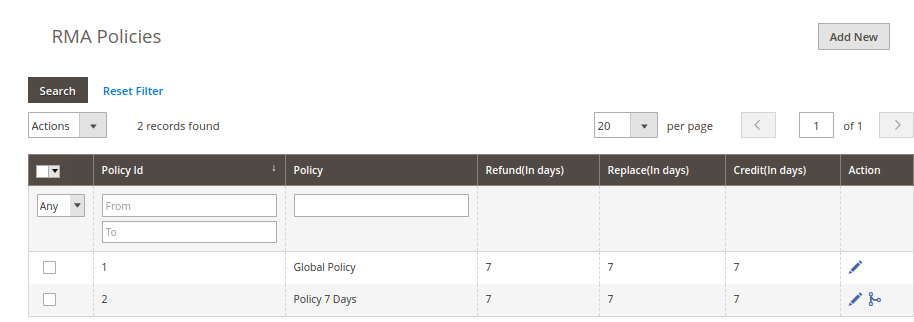
In this Magento 2 return extension, the admin can add new return policies for the plugin and can also edit or delete an existing return policy for the plugin.
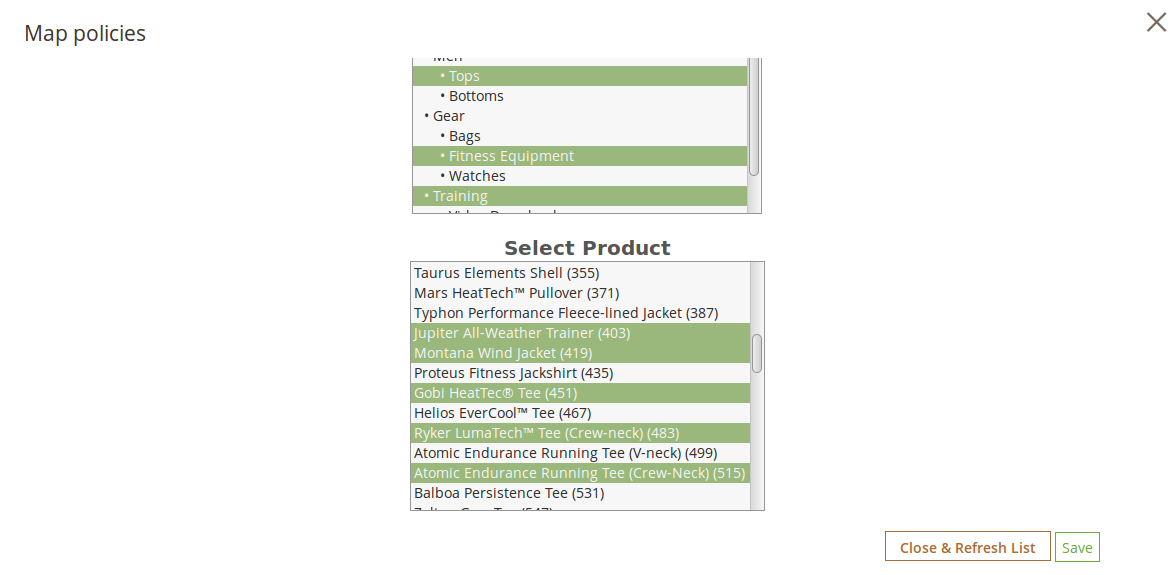
There is also an option to map the return policies to products.
Note: A product can only be mapped to a maximum of one return policy.
This tab contains a list of existing return policies for the plugin. The admin can also create a new return policy using the ‘ Add New ’ button shown near to the “Save Settings” button.
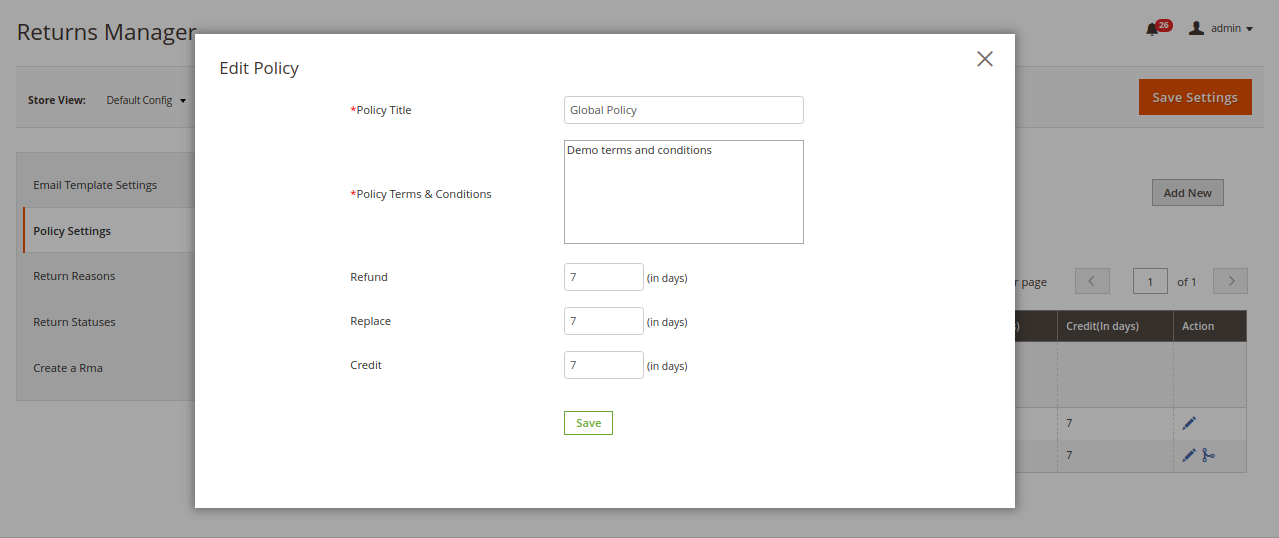
After clicking on the add new button a pop-up appears containing the form to create the return policy.
The form contains several input fields to enter the data of the policy like the name of the policy, terms and condition of the policy and the option to choose the parameters i.e. Credit, Return and Replacement.
The admin can also enter the days applicable to this return policy for different options as shown in the form below.
The add new policy form will look as shown in the screen below:
Actions
1. The admin can edit any policy using the first link in the Action column from the policy listing table. On clicking this link a modal containing the form for the policy will appear and the data for that policy is already filled in the fields. The admin can edit any data and can save the changes made.
2. The second link in the actions column is for mapping products to the policy. On clicking this link a modal will appear containing the options to map the products to that particular policy.
4.2.3 Return Reasons
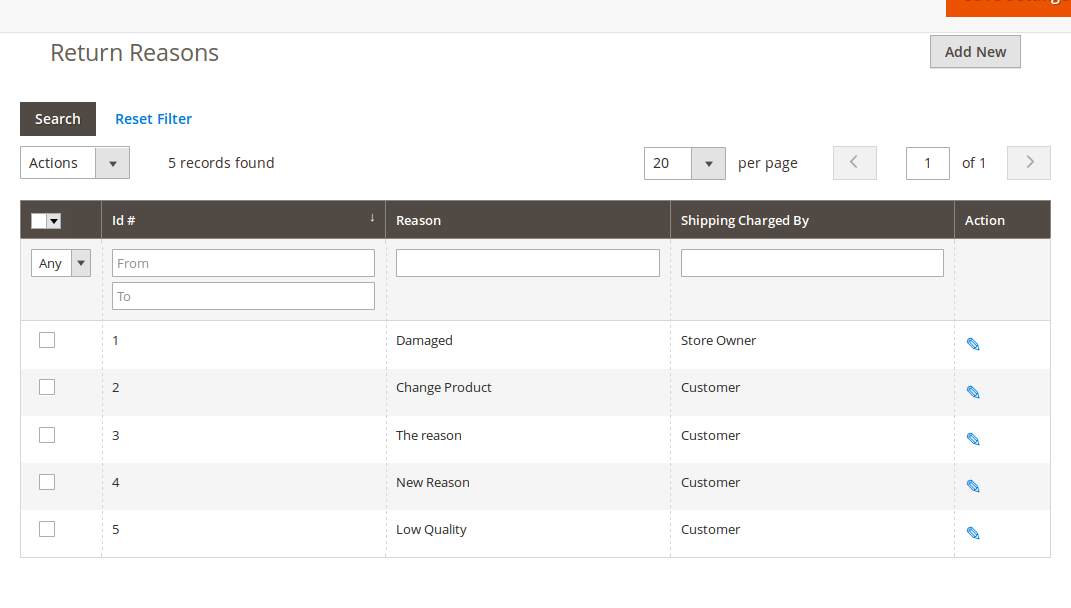
In this Return Manager for Magento 2 tab, a list of return reasons will appear in the form of a table. By default, there are 2 reasons already added to the system.
In the Action column, there is a link to edit the reason in front of every row.
The admin can add as many reasons as required to the system using the ‘Add New’ button. On clicking on the button a form will appear to add new Return Reason into the system. The form is shown below:
Admin can edit any reason as well by clicking on edit icon shown in front of every reason.
4.2.4 Return Statuses
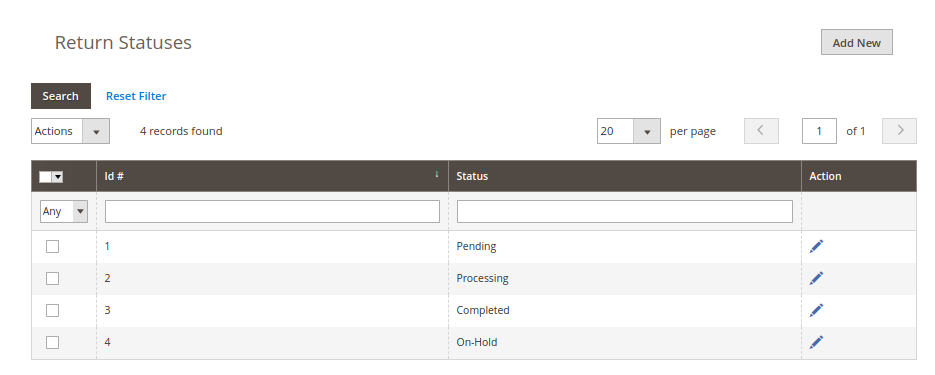
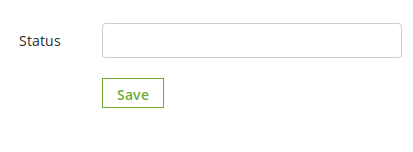
This Magento 2 return manager tab contains a list of return statuses in the form of a table. By default, there are 4 statuses already added into the system. The admin can further add any numbers of statuses into the system.
The links below the action column in the statuses list is for editing the existing return statuses.
The admin can add as many statuses as required to the system using the ‘Add New’ button. On clicking on the button a form will appear in a modal to add new Return Reason into the system. The form is shown below:
4.2.5 Create a RMA
This tab is used to generate a return request from the admin panel itself. The tab contains a form through which the admin can find any order by simply providing the reference number and the corresponding e-mail and then apply for return accordingly.
Note:
Any return request whether is created by admin or customer is moved to the pending returns and the admin has to approve it first to further change the status of the return request or to take any further action.
The orders that are delivered or completed are only eligible for return.
By default the status of the return request is set to default return status set by the admin in the ‘ Return Statuses ’ tab.
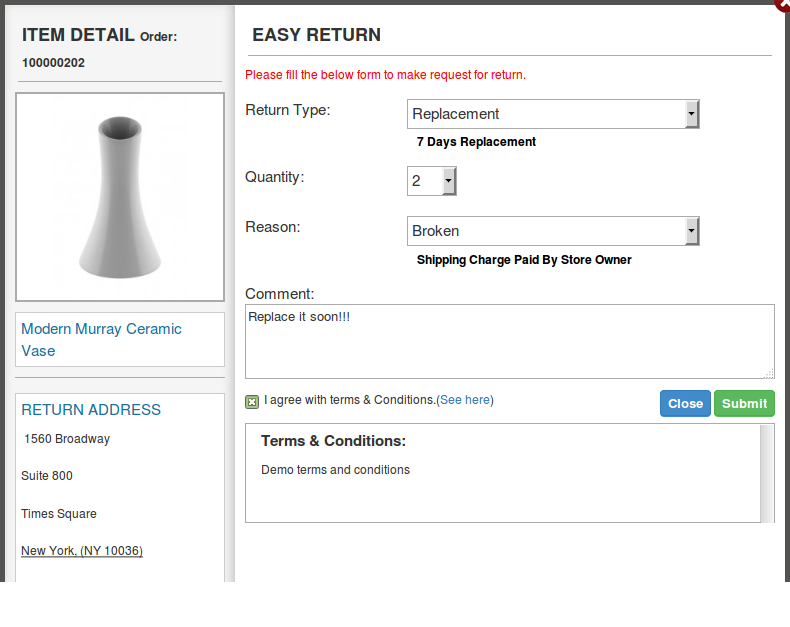
When the admin finds an order using the find order form then the order detail for the respective order will appear containing the list of products and a return button in front of products eligible for return. When the admin clicks on the return button a pop-up will appear containing the return from and enter specific data for the return request.
The admin has to fill the above form and then click on submit then a success form will appear showing the successful submission of the return request as shown below :
4.3 Return Slip Settings
In return Slip settings section, the online merchant will again get two configuration settings:
4.3.1 Return Slip Settings
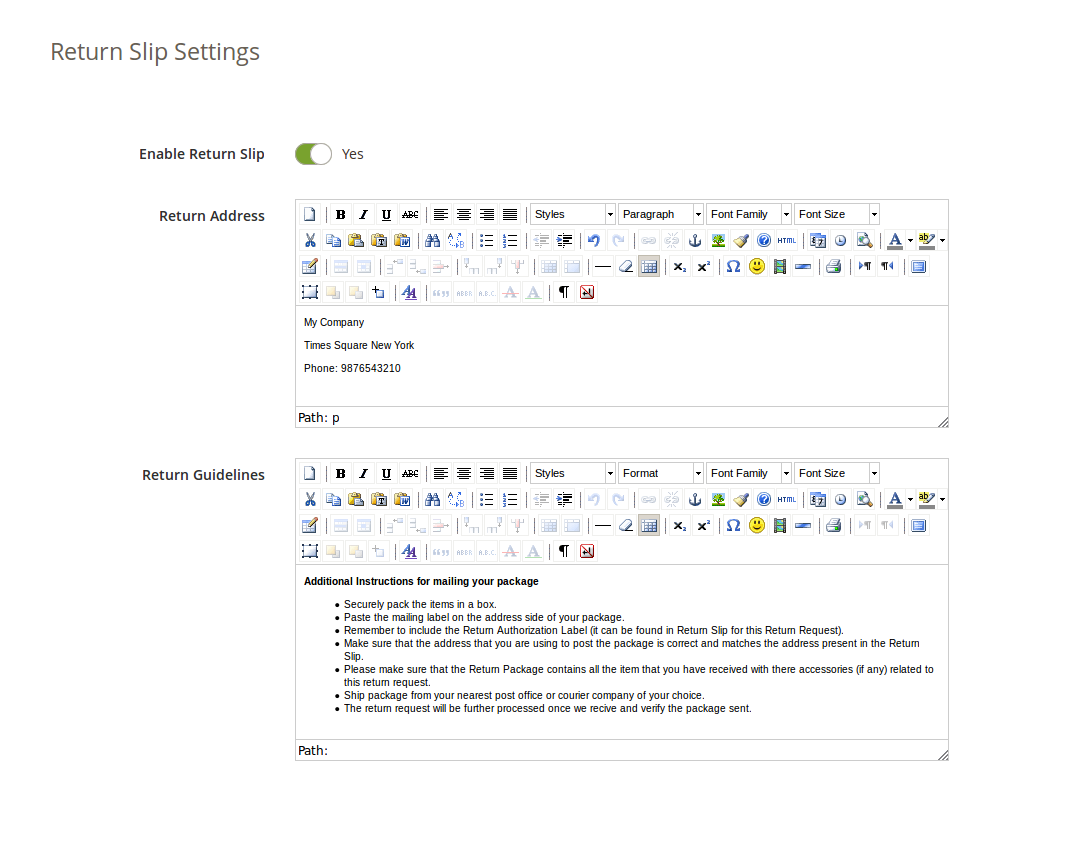
In this Magento 2 RMA module tab, the admin can alter the settings and content of the Return Slip. This return slip is generated automatically when the admin approves any return request (if the feature is enabled). The return slip is generated in ‘.pdf’ format and the link are mailed to the customer in the mail for Return Request Approval Notification.
Enable/Disable Return Slip: Initially, this Magento 2 return manager extension will be “OFF”. Admin can enable/disable the Return Slip feature by turning ON/OFF in this setting. Return slips are only generated when the feature is turned ON.
Return Address: This Magento 2 product return extension has an option to print the address on the return slip and will also be displayed on the return request form.
Return Guidelines: These guidelines will be printed on the return slip.
4.3.2 Return Addresses
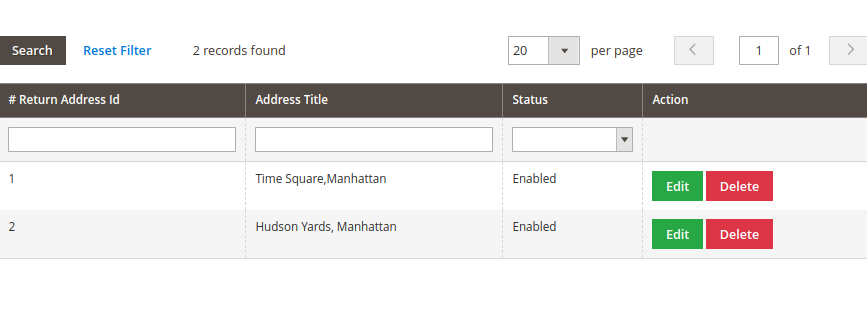
In return addresses section, the online merchant gets an option to add multiple return addresses from the admin interface. Admin can add, update and delete the return addresses easily.
Admin can edit the return address easily as shown below:
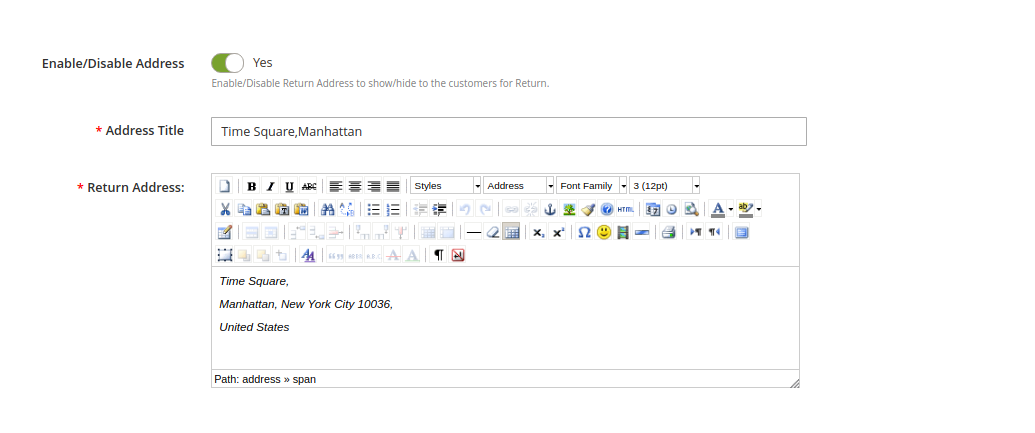
Admin needs to enter these details as shown below:
Enable/Disable Address: Activate or deactivate the settings.
Address Title: Set Address title from here.
Return Address: Enter the return address here.
4.4 Pending Requests
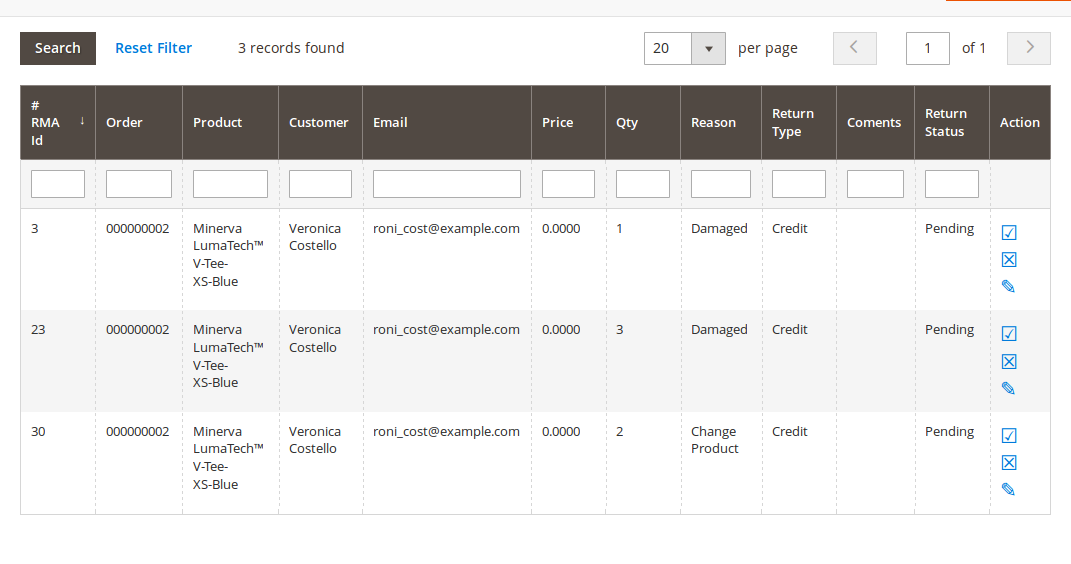
This tab contains a list of all the returns that are pending i.e. are not approved by the admin. The admin has to approve a return request in order to perform several operations on the return request like approve and dis-approve the request or download/view the file uploaded by the customer.
The admin can approve or deny a return request using the actions available in front of the list.
Admin can also download or view the file uploaded by the customer. View option is only available if the customer has uploaded the file.
Once the admin approves a return request then it is moved to the Active Returns List.
On the other hand if the admin denies a return request that it is removed from the list and this action can not be undone.
4.5 Approved Returns List
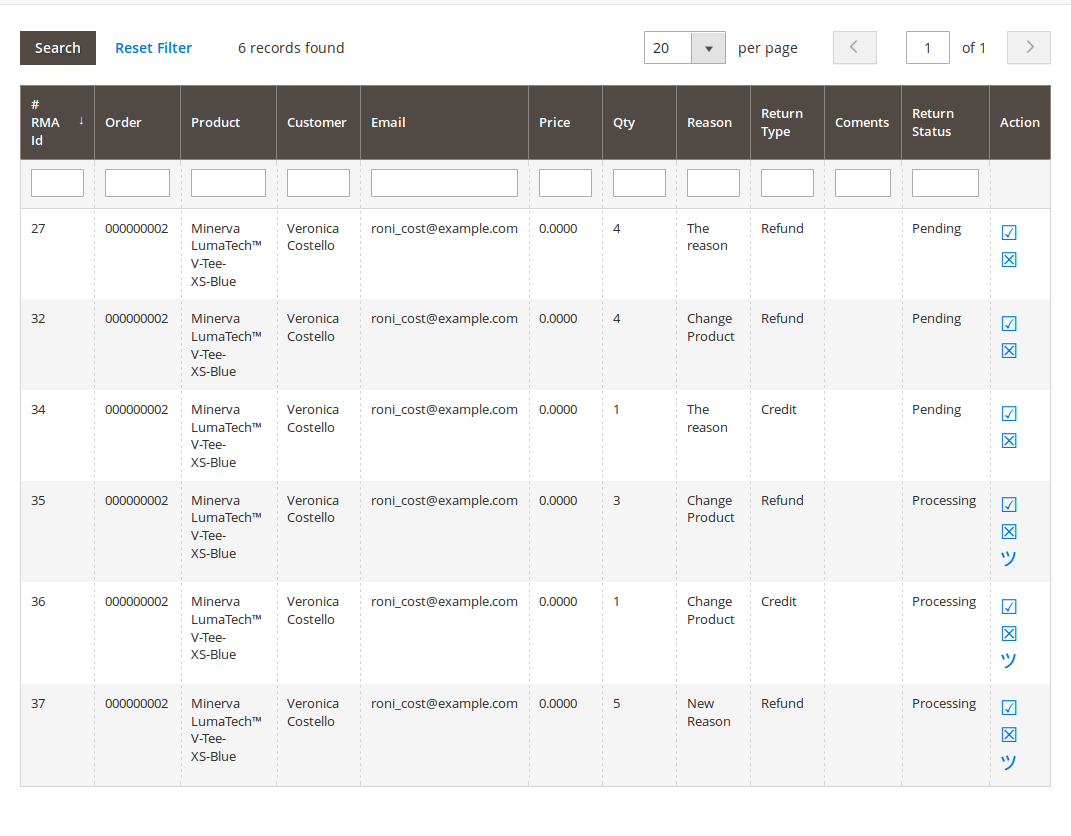
This tab contains a list of all the returns that are approved by the admin. The admin can proceed with the return process after approving the return request using this tab. The admin can change the status of the return request and can also deny a request form this tab and can archive the request as well.
The actions that can be performed from this tab for the active returns are:
Deny the return request.
Change the status of the return request by clicking on the edit icon.
Mark the return request as complete / add to archive.
When the admin marks a return request as complete then it is moved to the archives list.
4.6 Archived Requests
This tab contains all the return requests that are complete. The tab also contains a form through which the admin can filter the archives list.
There are options to export the data into csv file.
Single row can be exported and the whole data can also be exported using mass export option.
4.7 Canceled Return Requests
In the canceled return requests section, all the canceled return requests will be listed.
5.0 Front End Module
After enabling the plugin the front-end user will see a link in the header of the front-end through which the user can navigate to a new page.
The link in the header of the front-end will appear as follows:
When the customer clicks on this link than a new page will open on the basis of logged in status of the customer.
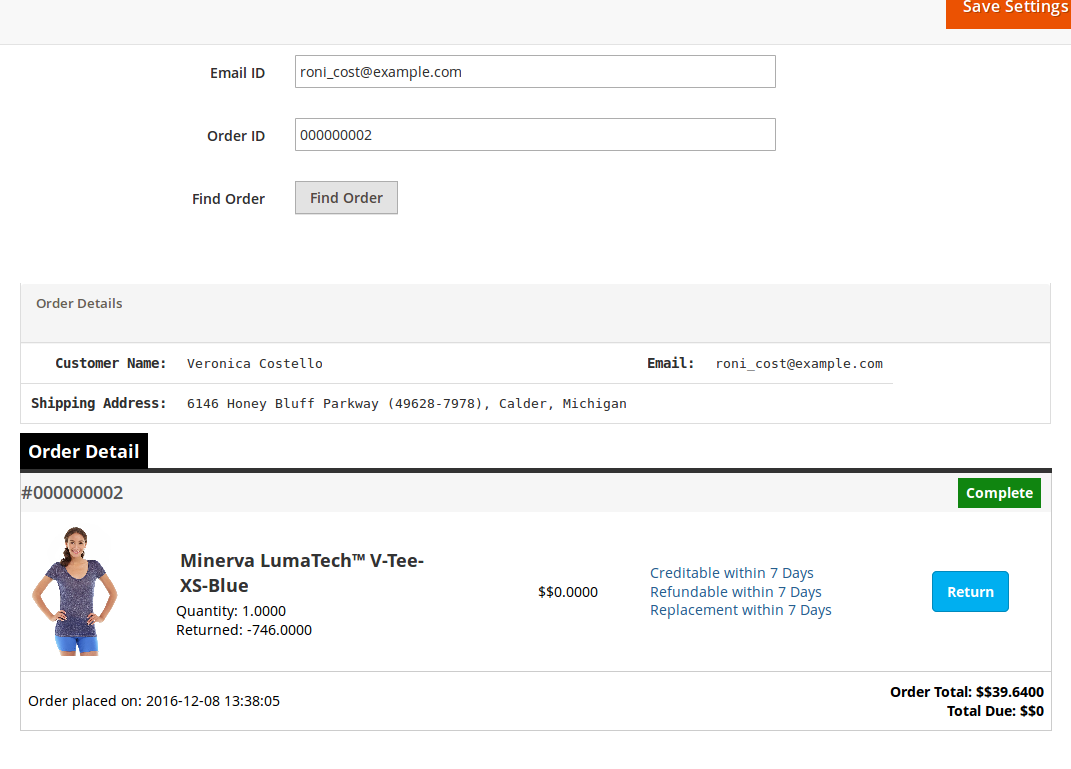
In case the user is a guest and is not logged into the website then the page will contain a form to find the order as follows:
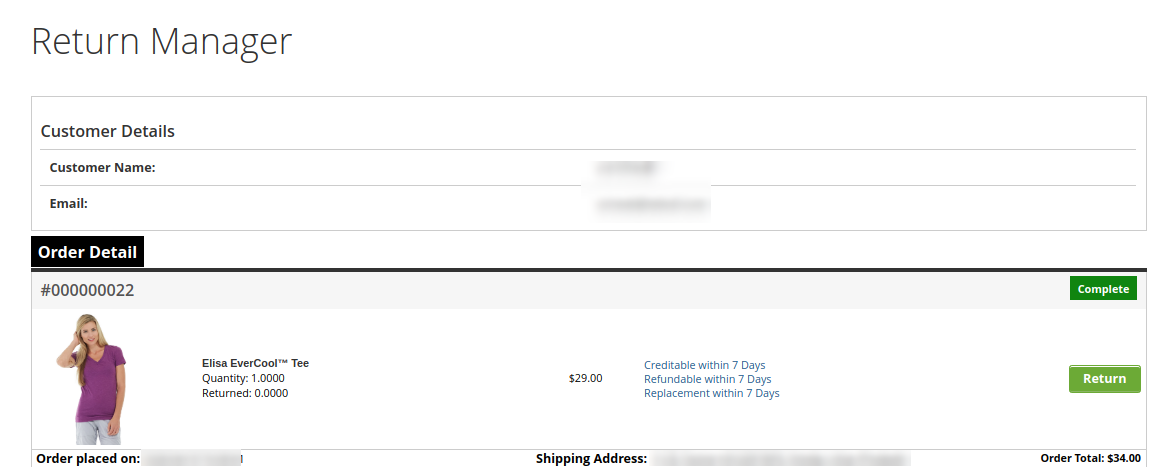
After proving the order reference number and the respective email the details of that order will appear including the return history on the basis of the email provided by the customer. The order details will appear as follows:
The products that are eligible for return in that particular order will have a return button. Through this button the customer can apply for return of that particular product.
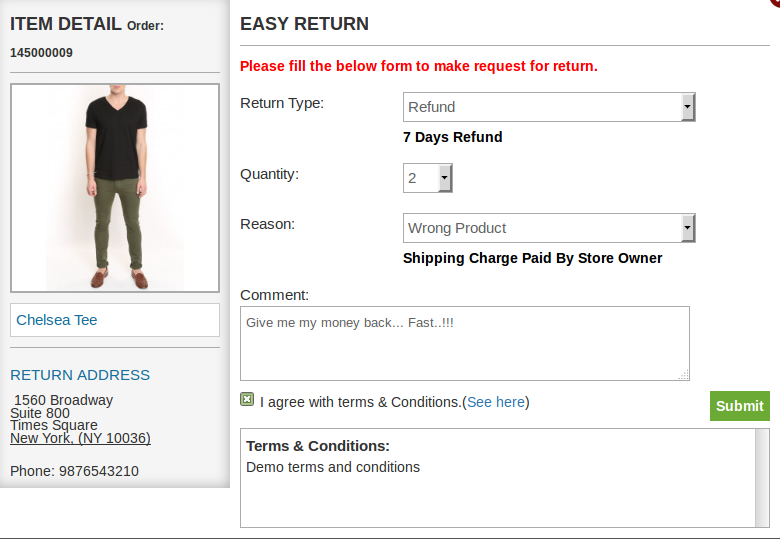
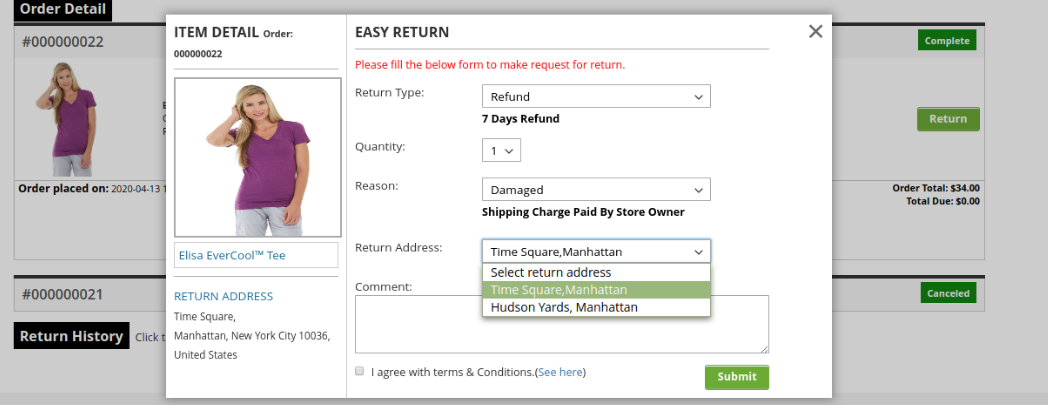
By clicking on the ‘Return’ button a pop-up will appear containing the form for return of that particular order. The form will appear as follows:
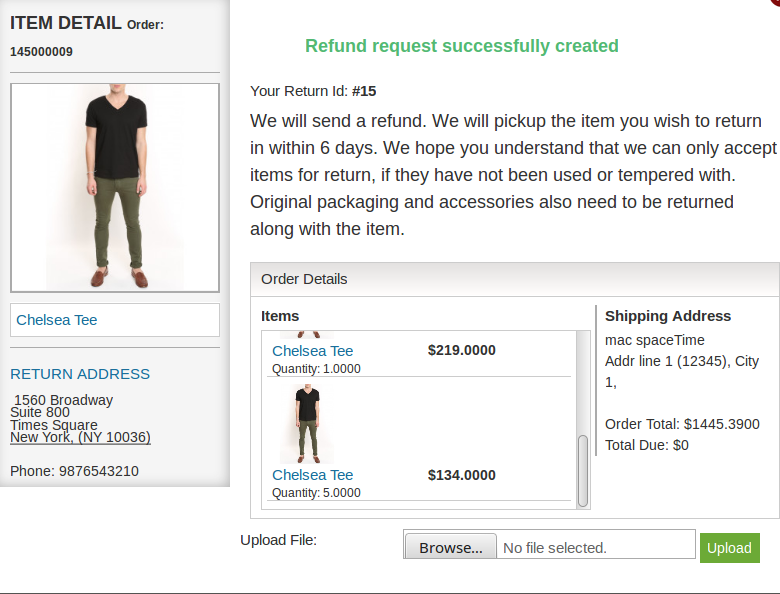
The customer has to fill the above form and then click on submit then a success form will appear showing the successful submission of the return request as shown below :
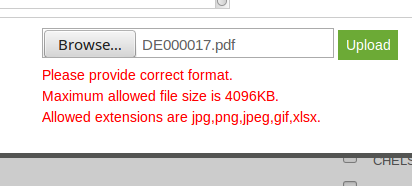
There is as option to upload files in the success page. From where you can upload file and admin can view/download that file from aamin panel. File limitations are set from admin panel.
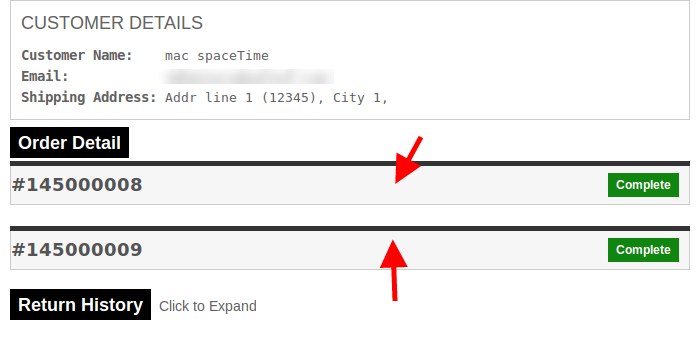
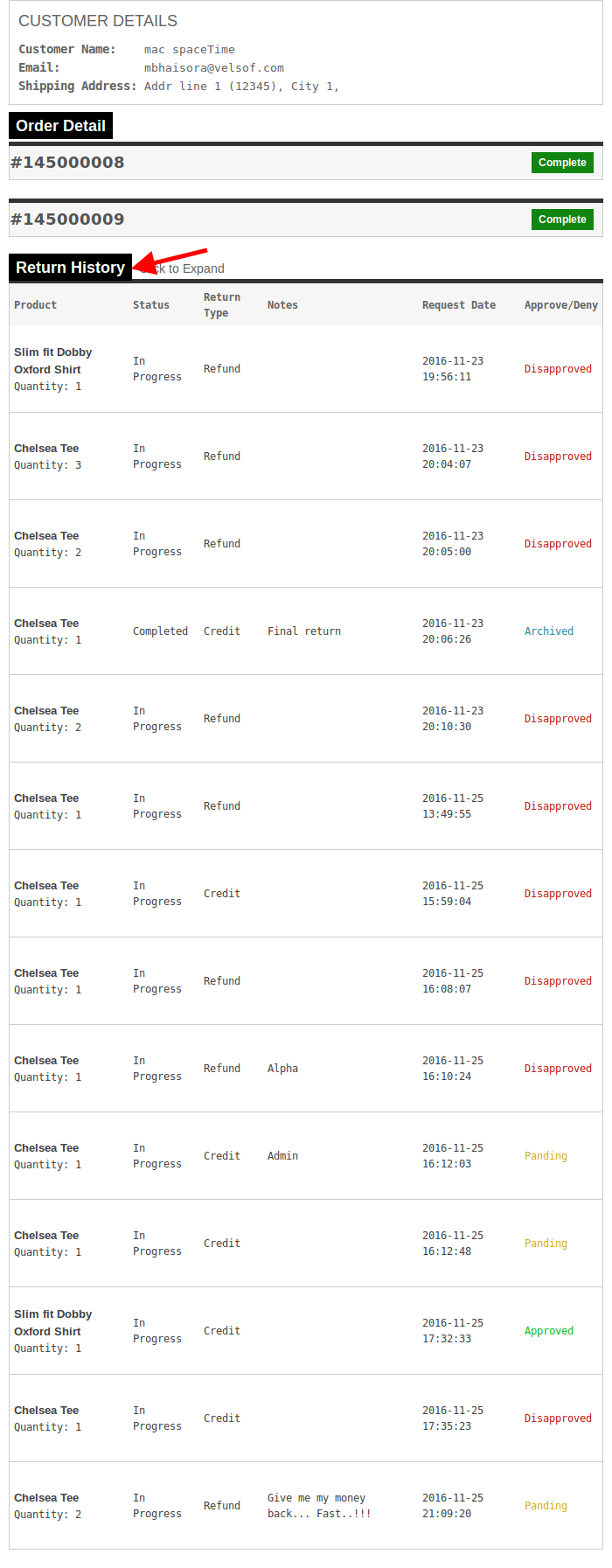
– In case the user is a registered customer and is logged into the website then the page will contain a list of all the orders placed by the customer. The page will appear as follows:
There will be the details of every order. We can expand any of the order division (will have to click where the arrows are pointed). On click the respective order division will be expended.
To view all the history of the return requests, user will have to expand the “Return History” tab.
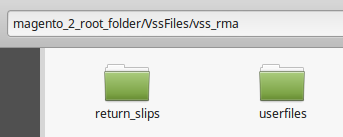
Additional Notes: Please make sure that there is a folder in you magento root directory named VssFiles. Inside VssFiles, one folder called “vss_rma” should exist and two more folders should be created (if not exist) inside “vss_rma” folder. Names of the folders inside “vss_rma” are “return_slips” and “userfiles”.
“magento_2_root_folder” is the same folder (directory) in which other folders like “app”, “bin” etc exist. “return_slips” folder contains all the slips generated during return process and customers can download return slip and the “userfiles” folder is the folder where files uploaded by users are stored.
After creating folders please give all of these folders full permissions. If folders exist already, then also give full permissions (-w-r-x).
In the updated version of Magento 2 Return Manager module, the online users get an option to cancel their orders:
The online users can also place return request as shown below:
Online users can select from multiple addresses as shown below:
This way, the online merchant can manage product returns easily on the website and make the overall process simple for online users. The Magento 2 return manager extension is highly customizable and offers a user-friendly interface to the users. The Magento 2 order return manager extension is mobile responsive ie. the online users can also view the return related details on their mobile devices. Magento 2 refund order Extension allows adding multiple return reasons, set return policies and default return status from the admin interface. The Magento 2 return product extension makes it easy to check return related details through pending, archive and approved request details.
For more details about this Magento 2 return manager extension, Visit here:
Magento 2 platform has arrived in the eCommerce business scenario quite a few days back. With this latest release, there are numerous store owners who might be thinking about making a quick transition on this eCommerce platform. The idea is actually good and a right decision for your store considering the multiple features and functionalities contained by this recent Magento upgrade. However, you need to show certain restraint towards this accomplishing hasty step as it might affect your business chances and conversions. Here are the few things or areas that needs to be handled while taking the first step towards Magento 2 migration.
1. Availability of limited extensions and themes for your store
Due to the recent introduction of this Magento 2 platform, there are limited number of extensions and themes that are created for this recent upgraded platform. There are various important extensions that are still not part of this new eCommerce platform which could affect the performance and productivity of your online store. If you want any specific Magento 2 extensions for any particular task on your site, you can visit our Knowband store and can select the desired plugin for your business.
2. Requirement of an effective hosting environment
If you want to drive maximum output out of this new upgraded Magento platform, it is advised to utilize the services of an optimized hosting platform that can serve the upgraded versions like PHP 7.0.2 and MySQL 5.6. You can also check out Nginx 1.8 web server as well as Apache 2.2 or 2.4 platform for this new Magento 2 platform. This upgraded eCommerce platform achieves higher speed benefits through Redis and Varnish also. Besides this, the Enterprise Edition of Magento platform can utilize web server like Apache Solr 4.x for search purposes and data distribution on three database masters. Don’t overlook these crucial parameters while deciding the appropriate web hosting server for your site.
3. Absence of required technical expertise and assistance
Being the recent upgrade, Magento platform developers don’t have all the finalized certification avenues for the new upgraded platform. There are increased chances that developers who are proficient in Magento 1 may not work properly on this new Magento 2 platform due to the limited exposure and information. It is importance to look out for a superb Magento developers that can carry out the various customization task without any problem. Handing over your Magento site to any inexperienced developers can cost you dearly in terms of conversion rates as they are not following Magento best practices.
4. Amount of cost involved in the migration process
Before planning the migration activity for this new upgraded Magento version, it is important to consider the cost that is involved in this entire critical process. Due to the difference in the platform architecture and theme, it would cost you good bucks while migrating your entire store to this new Magento 2 platform. But, there is a news of respite for you as the platform provides Magento 2 migration guide for a seamless transition.
5. Limited integration services
With the constant expansion and growth of your eCommerce business, it is imperative to add new third party Magento 2 extensions and API (Application programming interface) services. You may require the modules for various tasks like shipping, product management, omni channels sales and other such activities. With the migration of your platform, it may happen that these modules may not work properly with the new upgraded version due to unavailability of custom connectors which could cause problem in the integration services.
Once, you are well aware about the possible roadblocks in the path of migration journey towards Magento 2 platform, there are more chances of successful transition. Remember it is better to “Look before you actually leap” in order to avoid the severe consequences in a particular field. With a clear knowledge about the challenges, store owners can seamlessly upgrade their Magento store towards this new upgraded platform.


-300x300.webp)