With the huge involvement of the internet in daily lives, a large number of customers are buying products online globally. The advancement of the eCommerce industry is flourishing day by day. If you are a retailer then the idea to sell online could never go wrong. Selling online expands your reach globally. This helps the online marketplace to make more profits than usual.
There are numerous ways of selling online apart from starting an online website. Retailers can even sell their products through renowned marketplaces. The growing competition among sellers encourages them to implement some new strategies to attract more customers to your product. Selling on Marketplace like eBay, Etsy, Walmart, etc could be a bet as they can easily give a brand more exposure. and get you instant access to a vast number of potential customers.
If you create your own eCommerce website, you can get full control, large profits, higher scalability. It can become costly for you as setting and promoting a niche brand requires high investments. But if you choose a marketplace, you could sell your products online with certain control but will be able to leverage the global reach and services of a Marketplace. Customers often prefer buying products from Marketplaces because of the wide variety of products and the ease of all-in-one shopping. Apart from this, selling products on Marketplace could offer you much more.
Marketplace statistics to give a clear idea
- Here is a graph from a similar Web representing the total visits of two famous marketplaces Amazon and eBay.
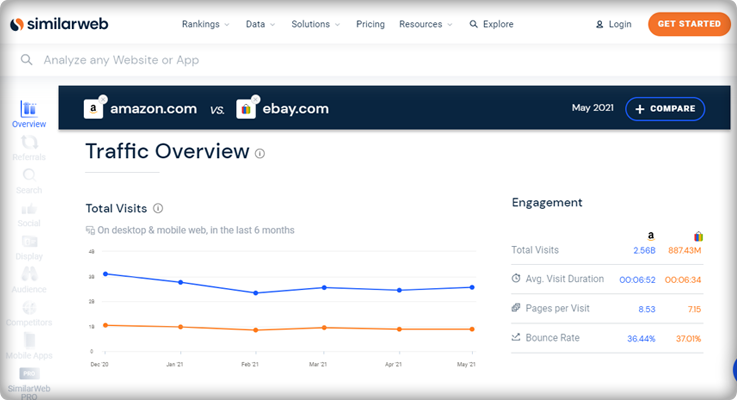
- In a recent blog, published by the webretailer, Amazon is still on the top, surpassing every other marketplace. It gets around 5.2B visits every month.
- The report includes data for 155 most visited marketplaces with more than one million visitors per month. And eBay ranks 2nd globally in the similarweb reports.
- The top 20 marketplaces have a collection of general merchandise except 3 that sells specific product categories, eg. Etsy.
- General, Fashion, Arts, crafts and gifts, Homewares, and Electronics are the top five product categories among the popular marketplaces.
Top 5 Marketplaces in India
- Amazon India
- Flipkart
- Snapdeal
- Myntra
- Shopclue
Top 5 Marketplaces in Spain
- Amazon Spain
- Milanuncios
- El Corte Ingles
- Ali Express
- eBay Spain
Top 5 Marketplaces in Italy
- Amazon Italy
- eBay Italy
- Mediaworld
- Unieuro
- AliExpress Italiano
Top 5 Marketplaces in Poland
- Allegro
- Ceneo
- Chrono24
- Showroom
- Domodi
Top 5 Marketplaces in France
- Amazon FR
- Cdiscount
- eBay FR
- Leroy Merlin
- Fnac
Top 5 Marketplaces in Germany
- Amazon Germany.
- eBay Germany.
- eBay Kleinanzeigen.
- Otto
- Idealo
Below are some of the reasons to start selling products on Marketplace:
1. Huge audience access:

The huge popularity of Marketplace like Etsy, eBay, Walmart, etc. for online shopping automatically provides you the accessibility to all its customers without having to spend any money on marketing. It’s a good opportunity for small business owners to gain good profits without any advanced investments.
2. Low Startup Cost:

As Marketplace has all things set up in one place, the retailer has to hardly make any investments other than some few expenses. Thus, the minimal cost is involved in selling on a Marketplace in comparison to selling on your own eCommerce website. For example Marketplaces like Amazon, Walmart, etc charges:
- Monthly Subscription Fee for selling on their platforms
And, - Listing Fee or Commission which is a standard amount for every product they listed on the Marketplace’s catalog.
3. To increase trust level:

It usually happens that the users buy the same product as yours from the Marketplace due to a lack of trust. Once your product reaches Marketplace, it will get more exposure and this will definitely motivate the users to go for instant purchase. It’s also beneficial in getting high sales and revenues too.
4. To reach Global Market:
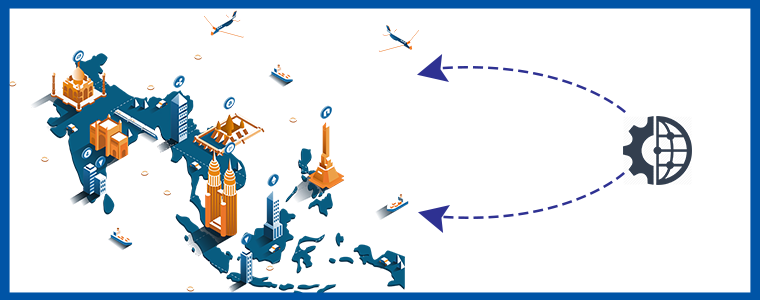
Marketplaces provide you an option to expand your business reach globally with minimal effort. Sellers can access millions of potential customers globally without making any advance investments. This would definitely boost up your cross-border sales and overall business growth. For example, Amazon, Walmart, Etsy eBay are top leading Marketplaces serving millions of online customers all over the world
5. Enhance your brand’s visibility:

If you are a newbie in the eCommerce industry, it’s obvious that customers are unaware of your brand and products. You surely need recognition in the market. Marketplaces like eBay, Etsy, and Walmart help you to boost up your brand and visibility by listing all your products on their web page.
6. Deliver outstanding customer service
There are similar options to help sellers fulfill customer standards for quick, free delivery. They have their customer care teams that work 24/7 for customer service and to resolve their real-time issues.
For example, with programs such as Fulfillment by Amazon (FBA) and eBay Global Shipping, you can choose to have on your behalf the marketplace warehouse, pick, prepare, and ship product.
7. Provides a broad variety of payment and shipping options
For quick purchases, the marketplace offers different payment and shipping methods. A seller does not have to worry about shipping while selling over different marketplaces.
Dropshipping is another trending feature provided by many marketplaces. While some allow the sellers to add their shipping methods or the seller can use the marketplace shipping services.
8. Extremely authoritative and trustworthy
Many eCommerce experts may contradict this but some may take the favor. Marketplace like Amazon is a safe and reliable place for the transaction. They provide secured options for payments and are integrated with various payment gateways.
Similarly, many online marketplace platforms are secured with PayPal security. It is the most trustworthy payment method worldwide.
Expert Sayings:
1. Yasuhiro Fukushima, Japanese business executive -“Thus, in the future, instead of buying bananas in a grocery store, you could go pick them off a tree in a virtual jungle.”
2. Paul Graham, Y COMBINATOR – You can’t wait for customers to come to you. You have to figure out where they are, go there and drag them back to your store.”
3. Mudit Khosla, CEO, Tradus: If one chooses to sell through a Marketplace, then there is very less requirement of working capital unless there is a deal; there are no rentals involved.
4. Ankur Sethi, Founder & CEO, Nupinch.com: If any local retailer wants to reach a million customers to just showcase the products, he’ll end up spending some fairly huge cash. Whilst, these Marketplaces act as a channel partner & help you reach millions of users, to some really deep parts of the countries & in turn push your sales exponentially.
Make more out of Marketplaces:
- Sellers should register themselves on all possible Marketplaces and make more ways of earning revenues.
- At the initial level, try to provide some discounts and offers to attract more customers to your product.
- Keep a check on the customer reviews about your product and try to appreciate them or address their concerns. This strategy helps in making loyal customers.
- Always remain aware of the latest trends and technical advancements of selling online.
Choosing the right Marketplace:
Selling through online Marketplaces like Walmart, eBay, Etsy is definitely a great option for an eCommerce retailer but choosing the right one for your business is the basic step to lead. Well, it totally depends on the product type and category of your store. Every Marketplace has its own standardized process of registration, requirements, terms, and conditions, etc. Sellers must go through these instructions and understand that which website will provide the right positioning and brand value to their product. One of the main things on which retailers should keep a check while choosing the right Marketplace is the traffic of the website. The more is the traffic, the more numbers of orders he can get for his products.
6 points to check about a Marketplace:
Although each Marketplace works differently there are some points that are similar in between them and are also a must check for a seller. They are:
- Website Traffic
- Reputation between customers
- Stability
- Checkout process
- Policies and Guidelines
- UI of Marketplace
The most important feature of a Marketplace is that it must provide a user-friendly interface to the customers. Sellers need to keep a check on this feature as they may face an issue in case the product is returned. Many times, the marketplace does not hesitate to accept the product which is returned without even questioning the buyer, thus this may incur a loss for the seller. So, it’s important for a seller to make the right choice for massive sales and overall business growth.
Start a Hyperlocal Marketplace that serves locally
With the clear idea of marketplace selling benefits, you can choose the right platform for your brand. Multichannel selling is profitable and builds your brand identity. Along with that, you can start selling your products locally. To make it painless, start with an online website using KnowBand’s hyperlocal marketplace module. You can deliver the products to your customers at their doorstep. You will need a delivery boy app that will allow you to manage the package delivery process. There is more to learn about it.
Over to you:
The less complexity involved with selling on a marketplace is inevitable for sellers. It’s really necessary to give an enhanced recognition to your business and Marketplace suits perfect for the job. So, regardless of the marketplace, you choose to sell on, it’s important to be aware of the latest trend going on in the eCommerce industry and implement it for a profitable business in the future.
This was all from my end, now it’s totally up to you to select a Marketplace according to the products of your store for the overall growth of your business.
Selling on Marketplace was not that easy before. Integrate your eCommerce store with the Marketplaces like Etsy, eBay, Walmart, and others in just a few simple steps. KnowBand offers Marketplace Integrators for various CMS platforms like PrestaShop, OpenCart, Magento, and Shopify which allows you to present your products to a larger audience and encourage brand awareness as well.
Find out more articles here:
How to get a Marketplace site: a step by step guide
Ecommerce Marketing Calendar 2021
Best eCommerce platforms for starting a multi-vendor marketplace
5 Ways to Attract Sellers on your Online Multi vendor Marketplace