An online store can’t survive in this tough competitive business environment through a properly maintained product and inventory management alone. With the passage of time, it is important to take the help of various engaging modules for your eCommerce store which may be built on various platforms. You may be satisfied with your OpenCart store in terms of its performance but it do needs the assistance of various modules for accomplishing numerous critical tasks in a seamless manner.
No doubt, OpenCart modules are the necessity for multiple OpenCart stores around the world to emerge ahead from their competitors. Ignoring these modules can turn out to be the grave mistakes in terms of customer engagement, product sales and conversion rates. However, there could be few people who may not be aware about the importance of modules in eCommerce business environment and may consider it as the sole wastage of money only. Let us discuss the reasons for the use of these modules on your online store.
They can be easily designed and developed
One of the prime reason for the increasing popularity of OpenCart modules in eCommerce field is the fact that OpenCart platform is based on the Model View Controller (MVC) pattern. Due to this architecture, anyone with the required knowledge about PHP and MySQL can effortlessly create and develop customized OpenCart modules for online businesses. The OpenCart module development process requires the creation of four files namely, Controller, Model, View and a language file. However, if you need any type of assistance in developing various customized modules for your OpenCart store, you can avail the OpenCart module development services of Knowband for getting a module as per your business requirements.
OpenCart modules are easy to handle
It is a common scenario that not all eCommerce store owners are tech savvy and may not be good at handling any module. Due to this user access restriction, OpenCart modules are built on a user friendly interface that makes it easier for site admin to perform various back end changes in a quick and smooth manner. Site admin just have to login to the back end of their OpenCart store and then move towards the System option to perform required module customizations.
They can help in improving the checkout process of a site
Checkout process is one of the foremost component that can either increase or decrease the product sales of an online store. You need to provide a simplified online shopping experience to customers through the help of various OpenCart checkout plugins for online stores. Knowband store also offers a wide range of checkout plugins for various eCommerce platforms like Magento, OpenCart and PrestaShop. Some of its amazing checkout plugins for OpenCart store owners are OpenCart One Page Checkout Pro, OpenCart One Page Checkout, OpenCart PDF Invoice Plugin and much more.
The modules can boost sales and site traffic for OpenCart stores
With the spread of numerous OpenCart stores, the pressure of getting more sales and traffic are also surging higher. With these concerns, it is important to boost sales of your OpenCart stores to establish your brand identity and reputation. For OpenCart site owners who are not having optimum sales, it is time for them to start utilizing the OpenCart modules for eCommerce sales for grabbing maximum sales and conversions. You can take the help of any of these OpenCart modules such as OpenCart Scratch Coupon, OpenCart Abandoned Cart, OpenCart Price Alert, OpenCart Social Loginizer, OpenCart Sales Coupon Enhancer, OpenCart Deal Timer and others for enhancing your product sales, customer engagement and conversion rates.
It is the most ideal time to grab the required conversions and sales for your OpenCart store with the help of various OpenCart modules. With the help of the above points, it could be easily understood that OpenCart modules are an indispensable part of every OpenCart store and they need to be included without any second thought. Come and visit Knowband store for availing a wide range of OpenCart stores to accomplish various site tasks in a quick and flawless manner.
Online customer reviews deliver positive and negative both aspect of your online business, which includes products, services, supports, buy interactions and many others. According to a survey, 70% of customers firstly go through the reviews and then makes the final purchase.
The Prestashop Review Booster Addon by Knowband reminds your customers to write the reviews about the product they’ve purchased. This not only increases the trust of your customers but also increases customer’s engagement towards your store.
Steps For Installation of Prestashop Review Booster Addon
To install this store review addon by Knowband, please follow the following steps:
1. Add addon folder under modules folder of your system.
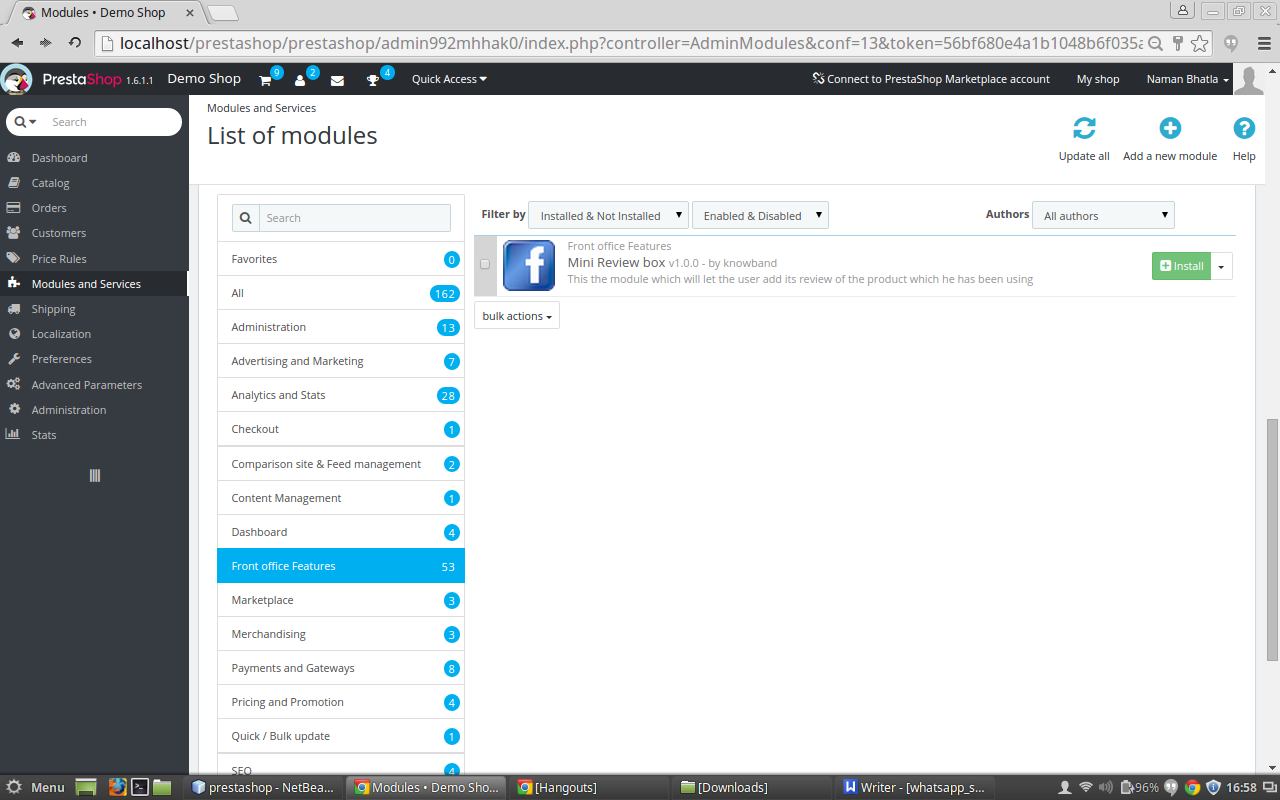
2. After adding this addon folder, system will list the addon on module page under front office feature category as given below:
3. Click on install to install the plugin
Admin Interface
The Prestashop get review addon provides following interfaces to the admin:
1. General Settings
2. Advance Settings
General Settings:
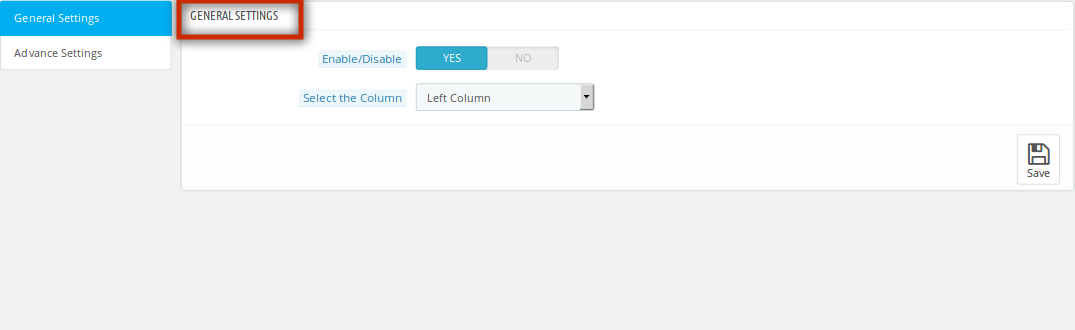
After clicking on configure link of Prestashop review booster addon on module listing page, system will open general settings tabs by default as shown in screen below:
Fields listed will be filled with some default values
GENERAL SETTINGS TAB DETAILS:
Enable/Disable : The Prestashop review manager addon allows the admin to enable/disable tha addon functionality by turning this ON/OFF.
Select the Column : This will be a drop down list of columns where we can display this Prestashop get review addon by Knowband. By default its value will be the left column. The admin can change it to right column by choosing the option given in this drop down menu..
Advance Settings
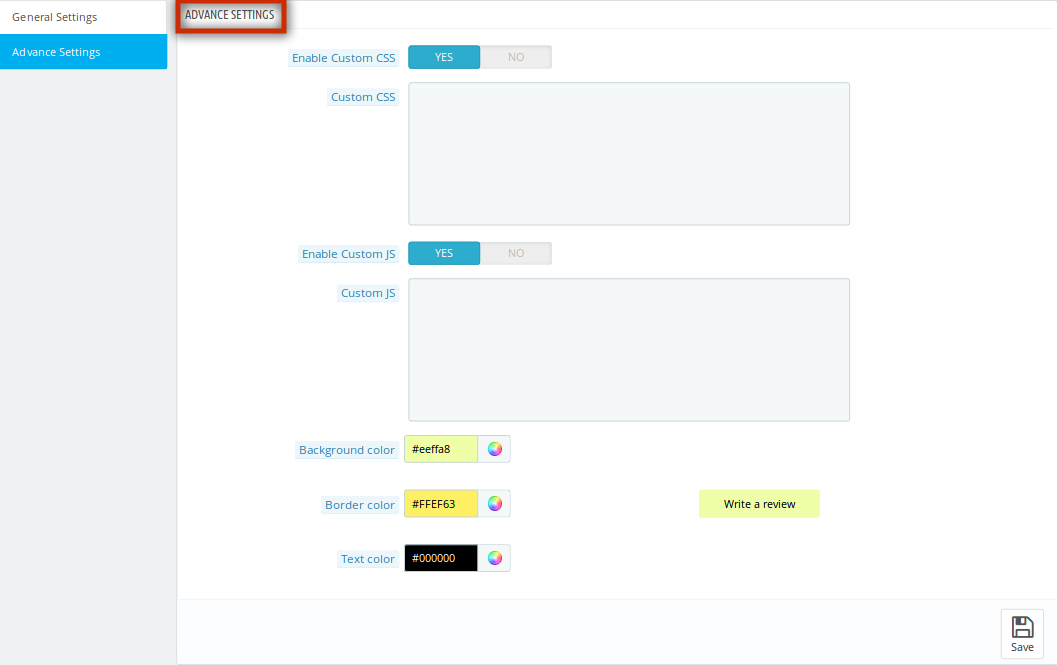
After clicking on the advance settings tab the below screen appears.
ADVANCE SETTINGS TAB DETAILS:
Enable/Disable Custom CSS: This enable/disable button of Prestashop review incentive addon by Knowband will help the store owner to set the status of the custom CSS which will be entered in the next field.
Custom CSS: This field of product review addon will be a text area in which the shop owner can enter the CSS code which he wants to show up in the front end of the shop.
Enable/Disable Custom JS: This enable/disable button of Prestashop store review addon will help the store owner to set the status of the custom JS which will be entered in the next field.
Custom JS: This field of Prestashop plugin by Knowband will be a text area in which the admin can enter the JS code which he wants to show up in the front end of the shop
Background Color: In this color picker option of Prestashop plugin, the admin can select the background color of the button.
Text Color: This field of store review addon by Knowband offers the admin to select the color of the text of the button.
Border Color: In this color picker, the admin can decide the color of the border of the button.
Front End Module:
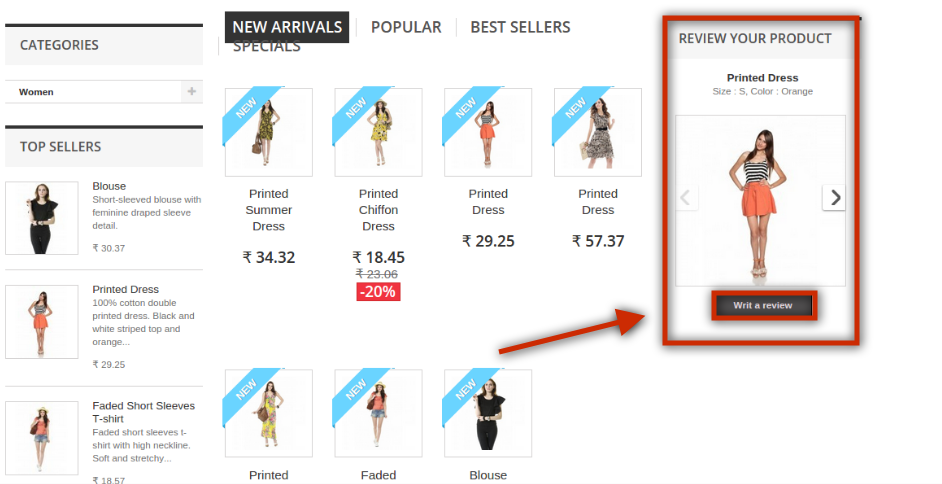
After enabling the Prestashop review manager plugin by Knowband, the front-end user will see the box appearing in any of the column which the admin has selected in the back end of this Prestashop module. Even the changes which the admin has made in the back end of the module will appear with the box in the front end
The Prestashop plugin at the front-end appears as follows:
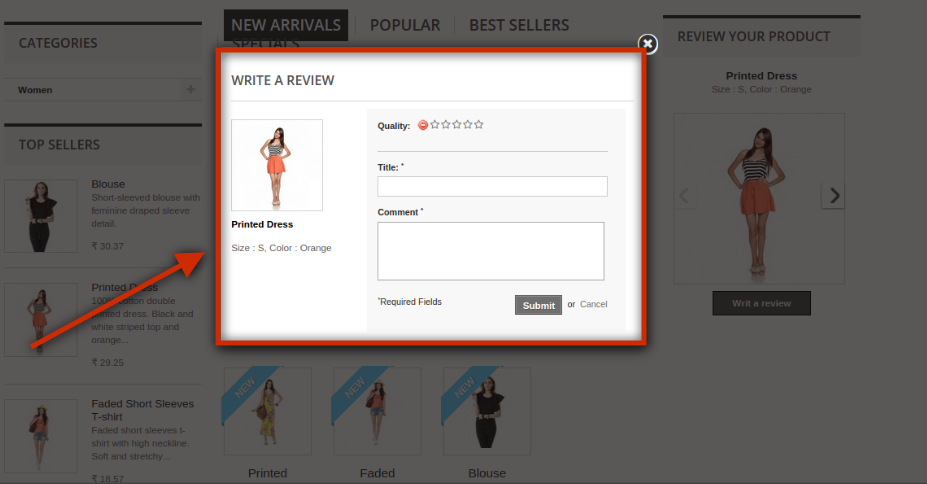
AFTER CLICKING ON THE REVIEW BUTTON
User can add the review in the fields given in this particular form and as soon as he will submit the form, the comments will be saved and this product will be marked as reviewed and will not be shown again.
Recommendations :
Refresh home page of your store every time you enable/disable the plugin. If plugin is not working after installation then please check permissions on modules folder. The folder should be writable. Please make the folder permission to 755.
Online-Kundenbewertungen liefern sowohl positive als auch negative Aspekte Ihres Online-Geschäfts, das Produkte, Dienstleistungen, Support, Kaufinteraktionen und viele andere umfasst. Laut einer Umfrage gehen 70% der Kunden zuerst die Bewertungen durch und machen dann den endgültigen Kauf.
Die Prestashop Rezension Booster Addon von Knowband erinnert Ihre Kunden daran, die Bewertungen über das Produkt zu schreiben, das sie gekauft haben. Dies erhöht nicht nur das Vertrauen Ihrer Kunden, sondern erhöht auch die Kundenbindung an Ihr Geschäft.
Schritte für die Installation von Prestashop Review Booster Addon
Um dieses Store Review Addon von Knowband zu installieren, folgen Sie bitte den folgenden Schritten:
1. Fügen Sie den Addon-Ordner unter Module-Ordner Ihres Systems hinzu.
2. Nach dem Hinzufügen dieses Addon-Ordners zeigt das System die Addon-On-Modul-Seite unter der Front-Office-Feature-Kategorie wie folgt an:
3. Klicken Sie auf Installieren, um das Plugin zu installieren
Admin-Schnittstelle
Das Prestashop Get Review Addon stellt dem Admin folgende Schnittstellen zur Verfügung:
1. Allgemeine Einstellungen
2. Erweiterte Einstellungen
Allgemeine Einstellungen:
Nach dem Klicken auf den Link Prestashop Review Booster Addon auf der Modulliste konfigurieren öffnet das System standardmäßig die Registerkarten mit den allgemeinen Einstellungen, wie im folgenden Bildschirm gezeigt:
Die aufgeführten Felder werden mit einigen Standardwerten gefüllt
ALLGEMEINE EINSTELLUNGEN TAB DETAILS:
Aktivieren deaktivieren : Das Prestashop Review Manager Addon erlaubt es dem Admin, die Addon-Funktionalität durch Ein- / Ausschalten zu aktivieren / deaktivieren.
Wählen Sie die Spalte: Dies wird eine Drop-Down-Liste von Spalten, wo wir dieses Prestashop Get Review-Addon von Knowband anzeigen können. Standardmäßig ist der Wert die linke Spalte. Der Administrator kann sie in die rechte Spalte ändern, indem er die Option in diesem Dropdown-Menü auswählt.
Erweiterte Einstellungen
Nach dem Klicken auf die Registerkarte Erweiterte Einstellungen erscheint der folgende Bildschirm.
VORAUS EINSTELLUNGEN TAB DETAILS:
Aktivieren / Deaktivieren von benutzerdefiniertem CSS: Diese Aktivierung / Deaktivierung-Schaltfläche von Prestashop Review-Incentive-Addon von Knowband hilft dem Geschäftsinhaber, den Status des benutzerdefinierten CSS festzulegen, das im nächsten Feld eingegeben wird.
Benutzerdefinierte CSS: Dieser Bereich des Produkt-Review-Addons wird ein Textbereich sein, in dem der Shop-Betreiber den CSS-Code eingeben kann, den er im Frontend des Shops anzeigen möchte.
Aktivieren / Deaktivieren von Custom JS: Diese Schaltfläche zum Aktivieren / Deaktivieren des Prestashop Store Review Addons hilft dem Besitzer des Geschäfts, den Status des benutzerdefinierten JS festzulegen, der im nächsten Feld eingegeben wird.
Benutzerdefiniertes JS: Dieses Feld des Prestashop-Plugins von Knowband wird ein Textbereich sein, in den der Admin den JS-Code eingeben kann, den er im Frontend des Shops anzeigen möchte
Hintergrundfarbe: In dieser Farbauswahloption des Prestashop-Plugins kann der Administrator die Hintergrundfarbe der Schaltfläche auswählen.
Textfarbe: Dieses Feld von Store Review Addon von Knowband bietet dem Administrator an, die Farbe des Textes der Schaltfläche auszuwählen.
Randfarbe: In diesem Farbwähler kann der Administrator die Farbe des Randes der Schaltfläche festlegen.
Front-End-Modul:
Nachdem Sie das Prestashop Review Manager Plugin von Knowband aktiviert haben,
Das Prestashop-Plugin am Frontend sieht folgendermaßen aus:
NACH DEM ANKLICKEN DES REVIEW-TASTS
Der Benutzer kann die Rezension in den Feldern hinzufügen, die in diesem Formular angegeben sind, und sobald er das Formular abschickt, werden die Kommentare gespeichert und dieses Produkt wird als überprüft markiert und nicht mehr angezeigt.
Empfehlungen :
Aktualisieren Sie die Startseite Ihres Shops jedes Mal, wenn Sie das Plugin aktivieren / deaktivieren. Wenn das Plugin nach der Installation nicht funktioniert, überprüfen Sie bitte die Berechtigungen für den Modulordner. Der Ordner sollte beschreibbar sein. Bitte machen Sie die Ordnerberechtigung für 755.
Introduzione del componente aggiuntivo Booster di Prestashop Review:
Le recensioni dei clienti online forniscono sia aspetti positivi che negativi del tuo business online, che comprende prodotti, servizi, supporti, interazioni d'acquisto e molti altri. Secondo un sondaggio, 70% dei clienti passa prima attraverso le recensioni e quindi effettua l'acquisto finale.
La Rassegna di Prestashop Addon di Knowband ricorda ai tuoi clienti di scrivere le recensioni sul prodotto che hanno acquistato. Ciò non solo aumenta la fiducia dei tuoi clienti ma aumenta anche l'impegno del cliente nei confronti del tuo negozio.
Passi per l'installazione del componente aggiuntivo Booster di Prestashop Review
Per installare questo addon review del negozio da Knowband, si prega di seguire i seguenti passi:
1. Aggiungi la cartella addon nella cartella modules del tuo sistema.
2. Dopo aver aggiunto questa cartella del componente aggiuntivo, il sistema elencherà l'addon nella pagina del modulo sotto la categoria delle funzioni di front office come indicato di seguito:
3. Clicca su Installa per installare il plugin
Interfaccia di amministrazione
L'addon di revisione di Prestashop fornisce le seguenti interfacce all'amministratore:
1. impostazioni generali
2. Impostazioni avanzate
Impostazioni generali:
Dopo aver fatto clic sul collegamento di configurazione del componente aggiuntivo Booster di revisione Prestashop nella pagina di elenco dei moduli, il sistema aprirà le schede delle impostazioni generali per impostazione predefinita come mostrato nella schermata seguente:
I campi elencati saranno riempiti con alcuni valori predefiniti
DETTAGLI DELLA SCHEDA IMPOSTAZIONI GENERALI:
Abilita / Disabilita: L'addon del revisore di Prestashop consente all'amministratore di abilitare / disabilitare la funzionalità di addon attivando / disattivando questo.
Seleziona la colonna: Questo sarà un elenco a discesa di colonne in cui possiamo visualizzare questo componente aggiuntivo di revisione di Prestashop da Knowband. Di default il suo valore sarà la colonna di sinistra. L'amministratore può cambiarlo nella colonna di destra scegliendo l'opzione fornita in questo menu a discesa.
Impostazioni avanzate
Dopo aver fatto clic sulla scheda delle impostazioni avanzate, viene visualizzata la schermata seguente.
DETTAGLI DELLA SCHEDA DELLE IMPOSTAZIONI ANTICIPATE:
Abilita / Disabilita CSS personalizzato: Questo pulsante abilita / disabilita l'addon di incentivi di revisione Prestashop di Knowband aiuterà il proprietario del negozio a impostare lo stato del CSS personalizzato che verrà inserito nel campo successivo.
CSS personalizzato: Questo campo di aggiunta di recensioni di prodotti sarà un'area di testo in cui il proprietario del negozio può inserire il codice CSS che desidera mostrare nella parte anteriore del negozio.
Abilita / Disabilita JS personalizzato: Questo pulsante di abilitazione / disabilitazione del componente aggiuntivo di revisione del negozio Prestashop aiuterà il proprietario del negozio a impostare lo stato del JS personalizzato che verrà inserito nel campo successivo.
JS personalizzato: Questo campo di plug-in Prestashop di Knowband sarà un'area di testo in cui l'amministratore può inserire il codice JS che desidera mostrare nella parte anteriore del negozio
Colore di sfondo: In questa opzione di selezione colori del plug-in Prestashop, l'amministratore può selezionare il colore di sfondo del pulsante.
Colore del testo: Questo campo di valutazione del negozio di Knowband offre all'amministratore di selezionare il colore del testo del pulsante.
Colore del bordo: In questo selettore di colori, l'amministratore può decidere il colore del bordo del pulsante.
Modulo Front End:
Dopo aver abilitato il plugin del gestore delle revisioni di Prestashop da Knowband,
Il plug-in Prestashop nel front-end appare come segue:
DOPO CLIC SUL PULSANTE DI REVISIONE
L'utente può aggiungere la recensione nei campi indicati in questo particolare modulo e non appena avrà inviato il modulo, i commenti verranno salvati e questo prodotto sarà contrassegnato come revisionato e non verrà più mostrato.
raccomandazioni :
Aggiorna la pagina iniziale del tuo negozio ogni volta che attivi / disattiva il plug-in. Se il plug-in non funziona dopo l'installazione, controllare le autorizzazioni sulla cartella dei moduli. La cartella dovrebbe essere scrivibile. Si prega di rendere l'autorizzazione della cartella a 755.
Wprowadzenie dodatku Booster do Prestashop Review:
Opinie klientów online zapewniają pozytywny i negatywny aspekt zarówno działalności online, w tym produktów, usług, pomocy technicznej, zakupów interakcji i wielu innych. Według ankiety 70% klientów najpierw przegląda opinie, a następnie dokonuje ostatecznego zakupu.
SOCZEWKI Prestashop Review Booster Addon by Knowband przypomina swoim klientom o pisaniu recenzji o zakupionym produkcie. To nie tylko zwiększa zaufanie klientów, ale także zwiększa zaangażowanie klienta w Twój sklep.
Kroki do instalacji dodatku do Boosta Review Prestashop
Aby zainstalować ten sklep, zapoznaj się z dodatkiem od Knowband, wykonaj następujące czynności:
1. Dodaj dodatkowy folder w folderze modules twojego systemu.
2. Po dodaniu tego folderu dodatku, system wyświetli listę dodatków na stronie modułu w kategorii funkcji front office, jak podano poniżej:
3. Kliknij instaluj, aby zainstalować wtyczkę
Interfejs administracyjny
Dodatek do recenzji Prestashop get zawiera następujące interfejsy do administratora:
1. Ustawienia główne
2. Ustawienia zaawansowane
Ustawienia główne:
Po kliknięciu na link konfiguracyjny dodatku do przeglądu Prestashop na stronie z listą modułów, system otworzy zakładki ustawień ogólnych, jak pokazano na ekranie poniżej:
Wymienione pola zostaną wypełnione pewnymi wartościami domyślnymi
USTAWIENIA OGÓLNE DANE TABELI:
Włącz / wyłącz: Dodatek do zarządzania recenzjami Prestashop pozwala administratorowi włączyć / wyłączyć funkcję addon poprzez włączenie / wyłączenie tej opcji.
Wybierz kolumnę: To będzie rozwijana lista kolumn, w których możemy wyświetlić ten dodatek do recenzji Prestashop przez Knowband. Domyślnie jego wartością będzie lewa kolumna. Administrator może zmienić go na prawą kolumnę, wybierając opcję podaną w tym rozwijanym menu.
Ustawienia zaawansowane
Po kliknięciu na zakładkę ustawień zaawansowanych pojawia się poniższy ekran.
USTAWIENIA ADVANCE TAB SZCZEGÓŁY:
Włącz / wyłącz niestandardowe CSS: Ten przycisk włączania / wyłączania dodatku zachęty do przeglądu Prestashop przez Knowband pomoże właścicielowi sklepu ustawić status niestandardowego CSS, który zostanie wprowadzony w następnym polu.
Niestandardowe CSS: To pole dodatku do recenzji produktu będzie obszarem tekstowym, w którym właściciel sklepu może wpisać kod CSS, który chce pokazać na początku sklepu.
Włącz / wyłącz niestandardowy JS: Ten przycisk włączania / wyłączania dodatku do recenzji sklepu Prestashop pomoże właścicielowi sklepu ustawić status niestandardowego JS, który zostanie wprowadzony w następnym polu.
Niestandardowy JS: To pole wtyczki Prestashop od Knowband będzie obszarem tekstowym, w którym administrator może wpisać kod JS, który chce pokazać na początku sklepu
Kolor tła: W tej opcji selektora kolorów wtyczki Prestashop administrator może wybrać kolor tła przycisku.
Kolor tekstu: To pole dodatku do recenzji sklepu przez Knowband oferuje adminowi wybór koloru tekstu przycisku.
Kolor ramki: W tym selektorze kolorów administrator może zdecydować o kolorze obramowania przycisku.
Moduł czołowy:
Po włączeniu wtyczki Prestashop review manager od Knowband,
Wtyczka Prestashop na interfejsie użytkownika wygląda następująco:
PO KLIKNIĘCIU NA PRZYCISKU PRZEGLĄDU
Użytkownik może dodać recenzję w polach podanych w tym konkretnym formularzu, a gdy tylko prześle formularz, komentarze zostaną zapisane, a produkt zostanie oznaczony jako sprawdzony i nie będzie ponownie wyświetlany.
Zalecenia :
Odśwież stronę główną swojego sklepu za każdym razem, gdy włączasz / wyłączasz wtyczkę. Jeśli wtyczka nie działa po instalacji, sprawdź uprawnienia do folderu modułów. Folder powinien być zapisywalny. Proszę nadać folderowi uprawnienia do 755.
As análises de clientes on-line fornecem aspectos positivos e negativos dos seus negócios on-line, incluindo produtos, serviços, suporte, interações de compra e muitos outros. De acordo com uma pesquisa, 70% dos clientes primeiro passam pelas revisões e, em seguida, fazem a compra final.
O Prestashop Review Booster Addon da Knowband lembra seus clientes para escrever as resenhas sobre o produto que eles compraram. Isso não apenas aumenta a confiança de seus clientes, mas também aumenta o envolvimento do cliente com sua loja.
Passos para a instalação do Preston de revisão de Prestashop
Para instalar este addon de revisão de loja por Knowband, por favor siga os seguintes passos:
1. Adicione a pasta addon na pasta modules do seu sistema.
2. Depois de adicionar esta pasta addon, o sistema irá listar o addon na página do módulo na categoria de recursos front office, conforme abaixo:
3. Clique em instalar para instalar o plugin
Interface de administração
O addon de avaliação Get Prestashop fornece as seguintes interfaces para o administrador:
1. Configurações Gerais
2. Configurações avançadas
Configurações Gerais:
Depois de clicar no link configure do Prestashop review addon de reforço na página de listagem de módulos, o sistema irá abrir as abas de configurações gerais por padrão, como mostrado na tela abaixo:
Os campos listados serão preenchidos com alguns valores padrão
DETALHES DA ABA DAS CONFIGURAÇÕES GERAIS:
Habilitar desabilitar : O addon do gerenciador de revisões do Prestashop permite que o administrador ative / desabilite a funcionalidade addon ativando / desativando essa função.
Selecione a coluna: Esta será uma lista suspensa de colunas onde podemos exibir este addon Prestashop get review by Knowband. Por padrão, seu valor será a coluna da esquerda. O administrador pode alterá-lo para a coluna da direita, escolhendo a opção dada neste menu suspenso.
Configurações avançadas
Depois de clicar na guia de configurações avançadas, a tela abaixo será exibida.
DETALHES DA ABA DE CONFIGURAÇÕES DE AVANÇO:
Ativar / desativar CSS personalizado: Este botão de ativação / desativação do addon de incentivo de revisão Prestashop por Knowband ajudará o proprietário da loja a definir o status do CSS personalizado que será inserido no próximo campo.
CSS customizado: Este campo de addon de revisão de produto será uma área de texto na qual o dono da loja pode inserir o código CSS que ele quer mostrar na frente da loja.
Ativar / desativar o JS personalizado: Este botão habilitar / desabilitar o addon de revisão de loja Prestashop ajudará o proprietário da loja a definir o status do JS personalizado que será inserido no próximo campo.
Custom JS: Este campo do plugin Prestashop da Knowband será uma área de texto na qual o administrador pode inserir o código JS que ele quer mostrar na frente da loja.
Cor de fundo: Nesta opção de seletor de cores do plugin Prestashop, o administrador pode selecionar a cor de fundo do botão.
Cor do texto: Este campo de addon de revisão de loja da Knowband oferece ao administrador para selecionar a cor do texto do botão.
Cor da margem: Neste seletor de cores, o administrador pode decidir a cor da borda do botão.
Módulo Front End:
Depois de ativar o plug-in do gerenciador de revisão Prestashop por Knowband,
O plugin Prestashop no front-end aparece da seguinte forma:
APÓS CLICAR NO BOTÃO DE REVISÃO
O usuário pode adicionar a revisão nos campos dados neste formulário específico e, assim que ele enviar o formulário, os comentários serão salvos e este produto será marcado como revisado e não será exibido novamente.
Recomendações :
Atualize a página inicial de sua loja toda vez que você ativar / desativar o plugin. Se o plugin não estiver funcionando após a instalação, verifique as permissões na pasta modules. A pasta deve ser gravável. Por favor, faça a permissão da pasta para 755.
The interest of customers are changing rapidly due to the tough competitive business environment which is taking a toll on the conversions and sales of an eCommerce store. There are various modules available in the market that can help in reviving the sales for your online store without any glitch. It is often seen that the absence of a simplified checkout process can turn visitors away from an online store.
If you have been finding it difficult to grab sales for your online store, the availability of just One Page Checkout for OpenCart may not fulfill the desired purpose. Here are the two amazing checkout extensions for OpenCart stores for making a strong business impact. Let us discuss the features of these Knowband extensions for grabbing the required conversions on an OpenCart store.
n an eCommerce business environment, the invoice matters a lot for online shoppers as they provides critical information about the orders placed by customers. Now, with the help of this OpenCart plugin for invoice generation, you can get invoice in PDF format through admin panel of your store. It will help you get clear insight about the purchases made by your targeted customers. Here are some of the features of this added extension to One Page Checkout for OpenCart stores for grabbing higher conversions.
– Can be easily installed and configured within few clicks.
– Comes with feature packed admin panel.
– Sends invoice to customers in PDF format along with confirmation mail.
– This feature packed OpenCart module works with numerous themes and stores.
– Site admin can also design and customize invoice according to their business preferences and requirements.
– Offers facility to display/hide store and order related details.
It is really a difficult task to make changes in customer orders due to changing moods and patterns of customers. Earlier, only customers have the authority to make changes in their orders but now store admin can also edit orders placed by the customers in a coherent manner. Take a quick look on the various features of this OpenCart module for order processing as mentioned below:
Supports easy order editing through one page layout design.
Does not require technical support for installation and configuration.
Works uninterrupted with other modules, themes and stores.
Allow customization features through interactive back end admin panel.
Comes with email, export and print packaging slip facilities.
Offers free technical support and future plugin updates.
If you are not getting the desired business results with your One Page Checkout for OpenCart stores, it is time to add these Knowband extensions without any further discussion. These OpenCart plugins are a true complement for a complicated checkout process and can win maximum sales for your online store. Get these plugins now from our Knowband store for a promising business fortune.
Getting customers on an online store is a challenging task and to actually convert these visitors into potential customers is even more difficult. According to various studies and analytics report, it has been observed that the checkout process acts as one of the major obstacles in eCommerce conversions. Moreover, online shoppers have become more impatient and are not willing to make online purchase from an eCommerce store which does not have a simplified checkout process.
Store owners need to remove the various bottlenecks that have been affecting customer engagement on your online store. Make sure that customers don’t have to scratch their head while making an online purchase and checkout process can play a key role in it. Here is a great news for PrestaShop store owners as they can transform their eCommerce store in a big way with the emergence of this PrestaShop One Step checkout module. Let us now check out the various features that can help you in achieving higher conversions and sales for your online store.
Offers ability to design your own checkout page- With this checkout addon for PrestaShop stores, it is now much easier to design and customize the checkout process with great ease. Store admin can choose from available layouts like 1 column design, 2 column design or 3 column design for ensuring a faster online purchase. You can customize your checkout fields and add fields like Guest Checkout and Social Login that provides login/ sign-up support through Facebook, Google and PayPal. In this way, you can transform your multi- page checkout formality into a single page checkout process for grabbing higher conversions and sales.
Comes with multi platform and device compatibility- People now a days are using multiple devices like desktops, laptops, smart phones and tablets to make online purchase. Due to availability of multiple devices, you need to select a checkout addon for multiple devices and screens for better customer targeting. If your eCommerce module can’t address your customers that are using different devices, you will certainly have a hard day in terms of customer engagement, sales and conversions.
Effectively targets multi- lingual customers- Online business is expanding at a rapid rate which consists of numerous customers that hail from different geographical and linguistic regions. It is the USP of this PrestaShop One Step Checkout module that can help in targeting customers of different spoken languages with the help of its efficient translation feature. Now, store owners can improve their conversions to a great extent by providing services or products in the native language of customers.
Does not interfere with any other modules or themes- This PrestaShop One Step Checkout extension is built in such a way that it can work independently with other available eCommerce modules and themes without any hurdle. Store owners can install this checkout module for any PrestaShop theme and can utilize its amazing features and functionalities in a smooth manner. Apart from this, Knowband module does not interfere with the working of any other existing PrestaShop module on your eCommerce store so as to ensure better synchronization and coordination on your PrestaShop store.
Offers free after sales technical support- Number Extension development company can claim a trouble free service of an eCommerce module in the long term business operations. However, thanks to the cost free PrestaShop technical support services of Knowband that can resolve every other issue without any problem. You don’t have to pay a single penny and can report your problem at here for a quick issue resolution. We have a dedicated technical support team that work round the clock to resolve customer and customization related issues in a smooth manner.
If the abandoned carts and bounce rates have a common phenomenon for your online store, you can now reverse the business fortunes with the help of this PrestaShop One Click Checkout module. Come and grab this checkout module for higher conversions by visiting our Knowband store at the earnest level.
When you have to face numerous competitors in your particular business segment, you need something extra that can serve your business interests in the best possible manner. If you are unable to encourage your targeted customers with your checkout process, it is time to take a quick look towards your checkout formalities. Fortunately, you can now take the assistance of a feature loaded Magento checkout extensions for that high performing eCommerce site. Here is the detailed account of various features that can boost the performance of your online store.
Offers brilliant customization facilities through admin panel
Being a store admin, it is now much easier to grab more conversions and sales for your online store due to the quick customization facility offered by these Magento checkout extensions. It offers a wide range of features and functionalities that can help in performing modifications on a site in terms of website design, layout, theme, checkout process and more without any delay. This checkout plugin can perform various site changes in a seamless manner for higher conversions and product sales on your Magento site.
Quick installation and configuration facility
Every store owner may not be technically sound for performing complicated installation and configuration of checkout plugin for Magento platforms. Understanding this grave situation, Knowband has come up these Magento checkout extensions that can be quickly installed and configured without any problem. User just have to follow the simple steps to perform installation and configuration of this checkout module on their Magento site. However, if there are still any technical issues related to the installation and configuration, you need to visit our technical support team at this link.
Ensures faster online shopping experience
It is important to improve the checkout process of your site in order to keep visitors engaged for maximum sales. With these Magento checkout extensions, store admin can remove irrelevant checkout fields that are affecting conversions and sales to a great extent. Now, store owners can converge their multiple page checkout formalities within a single page itself for instant customer engagement, attention and product sales.
Directs customers from multiple devices and screen sizes
Online shopping is going through an interesting phase where people are doing online shopping through multiple devices like desktops, laptops, smart phones and tablets. With so much devices in use, it becomes mandatory to select a Magento checkout plugin with mobile responsiveness for targeting multiple device users. If you can make it easier for your targeted customers to make online purchase through various computing devices, people will love to shop online from your eCommerce site irrespective of the number of options available.
Provides detailed cart information for effective customer targeting
These Magento extensions provide detailed information about the shopping cart to customers for a quick recovery of abandoned carts. Now, with the help of Magento abandoned carts extension, you can get a clear view of your abandoned cart to grab higher conversions and sales for your Magento site.
It is the need of the present eCommerce business scenario to take the help of these Magento checkout extensions for making a strong business impact among your rivals. These checkout plugins for conversions and sales can make a drastic change in your business fortunes in a short span of time. Visit Knowband store and get these checkout plugins for the maximum performance of your Magento site.
Knowband offers Prestashop Search Auto Suggest Addon which implements autocomplete search field functionality on your Prestashop eCommerce store. The Prestashop auto suggest module provides search suggestions to customers when the customer types anything in the search field. With the help of this Prestashop plugin, the online store admin can also display prices on the product suggestion list. The eCommerce store admin can filter the product search result on the bases of stock status also.
This Prestashop auto suggest plugin makes product searching much easier for the customers. The Prestashop fast search addon allows search in product description by product name, SKU, Description, Tag, UPC, EAN .etc). This way the online store admin can offer a better store experience to the customers by showing them suggested products during product search. The customers can view a list of products as suggestions at the same time when they start searching for any product on the website search box.
What’s new:
In the updated versions of this Prestashop Search Auto Suggest Module, there are some additional features:
Admin can show product and category headings on the website front-end interface. The Prestashop quick auto search plugin also allows setting the heading font and background color.
There is an option to set look and feel of search suggestions from custom layout settings of this Prestashop Fast auto search plugin.
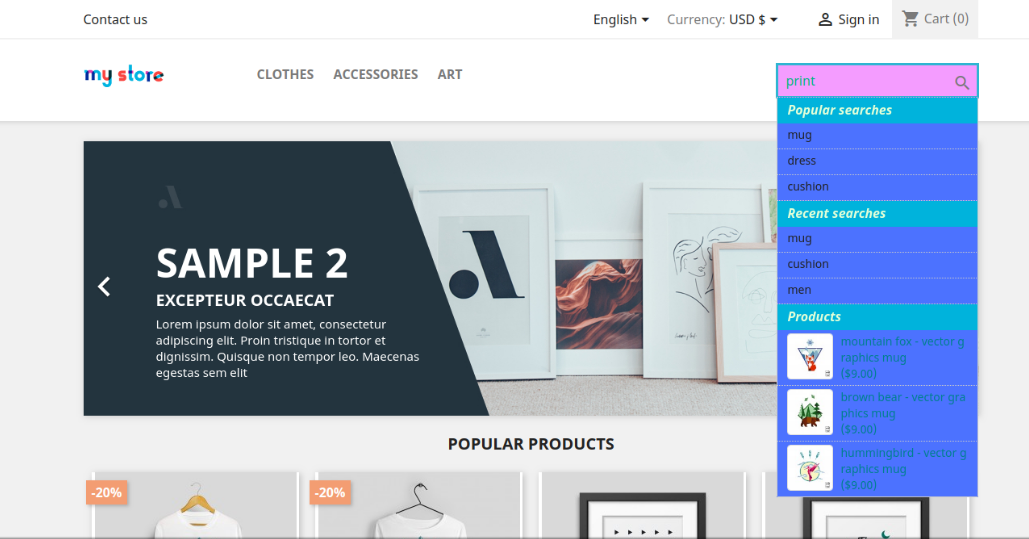
Admin can also show popular and recent searches to the online users by enabling and setting the number from the admin interface.
In search analytics settings, the online merchant can view last three month’s data. Prestashop Fast auto search plugin shows a graph for providing details of total searches, unique searches and number of users.
1.1 Benefits for Merchants Offered by Prestashop Fast auto search plugin
With this Prestashop Search Auto Suggest Module, the online merchant can show search suggestions to the online users at the same time when they start typing anything.
There is an option to display product prices along with product suggestions. The online users can also view the thumbnail image with the products.
The Prestashop Fast auto search plugin allows the store admin to set the number of product suggestions.
The Prestashop store admin can change the limit of characters to start searching. The minimum character limit is 3.
There is an option to search the term in products and category or admin can select only one of them for searching the term.
The Prestashop search complete addon provides an option to set the product search result based on stock status. Out of stock products can be hidden.
The Prestashop addon allows search in product details ie product name, SKU, Description, Tag, etc.
The Prestashop auto correct search addon allows the store merchant to set the look and feel of search suggestions from the admin interface.
The online merchant can also showcase popular and recent searches to the users.
Prestashop autocorrects search addon can check the top 10 search keywords in your store. This way, the online merchant can get an idea of popular keywords for that product.
The Prestashop search auto complete module provides search statistics that provide information about the keyword searched by the user.
In Search Analytics, the online merchant can view the status of the last three months. Admin can view total searches, unique searches and the number of users who used the functionality.
1.2 Features offered by Prestashop quick auto search plugin
The PrestaShop quick auto search plugin offers the autocomplete search suggestions feature.
The Prestashop fast search addon offers to search on the bases of details like name, description, tags, SKU .etc
The quick search addon offers products or category searching suggestions. Admin can also select both of them.
The Prestashop quick auto search plugin provides fast ajax search results.
The e-merchant can show prices with the product suggestions. The Prestashop Fast auto search plugin allows showing or hiding the product prices with the product suggestions.
The Prestashop Fast auto search plugin shows the top 10 searched keywords list in the search statistics.
The Prestashop search autocomplete module is multi Store compatible.
The Prestashop search suggestion plugin is SSL, theme and browser compatible.
The Prestashop quick search addon allows showing product and category headings on the website front-end interface. Admin can also set the heading font and background color.
From custom layout settings of this Prestashop Fast auto search plugin, the online merchant can set the look and feel of the search results.
There is an option to display popular and recent searches to the users on the front-end interface. Admin can also set the number of results.
Prestashop Fast auto search plugin shows a graph in the search analytics section for viewing total searches, unique searches and number of users easily.
Online users can get the desired product without any wastage of time. They need to search for it in the search box only.
The online customers can also view the product price directly in search of suggestions.
The Prestashop search autocomplete plugin offers a thumbnail image that helps the customer to select the product.
There is no need to type the complete name of the product.
The Prestashop addon offers a mobile-responsive interface. The online users can also view search suggestions in their mobile devices.
Prestashop search autocomplete plugin is browser compatible.
The online users can also view recent and popular searches.
The online users have an option to select products from the category section or product section of the search result.
2.0 Installation
Once the store admin purchases the Prestashop search auto complete module from the Knowband store, he will get below-mentioned files:
1. The zipped file consists of the source code of the Prestashop search auto complete module.
2. User Manual
The online store owner can follow the provided steps to install the Prestashop search auto complete module.
First of all the admin needs to unzip the zipped file. This file includes a few files and folders.
Copy all the folder and paste them into the “Modules” folder of the store’s directory. The admin can follow the path – Root Directory/modules/.
3. Now the store owner can install the Prestashop quick auto search plugin. As an eCommerce store owner, the admin can find that in Store Admin -> Modules and Services. It would be shown as below –
Now the admin can click on the “Install” button to install this module easily. A confirmation pop-up will be shown. Click on “Proceed with the installation” option. This step will install the live chat support module and show notification – “Module(s) installed successfully”.
3.0 Admin Settings
The Prestashop store admin can change the various settings of this Prestashop search suggestion module according to requirements. By using this Prestashop auto correct search addon the admin can automatically complete the search on the website. The admin can apply the settings to implement the auto suggest functionality. These are the configuration options as shown below:
General Settings
Product search Settings
Custom Layout
Search Statistics
Search Analytics
Admin can apply these settings and implement the functionality of showing search suggestions.
3.1 General Settings
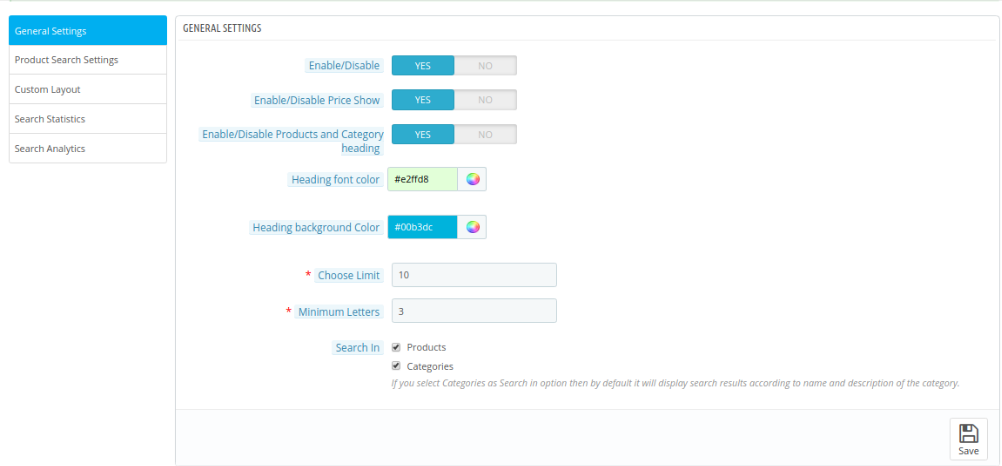
When the admin will click on the configure link on the Prestashop search auto complete module, the system will open general settings tabs by default. These are the configuration options available in this section:
Initially, fields in the above form will be already filled with their default values.
Enable/Disable: Enable the option for activating the auto suggest functionality.
Enable/Disable Price Show: Enable the option for showing product price along with the suggestions. For hiding the price, admin can disable this option.
Enable/Disable Products and Category heading: Activate this option for showing products and category headings in search suggestions.
Heading Font Color: Set the font color for category/product headings.
Heading Back-ground Color: Set the background color for category/product headings.
Chose Limit: Using this option the admin can set the maximum limit show search result by default the value will be 10.
Minimum Letters: The minimum letters the user enter to start the search can be set using this option. By default, the value will be 3.
Search In: The Prestashop admin can choose what to show the search result by simply checking the options.
3.2 Product Search Settings
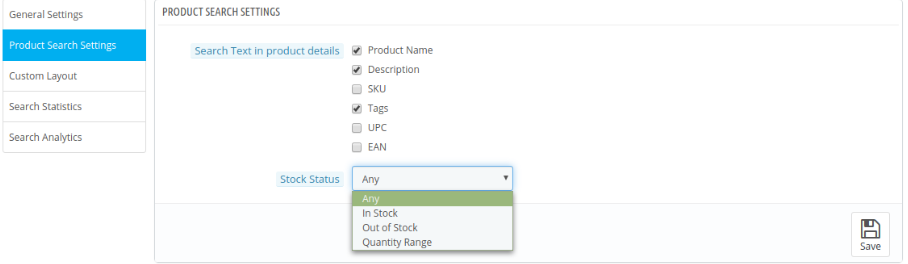
In this tab, the admin can configure all the settings regarding product search details are described below:
Search Text In Product Details: In this option, Prestashop admin can choose where to search the search term in the product details simply by checking the options.
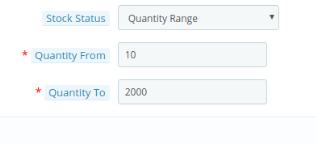
Stock Status: Admin can show all the products or as per the stock status. The Prestashop search auto complete module allows showing only in-stock products, only out of stock products or as per the quantity range.
3.3 Custom Layout
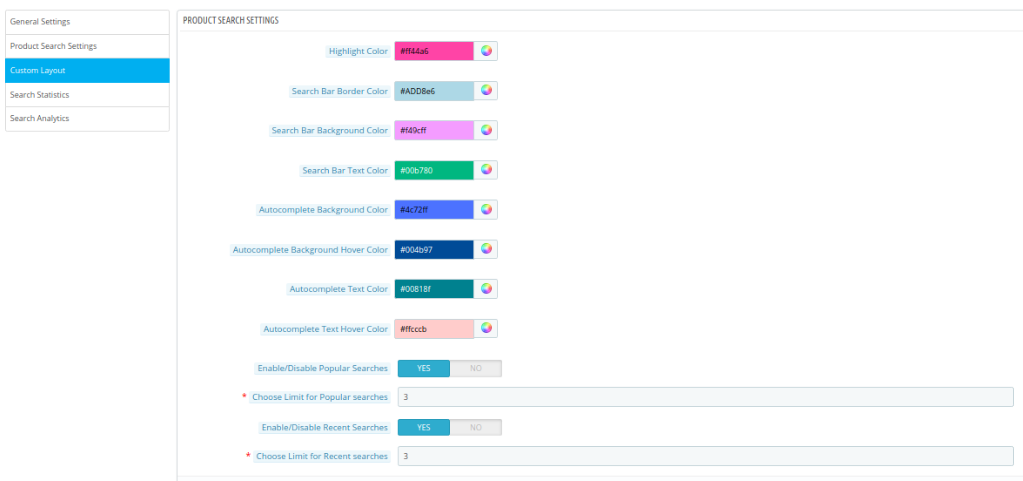
The online store merchant has an option to set the look and feel of product suggestions. These are the customization options as shown below:
Highlight Color: Set the highlight color for the search suggestions.
Search Bar Border Color: Enter the border color for the search bar.
Search Bar Background Color: Select the background color for the search bar.
Search Bar Text Color: Choose for the search bar text color.
Autocomplete Background Color: From the color picker tool, select the background color for auto complete section.
Autocomplete Background Hover Color: Set the autocomplete background color on hover.
Autocomplete Text Color: Select the color for autocomplete text.
Autocomplete Text Hover Color: Choose Autocomplete Text Hover Color from the color picker tool.
Enable/Disable Popular Searches: Enable this option if you want to show popular searches in front-end interface.
Choose Limit for Popular searches: Enter the number of popular searches that you want to show.
Enable/Disable Recent Searches: Enable this option if you want to show recent searches in front-end interface.
Choose Limit for Recent searches: Set the number of recent searches that you want to show to the users.
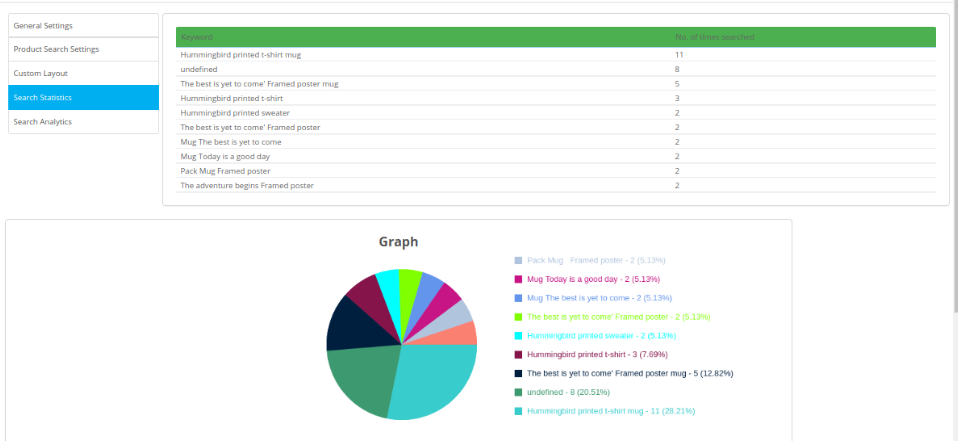
3.4 Search Statistics
In this tab, the admin can view the keyword searched by the users in the front end in the form of the list and graph.
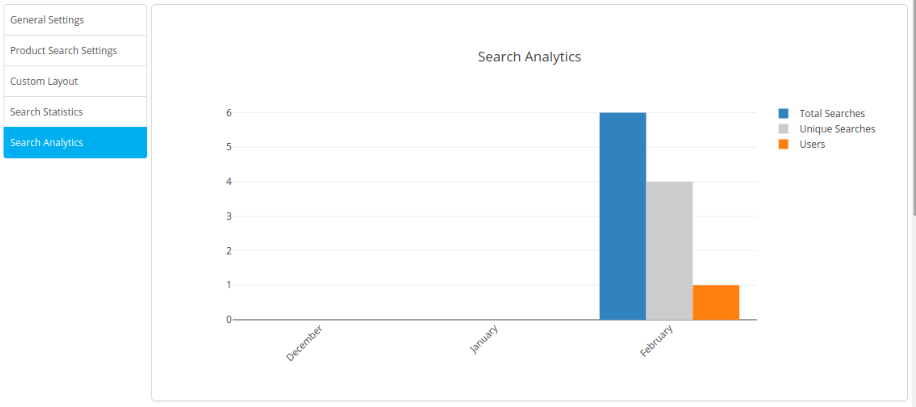
3.5 Search Analytics
In this section, the store merchant can view a graph of the previous three months in which he can view total searches, unique searches and number of users.
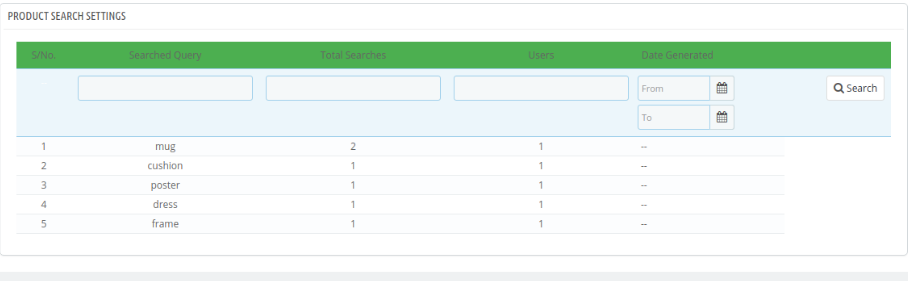
Admin can also view the searched queries in product search settings as shown below:
4.0 Front-end Interface
The online user can search the product using advanced algorithms, just by entering text in the search box user will be able to view the search result as shown below:
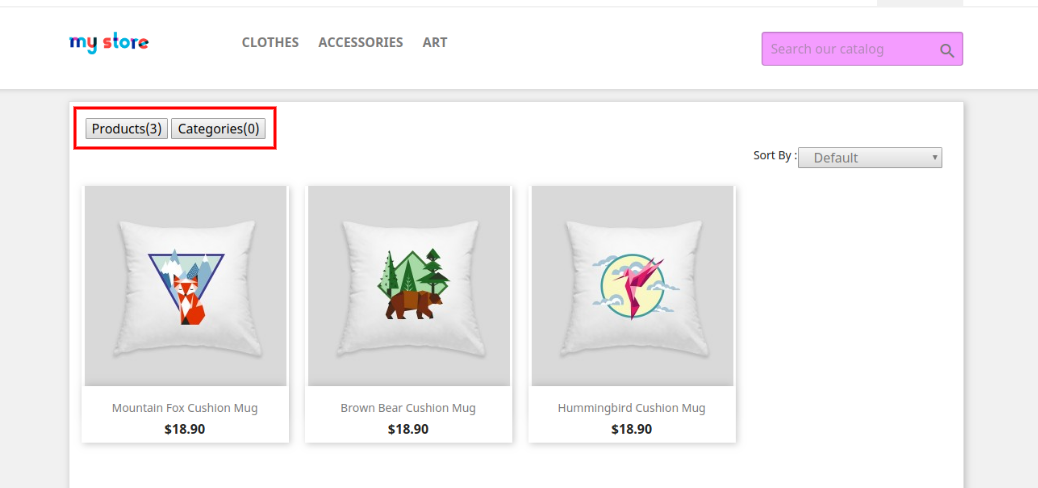
Clicking on any product or category will redirect the online users to the particular product/category. The online users can view category wise suggestion and product-wise suggestions in different headings as shown below:
The online users can also control the results by selecting the category or products option:
Thus with the help of this Prestashop auto-correct search addon, the eCommerce store admin can offer a better store experience to the store visitors and customers as well. The customers can easily view the desired products without even inserting the full name. This Prestashop search suggestion module offers a user-friendly interface.
The online users can get search suggestions while searching for any product on the website search box. The customers can easily get the product which improves their store experience. The eCommerce store admin can show price details with the product suggestions. The Prestashop auto suggest addon is highly customizable and allows the store admin to select from category or products for showing searches from selected sections. Prestashop fast search addon also provides an option to hide out of stock products from the search suggestions list.
This way, the online store admin can easily show suggestions to the customers and make shopping easy for the customers. The Prestashop search auto complete module shows the highlighted text color, category/product background color and text color for setting look and feel of suggested products. The Prestashop auto correct search addon is multi-lingual compatible, multi-store compatible and offers smooth functioning. The Prestashop search suggestion module can provide multiple suggestions that can help the customers and they can purchase the desired product without wasting time.
Recommendations
Refresh the home page of your store every time you enable/disable plugin.
If Prestashop Fast auto search plugin is not working after installation then please check permissions on modules folder. The folder should be writable. Please make the folder permission to 755