It is important to opt the right eCommerce platform for the growth and development of your online business. The successful operation and performance of an eCommerce website depend upon the right selection of the eCommerce platform. You need to take this crucial decision with utmost attention and care in order to grab the maximum site conversions. This is because any random eCommerce platform can’t help you win desired conversions and product sales for your site.
Out of the various eCommerce platforms such as Magento, OpenCart, PrestaShop, Shopify, WooCommerce, 3d Cart and others, OpenCart is definitely a good choice to go ahead. The OpenCart is packed with various useful OpenCart extensions and themes that can together make your site more engaging. Here are the 5 questions that you need to ask your OpenCart development services company for a promising online store.
Did your company provide you the required level of support?
In this competitive business environment, it is important to check the level of support provided by your OpenCart development services company in order to tackle various issues. No site owner would like to be left alone at the time of any website issues and this is where any effective OpenCart development services can be of great help.
Do that company take care of your site backup?
While making the transition onto an OpenCart platform from any other existing eCommerce platform, it is important to initiate the complete backup of your website. You can take the help of any eCommerce backup extension that can help in providing quick database backup of the website within no time.
Is your company offering you a shared hosting service or a dedicated server?
Dedicated server hosting can reduce the chances of slow website loading and server response time.
Most of the site owners are facing this critical question about
Whether to go for a shared web hosting service for their OpenCart site or choose a dedicated server. While the former seems to be the good option in terms of operating cost, there is also associated problem with it. If one of the websites is having certain security issues, it might affect the other websites that are sharing the same hosting server.
However, in the case of a dedicated server, OpenCart site owners don’t have to face any server uptime issues, bandwidth issues, disk storage space requirements, and other such problems. So, make the right selection based on your business and budget requirements.
Are they able to handle your future business requirements?
With the growth of your business, new customers are added on to your site and the customer traffic is also increased accordingly. You need to ask out your company to be hired about how are they going to handle the large traffic volume, how will they respond to higher server requests, how will they cater to the growing bandwidth requirement of the company and other such business concerns. If they can answer your question effectively, you need to avail the expertise of that OpenCart development company for your site.
Are they providing adequate server uptime?
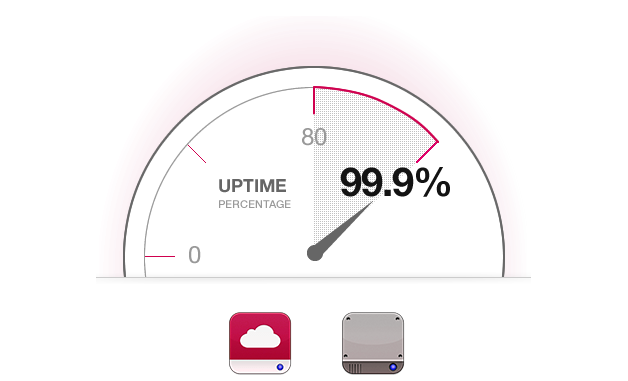
Higher server uptime means the fewer chances of network issues in your site for optimum business performance.
Your site server needs to perform effectively for the faster loading and performance of your website. Do ask your eCommerce services provider company about their average server uptime in order to analyze the performance of your website. Always remember that lower the server uptime, greater will be the loading time of your OpenCart site. It is important to hire the right company that can offer you an average percentage uptime of at least 99 percent in order to ensure the smooth performance of your eCommerce website.
Conclusion
The field of eCommerce is both promising and equally challenging also. You can either grab maximum conversions and sales for your site within a short period of time or it can be a case of total business failure. Using the right eCommerce platform plays a decisive role in the performance of your eCommerce site, so make the right selection for your unprecedented business growth. If you are failed in this critical task, your eCommerce website will certainly face a tough day in terms of conversion rates, product sales and customer engagement.
Online Sellers are losing money every day. I can say this very confidently because a survey laid by Baymard Institute says that in the UK, 76.45% of the total online sales are lost because of the shopping cart abandonment. Truth to be told, for every 100 potential customers, 67 of them just leave the site without completing the checkout. This scenario is not true just for the UK but every corner of the world. I wonder, how much would be the conversion rates if anyone could save those customers from abandoning your online shopping cart.
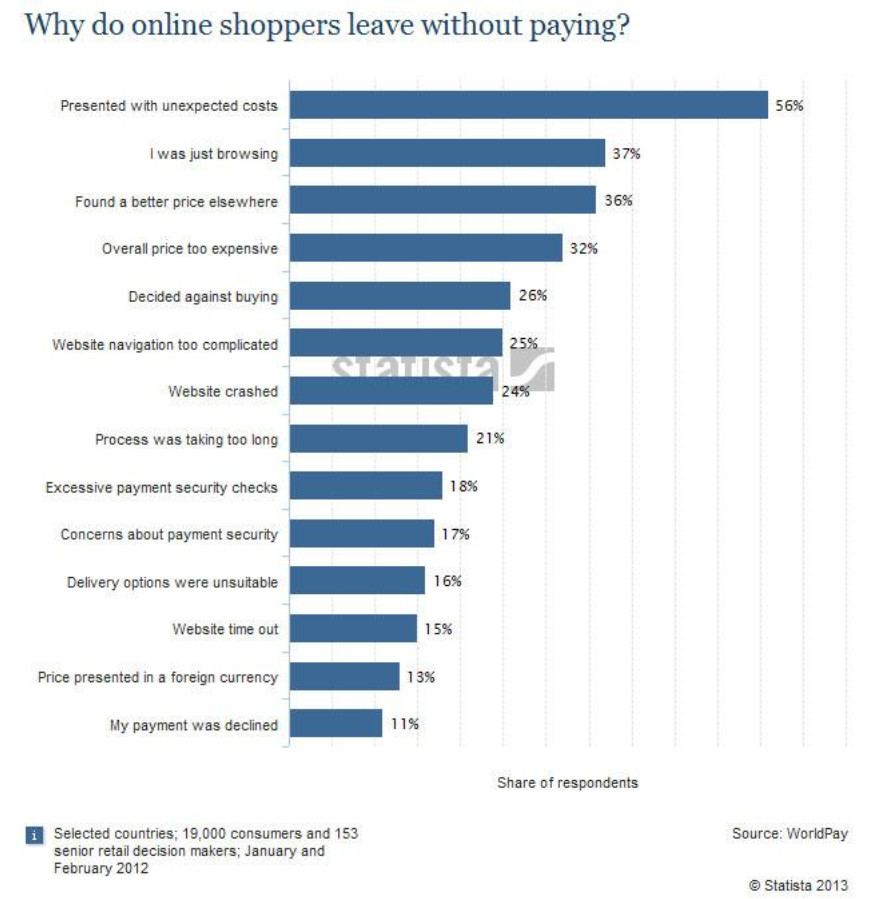
A research by Statistia suggests 14 main reasons for why shopping cart abandonments occur on an eCommerce site.
The reasons for shopping cart abandonment on an eCommerce site are even more than that. We can fight with them, but truth to be told, we cannot just eradicate them all even through the most advanced conversion optimization tools. There are some scenarios that can be minimized to show the least effect on the sales but we cannot avoid them at once. The reasons for shopping cart abandonment are numerous and they require some vigorous efforts and a considerable amount of time to be minimized. My concern here is not to go for the ways to avoid or eradicate the shopping cart abandonment, but to find a way to face and deal with them.
There are two ways to deal with the shopping cart abandonment on your site.
1. Ways to prevent- before cart abandonment.
2. Ways to recover- After cart abandonment.
There are numerous article and research reports on the web stating the ways to prevent shopping cart abandonments, and these articles are effective too. But, going with my concern here, I would like put some points that can be utilized to face the worst case scenario of shopping cart abandonments on an OpenCart site. OpenCart is an open-source eCommerce website solution that represents a quiet competitive control panel and a flexibility to manage some light weight eCommerce sites. Being a light weight and an open source solution, OpenCart lags in some areas when it actually resembles to prevent shopping cart abandonments. Well, it’s not a problem in only OpenCart sites, but many of the major open source and even some premium solutions cannot prevent the causes of shopping cart abandonment.
So, let’s get to the point where we would try to know some ways to deal with the inevitable. Shopping cart abandonments occur for multiple reasons and we cannot eradicate all of them at once. But, instead, we can be ready to face the OpenCart abandoned carts on the site. We can plan a strategy to deal with them instead of avoiding or ignoring them. If avoiding or preventing a shopping cart abandonment is not completely in our hands, then we can go for the recovery options to minimize the losses.
One of the best recovery options in this case is an OpenCart abandoned cart module or extension. We have to prepare our site to deal with the already occurred OpenCart abandoned cart instances, and for this to happen, the site must be ready to manage them in such a way that they generate the possibility to lure the customers back to the site. An OpenCart abandoned cart extension works smartly b sending messages and notifications to the customers reminding them about the abandoned cart they have left on your site. Well, the reminders are not at all enough to lure them back. So these extensions also possess the features to send some encouragements with the notifications.
How an OpenCart abandoned cart extension would help you recover your lost sales?
1. An OpenCart abandon cart extension works as a cron level real time system
An OpenCart abandoned cart extension works as a real-time system that operates according to the cron level settings. The cron level setting is required to setup the serial reminders with different email templates that are set to send different messages at different interval of time.
2. Can be set to discover the new abandoned carts
The extensions automatically add the orphan carts in the abandoned cart list and notify to the admin as soon as a cart crosses the time limit set to decide if a cart would be considered as abandoned or not. So, whenever the cron finds a new orphan cart, it updates them in the list.
3. It becomes very easy to send automatic emails
Through an abandoned cart extension, it becomes very easy to send serial reminders automatically without any manual intervention. The cron can be set to decide which email template would be sent to the customers at what time. So, the admin can set different email templates to be sent at different time slots. Say, the first email would be sent after 7 hours and without any offer, and the second email will be sent after 24 hours and with an offer. You can look at this example for a similar scenario:
The emails would include:
Pictures of the products they left in the cart
Reviews or ratings from other customers
Guarantee and easy refund policy information
A strong call to action to get them back again
Timing the emails:
1st email – should go out within 24 hrs
2nd email – send within 2 days
3rd email – send within 1 week
Example of an abandoned cart email from a site to one of its customers.
4. Know your abandoned customers
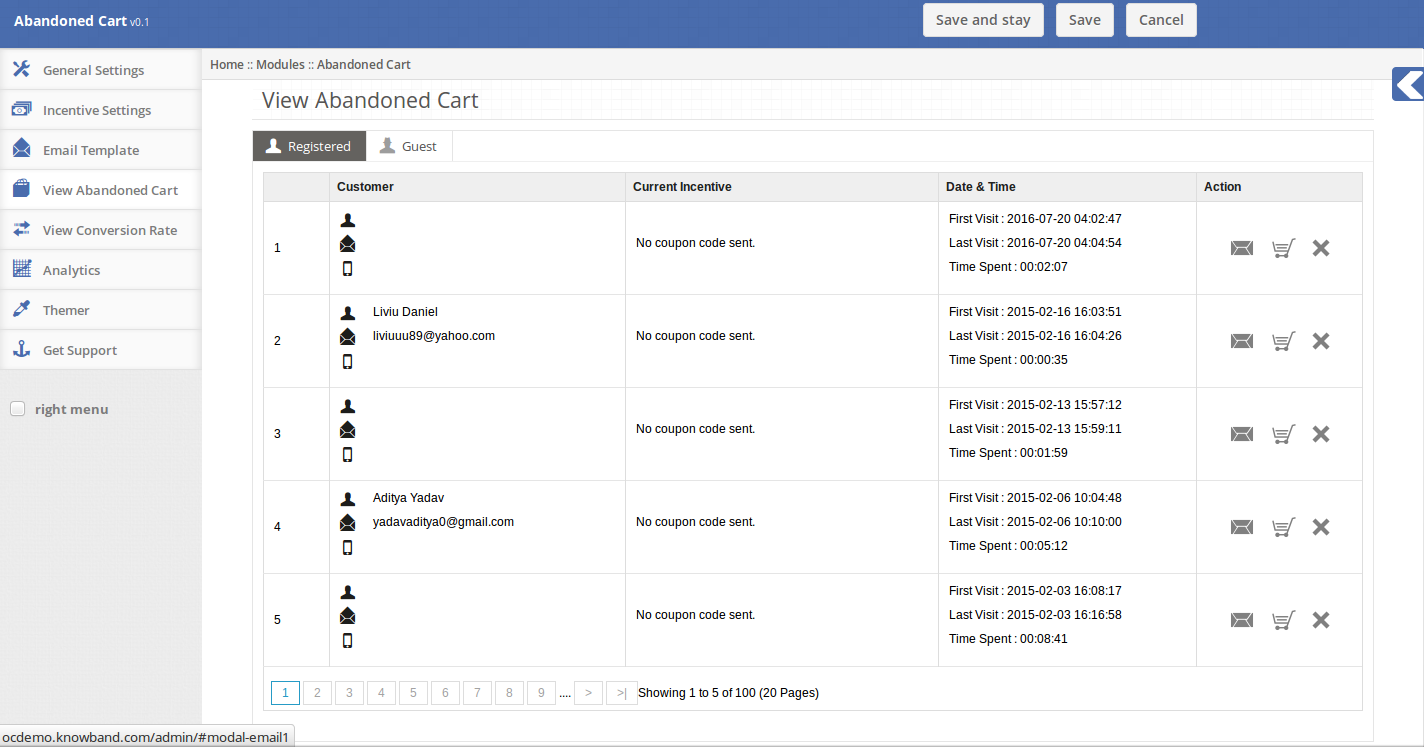
A central control panel to browse and manage the abandoned carts
The reporting system of an OpenCart abandoned cart extension provides the information about the customers who have abandoned your shopping cart. These information contain the details like name of the customer, email Id, Products in the cart. With these information you can also analyse why the particular customers would have left the cart and exit your site.
5. Know your site’s cart statistics
An OpenCart abandoned cart extension not only provide the interface to manage the emails to be sent but also it can be used as a research tool to find out how many carts are being abandoned at the moment and you can also compare your current cart performance with the earlier ones. With these information, you can plan your conversion optimization strategy based on the analytic.
Ad Re-targeting
Ad re-targeting in association with an effective OpenCart extension can recover the other 98 % sales.
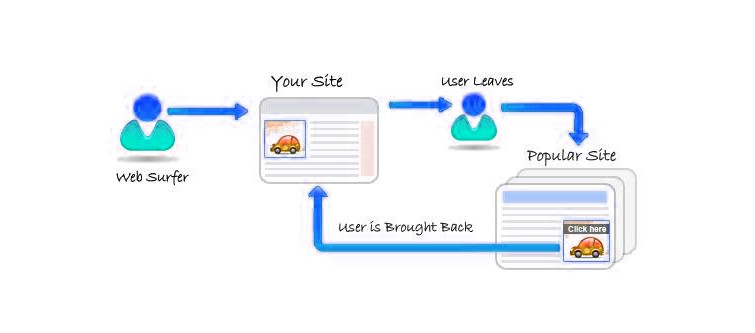
The another after cart abandonment method is by conducting an Ad Re-targeting campaign. A research by AdRoll, says that “2%” of buyers convert on the first visit itself. But your re-targeting strategy can bring the other 98% buyers back to the site. The ad re-targeting works by fetching the cookies from your site and utilizing them to advertise your site on the other site where the customer visits after abandoning your site. The condition for ad re-targeting is that your site needs to have an ad re-targeting partnership with the other site. For this, you can select any Ad re-targeting partner.
The OpenCart abandon cart extension can be used by the website owners to get strengthen their after cart abandonment strategy. It’s a heavy duty OpenCart extension that gets installed like any other OpenCart extension and performs all the task needed to be performed by a competitive OpenCart abandoned cart extension . So, now it’s a time to stop leaving money on the table and get back to where it was left by the customers.
Installing any unknown software or module is often a difficult task as it requires a great knowledge about the system requirements, software or module settings and other such parameters. I have often witnessed several OpenCart customers who are facing issues while installing this eCommerce platform on their system. This OpenCart platform is an open source shopping cart software that has gained immense popularity in a short span of time among various eCommerce store owners. Different versions of OpenCart has released so far and it is mandatory to keep updating your platform from time to time to include new exciting OpenCart extensions and functionalities into your store. The tutorial will run you through the basic steps to update OpenCart from one version to another.
This blog will help various OpenCart customers to upgrade their existing OpenCart platform to the new version without any hurdles. Let us take a step by step approach.
How to Update OpenCart from one version to another?
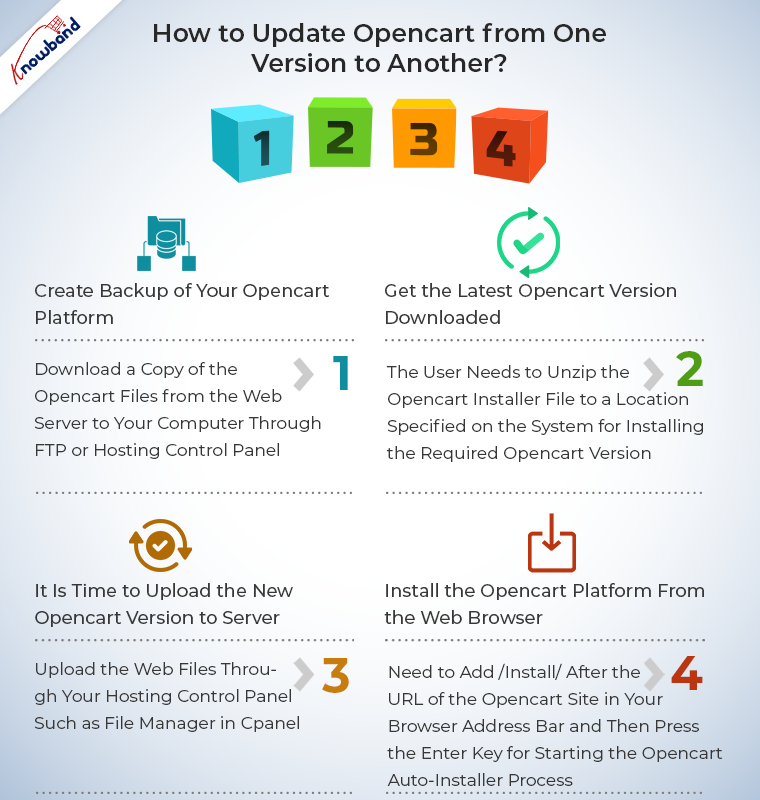
Create backup of your OpenCart platform
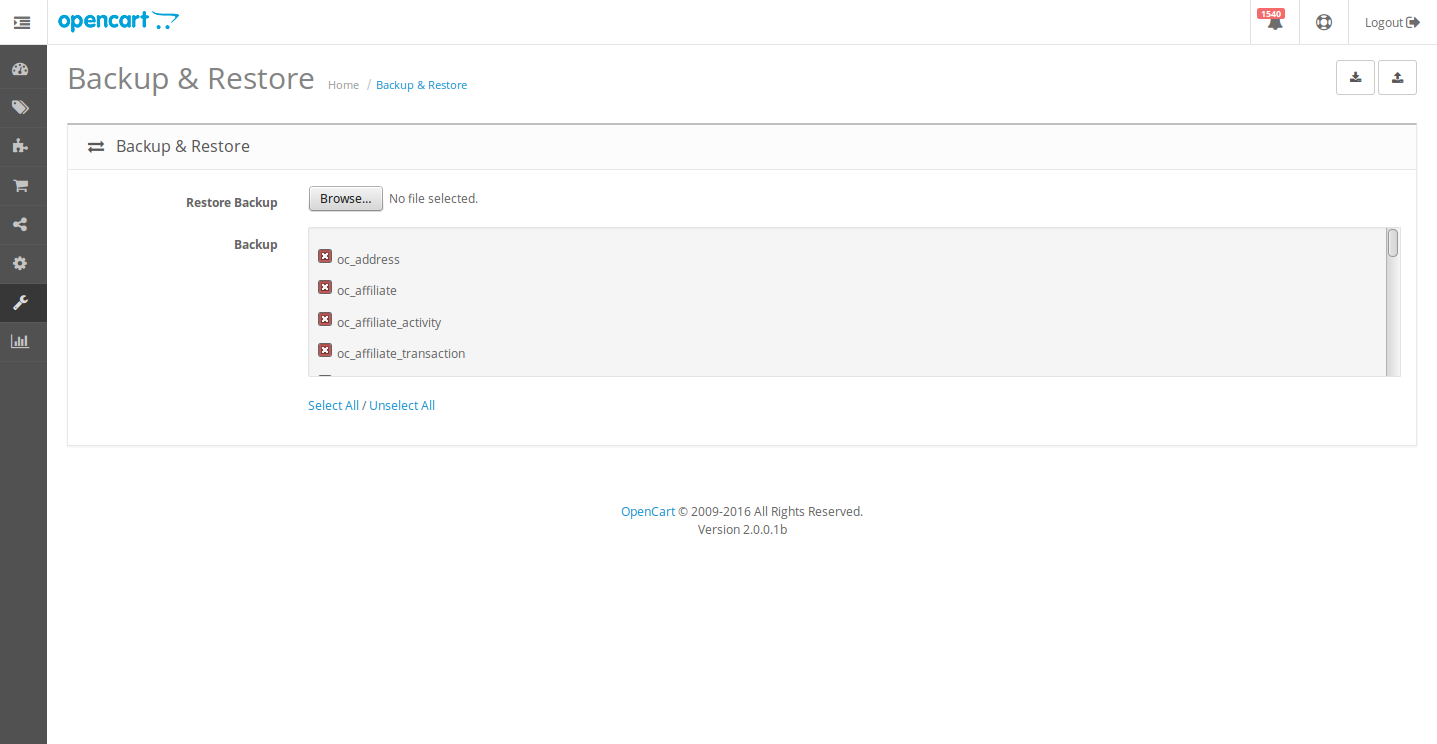
To accomplish this task, you need to download a copy of the OpenCart files from the web server to your computer through FTP or hosting control panel. You need to perform the database export through phpMyAdmin or you can also backup the database by following the path, OpenCart dashboard -> Tools -> Backup/Restore. Check out the image given below for understanding the above process.
Backup your OpenCart store for avoiding any problem during the upgradation process.
Get the latest OpenCart version downloaded
In order to download the latest OpenCart version, you need to check the link. The download file will be available in the form of a zip file. The user needs to unzip the OpenCart installer file to a location specified on the system for installing the required OpenCart version.
It is time to upload the new OpenCart version to server
Now, you can upload the web files through your hosting control panel such as File Manager in cPanel. Apart from this, user can use FTP tools for uploading the web pages and files from a computer system to web server. There, you will be prompted regarding how to handle the files with the same name during the uploading process along with the option to choose overwrite for applying changes in all the files with the same name on the web hosting account by replacing them with the new OpenCart files.
After unzipping the OpenCart installer file, you will see a folder named as “upload”. It is required to upload all the files and sub folder from your computer system to the web hosting excluding the files namely “upload/config.php” and “upload/admin/config.php”. Irrespective of the OpenCart version you are upgrading to, it is important to ensure that these two files are excluded during the uploading process to avoid the overwriting of these crucial files.
This entire process of uploading the OpenCart files from computer to web server may take some time. Based on the number of files included in the new OpenCart version, the uploading process done on the OpenCart directory located on the web server may take the involved time in the process.
Install the OpenCart platform from the web browser
Follow the simple steps of the upgradation process for ensuring a hassle free upgradation to a higher OpenCart platform.
Every other new OpenCart installation consists of an “install” sub folder present in the OpenCart root directory. Now, it is time to launch the auto-installer from the web browser. For this, you need to open the web browser on your PC or Mac and then enter the OpenCart domain name in the address bar of the browser. You need to add /install/ after the URL of the OpenCart site in your browser address bar and then press the Enter key for starting the OpenCart auto-installer process. As, you are upgrading an existing OpenCart version, it will require comparatively less time than the fresh OpenCart installation.
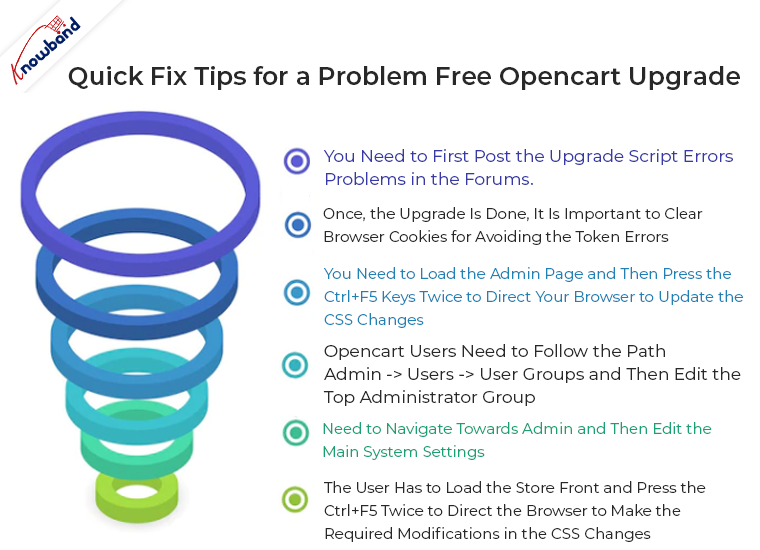
Quick fix tips for a problem free OpenCart upgrade
If you are looking to upgrade your OpenCart store without any problem, it is time to follow these quick simple tips for the required process.
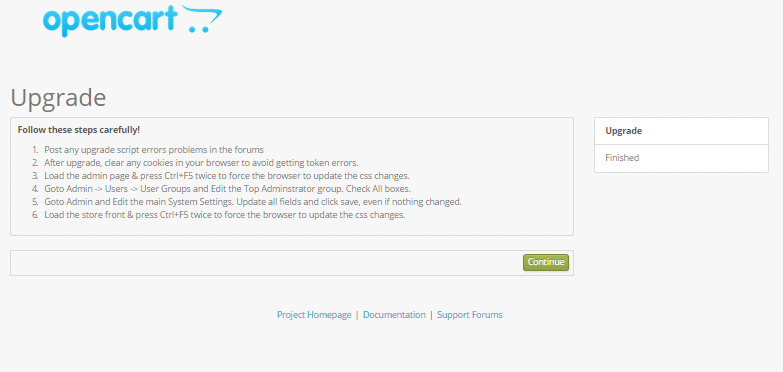
You need to first post the upgrade script errors problems in the forums.
Once, the upgrade is done, it is important to clear browser cookies for avoiding the token errors.
You need to load the admin page and then press the Ctrl+F5 keys twice to direct your browser to update the CSS changes.
Now, OpenCart users need to follow the path Admin -> Users -> User Groups and then edit the Top Administrator group. It is advised to check all the boxes there.
You need to navigate towards Admin and then edit the main System Settings. It is also recommended to update all the fields and then click on the save option inspite of whatever changes you have made.
The user has to load the store front and press the Ctrl+F5 twice to direct the browser to make the required modifications in the CSS changes.
Note- In case, you encounter any error messages from the front page or through admin dashboard when logged in such as “Use of undefined constant DIR_MODIFICATION OpenCart upgrade error”, ignore it and continue with your upgradation process.
By strictly adhering to the step by step instructions given in this blog post, any OpenCart store owners can upgrade its existing OpenCart installation into the desired higher OpenCart version in an effortless manner.
So, if you are planning to upgrade your OpenCart store, then, do not get intimidated by the technicalities as it can be handled and taken care of with ease. With the release of the latest version of OpenCart, that is, OpenCart version 3.0, the store upgrade has become a must-have. The new and positive changes with a lot more improved admin interface of OpenCart 3.0 can make your eCommerce business way more intuitive and flourishing.
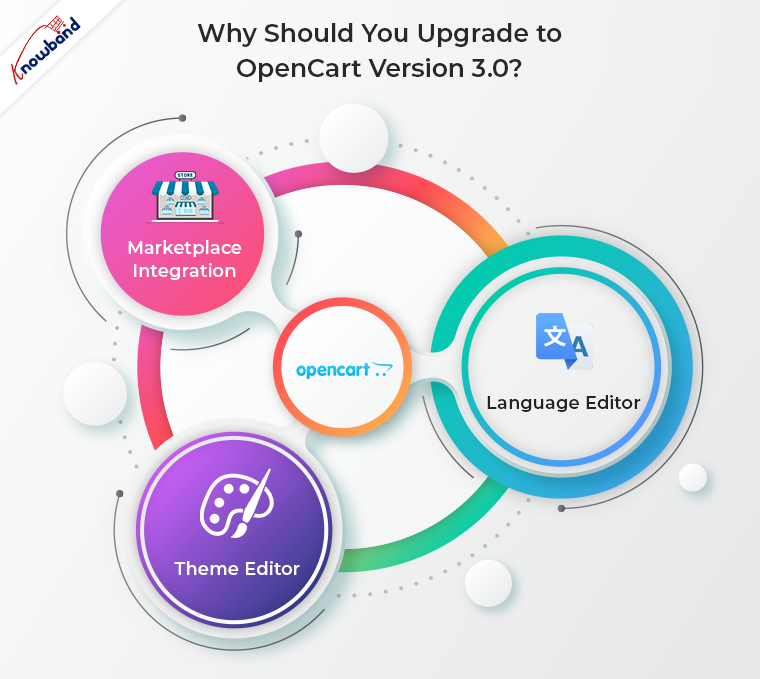
Why should you upgrade to OpenCart version 3.0?
The latest OpenCart version 3.0 has come with few major changes. They are discussed below:
Marketplace integration
The marketplace in the platform itself has made the biggest impression so far. You can now get OpenCart marketplace extension and install it in your store to enable the multi-vendor feature. Before the release of this version, it was reachable only via the official website. Knowband offers one such OpenCart multi vendor marketplace extension that can convert your store into a whole new marketplace. Watch the video to know more:
Theme editor
The improved Theme Editor allows you to modify platform’s themes directly from the admin interface via Twig language. The theme editor is user-friendly and easy-to-understand. It allows you to modify 3 main elements, the themes, pages and the code of the pages in particular. You will now be able to customize your storefront and improve the look and feel of the site from the back-end.
Language Editor
OpenCart 3.0 offers Language Editor that allows the store admin to customize any text in the store. The contents can be changed to a preferred language without troublesome installation of any third-party translation extensions. Translating the text is just a matter of few clicks now.
If you further want to improve the functionality of your OpenCart store, you need to take the help of various OpenCart extensions from Knowband store that are packed with multiple features. For more information about other Magento extensions, PrestaShop Addons or OpenCart modules, you need to visit the Knowband store at www.knowband.com.
OpenCart is one of the eCommerce platforms that has gained immense popularity and attention which explains its bright future in the years ahead. Although, eCommerce stores have numerous options to choose from but making the right choice will set your online business in the right direction. You may not consider it as an important part in an eCommerce business scenario but a wrong decision regarding eCommerce platform can do a grave injustice to your store in terms of customer engagement, conversion rates and product sales.
If you are unable to arrive at a proper conclusion regarding the selection of OpenCart platform for eCommerce sites, you need to analyze the pros and cons of this widely used eCommerce platform. Here are some of the merits and demerits of this OpenCart platform which is explained as follows:
Merits of OpenCart
The platform is open source and free
The OpenCart platform is an open source platform which means it can be easily modified and customized as per your business requirements. The store owners can avail the wonderful features and functionalities of this eCommerce platform without even spending a single penny as it is available for free of cost.
It consists of a huge active community of OpenCart developers
Having a problem in an eCommerce platform is a simple routine but it often becomes challenging if that problem remains unresolved. Thanks to the huge experienced community of OpenCart developers and programmers that can provide technical support to OpenCart users round the clock.
No Technical Knowledge is required
Store admin can focus more on their business with OpenCart CMS platform. The store admin with little or no technical background can easily add, manage and edit information on their store built using OpenCart platform
The platform has a vast library of themes and modules
This eCommerce platform has a vast range of themes and OpenCart modules that have the potential to improve the performance of any online store. Apart from the built-in modules, users can also avail the amazing third party OpenCart modules from Knowband store which is packed with numerous features and functionalities.
Multi-store management from a single dashboard
The multi-store compatibility is one of the biggest advantages of OpenCart. Having and managing multiple stores can be very complicated and time consuming. However, there are times when having more than one stores becomes inevitable. OpenCart allows you to build multiple eCommerce store and manage them from a single interface. You can evaluate your current orders, track your customers, sales etc. All of this happens from the same section of the website.
Excellent for beginners, small and medium eCommerce businesses
The OpenCart platform is a feature-packed eCommerce package that offers easy store management services to its eCommerce customers. If you are an eCommerce beginner, has small and medium eCommerce stores, this OpenCart platform is definitely the right choice for your online business.
Demerits of Using OpenCart
Making customization and changes in OpenCart is difficult
It is actually much difficult to make any desired changes in an OpenCart platform due to the absence of an effective Event system. In fact, events have just been incorporated into the OpenCart 2.0 version and are in the early development phase only. vQmod is another alternative to perform the required changes in an OpenCart platform but it often creates a problem in the core files. This critical task needs the assistance of an effective OpenCart expert only.
It is not ideal for supporting multi lingual customers
The OpenCart platform is not meant for catering multi lingual customers due to the problem which is caused in the interpretations. With this feature, it becomes extremely difficult to target multi lingual customers. If you are having an eCommerce store which has customers all around the world with different languages, you need to find out any other alternative apart from this OpenCart platform.
Not optimized for SEO
OpenCart has miles to go when it comes to SEO. This being one of the most important aspects for the success of eCommerce store may lead to some negative impact in the long run. As per experts, there were flaws with SEO in the OpenCart versions 1.5 to version 2.2, and it’s possible that in OpenCart 3.0 will have the same issues.
Owing to all the merits discussed above, it won’t be wrong to state that OpenCart remains one of the most popular eCommerce solutions. In addition to it, there are OpenCart extensions available that can optimize your site in accordance to the latest technologies and as per the expectation of customers. If you already have an OpenCart store or are planning to have one, then, you should simultaneously start thinking of the optimizing the setup.
OpenCart Extensions that can Boost the Functionality of your Store
Take a look at some of these hand-picked plugins that’ll improve the UI and UX of your OpenCart site.
OpenCart Spin and Win
With so many online options to choose, you make the UI of your site attractive enough to keep your customers hooked. OpenCart Spin and Win extension incorporates a gamified spin the wheel interface in the front-end of the site. This roulette-type popup can be placed anywhere on the site and can even be used as an exit popup. The alluring approach is one of the ways to curb the exit-intent of the customers and compel them to spend some more time on your site. So, if you are looking to earn some credits for the look and feel of your site straight-away, this is the smartest solution for you.
OpenCart Social Loginizer
Starting from the time when the customers enter the site to the moment when they check out, the shopping experience has to be flawless. OpenCart social loginizer plugin is one such option that can incorporate the social login options on your site. The online shoppers are mostly not a fan of lengthy registration processes. The quick login options make the sign up a matter of moment.
OpenCart Search More extension
Moving on to the category pages, making the site navigation easier for the store visitors is another important factor. OpenCart Search More plugin makes navigation easier. The customers can view the suggested products right after they type first several letters in the search box. With easy navigation, you can effortlessly boost the user engagement and the session time.
OpenCart Product Video
Product pages are where the actual sales pitch is offered. Hence, it should be readily designed to offer best possible information to the customer. OpenCart product video plugin allows the admin to display the product video and other related videos on the web page without making any code changes in the site. Provide the real-life feel of the product to the customers and enhance the chances of conversions.
OpenCart One Click Checkout (Buy Now)
OpenCart One Click Checkout (Buy Now) plugin adds a buy now button on the products page. The customers can checkout with a single product without removing the products saved in their cart by clicking on this button. The hassle-free checkout triggers the instant purchase decision of the customers.
OpenCart Review Incentive
The reviews and rating of the product pages are another key factors to motivate the customers to place the order. With the help of OpenCart Review Incentive extension, the store admin can offer incentives to the customers in return of their reviews. This is one of the ways to boost the number of reviews on the product page. Enhance the rating of the products and motivate more and more visitors to the checkout page.
OpenCart One page checkout extension
A complicated checkout process can raise the cart abandoned rate of your site. Simplify the checkout process of your site with OpenCart One page checkout plugin. The single page checkout incorporated by the extension offers social login and guest login options as well. Thus, this is one of the ways to optimize the conversion funnel of your site.
OpenCart Price Alert
A high-priced product shouldn’t mean a lost customer. Motivate the store visitors to return back to the site who abandoned the cart because of the product costing with OpenCart Price Alert extension. The OpenCart extension allows the store visitors to subscribe for an alert whenever there is a change in the product. The store admin can send reminders regarding the change in the product pricing. With the automated approach, you can motivate the customers to return back and place the order of the product that they left.
OpenCart Mobile App Builder
The customers these days prefer using mobile apps over the shopping sites. It is high time for the store owners to take a step ahead and stay abreast of the trends and technological advancement. OpenCart Android/iOS Mobile App Builder extensions can help you create a fully-functional mobile store at a few button clicks. The OpenCart store owners can now go mobile and tap a larger audience base with great ease.
OpenCart Multi vendor marketplace plugin
If you already own a eCommerce store based on OpenCart, then, you can even have a marketplace like eBay, Etsy and others. There are no code changes required for it. OpenCart marketplace extension can enable the multi-seller feature in your site without making any changes in the basic code of the site. Along with upgrading the site into a marketplace, the OpenCart multi seller marketplace module even makes the management effortless. The third-party sellers and their products as well as sales can be tracked and managed from a single interface. Not just this, even the vendors get an easy option to manage their shop from the dashboard itself. The profile, product and sales management are done from a single interface. In return of the rented space, the store admin can charge commission from the sellers. This commission is fixed at a button click. The fixed or percentage amount is automatically deducted from the vendors’ revenue.
It is important to have a clear view of all the possibilities and limitations of an eCommerce platform so that you don’t have to regret your choice later on. Don’t make wild guesses while selecting an eCommerce platform for your online store but analyze this eCommerce platform for the right decision. Understand the current eCommerce business scenario and go for this OpenCart platform without any second thought.
Nothing is much relieving for people than the option to make a quick product purchase with a simple checkout process especially in this busy daily routine. If you are running an eCommerce store, it is important to simplify the checkout experience for your targeted customers to enhance your product sales and conversions. A complicated checkout process can distract visitors from your eCommerce site and can result in higher shopping cart abandonments for your online business.
This is one of the common problem which has been faced by several OpenCart store owners who are struggling for higher sales and conversion rates. As per an independent survey and observation, it has been observed that complicated checkout process results in less sales, customer engagement and conversion rates. Here are some of the OpenCart checkout extensions that can simplify the checkout process for an OpenCart store.
1. OpenCart One Page Checkout
If you are not experiencing active participation from your targeted customers for an online purchase through your OpenCart store, it is really time for a quick introspection on your checkout process. OpenCart site owners need to analyze the usability of their checkout process and should simplify it further with the help of this OpenCart One Page Checkout extension. Some of the ways by which this checkout extension can help out your OpenCart store are as follows:
It provides a simple one page checkout process for ensuring a quick online product purchase to grab higher eCommerce sales.
The extension allows store admin to remove unnecessary checkout fields and steps for a quick product purchase.
The store owners can now effortlessly target a wide range of customers who are using different devices for browsing the site.
Makes login and registration process simplified for site visitors through the presence of social media login options.
Offers detailed cart information with the product image for ensuring a quick product purchase.
Freedom to choose desired checkout layouts from 1 Column, 2 Column or 3 Column designs with the help of this OpenCart One step checkout extension.
If you are looking for more feature loaded OpenCart checkout extensions for the simplification of checkout process on your site, this OpenCart One Page Checkout Pro extension is the end of your search. The extension contains the more advanced features that can provide a simple and engaging checkout process for your OpenCart customers without any expert assistance. Check out how this OpenCart One Step checkout extension can help out your online buyers.
Helps in making quick changes in your site and extension settings through its interactive admin panel.
Provides better customer targeting with its language translation feature.
Offers multiple payment and shipping methods for an engaging online shopping experience.
Allows easy login facility to customers with the help of multiple social media login options.
Makes checkout process as desired with the help of multiple design layouts such as 1 Column, 2 Column or 3 Column.
If the customers are not making purchase through your OpenCart store, it is time to avail the services of these OpenCart extensions from Knowband store. These extensions have a wide range of features and functionalities that can quickly simplify the checkout process for higher conversion rates and sales. Get ready for an engaging online shopping experience for your targeted OpenCart customers with these Knowband extensions.
If there is something that has seen a good response in the recent years in terms of market capitalization and customer engagement, it can’t be none other than the field of eCommerce. People are increasingly making online purchase due to the facility of home product delivery, relief from shopping bag handling and other such benefits. The role of an eCommerce platform can’t be denied for the success or failure of an online store.
Online store owners have the freedom to select any platform but this step should be taken with great care for grabbing required business results. For people who are not having much idea regarding the right eCommerce platform for their online business, I would suggest them to go for OpenCart without any second thought. Before you make the final decision regarding this OpenCart platform, let us understand the field of eCommerce first.
E-Commerce
It refers to all those activities of selling and purchasing products, services and softwares in an online world through the use of internet services. E-Commerce means electronic commerce or practice of making trade through electronic mediums. Here, buyer visits a particular site, selects a product for purchase and then finally makes the payment through a third party payment gateway.
As, the mystery around eCommerce has been unfolded, it is time to pay attention back towards this OpenCart platform that has been actively used by numerous site owners around the world. The platform has been widely appreciated and utilized by people involved in the eCommerce field due to various features, OpenCart modules and functionalities offered by it.
OpenCart
This OpenCart platform is an open source eCommerce software that is built on PHP and MySQL. It can be accessed free of cost under the GNU General Public license. It is built on the MVC (Model View Controller) architecture and can offer a wonderful online store with full set of functions to its customers.
E-Commerce store owners just have to install this platform, select their desired template, add products available on their store and they are finally ready for accepting customer orders on behalf of their online store. Some of the excellent features of OpenCart platform are as follows:
Open Source, free and easy platform.
Offers fully customization facility.
Consists of unlimited categories, products and manufacturers
Comprises of a vast library of inbuilt templates for better store performance.
Supports multiple currencies and languages.
Ensures easy checkout option for online shoppers through 40 payment gateways and PCI compliant standards.
Provides facility like sales reporting tools, error logging, downloadable products, integrated fraud modules, backup and restore tools, SEO features, product reviews and ratings, discount coupon system and much more.
Advantages of OpenCart platform
It is available for free and can be installed easily due to its open source nature.
The platform has an active community of OpenCart developers who are involved in issue resolution.
The platform consists of exciting inbuilt OpenCart modules, themes and templates for store performance.
Ideal for beginners, small and medium eCommerce stores.
The platform is easy to learn and manage.
Consists of multiple payment systems, feedback and rating items.
Disadvantages of OpenCart
The platform does not provide advanced customization facilities for eCommerce stores.
There is a need for OpenCart expert developer for change in coding.
Does not provide defense against outer attacks and assaults.
It is now time to pay a little attention towards this OpenCart platform for ensuring optimum performance of your online store. By having a detailed information about this eCommerce platform, it will be much easier to grab the required conversion rates and sales for your online store. So, let us now analyze this OpenCart platform for ensuring a promising website for your online business. Check out how OpenCart 2.0 is better than OpenCart 1.0.
There are numerous advancements that are continuing in the field of eCommerce platforms that boost the online shopping experience and sales. OpenCart is such an eCommerce platform that has gained much popularity in the online business environment due to its various packed features and functionalities. This eCommerce software based on PHP language was launched in year 2008 and is an open source platform available for everyone.
This eCommerce platform has come a long way since its stable release as OpenCart 1.1 and numerous features, responsive themes and OpenCart modules have been incorporated in between to grab the required customer engagement. With latest releases of OpenCart 2.xx versions, this eCommerce platform is surely giving a tough fight to its other business competitors. Let us analyze the various features that makes OpenCart 2.xx version quite different from its predecessor 1.xx version.
Comes with a fully responsive mobile design-
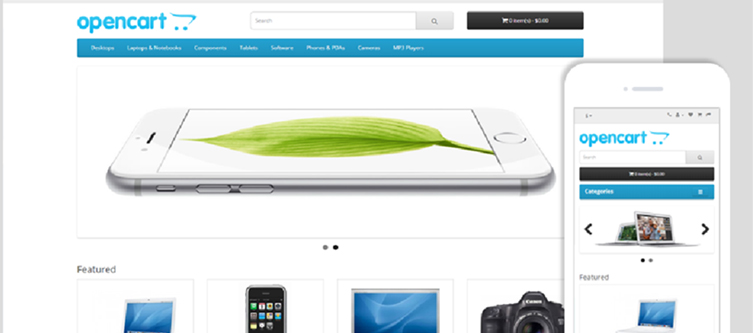
This new OpenCart 2.xx platform is better than the previous version in terms of its mobile responsive design. It does not only support mobile devices but comes with an amazing fully mobile responsive design. With this feature, OpenCart users will get the same level of interaction and site experience on different devices like desktops, laptops, smart phones and tablets.
Integration of bootstrap 3-
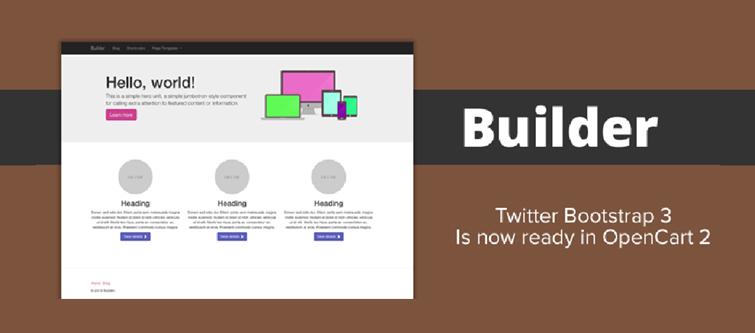
With the integration of Bootstrap 3 framework in OpenCart 2.xx version which makes use of HTML, CSS and JS platforms, it is now much easier to use mobile responsive designs, themes and templates. This Bootstrap 3 framework is installed at the core of the platform. Now, OpenCart stores built on the latest OpenCart 2.xx version can ensure sleek, intuitive and powerful interface for their desktop as well as mobile users.
Presence of Font Awesome support-
OpenCart 2.xx version consists of an advanced CSS font collection of 400+ icons known as Font Awesome for engaging OpenCart site design. Store admin just have to add the required icon class and they are free to use a huge collection of cool icons displayed on their site. This is a remarkable feature that can take the web designing activities to great heights.
Offers an intuitive and user friendly dashboard-
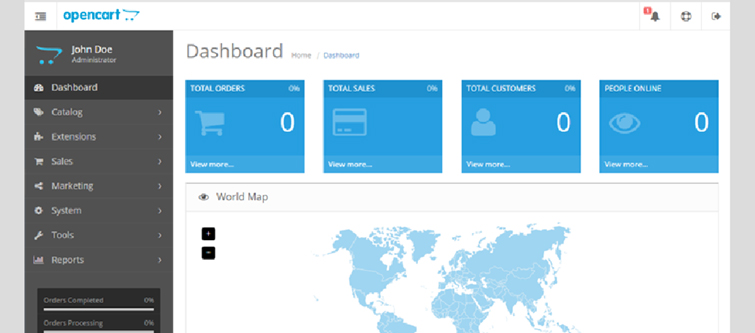
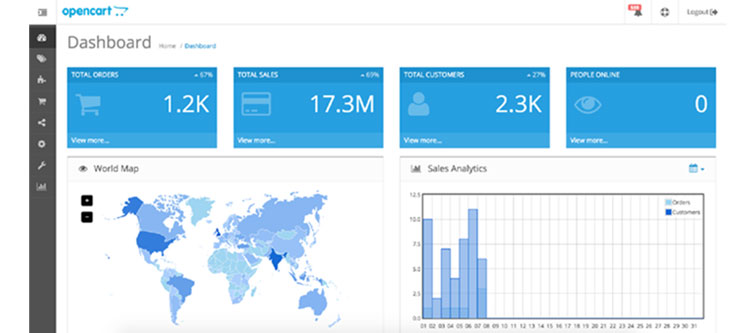
This latest OpenCart 2.xx version comes with an interactive dashboard that offers a wide range of services like sale analytics, people online, notice icon and other such features. Users can interact with this interactive admin panel for ensuring a smooth navigation around their site with the help of its vertical menu. These vertical menus located on the left side of the OpenCart platform improves the usability of the OpenCart dashboard for performing important site tasks and activities. Apart from this, it also consists of a Notice icon located at the top right corner of dashboard that provides critical information about new events.
Emergence of Extension Installer feature-
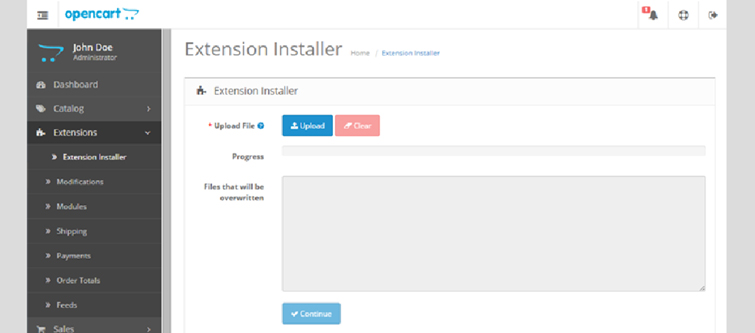
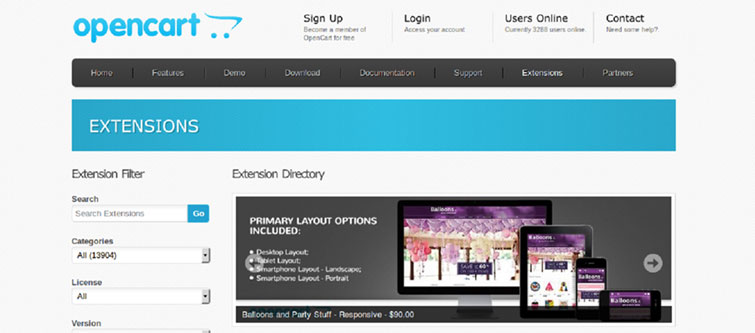
Adding any extension in the OpenCart platform is now much easier with this improved OpenCart 2.xx version. It consists of an built- in Extension installer feature that helps in simplifying the installation of OpenCart modules and themes. OpenCart store owners don’t have to override files through FTP during the installation process making it much simpler and faster. Once, you have uploaded the theme/extension, the list of all the overridden files will be visible.
With this new Extension Manager, OpenCart site owners don’t have to perform tasks like editing, uploading and replacing files through the FTP for the installation of any OpenCart extension. All this crucial activities can now be performed in a smooth manner with the help of an interactive and user friendly interface of OpenCart platform.
Introduction of MaxMind Fraud Detection System for enhanced security-
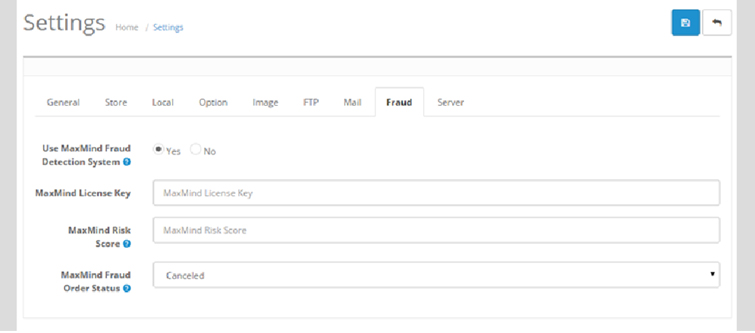
This OpenCart 2.xx version comes with an integrated MaxMind Fraud Detection System by default. This is a remarkable system that helps in identifying the risky orders for review purposes. The detection of such orders are done on the basis of high risk IP address, high risk email, high risk device or by anonymizing the proxy settings. For availing the services of this system, users just have to register themselves at MaxMind and then paste the required key in the Fraud settings of the OpenCart 2.xx admin panel.
If you are still using the older version of OpenCart platform, it is definitely the right time to make the maximum business impact by making a transition into this OpenCart 2.xx platform. By taking a close look towards all these features, it can be rightly understood that this latest OpenCart 2.xx version can improve the performance of OpenCart store in a flawless manner. For availing the services of our feature packed extensions for OpenCart store, visit the Knowband site at www.knowband.com.
OpenCart is one of the most popular platform for the development of eCommerce stores and has gained global attention within a short span of time. There are no doubt multiple eCommerce platforms available for online stores but none can match the level of expertise and features offered by this OpenCart platform. It has been serving the numerous eCommerce stores around the world and is writing new success stories for various online business.
If you are not much aware about the world of eCommerce business, it is time to invest your time, money and efforts on this OpenCart platform. You would be certainly amazed with the numerous features and functionalities that come with this eCommerce platform to improve the business fortune of various online stores. It is not just OpenCart modules that makes this platform powerful but it contains various functionalities like SEO, ease of setup, payment and shipping services supported and much more. Let us discuss all these components that makes this OpenCart platform as the most suited for the eCommerce development services.
1. Provides simple installation steps-
It is now easy to get ready with your eCommerce store with the simple installation steps provided by the OpenCart platform. Once, you have installed this OpenCart platform, users just have to perform basic functions like template selection, product addition, theme selection and your store is finally ready to process its first order. In case, you are a beginner in the eCommerce field, you can take the help for a quick and seamless OpenCart installation.
2. Comes equipped with free and affordable themes and modules-
This eCommerce platform comes with an amazing built in template system that can help you change between various templates with just a simple click. Apart from this, OpenCart store owners can integrate various built in as well as third party OpenCart modules from Knowband store like OpenCart One Page Checkout, OpenCart Social Loginizer, OpenCart One Page Checkout Pro, OpenCart Abandoned Cart, OpenCart Ajax Cart+ and others to improve the functionality of your online store.
3. User friendly admin interface for store management-
With the help of this OpenCart platform, it is now easy to manage an online store through an interactive admin panel. Store admin can now easily add products, product photos, categories, define SEF URLs, customize shipping options, integration of payment options and other such activities for the effective store management without any hurdle.
4. Supports multiple languages for better customer targeting-
In an online business, customer targeting is important for the growth of an online store in this competitive business environment. Considering the importance of customer targeting, OpenCart platform is available in 17 languages to provide you connectivity to your multi- lingual customers around the world. In order to add the design a store in the native language of a country, user just have to upload the required OpenCart modules for integrating that particular language with their online store. With a simple click on the language flag icon, it is easier for the store owner to switch between different languages.
5. Offers a huge variety of payment and shipping methods-
Payment and shipping methods make a strong impact on the customer engagement and attention while making an online purchase. Furthermore, it has been seen that presence of multiple payment and shipping methods reduces shopping cart abandonments on an eCommerce store to a great extent. Site owners just have to upload the desired OpenCart modules to utilize the functionality of the preferred payment and shipping methods. Some of the various payment and shipping methods that are present in this OpenCart platform by default are mentioned below:
Payment Gateways supported in OpenCart:
2Checkout
PayPal
Authorize.Net
SagePay
Klarna
Paymate
Cash on Delivery
Bank Transfer
AlertPay
SagePay Direct and more.
Shipping methods supported in OpenCart:
Citylink
Flat rate
Free Shipping
Per item
Royal Mail
UPS
United States Postal Service
Pickup From Store and others.
6. Ensures statistical data to analyze sales report-
In order to measure the growth and performance of your online store, it is important to track your store activity. Users need to understand the impact of analytics and statistics on eCommerce sales for improving their business fortune. Currently, OpenCart offers three types of statistical reports for a better idea about the store performance. These reports are shown below:
Sales Report- Helps in the calculation of total sales by day, week or month.
Products Viewed- Provides information about the most viewed or most popular products among site visitors.
Products Purchased- Offers insight about the most sold products on a site.
With a careful introspection of all the above features, any eCommerce store owner can understand the importance of OpenCart for eCommerce business. The platform is packed with multiple features and functionalities that can optimize the performance of your online store without any hurdle. So, embrace this OpenCart platform for a powerful eCommerce development services.
An online store can’t survive in this tough competitive business environment through a properly maintained product and inventory management alone. With the passage of time, it is important to take the help of various engaging modules for your eCommerce store which may be built on various platforms. You may be satisfied with your OpenCart store in terms of its performance but it do needs the assistance of various modules for accomplishing numerous critical tasks in a seamless manner.
No doubt, OpenCart modules are the necessity for multiple OpenCart stores around the world to emerge ahead from their competitors. Ignoring these modules can turn out to be the grave mistakes in terms of customer engagement, product sales and conversion rates. However, there could be few people who may not be aware about the importance of modules in eCommerce business environment and may consider it as the sole wastage of money only. Let us discuss the reasons for the use of these modules on your online store.
They can be easily designed and developed
One of the prime reason for the increasing popularity of OpenCart modules in eCommerce field is the fact that OpenCart platform is based on the Model View Controller (MVC) pattern. Due to this architecture, anyone with the required knowledge about PHP and MySQL can effortlessly create and develop customized OpenCart modules for online businesses. The OpenCart module development process requires the creation of four files namely, Controller, Model, View and a language file. However, if you need any type of assistance in developing various customized modules for your OpenCart store, you can avail the OpenCart module development services of Knowband for getting a module as per your business requirements.
OpenCart modules are easy to handle
It is a common scenario that not all eCommerce store owners are tech savvy and may not be good at handling any module. Due to this user access restriction, OpenCart modules are built on a user friendly interface that makes it easier for site admin to perform various back end changes in a quick and smooth manner. Site admin just have to login to the back end of their OpenCart store and then move towards the System option to perform required module customizations.
They can help in improving the checkout process of a site
Checkout process is one of the foremost component that can either increase or decrease the product sales of an online store. You need to provide a simplified online shopping experience to customers through the help of various OpenCart checkout plugins for online stores. Knowband store also offers a wide range of checkout plugins for various eCommerce platforms like Magento, OpenCart and PrestaShop. Some of its amazing checkout plugins for OpenCart store owners are OpenCart One Page Checkout Pro, OpenCart One Page Checkout, OpenCart PDF Invoice Plugin and much more.
The modules can boost sales and site traffic for OpenCart stores
With the spread of numerous OpenCart stores, the pressure of getting more sales and traffic are also surging higher. With these concerns, it is important to boost sales of your OpenCart stores to establish your brand identity and reputation. For OpenCart site owners who are not having optimum sales, it is time for them to start utilizing the OpenCart modules for eCommerce sales for grabbing maximum sales and conversions. You can take the help of any of these OpenCart modules such as OpenCart Scratch Coupon, OpenCart Abandoned Cart, OpenCart Price Alert, OpenCart Social Loginizer, OpenCart Sales Coupon Enhancer, OpenCart Deal Timer and others for enhancing your product sales, customer engagement and conversion rates.
It is the most ideal time to grab the required conversions and sales for your OpenCart store with the help of various OpenCart modules. With the help of the above points, it could be easily understood that OpenCart modules are an indispensable part of every OpenCart store and they need to be included without any second thought. Come and visit Knowband store for availing a wide range of OpenCart stores to accomplish various site tasks in a quick and flawless manner.
The interest of customers are changing rapidly due to the tough competitive business environment which is taking a toll on the conversions and sales of an eCommerce store. There are various modules available in the market that can help in reviving the sales for your online store without any glitch. It is often seen that the absence of a simplified checkout process can turn visitors away from an online store.
If you have been finding it difficult to grab sales for your online store, the availability of just One Page Checkout for OpenCart may not fulfill the desired purpose. Here are the two amazing checkout extensions for OpenCart stores for making a strong business impact. Let us discuss the features of these Knowband extensions for grabbing the required conversions on an OpenCart store.
n an eCommerce business environment, the invoice matters a lot for online shoppers as they provides critical information about the orders placed by customers. Now, with the help of this OpenCart plugin for invoice generation, you can get invoice in PDF format through admin panel of your store. It will help you get clear insight about the purchases made by your targeted customers. Here are some of the features of this added extension to One Page Checkout for OpenCart stores for grabbing higher conversions.
– Can be easily installed and configured within few clicks.
– Comes with feature packed admin panel.
– Sends invoice to customers in PDF format along with confirmation mail.
– This feature packed OpenCart module works with numerous themes and stores.
– Site admin can also design and customize invoice according to their business preferences and requirements.
– Offers facility to display/hide store and order related details.
It is really a difficult task to make changes in customer orders due to changing moods and patterns of customers. Earlier, only customers have the authority to make changes in their orders but now store admin can also edit orders placed by the customers in a coherent manner. Take a quick look on the various features of this OpenCart module for order processing as mentioned below:
Supports easy order editing through one page layout design.
Does not require technical support for installation and configuration.
Works uninterrupted with other modules, themes and stores.
Allow customization features through interactive back end admin panel.
Comes with email, export and print packaging slip facilities.
Offers free technical support and future plugin updates.
If you are not getting the desired business results with your One Page Checkout for OpenCart stores, it is time to add these Knowband extensions without any further discussion. These OpenCart plugins are a true complement for a complicated checkout process and can win maximum sales for your online store. Get these plugins now from our Knowband store for a promising business fortune.