OpenCart Product Availability Check by Zip Code Extension (Buy Now at zero cost)

“OpenCart Product Availability Check by Zip Code extension lets your customers check whether or not a product is available for delivery at their region. For this, they need to enter their area zip code.” The module is sometimes also referred to as OpenCart Zip Code Validator or OpenCart Zip Code verification.

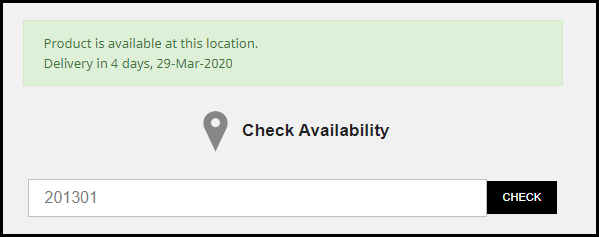
The module adds “Check availability of products” tab on the product pages. And upon entering the zip code, for available products, it displays that the product is available along with the estimated delivery date else it displays that the product is not available at that location.

Note: Due to the COVID-19 outbreak, we have made this module free for our customers. Related information and download link are given at the end of this post.

Overview

1. Allow customers to check product availability by their area zip code

2. Display the delivery day and the time interval for the specified zip code

3. Add to Cart button is disabled if product not available

4. Disable zip code check functionality on selected products

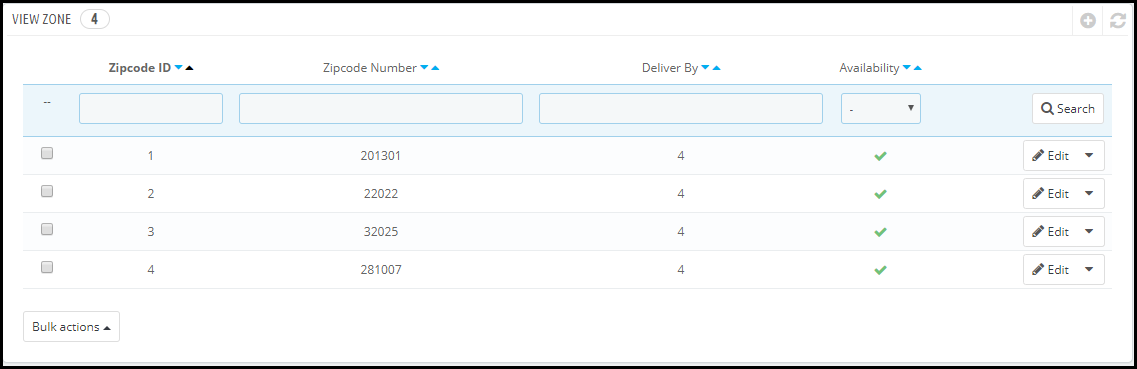
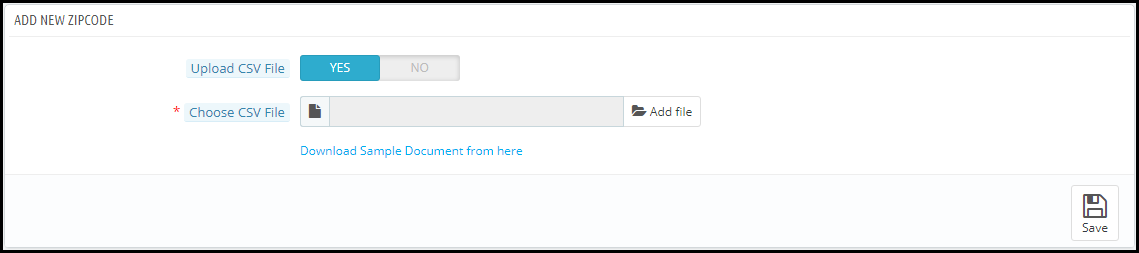
5. Add multiple zip codes either manually or through CSV upload

6. Specify the delivery time interval for a particular zone

7. Product mapping for different zones

Description

1. OpenCart Zip code Validator Extension requires customers to enter the zip code on the product page before proceeding further. They would not be able to add the product to the cart and checkout without checking the product availability.
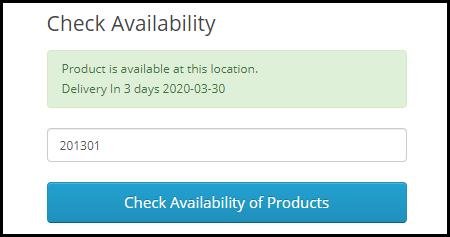
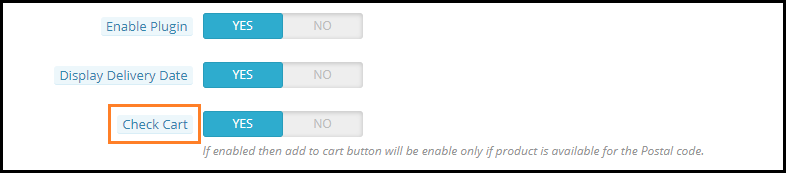
2. The Zipcode verification extension consists of a “Check Cart” option enabling which the “add to cart” button will disappear from the product page if that product is not available for the specified postal code.
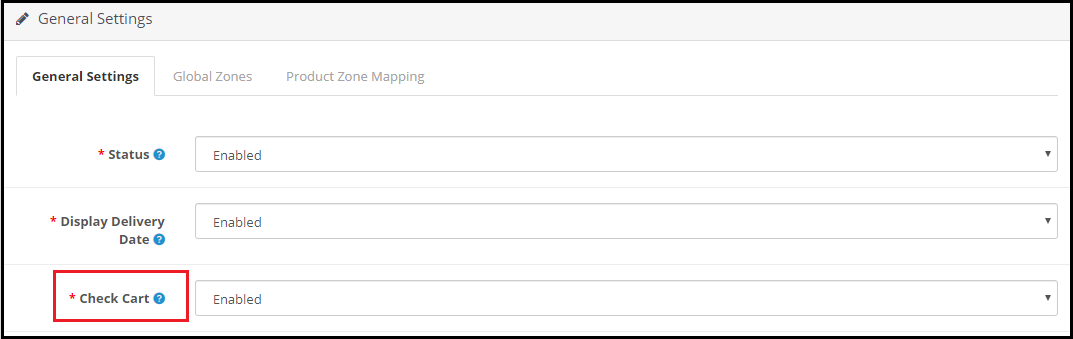
3. If the product is available in the specified area zip code, OpenCart Product Zipcode Extension displays the estimated delivery time interval along with the delivery date. (Refer to the image in point 1)

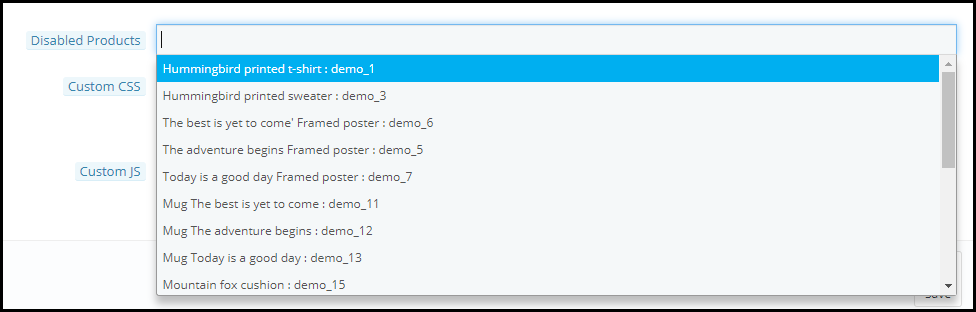
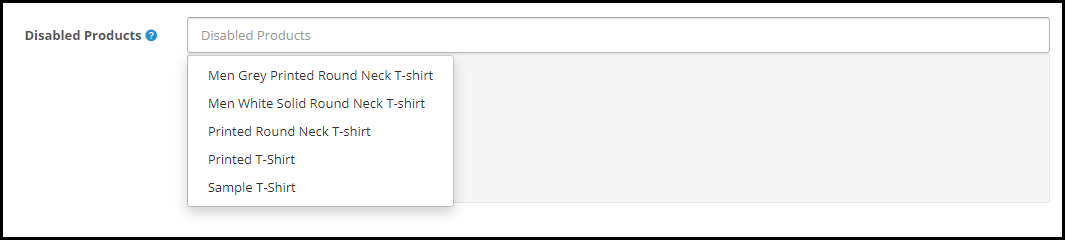
4. OpenCart Product Availability Extension provides you with the option to disable the zip code check functionality on some products. You can choose those products from the drop-down list under the “Disabled products” option.
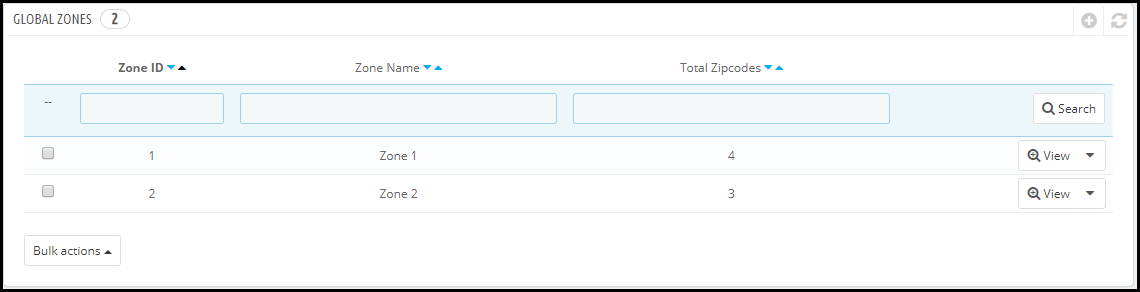
5. OpenCart Zipcode Validator Extension lets you add multiple zones from the back end configurations. You can specify the zip codes for every zone and define the delivery time interval. The zip codes can be added either manually or by uploading a CSV file.

6. You can map your store products for different zones, after which the products will be available only on those zones for which they have been mapped.

7. OpenCart Zip code verification module is easy to install and configure and offers multi-store compatibility

Benefits

1. Enhance the shopping experience of your customers.

2. Helps you with product page optimization

3. Makes it easy to manage products delivery.

4. It saves the customer’s time as they are informed about the product availability right on the product page.

Special note: The module has an actual cost of around $36 with free 3 months of support but following the corona pandemic, we have currently made it free for our customers. During these hard times, we are making sure that we do best for our customers in whatever way possible.

For the time being, download this module for free. We will keep you updated with new free modules.

Download the module from here.

If you have any query regarding this, you can reach out to us at support@knowband.com

COVID-19 and Its Impact on eCommerce Businesses

The beginning of the year 2020 does not seem to go too well, not only just for me or you, but the entire world. And the only reason for that is the Coronavirus which has shaken everyone and created chaos globally.

Originated from the Wuhan City of China, the COVID-19 has spread across countries infecting and killing many. This global pandemic has severely affected businesses, be it offline or eCommerce.

Before I proceed further, let’s understand what this COVID-19 is, what are its symptoms, how it can be prevented and lastly how it is affecting businesses.

What is COVID-19?

Corona Virus Diseases 2019 or COVID-19 is an infectious disease that spreads from person to person through respiratory droplets like when an infected person coughs or sneezes. These droplets can transfer from that infected person to the other person and make them infected too. And that’s how this coronavirus chain is formed.

A person can become the victim of COVID-19 in some other ways as well, like by touching an object or a surface that has the virus attached to it and then touching their face with those hands.

Symptoms of Corona Virus

People infected with Corona Virus might display symptoms like-

  • Mild to strong fever
  • Dry Cough
  • Difficulty in breathing/ Shortness of breath

The symptoms are not reflected immediately but usually after 1-2 weeks. Therefore it is advised not to be careless and take preventive measures.

How can Corona Virus be prevented?

  • Wash your hands often properly for at least 20 seconds | Use Sanitizer
  • Maintain Social Distancing
  • Avoid touching your face with unwashed hands
  • Stay Home
  • Cough into your elbow

Impact of COVID-19 in eCommerce

With the everyday increase in the total number of corona positive patients, the situation is only getting from worse to worst. From a local shopkeeper to popular eCommerce brands, the COVID-19 outbreak has left no one. Cities, states, even whole countries are getting locked down to prevent the spread of the disease and break its chain.

– Theatres, bars, restaurants, gyms, everything that involves mass gathering have been shut down.

– Corporates are left with no choice but to provide their employees with the work from home facility.

– Online food delivery businesses are almost shut.

– On-demand booking apps like OLA and Uber have also discontinued their facility in many places.

– Online shopping businesses have also witnessed a significant drop in the number of orders. Brick-and-mortar stores, on the other hand, are facing heavy downfall as people are not coming out of their home.

People have totally isolated themselves and are remaining inside their home. And this is the time when online streaming services like Netflix, Amazon Prime Video, Hotstar are making the most out of it. There is even talk of these streaming services reducing down their streaming quality to avoid the heavy traffic congestion during this pandemic.

Health-related products like Masks, Sanitizers, etc. are being sold in huge numbers and the sales figure is touching sky.

Final word

Let’s just hope this COVID-19 pandemic ends soon and the world takes a sigh of relief. Till then, just stay at your home, enjoy Netflix and chill. That’s the best way to do the best for your people, for your country and for this world.

Hope things get back to normal again and we are living the same life as it was before this Corona pandemic.

We, at Knowband, are trying our best to help eCommerce businesses in this difficult phase. Following the Corona outbreak, we are thinking to make some modules cost-free for our customers.

Check out the list of the free modules below-

PrestaShop Product Check Availability by Zip Code

OpenCart Product Availability Check by Zip Code

Magento Product Availability Check by Zip Code

PrestaShop Spam Blocker

OpenCart Spam Blocker

We have recently launched a Free COVID-19 Information Popup module as well for the PrestaShop and Magento 2 platform.

With the help of this module, you can notify your customers about any shipping and delivery related changes or any updates about your business. You can use this to educate your visitors about the preventive measures to stop the spread of the Coronavirus. And if you have some offers running on your website through which you want to help your customers in this quarantine period, you can do that too.

PrestaShop Product Availability Check by Zip Code Addon (Buy Now for Free)

“PrestaShop Product Availability Check by Zip Code, also referred to as PrestaShop Zip Code Validator or PrestaShop Zip Code Verification addon allows your store visitors to check whether the product they are thinking to purchase is available for delivery at their location or not. All they need to do is enter their area Zip Code.”

The module aims to enhance the customer shopping experience. It adds a zip code validator on the product pages and asks visitors to provide their zip code, upon entering which they are informed about the product availability.

Note: Currently, you can get this module for free. Related information and the download link is given at the end of the article.

Overview

1. Product Availability check through zip code

2. Display delivery period and date as per the specified zip code

3. Disable Add to Cart Functionality for non-available products

4. Disable zip code verification on selected products

5. Add zip codes manually or through CSV upload

6. Specify the delivery period for a particular zone

7. Map products with zones

Description

1. PrestaShop Zip code Validator addon adds a product availability check tab on your product pages. Customers would be required to enter their area zip code before adding the item to their cart and heading towards the checkout page.

2. The Zip code verification module contains a “Check Cart” option enabling which the “add to cart” button functionality will not work if the product is not available for the specified zip code.

3. If the product is available in the specified area zip code, PrestaShop Product Zip code addon displays the delivery period along with the delivery date.

4. No need to enter zip code every time on a different product page. Once entered, the availability of every product will be shown on that basis.

5. PrestaShop Product Availability addon lets you disable the zip code verification functionality for some specific products. You can choose the products for which you do not want the display the zip code check tab on the product pages.

6. With the help of PrestaShop Zipcode Validator addon, you can add multiple zones from the back end. For each zone, you can specify the zip codes and for each zip code, you can define the delivery period. The zip codes can be added either manually or by uploading a CSV file.

7. You can also map products according to zones. Put simply, you can specify which products would be available for delivery in a particular zone.

8. PrestaShop Zip code verification module is easy to install and configure.

9. Multi-store compatible, provides multi-lingual support and is compatible with all PrestaShop themes.

10. You can make additional changes in the PrestaShop Product Availability Check by Zipcode addon through Custom CSS and Custom JS.

Benefits of PrestaShop Zip Code Validator

1. Improve the shopping experience of your customers.

2. Easy managing products delivery.

3. Customers are notified right on the check out about the product availability rather than the checkout, hence making it time-saving.

Special note: The module costs around $30 with free 3 months support but as of now, following the corona outbreak in the entire world, we have currently made it free for our customers. During these hard times, we are making sure that we do best for our customers in whatever way possible.

Due to the Corona Virus pandemic which has created a lot of trouble in the delivery scenario, we decided to make this module free to help online businesses. Letting customers know about the product availability in their location would surely be of some great help not only for you but your customers as well.

Download the module from here- PrestaShop Product Availability Check by Zipcode

If you have any query regarding this, you can reach out to us at support@knowband.com

How to Make the Best Use of a Thank You Page?

You probably think that your job is done on the thank you page when a user has made a purchase.

Well, you are not wrong to think that way. Once a customer has made the payment and placed the order, what remains to be bothered about?

The focus of a brand is to encourage customers to shop and if they have been taken to the thank you page, you have succeeded in your efforts.

But do you know you can leverage a thank you page in many aspects rather than displaying a simple “Thank you for shopping with us” or “Thank you for placing your order” text?

What is a Thank You Page?

A thank you page also referred to as a post-purchase page is the page that is displayed to the users once they have successfully placed their order. It is basically a page where users are informed that their order has been confirmed.

Your thank you page could provide you with ample benefits. Let’s try to understand how you can make the best use of a thank you page on your website.

1. Encourage Cross-selling on the thank you page

Customers’ mind can switch in seconds. If they didn’t show the interest in the related items while purchasing, does not mean they cannot be encouraged later to purchase. With that being said, you should use the cross-selling strategy even when a customer has placed the order.

Display items that match with the customer’s purchase. Who knows they might be interested in buying them too.

Related: A complete guide to Cross-selling and Upselling in eCommerce

2. Ensure Customer Retention by offering a Coupon Code

You want to make sure that your customers return to your website in the future right? Then give them a reason for it. This becomes important especially in the case of new customers.

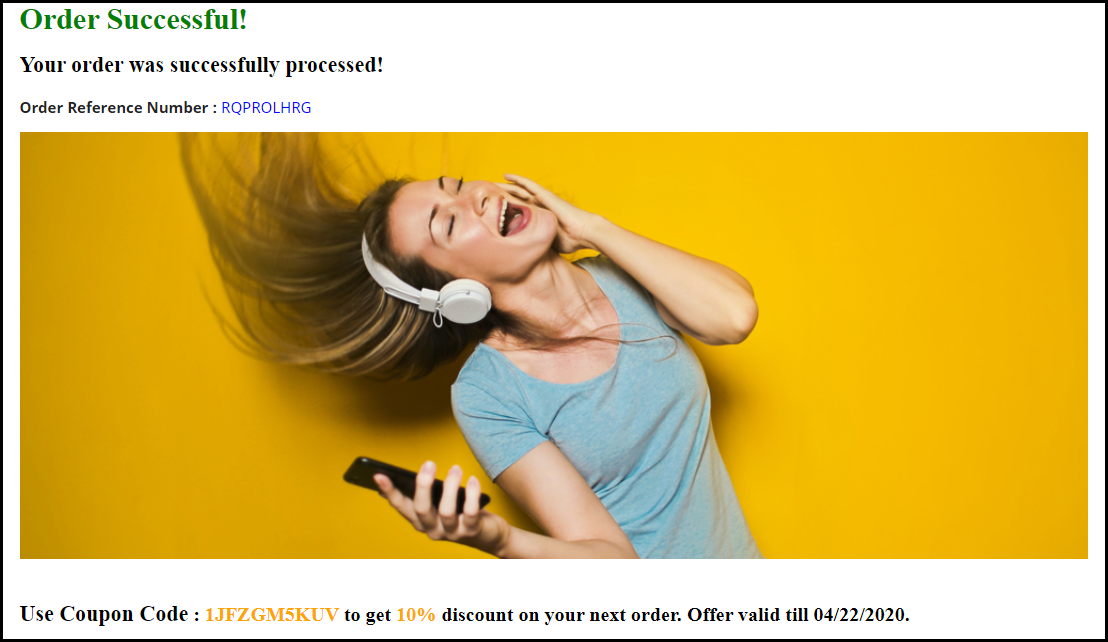
When a new visitor buys an item from your website, reward them with a coupon code alongside a thank you message. By displaying a coupon code on your thank you page, you can develop the curiosity inside the customer to come back to your store and purchase again.

This marks as one of the effective customer retention strategies.

3. Use Thank you page to collect Feedback

It is good to know what your customers think about your Brand. And there cannot be a better way to ask them that other than on the thank you page.

Ask them about their shopping experience or if they faced any difficulty at any place during their purchase journey.

This gesture tends to increase customer’s attachment towards your brand since they feel that their opinion is being valued. And if they leave any remark, appreciate them for it.

You can get more response if you just add a personal touch and also make them feel how important their opinion is for the success of your Brand.

4. Let Customers share their Order details

Customers might want to share their order details with someone, especially if they have purchased the product, not for themselves but for the other person.

Include an order sharing option on the thank you page. Allow sharing on WhatsApp, Facebook messenger, and Instagram since these three are the major communication channels for netizens.

5. Add a link to your Social Media Pages

You can display social icons of the platforms where you have your brand page or account so that customers get redirected to your social media pages after clicking on it. It is one of the best practices to increase your social followers.

6. Ask Customers to Refer your Brand to their known ones

If you are running a Refer and earn campaign for your website promotion, one of the best strategies to get more referrals would be to put it on the thank you page.

When someone makes a purchase, ask them to share your website with their friends, colleagues, family or relatives and reward them with some exciting incentives in return, for every successful referral.

This will bring you more sign-ups on your website.

Better Thank you page module by KnowBand

Thank You Page module by Knowband turns your normal order success page into a marketing page where you could display related products to the customers along with the discount coupon for their next purchase. You can also set an advertisement banner on the thank you page.

This module is available for PrestaShop, OpenCart and Magento. Check out-

PrestaShop Thank You Page addon

OpenCart Thank You Page extension

Magento Thank You Page extension

For any queries or assistance regarding this module, feel free to drop a comment below or you can contact us at support@knowband.com

Boost your sales with Magento Gift Card Extension

“Incorporate a gift card section on your Magento website with Magento Gift Card extension. The module allows your store visitors to shop for e-gift cards/ digital gift cards from your website.”

Digital Gift Cards have been in trend for a long time now, and the trend will continue since people have become fond of purchasing e-gift cards. It saves their time from the tedious gift search. Today, with the facility of online gift cards, a person can purchase and send a gift card to anyone in the world, at any point of time.

It is only because of this that a majority of eCommerce website owners like to provide the gift card facility to their customers.

Wishing for a gift card extension for your site so that you could also start selling gift cards? Knowband’s Magento Gift Card extension will cover all your possible requirements regarding gift cards.

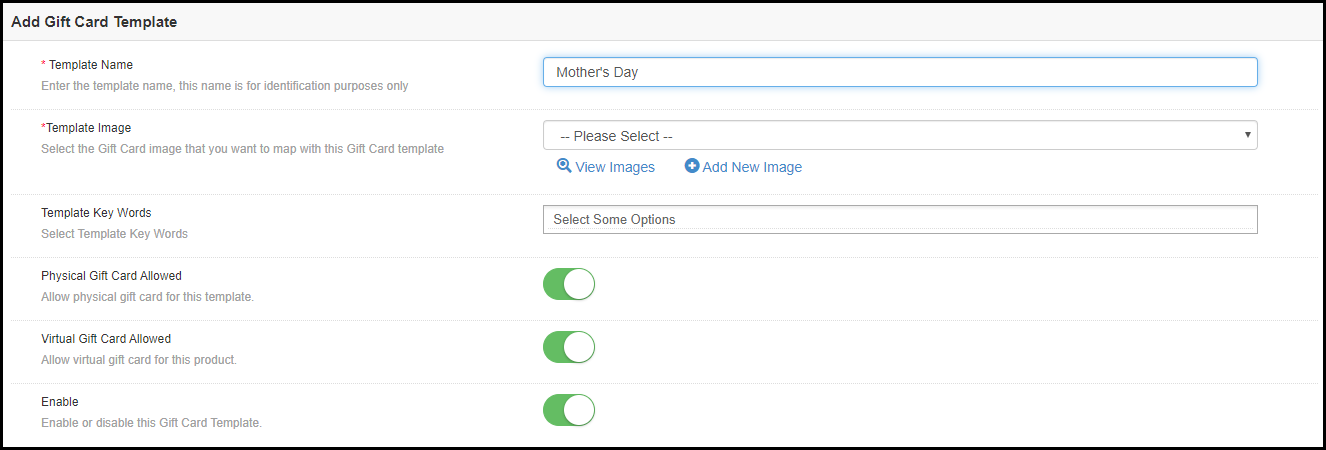
And with Mother’s Day only a few days away, purchasing a Mother’s Day special Gift Card will be one of the best ways to thank your mother and put a smile on her face. The module will let you create a Mother’s Day Gift Card from the back-end after which you can make it available for the customers to purchase it.

Overview of Magento Gift Card

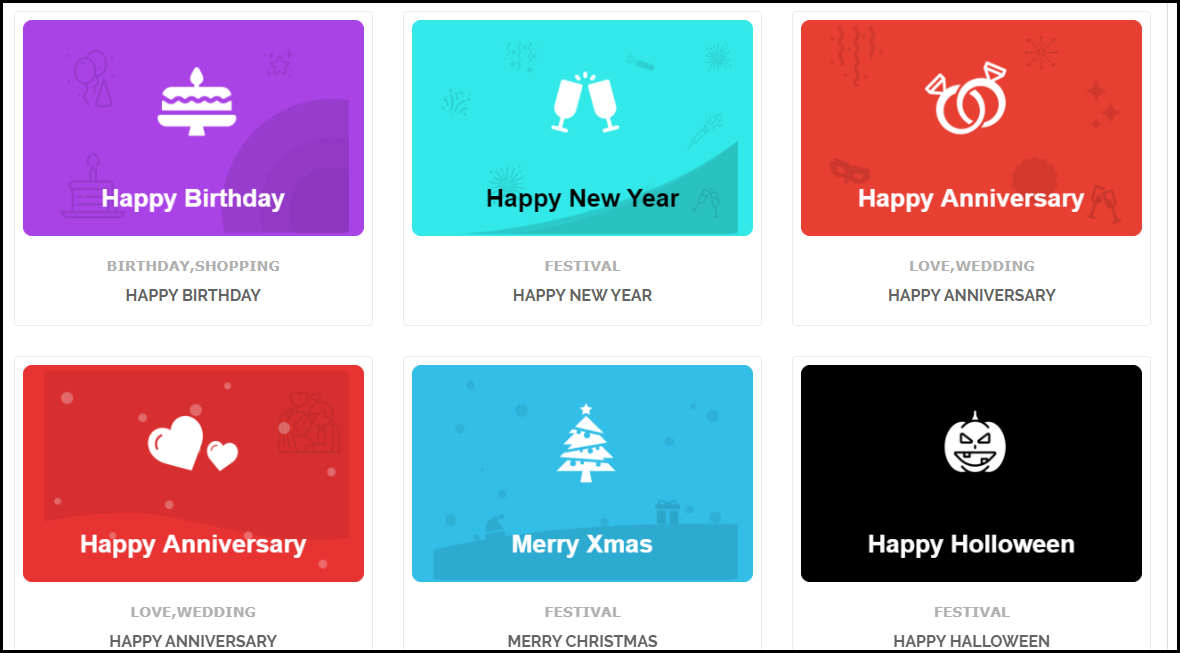
1. Gift Cards for multiple occasions- Mother’s Day, Valentine’s, Halloween, Christmas, Birthday, Anniversary, etc.

2. Customizable Gift Card templates | Add New Gift Card templates

3. Create different price range gift cards

4. Display the gift card option on Header, Footer, etc.

5. Customizable email templates

6. Send gift cards via email or print it yourself

7. Track gift card orders

Magento Gift Card functionality

1. Magento Gift card extension comes with pre-existing templates for occasions like Birthday, New Year, Mother’s Day, Father’s Day, Anniversary, Halloween, Christmas, etc. These gift card templates can be customized and you can also add new ones. You can also disable a particular template anytime.

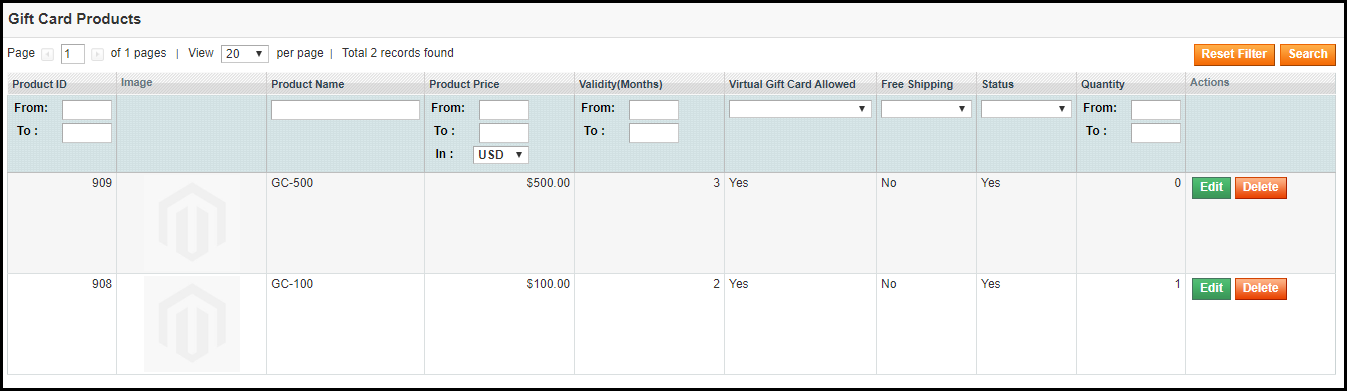
2. Magento Gift Card manager extension lets you set up gift cards of multiple prices so that a customer can choose the gift card as per his/her budget. You can also specify the gift card quantity of different priced gift cards. You can also set their validity. Besides, you can provide free shipping on a specific value gift card.

3. The gift card link can be placed across multiple places on your website such as the Header, Footer, and my account section. You can also highlight it on the left side on the front-end.

4. With the help of Magento Gift voucher extension, you can specify the order status for which the gift card would be marked as delivered and the gift card code would be generated.

5. Magento Gift Card extension provides an email template for the sender as well as the recipient, the subject and content of which can be customized as per the admin’s choice.

6. You can also set the minimum delivery time for the gift cards.

7. Magento gift card module lets you fix a prefix for your gift cards that helps you in your brand promotion.

8. The recipient can also download the gift card in the PDF format.

9. Allow gift cards to be sent physically (by printing it yourself) and virtually (over recipient’s email address).

10. With Magento Gift Card Voucher extension, you can track your gift card orders on your website.

11. The Magento Gift Card extension makes it a one-click task to enable or disable the module functionality.

Benefits of Magento Gift Card Extension

1. Easy to set up module with simple configurations

2. Helps in boosting your brand awareness

3. Increases your store sales and revenue

4. Acquire more customers [new] for your brand

If you need any assistance in this module regarding its configuration or have any sort of query, you can contact us at support@knowband.com.

How did you find this Magento Gift Card extension?

PrestaShop Facebook Store Addon

“PrestaShop Facebook store, also known as PrestaShop Facebook shop addon or PrestaShop social shop addon is amongst the best PrestaShop social media modules. It lets you set up a shop on your Facebook business page.”

The Facebook audience is huge. People of every age group are present on the largest social media platform that has over 2.4 billion monthly active users. It is the most targeted social media network by brands as it provides them with the opportunity to reach out to a large target audience.

Moreover, people spend a lot of time on Facebook and this is the reason why Brands have linked their Facebook page to their eCommerce website and opened a Facebook shop, i.e. to allow people to shop from that medium too.

If you are a PrestaShop website owner looking to open a Facebook shop, PrestaShop Facebook store addon will help you do that effortlessly. All you require is the Facebook App ID.

Note: This module requires a minimum of 2K likes on your Facebook page to work. Besides, your website must be SSL-enabled. If your website does not have an SSL certificate, the module would not work because Facebook does not allow linking to a non-SSL website.

Overview

1. Easy to set up your Facebook store without any requirement of technical knowledge.

2. Track performance of your Facebook shop by connecting Google Analytics.

3. Adjust the look and feel of your Facebook shop.

4. Display your bestsellers, featured products, new arrivals, etc.

Features of PrestaShop Facebook store addon [Detailed]-

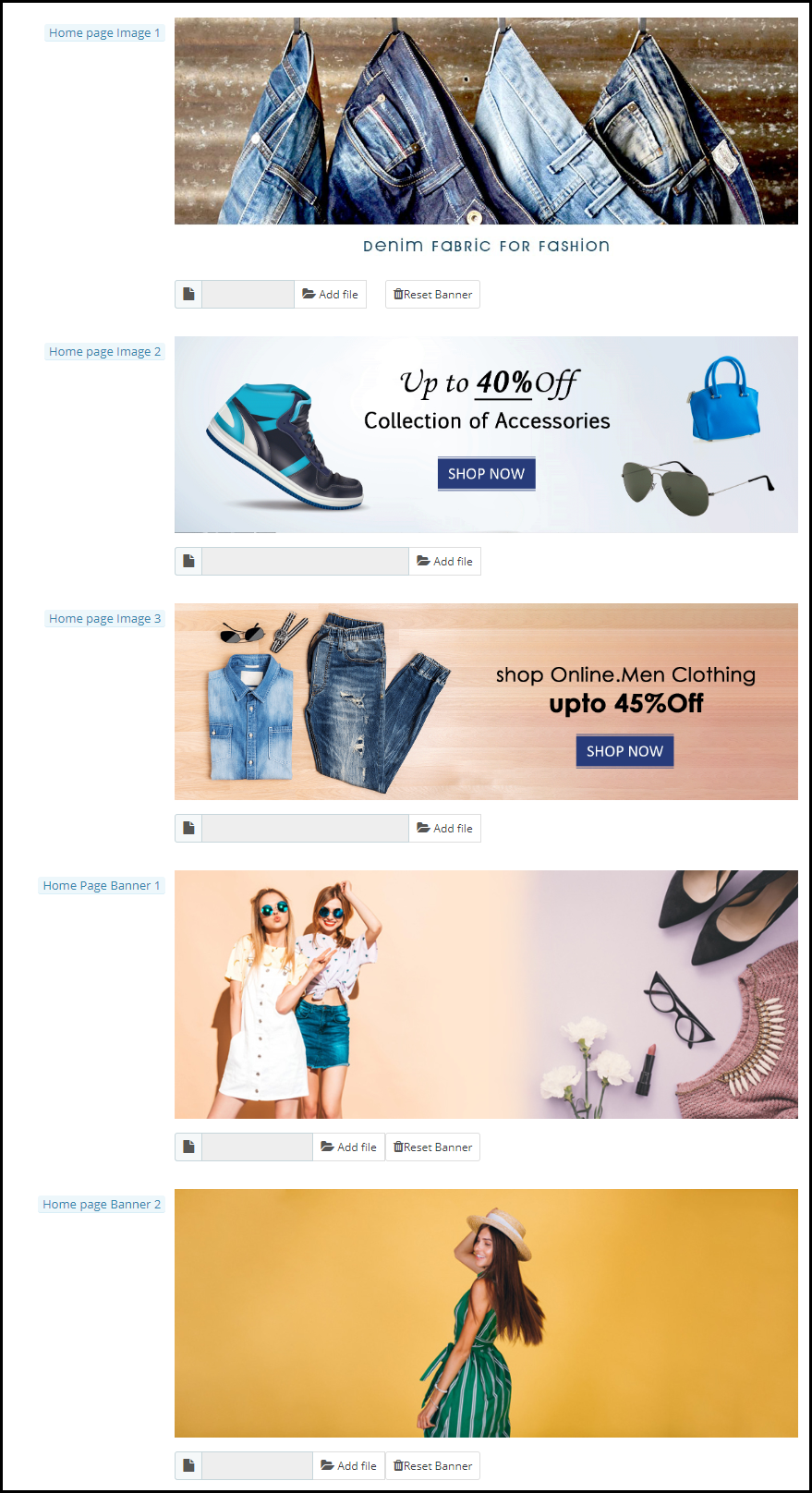
1. You can set up some attractive home page images to draw user attention. The images are displayed automatically. You can upload a maximum of three home page images.

Besides, you can set up home page banners as well to make your Facebook store more attractive. You can upload a maximum of two home page banners.

2. PrestaShop Facebook shop addon lets you customize the menu bar of your Facebook shop. The back-end of the module displays a list of categories that are set up on your website. You can then decide what category you want to put in the menu bar of your Facebook store.

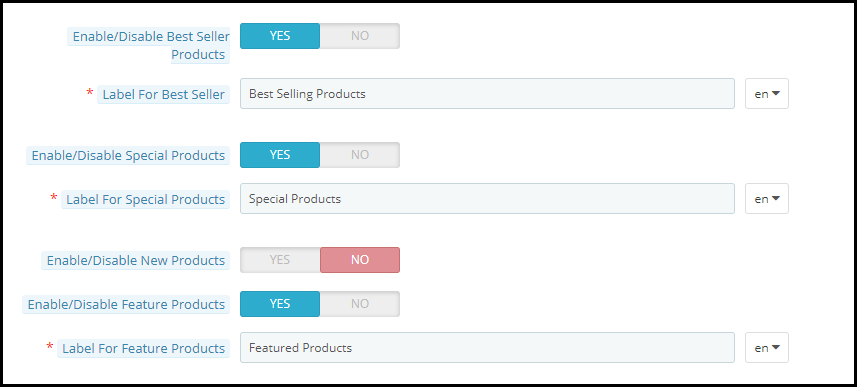
3. With PrestaShop Social shop addon, you can display featured products, bestsellers, new arrivals, special products, etc. You can specify the products that you want to show on your social shop.

You can also specify the maximum number of featured products that you want to display.

4. Connect Google Analytics by entering your analytics ID and track the performance (conversion and sales) of your Facebook shop.

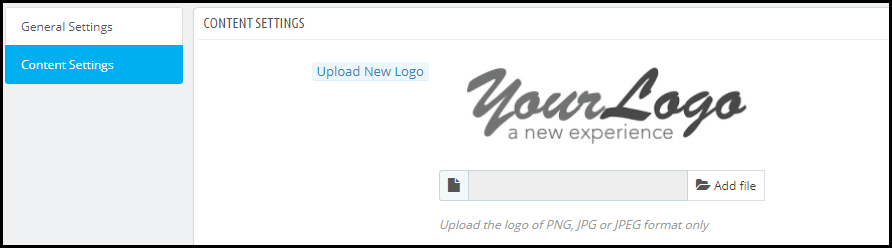
5. PrestaShop Facebook store addon helps you set up your Brand logo on your Facebook shop.

6. You can also adjust the theme colour of your Facebook shop.

7. PrestaShop Facebook store addon lets you set up the footer content for your store.

Benefits of PrestaShop Facebook shop addon

1. Boost your website traffic

2. Increase the conversion rate on your website

3. Promote your Facebook shop in front of a huge Facebook audience

4. Enhance the shopping experience of your Facebook followers

Over to You

PrestaShop Facebook store addon provides multi-lingual support and has multi-store compatibility. If you want to achieve high sales from the Facebook platform, having a Facebook shop is a must.

If you need any assistance with this module, you can contact us for help at support@knowband.com

Understanding Mobile Commerce: What is it? Examples and Benefits

Mobile Commerce has excelled at a rapid rate in the past few years. Smartphones are dominating the new generation and ease of access to online transactions is the primary reason for the quick evolvement of mobile commerce.

The use of desktops for online purchases has diminished and it is now being replaced by hand-held devices.

In 2018, mobile commerce made a figure of around $207 billion in the US itself, and that was around 40% of the total eCommerce retail sales captured that year. And the numbers are expected to hit the $338 billion mark in 2020, reports Statista.

If you talk about global mCommerce sales, it has already surpassed eCommerce way back in 2016, and it is going to make a powerful impact in the future.

What is Mobile Commerce?

Mobile Commerce also referred to as mobile eCommerce or simply mCommerce/m-commerce is all about online transactions that take place through mobile devices or tablets.

Put simply, whenever you conduct a transaction through your smartphone, it’s mCommerce. From purchasing the smallest of things to expensive ones, today, most of the people prefer to make the payment using their cell phones. This is what has led to mobile commerce expansion.

Mobile Commerce vs eCommerce: What’s the difference?

Though this would have been pretty clear by now, let me make it easier for you to understand. The key difference between m-Commerce and eCommerce is that the latter involves buying and selling of goods through any kind of device, be it a mobile or desktop, whereas m-commerce is used when online transactions are made through mobile devices specifically.

You can also say that eCommerce is the parent category and mCommerce is the child category.

Mobile Commerce Examples

M-commerce can be witnessed in our day to day lives. A few examples are-

Mobile Shopping

When I talk about mobile shopping, Amazon hits my mind straight away. The largest eCommerce company in the world captures a huge number of sales daily through mobile devices. It has its own mobile app as well which makes it even easier to purchase anything from their store. And since it covers a wide variety of items, it is the go-to shopping store for most of the people.

And similar to Amazon, there are multiple other websites that encourage mobile shopping.

Mobile Banking

Another example of mobile commerce is Mobile banking. Until a few years ago, people either used to meet-in-person or go to a money transfer store to send money to someone. Thanks to Mobile banking which has now made it a few clicks task.

If you want to transfer money to a user, all you require is their account details like account number and IFSC code, and a single tap would deposit the money in the recipient’s account. Digital wallets like Google Pay does not even require account details if the recipient is registered on the same platform.

Benefits of Mobile Commerce

There is a reason why m-commerce has achieved a significant rise in the past few years. Some of the major advantages of mobile commerce are-

1. Better Customer Experience

M-commerce makes it convenient for mobile users to make online payments. They do not need a laptop or desktop to conduct a transaction. If you are having a smartphone and a good Internet connection (since payment may fail if there is network issue), you can make a payment anytime, anywhere, without any hassle.

2. More and more people are shifting towards m-commerce

Mobile eCommerce is expected to reach 70% of the total eCommerce retail sales this year. Therefore, it is vital that you allow your mobile visitors with the facility of easy mobile transactions. Failing to do so may result in a huge loss in your mobile conversions.

Work on the mobile version of your website. Optimize it, make it responsive.

3. Faster transactions

Everyone wants comfort. Nothing would make a person happier if he or she could perform any task without getting up from their bed. Not sure about other things but mobile commerce applications have made it possible to make payments faster and you do not need to get up from your bed and search for your laptop.

You cannot carry a laptop with you every time. A cell phone? Definitely.

Final word

The first and the foremost thing to do to improve mobile commerce is making your web pages load quickly. The faster your website loads, the more mobile conversions you will have. The use of AMP in such cases proves to be beneficial.

From the moment a visitor enters your website to the final payment page, each and every step must be optimized, primarily the checkout page, so that the visitors do not find any kind of trouble on your website.

Make mobile commerce more flexible through our Mobile App Builder.

You May Also Like:

Mobile App Marketing: How to Promote your Mobile App?

Tips To Boost User Engagement with eCommerce Mobile Apps

How eCommerce Mobile Apps enhance Customer Loyalty?

Reduce Cart Abandonment with Magento 2 Abandoned Cart Extension

Convert abandoned cart users into your customers with Magento 2 Abandoned Cart extension.

Cart Abandonment is the primary concern for every eCommerce retailer. And in the online world, it is something that you have to deal with. It cannot be eradicated no matter how many efforts or techniques you apply.

However, many modules or plugins help website owners to reduce the cart abandonment rate on their website. One such module is the Abandoned Cart module by Knowband.

If you have a website on the Magento 2 platform and looking for some of the best Magento 2 Abandoned Cart extensions, Knowband’s Abandoned Cart extension for Magento 2 will probably put an end to your search.

Benefits

1. Recover abandoned carts and reduce the cart abandonment rate

2. Boost conversions

3. Increase your sales

Overview

1. Option to mark a cart as abandoned after a certain time

2. Auto-email functionality

3. Multiple email templates

4. Send discount and non-discount emails

5. Track Abandoned Carts

6. View Converted Carts

7. Abandoned Cart Analytics

8. Test mode functionality

Features of Magento 2 Abandoned Cart Extension [Detailed]-

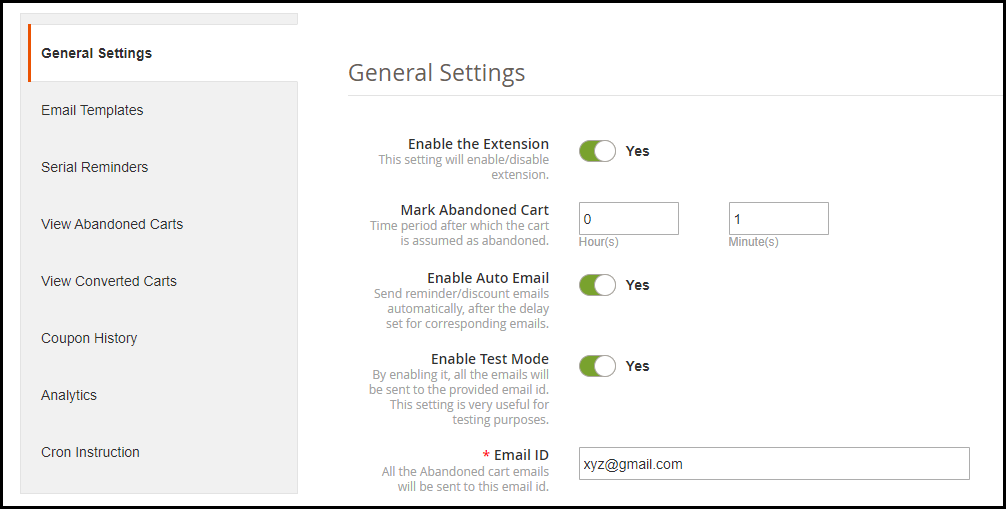
1. Magento 2 Abandoned Cart extension lets you specify a time period after which a customer’s cart is automatically marked as abandoned. For example, if the duration is set to 1 hour, then after 1 hour it will be added to the abandoned cart list.

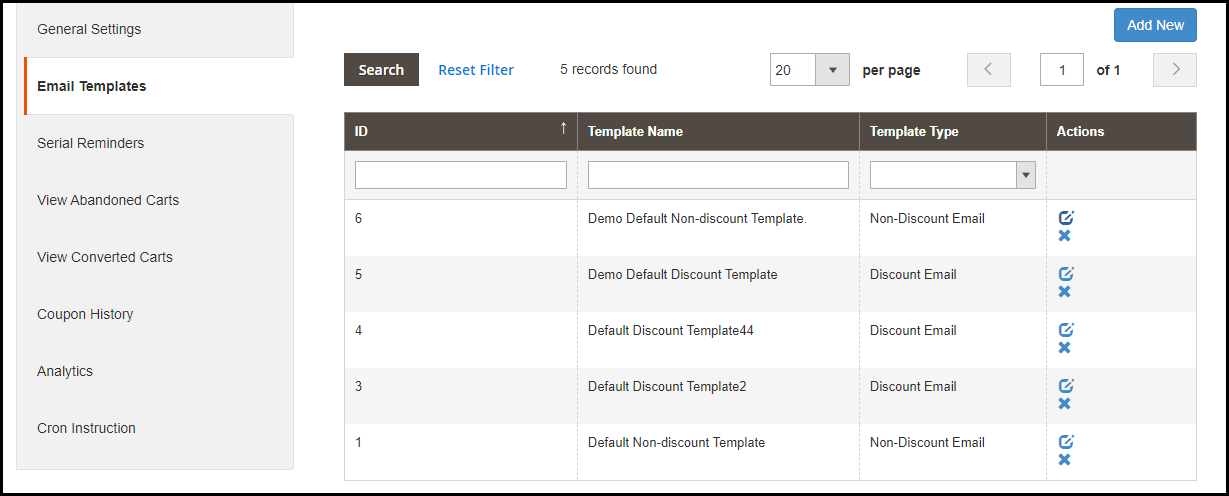
2. The Magento 2 follow up email extension offers multiple pre-existing email templates and you can also create new ones or customize the existing ones. For every email template, you can specify the template type whether it should be a discount email or a non-discount email. The latter is simply a reminder email where a user would be reminded about the pending items in his cart whereas the discount email contains a coupon code inside the email content which a user can claim to get discount on his left purchase.

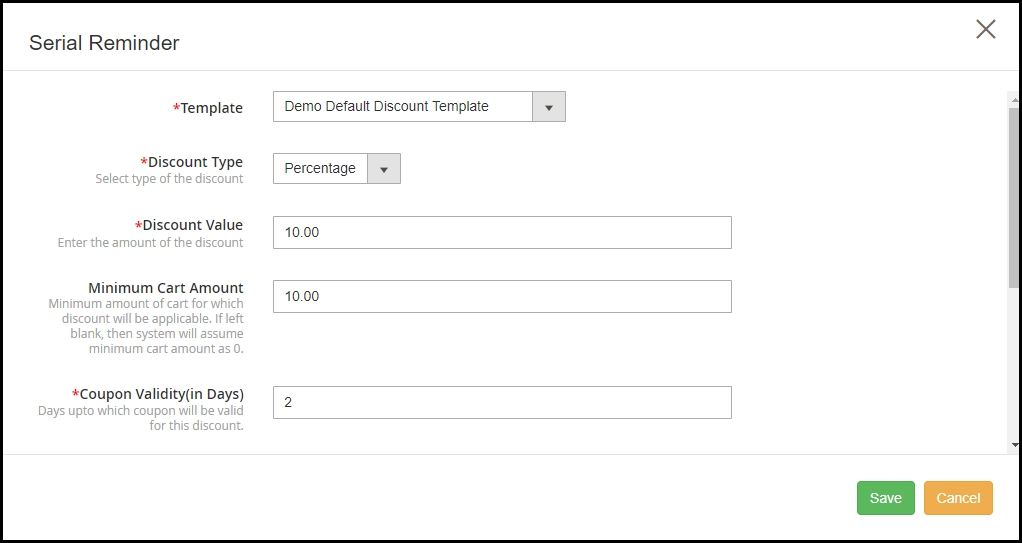
3. The Magento 2 Abandoned Cart extension allows you to schedule your emails. For discount email type, you can specify whether you want to provide a flat discount or percentage discount. You can also set the coupon value, coupon validity and specify the minimum cart amount for which the discount would be applicable. Besides, you can also offer free shipping to customers on their purchase.

4. Magento 2 Shopping cart abandonment extension also provides auto-email functionality enabling which the reminder emails would be automatically sent to the abandoned cart user after the set delay.

5. Track details of the abandoned cart users easily with the Magento 2 Abandoned Cart Reminder module. It displays some very useful information of the users like their name, email address, left cart amount, customer type whether they are registered or non-registered, their last visit or whether they have been sent a reminder email or not.

You can also check the pending items in their cart. Besides, you can view the list of the users who made a purchase after they had been sent the reminder email.

6. Check the complete history of the coupon codes that shows the discount amount, discount type, status of the coupon and whether it has been used or not.

7. Magento 2 Abandoned Cart Email extension provides you with some amazing analytics view in the form of line graphs and pie charts. You can compare abandoned carts and converted carts, abandoned cart amount and converted amount, and cart abandonments stats over a period.

8. There is test mode functionality that allows you to check how the emails are delivered to the user.

9. Enable/disable the extension in a single click.

If you need any assistance with this abandoned cart extension, you can reach out to us at support@knowband.com and we will try to resolve your query to the earliest.

Magento 2 Return Manager | RMA Extension

Magento 2 Return Manager, also referred to as Magento 2 RMA extension helps you manage your store returns comfortably.

Product returns take place in massive numbers in an eCommerce website and managing those return requests require a flexible returns management system. Failing to provide easy return facility to the customers may degrade your brand reputation.

Let this not be a problem anymore with Knowband’s Magento 2 Return Manager extension.

Overview

1. Three types of return choices: Replacement, Refund, and Credits

2. Image upload option for customers to highlight the defect

3. Easy returns for even Guest customers

4. Set up return policies and return guidelines

5. Create returns on customers’ behalf

6. View pending, approved and successful returns

7. Email customization

8. Responsive, multi-lingual, multi-store compatible, SSL compatible, and compatible with all browsers

Features offered by Magento 2 Return Manager Extension (detailed)-

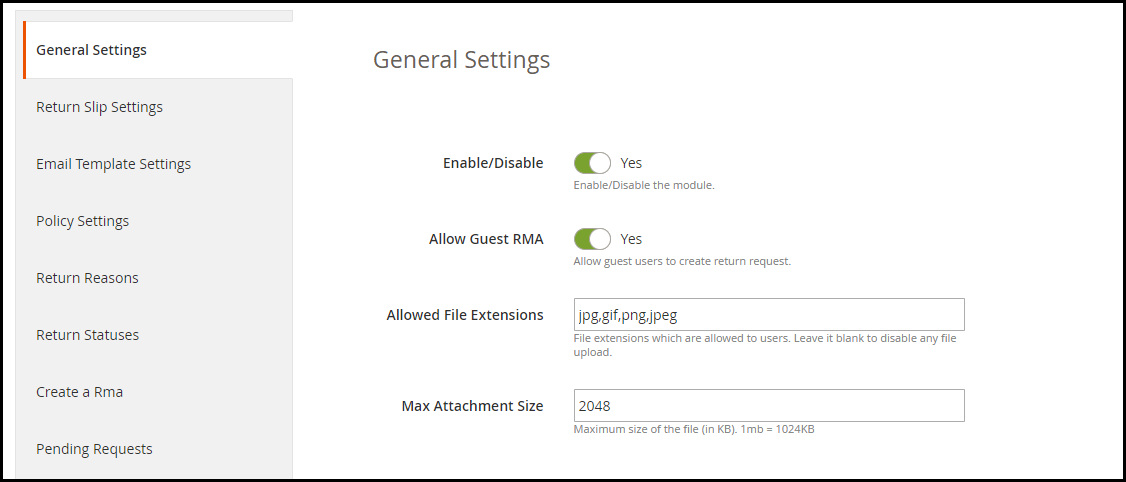
1. Enable or disable the module anytime within a single click.

2. Allow even guest users to raise a return request.

3. Magento 2 RMA extension allows customers to upload the image of the product to be more specific about the issue in the product. The supported file formats for image upload are jpg, jpeg, png, gif, and the image size cannot be more than 2 MB.

4. Make customers aware of the return guidelines while they return their item. A return slip is generated when a customer’s return request is approved that contains your return guidelines.

5. Magento 2 Returns Management extension allows you to set up your store addresses to make it convenient for your customers to send their return item. The store addresses are displayed when a customer is creating a return request. They can choose their desired nearby store.

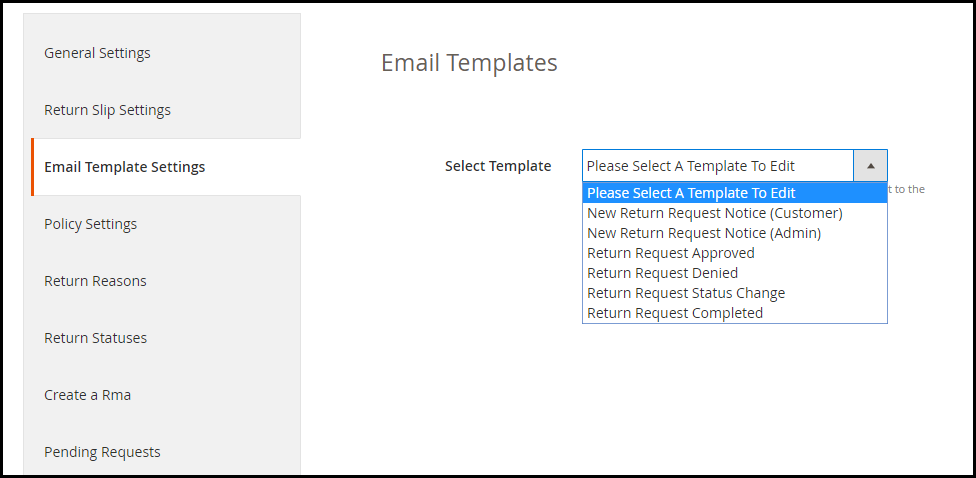
6. Magento 2 Returns and Refund Management extension provides multiple email templates for different order return status. You can customize these email templates as per your way.

7. You can create your return policies with the help of the Magento 2 Product Return extension. It will be displayed to the users while they create a return. For different return type, you can highlight different return policies. You can specify when can a customer expect the solution for his return, and also specify what should be the condition of the item to submit it for return. You can also map products for particular return policy.

8. Add some of the common return reasons to make it easier for the customers to pick their return cause from the drop-down list.

9. You can create different order return statuses through Magento 2 Return Manager module.

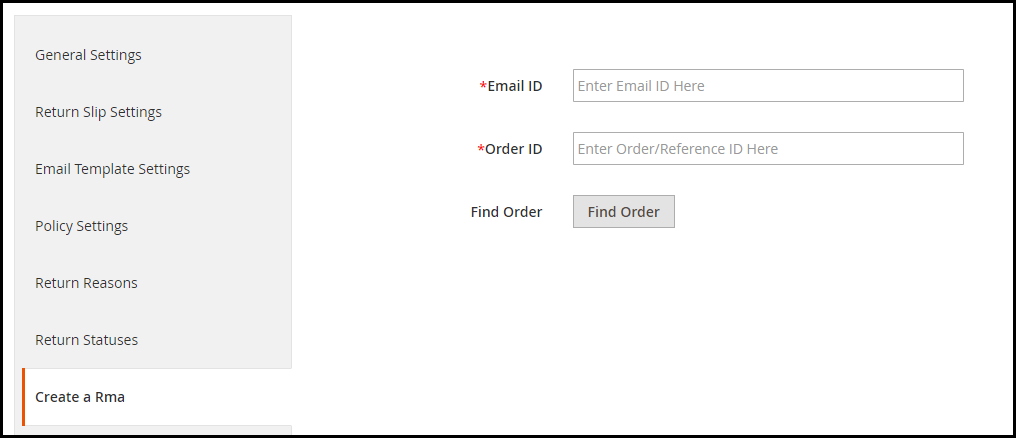
10. This RMA extension also allows you to create a return request on your customer’s behalf.

11. You can track your pending (non-approved) return requests and approved return requests from the back end. It displays the Order ID, product info, product quantity, customer’s name and email address, return reason, return type, and the return status. All the successful return orders are displayed under the Archives list.

12. A success message is displayed to the user every time a return request is placed.

Benefits of Magento 2 RMA Extension

Improve Returns management on your Magento 2 store.

Provide a hassle-free return facility to your customers.

Gain customer trust

Improve customer loyalty

Improve customer retention (because of store credits)

If you need any assistance with the Magento 2 Return Manager module, feel free to ask it in the comment section below or you can submit your query at support@knowband.com and our team will reach out to you shortly.

You may also like:

5 Ways to Manage eCommerce Returns

6 Simple Tips to Reduce eCommerce Returns

6 Pieces of Advice for an Effective eCommerce Return Policy

OpenCart Product Customization Extension

OpenCart Product Customization module also referred to as OpenCart Product Customizer and OpenCart Product Designer lets you add customization services on your website for your store products.

Today, the demand for customized products has increased exponentially. Many people are looking to purchase products that can be personalized and designed as per their choice. While some businesses are running it offline, some have taken it on the online platform and have set up the whole business on product customization.

If you have a website set up on the OpenCart platform and looking to provide online product customization services to your store visitors/customers, OpenCart Product Customization Extension is all you need.

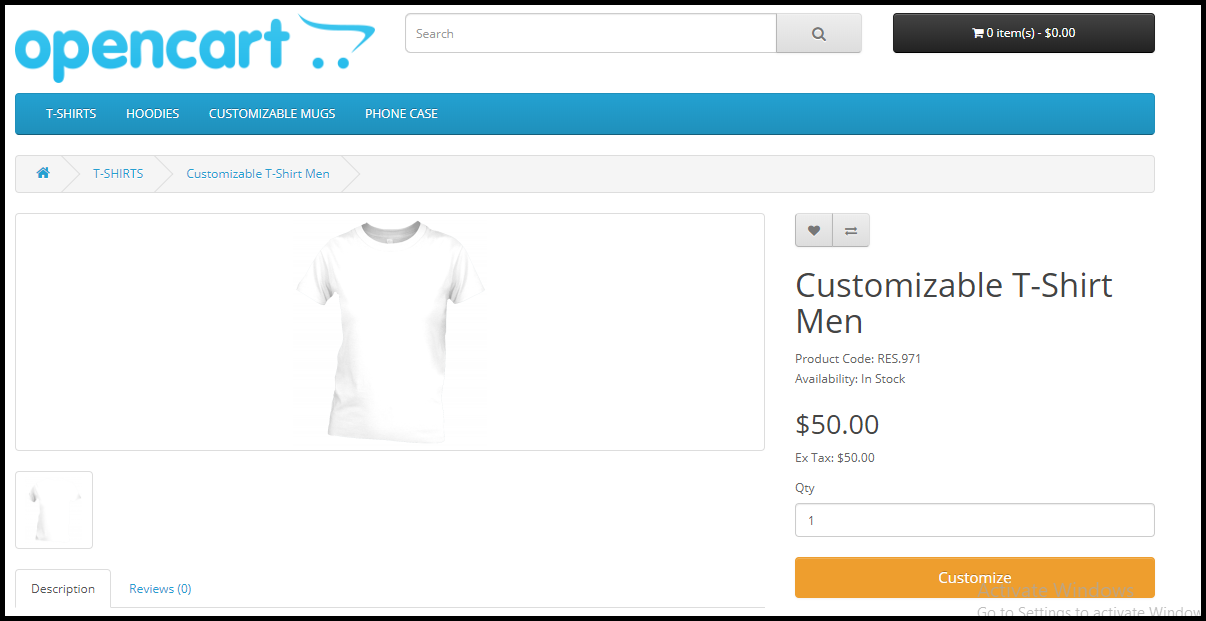
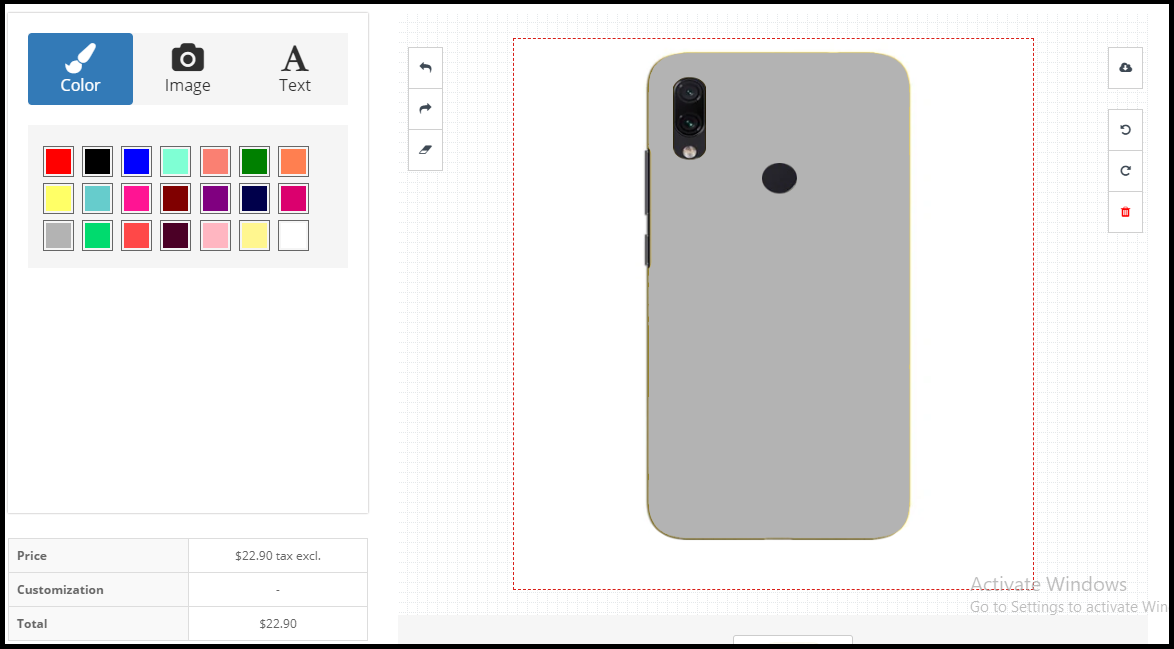
Once installed, the OpenCart custom product designer extension will add a customization panel on your product pages and will offer free-hands to your customers to make the desired changes.

Overview

Adds Customize tab on your product pages

Lets your customers add desired colour, image, texts, QR code, etc. on the product

Set up different fonts, colours and templates from the back end.

Set up customization price

Benefits

Boost your sales

Enhance the online experience of customers

Improve customer retention

Easy to set up customization service

Features of OpenCart Product Customization extension [Detailed]-

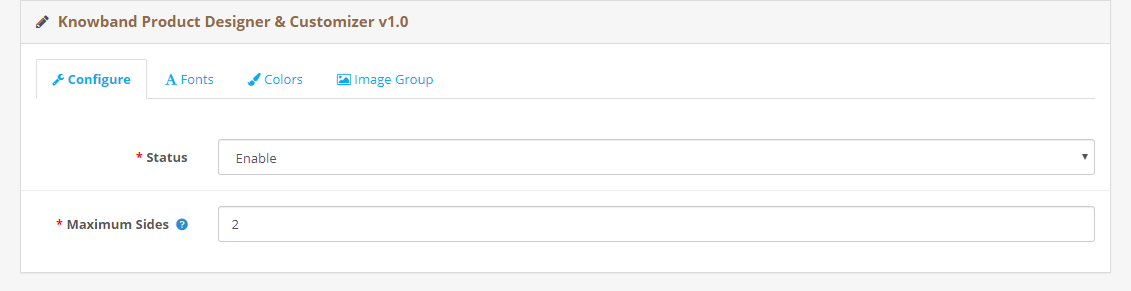
1. Enable/Disable the entire module functionality in a single click.

2. Specify how many sides of the product you want to make available for customization. This is mostly in the cases of t-shirt customization where a user can make the desired changes on the front as well as the back. This is why it is also called as OpenCart t-shirt designer module.

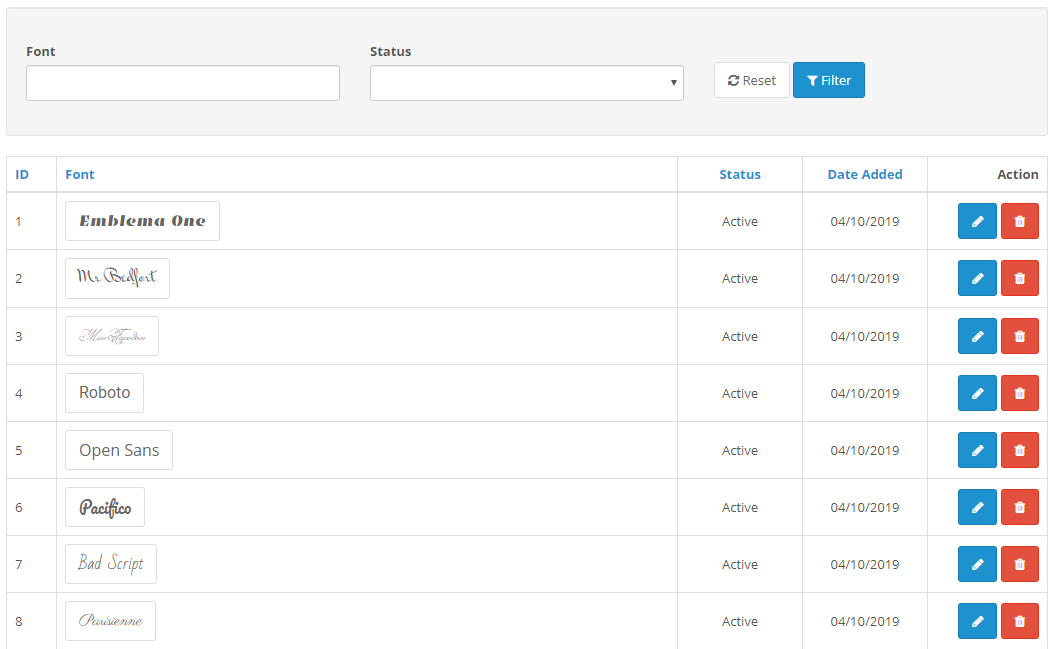
3. You can add as many fonts as you want from the backend to provide customers with text customization facility. You can also disable any font anytime.

4. Through OpenCart print-on-demand extension, you can add multiple colours from the back end to help customers choose the desired colour from a number of colour variants.

5. OpenCart Product customization module also comes with pre-existing templates which an admin can edit or delete as per his choice.

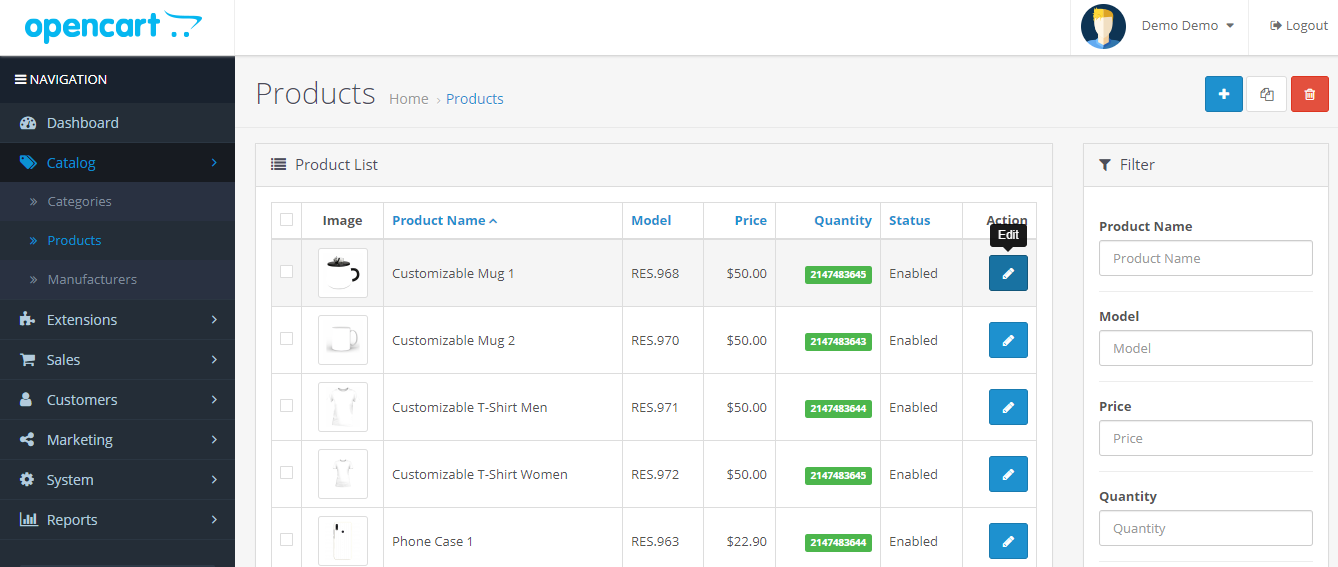
For advanced settings, head over to Catalog and then Products. Select a product, click on edit and then Product Designer.

From there,

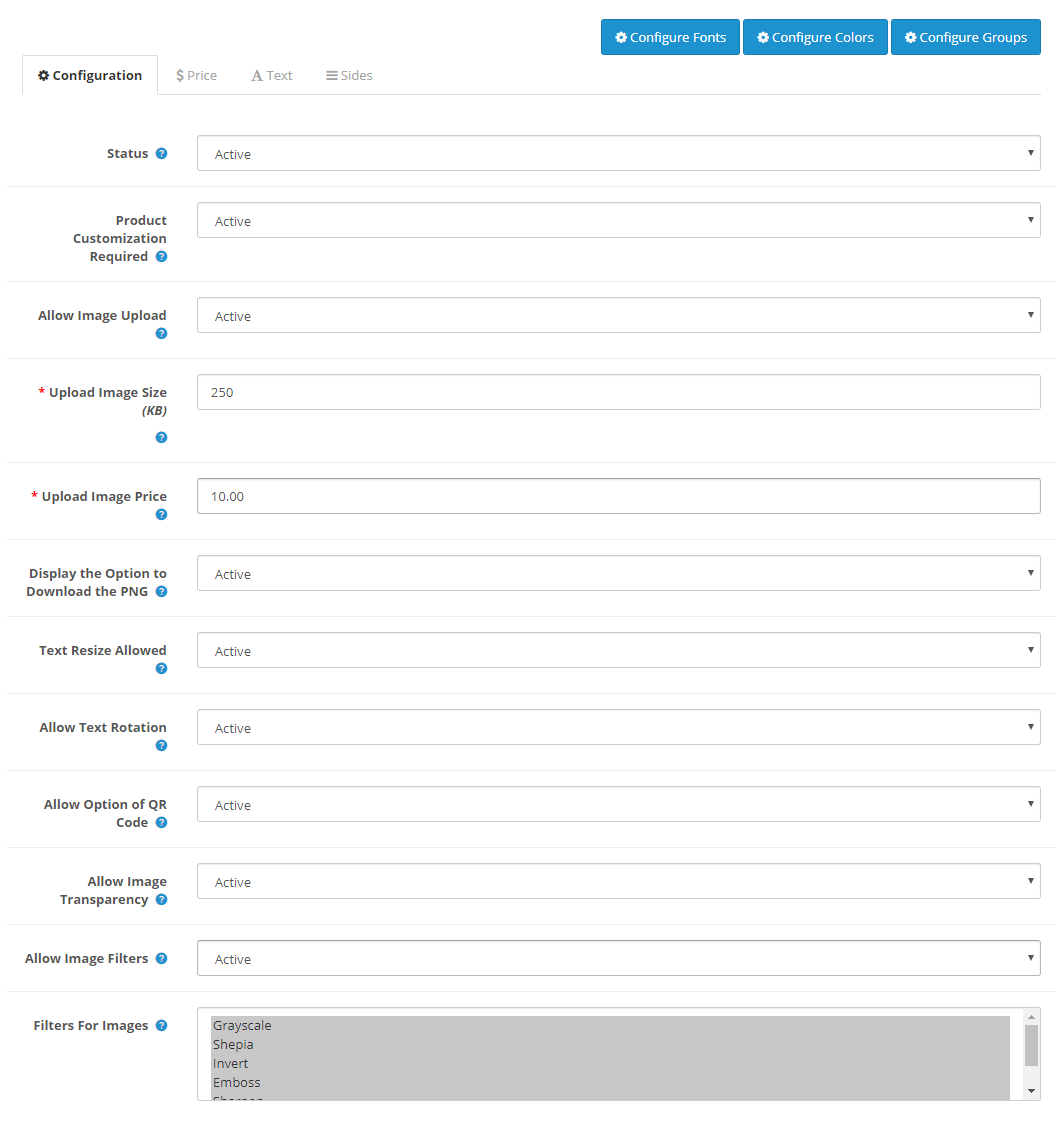
6. You can specify the maximum image upload size.

7. You can specify the image upload price.

8. Provide customers with the option to download the customized product image in the PNG format.

9. Allow text resizing and text rotation for customized texts with OpenCart custom product designer. You can also specify the minimum and maximum text length.

10. Display/hide the QR code option from the customization panel.

11. Specify the filters that would be available for use during customization.

12. Set up a fixed price for text customization. You can also charge customers per character.

13. Similarly, you can set up a QR code price and also specify a fixed price for complete customization with the help of OpenCart custom product builder.

If you need any assistance in the OpenCart Product Customization extension, you can submit your query at support@knowband.com
You may also like:

5 Benefits of Product Customization

PrestaShop Product Customizer