Magento 2 Preferred Delivery Time Extension

Magento 2 Preferred Delivery Time Extension allows your customers to choose the desired delivery date and time while they place their order.
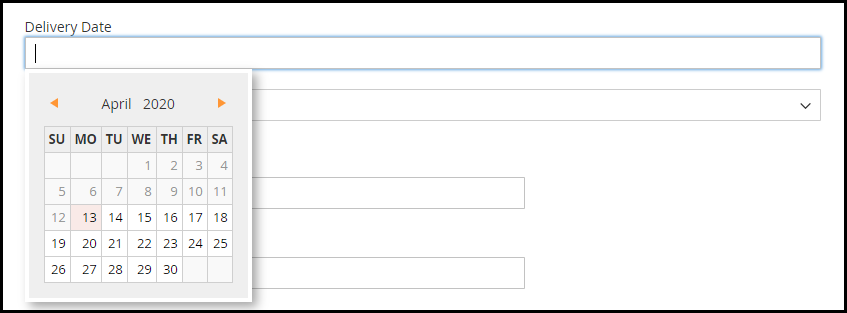
In an eCommerce website, the estimated delivery time is normally between 3 to 4 days. There is no confirmation as to which date and at what particular time would the product be delivered. A customer can only assume and hope to get the order at the desired time.

To enhance the shopping experience of such customers, you can install the Magento 2 Preferred Delivery Time extension and provide your customers with the option to choose the desired delivery date and time.

Overview

1. Specify the minimum delivery gap between the order placement date and preferred delivery date.

2. Set the delivery time [Start time and End time]

3. Set up multiple time slots for delivery

4. Specify non-delivery days

5. Let customers update the delivery date and time even after placing the order

6. Set a time limit to update the delivery date and time

Description

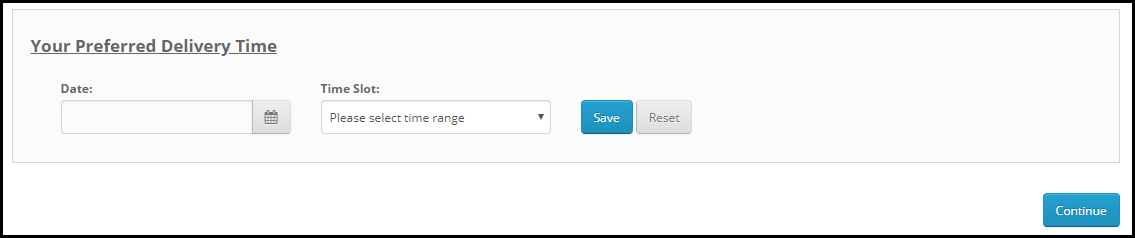
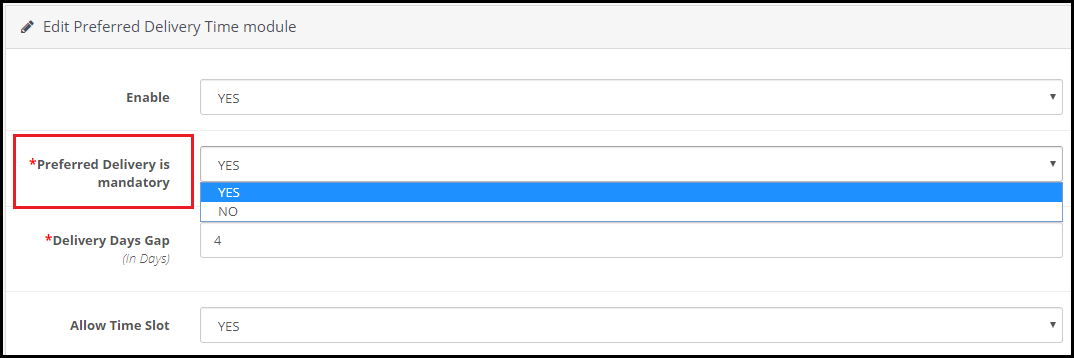
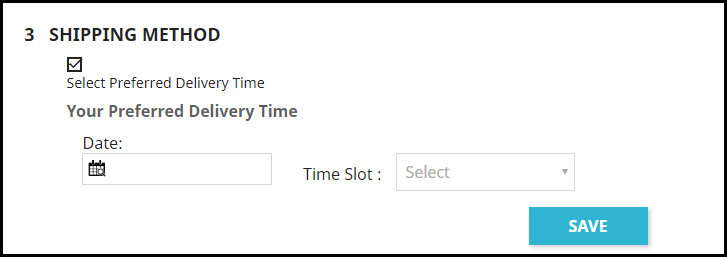
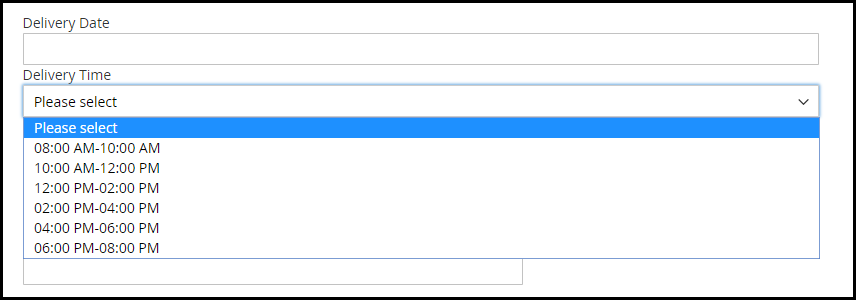
1. On the checkout page, the user is asked to select the desired date and time slot for their order. This can also be made optional hence allowing shoppers to follow the standard delivery procedure if they do not wish to opt for a preferred delivery date and time.

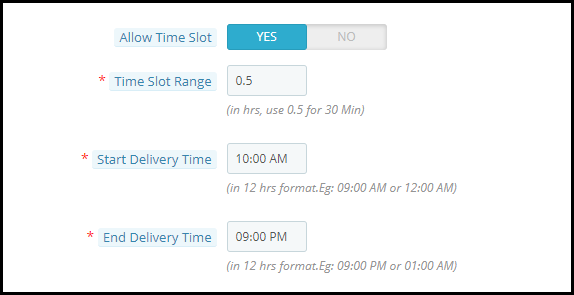
2. Magento 2 Preferred Delivery Date Extension lets you define the time period within which the order delivery will take place. For example, from 8 am to 6 pm.

3. Magento 2 Preferred Delivery Time slot extension lets you set up multiple delivery time slots. You need to specify the time slot range for it. For example, if the delivery happens in between 9 am to 6 pm and the time slot range is 2 hours, then the shopper would be provided with time slots like 9 to 11, 11 to 1, 1 to 3 and so on.
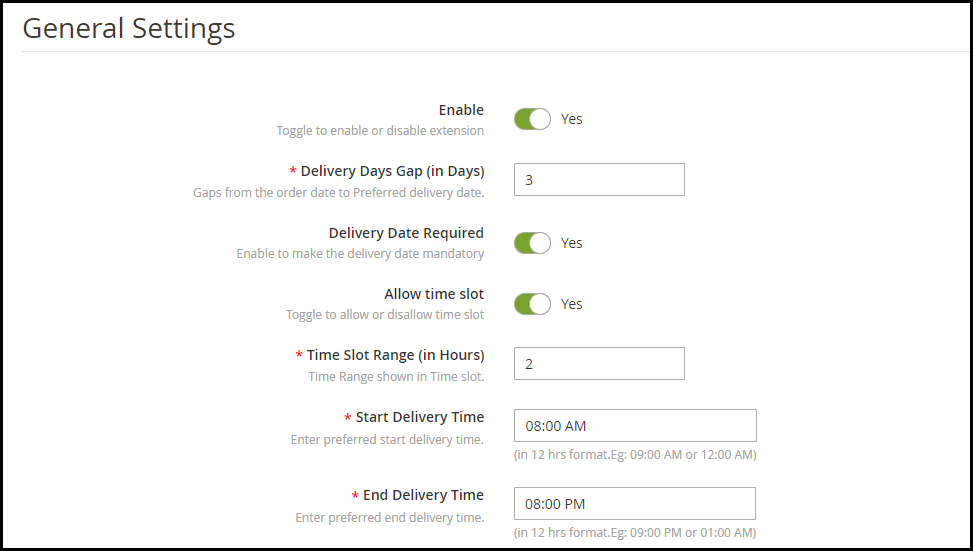
4. In cases where time slots do not adjust well with the delivery timing, for example, let’s say the delivery time is between 10 to 3 and time slot defined is 2 hours, then 10 to 12, 12 to 2 would be okay. But how would the remaining one hour fit into this?

Well, inside the configuration, there’s an option that says “Allow incomplete time range.” Enabling it would display that remaining 1-hour slot in the time slot else it would not be displayed if disabled.
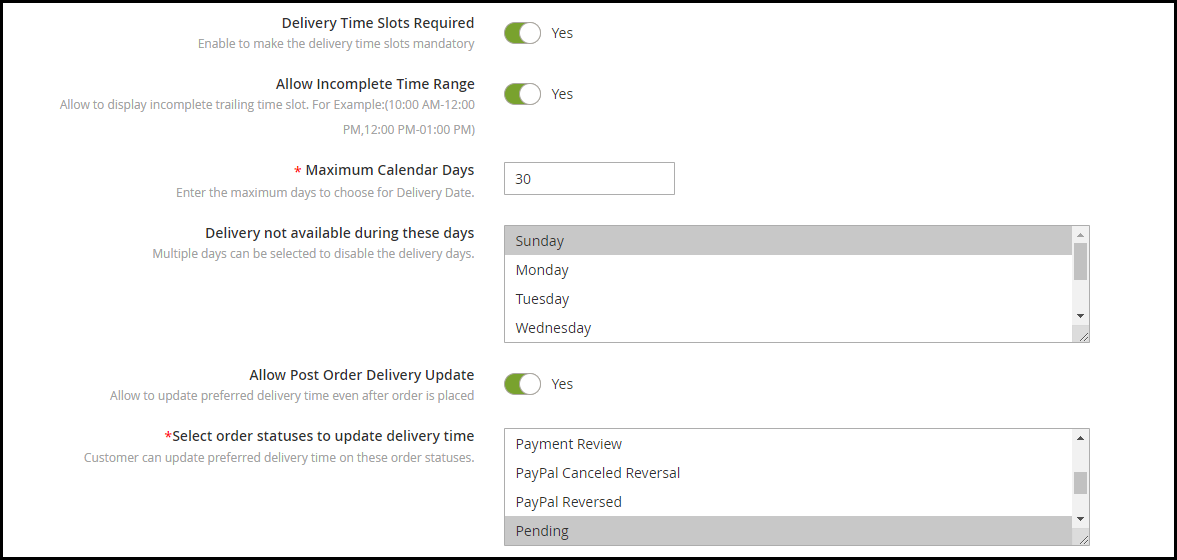
5. You can define a minimum delivery gap for a customer to pick the desired delivery date and time. For example, if the order is placed on 10th of April and the delivery gap defined by the admin is 4 days, then the customers would be allowed to pick the desired date and time for or after 14th of April.

6. You can also specify the maximum numbers of days gap between the order placement date and the preferred delivery date.

7. Magento 2 Preferred Delivery Date and Time Extension lets you specify the days on which orders would not be delivered.

8. With the help of this module, you can also allow your customers to update their delivery date and time even after they have placed their order. You can also set the time limit (in hours) within which the changes can be made. Changes cannot be made once the time limit expires.

9. You can specify the order status on which delivery date and time can be changed.

10. Magento 2 Preferred Delivery Date and Time extension also lets you notify customers via email if they update their delivery date.

Benefits

1. Enhance the customer shopping experience.

2. Improve customer loyalty and brand loyalty.

3. Improve customer satisfaction

For any kind of assistance with this module, you can contact us at support@knowband.com

Landing Page Optimization: How to Optimize Your Landing Page?

How do I optimize my landing page? What are the best ways to do it? What exactly is landing page optimization?

If you have these questions running through your mind, you have landed at the right place to get answers to these questions.

What is a Landing Page?

Marketers define a landing page in many ways. Some say it is a conversion page that aims to converts visitors into leads while some call it a destination page where the visitors land when they click on a promoted link, be it through Email, Google search results or social media.

Put simply, a landing page is a web page that is designed to make visitors take a certain action. It could be about making them download an eBook, getting them enrolled in a course, or it could be normal sign-up page.

The landing page usually contains form fields such as the name and email address along with the communication message that speaks about the purpose of that landing page.

Landing pages are free from other website elements so that the visitors are not distracted from the purpose and their attention remains on the landing page. Most of the landing pages are plain simple pages with a nice solid background; hiding distractions like the navigation bar, footer, etc.

What is Landing Page Optimization?

As the words indicate, Landing Page Optimization means optimizing the elements of your landing page to get more conversions/leads. It is needed when you are getting a lot of visits on the landing page but the conversions are not happening.

So you pay focus to the elements and design it or say enhance it not only to maximize the conversion rate but also to improve the user experience.

6 Tips to Optimize your Landing Page

When designing a landing page, keep the following points in mind-

1. Keep It Simple

Do not clutter your landing page with unnecessary elements. When you fill it up with too much text and colors, it does not look pleasing at all, and doing so might compel visitors to bounce off from that landing page straightaway.

Keep it as simple as you can and try to put the entire focus of the users on the call to action.

2. Less Text, More Impact

You need to be very creative with the words that you are using to get their attention. They should be persuading enough to achieve the results that you are expecting.

A simple one-liner can be more powerful than long texts. It just depends on how strong your convincing power is. Use less text but make sure it leaves a significant impact.

Highlight the benefits/offers. When you are designing a landing page, the first thing to give a thought to is how you are going to make customers feel that it can add value to them. You need to build the excitement and at the same time, be a kind of an influencer to push them to grab what you are offering.

3. Use Triggering Call-to-Action

Your call-to-action plays the most important role in your landing page. It should be clearly visible and hit the visitor’s eyes as soon as they enter the landing page.

Using triggering CTAs like “Get my eBook now”, “Download Now”, Claim my offer” can be more effective than other normal CTAs like “Sign Up”, “Learn More,” etc.

The color of your call-to-action is something you simply cannot overlook. Use colors that are pleasing to the eyes and display the CTA text in a crystal clear manner.

Not only does the CTA, but the color of your landing page also has a vital role to play in your conversions. Use contrasting colors that fit well with the text. Besides, keep everything spacious.

4. Develop Curiosity

You would have often seen marketers using phrases like “Limited Time Offer” or “Limited Grabs Available” or “Valid only for first XXX customers”. There is a reason why these terms are so successful in bringing positive results. When you use such terms, visitors act quickly as they know they might miss out on that opportunity later. They want to grab it before it expires.

You could also try adding a countdown timer and let visitors know how much time they have before the offer ends.

5. Use Exit Popups

Adding to our list of Landing Page optimization practices is using Exit Popups. Having an exit popup on your landing page provides you with one more opportunity to convert a visitor. So you can say it is like a Plan B of your Landing Page Conversion strategy. If Plan A does not work, plan B might.

An exit popup appears when a website visitor intends to leave the web page he or she is present at. They are more effective and less irking than other popups that could appear anytime and break the flow of the visitor.

Knowband also provides the Exit Popup module for PrestaShop, OpenCart, Magento and Magento 2 that lets you customize your popup and adjust its functionality as per your requirements.

6. Keep doing A/B Testing

It’s important to keep doing A/B testing of your landing pages as they would help you understand what kind of a landing page your visitors are more inclined to and what sort of changes you can make to optimize it further for better results.

If you do not perform A/B testing, you would not be able to clearly identify what’s lacking in your landing page even if you made it perfect from your end.

Final Word

Landing page optimization would not happen in an hour or a day and it cannot bring you results overnight. You will have to look from a user’s point of view and understand if it is good enough to bring you conversions.

Consider these 5 Landing Page Optimization tips and let me know if it worked for you.

What’s your landing page optimization strategy?

Magento 2 Gift Card Manager | Add a Gift Card section on your Website

Gift cards are purchased in huge numbers and not only during the holiday season but throughout the year. They are convenient and can be gifted to anyone having an email address. If you are also looking to add a gift card section on your website and provide your customers with the option of purchasing gift cards and gifting it to their loved ones, Magento 2 Gift Card Manager is all you need.

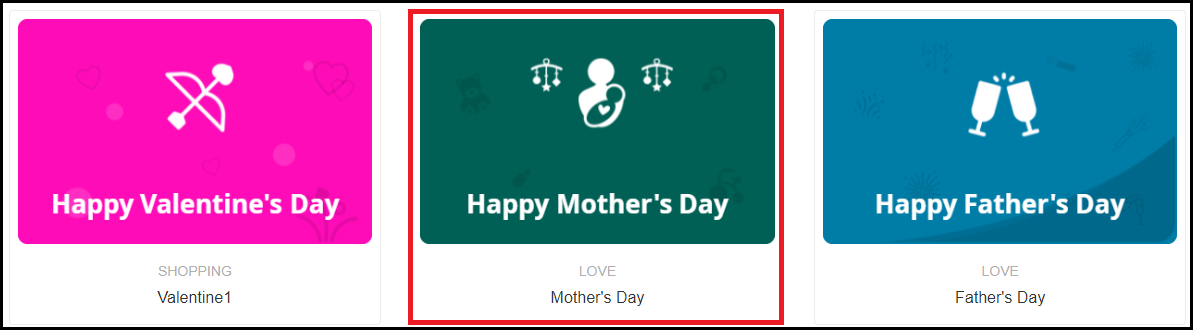
With Mother’s Day coming up in a few days, it is the best time to get this module and provide your customers with the option to purchase Mother’s Day Gift Cards and gift it to their lovely mother.

Overview

1. Eye-catching gift card section

2. Gift cards for multiple occasions

3. Customize gift card templates

4. Create gift cards of different price models

5. Place gift card link on multiple places

6. Gift cards delivery via email or at the physical address

Features Description

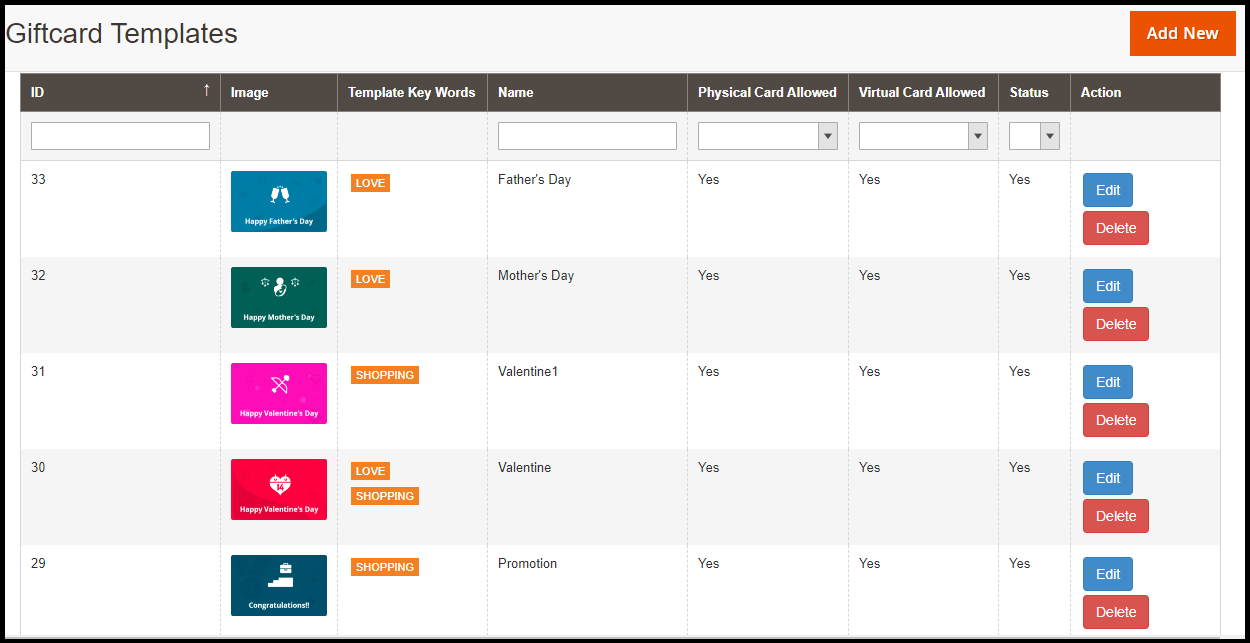
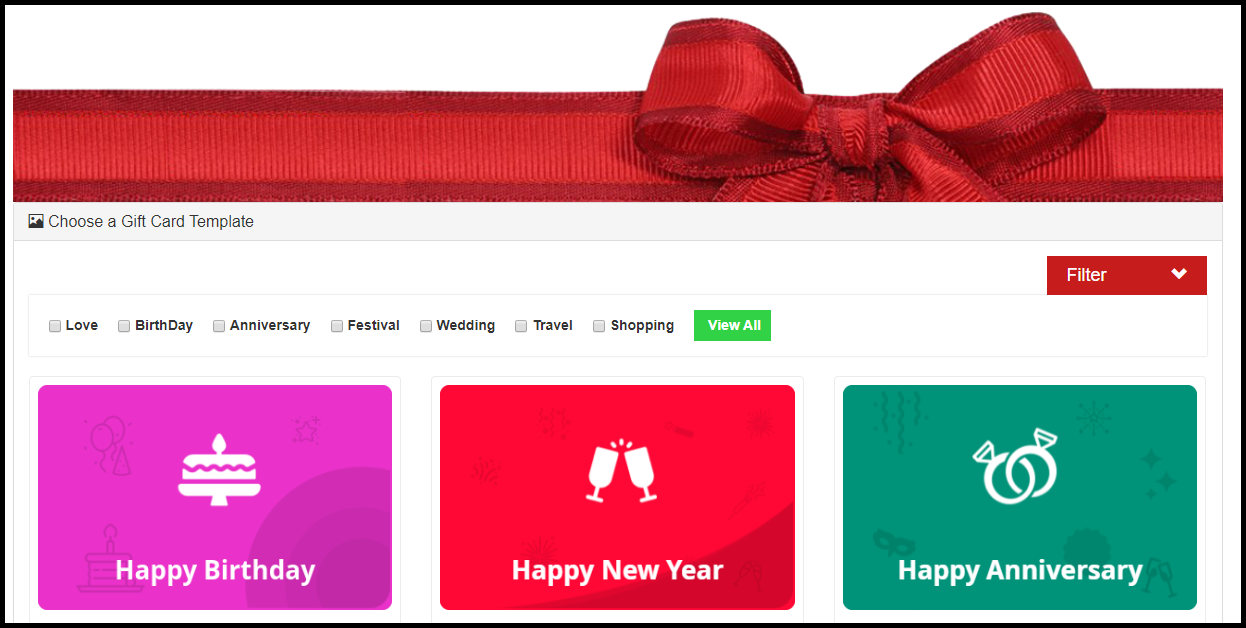
1. The Magento 2 Gift Card module offers pre-existing multiple gift card templates for various occasions such as Mother’s Day, Father’s Day, Valentine’s Day, Easter, Halloween, Christmas, New Year, etc.

You can customize these gift card templates, delete them and add new ones as well. While adding a new gift card template, you can specify whether it should be allowed to send physically, virtually (by email) or both.

2. With Magento 2 Gift voucher extension, you can also specify a category to your gift cards so that it becomes easy for the customers to filter them on the gift card page.

3. The gift cards can be set for different prices so that customers can purchase a gift card according to their budget. For the gift card having a fixed value, you can define its quantity and validity.

4. For gift cards that need to be sent physically, you can enable free shipping on them if you want.

5. Magento 2 Gift card extension lets you place the gift card link on many places on your website such as the Header and the Footer.

6. You can set a prefix for your Gift Cards to boost brand awareness.

7. You can define a minimum delivery gap of the gift cards. Put simply, the number of days specified would be the minimum days it would take for the gift card to reach the customer.

8. The Magento 2 Gift Certificate module lets you customize the email templates that would be sent to the recipient and the sender. The email subject and inside content can be modified accordingly.

9. The Gift card can also be downloaded in the form of the PDF.

10. You can track the Gift card orders with the help of Magento 2 Gift Card Manager module that provides you with the recipient’s email address, sending date of the gift card and the gift card status.

11. Customers can also add a message along with the Gift card.

Benefits of Magento 2 Gift Card Manager

1. Capture more sales

2. Boost brand awareness

3. Make digital gifting easy

4. Easy to install and configure

For any query or assistance, you can contact our team at support@knowband.com

Benefits of Having Multiple Payment Options on the Checkout Page

One of the reasons for shopping cart abandonment is the unavailability of multiple payment options on the checkout page.

Until a few years ago, a majority of eCommerce businesses were limited to having Credit Cards and Debit Cards as their payment options. But ever since the introduction of digital wallets, things have changed quite a lot. PayPal is one of the popular e-wallets that brands have adopted and now it is being followed by Google Pay as well.


Now, brands are trying to integrate as many popular payment options as they can on their website so that such a situation does not arise where online shoppers feel that they are left with no option except to abandon the purchase at the last minute.

Today, if you are not providing multiple payment options to your customers, you may lose out on huge conversions and you simply would not want to see the visitors leave when they are on the final step of their checkout.

Recommended Read: 12 Ways to Reduce Shopping Cart Abandonment

Why should you offer Multiple Payment Options?

How would you feel if you are on the verge of making the product payment but do not find your desired payment option? A bit disappointed, right? The disappointment can be extreme if you are committed to buying that product.

Conversely, you would be happy if you find the payment method that you were looking for or find the only source of payment that you can use to pay among the listed payment modes. This is normal consumer behaviour.


To be very specific, offering multiple payment options has the following pros-

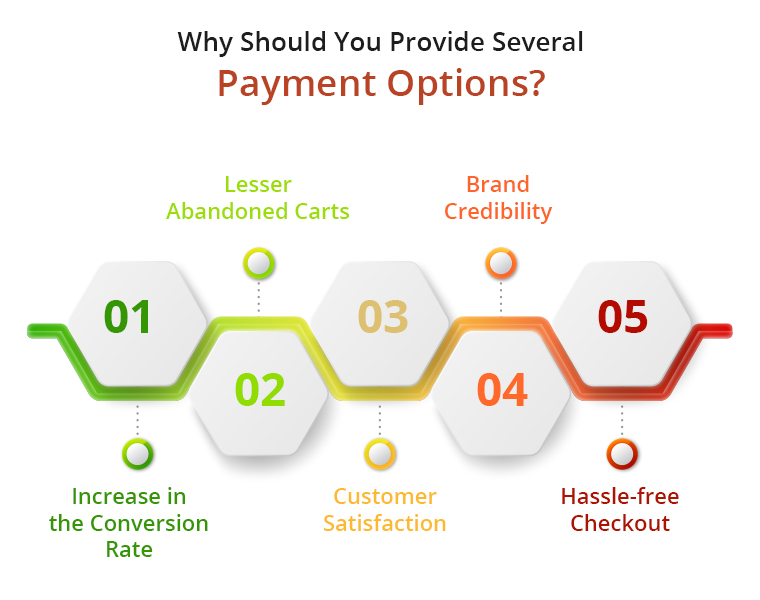
1. Increase in the Conversion Rate

2. Lesser Abandoned Carts

3. Customer Satisfaction

4. Brand Credibility

5. Hassle-free Checkout

If you do not offer them enough payment options, not only it would lead to cart abandonment but you will lose those potential customers to your competitors. So one of the effective ways to reduce cart abandonment and increase your conversions is by adding more payment options.

What you as a business need to understand is that people have their preferences set for the payment method they want to use, and those they are most comfortable with. And different people have different preferences. So the onus is on you to meet your customers’ choice. Moreover, people find it tiring to enter their card details every time they shop and are also a bit concerned too when sharing their card details online. If you are hell-bent on using limited payment options, you are indirectly making those prospects change their purchase mind.

Recommended Read: One Page Checkout vs Multi-Page Checkout

Types of Payment Options that you should provide to your Customers

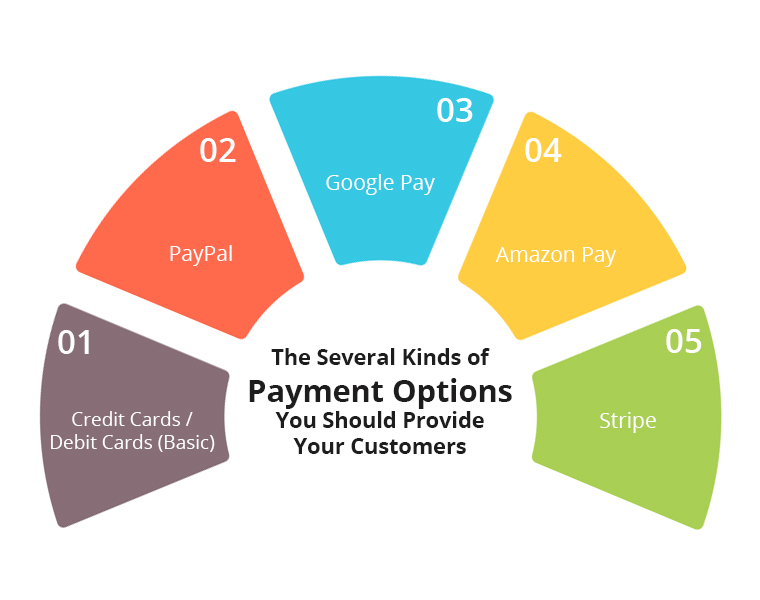
1. Credit Cards / Debit Cards (Basic)

The most common form of online payment that you would witness on every eCommerce website is Credit and Debit Cards. It requires users to share their details like Card number, Card validity, and CVV. And then a One-Time Verification Password (OTP) is sent to the user on his/her mobile number, upon confirmation of which the payment is made.

To avoid customers from filling in their details again when they come to shop in your store next time, you should provide them with the option to save their card details so that they do not waste their time putting the same set of details again.

2. PayPal

PayPal is amongst the most widely used payment methods. Today, it has over 305 million users worldwide. It will be okay not to have PayPal if your business region does not have a lot of PayPal users. But if it is set up globally, there should not be even a question as to why you should not include PayPal in your payment modes.

Let customers check out with PayPal and see a significant change in your conversion rate.

3. Google Pay

Launched in August 2018, Google Pay has already gained millions of users within a short span of time. And today, it competes for head to head with the other online payment modes. The Brand name itself is enough to gain the trust of the users and besides, it offers a seamless way to check out.

Adding to that, Google Pay rewards merchants as well as customers with some exciting cashback on transactions, making it one of the major reasons for its high use. Hence, you should definitely consider integrating Google Pay on your website.

4. Amazon Pay

Amazon is amongst the leading eCommerce brands globally and they have its own payment portal called Amazon Pay. Having Amazon Pay as a payment option on your payment page makes it easy for Amazon users to check out. Most of your customers would already be Amazon customers. This is another payment method that you should give a thought to unless you are trying to compete with Amazon.

5. Stripe

Stripe also makes it to our list of online payment options that you should offer to your customers. This online payment processing platform provides a convenient way to accept online payments. Over 100 thousand businesses are registered with Stripe.

Some of the other payment platforms that you can include are-

  1. American Express
  2. 2Checkout
  3. Braintree
  4. QuickPay
  5. First Data

Choose the payment options depending upon your business and the business region. What people prefer more in your targeted region should be your priority.

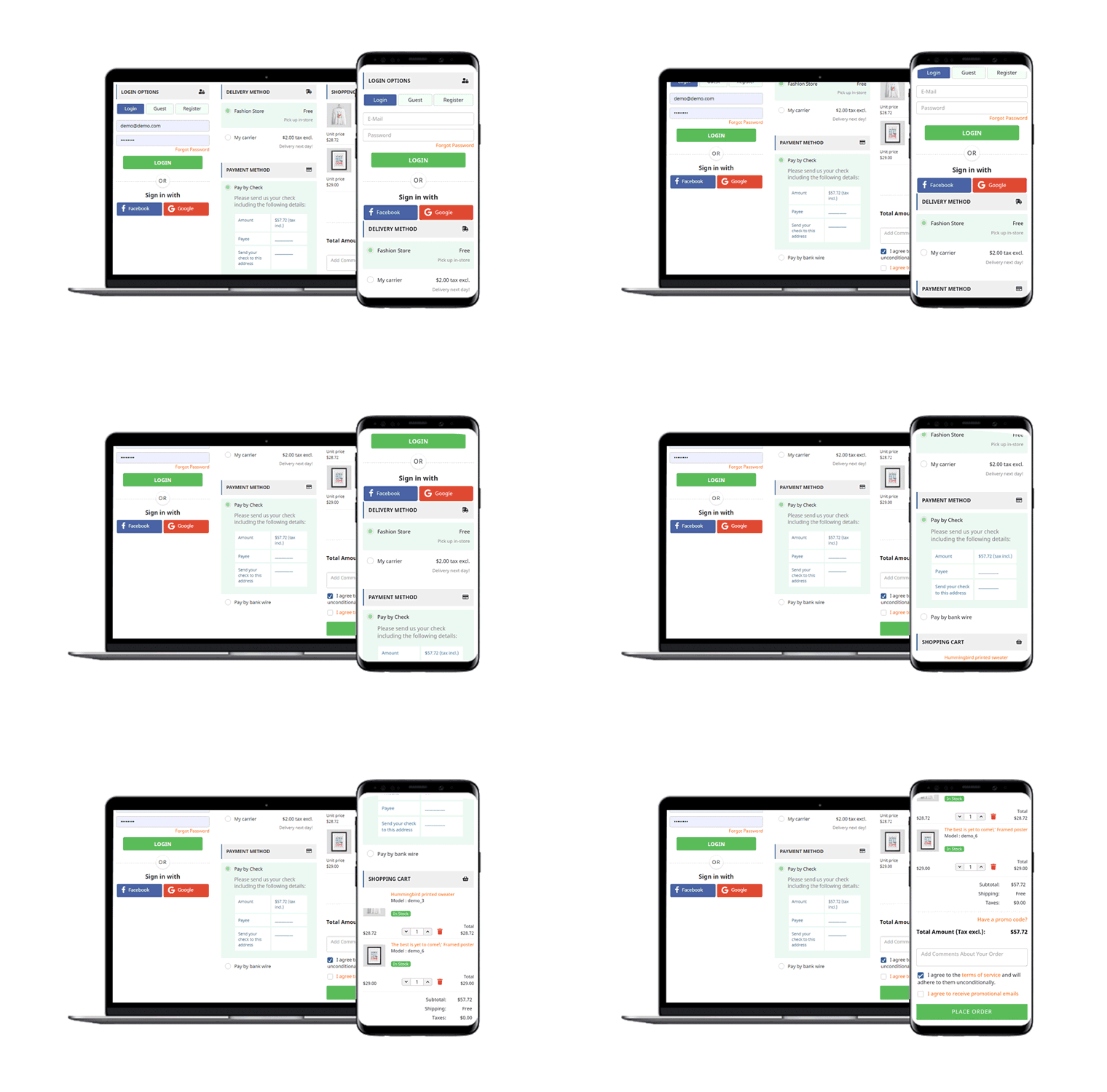
Knowband offers amazing One Page Checkout plugins for online store owners. One Page SuperCheckout addon is available for PrestaShop, OpenCart and Magento 2 platforms.

One Page Checkout module focuses on streamlining your customer’s checkout process with checkout page optimization. A retailer can eliminate pointless fields from his checkout page and show all of the content of the checkout process on a single page. On the checkout registration form, the admin can add Custom Profiles such as Business, Individual, Client, etc. One Page Checkout extension reduces Customers’ additional work. It enables them to finish the checkout process on one page, which lowers the rate of abandoned carts.

Recommended Read: 11 Checkout Page Optimization Practices to Increase Conversions

Final thoughts

Offering multiple payment options can scale up your conversion by a significant margin and improve customer satisfaction. The more options you provide, the more comfortable users will feel during checkout.

For a quick and user-friendly checkout that supports multiple payment options, try out our One Page Checkout module. It supports multiple payment methods such as PayPal, Stripe, Sage Pay, First Data, Mobilpay, 2Checkout, PayU, Braintree, Ogone, Pago Facil, QuickPay, Paysera, etc.

OpenCart Preferred Delivery Time Extension

OpenCart Preferred Delivery Time Extension allows your customers to choose the desired delivery date and time on the checkout page.

When a customer places an order, the estimated delivery time is usually 3-4 days. Since they are not sure about the exact arrival date and time, they have to adjust their other plans accordingly. Because of this, many times, customers miss out on the order pick up when it arrives.

Besides, there are times when customers want the order to get delivered at a certain time, mostly seen in the cases of birthday gifts.

In such cases, if you can provide customers with the option to choose a fixed date and time for the order delivery, they will rejoice. OpenCart Preferred Delivery Time module does exactly that.

OpenCart Preferred Delivery Date and Time extension allows customers to choose a date and a time slot on the checkout page as per their desire so that they could get the item on their specified day.

Overview

1. Allow customers to select the desired delivery date and time

2. Set a minimum delivery gap between the order placement date and preferred delivery date

3. Define the delivery time interval [Start time and End time]

4. Set up multiple delivery slots

5. Specify non-delivery days

6. Customers can update the delivery date and time even after placing the order

Detailed Description

1. On the checkout page (delivery method), the user is asked to pick his/her desired date and time slot for the order delivery. This can also be made optional hence allowing shoppers to follow the standard delivery procedure if they do not wish to choose a preferred delivery date and time. In the module configurations, admin can choose “Yes or No” for the “Preferred delivery day is mandatory” option.

2. OpenCart Preferred Delivery Date Extension lets you define the time interval within which the order delivery will take place. For example, it can be from 9 am to 5 pm or 10 am to 6 pm.

3. OpenCart Preferred Delivery Time slot Extension lets you set up multiple time slots by specifying the time slot range. For example, if the delivery happens between 9 am to 6 pm in a day is and the time slot range is 2 hours, then a customer would be provided with time slots like 9 to 11, 11 to 1, 1 to 3 and so on.

4. In such cases where time slots do not adjust well with the delivery timing, for example, let’s say the delivery time is between 10 to 3 and time slot defined is 2 hours, then 10 to 12, 12 to 2 would be too. But then we would be left with only 1 hour right? How does that get fit into this?

Well, inside the configuration, there’s an option that says “Allow incomplete time range.” Enabling it would display that remaining 1-hour slot in the time slot else it would not be displayed if disabled.

5. You can define a minimum delivery gap for a customer to pick the desired delivery date and time. For example, if the order is placed on 1stth of April and the delivery gap defined by the admin is 4 days, then the customers would be allowed to pick the desired date and time for or after the 4th of April.

6. You can also specify the maximum delivery period. For example, if the defined period is 30 days, then the shopper would have to pick a date and time from 30 days of the order placement date.

7. OpenCart Preferred Delivery Date and Time Extension lets you specify the days on which delivery won’t take place.

8. With the help of this module, you can also allow your customers to update their delivery date and time even after they have placed their order. You can also set the time limit (in hours) within which the changes can be made.

9. You can specify the order status on which change in the delivery date and time would be applicable.

10. OpenCart Preferred Delivery Date and Time extension also lets you notify customers regarding any info if they update their delivery date.

Benefits

1. Improve customer shopping experience.

2. Gain customer loyalty by delivering the product on the desired date and time.

3. Easy to install and configure.

Tutorial: Watch the Video Guide of Opencart Preferred Delivery

To help you set up and use the Opencart Preferred Delivery Time Extension, we’ve created a detailed YouTube tutorial. The video walks you through the installation process, configuration options, and step-by-step instructions to manage preferred delivery dates and times effectively.

Watch the tutorial here:

For any kind of assistance with this module, you can contact us at support@knowband.com
PrestaShop Shipping Cost by Zip Code Addon

PrestaShop Shipping cost by zip code addon adjusts the shipping fee as per the postal code entered by the customer in the address fields on the checkout page.

Instead of a fixed shipping cost, you can now charge customers for shipping location-wise, which means the shipping cost will fluctuate as per the location or zip code specified by the customer. PrestaShop shipping rates by zip code module helps you manage the shipping price for different zones.

Besides, it enhances the user experience on the checkout page.

Overview

1. The shipping cost is automatically calculated based on the zip code.

2. Set different shipping price for different zones and countries

3. Define a specific zip code or a range of zip code and charge shipping accordingly

4. Add multiple zones

5. Add multiple zip codes through CSV upload.

Description

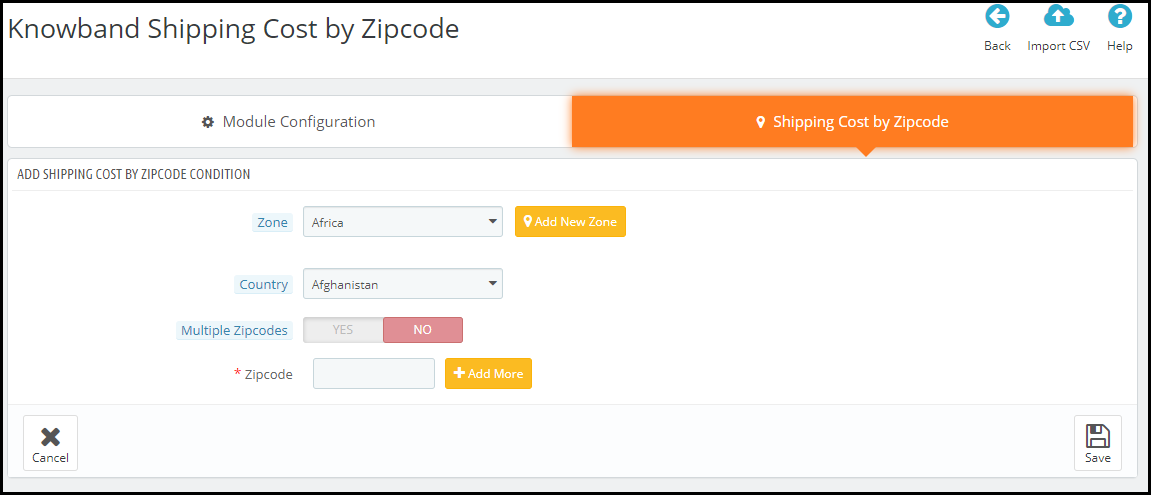
PrestaShop Shipping cost by zip code addon allows you to add multiple zones from the back-end configurations. Simply click on the Add new condition button to add a new zone.

After that, you can specify the zone which you want to add and choose the country accordingly. If you cannot find the zone from the drop-down list, you can add it manually by clicking on Add new zone.

Moving further, you can specify a particular zip code for a different shipping price or you can specify a range of zip codes that will follow the same shipping price. It is because a particular region has different zip codes. So you can set a range and have a fixed shipping price for all the areas lying in that range.

To add multiple zip codes through a CSV file, you can do that by clicking on the Import CSV option.

With the help of the PrestaShop Shipping cost calculator, you can adjust the shipping price as per your defined zones from your back-end office; under the shipping section.

Over to You

PrestaShop Shipping Calculator module is easy to install and configure with no requirement of any technical knowledge. You can enable or disable within a single click. The module also offers multi-lingual support and is compatible with the latest PrestaShop version

For any assistance, reach out to us at support@knowband.com

PrestaShop Preferred Delivery Time Addon

PrestaShop Preferred Delivery Time addon lets customers choose their desired delivery date and time on the checkout page.

When a customer places an order, they get an estimated delivery time like 2-3 days. Neither there is surety about the arrival date nor the timing. We just assume and hope for the order to deliver within the expected time.

Due to this, many times, customers are not able to pick up their orders due to their non-availability at the time of delivery.

Let’s talk about a different scenario. Sometimes, customers want to receive the order at a specific time, like on occasions like the birthday of their loved ones, so that they could gift them at the perfect time arrives.

In such cases, providing customers with the option to choose a specific date and time slot for the order delivery becomes highly important. And this is exactly what the PrestaShop Preferred Delivery Time module does.

PrestaShop Preferred Delivery Date and Time module allows customers to choose a date and a time slot as per their desire so that they could get the item on their specified time.

Overview

1. Let customers select the desired delivery date and time

2. Set a minimum delivery gap between the order placement date and preferred delivery date

3. Define the delivery time interval [Start time and End time]

4. Split up the time in multiple slots by defining a fixed time range for a particular slot.

5. Specify non-delivery days

6. Option to update delivery date and time even after placing an order

Detailed Description

1. In the shipping section, the user is asked to pick his/her desired date and time slot for the order delivery. This can also be made optional hence allowing shoppers to follow the standard delivery procedure if they do not wish to choose a preferred delivery date and time.

This can be configured by enabling or disabling the “Allow to select preferred delivery.” Keeping it enabled will make the process mandatory. Disabling the option will make it mandatory for a customer to choose a date and time slot.

2. PrestaShop Preferred Delivery Date addon lets you define the time interval within which you deliver the orders. For example, it can be from 9 am to 6 pm or 10 am to 5 pm.

3. PrestaShop Preferred Delivery Time slot addon lets you split the time interval into multiple time slots. You just have to define a time slot range. For example, if the delivery happens in between 9 am to 6 pm in a day is and the time slot range is 1 hour, then a customer would be provided with time slots like 9 to 10, 10 to 11, 11 to 13 and so on till 5 to 6.

4. In such cases where time slots do not adjust well with the delivery timing, for example, let’s say the delivery time is between 10 to 3 and time slot defined is 2 hours, then 12 to 12 would be fine, 12 to 2 would be too. But then we would be left with only 1 hour right? How does that get fit into this?

Well, inside the configuration, there’s an option that says “Allow incomplete time range.” Enabling it would display that remaining 1-hour slot in the time slot else it would not be displayed if disabled.

5. You can define a minimum delivery gap for a customer to pick the desired delivery date and time. For example, if the order is placed on the 26th of March and the delivery gap defined by the admin is 4 days, then the customers would be allowed to pick the desired date and time for or after the 30th of March.

6. You can also set the maximum delivery period. For example, if the defined period is 30 days, then the shopper would have to pick a date and time from 30 days of the order placement date.

7. PrestaShop Preferred Delivery Date and Time addon lets you specify the non-delivery days.

8. With the help of the PrestaShop Preferred Delivery time slot module, you can also allow your customers to update their delivery date and time even after they have placed their order.

9. Notify customers about the preferred delivery date and time slot in the order confirmation mail as well.

Benefits

1 Enhance the customer shopping experience.

2. Improve customer loyalty by delivering the product on the desired date and time.

3. By providing customers with the option to pick up a desired date and time slot, you can ask customers to pay a small charge for this facility, if possible.

For any kind of assistance with this module, you can contact us at support@knowband.com
Knowband Comes Up With Some Free Modules To Help eCommerce Businesses

Businesses are going through a rough patch due to the COVID-19 pandemic. There is a complete lockdown order in various countries. Cinemas, restaurants, offices, etc. have been shut. The economy has been hit hard and more challenges lie ahead.

People have put themselves in quarantine to prevent the spread of this deadly virus that is only multiplying the number of victims daily. These are hard times and we do not know how long it will take before the entire world resumes to the normal state again.

In this difficult phase, many people, celebrities, organizations are coming forward and showing their support in some way or the other, be it through donation, distributing food to the needful or exempting rent for the tenants.

We, at Knowband, understand the challenges businesses are facing due to this global pandemic and this is why we have made some of our modules free of cost as a token of support.

Existing Modules Currently Available For Free-

As of now, there are three modules that a user can purchase without paying a penny and we will keep you updated with other free modules whenever they are any.

PrestaShop Product Availability Check by Zip Code

OpenCart Product Availability Check by Zip Code

Magento Product Availability Check by Zip Code

OpenCart Spam Blocker

PrestaShop Spam Blocker

With the help of the first three modules, you can allow your customers to check product availability in their region. And for this, they do not need to head to the checkout page and confirm the availability after filling out the address fields.

The visitors are asked to enter the zip code right on the product page and check the product availability. The “Add to cart” button is disabled if the product is not available for the specified zip code.

The next two modules help you in reducing the spam traffic on your website.

How Can We Help in the Current Scenario?

Coronavirus is spread across cities and countries following which eCommerce businesses are facing major issues with shipping and delivery. Shipping is getting stuck and delayed and the same is the case with order delivery.

So, to make things convenient and time-saving for your visitors and customers, you can place a product check availability section on the product pages. If the product is available for delivery, it will display the estimated delivery date. So right now if there are shipping or delivery related issues, you can extend the delivery time and users would know it right on the product page.

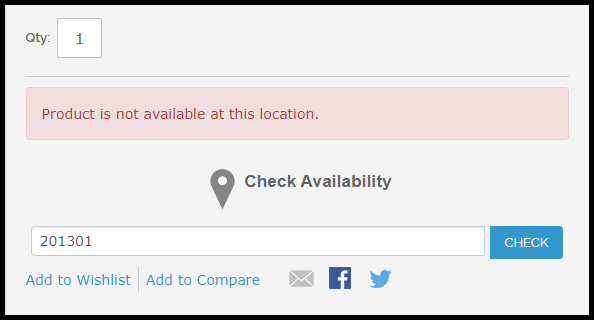
If the product is not available for delivery, it will simply display that the product is not available at this location.

Newly Launched Module For Free-

We have recently launched a new module called Free COVID-19 Information Popup addon which is available for two platforms- PrestaShop and Magento 2.

PrestaShop Free COVID-19 Information Popup

Magento 2 Free COVID-19 Information Popup

This module lets you inform your customers about the recent changes or updates in your business due to the corona outbreak. You can educate them about what precautions to take to avoid the spread of this virus. And if you are running some offers on your website during this period, you can highlight them too through this popup.

It is specifically designed to help you communicate with your website visitors in the easiest way so that you do not get too many queries on your support system.

You can customize the popup text and choose the popup image of your choice. Moreover, you can also control who sees this popup. You have the option to display the popup in selected countries only.

Through all these modules, our motive is to help you-

  1. Retain your customers

  2. Build customer loyalty

  3. Generate some revenue even in this crisis situation

There are no hidden terms and conditions and there is no end date for these offers, at least for now. We are not sure when this COVID-19 pandemic will end so you can grab this offer till the time it is available.

It is time for us to unite and be a helping hand for others. We did our part and we hope that this brought a smile on your face. If it is so, do not forget to leave a comment below.

For any assistance, you can reach out to us at support@knowband.com and for further updates, subscribe to our newsletters.

A Guide to Referral Marketing

A few days ago, a friend WhatsApped me the link of a website that has some trendy collection of jeans. Before opening the link, I asked him what it is.

He said it’s a newly launched fashion website where you get some unique collection of clothing items, that too at a reasonable rate. He further said that for the first time registered user, they are offering a flat 20% discount.

Even though I knew he will also get some incentives if I register through his forwarded link but what he said was indeed true. The site has some amazing stuff.

Impressed, I told about it to a few more friends. And I am sure they would have too.

This is what we call REFERRAL MARKETING!

What is Referral Marketing?

Referral marketing is the type of marketing where your existing customers give a shout out about your brand to others; family, friends, and relatives, which helps you acquire new customers.

Put simply, it is a word-of-mouth marketing where your customers market your brand or products or say spread a word about your business. In return, you reward them with some incentives for bringing new users/customers.

Referral Marketing Ideas and Strategies

If you are running a referral marketing campaign, keep a few points in your mind to get the most out of it. With that being said, let’s take a look at some of the effective referral marketing strategies-

1. Rewards for Both

To get fruitful results from a referral marketing program, make sure that the person who refers and the person who is being referred both get some rewards on successful referral.

If you are not paying the former, he or she would not be interested in sharing it with their known ones. The same goes for the latter. If they are not getting any kind of benefit through it, they will be least interested in giving it a look.

But if there are some perks for both, the referral program will surely bring some amazing results. This is basic and amongst the best referral marketing strategies.

2. Add Emotions to Your Way of Asking

Instead of simply saying “Refer a friend and earn XYZ”, it would be more ideal if you say “Hey, help us reach out to more people and get exciting rewards for it.” When you add emotions to your words, it leaves a stronger impact.

Ideally, this is the way to do it. Besides, it looks like an actual conversation between two people like someone is asking you for help else it seems like a conventional marketing scheme with no impact at all.

3. Do Not Reward Only When Someone Makes a Purchase

Most of the referral marketing programs focus on providing incentives only when the referred person makes a purchase. In fact, the referring person also receives rewards only when the other person buys anything from the website.

The idea referral marketing strategy here would be to provide commission also when the user successfully registers on your website. I mean there should be at least something for a person who sent a new user on your website and made him/her registered. And to make the referred person go for the first purchase, you could encourage them with an exclusive coupon code for first-time users.

This referral marketing idea is accepted by most of the brands.

Benefits of Referral Marketing

Let’s try to find out how referral marketing programs can be helpful for your business.

1. Boost Your Website Traffic

One of the major benefits of referral marketing is it tends to bring in more traffic on your website. The traffic during your referral marketing campaigns would comparatively be high as compared to other days, only if the campaign turns out to be successful.

2. Acquire New Customers

One of the primary purposes of a referral marketing program is to get more customers to your brand. And if implemented well, it will surely do the needful for you. You will get new subscribers in your email list which will help you target them later through your email marketing campaigns, and you will eventually gain some new customers as well.

3. Boost Brand Awareness

Referral marketing proves to be one of the best ways to grow your brand awareness. When people start discussing your Brand, it gives you a name in the market and more and more people try to know about it.

And believe me, no kind of marketing can beat word-of-mouth marketing.

4. Increase Your Store Sales

If you are rewarding people with some exciting incentives for promoting your website, getting registered or making a purchase, you will surely achieve high sales on your website. Who would not like to grab some rewards if they are enticing?

Referral marketing creates a win-win situation for both the customer and the brand.

Affiliate and Referral Program Module by Knowband

If you are also looking to start a referral program on your website and manage everything easily, the affiliate and referral program module will let you do that without any hassle.

The module sets up an affiliate section on your website and allows customers to register as an affiliate and earn some exciting rewards for referring your website to others. The rewards are awarded when a new user registers on your website or makes his/her first purchase. And you can also set up the commission value from the back end.

The affiliate can refer to a person by sharing the website link, referral code, etc. This module based on Referral marketing is currently available for the PrestaShop, Magento, and Magento 2 platform. Check out-

PrestaShop Affiliate and Referral Program Addon

Magento Affiliate and Referral Program Extension

Magento 2 Affiliate and Referral Program Extension

For any assistance, feel free to drop a comment below or submit your query at support@knowband.com

You May Also Like-

Benefits of Customer Loyalty Programs for your Online Business

How Affiliate and Referral Program helps online business?

6 Useful Tips to Get More Signups on your eCommerce Website

Magento Product Availability Check by Zip Code (Buy Now at zero cost)

“Magento Product Availability Check by Zip Code extension lets your customers check the availability of the product in their location by entering their area zip code.”

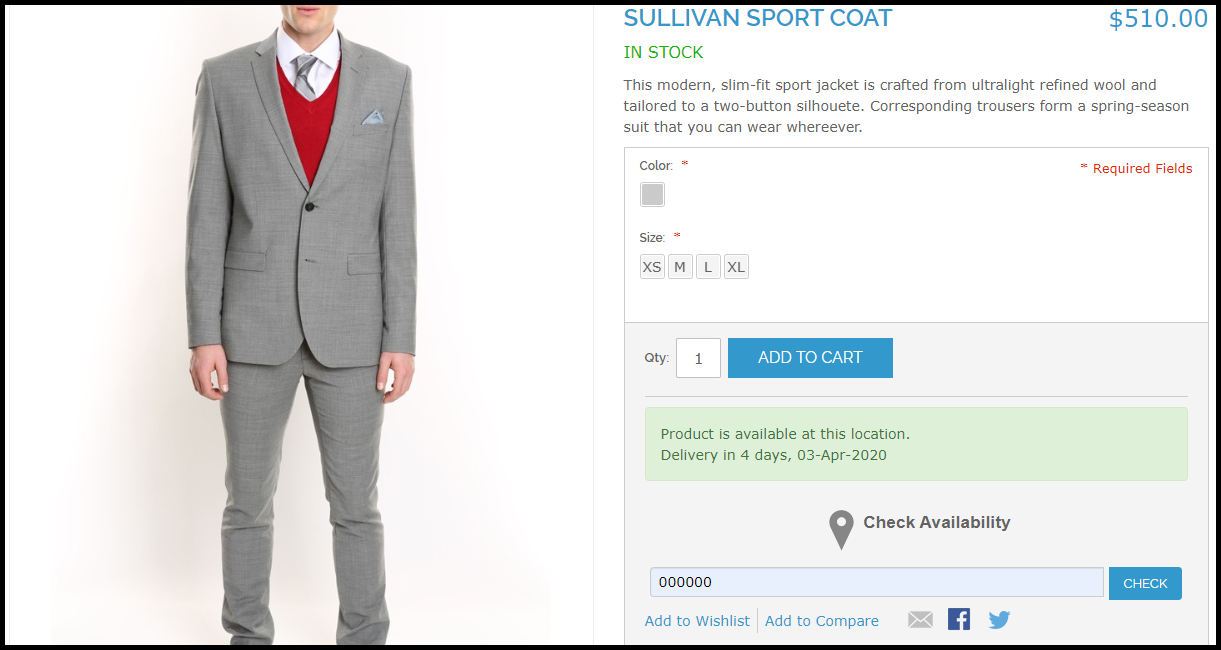
The extension adds a “Check availability” section on your product pages. When a user specifies the zip code of his/her region, it checks whether the product is available to be delivered at their location or not. If available, it will display the estimated delivery date else it will show that “the product is not available at this location.”

Note: Due to the COVID-19 outbreak, we have currently made this module free for our customers. Related information and download link are given at the end of this post.

Overview

1. Allow customers to check product availability by their area zip code

2. Display the estimated delivery date for available products

3. Disable Add to Cart button functionality if product not available

4. Add multiple zip codes

5. Specify the delivery time interval for a particular zone

6. Product mapping for different zones

Description

1. Magento Zip code Validator Extension requires customers to enter the zip code on the product page before proceeding to the checkout. They would not be able to add the product to the cart and checkout without checking the product availability.

2. Magento Zip code verification extension consists of a “Disable Checkout” option enabling which the “add to cart” button will disappear from the product page if that product is not available for the specified zip code.

3. If the product is available in the specified area zip code, Magento Product Zip code Extension displays the estimated delivery time interval along with the delivery date. (Refer to the image at the start of the blog post)

4. Magento Zip code Validator Extension lets you add multiple zones from the back end configurations. You can specify the zip codes (separated by comma) for every zone and define the estimated delivery date.

5. You can map your store products for different zones, after which the products will be available only on those zones for which they have been mapped. Product zone mapping can be done either manually or through CSV file upload.

6. Magento Zip code verification module is easy to install and configure and offers multi-store compatibility.

Benefits

1. Enhance the shopping experience of your customers.

2. Helps you with product page optimization

3. Makes it easy to manage products delivery.

4. Customers can know the product availability right on the product page and not on the checkout page.

Special note: The module has an actual cost of around $36 with free 3 months of support but following the corona pandemic, we have currently made it free for our customers. During these hard times, we are making sure that we do best for our customers in whatever way possible.

For the time being, download this module for free. We will keep you updated with new free modules.

Download the module from here.

If you have any query regarding this, you can reach out to us at support@knowband.com