Skip to content

Knowband Blog | Ecommerce Modules

Magento, Prestashop, Opencart, Shopify

Tag: social login

9 effective tips to improve sales on your eCommerce store

9 effective tips to improve sales on your eCommerce store

The growth and expansion of any business be it offline or online depends mainly on the conversions. In the case of eCommerce stores, the conversions are usually referred to as product sales achieved. Agree, every store owner can’t succeed in terms of making bumper sales but it is a fact that every eCommerce store owner has a strong urge about making a significant increase in his/her store sales.

If you are not lucky enough in increasing the sales of your online stores, it is time to start looking for an effective remedy. A low performing eCommerce site in terms of product sales is not of much use and is actually more of a burden if the operational cost of the store is too high. This blog is certainly a big relief for those sales deprived eCommerce store owners who are looking to escape out of the long continuous sales dud. We have figured out some ways and came up with  9 effective tips to improve sales on your eCommerce store.

1. Provide exciting offers and deals to your customers

Almost every online shopper is in search of exciting shopping offers and deals that could persuade them for a quick product purchase. If your eCommerce store is unable to excite its targeted customers through amazing deals, discounts, shopping offers, free shipping service, gift cards, sales coupon, and other such components, it is certainly going to hurt your business fortunes in the long run

2. Offer multiple payment and shipping methods

Don’t be adamant while offering payment and shipping options to your customers but try to be more flexible. You need to make a survey among your customers for including the popular payment and shipping options on your online store for ensuring a comfortable online shopping experience. The presence of only selected payment and shopping options also results in higher shopping cart abandonment and bounce rates.

3. Provide easy navigation around your site

Customers nowadays are very choosy when it comes to a product purchase. They want to look out for a number of products before actually going for the final purchase. In order to offer easy navigation around your eCommerce website, you can take the help of a productive heatmap and A/B testing tool like MockingFish that can improve the customer engagement on a site to a great extent.

4. Remove hurdles from your checkout process

Due to the scarcity of time with online shoppers, eCommerce stores need to focus on ways to improve the checkout process on their site. They need to remove unnecessary fields and checkout steps that are hampering the quick online product purchase of customers. If you want to manage this critical task through an eCommerce plugin, you can take the help of Knowband modules like Prestashop One Page Checkout, OpenCart One Page Checkout, OpenCart One Page Checkout Pro, Magento 2 One Page Checkout for simplifying the checkout process on your eCommerce store.

5. Spread the information about the urgency of your offers

In this competitive business environment, you need to showcase that the advertised offer on your site is much more engaging and is available for a limited time only. Once, your customers are aware of the urgency and limited availability of your shopping offers, they will be much more eager to purchase from your online store. Store owners can convey this message to their targeted customers in the form of appealing CTA buttons and CTA texts for grabbing higher conversion rates and sales.

6. Reduce Cart Abandonment Rate

There’s a heavy impact on sales due to abandoned carts. Though there is no magic to stop someone from abandoning their cart, there are ways that can help you bring the abandoned cart rate under control.

For that matter, you can try out the Abandoned Cart module by Knowband or use Web Push Notifications to give a gentle reminder to your visitors every time they abandon their cart. This way you can make an improvement in your sales.

7. Launch a facebook shop

With over 2.38 billion Facebook users today, not utilizing the Facebook platform means missing out on a great opportunity to improve sales on your eCommerce store. Link your eCommerce store to your Facebook business page, interact with your audience and run contests or offers at regular intervals to increase customer engagement. You can try out the Prestashop FB store addon for integrating your store to your Facebook page. If your brand doesn’t have a Facebook page, create one today.

8. Use popups effectively

Popups are a great way of attracting customers and capturing more sales, but they do not work as easy as it seems. Designing a good popup that could bring conversions requires your time, efforts and most importantly creativity. Pop-ups bring results only if they have been made in such a way that doesn’t unnecessarily irk a user. In fact, e-retailers today, are using pop-ups to engage users in some kind of fun activity, before actually asking for their email address.

You can try various types of pop-ups on your store such as Spin and Win Popup, Scratch Coupon Popup, Exit Popup, etc. and figure out which one brings more conversions to your store.

9. Avoid Mandatory Sign-ups

Do not kill the interest of your visitors by making the sign-up process on your store mandatory. In this way, you are only restricting a visitor from making a purchase.

Offer Guest Checkout to your visitors or enable social login options. Guest checkout is very helpful for users who do not want to get themselves registered on your platform while the social login option allows visitors to avoid the long registration process by asking them to login with their social accounts.

Conclusion

Do not consider the low sales as the fate of your eCommerce store. Make the required corrections with the help of the above-mentioned informative tips. If you are able to make the changes within the stipulated time, you can effortlessly grab more conversions and sales for your eCommerce store. Keep in check the above-mentioned 9 effective tips to improve sales on your eCommerce store. For more updates regarding eCommerce plugins and other related information, do visit our Knowband store at www.knowband.com

Liked This? You’ll Like These Too

  • 5 Checkout optimization that can Reduce Abandoned Carts and Boost Sales
  • Boosting customer engagement and sales by encouraging reviews and opinions
  • How can Sellers Improve their Sales in an eCommerce Business?
  • Simple Approaches to Boost your Sales using Facebook
Posted on September 2, 2016August 13, 2022Author Joe ParkerCategories EcommerceTags Abandoned Cart module, Cart Abandonment, Conversions, Exit Popup, facebook shop, one page checkout, popups, sales, scratch coupon popup, social login, Spin and win popup, web push notifications

How to simplify the Checkout Process of your PrestaShop Store?

It is often seen that consumers end up abandoning their cart due to a complex checkout process that makes the customer feel alienated from your site and forces them to look out for a better alternative. This is why it is important to simplify the checkout process and it can be done with the help of the PrestaShop One Page Checkout.

If you do not work upon your checkout process, it can affect your business in the long run. If the checkout process of your Prestashop store is too lengthy or complicated, it is time to pay a little attention to it. An unoptimized checkout page can kill your e-commerce conversions.

Online shoppers look for a simplified checkout process while they make a purchase. E-retailers know how much importance a simplified checkout page holds and for this reason, they keep on looking for ways to simplify the checkout process. If you are having an e-commerce store on the PrestaShop platform and looking for ways to simplify the checkout process of your store, you can opt for PrestaShop One Page Checkout addon.

PrestaShop One Page Checkout Addon

PrestaShop One Page Checkout helps you get rid of the unnecessary fields from the checkout page and displays all the checkout steps on a single page. Here are some of the wonderful features of the PrestaShop One Page Checkout addon that can help to simplify the checkout process.

PrestaShop One Page Checkout offers Easy Login facility

Account creation is the most time-consuming aspect of a checkout process. When a consumer looks all set to make a purchase, the intention of purchasing is brought down drastically when consumers are presented with a long and compulsory account registration form.

To overcome this issue and make sure consumers do not abandon their cart in between their checkout journey, One-page checkout comes up with the social login option so that the online shoppers do not get frustrated with the registration task and proceed further easily. With social login, people can sign in with their Facebook or Google+ account.

Besides social login, PrestaShop One Page Checkout addon also offers Guest Checkout facility so that visitors can checkout without requiring to sign-up on the website.

PrestaShop One Page Checkout displays the error in real-time-

This PrestaShop checkout extension has the inline validation facility that informs users about the possible errors in their checkout form. A green tick is displayed to the users if the information they have entered is correct else the error is marked by displaying the red cross sign. This helps a user identify the mistakes in real-time and correct them, what otherwise would have been a failed submission and users would have been asked to provide the details again.

Supports multiple Shipping and Payment methods-

The excitement of the purchase is often turned into disappointment due to the lack of desired payment options during the checkout process. E-commerce stores that do not focus on providing multiple payment modes and shipping services fail to capture more conversions. PrestaShop One Page Checkout addon supports multiple payment methods and shipping services. Thus, if you want to provide your users with a lot of options to choose from, you can integrate the various payment and shipping methods on the Prestashop One Page Checkout.

Multiple Layout Designs-

Sticking to a typical layout can sometimes turn out to be tedious for consumers. Hence, trying out different layouts can be an ideal solution. PrestaShop One Page Checkout offers 3 layout designs. You can redesign the layout of your checkout page at regular intervals and see which one is making the best fit for your business.

Customize Cart and Checkout fields-

PrestaShop One Page Checkout provides you with the option to customize your checkout fields. You can specify which fields you want to keep on the checkout page and which fields you want to hide. You can also choose whether to keep a field as mandatory or optional. And most importantly, you can set a priority of the checkout fields through drag and drop, which means if you want to place a particular field above any other field, the one page checkout module will let you do that easily.

You can also show or hide some specific cart fields as well.

Free Shipping Banner [New]-

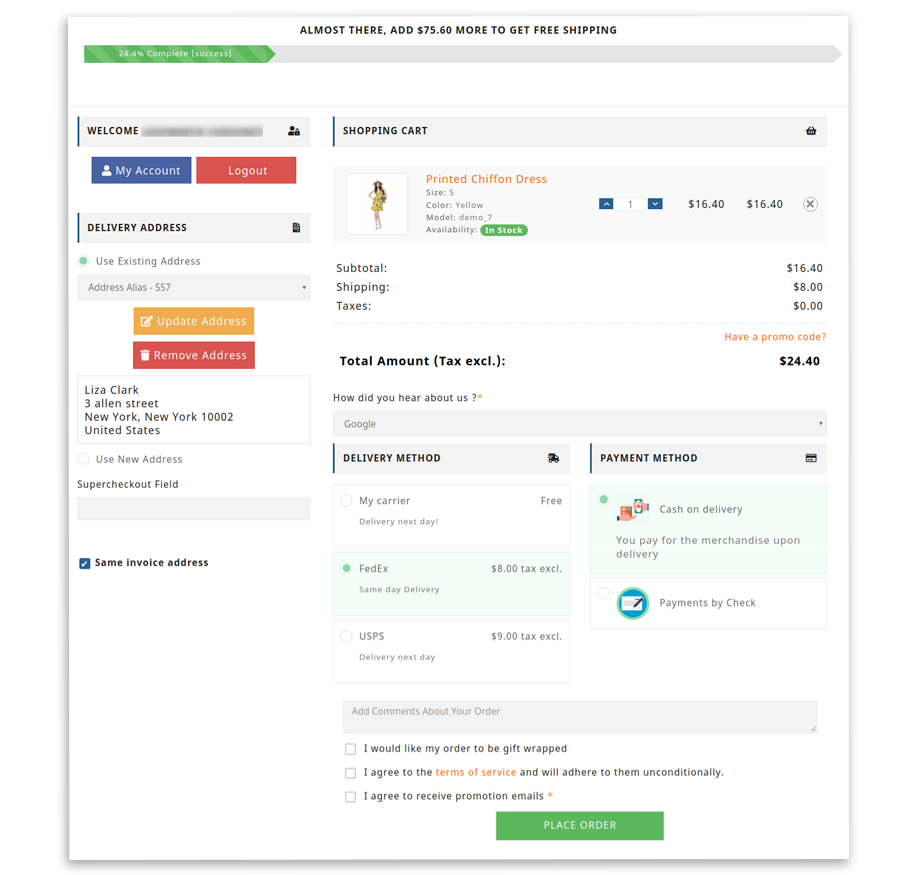
This recently added feature in the PrestaShop One Page Checkout module lets you display a free shipping banner on the top of your checkout page. From the back-end, you can specify the amount for or above which the free hipping bar would be displayed to a user. This tends to increase your average order value since this encourages customers to shop for a bit more to receive free shipping.

Get insights into Abandoned Checkouts [New]-

This feature in the PrestaShop One Page Checkout displays the count of abandoned checkouts alongside the revenue missed because of it. You can also view the checkout conversion rate and the total number of orders placed. This can be filtered out for a specific period.

The data is presented in a tabular form as well as graphical form.

Track Checkout Behaviour Report [New]-

PrestaShop One Page Checkout also helps you find out which checkout field is causing a hindrance on the checkout page for your visitors. It displays a percentage for all the checkout fields. Higher the number means it is causing the most trouble for your potential customers. This provides you with an opportunity to optimize it so that you can improve your conversions.

Conclusion

If there is anything that can make or break the chances of conversion, it is the checkout page. It is the most overlooked area by e-retailers and they look to simplify it as much as they can. A simplified checkout leads to great user experience and great user experience leads to more sales.

Do try out PrestaShop One Page Checkout to simplify the checkout process of your PrestaShop store and let us know how it worked out for you.

You Might Also Like:

  • How to optimize your checkout page and improve conversions?
  • One page checkout vs Multi-page checkout
  • How to simplify the shopping experience of your customers?
  • PrestaShop Checkout Modules to Improve your Checkout Process
Posted on July 19, 2016February 27, 2020Author Joe ParkerCategories PrestashopTags one page checkout, Prestashop One page checkout, prestashop one page checkout addon, Quick checkout, Simplified checkout, social login

Posts pagination

Previous page Page 1 Page 2
Proudly powered by WordPress
Please wait...

Newsletter Subscription

Subscribe With Us and Get Latest Updates
SUBSCRIBE
Exit mobile version