5 Features that Highly Influence the Customer’s Decision in Making Purchase

One of the biggest aspects of eCommerce that sums up their success rate is the way they influence the customers. The entire process of taking the visitors from the landing page to the checkout page is all about user engagement. In order to be more productive with the shopping site, various other areas must be covered apart from the product quality and service assurance. The customers has now moved on from the traditional form of making a purchase to online purchases. Therefore, it becomes quite important for the eCommerce store owners to present the sites in best way and try to reach out to the customer.

In order to get better understanding of the customer’s decision of making a purchase, we can discuss some of the points that can help the stores to get better conversions.

1. Product placement
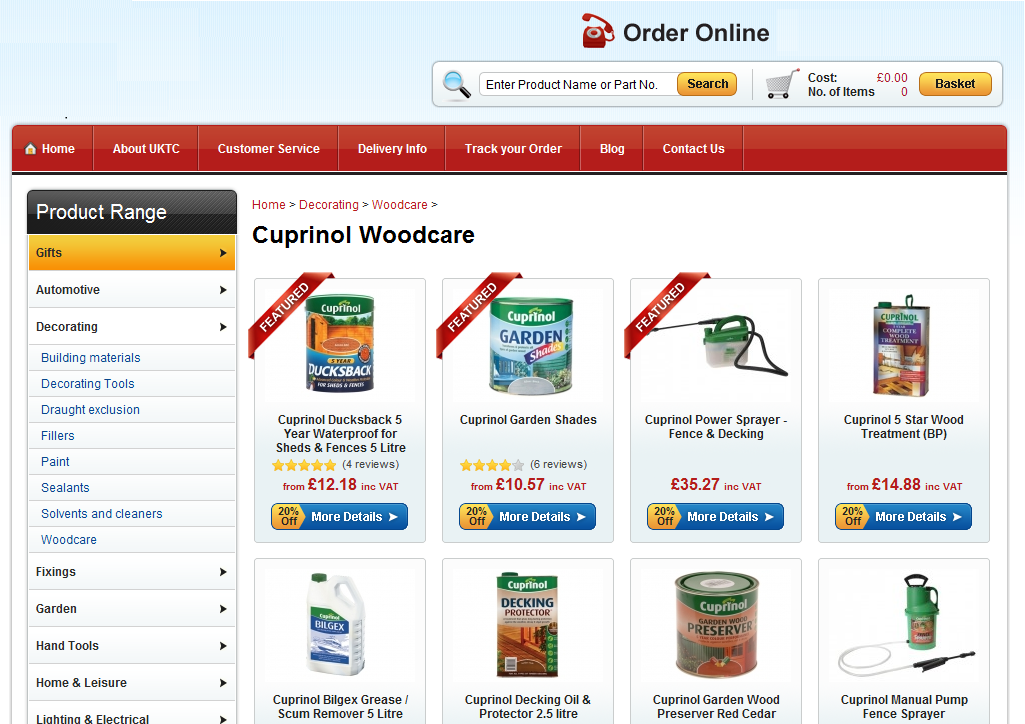
It is quite important for the web stores to know the fact that the buyers are not going to make a purchase on the products which are dig deep in the store. The chances of making a purchase on the product that is available in the 6 page of a particular product are quite low as compared to the same product that has been presented in the page 1. Thus, the placement of the product plays a very crucial role in determining the behavior of the customers and making a better sales to them. the customer wouldn’t like to spend their time in searching for the product and digging deep into the website. Moreover, refreshing the web page every time may even be time consuming. This is when the infinite scroll can help you out. There are module available for adding such functionality in the websites. For instance, Prestashop infinite scroll, Magento infinite scroll and others. Showcasing the products in the single page can make the visitors delve into the site in a better way.

👉Explore the Module with Our Video Guide

2. Easy purchase options
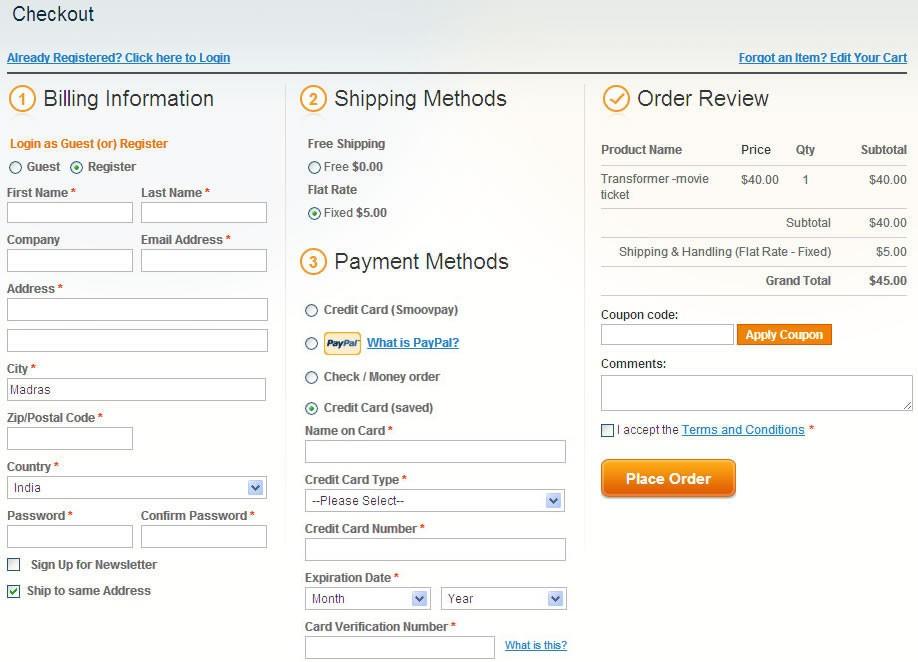
Why bother to make a purchase from your store when the online transaction is easier on other sites? This question must be taken into consideration by the store owners when trying to provide the customers with better services. The customers always look for some kind of assistance when it comes to making a purchase as most of the stores provide the product from the same brand. In this regard, the shopping site can provide the customers with assistance when it comes to different aspects. One of the way to provide customers with easy purchase option could be by providing the one page checkout option. There are extensions available for the various eCommerce platforms such as Magento one page checkout module or Prestashop one page supercheckout. It saves the customers a lot of time and saves the extra efforts they need to put in order to complete the purchase.

3. Marketing campaigns

Keeping the customers informed about your offerings is the best way to aid the purchase decision of the customers. Advertisement play an important role in influencing the visitor’s decision to make a purchase. The eCommerce stores must always try to keep the customers informed about the various activities going in the web store. It helps in creating an awareness among the users and also helps in attracting a better crowd to the store. To commence a successful marketing campaign the online stores must first do a research and try to figure out the various concerns of the potential buyers and then target the audience. The increasing trend of promoting the products through blogs and post is also catching attention. The eCommerce store can use this strategy to improve the product understanding among the customers and encourage them to make a purchase.

4. Better branding of the products

The most common customer behavior that has been observed is the pattern in choosing a product. Majority of the customers prefer to make a purchase on the product that is directly related to a bigger brand or a self-established brand. Creating a brand image of not just the site, but even of the products being catered is must. This not only entrusts the customers that they are receiving a quality product, but also ensure the trust elements in the product.

5. Solve their queries
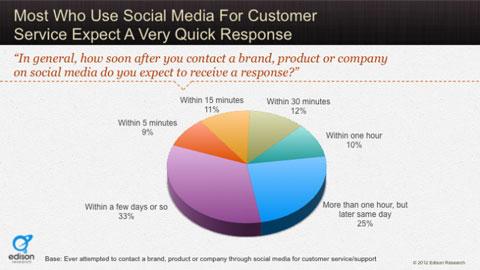
The availability of a chat support system in a website highly motivates the visitors to make a purchase. As, the visitors look onto the web store than the chances may arise where the users may find some complications with the products or their understanding is not developed. In that case if the online store provides them with the required assistance than the chances of making sales are improved. In other case, the users can use this feature to get their other doubts cleared. The customers like to get a response on their queries as soon as possible. If they are provided with the immediate response than they may be influenced to make a purchase from the store else the website is more likely to lose a potential buyer which could have been a paid customer otherwise.

Over to You

The customer behavior is highly complex and to completely figure out the best ways to tackle the customer decision, one needs to dig deep. The general points which are experienced as common traits that are shown by the visitors can be worked on by the online stores. The web stores can make use of additional addons to gain better conversions from the visitors.

Liked This? You’ll Like These Too:

5 Incredible Hacks to Enhance your eCommerce Businesses

If you are running an eCommerce store, then, prioritizing customer’s satisfaction becomes inevitable. Most of the time, customers prefer to make a purchase after they are fully satisfied with the services provided by the web store. If you think that providing quality product can lure the customer to your store, then, you may not be right completely as there are many other factors contributing to customer acquisition. Nowadays, almost every other store is using the same brand merchandise. Customers have plenty of options to buy those products.

So, what factor differentiates between the stores for a customer? Why should he/she choose your online store over the others. Well, getting required traffic to your website and at the same time having a healthy amount of satisfied customers is different. The eCommerce store owners need to think differently and creatively, in order to be upfront. The sellers must divert their attention from ‘only providing quality products’ to enhancing the customers experience with the web store. A better UX ensures a better customer relationship.

Seller need to make sure that the customers have a smooth and pleasant experience while shopping. It helps in making sure that the customer will engage them with your web store in future too.

Discussed below are certain strategies which can be used to build a stronger customer base.

1.  Better navigation

The web store owners needs to provide the customers with smooth browsing and better access to the site features. The website should be enhanced for better user engagement and shopping experience. The category and product navigation should be easy and effortless. Keep the category pages uncluttered. Moreover, the filters and deep linking can help you get some customers. In addition to this, features like one page check out, Infinite scroll and others prove to be useful features in binding the customer’s interest towards the web store. These may seem to be small details, but if acted properly, it can lead on to a significant raise in your sales and ultimately boost your conversions.

2.  Interactive Pop ups

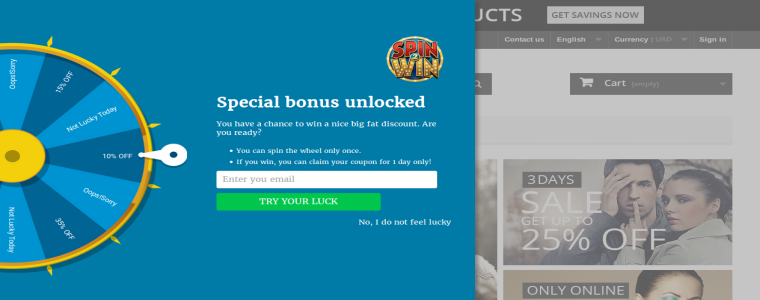
The main task for the web store owners is to keep their customers occupied. Thus, the sellers must provide the customers with an interactive platform where they can easily make purchase. The web store can use creative ideas like Spin and Win pop up and other gamified popups that are less annoying and ensures longer engagement at the same time. These pop ups keeps the customers on the website and curbs their exit-intend. The seller can also make huge sales by luring the customers through various offers, provided using these pop ups.

3.  Social Media Marketing

The concept of social media marketing is heating up. Most of the web store have either started to market using social media platforms like Facebook, Twitter and Instagram or planning to do so. The user based on these sites is way too much and it is never a bad idea to promote your products among such crowd. If proper strategy is followed than social media marketing can boost the product sales and increase the amount on conversions significantly.

4.  Mobile Apps

The significant rise in the numbers of mobile phones have changed the marketing strategies. With an easy access to mobile phones, it has become a better source to increase the number of customers visiting your store. In addition to this, the customers find mobile app more comfortable and trustworthy rather to desktop site. Thus, launching a mobile app for your web store might show an increase in your revenue generated through sales. Knowband offers an robust medium to all the eCommerce owners for having their own mobile app. Our Mobile App Builder can help you get your application in a matter of moment.

5.  Product reviews

According to a study, “Almost 54% of people would prefer to purchase a product after reading positive reviews about the products”. Thus, try to maintain a section which consists of all the product reviews. It enables the customers to share their experience about the products and helps other to make up their mind in order to purchase the particular product. It serves a huge purpose in increasing the sales.

Conclusion

Marketing with time has become more research based than service based. The sellers need to be stay updated about the trends which can boost their eCommerce store. If they want to grow more than they must give preference to their customer’s choices. Take the above mentioned consideration into account and optimize your store for better results.

For more Information about Shopify Spin & Win Module visit here:-

Module Link: https://www.knowband.com/shopify-spin-and-win

Liked This? You’ll Like These Too

Prestashop Infinite Scroll Module by Knowband – User Manual

1.0 Introduction

The Prestashop Infinite Scroll Module by Knowband is an integration of scrolling of products on the product listing page in place of pagination.

Pagination on a product listing page is a very common feature that we see on different eCommerce websites but this Prestashop infinite scroll module will make the listing of products on the product listing page a bit more interesting. When this Prestashop list product module will be enabled the customer will just scroll down the page to view more products which are listed in the product listing page.

2.0 Steps For Installation of Prestashop infinite scroll module:

Once you purchase the infinite scroll addon, follow the below steps:

  1. Go to the Store Admin -> Modules and Services.

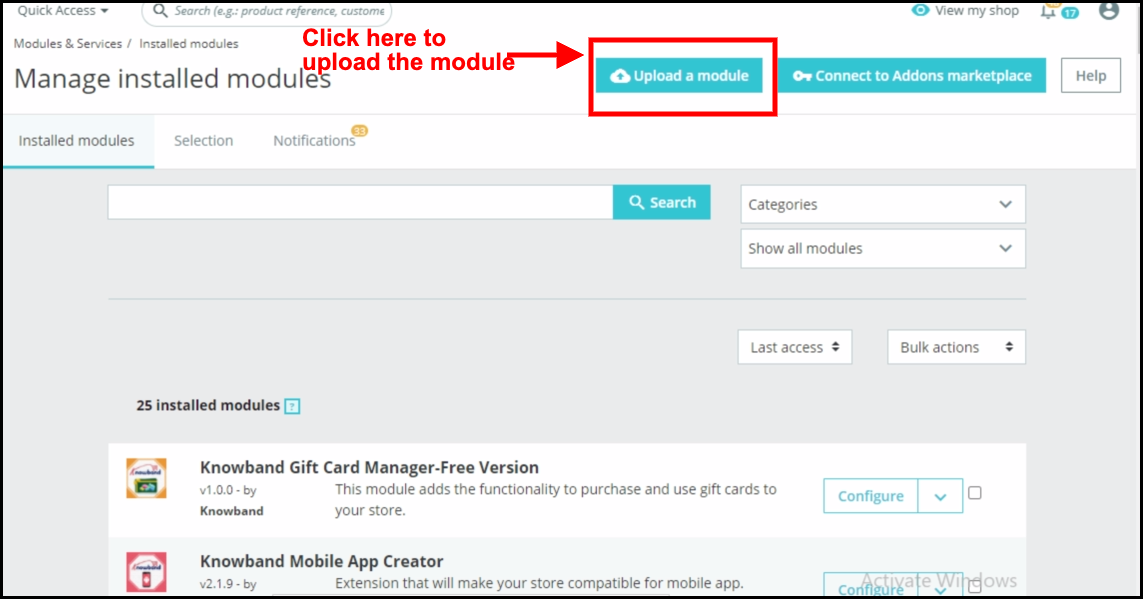
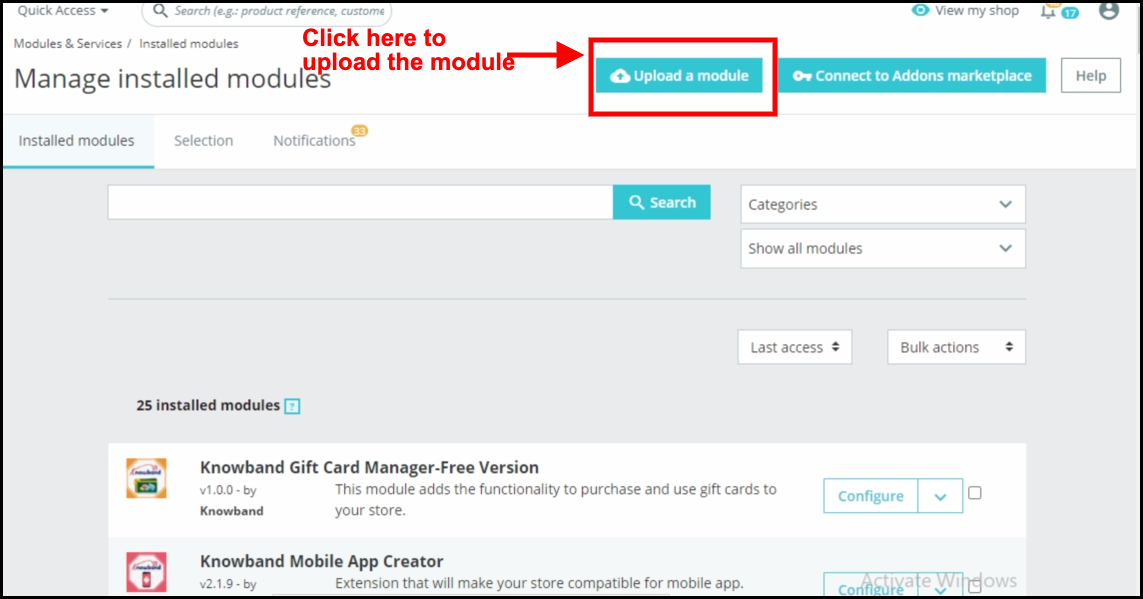
2. Click on “ Upload a module”. You can drag or drop the file or can simply select the file from the system.

Once the file is completely uploaded, a notification of “Module(s) installed successfully” will be displayed. Now you can configure your module.

3.0 Administration Module

In admin interface of the Prestashop infinite scrolling module, there will be following options to configure this Prestashop list view module. The Prestashop dropdown scrolling module includes 4 tabs and they are as follows.

1. General Settings

2. Advance Settings

3. Display Settings

4. Selector Settings

Each section of the Prestashop Infinite Scroll plugin is described in details below.

3.1 General Settings of the Prestashop infinite scroll module:

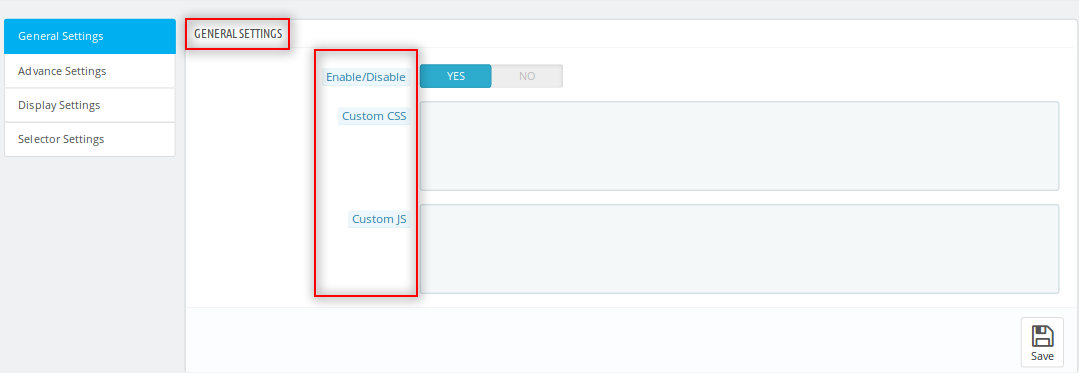
This section of the Prestashop list product module will be having following options to configure this Prestashop infinite scroll module:

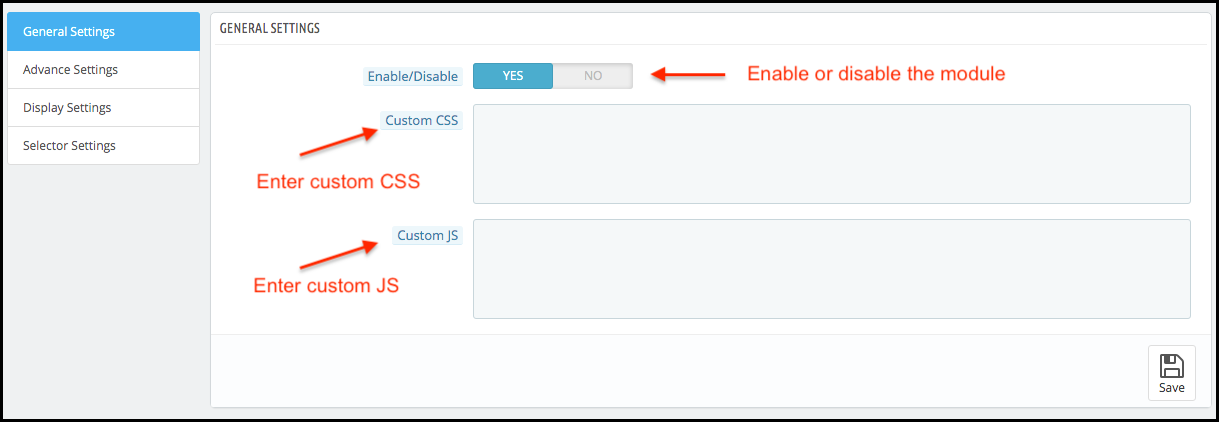
  • Enable/Disable: This option of the Prestashop fast scroll module will be having a toggle button with two specific values ON and OFF. This Prestashop module by Knowband will only work if this is set to ON. If this is set to OFF then none of the feature will be working and not even impacting any other section of website. By default, this option will be OFF.
  • Custom CSS and JS: These fields of the Prestashop Infinite Scroll module have been provided to let the admin change the look and feel of the front end of the Prestashop quick scroll module.

3.2 Advance Settings of the Prestashop infinite scrolling module:

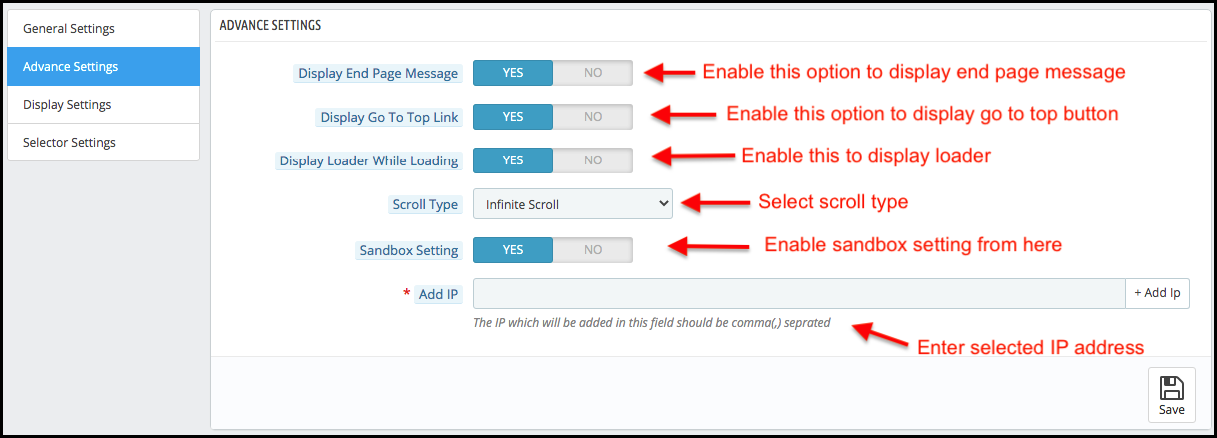
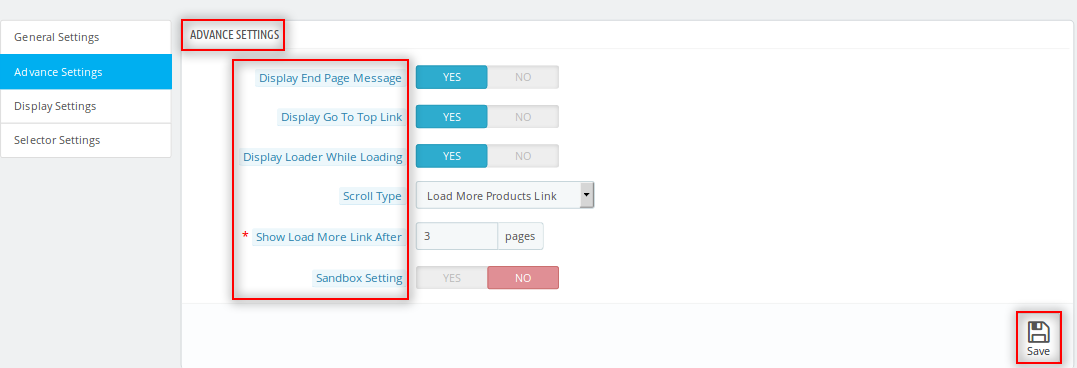
  • Display End Page Message: This field of the Prestashop drop down scrolling module offers the store owner to display the message at the end of product listing page.
    If the Owner enables Display End Page the following option will appear:
  • Display Go To Top Link: This field of the Prestashop Infinite Scroll module lets the store owner to display a link in the front-interface to go to top of the page by displaying a button at the bottom of the page.
  • Display Loader while Loading: This option of the Prestashop infinite scroll plugin offers the store owner to set display the loader during the loading of the product. So whenever customers scroll the page they can see a loader while loading the
  • Scroll Type: The Prestashop infinite scroll addon allows the store owner to choose between the scrolling option between the infinite scroll and load more products link.
    If the Owner can select the Load More Link then there will be following Option:
    Show More Link After: The owner can set the frequency to show load more link i.e after this many page loads the link will appear.
  • Sandbox Settings: Admin can also test the Prestashop infinite scroll module by enabling this field.
    If the Owner enables Sandbox settings the following option will appear:
  • Add IP: In this field of the Prestashop quick scroll module by Knowband, the admin can add different IP by separating them using a comma and the Prestashop module will work only for these IP addresses only.

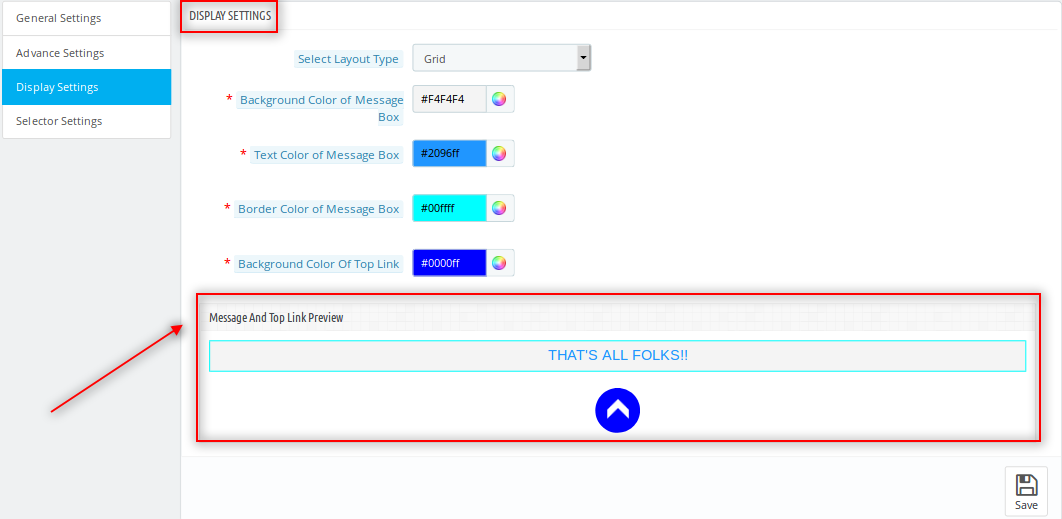
3.3 Display Settings of Prestashop infinite scroll module:

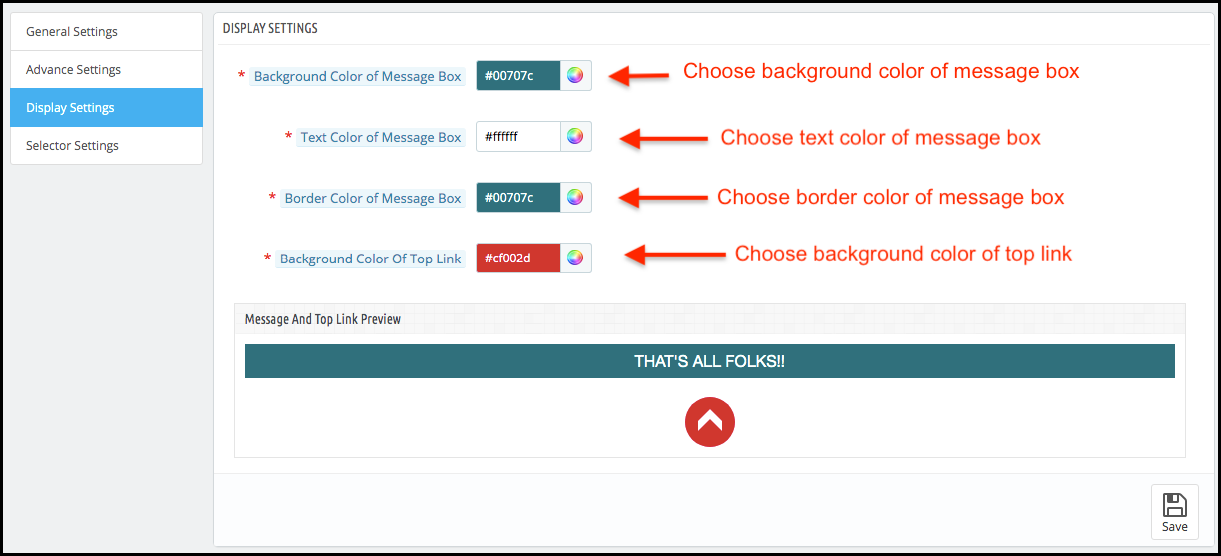
  • Background color of the Message Box: This field of the Prestashop drop-down scrolling module allows the admin to customize the background color of the message box that would be displayed when all the products loading will done.
  • Text color of the Message Box: The Prestashop Infinite Scroll module allows the admin to change the text color of the message box.
  • Border color of the Message Box: The Prestashop infinite scroll module allows the admin to customize the border color of the message box as per his requirement.
  • Background color of Top Link: The admin can customize the background color of the Top Link of the Prestashop list product module.
  • Message and Top link preview: Store admin can preview the end page message and top link button design.

The preview of the changes which will be done are reflected in the preview box given just below the fields of this Prestashop drop down scrolling module.

3.4 Selector Settings of the Prestashop infinite scrolling module:

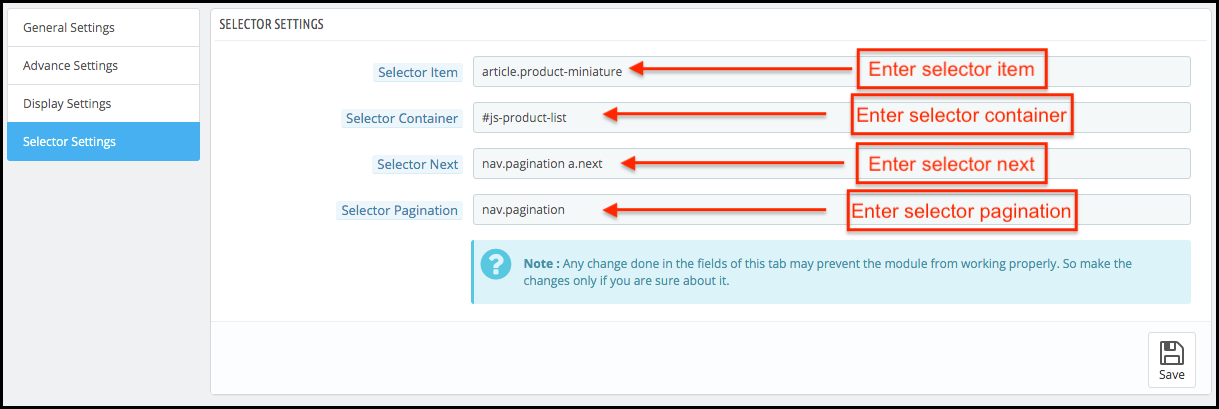
The values in this tab of the Prestashop dropdown scrolling module needs to be correct to let this Prestashop quick scroll module work properly. The values in this tab of the Prestashop Infinite Scroll module may change according to the theme of the Prestashop used in the front.

NOTE: If the selector values in these tabs of the Prestashop infinite scroll module are entered wrong then the Prestashop Infinite Scroll module will surely not work properly.

  • Selector Item: Store admin can enter the selector item value from this tab.
  • Selector Container: Store admin can enter the selector container value from this tab.
  • Selector next: Store admin can enter the selector next value from this tab.
  • Selector pagination: Store admin can enter the selector pagination value from this section.

4.0 Front Interface of the Prestashop Infinite Scroll Module:

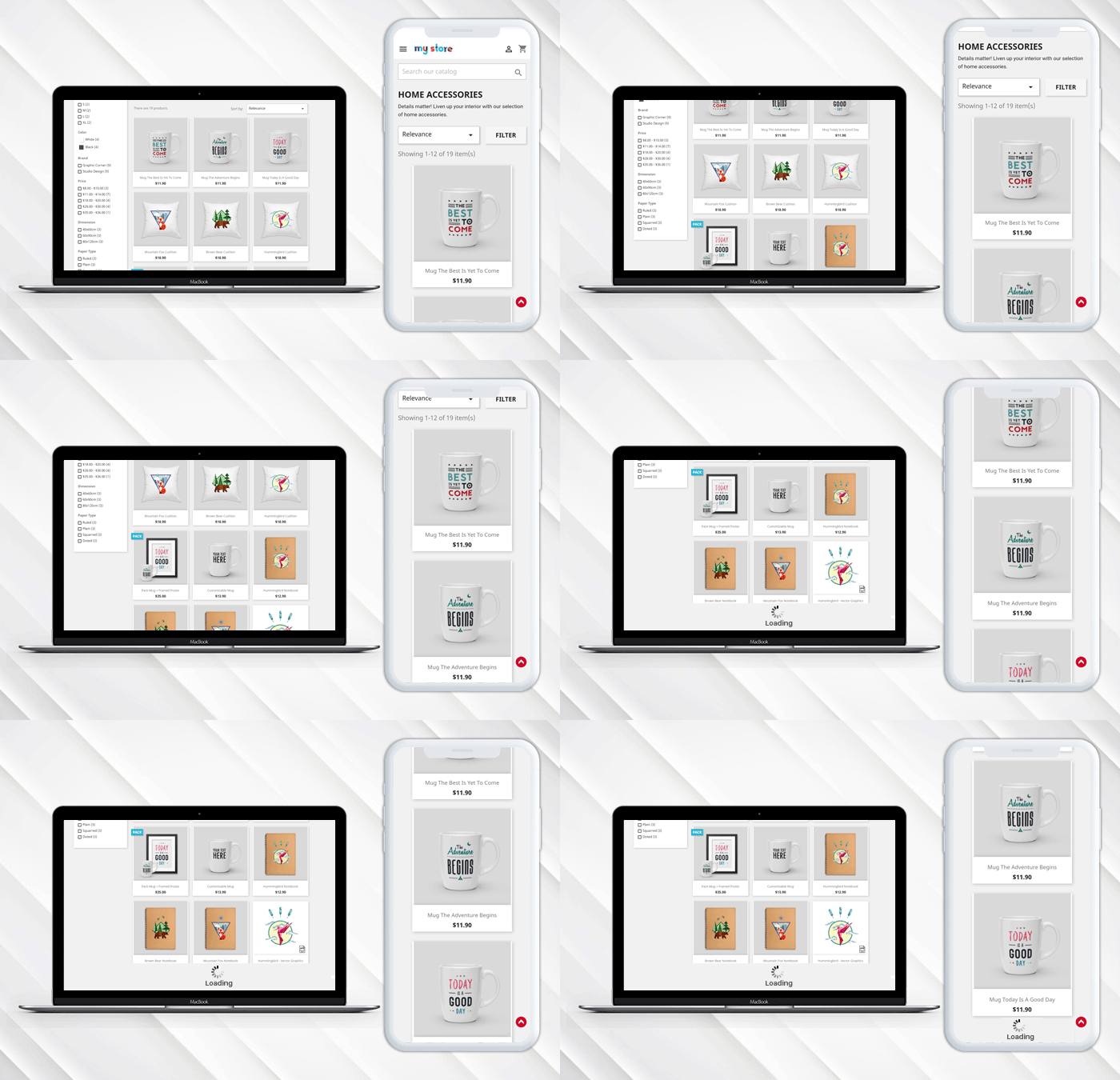
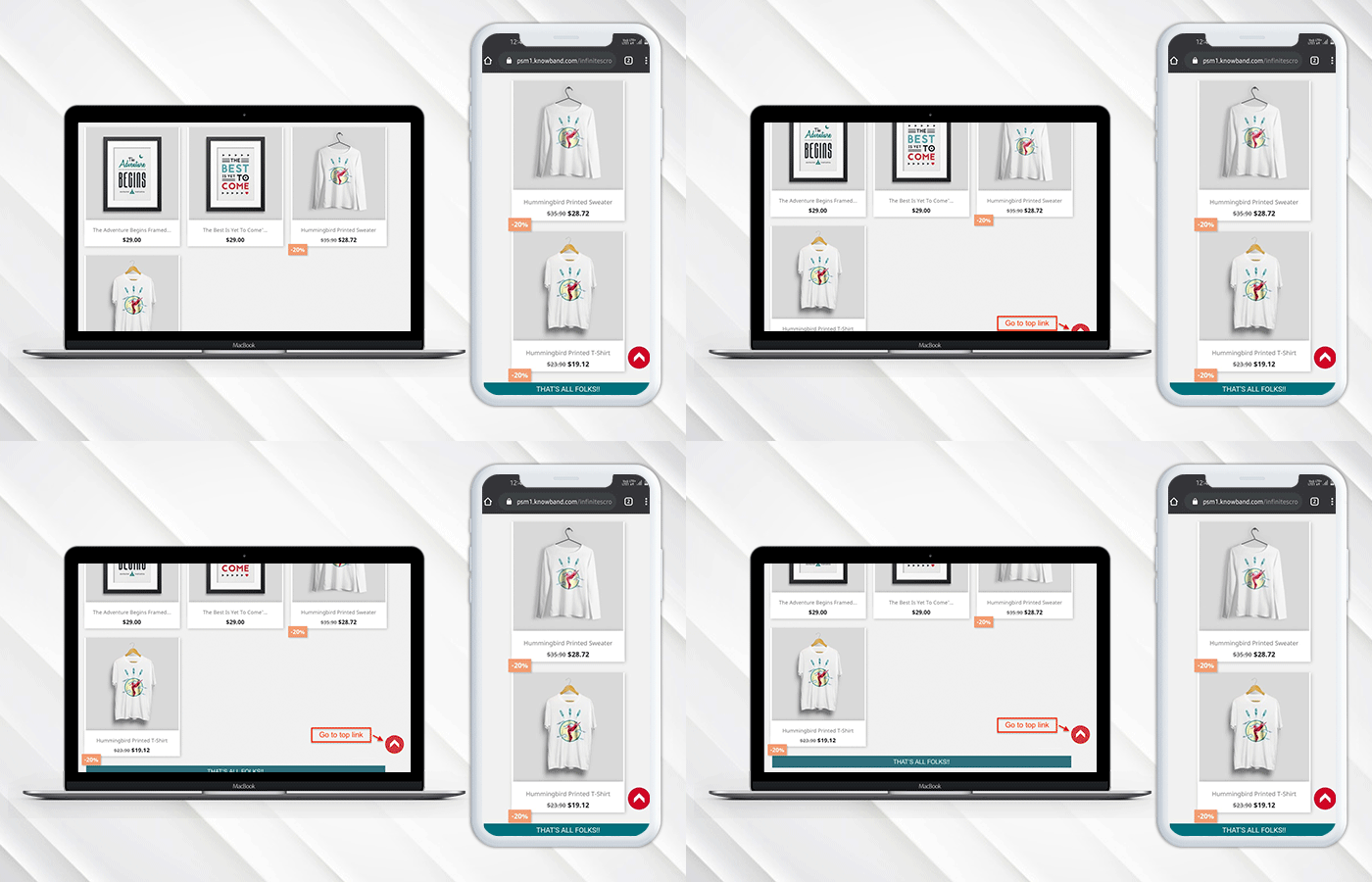
When the Prestashop infinite scroll module by Knowband is enabled from the admin panel then on every product listing page pagination of the products would not appear. The customer will be able to view all the products just by scrolling down on the page and if the display go to top link is enabled then the link will appear on the bottom right of the page to scroll the customer back to the top of the page.

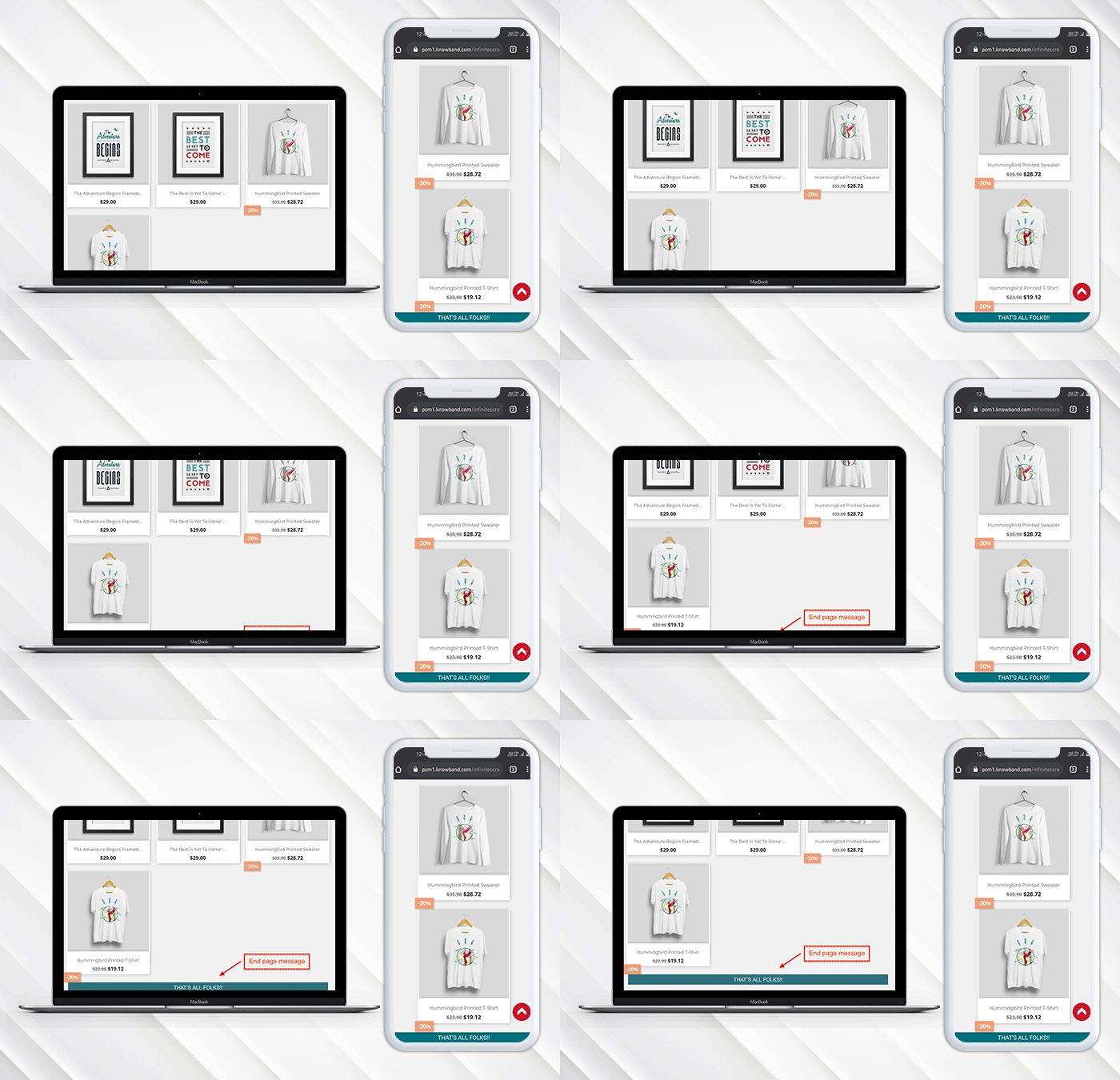
End Page Message:

Go to top button:

When all the pages are loaded a message appears in the bottom which states that all the pages are loaded now.Watch how this Prestashop Infinite Scroll Module by Knowband works:

Know more about this Prestashop Infinite Scroll Plugin here:

Prestashop Infinite Scroll Module Link: https://www.knowband.com/prestashop-infinite-scroll
Prestashop Infinite Scroll Module Admin Demo: https://psm.knowband.com/demo/?module=infinitescroll&demo=admin&referrer=kb&lang=en
Prestashop Infinite Scroll Module Front Demo: https://psm.knowband.com/demo/?module=infinitescroll&demo=front&referrer=kb&lang=en

Get this Knowband’s Prestashop Infinite Scroll Module on Addon Store as well. Visit here: https://addons.prestashop.com/en/navigation-tools/23643-knowband-infinite-scroll.html

“Also, explore more Prestashop modules for your Prestashop e-commece website.”

This Would Also Interest You: