According to the stats collected by Hootsuite, 1 billion people use Instagram every month, and around 130 million Instagram users tap on a shopping post. Brands use Instagram shopping posts to showcase their products and drive more sales. An Instagram Shop allows Instagram users to look for the desired product by visiting the brand page. The products are tagged on the images and users are redirected to the website to complete the checkout. In fact, with Instagram’s latest checkout feature, people can now purchase products directly from Instagram without having to close the app or getting redirected to the original store.
With Instagram shopping posts, you can make your followers aware of your products and guide them towards an easy purchase. Ensure you are using the Instagram shopping costs effectively, which means using high-quality product images, attractive captions, proper hashtags, and a perfectly timed sales pitch.
In this article, I will provide you a guide to set up your Instagram shop, brief you on how to add product tags to your Instagram posts and how you can drive more sales with Instagram shopping posts.
What are Instagram Shopping posts?
An Instagram shopping post contains product tags that make it easier for Instagram users to browse those products and make a purchase. They make the shopping path easy for the followers.
Many e-commerce retailers have even integrated their Instagram business account on their website and created a similar kind of Instagram Shop. KnowBand offers an Instagram Shop Gallery extension that fetches your Instagram account images or Instagram hashtags on your eCommerce store and helps you link your store products to the fetched Instagram content. The extension is currently available for OpenCart, Magento and Magento 2. Check them out.
You need to go through a few steps before you can share a shoppable post.
1. Instagram has approved 46 countries to avail the features of Instagram shopping. Hence, your location should be in those 46.
2. You must have a business profile on Instagram that sells physical products.
3. Your Instagram business profile must be associated with a Facebook catalog for your products.
To create a catalog for your products, you need to add a Shop section to your Facebook page. Then go to your business manager account, create a new or add an existing catalog that you would like to use for Instagram shopping.
4. Once you have followed all the steps, Instagram will review your account. This can take a couple of days.
5. After your account gets approved, you can start adding product tags to your Instagram posts.
How to add product tags to your Instagram posts?
The process to add product tags to your Instagram posts is pretty simple. You just need to select the picture, write your caption, use suitable hashtags. Just when you are about to finish, you will see the option of “Tag Products”.
Now, search for the product name that you want to tag in your post and add it. You can add up to 5 tags on your post.
Once it is done, you are ready to share your first Instagram shopping post.
How to drive sales with Instagram shopping posts?
1. Use High-quality pictures
The quality of your images decides the interest of the user in the products. No matter how amazing your product is, a bad quality image will not encourage a user to go for the purchase. Get your products photoshoot from a professional photographer for an amazing response from the followers.
2. Use Proper Hashtags
Optimize your Instagram shopping posts by using proper hashtags, which clearly define your products so that when people start searching for that term, your product appears on the search results. This gives a wide organic reach to your Instagram shopping posts. In addition to this, when a user follows a hashtag, your product visibility increases. More visibility creates more chances for sales.
3. Make sure the tags are attached to the right products
Attaching irrelevant tags to the products can mislead your followers and leave a bad impression. It can break the credibility.
4. Use Instagram stories to increase user engagement
Instagram stories are the latest trend. Brands use stories to attract the attention of followers. An Instagram story ensures that your followers do not miss any important announcement if in case they have skipped the post.
Conclusion
Instagram is currently one of the most engaging social media networks for users. Brands should not ignore its popularity. Instagram shopping posts look promising to reach out to potential customers. Such features provide businesses an excellent opportunity to attract Instagram users and convert them into potential buyers.
Create an Instagram Shop section on your e-commerce store as well. This works well to fetch user-generated content by using Hashtags and increases your brand awareness if you are running a marketing campaign.
Are you looking for some effective social media addons for your Prestashop website? There are plenty of social media plugins available that will help you gain social engagement, drive quality traffic to your store and get more conversions. In this article, I have listed 6 social media addons that will be helpful for your Prestashop store. Check them out.
The module offers up to 15 social login options that include Facebook, Google, Instagram, Twitter, Linkedin, Amazon, PayPal, Live, WordPress, Dropbox, Yahoo, GitHub, Disqus, Foursquare and VKontakte. It encourages quick sign-up and reduces password fatigue.
With PrestaShop Social Loginizer, you can track the total number of registrations and total login from various social media accounts. You can customize the login options and also select the pages where you want to showcase the social login block, for example, on the Home Page, Product Page, Category Page, Checkout Page, etc.
2. PrestaShop Instagram Shop Gallery
PrestaShop Instagram Shop Gallery addon adds an attractive Instagram Gallery section on your PrestaShop website. The Instagram gallery consists of the posts that are fetched from Instagram using specific hashtags.
So, basically with this module, you can define the hashtags for which you want to fetch the related images and map your products on those images.
The module makes it very similar to Instagram Shoppable Posts and offers many customizations to adjust the look and fool of your PrestaShop Instagram Gallery.
3. PrestaShop FB Store
PrestaShop FB Store addon helps the PrestaShop store owners integrate their E-commerce store to their Facebook business page.
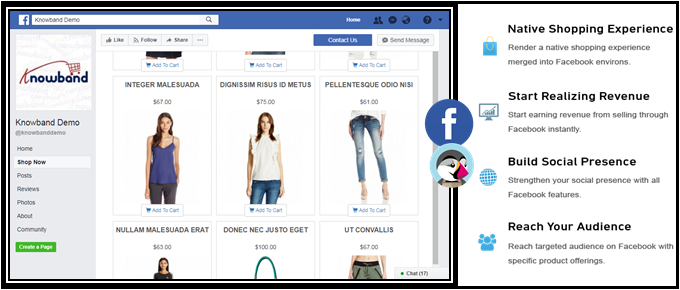
The module allows you to display your store products on your Facebook page, under the “Shop Now” tab. It is also known as the Facebook shop.
In this module, you can select the categories and products that you want to display on your Facebook shop. Also, you can set the limit of products that you want to feature.
You can also track the traffic coming to your website through facebook shop by providing your Google Analytics ID.
Note: To use this module, you need to have a minimum of 2K likes on your Facebook page.
4. PrestaShop Facebook Share and Win Discount
PrestaShop Facebook Share and Win Discount is an amazing tool to reward your users for promoting your products. This addon allows you to provide some discount to your users every time they share your product on their Facebook wall. This not only increases product visibility but also encourages word-of-mouth.
The module adds a Facebook “Share to get discount” button on your product pages.
PrestaShop Facebook Share and Win Discount addon also allows you to provide a flat discount value or some percentage discount to your customers. You can specify the discount value and set its validity.
5. PrestaShop Twitter Feed
PrestaShop Twitter Feed addon helps you display your twitter posts on your PrestaShop website. This addon offers tons of customizations, letting you make your twitter feed appear on the footer, left column or the right column of your website.
You can also choose where you want to display your tweets, for example, on the Home page, Login page, Product Page, Category Page, Account page.
PrestaShop Twitter feed addon provides you with the option to set your tweets limit.
You can select a Light or Dark theme for the twitter widget.
To make any further changes without touching the coding section, you can use the Custom CSS option.
6. PrestaShop Order Social Sharing
PrestaShop Order Social Sharing addon lets customers share their order details on a number of social networking platforms like Facebook, Twitter Google+ and lets you make custom changes as per your requirements.
It basically helps customers suggest or share a word about their order/product to their social friends and thus provides the latter with a direct link to check out the product.
Final Word
Having social media addons can make things interesting for your Brand as well as your store visitors.
I hope this article on “6 must-have social media addons for your Prestashop store” helped you in finding the best and suitable social media modules for your website.
If you found this information useful, do let me know by leaving a comment below or if you need any assistance in any of the modules, you can contact us at support@knowband.com
Well, to start with, how it would feel like to promote the product on a platform which has over 4 billion user? Isn’t it amazing? The increasing trend of social media has gained an ultimate rise in the last decade. At present, if we take a closer look, then, we can easily realize that almost every internet user is using some kind of social media. The popularity of Facebook is one of top rated among all the social media platforms. Hence, F-commerce is one of the better opportunity to stay ahead of competition in the eCommerce world.
The approach to grow your web store’s presence on Facebook is not that difficult. The eCommerce owners can now make their presence on this social media platform as well. With Facebook store, the customer can place their orders while surfing their profile. The Facebook store is a smaller version of the original eCommerce website.
The primary aim of any web store owners is to reach out to the potential buyers and try to connect with them. A better connection ensures the web stores with more sales and at the same time higher rate of conversions. The trend of using the social media platform specifically Facebook as the mean of selling the products is new and very effective. According to a survey, “46% of the online buyers wants the websites to provide their services on Facebook, but only 23% provide it”. Thus, the demand for an online store on Facebook is quite high and the results corresponding to the Facebook store are quite positive. It won’t be wrong to say that F-commerce is the future of online selling.
Let us discuss some of the ways in which F-Commerce can help you in staying ahead in the eCommerce field.
1. Increase user Engagement
One of the important factor which plays a vital role in popularizing the product would be the user engagement. The power of Facebook is not unknown. Most of the people from the age group 13-70 prefers to stay active on Facebook. Thus, the online shops have better chances to reach out to maximum buyers on the platform. The Facebook shop helps the e-merchants to grow more and get better engagement from the customers. The more engagement a platform is able to create the better are the chances of making a sale.
2. Better access for the users
How about getting a chance to explore your favorite shopping site from your favorite social media platform? The thought may brings a big smile on the faces of the customers. The customers don’t have to access the website separately and can check on their favorite products from the social media platform itself. The Facebook shop helps the customers in making instant purchase decision. The idea of shopping through Facebook is quite exciting and it compels the customers to look out for better products using the social media platform.
3. Rising trend
It has been observed that the sites which provided their services using the F-Commerce has an abrupt rise of 33% on the sales made. Thus, opting for the better options is never a waste of efforts for the eCommerce store owners. Though F-Commerce may seem an additional job for the website owners, but the result are more fruitful than the overall effort of launching a Facebook store.
4. Easy promotion
The idea of promoting any eCommerce business is quite troublesome, but F-Commerce has made it quite easy. The Facebook shop even provides the option of social sharing. The option has proved to be one of the most efficient way in making sure that the products are promoted to the farthest of the customers. The advantage of using Facebook as a source of marketing is that the visitors in Facebook can share the products that they like with their friends and so a chain of free promotion starts which enables the web store owners to make better sales on the promoted products.
5. Increased conversions
The rate of conversions is one of the deciding factor in any eCommerce store. Every online vendor wants to get better conversion rates. Thus, Facebook shop proves to be an efficient step in achieving his target. The reach of Facebook is quite large, hence, it makes it possible for the eCommerce owners to reach out to maximum potential buyers. Thus, bringing about a significant rise in the total number of effective conversions.
6. Enhanced word-of-mouth
The important factor which leads to the growth of any business is an idea. All the web store owners are in search of various ideas and opportunities to promote their web store and their products. The idea of utilizing Facebook in order to get more popularity and at the same time better coverage is one of the added advantage that drives the web store owners to make better profits. Most of the customers have already know about Facebook and to access a web store using Facebook all they need is to click on a post, which is not a difficult task. The web store owners can make better use of the Facebook by making use of various modules such as FB wall post module which adds more convenience to the users.
Conclusion
The trend is shifting from the restricted media platform to social media. Most of the people are quite aware with the concept of social media. If the web store needs to get higher conversion rates and also make better sales than picking the F-Commerce route will suit best to them. The optimization of the web store to meet customer requirements help in reaching out to more buyers. It is well set up, people can access it easily and most of all it provides the feature of social sharing. Hence, the web store owner must not care much about the social promotion of the product.
Prestashop FB Store is one such addon for the Prestashop eCommerce stores that can help the e-merchants set up their shop on this platform. So, the store owners can now cater a larger audience with minimal effort.
Having a Facebook store is one of the intelligent ways to hike your business growth. One of the best steps to recognize your business globally is to step into a social community, one amongst them is Facebook. It allows you to seek attention of your new audiences and thereby generate more customers for the store. The best part is that you can easily share your content with ease, market your store product and services. Opening a Prestashop Facebook Store is a no-brainer that improves your site sales from the bottom line.
PrestaShop is a free e-commerce platform where anyone can create his/her shop with just few steps. After having a shop, the main concern comes up to every shop owner is the marketing and making his products/brand more and more exposed to the world. As the Facebook claims, there are over 2 billion active users on Facebook by the year 2017. Here, we have made your work easier with Prestashop Facebook Store Addon.
Now you can have your Facebook Shop, change layout, template, and module with no design or coding skills required.
KnowBand Prestashop Facebook Store module helps you connect your PrestaShop store with Facebook and help you showcase your products to a very wide range of people.
1.1. Benefits of Prestashop Facebook Store Module for merchant
The store owner can increase the number of visitors and potential buyers on his/her PrestaShop store and boost their Facebook community with the help of this Facebook store integration Prestashop module.
The Prestashop Facebook integration module integrates your fan page on Facebook with your PrestaShop store.
The Facebook store integration with Prestashop offers auto listing of products on your Facebook store.
The Prestashop Facebook shop integration module has the option to display categories and featured products, etc.
The Prestashop Facebook Store Integration module increases your revenue and increase customer following/loyalty to your brand.
The Prestashop Facebook store module increase the genuine likes and followers on your Facebook Page.
The Prestashop Facebook Store Setup module creates a Shop tab inside your Facebook fan page to allow users to see products.
The Prestashop Facebook Integration module analyzes the change in sale with Google Analytics.
Change look and feel of the Prestashop Facebook shop anytime.
The Prestashop Facebook Shop Addon displays the desired products and categories.
1.2. Benefits of the Prestashop Facebook Store Integration for customers
With this Prestashop Facebook integration module by Knowband, the customer can have a look at your shop/products without actually visiting your PrestaShop store.
The Prestashop Facebook store module can be translated into desired language.
The prices of the Prestashop Facebook shop module can be changed to the local currency.
After clicking the “Add to cart” button corresponding to a product on FB Store, the customer is taken to the store to have an authenticated shopping experience.
2.0 Installation of Prestashop Facebook Shop Module
After purchasing the Prestashop Facebook shop module, you will get following files as listed below:
facebookstore.zip (contains source code of the module)
User Manual
Follow the following steps to install the Prestashop Facebook shop module:
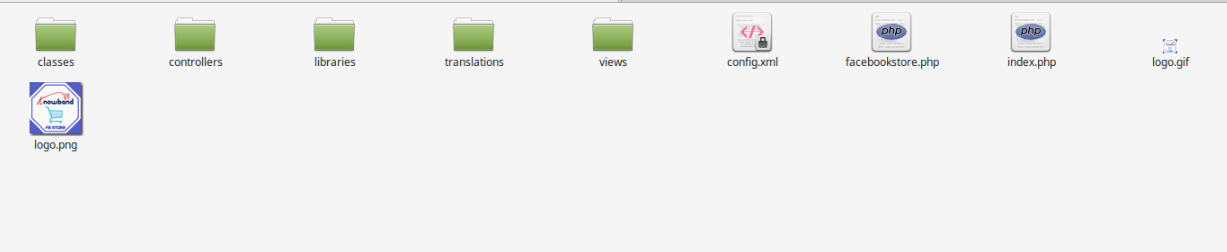
Step 1: Unzip the facebookstore.zip file. It would contain files and folders as shown below –
Step 2: Copy all the files and folders of unzipped folder into your store “modules” directory on the path – Root Directory/modules/.
Step 3: Now the Prestashop Facebook Store module is ready to be installed on your store and you can find that in Store Admin -> Modules and Services. It would shown as below –
In case, you are not able to find this Prestashop Facebook shop module in admin modules list, please try searching module with following details –
Keyword – Fb Store
Category – Front office
Filter By – Installed & Not Installed / Enabled & Disabled
Step 4: Click on “Install” button to install the Prestashop Facebook shop module. It would show a pop-up for your confirmation. Click on “Proceed with the installation” option. This step will install the Prestashop Facebook store module and show notification – “Module(s) installed successfully”.
3.0 System Setup of Prestashop Facebook Store Addon
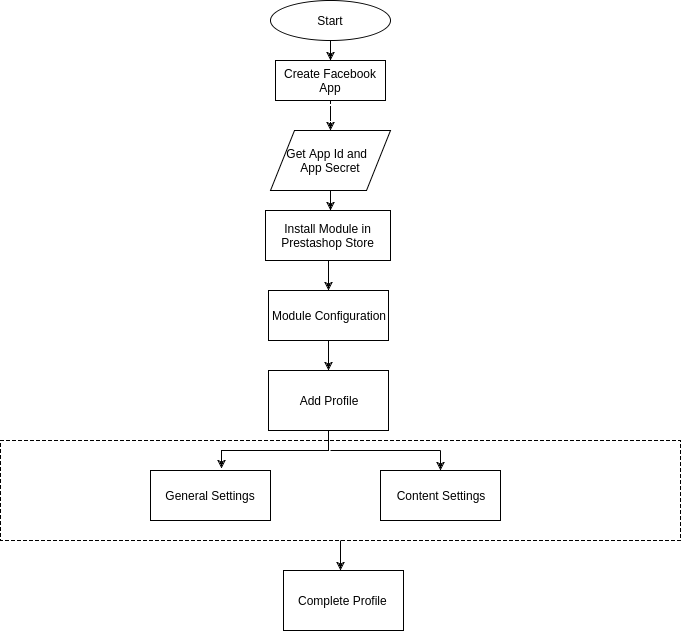
Before proceeding ahead, it is important to know that what is the correct flow of actions to setup this system as there are several things which are dependent of other things and if we do not take care of them then it would become difficult to process smoothly or may be error prone.
4.0 Facebook App Creation
Facebook App can be created by following below mentioned steps:-
Step 1: Go to given url :https://developers.facebook.com/apps/
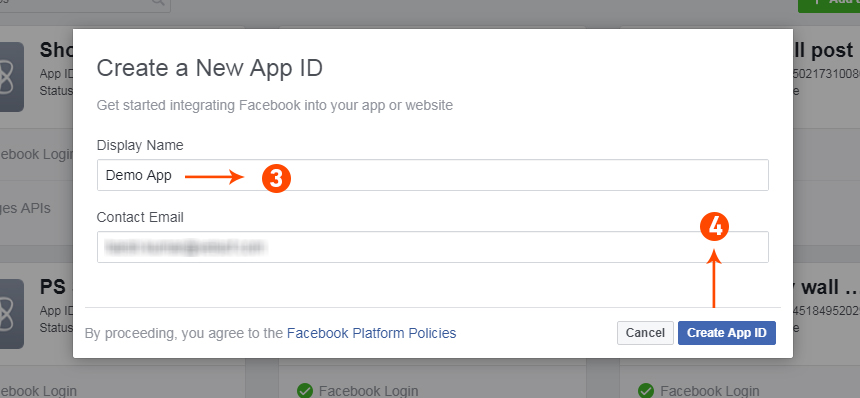
Step 2: Click on the “Add a New App”button.
Step 3&4: Enter your App name and email id, then click on “Create App ID” button.
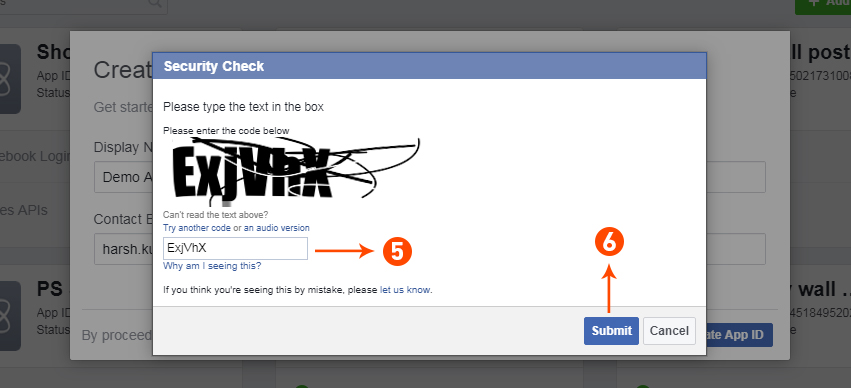
Step 5&6: After clicking on Create App ID you will have to go through a security check as shown:
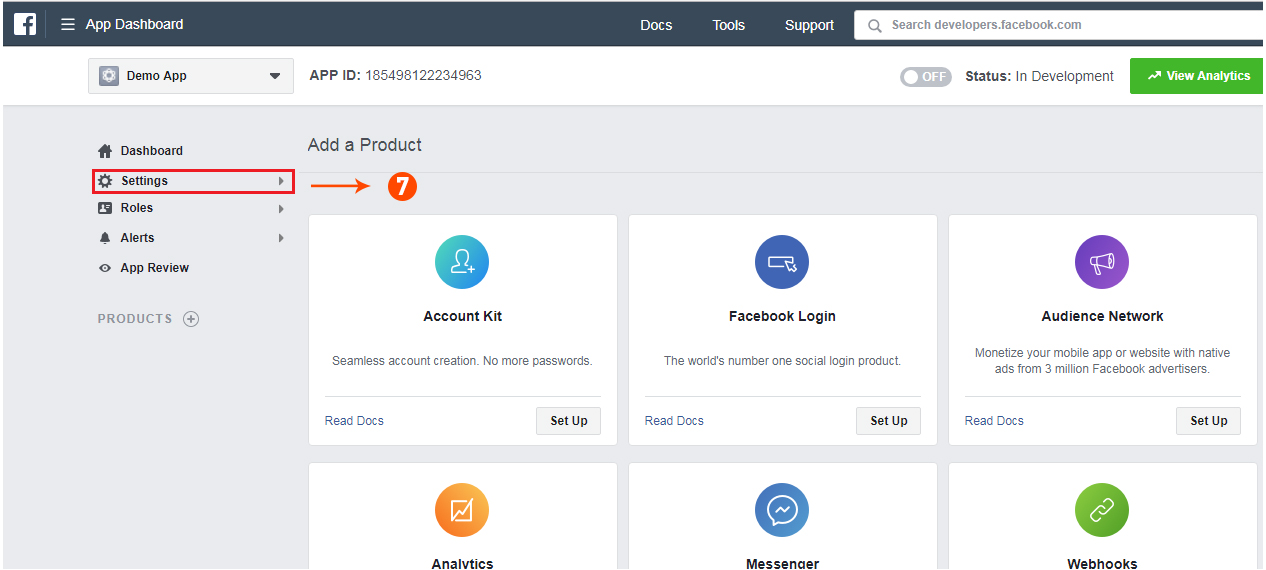
Step 7: Click on “Setting” tab of Prestashop Facebook Store Addon.
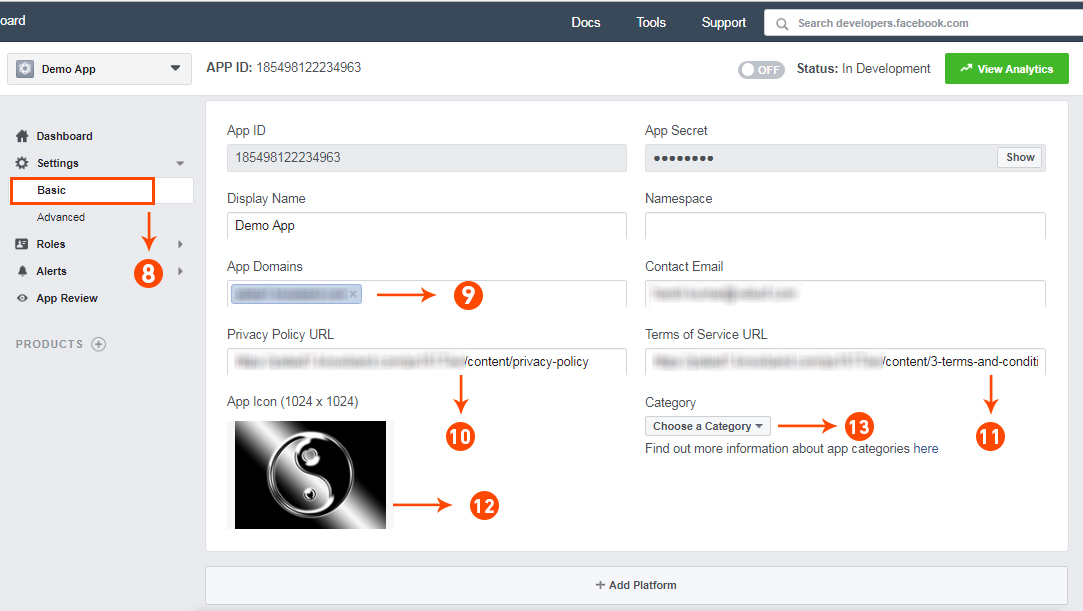
Step 8-13: Two option will be available in the dropdown, Basic and Advanced, click on “Basic”. And then enter your “App Domain”, “Contact Email”, ”Privacy URL”, ”Terms and Conditions URL”, ”Add Logo”, ”Select Category” and click on “Save Changes” button.
App Domains:
yourdomain.com is correct
yourdomain.com/store is incorrect
www.domain.com is incorrect
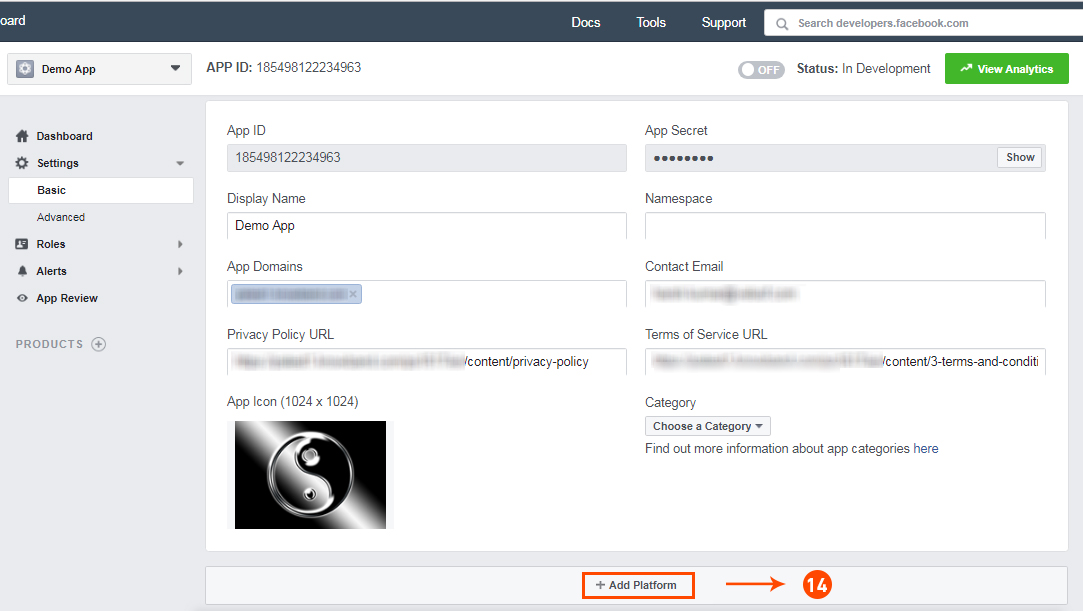
Step 14: Now click on “+Add Platform”.
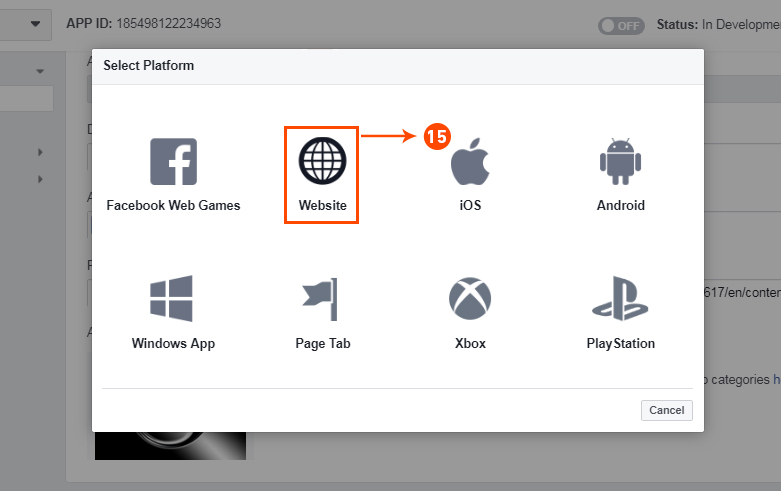
Step 15: And select Website as Platform
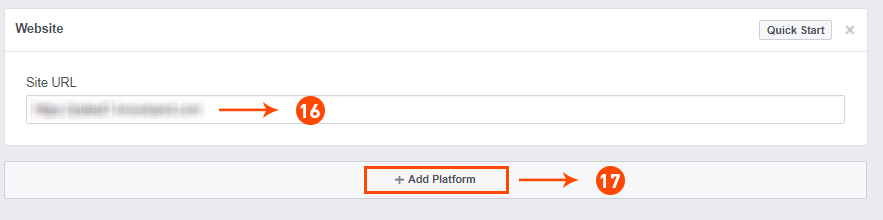
Step 16&17: Now Enter your site URL and Click on “+Add Platform”.
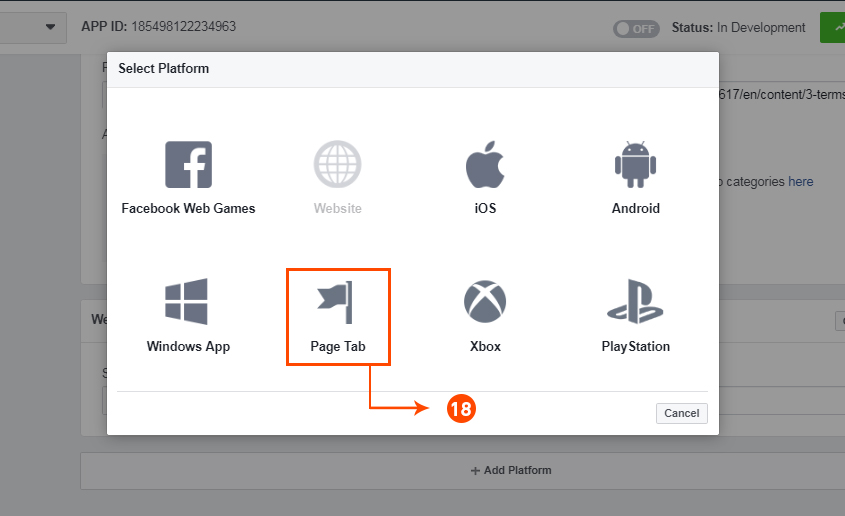
Step 18: This time select “Page Tab” as your platform.
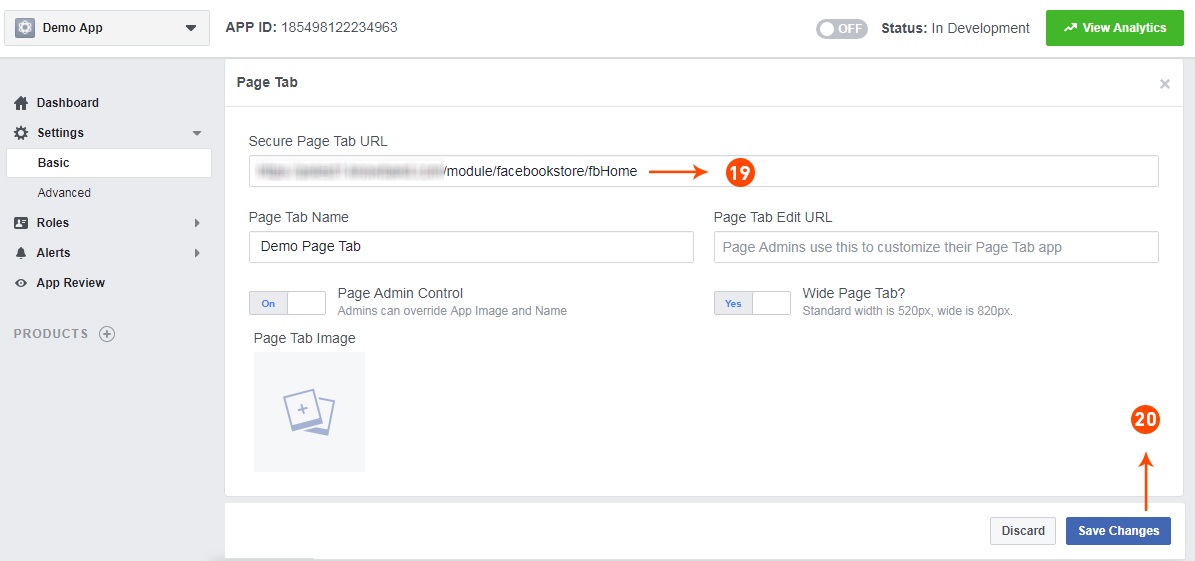
Step 19&20: Add Page tab URL and Save changes. If the changes are not saved, it means you have not configured the app properly. Check again the app domain, privacy policy, terms and condition URLs and website URL and try again.
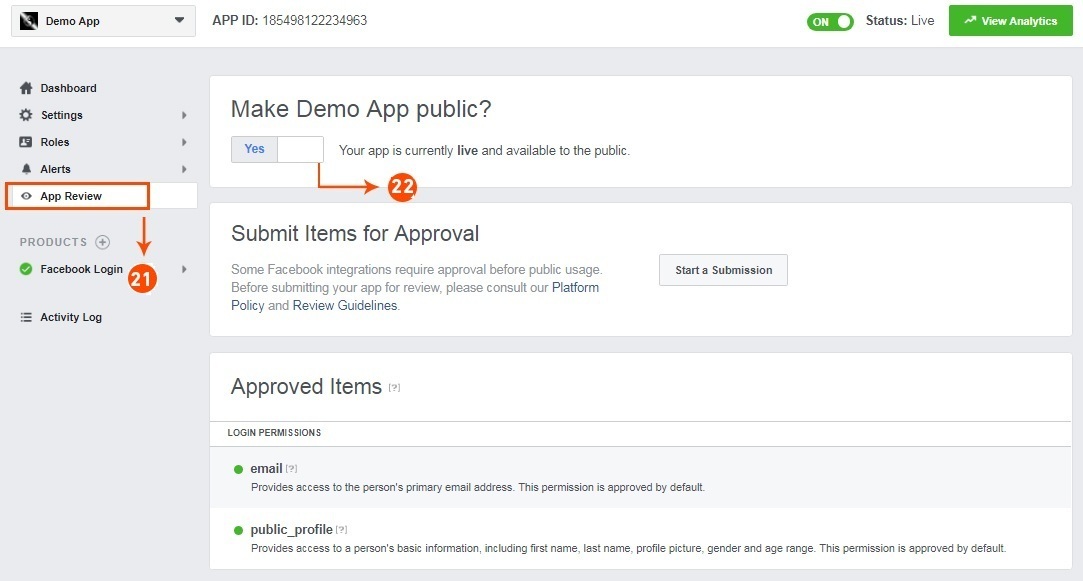
Step 21&22: Click on “App review”. And mark “Make ‘your app name’ Public” to Yes.
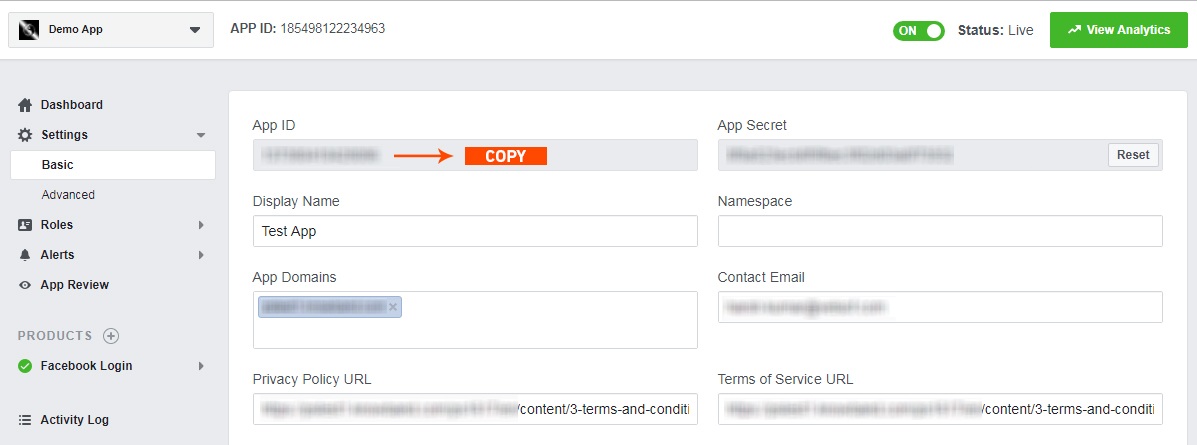
Step 23: Copy the App ID and paste it into the fields provided in the module.
5.0 Admin Interface of Prestashop Facebook Store Module
The admin interface of the facebook store integration with Prestashop is designed in such a way that a PrestaShop store owner can make the changes to his/her Facebook Store have the changes without wasting the time. Once the Prestashop module is setup completely, then the store owner can change the logo, banners and the layout of the shop.
Following are the steps which will help you setup your admin interface of the Facebook store plugin by Knowband:
5.1 How To Start configuration process of Prestashop Facebook Store Addon?
On clicking configure from Prestashop Facebook shop integration module listing page, the admin will be redirected to configuration page to save the “Facebook App Id” as shown below:-
Facebook App Id:- This field of the Prestashop Facebook Store Integration module is for Facebook App Id created for this Facebook shop module.
2. Next:- On Clicking this button, Facebook App ID will be saved in Db
5.2 How To Add Profile?
After successfully saving the App Id you will be redirected to the General settings page.
Add Profile Form has mainly two sections:-
General Settings
Content Settings
5.2.1 General Settings
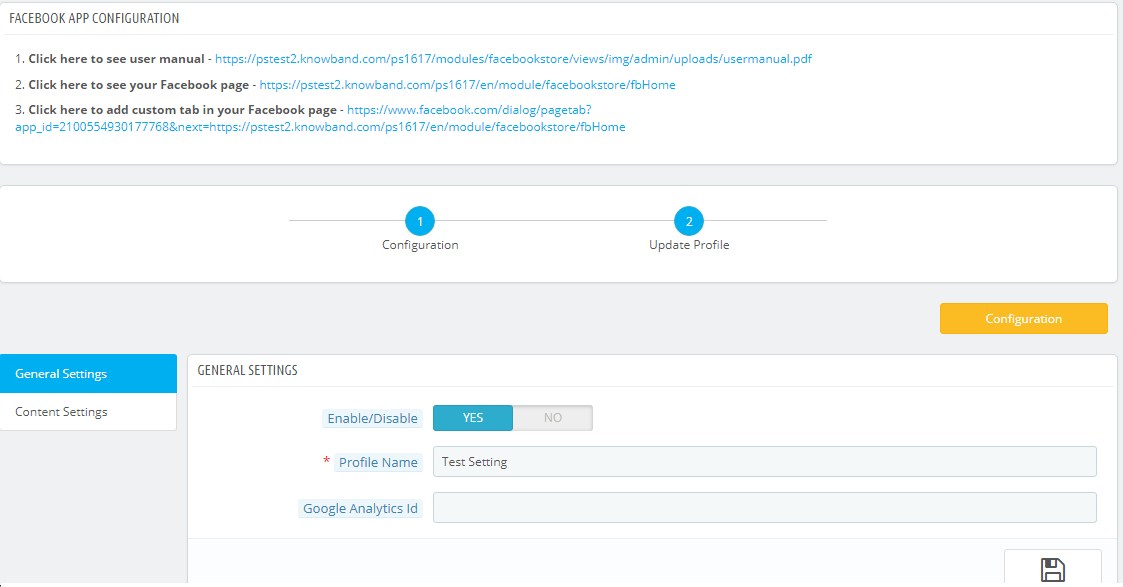
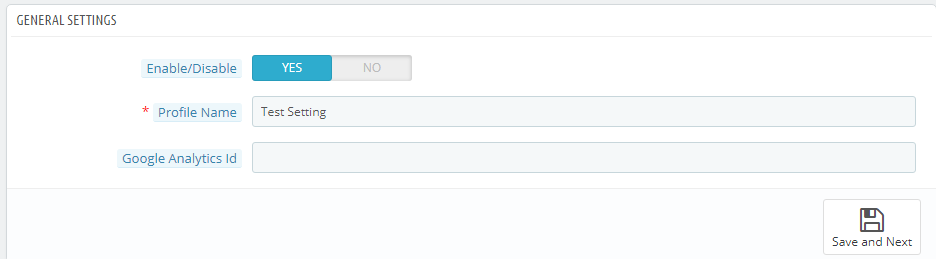
In general settings tab of Prestashop Facebook Store Addon, the Prestashop Admin has an option to add the profile name, option to enable and diable the Profile and Integration with the Google analytics using Google analytics ID.
Save and Next: Clicking on this button will save the settings and will create a profile.
Enable:- Facebook Tab content will be enabled or disables using this setting of the Prestashop Facebook Integration module.
Profile Name:- This field of the Prestashop Facebook Shop Addon is for the profile name for differentiating Profiles.
Google Analytics Id:- This field of Prestashop facebook shop integration module, the admin can enter Google analytics id to track the performance of the pages of Prestashop Facebook store.
5.2.2 Content Settings:–
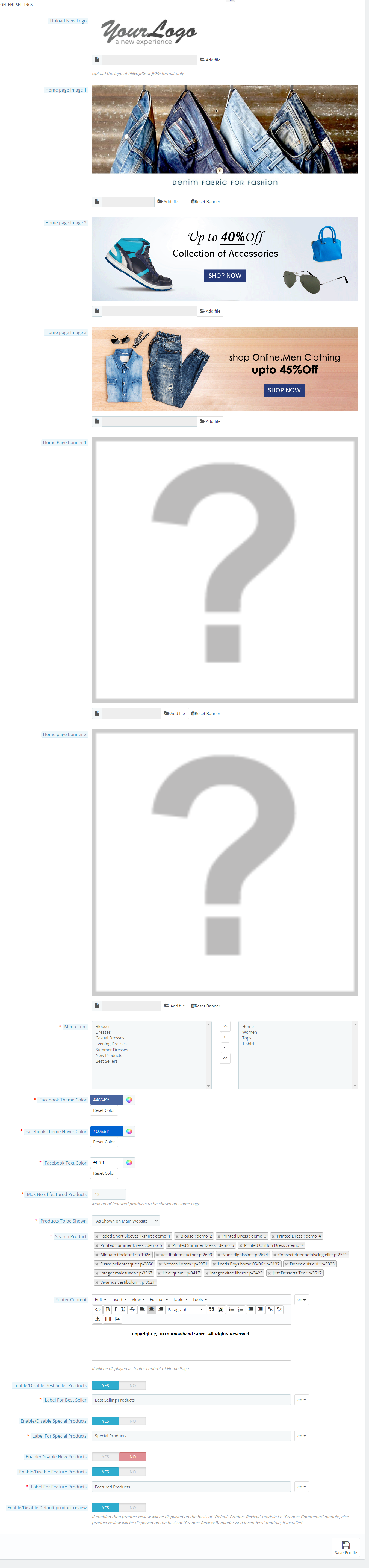
All home page content settings of the Prestashop Facebook integration module will be saved from here:-
Logo: System will pick the default logo from the PrestaShop. If user wants, he/she can upload new logo which will be displayed on Prestashop Facebook Shop Page.
Home Page Banner: In this field of Facebook store integration with Prestashop plugin, the admin can upload a banner image which will be displayed on the home page.
Home Page Content: In this field of Prestashop Facebook Store Setup module, added text will be displayed on Home Page of Prestashop Facebook shop tab.
Menu Items: Admin can select the menu items from Predefined list of the Prestashop Facebook shop integration module, which will be displayed on Facebook Shop tab. As of now keep the menu as single level which will be displayed on the Facebook Store tab.
Possible Menu Items which user can select.
Home Page
Categories
Best Sellers
New Products
Facebook Page Color: This option of Prestashop Facebook shop integration addon will be the color of all buttons and menu of Facebook Store Page.there will be option to reset to FB original color any time on clicking reset button. Default color will be :”#48649f”
Max No of featured Categories: Admin can select max number of featured categories to be shown on Home page under this field of Prestashop Facebook Store Integration module.
Featured Categories: In this field of Prestashop Facebook store module, the admin user can select the categories which will be displayed on the Home Page.
Product To be shown: In this field of Prestashop Facebook Store Integration module, system will ask the type of product to be shown on home page, i.e. From selected from below options or as shown on main website home page. It will be a dropdown.
Max No of featured Products: This field of Prestashop Facebook Store Setup module by Knowband allows the admin to select max number of featured products to be shown on Home page.
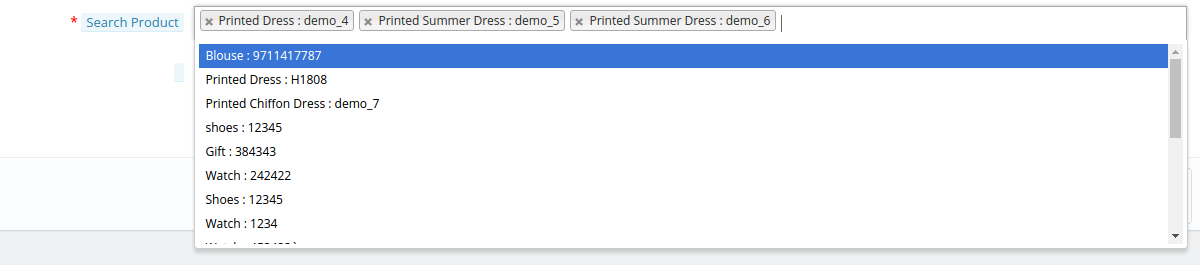
Featured Products On Home: In this field of Prestashop Facebook integration module, the admin user can select the products which will be displayed on the Home Page of the Facebook store.
Product Image Size: In this field of Prestashop Facebook Integration module by Knowband, the system will ask the size of image, i.e. small or big.
Footer Content: In this field of Facebook store integration with Prestashop module, the admin can add the content in the footer. Added text will be displayed on Home Page of Prestashop Facebook shop tab.
5.2.2 How to add a Custom tab in the FB page?
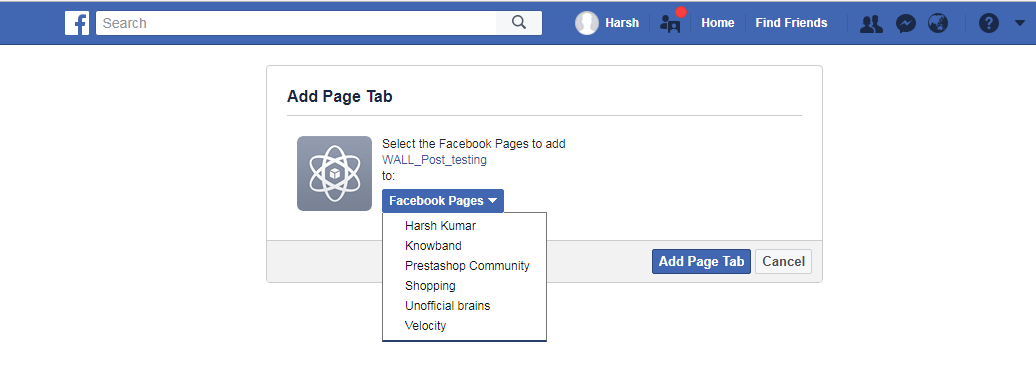
After saving the General settings and Content settings, you will have to add the Custom tab in the FB page. And to do this, click on the link to add the Custom tab as shown in the Screenshot below:
After clicking on this link you will be directed to page shown below:
You can select the page where you want to add the Custom tab. After selecting the page click on Add Page tab. After clicking on this button you will be directed to the page shown below:
This page will display how the Custom tab will look.
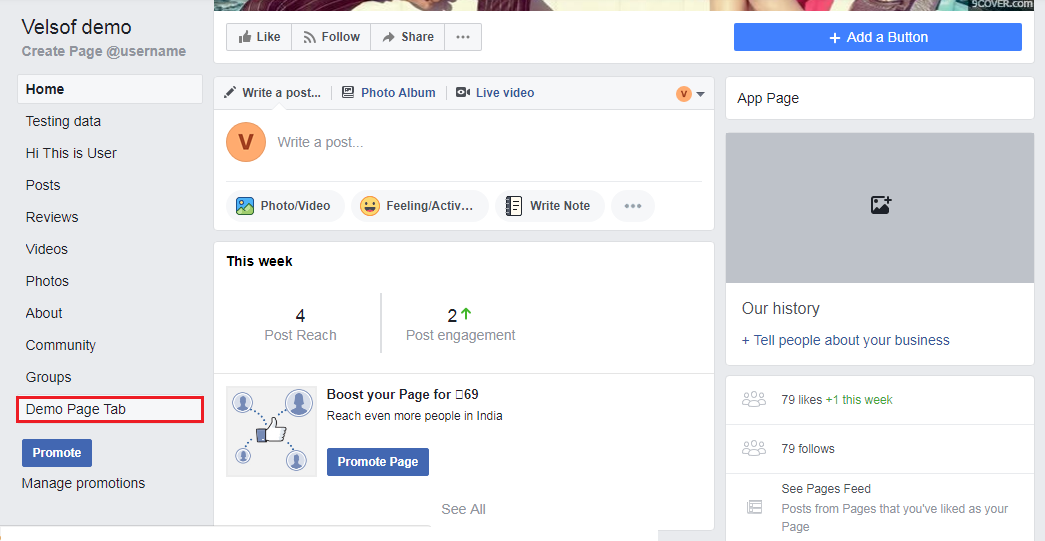
After this, you can go to the FB page where you have added the Custom Tab. You can see it will be added to the FB page as shown below:
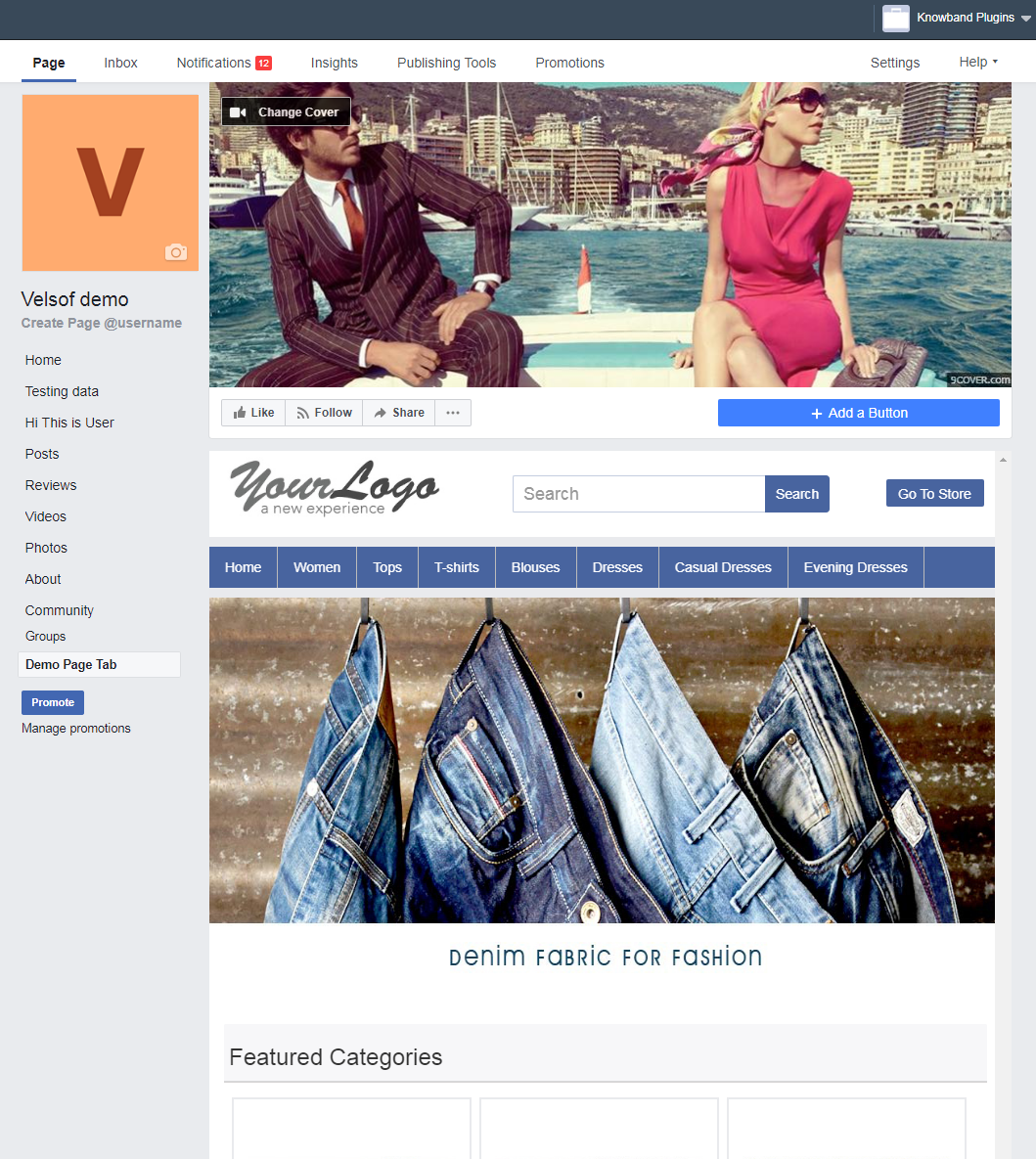
The Custom Tab will look as shown as below:
6.0 Facebook Tab UI
Clicking on the Added Tab from the Facebook page, Facebook Shop home page will be displayed.
6.1 Home Page
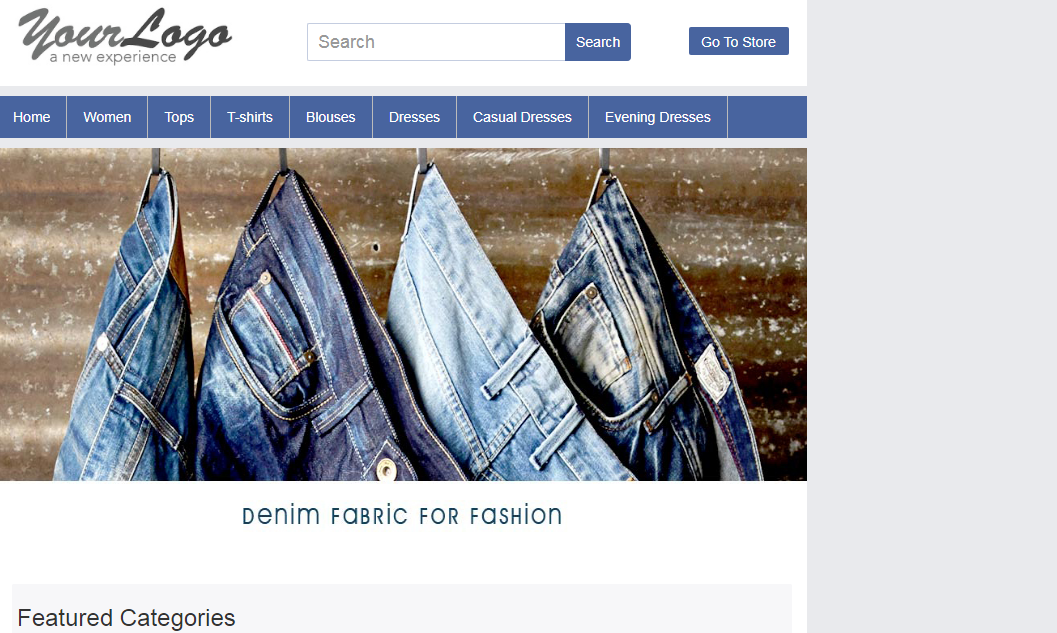
Home page will have the UI similar as mentioned below displaying the following:
Top bar
Header section
Menu bar
Text
Featured categories
Featured products, etc.
Top Bar: Top bar of the Prestashop facebook integration plugin will have Home link, Language Selection Dropdown & Currency Selection Dropdown if store is having multiple language or currency. Option to Go to Online will also be there (Go to Shop)
Header Section: Header section of the Prestashop Facebook store will have the logo, Search bar and Go to Store link.
Menu Bar: In thi field of Prestashop Facebook store module, based on the selection of Menu Items, Menu will be displayed. All the links needs to be opened in facebook iframe itself instead of redirecting user to Website.
Banner Image: In this field of Prestashop Facebook Store Setup addon, the admin can upload the banner image as well. If uploaded from Admin Panel, Home page of the Prestashop Facebook store will display the banner on Home page.
Text: If any text added in admin, Home page of the Prestashop Facebook store will display the text block otherwise it will be not be displayed.
Featured Categories: Featured categories section of the Prestashop Facebook Store Setup module will be displayed after “Text” section. Feature categories section will have category image, name of the category. Clicking on the same will redirect user to respective category page.
Featured Products: Featured Products will be shown as per profile settings.
6.2 Other Pages
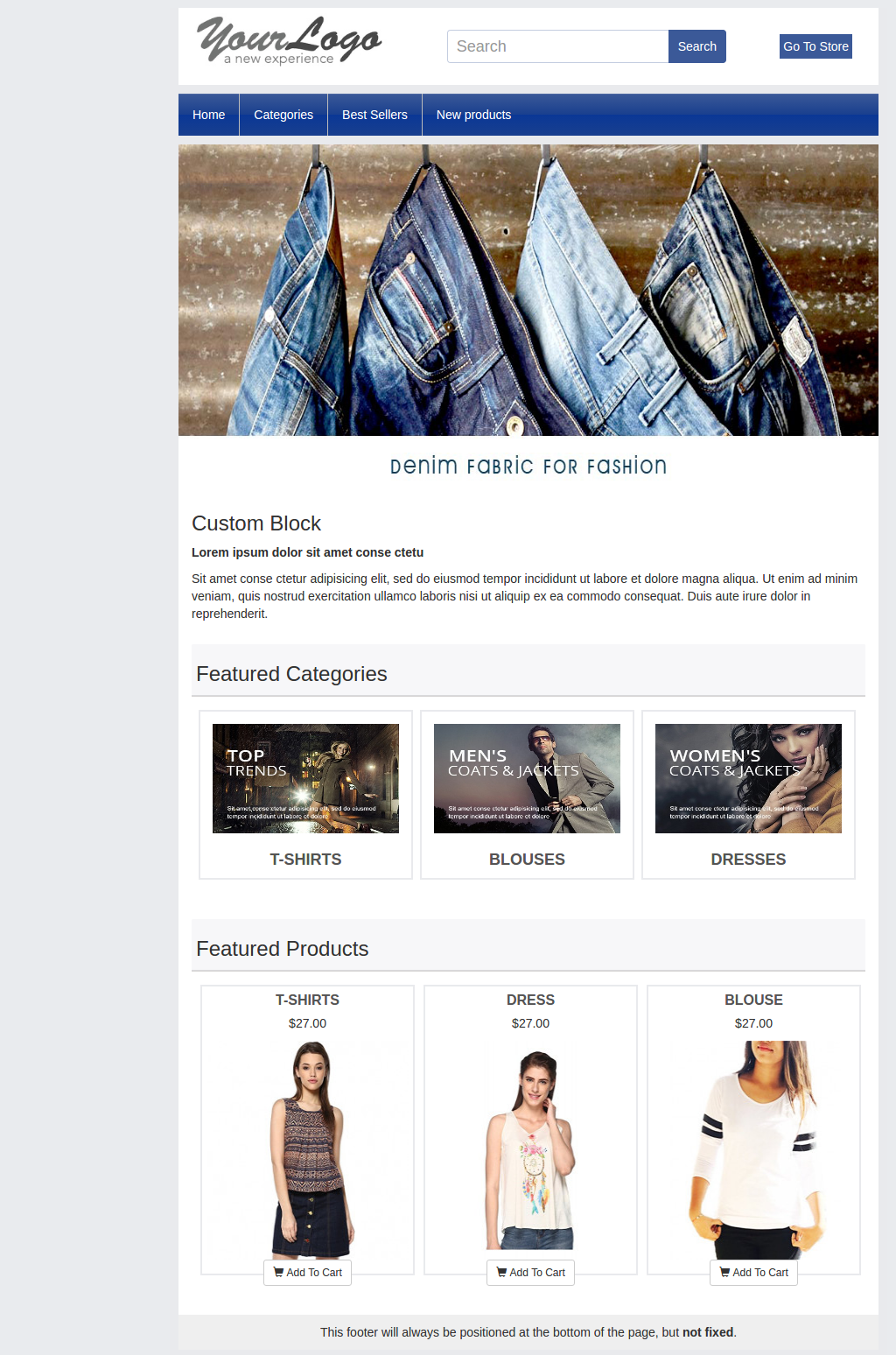
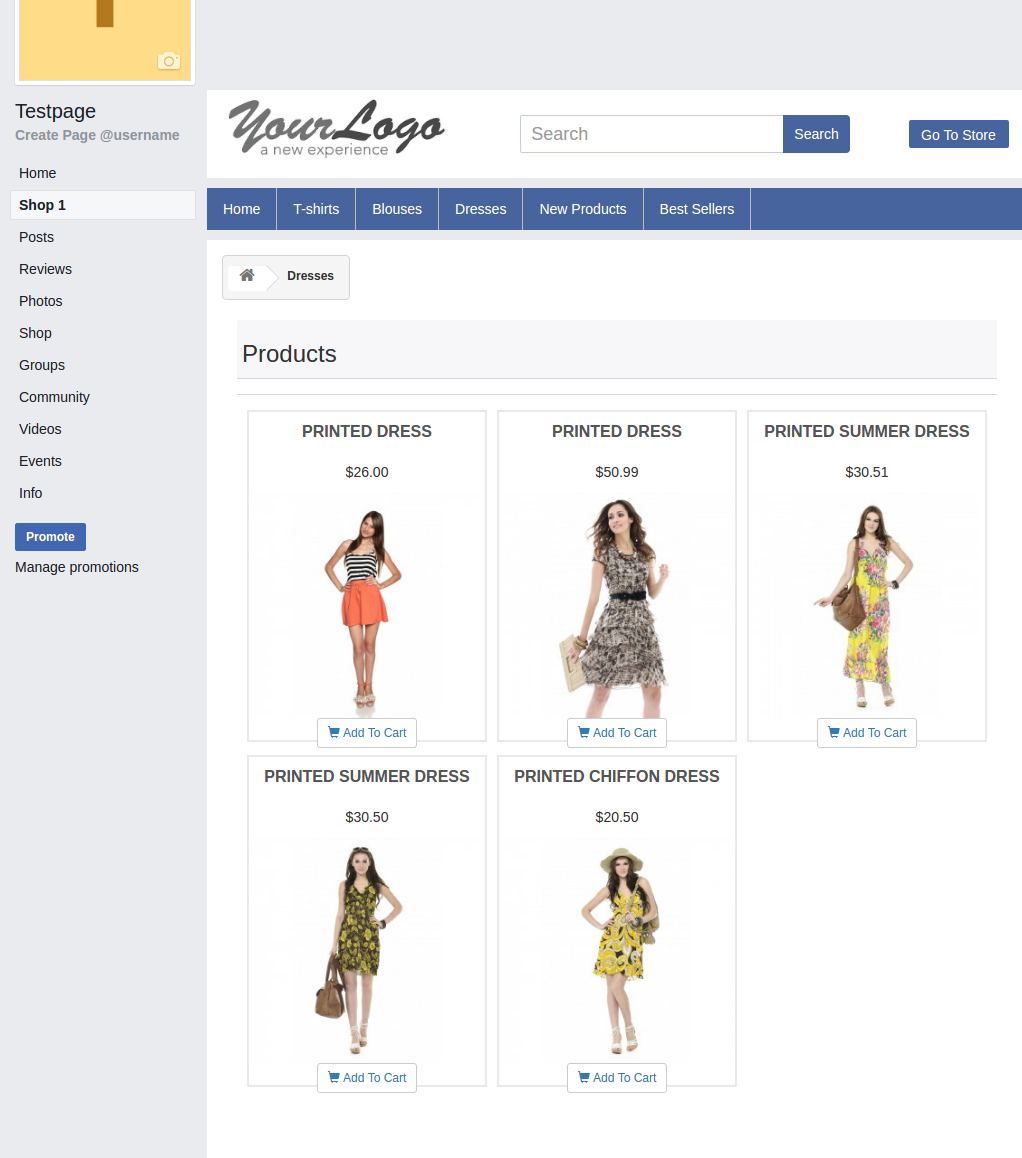
New Products page, Best sellers, category pages layout will be similar to below screen.
Now you are ready to have your Prestashop Facebook Shop giving your customers a way to connect with you with just one click. Clicking on the “Add to cart” option, the customer is redirected to your store to have a secure shopping experience.
Find below more details about this Prestashop Facebook Store Addon by Knowband: