At Knowband, we understand staying ahead of the competition requires constant innovation and improvement, and are committed to providing tools that help online stores thrive. Our latest updates to the Prestashop, Woocommerce, and Opencart Mobile App Builders are designed to enhance your store’s functionality and user experience. Here’s a look at the new features and how they can benefit your online business.
The Importance of Mobile Apps in E-Commerce:
In today’s digital age, mobile commerce is more important than ever. With the majority of consumers using mobile devices to shop online, having a robust mobile app is essential for any e-commerce business. Moreover, a mobile app not only provides a seamless shopping experience but also helps in building brand loyalty and increasing customer engagement.
Key Benefits of Mobile Apps:
Personalization: Apps can offer personalized shopping experiences based on user preferences and behavior. Furthermore, improved personalization leads to enhanced customer experience, leading to wider brand reach.
Push Notifications: The push notifications provided in Knowband’s Mobile App builder for Android and iOS directly communicate with your customers through push notifications, informing them about new products, offers, and more.
Faster Load Times: Apps generally load faster than mobile websites, providing a smoother experience.
Introducing Knowband’s Updated Mobile App Builders!
At Knowband, we specialize in creating powerful mobile app builders for Prestashop, Woocommerce, Magento2, and Opencart platforms. Our tools are designed to help you create a seamless mobile shopping experience, tailored to meet the unique needs of your business. We are excited to introduce the latest updates to our mobile app builders, which include several new features aimed at enhancing functionality and user experience.
Key Enhancements in the Updated Versions:
1.Dynamic Position of the Signup-Login Popup in Home Page Layout:
One of the standout features in our updated mobile app builders is the dynamic positioning of the signup-login popup on the home page. This feature allows store owners to customize the placement of the popup, making it more accessible and less intrusive for users.
Benefits:
Improved User Experience: By strategically placing the signup-login popup, you can ensure it catches the user’s attention without disrupting their browsing experience.
Increased Signups: A well-placed popup can lead to higher signup rates, as users are more likely to notice and act on it. Therefore, it is also going to help you grab more emails for your marketing campaigns.
Flexibility: You have the freedom to experiment with different positions to find what works best for your audience.
We have significantly enhanced the review pages to make them more interactive and user-friendly. The new features include dedicated sections for writing reviews, reading reviews, and displaying reviews on product pages.
Benefits:
User Engagement: Encouraging users to leave reviews and read others’ feedback can increase engagement on your site.
Credibility: Displaying reviews prominently on product pages helps build trust and credibility with potential customers.
SEO Advantages: User-generated content in the form of reviews can improve your store’s SEO, driving more organic traffic to your site.
3.Video in Banner Elements:
To make your promotional content more dynamic and engaging, we have added the option to include videos in various banner elements. You can now integrate videos into Banner Square, Banner Horizontal, Banner Grid, and Banner Countdown elements.
Benefits:
Enhanced Visual Appeal: Videos are more engaging than static images and can capture the attention of visitors more effectively.
Better Storytelling: Use videos to tell your brand’s story, showcase products, or highlight special promotions in a more compelling way.
Increased Conversions: Engaging videos can lead to higher conversion rates as they provide a richer, more informative user experience.
4.Improved Data Processing in Model Files:
We have overhauled the data processing mechanisms in our model files to avoid any data type-related issues. This technical enhancement ensures that your mobile app runs smoothly and efficiently.
Benefits:
Stability: Improved data processing reduces the likelihood of errors and crashes, leading to a more stable app experience.
Performance: With more efficient data handling, your app will perform better, providing a seamless experience for users.
Reliability: These backend improvements ensure that your app can handle large amounts of data without any issues, making it more reliable.
5.Push Notification and Firebase Key JSON Update:
In response to recent policy updates from Firebase, we have made changes to how push notifications are sent and how the Firebase key JSON file is uploaded. These updates ensure that your app remains compliant with the latest standards.
Benefits:
Compliance: Staying up-to-date with Firebase policies ensures that your app remains functional and compliant with industry standards.
Effective Notifications: Improved push notification handling means that your promotional messages and updates will reach users more reliably.
Ease of Use: The new admin configuration for uploading the Firebase key JSON file simplifies the process, making it easier for store owners to manage.
Why Choose Knowband’s Mobile App Builders?
Knowband’s mobile app builders stand out for their user-friendly interface, robust features, and exceptional customer support. Our tools are designed to help you create a seamless mobile shopping experience, tailored to meet the unique needs of your business.
Unique Selling Points:
Ease of Use: Our mobile app builders are easy to use, even for those without technical expertise.
Customizability: We offer a high degree of customization, allowing you to create an app that perfectly matches your brand’s identity.
Comprehensive Support: Our dedicated support team is always ready to assist you, ensuring that you get the most out of our products.
Knowband’s Mobile App Builders
Get the mobile app created for your store in a few hours with the Knowband Mobile App Builder Modules.
At Knowband, we are committed to helping you succeed in the competitive world of e-commerce. Our updated Prestashop, Woocommerce, Magento 2, and Opencart Mobile App Builders are packed with features designed to enhance user experience, drive engagement, and increase sales. We’re excited for you to experience these new updates and look forward to supporting your business growth.
Are you looking for a mobile app model for your pharmacy store? There are various phases, starting from an app design to its development, and creating a robust app becomes more hectic when you are not tech-savvy. Online shopping is making our life easier. With the advancement of technology, now we can also order medicines online and receive them at our doorstep.
KnowBand is presenting you a real-life example of a Dental Shopping App that can be an inspiration for making a successful pharmacy clinical app. This Dental medicine ordering app is live in India and has 5000+ installs.
Order Medicines in India with Dental Shopping Android Mobile App
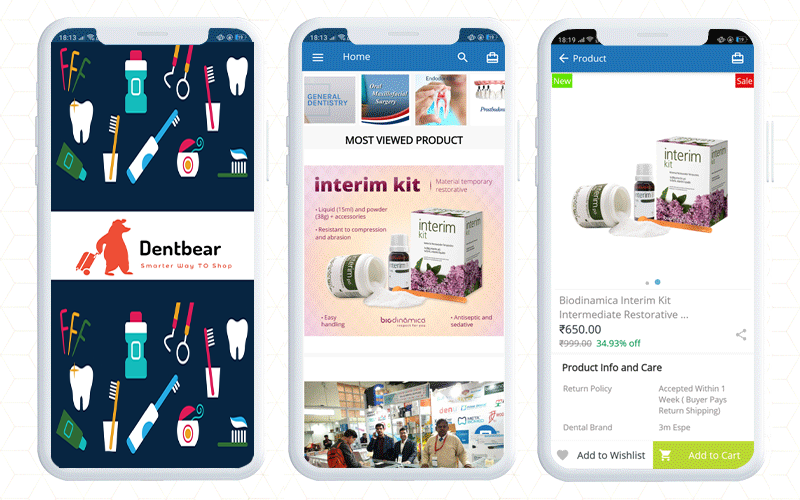
Dentbear.com is an Indian website for dental care products and medicines which is developed on Magento 2 platform. To make the Dentbear Mobile App for Android, they have used Magento 2 Mobile App Builder module, a tailored solution developed by KnowBand.
How does this Medicine Delivery App work?
Firstly, customers have to install the app from the Google Play store.
How to find the right product on Magento 2 Mobile App?
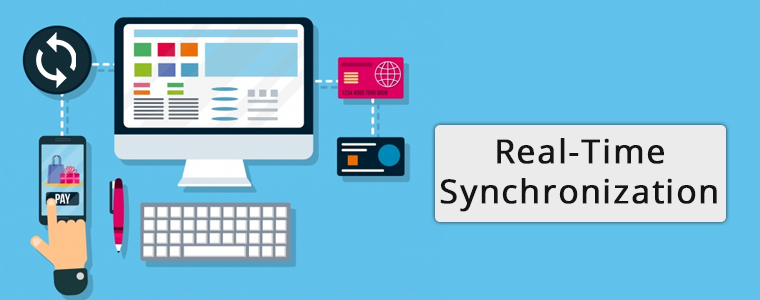
Once the customer opens the app, they will be landed on the home page. The Magento 2 app will be in real-time synchronization with the website.
The online dental store will show banners with current offers, new arrivals, best sellers, etc.
To place an order, search for the product you want to buy. For better search results, the app has voice search functionality.
Customers can sort and filter the products accordingly. The product page also displays the features and specifications of the product. Read product page best practices for mobile apps.
Now, customers can add the desired product to the cart or to the wishlist to make the purchase later.
How to complete the order on Dental Medicine Ordering App?
The App allows guest checkout or you can register at the dentbear store.
Signup or Continue as guest
If you are an existing customer then log in to place your medicine order
For login, customers get choices like login with email address and password, they can use social media accounts or log in with a fingerprint sensor.
Now add the shipping address and complete the payment process. Magento 2 mobile app builder supports all the payment and shipping methods.
What to do if you need customer support?
This application has a live chat support facility with which you can talk to the customer service team. It is a default feature of Magento 2 Mobile App builder. It allows the app merchant to connect with the customer via WhatsApp and Zopim live chat support.
DentBear delivers dental products all over the world.
Finally, getting a mobile app adds a lot of ease to your business. The mobile app builder, a delivery boy app, and an appointment booking system modules make your life easier than ever. On top of that, they simplify your local delivery services, management and deliver a satisfactory customer experience. With the help of these modules, you can start your online pharmacy delivery services right away.
Good luck with your new venture!
E-commerce development Support by KnowBand
Several modules can help you optimize your eCommerce store. If there is a functionality you want on your eCommerce website, any KnowBand extension will likely allow you to do so or if you don’t find any such plugin, you can always contact us at support@knowband.com for your custom plugin creation needs.
We have stepped into the 2021 Holiday Season and this is the best time to generate revenue for your eCommerce store with a native eCommerce mobile app(Android and iOS).
Mobile shopping apps are always known to provide a better shopping experience when compared to websites. That’s one of the prominent reasons to take your online business to mobile. Also, more and more people are now using their mobile devices to shop online, it becomes crucial for eCommerce businesses to have their own shopping app in the market.
Launch a pair of eCommerce mobile app today. First, let’s explore the readymade solutions to launch apps. KnowBand has been a leading eCommerce plugin and Mobile App provider for the past decade. Here are some of the prominent app solutions for your business:
Android & iOS Mobile App Builder
The native Android and iOS mobile apps will be published on Google Play and the Apple App store available for public download. The customers will be able to install the app directly from there and purchase products on the go. Mobile apps prove to be very useful especially during the sale & festive seasons. E-Commerce businesses can leverage huge profits by increased sales and revenue. All you need to do is to choose the right solution and launch eCommerce mobile apps. In addition, complete technical support will be provided from app creation to publishing on app stores. Check our modules from:
A complete coding-free tool is not the only perk of choosing Knowband’s App Builder. Here are some of the prominent features and benefits for both store admin and front-end mobile shoppers:
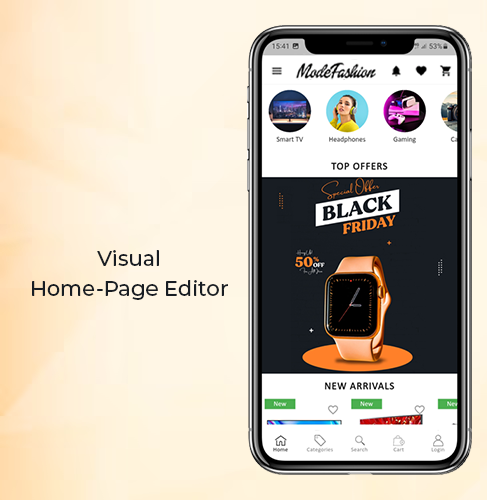
#1. DIY Home-Page Layout Editor
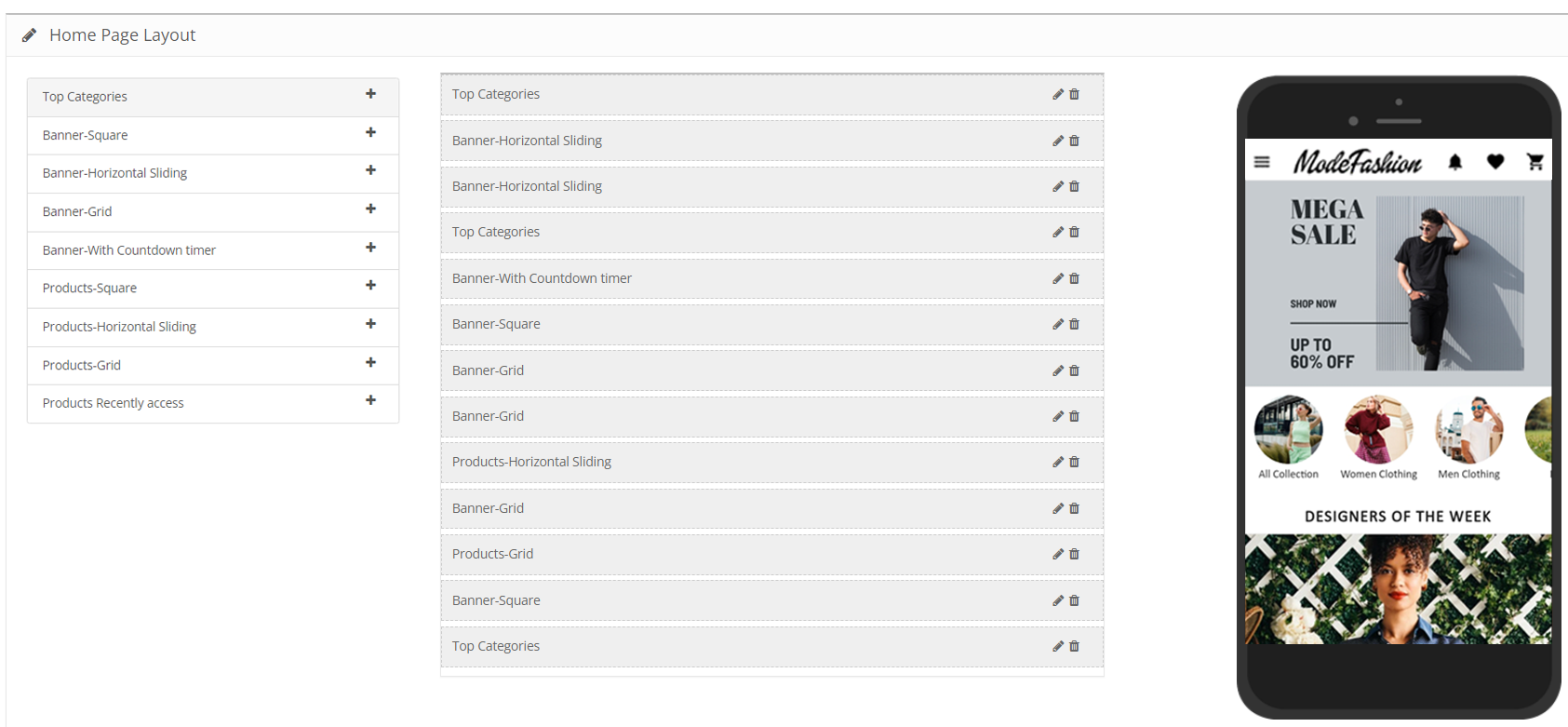
The admin panel of the eCommerce Mobile App Maker extension offers a fully customizable home page editor with various customizable elements (banners, sliders, products, countdown timer, category, etc.) The store admin gets a bunch of easy-to-use editing tools using which they can re-design the home-page layout.
The best thing about this is that the store admin can change the look and feel of the eCommerce Android and iOS app anytime even after the app is live on app stores. Use the right set of banners, images, colors, logos, etc., and launch your own branded apps for your business.
Note: Our Mobile Apps are also compatible with Spin win gamified email subscription pop-up. Offer an appealing pop-up on mobile apps and promote sales and deals with ease.
The apps built using eCommerce app builder support multiple international currencies and languages (including the RTL scripts like Arabic). This is very helpful for businesses that are willing to go global or local. Technically, all languages and currencies available on the website will be automatically supported on mobile apps.
Provide all currencies and languages popular in your business area or choose to go global. Sell products across borders like you’re actually taking your shop there. The shopping apps will be available on the Play Store and Apple App store for worldwide download and usage.
#3. Inbuilt Live Chat Support
The app users also get to easily connect with the chat support team via Whatsapp or Zopim (Zendesk) chat options. All you need to do is to enable the live chat option from the admin panel. The customers on the mobile app will be able to message you directly and get answers to your queries.
Having prompt support for mobile app users will definitely increase trust for your business and motivate users to shop more. To know the advantages of Live Chat for eCommerce, click here.
#4. Live Synchronization (Inventory and Payments)
All the data on the eCommerce website remains in real-time synchronization with its Mobile App. This also allows automatic inventory updates and management on the app. No need to do hours of work just to add products and categories in the app. The eCommerce Mobile App Builder will automatically fetch the categories and products on the apps without any manual work requirement.
Along with inventory, the payment methods on the website will also remain in sync with the apps. No need to go for any sort of extra charges to get reliable payments on the app. All website payment options will be automatically fetched on the app & function flawlessly.
#5. Unlimited Push Notifications:
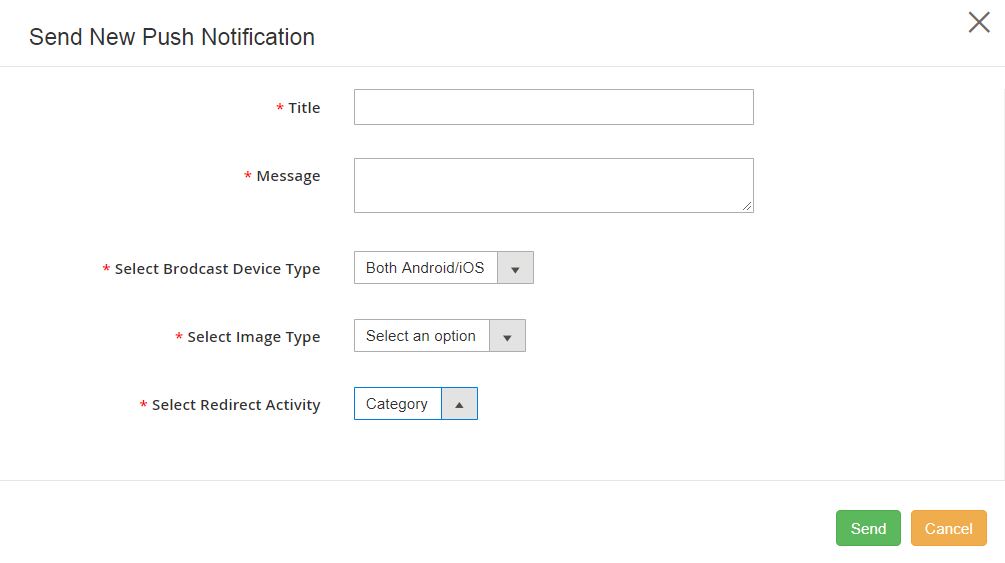
Push Notifications are very useful to re-engage app users in a personalized manner. From the admin panel of the module, store admin can send an unlimited number of Push notifications to their app users as per their needs. The template, link, image, etc. can be also be chosen for the push notification.
The push notifications can also be scheduled for automatic deployment or can be sent manually to Android and iOS app users. The condition is only that the app should’ve been installed on the device. The push notifications are unlimited and no charges or limitations to promote products, sales, deals, etc.
Conclusion
A lot more features are available on the eCommerce Mobile App Builders by KnowBand. Such apps are also compatible to easily become a Multivendor Marketplace because the app builder extensions are compatible with the marketplace extension.
So, why wait longer? If you are willing to launch an eCommerce Mobile Apps, give these extensions a try. Try out the demo apps and admin panel demo link to know more.
Check out the mobile app portfolio of client’s apps created using Knowband’s Mobile App Builder.
Remember that for this Holiday Season, the eCommerce App Maker Extensions (Android & iOS) by KnowBand are available at a discounted price. Feel free to drop us an email at support@knowband.com for any queries or assistance.
Some successful Mobile App Case Studies for your reference:
Online shopping has now become a major part of almost everyone’s life. Be it apparels, or electronics, or even groceries, more & more netizens are preferring to shop online now. One major reason for this preference is mobile applications. Mobile devices like smartphones & tablets have become a staple for almost every person worldwide. This factor makes it high time for eCommerce businesses to bring their store to a mobile app.
In this write-up, we will elaborate on a Grocery Shopping Native Mobile App that has been built using an eCommerce Mobile App Builder plugin developed by KnowBand. This plugin is meant to be installed on the eCommerce website. Using the data of that website, the app builder plugin automatically builds a shopping app & its APK & IPA files are published on the Google Play Store & Apple App Store.
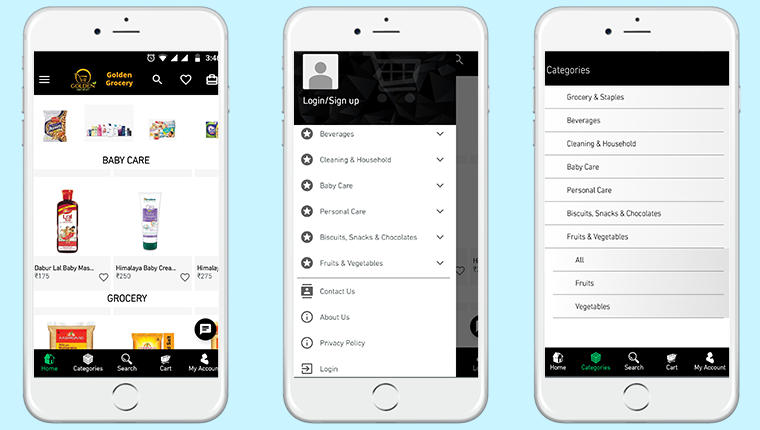
One of the grocery shopping apps built using KnowBand’s eCommerce Mobile App Builder is ‘Golden Grocery’. The ‘Golden Grocery’ mobile app is a feature-rich native application both on the frontend as well as the backend. Take a look at the user-end of the ‘Golden Grocery’ Native Mobile App.
These app screens are of ‘Golden Grocery’ Mobile App. The 3 screens above display the HomePage, Navigation Menu & the Category Page respectively. Using the eCommerce Mobile App Builder plugin, store owners get a customizable app. They can easily design their home-page of their app using various home-page editor tools provided on the backend of the eCommerce Mobile App Builder plugin.
Product Page:
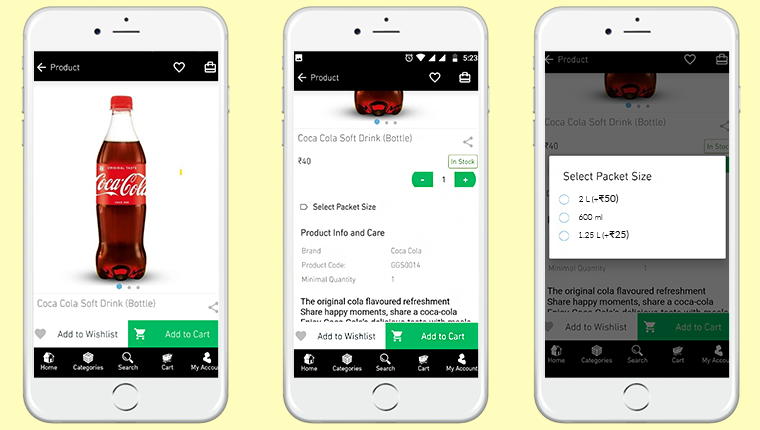
Shown above is the product screen of the ‘Golden Grocery’ Native Mobile App. It includes multiple product displays, page sharing icon (for multiple platforms), product quantity stepper, product specifications, description, wishlist button, ‘Add-to-Cart’ button & much more.
From the backend of the eCommerce Mobile App Builder, store admin can even select whether clicking the ‘Add-to-Cart’ button would send the app user directly to the cart page or whether it would keep the user on the same product page for break-free shopping.
We are grateful to have received great feedback about our eCommerce Mobile App Builder extension from our client (Golden Grocery). We are glad that they found our plugin easy to use & were able to launch their new app without any hassle & in the least time possible.
As a leading eCommerce solution provider, we, at KnowBand, will continue to provide the best tools & services to various eCommerce businesses around the world. Take a look at our range of Native eCommerce Mobile App Builder extensions:
Features Of The E-Commerce Mobile App Maker Extension:
#1. Multi-Lingual Support:
This feature makes your shopping app support various international languages. It is ideal for businesses that serve internationally or in a language other than English. RTL languages like Arabic, Persian are also supported.
#2. Support For Multiple Currencies & Payment Gateways:
This feature allows your app to support various international currencies & payment gateways. As the eCommerce Mobile App builder plugins by KnowBand are open-source solutions, even more currencies & payment gateway support can be added as per business requirements.
#3. Live Chat Support:
This equips your Shopping App with in-app Whatsapp/ Zopim Chat Support. It connects your app users to your chat support team.
#4. Push Notifications:
From the backend of the eCommerce Mobile App Builder, store admins can create, automate & send an unlimited number of Push Notifications to their app users. It’s highly useful for e-retailers as these notifications play a huge role in boosting customer retention & to reduce the cart abandonment rate.
#5. Simplified Logins:
For a smoother onboarding, visitors can be made to sign-in into your app via fingerprint authentication or via their social accounts i.e. Google, Facebook, etc.
#6. Live Synchronization:
Both the website & the app remain in-sync with each other because Mobile App, created using this shopping app maker plugin, uses the same database as that of its equivalent website. This also ensures automatic inventory management.
#7. Complete Technical Support:
With the paid version of this extension, you get a free 3 month support period. This support includes assistance in building, optimizing, & launching your eCommerce App. If required, your app can further be customized according to your needs- such as setting up returns & refunds, etc.
#8. Simplified Backend:
Store admins can instantly make changes in their app by editing/ re-configuring the App Builder plugin from their website backend. This helps a lot with instantly customizing the app’s home page, or to create/ automate/ send push notifications, customize the tab-bar, etc. All these re-edits take just a minute to make & they instantly show up on the mobile app as well..
Conclusion:
Apart from all the features mentioned above, a lot more features are provided by default. Some of them are- one-page checkout, Offline accessibility, pre-saved addresses, social sharing options for multiple platforms, compatibility with ‘Spin & Win’ plugin, compatibility with Image Search Plugin, etc.
Hence, if you own a Grocery store on PrestaShop, OpenCart, Magento, or WooCommerce, drop us an email at support@knowband.com to discuss more.
Mobile apps are of great importance especially for online businesses (eCommerce) that are willing to launch their new mobile application. Having the right eCommerce mobile apps with all the right set of features & functionalities is something that every such business wishes to have. Although in some scenarios, some businesses may not feel satisfied with their mobile application & may want to modify it or they may even wish to get their money refunded.
Well, that’s what this write-up is about. On all of our eCommerce Mobile App Builder extensions, we are offering a 30-day Money-back Guarantee. The extension is available for following eCommerce platforms:
Based on the feedback from a few of our clients, we realized that some clients may need some time to figure out if the app builder extension is right for their needs. We have various guides in the form of articles, video tutorials, admin demo links & free version of our eCommerce Mobile App Builder extensions. Despite that, some unawareness may still persist which may lead to dissatisfaction with the app builder. This 30-day money-back guarantee will be favorable to them.
For some clients with a different or unique business model, the generalized layout of our e-commerce app builder extensions may not be suitable or it may not be suitable for them to get their general layout app modified to turn it into a mobile app suitable for their needs. This 30-day money-back guarantee can also help to a huge extent.
Note: With this offer, we will create and send APK to you for review. Money-back is only valid if you are not satisfied and don’t publish it on Google Play Store. If the app is published, we won’t offer you a refund.
We have been regularly updating & upgrading our eCommerce Mobile App Builder extensions to equip it with the latest technologies & features. Both on the frontend as well as the backend, we intensively test our extensions to avoid any bugs or glitches so that we serve the best to our clients. This has left us with positive reviews & feedback from the majority of our clients.
It’s not just us but our clients who have labeled our eCommerce mobile app builder extensions as one of the most efficient & cost-effective app builder solutions for eCommerce domains. We are proudly confident in all of our eCommerce Mobile App Builder extensions & introducing a money-back guarantee proves it even more.
[Great Deal] Top Features You Will Get In Shopping Apps:
The shopping apps for websites built on PrestaShop, OpenCart, Magento 2 & WooCommerce comes with all basic and necessary eCommerce features and functionalities. Here are listed some of the major ones to thrive your business with no hindrance:
#1. Unlimited Push Notifications:
For any sort of eCommerce mobile apps, push notifications are kind of a must. Their dominance over traditional email marketing approaches and growing sales figures are solid reasons for how mobile push notifications are worthy of every business.
In shopping apps as well, push notifications to play a huge role in boosting customer engagement, retention & sales. This feature is something that you will get in our eCommerce app & many of these notifications can also be configured to be scheduled or automated. Some examples of those are abandoned cart notifications, order status notifications, etc.
KnowBand’s Mobile App Builder even offers custom notification in the admin panel which can be sent to the users and motivate them for more sales. All running deals and offers can be promoted via mobile push notifications.
To expand the audience reach, more & more online shopping businesses are including support for multiple languages & currencies. To cater to such businesses & to make app launching more convenient for them, most shopping apps nowadays support these features.
It wasn’t facile to take your business to cross borders and sell products like your store was there only. Our Mobile Apps helps in achieving the same. The native eCommerce Apps come with all languages support including RTL ones like Arabic, Hebrew, Urdu, Persian, etc. Hence, whatever languages on your eCommerce store, same will be on the mobile apps as well.
It’s a must-have feature for any sort of app including shopping apps. With this feature, both the mobile as well as the website always remains in live synchronization with each other. This way store admins don’t have to manage their mobile app separately.
Often, eCommerce store owners complain of problems managing their huge inventory on both websites and apps. To reduce the manual efforts, we have offered 100% synchronization in our apps allowing automatic realtime updates in the app inventory whenever any new additions or changes done on the store.
No eCommerce business wants its customers to get frustrated due to lengthy checkout processes. To aid that the ‘One-Page Checkout’ feature is common in almost every online shopping app these days.
The users get a simplified checkout experience with easy order submission with quick review of details related to purchase.
Live-Chat options are the frontline of customer support for every online shopping application. In the eCommerce Mobile App Builder extensions, Whatsapp & Zopim Chat Support is provided by default. These are two very popular platforms. Especially, Whatsapp is something every netizen uses these days.
All of the features mentioned above and even more are available in our E-Commerce Mobile App Builder extensions for platforms like PrestaShop, OpenCart, Magento & WooCommerce. We aim to put the best & the latest in our extensions & will continue to do so to cater to our clients in a better way.
We hope you find our eCommerce Mobile App extensions even more helpful & convenient. As always, you can reach out to us at support@knowband.com for any of your queries or assistance.
Whenever an eCommerce business decides to build a mobile application for themselves, the first few things that come to their consideration is app designing, development & deployment. To make a feature-rich & customer-centric Magento mobile app, all these factors must be expertly handled.
This can make the app-building project quite expensive, especially for eCommerce businesses. Fortunately, businesses with their website built on Magento don’t have to worry about any of these. All of the steps i.e. development, design & deployment is collectively offered by a Magento Native App Builder extension developed by KnowBand.
This extension is a non-coding solution that can automatically create your own Magento Mobile App (APK/IPA files) using your own Magento website. It is very affordable for store owners as it costs only $169. Apart from that, store owners are also offered a free 3-month support period.
Using an app builder extension for building & launching an app is the latest trend. This Magento Mobile App Maker plugin is a secure & reliable approach that provides you with great user-end as well as backend features. Building a native Magento mobile app using such an app builder extension is easy for even a non-tech savvy person. Mentioned below are its 3 simple steps.
Quick Steps To Build & Launch A Magento Mobile App:
Step 1: Purchase the Magento Mobile App Maker extension from the KnowBand.
Step 2: Install the downloaded extension & install it on your Magento website. Then, simply fill the app pre-requisite form provided by KnowBand.
Step 3: Review your app & get it published on Google Play Store/Apple App Store.
If you want to test out this extension before purchasing, you can download its free version from the KnowBand Store & use it to design your demo app.
Highlighted Features Of Magento Mobile App Builder:
1. Unlimited Push Notifications:
Store owners are provided with an unlimited number of push notifications. They don’t need to worry about any such limitations. Some of these notifications can even be automated & scheduled such as the abandoned cart message, order status messages.
2. Home-Page Customization:
The complete home-page can be edited live using the visual home-page editor in the backend settings. Store owners can add interactive banners, sliders, countdown timer sale banners, etc all with just a few simple clicks & drag-&-drops.
3. Fully Customizable App:
This Magento app maker extension builds apps that are fully customizable. All of the customizations can be made easily from the backend of this extension. All of the at-a-glance features listed below are totally customizable. Store owners & admins can also take any sort of assistance from the experts at KnowBand. The possibilities with this extension are endless.
4. Deep Linking:
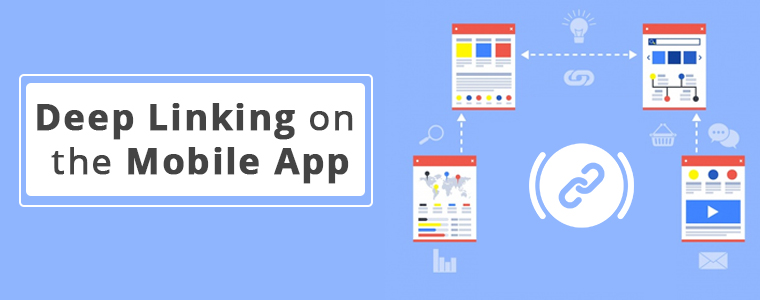
Deep linking is the latest feature addition with this app builder plugin. It effortlessly brings your mobile site visitors to the equivalent page on your Magento mobile app. For such a case, your app must be already available on users’ devices. This helps to boost the user retention rate of your app.
5. Multi-lingual & Multi-Currency Support:
With this extension, your native Magento Mobile App would by default support multiple languages (including RTL scripts and languages) & currencies.
6. WhatsApp & Zopim Chat Support:
Two of the popular chat support platforms are integrated with your app using this extension. These are WhatsApp & Zopim Chat Support. Its sticky icons are present on the lower end Magento App. You can even enable/disable them from the backend if required.
7. Social Sharing & Social/Fingerprint Login:
Login & sharing is made easier for your app users. They can log in to your app using their Facebook/ Google accounts. Also, multiple social sharing options are also integrated with the app by default. App users can share any product on whichever platform they want. OTP(Phone Number) and Fingerprint login will be available in mobile apps.
8. Shipment & Payments:
All of the payment & shipping methods active on your Magento website are by default supported & active on the mobile app as well. Admins can even deselect a few particular options on the app if they wish.
9. Real-Time Synchronization:
Because this extension derives a native mobile app right from your Magento website, all the data on both your app & site are in real-time synchronization with each other. This also keeps the catalog management automatic.
Conclusion:
The popularity of mobile apps has been growing among netizens. Almost every eCommerce business is taking a step towards having a mobile app with all the latest features. With smart & affordable solutions such as this Magento Mobile App Builder, it only a matter of a couple of days to get the Magento app up & running.
Feel free to check out its demo version & its feature-list as it is packed with a lot more than the ones described in this write-up. For any queries or consultation, email us at support@knowband.com. We would be more than delighted to assist you.
As the technologies keep evolving, it has become quite essential to keep up with the trends. For businesses, it gets really important to keep their website, mobile app, etc. up to date. eCommerce business owners are aware of this & are making all the efforts to have all the latest functionalities on their sites & mobile apps.
To help such business out, mobile app builder extensions from KnowBand underwent updation. The new version of Magento 2 Mobile App Builder is out. Despite already being a full-fledged tool, this app maker plugin has now even more to offer.
Recent Additions In Magento 2 Mobile App Builder (v1.0.6):
1. Visual Home-Page Editor With Live Preview:
This recent update allows the admins to edit the home-page design while all those changes are visually previewed on the backend itself. This way, they can get a live view of the changes they make on their home-page layout. Once the admin is satisfied with the preview, he/she can save the design. After saving, the new design would instantly reflect on users’ devices.
Add multiple banners, sliders, & even countdown-timer with just a few clicks & swipes. Rearrange the home-page components to suit your theme. Add call-to-action & relevant redirects on the desired components of your homepage. Admins can also pre-design multiple layouts & enable any one of them at a time.
2. Deep Linking:
Deep Linking is a great way to retain app users without any effort. All those who have your Magento Shopping app installed will automatically get redirected to the relevant page on the app if they end up visiting any page on your mobile site. This ensures more personalization to the app users & better user experience. Such factors naturally improve the engagement on the app.
Other Features of the Magento Mobile App Builder:
1. Push Notifications:
With this app maker extension, store owners can create & send an unlimited number of Push Notifications to their app users. There are even 3 automated templates provided for ‘successful order’ notification, ‘order tracking’, and ‘abandoned cart’ notifications. Admins can even set the timer after which the abandoned cart message would be sent to particular app users.
2. Multi-lingual & Multi-Currency Support:
This app maker add-on equips the Magento app to support multiple languages and currencies. App users can choose the ones according to their preferences.
3. Fully Customization White Label App:
The Magento 2 mobile apps built using this plugin are totally customizable. Most of the customizations can be made by the admins from the backend of this module. They do not need to perform any coding or spend hours on any task because of the simplified backend. Any other unique customizations can even be programmed into it if the need arises.
4. Tablet & Smartphone Compatible:
These Magento 2 Mobile Apps will be compatible to run on both smartphones and tablets on both Android & iOS operating systems. Store owners can even opt for an app for just a single operating system.
5. Live Synchronized:
This feature keeps both your Magento website and the eCommerce mobile app always in real-time sync with each other. This also keeps the catalog management automatic for your app.
6. Quick Onboarding Options:
App users can log in/ signup using their Facebook or Google accounts. They can also login using fingerprint authentication.
7. Multiple Chat Support Options:
By default, Whatsapp & Zopim chat support is provided with this add-on. Admin can enable/ disable any or both of them whenever they wish.
8. Enhanced Navigation:
The navigation menu & the filter & sort provide the app users with very user-friendly navigation. The category and subcategory arrangement is automatically set in a proper manner. Admins can even add a few CMS pages on the menu of their Magento 2 Mobile App. They can select those CMS pages from their website.
9. Multiple Social Sharing Options:
This allows the app users to share a product page directly to their social media platforms. App users can choose from a large number of platforms to share with just a single click.
10. Simplified Checkout:
This Magento 2 Mobile App maker extension offers one-page checkout to make it easier for app users to place orders without a hassle. The address is pre-filled out of all the addresses stored on the users’ my-account page. The app users can even track their active orders directly from the eCommerce app.
Conclusion:
This Magento 2 Mobile App Builder, developed by KnowBand, is an ultimate tool to build a Magento app for your business from your own Magento website.
Now that mobile apps are getting a lot more preference by the netizens, it is now a necessity for eCommerce businesses to have a synchronized mobile app. With an extension like this one, eCommerce businesses have a great advantage & opportunity to excel.
Migrated your eCommerce store to the updated version Magento 2.0? Well, let’s build a pair of native Mobile Apps for the same.
Having a Magento 2 Mobile App for your eCommerce website is much more than just a sales & marketing tool as it enhances your revenue & loyalty in just minimal efforts. But, building a native Magento 2 Mobile App is a lot tougher than it seems as you have to indulge in all sorts of coding languages & expensive tools/software. This article actually covers two basic questions regarding your Magento 2 Mobile APP:
Ques 1: Why you should start selling on App along with Magento 2 website? Ques 2: How can you get a powerhouse app for your Magento store?
Well, stick to the end of this article & hopefully you will get all your answers.
Magento 2 Mobile Apps: An Introduction
The Magento eCommerce platform has almost all varieties of multi-sized businesses from small-scale industries to start ups. And that too seems to be growing since the Magento has launched its updated version with issues fixed & updated features. Since this is a new platform & the majority of store owners are still deciding to move to the mobile platform, you can take a lead by transforming your website into native Magento 2 Android & iOS app.
As far as profits are concerned, having a Magento 2 Native App will definitely lure heavy mobile user base to your store which will ultimately boost user engagement & sales. Offering your users an amazing shopping app is also the reason behind more sales & revenue. So, getting a featured Magento 2 Mobile App is the next big thing you could do for your store after migration.
Magento 2 Mobile Apps: Development (3-steps Only)
We have made Magento 2 Mobile Apps development process as simple as it could for you. All you need to do is to follow these 3 simple steps:
Step 1: Purchase Magento 2 Mobile App Builder module & install the same on your store. Step 2: Share your app specifications/requirements with our pre-requisites form. Step 3: Get developed APK/IPA files & publish on respective App Stores.
If you face any issue, we will assist you in publishing your app.
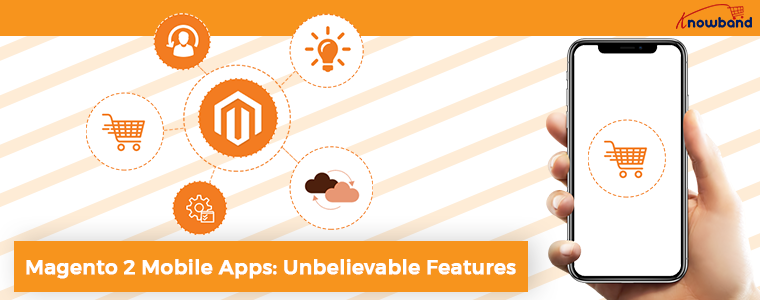
Magento 2 Mobile Apps: Unbelievable Features
Your Magento 2 Mobile Apps would have numerous features & functionalities that definitely be a game-changer for your business. Let’s take a look at the major ones of them:
1. User-friendly Interface: The Magento 2 Mobile Apps come up with simple yet friendly interface which makes mobile app shopping fun for the users. Various intuitive font options are also there in the app.
2. Customizable Home Screen: The way you offer your app look & feel decides the no. of purchases you are gonna get. The Magento 2 Mobile App Creator offers a fully flexible home screen with all sorts of customization. The store merchant gets various attributes to craft the home screen:
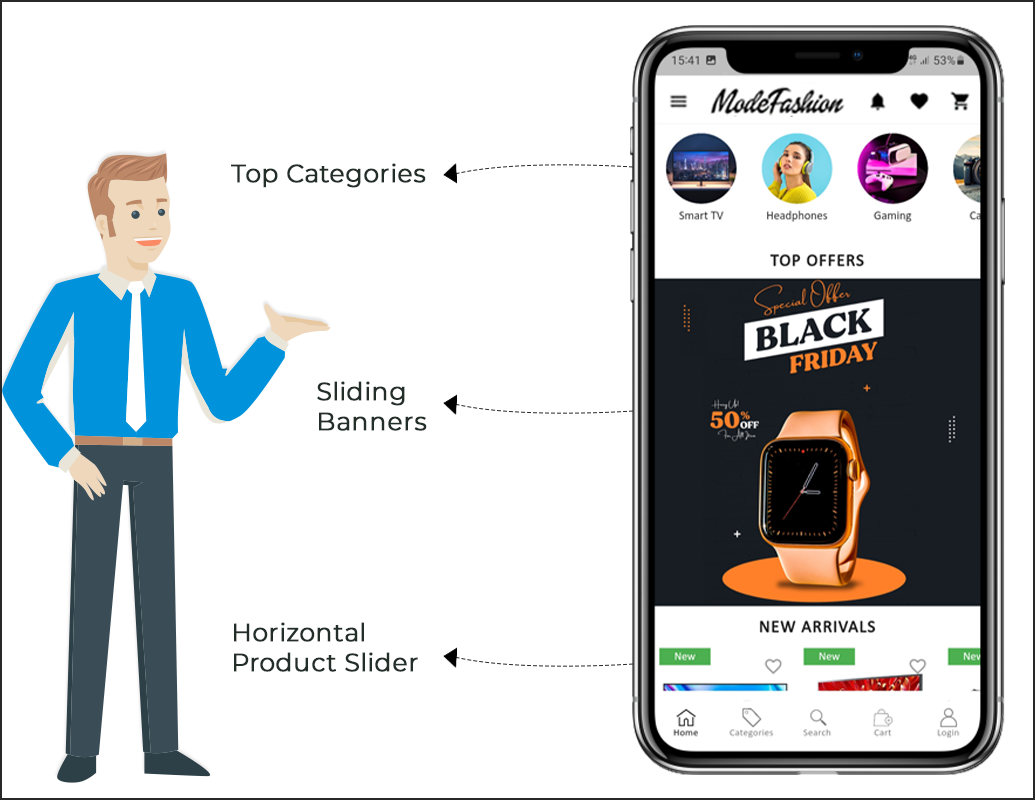
Top Categories
Multiple Banners (Square, Grid, Sliding)
Multiple Products (Square, Grid, Sliding)
Countdown Timer Banner
Recently Viewed Products
All these designing elements are fully configurable & their positioning can be changed with just drag & drop feature.
3. Tab Bar Icon: Magento 2 mobile app comes with tab bar icon functionality which allows users to quickly switch among one section to another section of the app. Tab bar icon functionality makes the experience of app users smoother & simpler.
4. Web-admin Panel Access: The Magento 2 Mobile App Maker offers complete module backend access to the store merchants & let them design & manage the app on their own.
5. Live Synchronization: The Magento 2 Mobile Apps are in 100% synced with your website & which reverts all sorts of website updates on Mobile App. Your Mobile App inventory automatically gets updated as of website.
6. Tablet & Mobile Support: The Magento 2 Mobile App Creator offers tablet & mobile supported apps for your website which runs flawlessly on user’s devices. Whether it’s an iPhone, iPad, Android phone or tablet.
7. Multi-lingual & RTL Support: The Magento 2 Mobile App Maker offers both multi-lingual & RTL writing support on Android & iOS apps. You can offer your app to users living in any corner of the world.
8. One-tap Login: The Mobile Apps with Magento 2 Mobile App Creator offers Google/Facebook/OTP/Fingerprint login options for the shoppers.
9. 24*7 Chat Support: Your Magento 2 Mobile Apps come up with 24*7 Zopim & WhatsApp chat support which makes it easier for the app user to contact directly with the store admin.
10. Easy Payments: The Magento 2 Mobile App Creator supports all sorts of website payment options on the mobile app. You can even add various other native payment methods over a small fee.
11. All Shipping Methods Support: Your Magento 2 Mobile App supports all sorts of website shipping methods & eases the trade for you.
12. All Product Type Support: The Magento 2 Mobile App Creator supports all sorts of products on Mobile App like the single, bundled, configurable, grouped, downloadable, etc.
13. Layered Navigation: The Magento 2 Mobile App has multiple filtering & sorting options which makes the product search more seamless.
14. Voice Search (Android Only): The Magento 2 Mobile App Maker offers advanced voice search in Android App to make the search process easier.
15. Coupons & Vouchers Support: The Magento 2 Mobile App Maker supports all sorts of coupons & vouchers in Mobile App. Your app users can also use active website coupons/vouchers.
16. Simplified Checkout Screen: Easier the checkout process, more are the chances of successful purchases. The Magento 2 Mobile App Builder offers a single-screen checkout approach in Android & iOS apps.
17. Real-time Order Tracking: Curb out your app user’s insecurities with real-time order tracking functionality in Magento 2 Android & iOS apps.
18. Push Notifications: The Magento 2 Mobile App has a handy push notification tool which allows you to send unlimited push notifications regarding daily deals & highlights. Both automated & manual notifications are offered with Magento 2 Mobile App Creator.
19. Wishlist: Sometimes the users will not purchase the products for some reason like unavailability of size, color, product, etc. But, Mobile app for Magento 2 comes with inbuilt wishlist functionality which allows users to save their desired products on it for future purchases.
Conclusion
There might be a variety of Magento 2 Mobile App solutions as of now but, not all of them have such easy process & sale-pushing features. KnowBand has designed this module completely admin-friendly & provided almost every access into your hands. The features are more than enough to make your eCommerce store selling hassle-free on Mobile App.
The merchants who haven’t upgraded their store to Magento 2 & still using the old version can also take their store to the mobile platform with Magento Mobile App Builder. Go & build one for your store today.
Have you recently migrated to Magento 2.x from Magento 1.x? It’s time to build native Apps for your store. We all are aware that eCommerce mobile apps are one of the most unavoidable needs of online businesses today. So, if you are a Magento 2 store owner and planning to take your website to the Mobile platform, KnowBand has made the job simpler for you. Find out how?
The Magento 2 Mobile App Builder extension lets you upgrade your eCommerce store into a pair of featured & flawless Mobile Apps. The fully functional Android & iOS apps developed with Magento 2 Mobile App Maker would definitely fulfill all the requirements for the growth of your store. This is the most seamless solution for mCommerce development. All you need to do is to specify your business requirements and leave the rest to our skilled development team.
The Mobile Apps for Magento 2 stores developed by this ready-to-go solution provide a flawless and reliable shopping experience to the users. This will definitely boost conversions & sales of your store.
1.1 New Updates:
a) Home Screen Layout Backend Preview:
In the latest version (v1.0.6) of Magento 2 Mobile App Creator, the store admin can preview the home screen layout there only while setting up it from the admin panel. No need to open the app, refresh every time to visualize the changes. Just design your home screen with more ease and change it whenever required.
b) Flutter Update:
We have recently updated our both Android and iOS Mobile Apps to the latest Mobile App Development technology Flutter. Now, users can experience robust speed with all the updated features.
c) QR Code/Bar Code Scanner:
Now, the mobile app users can also search their favourite data by searching via QR/Bar codes. Android and iOS App users can find the updated option on the search page.
d) Video Banner Elements:
Knowband’s Magento 2 Mobile App Builder now includes video banner components on the home page. This feature allows store admins to showcase engaging videos by uploading them directly or embedding YouTube videos, enhancing the visual appeal and user experience of the app’s home page.
e) List/Grid View:
With Knowband’s Magento 2 Native Mobile App Builder for Android and iOS, app users can seamlessly switch between list and grid views while browsing products. This feature enhances the overall shopping experience by offering a flexible and visually appealing way to explore products. Users can easily toggle between the views using the list/grid button available on the product listing pages.
f) Video/Banner Options on Category Product Listing Pages:
The updated Knowband Mobile App Maker for Magento 2 now allows store admins to enhance category product listing pages with video and banner upload options. Admins can upload videos (under 2 MB) or directly showcase YouTube videos, offering a more engaging and dynamic browsing experience. This feature provides greater UI control for the store admin while significantly improving customer interaction and experience.
g) Automated Banner Sliders:
The latest Knowband Magento 2 Mobile App Builder introduces an automated banner slider feature, enabling store admins to configure the sliding interval directly from the module backend. This functionality is particularly useful for the “Banner Horizontal Sliders” on the home page, where admins can add both video and image banners for a dynamic and engaging display.
h) Enhanced Review Section:
The Knowband mobile app offers an enhanced review section. Approved reviews are now displayed with an improved UI, providing a visually appealing and seamless experience for both Android and iOS app users.
i) Login and Sign-up Pop-up option:
Capturing the visitors’ emails is one of the biggest challenges in eCommerce. However, we have simplified this process by introducing the login/sign-up pop-up in the recent Mobile App Builder version.
The store admin can add a login pop-up that will appear for non-logged-in customers, increasing the email opt-in chances by providing simple login options to the users.
1.2 Module Installation
The steps to install the Magento 2 Mobile App Creator module are mentioned below:
The package has a zipped file that contains the user manual and the source code of the Mobile App Builder Extension. Unzip the package.
Create a folder{Magentoroot}/app/code/Knowband/Mobileappbuilder
Upload the extracted content in the above folder via FTP manager (like Filezilla or WinSCP – download here: https://filezilla-project.org/).
Now run the below commands to install the plugin:
php -f bin/magento module:enable –clear-static-content Knowband_Mobileappbuilder
php -f bin/magento setup:upgrade
php -f bin/magento setup:di:compile
php bin/magento setup:static-content:deploy
The extension is now installed and ready for use. In Admin Panel go to “Knowband > Mobile App Builder”. You can now configure and use the Magento 2 Mobile App Builder module.
2.0 Magento 2 Mobile App Demo
Before going for the purchase of the Magento 2 Mobile App Maker extension, it’s better to test our demo apps.
2.1 View Our Demo Store working on Apps
We have developed two demo apps & set us a demo store for seamless testing of the module before actual Mobile App development. Follow the steps mentioned below:
Step 1: Download and install Nautica Magento 2 Mobile Apps on your testing device. Here, are the links to Magento 2 Android & iOS Apps: Apple App Store Google Play Store
Step 2: Open the App and tap “View Demo” option. That’s it, you can easily test all the app functionalities now.
Note: To access the Admin Panel of KnowBand’s Magento 2 Mobile App Builder on our demo store, visit here.
2.2 View Your Store working on Demo Apps
Want to test your own website on these demo Mobile Apps? We even made that possible in just 3 simple steps:
Step 2: Install the Demo Apps (links in the previous section) on your mobile device. Open the App & enter your website URL in the “View Your Store” option.
Step 3: Tap “View Your Store” and start analyzing your own website working on our demo apps.
Note: This Free version of Mobile App Builder is just for the demo purpose & no APK/IPA files will be provided with this module. In order to get your own APK/IPA files, you need to purchase the paid version of the Magento 2 Mobile App Builder.
3.0 Build your own Magento 2 Mobile Apps
After successful testing of Magento 2 Mobile App Builder, build a pair of mobile apps for your website. KnowBand has made it as simple as it could get.
Step 1: Purchase & Install Module on your website.
Purchase Magento 2 Mobile App Builder & install the same on your store using your store FTP details.
Step 2: Share your App Specifications
Share some details regarding app development with us through a pre-requisite form.
Step 3: Get Your Android & iOS Apps in 1-2 days
The final APK & IPA files can be shared with you in just 2-3 days. You can review the same & suggest changes (if any).
Note: You can publish these APK/IPA files on respective app stores. Refer to the following links for the same:
If there is any issue while app publishing, we would get it done for you.
4.0 Admin Panel Screens
After the successful installation of Magento 2 Mobile App Builder, the store admin will get the following tabs for customization:
4.1 General Settings:
Enable the Extension: Enable the Magento 2 Mobile App Builder to make the mobile apps work on the user’s devices.
Redirect to Cart Page when Add To Cart: Whenever any user clicks on Add To Cart button, it will be redirected to the shopping cart screen.
Display Short Description: Enable to display of the short product description on the product screen.
Enable Request Log Reporting: Enable the error log on the mobile apps which is used to identify & rectify any abnormal behavior of the mobile apps.
Show App Preview: This option will show/hide a preview of the app.
Enable/Disable Spin and Win: If you are using Knowband’s Spin and Win module, this option will enable/disable the spin and win pop-up in the apps.
Enable Social Login: This option will enable/disable social login options in the apps.
Enable/Disable Fingerprint Login: Enable Fingerprint login on the Mobile Apps.
Enable/Disable Phone Number Login: Enable Phone Number login on the Mobile Apps.
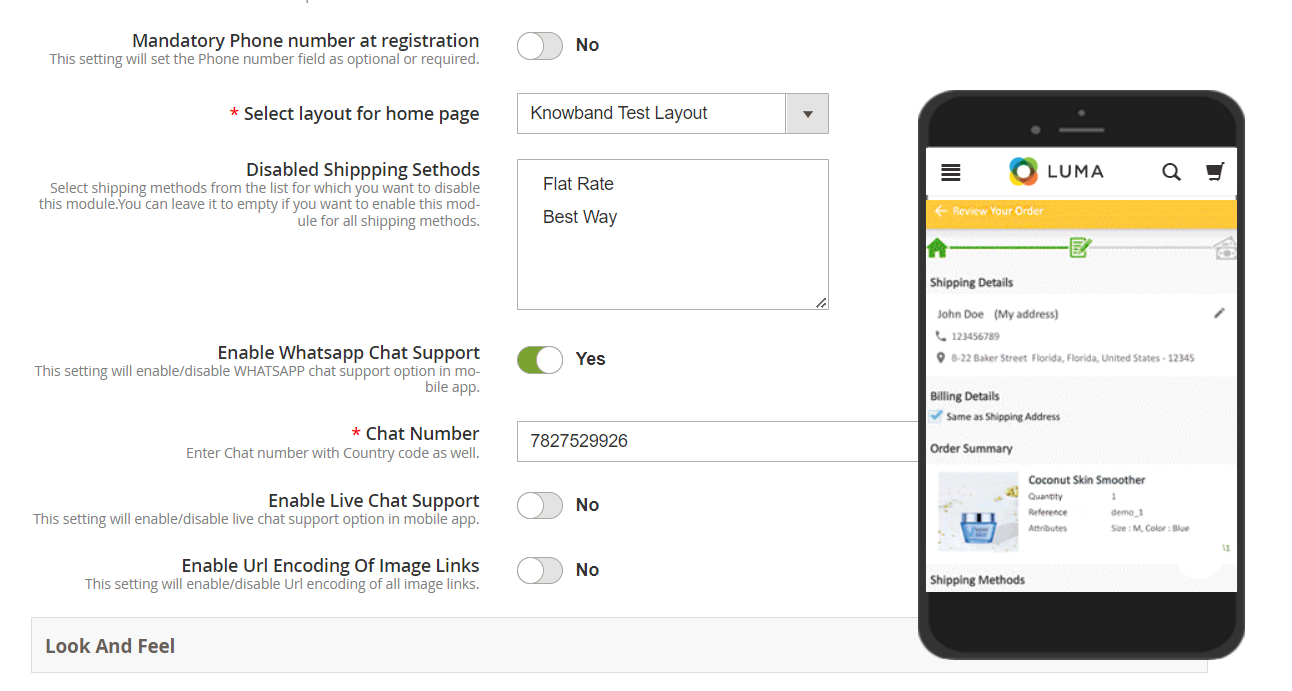
Mandatory Phone number at registration: The store admins can make the mobile number optional/mandatory by the help of the following button.
Select Layout for Home Page: Choose the desired Home Screen layout for the mobile apps.
Display Notifications in App: Show/Hide Notification tab in the app for the customers.
Enable/Disable Login Pop-up: The admin can enable the login pop-up on the home page with this button.
Disabled Shipping Methods: The admins can disable specific shipping methods for the app only from the following button.
Enable Live Chat Support: Enable/disable Zopim(Zendesk) chat option on mobile apps. You need to enter the chat API key provided along with the final apps.
Enable WhatsApp Chat Support: Enable/disable the WhatsApp chat option on mobile apps.
Enable Logo: Enable logo on your mobile apps. You can upload the logo image which will be displayed on the header of the mobile apps.
Select Font of the apps: With the help of the following button, the admins can change the fonts of both Android and iOS Apps.
App Button Color: Choose the button color for your apps.
App Theme Color: Choose the theme color for your apps.
App Button Text Color: Choose the button-text color for your apps.
App Background Color: Choose the background color for your apps.
App Icon Theme Color: Choose the app icon theme color.
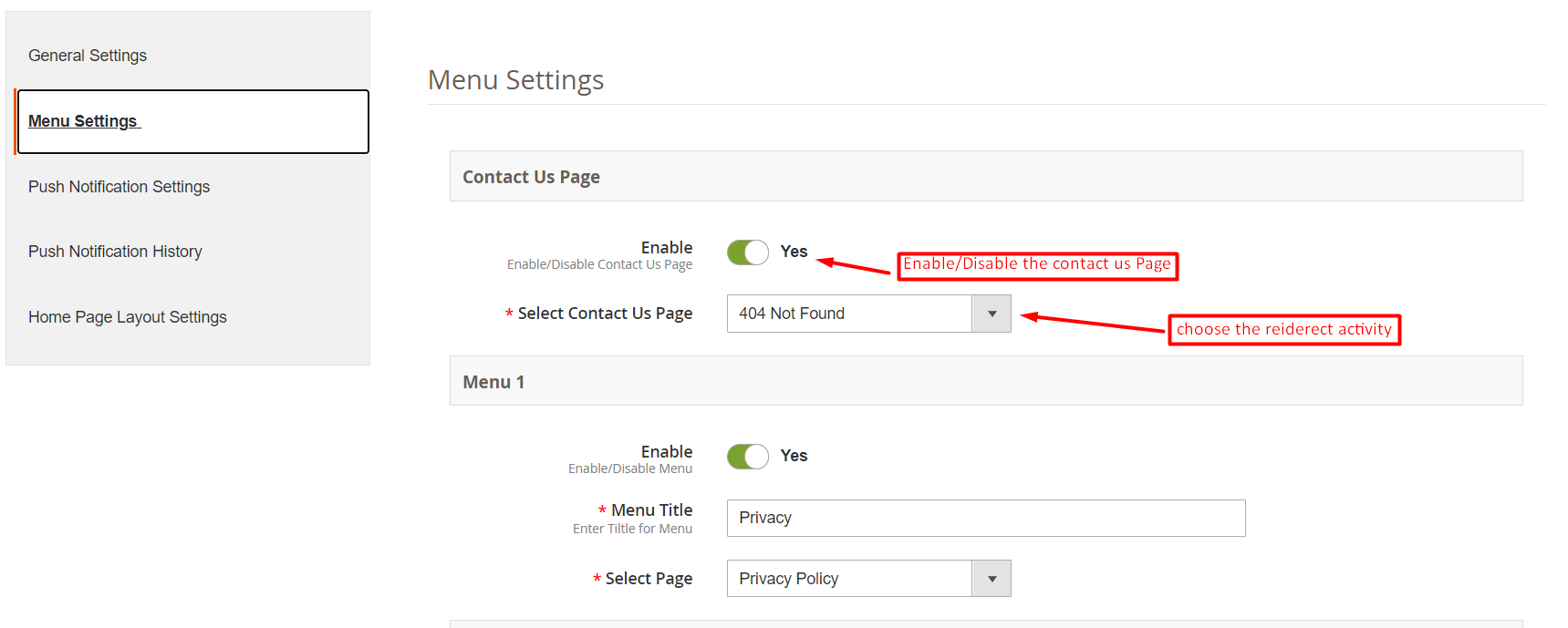
4.2 Menu Settings:
With the Menu Settings tab in Magento 2 Mobile App Maker, you can easily add and manage CMS pages on your mobile app. The Contact Us page can be enabled or disabled as per your preference, and you can also add new CMS pages to the menu. This allows you to provide your customers with easy access to important information such as your store policies, FAQs, and more. Additionally, you can customize the order of the menu items to make it easier for your customers to navigate through the app.
4.3 Push Notifications:
Service Account JSON: With the deprecation of the traditional Firebase push messaging API, it has been replaced by a Service Account JSON file. This section allows admins to configure the JSON file obtained from their Firebase account. You can either set this up on your own, or we will provide the Service Account JSON file during the app creation process for your convenience.
Order Success Notification: Configure automated Order Creation push notification which would be sent automatically to the user’s apps who successfully create an order through your app.
Order Status Update Notification: Configure Order Status Update notification which would be sent automatically to the users whenever there is an update in order delivery status.
Abandoned Cart Notification: Configure automated Abandoned Cart notification which would be sent automatically to the users who left their products in the cart.
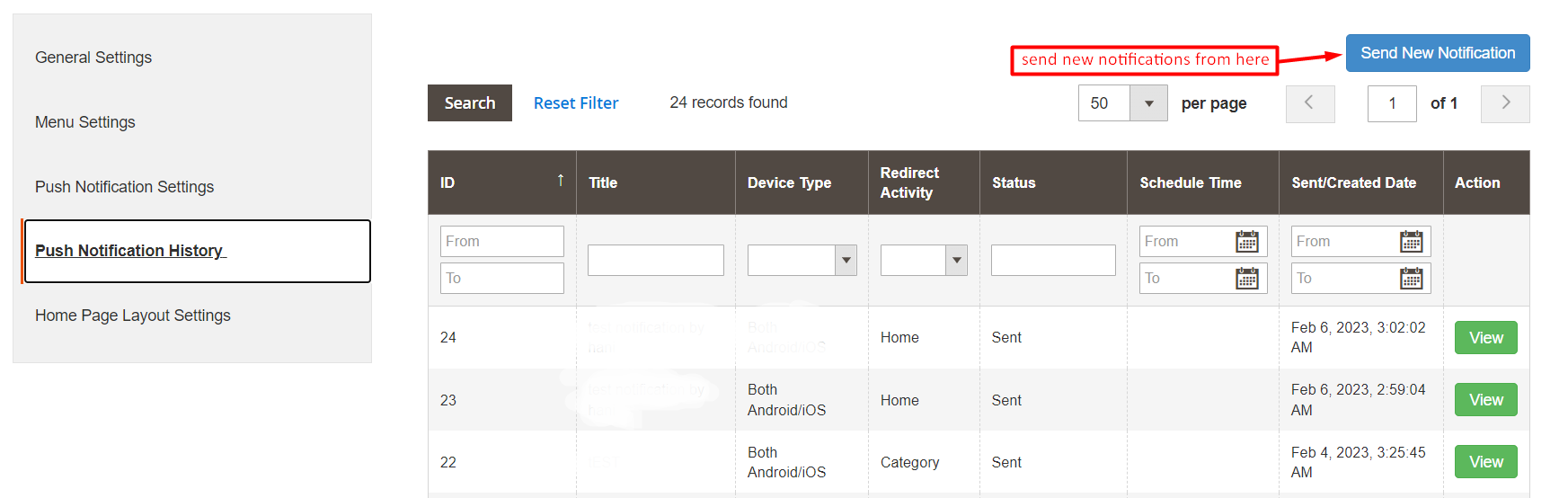
4.4 Push Notifications History:
In the following tab, we have provided the option to check all the previously shared notifications along with the date and time. Moreover, by clicking on the send a new notification, the users can also send new notifications to the app users.
We have also added a special feature in the Magento 2 mobile app Builder module. Now the admins can send new notifications immediately or can also schedule them for the future.
4.5 Home Page Layout
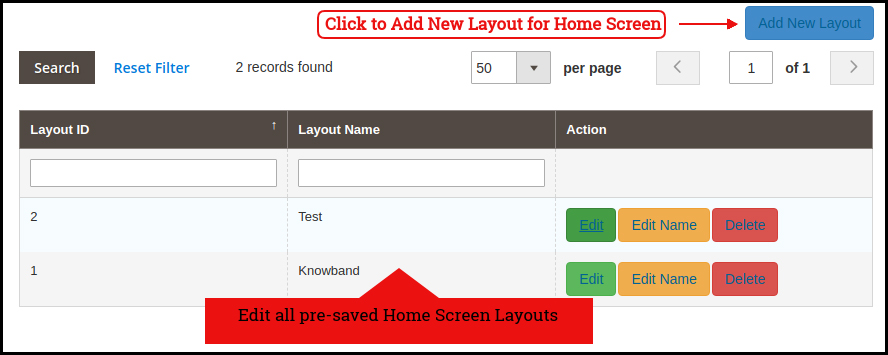
The Magento 2 Mobile App Builder offers a customizable Home Screen with all sorts of design elements in the module backend. You can create any layout for your mobile app’s Home Screen & offer it to your users.
After adding the layout, click on the Edit option & start configuring various designing attributes for your Magento 2 App Home Screen.
The store admin can configure the following design elements under the Home Page Layout tab of the Magento 2 Mobile App Builder:
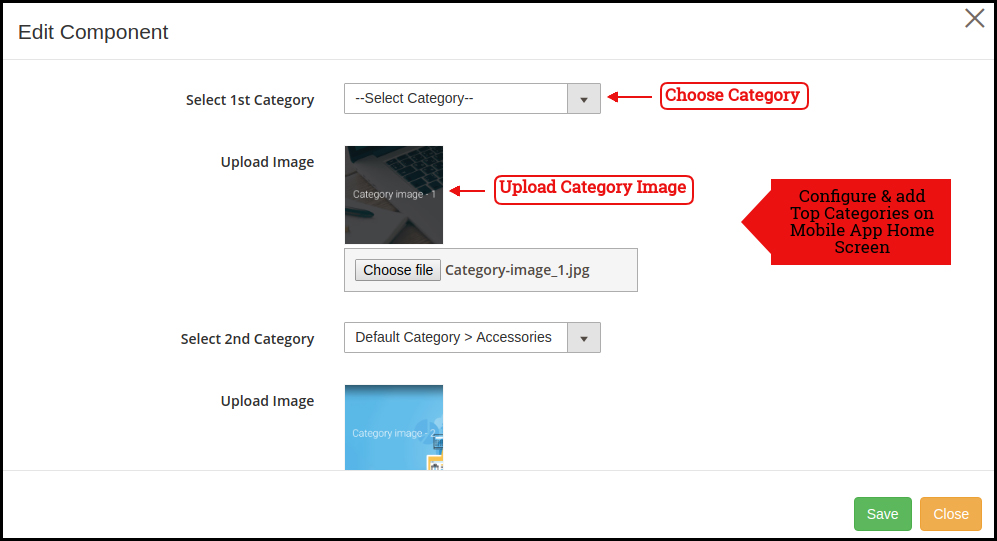
Top Categories:
These square-shaped categories can be used to highlight all the major categories of your website on the Home Screen. These categories can be added from the module backend as shown in the below snapshot:
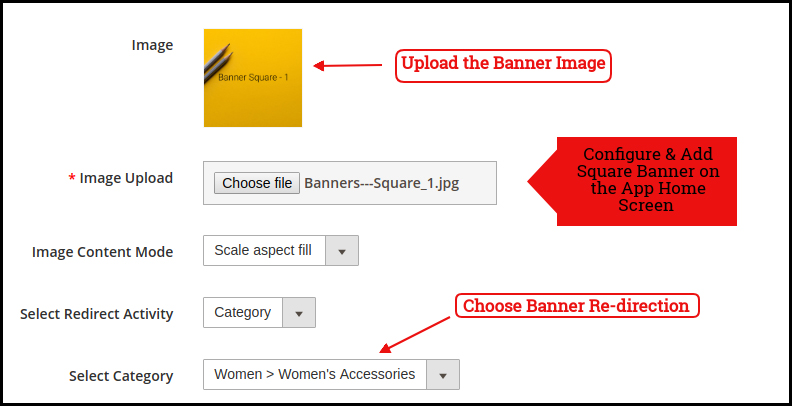
Square Banner:
The Banner can be displayed in square form on the Mobile App Home Screen. Now, the store admin can add or upload YouTube videos for the banner square layout components with the relevant options provided in the redirect activity section. The landing page, image can be configured as shown in the below snapshot:
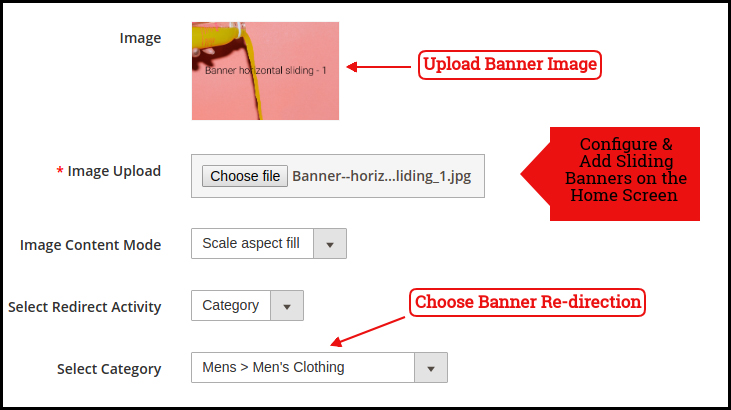
Sliding Banner:
The Magento 2 store admin can also add video elements in the horizontal sliders. We have also provided a time interval section in the recent updates that will allow the admin to configure the interval for the automated banner sliders.
The sliding banners can be displayed on the mobile app Home Screen which can be configured as shown in the snapshot below:
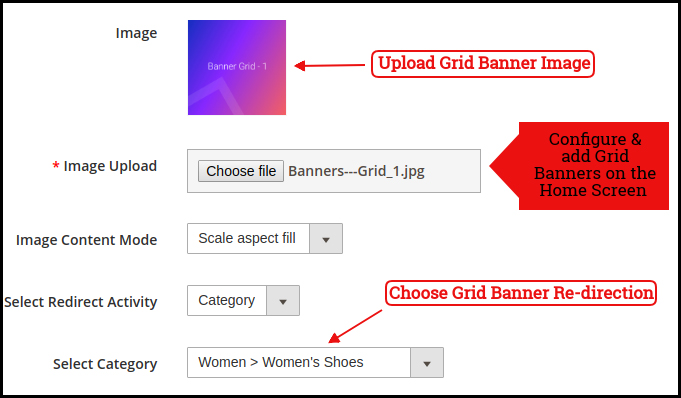
Grid Banner:
Like horizontal banner sliders, the store admin can also add videos in the grid banner layout components. These are the banners for the app home screen displayed in the form of a grid listing & can be customized as shown in the below snapshot:
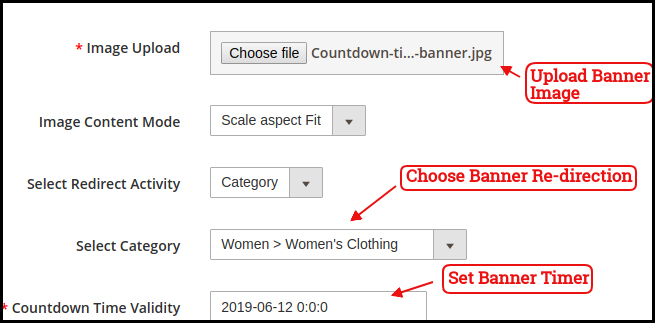
Countdown Timer Banner
Display a countdown timer banner on Magento 2 Mobile App home screens & offer a time-based/flash sale to your users:
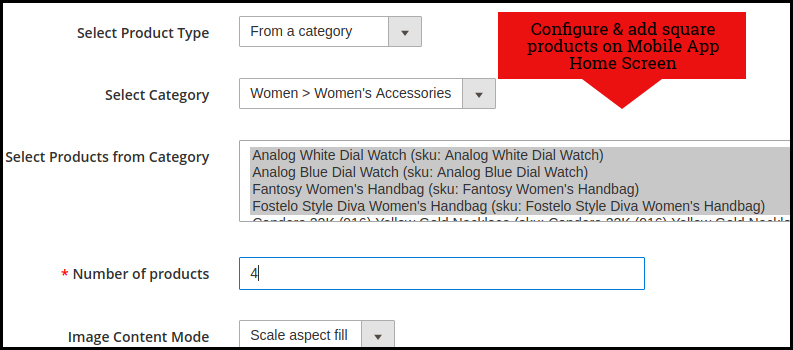
Square Products:
The products can also be listed in the square listing on the Mobile App Home Screen. This can be configured as shown in the snapshot below:
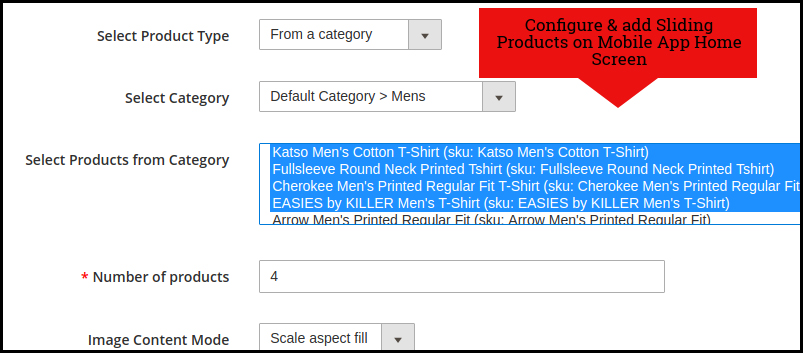
Sliding Products
The products can be displayed in the slider view on the mobile app Home Screen & can be configured from backend panel.
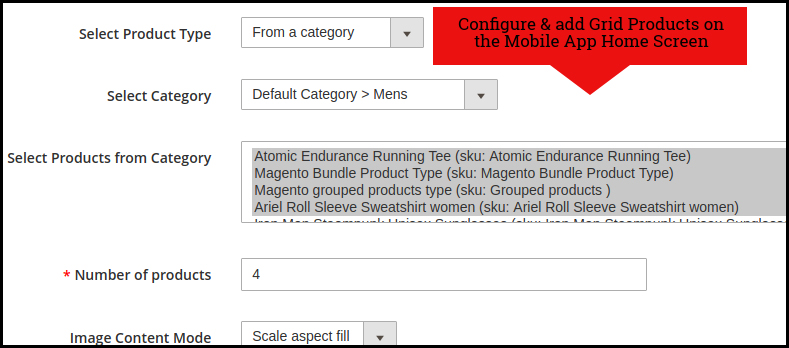
Grid Products:
The products can be displayed in the grid view on the Mobile App Home Screen:
Products Recently Accessed:
The Magento 2 Mobile App Creator offers the recent products tab on the mobile app home screen which displays recent products viewed by the user. You can just add the element in your layout to display the same on the home screen.
Login Pop-Up:
The enhanced Magento 2 Mobile App Maker comes with a login pop-up on the home page. With the help of this layout component, the admin can showcase a login pop-up on the home screen of the app. This pop-up will only appear for non-logged-in users.
Note: The store admin can add up to 20 elements while designing a layout in the backend panel.
5.0 Mobile App Screens
5.1 Home Screen:
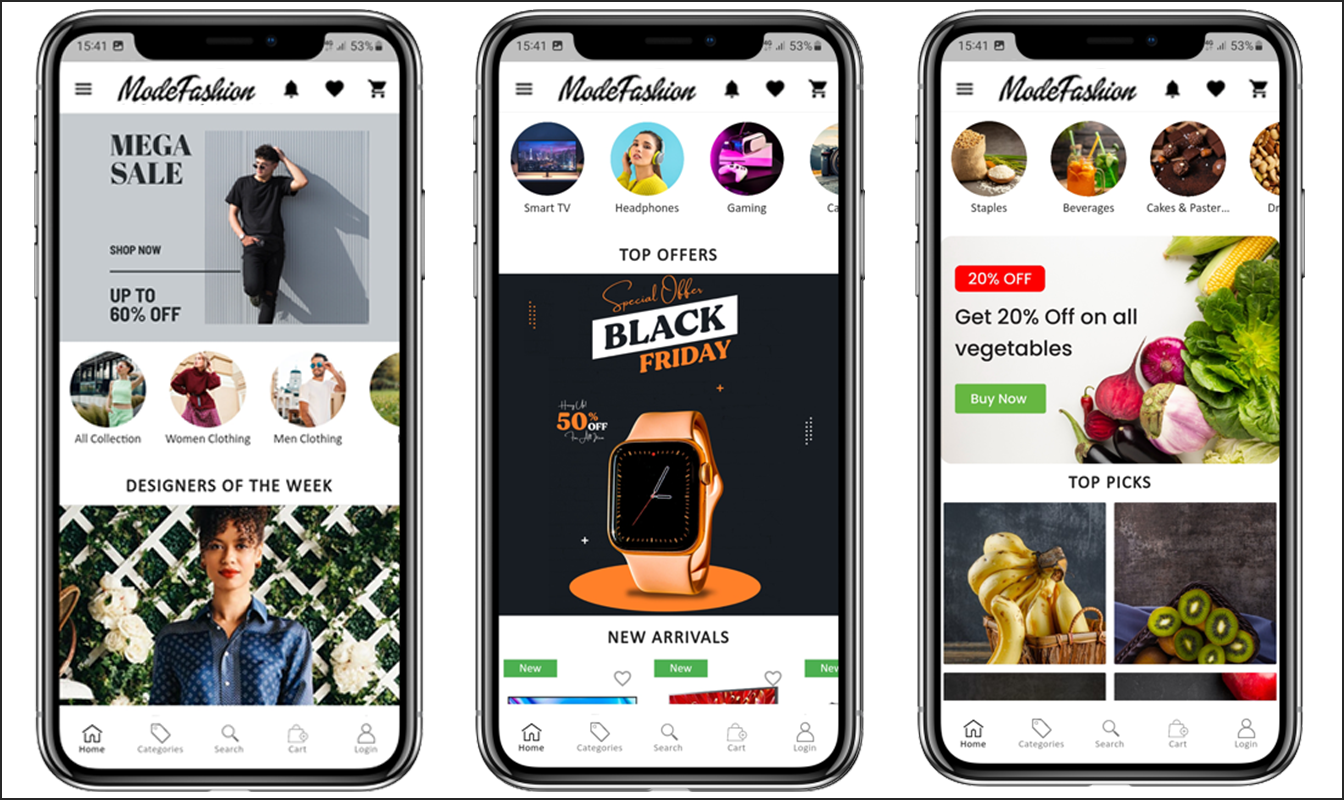
The Magento 2 Mobile App Builder brings the complete flexibility to design the mobile app Home Screen on your own. The Android & iOS mobile apps can be designed from the backend panel using the following designing attributes:
–> Top Categories
–> Square Banners
–> Sliding Banners
–> Grid Banners
–> Square Products
–> Sliding Products
–> Grid Products
–> Countdown Timer Banner
–> Recently Viewed Products –> Login Pop-Up.
–> Video Banner Elements
–> Enhanced Review Page.
The positioning of all the elements can be changed with a simple drag & drop.
a) Dynamic Layouts: Create & save various alluring & intuitive layouts in the backend & change your app’s look & feel in just one click.
b) Store Logo: Add your store logo image in the module backend & display the same on the header of the apps.
c) Search: The Magento 2 Mobile Apps have keyword search options that allow users to search for products without any hassle. Along with Keywords, the users can also search products via QR and Bar code scanner.
d) Wishlist: Wishlist option in Magento 2 Mobile App lets you bookmark the desired products for future purchases.
e) Shopping Cart: The users can easily access the shopping cart from the top-right corner of the home screen.
f) WhatsApp: The Magento 2 Mobile App Maker offers two live chat options in mobile apps with Zopim & WhatsApp. The app users can directly message you regarding any issue or query regarding purchase.
g) Login-in Pop-up: We have recently introduced the all new login-signup pop-up in Magento 2 Android and iOS Apps. If the customer is not logged in, he simply complete the login/signup buttons provided under the sing-up pop-up.
5.2 Accordion Menu (Navigation Bar)
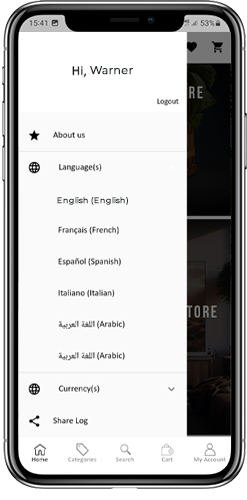
The Magento 2 Mobile App Maker offers an Accordion Menu in the mobile apps which displays the store categories on the Mobile Apps. Your app users can easily browse all the categories from this menu & access all CMS pages. This menu has the following options:
Categories: All sorts of categories on your store are fetched on the Android & iOS mobile apps as well. The apps even offer a multi-level categorization & allow the users to browse products with ease.
CMS Pages: All CMS pages on your store like About Us, Contact Us, Terms & Conditions, etc will be displayed on this Menu.
Language(s): The Magento 2 eCommerce Mobile Apps are both multi-lingual & RTL languages supported. The users can choose the desired app language & the entire app contents will be translated accordingly. Every sort of language available in the store is displayed here under this menu.
Currency(s): Just like multiple languages, all sorts of currency options running on your website will be displayed in Magento 2 Mobile Apps. This allows app users to make payments with the desired currency option.
5.3 Category Screen:
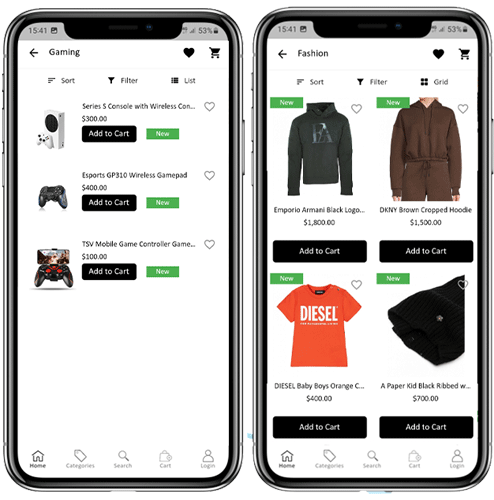
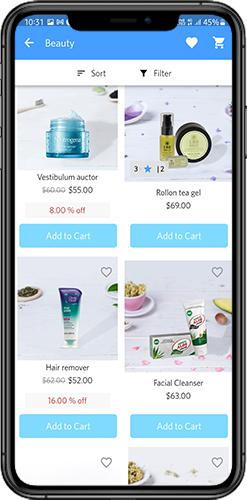
All categories on your Magento 2 website are fetched on the Magento 2 Mobile Apps as well. The category screen of the Magento 2 Mobile App has two views: Grid & List view. This screen has the following options:
Grid & List View:
The products can be displayed in both grid & list view.
Sort:
The sort option in Magento 2 Mobile Apps allows the users to view products in the Low to High or High to Low categories.
Filter:
Filter down the category products with various attributes like price, cost, etc. & search for desired products without any effort.
5.4 Product Screen:
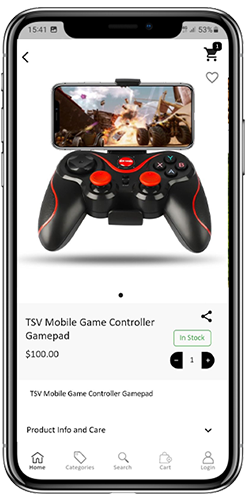
The Magento 2 Mobile App product screen is completely clutter-free & appealing. Every product has multiple images displayed along with its name & price. The product availability is also displayed as “In Stock” or “Out Of Stock” along with the price discounts. The Product Screen has the following options:
Product Options:
Various options related to the product like size, color, etc. are displayed on the product screen. These options are the same as those available on your website.
Short Description:
Users get to read the short description of your product to quickly make up their minds. The Magento 2 Mobile App displays both short & full descriptions of the products.
Product Info & Care:
All the information related to the specific product is displayed in this section. This is the same information as on the website.
Add To Wishlist:
The users can even add the products to the wishlist bag from here. The products added to the wishlist are bookmarked for future purchases.
Add To Cart:
The Add To Cart button allows you to add products to the cart which can be processed further in successful order creation.
Product Social Sharing:
The Magento 2 Mobile App has the option to share the products on different social platforms, Bluetooth & e-mail. The users can share the products with their friends & relatives & bring potential users to your store.
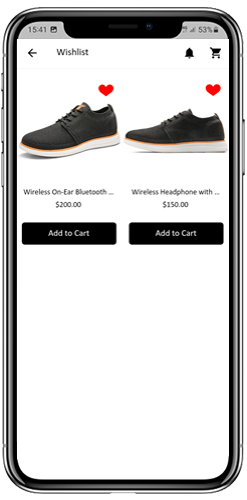
5.5 Wishlist Screen:
The Magento 2 Mobile App Builder offers a wishlist bag allowing the users to bookmark products for future purchases. The app users can view the list of all wishlist products from this screen. It has the following options:
Add To Cart:
The app users can add the wishlist product directly into the shopping cart with Add To Cart option.
Remove From Wishlist:
The users can even remove any wishlist product with a remove option if required.
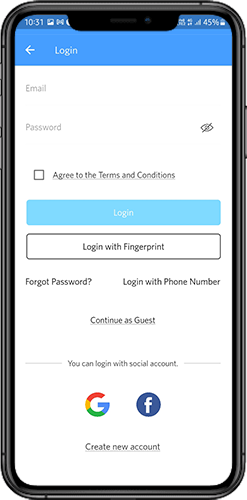
5.6 Login Screen
The Magento 2 Mobile App Maker offers various one-tap login with the following options:
1. E-mail Login
2. Google & Facebook Login
3. OTP & Fingerprint Login
Login:
The Magento 2 App users can authenticate & access using e-mail sign-in credentials.
Sign Up:
All the new users can sign-up & create their account on the store from the mobile App. The sign-up form for the Magento 2 Mobile App is fully seamless.
Login with Phone Number:
Your Magento 2 Mobile App comes up with a phone number login option allowing the users to verify OTP.
Login with Fingerprint:
Your app users also get an option to log in with a fingerprint. This biometric authentication makes the app log in just a matter of a few seconds.
Login with Facebook:
The users can log in to mobile apps using their Facebook Account Credentials.
Log in with Google+:
The users can log in to the app using their Google+ Account Credentials.
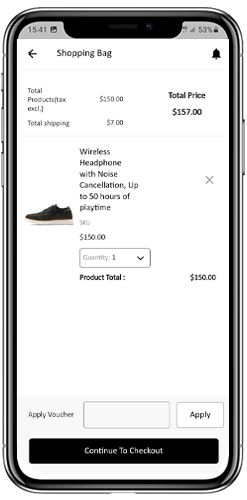
5.7 Shopping Cart Screen:
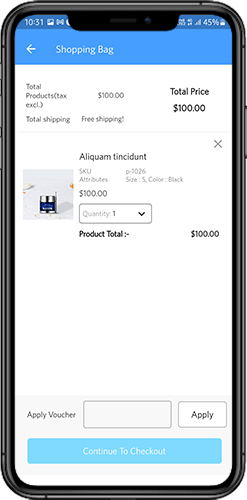
The Shopping Cart screen of the Magento 2 Mobile App will display all products added to the shopping cart. The mobile app users can view Product name, quantity, total price & shipping cost from the cart. The Shopping Cart screen has the following options:
Apply Voucher:
This option allows the users to get discounts & offers by entering valid coupons & vouchers running on your website.
Total Product Price:
The users can view the complete cost of their shopping bag which is automatically updated as per any addition to the cart.
Update Product Quantity:
The users can even update the specific product quantity.
Remove Product:
The app users can simply remove the product from the cart.
Continue Shopping:
The app users can leave the cart to browse more products on your app. The shoppers will be redirected to the home screen by tapping the Continue Shopping option.
Continue To Checkout:
The app users can proceed further to the checkout & payment screens just by tapping the “Continue To Checkout” option. It will redirect users to the checkout screen.
5.8 Checkout Process
The Magento2 mobile app Builder consists of a simplified checkout process. The front-end mobile app users have the option to select shipping details, billing details, order numbers, order comments, and so on in the checkout process of the mobile app.
Users of the Android and iOS apps only need to follow a few simple steps to place their orders.
1. Customers can select the desired product and add it to the shopping cart. After clicking on the shopping bag, he or she can also select the desired product quantity. Moreover, the front-end mobile app users can see the total number of products and shipping costs.
The customer also has the option to apply any voucher and coupon code at the bottom of the same page.
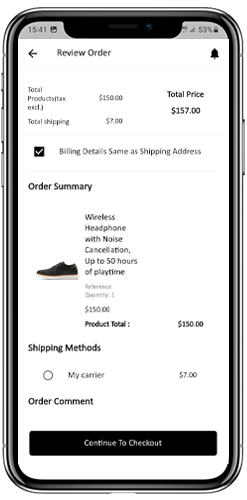
2. After clicking on the Continue to Checkout option, the user can review the order where he or she can see several details. Such as product price, shipping cost, shipping address (It can be edited on the same page), order summary (Number of the products), total price, and so on.
Additionally, the customer has the option to select their preferred mode of shipping on the same page. The user can also put his or her special request or requirement in the order comment option appearing at the bottom of the screen.
The user will be redirected to the payment method screen after clicking on the continue to checkout option.
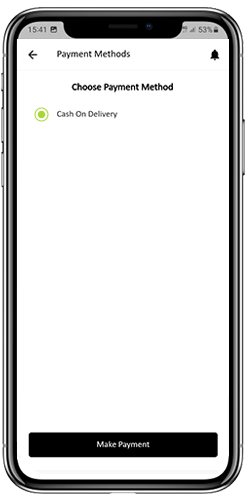
On this screen, users have the option to select from all of the website payment options. By default, the shopping app consists of a cash-on-delivery option as a mode of payment.
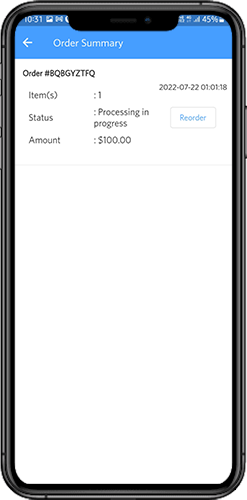
When the user performs the payment activity, then he or she will be redirected to the order summary screen. where the customer can see the order status, order number, amount, and so on. The front-end mobile app users will get the order confirmation popup message on their mobile phone screens as well.
5.9 My Account Screen
My Account screen of the Magento 2 Android/iOS App allows the users to view the complete account details including a list of all previous orders. This screen has the following options:
Order History:
The users can view the complete details of their past orders, including the date of submission, order reference, pricing, and delivery status.
Update Profile:
The users can update their profile details, such as their first and last name, phone number, and password, using the app’s account settings.
Shipping Address(s):
The users can view all the saved shipping addresses in the Magento2 Mobile App, and they can also add a new shipping address from this screen.
Order Details:
The Magento2 Mobile App allows users to view their order history in the app. The users can see a list of all their previous orders, along with the order date, order number, order status, and total cost. They can also view the details of each order, including the products ordered, shipping and billing address, payment method, and delivery status. This feature makes it easy for users to keep track of their past purchases and reorder products if needed.
6.0 Order Detail Screen
The Order Details screen in your Magento2 eCommerce App displays the complete order details, including the shipping address, product summary, shipping and payment method, and total cost summary. The app users can track the delivery of previously placed orders directly from this screen, providing them with a hassle-free shopping experience.
7.0 Advanced Magento 2 Marketplace with Mobile App
KnowBand’s Magento 2 Marketplace converts your online website into a fully-fledged marketplace. The Magento 2 Mobile App Builder is fully compatible with Magento 2 Marketplace extension. This means you can bring the entire marketplace listing on the same Magento 2 Mobile Apps. Thus, launch a pair of Marketplace-compatible Mobile Apps with KnowBand & attract a large base of sellers & customers to your store.
–> As the user clicks on the Seller option, he/she is redirected to the Seller page of the mobile store. The user can view the list of the sellers in the marketplace along with their ratings.
–> The customers can click on the name of the seller in order to see his profile and the product being offered. The sellers can log in with their username and password. They are then redirected to the dashboard.
Get to know more about Magento 2 Marketplace with Mobile App from here.
That’s it! For More Info on KnowBand’s Magento 2 Mobile App Builder, refer the following links:









![[Success Story – Goldengrocery] Grocery Mobile App for E-Commerce](https://www.knowband.com/blog/wp-content/uploads/2020/07/Success-Story-%E2%80%93-Goldengrocery-Grocery-Mobile-App-for-E-Commerce.png)








![[New Version Release] Magento 2 Mobile App Builder : v1.0.6](https://www.knowband.com/blog/wp-content/uploads/2020/05/New-Version-of-Magento-Mobile-App-Builder-Ready-To-Serve-The-eMerchants.jpg)