WooCommerce Mobile App Builder – User Manual

Get fully Flutter Android & iOS apps for your WooCommerce website & start selling your products on Mobile Apps!

1.0 Introduction
WooCommerce Mobile App Builder

This is the user manual for WooCommerce Mobile App Builder’s cutting-edge and ready-made Flutter mobile app solution. This eCommerce website plugin was created and expertly crafted to help you create flawless and feature-rich Android and iOS shopping apps.

1.1 Introduction to WooCommerce Mobile App Builder

The most sophisticated and automated way to expand your online business to mobile platforms is with the WooCommerce Mobile App Builder. It turns your entire website into a mobile app with features and enables you to sell products on mobile devices in addition to the traditional website. The app’s features and operation perfectly mirror those of the website and are compatible with both Android and iPhone devices.

The pre-configured framework used by our WooCommerce Mobile App Builder was created by experts and professionals to create two Flutter eCommerce apps (Android and iOS). The apps can bring every item in your store to the user’s fingertips and increase sales and revenue. Therefore, this is your best opportunity if you are a WooCommerce store merchant looking for a complete mobile app solution. To get complete information on WooCommerce Mobile App Development, read the article in its entirety.

Additionally, the Multi-vendor Marketplace plugin is fully compatible with our WooCommerce Mobile App Builder extension. The same Mobile Apps can be used to access the entire marketplace listing. Even better, we provide a bundle that includes both WooCommerce Advanced Marketplace With Mobile App and WooCommerce Multi-Vendor Marketplace.

Moreover, You would be persuaded to choose this Flutter app solution if you considered the following advantages of WooCommerce Mobile App Maker:

  1. A mobile app solution with no coding.
  2. A welcoming administrative panel with full access.
  3. Free assistance for three months
  4. Completely Flutter remedies (Android & iOS)
  5. Synchronization of your apps and website at all times
  6. Extremely flexible in terms of design and operation.
  7. Uses practical marketing tools to boost user engagement.
  8. Increases your store’s revenue and traffic.

Top Qualities of the WooCommerce Mobile App Builder:

The following is a list of some of the major features that your apps with WooCommerce Mobile App Builder will include:

  • The layout of the home screen can be changed (Complete Flexibility)
  • Store Identities
  • (24/7) WhatsApp Chat Support
  • OTP and fingerprint login for both tablets and smartphones with Google and Facebook
  • Support iOS 9 and subsequent iOS versions, as well as Android 4.2, and up versions support.
  • automatic inventory updates.
  • Numerous Font & Color Options
  • bilingual and RTL (Right To Left)
  • Support All Product Types
  • Support Multi-currency
  • Support Website Shipping Method Supported on Apps
  • Support Website Payment Method
  • Push Notifications indefinite
  • Options for Product Social Sharing
  • Numerous options for sorting and filtering
  • Wishlist Functionality
  • Internet coupons or vouchers backed by apps.
  • Checkout Screen with Fewer Details
  • Live Order Monitoring
  • Unbroken Accordion Menu
  • Clear-cut Category & Product Screen

Latest Version Updates in WooCommerce Mobile Apps:

With an integrated “Add To Cart” button for products on the Home & Category screen, the WooCommerce Mobile App has been made more usable for online shoppers. By simply tapping the cart button, users can quickly add products to the cart.

The category screen of mobile apps also features an Add To Cart button. Users only need to scroll to the bottom of the page to browse the products and keep adding items to their shopping cart by tapping the Add To Cart button.

A) App Reviews for Products

Our WooCommerce Mobile App is currently compatible with WooCommerce’s built-in Product Comments module. The user can now post product reviews on the website, and those reviews will also show up on the app. The user has access to both read and write reviews on the app.

b) Related App Store Products

The Automatic Related Products module is now compatible with the WooCommerce Mobile App Builder. On the product page of the website and mobile app, related products can be shown. This compatibility can be a wonderful tool for your company to increase cross-selling.

C) Deep Linking: A deep linking feature is built into the WooCommerce Mobile App. Now, when a link is shared, the user will be taken to the application rather than the website. Installing the app on the mobile device is the only requirement. The user will even be directed to the appropriate app screen by the shared link.

D) Accessibility in Offline Mode: With this extension, eCommerce mobile apps will now function even when there is no internet connection. Users are able to browse any time the pages that were loaded while the internet was active. Products, categories, the cart screen, etc.

–> Explore WooCommerce GDPR Module

E) Spin & Win (Gamified Email Subscription) Compatibility:

The WooCommerce Spin & Win extension is also compatible with the WooCommerce Mobile App Creator. On the web store, a spin-wheel interactive pop-up that can be scheduled for entry or exit display is provided by the gamified email subscription pop-up. The same pop-up will now be automatically displayed on the apps thanks to this integration. The extension only needs to be installed on your website.

F) Video Banner Elements: Knowband’s WooCommerce Mobile App Builder now supports video banners on the home page. Store admins can upload videos directly or embed YouTube videos, making the home page more visually appealing and improving the user experience.

G) List/Grid View: Knowband’s WooCommerce 2 Native Mobile App Builder for Android and iOS allows app users to easily switch between list and grid views while browsing products. This feature improves the shopping experience by providing a flexible and attractive way to explore products. Users can toggle between views using the list/grid button on the product listing pages.

H) Automated Banner Sliders: The latest Knowband Magento 2 Mobile App Builder includes an automated banner slider feature. Store admins can easily set the sliding interval from the module’s backend. This is especially helpful for “Banner Horizontal Sliders” on the home page, allowing admins to add both video and image banners for a more dynamic and engaging display.

I) Enhanced Review Section: The Knowband mobile app features an improved review section. Approved reviews are displayed with a better user interface, offering a more visually appealing and seamless experience for both Android and iOS users.

–> Investigate the WooCommerce Spin Win Module

This is not the end of the list. Learn more about the features in-depth from this page.

2.0 Demo of the WooCommerce mobile app

KnowBand is aware of your hesitation to use the solution and has provided all owners of eCommerce stores with a free demo in order to allay your worries. The merchants can see their store operating on our demo apps as well as our demo store operating on mobile devices.

2.1 Check Out Our Demo Store for Apps

Want to see the features of the eCommerce app? In order for you to explore the app and see all of its features, we have integrated our demo store with it. Just adhere to the guidelines below:

Step 1: Your mobile device can be used to download and install the Nautica WooCommerce Mobile App. The following are links to download trial versions of the following apps:

Apple App Store  – https://testflight.apple.com/join/mrvIRLfw

Google Play Store- https://play.google.com/store/apps/details?id=com.velsof.woocommercegenericapp

Secondly, the Click the view demo button after launching the Nautica WooCommerce App.

I’m done now! On the demo app, you will see our demo store operating. You can browse it, test out every feature, place orders, etc.

Note: Click here to access the KnowBand Mobile App Builder Admin Panel on our demo store.

2.2 Watch Your Store Operate with Demo Apps

Not content? Do you wish to test the demo apps on your store? We have everything covered for you, though. On our demo app, you can also experience your store, and at no cost. You only need to follow these 3 steps to achieve the same results:

  • Install the FREE WooCommerce Mobile App Builder plugin on your store as the first step.
  • Install the Demo Apps on your mobile device in step 2 (links are in the previous section). Open the app and type in the store URL.
  • Click “View Your Store” to begin using demo apps to explore your store.
  • Type your store’s URL into the box that appears.

For instance, see https://www.example.com/

Note: No APK or IPA files will be provided with this module; this Free version of Mobile App Builder is only for demonstration purposes. You must buy the WooCommerce Mobile App Builder’s paid version in order to obtain your own APK/IPA files.

3.0 Create a mobile WooCommerce app in 3 easy steps

We hope you enjoyed the WooCommerce Mobile Apps demo and discovered what you were looking for. So now is the perfect time to add a pair of Flutter apps to your store. An eCommerce mobile app can be created in the most straightforward manner possible. Your app will be ready in just 3 easy steps and 1-2 working days.

First, add the module to your website.

Install WooCommerce Mobile App Builder on your store after downloading it.

Step 2: Share the details of your application

Use our prerequisites form to share your app’s specifications.

Step 3: In 1-2 days, receive your apps

Our knowledgeable and experienced developers create your apps precisely in accordance with the shared details. In 1-2 days, we would reply with APK/IPA files.

Note: These APK/IPA files can be published on the appropriate app stores.


Still a problem? Tell us, and we’ll help you publish the apps. Furthermore, you can contact us at support@knowband.com if you have any questions or suggestions.

4. Installation of Module

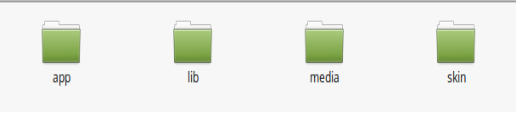
You will receive the files listed below once you have purchased the WooCommerce Mobile App Builder module:

1. ZIP-formatted compressed file (contains the source code of the addon)

2. User Guide

You can now continue the installation process in one of the two ways listed below:

Details of module installation via FTP

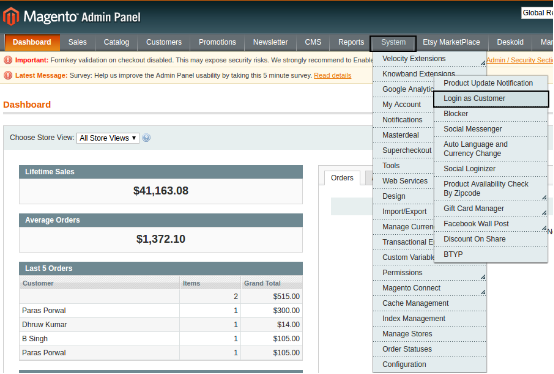
Installing a module using admin details

5.0 Screens for the admin panel

It’s time to set up the WooCommerce Mobile App Creator’s Admin Panel after it has been successfully installed on your website. You will see the following tab with user-friendly interfaces as soon as you select the “Configure” option on the KnowBand Mobile App Builder. Let’s eliminate each one individually.

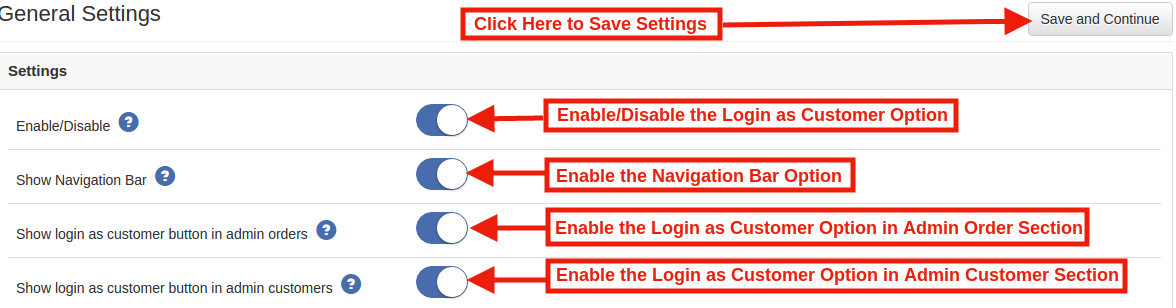
5.1 General settings:

The settings needed for users’ devices to run your mobile app are all covered under the General Setting tab. This tab has every generalized option required to sync the app.

A) Enable Plugin: To make your mobile app functional on users’ devices, enable the WooCommerce Mobile App Creator plugin.

B) Enable Spin and Win: When any user opens the app, enable the display of a gamified spin-wheel pop-up on the home screen. It can be used to provide discounts and deals in exchange for their email addresses, which are then used for marketing. The Spin and Win module from Knowband must be installed on your website in order for this functionality to function.

The Spin and Win Module will only function if the plugin has been installed in your store end.

C) Redirect on Cart Page when Add To Cart: This feature enables you to manage the “Add To Cart” button’s navigation. When a user taps the Add To Cart button, you have the option of sending them to the shopping cart or keeping them on the product page. This increases the likelihood of making additional purchases.

D) Display Short Description: Allow the short description of the product to appear on the product screen alongside the full description and other information.

E) Choose Layout: Pick the Home Page Layout you want for your WooCommerce app. According to different holidays and themes, you can create a variety of home screen layouts in the backend and use them as needed for your store.

Choose the preferred button color for your WooCommerce Mobile App under Option

F) App Theme Color: Pick your WooCommerce Mobile App’s preferred theme color.

G) Logo image: Put your store’s logo on the app’s top header by uploading it. This helped your brand gain recognition among global mobile customer s.

H) Disabled Shipping Methods: Select the shipping options you want to be hidden from the WooCommerce Mobile App.

I) Enabled CMS Pages: Select the CMS pages you want to appear on mobile apps.

J) Enable Request Log Reporting: Enable the log feature on mobile apps to learn more about any unusual behavior exhibited by your app.

K) Enable WhatsApp Chat Support: On your WooCommerce Mobile Apps, enable the WhatsApp chat option. Your WhatsApp number entered in the backend can be used by users to get in touch with you directly.

L) Enable/disable Phone Number Registration: In your WooCommerce Mobile App, enable the Phone Number login option and enable OTP authentication for your users.

M) Enable URL encoding for Image Links: Turn on this feature to allow the app to support characters other than ASCII.

N) Show Add to Cart Button on Product Block: The admin can show/hide the “add to cart” button for the product listing pages with the help of this button.

O) Enable Notification List Feature: The button allows the admin to enable the notification listing features for the app users. If this option is disabled, the notification tab will not appear in the app.

P) Enable Sign In Login Popup: The admin can enable or disable the login/sign-up pop-up for the new customers with this option.

5.2 Settings for Push Notifications

The Google Primary Services for the Push Notification to Mobile Devices are used by the WooCommerce Mobile App Creator for Android and iOS to harness the power of push notifications. It provides this practical marketing tool to increase sales by grabbing users’ attention right away. With the help of your WooCommerce Mobile App, you can easily highlight your current specials and offers. WooCommerce Mobile App Maker offers both automated and customized notifications.

A) Service Account JSON: With the deprecation of the traditional Firebase push messaging API, it has been replaced by a Service Account JSON file. In this section, admins can configure the JSON file from their Firebase account. You can either set it up yourself, or we can provide the Service Account JSON file during the app creation process for your convenience.

B) Order Creation Notification Enable/Disable: Enable/Disable automated Push Notification sent to app users upon successful order creation.

–> Title and Message for Push Notification: To create an order successfully, enter the title and message in the push notification setting.

C) Order Status Changed Notification: Users of the app can choose whether to receive automated Push Notifications when their previous order’s delivery status changes.

-> Title and Message for Push Notification: Enter the title and message whenever the delivery status of an earlier order is updated on the push notification setting.

D) Enable/Disable Abandoned Cart Notification: Enable/Disable automated push notifications that are sent to users whose carts have been abandoned but no successful purchase has been made.

Enter the title and message for the push notification sent to app users who have abandoned their carts.

E) Time Interval: The amount of time (in hours) between which app users who have abandoned their carts without making a purchase will receive Push Notifications.

5.3 History of Push Notifications

This tab includes a history of each type of push notification that was sent to a user with relevant information. The retailer has access to all previously sent notifications. Additionally, a custom notification created in the backend can be sent to the users using this tab. Through manually sent notifications, you can easily inform customers about any information or discounts pertaining to the store.
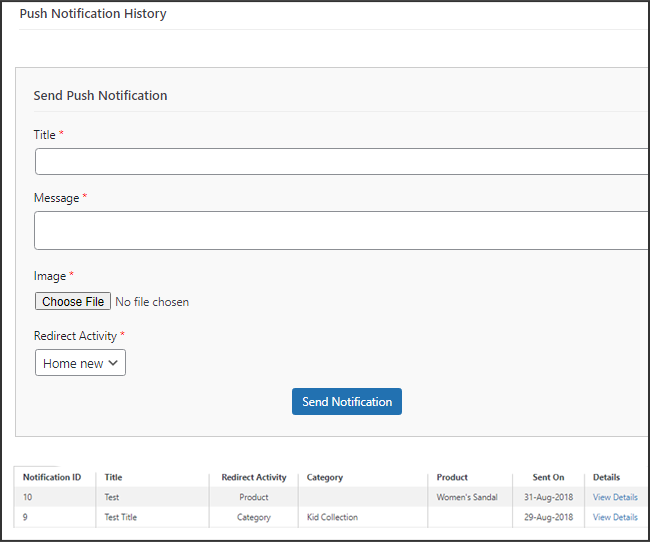
Send Notification: You can choose to manually send a notification to app users using this option. According to the screenshot below, you can customize the notification’s title, message, landing page, image, etc.
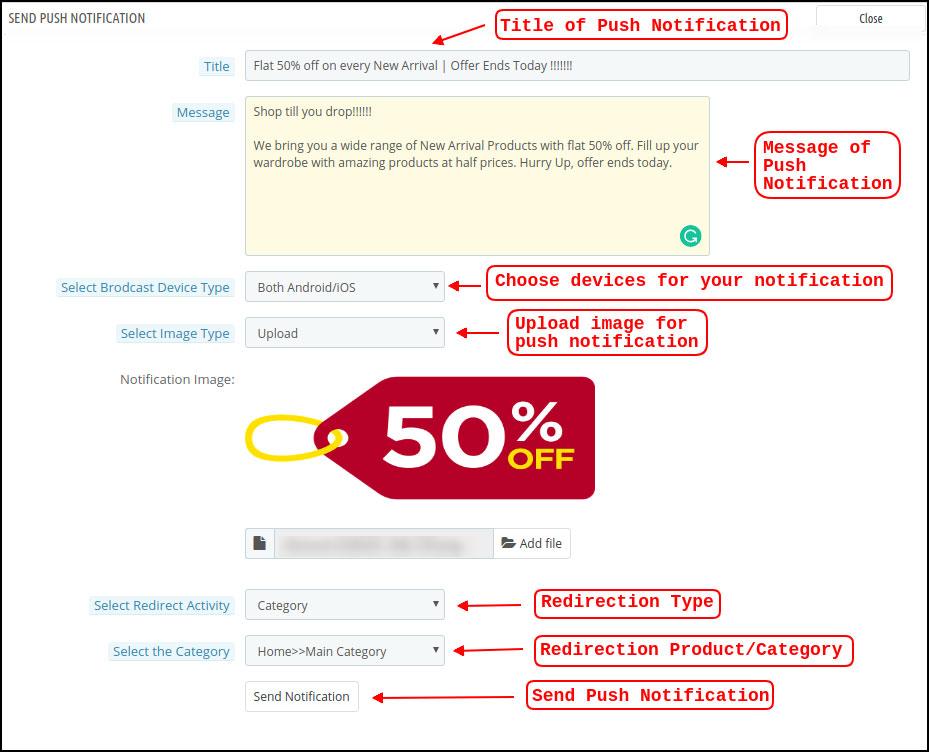
a) Push Notification Title: This is the name of the manual Push Notification you will be sending to app users.

b) Push Notification Message: The text of your manual notification that needs to be sent to app users.

c) Device Type: You can specify which users on Android, iOS, or both platforms you want to receive your manual push notification.

d) Image Type: You are able to upload the banner or image you want to use to support your notification. The banner image can be used directly through a URL or uploaded.

e) Notification Image: The store administrator is given the opportunity to preview the notification image and assess how it will appear on users’ apps.

The actual URL of the notification image that will be sent to app users is listed under item f.

f) Redirection Activity: Here, you can select from the Home Screen, Any Category, or Any Product to redirect your notification. Your users will be directed to whatever you specify when they tap the push notification.

g) Choose the Category/Product: For your notification, you can select any relevant category/product screen.

h) Send Notification: After creating and previewing your notification, it’s time to send it to your apps.

5.4 Payment Procedures

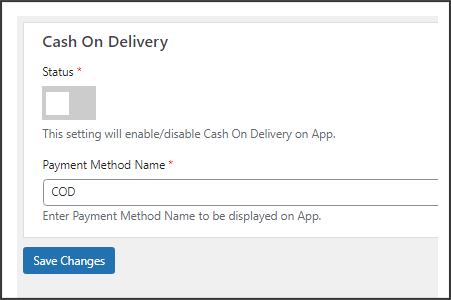
All types of website payment methods are supported by the WooCommerce Mobile App Creator for Android & iOS apps. It also includes the option for COD payments and the flexibility to include additional Web-View payment methods.

In our mobile app, the only available payment option is cash on delivery by default. Disable the COD method from the module’s back end, though, if you want to add the same payment methods as on your WooCommerce store. All of the payment options that are available on your website will work as intended in your mobile apps after the COD method is disabled.

.
5.5.1 Home Page Design

The WooCommerce Mobile App Builder plugin’s ability to design and create multiple home screen layouts using different designing attributes and elements is one of its most amazing features. As can be seen in the screenshot below, this tab contains a list of home screen layout that has been previously configured using different themes & fonts:
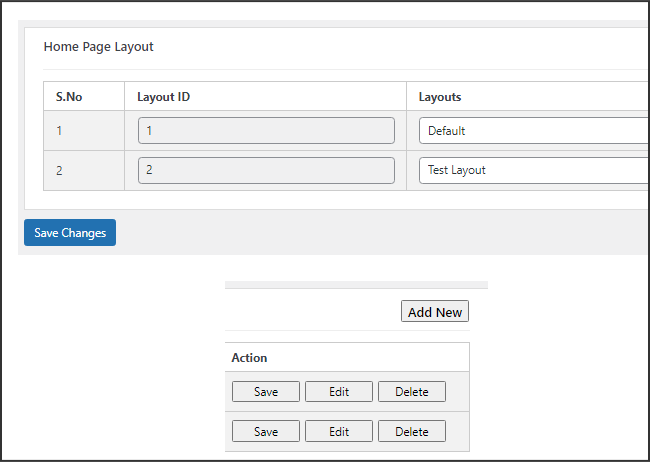
The following elements are available in the back-end to configure the home page layouts:

  • Top categories
  • Square Banner
  • Horizontal Sliding Banner
  • Grid Banners
  • Countdown Banner
  • Grid Products
  • Horizontal Sliding Products
  • Recently Accessed Products
  • Add YouTube videos/upload videos on the home page layout.
  • Login/sign-up pop-up for the non-logged-in users.
  • Add custom banners with custom dimensions.

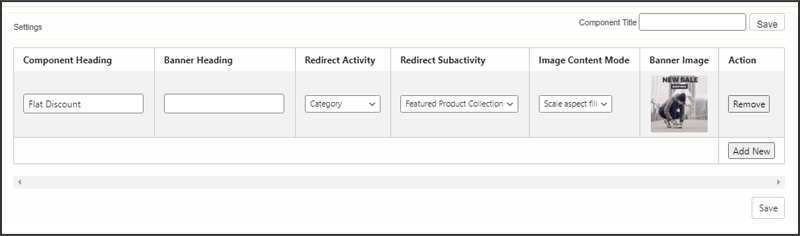
Any of these attributes can be set up by the store merchant and used to create and save multiple layouts. These layouts can be utilized based on the theme and specifications. Additionally, using just a drag and drop functionality, different elements’ positions can be changed.

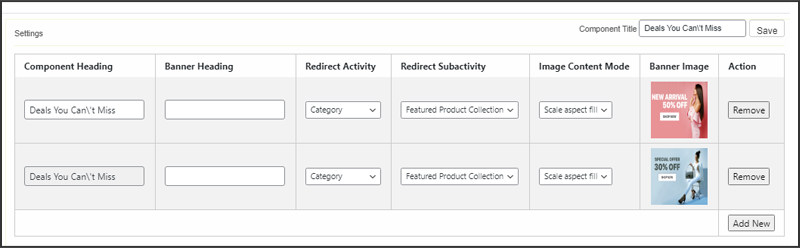
Top Categories:

Top categories can be configured, including their image and landing categories or products, and are shown as small squares on the home screen. Maximum categories available through the WooCommerce Mobile App Maker are 8, with a minimum of 4 required.

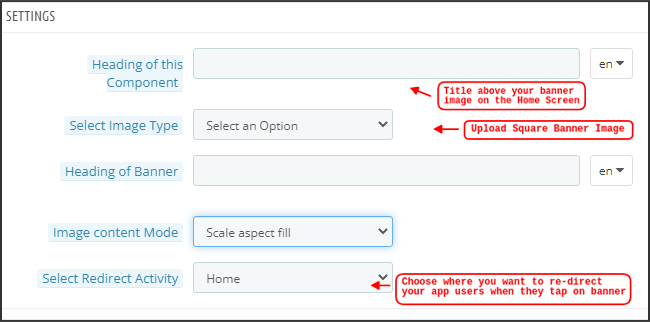
Square Banner:

Top categories can be configured, including their image and landing categories or products, and are shown as small squares on the home screen. Maximum categories available through the WooCommerce Mobile App Maker are 8, with a minimum of 4 required.
In the recent updates, we have also provided the option to showcase different videos with the YouTube Video/Video Upload section added in the “Select Image Type” section.
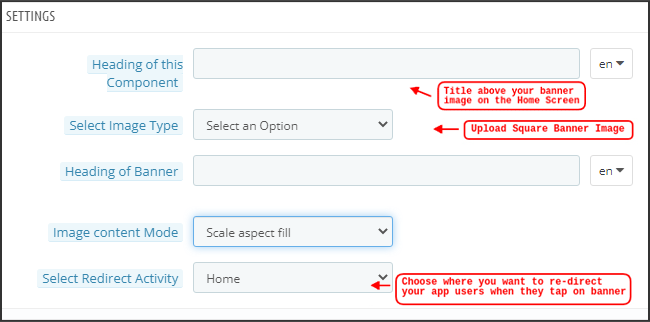
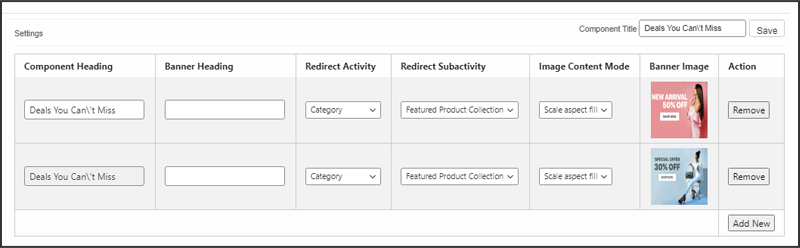
Horizontal Sliding Banner:

These rectangular sliding doors are available and fully customizable from the backend. Like banner squares, the admin can also highlight the banner sliders by adding video elements. Furthermore, now the admin can get the option to enter the time that he wants to set for the automated banner sliding.

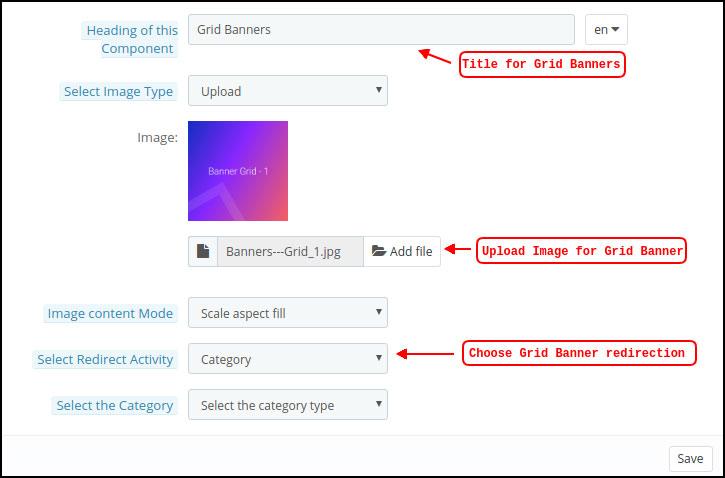
Grid Banners:

These are square-shaped banners that are listed in a grid format on the home screen. On the home screen, you can place as many banners as you like. You can also change the landing page’s image as needed.
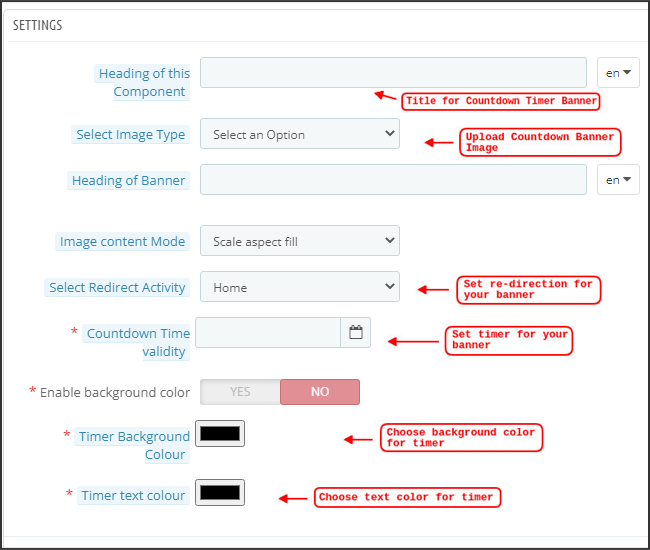
Countdown Timer Banner:

A countdown timer is available on the banner provided by the WooCommerce Mobile App Builder. You can choose the landing page and banner image, as well as set a timer for when you want to display the banner. The banner will automatically disappear when the timer expires.
Square Products:

Regarding banners, the WooCommerce Mobile App Creator provides products to show as square listings on the home screen.
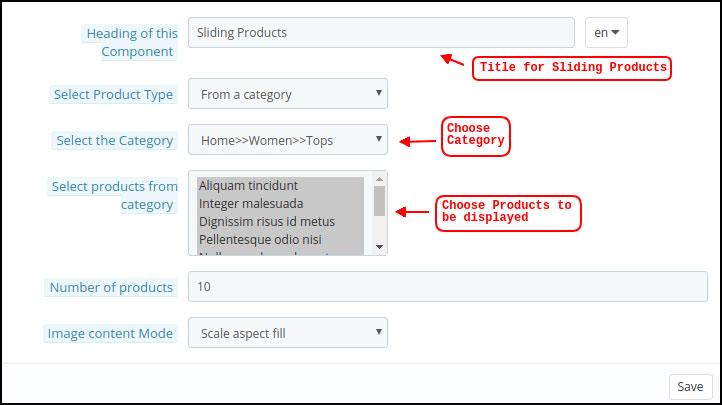
Horizontal Sliding Products

The products can be added as horizontal sliders. The products chosen may fall under any one particular category or may be highlighted as Best Sellers, Featured Products, etc.
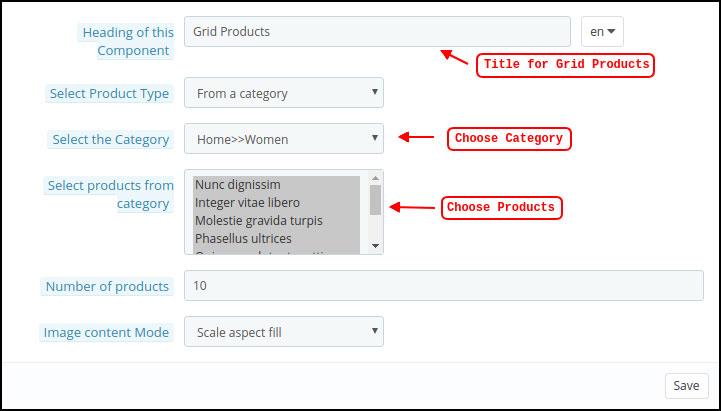
Grid Products:

Grid listings of the products can also be added to the home screen. Any category can be used to select the goods.
Products Recently Viewed: The WooCommerce Mobile App Creator offers the recent tab element, which shows the most recent products the user has viewed. To display the element on your home screen, simply include it in your layout.

Sign-Up Pop-Up: Capturing visitors’ emails is a major challenge in eCommerce. To simplify this, the latest version of the Magento 2 Mobile App Builder includes a login/sign-up pop-up feature. Store admins can add a pop-up that appears for non-logged-in customers, making it easier to collect emails by offering simple login options and increasing the chances of email opt-ins.

Note: When designing a layout in the backend panel, the store administrator can add up to 20 elements.

6.0 Screens for Mobile Apps

6.1 Home Screen

Your WooCommerce Mobile App’s Home screen will be exactly how you want it to be. You have complete creative control over how to design and create a home screen with the WooCommerce Mobile App Maker. You can create user-friendly home screen layouts using a variety of banners (Square, Grid, Sliding), products (Square, Grid, Sliding), countdown timer banners, and recent products tabs in the backend.
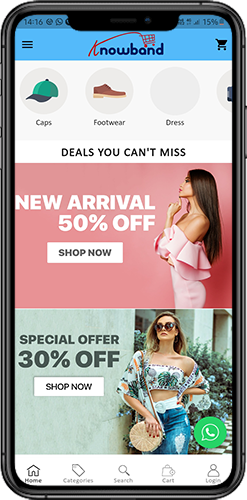
 

Additionally, different design elements’ placements can be changed based on the situation.

1. Dynamic Layouts: You can create and save different layouts in the backend and reuse them for different events and festivals by using a variety of elements. Your app’s home screen can be created and customized dynamically.

2. Brand Logo: The WooCommerce Mobile App’s top header’s left-middle section displays your store’s logo. The logo can be enabled or disabled, as well as having its image changed, from the module backend.

3. Search: The search feature enables mobile app users to find what they’re looking for quickly and easily. The WooCommerce Mobile App offers two ways to search for products: On the WooCommerce Mobile App’s bottom tab bar layout, there is a search option.

–> Text: Users of your app can search for desired products by entering a few relevant keywords. The WooCommerce Mobile App will display results for that keyword that are pertinent.

4. Wishlist Bag: The wishlist bag, which contains all bookmarked products, is visible on the top header of your WooCommerce Mobile App. Users of the app can store their wishlist items in a bag for potential future purchases.

5. Shopping Cart: The Shopping Cart can be found on the app’s home screen in the top-right corner.

The users can get to know about the products added to their cart right from there.

6. WhatsApp:

A live seller-buyer chat option can be found at the bottom right of the home screen. Customers who use your mobile app can easily and directly message you with any questions, and you can answer them right away.

6.2.1 An Accordion Menu (Navigation Bar)

On the website, there are WooCommerce Mobile Apps for Android & iOS that have been developed with accurate product categorization. Mobile shoppers can browse a variety of products with ease. The Accordion Menu is also available for all CMS pages. It offers the following alternatives:


1. My Account

All user data, including personal details, shipping addresses, and order details, can be found on the My Account screen. The customers have access to all of their information and can update both their login credentials and personal information.

2. Categories

These categories match those on your website exactly. For easy browsing, you can map them appropriately and provide a 3-level categorization to app users.

3. CMS Pages

Here, a variety of CMS pages from your website, including About Us, Contact Us, Terms & Conditions, etc., are displayed. From the WooCommerce Mobile App Builder backend, you can select the one you want to be shown on the mobile app.

4. Language

Your users can view the WooCommerce Mobile app in their native language using the language selection option.

5. Currencies(s)

The WooCommerce Mobile App also shows all currencies that are offered on your e-commerce website. Customers can view and buy products for the price in the currency of their choice.

6. Sign in/Sign out

This option makes it simple for your users to log in and out of the WooCommerce Mobile App.

6.3 Category Screen:

Your WooCommerce Mobile App includes all of the associated categories, parent categories, and subcategories. The category screen is created with minimal clutter in

1.Two fundamental views:

Grid and List. In every listing, the product name, image, price, and discount are shown along with a button to add them to your wishlist bag. Layered navigation on mobile apps created with the WooCommerce Mobile App Builder makes finding products much easier. The category screens offer the following choices:


2. Sort:

Customers can choose the preferred order for sorting the category product pricing using this option. Your apps have two sorting options: Price: Low to High and Price: High to Low.

3. Filter:

The users can filter out the products using various selection options provided under the filter tab.

6.4 Product Screen:

Your WooCommerce Mobile App’s product screen is straightforward and interesting. Along with the name and price, various images of the same item are displayed. Depending on inventory status, the product availability is also indicated as “In Stock” or “Out Of Stock”. It includes the next additional items.
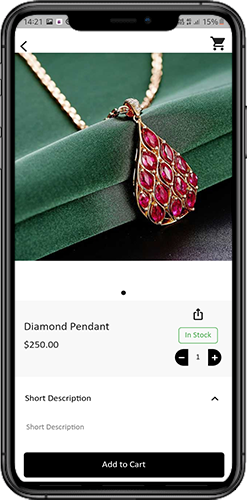
1. Options

Product Options: This screen shows all available options for the product, including size, color, and so forth. The product choices here match those on the website.

2. Brief Description

Users can quickly decide after reading the brief description of your product.

3. Product Details and Care

This page displays all of the product information that is listed on the website. Users of the app can access this page for detailed product information.

4. Add To Wishlist: By tapping “Add To Wishlist” on the left bottom of the product screen, users of the mobile app can directly bookmark the product.

5. Add To Cart: As the name implies, clicking the “Add To Cart” button adds the product directly to the shopping cart, allowing users to continue with the transaction.

6. Product Social Sharing

On this screen, you have the option to share your product on various social networks, including Bluetooth and email. Users of the app can invite many users to your app by sharing the products with their friends and family on various social media platforms.

6.6 Login Screen

The WooCommerce Mobile App Creator streamlines the sign-in/registration process and provides a variety of one-tap login options:

1. Login

Using their email addresses as sign-in credentials, app users can authenticate and access apps.
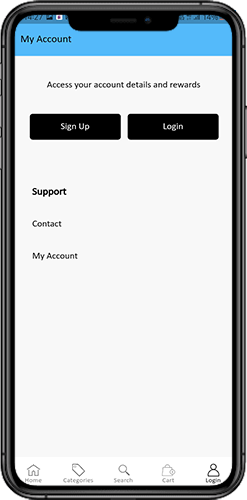
2. Register

The mobile app allows all new app users to register and create an account on the store. Only pertinent information is requested on the WooCommerce Mobile App sign-up form.

3. Use Phone Number to Log In

The easier and more reliable phone number login option that your mobile app offers makes it simpler for users to login and verify their OTP.

4. Use your fingerprint to log in

Additionally, your users have the option of using fingerprint authentication to sign in. Users can now quickly access apps thanks to this.

5. Login with Facebook

Users can access the app by logging in with their Facebook credentials.

6. Login with Google

The users can log in to the app using their GoogleAccount within no time.

7. Shopping Cart Screen:

All of the items in your shopping cart are displayed on the WooCommerce Mobile App’s shopping cart screen. The product’s name, quantity, total price, and shipping cost are all visible to app users.
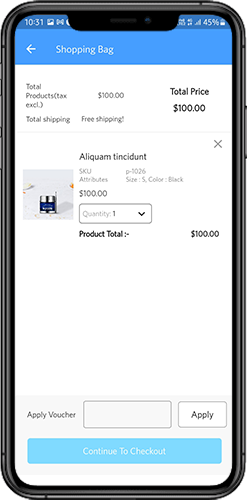
1.Use Voucher

By entering active coupons and vouchers that are currently active on your website, this option enables users to receive discounts and offers.

2. The full product cost

Users can access this page to view the full cost of their shopping bag. It is automatically updated whenever there is a change in the quantity of a product or an addition.

3. Revision of Product Quantity

With the “Update Quantity” option, app users can even change the product quantity.

4. Remove the item

Users of the app can easily remove a product from their cart by selecting “Remove” from the menu.

6. Continue To Checkout

By selecting “Continue To Checkout,” front-end mobile app users can continue to the checkout & payment screens. On the checkout screen, they will receive a redirect.

6.8 Checkout Process

The checkout process in the WooCommerce mobile app Builder is made simple. In the mobile app’s checkout process, front-end users have the option to choose the shipping details, billing details, order numbers, order comments, and so forth.
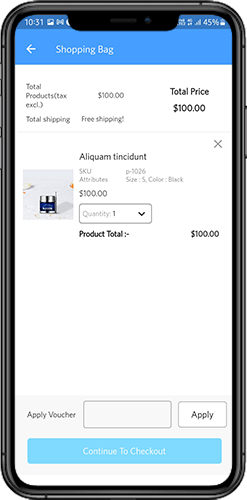
Orders can be placed using just a few easy steps on the Android and iOS apps.

1. Customers can choose and add the desired item to their shopping carts. When the shopping bag is clicked, the user can also choose the desired product quantity. Users of the mobile front-end app can also view the total number of products and shipping costs.

At the bottom of the same page, the customer can also choose to use any coupon or coupon code.

2. The user can review the order and see several details after selecting the Continue to Checkout option. such as the cost of the product, the cost of shipping, the shipping address (which can be changed on the same page), the order summary (the number of products), the total cost, and so forth.

On the same page, the customer can also choose their preferred method of shipping. The order comment option that appears at the bottom of the screen allows the user to also include any special requests or requirements.
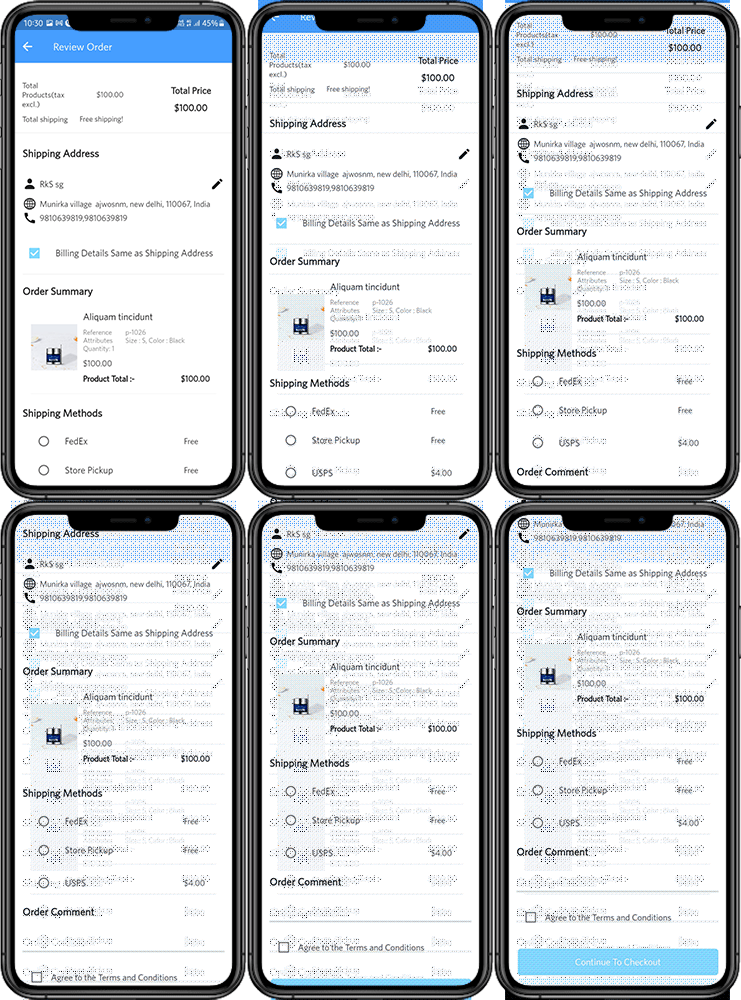
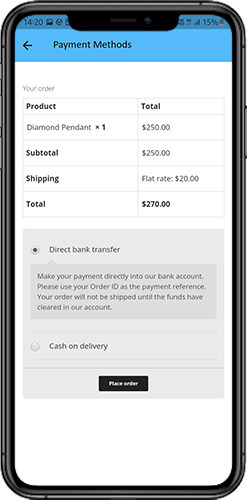
3. After selecting the option to “continue to checkout,” the user will be taken to the screen that asks for their payment method.

Users can choose from all of the website’s payment options on this screen. The shopping app includes a cash-on-delivery option as a standard form of payment.

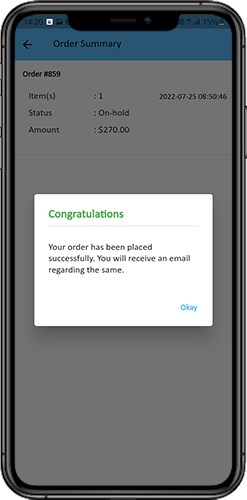
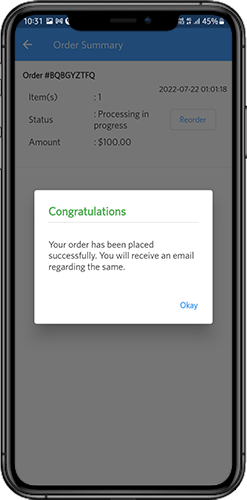
The user will be taken to the order summary screen after completing the payment activity. where the customer can view the status, cost, and other information regarding their orders. Users of the front-end mobile apps will receive the order confirmation popup messages on their mobile phone screens as well.
6.9 My Account Screen

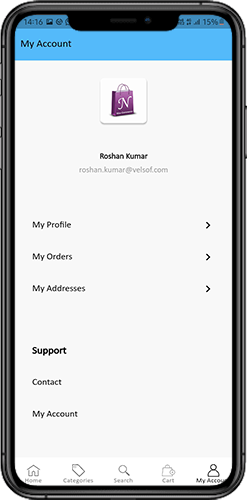
Users of the Android/iOS eCommerce app can view all account information, including a history of previous orders, on the My Account screen. The following options are available on the My Account screen:
  1. Order History

The users learn all the details of the earlier-placed order. The date the order was submitted, the order number, the price, and the delivery status are all visible to the users screen.

2. Update Profile:

Users can also update their previously saved profile information, such as their first or last name, phone number, and password.

3. Delivery Address (s)

Users of the app have access to the full list of saved shipping addresses. From here, you can also add a new shipping address.

4. Order Details:

The complete list of previously placed app orders is available to app users.

5. Reorder function

By selecting the “Reorder” button, you can directly reorder a product. By pressing a single button, all previous orders will be added to the cart.

6.10 Order Detail Screen
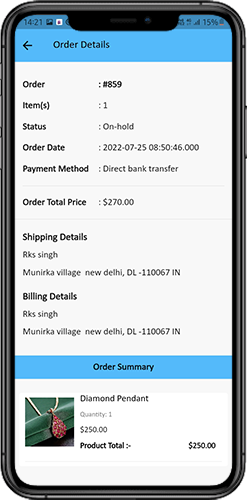
The WooCommerce eCommerce App’s order details screen shows every aspect of the order, including the shipping address, a summary of the products, the shipping and payment options, and the total cost. From this screen, users can even follow the delivery of previously placed orders.

7.0 Video Tutorials

PrestaShop SEO Optimizer- Clean URLs & 301/302/303 Redirection Module- User Manual

1.0 Introduction

A higher ranking on the search result page of the search engines like Google, Bing, and others is the biggest challenge for an online business. With a higher ranking, the chances of better sales also increase. In order to improve the search ranking, it is mandatory for the store owners to follow the guidelines issued by the search engines. SEO (Search Engine Optimization) is the way to increase your online presence for a better ranking on the SERPs. The On-Page SEO activities involve – website optimization, meta tag optimization, SEO-friendly URLs, keyword density and more. Among these factors, one factor is the SEO-friendly URLs which play an important role in the ranking. As per Google guidelines, Google recommends that the URL structure of a website should be as simple as possible. SEO-friendly URL is also useful for indexing process flow by the search engine bots.  In clear words, comprising SEO-friendly URLs for a website increases the chances for a website to get higher ranks in the search results. The default URL structure of PrestaShop SEO Optimizer Module includes the product id in the product page URL, Category page URL in the category page URL.

To help the store admin to create SEO-friendly URLs, Knowband has developed the URL Cleaner (SEO-friendly) Module. This PrestaShop SEO Optimizer – URL Cleaner Addon automatically generates the SEO-friendly URL by removing the ID from the URLs of products, categories, suppliers, manufacturers, CMS and all other pages of your store. It allows the admin to implement the 301, 302 or 303 redirection as per the requirement.

1.1 Features of the Prestashop URL Cleaner (SEO-friendly) Addon:

1. PrestaShop SEO-friendly URL Addon is a module that automatically converts the default URL into SEO-friendly URL.

2. The Knowband PrestaShop Rewrite URL Module removes the auto-generated ID from the URLs of the products, categories, suppliers, manufacturers, CMS and all other pages of your store.

3. With the help of this PrestaShop Fixed Duplicate URL Addon, the admin can view the duplicate URL list and modify or remove the URL as per the need.

4. PrestaShop URL Cleaner Module provides an option to the store merchant to redirect the old URL to the new URL. The Store admin has 3 choices on redirects i.e. 301 redirects, 302 redirects, and 303 redirects.

5. SEO URL PrestaShop extension is a module that helps the store merchant in improving SEO.

6. This PrestaShop URL Rewriting Module by Knowband helps the eCommerce owner to improve the website SEO.

7. The PrestaShop store admin can set the URLs to end with or without .html by using this Prestashop URL Cleaner Addon.

8. PrestaShop URL Id Remover Module is multi-store compatible.

9. SEO-friendly Prestashop URL Cleaner Module back-end interface extremely easy to use.

10. With this PrestaShop 301/302/303 Redirect Module, the admin can redirect the N no. of the old URLs to new URLs.

Technology for Development

Language: PHP

FrameWork: PrestaShop

2.0 Steps For Installation

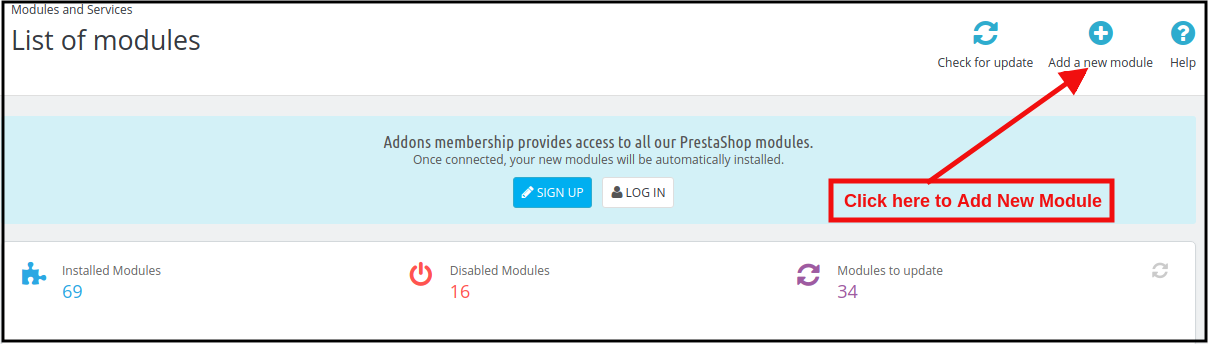
1. To upload the module click on the “Add a new module” button.

2. After clicking on Add New Module now select the module zip file.

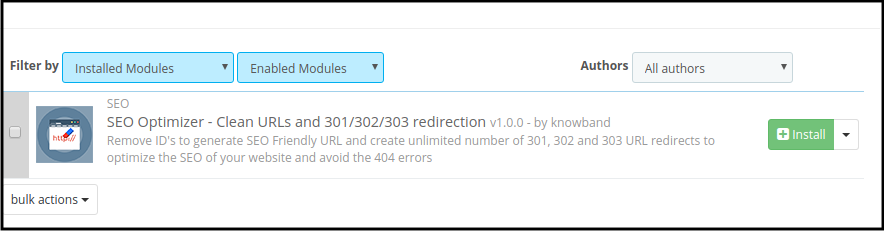
3. Now, You can find the PrestaShop SEO Optimizer Module in the module list and Click on the Install link to install the plugin.

4. After installing the module, the admin will be able to configure the module.

3.0 Admin Interface

After installing the module in the PrestaShop store, the store owner can make the changes without any hassles. There are the following sections available to the admin interface:

1. Module Configuration
2. Duplicate URL Rewrite Products
3. URL Redirection List

Each interface of this PrestaShop URL Cleaner (SEO-friendly) Module is explained below.

3.1 Module Configuration

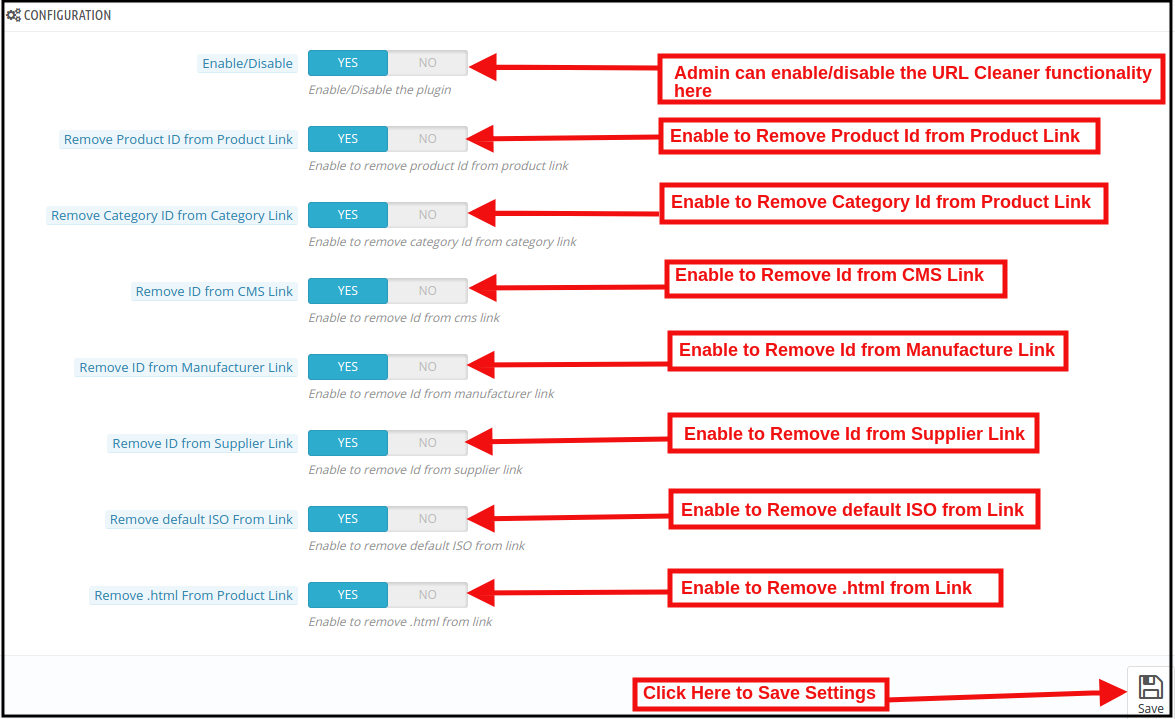
On clicking on the configure link on PrestaShop 301/302/303 Redirect Module, the system will open Configuration tabs of this Prestashop plugin by default as shown in the screen below:

Initially, the fields of this PrestaShop URL Cleaner(SEO-friendly) Addon in the above form will be already filled with their default values.
Enable/Disable: This field will enable the URL Cleaner feature. If enabled, the PrestaShop URL Cleaner will automatically convert the default store URL to SEO-friendly URLs.

Remove Product ID from the Product Link:

The default URL structure of the PrestaShop product page contains a product id and a URL like https://psm.knowband.com/urlcleaner/16/en/casual-dresses/3-printed-dress.html. As you can see the default product URL has the product id. After enabling this feature, the PrestaShop URL Cleaner Module will automatically remove the product id from the product link and the updated link will appear like this:

https://psm.knowband.com/urlcleaner/16/blouses/blouse

https://psm.knowband.com/urlcleaner/16/casual-dresses/printed-dress.html

Remove Category ID from the Category Link:

The default category page link contains the category id and a URL like https://psm.knowband.com/urlcleaner/16/8-dresses. This URL is complex and not SEO-friendly. By enabling this remove category option, the PrestaShop URL Id Remover Module removes the category id from the category link and after removing the category, the updated URL will appear like this:                  https://psm.knowband.com/urlcleaner/16/women/dresses

Remove ID from the CMS Link

The standard URL structure of the PrestaShop CMS page contains numeric values like

https://psm.knowband.com/urlcleaner/16/content/4-about-us. Using this option of PrestaShop SEO-friendly URL Module, the admin can enable this setting to remove the id from the CMS link and the automatic generated URL would look like:

https://urlcleaner16.knowband.com/content/about-us

Remove ID from Manufacture Link

By default, the Manufacture URL contains the Manufacture id in the manufacture URL. With the help of this extension, the admin can remove the id from the manufacturing link.

Remove ID from Supplier Link

PrestaShop does not have the feature to remove supplier link from the URL. After enabling this option, PrestaShop URL Cleaner Module automatically removes the id from the Supplier link.

Remove default ISO from Link

PrestaShop URL Cleaner (SEO-friendly) Module removes the default language’s ISO code from URLs and removes the language ISO code from shop’s default language. So, in this case, it will remove /es/ from all Spanish URLs, but other languages in your shop will still have ISO code in the URL.

For example: By default, the product URLs are like

https://urlcleaner16.knowband.com/en/casual-dresses/printed-dress after enabling the option URL would look like:

https://urlcleaner16.knowband.com/casual-dresses/printed-dress

Remove .html from Product Link: By enabling this option, the PrestaShop SEO Optimizer – Clean URLs & 301/302/303 redirection module remove the .html from the default product URL.

3.2 Duplicate URL Rewrite Products

In case after removing the product ID from the product’s URL, if there are any two product’s URLs are same.

For example, The two product’s URL contains different Id like:

https://psm.knowband.com/urlcleaner/16/en/casual-dresses/3-printed-dress.html
https://psm.knowband.com/urlcleaner/16/en/casual-dresses/4-printed-dress.html

After enabling the remove product id option, the module removes the product id from the URL and product URL like:

https://psm.knowband.com/urlcleaner/16/en/casual-dresses/printed-dress.html

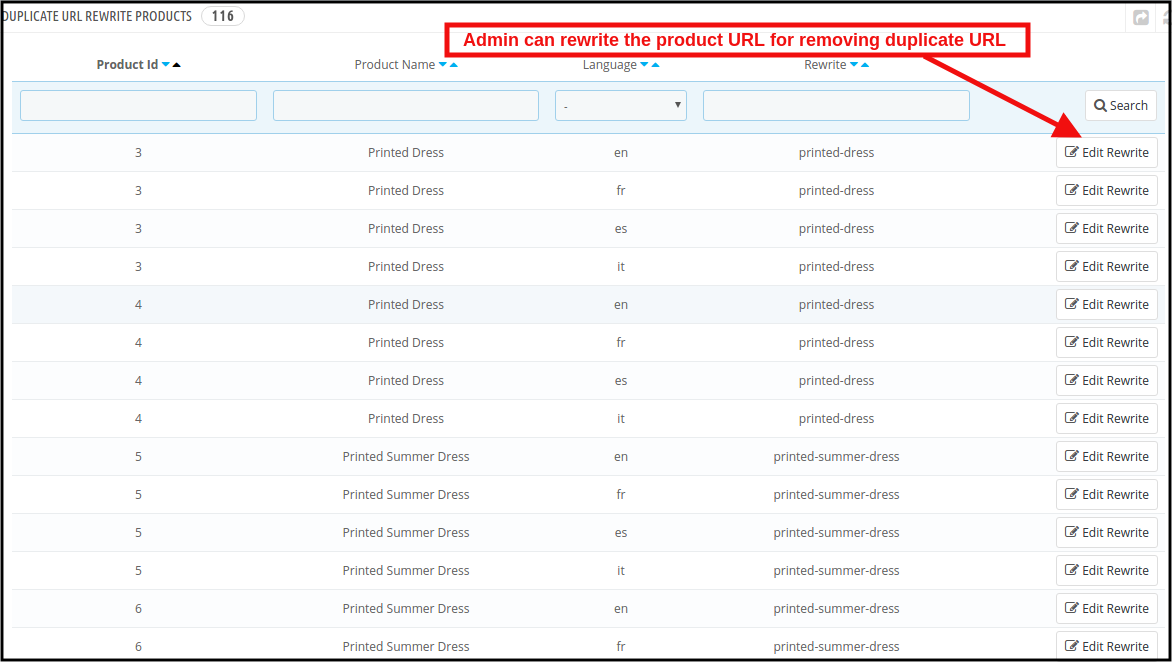
Then this product’s URL list will show on this tab. Find below the attached image:

In this tab, the admin can view all the Duplicate URLs and they can update rewrite value the products as per their convenience.

3.2.1 How to edit the Duplicate URL?

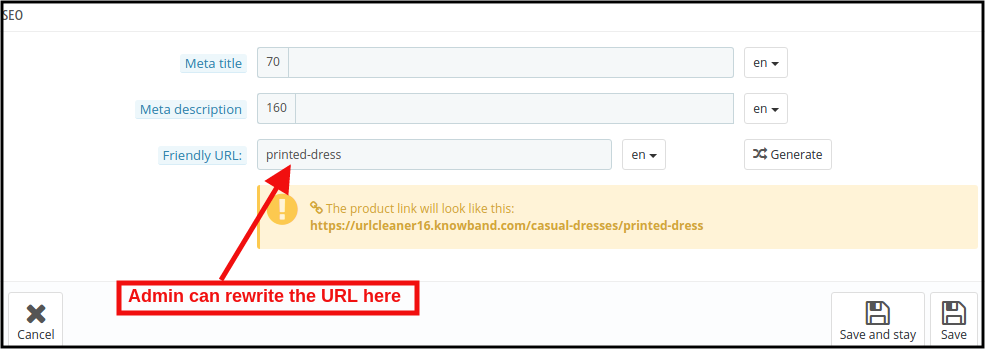
When the store admin clicks on the rewritten link, the PrestaShop URL Redirects Module will redirect the admin to the below-mentioned page:

Here, the store admin can rewrite the duplicate URLs. As soon as the admin will make changes to the URLs, these URLs get removed from the duplicate URL list.

3.3PrestaShop SEO Optimizer Module URL Redirection List

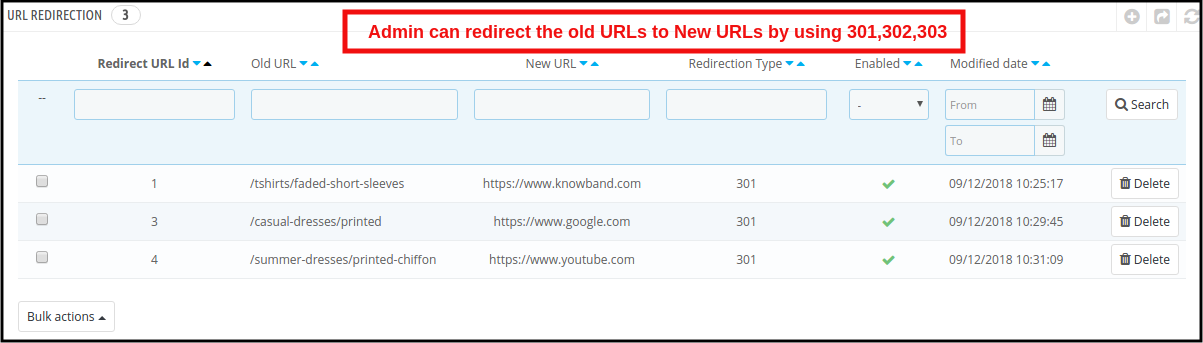
If the store admin changes the URL of any particular product page, the online retailer needs to redirect the old URLs to the new URLs. This PrestaShop 301/302/303 Redirect Module allows the PrestaShop store admin to redirect the old URLs to new ones. This PrestaShop SEO Optimizer Module offers the three redirection options including 301, 302 and 303 to the store owner.

3.3.1 How can Admin Redirect the Old URLs to New URLs?

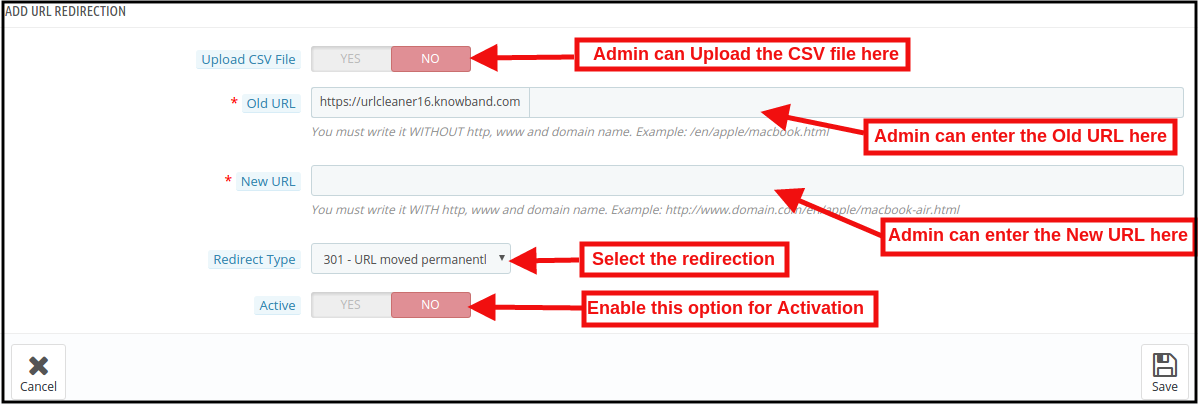
For the redirection of the old URLs to the New URLs, the store admin needs to click on the “Add New” button. After clicking on the Add New button, the below mentioned page open:

Here, the store admin can enter the Old URLs and New URLs, select the redirection from 301 (for permanent redirection), 302 (for temporary redirection) and 303 (to get the method used to retrieve information).

The admin can easily redirect the Old URLs to the New URLs.

URL Redirection through CSV file

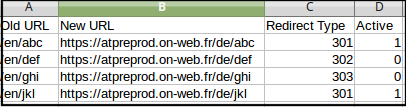
Upload CSV file: In order to redirect the multiple URLs. You can enable the Upload CSV file option. After enabling this option, the admin will be able to download sample CSV file and as per the fields defined in CSV file, the admin needs to enter the details in the CSV and upload the same.

After enabling CSV upload option, the below mentioned page open:

Choose CSV File: The Store admin can upload the sample CSV here for redirecting the products page.

Sample CSV File Format:

4.0 Front End

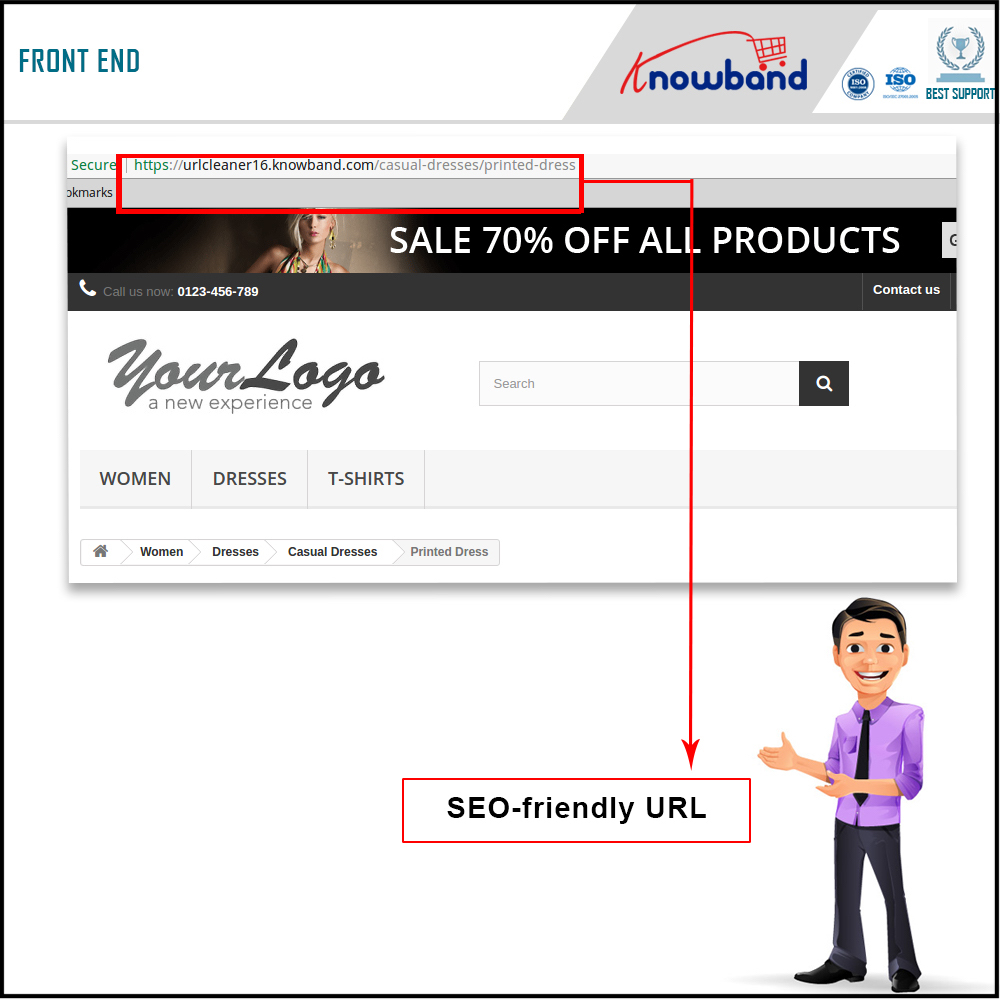
After enabling the PrestaShop URL Id Remover Module by Knowband at the front-end, the users will be able to see an SEO-friendly URL that will clearly highlight the purpose of the page. Google also recommends “A site’s URL structure should be as simple as possible. Consider organizing your content so that URLs are constructed logically and in a manner that is most intelligible to humans (when possible, readable words rather than long ID numbers).” This will also help the admin in improving the search results of the website.

The SEO-friendly URL would appear as follows:

For more information about PrestaShop SEO Optimizer- Clean URLs &301/302/303 Redirection Module:

PrestaShop SEO Optimizer- Clean URLs &301/302/303 Redirection Module Admin Demo

PrestaShop SEO Optimizer- Clean URLs &301/302/303 Redirection Module Front Demo

How to download your Android/iOS app from Diawi link?

What is Diawi?

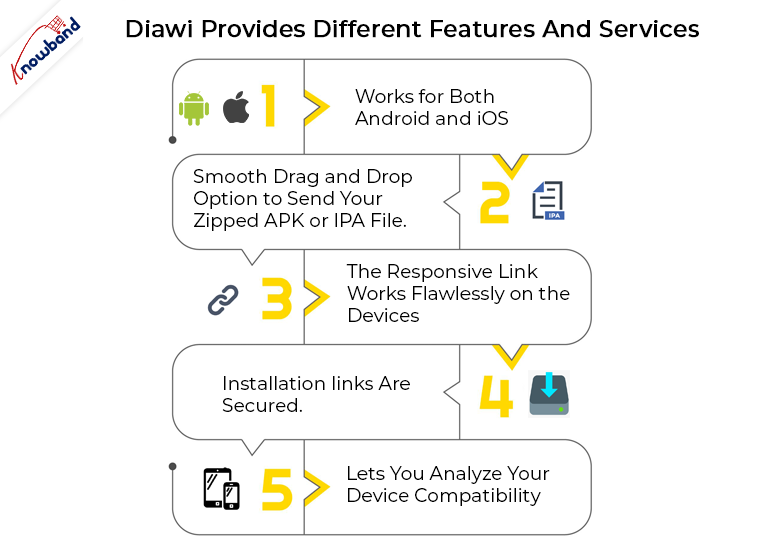
Diawi is a tool used by the developers for sending their app directly to the handheld devices. This is basically used for in-house applications. Apart from just app deployment, Diawi even provides different features and services. Let me sum them up in the following list for you:

  1. Works for both Android and iOS.
  2. Smooth drag and drop option to send your zipped APK or IPA file.
  3. The responsive link works flawlessly on the devices.
  4. Installation links are secured.
  5. Lets you analyze your device compatibility.

How does Diawi works?

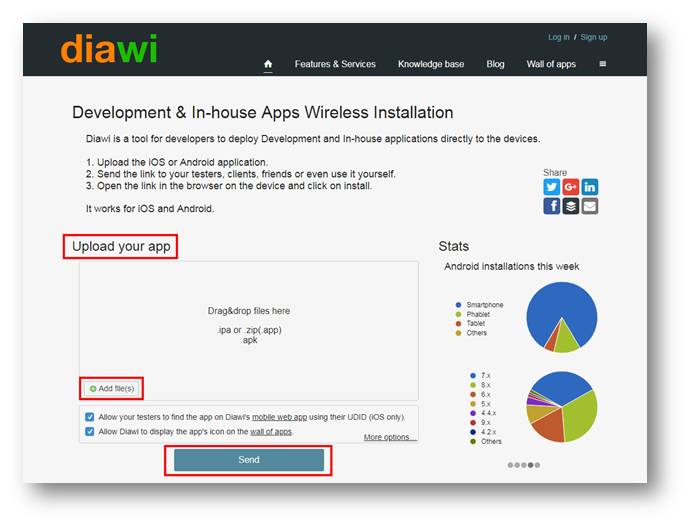
First, you are required to upload the .ipa or .zip file containing the source code of your application into Diawi tool. Once you have uploaded the file, it will take some time to process depending on the size of your application. Once the processing is complete, you can send the link to the device.

How can you install the app with the link?

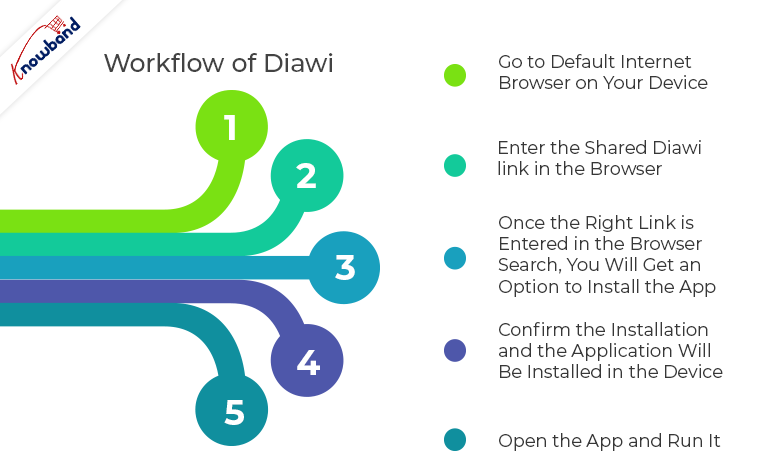
Well, the workflow of Diawi is of few simple steps. If followed correctly, the app deployment is just a matter of few screen taps. Find the steps below:

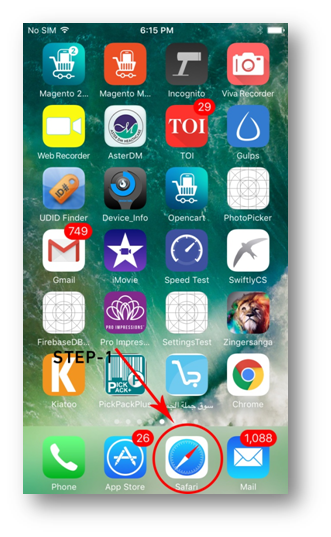
Step 1: Go to default internet browser on your device (Chrome for Android and Safari for iPhones).

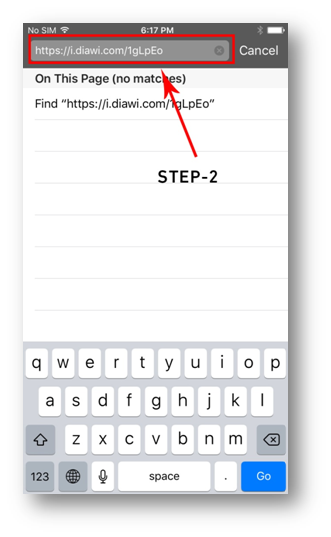
Step 2: Enter the shared Diawi link in the browser.

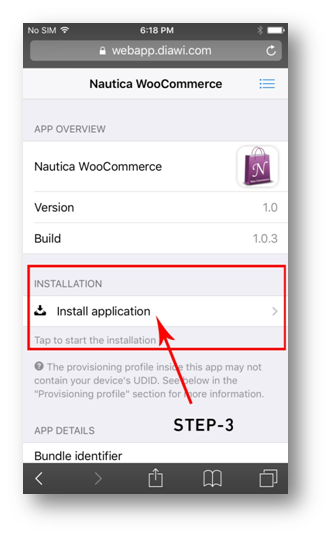
Step 3: Once the right link is entered in the browser search, you will get an option to install the app.

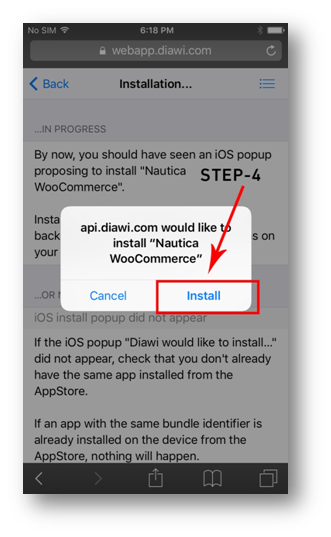
Step 4: Click on the install option and you will be redirected to the next page. Confirm the installation and the application will be installed in the device.

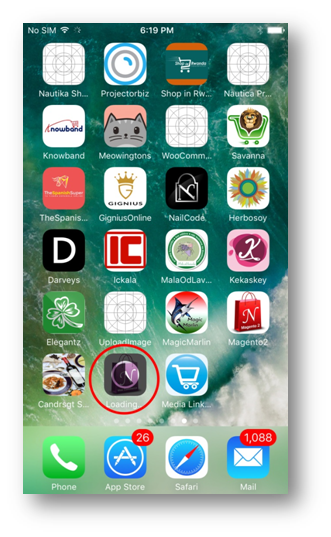
Note: You can check the installation progress on the drawer.

Step 5: Open the app and run it.

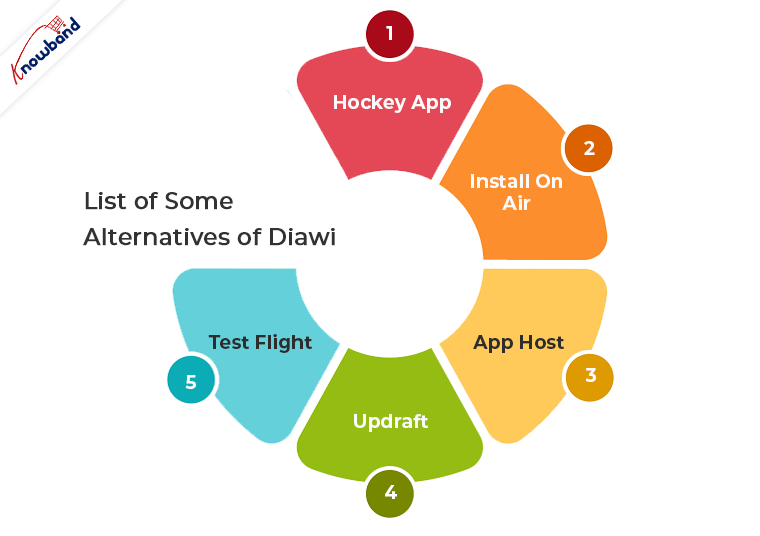
List of Some Alternatives of Diawi 

1. HockeyApp
2. Install On Air
3. App Host
4. Updraft
5. Test Flight

Related Articles

How long will the link remain active?

Diawi links get expired after a few time. The link availability depends on the following factors:

1. Last installation date

Active link duration also depends on the date of the last installation. If no installation is done with the link, then, the file upload date will be considered.

2. Number of installations left

It also depends on the number of installations left from the shared link.

3. Manual disable

You can manually disable the diawi link if it has been created using an account.

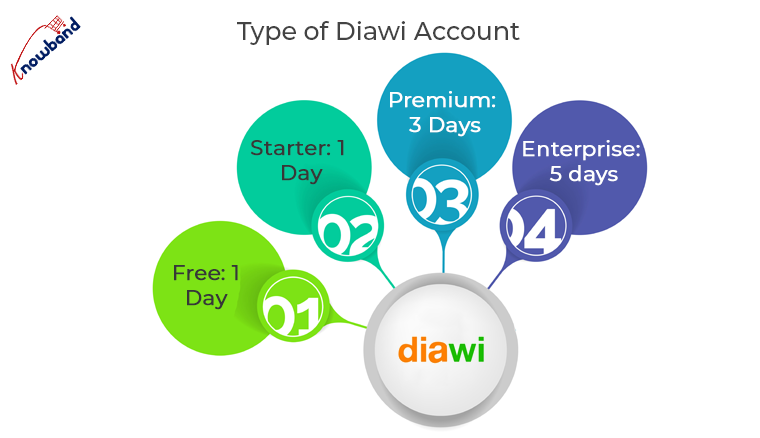
4. Type of Diawi Account:

  • Free: 1 day
  • Starter: 1 day
  • Premium: 3 days
  • Enterprise: 5 days


Conclusion

So, these were a few simple steps to deploy your app to any device with diawi. I hope this information will benefit you.

Now, you can convert your store into a Mobile App with no coding. Check the No Code Mobile App Solution provided by Knowband for all the major platforms like Prestashop, Opencart, Magento, Magento 2 and Woocommerce.

Magento targeted by malware attack

As per the latest news, Magento has confirmed that the platform has faced a rigorous malware attack lately which resulted in affecting its 5000 end-users. The malware is reported to be named as MagentoCore which simply unveils the passwords. This malicious malware was designed with the motive to compromise the stores running on the Magento platform.

Why Magento?

We all know the fact how Magento has built its reputable place in the eCommerce industry. Along with advanced features and frugal accommodations, it became the top choice of the store owners. Meanwhile, Magento also became the preferred cull of malware.

Magento spokeswoman quoted, “We’re committed to ensuring the security of our customers and encourage all merchants to stay up to date on security patches“. She also said,” Merchants should sign up for the Magento Security Scan Tool and schedule regular scans of all of their domains. This free tool allows merchants to monitor their sites for security risks, [including vulnerability] to brute force attacks. The Security Scan Tool also monitors for malware.”

Magento, being an Open Source Platform sanction its users to share their custom features as per their individual requisites. The platform even allows the Store Admin to tweak the existing features on their own as transparency exists in the source code. Lately, Magento 1 support has been increased until June 2022. Though many e-merchants are migrating to Magento 2 platform, there is still a sizable base for Magento 1. So, it would be better that Magento soon comes up with any solution for this issue.

EU Antitrust charges to be imposed on Qualcomm over iPhone Modem lawsuits in Germany

Qualcomm, the leading chip-maker organization is going to face penalties from the European Commission over Antitrust charges in upcoming days. The company is being alleged for paying Apple to eschew the rival companies in the industry.

Why will Qualcomm be under EU scrutiny?

Apple brought this antitrust actions of Qualcomm in light by filing a report to the Directorate-General for Competition earlier this year. Now, EU officials are looking to query Qualcomm over the allegations. The complaint filed against Qualcomm contains its attempts of patent enforcement in Germany. The motive behind this Antitrust action is directly against Apple by coercing them into acquiring its chips instead of sharing the supply chain with Intel.

The two companies were in peaceful agreement with each other before Intel came into the picture. Qualcomm used to provide chips to the iPhone maker in cheaper cost. But, as Apple shifted their interest to Intel, Qualcomm tried to draw the line.

This patent battle of Qualcomm with Apple had been the highlight for quite a few time. Earlier, Qualcomm even asked for blueprints to Intel Chips used in the iPhones. The company wanted the blueprints of the chips used in Apple’s iPhones, but Intel went back to providing documents related to the latest radio frequency components being used in recent Apple phones.

Will Qualcomm be proved guilty?

The chip-maker has come out from other Antitrust cases as well. Qualcomm’s dispute with Taiwan ended with a settlement this year. Well, the trials of this case with Apple will begin in next few months. We will find out then if the chip biz company bypasses the charges or another EU fine is down the road.

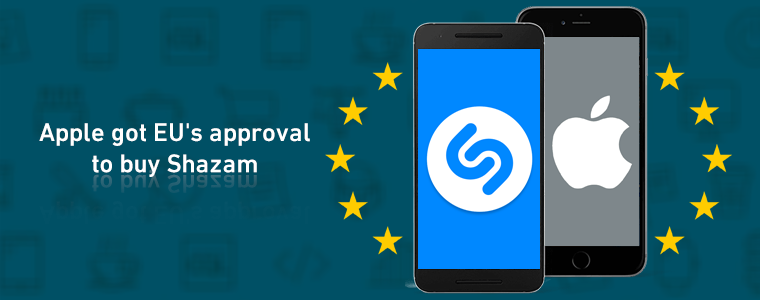
Apple won EU Antitrust Approval for acquiring Shazam

The European Union have shown a green signal to Apple in the ongoing case of Shazam buyout. Apple, in the month of December, last year showed its keen interest in buying Shazam for $400M. The iPhone maker’s motive behind this deal was to give a competition to Spotify music app.

The European Union started investigating the case in the month of April this year. EU had concerns regarding this case that Apple will misuse the data of the app in driving the existing competition from the industry. Well, turns out Apple has surpassed all the apprehensions and got the music discovery app.

EU competition commissioner Margrethe Vestager said, “After thoroughly analyzing Shazam’s user and music data, we found that their acquisition by Apple would not reduce competition in the digital music streaming market“. She even strengthened her statement with,” Data is key in the digital economy. We must therefore carefully review transactions which lead to the acquisition of important sets of data, including potentially commercially sensitive ones“.

A few days ago, we reported that Apple is set to win EU’s permission of Shazam buyout. It finally happened today. Let’s see how Apple will use this music discovery app in future and how it will affect the Spotify’s position in the market.

End to all the Rumors: Magento 1 support confirmed to June 2020

Last week, we discussed how the faint rumors about the end of Magento 1 are circulating in the market. Some experts were even suggesting to instantly migrate to Magento 2 as Magento 1 were dropping their support. However as confirmed by Magento Officials, it isn’t happening that early.

Magento 1 support extended to June 2020

Yesterday an official announcement was made by the Magento officials regarding the extend of Magento 1 support. Magento 1 support will be provided until June 2020. Till the date comes, the support for the previous platform will be as follows:

a) Support for Magento Enterprise Edition

For Enterprise Edition (Magento Commerce 1), the support will include both quality fixes and security patches. A Lifecycle Policy has withal been shared with complete Enterprise Edition support details.

b) Support for Magento Community Edition

On the other hand, for Community Edition (Magento Open Source 1), the company aims to provide the security patches up to June 2020 in order to keep the sites compliant and secure. Detailed security patches support are mentioned in their Legal Terms Page. An official notification regarding this announcement has also been sent to all the existing Magento 1 store owners yesterday.   

Why June 2020?

Magento, in regard to showing their concern with e-merchants, has finalized the cessation date to be June 2020. The reason abaft this is pretty straightforward. They optate to provide enough time to store owners for migrating their business to the new and updated platform. They are giving both time and confidence to users to make a successful transition without any kind of panic or trepidation.

Why Magento 2?

The cloud commerce platform, Magento even went on discussing the advanced functionalities which we will experience in Magento 2. They described a few features and technicalities involved with the Magento 2 platform which would hopefully make a difference. I would sum them up in bullets for you :

  • Magento 2 delivers unmatched flexibility, thus, will help in enabling virtual eCommerce experience.
  • Magento 2 provides superior performance in the cloud hosting.
  • It is completely free from the IT bottlenecks with improved content and intelligent business capabilities.

The company said that currently there are more than 2000 Magento 2 extensions and numbers incline to elevate in the future. As more e-merchants will connect with the platform, it will surely find its worthy place in the market. Magento has even asked all the Magento 1 store owners to commence planning for up gradation to Magento 2 platform.

Conclusion:

So, for all the eCommerce merchants out there, no need to worry anymore. You have got enough time to make a successful transition to Magento 2 setup. This time could be the turning point for your business if you use it for making better business planning and implementation along with the platform up-gradation.

Time for some great App Marketing Campaigns from which we require to learn

Convincing customers isn’t everyone’s piece of cake. Keeping them on their toes in such a competitive market requires a lot of planning and efforts. When we think about acquiring leads through a mobile application, it just gets tougher. If we look at some of the successful marketing campaigns, they prove that with the right approach and strategy anyone can create their own success story. All required from you is to put out your best efforts, which will be understood and valued by the audience.

Whenever we market products, it simply means that we are telling a story to the users about our products which will ultimately help them in understanding our brand. So, why not be a good storyteller and make them believe in you. Yeah! marketing history has been full of such extraordinary approaches which made their mark then. Here are the few top picks among them –

1. How a social media tactic made a big difference for Starbucks?

Direct app marketing may work for one or two cases but it isn’t fruitful for every scenario. Often marketers ask people to download their app in their promotions. Well, the better way is to lure them with advanced features or content of your application. It is the easiest way to promote your app which will ultimately result in the huge number of potential downloads.

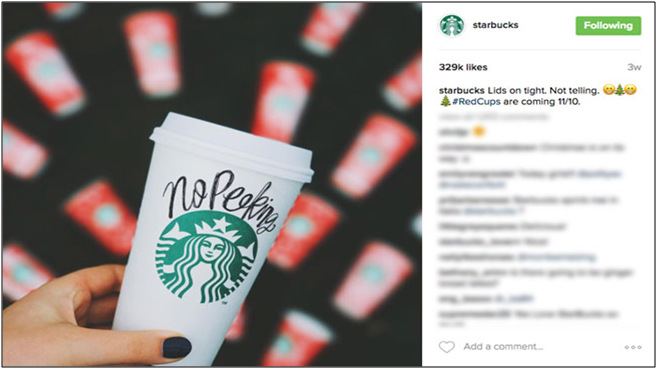
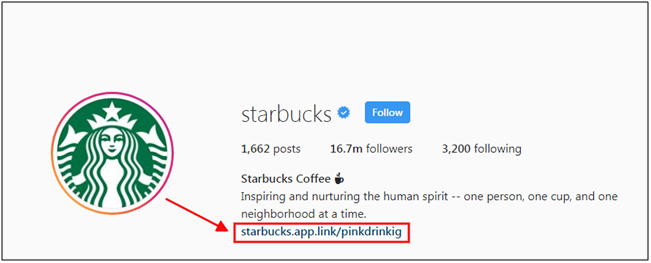
We all know Starbucks for its perfect coffee. They adopted this marketing strategy by asking the users to send images of the best Starbucks product and the best clicks were highlighted on the social media. See it for yourself:

Along with this, their Instagram bio contained the link of app installation.

Now it may seem any general promotion, but trust me it is an extraordinary one. The amazing clicks will drive the users to see more content on the page and what will they find there – app installation link in bio. It is a quite smart play to achieve more popularity.

2. How free rewards lured the Australians?

Rewards have always been a boon when it comes to motivating people. We all love receiving perks at some point in our life and so is in the marketing. The key ingredient of reward-based marketing is the free stuff which engages the everyday consumer and incentivizes them to share your brand message.

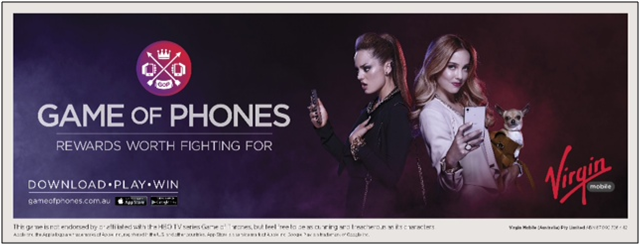
Let’s take an instance for a moment. A few years ago an Australian company Virgin came up with a Mobile App Campaign which allowed its countrymen to compete against each other in a game for $20000 reward. The results followed by the strategy were quite unexpected:

  • 40,000 active users joined the game.
  • 14,568 users entered a Virgin Mobile store to protect their in-game loot.
  • As many of 44% of users were actively engaged with the game throughout.

This cleared the picture that the combination of real-life awards and game worked pretty well for them and this approach can be used to lure users socially. Using physical and digital incentives surely grabs the user’s attention.

3. How IKEA transformed paper catalogue into the interactive platform?

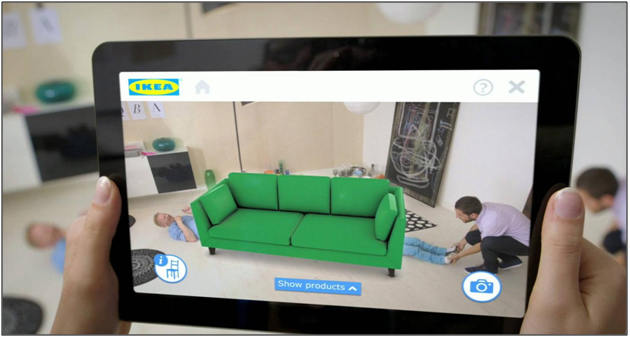
In the year 2012, the Swedish based multinational group IKEA released their catalogue app and left the world to astound by bringing augmented reality into it. Perhaps, it was the most unique feature of the app to just project images of furniture into the user’s house to test its beauty and aesthetic. It basically took the shopping word to a whole new level with just a mobile app.

Well, it was obvious for the app to acquire 6.2 million users in the very same year and it also reported an average of eight minutes browsing compared to three minutes reading only the catalogue. This strategy for sure worked for IKEA and the figure jumped to 10 million in 2013. This is a perfect example where the modern technology trends could be a strong pillar in marketing.

4. How app CTA’s are leading to a huge number of downloads with nominal efforts?

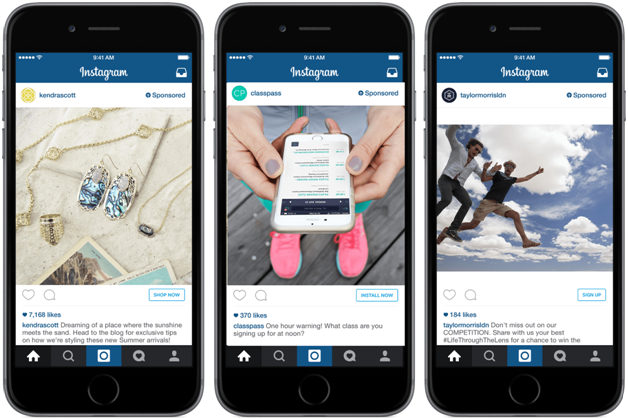
What better place to promote your app than social media platforms? But, writing promotional text on the social platforms isn’t enough nowadays. So, why not opt for a more engaging strategy. That’s what in-app Call-to-action buttons are for. Many social platforms give us multiple ways to add app CTA’s. Following image will make you more clear where have you seen it:

This approach is simple yet proven to be an effective one. Marketing your app when users are checking out their social content. What can be better than this which just guides them to your app? It can get you many instant and regular downloads for your application.

The app links and CTA’s can also be added in the profile bio. This would promote your application is a most seamless way without annoying any users in the process.

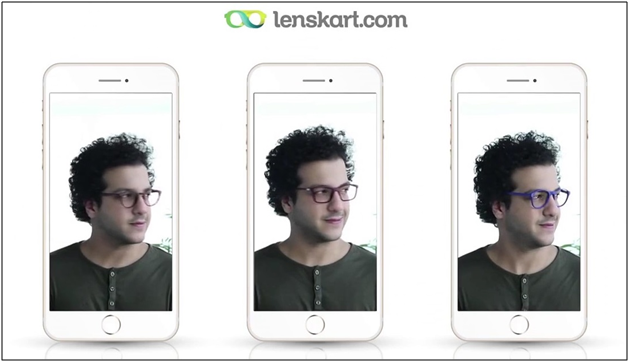
5. How has Lenskart changed the Eyeglasses purchase with 3D try-on feature?

Lenskart eyewear retailer has been always been a step ahead with their marketing strategy. Let’s have a look at the latest one – 3D try-on feature. This allowed the users to try the frames and glasses directly through the app and let them buy without any efforts. This technology used face mapping which recommends the best-fit glasses for the person.

This advanced way of shopping eyewear allowed the easy purchase to users and it even benefitted Lenskart when users shared the responses on social media. They offered the maximum value to the users which compelled the audience to download the application.

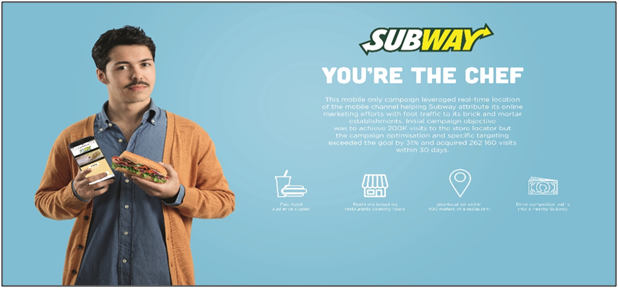
6. How mobile app campaign of Subway France piled up more wins?

Subway bridged the online and offline activities with its mobile application and made an effective impact on the users. Subway, last year started a campaign ‘You’re The Chef’ which relied on delivering what people actually want to pay money for. They used behavioral data of users and established groups of regular fast food customers. This campaign was purely mobile and targeted users during the usual lunch and dinner times.

What better use could be of segmentation? This campaign also proved how push notification can enhance your business sales with nominal efforts. Another tech trend geo-fencing was also used in their app for sending a short video and showing the distance to nearest subway whenever any user is within 400 meters of a Subway sandwich bar. The video even included the call to action button, which opened the native map application in the user’s device and showed the shortest route to the store. Thus, this whole campaign was through a single application with the rich usage of push notifications.

How can you own a flawless Mobile App for your eCommerce store?

The eCommerce mobile applications serve something beyond business for the eCommerce industry. Without a doubt, the mCommerce is going to change the way the world shops in future. Most firms have thought that it was useful to have a dedicated application for a mobile platform for consumer loyalty just as an expanded business. Indeed, the benefits can go past minor shopping ease. Hence, the KnowBand presents different extensions for various platforms like – PrestaShop, Magento, Magento2, OpenCart, WooCommerce and Shopify as well.

KnowBand provides this pre-configured Mobile App Builder extension through which you can convert the website into a mobile app in a few simple steps. Even, if the store admin coming from a non-technical background can easily and efficiently transform their store into the native mobile app and improve sales on their store.

Wrap up

These were the 6 top marketing campaigns that made waves in the last few years. They are the proof of how an extraordinary marketing strategy can make a big difference in lead generation and brand awareness. It’s always a good instinct to learn from other’s success. So, next time whenever you are planning of eCommerce app development and its marketing campaign, keep them in your mind.

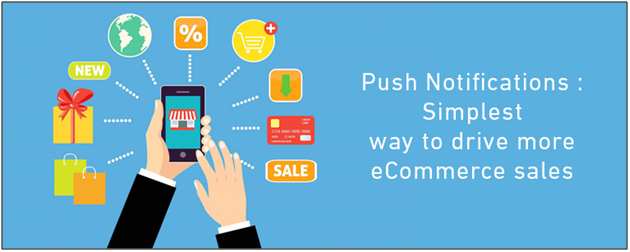
How are Push Notifications beneficial in driving more eCommerce sales?

Online shopping is growing at an unprecedented rate and retaining app users isn’t easy for an e-merchant nowadays. Push notifications are the best-suited option for product marketing as they target almost every app user and motivates them for more purchases. Push notifications are actually real-time messages which go directly from online website to the user’s device. Even if the users aren’t browsing your store, the notifications will make their way to them if the app is installed in their device.

The traditional marketing channels like E-mails, messages were also good but they weren’t enough engaging if we compare them with push notifications. The personalized notification is what makes more influence on the audience. Now, when it is quite clear that the push notifications can easily aware the users, do you really think that the job is that easy? Well, no! Let’s find out how and why?
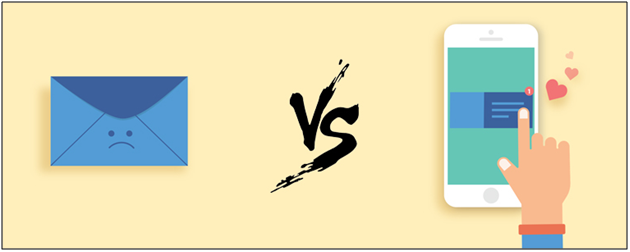
E-mail Marketing VS Push Notifications

A few times back the major marketing approach was through e-mails in the eCommerce industry. No doubt it was worth then but with the evolution of the mobile app industry, push notification became more convenient way of targeting audience. If we look at the statistical records today, average user spends approx five hours on the smartphone and that to 92% of the time in mobile apps. It clearly tells that the preference of mobile apps is way high than website browsing. An old saying” Early bird gets the worm” suits best to eCommerce marketing i.e. the faster you reach to the user, the more you stand to gain.

As it’s pretty obvious that mobile apps are the present and future of the eCommerce industry. So, why not adopt a way of targeting users before lagging behind in the race. That’s how push notification comes into the picture. How crucial they can be for your app’s success could be understood by fact that they boost app engagement by 88% on an average.

Push notifications aren’t similar to the traditional messages. Many e-merchants don’t realize the fact that this method requires proper strategy. Just sending notifications to users without getting any proper idea even annoys them as per the following report. Let’s figure out in this article how can we make the most of the effective push notifications marketing and keep yourself stay ahead of the pack.

1. The magic of power words in Push Notifications!

Words are merely a group of simple alphabets, yet carry immense power. Right words can be quite influential in the case of push notifications. You can find the list of some effective power words from here. However, the usage of the words should be justified else it could simply ruin the whole purpose.

There are even various non-power words which work quite well in attracting users. If they are used properly can easily convince the audience to open the app. So, whether the words have power or no power, they are the key to user persuasion. Thus, learning what to say and what not to say in a push notification is a must. You can surely find the foolproof power words with following steps:

Step 1: Deduce your desired action behind the push notification.

Step 2: Determine the right emotion to drive the required action.

Step 3: Choose your game of words wisely to trigger the right emotion.

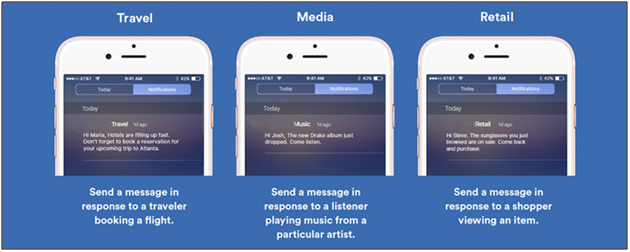
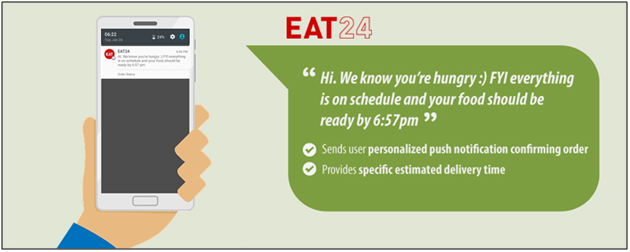
2. Personalization of push notifications can create the right spark!

Segmentation is mainly used in the push notifications to make sure that the message is delivered to the right audience. No one can deny the fact that personalization has always been fruitful for online marketing. It also works pretty well for the push notifications. As per a report, in the year 2015, personalization increased push notifications conversions by 300%.

Segmented notification is based on dividing the users into different groups on the basis of their behavior, purchase decisions, likes, dislikes etc. Now, it makes the audience targeting quite simple in segments. Along with segmentation, there are few other factors like geo-targeting etc. which could help in making the notifications more effective. Personalization is very powerful and if used in the right spot, could be the key to gain huge sales.

3. Right content could deliver the right message!

The core motive behind sending push notifications is to deliver your message to users. Well crafted content is a must to make your notification more precise to the audience. Well, often the marketers think that the right content is just text but it’s not so. Clear push content should have any catchy phrase or joke in order to make notifications more engaging.

The name of the users, their last actions on the app can also be used for marketing. If the users were interested in any product, just notify them of any progress related to them. This approach will surely develop a sense of trust between the customer and your brand.

4. Timing is the key to success with push notifications!

Timing and relevance are the two key factors of making the push notification influential. Push notifications should always be targeted at the right time. Even though it is creative and informative, no one likes being woken up at midnight or early morning.

The best time to send push notifications is in the happy hours between 10 AM and 1 PM for effective results. A study by Localytics found that sending push notification in this time can simply improve open rates by 66%. In this study, Fridays to Thursdays are said to be the best days for getting maximum conversions and leads.

Also, when there is a requirement of too many push notifications, it’s better to prioritize them before sending to users. It will even help you with the segmented push strategy. The push notifications can be on basis of what’s happening around. Any festive based or seasonal push notification should be made a priority as they can easily connect with the audience.

5. Well-timed and personalized notifications will highlight your brand!

Earlier, over 50% of all consumers considered bulk push messages as an annoying distraction. This bounded the marketers to send fewer notifications in the fear of losing potential users. But, if we look at the current stats, the number of push messages has grown by 64% per app since 2015. Now with the increased reliance on the apps, users are getting used to bulk notifications.

So, timely and personalized notifications should be sent in an appropriate number else there might be a big chance of getting drowned in the surrounding competition.

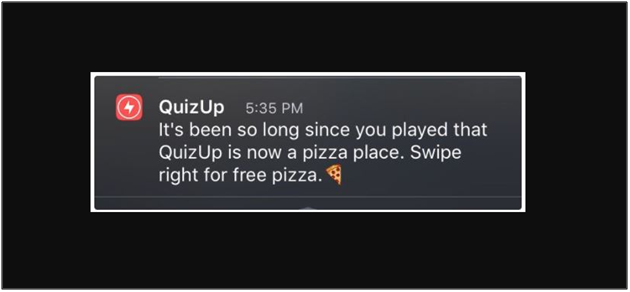
6. Creativity works in every line of work, so is to push notifications!

Just take a look on the above notification. Isn’t it is the best approach to target users? Before trying your hands on push notification, hire a creative team for the job. Entertaining and creative messages have the very high chance to grab the user’s attention. Instead of writing lengthy texts just focus on your brand and make notification a bit interactive. A buzz should be created in notifications then whether it comes from rhyme or any catchy joke.

7. A/B notification testing will eschew any upcoming mistake!

It wouldn’t be a smart play to make assumptions about how your notification will land on various devices. However, a simple one-time test will make the picture more clear. What if there is a way to test your push notification before making final for the delivery. That’s where A/B testing comes.

A/B testing is the comparison of one or more versions of a push notification to see which one performs better. The tests are sent to small random groups and the winning version is obtained with the process.

Over to you

When it comes to the mobile world, the change is paced and ineluctably foreordained. Thus the fastest and easiest marketing trend we can rely on is push notifications. Push notifications are one of the essential reasons why e-merchants are investing in mobile applications. These 7 tips discussed above will help you in sending effective push notifications to your users and ultimately should maximize the number of sales you’re making. On the safe side, make sure you have incorporated push notifications feature while creating a stunning mobile application for your business.