Shipment is not being registered on the sent timestamp and also no error is reporting in the response.
Solution:
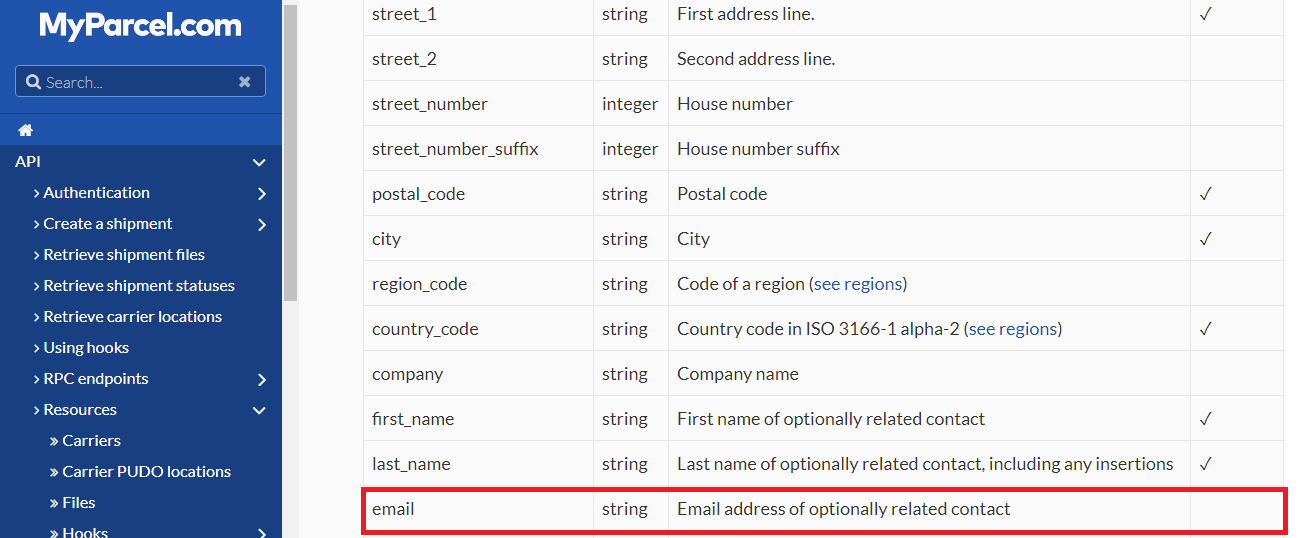
We have raised a ticket for the same and they replied that this issue was occurred because recipient’s email parameter was not sent in the Shipment API https://api.myparcel.com/shipments
According to the Spring Omni documentation, this email is optional parameter:
So, we raised a ticket again on Spring Omni regarding this and they replied: The shipment is failing to be created due to recipient email address not being populated. Although, the schema shows this as optional but Spring require the email address so the carriers can send notifications to the recipient (if they offer that service…)
So recipient email is required parameter in Spring Omni and need to be sent in shipment API.
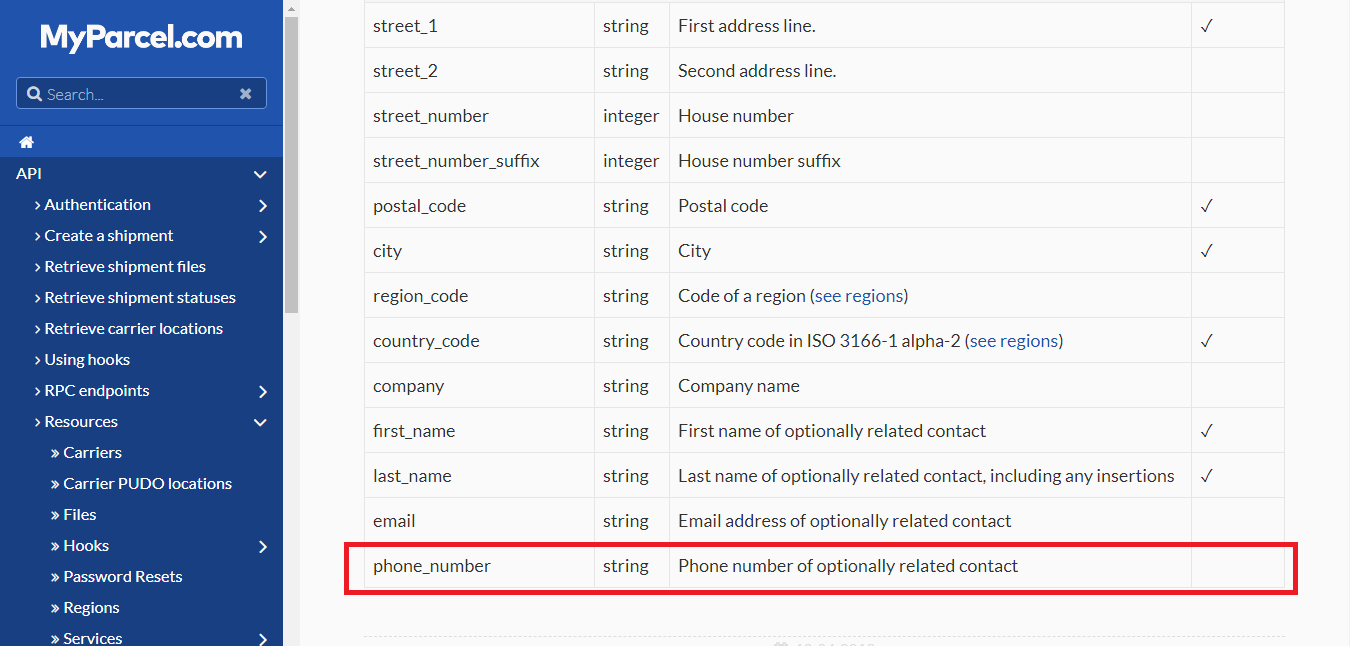
According to the Spring Omni documentation, phone_number is an optional parameter:
We raised ticket on Spring Omni and they replied: The shipment is failing to be created due to recipient phone number not being populated. Although, the schema shows this as optional but Spring require the phone number so the carriers can send notifications to the recipient (if they offer that service…)
So phone_number is a required parameter and need to be sent in shipment API.
How to get the manifest report of the Spring Omni shipments?
SOLUTION: We raised a query to spring Omni, if they have any API to generate the manifest of the shipments created on a particular day.
They replied:
“We don’t currently provide a manifest“. So we tried to generate manifest on our end and confirmed with pick up boy of Spring Omni if they need manifest report to collect the parcels? They replied that there is no need to generate a manifest report of the shipments as they simply charge for only the number of labels (parcels) handover to them.
We want to know that Spring Global charges us on the shipments which we have created and registered OR parcels which we will hand over to them for delivery.
We raised a ticket on Spring Global:
Which shipments (parcels) will they charge us? Will it be on the shipments which we have created and registered OR parcels which we will hand over to them.
Suppose we have created and registered 10 shipments but handover only 8 parcels to them to deliver (As we do not want 2 shipments to be delivered). So now for this particular case, will they charge us for 10 shipments or 8?
They replied:
“Spring will only bill labels which have been scanned. So in your example you would only be billed for 8 labels“.
As we can see that we will only be charged for the parcels that we handover to them for delivery irrespective to the number of shipments we have created on their end.
When we asked Spring Global for the reason of this error, they replied that the problem here is “The region which is not recognized as they do not have regions for the USA set up yet”. Simply omitting the region should fix this problem.
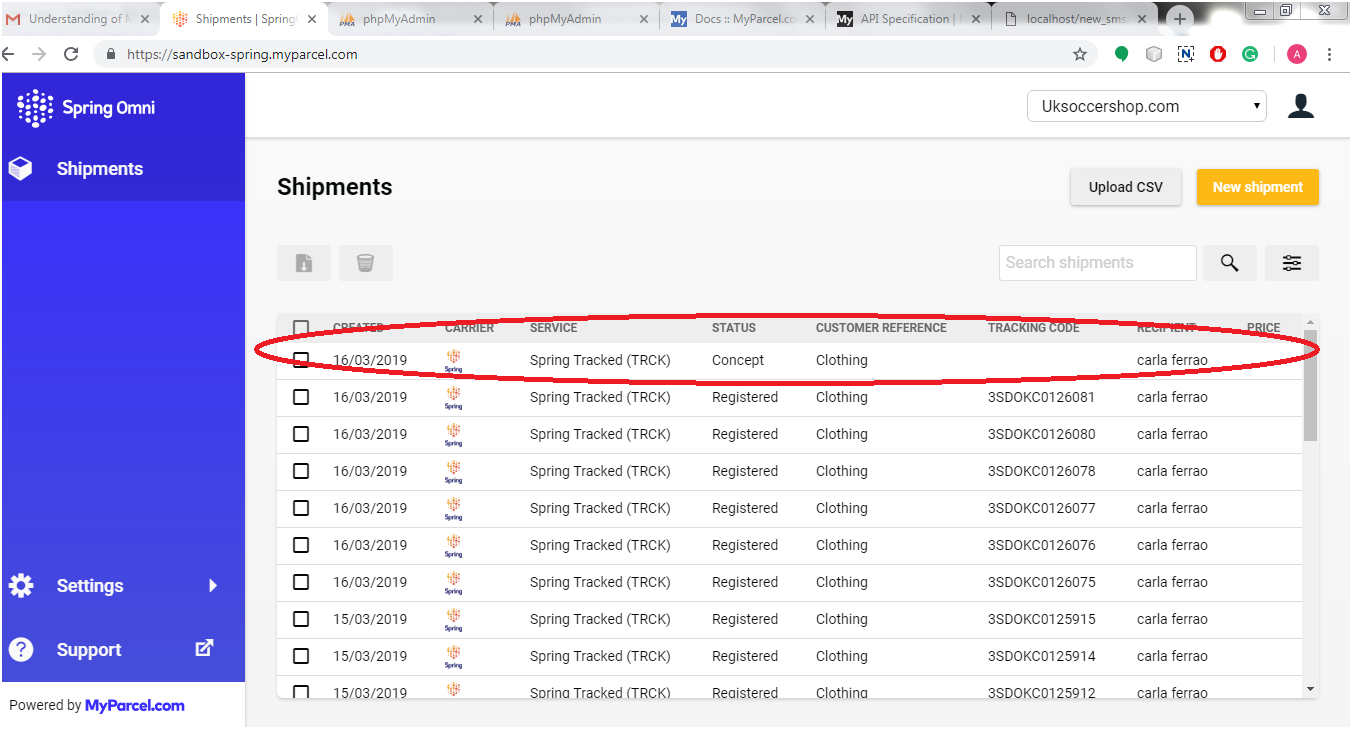
We were facing an issue while we tried to create a shipment (Using /shipments API) and after that we were fetching the label (Using /shipments/{shipment_id}/files API). The issue was that we got blank response. When we checked Shipments on the back office, it looked like below screenshot:
When we clicked on the shipment (with status = “concept”), we got a message as “The shipment was created, but has not been registered with the carrier (yet).”
When we understood the concept of this new shipment creation process in Spring Omni, we come to know that in Spring Global, We need to register a shipment instead of only creating the shipment before fetching the label corresponding to the shipment. There are two possible scenarios for registering a shipment:
Create the shipment and register as well at the same time
Create the shipment but register it at a given specific time i.e. in future
1. To register a shipment instantly
While sending the create shipment request, we need to send the “register_at” parameter value as 0 or past time (UNIX timestamp) in the request data. Kindly refer the below code for the same:
If we send the register_at value as current timestamp then we might get some delay in registering the shipment, So Spring Global has suggested us to send the register_at value as 0 so that the time will be considered in past and the shipment will be registered as soon as possible. Since the shipment will be registered now, we won’t be able to delete/edit the same.
2. Register a shipment in future time
If we want to edit/delete the shipment after creating the one, then we just need to register the shipment in future or at a given specific time. To register a shipment in future time, let’s say after 5 hours of shipment creation, simply pass the “register_at” value as future timestamp of five hours on basis of current time. Now we will be able to edit/delete the shipment till 5 hours but won’t be able to fetch the label and commercial invoice. At the given timestamp, the shipment will be registered automatically and we will be able to fetch the label and commercial invoice after the given time.
So these are the two ways to register the shipment. We can use both on basis of our requirement.
The logistics sector’s global leader is DHL. Specializing in transportation, courier services, and international shipping.
While booking shipment on DHL using API (In our case, the delivery country was “Ireland”), we got an error in response to the capability request. The error was “The destination location is invalid. Please check the data“.
Solution:
For this issue, we raised a ticket on DHL, and in response, they replied as below:
When requesting capabilities, it is important to provide complete and quality address data. It is necessary to determine accurate routing information and capabilities for the origin and destination. The following might be the reason for the error:
It might be possible that there are more than one city with the same name in different suburbs. So to get a successful response, we need to add suburbs in destination address specially, for deliver country “Ireland”.
For the destination countries, which do not have any zip codes, city name must be spelled accurately. For example, there is no city called NORTH ROAD in IE, the actual city is called M50 NORTH ROAD.
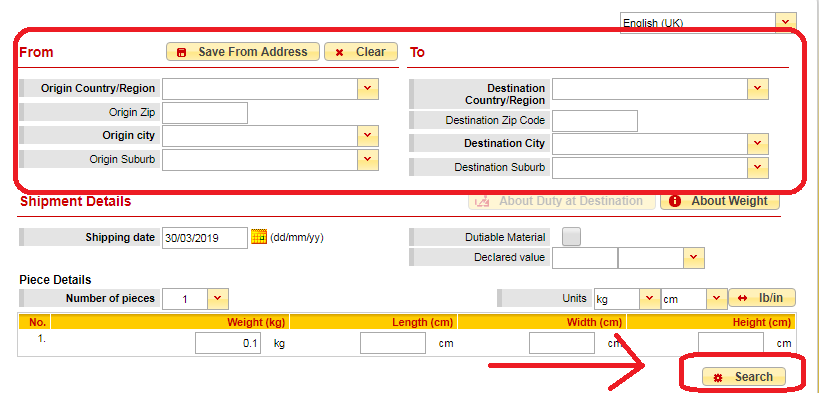
From this response, we were not clear about the validation of address means how do we know that the address is correct or not or the city name is correct or not. For example, if we are sending the city name as “Co. Dublin” in the create shipment request, we get an error of Invalid Location. So we have raised a ticket again to know how we can validate address and in response, DHL suggested a tool named DHL Capability Tool (https://dct.dhl.com/). Just enter the sender and destination address in the form and click on search button as shown in the screen shot below:
This tool will give the result if the address is valid or not. So if you are getting any error regarding location, you can validate address using this capability tool.
Knowband is proving One Page Checkout modules for eCommerce stores that are compatible with DHL. This is available for all major CMS platforms like Prestashop, Opencart, Magento, and Magento 2.
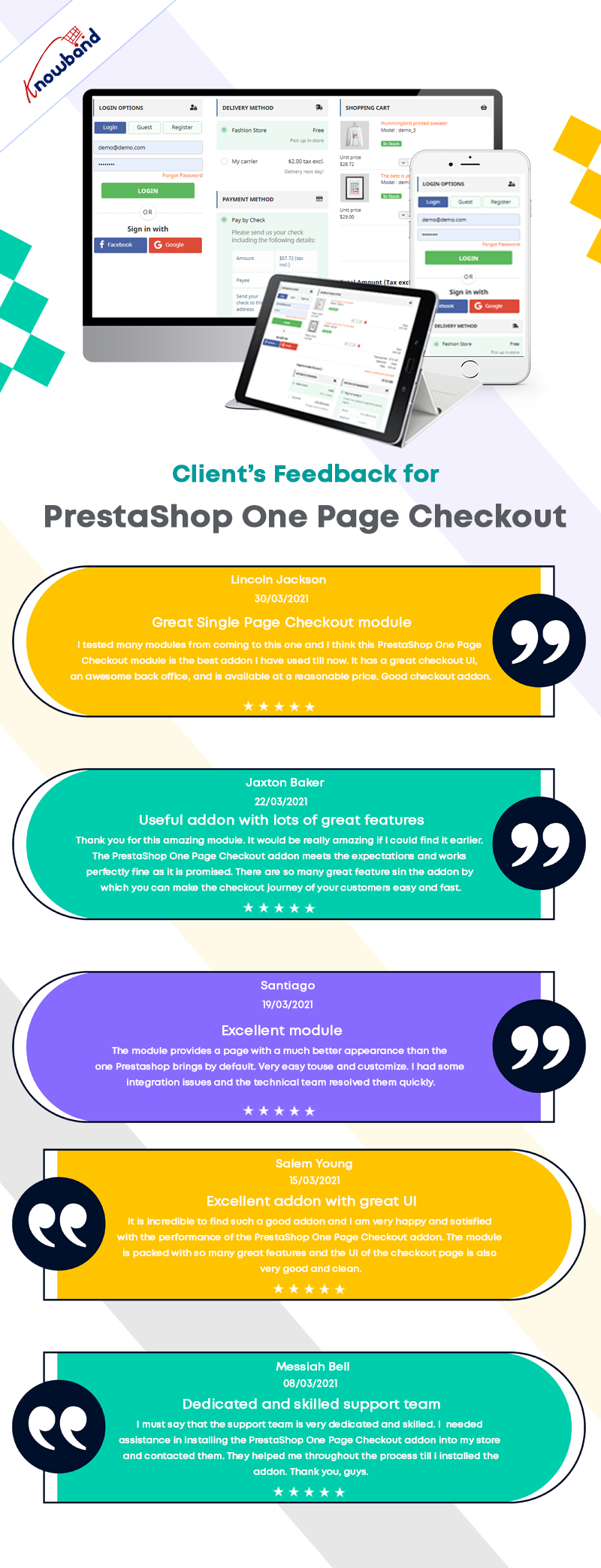
One Page checkout is a must-have for an eCommerce store as it helps in greater conversion rate, reduced abandoned cart rate, and ease of checkout for the user. Find what customers are saying about this module below:
Sometimes, the customer leaves the selected product in the cart and move to the other shopping site. The shopper who left the pending cart would have otherwise placed an order leading to a conversion. What’s the right solution to get them back to the store. Well, Knowband’s Magento 2 Abandoned cart extension automates everything from sending a discount cart reminder email to urging customers for the checkout. This Magento 2 Email Follow up module simply sends the pending cart details including customer’s name, a peachy discount coupon and the overview of cart items. Further, you can easily set and schedule the delivery of cart reminder notifications with Magento 2 Cart Abandoned module in order to compel the purchase decision, thus improving customer loyalty towards the store.
New Features in the updated version(1.0.1):
In the updated version of this Magento 2 Abandoned cart module, there are some additional useful features for better performance. The store merchant can now configure and send popup reminders and push notification reminders to those online users who left their cart abandoned. Apart from this, the admin can also offer a fixed or percentage-based discount with reminders. Magento 2 Abandoned cart module also provides a Cron log in the updated version. The online merchant can view the cron name, type, status and actions taken by Cron from this Cron log section.
1.1 Striking Features of Magento 2 Abandoned Cart Email Follow-up Module
The Magento 2 Abandoned cart module offers you multiple customizable features which are easy to implement for your eCommerce shop. You can implement and configure any feature for your store without using any coding knowledge. Let us quickly take an overview of striking features by Magento 2 Abandoned cart recovery email extension.
1. Magento 2 Cart Abandoned module incorporates an automated solution that sends a custom reminder notification to the customer who left items in their cart without completing its checkout.
2. You can create unlimited email templates for different abandoned carts with the help of Magento 2 Abandoned cart recovery email extension.
3. Magento 2 Email Follow up module allows you to track the complete list of abandoned carts and the customers who had abandoned.
4. This Magento 2 module offers the ease to schedule the delivery of Cart Serial Reminders from the backend.
5. Using this Magento 2 Reduce Cart Abandonment extension, you can include a discount coupon code to entice the abandoners.
6. Magento 2 Abandoned cart extension offers pre-defined email templates for abandoned cart reminders which can be modified as per requirements.
7. Magento 2 Abandoned cart extension automatically triggers reminder notifications after the delay set for corresponding emails.
8. Magento 2 Abandoned cart email follow-up module allows you to create as many cart abandonment rules or reminders for your eCommerce shop.
9. The complete details about total abandoned carts and converted carts can be outlooked from the back-office of this Magento 2 Reduce Cart Abandonment extension.
10. The order details corresponding to a converted cart can be checked from the backend of Magento 2 Abandoned cart email follow-up module.
11. Magento 2 Cart Serial Reminder module allows functionality to execute cron instructions manually from the back-office.
12. Magento 2 Email Follow up module lets you update Abandoned Cart List and Send Abandoned Cart Email just by running the cron file manually.
13. You can view the graphical statistics of total abandoned and converted cart value from the backend of Magento 2 Abandoned cart recovery email extension.
14. Magento 2 Abandoned cart module provides you a list of total used and unused discount coupons generated for cart recovery.
15. Magento 2 Email Follow up module gives an option to set time period after which the cart is marked as abandoned.
16. The test mode feature helps to test the follow-up emails before sending it to the actual user.
18. Magento 2 abandoned cart reminder notifications are mobile responsive.
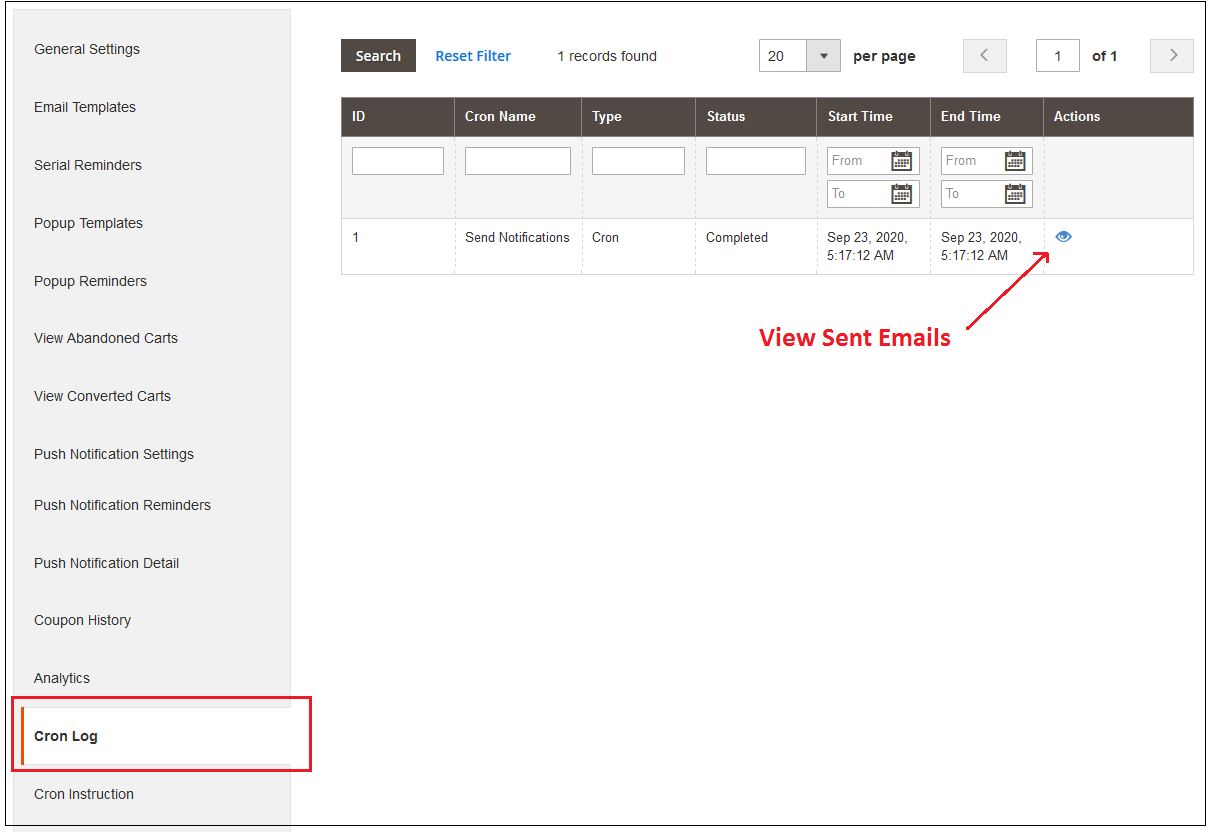
19. From the Cron log section, the online merchant can check the cron name, its type, status and actions taken by Cron. This Magento 2 Abandoned cart email follow-up module provides a list of all the Crons and its actions.
20. The e-merchant can create popup templates and also setup multiple popup reminders from the admin interface of the Magento 2 Email Follow up the module. Admin can also offer discount coupons to the users with these reminders.
21. Admin has an option to set duration, discount type, discount value and minimum cart amount on which the online users will get a discount. The Magento 2 Abandoned cart recovery email module allows setting coupon validity days, pop-up reminder status and enabling free shipping for the users.
22. This Magento 2 Abandoned cart extension allows the e-merchant to set push notifications setting and send push notification reminders to the abandoned cart holders. In the push notification details, admin can check cart ID and click status.
2.0 Installation Guide of Magento 2 Abandoned Cart Reminder Extension
1. Once after purchasing Magento 2 Abandoned cart extension from the Knowband store, you will get the following files on your registered email:
Source code file of Magento 2 Cart Abandoned module in zipped file format.
User Manual of Magento 2 Cart Abandoned module
2. Unzip the extension package.
3. Create a folder{Magentoroot}/app/code/Knowband/Abandonedcart
4. Upload the extracted content in the above folder via FTP manager (like Filezilla or WinSCP – download here: https://filezilla-project.org/).
5. Now run below commands to install the plugin:
php -f bin/magento setup:upgrade
php -f bin/magento setup:di:compile
php bin/magento setup:static-content:deploy
php bin/magento cache:clean
The Magento 2 Abandoned cart extension is now installed and ready to use.
3.0 Admin Interface of Magento 2 Abandoned Cart Extension
Just after successful installation of Magento 2 Email Follow up extension on your website, you can create unlimited abandoned cart reminders for your store and automatically trigger them as per your business needs. In order to configure this Magento 2 Reduce Cart Abandonment extension, navigate the settings in the given order: Admin Panel > Knowband > Abandoned Cart > Configuration
The simple to understand admin interface of Magento 2 Abandoned cart module contains the following eight sections namely:
Each of these sections has been discussed in detail below.
3.1 General Settings
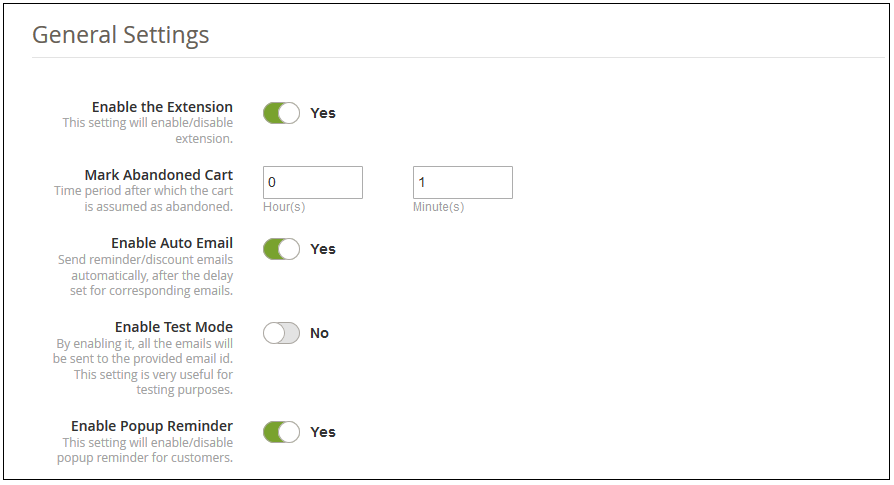
The general settings of Magento 2 abandoned cart reminder extension involve the following configuration options:
Enable the Extension: This option enables or disables the functionality of Magento 2 Abandoned cart extension for the online shop.
Mark Abandoned Cart: This option allows you to set time period(in hours and minutes) after which the cart is considered as abandoned.
Note: The minimum abandon cart time can be set to 0 hours and 1 minute.
Enable Auto Email: Enable or disable this option to send reminder/follow-up emails automatically after the set period is over for corresponding emails.
Enable Test Mode: This option will enable or disable the test mode functionality. If enabled, you can test the emails on the provided email address.
Email ID: This option sets the email ID used for testing purpose of reminder emails.
Enable Popup Reminder: The online merchant can activate settings for sending popup reminder.
3.2 Email Templates
Under this section of Magento 2 Abandoned cart email follow-up module, you can see the list of email templates used for various email reminders. The detail for every email template along with its name, type, and permitted actions is shown in this interface. You can edit or delete any of the templates by clicking the “Edit” and “Delete” button corresponding to the email template.
To create a new reminder email template, click on the “Add New” button at the top right screen side of the admin panel. Magento 2 Cart Abandoned module allows you to create two types of email templates as:
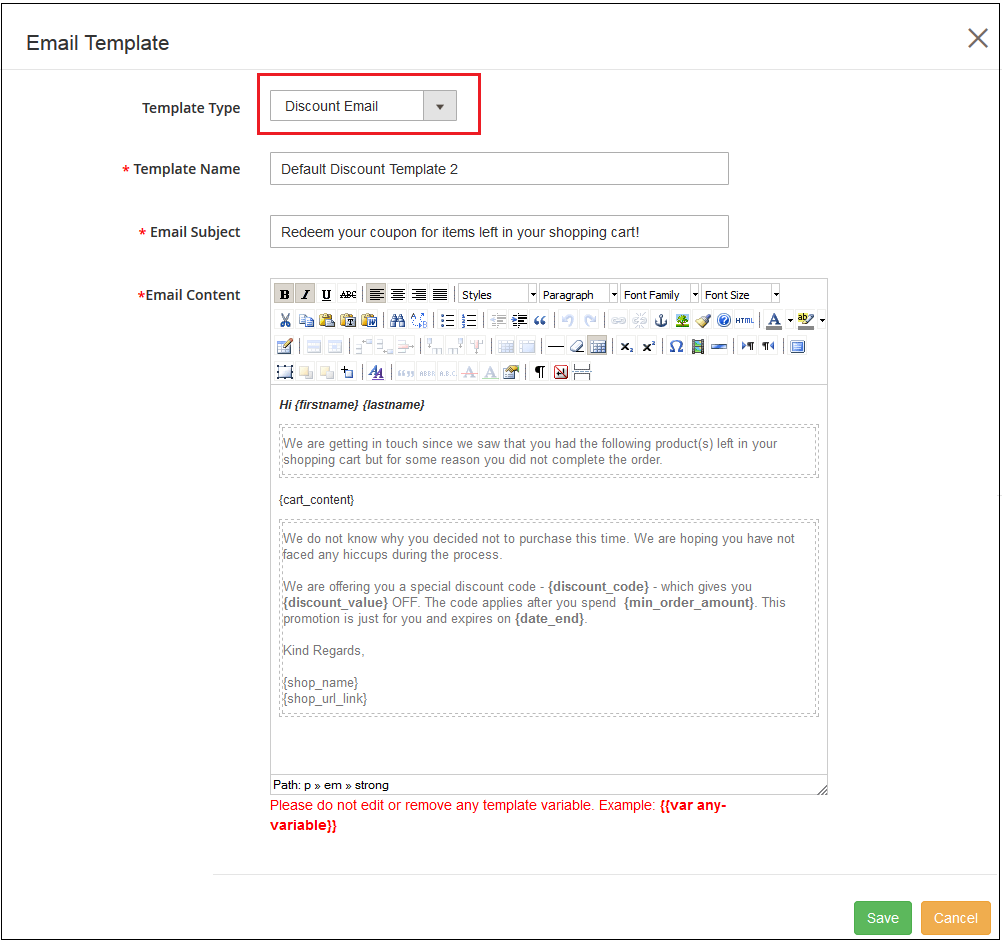
A) Discount Email Template
Template Type: You can choose the type of template you want to create as Discount Email Template or Non-Discount
Email Template: The above screenshot shows the settings of a Discount Email.
Template Name: This option allows you to set the name of the template.
Email Subject: With this option, you can set the subject for the discounted email template.
Email Content: This option specifies the body content of the discount email template.
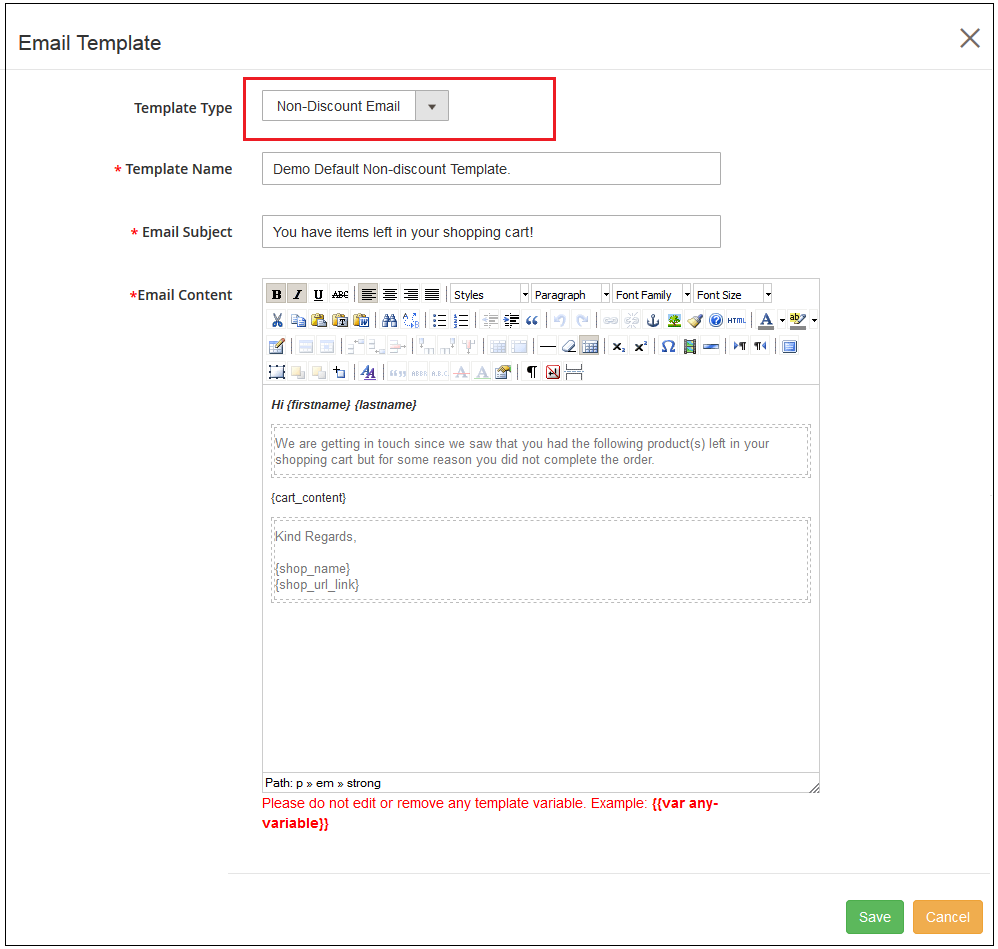
B) Non-Discount Email Template
Similar settings are for Non-Discount Email which is given below:
Template Type: You can choose the type of template you want to create as Discount Email Template or Non-Discount
Email Template: The above screenshot shows the settings of a Non-Discount Email.
Template Name: This option allows you to set the name of the template.
Email Subject: With this option, you can set the subject for the non-discounted email template.
Email Content: This option specifies the body content of the non-discount email template.
3.3 Serial Reminders
This section of Magento 2 Email Follow up module lists all the existing serial reminders. You can edit or delete any of these existing serial reminders by clicking on the corresponding “Edit” or “Delete” button. To add a new serial reminder, click on the “Add New” button at the top right corner of the screen.
You can create or add two types of follow-up reminders. One with a discount and the other non-discounted.
A) Discount Email Reminder
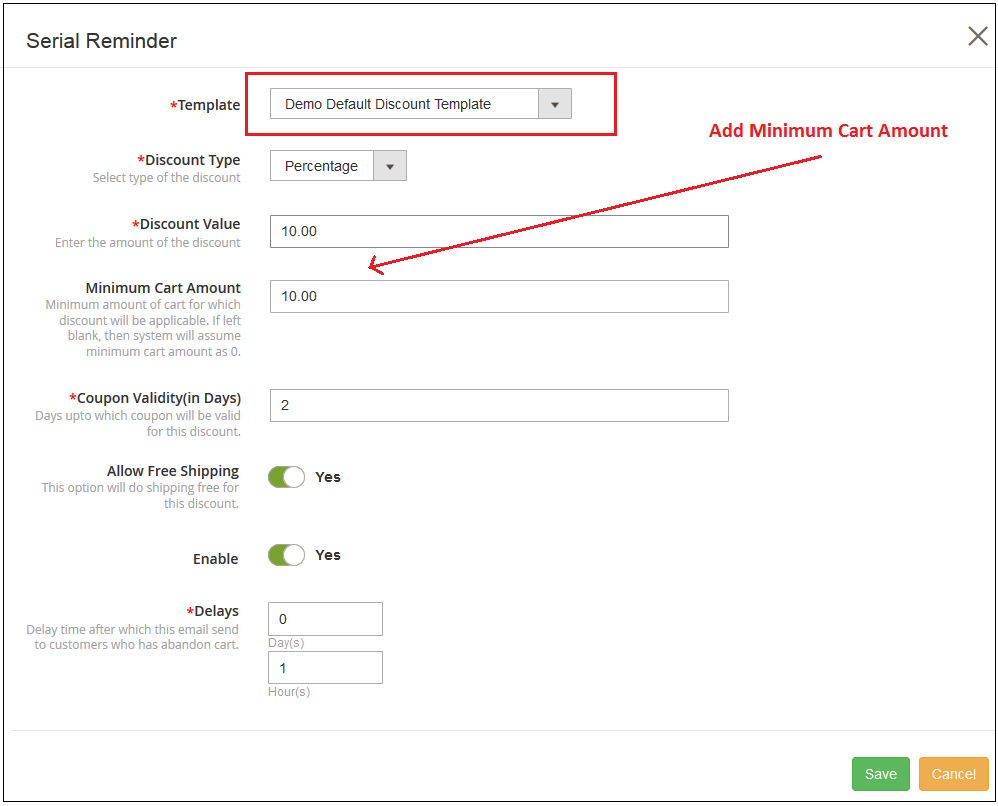
Template: This option lets you select the template for the reminder email. You can select the template as Discount template or Non-discount template.
Discount Type: This option allows you to set the discount type as fixed or percentage.
Discount Value: With this option, you can set a fixed discount value or percentage type value.
Minimum Cart Amount: You can set a minimum cart amount for which the discount coupon is applicable.
Coupon Validity (in days): You can set the validity for the discount coupon for which the discount value is applicable on orders.
Allow Free Shipping: This option will allow free shipping on product orders using this discount coupon.
Enable: This option will enable or disable this reminder email notification.
Delays: You can set a delay time after which this reminder email will be sent to customers who have abandoned their cart.
B) Non-Discount Email Reminder
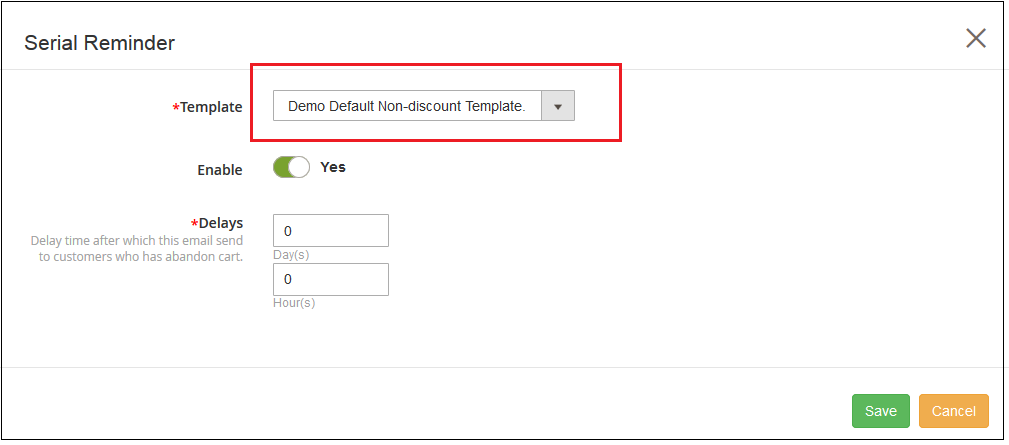
Template: This option lets you select the template for the reminder email. You can select the template as a Discount template or Non-discount template.
Enable: This option will enable or disable this reminder email notification.
Delays: You can set a delay time after which this reminder email will be sent to customers who have abandoned their cart.
Similarly, the existing templates can be modified just by clicking the Edit option corresponding to any of these reminder notifications.
3.4 Popup Templates
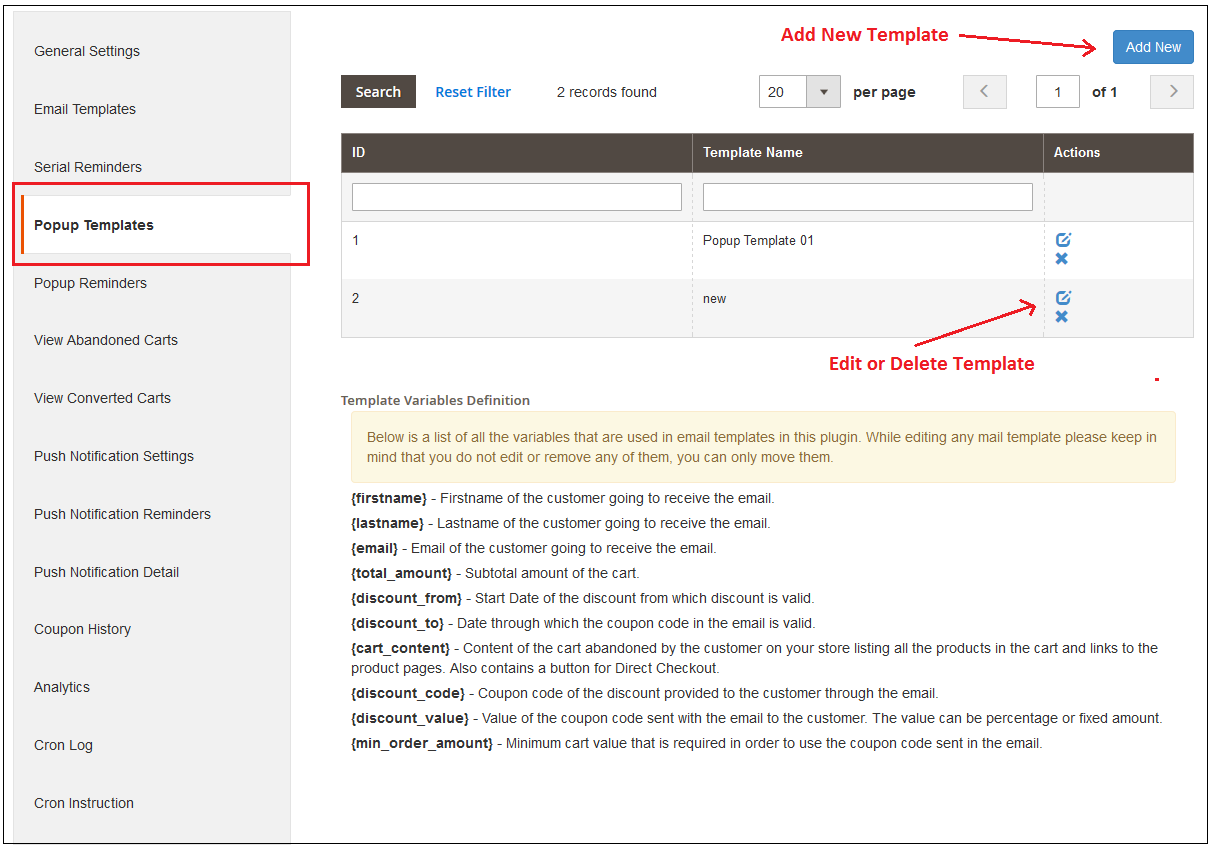
Here, the store admin can view popup templates list and also add new popup templates for sending popup remindersto the users. Admin can view the popup templates list as shown below:
Admin can add, update and delete any popup template anytime from the admin interface. For adding new popup templates, admin needs to click on add new button. After clicking on this button, admin can view a popup as shown below:
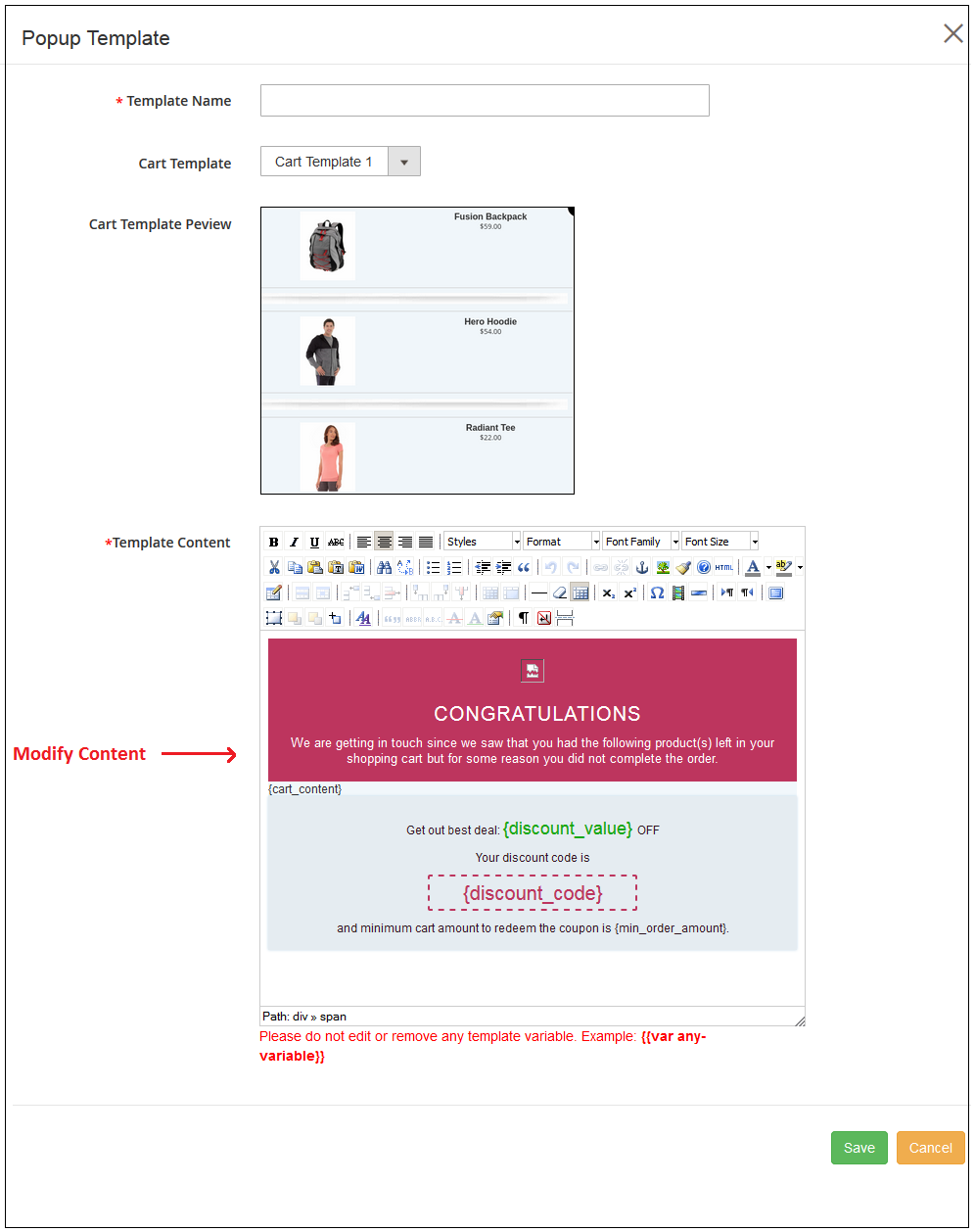
Admin needs to enter these details for adding a new popup template:
Template Name: Admin needs to enter the name for popup template.
Cart Template: Admin needs to select the cart template from the list.
Cart Template Review: Admin can preview cart template from here.
Template content: Admin can set the template content from here.
After this admin needs to save these settings.
Admin can click on delete button for removing any popup template and click on edit button for editing any popup template. While editing the popup templates, admin can select the store also.
3.5 Popup Reminders
Here, admin can create multiple popup reminders and update or delete it a per the requiremnets. Admin can view a list of all the popup reminders as shown below:
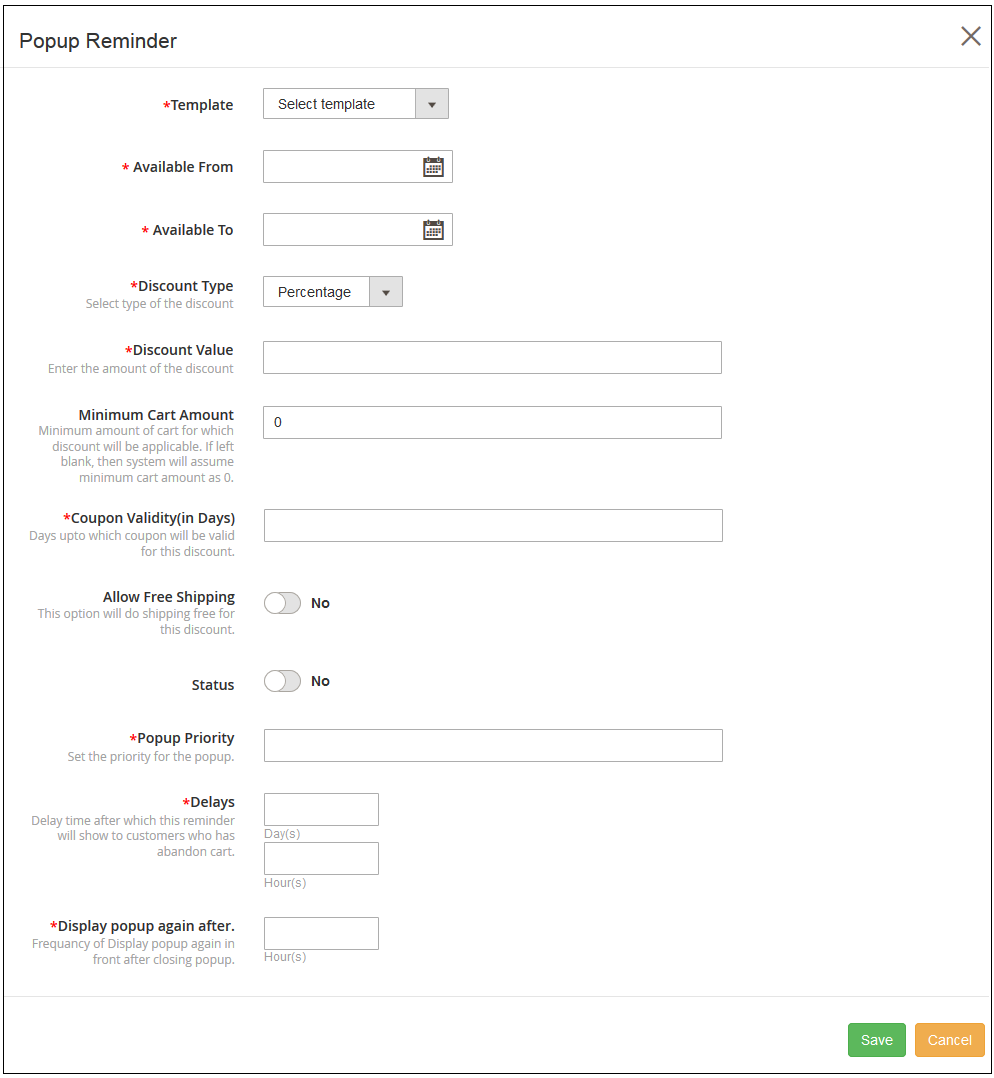
For adding new popup reminder, admin needs to click on Add new button. The admin needs to enter these details in the popup as shown below:
Templates: Admin needs to select the popup templates.
Available From: Enter Start Date and time.
Available to: Enter End Date and time.
Discount Type: Set fixed or percentage Based discount type.
Discount Value: Set the discount value.
Minimum Cart Amount: Set the minimum cart amount for which customers will get this discount.
Coupon Validity: Admin can set coupon validity in days.
Allow Free Shipping: Enable this option for offering free shipping.
Status: Activate the popup reminder from here.
Popup Priority: Set the priority of this popup reminder.
Delays: Set delay time in days, hours after which users will get this reminder.
Display popup again after: Set the time in hours after which you want to show popup reminders again.
The online merchant can edit and delete the settings.
3.6 View Abandoned Carts
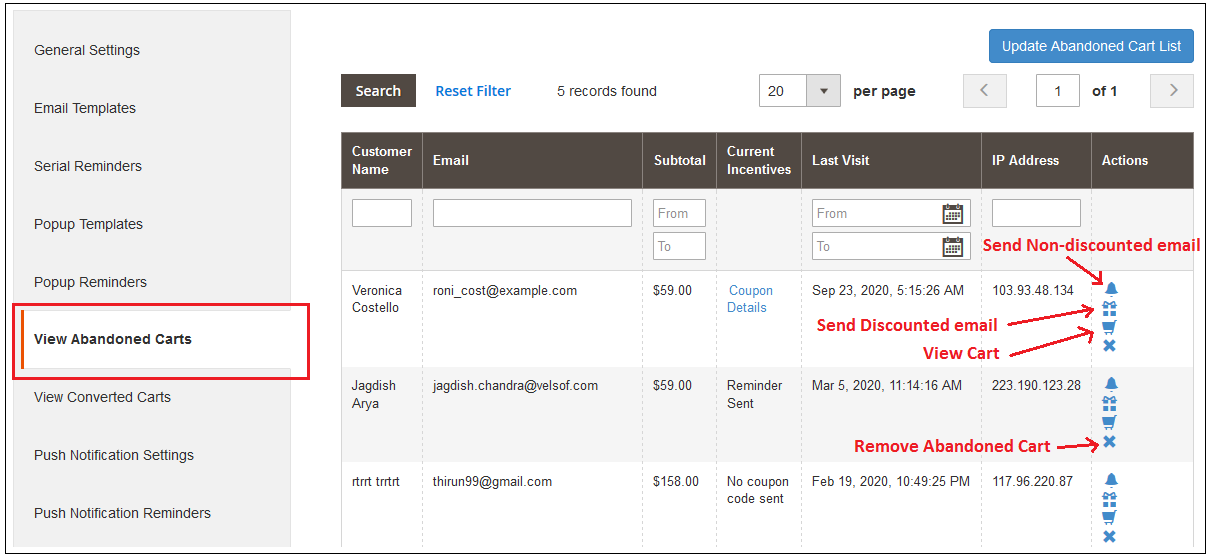
Under this section of Magento 2 Reduce Cart Abandonment extension, you can check the complete list of abandoned carts at your online shop.
You can manually update the abandoned cart list by clicking on the “Update Abandoned Cart List” button provided at the top right screen of the admin panel. Or, you can directly run the cron instruction to Manually update the abandoned cart list which is discussed in section 3.14.
With the help of these records, you can track the abandoned carts at your store along with the customer name, email, type, abandoned cart value, incentives offered and actions allowed.
There are five options corresponding to every abandoned cart which are:
Coupon Details: The details of the coupon sent to the customer can be seen by clicking on the “Coupon Details” link in front of the abandoned cart. This option is only seen for reminders with the discount coupon.
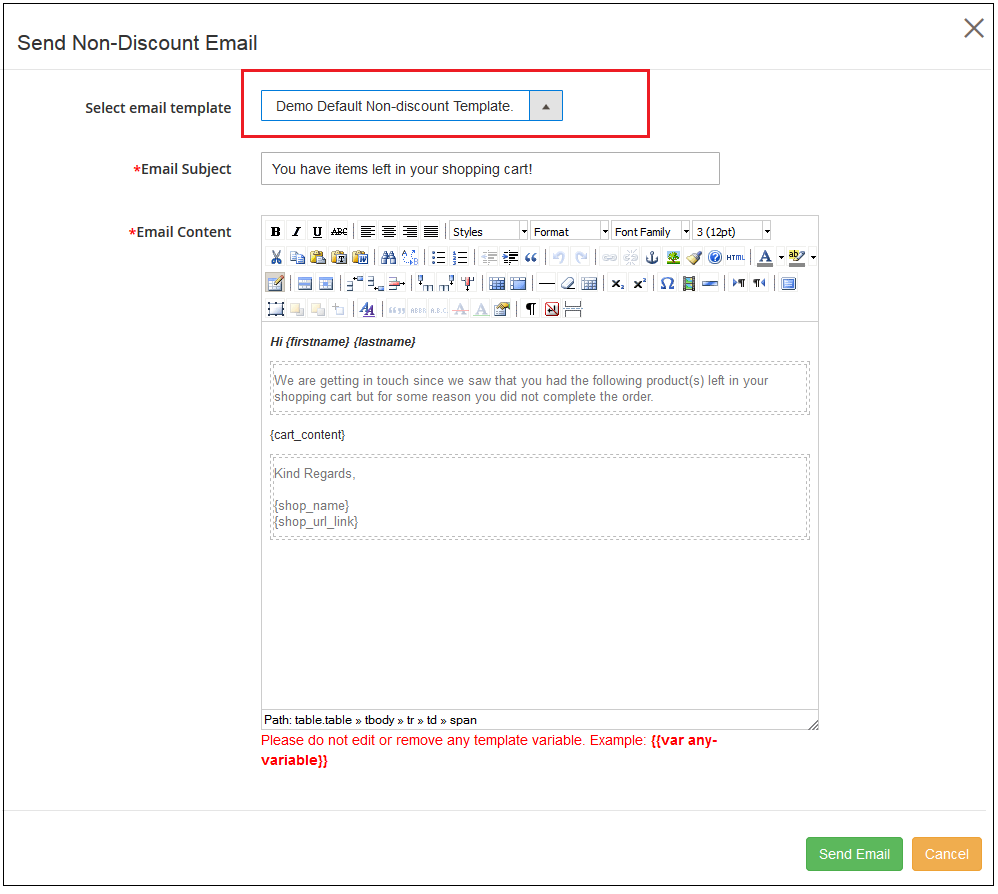
Send Non-Discount Email: By clicking on the bell icon of this Magento 2 abandoned cart module, you can send non-discount reminder regarding the products saved in the cart of the customers. On clicking the same a pop-up will appear having all the fields that will be sent in the follow-up email without any discount coupon.
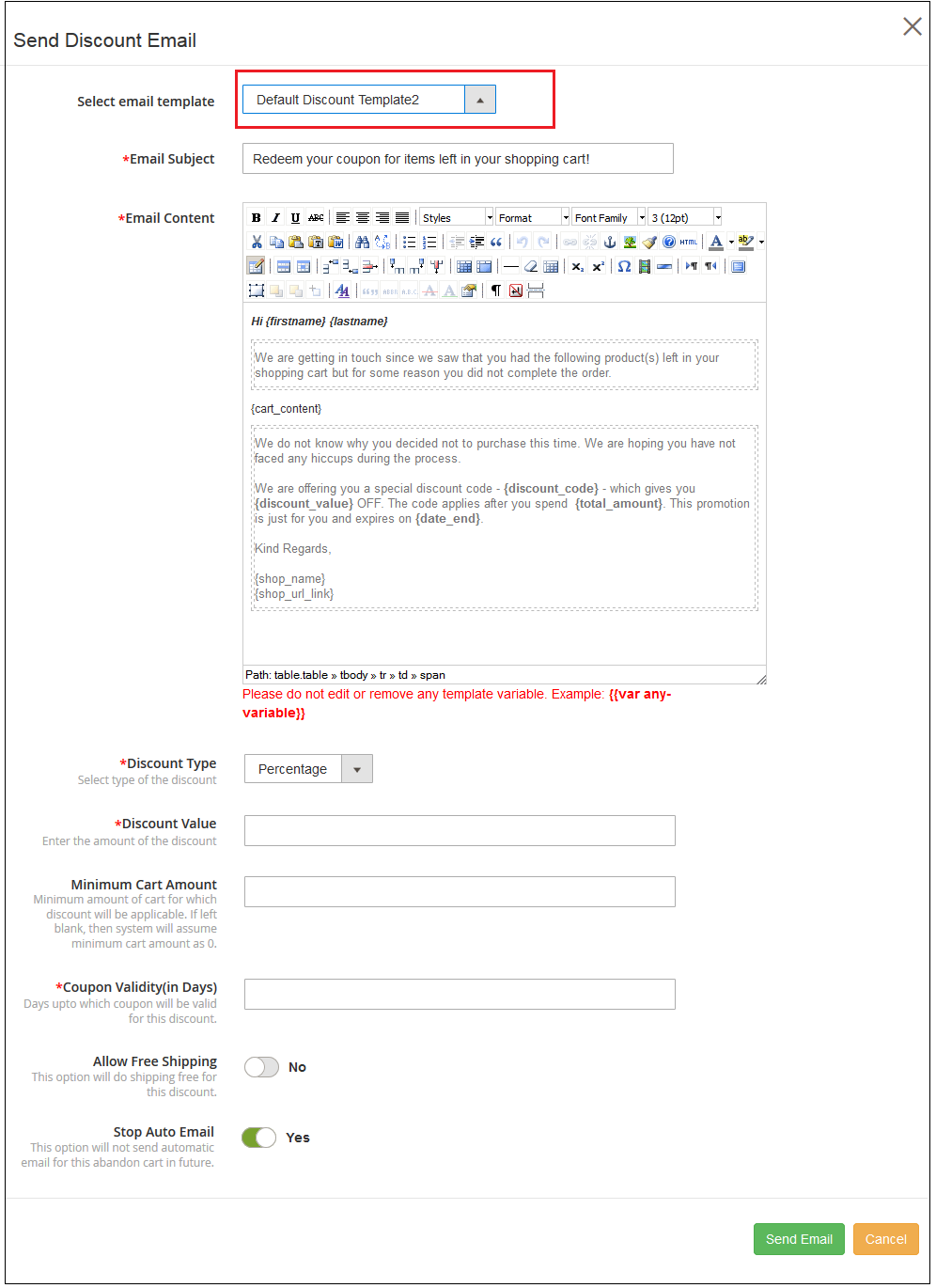
Send Discount Email: To send the follow-up email to the customer regarding the shopping cart abandonment with a discount coupon, you have to click on the “Gift Icon” in front of the desired abandoned cart. On clicking the same a pop-up will appear having all the fields that will be sent in the follow-up email.
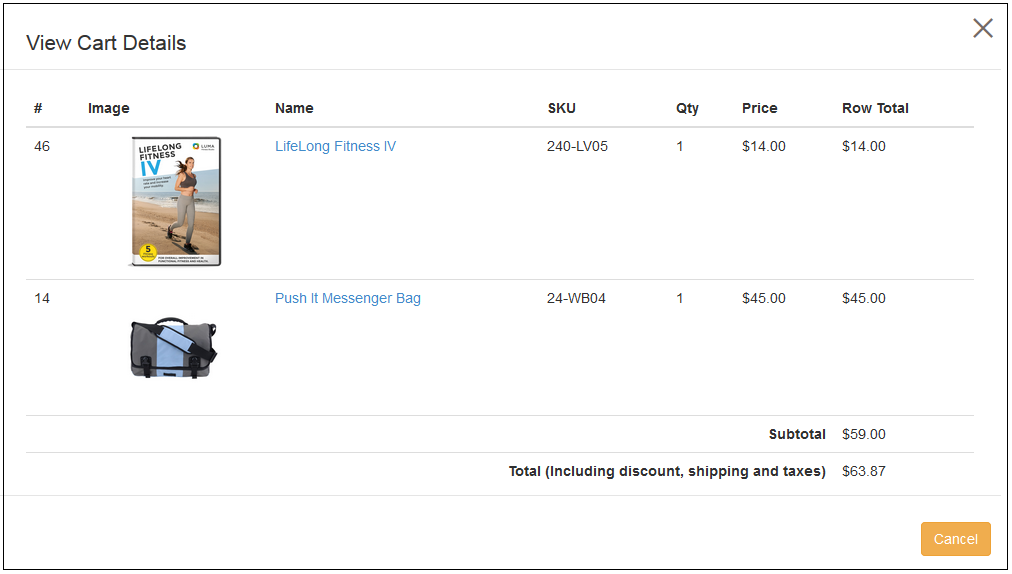
View Cart Details: To view the details about the abandoned cart, you have to click on the “Cart Icon” in front of the desired abandoned cart. A pop-up will appear having all the details of the cart.
Remove this Abandoned Cart: To delete any abandoned cart, you have to click on the “Remove Button” in front of the desired cart. A confirmation pop-up will appear asking for confirmation of the deletion, once confirmed the abandoned cart will be gone forever.
You can perform any listed options for an abandoned cart. These options can be used when you want to manually send discount/non-discount email to the selected abandoned cart.
The other way is to run the cron file instruction to send the abandoned cart email to all the queued customers who have abandoned their cart. This is discussed in section 3.8.
3.7 View Converted Carts
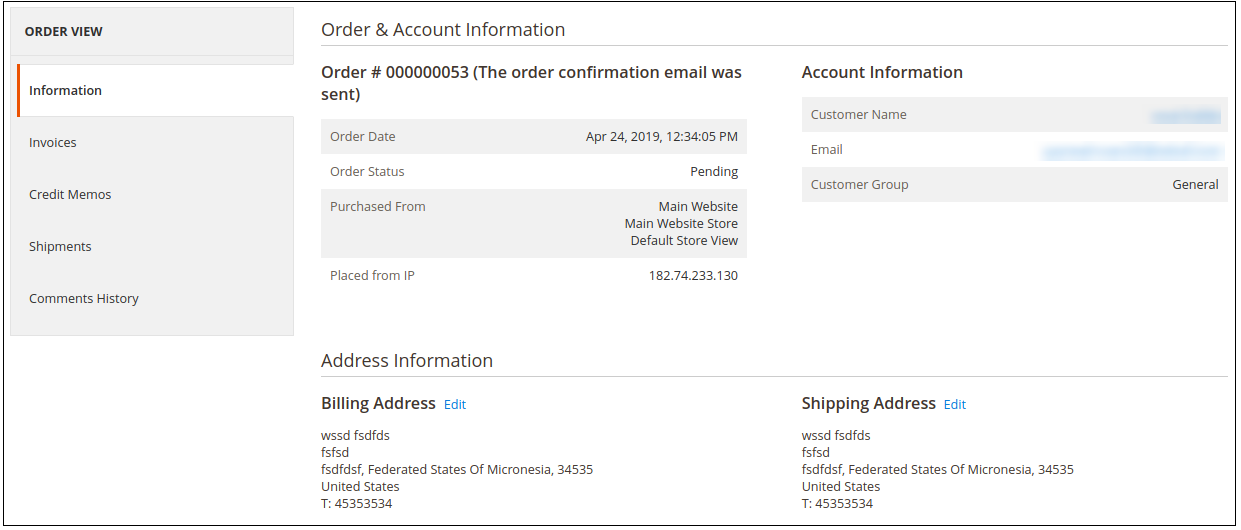
This section of Magento 2 Abandoned cart email follow-up module will list all abandoned carts that have been converted successfully. You can check the customer detail, order date and value for each of the converted carts. An option to “View Order” is also provided which will redirect to the order information page as shown in the image below:
Note: The Abandoned cart is considered as converted only if the customer places an order for that cart after a reminder mail has been sent.
3.8 Push Notification Settings
Admin can apply push notification settings from here:
Admin needs to activate the settings and enter API key, Project ID Messaging Sender Id along with server key details.
3.9 Push Notification Reminders
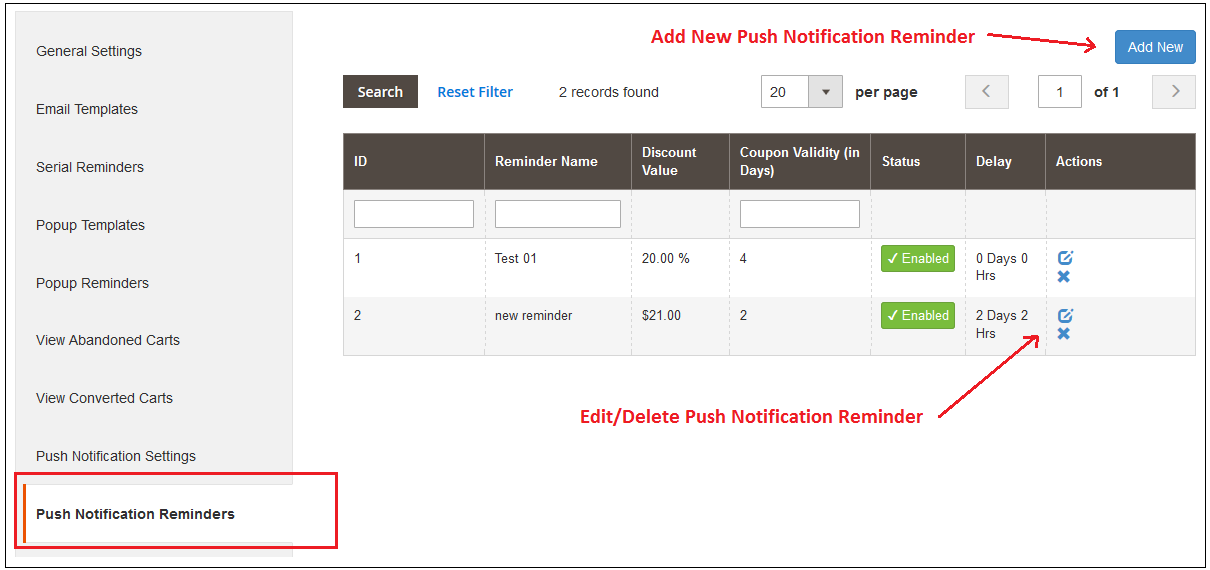
In Push notification reminders, admin can view a list of push notification reminders as shown below:
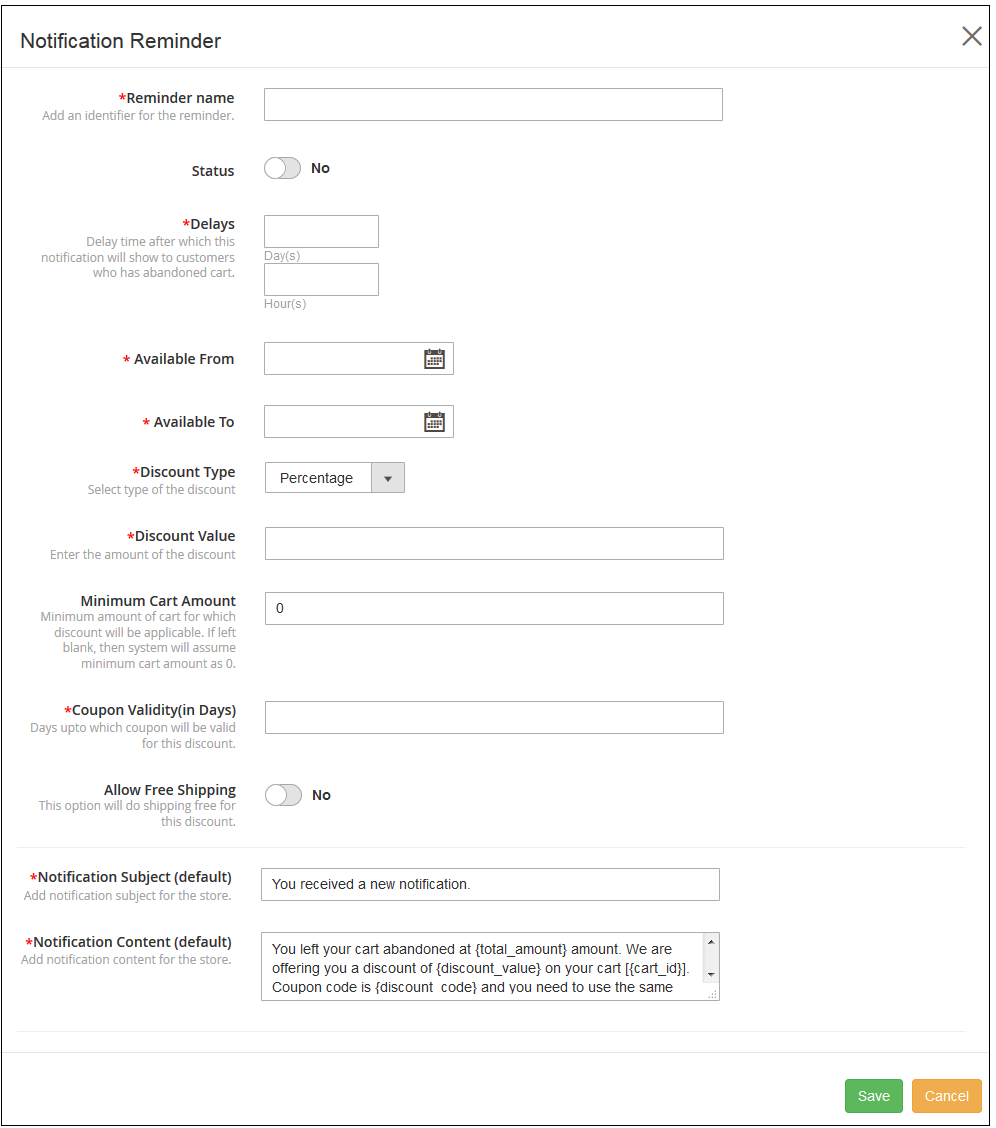
Admin can add new push notification reminders by clicking on the “Add new” button. After clicking on this button, admin needs to enter these details as shown below:
Reminder Name: Admin can set the reminder name from here.
Status: Admin can activate or deactivate the status.
Delays: Set the delay in days and hours after which this notification will be shown to the abandoned cart holders.
Minimum Cart Amount: Set min. cart amount here for which customers will get this discount.
Coupon Validity: Set coupon validity in days.
Allow Free Shipping: Offer free shipping to the users.
Notification Subject: Default notification subject is available. Admin can also edit it.
Notification Content: Content is available by default. Admin can modify the content.
Admin can save these settings. The Magento 2 Abandoned cart module also allows editing and deleting the push-up notification reminder.
3.10 Push Notification Detail
In push notification details, admin can view the reminder name, cart ID, Click status and actions.
3.11 Coupon History
This interface of Magento 2 Abandoned cart extension provides a view to the coupon history. Each record gives associated information about a coupon code, discount amount, discount type, coupon period, and its status.
3.12 Analytics
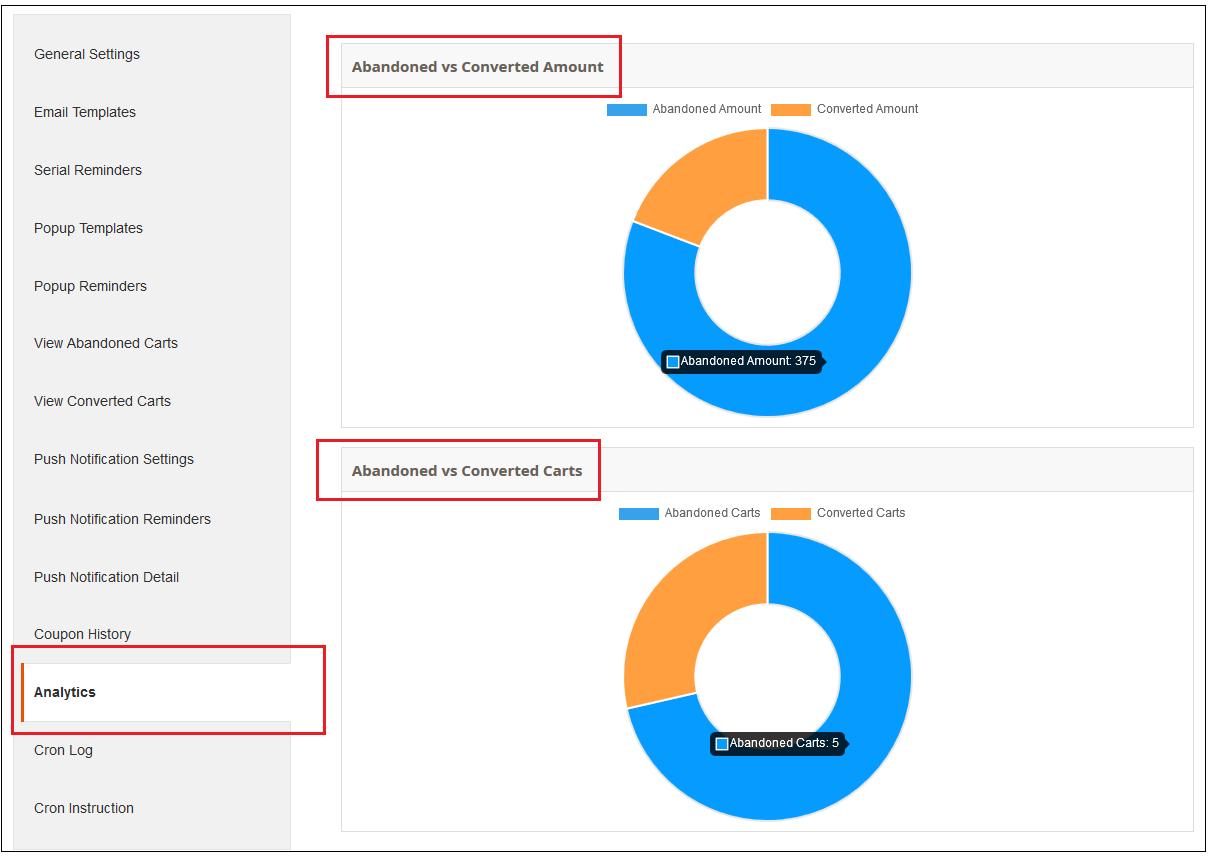
Under this section of Magento 2 Email Follow up module, you can check the graphical statistics between the total number of Abandoned Carts and Converted Carts. Also, you can check the comparison between Abandoned vs Converted Amount illustrated using pie charts.
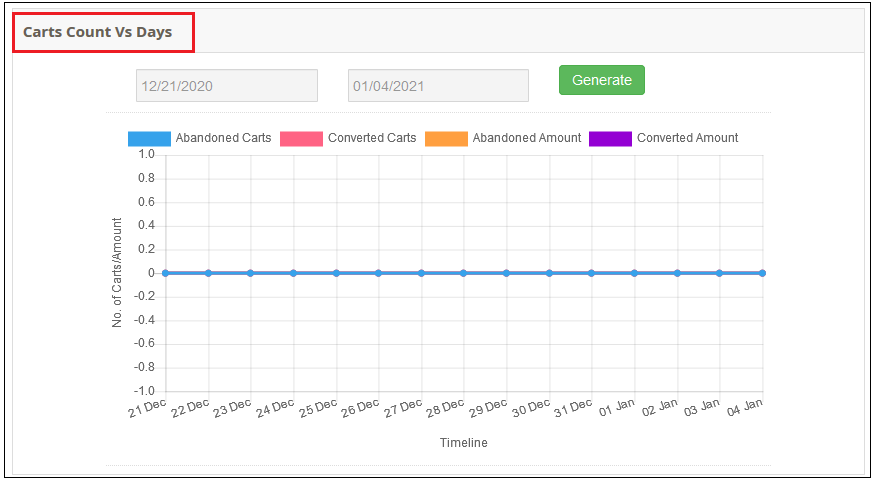
This bar chart gives the overview of the total abandoned carts, converted carts, amount abandoned and amount converted in a given time span.
3.13 Cron Log
In Cron log admin can view these details as shown in the screenshot:
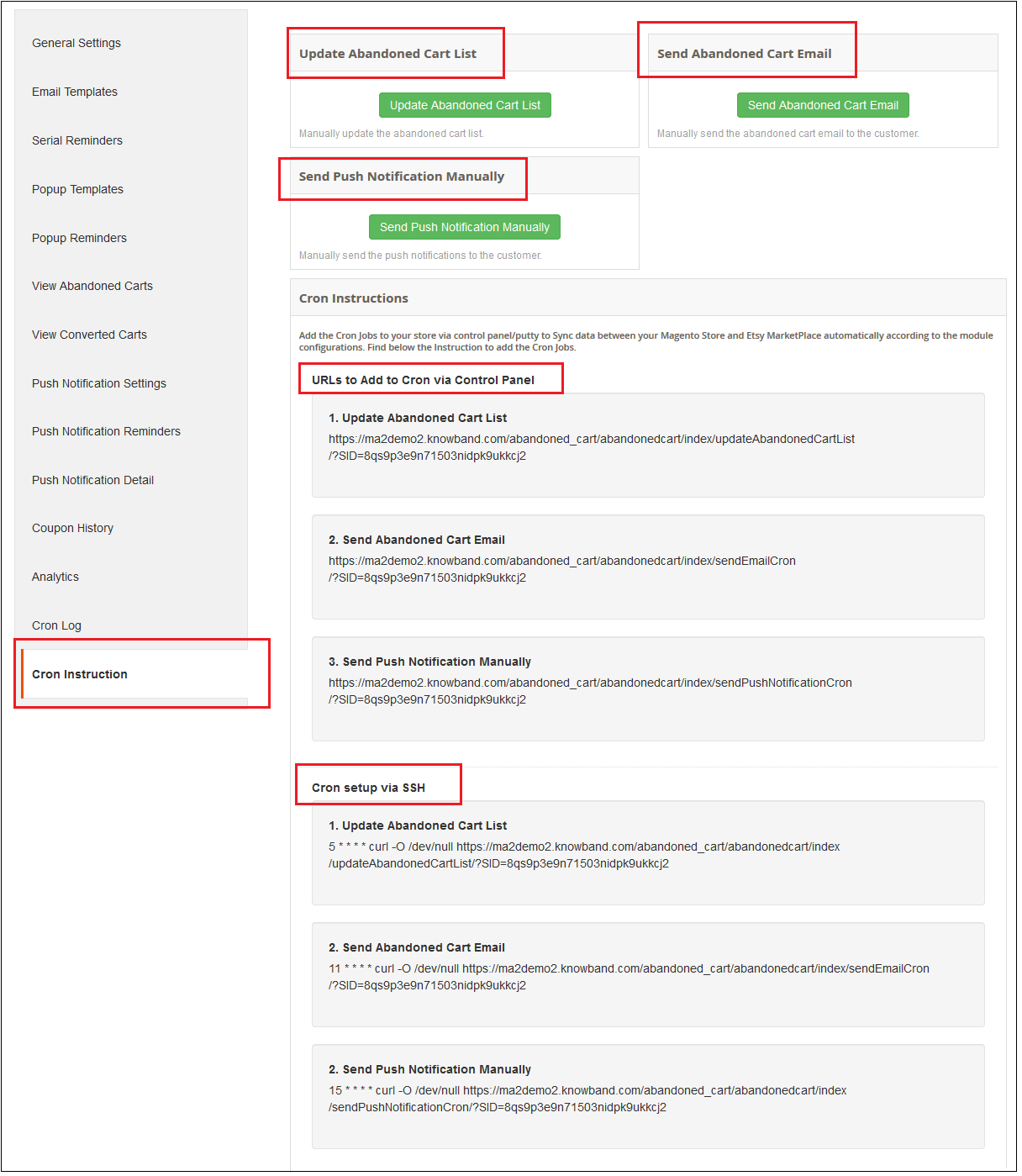
3.14 Cron Instruction
A cron is a service that allows a user to automatically execute a script at a specific time.
For example, you can set a particular PHP script to be automatically executed every day at midnight.
In order to set CRON for Abandoned Carts the following 2 URLs are supposed to be added to the crontab of your server:
Updating Abandoned Carts List
https://www.yourstore.com /abandonedcart/index/updateAbandonedCartList?SID=
A success message is also displayed as given below:
Sending Abandoned Cart Emails Automatically
https://www.yourstore.com /abandonedcart/index/sendEmailCron?SID=
Upon clicking the Send Abandoned cart Email button, a success message is shown as
Note: Reminder emails are sent only one time to a particular email ID or cart.
4.0 Front-End Interface
If the online user left his/her cart abandoned then this Magento 2 abandoned cart module sends a reminder email to the online users. Apart from this online users can also get popup reminders, pushup notification reminders along with the discount coupon. They can complete their order using the discount coupon provided by the online merchant.
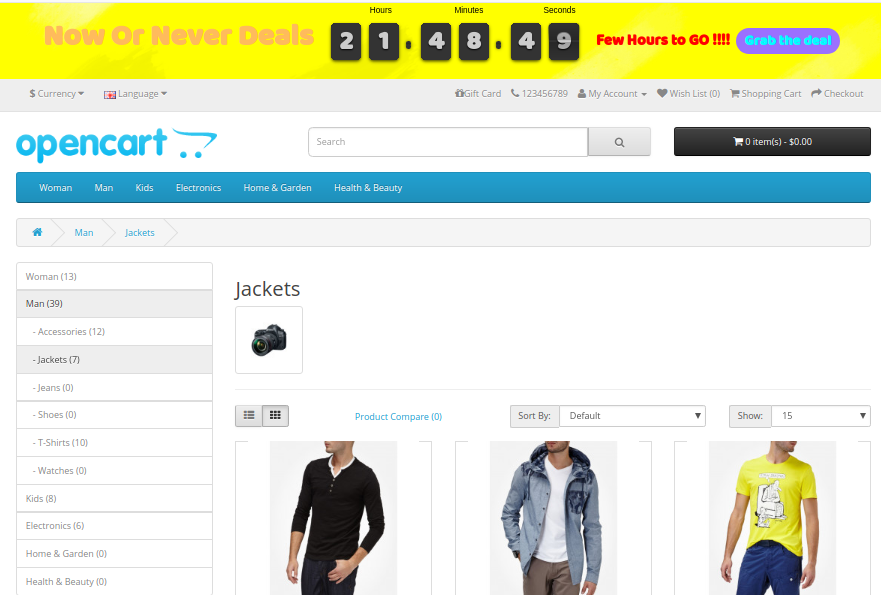
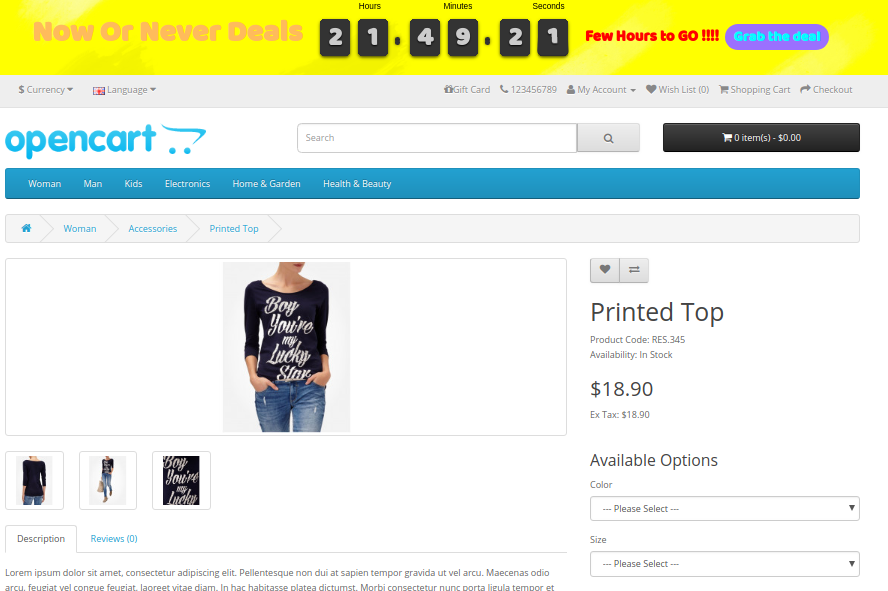
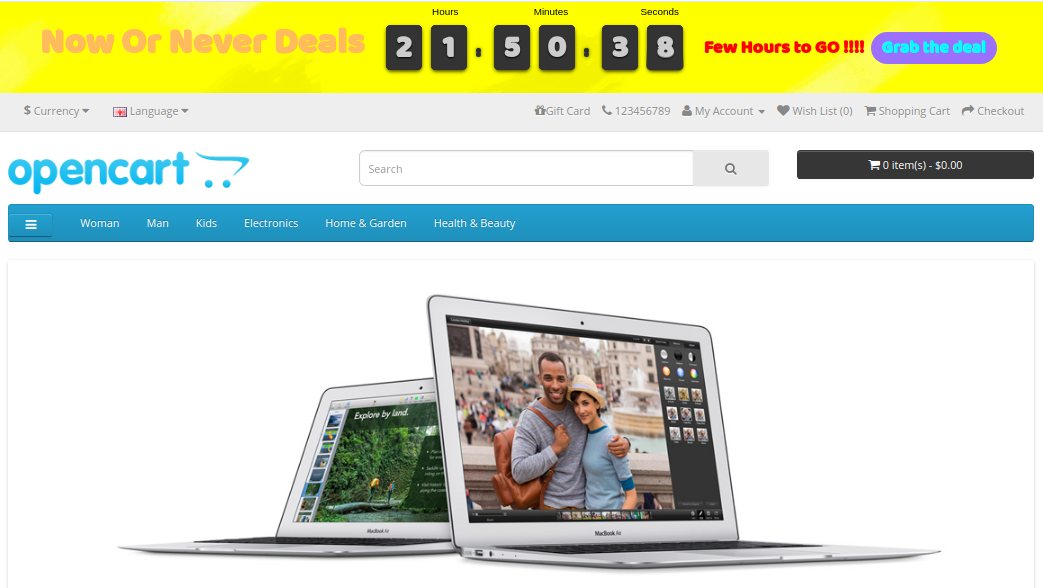
Putting a countdown timer bar at the top of the website is the best way to remind your shoppers that they have a limited amount of time to grab the product deals at the lowest rates. A sense of urgency is created using sales countdown timer which triggers their instant purchase decision. OpenCart Countdown Sales Timer extension compels shoppers to make an immediate decision by showing limited stocks and half prices. Showing sale price and free shipping on selective products are an effective tactic to provoke bulk sales on the eCommerce store. Knowband’s Sales Countdown Timer Bar for OpenCart allows admin to add a custom timer bar to their online shop promoting special events, promotions and new product launches.
Countdown timer campaigns module offers a real-time countdown timer creating awareness among customers regarding limited edition products, new arrivals, free shipping products and many more. This results in increasing conversion rates which ultimately helps e-merchants to run more effective sale campaigns/promotions. With OpenCart sale countdown module, admin can create multiple countdown timers for the homepage, product pages and category pages within the website scheduled at different dates and times.
1.1 Striking Features of Countdown Timer extension for OpenCart
OpenCart sale countdown module offers many customizable features which can be set as per business requirements. No coding is required and the store owner can set a sales timer bar for their store in seconds. Let us explore them one by one.
1. OpenCart sale countdown module displays a countdown timer bar for the entire website or selective pages to create a special feel and urgency among the visitors.
2. Using Sales Countdown Timer Bar for OpenCart, admin can show the desired text message beside a countdown timer running.
3. With the countdown timer campaigns module, Admin can easily fix the start and end time for multiple countdown timers.
4. Admin can create multiple Sales Countdown Timer Bar for OpenCart site based on different occasions and events.
5. OpenCart Countdown Sales Timer extension allows admin to choose appealing color coding for the sales countdown bar on the website.
6. The Sales Countdown Timer Bar for OpenCart can be shown at the top or bottom of the store.
7. An option to change the font style of text shown on countdown timer bar is also provided by this OpenCart Countdown Timer module.
8. To avoid confusions in different timers, admin can set a unique name corresponding to each of the sales countdown timer bars.
9. With OpenCart sale countdown module, admin can assign a unique priority or sort order for each of the set timers for the shop.
10. The button text and button link is shown over the countdown timer bar can be changed using this OpenCart extension.
11. An option to add custom CSS code is also offered by this OpenCart Countdown Sales Timer module.
12. Countdown timer campaigns module provides flexibility to display the countdown timers in selected locations or countries.
13. The OpenCart Countdown Timer module gives an option to set time after which the countdown sales timer is shown at the front.
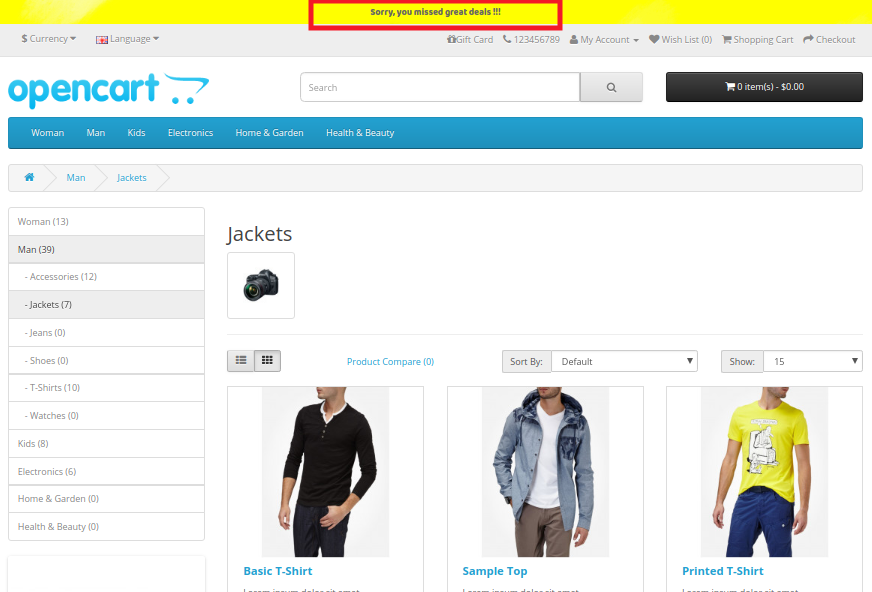
14. OpenCart admin can show a text message after the sale timer ends or expires. If no expiry message is shown then the timer will automatically end and disappear without giving any message to the visitors.
15. OpenCart sale countdown module works flawlessly in multiple languages and with multiple stores.
16. OpenCart Countdown Timer is completely mobile responsive.
17. OpenCart Countdown Sales Timer extension can be enabled or disabled on a single button click from the backend. Moreover, each of the timers can be separately enabled or disabled as per requirements.
2.0 Installation Guide of OpenCart Countdown Sales Timer extension
Before starting the installation process, you have to buy the OpenCart sale countdown module from the Knowband store. Once purchased, you will receive the following files on your registered email.
The source code of OpenCart Countdown Sales Timer extension in zipped file format.
User Manual of OpenCart Countdown Sales Timer extension
Now in order to install this OpenCart Countdown Timer Bar on your online shop, follow the given steps:
1. Unzip the zip file. You will get the folders as shown in the image below:
2. Copy all the folders of the zip file in the Root Directory of OpenCart setup via FTP manager.
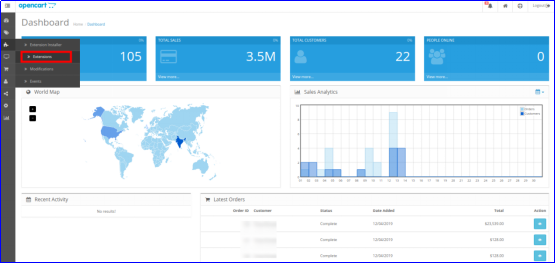
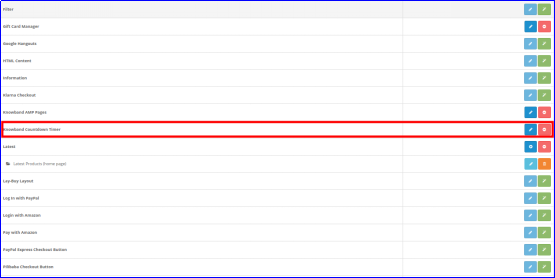
So, OpenCart Countdown Sales Timer is now successfully installed and is ready to use at your store. Go to the admin menu and click on the extensions and thereby click on configure button next to Knowband Countdown Timer.
3.0 Admin Interface of OpenCart Countdown Sales Timer Extension
Just after successful installation of Sales Countdown Timer Bar for OpenCart website, you can create and configure the countdown sales timers as per your requirements. Navigate the settings in the given order: Admin Panel > Extensions > Modules > Knowband Countdown Timer
The simple to understand admin interface of OpenCart Countdown Timer Module is divided into two broad sections namely:
1. General Settings
2. Timers
Each of these sections have been discussed in detail below. Further, the “Timer” section is sub-divided into:
1. General Settings
2. Display Settings
3. Look and Feel Settings
3.1 General Settings
The general settings of the Countdown Timer extension for OpenCart have been listed one by one.
Status: Enable or disable the complete functionality of countdown timer campaigns module on the store.
Fonts: Select the desired font style for the text information shown on the sales countdown timer bar.
3.2 Timers
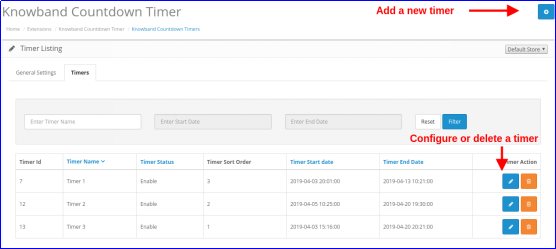
OpenCart sale countdown module provides a detailed view of the existing countdown timers. An option to edit or delete the existing timers is provided corresponding to each of the timers. Admin can easily make changes to the existing sale timers. To add a new countdown timer to the store, click on the “+” button shown at the top right corner of the admin interface. As you click on the “Add” button, you will see the following settings for the countdown timer.
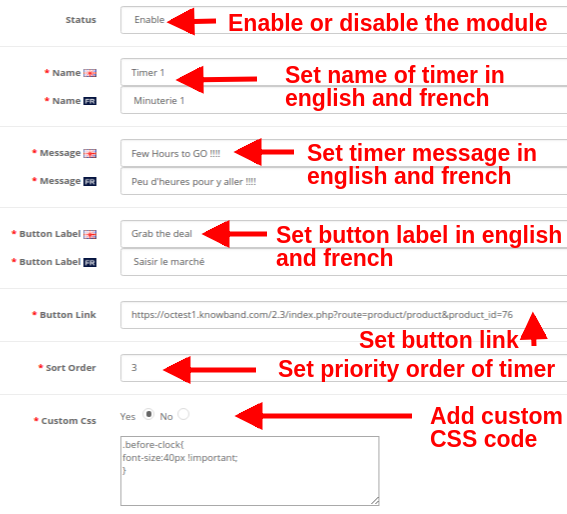
3.2.1 General Settings
Initially, the above fields are set to their default values.
Status: This option enables or disables the countdown timer.
Name: This option allows you set a name for the sales timer so that you are not confused while configuring the settings for multiple timers on the store. The name can be specified in English, French and other languages.
Message: This option sets a message or text information shown on the countdown sales timer bar. This text describes the deal or discount offer which is active on the store.
Button Label: To redirect the visitor on the deal or offer page, a button is provided on the timer bar. This option allows you to set the desired label for this timer button.
Button Link: This option lets you set the URL for the timer bar button. When the user clicks the button, they are redirected to this specific link.
Sort Order: This option allows you to set the sort order or priority value for each of the timers created for the OpenCart store. Remember, this priority value should be unique.
Custom CSS: This option includes custom CSS to improve frontend functionality of the website.
3.2.2 Display Settings
The display settings of this OpenCart Countdown Sales Timer extension control where and how the Countdown Timer block will be displayed to the visitors. The various configuration options under this section include:
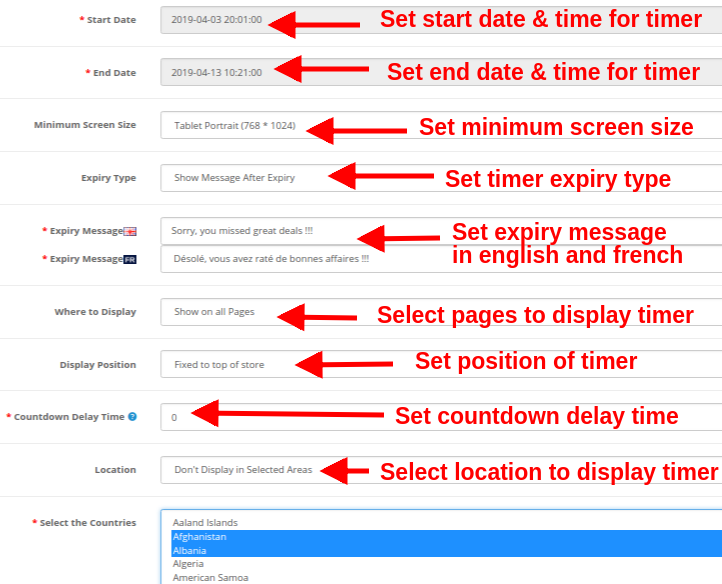
Start Date: This is a mandatory field that sets the start date and time for the countdown timer.
End Date: This is a mandatory field that sets the end date and time for the countdown timer.
Minimum Screen Size: This option sets the minimum screen size(display configuration) where this countdown timer block can be seen through different devices.
Expiry Type: This option allows you to set the countdown timer expiration type. You can either set it to “Auto” or you can “show a custom message after timer expiry”.
Where to Display: This option allows you to choose the site pages where you want to display the countdown timer block on the website. You can show on your complete site or only selected pages of your site.
Display Position: You can fix the display position for the countdown timer block over the website. The three display options include:
1. Top of the store
2. Fixed to top of window
3. Bottom of the store
Countdown Delay Time: You can specify the delay time (in seconds)after which the timer block is displayed on the frontend. Set 0 if you want to display it immediately to the visitors.
Location: You can set a location where you want to show the sales countdown timer. You can set the location as global or to selected areas only.
3.2.3 Look and Feel Settings
The look and feel settings of OpenCart Countdown Timer module control the frontend appearance of the countdown timer block. The various configuration options offered are:
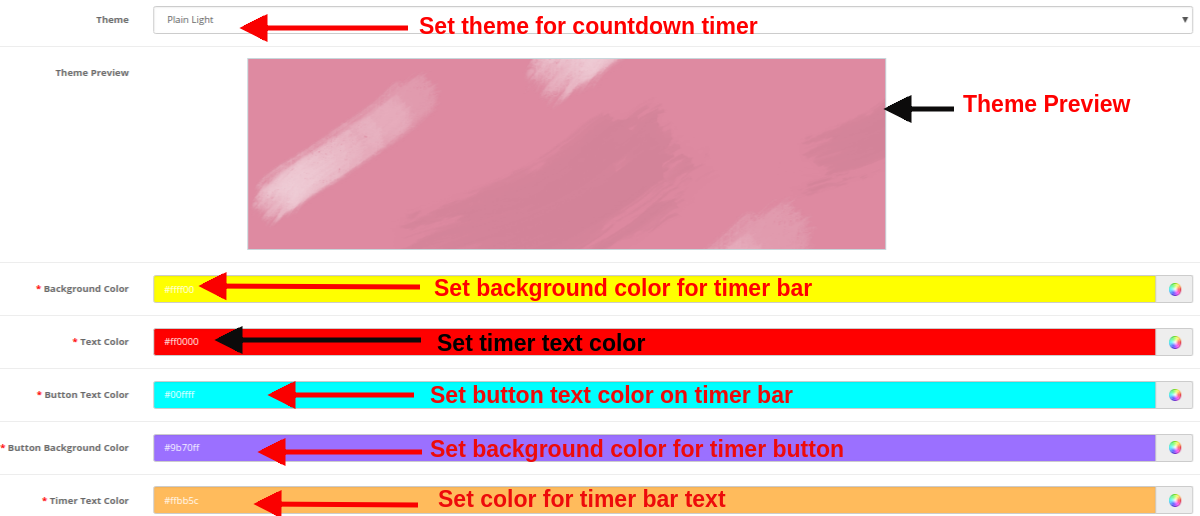
Theme: This option allows you to set a theme for the sales countdown timer block.
Theme Preview: Using this option, you can preview the selected theme before applying the final changes to the website.
Background Color: Using this option admin can set the background color for the sales countdown timer block.
Text Color: The font color of the text shown on countdown timer block can be set using this option.
Button Text Color: Admin can change the text color on the timer button.
Button Background Color: Admin can set a desired background color for the timer button.
Timer Text Color: Select text color for the timer text shown in sales countdown block.
After this, click on the “Save” button shown at the top right corner of admin panel to save the module settings.
4.0 Front Interface of Countdown Timer Campaigns Module
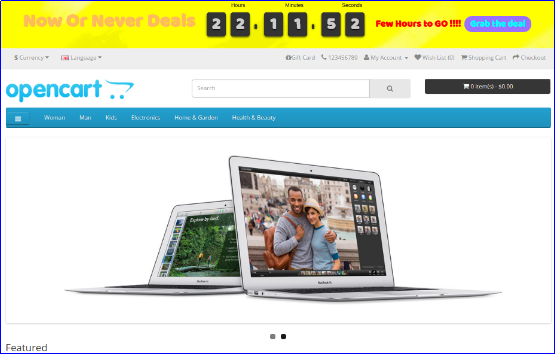
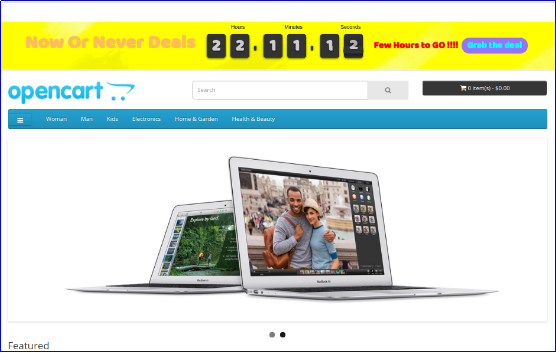
After you have successfully configured the settings of OpenCart sale countdown module, you can see Sales Countdown Timer Bar for your OpenCart store in accordance with the selected priority values and time schedule.
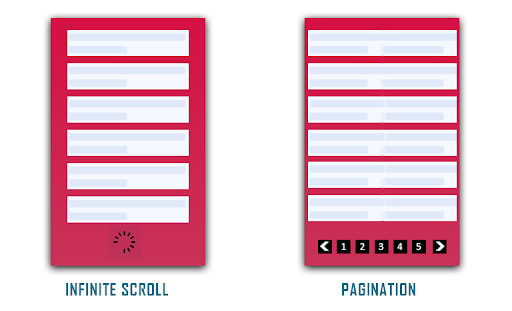
Pagination or Infinite Scrolling, which would be better? This thought has struck website owners many times and they still get stuck in a dilemma when it comes to choosing between any one of the UX patterns for their website.
In this article, I will share deep insights into both these processes and help you choose the better one for your website. Before we delve into the Infinite Scroll vs Pagination debate, let’s try to understand both.
What is Pagination?
Pagination is the process of breaking large content into smaller chunks. It divides your website content into discrete pages and forms a sequential numbering at the end of a page.
A common example of Pagination is the Google search result. Every time you search for something on Google, it displays n number of results that are divided into several pages.
Pros of Pagination
Talking about the benefits of Pagination, here are some of them.
Better Conversions
“Conversion” is the major factor that has kept online businesses sticking to the Pagination process. Pagination proves to be extremely helpful for users who have entered your website with a purchasing mindset rather than just browsing through the content.
Better Control
With Pagination, you can reach the footer of the website or the top section conveniently, therefore, providing better control to browse the content.
Easy tracking and bookmarking
Pagination makes it easy to track how much content has been consumed. Consider Google search results or Amazon, for example, if you have gone through some pages already, you do not need to go through them again. You can directly jump to a specific page and also bookmark it for later use.
Cons of Pagination
Talking about the cons of Pagination-
Breaks the flow
Pagination obstructs seamless browsing. It breaks the flow of a visitor by asking him/her to navigate to the next page to browse further and disturbs the user experience.
More clicks and loading time
Users get tired after clicking on the “next’ button or switching between pages multiple times. Not only it is tiring but users also get irked by the page loading process.
What is Infinite Scrolling?
Infinite scrolling or continuous scrolling is a single-page scrolling that goes on endlessly with no certain finish line. It loads the overall content on a single page and offers a continuous flow of browsing. With Infinite Scrolling, the next page content or say the next set of products are loaded automatically within the same page as the user scrolls down. It is also known as Progressive loading and endless scrolling.
Social media sites like Facebook and Instagram are some of the best examples of Infinite scrolling.
Pros of Infinite scrolling
Talking about the benefits of Infinite Scrolling, here are some of them.
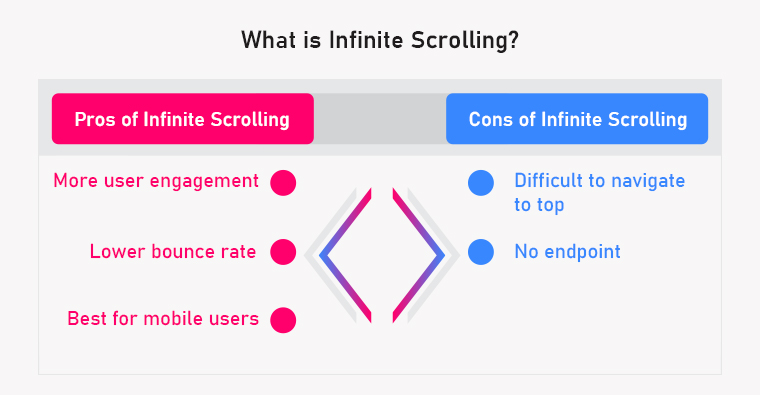
More User Engagement
The primary purpose of Infinite Scrolling is to engage users and make them stay longer on the website and it does that job perfectly. It is adopted by those website owners who have content exploration as their primary focus. It also makes browsing fun.
Infinite scrolling keeps the user flow and engages your audience towards your content, hence creating more user engagement.
With more user engagement, the average time spent by a user on your website, increases, which eventually reduces the bounce rate.
Best for mobile users
Infinite scrolling provides an amazing browsing experience to mobile users, especially on the mobile app. Since most of the website traffic today is generated through mobile, Infinite scroll makes the best fit for your business as it is more intuitive and user-friendly.
When users keep scrolling down, they usually dig so deep that navigating to the top becomes a daunting task.
Also, users cannot bookmark a page in Infinite Scrolling. They will have to consume the entire content again when visiting for the next time.
No endpoint
Continuous scrolling makes a user feel bored after a point and compels them to take an exit.
In addition to that, a user looking for the footer section on your website can find continuous scrolling quite frustrating as it becomes challenging to reach the endpoint of the page.
Pagination vs Infinite Scrolling: The Final Call
Since you have understood both Pagination and Infinite Scrolling now along with their pros and cons, it is time to decide which one can be a better option for your website/store.
When to use Infinite Scrolling and When to use Pagination?
Considering all the factors, here is my take on Paging vs Progressive loading:
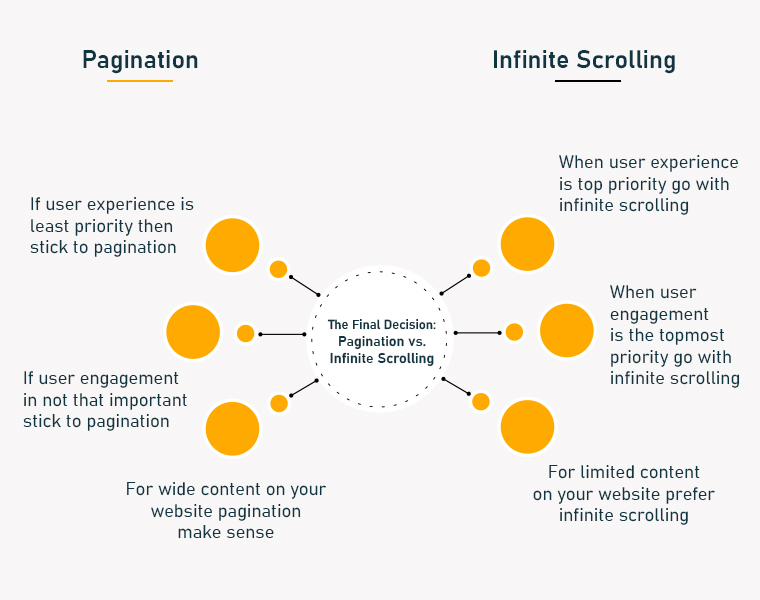
1. If the user experience and user engagement are your topmost priority, go with Infinite Scrolling else stick to Pagination.
2. If you have limited content on your website that a user can reach the endpoint after a certain time, prefer Infinite Scrolling. Pagination would make sense if you have wide content.
In the end, it is your call depending on your business and requirements. Both Paginare effective in producing quality results. Keep doing A/B testing at regular intervals and figure out the most effective one.
If you are thinking to implement the Infinite Scroll feature on your website, check out our Infinite Scroll module.
Infinite Scroll module by KnowBand
The Infinite Scroll module by Knowband is a feature-packed plugin that generates automatic loading on the product listing page. It provides easy navigation through the product catalogue.
The infinite Scroll module is a modern replacement for Pagination System and offers seamless browsing.
Features of Infinite Scroll
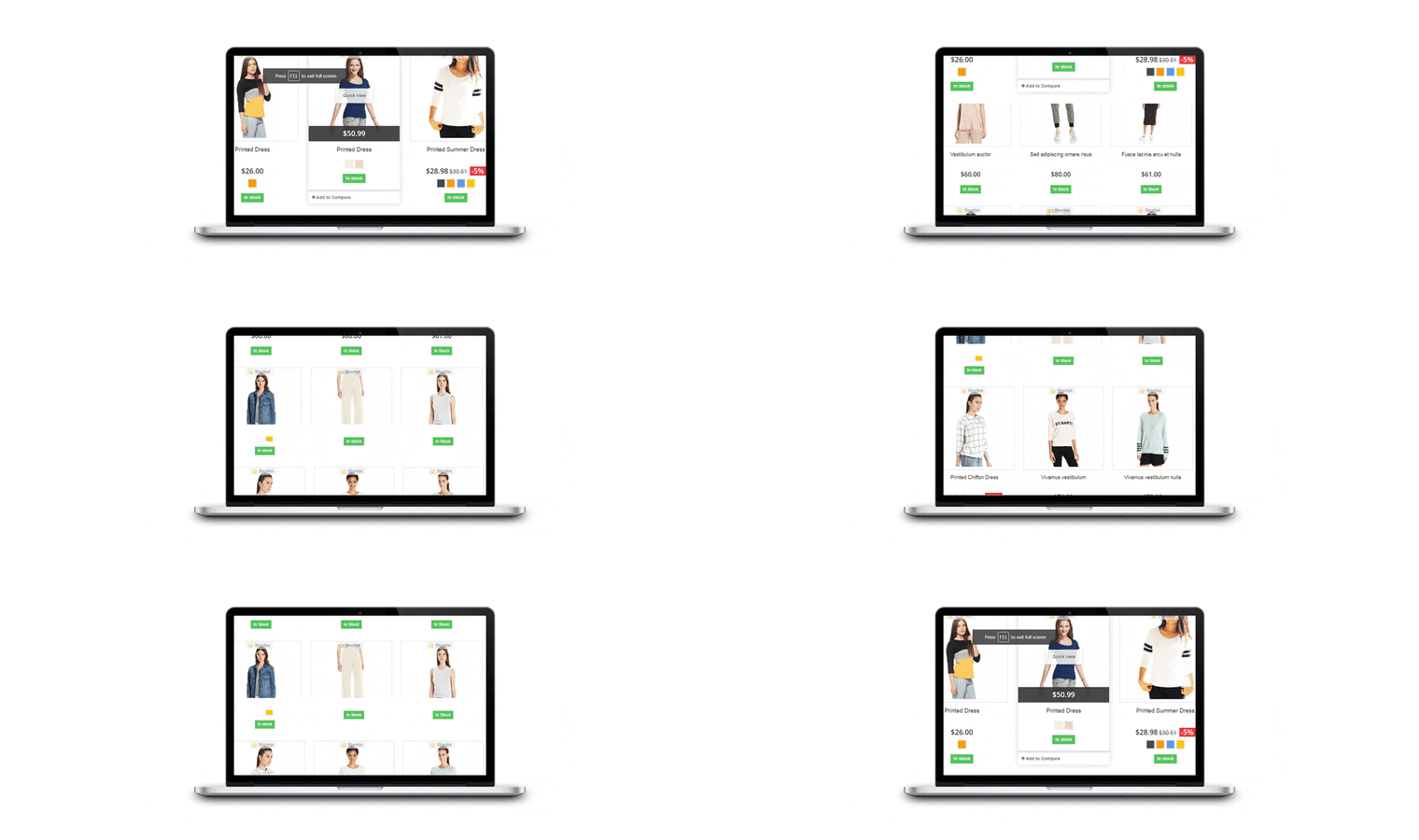
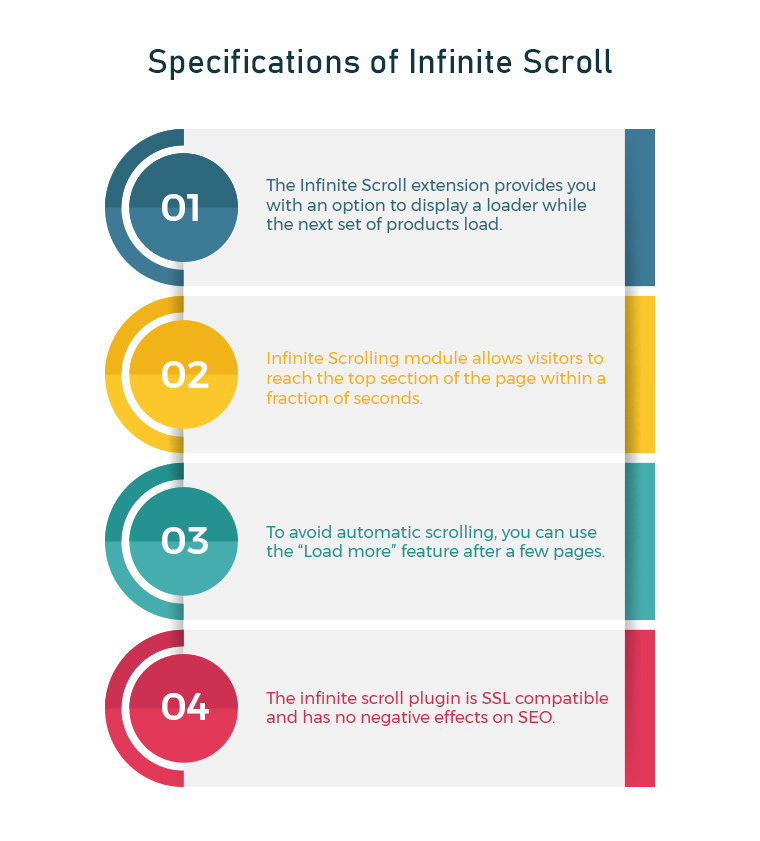
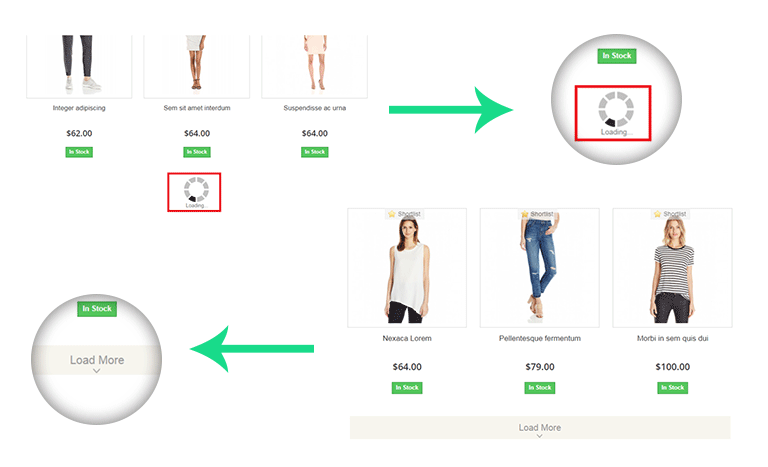
1. The Infinite Scroll extension provides you with an option to display a loader while the next set of products load. The loading animation keeps the interest of the users while they wait for the page to load. It tends to keep users on the website which probably would not happen in the case of Pagination where users have to keep loading pages manually.
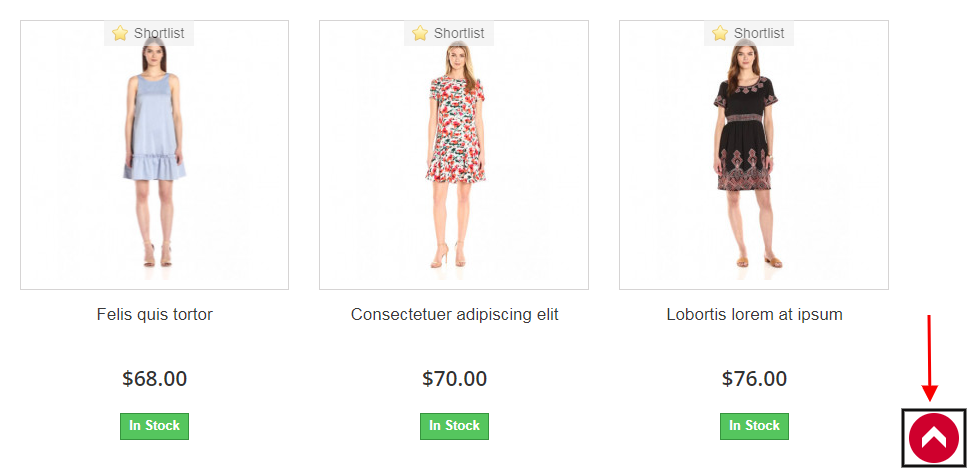
2. Infinite Scrolling module consists of a “Go to top” button that allows visitors to reach the top section of the page within a fraction of seconds.
One of the cons of Infinite Scrolling that we discussed above was it is difficult to navigate to the top of the page. The “Go to top” button in the Infinite Scroll module eliminates this problem.
3. To avoid automatic scrolling, you can use the “Load more” feature after a few pages. This is helpful for users who do not want to witness continuous scrolling for a longer duration.
4. You can also create a message box at the end of your product results which confirms to your visitor that the results have ended.
5. Infinite scroll plugin doesn’t affect your SEO and is SSL compatible
Businesses are always seeking methods to improve the customer experience. Online firms have been compelled to develop innovative concepts as a result of the intense rivalry in the e-commerce market. One of the finest strategies for that is click reduction. It is effective in lowering bounce rates, increasing average site time and user engagement, and vastly improving user experience. For any assistance in these modules, you can reach out to us at support@knowband.com