With the growth of the eCommerce industry & mobile apps, online businesses are coming up with major shifts. The latest technology changes are able to provide a pleasant shopping experience to the customers and also helps in increasing sales and revenue. The Progressive Web App is one such technology that is known for responsiveness, fast loading, rapid installation, and other various exciting features. Moreover, the eCommerce PWA Mobile App Builder allows the store admin to easily transform the eCommerce store into Progressive Web App.
The Knowband PWA Mobile App Maker for eCommerce is a ready-made plugin for launching a featured shopping app. The extension gives a native app-like experience in the PWA Mobile App without any sort of technical knowledge. The store admin can handle all changes & configurations from the backend of the module. The changes will be reflected on the live eCommerce PWA Mobile App automatically. It is a very lightweight app and can seamlessly and smoothly run on any device.
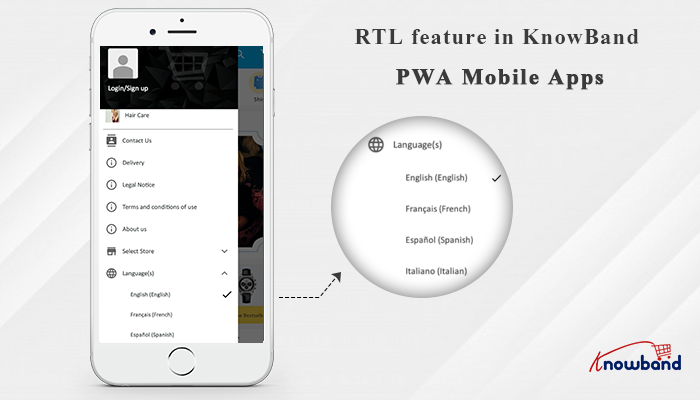
[NEW UPDATE] RTL Feature In KnowBand PWA Mobile Apps:
The language plays an important role in grabbing the user’s attention & improve the shopping experience. But, many eCommerce mobile apps can not target a vast mobile audience because of the language barrier. To target the market regionally and globally, the store admin just needs to add their native language on the website and Progressive Web App. With PWA Mobile App Maker, it becomes very handy to launch the Progressive Web App for the eCommerce store.
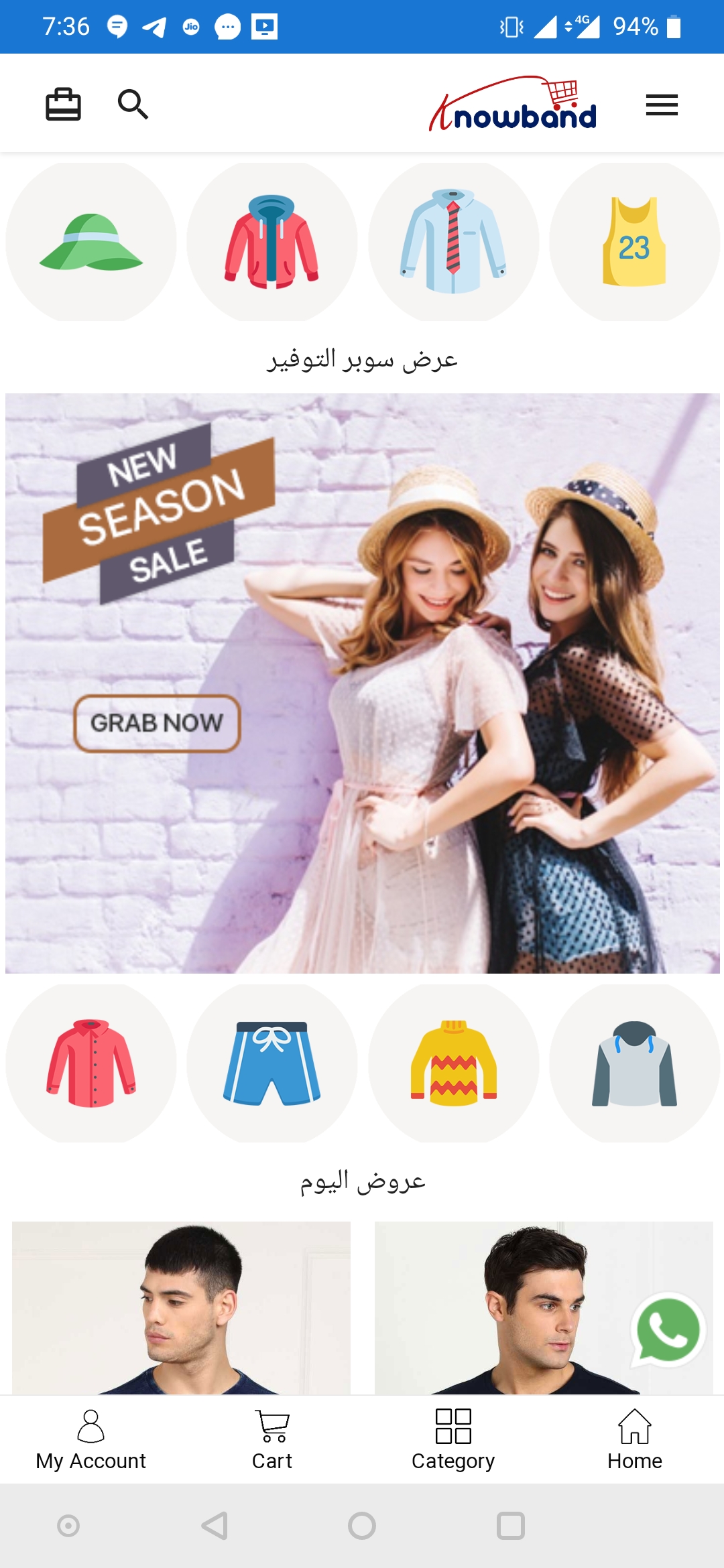
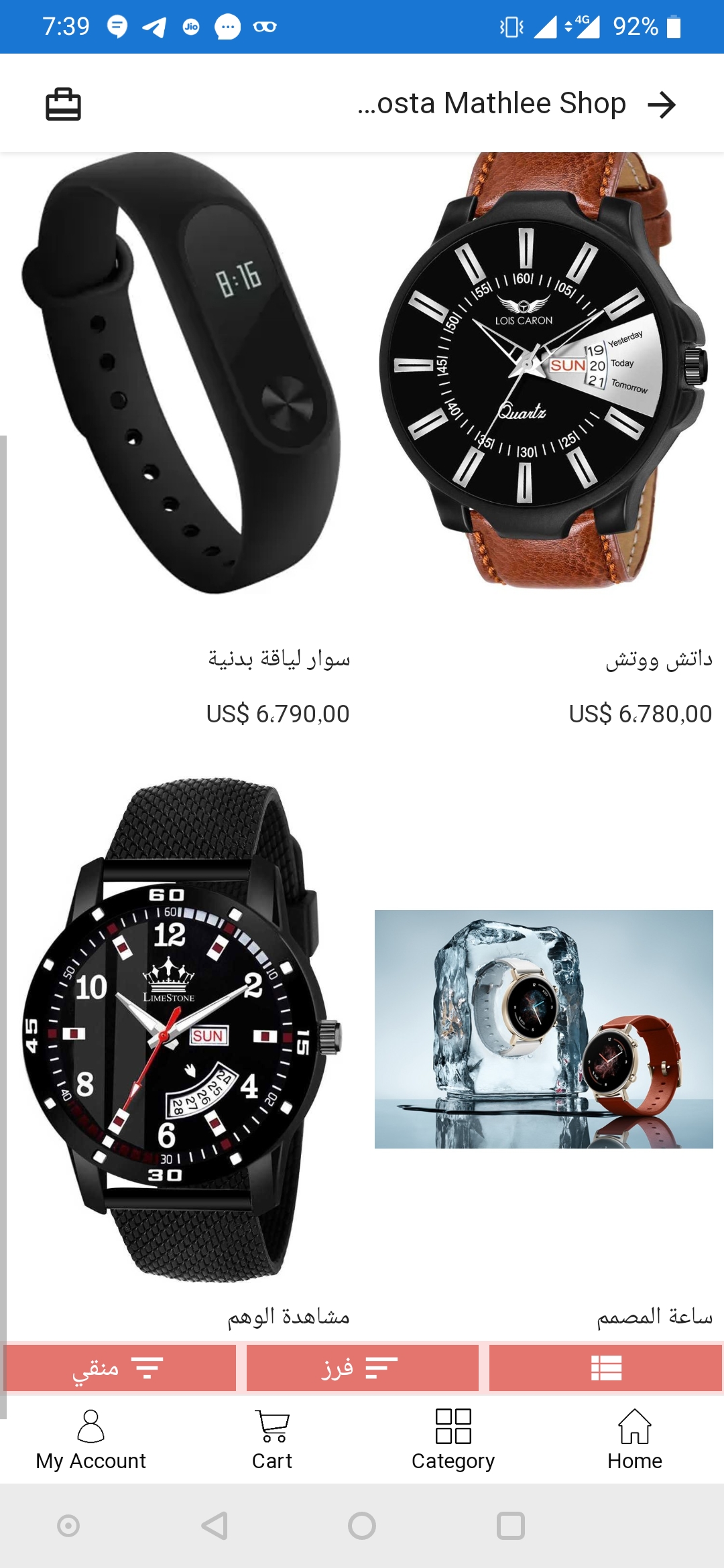
The store admin can add multiple languages on the PWA Mobile App including RTL languages such as Arabic, Hebrew, Persian, etc. The Progressive Web App supports all the languages available on the eCommerce website. This makes it easy to target the audience from different regions and expand the business reach. Now, the store admin can include more languages on the app other than the website. Here are some of the screens showcasing how the RTL screens will look like:
What is PWA Mobile App Builder & how does it work?
The Progressive Web App Creator offers a great customer experience to the users and it is a ready-made software plugin that allows the store admin to perform all the customizations. All the changes are performed with a few mouse tweaks in the admin panel without any coding knowledge.
Once the eCommerce website has been integrated with the Progressive Web App Builder, all the eCommerce website data/inventory will be automatically fetched on the mobile app. The user can easily install the Progressive Web App just by accessing the store URL on the mobile browser. Knowband offers PWA Mobile App for all major platforms like PrestaShop, Magento 2, WooCommerce, OpenCart. Check more details from the below links:
Other Key Features of the Progressive Web App Creator:
These are some points that you should consider in your Progressive Web App before going for it. These features help the eCommerce business to get a boost in conversion-
1. Easy Branding With Customization Option:
The branding option in the eCommerce PWA Mobile App consists of an app logo, brand name, icon, image, splash screen, background color, etc. This allows the store admin to establish the brand identity in the mind of the customers using the PWA Mobile App. Poor branding strategies can lead to lower traffic and reduce the conversion rate. The whole look of the home screen layout, color, font, etc. can be easily changed from the module admin panel. The right set of banners, images, text can lead to improved app interface and conversions.
2. Tablet & Mobile Compatible:
The eCommerce Progressive Web App is not platform or device-dependent and it is very much lightweight. The eCommerce app can smoothly run on Android/iOS and mobile/tablet and easily get adapted with all multi-screen sized devices.
3. One-Click Login & Checkout:
The PWA Mobile App Builder consists of one-click login options with Facebook & Google. The inbuilt login and registration options such as Google & Facebook and email allow users to access PWA Mobile App with ease.
The eCommerce shopping app allows the customers to fill in only necessary information while performing the transactions. This gives them the benefit of simplified checkout. This option prevents the customer from getting irritated and offers a smooth transaction process.
4. All Payment & Shipping Methods Support:
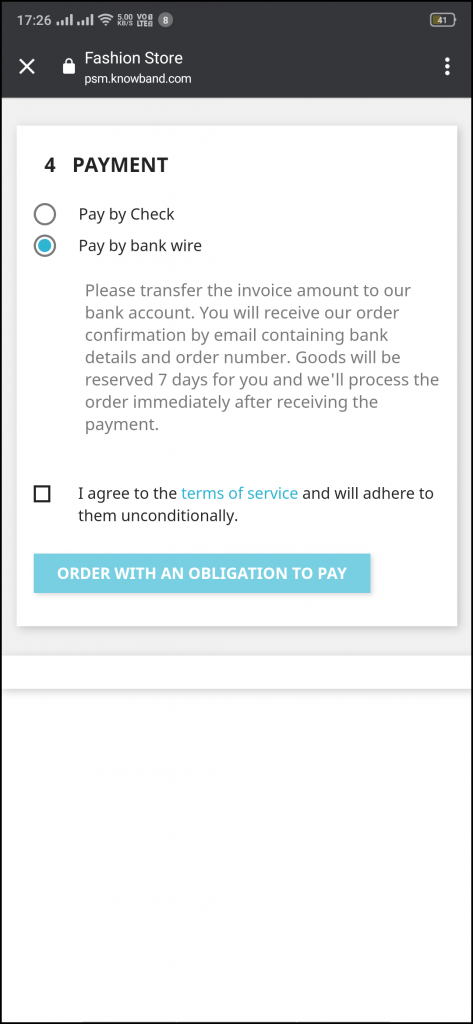
To gain the trust and reliability of the customers, the store admin can use multiple payment and shipping options in the PWA Mobile App. All the payment and shipping options available on the eCommerce website can be added to the Progressive Web App. The customers can easily shop from the most preferable payment & shipping options.
5. Real-Time Synchronization:
The real-time synchronization feature fetches the eCommerce website product inventory and data into the mobile app automatically. The store admin can easily update the app inventory as of website without the need of putting manual efforts again.
6. Lightweight App with Fast Loading:
The PWA app is very much lightweight and fast loading than the native apps. The Progressive Web App Builder ensures fast app performance and makes it smoothly run on all devices and platforms. The users do not have to depend on the Play Store and App Store to install the eCommerce mobile app.
7. Supports Offline Mode:
The eCommerce PWA Mobile App Builder consists of a cache of previously loaded data. It shows the data to users even if they are not connected to the internet. The user conveniently uses the shopping app with ease and adds products to their wishlist and cart.
8. Zopim and Whatsapp Chat Options:
The Progressive Web App Maker consists of Zopim and Whatsapp Chat features that helps to solve the queries and issues of the customers. Customer support is available 24*7 for mobile shoppers. The feature allows the user to connect with the store admin whenever required.
Conclusion:
This blog consists of eCommerce PWA Mobile App Builder features that ensure fast performance and reliable shopping channel for your mobile audience. Such PWA Mobile App can give a boost and competitive edge to the business. The outstanding features of the readymade plugin help in achieving a good conversion rate and sales from the mobile audience. You can reach us at support@knowband.com in case of any queries.
The PWA Mobile app for eCommerce is designed and developed to provide ease to the store admin by owning a shopping app. The store owners can now easily transform the eCommerce store into the Progressive Web App. The Progressive Web App is one of the most relatable technologies for which every eCommerce store admin should opt for. It offers some amazing features in the mobile app such as offline mode, easy customization options, platform independence, push notifications, etc.
Knowband is a well-renowned company that is especially known for developing readymade plugins for eCommerce websites. We have developed eCommerce plugins for different platforms like OpenCart, PrestaShop, Magento 2, WooCommerce. One such extension is PWA Mobile App Builder. This readymade solution allows the store admin to make their website PWA active and customers will get “Add PWA App To Home Screen” to install and access the shopping app.
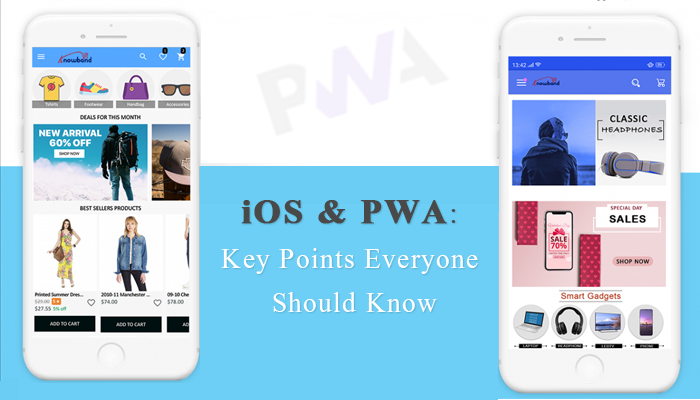
Important Notes Of PWA Mobile App for working on iOS Devices:
There have been many myths and confusions in the eCommerce industry about working of PWA Mobile Apps on the iOS devices like iPhone, iPad, etc. Here are some of the major ones to clear out the concept:
1. iOS devices do not allow the “Add To Home Screen” prompt
The PWA Mobile App Builder provides an ease to the customer to easily add the mobile app in their device Home Screen without accessing it from the App and Play store. Once the store URL is opened on the mobile browser, a prompt comes with “Add To Home Screen”. This feature is working smoothly on Android as of now. The iOS app users need to add the Progressive Web App on the iPhone/iPad manually because the iOS does not offer any inbuilt “Add To Home Screen” popup.
2. Web Push Notifications won’t work in iOS
Push notification is one of the best marketing tools of eCommerce PWA Mobile App Builder. The push notification feature of the eCommerce PWA Mobile App Maker is very much useful in sending updates about discounts, offers, cart abandonment rates to mobile shoppers. The store admin can easily configure and send push notifications to Android users, but as of now, this option is not available for iOS users.
What is PWA Mobile App Builder & how does it work?
The Progressive Web App Maker is a modern web technology that offers a native app-like experience via web-app. It is a ready-made software plugin that converts your eCommerce store into a Progressive Web App without any coding knowledge. Moreover, the store admin can get all the advantages of the eCommerce app in the Progressive Web App. Enabling PWA Mobile App in mobile devices allows the store admin to save time, and money and comes with easy customization options.
Once the website is converted into PWA Mobile App, whenever any user opens the store URL on the mobile browser, the “Add To Home Screen” pop-up will be there. The Progressive Web App will be simply added to the mobile device and the same can be accessed anytime to browse or shop products.
Knowband offers the PWA Mobile App Maker for all major platforms like PrestaShop, Magento, WooCommerce, OpenCart. Check the below links for more information:
Other Key Features Of PWA Mobile App Builder (On Both Android & iOS)
There are some key features of the Progressive Web App that are available on both Android and iOS devices. We have mentioned a few of them in this section:
1. Branding with Home Screen Customization:
Branding is one of the most important parts of every eCommerce business because it gives an identity to the eCommerce brand in the mind of customers. The store admin can also take the benefit of the proper branding strategy by adding the brand logo, brand name, icon, image, splash screen, background color, etc. in the Progressive Web App. All these changes can easily be done by accessing the module backend.
The PWA Mobile App consists of several effective customization options from which the store admin can change the look and feel of the app without any change in technical coding. The PWA for eCommerce allows the store admin to perform the changes even if the app is live. The store admin can change banners, images, sliders, intuitive colors, and font, etc., and design the home screen layout from the admin panel.
2. Tablet & Mobile Compatible:
The eCommerce PWA Mobile App is very much lightweight and can easily get compatible with all devices. The eCommerce Progressive Web App is not platform or device-dependent and can smoothly run on Android or iOS and mobile or tablet.
3. One-Click login and Checkout:
Most of the eCommerce mobile apps are not able to provide the easy login and checkout option that can lead to a high cart abandonment rate. The PWA Mobile App Builder offers one-click login solution with Google & Facebook. The store admin can enable the social login options and email login/registration. The simple checkout process allows the customers to fill in the necessary information to complete the transactions. This option only allows the users to fill in the relevant information to complete the order in PWA Mobile App.
4. All Payment & Shipping Methods Support:
The store admin can also include the multiple payment and shipping in the eCommerce PWA Mobile App available on the eCommerce website. The customer can conveniently shop with their most preferable payment and the shipping method. The reliable payment and shipping options improve customer trust and persuade them to shop more.
5. Multilingual & RTL Languages Support:
The eCommerce PWA Mobile App supports all the languages available on the eCommerce website. The Progressive Web App also allows the store admin to add multiple languages including RTL (Right To Left) scripts like Arabic, Hebrew, Persian, etc. The eCommerce merchant can include the languages according to the target region and the needs of the users. The mobile shoppers just have to select the language in the eCommerce app and it will get translated accordingly.
6. Real-Time Synchronization:
The Real-time synchronization ensures all the eCommerce website product inventory and data to be fetched into the shopping app automatically. If any changes are performed in the store inventory, then the same will also get reflected in the front-end eCommerce Progressive Web App. This eliminates the manual efforts of the store admin and saves a lot of time.
7. Lightweight App with Fast Loading:
The PWA Mobile App Builder is very much lightweight and gives fast performance if we compare it with the native apps. The Progressive mobile app allows the customer to install it without worrying about the space in the mobile phones. The PWA app is also not dependent on the Play Store and App Store. The user can directly install it from the eCommerce website.
8. Supports Offline Mode:
The offline mode of the PWA Mobile App allows the users to access the eCommerce mobile app without any internet. The cache of previously loaded screens appears on the Progressive Web App. This option allows the user to conveniently use the mobile app with ease even if they are facing any internet issues.
9. Zopim and Whatsapp Chat Options:
The Progressive Web App Builder provides a convenient chat feature to mobile shoppers. The users can directly connect to the store admin regarding their queries, issues, and confusion and get answers via chat. The store admin can give instant solutions to their concerns. This feature allows the user to connect with the store admin anytime and get the required assistance.
10. Compatible With Multi-vendor Marketplace:
The Progressive Web App maker is also compatible with the multi-vendor marketplace. The multi-Vendor marketplace plugin allows the store admin to easily register the seller by taking some required information. It allows the sellers to get registered on the web marketplace and the same will be fetched on the eCommerce PWA app along with their profile and products.
Here, in this article, we have tried to cover all the concerns related to PWA Mobile App and iOS platform. Along with that, we have tried to narrow down all the outstanding features of the readymade plugin PWA Mobile App Builder. It is the most convenient option to take your business to the mobile platform and help you to achieve the goal that you are looking for.
No one likes to face unpleasant or bad online shopping experiences. The technologies are changing rapidly according to the way customers behave while online shopping. But, running an online eCommerce shop isn’t a piece of cake for everyone. Often, a minor issue like slow page loading time can increase your bounce rate and make you lose revenue. To eliminate this problem Google came up with the solution called, Progressive Web App(PWA) in the year 2015. PWA Mobile App for eCommerce is noted for responsiveness, fast loading, rapid installation, and very exciting features. The qualities like this give it the potential to replace native apps.
Knowband is popularly known for providing the best eCommerce solution to a wide range of eCommerce platform owners. Knowband offers readymade plugins for platforms like Magento 2, PrestaShop, OpenCart, and WooCommerce to provide eCommerce Progressive Web App solutions to its customers.
E-Commerce Progressive Web App(PWA) gives you the look and feel of the app (as of native) with all the advantages of responsive websites. It is available for almost all browsers with a quick installation facility. The user interface of the PWA Mobile App looks like an app and can also work offline, even with a slow or no internet connection. It also provides mobile push notification features that provide updates to users on a timely basis.
#1. Customer Engagement and push notifications:
Customer engagement is one of the top priorities in the current eCommerce scenario. There are several ways through which store admin can improve customer engagement using a Progressive Web App. The store owners can use push notification features to inform about current website updates, discounts, stocks, and sales. Moreover, the “Add to Home screen” pop-up makes it easier for customers to install the app instantly on the PWA Mobile App.
#2. Improved security with no installation:
It is important to gain the trust of customers with Progressive Web App Builder. The sale is more likely to improve when customers trust and rely on your PWA Mobile app. So, the PWA mobile app considered all the security parameters to be followed to gain customer trust. Progressive Web App Maker can be easily added to the user’s mobile home screen with a few clicks and users can easily get away from lengthy installation processes.
#3. Higher conversion rate:
PWA Mobile Apps are fast loading and offers high performance, unlike native apps. It also uses website content efficiently that positively influences users and boosts conversion rates.
#4. Seamless Performance:
Users can access the Progressive Web App Maker allowing the users to access the required data even when they are not connected to the internet or an unstable network. The PWA Mobile App works perfectly in those areas with an unstable network connection and allows users to perform several activities on the app.
#5. Improved Search Ranking:
Google discovers and crawls Progressive Web App(PWA) easily and effortlessly because each page of a web app has a unique URL. This means that you can get much-needed traffic in your web app.
#6. Cost-effective:
Progressive Web App Maker is a lot cheaper than native app development. The native app requires a separate version of iOS and the Android operating system but the PWA app consists of only one cross-platform to launch. It is a great way to cut down the expenses of developing applications. Basically, a PWA Mobile App can be simply derived by opening the website on a mobile browser.
Top 10 PWA examples of online marketplaces
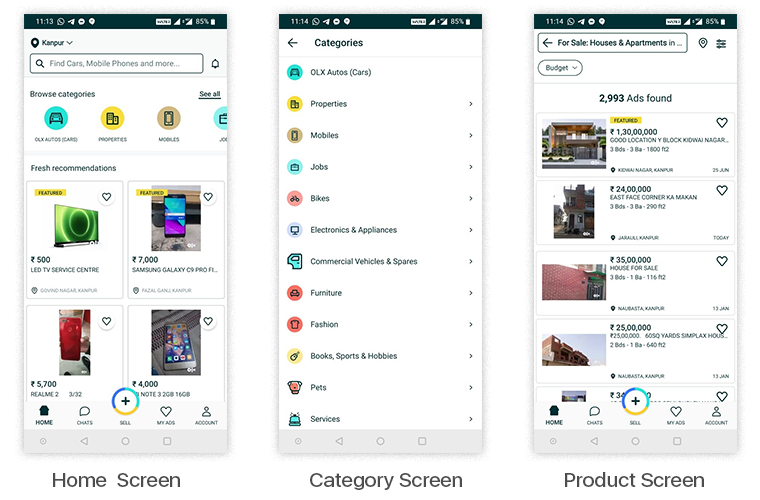
As you can see there are many benefits of the Progressive Web App in the eCommerce industry. There are many global brands that integrate PWA on their websites. We have mentioned top global brand examples that showed shocking results after integrating PWA into the website.
Jumia:
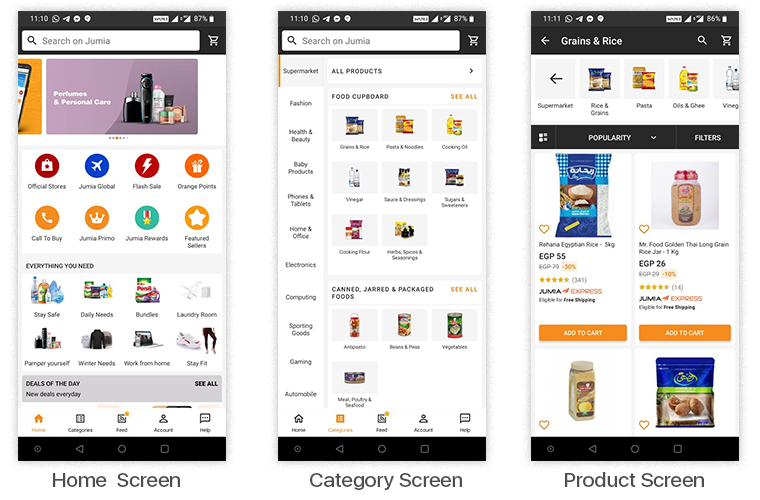
Jumia is an African eCommerce website, launched in Nigeria in 2018. It has expanded to over 14 countries, including Morocco, Kenia, South Africa, and Egypt, etc. The obstacle in Jumia growth was its target audience visiting the website from 2G internet connection and the customers are having low-end phone experience with data limitations issues. Jumia eliminates the obstacle by providing a smooth user experience through PWA for eCommerce. After that Jumia became hit and visitors spent more time on the app that also showed a significant decrease in bounce rate.
33% higher conversion rate
50% lower bounce rate
12X more users than native apps (Android & iOS)
5X fewer data used
2X fewer data required to complete the first transaction
25X less devices storage required
Flipkart:
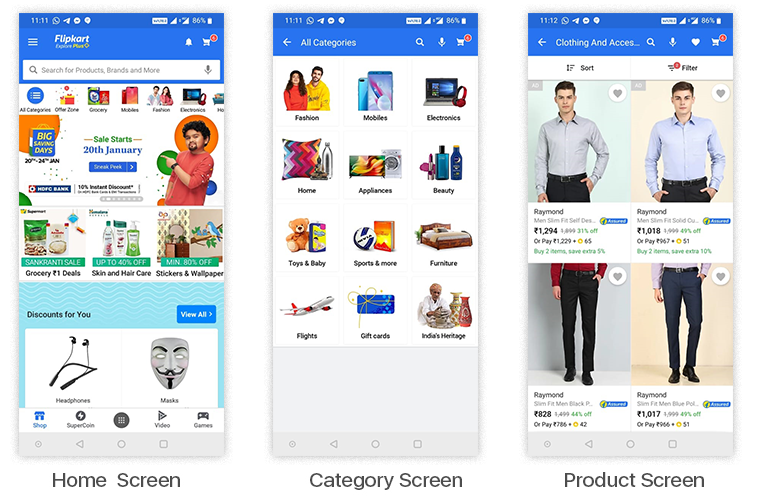
Flipkart is considered one of the top e-commerce platforms in India. It is giving neck to neck competitions to websites like Amazon. Flipkart got abandoned by many users in 2015 because it is not able to compete with native apps. The reason is users are not getting a fast and responsive user experience.
After that Flipkart came with a solution called Flipkart Lite. It is a progressive web app that is built to provide a great user experience to customers and it became a huge success. PWA apps run fast, work offline, and help to re-engage customers. The push notification feature in Flipkart gives timely and relevant updates to their customers and also works in offline mode.
3x lower data usage
40% increase in user engagement
70% more conversion rate
3x more time spent on site.
Ali Express:
AliExpress was launched in China in 2010. It is a global retail company that has gained popularity in top countries such as Russia, Brazil, and the US. AliExpress is often compared to eBay because buys can directly sell their products to customers. The company gained popularity and implemented an eCommerce PWA Mobile App solution to its website to cater to the needs of both web and mobile customers. After that Ali express rebuilt its online presence with a fast and reliable eCommerce Progressive Web App
82% increase in iOS conversion rate
104% more new users across all browsers
2x more pages visited
74% increase in time spent
OLX:
It is another brand that has adopted the PWA Mobile App Builder technology. The company headquarters is in Amsterdam and operates in approximately 45 countries. In 2014 South African media group called Naspers acquired 95% of OLX. The OLX strategy is to allow customers to buy used products at a lower cost. They have also included a chat option where the customers can negotiate product prices.
The majority of traffic in OLX comes from mobile devices and the figure was continuously growing. The only problem was the website’s slow speed leads to more bounce rate. The company came up with an eCommerce Progressive Web App solution and provided an “Add to home screen” feature that increased the engagement rate.
250% increase in engagement rate
23% less time until a page is interactive
80% lower bounce rates
146% increase in CTR (click-through rates) on Ads
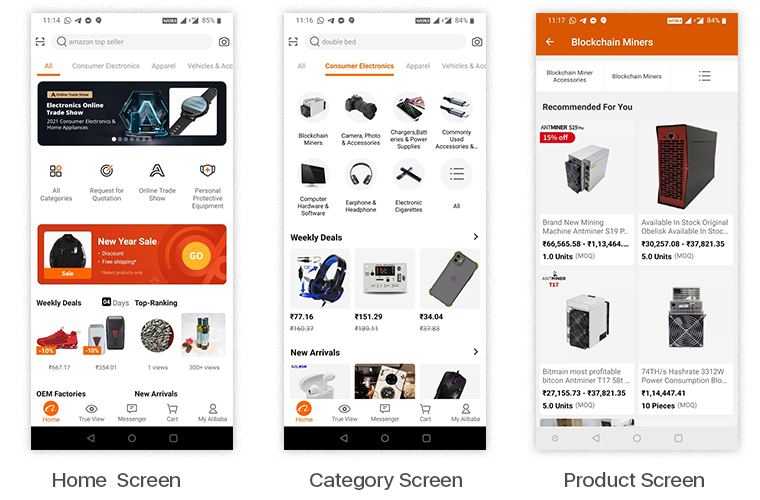
Alibaba:
Alibaba serves millions of buys and sellers located in 200 countries. It is the world’s largest global wholesale platform. It serves more than 2 million buyers around the world. The majority of users are using Alibaba via mobile devices so they came up with native Android and iOS apps. Soon, the company realized that customers do not want to download apps because of its large size mobile application. Customers can easily perform the transactions from their web browsers rather than downloading the app which is more than 60 MB.
Alibaba decided to opt for the eCommerce PWA Mobile App Builder platform. Alibaba integrated features such as Add to Home Screen, Push Notifications and the motive is to engage more customers and to provide a fast and reliable mobile experience. And Alibaba is successful to engage visitors and impress their users with a reliable and fast mobile experience.
76% higher conversion rate.
14% more monthly active users on iOS
30% more monthly active users on Android
4X higher interaction rate
Pure Formulas:
The Pure Formulas company is specialized in providing health and nutritional supplements, vitamins, minerals to buyers. The problem with Pure Formulas is that the checkout process is too slow and page loading time is very much high and that results in low conversion and high cart abandonment rates.
Pure Formulas come up with the solution to that after implementing Progressive Web App Builder on their website. Progressive Web App Maker lowers the cart abandonment rates. Customers can now easily find needed health products. Customers can also plan a menu according to their preferences, health state, and dietary needs.
+23% to mobile revenue;
14% to the conversion rate;
+9% to the average order value.
Garbarino:
Garbarino is an Argentina-based company that offers a wide range of products from furniture and electronics to toys and DIY items. After implementing Progressive Web App Creator, Garbarino obtains better performance, decreases in load time, and visitors navigate more on the website.
The interface of the web app is very much user-friendly, convenient and the features like filter, discounts help the customers to pick up the best product from the list.
27% Conversion rate increased
35% increase in Pageviews increased
9% decrease in Bounce rate decreased
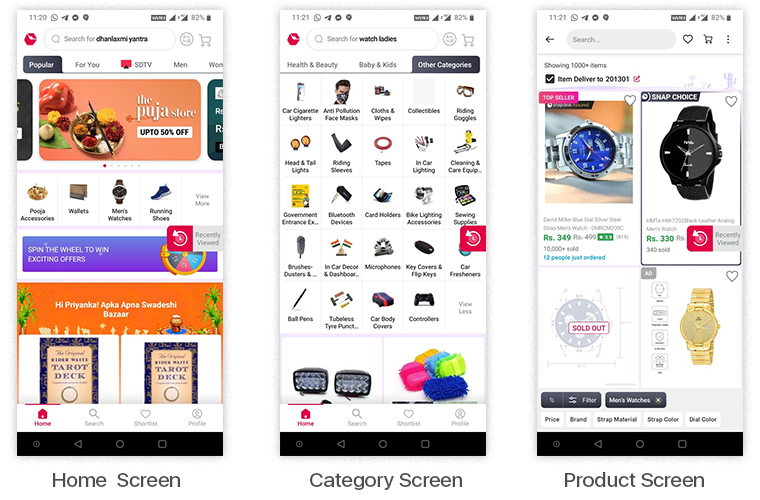
Snapdeal:
Snapdeal is the largest online marketplace in India that offers multiple products to its customers. The range of products varies from electronics and kitchen appliances to clothes and online entertainment. With the increase in the rate of user engagement, Snapdeal decided to implement eCommerce PWA Mobile App Builder technology on their website.
This was a fortunate decision for Snapdeal because Progressive Web App Builder provides a pinned footer menu, convenient filter menu, fast loading page and etc to the web app. Along with that users can also visit the web app even in offline mode. It added value to the user experience and enhances their shopping experience.
UK Meds:
The pharmaceutical industry is no longer behind in terms of technology and UK Meds is the live example for that. The goal of UK Meds is to deliver the medicine to the customer’s doorstep conveniently and easily. The UK meds consist of all important features such as consultations, treatment, placing an order and getting it delivered, etc.
UK Meds consists of all those things that a customer requires and to cater to all the needs of the customer without leaving behind in technology, UK Meds decided to implement Progressive Web App. It makes their web app easy to load, enhances the user experience, improves revenue, etc.
5 Miles:
5 miles builds a bridge between nearby sellers and buyers. It is an online marketplace that is used to trade such things as cars, clothes, kitchen items, second-hand stuff, and so on. But the company was not able to deliver a better user experience to the customers. Because of the low retention and high bounce rate, the company decided to switch to native apps, but this strategy turns out to be very expensive and challenging.
After getting inspired by technology trends, 5 Miles opted for PWA for eCommerce and it turns out to be a boon for them. The web app became fast and efficient and also showed a good decrease in bounce rate. The app also allows you to participate in a real-time bidding process, the bids change in flash and you may also get a drop-dead bargain.
50% decrease in bounce rate
30% increase in conversion rate
30% increase in the time spent
Conclusion –
If you want to deliver a fast and seamless shopping experience on mobile, then you must opt for a Progressive Web Application. An eCommerce PWA Mobile App can bring much more to the table than you have ever thought of. We have mentioned worldwide brands that get benefits from PWA and you can also get the same by implementing it on your website. Knowband is here to turn your ideas into reality. If you invest wisely you are also able to obtain profit from PWA. You can contact us at support@knowband.com.
Nowadays people are spending a lot more time using mobile devices to access the internet and consuming twice the data they consume on desktop websites. That goes for online shopping standards as well. Using an eCommerce website to bring sales is challenging when you have flaky internet connectivity. And, asking users to install a mobile app is again a conversion killer. PWA (Progressive Web App) fits in between the native mobile app and the website browser and is more likely designed to boost the mobile conversions for eCommerce stores.
Progressive Web App is the new must-have format for the mobile branding of your business. PWA mobile apps have overcome the most alarming problem of distribution. Do you ever go to your browser for Google Maps navigation? Probably not! Research says that most of the users, around 87% choose to browse on native apps. That makes it mandatory to have the app installed on the user’s device.
PWA mobile app gets derived directly from the mobile browser of the website and no need to visit any third-party app store or medium to install the app. Actually, whenever any user opens a PWA active website on a mobile browser, a prompt message asks to “Add App To Home Screen”.
App developers and service workers (Script files) in combination create PWAs for offering a dynamic, smooth user experience while accessing the content through a website/web-app.
Introduction to Progressive Web App
The Progressive Web Applications, also known as PWA are enhanced versions of web apps, developed with javascript. PWAs have extra capabilities like the user can access them offline and also receive push notifications based on the marketing standards.
PWA improves your website’s performance, security, accessibility, and SEO features. It enhances your reliability and workflow. They allow you to work offline and on flaky networks. Progressive web apps are fast and engaging. The PWA’s have seamless navigation and are packed with smooth animations, jank-free scrolling which makes it faster.
Major Advantages Of Progressive Web App
In order to create efficient web applications, progressive web applications (PWAs) are more of a technique that includes a mix of technologies. With an enhanced user interface, individuals can spend more time on websites and see more advertising. They prefer to buy more, and more likely to return regularly with warning notifications.
#1. Reliable Performance
A typical website forces users to wait while it is busy making trips to the server, doing nothing. Each request from the network to fetch an asset or piece of data passes through a service worker, who first checks if the answer to a specific request is already in the cache. As users immediately get real content, even on a bad link, they trust the app more and see it as more reliable.
#2. Fast Loading
This UI isn’t flaky. Scrolling is seamless and the app reacts to user interaction easily. Your Progressive Web App will naturally be faster than the native apps, being lightweight & having a fast loading mechanism. This provides the app users with an exceptional user experience that keeps the services at par.
#3. More Engaging
It looks and feels like a native application. Over the user’s home screen, a PWA can earn a location. By offering a full-screen work environment, it provides a native app-like experience. To keep users active, it makes use of push notifications.
#4. Offline Usage
The pattern of “offline first or “cache first” is the most common technique for serving the user with content. If a resource is cached and offline accessibility can be checked before you download the content. Download it if it’s not already in the cache and save it for future use.
#5. Push Notifications
Push notifications effectively increase the conversion rate of your eCommerce store. PWAs allow the owners of the store to configure and submit unlimited push notifications. They have in-built functionality to automate & schedule them. Using catchy titles & graphics in your notifications can do wonders.
Why you should have a Progressive Web Application?
While a PWA is not a must-have functionality but it is a way to improve your relationship with current and potential customers while also overcoming the difficult challenge of visitors driving away from the website.
Many people become oblivious to the prompts to enter an email list and sometimes do not take the next step to open and read the emails, but you can build real brand loyalty if you can get a customer to use your Progressive Web App.
Google is supporting the PWAs since 2015 and now iOS also allowing them on their web browser. Google scores the Progressive Web Applications better while crawling and other practices. Various Google Chrome extensions are created to support the PWAs.
PWA can be a good idea if you are starting up your new website. It makes sense to distribute your web app to users, in the beginning, to get their feedback before creating your responsive mobile app.
The Progressive Web App cannot be replaced with responsive mobile applications but in a way when you are planning to launch your mobile app, it is a good option to start with.
KnowBand developed PWA for various eCommerce Platforms:
The Progressive Web App Builder extension is available for almost all major eCommerce platforms. The store admin just needs to choose the right plugin and install it to follow the simple guideline for the configuration.
The below-mentioned features are the most prominent ones and are all put together and our Knowband experts developed the Progressive Web Application. The app is lightweight and faster loading and enhanced performance. The PWA Mobile app supports multi-lingual and various currencies that allow you to expand your business globally.
1. Change the Look and feel of the PWA- The store owner can change the colors, add a brand logo and various designs to make it look good. Even the complete home screen design can be edited and changed via a DIY editor. The changes will be reflected in the actual app anytime.
2. Featured Product Listing- Designed in a way that the user can add different product/category-based elements. The store admin can showcase the best sellers, featured products, recently purchased, etc. on the home screen.
3. Easy Installation- The users do not need to visit any third-party app store. Instead, the PWA Mobile App can be added on the phone directly by opening the website on a mobile browser.
4. Reliable and Engaging- The eCommerce PWA Mobile App works flawlessly under no/slow internet connectivity. Even in offline mode, the cached data & previously loaded pages make the content available to app users.
5. E-mail and Social Login- The store owner can allow users to sign up by adding an email address or with their social media accounts.
6. All Payment and Shipping Method Support- Customer often bounces back due to limited shipping and payment methods but with PWA, this is not a challenge anymore. All website payment and shipping methods will be actively functioning on PWA Mobile App.
7. Offline Mode- Even without an internet connection or on a sluggish network, your PWA App will work properly. Users will not have to rely on the internet at all times to shop for app items.
8. One-Page Checkout, Unlimited Push Notifications, Live Synchronization, and Order Tracking like features are the additional advantages of PWA.
9. Cross-selling– It allows you to showcase related products to improve sales on PWA. It also allows the store manager to select the CMS pages from the website and will be optimized automatically.
We have developed the PWAs for many clients and some of the success stories for 2020 are discussed in our previous article.
Conclusion:
Turn the online eCommerce website into the PWA Smartphone App and give mobile visitors a seamless web shopping app. The highly engaging PWAs can be launched from the home screen as you can add an icon for it and they even send push notifications. This is a great example of technology development and has a lot of scope in future advancement.
Progressive Web Apps are still in their infancy, as described, but it’s an exciting time to experiment with the methodologies behind them and see how well they can relate to your web applications.
Please feel free to comment on-thread if you have input on places that you would like to see covered.
We have always been somewhere looking for an alternative to Google Play and Apple store publishing. PWA (Progressive Web Apps) seems to be emerging as the prime option for the same. This technology is the latest trend and becoming more popular with passing time. Even various experts and tech geniuses are referring to PWA as the future.
The Progressive Web App is useful in replicating the exact native-like experience in-browser applications. The major benefit is that the store owner needs not to handle the app store or play store publishing, but rather, the PWA Mobile Apps can be simply installed by opening the website URL on a mobile browser. The customers get the option of adding the PWA app to the home screen as they open the store URL on mobile chrome.
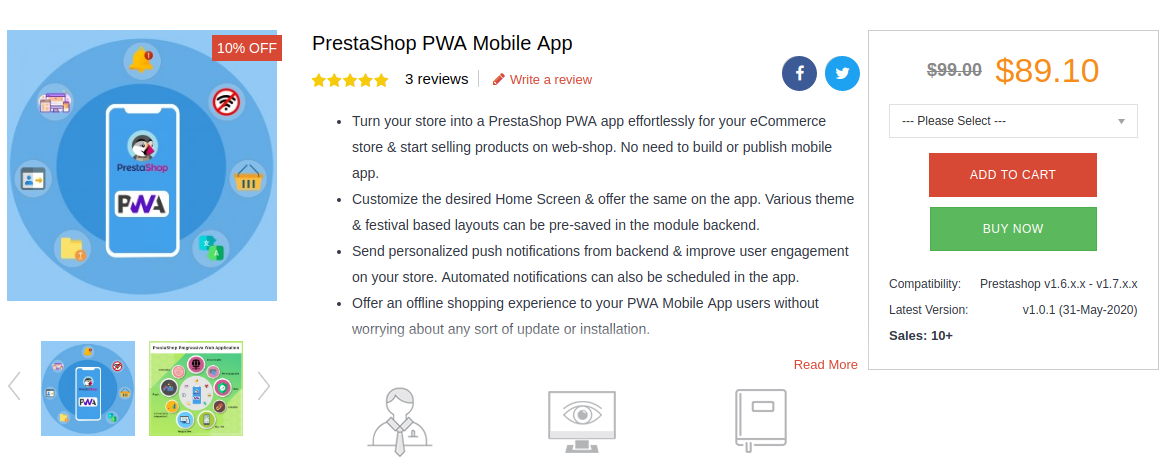
PrestaShop PWA Mobile App Builder
With the automated PWA Mobile App Builder framework, it becomes way simpler to launch the Progressive Web App for PrestaShop stores. Just three simple steps are required for the job:
Major Advantages of PrestaShop Progressive Web App:
Not just the launch process, the PWA mobile apps even come with many features and benefits. Let’s check how useful these PrestaShop PWA Mobile App could be for eCommerce stores:
1. Preferred Choice for Businesses
If we consider the big enterprise names in the eCommerce world, the idea of the Progressive Web App would be much clear. Twitter, Walmart, Alibaba, etc. have already chosen Progressive Web App to improve conversions and revenue. All worldwide small as well as big PrestaShop eCommerce stores can choose PWA Mobile Apps and started growing the sales from mobile audiences instantly.
2. Wider Mobile Audience Targeting
The PrestaShop PWA works perfectly with both Android and iOS(All versions), making it a top-notch choice for eCommerce stores. Worldwide as well as the regional mobile audiences can be covered with this solution. More users visit the website, more will be Progressive Web App installations. The apps will be added to the application drawer along with other apps. The performance will be fully native-like and the users can simply open the app whenever they want to shop products.
3. Less Development Efforts & Cost
With native apps, the eCommerce merchant needs to input huge cost and time in order to get Android and iOS apps developed and published. The publishing process on Google Play and Apple App store is quite tricky and sometimes becomes a headache for non-techie business owners. PrestaShop PWA Mobile App Maker comes as a savior in this situation. The PWA mobile app can be derived directly by opening the store URL on a mobile browser. Your mobile version will be converted into a PWA app, keeping the desktop version working as usual.
4. Handy Admin Panel Control
The PrestaShop PWA Mobile Apps come up with an easy-to-use admin panel to manage & configure the live Progressive Web App. No need to ask the developers or learn to code. The store admin can simply make the required changes and the same will be instantly updated on the live PWA Mobile App. The home page layout configuration allows the store admin to change the look and feel of the live Progressive Web App anytime without any code change.
5. Marketing via Push Notifications
Push notifications have been used for all eCommerce mobile apps in order to achieve marketing and revenue goals. We all would have witnessed the push notifications being received in our mobiles for installed apps. The PrestaShop Progressive App Maker makes this possible in your PWA apps as well. The store merchant will be allowed to configure and send the custom as well as predefined push notifications on mobile devices.
6. Faster Working with Offline Accessibility
The Progressive Web Apps are very lightweight and hardly crash or stops on mobile devices. The technology to create PrestaShop PWA Mobile Apps is advanced and keeps the loading and performance faster when compared with native apps. The faster loading & smooth working can improve the shopping experience of mobile users at par. Another major highlight is that PrestaShop PWA Mobile Apps can work under offline mode (No/slow internet connectivity).
7. More Conversions & Sales
The PWA for PrestaShop can improve mobile conversions for eCommerce businesses. Offering a simplified process to install the app directly from the mobile website directs the users to the Progressive Web App. With layered navigation and simplified checkout, the apps can be a major revenue source for eCommerce business. If we go for Alibaba reference, their PWA app increased conversions by 76%.
Conclusion:
Shift to better tomorrow with eCommerce PWA Mobile App. Your competitors have already moved to the Progressive Web App league and started getting more revenue. Considering the mass adoption of PWA, it’s right time to take your PrestaShop store into a mobile application. Offer an amazing shopping experience with enhanced features like fast performance, offline working, push notifications, SEO, and much more.
No one can deny or ignore the paced growth of eCommerce (retail) industry. With Mobile Phones stepping into the online commerce, the trends of online shopping has fully revamped. With the growing use of smartphones & mobile devices, m-Commerce has grown exponentially in the past decade. Almost every eCommerce business has released their own mCommerce shopping apps by now. So, to be relevant and to be ahead of the competition in the market, e-retailers must be aware of various mCommerce trends.
Although, we all are aware of the growth in smartphone usage and mobile apps preference when it comes to online product purchase. Yet, not all the e-merchants are achieving its full advantage for the online business. Mobile Commerce is a must have for every eCommerce website in 2020. The more you delay, more sales and conversions are losing. Taking your website business to the mobile platform isn’t any sort of luxury anymore, but merely a basic necessity. Don’t go for my word, just take a look at the below statistics:
In year 2017, the mobile eCommerce sales accounted for around 34.5% of total eCommerce sales. [Source: Statista]
By the end of 2021, the growth in this data is expected to be 54% of total eCommerce sales. [Source: Emarketer]
In this write-up, we will elaborate the top 4 eCommerce trends that have been extremely useful for the store owners.
#1. Multi-Platform Shopping Applications
Targeting both Android and iOS smartphone using audience will definitely bring more conversions for you. Offer a pair of native mobile apps for eCommerce website and let users shop from the applications as well. Native eCommerce Mobile Apps are the ones that are published on the app stores (Google Play Store & Apple App store). With a featured shopping app, the users won’t be just limited to the browsing products but keeping them everything available at their fingertips will increase more sales.
Choose a reliable ready-to-launch Mobile App Builder and get everything ready in 2-3 days. The readymade eCommerce Mobile App Maker extension allows the store admin to create apps without any coding or programming. Nor they need to hire a programmer and spend a huge money for the same. Just purchase the right plugin for your eCommerce and rest everything will be automatically handled from creation to publishing on App stores.
E-Commerce Progressive Web Apps are the ones that are made live on the website (of the store). Whenever mobile website visitors visit a PWA active website, they see a button/tab which says ‘Add-To-Home-Screen’. Upon clicking it, the PWA mobile app gets instantly installed on user devices. That’s it, now the Progressive Web App will work like any other shopping application.
There are a few readymade extensions have the capability to provide fully customizable mCommerce PWA App for online store. The store admin get a very admin friendly dashboard from where they can edit and manage mobile app, send push notifications, etc. These days, to reach out to all possible target audiences, most eCommerce businesses are utilizing both native (Android and iOS) & PWA mobile apps.
Store owners that wish to have multiple sellers on the store usually opt for a complete package of Multi-vendor marketplace website and mobile applications. This process is simplified by Advanced Multi-vendor Marketplace with Mobile App extensions. Check out them from below links:
Using these, store owners instantly convert their store into full fledged marketplace & mobile app. On such a marketplace, store owners get a very optimized admin panel which let’s them manage every thing like-
Vendor Management
Seller Request Approval
Seller Commission Management
New Category Request Approval/ Disapproval
Tax Rule Settings
Rating & Review Management
Seller Order Tracking & Management
Sellers’ Transaction Tracking
Payout Management
All of the approved sellers on the store get their own unique vendor panels on which they can get following features:
Manual & Bulk Upload of Products
Order Management
Order Tracking
New Category Request
Commission Based Payout & more.
#4. Digital Payments & Transactions:
There was a time when online shoppers hesitated to make online payments & always opt for ‘Cash On Delivery’ options. But with the passing time & advancements in technologies & cyber securities, more & more shoppers have started to prefer digital payments over other options. In fact, nowadays the users first approach is to choose mobile payments over other options.
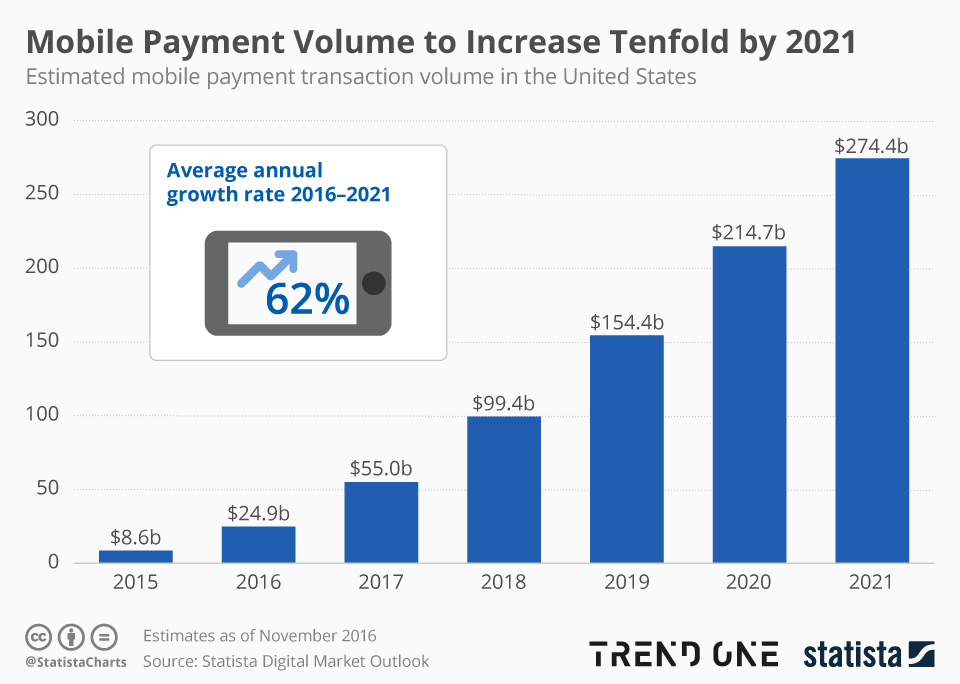
And reason is pretty simple for that. Mobile Payments offers much seamless and quick medium to pay for online product purchase. Just a few taps and the money is paid. Over the past few years, various advanced digital payments have been introduced in the market like e-wallets, Apple Pay, Google Pay, Braintree, Stripe, PayPal, Bank transfer etc. The eCommerce store owners can now opt for any payment options on their website and mobile application. As per Statista, mobile payments is expected to increase tenfold by 2021.
Its good to have e-wallets and UPIs integrated in eCommerce Mobile Apps. The users shopping through mobile applications (Android or iOS or PWA) can choose their preferable option to pay and make secure transactions. So, for businesses who have already stepped into mobile commerce or looking for a way to do so, choose a solution offering various digital payments to cater all sorts of mobile using audience.
Closing Comments
These were a few examples of how online shopping behavior is transforming. The store owners who are running their business on online eCommerce platforms should be in check with these trends. Ignoring the need of eCommerce mobile apps will only be a losing factor in matter of sales or revenue or growth.
So, if you are thinking of launching shopping apps for your website, its high time to act upon the same. Check the readymade solutions shared above or discuss more on support@knowband.com. We, at KnowBand offer readymade native (Android and iOS), PWA (Progressive Web App) & Marketplace Mobile Apps for the eCommerce websites build using any of the below platforms:
It’s 2020 & by now most online businesses have realized the importance of mobile applications. Mobile devices, especially smartphones, always remain switched on & connected to the internet & more importantly, they are in quick reach of the smartphone users. For businesses, this makes mobile devices the best medium to be present.
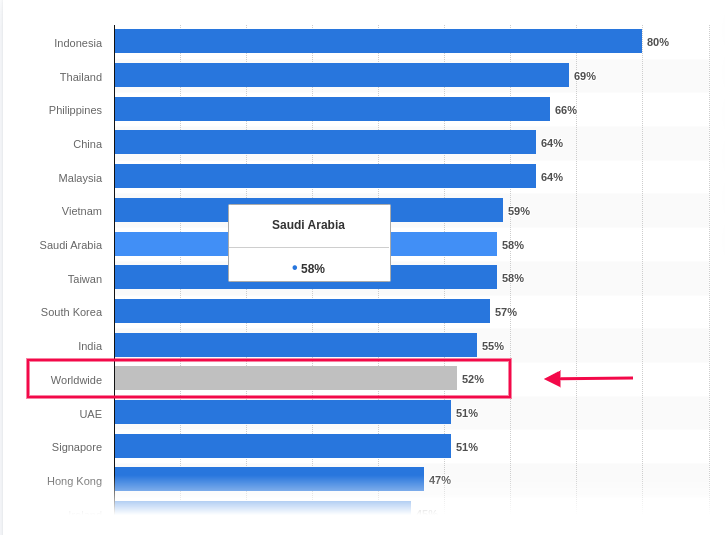
Based on a report by Statista, the global average percentage of online shoppers, who used their mobile devices to shop online, was 52%. This clearly states the urgency to provide a better shopping experience on mobile devices. Native Mobile Applications & Progressive Web Apps are a great solution to this.
Out of these, Progressive Web Apps (PWA) have been around for only 5 years now but in just a short amount of time, they have gained huge popularity among smartphone users as well as businesses. Upon transitioning to PWA, almost every eCommerce business has reported an exponential increase in conversion rates, app downloads & a lot more. You can check out the reports of Starbucks, Flipkart, Alibaba, etc. for your reference.
Building & launching is indeed very convenient for e-merchants now because of technological advancements & automated tools. In this write-up, we will elaborate on how you can also grow your eCommerce business, built on Magento 2, using a readymade tool.
The Magento 2 PWA Mobile App Creator extension is that ultimate tool. Whether you have a single-vendor Magento 2 website or a multi-vendor Magento 2 website, you can easily use this PWA maker tool on your website to automatically build a PWA Mobile App for your online store.
Doesn’t it seem magical? Well, it’s just the perfect use of web technologies.
How Does A Magento PWA Mobile App Builder Tool Work?
Just like any other Magento 2 extension, this PWA Maker tool is also a Magento 2 extension. Upon installing this extension on a Magento 2 website, it builds a customizable PWA derived from the data of that website. This keeps both the website & the PWA in live synchronization with each other.
Speaking of a customizable PWA, the Magento 2 PWA Maker tool provides the store-admins with various easy-to-use editing tools on the backend using which they can customize their PWA while it’s live. There is no need to worry about any downtime. Also, on the user-end, all the best & latest UI/ UX elements are equipped to provide an excellent user experience.
How Can Netizens Install A PWA?
Progressive Web Apps aren’t published in any of the app stores. Instead, they are made live on the website (on which this extension is installed). This means whenever netizens visit such a PWA active mobile-website, they are greeted with an ‘Add-To-HomeScreen’ popup at the bottom of the screen. Once they click it, the PWA automatically gets installed on their mobile device & appears to work just like any other mobile app on the mobile device.
How Store Owners Can Launch A PWA Using The Magento 2 PWA Builder?
Step 2: Install this extension on your Magento 2 website.
Step 3: Fill the app pre-requisite form & review your app before making it live on your mobile website.
Features Of The Magento 2 PWA Builder Plugin:
#1. Simplified PWA Admin Panel:
The store owners and admins can easily configure their PWA App, set its color theme, logo, design the home-page layout, & do a lot more without a hassle. For their home-page, they can use any of the predefined components (like sliders, banners, product blocks, countdown-timer banner, etc.), configure it & rearrange them the way they want.
#2. Unlimited Push Notifications:
Store admins can send an unlimited number of push notifications to their app users and keep them engaged. Admins can also send personalized notifications & also automate & schedule some of the common ones like the abandoned cart notifications, order status notification. Admins can also use relevant graphics and catchy messages with desired redirect links on your Push Notifications.
#3. Multi-lingual & Multi-currency Support:
The Magento 2 PWA App built using this tool supports multiple currencies and multiple languages including RTL scripts like Arabic, Persian, etc. The Progressive Web Apps are capable of expanding your business reach across borders simply without any additional effort.
#4. Offline Accessibility:
By default, the Progressive Web Apps support offline access. Because of data caching, PWA Apps work even when the app user is offline or under slow internet connection.
#5. All Payment & Shipment Methods:
All of the payment and shipment methods active on your Magento 2 website will automatically be active and fully functional on your Magento 2 PWA App.
#6. Social Login & Quick Sharing:
App users can easily onboard your Magento 2 PWA App with hassle-free social login options i.e. via Facebook & Google accounts. The PWA App built using this readymade tool also has a quick sharing link on the product pages. App users can hence easily share their choice of products on any of their social media handles.
#7. Order Tracking:
App users can also track all of their active orders and stay updated with the status of their order’s delivery. Any changes/ updates in the status of the order instantly reflect on the app & in the form of an order status push notification.
#8. Quick Login Options:
With traditional E-mail sign up & login options, the Magento 2 PWA Mobile App comes with inbuilt Google and Facebook login allowing users to seamlessly access the app in no time.
#9. Customizable Home Screen:
The PWA mobile app for Magento 2 comes with a customizable home screen whose layout can be designed from the admin panel. The store admin gets to craft and makes changes in the home screen as per any festival, sales or any other occasion.
Apart from just having a mobile-optimized eCommerce website &/or native mobile application (on the app store), having a PWA gives businesses more opportunity to reach all kinds of audiences with fewer efforts. With the use of a powerful ready-made tool like the Magento 2 PWA Mobile App Builder, building, launching & managing a PWA becomes a thousand times more convenient than building one from scratch.
So why wait longer? If you have a Magento 2 website for which you need a PWA, reach out to our experts at support@knowband.com or simply own your PWA maker tool from the Knowband e-store.
Mobile Applications have become a major source of leads for almost every kind of eCommerce business. Whether it’s a native or hybrid or a PWA app, being available to the customers on their most used device is always a great approach.
In the past 5 years, Progressive Web Apps (PWA) have become very popular among the app users & very profitable for eCommerce businesses. Various eCommerce platforms are allowing easier mediums to build & launch a PWA Mobile App. To bring the WooCommerce store owners into this landscape, our experts at KnowBand have developed & launched an automated WooCommerce PWA Mobile App Builder plugin which simply integrates with your website & gives you a fully customizable WooCommerce PWA.
This PWA maker plugin is a no-code solution although it still provides easy-to-use DIY tools using which store admins can modify their PWA without any efforts. Also, on the user-end, the app users get the best in class UI & UX just like any high-end mCommerce store.
New Feature Upgrades in WooCommerce PWA Builder (v1.0.1)
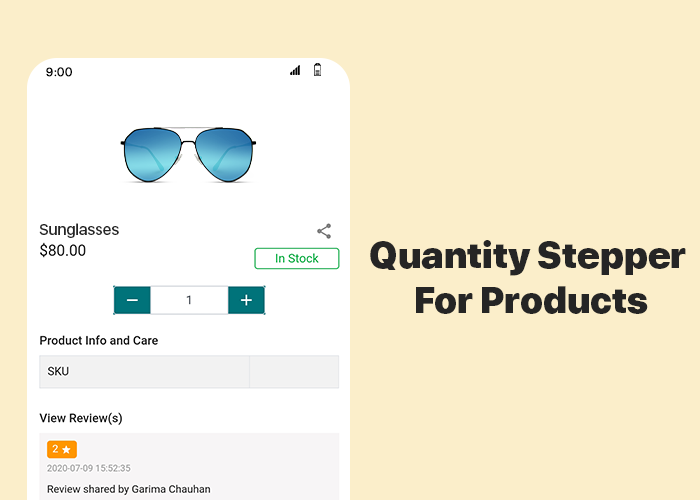
#1 Quantity Stepper For Products:
As usual, for convenience, online Shoppers like a simpler but feature-rich interface on an e-store. Things like adding multiple quantities of products or changing the quantity at the time of checkout & while being on the cart, improve the shopping experience of the app users. All such features are by default added in the PWA build using the WooCommerce PWA plugin. This newly added feature allows the app users to change the product quantity by stepping it up (+) or down by one unit.
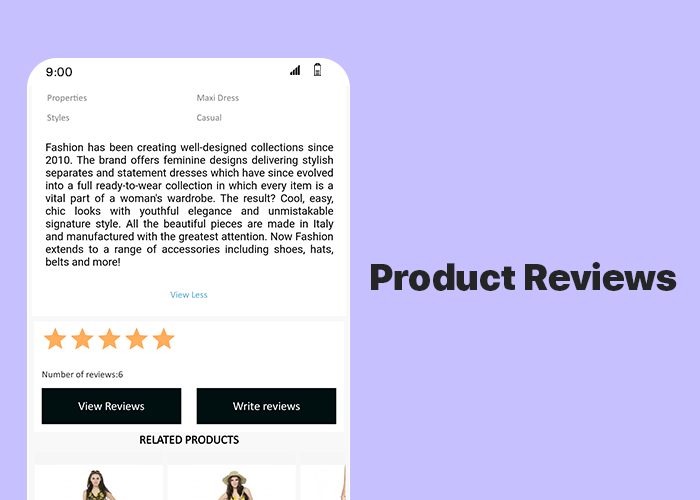
#2 Product Reviews:
This feature allows the app users to write & submit reviews of the products that they bought from your store. Reviews play a huge role in the eCommerce apps & websites. They can motivate others to purchase the products & increase your sales & revenue.
Simple Steps To Launch WooCommerce Progressive Web App:
Fill the app pre-requisite form & review your PWA before making it live.
How Are PWA Installed On Users’ Devices?
A PWA Mobile app is simply made live on the company’s website. There is no need of publishing it on the Google Play Store or Apple App Store. Whenever shoppers visit such a website on their mobile internet browsers, they are shown an ‘Add-To-HomeScreen’ popup on their screen. Once they click it, the PWA automatically gets installed on that user’s mobile device. The PWA then appears to work just like any regular mobile apps on a mobile device.
Major Features Of WooCommerce PWA Builder Plugin:
1. Simplified PWA Admin Panel:
The store owners and admins can easily configure their WooCommerce PWA App, design its home-page layout, manage push notifications & do a lot more without a hassle.
2. Unlimited Push Notifications:
It allows the store admins to send an unlimited number of push notifications to their app users and keep them engaged. Admins can also send personalized notifications and automate and schedule some of the common ones like the abandoned cart notifications, order status & order confirmation notifications. Use relevant graphics and catchy messages with desired redirect links on your Push Notifications.
3. Multi-lingual & Multi-currency Support:
The eCommerce PWA Apps built using these plugins support multiple currencies and multiple languages including RTL scripts like Arabic, Persian, etc.
4. Offline Accessibility:
By default, the Progressive Web Apps support offline access. Because of data caching, PWA Apps work even when the app user is offline or under slow internet connection.
5. All Payment & Shipment Methods:
All of the payment and shipment methods active on your website will automatically be active and fully functional on WooCommerce PWA App.
6. Social Login & Quick Sharing:
App users can easily onboard your WooCommerce PWA App with hassle-free social login options i.e. via their Facebook & Google accounts.
The PWA Apps built using this WooCommerce PWA plugin also provides a quick sharing link on the product pages. App users can hence easily share their choice of products on any of their social media handles.
7. Order Tracking:
App users can also track all of their active orders and stay updated with the status of orders’ delivery. Any changes/ updates in the status of the order instantly reflect on the app & also in the form of the automated order status notification.
Concluding:
With such a powerful tool available in the market, WooCommerce store merchants can stop worrying about the hassle & time involved in building a PWA. Grab your own WooCommerce PWA Mobile App Maker Plugin & launch your new PWA asap.
For any assistance or query, feel free to reach out to our experts at support@knowband.com. Our team would be happy to help you.
Nowadays almost every online business is transitioning its mobile website to a Progressive Web App for all the good reasons. For online shopping, the usage of mobile devices has already surpassed desktops & laptops. Globally, on an average 52% of netizens used their smartphones to shop for something online, based on a report by Statista. To cater to such audiences, Progressive Web Apps are a great medium.
Building & launching Progressive Web Apps is comparatively more convenient than doing the same with Native Mobile Apps. This is also because PWAs are compatible with every kind of mobile device. KnowBand offers a readymade tool to transform your regular eCommerce store into featured PWA shopping apps with:
KnowBand, a leading eCommerce solution provider, has developed & launched a bunch of eCommerce PWA Mobile Apps for its clients & in this writeup, we are briefing on some of the top PrestaShop PWAs that have been developed by KnowBand in 2020. Here are those web apps:
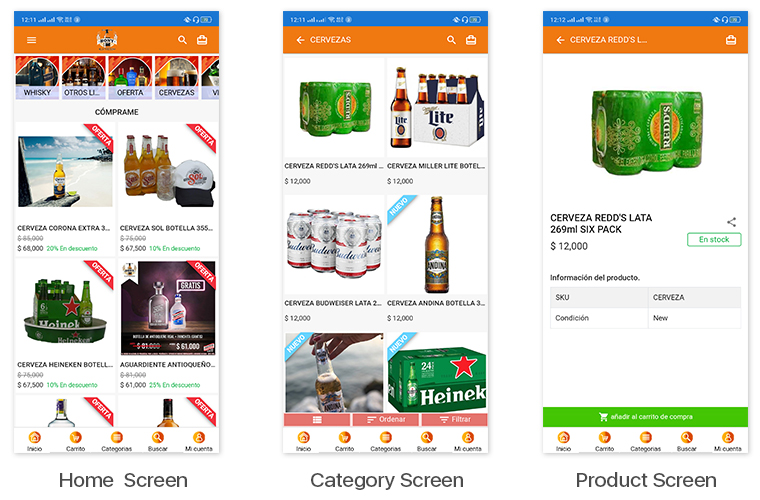
1. Bony Liquors:
Bony Liquor is an online store based in Spain selling beverages, drinks, cigarettes & complimentary snacks to its customers. With the help of experts at KnowBand, they launched their PrestaShop Progressive Web App on their mobile website. Their PWA has many of the latest UI elements that keep the user experience at par. It also has social login options via Facebook & Google accounts. App users can easily shop for the products they need & pay via various payment modes.
The best thing about PWA is that mobile website visitors can install their web app from their mobile website itself. The installed PWA then looks & appears to work just like every other app on users’ mobile devices.
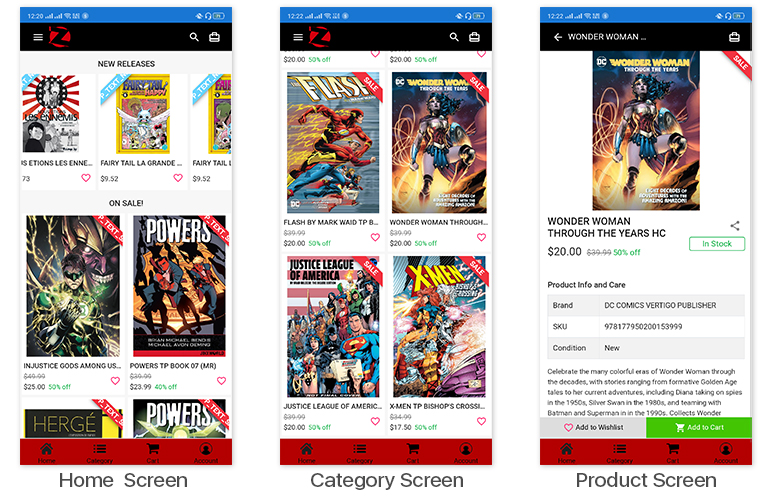
LibreairieZbookstore is an online PrestaShop store where customers can buy books & comics from a wide range of collections available at their store. KnowBand’s PWA module helped them launch their PrestaShop PWA that their store admin can customize anytime as per their needs. The PWAs built using KnowBand’s modules are white-label apps that allow the store owners to modify their apps by themselves without the need for coding.
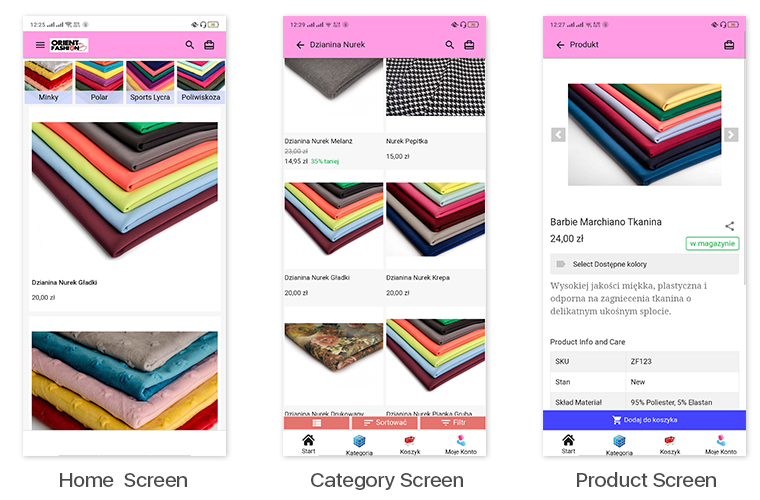
This eCommerce store is a multi-lingual & multi-currency store that sells fabrics & its cutouts to its customers. Their Progressive Web App built by KnowBand also supports all of the languages & currencies of their website. All of their coupons & vouchers on their website are also supported on their PrestaShop PWA.
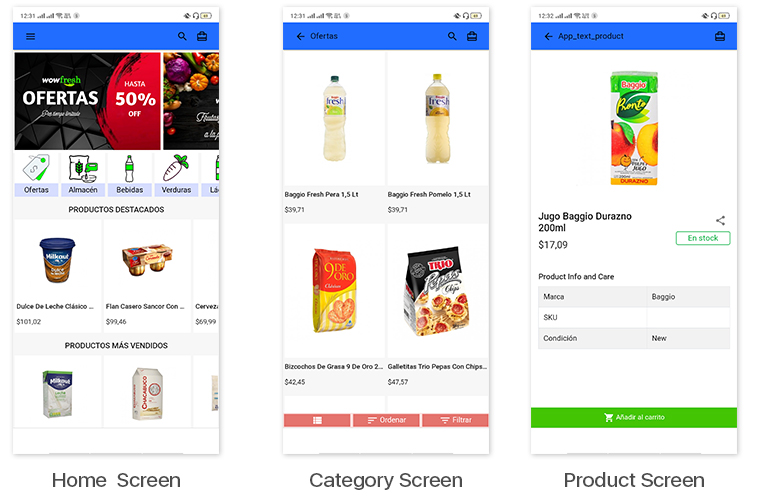
WowFresh is an online store built on PrestaShop that sells groceries, snacks & beverages. The store is mainly in the language Spanish. Its mobile site visitors can download its PWA from the ‘Add To Homescreen’ popup /tab on the mobile website.
Kittags is a UK based eCommerce website that sells regular & customizable tags that can be attached to backpacks, strolley bags, luggage, etc. Its website is built on PrestaShop & the store admins at Kittags used the PrestaShop PWA Builder module, developed by KnowBand, on the backend of their website to automatically build & launch their Progressive Web App.
The PrestaShop PWA Mobile App Maker module is an automated plugin that can be used on a PrestaShop website just like any other regular module. Upon installing the PrestaShop PWA module, the store admins get a full-fledged PWA on their mobile website (frontend) & its configuration dashboard on the website backend. They can hence customize their web app using the DIY tools provided on the backend dashboard.
Once the PWA mobile app is made live on the website, mobile website visitors can simply install the Progressive Web App on their mobile device by clicking on the ‘Add To HomeScreen’ button displayed on that mobile website.
The PrestaShop PWA Mobile App module is laced with a number of frontend & backend features. Some of those features include-
#1. Multi-Lingual & Multi-Currency App:
The web apps built using this PrestaShop PWA Maker module by default support multiple international currencies & languages including the RTL scripts like Arabic.
#2. Offline Mode Accessibility:
App users can seamlessly use your PWA even when they are unable to connect to the internet. This allows offline browsing of the pages & even the category pages that users had already visited before.
#3. Unlimited Push Notifications:
The PrestaShop PWA module by KnowBand keeps no limitations on the Push Notifications. Store admins can send an unlimited number of notifications to their app users. These notifications can be created from the backend of this module (installed on the website).
#4. DIY Home-Page Layout Editor:
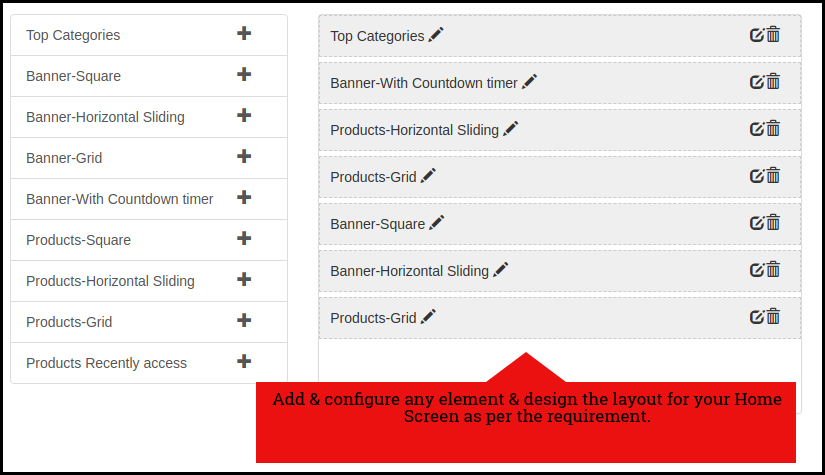
This DIY tool gives immense control to the store owners & admins when it comes to changing the home-page layout. Multiple components like sliders, banners & grids for product display & banner images are provided. Even the countdown-timer banner tool & recently accessed products slider is included in the list of components. Just drag & drop them to rearrange & configure each of the components without a hassle.
#5. Live-Synchronization:
This module keeps your PWA as well as your PrestaShop website in real-time synchronization with each other. It exempts you from having to manage your PWA manually.
#6. Social Login & Sharing:
App users can login into the app using their Facebook or Google accounts. Also, on every product page, quick sharing links are provided for multiple social media platforms.
#7. All Payment & Shipment Methods Support:
All of the Payment & Shipment methods active on your PrestaShop website will by default be active on your eCommerce PrestaShop PWA.
#8. One-Page Checkout:
To make the checkout experience convenient for the app users, a single page checkout screen is provided on which the app users can even select a pre-saved address. They can easily update the quantity of the product & add or remove coupon codes etc without having to navigate to any other page.
#9. Order Tracking:
This PrestaShop PWA Creator module even offers an order tracking feature to the app users. They can track their active orders from within the web app.
Being in the retail eCommerce industry, you must have come across the word PWA (Progressive Web App). If yes, you must be also aware of the capability they carry as a shopping application. In case not, you’ve landed in the right place. With the constant growth in the usage of shopping apps (both native & PWA), online stores are shifting to PWA Mobile App development for their businesses. Launching a Progressive Web App is quite a simpler and affordable task these days.
KnowBand has launched Magento 2 PWA Mobile App, a complete no-code and automated tool to launch a Progressive Web App. In simple words, whenever any user opens your store URL on the mobile browser, he will get a prompted message of “Add To Home Screen”. The Magento 2 Progressive Web App will be added in the user’s device like any other app and online purchasing can be done on the go.
1.1 View Demo App:
Explore Progressive Web App demo for Magento 2 and take a glance at how your final apps will look and work:
–> iOS devices do not offer any inbuilt “Add To Home Screen” prompt. Users need to manually add the Magento 2 PWA Mobile App to the home screen of iPhone or iPad.
–> iOS does not support web push notifications. The push notifications can only be sent to the Android device from the admin panel of Magento 2 PWA Mobile App Builder.
The Magento 2 PWA Mobile App Creator now supports all worldwide languages including RTL (Right To Left). The PWA Mobile App for Magento 2 can have languages like Arabic, Hebrew, Persian, etc. The store owner can offer all website languages on the Progressive Web App and can even add new ones.
2.0 Admin Panel Screens:
With the friendly admin panel backend, the store admin can configure and customize the look, feel, and working of the PWA Mobile Application. It’s just a matter of a few clicks and mouse toggles to make changes in the Magento 2 Progressive Web Apps. Let’s take a detailed overview of the Admin panel screens:
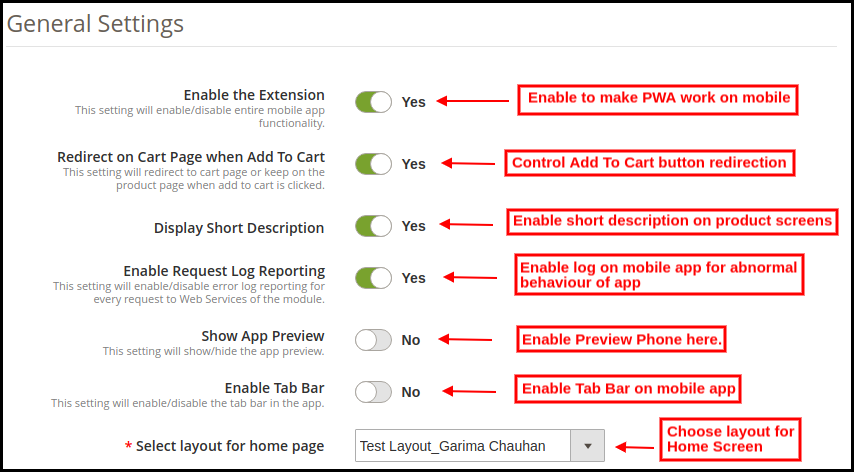
2.1 General Settings:
a) Enable the Extension: Enable Magento 2 PWA module to make web app work on the users’ smartphones.
b) Redirect on Cart Page when Add To Cart: Enable to re-direct users to shopping cart or disable to keep them on the product screen.
c) Display Short Description: Enable to add & display a short description on the product screen of Progressive Web App.
d) Enable Request Log Reporting: Enable this tab to activate the log file on the PWA Mobile App. This log file can be used to rectify any abnormal behavior of Progressive Web Application.
e) Show App Preview: Enable to add a preview phone in the admin panel. All color, font, home screen changes will be displayed in real-time preview phone.
f) Enable Tab Bar: Add a bottom tab bar on the Magento 2 PWA Mobile App.
g) Select Layout for Home Page: Choose desired layouts from the added ones and improve look and feel of app.
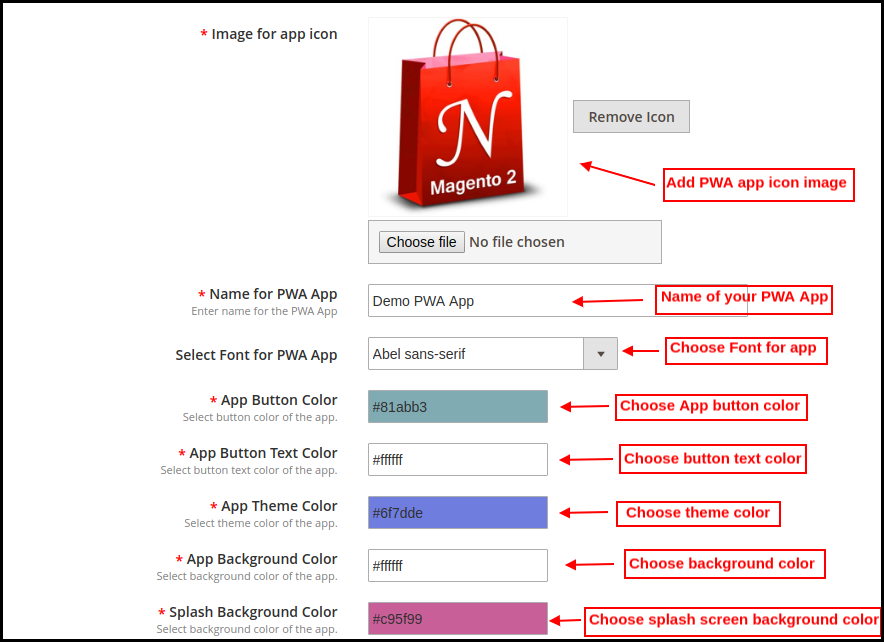
h) Image for App Icon: Upload Magento 2 PWA app icon on your own and change the same as well if required.
i) Name For PWA App: Enter the name of the Magento 2 Progressive Web App.
j) Select Font For PWA App: Choose the font of your PWA app for Magento 2.
k) App Button Color: Choose button color for your PWA Mobile App.
l) App Button Text Color: Choose the button text color for your Magento 2 Progressive Web App.
m) App Theme Color: Choose the theme color (header) of your web application.
n) App Background Color: Choose the background color of the Progressive Web Application.
o) Splash Screen Background Color: Choose the right color option for the background of the PWA app splash screen.
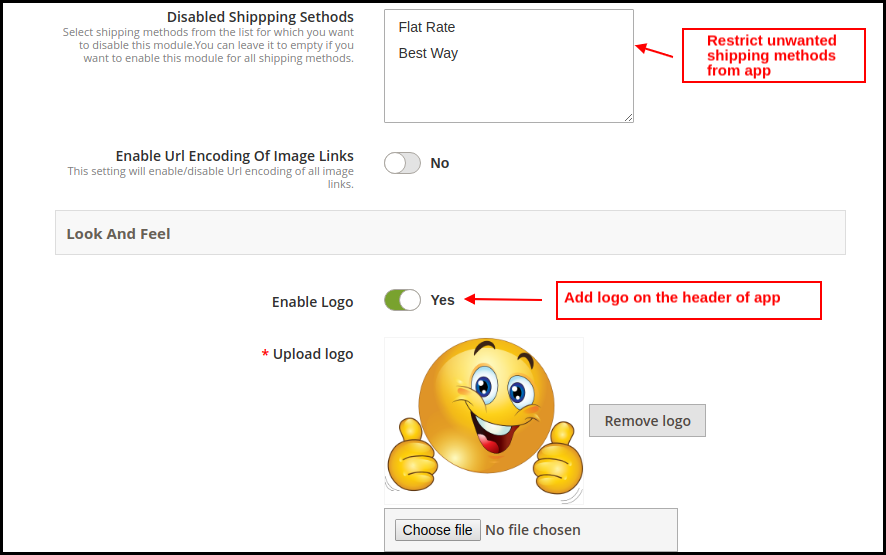
p) Disabled Shipping Methods: Choose shipping methods to be restricted from working in Magento 2 PWA mobile app.
q) Enable & Upload Logo: Add the logo image of your store to be displayed on the header of the PWA Mobile app.
2.2 Push Notifications Settings:
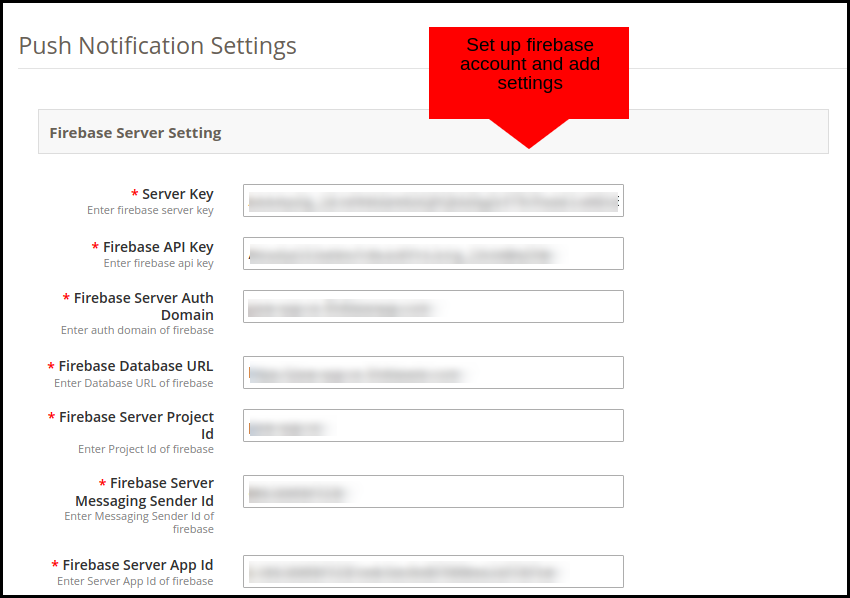
The Magento 2 Progressive Web App offers unlimited push notifications to market and promotes store deals and products. The store admin will get push notifications for a lifetime with no additional charges.
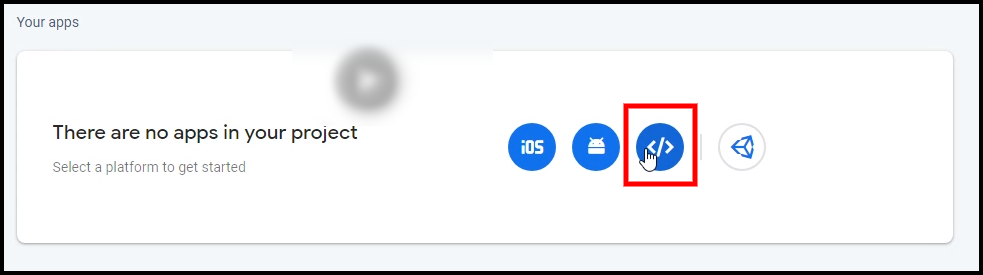
The various fields under this setting tab require a Firebase Account set up. Here’s how you may set one:
How to set up a Firebase Account?
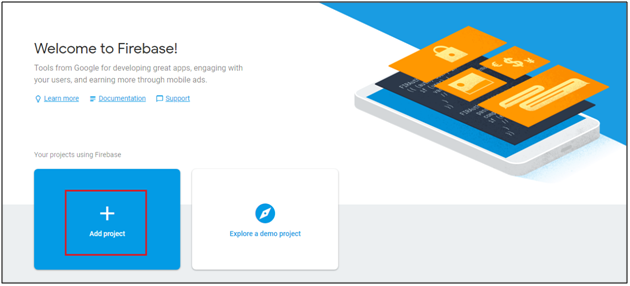
Step 1: Login Google Firebase
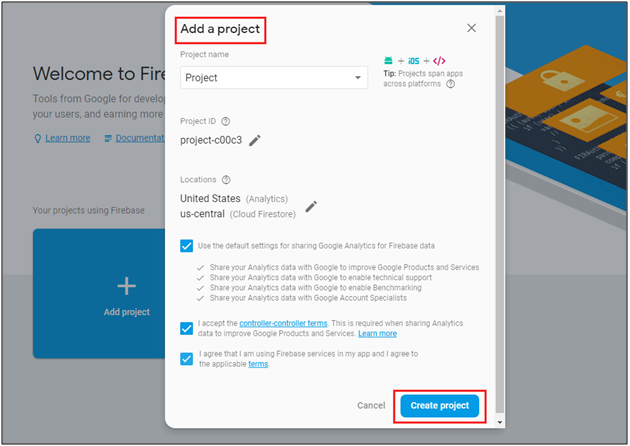
Step 2: Create a New Project
As you click on Add Project, the following dialog box will pop up:
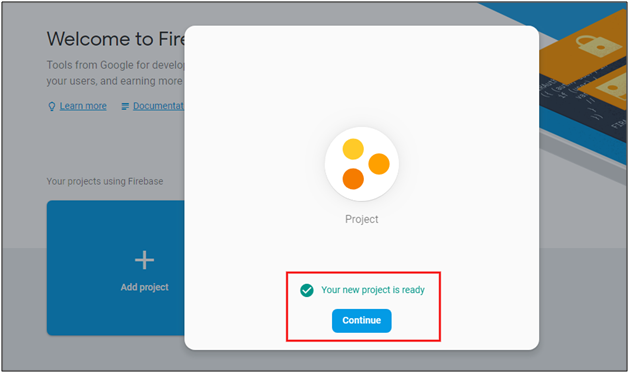
It will take a few seconds to create the project. Once the project is ready, click continue.
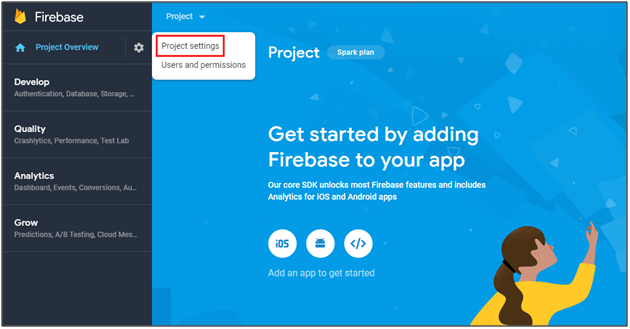
Step 3: Manage Project Settings
Once the project is created, click on Project Settings.
Step 4: Go to Authentication options:
Step 5: Find Firebase Keys
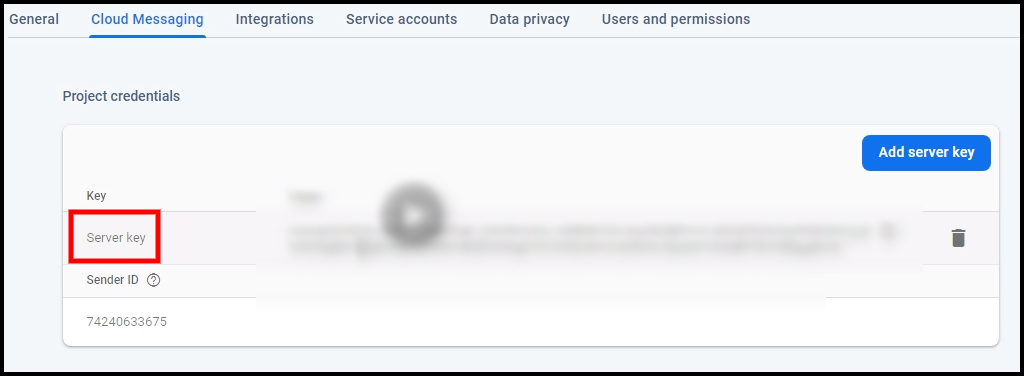
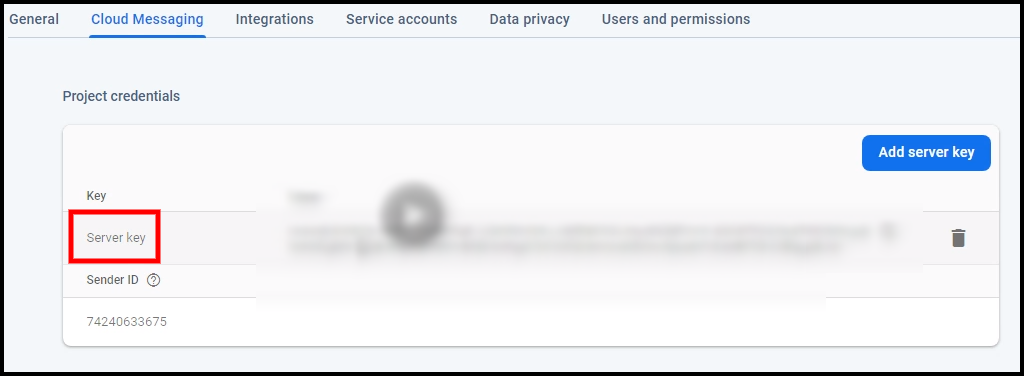
In the project settings, click on Cloud messaging settings. From here, you can directly get the server key.
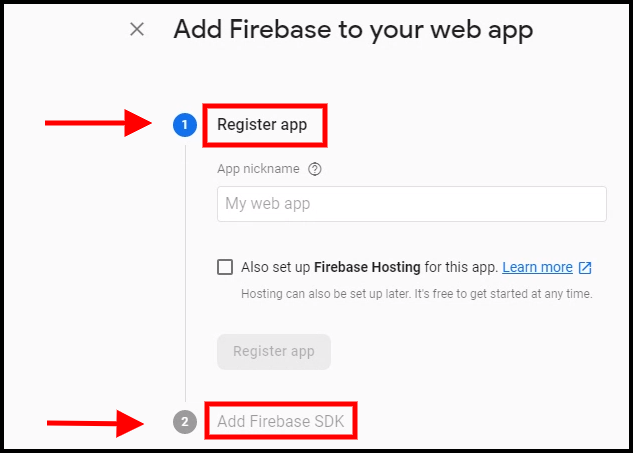
Step 6: Add your Web-App to Firebase
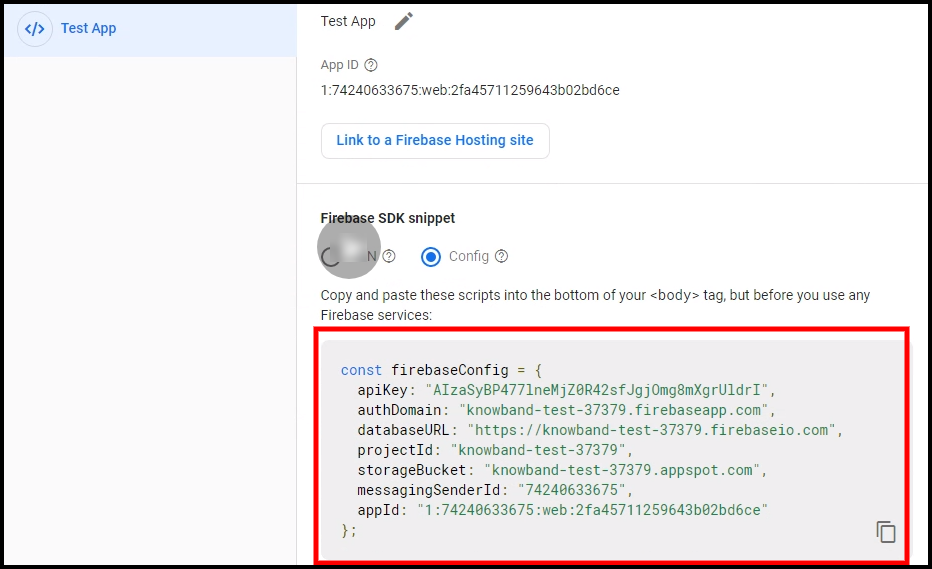
Step 7: Get other firebase related details and paste the same in PWA module admin panel.
Step 8: Get firebase server key from cloud messaging tab in Settings:
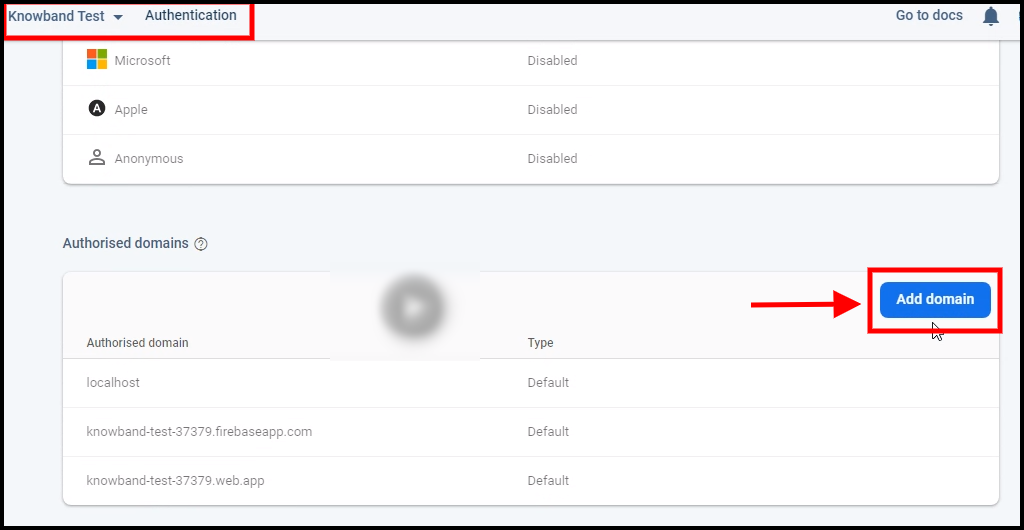
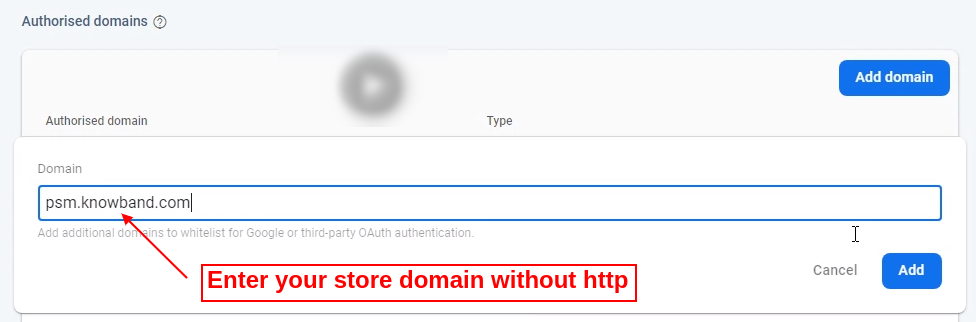
Step 9: Add your domain in authentication>>sign-in.
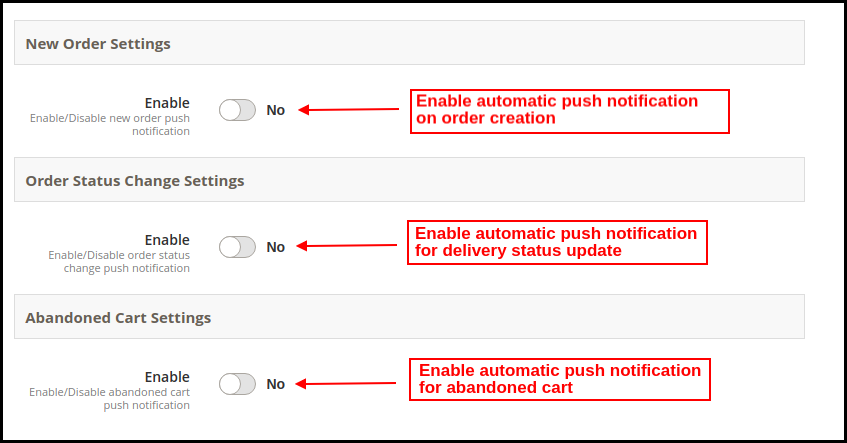
2.21 Automated Push Notifications:
The store admin gets to schedule automated notification sending for the following cases:
a) New Order Settings: Whenever any new order is placed from the Magento 2 PWA Mobile App.
b) Order Status Change Settings: Whenever the delivery status of any order gets changed/updated.
c) Abandoned Cart Settings: Whenever any user leaves product in cart and abandon Progressive Web App.
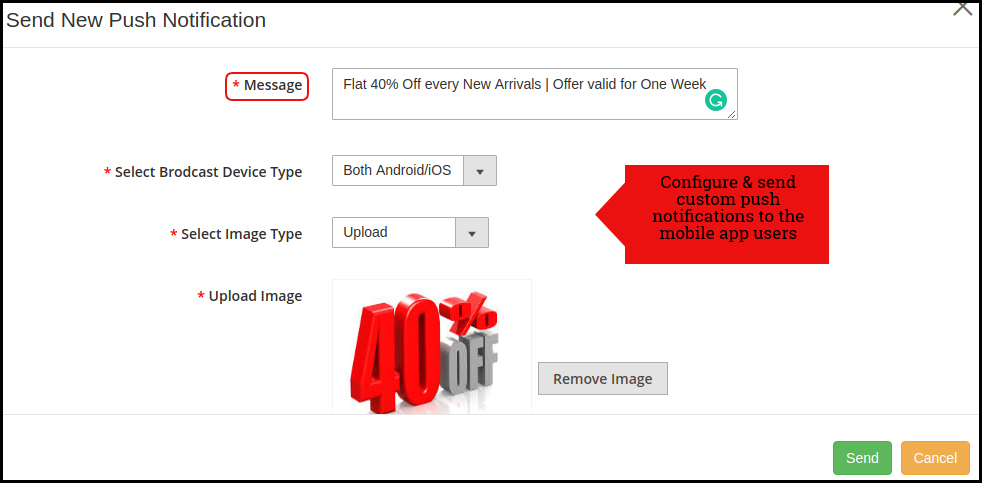
2.22 Manual Push Notification:
As shown in the above snapshot, the store admin can personalize and send manual push notifications to PWA Mobile App users. The message, image, discount offered, redirection link can be added/edited to improve the efficiency of notification and bring more sales.
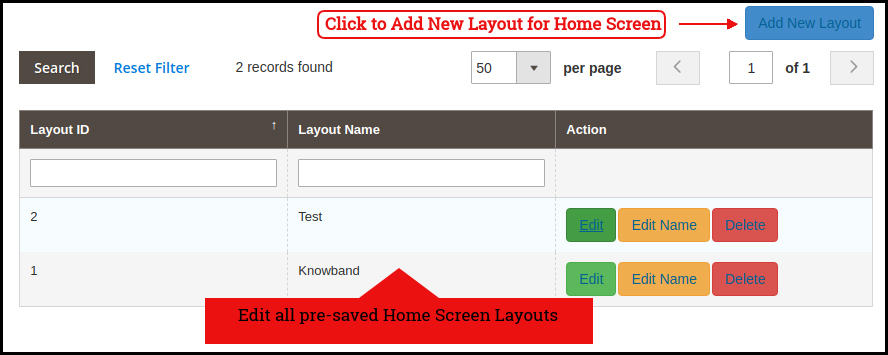
2.3 Home Page Layout:
The Magento 2 PWA Mobile App Builder offers a fully customizable DIY editor panel to customize and configure the look and feel of Progressive Web Application. Various new layouts can be added to the admin panel based on upcoming festivals and occasions.
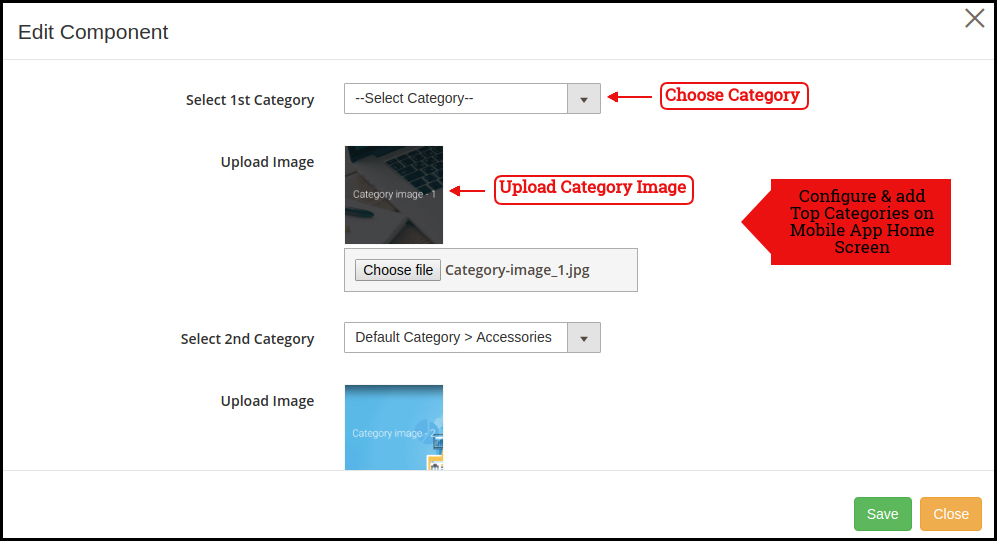
2.31 Top Categories:
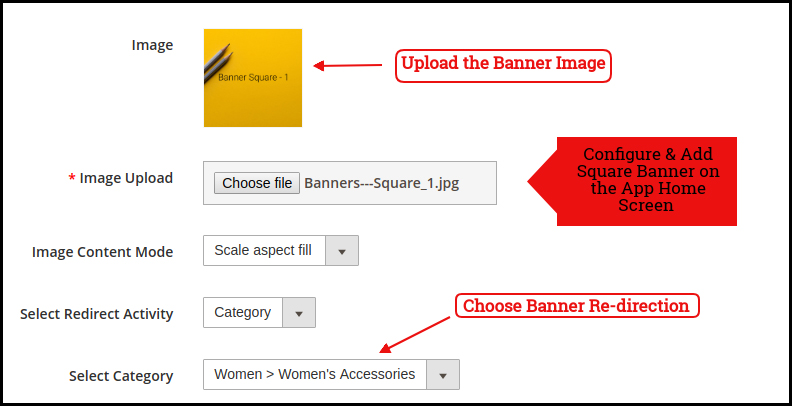
2.32 Square Banner:
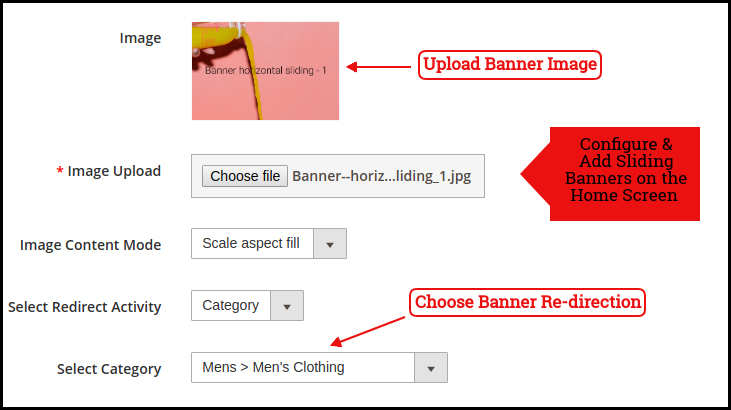
2.33 Sliding Banner:
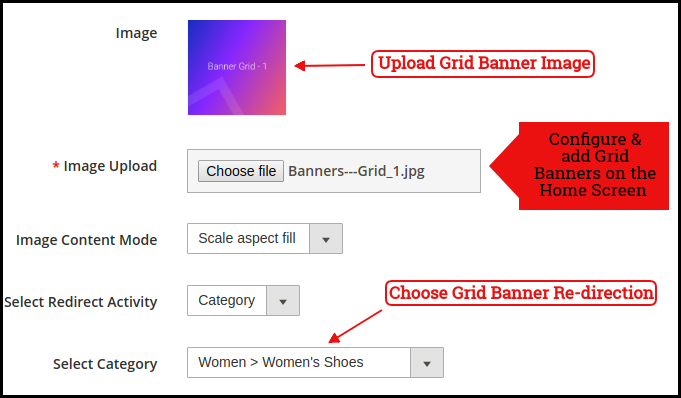
2.34 Grid Banner:
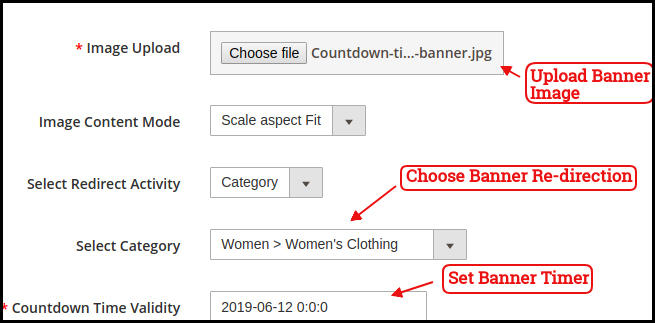
2.35 Countdown Timer Banner
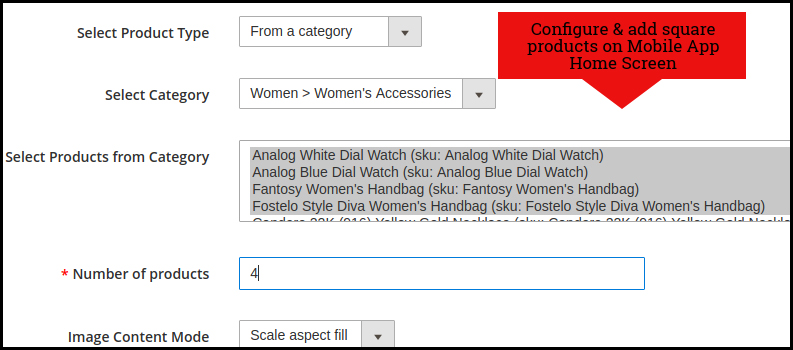
2.36 Square Products:
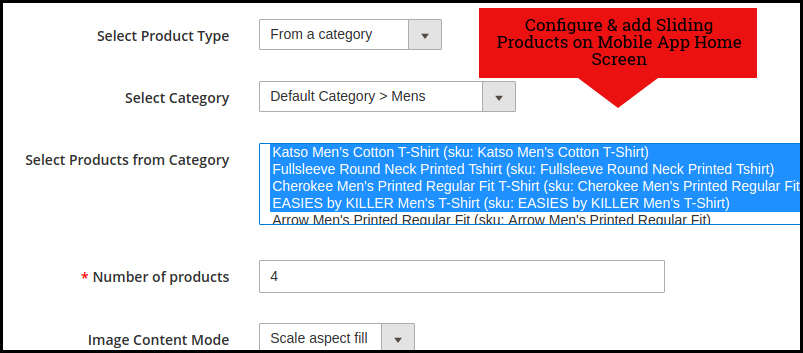
2.37 Sliding Products:
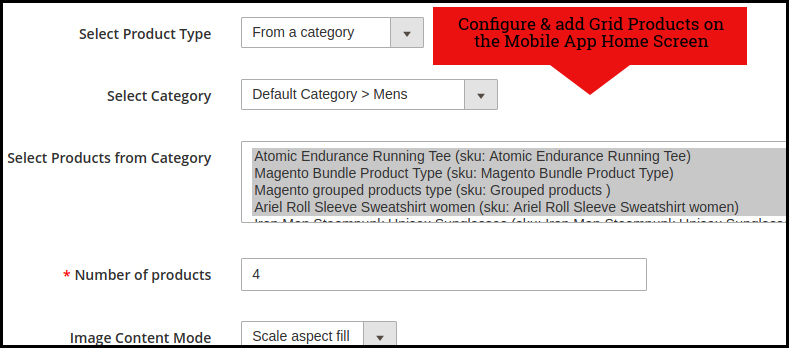
2.38 Grid Products:
How to get Facebook App details?
Facebook App can be created by following below-mentioned steps:-
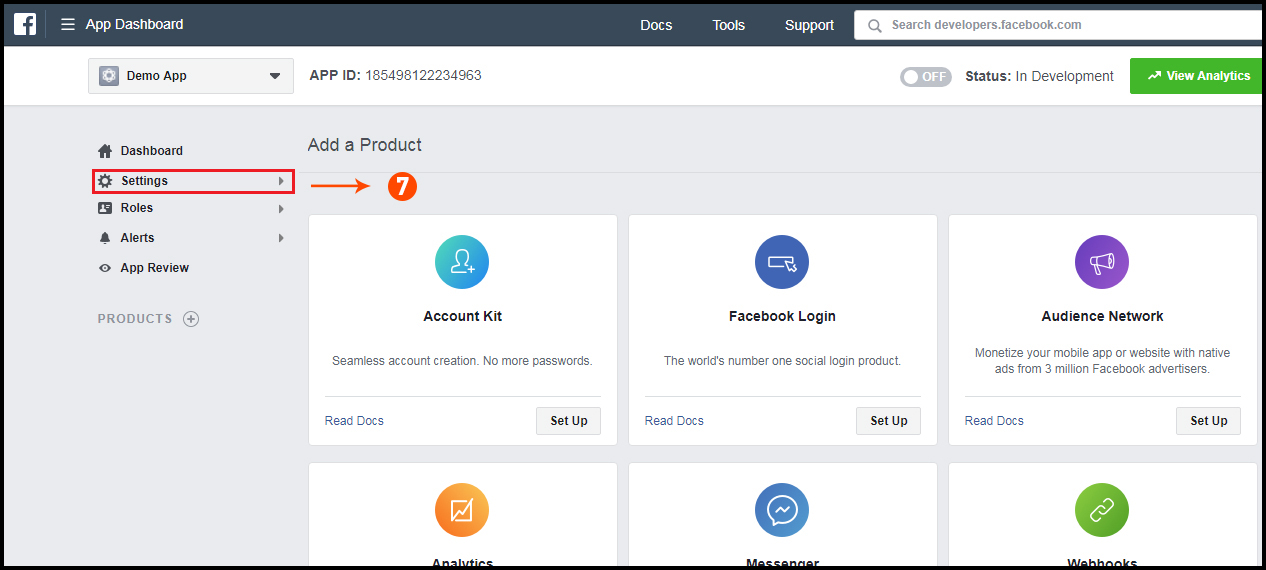
Step 1: Go to given URL: https://developers.facebook.com/apps/
Step 2: Click on the “Add a New App” button.
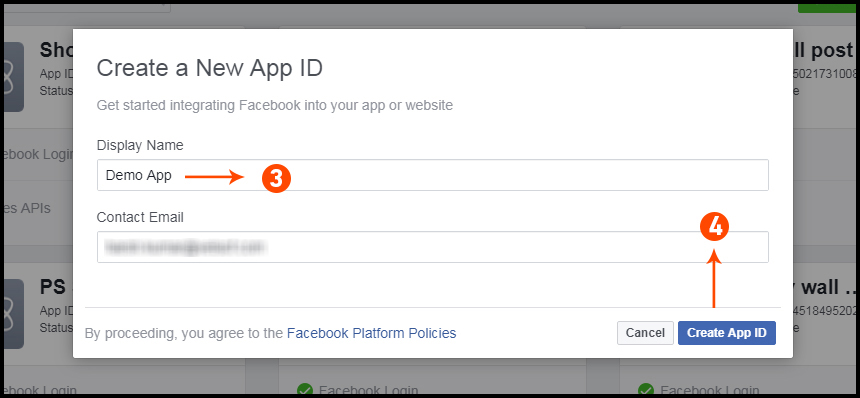
Step 3&4: Enter your App name and email id, then click on “Create App ID” button.
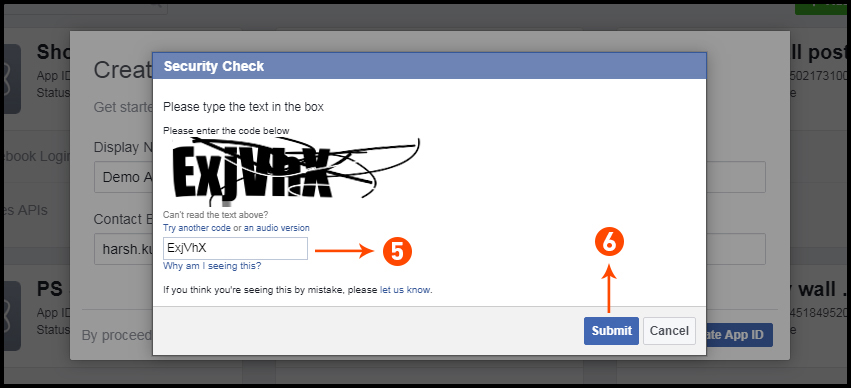
Step 5&6: After clicking on Create App ID you will have to go through a security check as shown:
Step 7: Click on “Setting” tab.
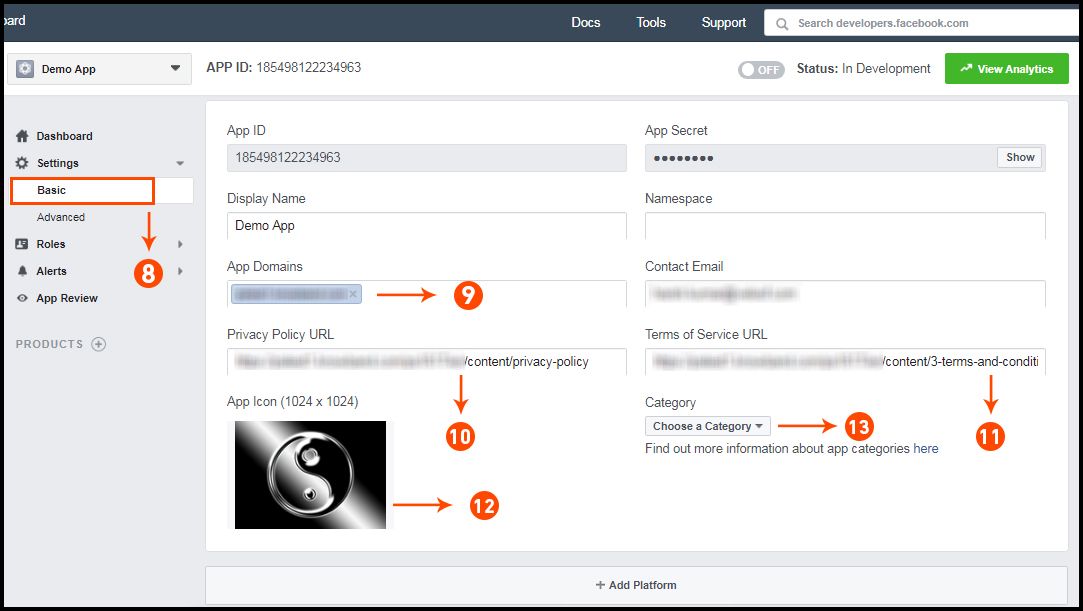
Step 8-13: Two option will be available in the dropdown, Basic and Advanced, click on “Basic”. And then enter your “App Domain”, “Contact Email”, ”Privacy URL”, ”Terms and Conditions URL”, ”Add Logo”, ”Select Category” and click on “Save Changes” button.
App Domains:
yourdomain.com is correct
yourdomain.com/store is incorrect
www.domain.com is incorrect
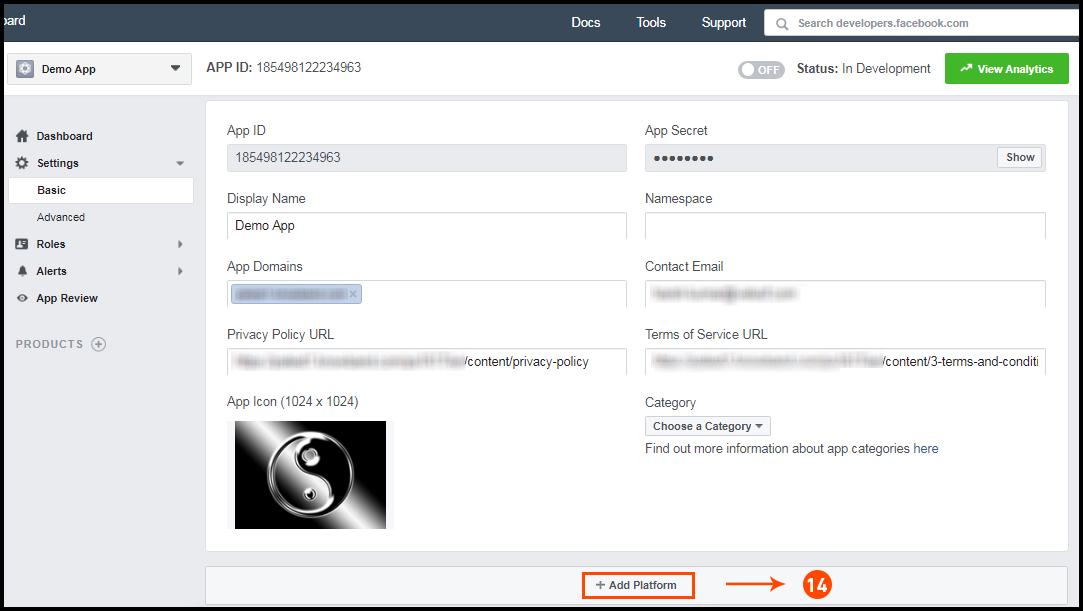
Step 14: Now click on “+Add Platform”.
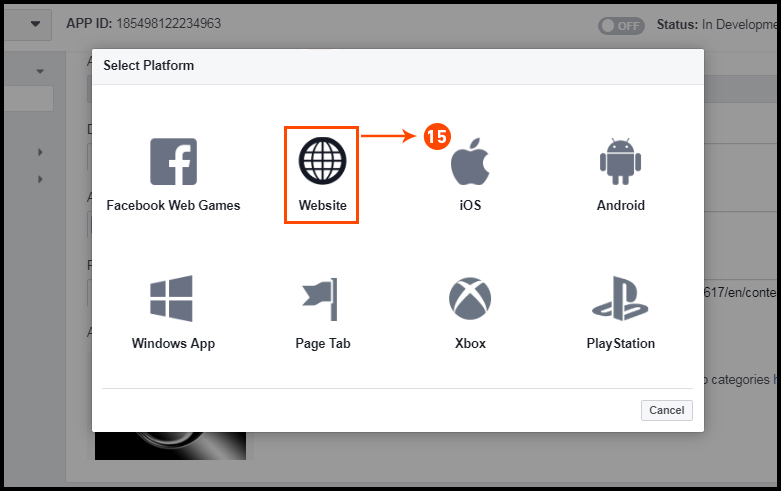
Step 15: And select Website as Platform.
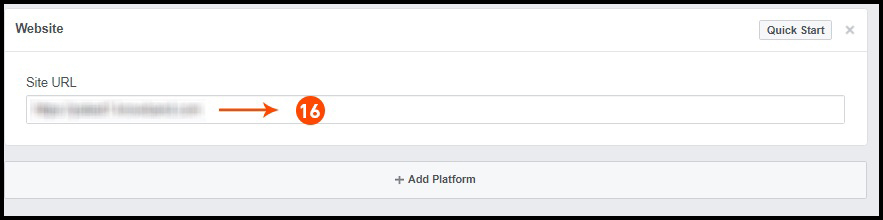
Step 16: Now Enter your site URL.
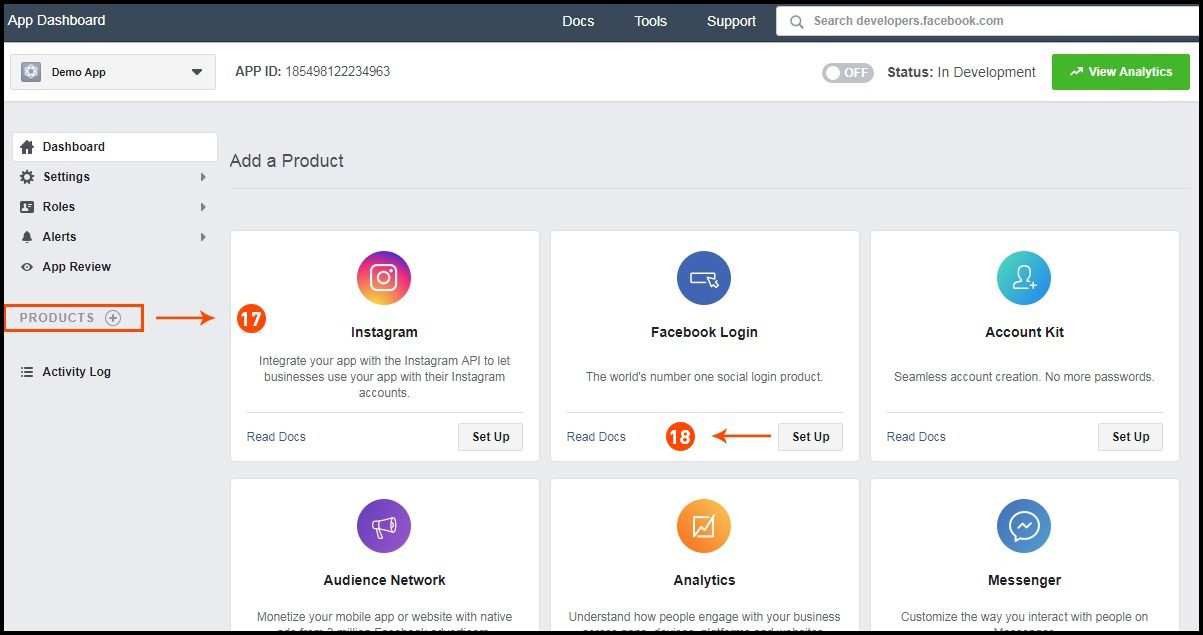
Step 17&18: Click on “Products+” and select Facebook login.
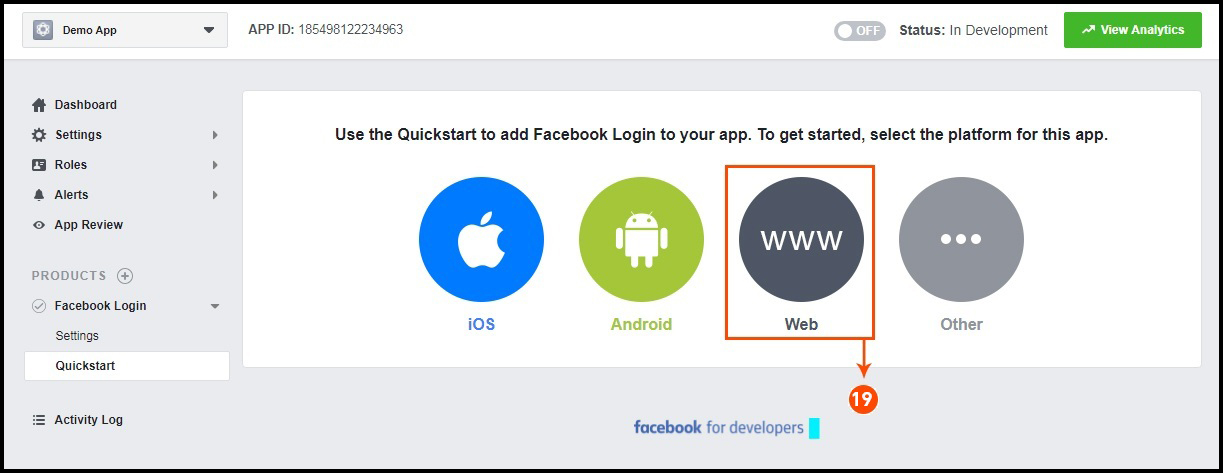
Step 19: Select web as the platform for the app.
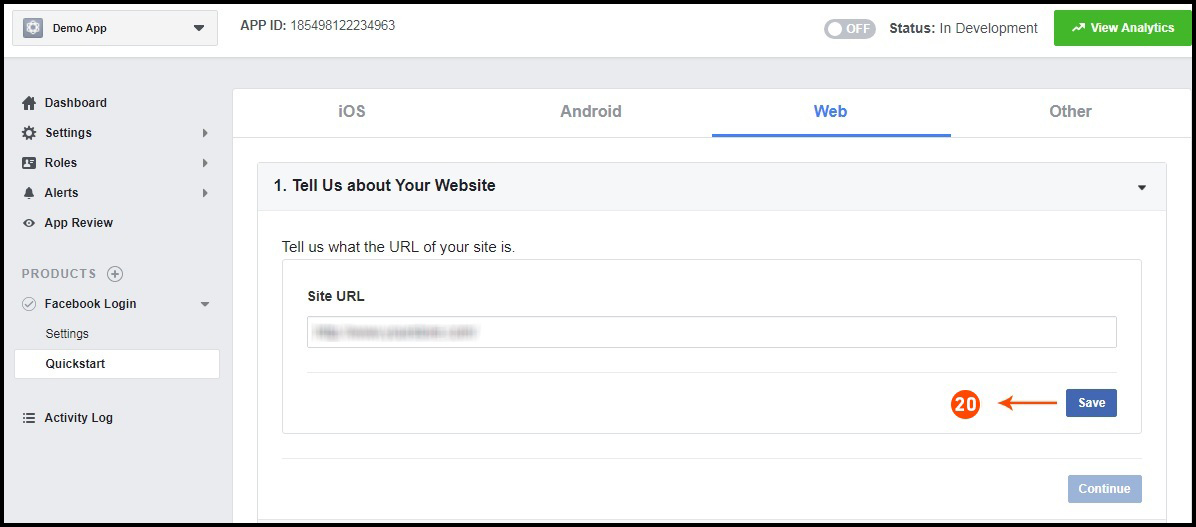
Step 20: Now click on save.
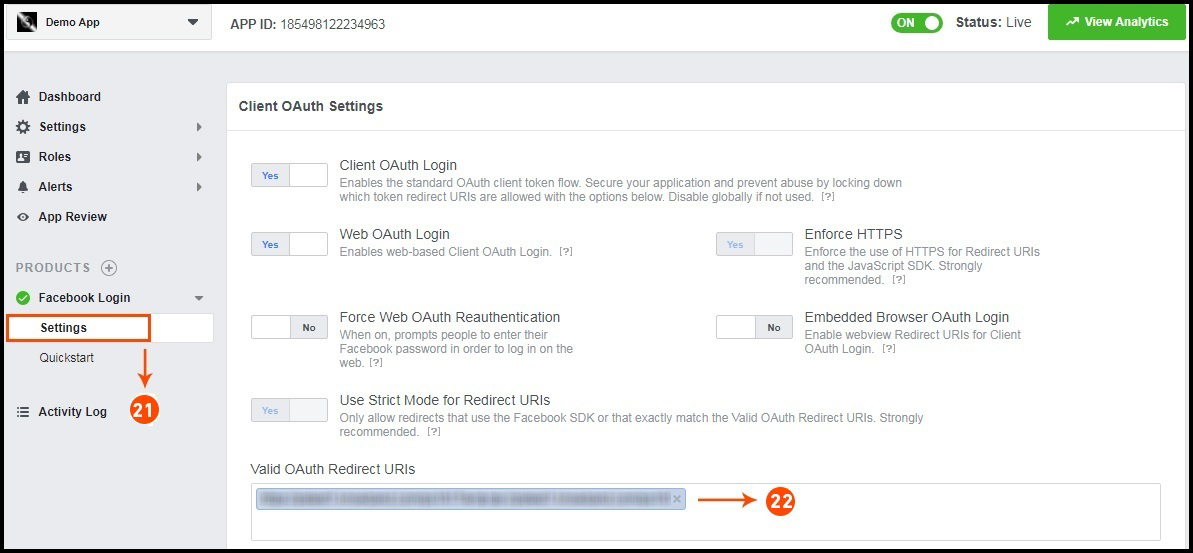
Step 21&22: Click on Settings and add a Valid OAuth Redirect URIs.
Valid OAuth Redirect URIs:
https://example.com/pwa-app/login
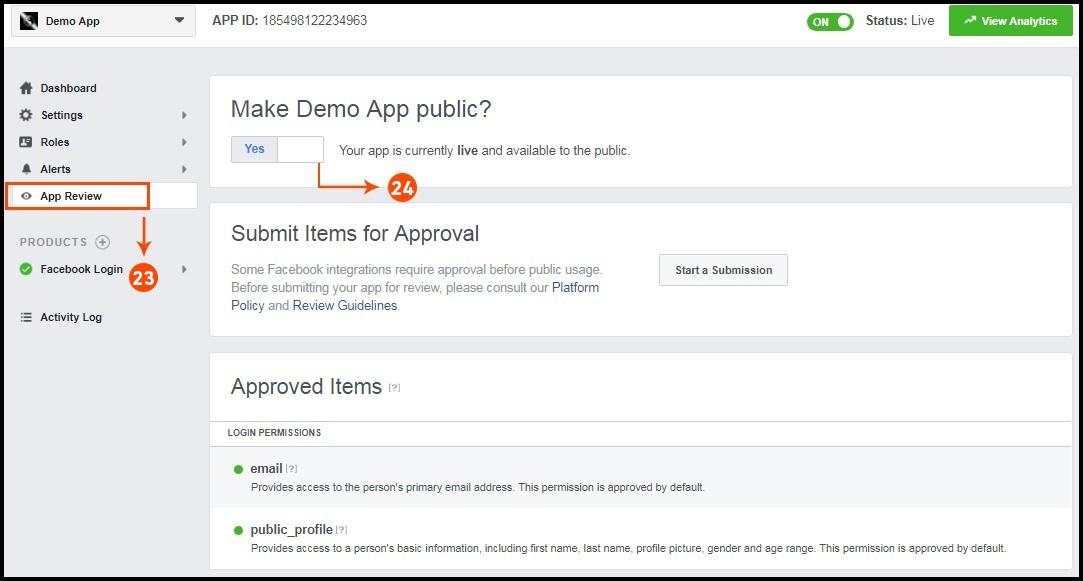
Step 23&24: Click on “App review”. And mark “Make ‘your app name’ Public” to Yes.
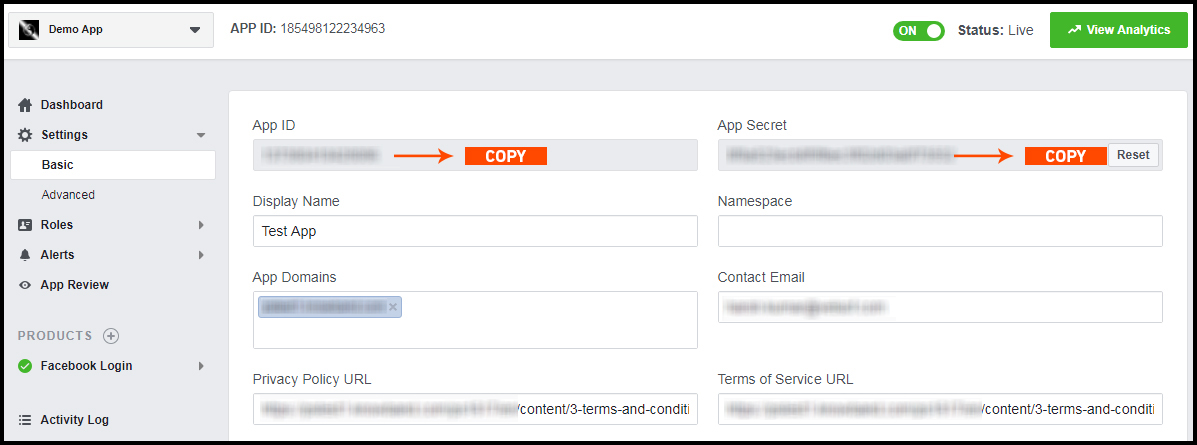
Final Step: Copy the App ID and App Secret and paste it into the fields provided in the module.
How to get Google App details?
Go to Google Developers Console
(https://console.developers.google.com/project) or click on link given top right of the respective tab in module configuration page.
Now click on Create Project on the left of the page.
Enter a name for your project and proceed to the next step.
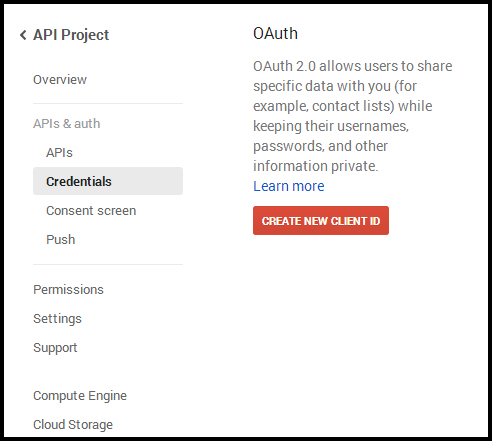
Now click on APIs and auth-> Credentials from the left menu as shown below.
Click Create New Client ID button from the right panel of the screen.
You may have to fill the form for Consent Screen before proceeding. To do so, that you have to click on Consent Screen in the left menu as shown in the image above.
Fill the pop-up form with below details:
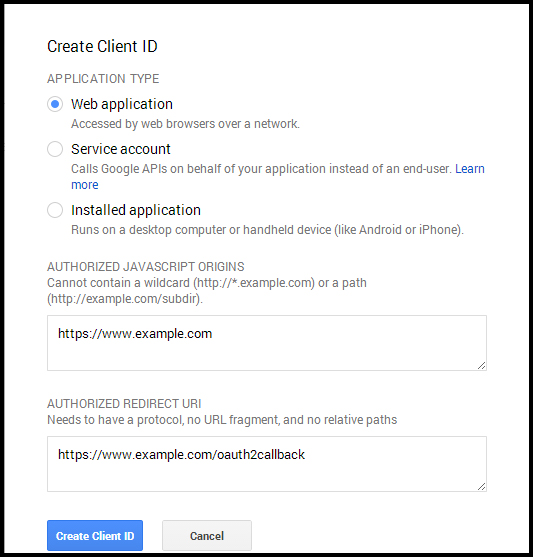
Application Type: Web Application. Authorized JavaScript Origins: Your store domain name (https://www.yourstore.com). Authorized redirect URI or URI of Loginizer redirect page:
https://example.com/pwa-app/login
Now click Create Client ID button to get your Client ID and Client Secret Key.
Now you can use the client secret and client ID to let your customers login to your store using their Google account.
3.0 Front End PWA App Screens:
Take a quick glance on seamlessly designed screens of Progressive Web App for Magento 2:
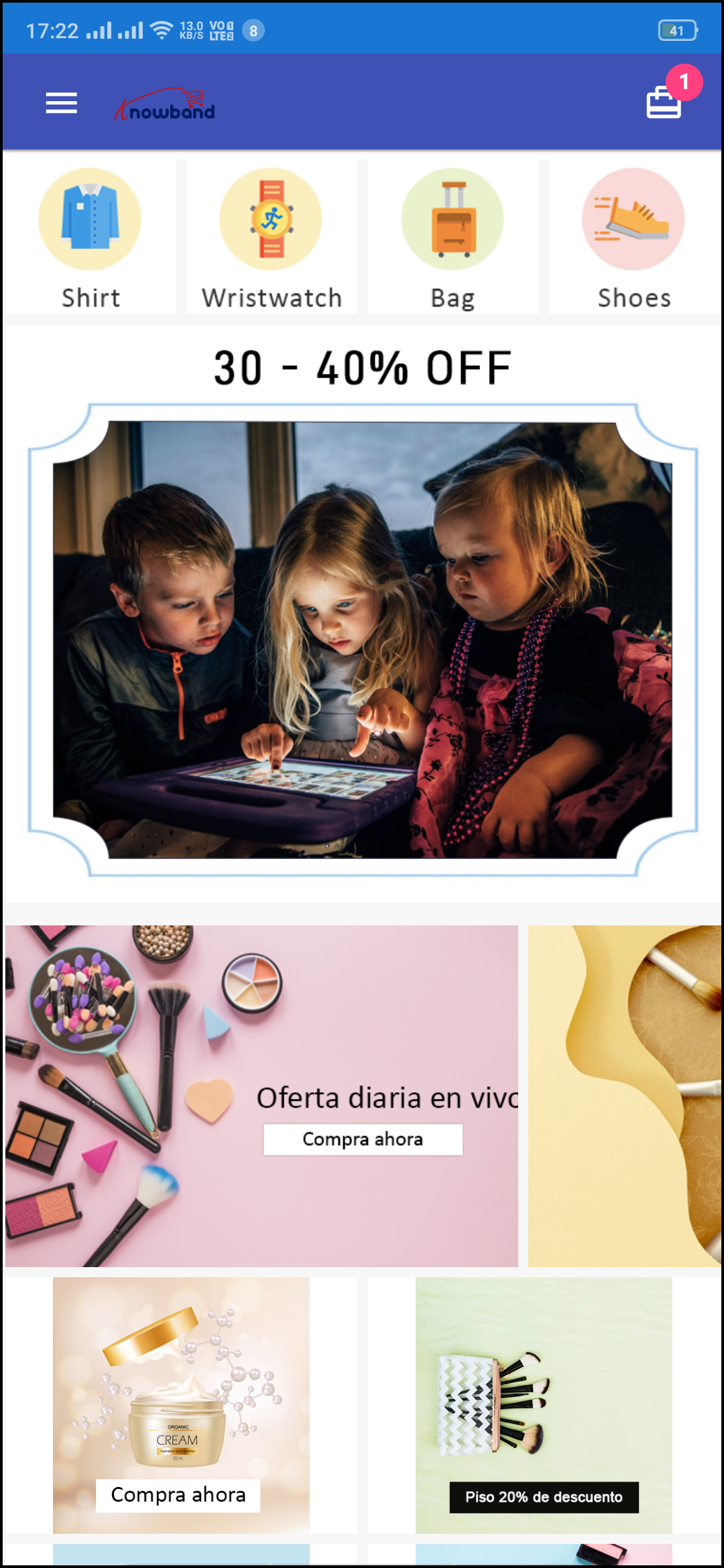
3.1 Home Screen:
The home screen of the Magento 2 Progressive Web App is fully customizable from the admin panel of the module. You can design the layout of app screens the way you want. Custom layouts can be designed in the admin panel based on events, festivals, occasions, etc. and used whenever required.
1. Dynamic Layout:
Using various designing elements (banners, sliders, categories, etc), the store admin can create dynamic layout as per the need.
2. Store Logo:
Add store logo on the header of the PWA app.
3. Shopping Cart:
The shopping cart icon on the top-right corner of the home screen allows users to switch on cart screen.
4. Navigation Menu:
Browse the categories in the apps with left navigation menu on the home screen.
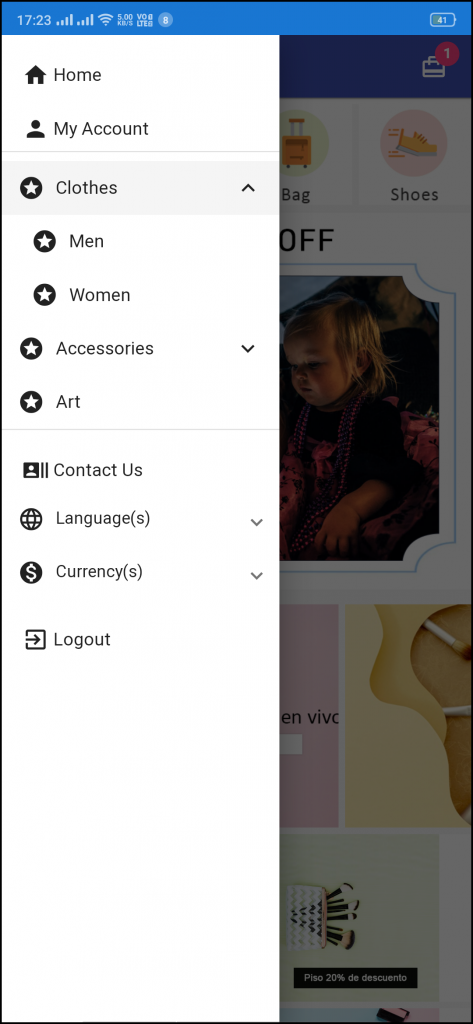
3.2 Left Navigation Menu:
The Magento 2 PWA Mobile Apps come up with seamless categorization of products. The categories on the PWA Mobile App will be the same as available on the website. Online shoppers can easily browse products from multiple categories without any hassle. Various CMS pages can also be added to the left navigation menu using the admin panel.
1. My Account:
My Account option contains all the user personal, shipping, order information. The PWA app shoppers get to view all the stored data related to them & can update the same as well.
2. Categories
Categories displayed in left navigation menu of PWA app are the same as of your website.
3. CMS Pages:
Various CMS pages like About Us, Contact Us, Terms & Conditions, etc. Can be accessed from here.
4. Language(s)
The language option allows PWA app users to view the web-app in their desired language. All available languages are displayed under this option only.
5. Currency(s)
All available currencies on your website are displayed here on Magento 2 PWA app.
6. Login/Logout
Users can easily sign-in/sign-out from Magento 2 PWA app via this option.
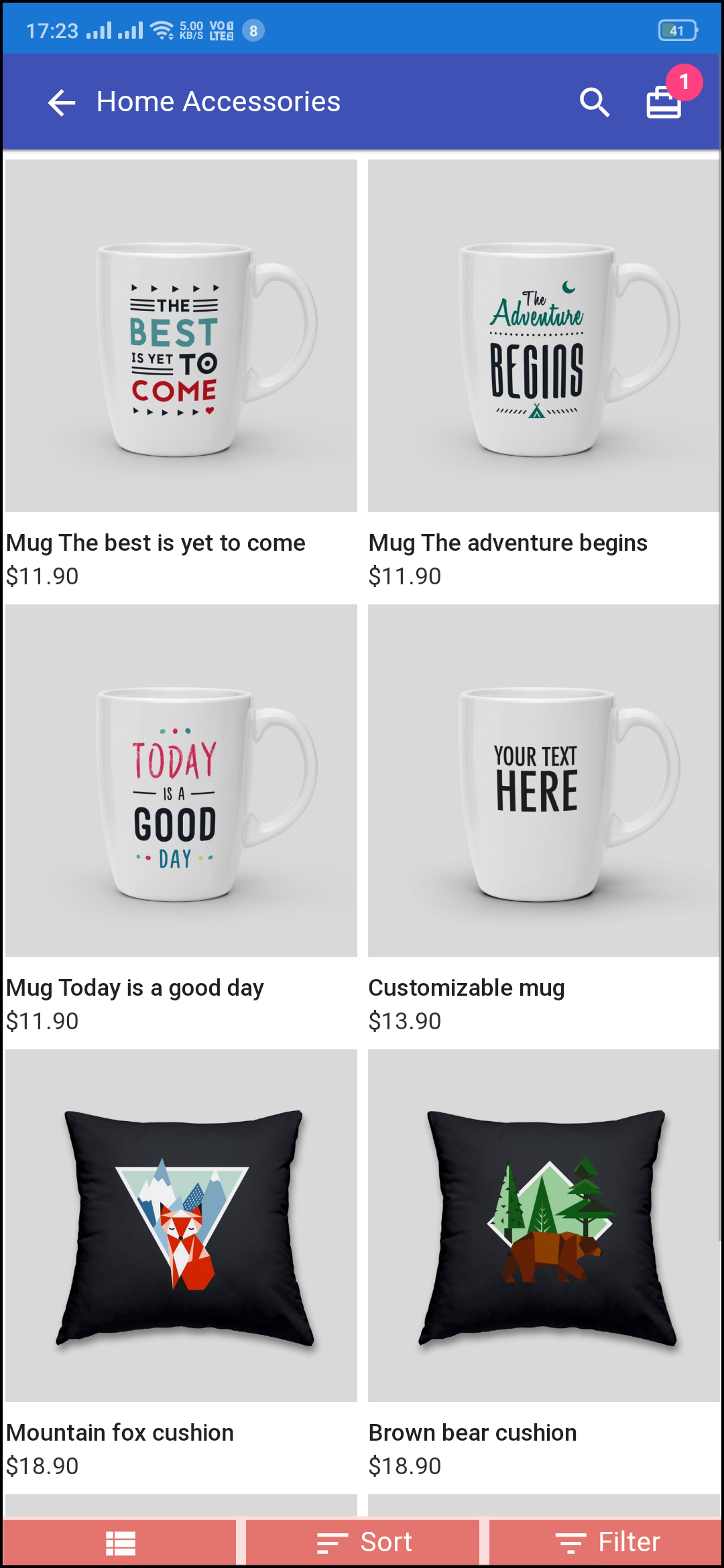
3.3 Category Screen:
1. Multiple Views:
The categories on PWA app for Magento 2 can be viewed in both list and grid view.
2. Sorting:
This option allows the online shoppers to choose the sort order in order to narrow down the search and get desired product with ease.
3. Filter:
Option to filter products simplifies product search. Users can filter all products under categories using various attributes like size, color, price etc.
3.4 Product Screen:
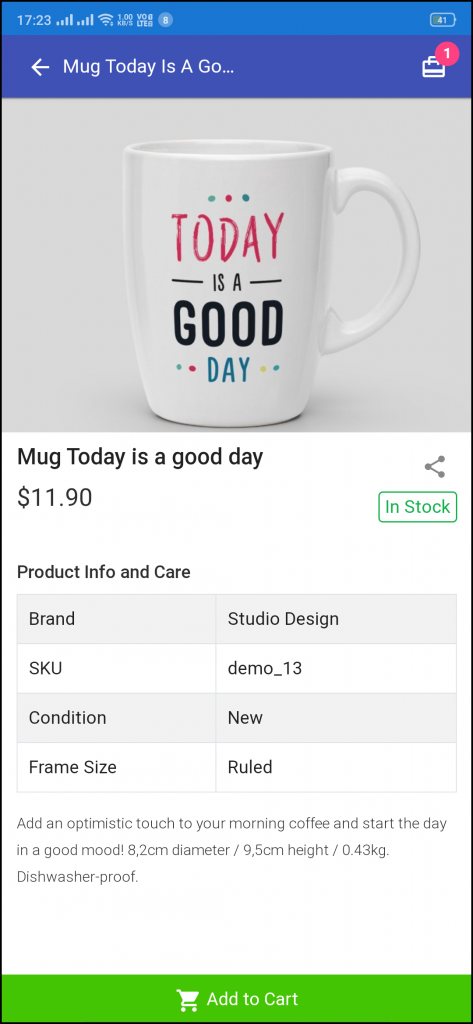
The product screen of the Magento 2 Progressive Web App contains all necessary product information the same as of your store. From multiple product images to short and long description helps in making user’s mind for purchase. The product availability is signaled as “In Stock” or “Out Of Stock” based on inventory status.
1. Product Info & Care
The complete product information as available in the inventory will be displayed here.
2. Short Description
Users get to read the short description of your product to quickly make up their minds about the purchase.
3. Product Options:
All the options related to the product like size, color, etc. are displayed here.
5. Add To Cart:
This button allows users to add products into the cart. The users can further process the cart for purchase.
6. Product Social Sharing:
The sharing option for the product allows users to share products on multiple social channels.
3.5 Login Screen
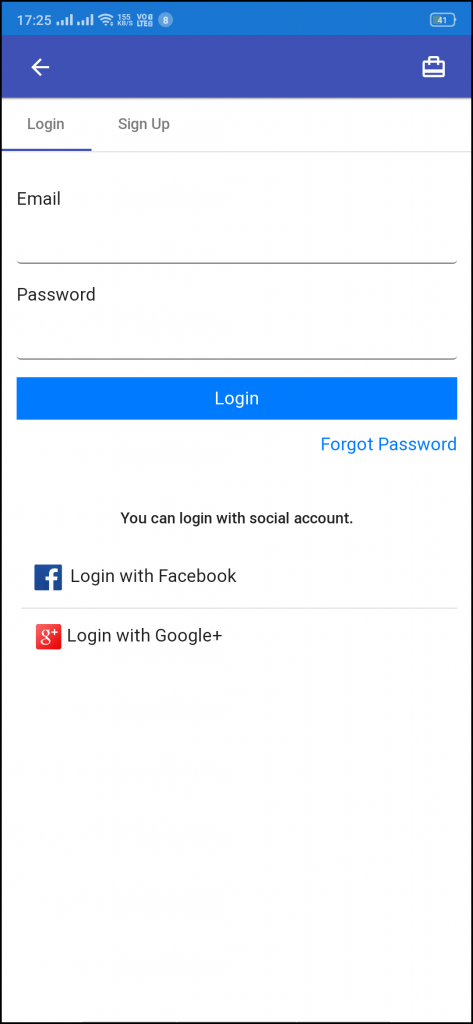
The Magento 2 Progressive Web App offers quick one-tap login options & make sign-in/registration process more seamless:
– Email Login
– Google Login
– Facebook Login
1. Login
The app users can easily authenticate & login to PWA apps using their previous email login credentials.
2. Sign Up
All the new app users can sign-up & create their account on the store from the Magento 2 PWA App. The sign-up form asks for only the necessary details to create an account.
3. Login with Facebook
The users can log in into the PWA app using their Facebook Account Credentials.
4. Login with Google+
The users can log in into the PWA app using their Google Account Credentials.
3.6 Shopping Cart Screen:
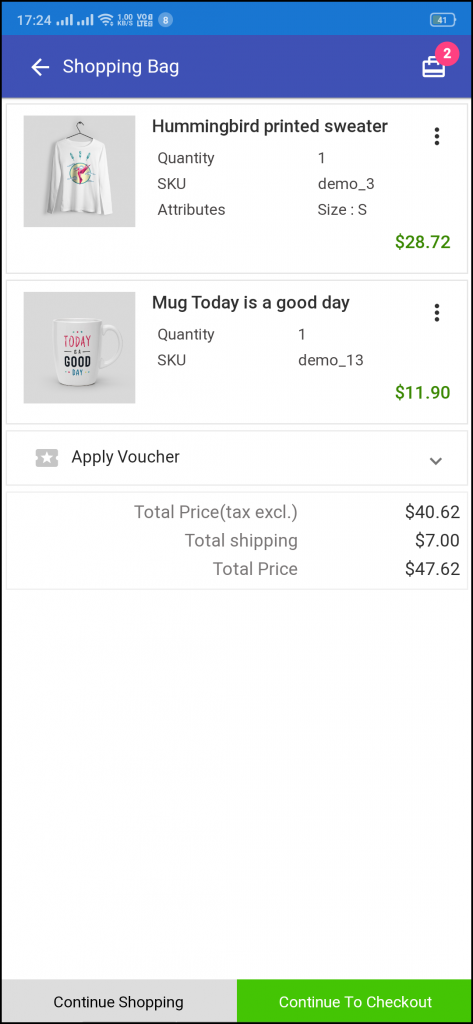
The shopping bag of Magento 2 PWA apps will display all added products along with their quantity and price to pay. The app users can view product details as well to be sure before purchasing one.
1. Apply Voucher:
This option allows users to use website coupons and grab discount offers.
2. Total Product Price:
The users get to view the complete cost of their shopping bag before proceeding further. It is automatically updated according to any update with product quantity or new addition.
3. Update Product Quantity:
The PWA app users can even update the product quantity with the “Update Quantity” option.
4. Remove Product:
The app users can simply remove the product from the cart by simply tapping the “Remove” option.
5. Continue Shopping:
The app users can leave the cart to browse more products on your app.
6. Continue To Checkout:
The PWA app users can proceed further to the checkout & payment screens just by tapping the “Continue To Checkout” option.
3.7 Checkout Screen:
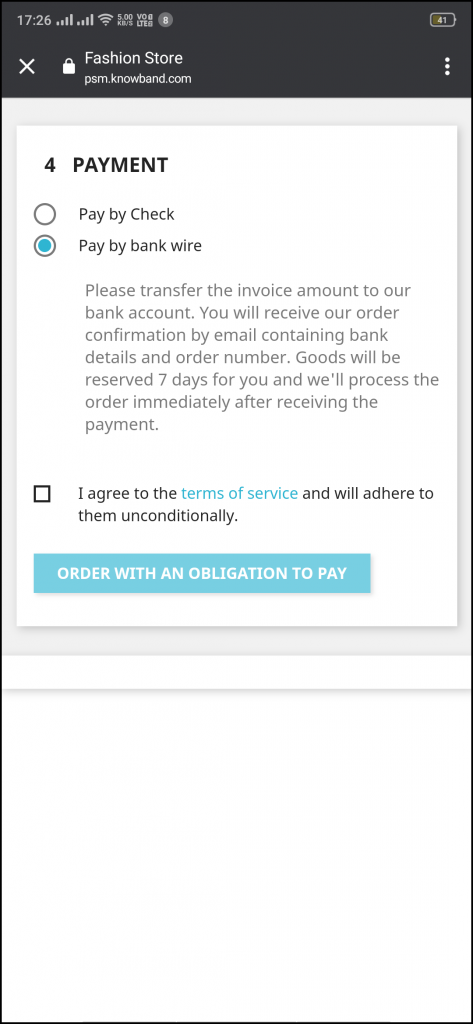
The PWA Mobile apps for Magento 2 comes with a single screen clutter-free checkout with only relevant & necessary fields required. App users get a complete overview of the order before actually making the payment like shipping details, billing details, order summary, order comment, payment summary.
1. Shipping & Billing Details
This screen provides details of the shipping & billing addresses saved by the user. The user can also edit/save the new shipping address if needed.
2. Order Summary
The app users get to view product details before making payment.
3. Shipping Methods
All available shipping methods are displayed here. Users can choose the one suiting their need.
4. Order Comment
Users can also add any comment related to their order which will be visible to store admin on the order web-page in the backend.
6. Payment Summary
This section displays the complete breakdown payment details involved with the purchase.
7. Proceed To Payment
The PWA app users will be re-directed to the Payment screen after tapping the “Proceed To Payment” button.
3.8 Payment Screen:
Magento 2 PWA App brings all web-view (website) payments on the app. The app users will find same payment options here as available on the applications. The payment screen of Magento 2 Progressive Web App is fully optimized for app view.
3.9 My Account Screen:
My account screen of the Magento 2 PWA app offers all users details available on the Progressive Web App. The online shoppers get to view the personal details, shipping address, order details, etc.
1. Personal Details
Users can also view & update their pre-saved profile details.
2. Shipping Address(s)
The app users can see the complete list of pre-saved shipping addresses in the PWA app.
3. Order Details
The app users can get to view the complete list of the previously placed orders from the PWA app and their details.
4. Re-order feature
There is a direct re-order button on the My Account screen of the PWA app. All the previous products under this order will be added into the cart with just a single button.
3.10 Order Detail Screen
The Magento 2 Progressive Web App displays complete order details of previous app orders. This screen contains Order Details, Status History, Shipping & Billing Addresses, etc. for every order placed through the Magento 2 PWA app. The app users can quickly view the entire order summary and get to keep track of delivery status as well.