Skip to content

Knowband Blog | Ecommerce Modules

Magento, Prestashop, Opencart, Shopify

Tag: Prestashop Social Login

Encourage Quick Sign-up with Magento 2 Social Login Extension

Encourage Quick Sign-up with Magento 2 Social Login Extension

“Simplify the registration process, capture more leads and reduce cart abandonment on your Magento 2 store by providing a quick login facility to your website visitors with the help of Magento 2 Social Login extension.”

Mandatory sign-ups have been an annoyance for long. People just hate creating an account every time they visit a new eCommerce website. While some get irked by the lengthy and a time-consuming registration form, some just do not like sharing their personal details at all.

The compulsory account creation forms a barrier in your conversions as well. While being on the checkout page, consumers are presented with a sign-up form, which breaks the checkout flow and sometimes becomes a major reason for cart abandonment. In addition, you fail to gather customer data.

Now, get rid of the mandatory registration forms and reduce the obstacles in your checkout process by allowing users/customers to sign in to your Magento 2 store easily with their social media accounts.

The Magento 2 Social Login extension is designed to provide an easy and quick login facility to your visitors by avoiding the manual registration task and providing them with various social login options. Hence, customers do not need to create an account and remember the login credentials.

It is a simple yet powerful Magento extension to enhance customer experience on your Magento store.

Key Features of Magento 2 Social Login

1. Up to 12 social logins available

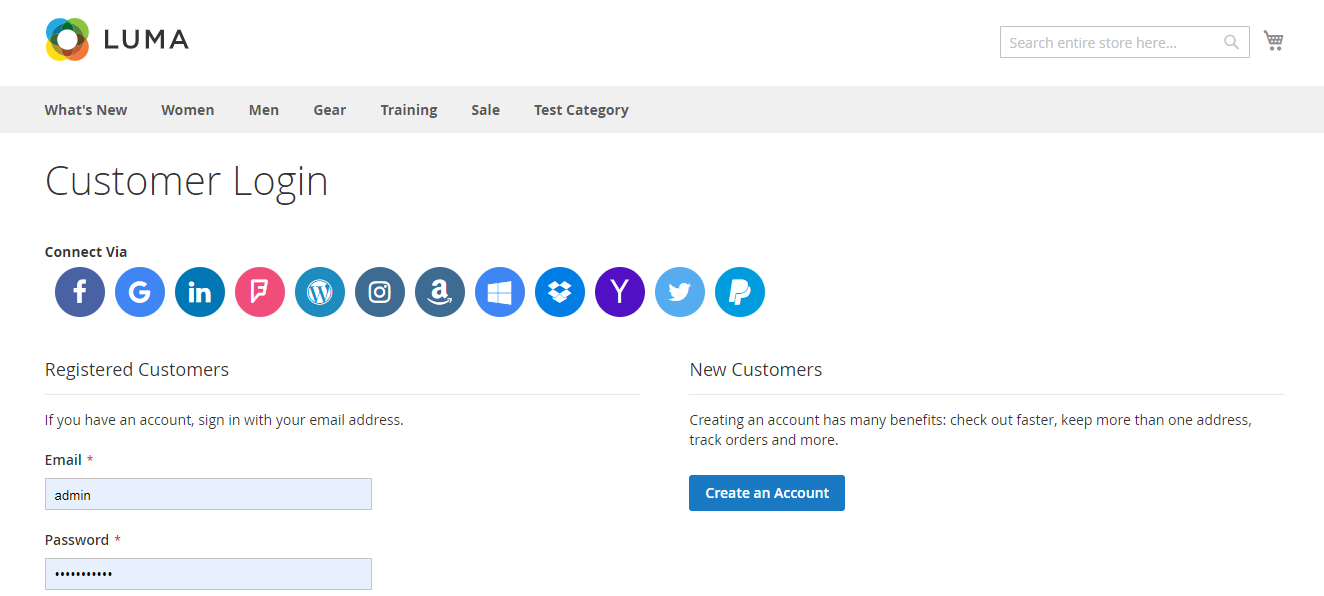
Social Login extension for Magento 2 provides up to 12 social login options to your customers. The social networks supported by this extension are:

Facebook

Google

Instagram

Twitter

LinkedIn

Amazon

PayPal

Yahoo

WordPress

Foursquare

Live

Dropbox
2. Display the social login block at multiple pages

The Social Login extension for Magento 2 allows you to place the social login block at multiple pages like Login Page, Registration Page, Checkout Page, etc.

3. Sort social icons

You can arrange the social icons as per your requirements. For example, you can keep the major social networks like Facebook, Google, Twitter and Instagram on the top and rest of the icons below them.

4. Customize icons
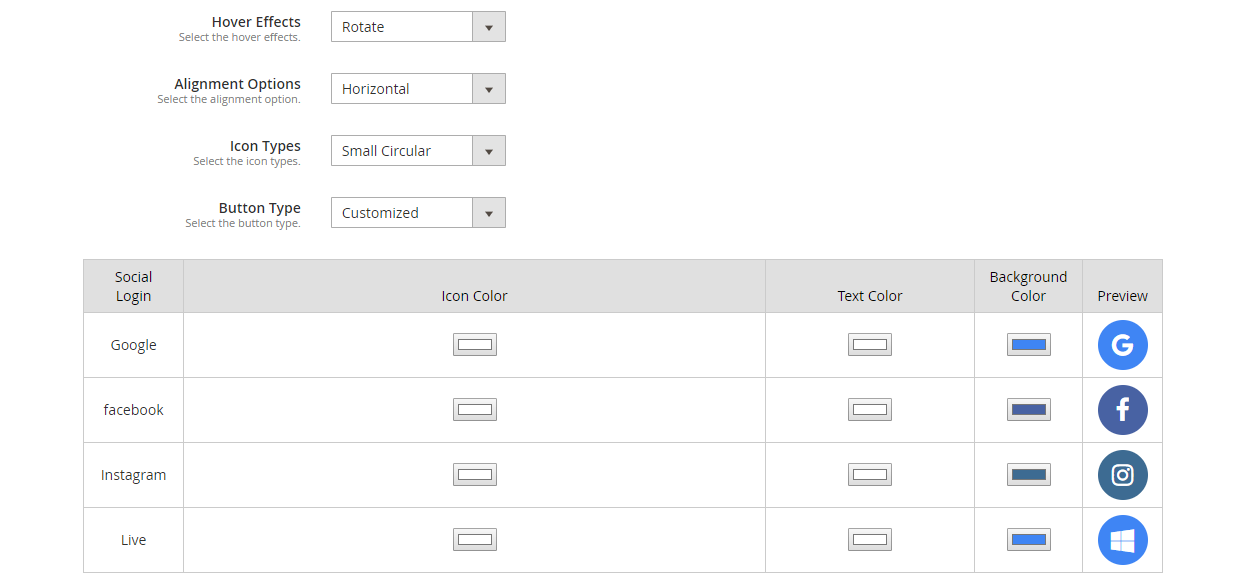
Magento 2 Social Login extension allows you to customize the social icons. It includes:

Alignment of the icons: Choose whether you want to display the icons vertically or horizontally.

Add effects to the icons: The social icons with either get highlighted, rotate or zoom when clicked.

Icon type: Select how you want your icons to be displayed. It consists of options such as small circular, small rectangular, large rectangular, small rounded, large rounded.

Button type: Choose the default button of the social networks or you can adjust the icon colour, text colour and background colour accordingly. A preview will be displayed as you make custom changes.

5. Get a complete analysis of the social registrations
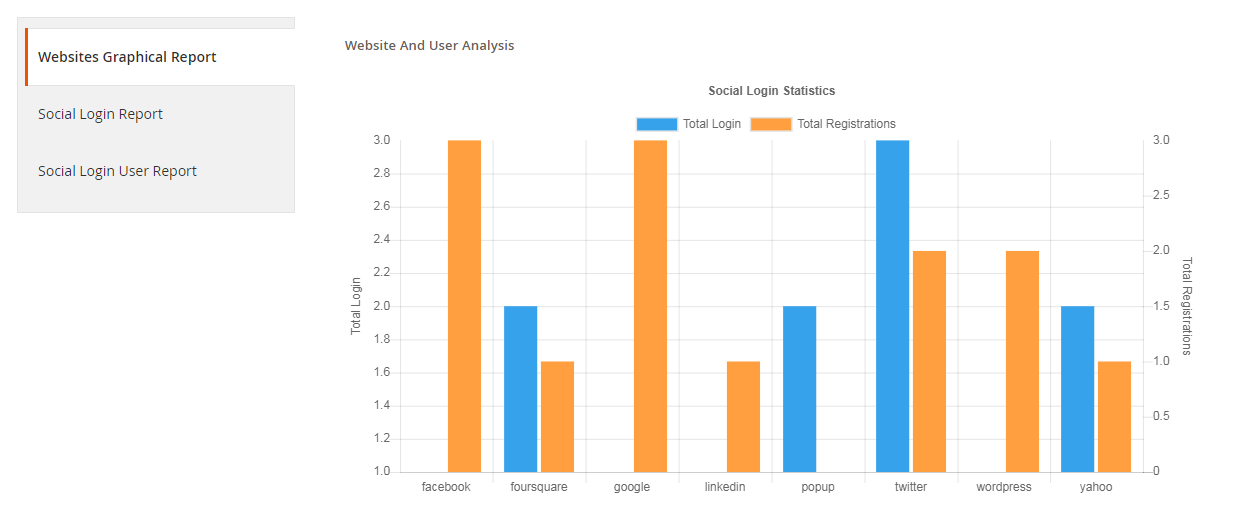
Check which social login users preferred the most for signing in, how many login and registrations have been captured in total.

You can also track the email address of the users and check which user came from which platform.

6. Fully compatible with One Page Checkout

Magento 2 Social Login extension is fully compatible with our popular Magento 2 One Page Checkout. The Magento 2 One Page Checkout has in-built social login option but it is only restricted to Facebook and Google login. However, by installing the Magento 2 Social Login extension, you can provide your users with up to 12 social login options.

Why should you choose Magento 2 Social loginizer?

1. Quick and easy login

2. Capture more sign-ups

3. Simplify and speed up the registration process

4. Customers do not need to remember passwords

5. Excellent for target marketing

6. Increase conversions

7. Reduce cart abandonment rate

8. Lower bounce rate

Adding to a fact that 77% of the users find social login to be a perfect solution for registration and 60% of the users are more likely to use it on mobile (Source: Annex Cloud), you should definitely consider this Magento extension for your Magento store.

To know the complete benefits of social login, read 10 benefits of social login in eCommerce.

Check out the admin demo, front demo and the user manual of the extension.

You can also check out

Social Login extension for Magento

OpenCart Social Login extension

Social Login addon for PrestaShop

Posted on September 12, 2019September 17, 2019Author Manish BarthwalCategories MagentoTags Magento Social Login, opencart social login, Prestashop Social Login, social login, social login magento 2, Social sign-in
How to get and set a PrestaShop Facebook Addon on your website?

Social media comes up with a new buzz every day. We cannot decline the fact social media has not only changed the way of connecting to our acquaintances but has also revolutionized the way of communication between the users and websites.

Keeping the social media marketing and all other uses of social media aside, here I am talking about the social login feature and the ways of implementing a social login using PrestaShop Facebook addons on your website.

How Social login adds value to your website?

The immediate effect that you will notice on your website is the decrease in the cart abandonments. E-Commerce websites suffer a great loss from the cart abandonments that occur due to lengthy checkout processes on their stores. The length of the checkout process is increased exponentially when you ask the customers to register an account by filling the registration forms.

With the addition of PrestaShop Facebook addon on your store, you will be able to eliminate the account registration step and still you will capture the customer information from their Facebook account. Almost every online user has a Facebook account nowadays. So, it will not be a tough task for them to just click a Facebook login button and login directly to their user account.

How to get PrestaShop Facebook login for your store?

Step 1: Download a PrestaShop Facebook addon and install it like every other PrestaShop module on your site.

You can opt for any PrestaShop Facebook addon that you like. The interface for Facebook setup is almost similar in any PrestaShop Facebook addon. However, I am using the Knowband-social loginizer module here to explain as this module have several other social login options that can be set up. Its economical to use an all in one module.

Step 2: After installing the module, go to the configuration panel of the module by clicking on “Configure” from the modules listing page.

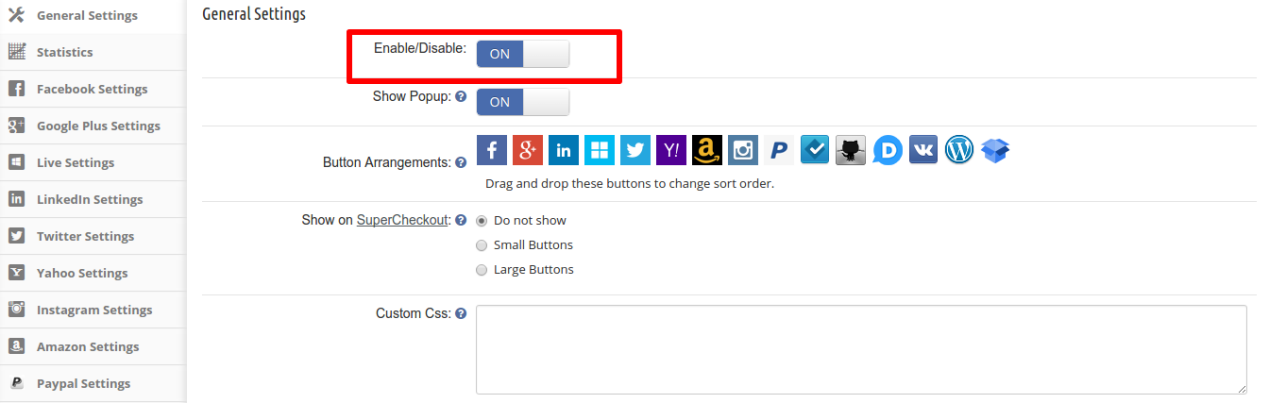
Step 3: Now, in next interface, enable the module if it is not enabled already and Click Save.

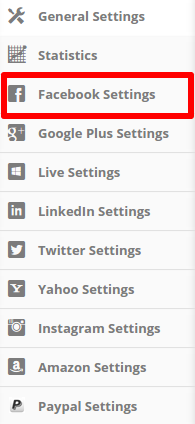
Step 4: The module consists of the settings tab for several social login options. But we are concerned with the Facebook login. So, in the left side, click on Facebook settings.

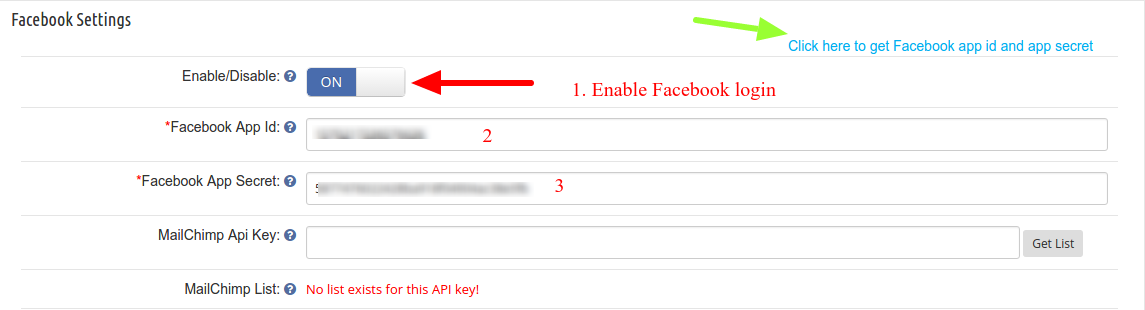
Step 5: After clicking on the Facebook Settings, you will see the following interface:

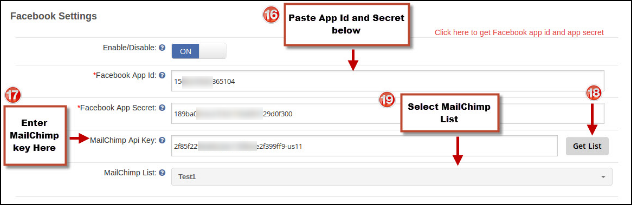
In this interface, first, enable the Facebook login by clicking on the toggle button. After that, you will need your Facebook App id and Facebook App Secret key. That’s it, your website is ready to receive social login via Facebook now.

How to get the Facebook App id and App Secret key?

To get the Facebook app id and App secret key you will need to follow these steps

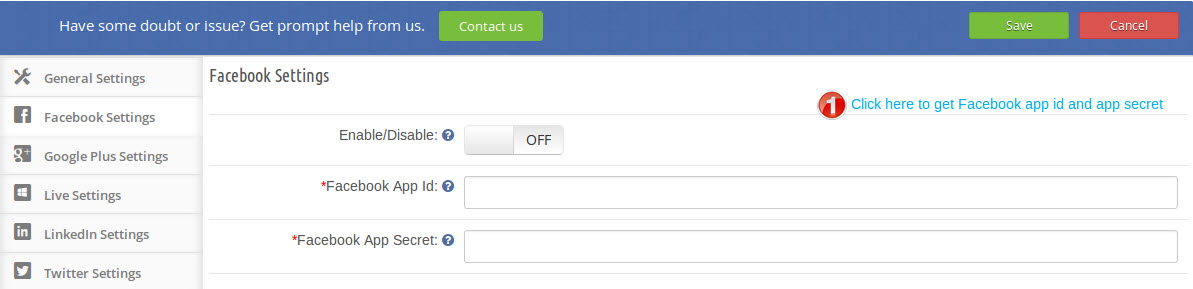
1. Click on the link in the module configuration as shown in the screenshot below:

2. In the next page in my Apps section click on “Add a New App”

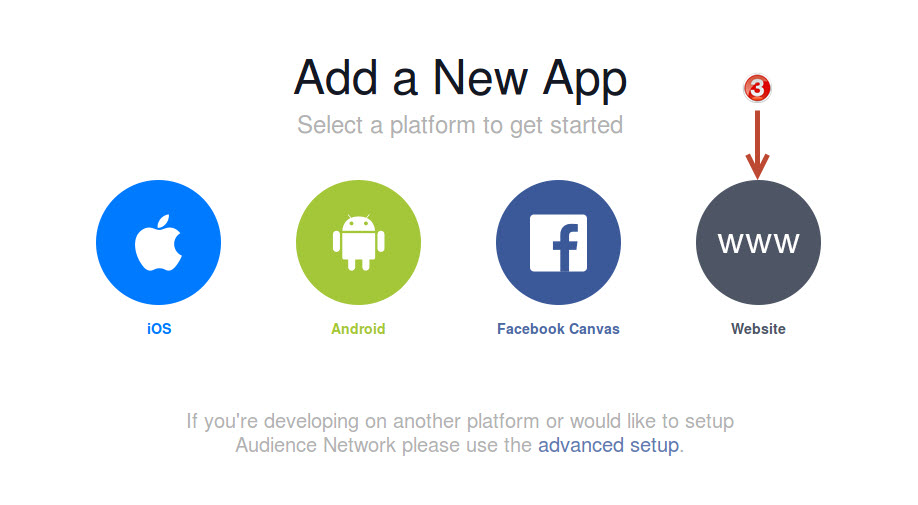
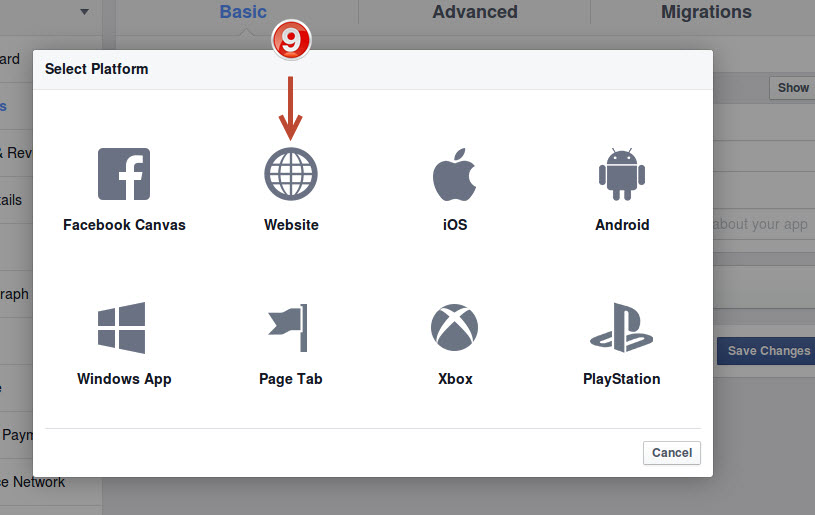
3. Click on “Website” in the Add a New App interface

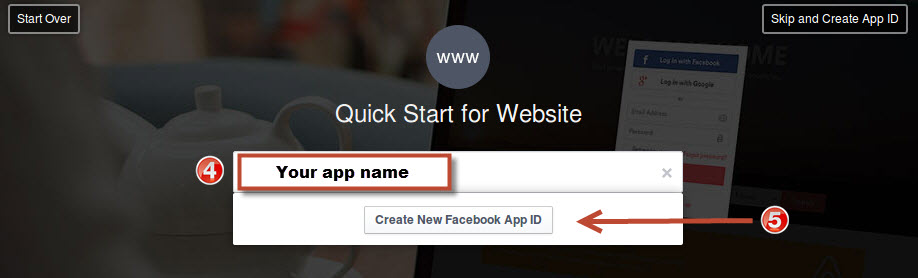
4. Enter your desired app name you want to give to your app. eg: Store name social login and then click on “Create new Facebook App ID” button

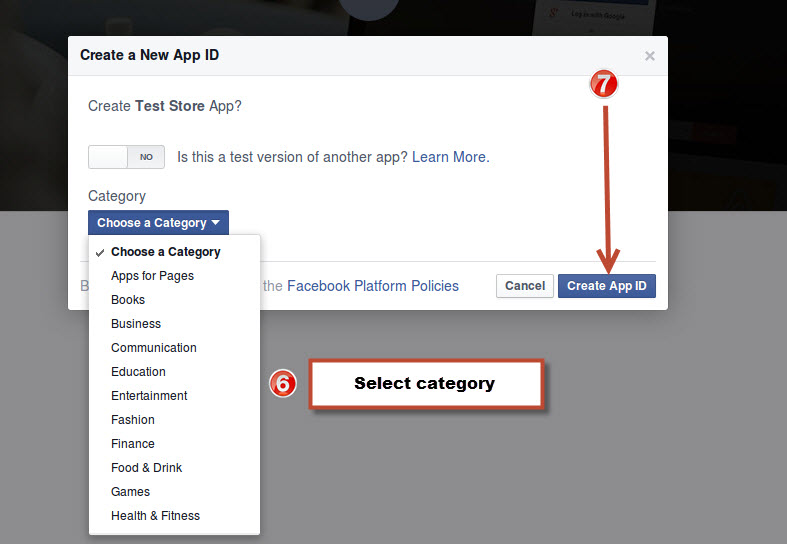
5. In Category section choose a category of your app, and click on “Create App ID”

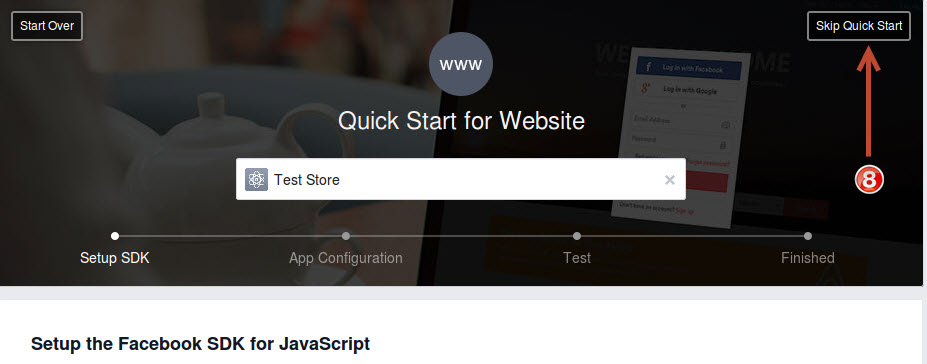
6. Click on Skip Quick Start

7. Click on the Website link

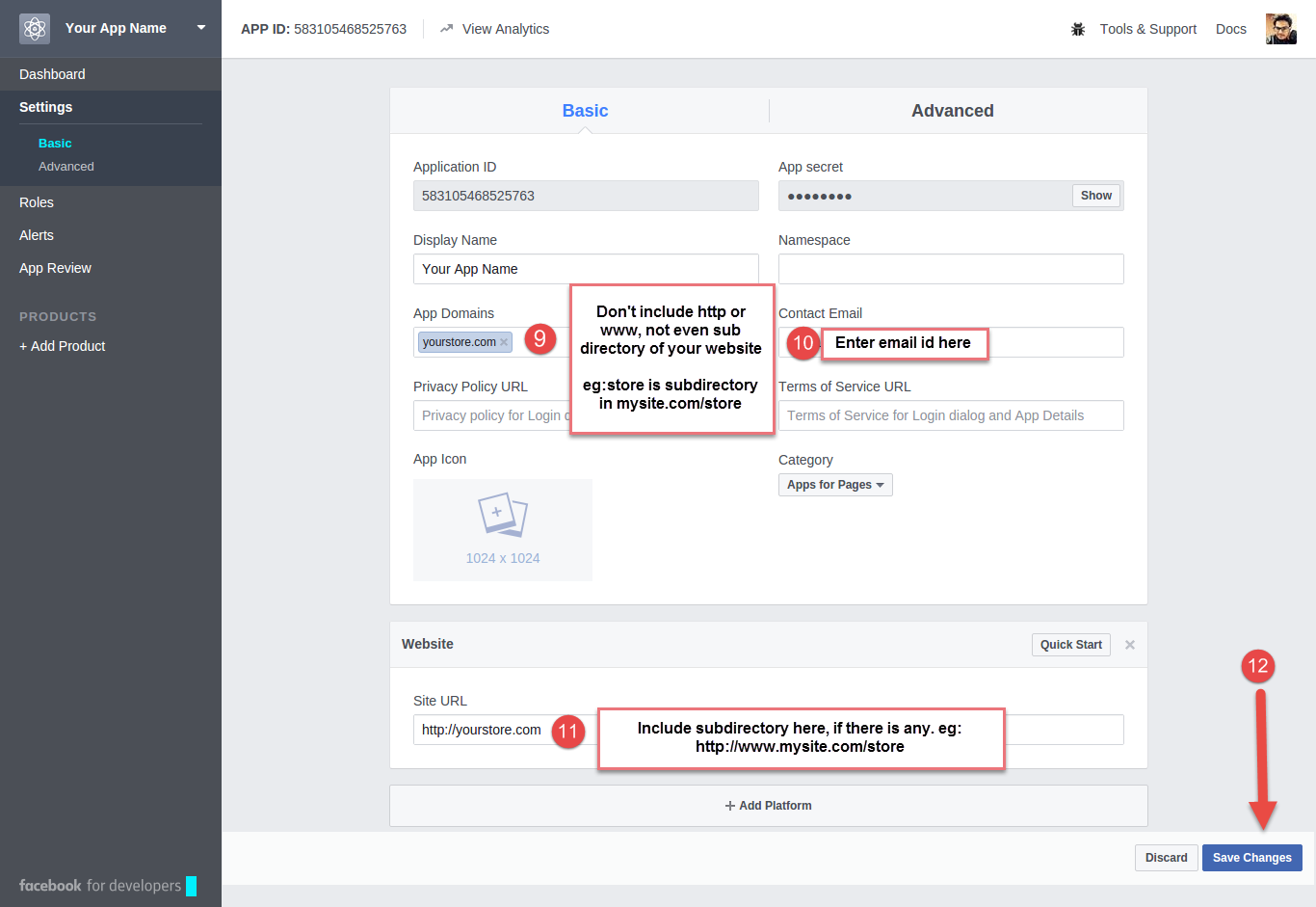
8. Fill up the form as explained in the image below;

App Domains:

Yourdomain.com is correct

Yourdomain.com/store is incorrect

www.domain.com is incorrect

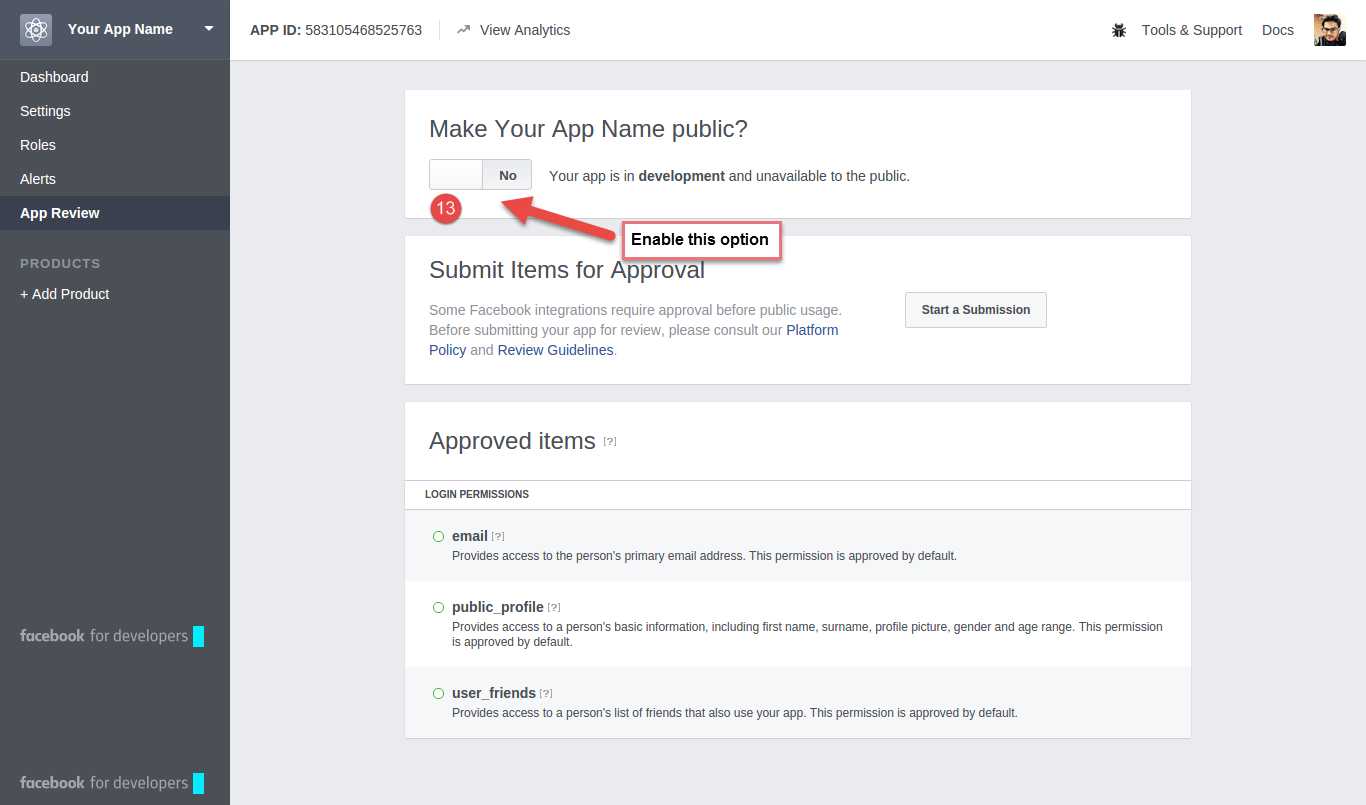
9. Under status and review tab, enable its live feature.

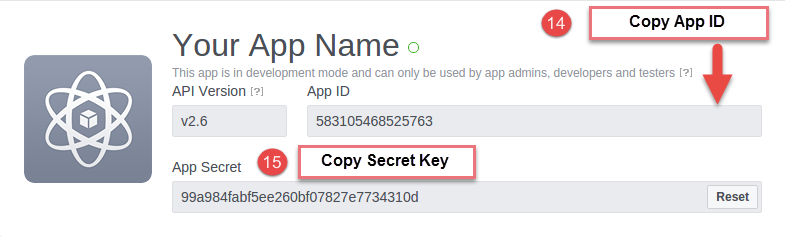
10. Now, on the next screen, you will see our App ID and Secret Key. Copy both the details.

11. Paste the copied details in the respective fields in the module as shown in the image below:

So, in this way you can set up a PrestaShop Facebook addon on your PrestaShop website and start accepting the social login. This is one of the easiest approaches to start accepting social login on your eCommerce website. Hopefully, this detailed explanation will help you to set up PrestaShop Facebookaddonaddon on your website.

Some other PrestaShop Social Media/Facebook Modules

PrestaShop FB store

PrestaShop Facebook store addon helps you list your PrestaShop website products on your Facebook business page. All you need to do is provide your Facebook App ID.

Once added, your Facebook shop will be ready to run. With the help of PrestaShop Facebook shop addon, you can customize the look and feel of your Facebook shop.

You can upload your Brand logo, set up home page banners, adjust the menu items to be displayed, specify the products that you want to display. Further, you can display featured products, best sellers, special products, new arrivals, etc. There are many other features which the PrestaShop Facebook shop addon offers.

If you want to increase the traffic on your website and boost your sales, PrestaShop FB shop addon will help you achieve it.

PrestaShop Social Loginizer

PrestaShop Social Login addon makes the sign-up process easy for your website visitors. It provides you with up to 15 social login options that you can incorporate on your website which includes Facebook login, Google login, Instagram login, Twitter login, LinkedIn login, Yahoo login, Amazon login, PayPal login, Foursquare login, Live login, GitHub login, WordPress login, Dropbox login, Disqus login, and VKontakte login.

You can check out a few more modules such as PrestaShop Social Messenger, PrestaShop Facebook Post Feed, PrestaShop Facebook share and win discount

You Might Also Like:

  • 6 must-have social media addons for your PrestaShop store
  • 5 Solid Evidence a Facebook Store can double your Conversions
  • 5 Ways Facebook Album can Help you Stay Ahead
  • How to get and set a PrestaShop Facebook Addon on your website?
  • Leverage the Power of Facebook to Improve your Sales
  • Simple Approaches to Boost your Sales using Facebook
Posted on February 13, 2017March 4, 2020Author Joe ParkerCategories PrestashopTags Prestashop Facebook Addon, prestashop facebook store, Prestashop Social Login
Proudly powered by WordPress
Please wait...

Newsletter Subscription

Subscribe With Us and Get Latest Updates
SUBSCRIBE
Exit mobile version