Prepare Your Prestashop Store for Holiday Shoppers with Easy-to-Use Gift Cards

The holiday season is the busiest time of the year for eCommerce stores, and it’s essential to make shopping easy and enjoyable for customers. One of the best ways to prepare your Prestashop store for the holiday rush is by offering gift cards. Furthermore, Gift cards are a great choice for both last-minute shoppers and customers who want to let their friends or family pick their own gifts. With the PrestaShop Gift Card Manager Addon, you can provide an easy-to-use solution that enhances customer satisfaction and boosts your holiday sales.

In this article, we’ll explore how gift cards can benefit your store and how the Gift Card Module for Prestashop can help you capitalize on the holiday shopping surge.

Why Offer Gift Cards in Your Prestashop Store?

Gift cards have become one of the most popular gift choices among consumers. They’re convenient, and flexible, and allow recipients to choose their preferred items. Moreover, for eCommerce businesses, gift cards provide a way to increase revenue, attract new customers, and reduce the chances of product returns.

Here’s why adding the PrestaShop Gift Card Module to your store is a smart move for the holiday season:

Attract Last-Minute Shoppers: During the holidays, many shoppers are looking for quick and convenient gift options. Therefore, gift cards are a perfect solution for customers who may not have the time to shop for specific items.

Increase Customer Retention: Offering a Prestashop Gift Card Manager Addon gives your customers a reason to return to your store. Thus, when the recipients receive a gift card, they’re likely to browse your store, potentially becoming regular customers.

Boost Sales and Revenue: Many customers spend more than the gift card’s value when shopping. By adding a Gift Card Addon for Prestashop to your store, you can encourage additional purchases and boost your holiday sales.

Tailored for all Your Gift Card Needs this Holiday Season

Use Code: DEAL20 for Extra 20% OFF

SHOP NOW

Key Features of the PrestaShop Gift Card Module!

Customizable Gift Card Designs: You can offer a range of holiday-themed designs, allowing customers to choose a style that suits their needs. Customization helps make the gift card more appealing, increasing the chances of a sale.

Flexible Gift Card Values: With the Prestashop Gift Module, you can set different values for your gift cards, catering to various budgets. Whether a customer wants a $20 or $200 gift card, they’ll have the flexibility to find a suitable option.

Scheduled Delivery Options: The PrestaShop Gift Voucher Module lets customers schedule their gift card delivery for specific dates, making it ideal for holiday gifts. This feature allows shoppers to plan ahead, ensuring their gift is delivered at the right time.

Easy Management Interface: The PrestaShop Gift Manager Addon provides a user-friendly interface that allows store owners to manage all gift card settings with ease. Thus, from creating new gift card templates to tracking purchases, the module is designed for easy navigation.

Personalized Messages: The PrestaShop Gift Card Voucher Module allows customers to add personalized messages when sending gift cards to loved ones. This adds a personal touch to the shopping experience and enhances customer satisfaction.

How to Use the Gift Card Module for Prestashop to Drive Holiday Sales?

Implementing the Gift Card Module for Prestashop is easy and can help drive significant holiday sales. Here’s how to make the most of it:

1. Promote Your Gift Cards on Key Pages:

Add banners or notifications on your homepage, product pages, and checkout page to inform customers about the availability of gift cards. This can encourage shoppers who are unsure of what to buy to choose a gift card instead.

2. Create Holiday-Themed Gift Cards:

The PrestaShop Gift Card Manager Addon allows you to create holiday-specific designs that resonate with the season. Offer gift cards with festive designs for Christmas, New Year, or any other special occasion. This seasonal customization adds to the appeal of your gift cards.

3. Offer Discounts or Free Gift Cards:

Consider offering discounts on gift card purchases, such as 10% off when buying a $100 gift card. Therefore, another strategy is to provide a Prestashop Free Gift Card Manager Addon with a certain purchase amount. For example, offer a $10 gift card for every $100 spent, motivating customers to shop more.

4. Highlight Gift Cards in Your Marketing Campaigns:

Promote your gift cards in email newsletters, social media posts, and holiday marketing campaigns. Make sure your customers know about the option to purchase gift cards as an easy, flexible gift solution.

Final Thoughts!

Adding the Prestashop Gift Module to your store is a smart move for the holiday season. By offering gift cards, you cater to the needs of last-minute shoppers and those looking for flexible gift options. The PrestaShop Gift Card Manager provides a feature-rich and easy-to-use solution that’s perfect for eCommerce stores looking to enhance their holiday offerings.

With the Prestashop Gift Manager Addon in place, you can easily drive more sales and create a better shopping experience for your customers. Whether you’re offering gift cards as a convenient holiday gift or as part of your year-round product range, this module will help you take your store to the next level.

5 Must-Have Prestashop Addons to Boost Engagement and Sales this Holiday Season

The holiday season not only brings a tremendous opportunity to attract new customers and boost sales but also brings increased competition. Therefore, with online shoppers looking for festive, engaging, and seamless experiences, having the right tools in your Prestashop store is essential. Here are five must-have Prestashop Addons by Knowband that can help you create an inviting shopping environment, enhance engagement, and encourage more purchases this holiday season.

1. Prestashop Website Decoration Effect Addon:

Setting a festive ambiance is a simple yet effective way to draw customers in and enhance their shopping experience. The Prestashop Website Decoration Effect Addon lets you add holiday-themed decorations and animations to your website, such as falling snowflakes, twinkling lights, or festive icons. Furthermore, these small touches immediately communicate the holiday spirit, giving your store a warm and inviting feel.

Moreover, the customization options in the website decoration addon for Prestashop allow you to control where these effects appear, their frequency, and how they integrate with your brand’s look and feel. Thus, by creating a visually appealing holiday atmosphere, this Addon encourages customers to stay longer and browse more, increasing the chances they’ll make a purchase.

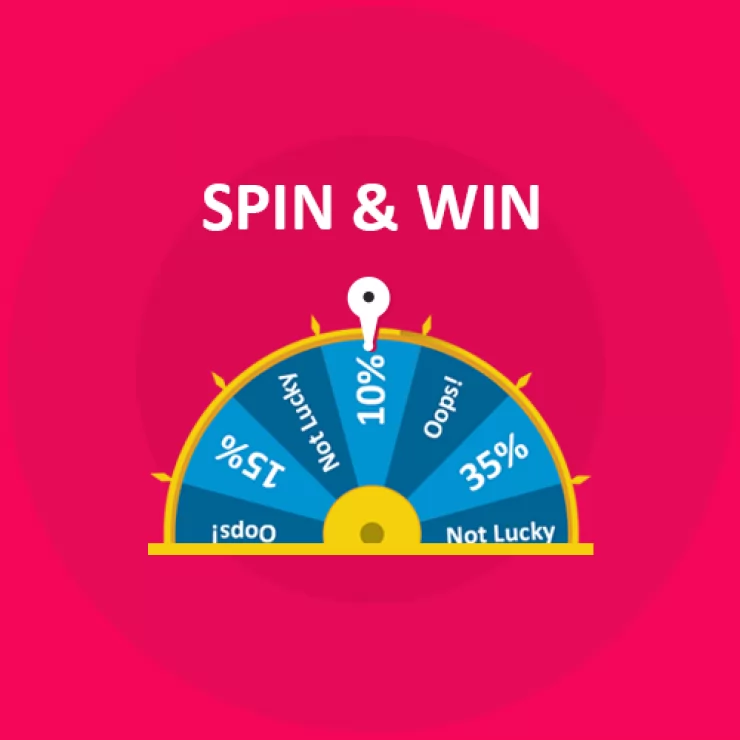
2. Prestashop Spin and Win Pop-Up Module:

The Second Recommendation: The Prestashop Spin and Win Pop-Up Module is a gamified feature that offers an interactive and exciting experience for visitors. Instead of a traditional discount pop-up, this module presents a spinning wheel where customers have the chance to win a variety of rewards, such as discounts, free shipping, or special offers. Furthermore, the act of spinning the wheel adds an element of fun to the shopping journey, helping to capture visitors’ attention and engage them right from the start.

Additionally, Knowband’s Spin and Win module for Prestashop asks customers to enter their email addresses before spinning, which helps build your mailing list for future promotions.

Boost Customer Engagement with Spin and Win Gamified Pop-Up

Use Code: DEAL20 for Extra 20% OFF

SHOP NOW

On the other hand, the sense of excitement created by the possibility of winning a prize can increase conversions as customers are more inclined to complete their purchase to use their reward. Therefore, by incorporating an engaging feature like this, you not only entertain visitors but also encourage them to shop with enthusiasm.

3. Prestashop Product Sticker and Label Addon:

Highlighting specific products or promotions can make a significant difference during the holiday season when customers are often looking for the best deals. The Prestashop Product Sticker and Label Addon allows you to add customizable stickers and labels to your products, such as “Best Seller,” “Holiday Special,” or “Limited Time Offer.” Furthermore, these visual markers help shoppers identify key items and holiday deals quickly, making it easier for them to navigate through your store.

Thus, with the Prestashop Product Sticker Addon, you can customize the design, colors, and placement of the labels to match your store’s holiday theme, ensuring they complement your brand rather than cluttering the page. Moreover, the labels not only make products stand out but also guide customers toward important items and offers, creating a smoother and more effective shopping experience.

Moreover, this can speed up decision-making and lead to quicker purchases, which is beneficial for both customers and store owners during the busy holiday season.

👉Explore the Module with Our Video Guide


4. Prestashop Gift Card Manager Addon:

Gift cards are an increasingly popular gift option, especially during the holidays, as they allow recipients the flexibility to choose their own gifts. The Prestashop Gift Card Manager Addon makes it easy for you to offer digital gift cards, a convenient and thoughtful solution for holiday shoppers. With this Addon, customers can purchase gift cards directly from your store and send them digitally to friends or family members. This is particularly useful for last-minute shoppers who may need a quick gift option that can be delivered instantly.

Furthermore, Knowband’s Prestashop Gift Card Addon also allows for customizations, so you can brand your gift cards with holiday-themed designs that match your store’s aesthetic.

Digital gift cards not only provide a convenient gift option but also encourage future spending, as recipients are likely to spend beyond the card’s value. By offering gift cards, you can cater to holiday shoppers’ needs while also driving additional revenue for your store.

5. Prestashop Gift the Product Addon:

The Prestashop Gift the Product Addon simplifies the process of gifting products, allowing customers to purchase items and send them directly to friends or family with just a few clicks. This feature is perfect for holiday shoppers who want to give a personal gift without going through a complicated checkout process. With this Addon, customers can add recipient details, select a personalized message, and choose gift packaging options if available, creating a seamless gifting experience that adds a personal touch.

Creating a Cohesive Holiday Shopping Experience with These Addons!

Using these five Addons in combination can transform your Prestashop store into a one-stop holiday shopping destination that customers will love. By setting a festive mood with decorations, adding interactive elements like Spin and Win, guiding shoppers with product labels, and offering convenient gifting options, you create a seamless and joyful shopping experience. Furthermore, each Addon plays a unique role in improving the shopping journey, whether it’s enhancing the visual appeal of your store, engaging customers with fun incentives, or simplifying the gifting process. 


Key Differences Between Gift Cards and Wallets in E-Commerce!

E-commerce businesses constantly seek new ways to enhance customer experiences, increase sales, and offer flexible payment solutions. Among these, gift cards and wallet systems have become two prominent tools. While both methods aim to simplify transactions and boost customer engagement, they serve distinct purposes. Understanding the differences between gift cards and wallets can help store owners decide which system to implement based on their business model and customer needs.

1. Nature of Use:

Gift Cards are primarily used for gifting purposes. Customers purchase gift cards with a set value, which they can either use themselves or give to someone else. Furthermore, these cards act as prepaid vouchers that can be redeemed in the store within a certain period. The user can apply the card during checkout, reducing or eliminating the need for immediate payment. Therefore, gift cards are commonly used for holidays, birthdays, or other special occasions.

Wallets, on the other hand, are virtual accounts where customers can store funds for future purchases. Unlike gift cards, wallets are not typically purchased as gifts. Instead, they provide a convenient way for regular shoppers to manage their spending on a particular site. Furthermore, customers can add money to their wallets at any time and use the stored balance to complete transactions quickly without entering payment details every time.

2. Flexibility and Customization:

Gift cards tend to have a one-time value assigned to them and are generally non-rechargeable. Once the gift card is redeemed, its balance is deducted and cannot be reused. The customer may need to purchase a new gift card if they want to gift or use this service again.

Wallet systems offer more flexibility here, as they allow users to top up their balance at any time. A customer can add funds to their wallet multiple times, and the balance can be used across several transactions. Moreover, the funds in the wallet can often be replenished using various payment methods, providing long-term utility for frequent shoppers.

3. Expiration and Validity:

A significant difference between gift cards and wallets is how they handle expiration.

Gift cards often come with an expiration date, meaning the customer must use the full value of the card within a certain period, typically ranging from a few months to a year. While expiration dates can help eCommerce stores by encouraging faster usage, they may cause frustration for customers if the gift card expires before they can use it.

Wallets, by contrast, usually have no expiration date. The balance stored in the wallet remains available indefinitely, providing customers with the freedom to use their funds whenever they choose. This can be a major selling point for customers who prefer not to feel rushed to use their balance before it expires.

4. Encouraging Customer Engagement:

Gift cards are a great way to attract new customers to your store. When a gift card is given, it introduces new potential buyers who may not have previously shopped at your store. Once these new customers redeem their gift cards, they may continue to shop with you if they find the experience satisfactory. However, gift cards are often a one-time transaction tool and may not directly encourage repeat business unless the customer decides to shop again without a gift card.

Wallet systems, on the other hand, are a powerful tool for fostering customer loyalty and repeat purchases. Since the wallet balance is tied directly to the customer’s account, it encourages them to return to the store and make more purchases. Additionally, businesses can incentivize wallet usage by offering cashback or rewards directly into the customer’s wallet, further boosting engagement and retention.

5. Financial Flow and Rechargeability:

One of the main differences between gift cards and wallets is how the funds flow.

Gift cards are prepaid, meaning the amount is fixed at the time of purchase, and the balance cannot be replenished once used. After a customer redeems the card, the transaction is complete, and they need to buy a new card for further usage.

Wallets, on the other hand, allow for continuous usage. Customers can recharge their wallets with funds at any time, making it more of an ongoing relationship between the customer and the store. This rechargeability feature is one of the biggest advantages of wallets, as it keeps the customer connected to your store for future transactions.

Now that we’ve explored the key differences between gift cards and wallets, let’s highlight how Knowband’s PrestaShop Gift Card Addon and PrestaShop Wallet Addon can help store owners leverage these two powerful tools.

Knowband’s PrestaShop Gift Card Addon

Offer customizable gift cards to your customers with the PrestaShop Gift Card module, perfect for boosting sales and customer engagement.

SHOP NOW

PrestaShop Gift Card Addon:

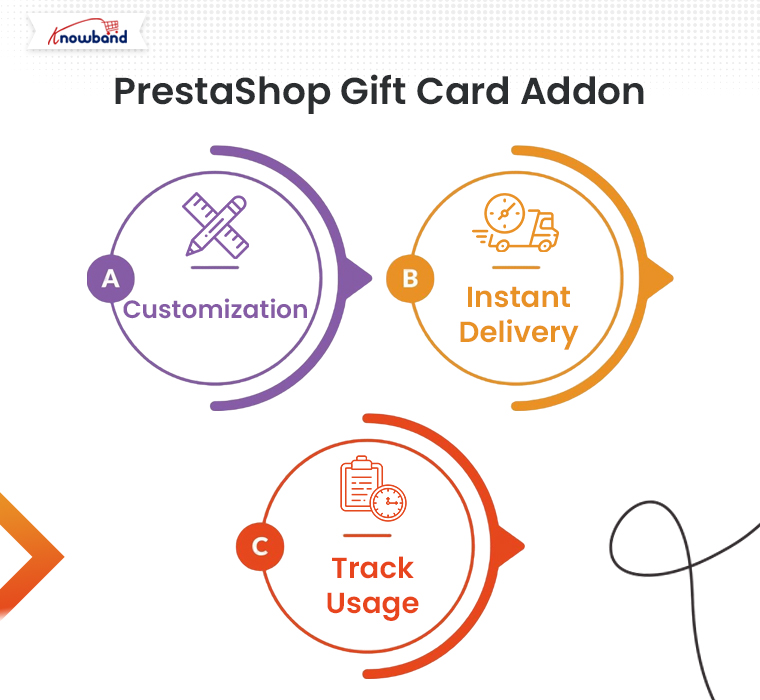
Knowband’s PrestaShop Gift Card Addon is designed to help store owners easily implement a gift card system on their PrestaShop store. With this addon, you can offer customizable gift cards for various occasions, allowing your customers to purchase and send them to their loved ones. The addon comes with features like:

Customization: Store owners can create and offer a wide variety of gift cards with different themes and designs for holidays, birthdays, and other special occasions.

Instant Delivery: Customers can send digital gift cards instantly via email, making it convenient for last-minute gifts.

Track Usage: Customers can easily track their gift card balance and view its validity right from their account.

By offering gift cards, you can attract new customers and boost sales during peak shopping seasons like Christmas or Black Friday.

Knowband’s PrestaShop Wallet Addon

Boost customer loyalty with the Prestashop Wallet module, allowing users to make hassle-free payments using a secure digital wallet in your store.

SHOP NOW

PrestaShop Wallet Addon:

Knowband’s PrestaShop Wallet Addon is an excellent solution for boosting customer retention and streamlining the checkout process. With this add-on, customers can add money to their wallets, making future purchases quicker and easier. The key features include:

Rechargeability: Customers can add funds to their wallets at any time, allowing them to use the balance across multiple transactions.

Faster Checkout: Wallet users can skip entering payment details at checkout, leading to a smoother shopping experience.

Incentives: Store owners can incentivize wallet use by offering cashback or store credits that are added directly to the customer’s wallet.

This addon is ideal for store owners who want to encourage repeat purchases and enhance customer loyalty.

You can also watch our video on “Knowband’s Free Gift Card Manager Addon for PrestaShop” here:

Supercharge Your Prestashop Store: Top 6 Free Addons by Knowband!

If you’re running a Prestashop store, you already know how essential it is to have the right tools to enhance your store’s functionality and boost sales. Knowband, a leading developer of eCommerce plugins, offers an impressive collection of free Prestashop add-ons that can give your store the competitive edge it needs. These free modules streamline your processes, improve user experience, and integrate your store with major platforms, all without breaking the bank.

In this blog, we’ll explore the top 6 free Prestashop addons by Knowband that can help you supercharge your online store and take it to the next level.

1. Free Google Shopping – Prestashop Addon:

With the rapid rise of product search via Google, getting your products featured on Google Shopping has become a must for any online retailer. Therefore, the Free Google Shopping Prestashop Addon by Knowband makes it incredibly easy to sync your store with Google Shopping.

This module helps you generate product feeds that comply with Google’s shopping requirements. Furthermore, the Google Merchant Feed Addon for Prestashop automatically exports product data from your store, which saves you time and ensures your products are always up-to-date on Google. Moreover, with more visibility, you can drive new traffic and boost your sales. This tool is perfect for Prestashop store owners looking to gain exposure without manual effort.

Key Features:

  • Easy product feed generation for Google Shopping.
  • Custom feed generation based on category.
  • Automated synchronization of store data with Google.

2. Free Gift Card Manager – Prestashop Addon:

Gift cards are a fantastic way to increase customer engagement and boost your store’s revenue. With the Free Gift Card Manager Prestashop Addon, you can easily offer customizable gift cards directly from your store.

The Prestashop Gift Card module allows you to create multiple types of gift cards for your customers to purchase and send to their loved ones. Furthermore, you can customize templates, set card values, and even allow customers to personalize their gift cards. It’s a great way to attract new customers, retain existing ones, and increase your average order value.

Key Features:

  • Customizable gift card designs and templates
  • Set flexible price ranges and expiration dates
  • Easy management of gift card purchases and usage

3. Free Etsy Marketplace Integration – Prestashop Addon:

For those looking to expand their business reach, Etsy Marketplace Integration is a great option. Knowband’s free Prestashop addon enables you to easily list and manage your products on Etsy, one of the most popular online marketplaces for handmade and vintage goods.

Furthermore, the Etsy Connector Addon for Prestashop simplifies the process of uploading your Prestashop store’s products to Etsy, syncing inventory, and processing orders. Therefore, it saves you from the hassle of manual listing, allowing you to reach Etsy’s large and diverse customer base effortlessly.

Key Features:

  • Easy product listing and inventory synchronization with Etsy.
  • Automatic updating of orders between Prestashop and Etsy.
  • Simple order tracking and management through a single dashboard.

4. Free Return Manager – Prestashop Addon:

Handling product returns efficiently is a crucial part of maintaining customer satisfaction. The Free Return Manager Prestashop Addon by Knowband simplifies the return process for both customers and store admins.

With this addon, customers can easily request returns, track return status, and communicate directly with the store regarding their return requests. As an admin, you get a centralized dashboard to manage all return requests, making it easier to approve, reject, or process refunds. This addon helps ensure smooth handling of returns, which can enhance customer loyalty and satisfaction.

Key Features:

  • Simple return request process for customers.
  • Centralized dashboard for admin management of returns.
  • Easy communication between customers and admin regarding return status.

5. One Page Checkout Free Version – Prestashop Addon:

Cart abandonment during checkout is a big concern for online retailers. However, on the other hand, you can simplify the checkout process for your customers by offering a fast and user-friendly single-page checkout with the One Page Checkout Free Version Prestashop Addon.

This addon reduces the number of steps in the checkout process, making it quicker and more convenient for customers to complete their purchases. On top of that, you can customize fields, offer multiple payment and shipping methods, and improve the overall shopping experience for your users, leading to higher conversion rates.

Key Features:

  • Single-page checkout for faster conversions.
  • Customizable checkout fields.
  • Supports multiple payment and shipping methods.

6. Free eBay Marketplace Integration – Prestashop Extension:

While primarily designed for Prestashop users, Knowband’s Free Prestashop eBay Marketplace Integration allows you to seamlessly list your products on eBay and manage your orders from a single platform.

With millions of active users, eBay is a goldmine for online sellers. This free extension enables you to sync product details, update stock levels, and handle eBay orders without switching between different platforms. Moreover, it’s a great way to maximize your product visibility and tap into eBay’s large customer base.

Key Features:

  • Simplified product listing on eBay.
  • Automatic synchronization of stock and order details.
  • Efficient order management through Opencart.

Knowband’s Free PrestaShop Modules

The Knowband Free PrestaShop Modules offer a range of complimentary tools to enhance your PrestaShop store’s functionality. These free modules help improve user experience, streamline operations, and boost engagement without additional costs.

SHOP NOW

Conclusion!

Each of these top 6 free Prestashop addons from Knowband can greatly enhance the functionality of your eCommerce store. Whether you want to simplify checkout, manage returns, integrate with popular marketplaces, or personalize customer experiences, Knowband has a free addon to meet your needs.

Furthermore, by incorporating these powerful tools into your Prestashop store, you can improve your efficiency, increase sales, and create a more seamless shopping experience for your customers.

Enhance Customer Loyalty with Knowband’s PrestaShop Free Gift Card Manager Addon!

In the dynamic world of eCommerce, establishing and maintaining customer loyalty is paramount. Furthermore, a proven method to foster this loyalty is through the implementation of gift cards. With PrestaShop’s Free Gift Card Manager Addon, merchants have a powerful tool to seamlessly integrate gift card functionality into their stores. This addon not only simplifies the creation and management of gift cards but also offers numerous benefits that can enhance customer loyalty and boost sales.

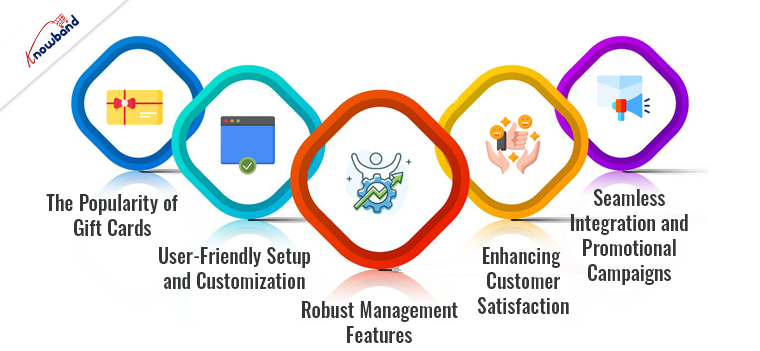
The Popularity of Gift Cards:

Gift cards are incredibly popular among consumers for their convenience, flexibility, and the personal touch they add to gifting. Moreover, the gift cards allow recipients to choose exactly what they want, making them a preferred choice for many. For merchants, gift cards represent an opportunity to attract new customers, encourage repeat purchases, and increase the average order value. Therefore, the PrestaShop Gift Card Manager Addon leverages these advantages, providing a seamless experience for both the merchant and the customer.

Gift cards are not just seasonal gifts; they have a year-round appeal. Whether it’s for birthdays, anniversaries, holidays, or even corporate incentives, gift cards remain a top choice. The convenience they offer to both the giver and the recipient makes them a universally appealing option.

User-Friendly Setup and Customization:

The PrestaShop Gift Card Manager Extension is designed to be user-friendly, allowing even those with limited technical skills to set up and manage gift cards with ease. Furthermore, the Gift card addon for Prestashop provides various customization options that enables merchants to design gift cards that align with their brand’s aesthetic. This personalization not only enhances the customer experience but also reinforces brand identity.

Furthermore, the merchants can effortlessly create attractive and personalized gift cards that reflect their brand’s unique style. Customization options include adding logos, selecting color schemes, and choosing from various card templates. This level of customization ensures that the gift cards are not only functional but also visually appealing, which can enhance the overall shopping experience for customers.

Robust Management Features:

The PrestaShop gift voucher module also offers robust management features. Merchants can easily track the issuance and redemption of gift cards, monitor the remaining balances, and generate detailed reports. These capabilities provide valuable insights into customer behavior and the effectiveness of gift card campaigns, allowing for data-driven decision-making.

Detailed analytics and reporting tools enable merchants to understand how gift cards are being used. This data can reveal trends and patterns, such as peak periods for gift card purchases and redemptions, popular gift card values, and customer demographics. Armed with this information, merchants can refine their marketing strategies and tailor their offerings to better meet customer needs.

Enhancing Customer Satisfaction:

Customer satisfaction is further enhanced by the smooth purchasing and redemption process facilitated by the PrestaShop Gift Card Manager. Therefore, customers can purchase gift cards just like any other product, and the redemption process is straightforward, ensuring a hassle-free experience. This ease of use is crucial in maintaining a positive customer relationship and encouraging repeat business.

The seamless integration of the gift card system into the checkout process ensures that customers have a frictionless experience from start to finish. Automated notifications and reminders about remaining balances further enhance the customer experience by keeping them informed and engaged.

Seamless Integration and Promotional Campaigns:

The PrestaShop gift card voucher module integrates seamlessly with other PrestaShop functionalities, ensuring that the gift card system works harmoniously with the store’s existing setup. This integration means that merchants do not have to worry about compatibility issues or complex configurations, allowing them to focus on their core business operations.

Promotional campaigns are another area where the Gift Card Module for PrestaShop shines. By offering gift cards as part of promotional activities, merchants can attract new customers and incentivize existing ones. For example, a promotion that offers a free gift card with purchases over a certain amount can drive higher sales and encourage larger transactions. Additionally, gift cards can be used as rewards for loyal customers, further strengthening the customer relationship.

Merchants can create targeted promotions that leverage the power of gift cards. For instance, during holiday seasons or special sales events, offering bonus gift cards can entice customers to spend more. Such promotions not only drive immediate sales but also ensure future visits when customers return to redeem their gift cards.

Knowband’s Prestashop Free Gift Card Manager Addon

Create and manage gift cards easily with the PrestaShop Free Gift Card Manager by Knowband. Perfect for boosting sales and customer engagement.

SHOP NOW

Conclusion!

In conclusion, the PrestaShop Gift Card Manager Addon is a valuable tool for any PrestaShop merchant looking to enhance customer loyalty and drive sales. Its user-friendly setup, flexibility in gift card creation, robust management features, and seamless integration make it an indispensable addition to any e-commerce store. By leveraging the power of gift cards, merchants can create a more engaging and rewarding shopping experience, ultimately fostering greater customer loyalty and long-term success.

The PrestaShop gift manager addon not only simplifies the process of managing gift cards but also opens up new avenues for customer engagement and revenue generation. In today’s competitive eCommerce landscape, investing in tools that enhance customer satisfaction and loyalty is essential. The PrestaShop Gift Card Manager does just that, providing a comprehensive solution that benefits both merchants and customers alike.

Watch the video on Knowband’s Free Prestashop Modules here:

What settings are there in the Configuration tab of Prestashop Gift Card Manager?

Nowadays. it can get hectic for people to choose gifts for their friends and family. What they could appreciate and what they’ll give as gifts from their finish to other people, is something that irritates the provider. Consequently, they began giving gift cards instead of actual gifts. This is when e-gift cards come into the image.

What is a Digital Gift Card or eGift Card?

A computerized card is an electronic gift card that includes an extraordinary code that can be benefited from an internet-based store (of which the gift card has a place) to purchase something of the very esteem as that of the gift card.

For instance, on the off chance that it is an Amazon gift card worth 1000 rupees, the provider can gift it to any individual who emails the code to the beneficiary. Consequently, the beneficiary can add a result of a similar worth ($100) to the truck and enter the code while on the checkout page to shop the item.

The Prestashop gift card manager by Knowband is a stunning tool for your eCommerce business. In fact, there are several settings where you can configure the plugin without any hassle. In this blog, we will take a look at the various settings under the Configure Tab of the Prestashop send gift card addon.

Configure Tab settings of the Prestashop Gift Card Manager

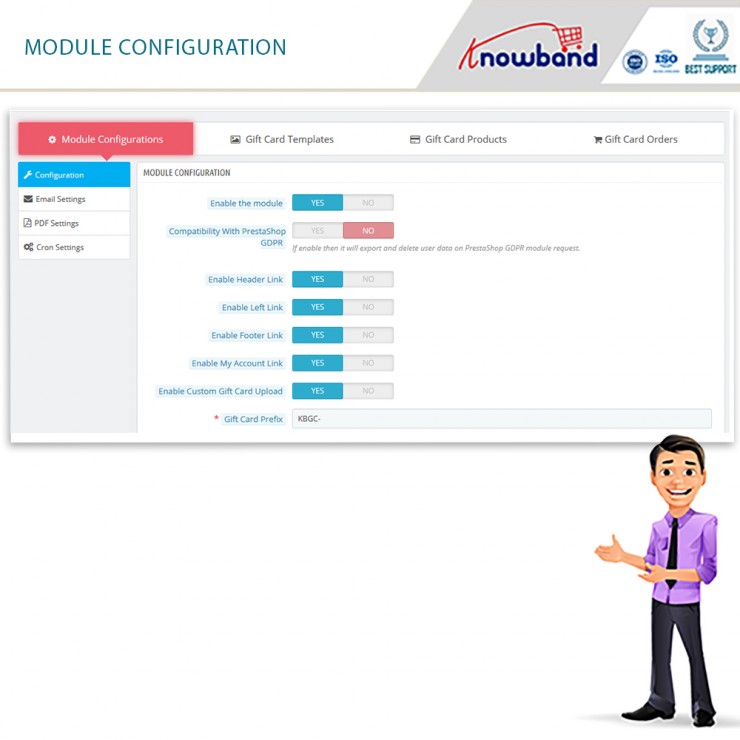
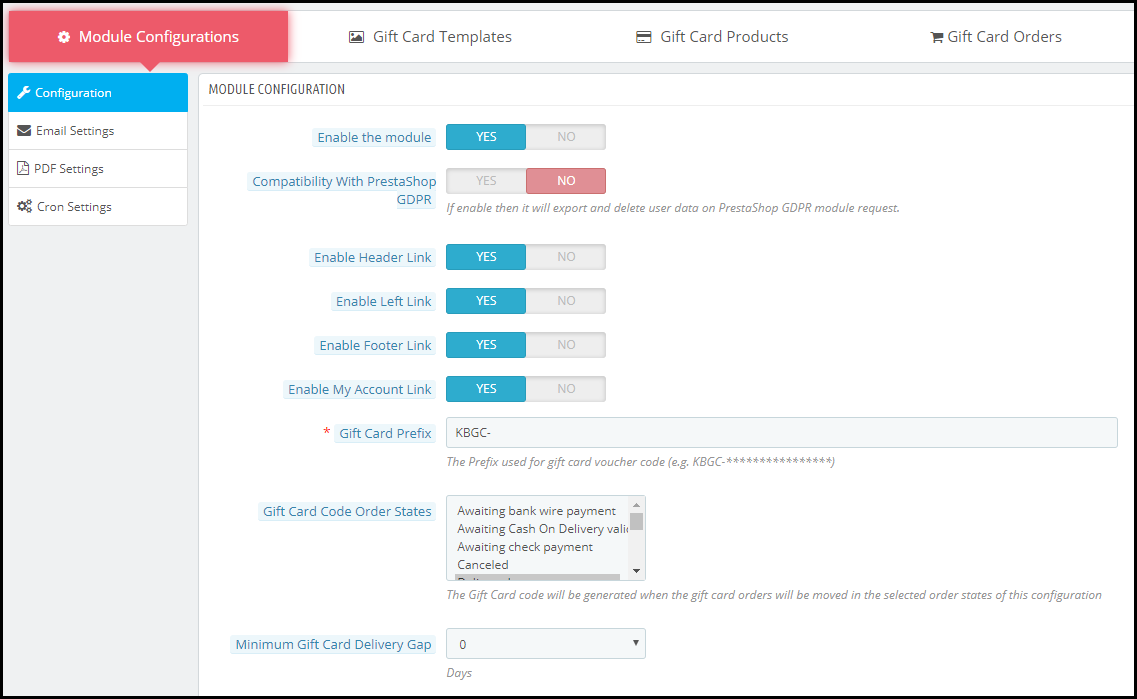
  • Enable the Module

The main functionality is where you enable or disable the whole existence of the Prestashop gift card addon on the front end of the website.

  • Compatibility with Prestashop GDPR

Once you enable this function, then it will export and delete user data on the PrestaShop GDPR module request.

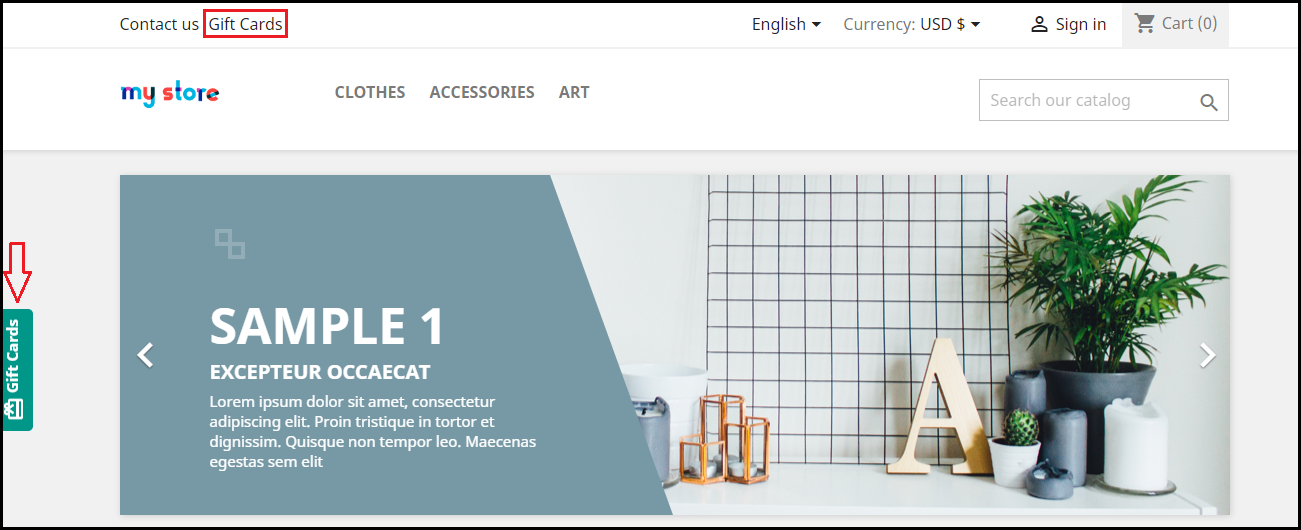
  • Enable Header Link

With this functionality, the admin can enable the module’s function on the header of the website.

  • Enable Left Link

With this functionality, the admin can enable the module’s function on the left sidebar of the website.

  • Enable Footer Link

With this functionality, the admin can enable the module’s function on the footer of the website.

Note: Our Module adds a Gift Card Link in the footer if the footer contains the displayMyAccountBlock Hook. Also, if the Theme editor is present in the store then Admin can add a gift card link in the footer using the theme editor.

  • Enable My Account Link

With this functionality, the admin can enable the module’s function on the My Account page of the website.

  • Enable Custom Gift Card Upload

Do you wish to allow your customers to make custom gift cards? You can allow them to use this functionality.

  • Gift Card Prefix

This option enables the store owner to input the prefix for the gift voucher code through the module.

  • Gift Card Code Order Status

This setting of the Prestashop gift card module allows the admin to update the order status when the gift card will be marked delivered and the gift card code will generate.

  • Minimum Gift Card Delivery Gap

Under this tab of the Prestashop gift voucher module, the admin can set the delivery gap. Further, between the order placement and delivery of the gift card.

  • Email Setting

Under this setting of the Prestashop gift card manager, the admin can easily select the language of the email settings. Furthermore, the options include English, French, Italian, and Spanish.

Once the admin selects and saves the language, more settings unfold further. The segregated settings include the following:

  • Recipient Email Subject

This email template will be sent to the recipient of the Gift Card. In fact, this contains the subject of the email.

  • Recipient Email Content

In this option of Prestashop Gift Card Manager, the admin can add the content or the body of the email for the receiver of the gift card.

  • Sender Email Subject

This email template will be sent to the sender of the Gift Card. In fact, this contains the subject of the email.

  • Sender Email Content

In this option of Prestashop Gift Card Addon, the admin can add the content or the body of the email for the sender of the gift card.

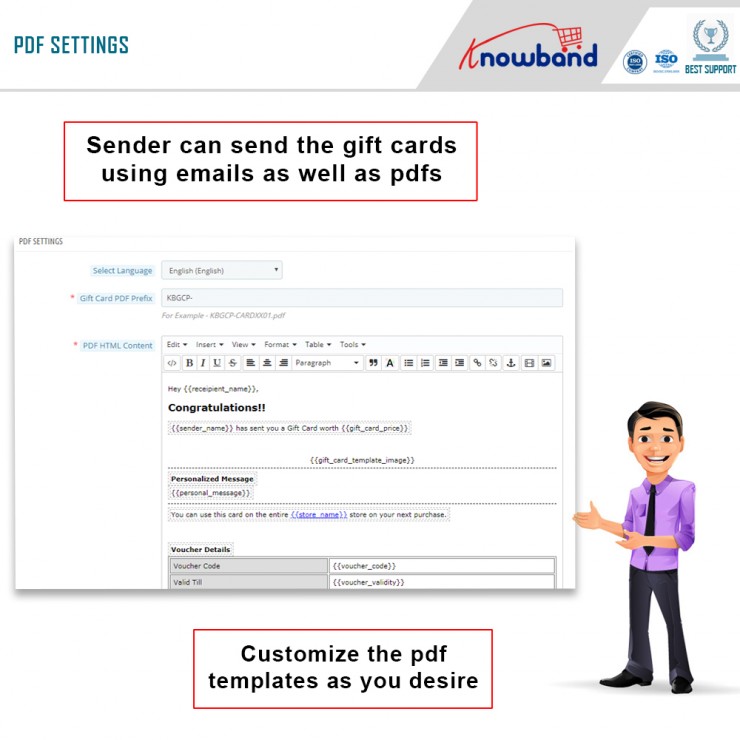
  • PDF Setting

Under this setting of the Prestashop gift card module, the admin can easily select the language of the PDF settings. Furthermore, the options include English, French, Italian, and Spanish.

Once the admin selects and saves the language, more settings unfold further. The segregated settings include the following:

  • Gift Card PDF Prefix

In this option, the admin should enter the prefix of the PDF file. Furthermore, that will generate gift cards.

  • PDF HTML Content

NOTE: Keywords like {{sample}} will replace by dynamic content at the time of execution. Please do not remove these types of words. Otherwise, proper information will not be displayed. You can only change the position of these keywords in the HTML.

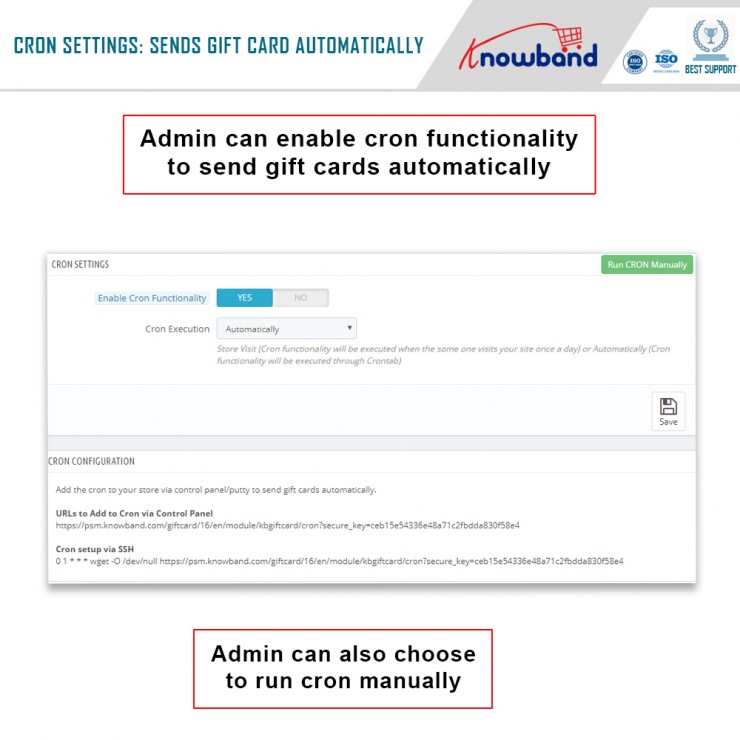
  • CRON Setting

Under this setting of the Prestashop send gift card addon, the following options are available:

  • Enable CRON functionality

With this setting, the admin can enable or disable the cron functionality. Moreover, send gift cards automatically.

  • Cron Execution

With this setting, the store owner can run CRON automatically or set it to Store Visit.

Note: Store Visit (Cron functionality will execute when someone visits your site once a day) or Automatically (Cron functionality will execute through Crontab).

In the End

Thus, this is what the main settings of the Prestashop Gift Card Manager look like. Furthermore, there are other settings like Gift Card Templates, Gift Card Orders, and Gift Card Products. Would you like to invest in the Prestashop plugin by Knowband? In case you have any doubts or queries, please let us know at support@knowband.com.

Check Video here:


What are different ways of reducing Post-Holiday Returns?

It is very essential to reduce post-holiday returns. Industry, sales channel, product type, and how to return data are collected and counted all affecting return rates. Further, the younger customers are driving the trend according to the reports. The reason is, they see internet purchases as rentals. Moreover, returns might rapidly undo your holiday success if you don’t account for them and discover:

  1. Sales are lower than expected
  2. Converted fewer clients than the originally
  3. Compared to sales cost and profit margins, sales cost is higher and profit margins are lower.

Therefore, in this blog, we will be discussing ways of reducing holiday returns and automating the returns process. However, before that, we will understand why it’s important to reduce the returns?

Why it’s important to reduce the returns?

The first step is to analyze why do people are returning products as this will give you valuable insights and even make you understand the real problem. Furthermore, it is to everyone’s best advantage to reduce the number of returns you receive. 

You might not be aware but lesser returns can save a lot of money on replacement items, shipping, as well as other factors. Moreover, it provides a better as well as efficient customer experience which is again good for eCommerce business. As a result, trust is created between your business and potential buyers.  

Henceforth, keeping the rate of return lower can result in better business. 

What are the ways of reducing returns?

  • Begin with quality control

The first way that helps in reducing post-holiday returns is “Begining with quality control”. Furthermore, 23% of returns happen as companies ship an incorrect item. Mis-ship happens usually when businesses grow.

Being a small retailer, you can wrap as well as send every order. It would be great if you double-check the order before shipping. When you adopt a hands-on approach, it’s easy to ensure that shipments are proper. Whereas larger businesses can opt for automation that can help you in resolving the issues. Furthermore, the Inventory management software includes a warehouse management feature that helps in reducing the number of returns your receive. 

  • High-Quality Photos

High-quality photos can even help in reducing post-holiday returns. Furthermore, such photos help customers understand the product better. Make sure you take pictures from different angles to make customers understand each feature of the product. 

In case you are not good at photography, feel free to hire a professional photographer. Money spent on getting good pictures will pay for itself with a reduced return rate. 

  • Better Product Descriptions

Writing better product descriptions can help customers understand the product well. Speaking about better product descriptions, make sure you include everything about the product. For example, if you have been selling furniture, make sure your product descriptions consist of measurement of the product, color, and material. This way customers can decide better and this will create transparency which is liked by customers a lot. 

  • Represent Sizing Correctly

Products that do not fit are one of the most common reasons for returns in the apparel industry. Because online buyers can’t try on garments before buying them, it’s understandable that products be returned because they don’t fit.

With the assistance of resources like size software and sizing charts, you may limit the number of returns you receive due to sizing concerns.

Knowband Modules assist in reducing post-holiday returns

Knowband, known as an eCommerce solution provider and module development company. Furthermore, Knowband has earned a reputation for offering efficient development services and post-sales support. Moreover, it offers a boost to your business by offering best-in-class plugins for different eCommerce platforms such as Magento, Prestashop, OpenCart, Shopify, and others. 

Knowband even offers some great modules for reducing post-holiday returns as well as reading the specifications of these modules helps in reducing the chances of return.

Module 1: Product size chart

The product size chart module helps in reducing post-holiday returns. Knowband offers this module for different eCommerce platforms such as:

Prestashop Addons

Magento 2 ® Extensions

Magento ® Extensions

Opencart Extension

Module 2: Product Video

The product video module is highly beneficial for eCommerce businesses. This helps customers to understand the product better. As a result, the return chances get reduced. Knowband even offers the module for different eCommerce platforms:

Magento 2 ® Extensions

Magento ® Extensions

OpenCart Extensions

Prestashop Addons

Module 3: Gift Card

Digital Gift Cards are a blessing for eCommerce stores. These enable customers to purchase accordingly from the specific store. Gift cards even provide freedom to permit them to purchase what they need. Furthermore, this offers the satisfaction of having gifted well.

PrestaShop Addons

Opencart Extensions

Magento 2 ® Extensions

Magento ® Extensions

Module 4: Product Review

Product review also helps customers make decisions better and feel more confident. Furthermore, the more reviews you have, the more confident a customer is that they’re making the right choice. Reviews can also assist a store’s internet visibility.

Product Review Reminder And Incentives – Prestashop Addons

Review Reminder And Incentives – Magento 2 ® Extensions

Review Reminder And Incentives – Magento ® Extensions

Final Note

Analyzing as well as testing your approach to returns and ways of measuring up to your peers is a great way of generating a return on your post-holiday returns. Along with that, another way of generating a return on post-holiday returns is by utilizing these modules.

In case you face trouble, feel free to write us at support@knowband.com

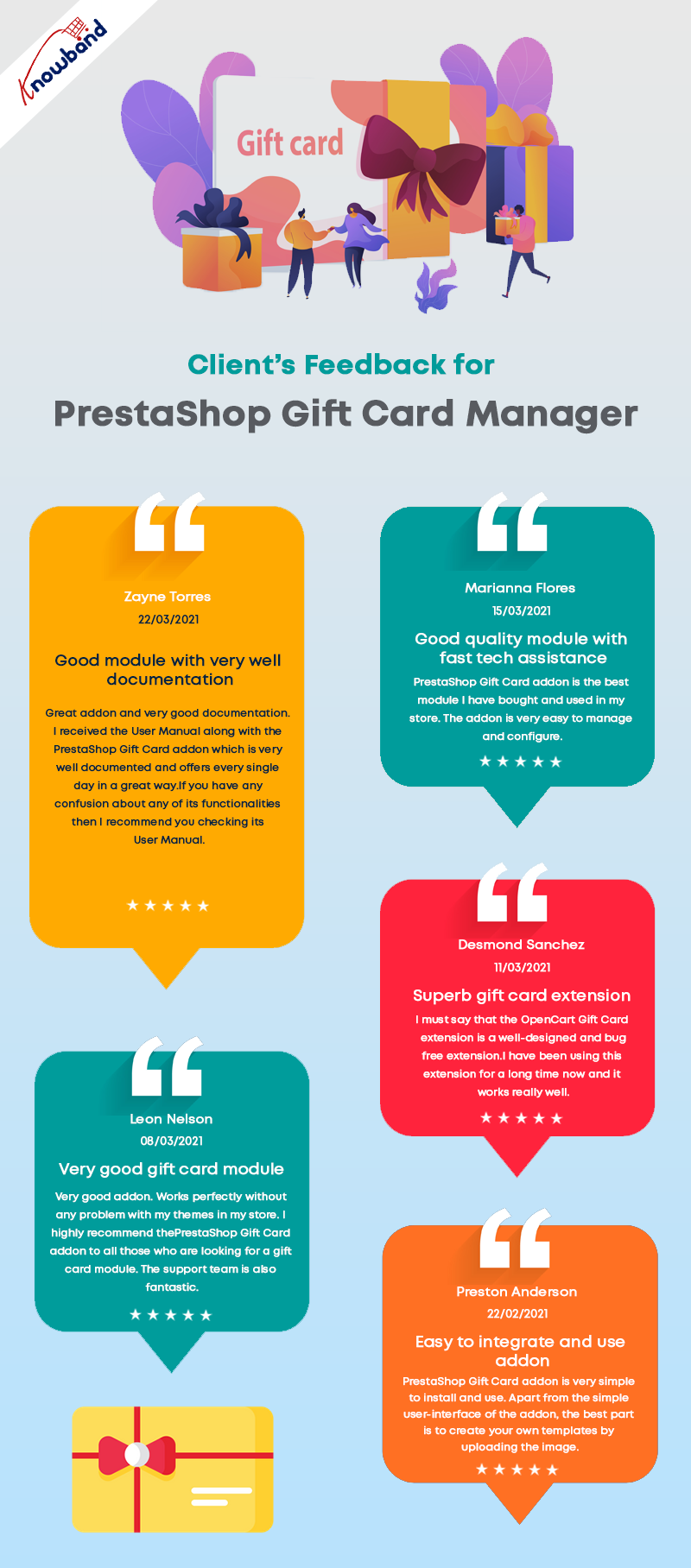
Clients find Knowband’s PrestaShop Gift Card Module Impactful on Holiday Sales

Do you also get confused while choosing the gifts for your friends and family? When I purchase a gift, what bothers me the most is if they will like it or not. If you’re anything like me, you’ll be able to relate to this. It does affect the buying decision. But, I am grateful for the unique gifting choice of ‘Gift Cards.’

These days many eCommerce websites and retailers sell gift cards in their stores. You can easily send the card to your friends and they can buy whatever they like using the Gift Card amount. If you are a PrestaShop store owner and want to sell Gift Certificates in your store then I will explain how easy it is to add a Gift Card to your store. This blog will be your complete end-to-end guide with real-life examples and client feedbacks.

How Do Gift Card Works & PrestaShop stores make money on them?

Gift cards are like prepaid debit cards that have money loaded on them for future usage. These are commonly utilized both online and in person. Many eCommerce stores offer Gift Cards on their store with fixed or custom amount options.

There will be a minimum and maximum initial loading amount on many gift cards. The receiver will have the freedom of spending the loaned amount in buying products from that store. Some eCommerce also allow partial usage of the card while most of the cards are for a one-time purchase.

As a sender (existing customer) purchase a gift card, it generates advance revenue for the store. Once the card is sent, there are high chances that the receiver will be a newbie for your store. Hence, increases advance sales and customer acquisition rate.

Any customer with the gift card must check its eligibility and validity when they buy or receive a gift card.

Boosting sales is easier with Prestashop gift card addon

Not only digital gift cards are beneficial for customers because it saves their time in searching for the right gift but for merchants as well as it increase your online business’s sales, especially during the Christmas or New Year season, or the holiday season. You might not be aware but more than half of customers enjoy sending gift cards to their friends and family.

With the PrestaShop Gift Card Addon,

you can increase your earnings while also bringing new clients to your online store. The module’s ability to sell gift vouchers also aids brands in promoting their labels without having to spend additional money on marketing.

It’s a Smart Move if you Sell Gift Cards on PrestaShop Store

  1. Advance Revenue
  2. Acquire new Customers
  3. Promote Brand Identity
  4. Personalized Shopping Experience

This gift card captures new orders, particularly during the holiday season when they are sold in greater numbers. Selling gift cards on the PrestaShop store also enhances the entire holiday season’s earnings.

Clients love this fancy module- Feedback

Why KnowBand’s Gift Card is their first choice for Holiday Sales

The gift card area can be installed and easily added to your PrestaShop eCommerce store. These gift certificates/cards can be sold with festive themes like Christmas, New Year, Mother’s Day, Valentine’s Day, etc. Clients have experienced that the PrestaShop Gift Card Manager leads to a rise in sales in a short period of time.

Better UI

The module’s installation is extremely straightforward and requires no high-level coding skills. With that, it comes with a great UI design for the admin panel as well as the front-end view.

Better accessibility of Gift Card feature on PrestaShop Website

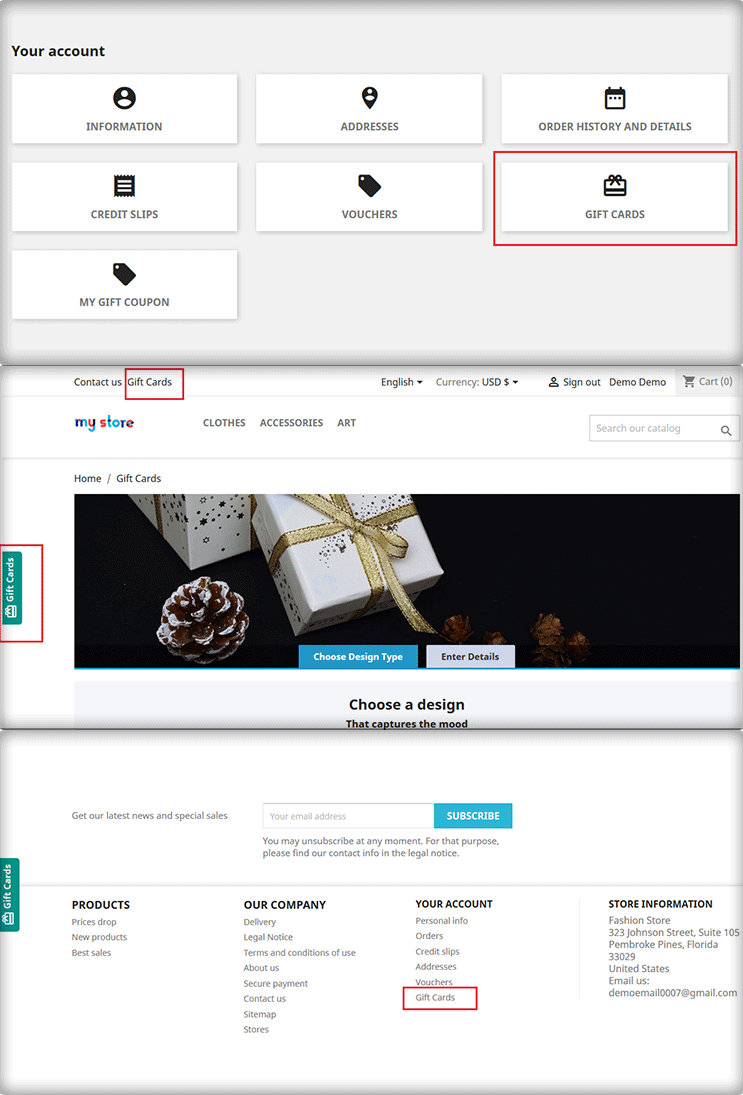
The Prestashop Gift Voucher Module by Knowband allows you to add a gift voucher button to several parts of your website, including the header, footer, and left section of the page.

Fancy Themes for every occasion

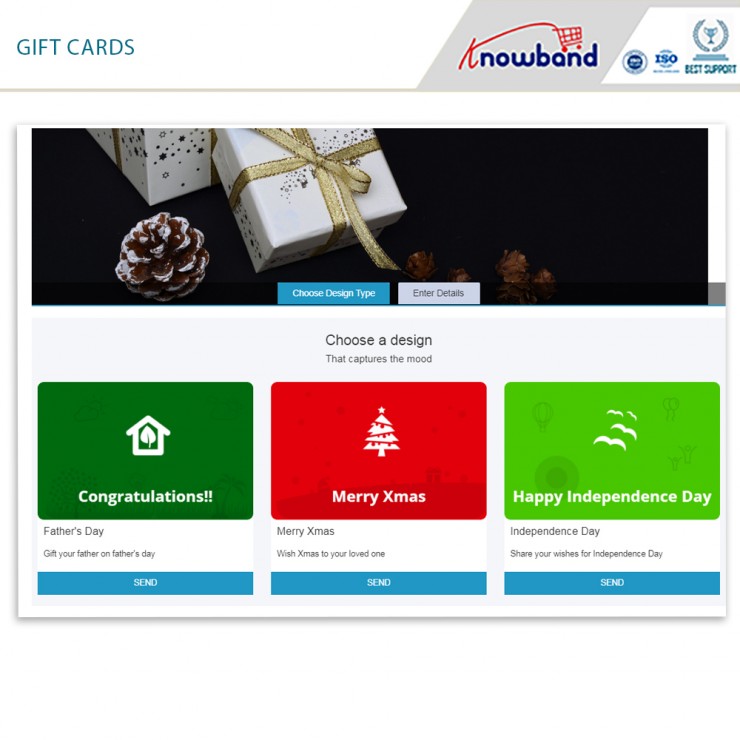
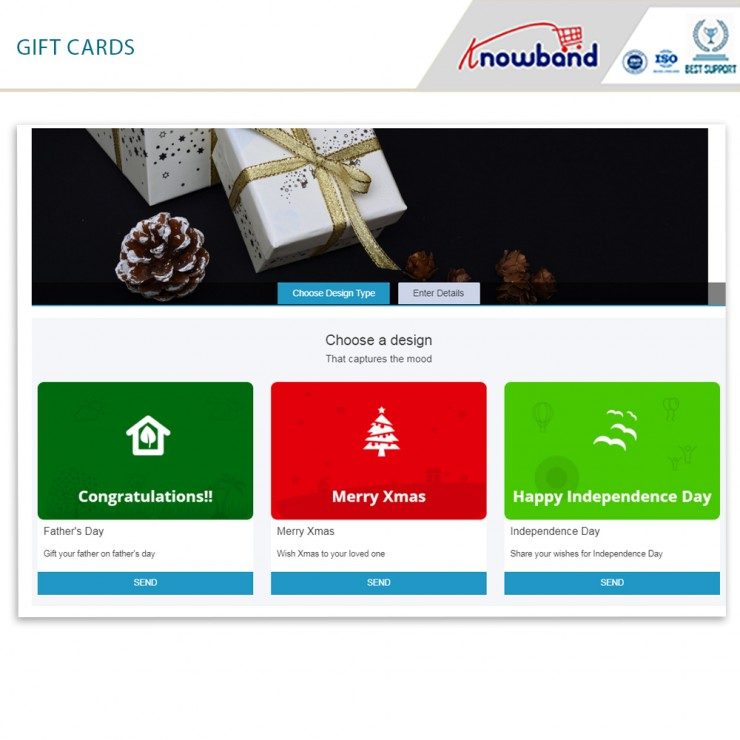
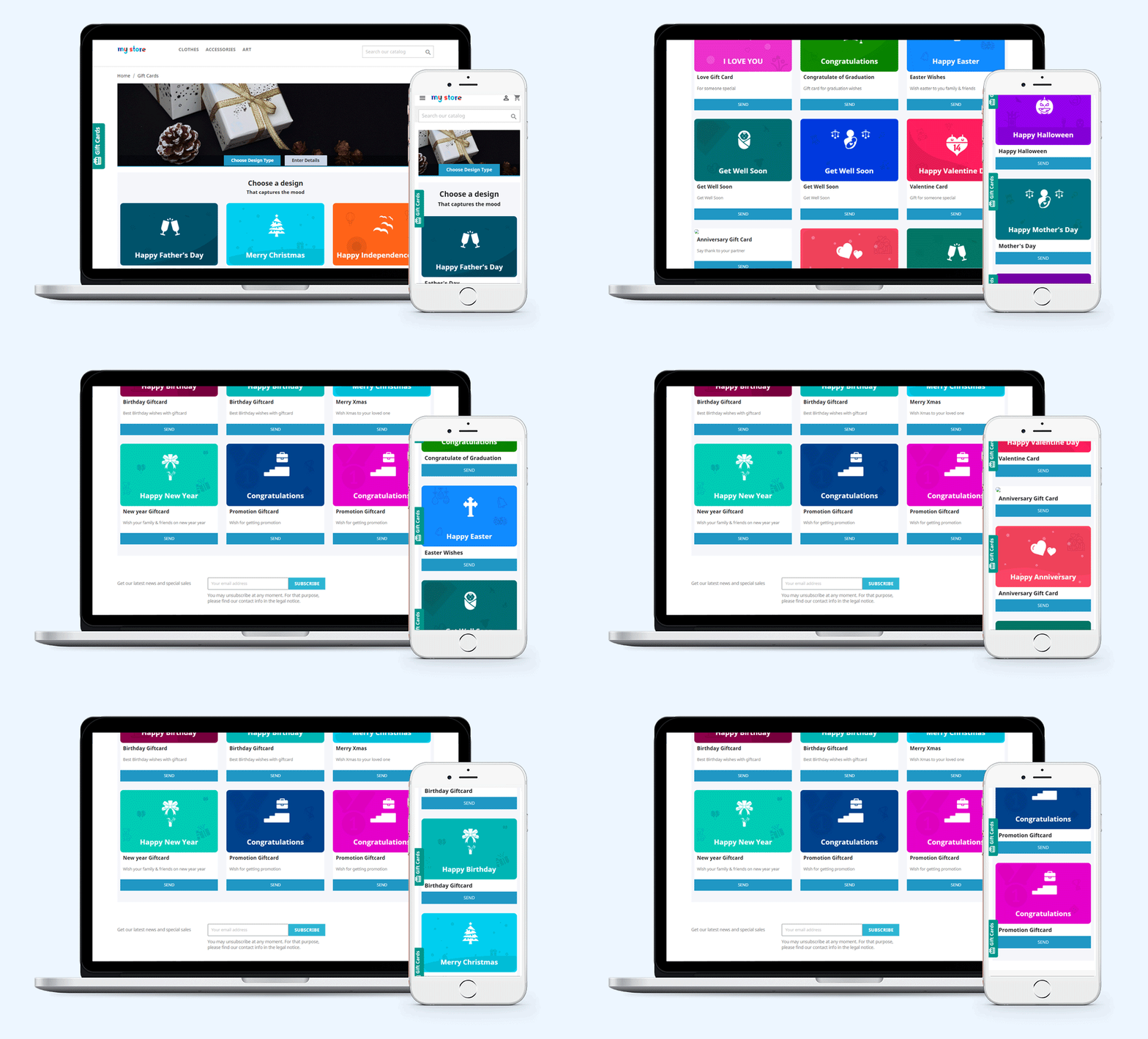
Not every person likes to have a similar design gift card for every occasion. This module gives enough freedom to merchants to customize their gift cards for different occasions such as birthdays, Christmas, anniversaries, Halloween, New Year’s Eve, Father’s Day, Mother’s Day, and so on. Similarly, store owners can create new templates with immediate subjects from the back office.

Upload an image and create custom gift cards

Visitors may create and send a personalized gift card using the PrestaShop Gift card manager, which includes a picture upload feature. A sender can now send a gift card with a personalized image. One way of sending gift card is via email with a custom note and one is, you can print the gift card by yourself.

Custom emails and ready-made templates

The Prestashop Gift Card Addon by Knowband includes a note email template for informing the giver and recipient on the status of their gift cards. From the module’s back office, the admin can quickly change the text of this email. On the receiving end of the gift card, customers can include a note for their loved ones.

How do customers send Gift Card to friends and Family

The module allows two methods:

  1. Send the gift card over email with a custom note
  2. Print it yourself and send it to your loved ones

Track Gift Card Order History

The use of the gift voucher code in the checkout is displayed on the coupon history tab. The following information will be displayed: Order ID, Customer Name, Amount, and Date Added.

Cron Functionality

Customers will appreciate the ability to send gift cards on the day of the event. Cron allows the PrestaShop store administrator to schedule the email’s delivery.

Knowband’s PrestaShop Gift Card Module enhances your customers’ buying experience in your business by making events more memorable for their friends and family. It aids in the retention of current clients as well as the acquisition of new clients for your company.

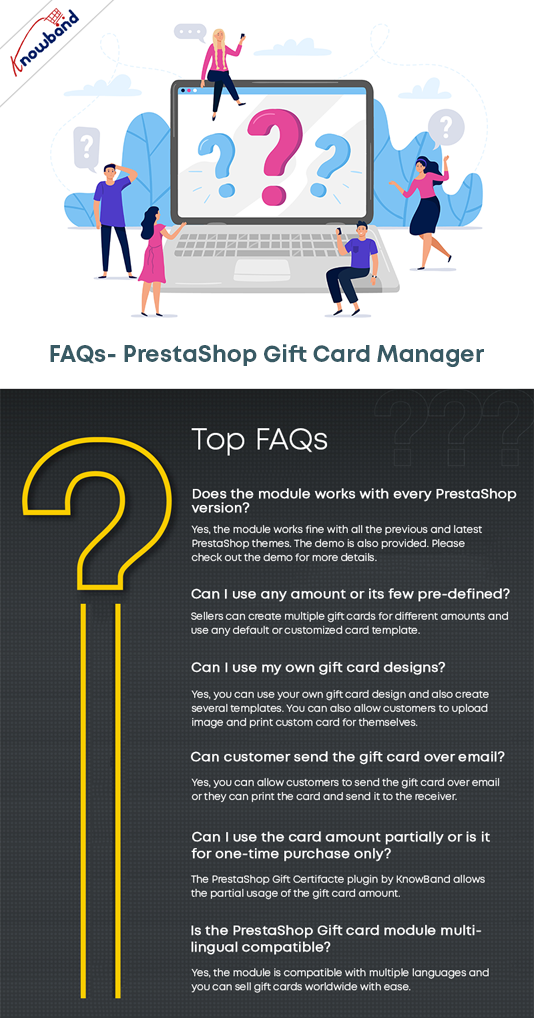
FAQ – PrestaShop Gift Card Manager Module

To Wrap up

So, what are your thoughts on the subject? If you own a Prestashop store and want to grow your business faster and want to attract more and more clients this Christmas and New year, this is something you should look into. For your business, digital cards are critical. The PrestaShop Send Gift Card extension is a highly functional, configurable, and handy module that will help your eCommerce store increase sales and conversions. Knowband is offering Prestashop Gift Card Module at $42.40. Further, the Knowband is offering Year End Sale- Min 20% Off Sitewide + Extra 20% Off. Use Code: KBOFF20.


Click here to explore the module and learn why digital gift cards are a must-have on every eCommerce store?

If you are unaware of the benefits of selling gift cards then click here.

PrestaShop Gift Card Manager to Sell Gift Vouchers

“Set up a gift card section on your PrestaShop website effortlessly to provide the online gift cards facility to your store visitors with PrestaShop Gift Card module.”

The demand for gift cards has increased over the years and it has become a go-to option for people whenever they want to gift something to their close ones. It is difficult to come up with a gift idea that everyone likes. People are too busy to explore and buy something and if the recipient doesn’t like that gift, the efforts and time will go in vain.

Thus, gift certificates have become the most effortless and easy gifting option. You can now easily add Gift Vouchers as a product on your Prestashop store using Knowband’s PrestaShop Gift Voucher Module.

On occasions like Father’s Day, Mother’s Day, and on the holiday season when we have Halloween, Black Friday, Christmas, etc, Gift Cards are sold in huge numbers.

The holiday season is approaching and it is the best opportunity for you to start selling personalized gift cards in your store. With our Gift Card module, it becomes easy to put up different types of gift cards on your website.

Create Gift Cards to sell on PrestaShop Store

How do PrestaShop Digital Gift Card works?

  1. Place gift card Product link on multiple places
  2. Pre-existing customizable gift card templates for the Birthday Gift Voucher, multiple festivals, etc.
  3. Allow Print or email customized Photo Gift Cards
  4. Set up multi-priced gift certificates
  5. Set gift cards validity
  6. Allow gift cards purchase in multiple currencies
  7. Allow partial usage of gift cards
  8. Customize Gift card emails to send a gift certificate
  9. Track your gift card orders
  10. Multi-lingual, multi-store, and GDPR compatible

Benefits of Selling Gift Cards on your PrestaShop Store

A gift card is not just an easy-to-buy alternative gifting option but it gives you more than that.

  1. Boost your sales and revenue

This module is responsible for increasing sales and revenue as many indecisive shoppers get a chance to buy a product that does not require much effort. Customers can add the Gift Card product to the cart, customize and buy.

  1. Grow Brand Awareness

Moreover, it adds value to your brand identity. Word of mouth plays a crucial role to increase brand awareness. Every gift card contains a prefix and the Gift Card templates can have the logo and brand name on them.

  1. Acquire New Customers

By selling Gift Card on the PrestaShop store, you attract several customers who were not really your direct visitors. The Gift Card buyer will give the card to a friend or a family member and eventually, they will shop from your store to claim that.

  1. Advance sales

The gift cards also generate advance revenue as the customer buys them in advance for a specific amount and later the recipient will buy products from the store by using the digital card.

Features of PrestaShop Gift Card Addon [Detailed]-

  1. Create Gift Card

  • Default Gift Card Templates:

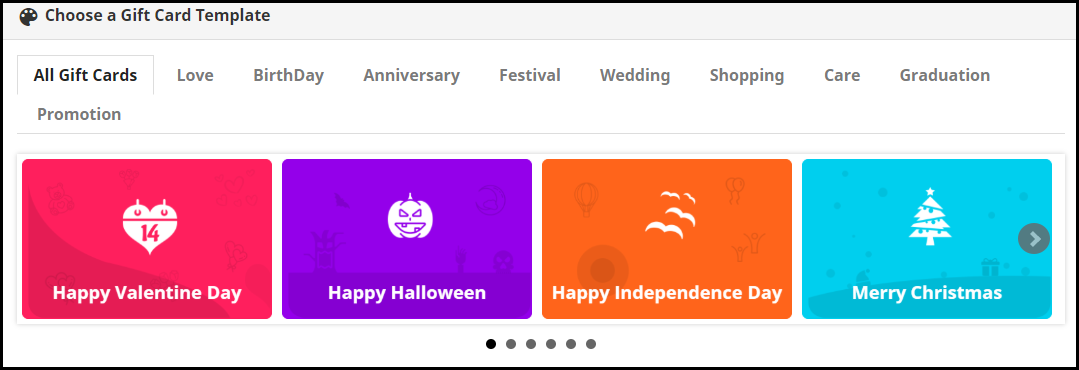
PrestaShop Gift Card Manager offers gift vouchers for multiple occasions like Birthdays, anniversaries, Halloween, New Year, Mother’s Day, Father’s Day, Valentine’s Day, etc. These gift card templates can be easily customized. Besides, you can add new gift cards if you want.

  • Customized Photo Gift Cards

The customer can add a picture to their gift card and give it a personal touch. This unique way of printing digital gift cards with custom images attracts more new shoppers to your store as personalization is a major branding factor these days.

  1. Advanced Admin Control

  • Add Gift Card Link to Multiple Places

PrestaShop KnowBand Gift card plugin lets you display the gift card link in multiple places to highlight your gift card section in front of your store visitors. It can be placed on the header, footer, my account section, and on the center-left of the screen.

  • Gift Card Delivery Settings

Set a date to deliver. You can define a minimum delivery gap for the PrestaShop gift certificate to reach the recipient or a date to send an email including the gift card details

  • Type of delivery

For a particular gift type, you can choose whether it should be allowed for physical delivery and virtual delivery. If a card is virtual then there is no point in charging a shipping fee. Hence, the seller can decide the shipping charges for the type of delivery.

  1. Flexible Pricing Scheme

PrestaShop Gift Card Manager Addon lets you set up multi-range gift cards on your website so that customers can choose a gift card as per their budget.

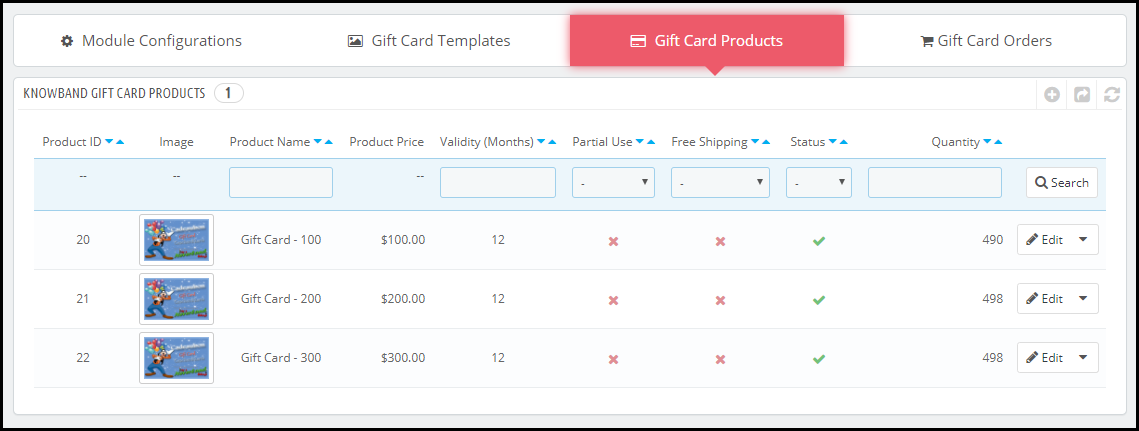
For a gift card of a specific value, you can define its quantity, make it available for multiple currencies, set the gift card validity, and allow free shipping and partial usage.

  1. Unique Branding Techniques

Set up a prefix for your Gift cards that does your Brand promotion. To create a unique card template, it provides options like adding a name, category, keyword, etc. You can make your own templates by using an image with the logo and brand name.

  1. How to Generate Gift Card Code?

With this PrestaShop premium gift card, you can specify the order status. It can be the payment status like awaiting payment, awaiting COD, Canceled, delivered, etc.  For the gift card voucher code generation, the seller will have to define ar specific order status.

  1. Notify with Email Alerts and PDF

PrestaShop Gift voucher module lets you customize the emails that would be delivered to the sender and the receiver. Customers can download the Gift card in PDF format.

  1. Categorize the Gift Cards

You can define categories for gift cards and put the relevant ones under them. For example, gift cards related to Christmas, New Year, and Cyber Monday can be put under the “Holiday Gift Cards” category and say if you have multiple gift cards for Birthdays, all of them can be displayed under the “Birthday Gift Cards” category. This makes it easy and quick for a customer to choose the desired gift card.

  1. Track your gift card orders easily

Tracking the orders and keeping their record is a great business practice. The section comprising of gift certificate orders displays the order reference, recipient’s email address, sending date, and the gift card status.

  1. PrestaShop Gift Card Module Compatibility

PrestaShop Gift Card Module is multi-store compatible, has multi-lingual support, and also provides GDPR compatibility. It is also compatible with every PrestaShop version from 1.6 to 1.7.

Finally, The holiday season is approaching and it is the best opportunity for you to start selling personalized gift cards in your store. With our Gift Card module, it becomes easy to put up different types of gift cards on your website.

For any assistance or query regarding this module, reach out to us at support@knowband.com

You may also like:

Why Digital Gift Cards are Important to your eCommerce Business?

Get more Holiday sales by setting up a Gift Card section on your store

Give Some Holiday Season Flair to an Ecommerce Website Design

Offer Birthday Coupons to Your PrestaShop Customers And Win their Loyalty