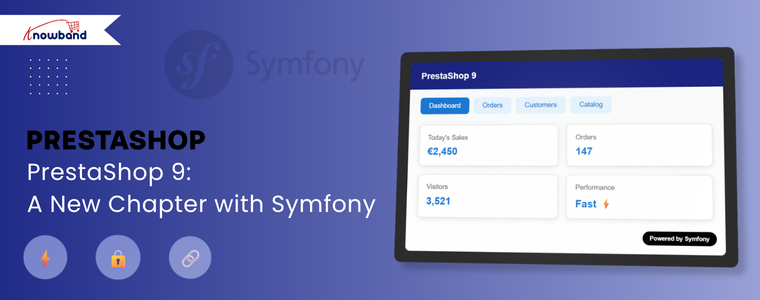
PrestaShop 9 marks a major advancement for the platform. This is not just an ordinary update; it is a significant effort from the community to build a modern, reliable core. The entire system now runs on the Symfony framework. This transition was a careful plan that took years. The switch to Symfony is critical. It makes the platform faster, more secure, and more adaptable for everyone. Ultimately, PrestaShop 9 is a total overhaul. Its design makes it ready for the future and competitive in today’s e-commerce landscape.
The Symfony Switch: A Closer Look
The most significant change in PrestaShop 9 is that the entire administration area now operates on Symfony 6.4 LTS. Before, the PrestaShop team used a mix of old code and Symfony. This was complicated for developers and often caused bugs. But with this new version, the team rebuilt every single admin page. They built them to fully use Symfony and Twig templating.
As a result, developers can now work with a single, consistent framework. This consistency simplifies creating new modules and makes fixing issues much easier. The platform can also use Symfony’s strong security features. It benefits from the support of a large developer community.
In addition, this change allowed the project to remove a lot of outdated code. For example, the team has permanently removed features like the old XML API and the confusing product form. In their place is a cleaner system that is simpler to maintain. The platform also now supports newer versions of PHP (8.1–8.4). This is a huge benefit. These new PHP versions bring significant performance boosts and better error handling.
They also include Just-In-Time (JIT) compilation. This can make your store run much faster. In summary, the move to Symfony is all about making the platform more dependable, more powerful, and easier to expand.
New Features for Store Owners
While the biggest changes are “under the hood,” the admin panel itself offers a much better user experience. The interface has a more modern look, and all pages now feel consistent. You won’t see that frustrating mix of old and new interfaces anymore. This consistency makes managing your store a lot smoother and reduces the time you need to train new staff members.
For developers, one of the best new tools is the Admin API. This new API provides a modern way for other systems to communicate with your store. It’s built on a framework called API Platform, which makes connecting with things like your inventory system, customer management software, or a mobile app simple. For example, it’s now very easy to automatically update prices or sync your stock with your warehouse management system.
You could even create a custom mobile app for your store. Then you can have it pull all product and order data directly from this API. In fact, this new API is what makes headless commerce a reality. It lets you use PrestaShop for its back-end. Meanwhile, you can create a totally custom front-end with modern frameworks like React or Vue.js.
Why This Is Great for Everyone
These technical updates provide real benefits for both store owners and developers. For store owners, the platform is much faster. The updated code and PHP compatibility mean your pages will load quickly. Quick loading is crucial for keeping customers happy and getting more sales. Also, PrestaShop 9 now supports new image formats like WebP and AVIF. These images are much smaller. This speeds up your site even more without reducing quality. A faster site can also improve your Core Web Vitals score. That score is a key factor for good SEO.
The SEO features have also been refined. The platform creates cleaner, shorter URLs by default. This makes it easier for search engines to understand your site. For developers, the benefits are huge. The full Symfony architecture gives them a consistent, well-documented environment.
This makes building modules and themes easier and more enjoyable. With the new Admin API, they can build better, more powerful integrations. They can also meet today’s demanding business needs. All in all, PrestaShop 9 is a massive improvement. It’s a modern, future-proof platform.
Need trustworthy PrestaShop plugins or expert help with migration and compatibility? Our team delivers seamless solutions tailored to your store’s version—whether you’re on 1.6, 1.7, 8, or moving to 9. We handle the technical complexity, so you can focus on growing your business with confidence.
Choosing a platform is difficult when starting an online store. PrestaShop is a really good choice. You can read about the advantages of Prestashop eCommerce in this blog. This article will provide further information on the features, benefits, and disadvantages of PrestaShop eCommerce.
PrestaShop supports customization and is an open-license, highly configurable e-commerce choice. PrestaShop eCommerce has a tonne of benefits, and these are due to its distinctive characteristics. If you’re seeking affordable eCommerce options for small to medium-sized businesses, PrestaShop is the ideal choice. PrestaShop has long been widely used and well-liked because of its usability.
The Pros and Cons of the Prestashop Platform
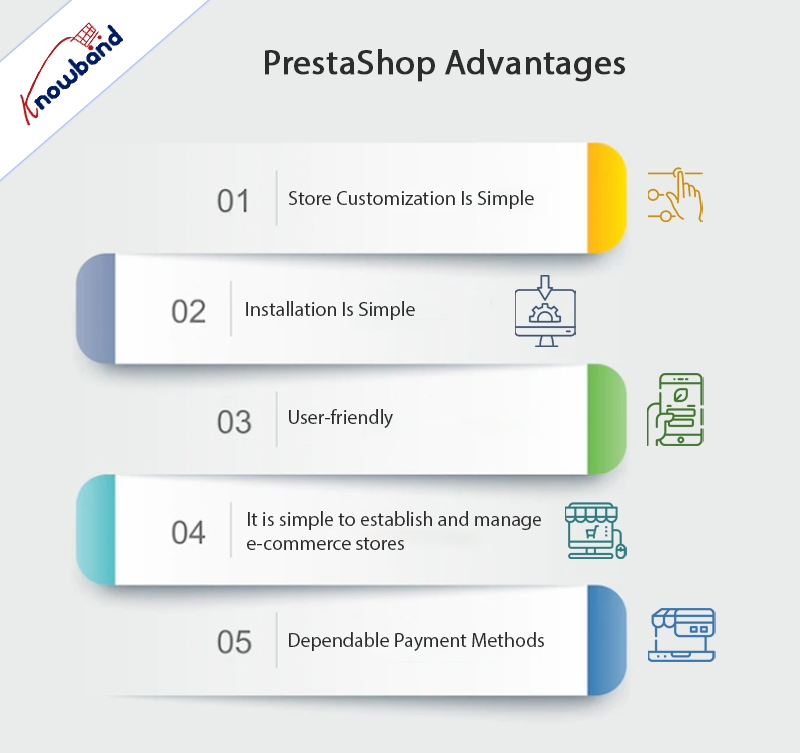
Advantages
Store Customization Is Simple
In this day and age, open-source is the way to go if you want your website to have a distinctive vibe. In the fiercely competitive world of eCommerce, developing an iconic brand is essential to your long-term success.
Two different modules are needed to customize your online store. The second module is an advanced module that allows you to change the code so that you can customize your online store. However, the first module is necessary for making rapid modifications. You will also require access to HTML, CSS, and JavaScript files for various reasons.
Additionally, Prestashop’s customization options include an internal search engine that will make it easier for your clients to traverse your store.
Installation Is Simple
Installing PrestaShop from the open-source software’s official website is simple. A completely functional and responsive internet store is quickly present after downloading the program.
PrestaShop’s file size is very small, so even if you’re a beginner or have a sluggish internet connection, you can rapidly set up this eCommerce platform.
User-friendly
When using PrestaShop, technical knowledge is not necessary. The reason behind this is that it has a straightforward and practical design. As per the PrestaShop review by experts, it is basic and easy to use. You should be able to manage and keep an online store up and running even if you only have basic IT skills.
It is Simple to Establish and Manage E-Commerce Stores
Prestashop makes it simple to complete the main work of establishing an online store. This is due to the software’s simplicity, which effectively eliminates the complexity of alternative website development scripting languages. Additionally, PrestaShop makes your e-commerce store’s maintenance tasks simpler.
There will be no need for you to seek any extra assistance from so-called professionals to guide you through PrestaShop’s workflow. PrestaShop is an open-source platform that you can use on your own to set up an online store, especially if you are familiar with its features.
Dependable Payment Methods
The dependable and practical payment methods offered by Prestashop are its main benefits. PayPal is among some of the payment methods they employ. There is no need to worry about fraudulent activity because these payment options are safe.
The SSL protocol system also handles secure transactions. Prestashop additionally allows one-page checkout, which encourages product purchasing.
Prestashop also comes up with a few out-of-the-box capabilities in addition to these crucial ones. These features consist of cost-free marketing techniques including automated email follow-ups, discounts, coupons, and vouchers. Inbuilt features for consumer convenience include “recently seen products,” “returns management,” and “order tracking.”
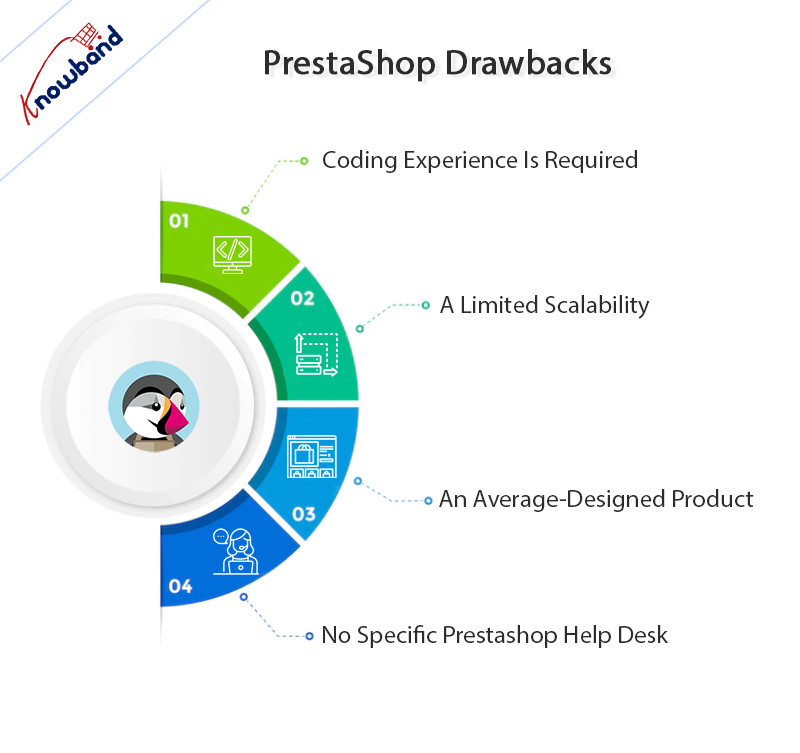
PrestaShop Drawbacks
Coding Experience Is Required
PrestaShop has the benefit of being open-source. The drawback to that is that you need to know a little bit of code to fully design and optimize your site. PrestaShop is not the right choice for organizations looking to build an easy and rapid e-commerce site.
A Limited Scalability
PrestaShop’s limited scalability is one of its main issues. Small and medium-sized businesses can use this e-commerce platform. PrestaShop is not the best option when the platform wants to grow.
An Average-Designed Product
PrestaShop offers a good layout for a store with limited resources. The approach is not appealing or appropriate for large-scale retailers. Although PrestaShop provides necessary features, its designs lack a polished appearance.
No Specific Prestashop Help Desk
Prestashop support and specialists’ staff are not available. This platform’s primary drawback as an e-commerce platform is this. The users, however, do not see this as a downside because there are a huge number of active members (on support pages) who are always available to help the users anytime a problem arises.
Alternatives to Prestashop Hosting
PrestaShop is an open-source eCommerce platform that can assist you in swiftly building an online store. Therefore, you can take advantage of some of the improved capabilities in an economical way if you pair this platform with a trustworthy web hosting company. Some of the options are present below:
Bluehost
The most straightforward PrestaShop hosting option is Bluehost. It is a reputable web hosting provider. The excellent discounts that Bluehost has to offer for other CRMs also apply to PrestaShop. It is a one-click PrestaShop installer that enables you to quickly set up and manage your PrestaShop website. It also provides the industry-standard cPanel for a simple user interface.
You can quickly manage your website, domains, emails, and other things with its cPanel. Additionally, its outstanding scalability provides strong instruments for the expansion of your website and company. It has numerous server locations and provides your website with dependable uptime, excellent speeds, and flawless functionality.
Hostinger
Choose Hostinger if you want sales-optimized hosting with outstanding PrestaShop performance and consistent uptime. It features email accounts, limitless storage, and unmetered bandwidth. However, most clients have no restrictions on the number of websites, subdomains, FTP users, or parked domains. Nevertheless, going further with the routine With Hostinger, managing an eCommerce business is remarkably easy. It is possible with its top-notch cart performance and conversion rates thanks to its top-notch hosting services.
You may acquire PrestaShop-optimized servers from Hostinger that guarantee top-notch performance by improving their servers with setup.
In the End!!
After the Prestashop eCommercereview, we recommend that users who are comfortable with coding should use this platform. Users cannot rely on Prestashop support to fully utilize this platform. Users who have coding knowledge can use the features of this platform to the fullest.
If you have any concerns related to this platform and its modules, then you can reach out to us at support@knowband.com. We also help our clients with their original ideas so they can be realized in accordance with their needs. Customer satisfaction is our top priority, and we assist them with their needs. Kindly let us know if you have any ideas for your business with which you need our hand.
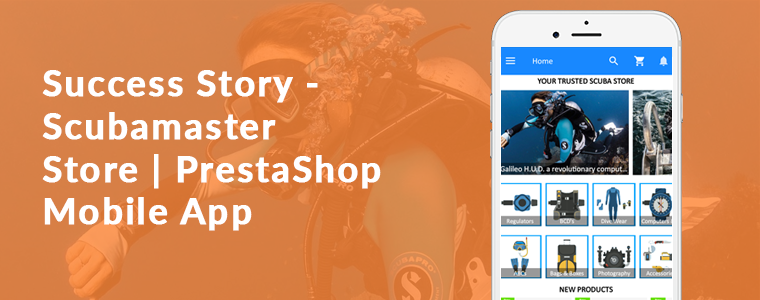
This article is a toast to the success story of the Prestashop Mobile App for Scubamaster store developed using the Mobile App Builder plugin. Consider using KnowBand’s Mobile App Builder Module to develop Android & iOS Mobile app for the PrestaShop store. The Mobile App Builder offers the following advantages to the store admin:
No coding skills required
One Time Payment
Real-time synchronization between PrestaShop store and Mobile App
Supports all major payment methods
Supports all major shipping methods
Customizable Home Screen
Push Notifications
For the complete list of the feature please click here
Our technical team will assist you to submit the app at Google and Apple Play Store
Aside from growing your product sales and company exposure, a mobile app enhances customer retention. Each time users view it, an application guarantees the same presentation of goods and services. Customers, no matter which page they visit, will go through the same user experience. A mobile app allows you to get in touch with your customers quickly.
ScubaMaster Store created their mobile app with various functionalities that are required. With the aid of Mobile App Builder, they have customized the theme and added all the needful categories and menus in the App. Along with that, Prestashop Mobile App for Scubamaster store has an order return feature that is incorporated additionally using Return Manager PrestaShop Module. They have options like Gift Card for every occasion and an Affiliate and Referal Program to incentivize the users.
Let’s dive deep into the Prestashop Mobile App for Scubamaster store’s success story!
About PrestaShop Scubamaster store
The ScubaMaster Store is Bahrain’s and Saudi’s one-stop-shop for diving’ for the east coast. In the Kingdom of Bahrain and the Kingdom of Saudi Arabia, ScubaMaster is proud to be the number one diving center. They have the widest collection of scuba equipment under one roof from top brands that cater to specialist and advanced equipment for scuba divers’ basic needs.
You will find top-quality products, the best customer service, and a broad selection of PADI courses from beginners to expert levels. From beginners to advanced levels, they have male and female instructors who teach a wide variety of PADI courses, which makes the ScubaMaster the only PADI 5 Star Dive Center in Bahrain. To keep the game going and to deliver a superior user experience, they have asked KnowBand to develop a full-fledged mobile app.
Prestashop Mobile App for Scubamaster store-Top features
The Prestashop Mobile App for Scubamaster store is a versatile app with all the necessary features. Some of the top-notch functionalities are discussed in this section.
1. Home Screen, Product Page, and Categories
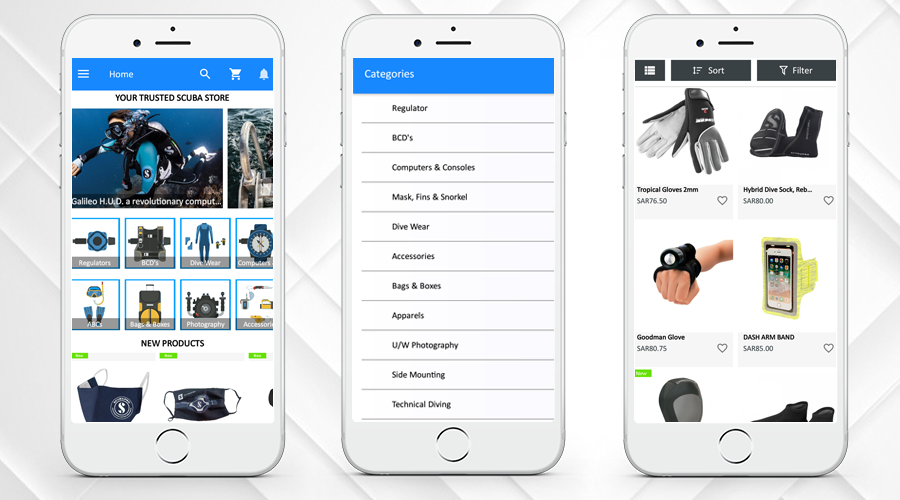
By using the eCommerce Web App Builder plugin, store owners get a personalized app. Scubamaster store has designed the home page of their app easily using different home page editor tools provided on the backend of the Prestashop Mobile App for the Scubamaster store. Several categories can be added to the store’s navigation.
The home page design can be customized and the admin can add the banners, products, or other blocks to the home screen to offer a better customer experience. The Android Mobile App Creator for PrestaShop has an easy-to-manage admin interface that helps the admin to create attractive home screens.
2. Multiple languages and Currency Support
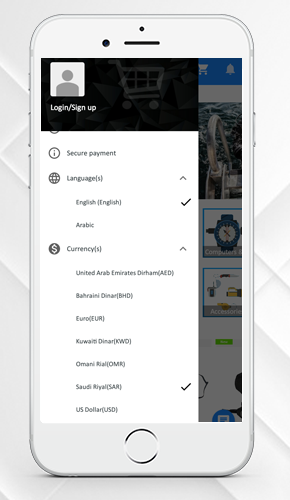
Developing a different mobile app for different languages is not possible for the store administrator. The user can select and check any desired language on the app in their preferred language. Take a look at the multi-lingual and multiple currency support features of the ScubaMaster Store Mobile App. The PrestaShop Mobile App Builder supports multi-lingual functionality and also supports RTL language.
3. New Product, Bestsellers, Hot Products, Wishlist features
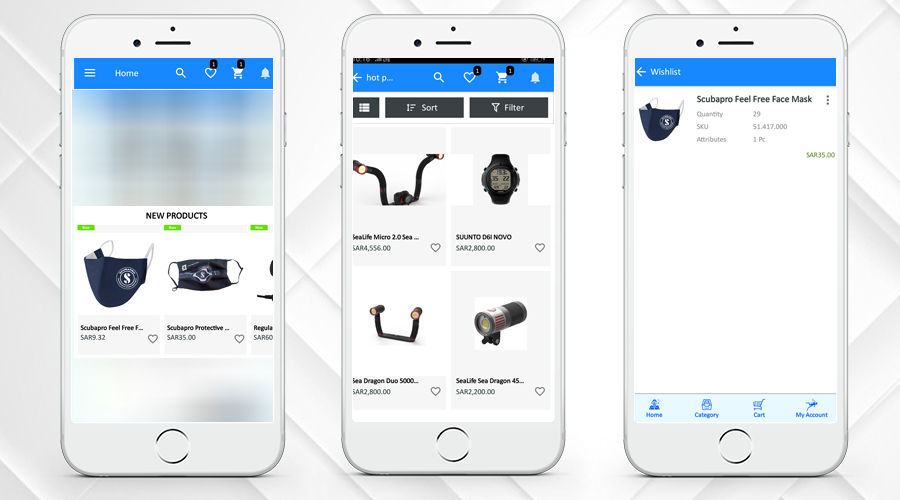
Clear navigation for new products, best sellers, and hot products keeps the customer engaged. The admin can select the products like New Arrivals, Best Sellers, Special Products, Products from a category, or Custom Products to showcase on the home screen that will help the customers to make their purchase decision.
Another interesting feature that you should have in your mobile app for eCommerce is the wishlist. The Mobile App Creator’s built-in wishlist feature enables customers to add the product to the wishlist and access it for later purchase.
4. Easy Sign-up and Login
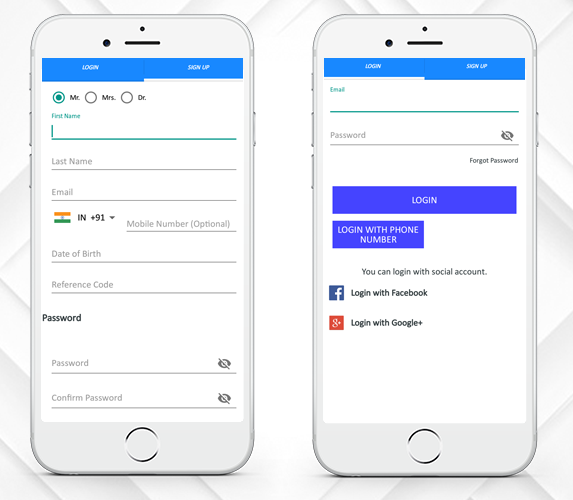
Prestashop Mobile App for Scubamaster store provides multiple login options. Now users can login with Google, and Facebook, email & Phone Number. Users of the mobile app will simply log in to the app and conveniently access the items and categories. Users can easily share products on social media.
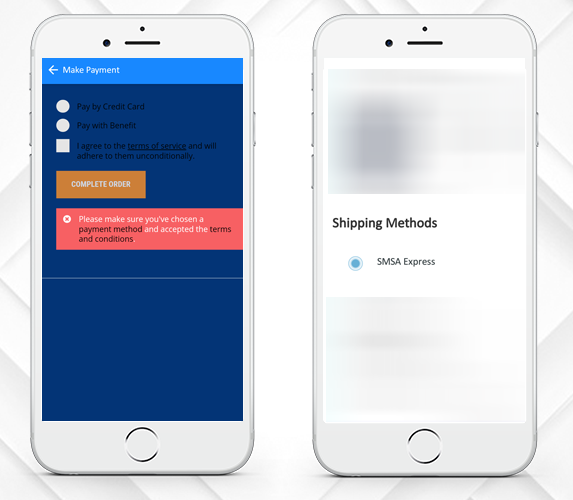
5. Supports Various Payment and Shipping Methods
The ScubaMaster is offering various payments and shipping options that enhance the urge to buy more. On the website and mobile apps, the front-end mobile shopper will find the same kind of checkout experience.
ScubaMaster Store Mobile App has more PrestaShop modules for store management and to boost sales
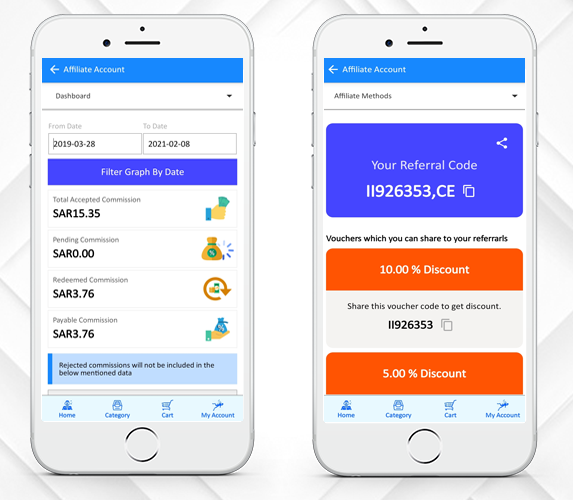
6. Affiliate and Referral Program
The ScubaMaster Store has incorporated the Affiliate and Referral Program. Affiliates promote the link on their website, blog, or YouTube channel of your store products, etc. The affiliates get a small commission on every sale through their affiliate link.
A visitor or customer shares your products with their people in the Referral marketing program. When people make purchases from your store, you provide them with some kind of referral reward. A customer can choose to share the link or voucher code for the product.
7. Return Manager
Return Manager Module by KnowBand is another successful tool used by ScubaMaster to manage the order returns on their store. they can track the return from the backend.
They have also customized this module to work well with the mobile app. KnowBand added this custom feature at the client’s request. Customers can place return, order cancellation requests, or refund requests from ScubaMaster Store Mobile App.
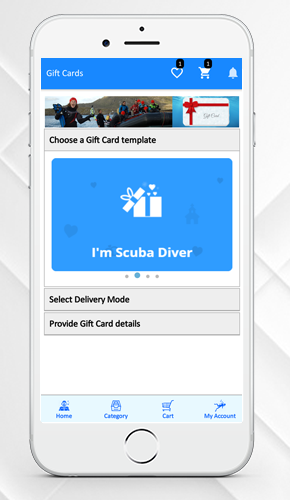
8. Gift Card Manager-Gift Card for your loved ones
Digital Gift Cards, also referred to as electronic gift cards or e-gift cards, contain a branded gift code and are sent via email. All over the world, e-gift cards can be sent to anyone. The same has been added to the ScubaMaster Store Mobile App.
The module adds a gift card section and provides pre-existing customizable gift card templates. Use these templates for various occasions such as Halloween, Christmas, New Year, Mother’s Day, Birthday, Anniversary, etc. For any desired occasion, you can add new gift card templates so that you do not miss out on any important event.
Why build a mobile app for your business?
Nowadays, for almost every purpose you can think of, like selling products and rendering utilities, mobile app development services have been used to create iOS and Android mobile apps.
The mobile device consumer population currently stands at over 1 billion worldwide. The reasons why every business owner wants a mobile app for his or her company are below.
Mobile Applications improves customer experience; it increases customer engagement on your store and adds value to your customers. Along with that, mobile apps play a crucial role in building a brand’s identity.
The purpose of mobile apps is to reinforce and inform the client about your brand. The more he likes you, the more he listens to you and your sales pitches and ultimately commits himself to your brand.
PrestaShop Android & Ios Mobile App Builder Module
Without any coding, you can create an eCommerce mobile app for your PrestaShop store. The Mobile App Builder Module helps the shop administrator to launch the shopping app under its website/business name and value. To make the shopping app look attractive and enticing for front-end shoppers, there are intuitive color and font options.
The iOS and Android mobile app let you send infinite push notifications. You can customize the entire home screen and look and feel of the PrestaShop mobile app front-end. It is most useful for the store admin to design the home screen layout of the mobile app. Only select the required banners, sliders, categories, products, etc., and to change them, use drag & drop. It is possible to modify and customize locations, headings, names, etc. from the admin panel at any time. These adjustments on the app will be mirrored in real-time on the apps.
What if we told you that there is a simple way to increase your profits, improve your customer base, and give your brand a boost? It is all possible by developing a smartphone app for your online store. The eCommerce Mobile App is now taking over the industry, drawing many users and racking up huge profits. The number of users who choose to shop on mobile devices is increasingly rising and with that the growth of mobile e-commerce is surplus.
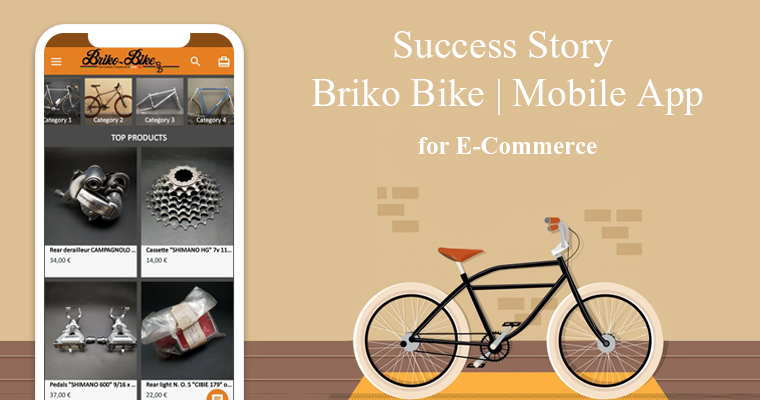
This article is to celebrate the success story of our client ‘Briko Bike’, an eCommerce store which was established in 2008 in France. They built a shopping native mobile app using KnowBand’s eCommerce Mobile App Creator plugin. The app builder plugin automatically creates a shopping app using the data from the website & its APK & IPA files are released on the Google Play Store & Apple App Store. Store owners only have to install the app plugin on their website.
About Briko Bike:
Briko Bike’s store owner is a great enthusiast and old bike collector and he converted the hobby into his profession. You can find a collection of spare parts of the old vintage bikes on the Briko Bike’s website and the Mobile App that was created using KnowBand’s Mobile App Plugin.
Services offered by Briko Bike:
At Briko Bike store, they provide accessories for road bikes, mountain bikes, BMX old school parts, and all the parts from a brake shoe to luggage storage bag. Briko Bike is one of the exclusive stores that sell such products online.
–> Click here to Install Briko Bike Mobile Application from Play Store
–> Click here to Install Briko Bike Mobile Application from Apple Store
Top Features of Briko Bike Mobile App:
1. Home-Page, Menu & Category Page:
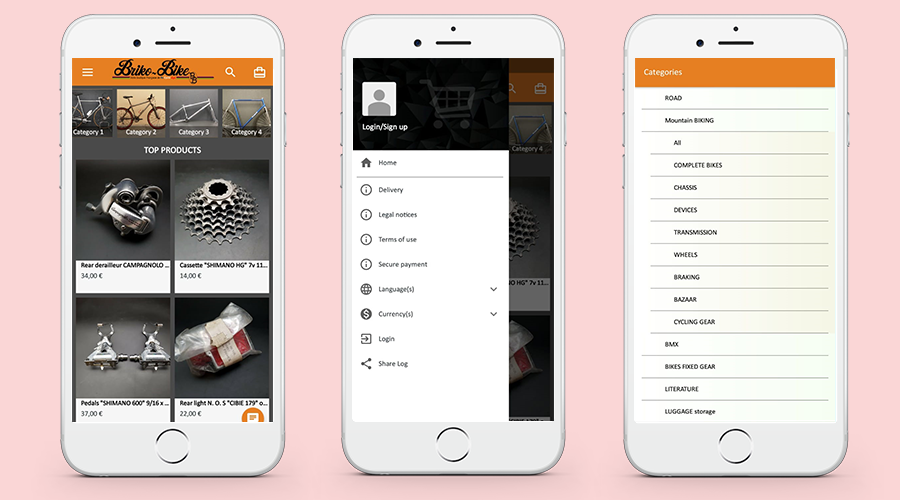
These app screens are from the Mobile App of ‘Briko Bike’. The Home Page, Navigation Menu, and the Category Tab are shown on the 3 screens above. Store owners get a customized app by using the eCommerce Web App Creator plugin. Using various home page editor tools given on the backend of the eCommerce Mobile App Creator plugin, they can design the home page of their app easily.
2. Categories and Sort Filters for Product Page:
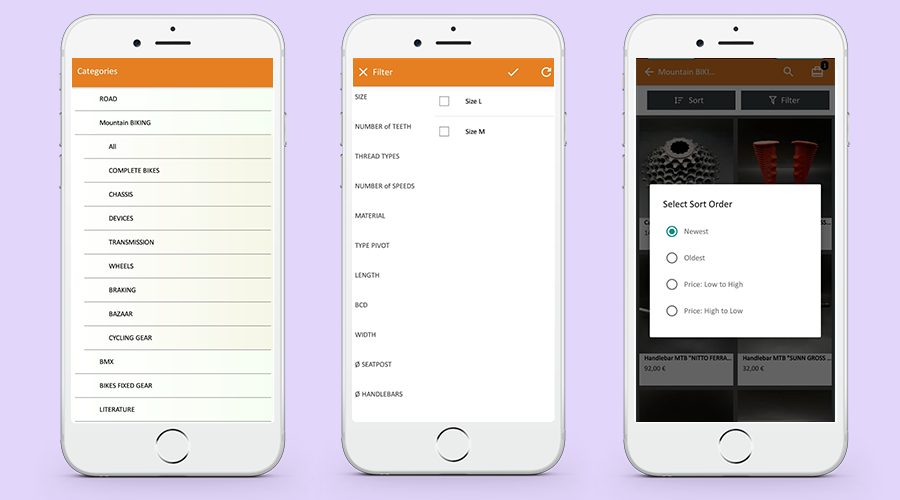
While making a purchase, sometimes it is difficult to find the right product. To simplify the search results, the mobile app is integrated with the category selection and sorting menu as shown in the pictures below. From the listed categories, customers can select desired ones and sort them accordingly.
3. Shopping Cart Design:
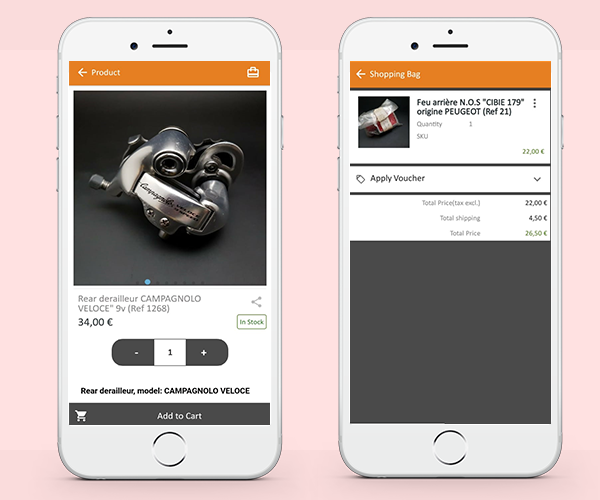
The shopping cart is used by e-commerce websites not only to promote a customer’s shopping experience but also to boost sales. Briko Bike Mobile Application has a custom shopping cart. Customers can add one or more products to the cart and purchase them immediately.
4. Clear CTAs:
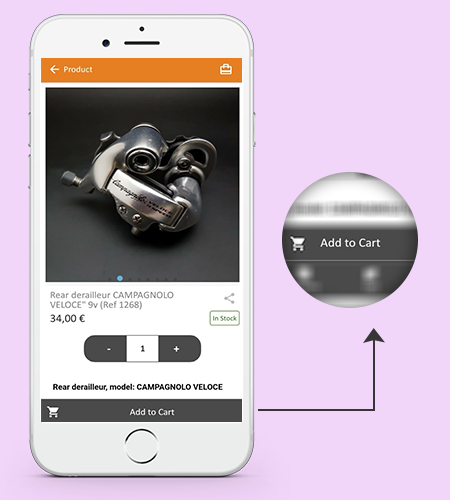
A lot of emphases is put on the homepage when developing an online shop, which is the first thing visitors see when they arrive. The product page of the Mobile App is highly responsive and its design is drool-worthy that can easily convert. It has a clear ‘CTA’ (Call to Action) button that allows the user to add the product to the cart.
5. Easy Sign-up, log in, and Guest Checkout:
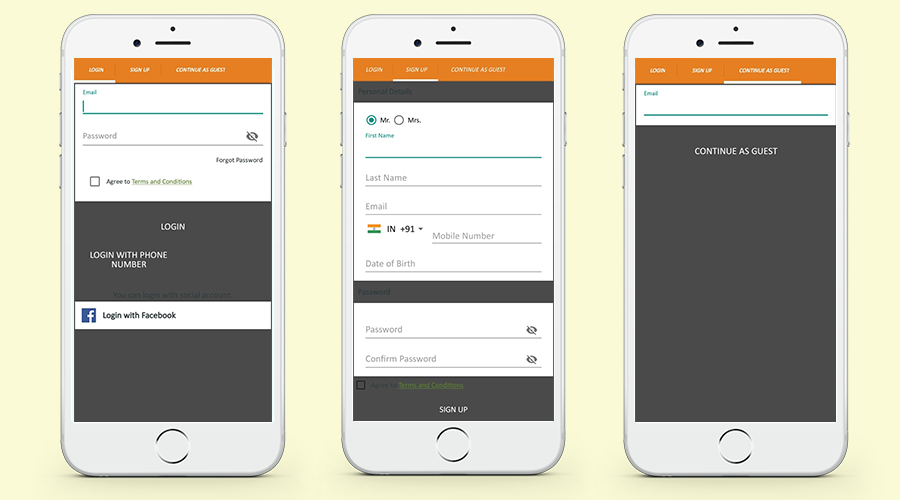
Briko Mobile Application created by KnowBand’s Mobile App Builder provides 3 checkout options for the user. Customers can register by filling up the registration form, log in via Facebook (Social Media Account), and can also opt for a Guest checkout by inserting the email ID. These features are provided by the Mobile App and can be customized as per the user requirements.
Message from Briko Bike:
After long researching and testing different ways to create an application for my Prestashop site, I finally decided on the BUILDER APP module which perfectly matched my expectations.
The main advantage of this module is that you buy it only once and you have no other costs, unlike other solutions which take a percentage on the sale of your products !!!!
This solution is very easy to implement without knowing how to code to obtain a nice and modern application, I still called on the Knowband technical service for some specific improvements which were carried out very quickly according to my request.
I would like to thank the entire Knowband team for their quality work and their reactivity during our exchanges of messages.
I would also like to point out that the Android and Apple applications are put online by the technical service on the stores, let you guide;)
About PrestaShop Android & iOS Mobile App:
KnowBand offers more than 60 PrestaShop modules that are also listed on the official PrestaShop addon store. Some top-notch PrestaShop modules developed by KnowBand are- One Page Checkout Module, Abandoned Cart Module, Return Manager Module, Marketplace Integration modules (eBay, Etsy, Google Shopping), Multi-vendor Marketplace & Android & iOS Mobile app.
The Android & iOS Mobile app module allows the PrestaShop store admin to create a mobile app for the existing PrestaShop store. The store manager needs to purchase the Mobile app module (One-time payment) and along with that he/she has to submit the prerequisite form. As per the shared details, the mobile app development team of the KnowBand will share the app for review and as per the final approval, the APK and IPA files will be shared. These APK and IPA files can be used to list the module on Google and Apple App store. All the data available on the website will get sync to the mobile App automatically in real-time.
Running an eCommerce store isn’t a piece of cake, that too with numerous goals & outcomes to achieve. Regardless of the products you sell, there will surely be challenges waiting for you. When it comes to designing PrestaShop store website, it’s all about having a well-functioning interface (UI) to provide a great user experience (UX). It’s a good thing that some of the popular eCommerce platform solutions like PrestaShop come up with such feature-rich backend to achieve that.
The PrestaShop eCommerce platform helps to launch and run an online website in the most seamless and fluid manner. With proper planning in the right direction, an online retail store can be made more promising and enjoyable.
But, the question is, what are those prime features that one must keep in mind while designing an eCommerce PrestaShop website? Well, this article aims to elaborate on a few of them along with their implementation & optimization.
Prime Features To Add In PrestaShop eCommerce Store:
#1. Navigation & Category Placement:
It’s not ideal to have the products listed without setting them under proper categories & subcategories. Apart from just categorizing the products, each category/ sub-category must be arranged on the navigation-bar/ toggle- menu in a way that the customers don’t need to make more than 4 to 5 clicks to reach their choice of page. Also, have all other necessary links in the navigation bar /menu with the motive to make this more seamless on the front-end for your shoppers.
Keep the category URLs SEO friendly & have relevant thumbnail images with relevant alt-tags on images source code. This further enhances your on-site SEO & makes your category image discoverable on Google search results.
#2. Product Page Design:
The PrestaShop store admin must design the product page keeping following things in mind:
Depending on the product you are selling, add necessary fields like SKU, dimensions /weight, expiry date, stock availability, minimum quantity per order, shipping charges & taxes, deliverability in specific areas (Pincode), etc.
Add quick links to suggest the customers to related products /accessories.
Have the option to add a product to wishlist. Some eCommerce websites also allow users to create multiple wishlist folders which they can also share with their respective friends. This is an amazing approach to encourage new visitors to set up an account & contribute to boosting conversions on your eCommerce site.
Add the social sharing quick links for popular platforms like Facebook, WhatsApp, Pinterest, Instagram, Custom URL, etc.
Apart from product images, adding a video with the product details is also in the trend. It helps the customers to get a better view of various details about the product. This further helps to boost sales for that particular product. For instance, the assembly video of a DIY Wardrobe.
#3. Design for Convenient Browsing:
Add relevant filter & sorting options for easy product finding. For eCommerce giants like Amazon, different product categories require different filtering options. For example, the apparel category can have filters like brand, color, size, fit, cloth material, etc. On the other hand, the smartphone category may have filters like brand, color, dimensions, operating system, RAM, etc. If your PrestaShop eCommerce website sells a wide range of different categories of products, have the right set of filtering parameters for each such category.
Some of the very common sorting options are – popularity, price (low to high or high to low), customer ratings/ reviews, etc. Based on the products you are selling, you must design your PrestaShop eCommerce website to have sorting options according to the user needs & choices.
#4. Offering Discount Coupon & Vouchers:
Setting up coupons & vouchers with all sorts of discounts isn’t enough these days. Their availability & benefits must be smartly designed to be introduced to online shoppers. Some eCommerce websites tend to display it on the home page & checkout pages, while some websites have those coupon codes displayed all the time by attaching a sticky tab on the bottom of the screen. Such factors must be considered while displaying coupon codes & other discounts.
#5. Seamless Checkouts & Payments:
Checkout pages can be differentiated as two different designs. One of them involves having more detailed user entries making it a bit lengthier & time taking. While the other one is with one-page checkout with limited yet necessary entries making the checkout procedure really quick. Make your checkout pages encouraging users for more purchases.
Design your checkout pages to have some entries pre-filled during the checkout. For instance, have all the previous delivery addresses saved so that customers don’t have to manually type the entire address again each time they purchase anything.
Add all the relevant payment options according to the audiences you are serving. Set up your payment gateways with reliable robustness and security in consideration. Keep the processes simple so that customers don’t back out from checkout & payment without successful purchases.
#6. User-Friendly Backend:
A good PrestaShop website must not only be designed to keep the customer-centric factors in mind but also aim for the website admin’s convenience. For eCommerce website owners on the PrestaShop platform, it’s kind of a necessity to have the right set of tools in order to manage the website, inventory, user data, payment gateways, & other online retail factors.
For instance, if you want customers visiting websites to purchase a particular product in limited quantities, the admin may set those limits in a matter of minutes via the admin panel without spending hours on coding. That’s just a nominal functionality out of all of them. In simple words, complete website design and working can be controlled over a few mouse clicks.
Most of the elements in a PrestaShop website can be added/ enabled with utter ease because of in-built backend features. And, in addition to that, other ones can be added via 3rd party PrestaShop Modules or custom coding. Hence, the store owners are not bound to the availability of templates & extensions.
Conclusion:
These above-discussed potent features & even others can be designed & implemented in a PrestaShop web-store. If you are, in any form, associated with an eCommerce business or planning to launch one, choose PrestaShop and keep these points in mind.
We, at KnowBand Plugins, offer all sorts of plugins/extensions to enhance and improve the functionality of your PrestaShop store. Our leading eCommerce plugin & development services have assisted a wide range of retail store owners worldwide running their business on any the following eCommerce platforms: