PrestaShop Preferred Delivery Time Addon

PrestaShop Preferred Delivery Time addon lets customers choose their desired delivery date and time on the checkout page.

When a customer places an order, they get an estimated delivery time like 2-3 days. Neither there is surety about the arrival date nor the timing. We just assume and hope for the order to deliver within the expected time.

Due to this, many times, customers are not able to pick up their orders due to their non-availability at the time of delivery.

Let’s talk about a different scenario. Sometimes, customers want to receive the order at a specific time, like on occasions like the birthday of their loved ones, so that they could gift them at the perfect time arrives.

In such cases, providing customers with the option to choose a specific date and time slot for the order delivery becomes highly important. And this is exactly what the PrestaShop Preferred Delivery Time module does.

PrestaShop Preferred Delivery Date and Time module allows customers to choose a date and a time slot as per their desire so that they could get the item on their specified time.
Overview

1. Let customers select the desired delivery date and time

2. Set a minimum delivery gap between the order placement date and preferred delivery date

3. Define the delivery time interval [Start time and End time]

4. Split up the time in multiple slots by defining a fixed time range for a particular slot.

5. Specify non-delivery days

6. Option to update delivery date and time even after placing an order

Detailed Description

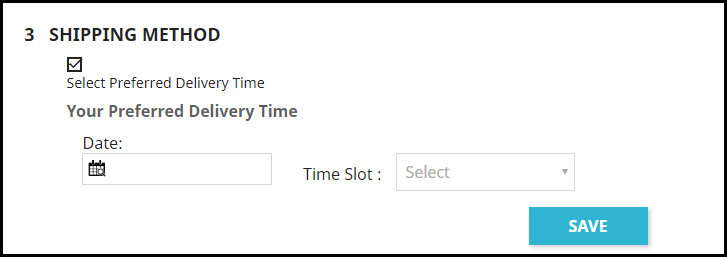
1. In the shipping section, the user is asked to pick his/her desired date and time slot for the order delivery. This can also be made optional hence allowing shoppers to follow the standard delivery procedure if they do not wish to choose a preferred delivery date and time.

This can be configured by enabling or disabling the “Allow to select preferred delivery.” Keeping it enabled will make the process mandatory. Disabling the option will make it mandatory for a customer to choose a date and time slot.

2. PrestaShop Preferred Delivery Date addon lets you define the time interval within which you deliver the orders. For example, it can be from 9 am to 6 pm or 10 am to 5 pm.

3. PrestaShop Preferred Delivery Time slot addon lets you split the time interval into multiple time slots. You just have to define a time slot range. For example, if the delivery happens in between 9 am to 6 pm in a day is and the time slot range is 1 hour, then a customer would be provided with time slots like 9 to 10, 10 to 11, 11 to 13 and so on till 5 to 6.
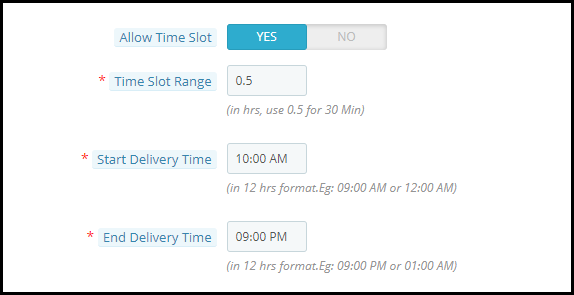
4. In such cases where time slots do not adjust well with the delivery timing, for example, let’s say the delivery time is between 10 to 3 and time slot defined is 2 hours, then 12 to 12 would be fine, 12 to 2 would be too. But then we would be left with only 1 hour right? How does that get fit into this?

Well, inside the configuration, there’s an option that says “Allow incomplete time range.” Enabling it would display that remaining 1-hour slot in the time slot else it would not be displayed if disabled.

5. You can define a minimum delivery gap for a customer to pick the desired delivery date and time. For example, if the order is placed on the 26th of March and the delivery gap defined by the admin is 4 days, then the customers would be allowed to pick the desired date and time for or after the 30th of March.

6. You can also set the maximum delivery period. For example, if the defined period is 30 days, then the shopper would have to pick a date and time from 30 days of the order placement date.

7. PrestaShop Preferred Delivery Date and Time addon lets you specify the non-delivery days.

8. With the help of the PrestaShop Preferred Delivery time slot module, you can also allow your customers to update their delivery date and time even after they have placed their order.

9. Notify customers about the preferred delivery date and time slot in the order confirmation mail as well.

Benefits

1 Enhance the customer shopping experience.

2. Improve customer loyalty by delivering the product on the desired date and time.

3. By providing customers with the option to pick up a desired date and time slot, you can ask customers to pay a small charge for this facility, if possible.

For any kind of assistance with this module, you can contact us at support@knowband.com

Knowband Comes Up With Some Free Modules To Help eCommerce Businesses

Businesses are going through a rough patch due to the COVID-19 pandemic. There is a complete lockdown order in various countries. Cinemas, restaurants, offices, etc. have been shut. The economy has been hit hard and more challenges lie ahead.

People have put themselves in quarantine to prevent the spread of this deadly virus that is only multiplying the number of victims daily. These are hard times and we do not know how long it will take before the entire world resumes to the normal state again.

In this difficult phase, many people, celebrities, organizations are coming forward and showing their support in some way or the other, be it through donation, distributing food to the needful or exempting rent for the tenants.

We, at Knowband, understand the challenges businesses are facing due to this global pandemic and this is why we have made some of our modules free of cost as a token of support.

Existing Modules Currently Available For Free-

As of now, there are three modules that a user can purchase without paying a penny and we will keep you updated with other free modules whenever they are any.

PrestaShop Product Availability Check by Zip Code

OpenCart Product Availability Check by Zip Code

Magento Product Availability Check by Zip Code

OpenCart Spam Blocker

PrestaShop Spam Blocker

With the help of the first three modules, you can allow your customers to check product availability in their region. And for this, they do not need to head to the checkout page and confirm the availability after filling out the address fields.

The visitors are asked to enter the zip code right on the product page and check the product availability. The “Add to cart” button is disabled if the product is not available for the specified zip code.

The next two modules help you in reducing the spam traffic on your website.

How Can We Help in the Current Scenario?

Coronavirus is spread across cities and countries following which eCommerce businesses are facing major issues with shipping and delivery. Shipping is getting stuck and delayed and the same is the case with order delivery.

So, to make things convenient and time-saving for your visitors and customers, you can place a product check availability section on the product pages. If the product is available for delivery, it will display the estimated delivery date. So right now if there are shipping or delivery related issues, you can extend the delivery time and users would know it right on the product page.

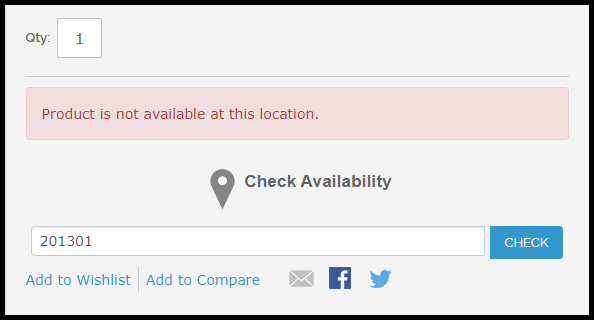
If the product is not available for delivery, it will simply display that the product is not available at this location.

Newly Launched Module For Free-

We have recently launched a new module called Free COVID-19 Information Popup addon which is available for two platforms- PrestaShop and Magento 2.

PrestaShop Free COVID-19 Information Popup

Magento 2 Free COVID-19 Information Popup

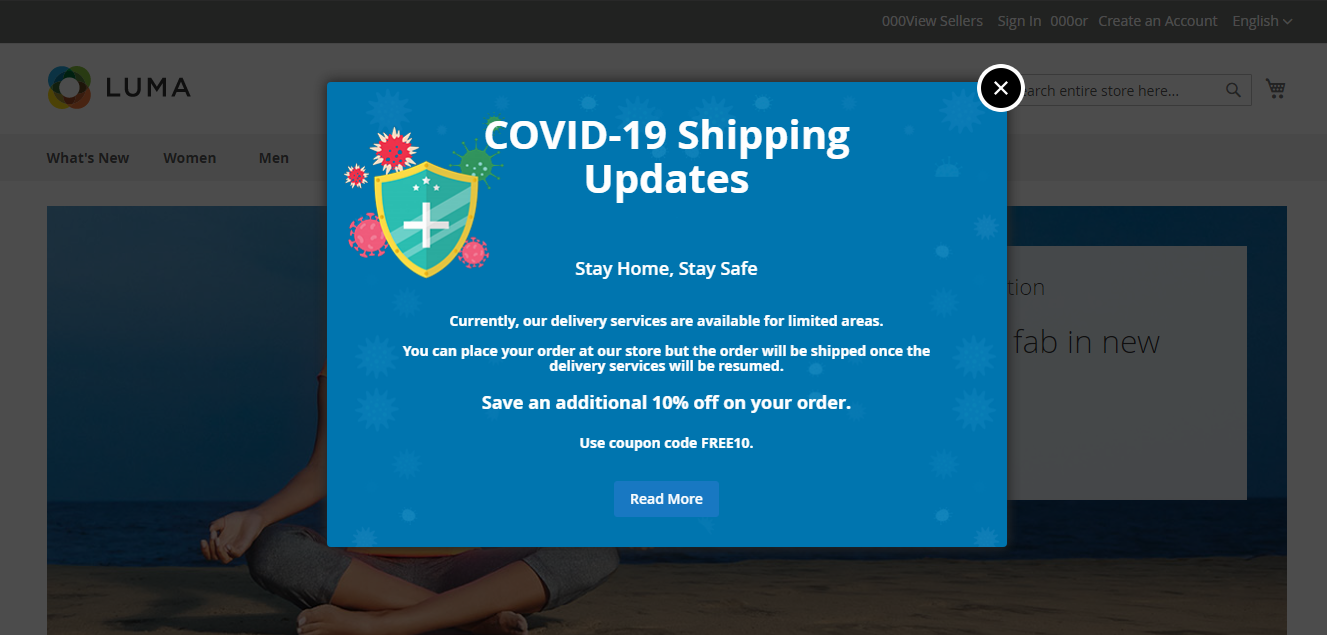
This module lets you inform your customers about the recent changes or updates in your business due to the corona outbreak. You can educate them about what precautions to take to avoid the spread of this virus. And if you are running some offers on your website during this period, you can highlight them too through this popup.

It is specifically designed to help you communicate with your website visitors in the easiest way so that you do not get too many queries on your support system.

You can customize the popup text and choose the popup image of your choice. Moreover, you can also control who sees this popup. You have the option to display the popup in selected countries only.

Through all these modules, our motive is to help you-

  1. Retain your customers

  2. Build customer loyalty

  3. Generate some revenue even in this crisis situation

There are no hidden terms and conditions and there is no end date for these offers, at least for now. We are not sure when this COVID-19 pandemic will end so you can grab this offer till the time it is available.

It is time for us to unite and be a helping hand for others. We did our part and we hope that this brought a smile on your face. If it is so, do not forget to leave a comment below.

For any assistance, you can reach out to us at support@knowband.com and for further updates, subscribe to our newsletters.
A User-Centric Approach To Design A PrestaShop Website

To build an interactive & powerful eCommerce website, PrestaShop surely is a great option for all small businesses and biggies. The major benefit of PrestaShop website development is that the store admin can simply manage the entire website with a few tweaks which ultimately gives tremendous results in a matter of reach and sales.

By now, almost every eCommerce business is aware that they must serve their customers in a more personalized manner than ever. This has led e-businesses to take extensive measures & build loyalty with their audiences. Such a business pattern has improved the brand reputation of those companies & witnessing that more & more businesses have started to implement such designing in the store.

But in order to design a PrestaShop website with a customer point-of-view on the top, one must re-consider multiple factors than just conventionally designing an eCommerce website. This article aims to unfold various such parameters that help in designing a PrestaShop web-store with a great focus on improving user experience & satisfaction. Check the points discussed below to know further in detail:

#1. List Down Your Needs:

Determine whether you would be requiring a multi-vendor marketplace or just a single store. Similarly, lay out all your plans so that the concerned team can work on the best possible design for your PrestaShop website.

If you already have a PrestaShop website & you only need to redesign it, instead of building a new site, be clear on the checks and trends. After that, get along with your further move.

#2. Responsive Design:

Keep your PrestaShop website as an omnichannel. Because a lot of us access the internet via smartphone on a daily basis, the design of the store must be compatible with mobile devices as well aka responsive design.

In fact, eCommerce businesses are going a level up by not just having a responsive design but also having AMP (Accelerated Mobile Pages) or PWA (Progressive Web Apps) or even their own PrestaShop Mobile App. All these contribute to acquire & serve a variety of customers on all possible devices and browsers.

By default, PrestaShop is responsive. But if any custom re-designing is coded, then that must be manually made responsive as well to make it appear beautifully on the mobile devices.

#3. Include CTA’s:

Call-To-Action elements are really important as they are meant to attract visitors so that your business can acquire more leads. CTA is usually kept precise with a straightforward yet catchy message. It should urge the site visitors to interact & take action.

The most common one is a CTA Button for newsletter sign-up. Based on your purpose use any relevant CTA s on the webpage but make sure not to overdo it.

#4. Showcase Customer Reviews:

On the website product page, have a design that allows users to write reviews of the products purchased by them. Having such testimony influences others to purchase the products based on their reviews. It has also been found e-shoppers find it good to have genuine reviews on products. This ensures unbiased information on products and helps newbies in making the decision.

As per a survey, 84% of people trust product reviews as much as they trust their friends’ recommendations. So, it’s a trendy & must-have feature to offer honest reviews for the products.

#5. Seamless Navigation & Accessibility:

On any eCommerce website, it’s not ideal to have the products listed without proper categorization. Apart from just categorizing the products, each category/ sub-category must be arranged on the navigation-bar/ toggle- menu in a way that the customers don’t need to make more than 4 to 5 clicks to reach their choice. Also, have all other necessary links in the navigation menu.

Set the category URLs to be SEO friendly & have relevant thumb-nail images with alt tags on images’ source code. This further enhances your on-site SEO & makes your category image discoverable & reachable on search results.

#6. Product Page Design:

Depending on the product you are selling, add necessary fields like SKU, dimensions /weight, expiry date, stock availability, minimum quantity per order, shipping charges & taxes, deliverability in specific areas (Pincode), etc. Have the option to add a product to wishlist. Some eCommerce websites also allow users to create multiple wishlist folders which they can also share with their respective friends. This can also encourage the new visitors to set up a new account & contribute to increasing conversions on your eCommerce site.

Add the Social Sharing quick links for popular platforms like Facebook, WhatsApp, Pinterest, Instagram, custom URL, etc. Apart from product images, it’s also a trend to add a video about the product. It helps the customers to get a better view of various details about the product. This further helps to boost sales for that particular product. For instance, the assembly video of a DIY Wardrobe (like IKEA).

#7. Add A Chatbot:

Chatbots have the power to be statically/ dynamically serve the customers 24/7. Also, about 50% of the netizens prefer to initially connect with a company via their chatbots. So, incorporate a chatbot and let users share their queries with you. Static chatbots are quite affordable & can even be automated to some extent. Chatbots can also be integrated with AI technologies to offer more dynamic & human-like support. Choose the one according to your business requirements.

#8. Simplified Checkout Procedure:

A lengthy & complicated checkout process can churn the online shoppers leading to reduced satisfaction and retention. To avoid such downfalls, have quick checkout procedures by designing a One-Page Checkout on the website. Optimize it to have some pre-filled entries like previous addresses, phone no’s, etc. Nowadays, majority websites even have the previously used payment options saved for faster checkouts.

Guest checkouts are also getting trendy among eCommerce businesses. It is helpful for the new visitors who don’t want to go through lengthy signup processes & increase efforts in checkout.

#9. Secure Payment Methods:

Offer all reliable payment options on the store according to the audiences you are serving. Set up your payment gateways along with all required security factors. Keep the process simpler so that users don’t back out from checkouts & payments.

#10. Strategies For User Retention:

User retention plays a vital role in improving sales of the PrestaShop website as returning users come with the best chance for more purchases. Keep your eCommerce store design to be enough encouragement for users to keep coming back in the future for shopping. Relevant CTA’s can be used to achieve the same. Attractive and catchy upcoming sale banners with correct display of vouchers, coupons, referral programs or loyalty programs usually helps is user retention.

Conclusion:

All the above factors help in designing an eCommerce website that makes an ecosystem of personalized services for your customers. It’s all about giving great focus on how to serve your customers in a better way.

If you are willing to give your best in designing such a website, we suggest you connect with KnowBand Plugins or drop us an email at support@knowband.com. After all, in such a competitive retail environment, there mustn’t be any factors to slow down your business.

A Guide to Referral Marketing

A few days ago, a friend WhatsApped me the link of a website that has some trendy collection of jeans. Before opening the link, I asked him what it is.

He said it’s a newly launched fashion website where you get some unique collection of clothing items, that too at a reasonable rate. He further said that for the first time registered user, they are offering a flat 20% discount.

Even though I knew he will also get some incentives if I register through his forwarded link but what he said was indeed true. The site has some amazing stuff.

Impressed, I told about it to a few more friends. And I am sure they would have too.

This is what we call REFERRAL MARKETING!

What is Referral Marketing?

Referral marketing is the type of marketing where your existing customers give a shout out about your brand to others; family, friends, and relatives, which helps you acquire new customers.

Put simply, it is a word-of-mouth marketing where your customers market your brand or products or say spread a word about your business. In return, you reward them with some incentives for bringing new users/customers.

Referral Marketing Ideas and Strategies

If you are running a referral marketing campaign, keep a few points in your mind to get the most out of it. With that being said, let’s take a look at some of the effective referral marketing strategies-

1. Rewards for Both

To get fruitful results from a referral marketing program, make sure that the person who refers and the person who is being referred both get some rewards on successful referral.

If you are not paying the former, he or she would not be interested in sharing it with their known ones. The same goes for the latter. If they are not getting any kind of benefit through it, they will be least interested in giving it a look.

But if there are some perks for both, the referral program will surely bring some amazing results. This is basic and amongst the best referral marketing strategies.

2. Add Emotions to Your Way of Asking

Instead of simply saying “Refer a friend and earn XYZ”, it would be more ideal if you say “Hey, help us reach out to more people and get exciting rewards for it.” When you add emotions to your words, it leaves a stronger impact.

Ideally, this is the way to do it. Besides, it looks like an actual conversation between two people like someone is asking you for help else it seems like a conventional marketing scheme with no impact at all.

3. Do Not Reward Only When Someone Makes a Purchase

Most of the referral marketing programs focus on providing incentives only when the referred person makes a purchase. In fact, the referring person also receives rewards only when the other person buys anything from the website.

The idea referral marketing strategy here would be to provide commission also when the user successfully registers on your website. I mean there should be at least something for a person who sent a new user on your website and made him/her registered. And to make the referred person go for the first purchase, you could encourage them with an exclusive coupon code for first-time users.

This referral marketing idea is accepted by most of the brands.

Benefits of Referral Marketing

Let’s try to find out how referral marketing programs can be helpful for your business.

1. Boost Your Website Traffic

One of the major benefits of referral marketing is it tends to bring in more traffic on your website. The traffic during your referral marketing campaigns would comparatively be high as compared to other days, only if the campaign turns out to be successful.

2. Acquire New Customers

One of the primary purposes of a referral marketing program is to get more customers to your brand. And if implemented well, it will surely do the needful for you. You will get new subscribers in your email list which will help you target them later through your email marketing campaigns, and you will eventually gain some new customers as well.

3. Boost Brand Awareness

Referral marketing proves to be one of the best ways to grow your brand awareness. When people start discussing your Brand, it gives you a name in the market and more and more people try to know about it.

And believe me, no kind of marketing can beat word-of-mouth marketing.

4. Increase Your Store Sales

If you are rewarding people with some exciting incentives for promoting your website, getting registered or making a purchase, you will surely achieve high sales on your website. Who would not like to grab some rewards if they are enticing?

Referral marketing creates a win-win situation for both the customer and the brand.

Affiliate and Referral Program Module by Knowband

If you are also looking to start a referral program on your website and manage everything easily, the affiliate and referral program module will let you do that without any hassle.

The module sets up an affiliate section on your website and allows customers to register as an affiliate and earn some exciting rewards for referring your website to others. The rewards are awarded when a new user registers on your website or makes his/her first purchase. And you can also set up the commission value from the back end.

The affiliate can refer to a person by sharing the website link, referral code, etc. This module based on Referral marketing is currently available for the PrestaShop, Magento, and Magento 2 platform. Check out-

PrestaShop Affiliate and Referral Program Addon

Magento Affiliate and Referral Program Extension

Magento 2 Affiliate and Referral Program Extension

For any assistance, feel free to drop a comment below or submit your query at support@knowband.com

You May Also Like-

Benefits of Customer Loyalty Programs for your Online Business

How Affiliate and Referral Program helps online business?

6 Useful Tips to Get More Signups on your eCommerce Website

How To Design A PrestaShop Website With Sale Boosting Features?

Online shopping is in the trend and it is only growing with each passing day. If we look at the data, around 61% of users are opting for online product purchases worldwide. That makes eCommerce store a top-notch channel to sell products and generate revenue. But, competition is huge making a slight chance for you to achieve sales goals. In this article, we will be going through some of the brilliant ways to ease the task to design PrestaShop website. Having a pretty good design & functionalities is what makes your PrestaShop eCommerce website stand out from its competitors. The PrestaShop platform not only eases the task for e-store owners to easily design their site but also is visually appealing & convenient for users viewing the site.

Along with all the ease that comes with designing a PrestaShop website, putting some more efforts by adding sales-boosting features can further lead you to success. Follow along this article to know about all the various PrestaShop designs that can prove lucrative to sales.

Sale Booster Features For PrestaShop Website:

1. Social Sharing Options:

Design your site having social login options via Facebook, Google, etc. Also, add quick-access icons for the users letting them easily share web-pages & products on their social media channels. Being already logged in via social channels makes it really convenient for them to share on multiple channels. A word of recommendation received from friends is has proven to be quite good to organically get new leads even with minimal efforts.

2. Sort & Filter For Easy Search:

Making navigation less time-consuming for customers automatically improves their satisfaction with your services. Ultimately, it helps them buy what they wish with fewer efforts in searching. Design your filtering options keeping in mind about the different categories available on your PrestaShop website. For instance, filters like- ‘size’, ‘fit’, ‘color’, etc. for apparels & ‘OS’, ‘RAM’, etc. for smartphones. Both these categories can’t keep the same set of filters,

3. Labels & Batches:

Automate your website to label certain products as “Best Seller”, “Trending”, “Special Offer” depending on the products being sold on PrestaShop. Having such labels/batches set for some of the products can develop a better level of trust & usability among your customers. This way, more of your customers would be willing to buy such products giving you an instant lift in the sales of the labeled products.

4. Allow Reviews For Products:

Design your product pages having a review section on which users can write their feedback on the product & rate the same. The majority of online shoppers even prefer to have slight negative reviews on products for the sake of being unbiased. The reviews can prove valuable for new users visiting the products.

5. Infinite Scrolling:

Pagination or manual scroll is a traditional approach that can slow down the browsing pace of your customers. Add an infinite scrolling button. This allows automatic scrolling of products at a slow observable pace. Such functionalities strengthen the interface & allow users to shop quicker eventually boosting the sales. Check Infinite Scroll plugin for PrestaShop.

👉Explore the Module with Our Video Guide

6. Call-To-Action Sources (CTA’s):

Add relevant Call-To-Action buttons or other sources. Add at least 1 or 2 CTAs on each page & keep its content precise & catchy. Also, be sure to add tracking codes to them as well to measure the response received via these buttons.

7. Customer Retention & Loyalty:

The kind of customers who keep returning for more shopping is much valuable for any online retail business. Such customers are loyal ones & are even responsible for recommending your services to their friends and family. Hence, design your site in a way that you are able to retain more customers than just acquiring the new ones. Also, have some loyalty programs & credits to award your loyal customers.

8. Responsive Design:

Out of all the designs & customization that you make on your site, be sure that they are responsive i.e. functional on mobile browsers. More than half of netizens now are shopping via their smartphone & having any sort of glitch in your design for mobile browsers can make them backout from successful purchases.

9. Easier Navigation:

Design your navigation bar as a sticky menu for mobile & desktop browsers & even for the mobile app. No one wants to scroll all the back to the top just to access the navigation menu. Such factors that improve user shopping experience play a huge role in increasing the overall sales.

10. Checkout & Payment:

Keep the design of your checkout page to be user-friendly & less time-consuming. Have an alternate quick checkout page, for instance, the ‘One-Page-Checkout’. Also, you can allow your customers to set their address book. Having to simply choose the address from the saved list is way more convenient than manually entering the delivery address each time a customer shops.

Wrap Up:

With PrestaShop, plenty of designing options & customizations are available. With a good customer-centric approach, a lot can be achieved whether it’s for brand reputation or increasing sales. Such a PrestaShop store design is worth having & now, it’s your chance to give it a try. Drop us an email at support@knowband.com to discuss it with us.

PrestaShop COVID-19 Popup Addon -User Manual

1.0 Introduction:

The COVID-19 pandemic has seriously affected businesses all over the world. Because of this Corona virus, many countries are facing a lockdown situation to stop the virus from spreading. After the lockdown situation, product shipping and delivery services are now more challenging. 

Knowband offers Free COVID19 Information & Shipping Availability Checker module, by which the e-merchants can inform their customers about their shipping and delivery operations status with an Information Popup on their website. On this popup, the store admin can highlight the current status of their store services, can provide links to educate the customers about this pandemic, and can highlight deals and discounts too. The Free COVID19 Information & Shipping Availability Checker module offers a user-friendly interface and is quite easy to use and configure.

1.1 Features of Free COVID19 Information & Shipping Availability Checker:

  1. Easy to Install and Configure: The Free COVID19 Information & Shipping Availability Checker can be easily installed and configured. The store admin doesn’t require any advanced technical knowledge is required to do it.
  2. Select Country to Allow Shipping: The Free COVID19 Information & Shipping Availability Checker module allows you to select the countries where you want to allow shipping of your products. You can simply select the countries and save the settings from the admin interface.
  3. Specify Time Interval for Popup: The store admin can select and set the time interval to display the COVID-19 Information Popup again on the Front end of the website.
  4. Restrict Countries for Shipping: From the back office of this module, the admin can add a customizable message for the customers of those countries where you do not ship your products or are not shipping the products due to Corona virus outbreak.
  5. Popup Display Frequency: The store admin can set the display frequency of the COVID-19 Popup from the back office of the module.
  6. Customizable Look and Feel: The store admin can upload or replace the background banner, customize the banner text and text color from the back office of the Free COVID19 Information & Shipping Availability Checker module.
  7. Enable/disable the Module: The module can be enabled or disabled from the admin interface in a single click.

1.2 Merchant Benefits of Free COVID – 19 Information Popup:

  1. The Free COVID19 Information & Shipping Availability Checker module offers COVID-19 Information Popup by which the e-merchant can inform his customers about the current status of the shipping and delivery services of his store.
  2. With this module, the e-merchant can educate his customers about the COVID-19 virus and inform them about the preventive measures to be taken against this pandemic.
  3. The Free COVID19 Information & Shipping Availability Checker module also allows the e-merchant to allow checkout and shipping of the store products only to selected countries where he can actually deliver his services. If the store owner is unavailable to deliver products in a country, the module will show an error message regarding the unavailability of the delivery of product. 

1.3 Customer Benefits of COVID – 19 Information Popup:

  1. With this Free COVID19 Information & Shipping Availability Checker module, the customers get to know about the current status of online store. The module informs the customers if the product is not available for delivery in his country. This way, he is saved from order cancellation issue.
  2. By knowing protective measures through the COVID-19 Information Popup, the customer can save themselves from this pandemic.

2.0 Installation:

After purchasing PrestaShop Free COVID19 Information & Shipping Availability Checker module, the store admin can install the module in very easy and simple steps. The store admin will get the above files while purchasing this Free COVID19 Information & Shipping Availability Checker module:

  1. The zipped file that consists the source code of this Free COVID19 Information & Shipping Availability Checker module.
  2. User Manual

In order to install this Free COVID19 Information & Shipping Availability Checker module, the admin needs to follow these steps:

  • Unzip the zipped file which includes some files and folders.
  • After that, admin can copy the overall content of the folder and paste them into the “Modules” folder of the store’s directory. The admin can follow the path – Root Directory/modules/.
  1. Now the store owner can install the Free COVID19 Information & Shipping Availability Checker module. As an eCommerce store owner, you can find that in Store Admin -> Modules and Services.

Now you just need to click on “Install” button to install this Free COVID19 Information & Shipping Availability Checker module. A confirmation pop-up will be shown. Click on “Proceed with the installation” option. This step will install the Prestashop Free COVID19 Information & Shipping Availability Checker module and show notification – “Module(s) installed successfully”.

3.0 Admin Interface:

The store admin can easily configure the Free COVID19 Information & Shipping Availability Checker module from the admin interface. After installing the extension, the admin can configure the extension from the ‘Knowband’ tab. The admin interface includes the following categories:

3.1 General Settings:

  • Enable/disable the Extension: The e-merchant can enable or disable the Free COVID19 Information & Shipping Availability Checker module from General Settings in a single click.
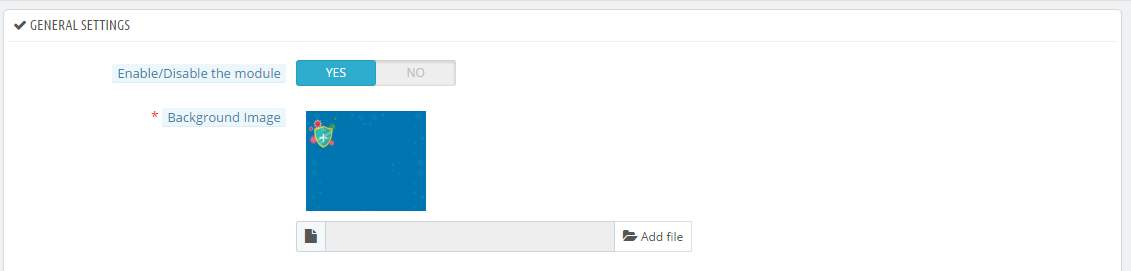
  • Background Image: The background banner of the COVID19 Information Popup can be uploaded , deleted or replaced from this tab.

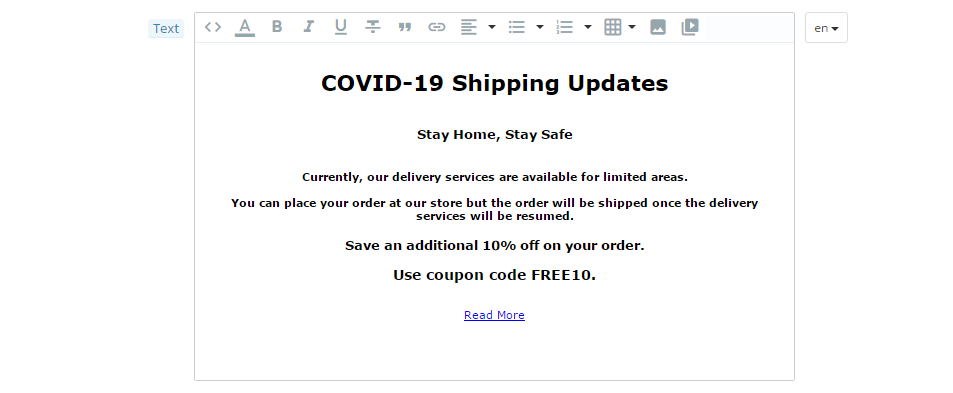
  • Text: From the Text tab, the store admin can add and customize the COVID19 Information Popup banner text. 

  • Text Color: From this tab, the admin can choose the color of the text displayed in the banner at the front office.
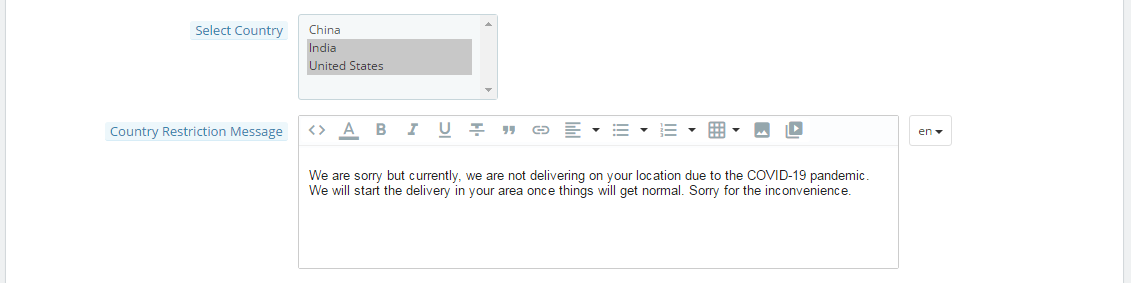
  • Select Country: From this tab, the e-merchant can select those countries where he wants to allow shipping and checkout of the products of his store.


  • Country Restriction Message: If a country is not selected in the ‘Select Country’ tab, the module will show an error message at the checkout page highlighting the unavailability of the product in that particular location. From the ‘Country Restriction Message’ tab, the store admin can add and modify this error text.

  • Time Interval for Popup (in Min): The admin can specify the time interval in minutes to display again the COVID19 Information Popup on the website.

4.0 Front Office:

Magento Product Availability Check by Zip Code (Buy Now at zero cost)

“Magento Product Availability Check by Zip Code extension lets your customers check the availability of the product in their location by entering their area zip code.”

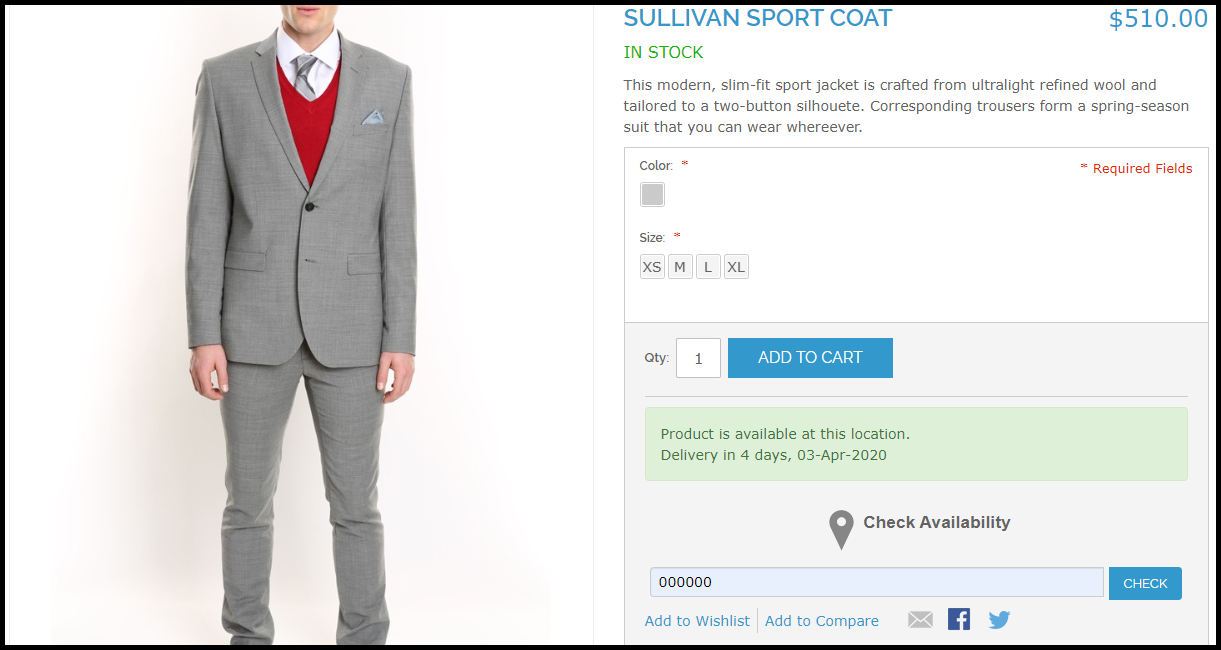
The extension adds a “Check availability” section on your product pages. When a user specifies the zip code of his/her region, it checks whether the product is available to be delivered at their location or not. If available, it will display the estimated delivery date else it will show that “the product is not available at this location.”

Note: Due to the COVID-19 outbreak, we have currently made this module free for our customers. Related information and download link are given at the end of this post.

Overview

1. Allow customers to check product availability by their area zip code

2. Display the estimated delivery date for available products

3. Disable Add to Cart button functionality if product not available

4. Add multiple zip codes

5. Specify the delivery time interval for a particular zone

6. Product mapping for different zones

Description

1. Magento Zip code Validator Extension requires customers to enter the zip code on the product page before proceeding to the checkout. They would not be able to add the product to the cart and checkout without checking the product availability.

2. Magento Zip code verification extension consists of a “Disable Checkout” option enabling which the “add to cart” button will disappear from the product page if that product is not available for the specified zip code.

3. If the product is available in the specified area zip code, Magento Product Zip code Extension displays the estimated delivery time interval along with the delivery date. (Refer to the image at the start of the blog post)

4. Magento Zip code Validator Extension lets you add multiple zones from the back end configurations. You can specify the zip codes (separated by comma) for every zone and define the estimated delivery date.

5. You can map your store products for different zones, after which the products will be available only on those zones for which they have been mapped. Product zone mapping can be done either manually or through CSV file upload.

6. Magento Zip code verification module is easy to install and configure and offers multi-store compatibility.

Benefits

1. Enhance the shopping experience of your customers.

2. Helps you with product page optimization

3. Makes it easy to manage products delivery.

4. Customers can know the product availability right on the product page and not on the checkout page.

Special note: The module has an actual cost of around $36 with free 3 months of support but following the corona pandemic, we have currently made it free for our customers. During these hard times, we are making sure that we do best for our customers in whatever way possible.

For the time being, download this module for free. We will keep you updated with new free modules.

Download the module from here.

If you have any query regarding this, you can reach out to us at support@knowband.com
Best Tips To Customize A PrestaShop Website

Selling products on an eCommerce website rely on the presentation & personalization of the products. In simple words, the functionalities, products, features, etc. should be matching to front-end client requirements. PrestaShop online store customization is all about adding new features and functionalities. While doing so, you must be taking some precautionary measures which will help in branding a unique image to the website without cluttering in any possible way.

The majority of the PrestaShop e-retailers happen to make at least some sort of custom change in their e-store. This is, in fact, a necessity for e-businesses to have a distinctive & unique touch to their eCommerce website. Most businesses opt for this to keep the look & feel of their website in-line with their own unique theme of their business. These customizations not only enhance the graphical design of a website but also contribute to adding more functionalities & improve the shopping experience.

Here are few such factors discussed below that can help you with customizing your eCommerce PrestaShop website.

#1. Customization Using Hooks:

Hooks are basically images that can be used for displaying informative images & also act like CTA sources. We can categorize them into two basic options:

A) Action Hooks:

These hooks are clickable & hence can be used to redirect the site visitor to a relevant page. These kinds of hooks require strategic configuration as their CTR would influence more engagement and sales.

B) Display Hooks:

These hooks are plain images simply for the purpose of displaying various things. Some common areas where hooks are placed:

a) Multiple positions on the homepage.
c) Left/ Right-aligned hooks.
d) Footer’s bottom area.

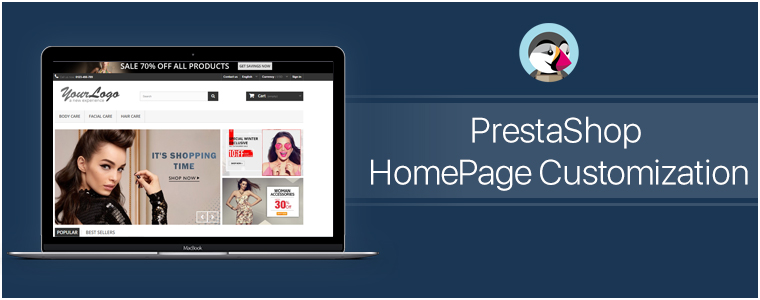
#2. PrestaShop HomePage Customization:

Generally, on the home-page, the area ‘above the fold’ is what gets the first view on a website. Similar to newspapers, websites also have the most important news highlights on the top half of their home page, such an approach to design & customize the PrestaShop homepage helps to engage customers in a more productive way. Some of the home-page designs that can be customized include:

● Sticky Navigation Menu/ Bar with Company Logo, Signup link, search box, etc.
● Slider Images with hyperlinks to relevant topics.
● Banner Images of selected categories of the products being sold on the e-store.
● Hyperlinked Infographic for sale, lotteries, offers, coupons, time-based flash-sale, new arrivals, brand launches.
● Widgets/ add-ons for social accounts like a Facebook block with like/share/follow buttons.
● Static/ dynamic chatbots.
● Gamified CTA (Call to Action) like ‘spin & win’ discount wheels or gamified newsletter/ notification subscriptions.
● Banners for top-seller/ top-brand.
By now, you would have probably realized how these additions would not only make such an e-store stand out for looks & functionalities but also serve the purpose of growing conversions.

A lot of these modifications can be made using the PrestaShop Modules. And because PrestaShop is an open-source eCommerce platform even more edits can be made by manually coding the required functionalities. So the eCommerce businesses on PrestaShop automatically get an additional advantage here to build their site according to their own unique business needs.

#3. PrestaShop Footer Customization:

The footer of the PrestaShop website enables the e-store admins to showcase various widgets & functionalities. Some can be added via PrestaShop Add-on Modules while some come pre-installed. Even more, can be added via coding or customization.

Footer, for all the webpages, is mostly kept common. So, it is crucial to have all the important things available in it. It offers instant access to your customers for all necessary links & information no matter where they’re displayed on the Prestashop website.

Few common footer customizations are listed below:
● Newsletter Signup Segment
● Social Channel Icons
● Sitemap (HTML Sitemap)
● Company Certifications & Payment Methods
● Quick Navigation Links
● Sign-in /Sign-up Links / ‘My Account’ section
● Contact details of the Company

#4. Other Customizations:

A) CMS Icons:

To display extra information about your PrestaShop store such as payment options, refund policies, etc, admin can use the CMS icons. Clicking them takes the user to the relevant page.

B) Top Side Banner:

This is a default feature that admins can enable/disable. This adds a thin banner on the extreme top of the page with the purpose to show the special offers, discounts, limited-time shipping, etc.

C) Social Sharing Icons/ Links:

With these icons, your e-shoppers can share the link of their choice of products with their friends, family & acquaintances. Prefer to add the links for Facebook, Pinterest, Whatsapp, etc.

Conclusion:

As they say, often little things make the biggest impact. Adding more customized functionalities to your store would help in the growth of the business. These just are a few examples of how PrestaShop Customization can be utilized. Apart from these, there are unlimited numbers of customizations that can be implemented. Feel free to discuss with us on support@knowband.com and get a quote for the required customizations.

Visit KnowBand Plugins to get eCommerce plugins for all platforms.

OpenCart Product Availability Check by Zip Code Extension (Buy Now at zero cost)

“OpenCart Product Availability Check by Zip Code extension lets your customers check whether or not a product is available for delivery at their region. For this, they need to enter their area zip code.” The module is sometimes also referred to as OpenCart Zip Code Validator or OpenCart Zip Code verification.

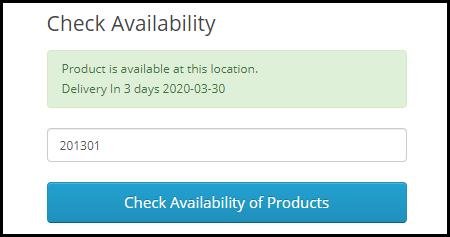
The module adds “Check availability of products” tab on the product pages. And upon entering the zip code, for available products, it displays that the product is available along with the estimated delivery date else it displays that the product is not available at that location.

Note: Due to the COVID-19 outbreak, we have made this module free for our customers. Related information and download link are given at the end of this post.

Overview

1. Allow customers to check product availability by their area zip code

2. Display the delivery day and the time interval for the specified zip code

3. Add to Cart button is disabled if product not available

4. Disable zip code check functionality on selected products

5. Add multiple zip codes either manually or through CSV upload

6. Specify the delivery time interval for a particular zone

7. Product mapping for different zones

Description

1. OpenCart Zip code Validator Extension requires customers to enter the zip code on the product page before proceeding further. They would not be able to add the product to the cart and checkout without checking the product availability.

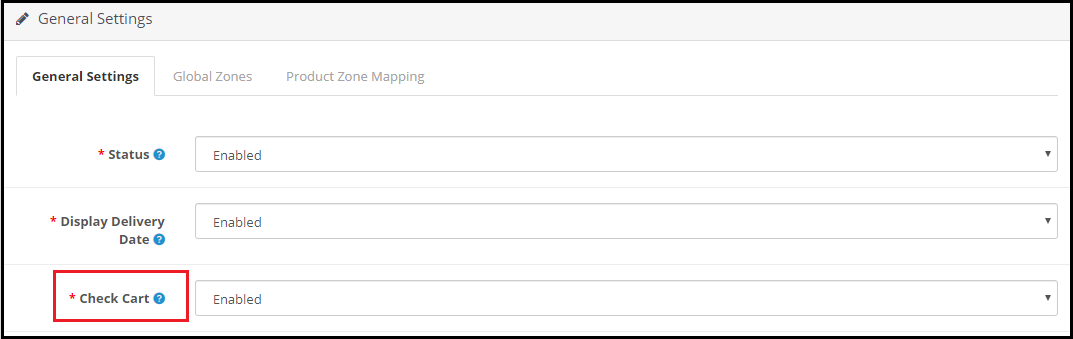
2. The Zipcode verification extension consists of a “Check Cart” option enabling which the “add to cart” button will disappear from the product page if that product is not available for the specified postal code.

3. If the product is available in the specified area zip code, OpenCart Product Zipcode Extension displays the estimated delivery time interval along with the delivery date. (Refer to the image in point 1)

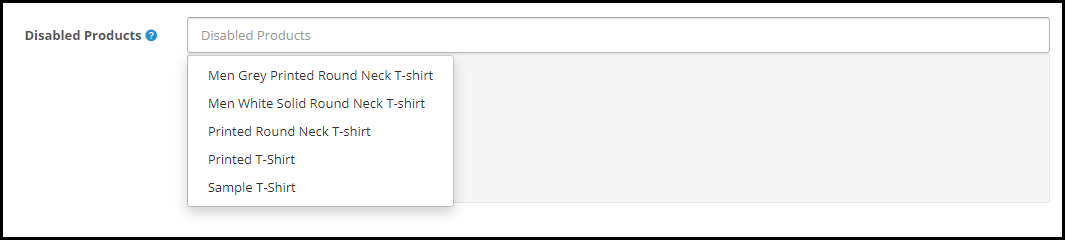
4. OpenCart Product Availability Extension provides you with the option to disable the zip code check functionality on some products. You can choose those products from the drop-down list under the “Disabled products” option.

5. OpenCart Zipcode Validator Extension lets you add multiple zones from the back end configurations. You can specify the zip codes for every zone and define the delivery time interval. The zip codes can be added either manually or by uploading a CSV file.

6. You can map your store products for different zones, after which the products will be available only on those zones for which they have been mapped.

7. OpenCart Zip code verification module is easy to install and configure and offers multi-store compatibility

Benefits

1. Enhance the shopping experience of your customers.

2. Helps you with product page optimization

3. Makes it easy to manage products delivery.

4. It saves the customer’s time as they are informed about the product availability right on the product page.

Special note: The module has an actual cost of around $36 with free 3 months of support but following the corona pandemic, we have currently made it free for our customers. During these hard times, we are making sure that we do best for our customers in whatever way possible.

For the time being, download this module for free. We will keep you updated with new free modules.

Download the module from here.

If you have any query regarding this, you can reach out to us at support@knowband.com
Magento 2 COVID-19 Module -User Manual

1.0 Introduction:

The Magento 2 Free COVID – 19 Information Popup extension allows the store admin to display a COVID – 19 Information Popup in which they can notify their customers about the current update on their Shipping and Delivery services. With this Popup extension, the store admin can educate the customers on basic protective measures against this infectious disease COVID-19. Because of the lockdown situation in many countries, the shipping and delivery services of many businesses are negatively affected. With this COVID – 19 Information Popup, the store owner can update the customers about the shipping and delivery services easily.

1.1 Features of Free COVID – 19 Information Popup:

  1. Easy to Install and Configure: The COVID – 19 Information Popup extension is quite easy to install and configure and no coding efforts are required to integrate this Popup on your website.
  2. Choose Geo Location: With this feature, you can display the COVID – 19 Information Popup worldwide or you can choose specific countries to display the popup. 
  3. Specify Display Frequency: This extension allows you to set the display frequency of the COVID – 19 Information Popup on your website. You can display this popup on every visit, hourly, daily, weekly, or monthly basis.
  4. Customizable Look and Feel: The admin can customize the COVID – 19 Information Popup banner, and text as per their business needs and requirements. The admin can also change the color of the text in the Popup.

1.2 Merchant Benefits of Free COVID – 19 Information Popup:

  1. By displaying the COVID – 19 Information Popup, the merchants can educate their customers and spread awareness about the infectious disease.
  2. The merchants can notify their customers about their shipping and delivery services during the quarantine period using the COVID – 19 Information Popup.
  3. The merchants can also display current deals and discounts on the Popup with the respective Coupon Code.

1.3 Customer Benefits of COVID – 19 Information Popup:

  1.  The COVID – 19 Information Popup can play a major role in educating the visitors of your website. The customers will get the right information about the basic protective measure against this new COVID-19 virus with this COVID – 19 Information Popup.
  2. With this Popup, the customers will be updated about the shipping and delivery services of your company.

2.0 Installation:

After purchasing Magento 2 Covid Popup extension, the store admin will get the following files:

  1. Knowband_Covidpopup.zip which has the source code of this Magento 2 COVID-19 Popup plugin.
  2. User Manual, with all the basic details and information.

2.1 The steps to install the Magento 2 COVID-19Popup Extension are mentioned below:

  • Download the Magento 2 COVID-19 Popup module from Knowband.
  • The package has a zipped file that contains the user manual and the source code of the Magento 2 COVID-19Popup module. Now, Unzip this package.
  • Create a folder {Magentoroot}/app/code/Knowband/Covidpopup
  • Upload the extracted content in the above folder via FTP manager (like Filezilla or WinSCP – download here: https://filezilla-project.org/).
  • Now run below commands to install the plugin:
  1. composer require geoip2/geoip2:^2.9.0
  2. php bin/magento module:enable Knowband_Covidpopup
  3. php bin/magento setup:upgrade
  4. php bin/magento setup:di:compile
  • The extension is now installed and ready for use. In Admin Panel go to “Knowband ->Free COVID-19Information”.
    You can now configure and use the Knowband COVID-19 Popup plugin.

3.0 Admin Interface:

The store admin can easily configure the COVID – 19 Information Popup extension from the admin interface. After installing the extension, the admin can configure the extension from the ‘Knowband’ tab. The admin interface includes the following categories:

3.1 General Settings:

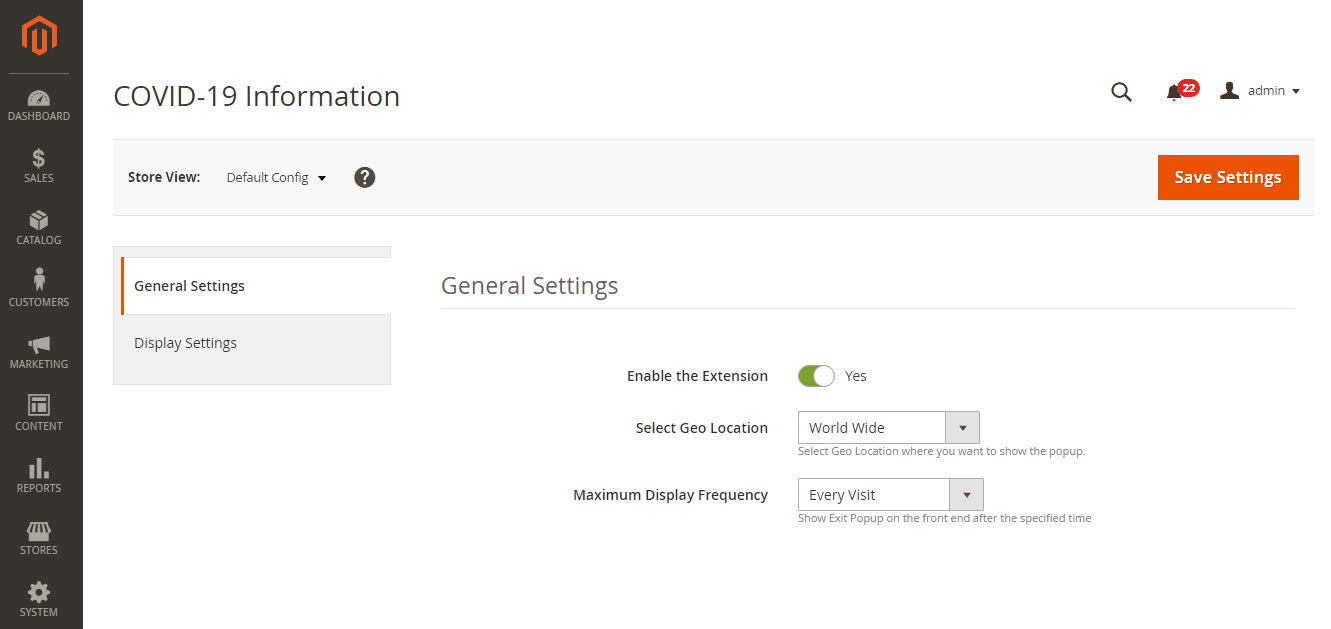
  1. Enable the Extension: From this button, you can enable or disable the COVID – 19 Information Popup extension.
  2. Select Geo Location: From this tab, the admin can select the Geo Locations in which he wants to display this COVID – 19 Information Popup. The admin can display the Popup worldwide or in selected countries.
  3. Maximum Display Frequency: From this tab, the admin can set the frequency to display the COVID – 19 Information Popup i.e., on Every Visit, One Visit per hour, One Visit per day, One Visit per week, One Visit per month.

3.2 Display Settings:

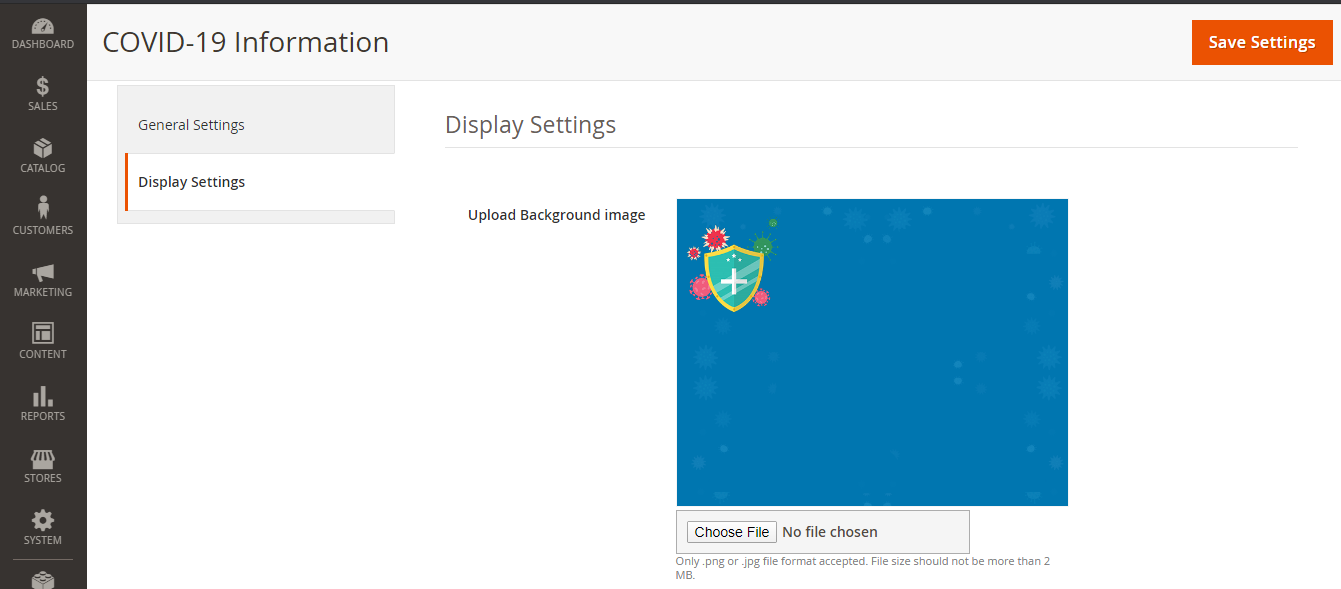
  1. Upload Background Image: The store admin can upload and replace the Popup banner from this tab by clicking the ‘Choose File’ button.
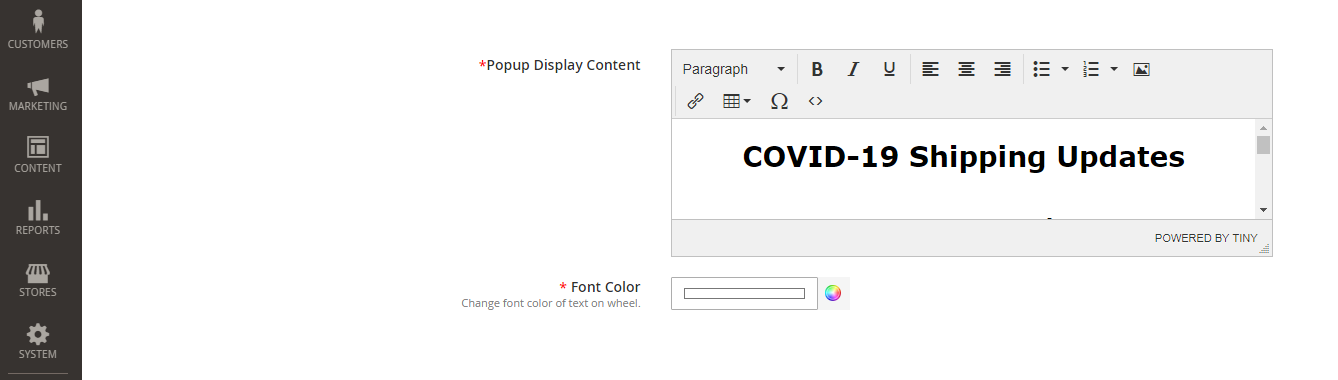
  2. Popup Display Content: The text in the COVID – 19 Information Popup can be easily customized from this tab.
  3. Font Color: From this tab, the admin can change the font color of the text in the COVID – 19 Information Popup.

4.0 Front Office: