Prestashop Product Sticker & Label Addon – User Manual

1.0 Introduction:
Modern customers have a limited attention span. Meaning that when they visit an eCommerce website, the administrator has a limited time to provide them with relevant information and enticing offers. The reason behind the same is various types of information are crucial for customers to determine if a product meets their requirements.

Considering the same, we have developed the PrestaShop Product Label addon specifically for PrestaShop eCommerce merchants. The Prestashop product sticker and label module enables administrators to add dynamic stickers to their storefronts. Additionally, administrators have the flexibility to upload their stickers, customize their dimensions, and choose their desired position on the website pages.

Moreover, if you aim to inform your customers about sales, promotions, delivery times, and other important details. Knowband’s Prestashop Product badge addon for PrestaShop is the perfect solution for all your promotional business needs. This extension provides a wide range of useful features and ensures peace of mind. Let’s explore some of the key highlights offered by the PrestaShop product sticker plugin.

2.0. Major Highlighted Features Offered by Knowband’s Product Badge Addon:

The PrestaShop product sticker plugin is empowered by tons of incredible features. Not only the plugin is configurable from the back end but also provides high-quality pre-loaded stickers.

We have tried to cover up some of the most sounding features of the PrestaShop product sticker module.

  1. The admins can boost their revenue by showing the offer discounts on products.
  2. The PrestaShop store admins can choose the pages where they want to show the product stickers. For example, the store administrators can choose the options from the product page, product listing page, search page, home page, and much more.
  3. The PrestaShop admins can choose to include or exclude specific products for the sticker appearance.
  4. With the help of the PrestaShop Product Sticker module, the store admins can include the PrestaShop store categories where they want to show the responsive stickers.
  5. Along with pre-available stickers, the admins can also upload the stickers of their own will in the module and make them appear within no time on the shopfront.
  6. The PrestaShop Product Label plugin allows showing the stickers based on the products’ available stock conditions.
  7. Create as many labels as you want within clicks.
  8. The PrestaShop store admins can manage the sticker positions on the product images right from the module backend.
  9. The admins can schedule the start and end dates for particular stickers.
  10. The admins can choose between all products, specific products, and special categories for the sticker appearance.
  11. The admins can also select the rules of products like best seller products or can set minimum or maximum prices of products or new products for the sticker appearance.

3.0 Installation Guide for Prestashop Product Sticker and Label Addon:

Once you purchase the addon, follow the below steps:

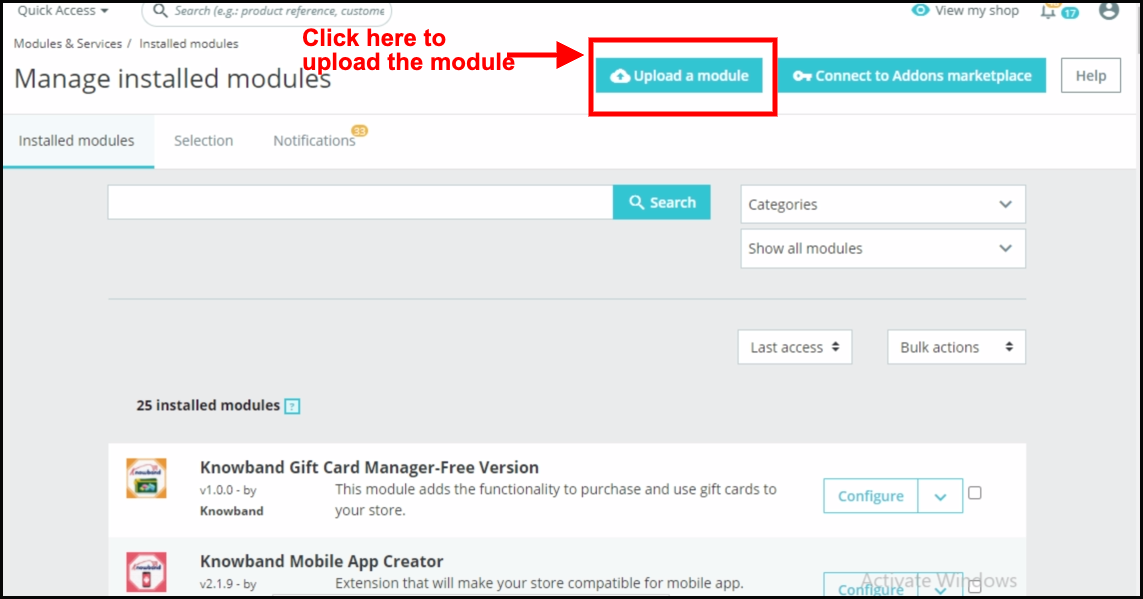
  1. Go to the Store Admin -> Modules and Services.
go-to-the-store-admin-modules-and-services

  1. Click on “Upload a module”. You can drag or drop the file or can simply select the file from the system.
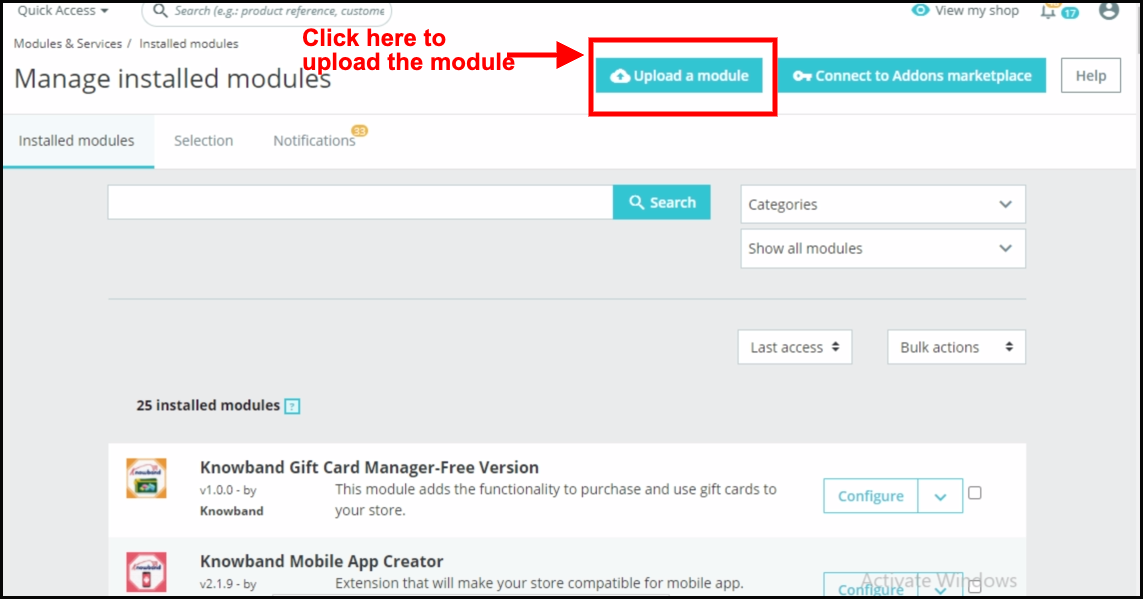
 

Once the file is completely uploaded, a notification of “Module(s) installed successfully” will display.

4.0. Admin Interface: Prestashop Product Badge Module!

The Prestashop product badge addon comes with an easy-to-configure admin panel. Using the same the Prestashop store administrator can simply configure the sticker settings and can further manage the Product stickers for the shopfront. 

  • 4.1. General Setting:


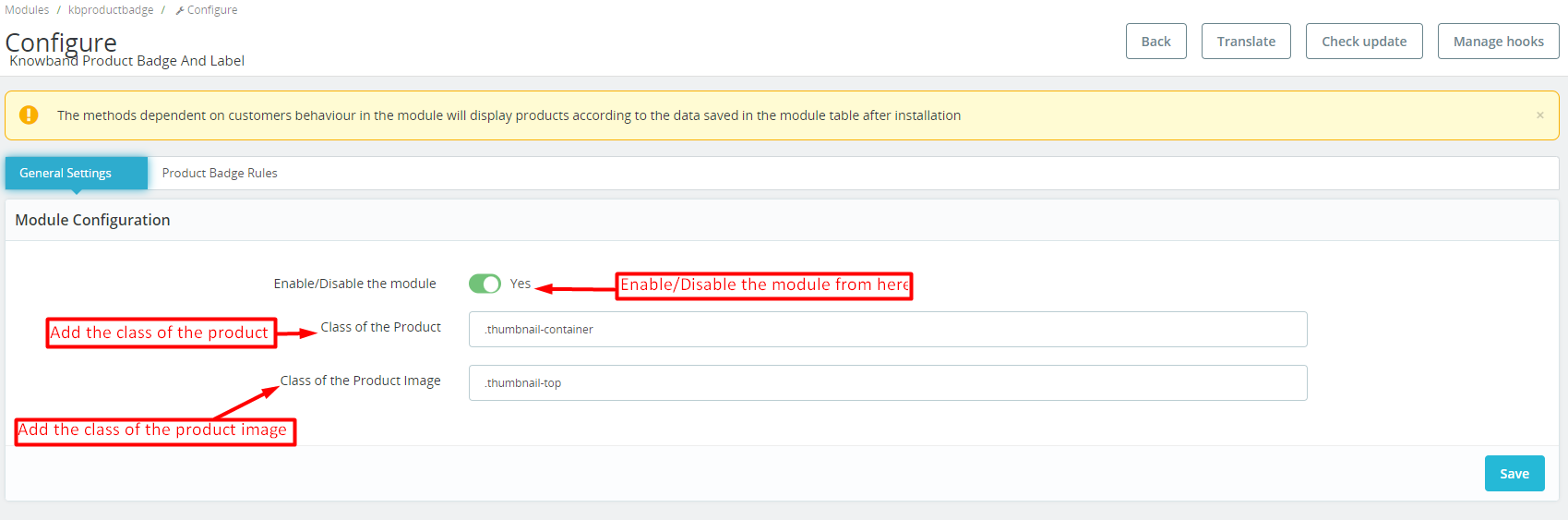
In the following tab, the admin can manage the plugin’s general settings.

Enable/Disable: You can use the following button for enabling/disabling the module. 

Class of Product:

The admins can add the class of their store products on store front in this particular text box. 

Class of Product Image:
The particular text field is provided for the admins to enter the class of the store’s product image on storefront.

4.2. Product Badge Rules:

In the following tab, the store admin can manage basic setting operations for the product badges.
we have provided the options for adding new, editing, or deleting all the stickers. Moreover, the Prestashop store admins can find the list of all the stickers in the following tab.

Add Sticker Rule:
By clicking on the following button, the store admins can create new sticker rules. 

Edit Sticker: If you have already created and configured a sticker rule and now want to change the sticker settings, you can modify the same from here.

4.2.1. Product Badge Rules: General Rule Setting:
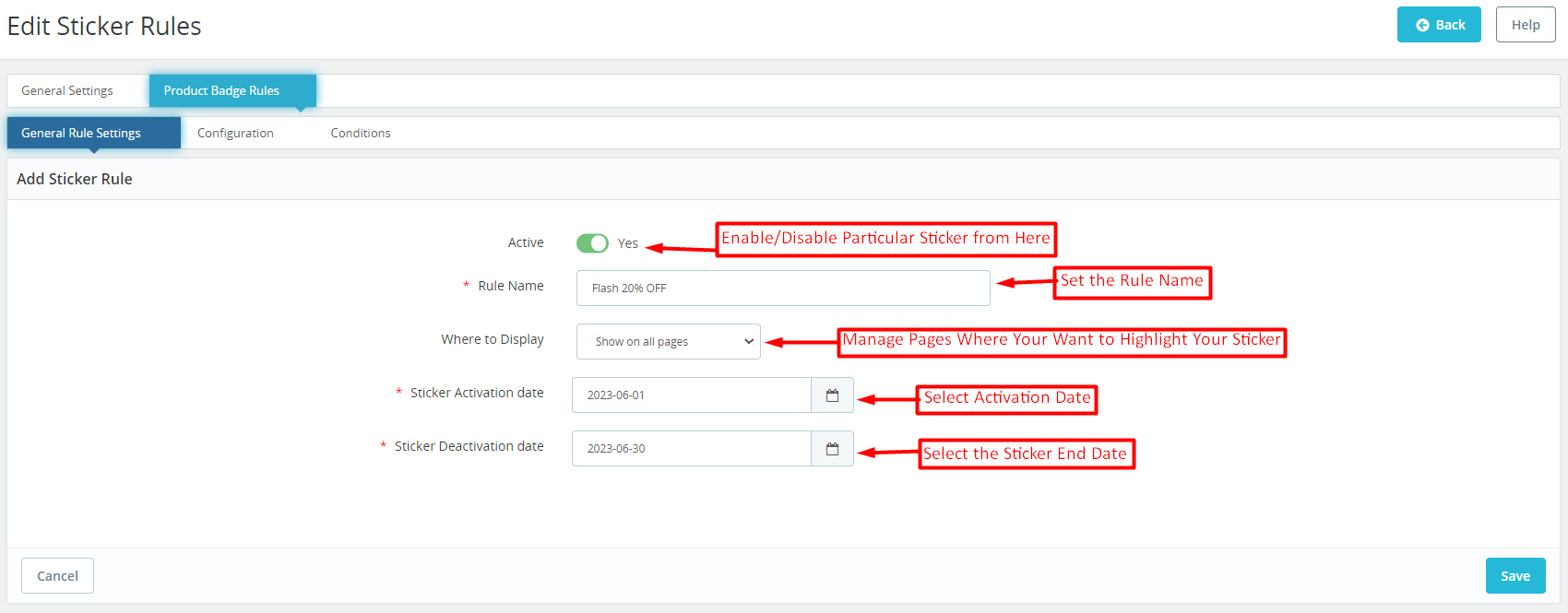
Prestashop Product sticker and Label addon provide a separate tab for managing the general sticker rules. In case the admin wants to modify the general configurations of the sticker, he can modify the same from here. 

Active: With the help of this button, the store admins can enable/disable a particular product sticker. 

Rule Name: You can add the sticker name from here at your convenience. 

Where to Display: The Prestashop store retailers can manage the pages where they want to display the stickers. For example, we have provided the options for showing stickers on all pages and the admins can even select the specific pages where they want to show the product badges. 

Sticker Activation Date: Choose the starting date of product stickers from here. 

Sticker Deactivation Date: The Prestashop admin can select the end date for a particular sticker from here.

4.2.2. Product Badge Rule: Configurations:
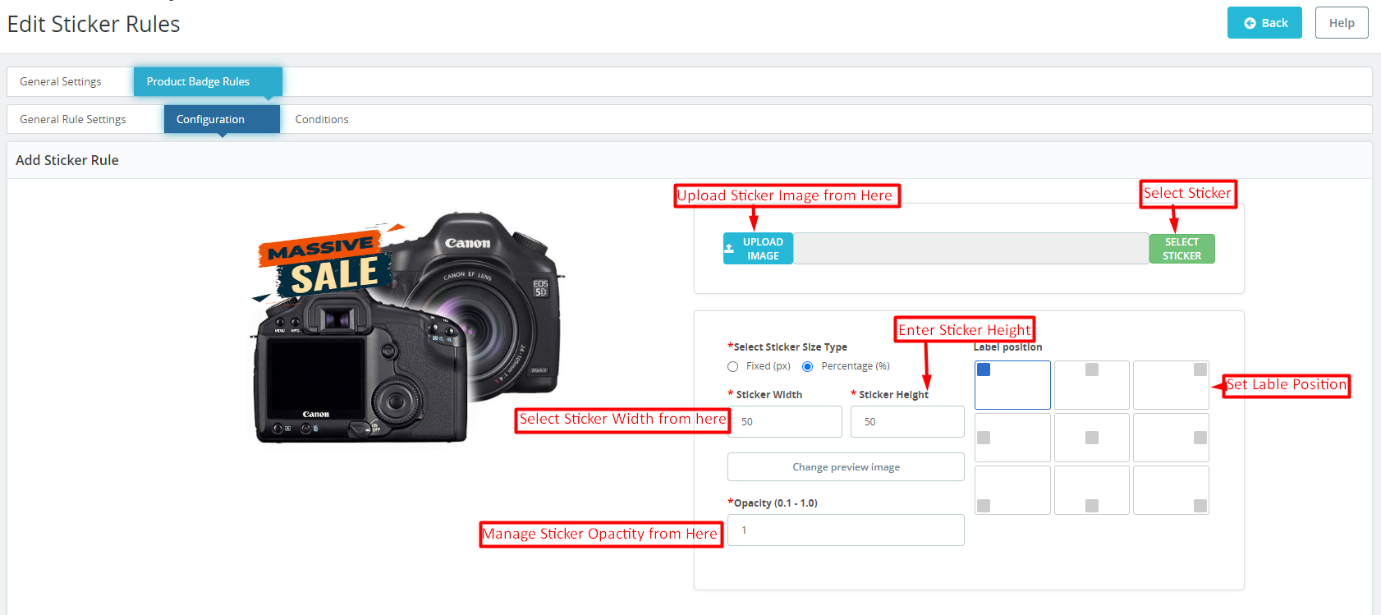
The sticker configuration tab offered by Knowband Prestashop Product Sticker and Label Addon simplifies the sticker look and feel management.
The following tab allows the eCommerce store admins to choose from 20+ pre-loaded stickers and the admins can also add new stickers at their convenience. 

Sticker Upload:

If you wish to upload a new sticker from your system, simply use the “Upload Sticker” button.

Sticker Size Type Selection:

We provide two options in the button below. If you prefer to set the sticker size using fixed dimensions (in pixels), click on the corresponding radio button.

Alternatively, if you want to configure the sticker size based on a percentage, we have also provided an option for the same. 

Sticker Height and Width:

Using the button below, you can adjust the height and width of your product label. You can also preview the sticker’s appearance in real-time as you change its size. For percentage, the maximum height and width should be 100%.

Change Preview Image:

Administrators can select a new preview image to visualize how the product labels will look on their product images using the button.

Opacity:

You can adjust the opacity of the sticker using the following option.

4.2.3. Product badge Rules: Conditions:
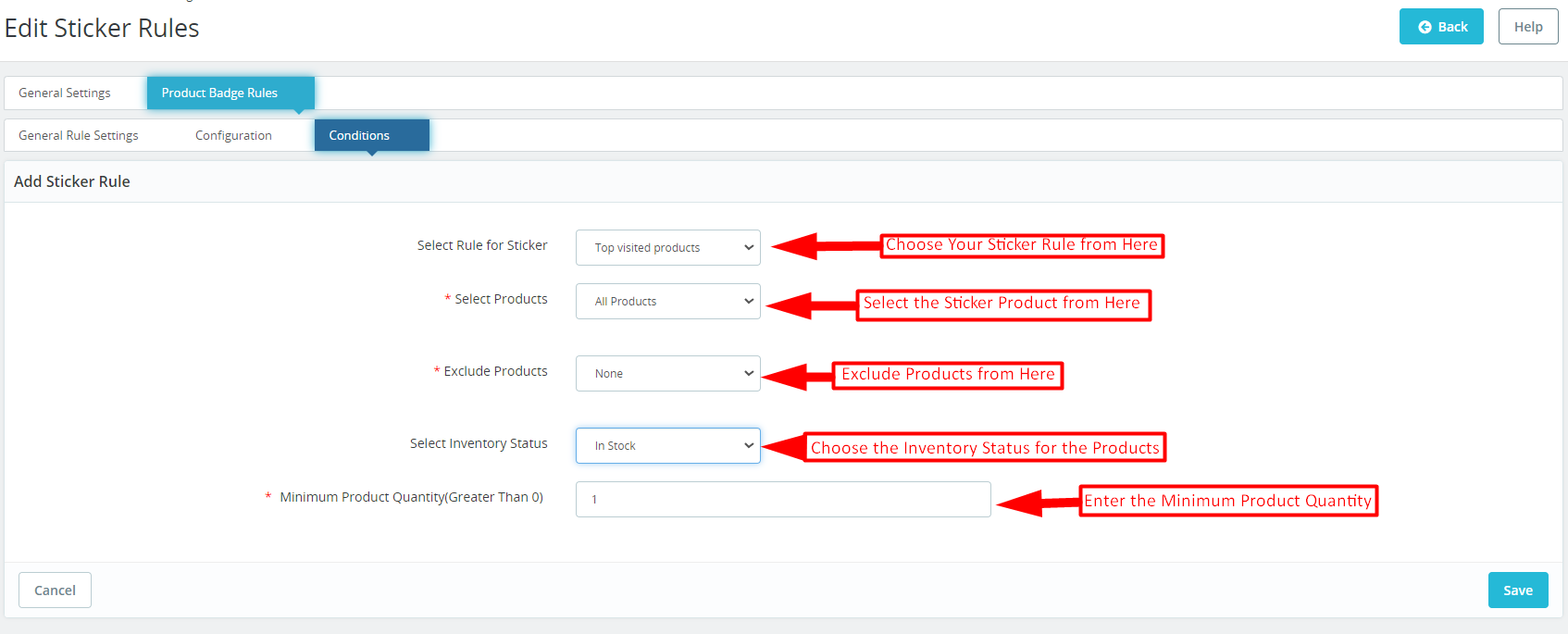
In the sticker conditions tab offered by Knowband Prestashop product sticker and label module. The store admins can set different conditions for the product badges.

Select Rule for Stickers: You can select your sticker rule from various options provided here. We have added rules for showing stickers based on top visited products, on-sale products, best-seller products, and new products, and even the admins can add stickers based on the price value.

Select Products: As a Prestashop store admin, you can select products from here (on which you want to display the stickers). You can select the option as all products in case you do not want to exclude any specific product or category.
Furthermore, you can also enter specific products and specific categories for a sticker appearance. 

Exclude Products: In the following tab, the admins can exclude specific products for the product badges. 

Select Inventory Status:

From here, you can select if you want to show the stickers for the in-stock or out-of-stock products only.

Minimum Product Quantity:
If you are looking for showing product labels based on the product quantity in your store, you can add the specific value in the following field. 

5.0. Prestashop Product Sticker and Label Addon: Front End:

After making the changes as per convenience and saving the data from the module back-end. Prestashop store administrators can immediately assess the impact of their modifications. Prestashop Product Sticker module empowers administrators to effortlessly showcase a stunning array of high-quality stickers on their shopfronts. These visually appealing stickers serve as eye-catching elements that captivate the attention of customers. Which further helps in enhancing the overall aesthetics and professionalism of the online store.


The samples above exemplify the seamless integration and impressive front-end displays. The following examples showcase the versatility and creativity that administrators can harness to create compelling product showcases and leave a lasting impression on their customers.
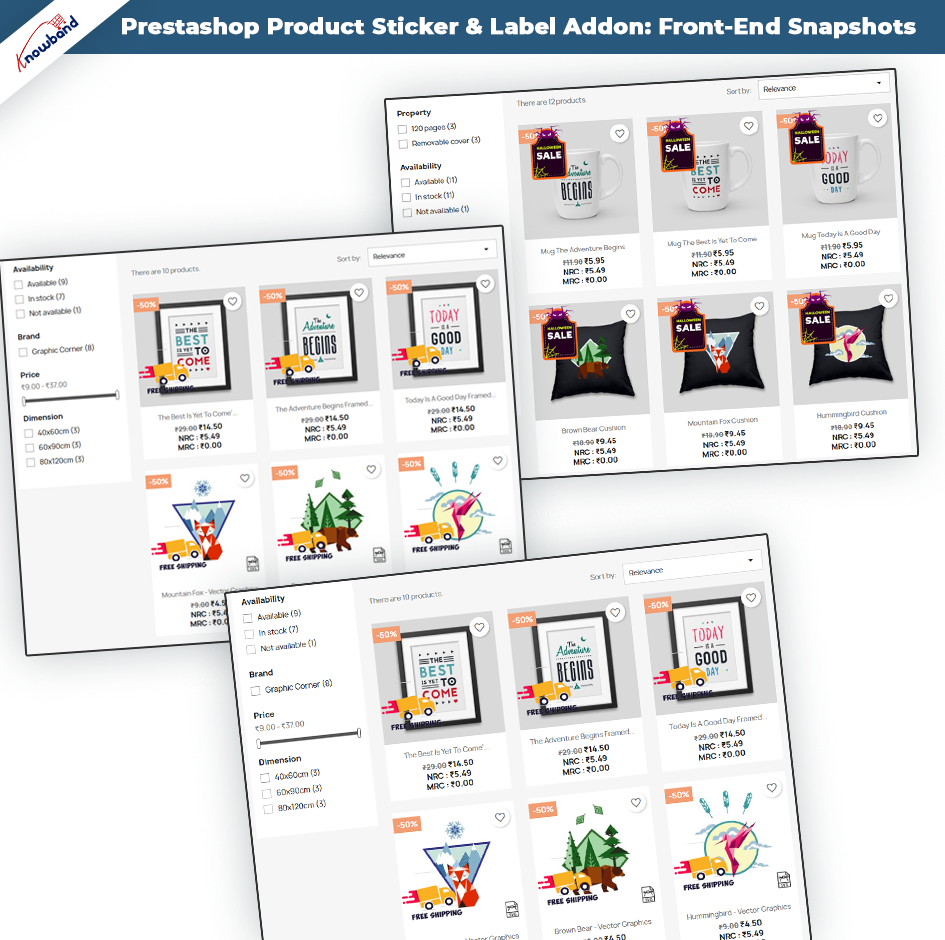


Note: – Only one sticker can be displayed at once on the product image. 

The stickers will be shown based on the most recent date of creation of the sticker rule. This means that the sticker rule that was created most recently will determine which stickers are displayed first.

For a quicker understanding, please refer to the demo tutorial.

WooCommerce iOS App Maker: Revolutionizing E-commerce on Mobile

Are you a business owner looking to expand your reach and enhance customer experience in the ever-evolving world of e-commerce? Look no further than Mobile App for WooCommerce! This groundbreaking platform is transforming the way businesses operate by providing a seamless mobile app experience for WooCommerce users. In this article, we will explore the features, benefits, and impact of WooCommerce iOS App Maker on the e-commerce landscape.


The Rise of Mobile Commerce:

With the rapid growth of mobile usage, businesses need to adapt to meet the demands of consumers who prefer to shop on the go. Mobile commerce, or m-commerce, has witnessed tremendous growth, and e-commerce platforms are recognizing the need to provide mobile-friendly experiences.

Understanding WooCommerce Mobile App Maker

Mobile App for WooCommerce is a powerful tool that empowers businesses to create their own custom mobile apps for iOS devices. It seamlessly integrates with WooCommerce, the popular e-commerce plugin for WordPress, allowing businesses to extend their reach and engage with customers through dedicated mobile applications.


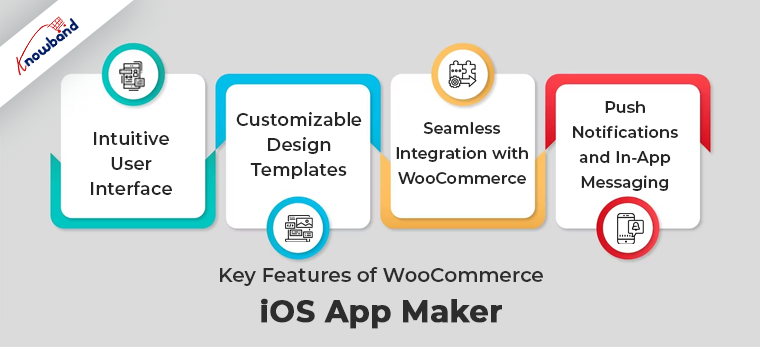
Key Features of WooCommerce iOS App Maker:


Intuitive User Interface:

The user interface of WooCommerce iOS and Android App Creator is designed to be intuitive and user-friendly. Even for those without technical expertise, creating a mobile app becomes a hassle-free process. The platform provides a drag-and-drop interface, enabling users to easily customize the app’s layout and functionality.

Customizable Design Templates:

WooCommerce App Maker offers a wide range of design templates to choose from. These templates are fully customizable, allowing businesses to align the app’s branding with their overall identity. From color schemes to font styles, every aspect of the app’s design can be tailored to create a unique and captivating user experience.

Seamless Integration with WooCommerce:

One of the standout features of WooCommerce App Creator is its seamless integration with WooCommerce. This ensures that businesses can synchronize their products, inventory, and customer data effortlessly between their website and mobile app. Any changes made on the website will reflect automatically in the app, providing a consistent and up-to-date shopping experience.

Push Notifications and In-App Messaging:

Engaging with customers is crucial for business success. WooCommerce App Maker allows businesses to send push notifications and in-app messages to their app users. These notifications can be personalized based on user preferences, promoting special offers, product updates, or important announcements. By leveraging this feature, businesses can stay connected with their customers and drive increased engagement.


The Benefits of Using WooCommerce iOS and Android App Maker:

Enhanced User Experience:

A dedicated mobile app built with WooCommerce mobile App Maker offers a superior user experience compared to browsing a website on a mobile browser. Apps are optimized for mobile devices, ensuring faster load times, smoother navigation, and improved overall performance. Users can enjoy a seamless and convenient shopping experience, leading to higher customer satisfaction and loyalty.

Increased Sales and Conversion Rates:

With a mobile app, businesses can capitalize on impulse buying and provide personalized recommendations based on user behavior and preferences. Push notifications can be used to notify users of limited-time offers, discounts, or abandoned cart reminders, prompting them to complete their purchases. The result is increased sales and higher conversion rates, benefiting both the business and the customers.

Improved Brand Loyalty and Engagement:

A mobile app creates a direct channel for businesses to connect with their customers. By sending personalized offers and relevant content, businesses can nurture customer relationships and foster loyalty. Additionally, features such as loyalty programs, in-app rewards, and exclusive app-only deals can incentivize customers to engage more frequently, further strengthening the bond between the business and its audience.


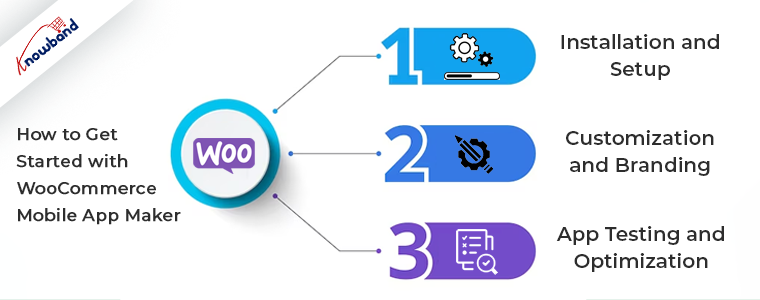
How to Get Started with WooCommerce Mobile App Maker

Creating a mobile app with WooCommerce mobile App Maker is a straightforward process. Follow these steps to bring your e-commerce business to the mobile platform:


Step 1: Installation and Setup

Start by installing the WooCommerce App Maker plugin on your WordPress website. Once installed, configure the necessary settings and connect your WooCommerce store to the app maker platform.


Step 2: Customization and Branding

Choose a design template that aligns with your brand and customize it according to your preferences. Personalize the app’s colors, fonts, logo, and other visual elements to ensure consistency with your brand identity.


Step 3: App Testing and Optimization

Before launching your app, thoroughly test its functionality and usability. Identify and address any issues or bugs to provide a smooth experience for your users. Optimize the app’s performance and loading speed to maximize customer satisfaction.


The Future of E-commerce: Trends and Predictions

As technology continues to advance, e-commerce is poised for further innovation. Here’s a glimpse into the future of e-commerce:


Mobile-First Approach:

Mobile devices will continue to dominate the e-commerce landscape, with businesses prioritizing mobile optimization and delivering exceptional mobile experiences.

Voice Commerce and AI Integration:

Voice assistants and AI technology will play a significant role in shaping the future of e-commerce. Customers will be able to make purchases and interact with businesses using voice commands, and AI algorithms will provide personalized product recommendations.

Augmented Reality Shopping Experiences:

Augmented reality (AR) will revolutionize the way customers shop online. By allowing users to visualize products in real-world settings, AR technology will provide an immersive and interactive shopping experience.


Conclusion

WooCommerce iOS and Android App Maker is a game-changer for businesses seeking to expand their reach and improve customer engagement in the mobile commerce landscape. By offering a seamless mobile app experience, businesses can drive sales, enhance brand loyalty, and provide exceptional user experiences. Embrace the future of e-commerce by harnessing the power of WooCommerce iOS App Maker and taking your business to new heights.


FAQs

Q.1 What is WooCommerce iOS App Maker?

WooCommerce iOS App Maker is a platform that enables businesses to create customized mobile apps for iOS devices, seamlessly integrated with WooCommerce.

Q. 2 Can I customize the design of my app?

Yes, WooCommerce Android App Builder provides a range of customizable design templates. You can personalize the app’s appearance to align with your brand identity.

Q. 3 Will my app be compatible with future WooCommerce updates?

Yes, WooCommerce mobile App Maker ensures compatibility with future updates of WooCommerce, allowing your app to stay up-to-date with the latest features and functionalities.

Q. 4 How can a mobile app improve my sales?

A mobile app provides a more user-friendly and convenient shopping experience, leading to increased sales and higher conversion rates.

Q. 5  Is WooCommerce iOS App creator suitable for small businesses?

Yes, WooCommerce iOS App creator caters to businesses of all sizes. Its intuitive interface and customizable features make it accessible and beneficial for small businesses as well.


A Comprehensive Guide to Choosing the Right PrestaShop Multi-Vendor Marketplace Plugin

Multi-vendor marketplaces have grown in popularity along with e-commerce. These platforms provide a space where multiple sellers can offer their products or services to a wide range of customers. To set up a successful multi-vendor marketplace using PrestaShop, you need a reliable and feature-rich Prestashop multi-vendor marketplace plugin that can handle the complexities of managing multiple vendors, inventory, payments, and more. In this article, we will explore the essential factors to consider when choosing a multi-vendor marketplace plugin for PrestaShop and highlight its benefits of it as a recommended solution.


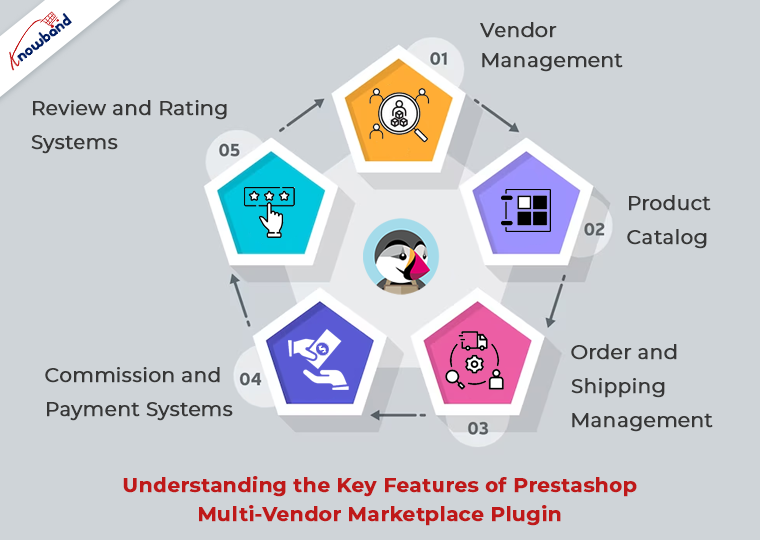
Understanding the Key Features of Prestashop Multi-Vendor Marketplace Plugin:


When evaluating Prestashop multi-vendor marketplace plugin, it’s crucial to assess its key features to ensure they align with your specific business requirements. Some key characteristics to consider include:

  1. Vendor Management: A robust plugin should provide comprehensive tools for managing vendors within the PrestaShop platform, including registration, approval processes, profile management, and communication channels.
  1. Product Catalog: The ability to create and manage a diverse product catalog within PrestaShop is vital. Look for features such as product listings, inventory management, and options for categorization and search.
  1. Order and Shipping Management: Seamless order processing, tracking, and integration with PrestaShop’s shipping modules are crucial for a successful marketplace. Consider plugins that offer automation and efficiency in managing orders and shipping logistics within the PrestaShop environment.
  1. Commission and Payment Systems: Multi-vendor marketplaces operating on PrestaShop typically rely on commission-based models. Look for plugins that offer flexible commission settings and seamless integration with PrestaShop’s payment modules, ensuring smooth and secure transactions.
  1. Review and Rating Systems: A trustworthy marketplace built on PrestaShop relies on customer reviews and ratings. Consider plugins that enable buyers to provide feedback on vendors and their products within the PrestaShop platform.


Why Choose PrestaMarketplace for PrestaShop:


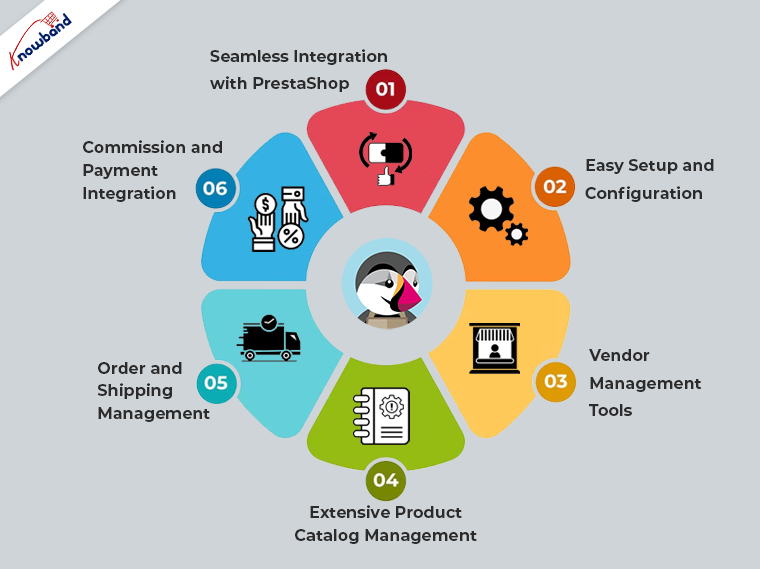
One plugin that stands out in the market for PrestaShop. With its rich set of features and user-friendly interface, it offers a robust solution for building and managing a multi-vendor marketplace within PrestaShop. Here are some reasons why this is worth considering for your PrestaShop-based marketplace:


  1. Seamless Integration with PrestaShop: This is designed specifically for PrestaShop, ensuring seamless integration and compatibility with the platform. This simplifies the setup process and allows you to leverage the existing features and functionalities of PrestaShop.
  1. Easy Setup and Configuration: It provides an intuitive interface and straightforward configuration options that align with PrestaShop’s user-friendly environment. You can quickly customize your marketplace to match your branding and requirements within the familiar PrestaShop interface.
  1. Vendor Management Tools: This plugin offers comprehensive tools for managing vendors within PrestaShop, allowing you to efficiently handle vendor registrations, performance monitoring, and communication within the platform.
  1. Extensive Product Catalog Management: It enhances PrestaShop’s product catalog management capabilities, offering advanced features such as bulk product import/export, inventory management, customizable product pages, and compatibility with PrestaShop’s product attributes system.
  1. Order and Shipping Management: It seamlessly integrates with PrestaShop’s order processing and shipping modules, enabling efficient order management, shipment tracking, and integration with popular shipping providers supported by PrestaShop.
  1. Commission and Payment Integration: The plugin offers flexible commission settings within the PrestaShop environment, allowing you to set commission rates based on vendor categories or individual vendors. It integrates smoothly with PrestaShop’s payment modules, ensuring secure and hassle-free transactions for your marketplace.


Conclusion:

Selecting the right multi-vendor marketplace plugin for PrestaShop is crucial for the success of your e-commerce venture. By carefully evaluating the key features and considering the specific needs of your PrestaShop-based marketplace, you can make an informed decision. It stands as a reliable option, offering a range of essential features that simplify the management of multi-vendor marketplaces within the PrestaShop platform. 


Exploring the Changes in Etsy API v3

Etsy, the popular online marketplace, has introduced its latest API version, Etsy API v3, replacing the older v2 version. This transition brings significant changes and improvements that sellers and developers need to be aware of to ensure a smooth integration process. In this article, we will explore the key changes in Etsy API v3 in simple terms, helping you understand and adapt to these updates.

Key Changes in Etsy API v3 and How They Impact Sellers and Developers:

Enhanced Security with OAuth 2.0:

One of the important changes in Etsy API v3 is the adoption of OAuth 2.0 for authentication and authorization. OAuth 2.0 is a more secure and widely used industry standard. It ensures that only authorized applications can access seller data and perform actions on their behalf. 

Clearer Endpoint Requests:

Etsy API v3 introduces changes to how developers make requests to the API. With the new version, each request must include an “x-API-key” header containing the Etsy App API Key. This change enhances security and helps Etsy track API requests more effectively. Sellers and developers need to update their code to include this header when communicating with Etsy’s API.

Standard request parameters:

The handling of standard request parameters has been modified. The “fields” query parameter, previously used to retrieve partial resources in v2, is no longer supported in v3.
While the “includes” query parameter is still available in some endpoints, its support is limited. Notably, some endpoints now return associated resource data by default, simplifying the API call.

Pagination:

The users can now experience updated pagination. The “limit” and “offset” query parameters should be used for pagination instead of the “page” parameter used in v2. The default records returned per API call is 25, and the maximum number of records that can be returned is 100. To facilitate navigation through larger data sets, Etsy provides limit and offset parameters. The limit parameter allows you to specify the number of records to retrieve per page. While the offset parameter helps you navigate to a specific page of results.

Additionally, the response includes a count field, indicating the total number of records available for pagination. Please note that for performance reasons, the offset parameter has a maximum value of 50000, ensuring efficient handling of large data sets.


Resource scopes:

In the updated Etsy API v3, resource scopes for filtering lists of resources have transitioned from path-based to query parameter-based filters.

Example: Filtering listings by shop ID and state

Suppose you wanted to filter listings by a specific shop ID and state. In v2, you would use:

/v2/shops/:shop_id/listings/active

With the shift to v3, the URL and query parameter approach would be:

/v3/application/listings?shop_id=:shop_id&state=active

Here, you include the desired values for the shop ID and state as query parameters.

Improved Response Structure:

In the previous version of the Etsy API (v2), API responses followed a standardized structure. Encapsulating various fields and nested objects. However, in Etsy API v3, responses have changed. Specifically, endpoints that return lists of resources now include two important fields: “count” and “results.”

The “count” field denotes the number of results in the response, providing a quick overview of the total count of resources returned. On the other hand, the “results” field contains the actual resource objects themselves. This revised structure allows developers to easily access the count and retrieve the specific results from the response.

Retirement of Outdated Resources:

Over 40+ resources and endpoints have been replaced or removed in v3 across various categories such as Payment. ShopListingVariationImage, ShippingProfileUpgrade, User, ShopSection, and more. The complete list of retired resources can be found in the documentation.>>https://developers.etsy.com/documentation/migration/retired-resources/

API Rate Limits:


In Etsy API v3, there have been no changes to the API rate limits compared to v2. If you were using the same Etsy App API Key in v2, your negotiated rate limits will remain the same in v3 as well.

By default, Etsy apps authenticated with their API key can make up to 10,000 public requests within a 24-hour period, providing developers ample opportunities to interact with the Etsy platform and retrieve the necessary data for their applications. The rate limit (10 queries per second) ensures fair usage and maintains system stability.


Do You Know?

Are you already having a Prestashop, Opencart, WooComemrce, or Magento 2-based eCommerce shop? Do you know that with Knowband Etsy marketplace connector, you can list and manage your products on the Etsy marketplace?
The Knowband Etsy Marketplace connector comes with the latest Etsy V3 API changes and ensures seamless integration between your website and the Etsy marketplace.
For example, you can manage all your Etsy orders and listings right from the admin panel of your eCommerce store. Furthermore, you can also reach out to us at support@knowband.com for more information about Etsy Marketplace Connector. 


Conclusion:

The transition to Etsy API v3 brings important changes aimed at enhancing security, simplifying integration, and improving the overall experience for sellers and developers. By understanding and adapting to these changes, you can ensure seamless integration with Etsy’s updated API version and leverage its new capabilities effectively.


Advantages of Knowband Opencart Product Sticker And Label Extension for the Websites

We know that it is very important to capture the attention of potential customers and stand out from the competition. Additionally, one effective way to do this is by using eye-catching product stickers and labels on your online store. Knowband Opencart Product Sticker and Label extension have a wide range of benefits. Moreover, this extension can help enhance your store’s visibility, boost sales, and improve the overall shopping experience for your customers. In this blog, we will explore the key advantages of using Knowband Product Sticker OpenCart Extensions.


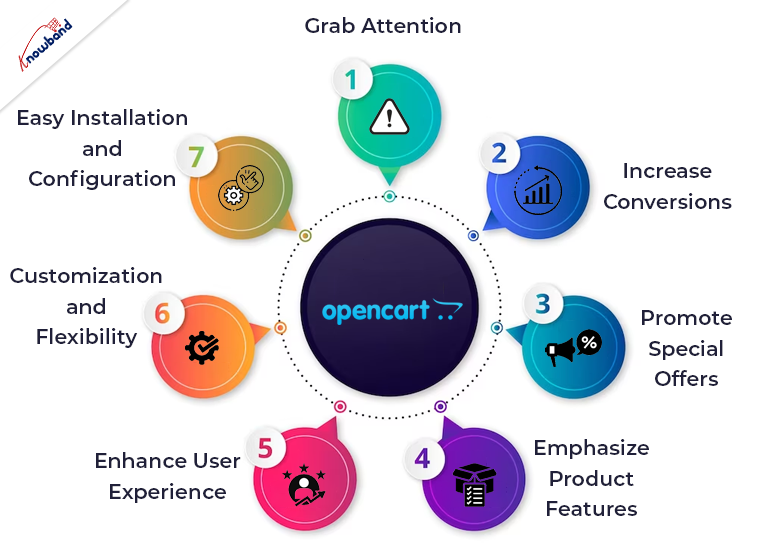
7 Benefits of Opencart Product Sticker and Label Extension:


Grab Attention:

One of the primary benefits of using product stickers and labels is that they instantly grab the attention of online shoppers. Further, with Knowband Product Badge, you can add attractive and visually appealing stickers to your product images, making them more noticeable. Also, these stickers can highlight various aspects such as discounts and can be shown on different products as per the requirement. Also, by drawing attention to these key elements, you can effectively communicate important information. Additionally, this encourages customers to explore your products further.


Increase Conversions:

When customers are browsing through a large number of products, it can be challenging to make a decision. Furthermore, product stickers and labels act as powerful persuasive tools that can influence purchasing decisions. By using Knowband Product Sticker & Label, you can add labels such as “Bestseller” or “Customer Favorite” to your high-performing products. Moreover, it creates a sense of trust and credibility in the customers. This can help to instill confidence in customers and motivate them to make a purchase, thereby increasing your conversion rates.


Promote Special Offers:

Running promotional campaigns and offering special discounts is a common strategy in e-commerce. Additionally, using the Knowband Opencart product sticker module, you can easily highlight these offers using attractive stickers and labels. Whether it’s a percentage discount, buy-one-get-one-free, or limited-time offers, these stickers make it easier for customers to identify and take advantage of the deals. Further, this not only encourages immediate purchases but also creates a sense of urgency, driving customers to complete their orders quickly.


Emphasize Product Features:

Every product has unique features that set it apart from others. Additionally, Knowband Product Sticker & Label allows you to emphasize these features by adding descriptive labels to your product images. Moreover, if you sell electronics, you can use stickers like “Wireless,” “Bluetooth Enabled,” or “Waterproof” to highlight the key functionalities. Further, by providing this information upfront, you make it easier for customers to understand the value of the product. This leads to informed purchasing decisions.


Enhance User Experience:

A seamless and enjoyable shopping experience is essential for customer satisfaction and retention. Therefore, Knowband Product Badge enhances the user experience by making product browsing more engaging and informative. Further, with clear and visually appealing stickers, customers can quickly identify important information such as product ratings, customer reviews, or product variants. Also, this saves their time and effort, ensuring a smooth shopping journey and increasing the chances of making a purchase.


Customization and Flexibility:

Knowband Product Stickers and Labels for the OpenCart provide extensive customization options. Further, it allows you to save the stickers and labels to match your brand’s aesthetics and requirements. Also, you can choose from a variety of pre-designed stickers or upload your own using this extension. Additionally, this flexibility ensures that the stickers align with your overall brand image and messaging. Moreover, you can also easily manage the placement and visibility of stickers on your product images, ensuring they enhance the visual appeal.


Easy Installation and Configuration:


Implementing Knowband Product Label on your OpenCart store is a hassle-free process. Additionally, this extension is easy to install and configure and requires no technical expertise. Also, once installed, you can start adding stickers and labels to your products immediately. Further, the user-friendly interface of the extension makes it simple to manage and modify stickers according to your changing needs. 


In The End

Knowband Opencart product sticker and label extension offers numerous benefits that can greatly enhance your online store’s visibility and sales. Additionally, it captures attention and increases conversions to promote special offers and emphasize product features. Moreover, these stickers and labels play a vital role in improving the overall shopping experience for your customers. Also, with customization options, easy installation, and ongoing support, Knowband Product Badge proves to be a valuable tool to boost your e-commerce business.

In case you are interested in our plugin then kindly let us know of the same and you can reach out to us at support@knowband.com. Also, if you have an interest in our other plugins then we will be happy to assist you so kindly let us know of the same. 


4 Incredible Features Offered by Knowband’s OpenCart Product Sticker Extension!

The Opencart product sticker plugin allows retailers to display responsive stickers and product labels on the storefront. Making customers aware of discounts and deals. Additionally, the module comes with 50+ pre-loaded stickers. On top of that the Opencart admins can also upload custom stickers with clicks. Even if the size of the uploaded image is not well enough. We have also provided the option to manage and resize the sticker. Furthermore, managing the positions and sizes of product labels on the storefront does not require any knowledge of HTML, CSS, or any other styling language.

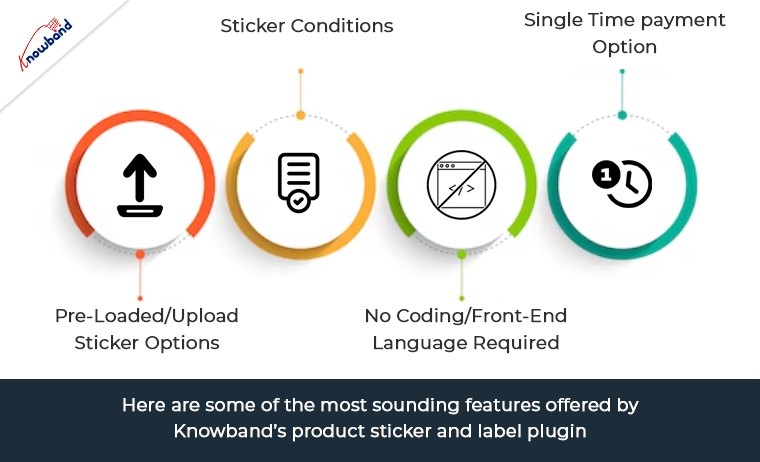
Here are some of the most sounding features offered by Knowband’s product sticker and label plugin.

Pre-Loaded/Upload Sticker Options:

OpenCart Product label extension comes with 20+ pre-available stickers and labels. You can choose from a wide variety of stickers and can go with the most suitable one.Likewise, if you are willing to add stickers as per your choice, we have also provided an option for the same. For uploading a sticker, all you need to do is click on add a sticker, Upload, choose a sticker, and that’s all.

Moreover, you will not have to worry about the sticker dimensions and size. In the sticker setting tab, the admins can resize any stickers and can even manage the opacity for the same. The following flagship feature not only makes the Opencart sticker module a complete plugin in itself but also increases the usability for the OpenCart retailers.

OpenCart Product Sticker Conditions:

When it comes to the sticker conditions, OpenCart product sticker extension provide complete peace of mind to store administrators. Not only the admins can modify the sticker appearance in every single meaning. But, can also show hide stickers based on stocks. Coming in details, the admins can configure any modified sticker appearance by selecting product stock status. Including/excluding special categories and products, and much more. Moreover, the admins can manage the pages where they want to show/hide stickers on their shop’s front end.

No Coding/Front-End Language Required:

OpenCart product label and Stickers extension come with an extremely easy-to-understand structure for the admins. While configuring the module, you will find every step and feature tailored appropriately. You will not have to require any coding or technical skills while setting up the stickers for your storefront.

Single Time payment option:

On top of that the plugin comes with single-time payment options. This means you will not have to pay any annual subscription charges for managing your stickers. Moreover, along with the module purchase, eCommerce sellers get 3 months of free technical support. In case you find yourself stuck somewhere, our tech team has got your back with all the expertise and experience.

Wrapping Up!

The images of your products are a crucial aspect of your online store. As they are often the first thing that catches the attention of visitors. With Opencart’s Product Label and Stickers modules, you can customize your product images by adding stickers on top of them. By doing so, you can inform your customers about any special features or offers on your products, such as discounts or free shipping.

These stickers will be prominently displayed on product images throughout your site. The possibilities for using the Product Label and Stickers Module are endless if you have a creative mindset. Additionally, you can create and add labels to the product page, with multiple customization options available in the backend. Admins have complete control over how each sticker or label looks and can edit them in any way they desire.

Notable Changes in PrestaShop 8.0: A Major Leap Forward for E-commerce

PrestaShop, one of the most popular open-source e-commerce platforms, is known for its robustness, flexibility, and extensive range of modules. With the release of PrestaShop 8.0, there are several technical changes that can significantly enhance both the functionality of modules and the overall website experience. In this article, we will explore some of these changes and their potential impact on PrestaShop users.

Improved Module Management System:

PrestaShop 8.0 introduces an upgraded module management system that offers better control and customization options. It includes a revamped module dashboard, allowing merchants to manage and configure modules more efficiently. The new system also provides enhanced compatibility and improved security measures, ensuring a seamless experience while installing, updating, and removing modules.

Responsive Web Design:


In the era of mobile devices, responsive web design has become crucial for any successful e-commerce website. PrestaShop 8.0 focuses on delivering an exceptional user experience across different screen sizes and resolutions. The platform now offers responsive templates out of the box, ensuring that your website looks and functions flawlessly on desktops, tablets, and smartphones. This technical enhancement can lead to higher customer engagement and increased conversion rates.

Accelerated Mobile Pages (AMP) Support:


Continuing with the mobile optimization theme, PrestaShop 8.0 introduces support for Accelerated Mobile Pages (AMP). AMP is an open-source initiative that allows web pages to load almost instantaneously on mobile devices. By implementing AMP in PrestaShop 8.0, merchants can offer lightning-fast browsing experiences, reducing bounce rates and improving search engine rankings.

Advanced Search and Filtering Capabilities:

Searching and filtering products effectively is crucial for an e-commerce website’s success. PrestaShop 8.0 comes with advanced search and filtering capabilities, enabling customers to quickly find the products they are looking for. The updated search system offers improved relevance, autocomplete suggestions, and the ability to search across multiple product attributes. These enhancements empower customers to navigate the website effortlessly and make informed purchase decisions.

Integration with Progressive Web Apps (PWA):


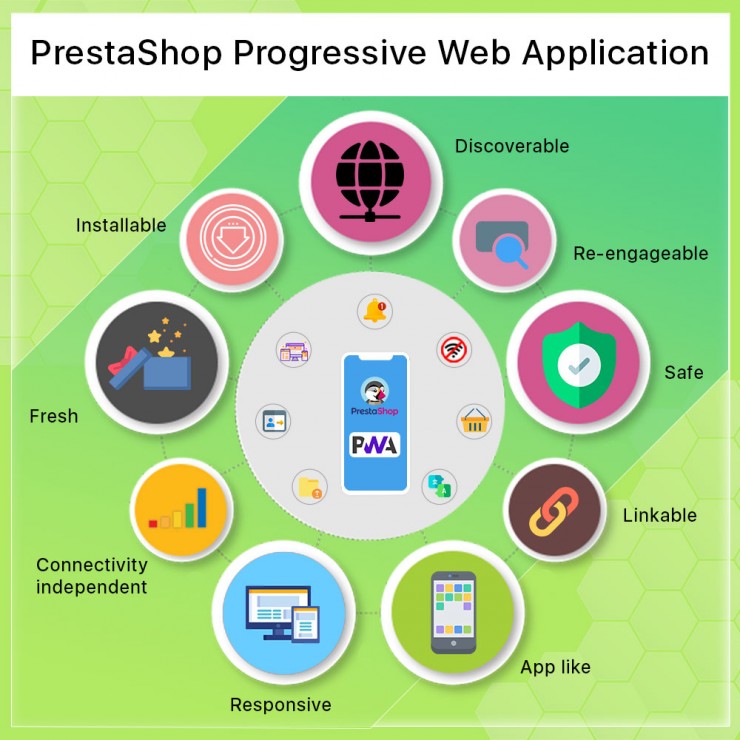
Progressive Web Apps have gained significant traction in recent years due to their ability to deliver an app-like experience within a web browser. PrestaShop 8.0 introduces seamless integration with PWAs, allowing merchants to leverage the benefits of both web and native mobile apps. PWAs offer features such as offline browsing, push notifications, and home screen shortcuts, enhancing customer engagement and retention.

Performance Optimization:

The performance of a website is essential in ensuring user satisfaction and driving conversion rates.. PrestaShop 8.0 focuses on performance optimization, leveraging the latest technologies and best practices. With improved caching mechanisms, code optimization, and database optimizations, the platform aims to deliver faster page load times and a smoother user experience. These technical changes can lead to improved search engine rankings, higher customer retention, and ultimately, increased sales.

Enhanced Security Measures in Prestashop 8.0:

In an increasingly digital world, ensuring the security of an e-commerce website is paramount. PrestaShop 8.0 includes enhanced security measures to protect both the platform and its users. This includes improved encryption algorithms, stricter validation checks, and proactive vulnerability management. By implementing these security enhancements, PrestaShop aims to provide a secure and trustworthy environment for online businesses and their customers.

In the end:

Prestashop 8.0 brings a host of technical changes that can significantly enhance the functionality and user experience of PrestaShop-powered websites.
From improved module management and responsive web design to advanced search capabilities and performance optimizations, these changes aim to empower merchants and provide a seamless shopping experience for customers. By staying up-to-date with the latest version of PrestaShop and leveraging these technical enhancements, businesses can stay competitive in the ever-evolving world of e-commerce.
Furthermore, at Knowband we provide Prestashop web and app development services at very reasonable prices. Not only you can check out a wide range of Prestashop v8.0 compatible addons but also we offer custom module development to our Prestashop eCommerce merchants.  Thus, in case you are having queries or suggestions regarding any of our plugins, feel free to find us at support@knowband.com.

Prestashop Mobile App: An Irreplaceable Asset to Increase User Engagement and Store Revenue

It is an era of digital advancement mobile app is an essential aspect of our daily lives. It offers convenience, speed, and personalized experiences. Moreover, for e-commerce stores, the app provides an opportunity to engage users and boost revenue. PrestaShop offers mobile app solutions that come equipped with a range of effective marketing tools. Furthermore, these tools empower businesses to actively engage their mobile app users. These are usable by enhancing customer retention and maximizing their revenue potential. In this article, we will explore the array of marketing tools available in the PrestaShop mobile app. Further, we will see how we can develop into how they can effectively help businesses achieve their objectives.


Push Notifications:


Push notifications are a powerful tool for engaging users and keeping them informed about offers. Also, the Prestashop mobile app offers seamless integration with push notification services. This enables you to send targeted messages directly to users’ mobile devices. Additionally, these real-time notifications have a high open rate and can grab users’ attention. By crafting compelling and personalized push notifications, you can increase user engagement. Also, this encourages repeat visits and ultimately boosts sales and revenue.

For example, an e-commerce store running a limited-time sale can send push notifications to app users. Further, informing them about the sale and offering exclusive discounts to them. Also, this timely communication can entice users to make a purchase, resulting in increased revenue.


In-App Messaging:


In-app messaging is an effective way to communicate with users while they are actively engaged with the app. Also, the PrestaShop mobile app provides the capability to send personalized messages to users. The implementation of this functionality in our app is possible as customization at an additional cost. Further, stores can leverage in-app messaging to guide users through the purchasing process.

Implementing Abandoned cart functionality as customization is very beneficial for the business. Further, if a user abandons their cart, an in-app message will be there to remind them about the items they left behind. Also, an offer incentive, such as a discount or free shipping can encourage them to complete the purchase. Additionally, this personalized approach helps business to recover lost sales and improve conversion.


Personalized Recommendations:


Personalized product recommendations play a crucial role in enhancing user experience. By showcasing relevant products to users, you can increase the chances of cross-selling to boost orders. For this functionality of product recommendation, we can implement our related product module as a custom change in the app.

For example, if a user is browsing for a specific category of products, the app can display related items or complementary products that the user wants. Further, by personalized recommendations, you can enhance user engagement and increase revenue generation.


Loyalty Programs:


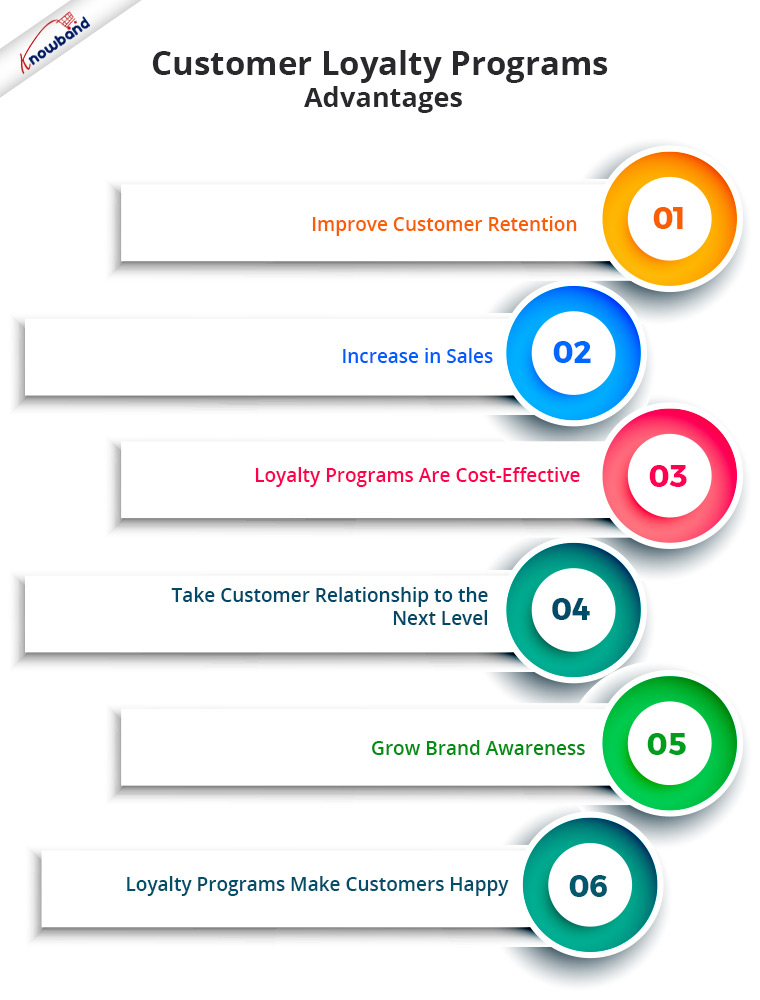
Customer loyalty is a vital component of any successful e-commerce business. The Prestashop mobile app enables to implementation of loyalty programs and rewards customers for their engagement. Loyalty points, discounts, and referral programs should be there to incentivize repeat purchases. For these functionalities, we have various plugins which you can use on your website or get integrated into your app at an additional cost.

By implementing a loyalty program within the mobile app, businesses can encourage users to keep coming back. The rewards and incentives offered through the program can impact customer retention. Further, it results in increased revenue over time.


Conclusion:


The PrestaShop mobile app offers a range of handy marketing tools. These tools can significantly boost user engagement and revenue for e-commerce stores. Push notifications, in-app messaging, personalized recommendations, and loyalty programs, empower your business. It helps in creating personalized and seamless shopping experiences for mobile app users. Further, by leveraging these marketing tools effectively, businesses can enhance customer satisfaction. Further, it can drive conversions and keeps you ahead of the competition. With PrestaShop mobile app, you can unlock the full potential of your e-commerce business. Moreover, it will help you to achieve long-term success in the mobile landscape.


We are here to assist our customers as per their requirements and we assist from installation to the point till the app is live. Kindly let us know if you have an interest in our mobile app or another plugin at support@knowabnd.com. In case you need a certain integration or functionality in the app then we will assist you with the same. Kindly let us know of any concerns or issues related to any of our modules.


Different Payment Gateways for Your Online Store

As eCommerce continues to thrive, setting up an online store has become more accessible than ever before. However, one crucial aspect that every online store owner must carefully consider is the selection of a reliable and secure payment gateway. A payment gateway serves as the bridge between your online store and the financial institutions that process transactions. In this blog post, we will explore what a payment gateway is, discuss some of the best payment gateways available worldwide, and help you make an informed decision for your online store.

What is a Payment Gateway?

A payment gateway is a software application that enables secure and efficient online transactions by transmitting payment information between the customer, merchant, and the acquiring bank. It plays a vital role in authorizing transactions, encrypting sensitive data, and securely transferring funds from the customer’s account to the merchant’s account. In essence, a payment gateway ensures the smooth processing of payments, giving your customers a seamless purchasing experience.

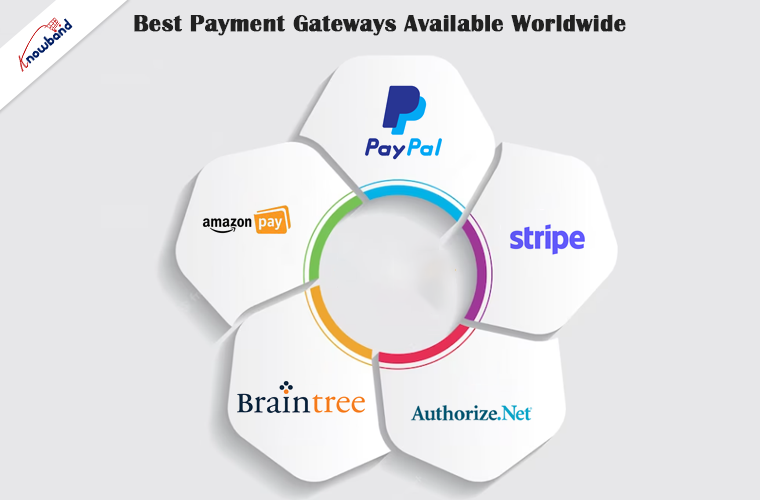
Best Payment Gateways Available Worldwide

1. PayPal

As one of the most widely recognized payment gateways, PayPal allows customers to make online payments securely using their PayPal accounts or credit/debit cards. It offers a user-friendly interface, supports multiple currencies, and provides buyer and seller protection. With its vast user base and global acceptance, PayPal is an excellent choice for international businesses.

2. Stripe

Stripe is known for its developer-friendly payment gateway solution. It offers robust security, and seamless integration with various e-commerce platforms, and supports over 135 currencies. Stripe provides a customizable checkout experience, recurring billing options, and features like fraud detection and prevention, making it a popular choice for both startups and established businesses.

3. Authorize.Net 

Established in 1996, Authorize.Net has maintained a strong presence in the payment gateway market. It supports a wide range of payment options, including credit/debit cards, e-checks, and digital wallets. Authorize.Net offers advanced fraud detection tools, customizable payment forms, and integrations with major e-commerce platforms. It is particularly suitable for businesses operating in the United States.

4. Braintree

Acquired by PayPal, Braintree is a robust payment gateway that provides seamless integration options and supports multiple payment methods. It offers features like recurring billing, advanced fraud protection, and customizable checkout experiences. Braintree’s transparent pricing structure and developer-friendly APIs make it an attractive option for businesses of all sizes.

5. Amazon Pay

With Amazon Pay, customers can use their existing Amazon accounts to make payments on your online store. It offers a familiar and trusted payment experience, eliminating the need for customers to enter their payment information manually. Amazon Pay is renowned for its security measures, and it provides seamless integration with popular eCommerce platforms.

Conclusion

Selecting the right payment gateway for your online store is crucial for a successful eCommerce venture. Consider factors such as security, ease of integration, available features, and compatibility with your target audience’s preferred payment methods. The payment gateways mentioned in this article are among the best options available worldwide, but it’s essential to evaluate your specific business requirements before making a final decision.

Remember, providing a seamless and secure payment experience is essential for building trust with your customers and ensuring repeat business. If you have any inquiries or queries regarding payment gateways for your online store, feel free to contact support@knowband.com. Their team of experts will be more than happy to assist you in making the right choice for your eCommerce business.

Prestashop Mobile Apps: A Profitable Technique to Enhance Sales of Online Businesses

In the age of smartphones and digital devices, businesses must adapt and use the power of mobile technology. Further, if you own a PrestaShop store, integrating a mobile app into your marketing strategy can be a game changer. A mobile app has the potential to skyrocket your sales and enhance customer engagement. In this blog post, we will explore the benefits of having a mobile app for your PrestaShop store and how it can boost your sales like never before.

Seamless Shopping Experience

Mobile apps provide a seamless and user-friendly shopping experience for your customers. With a well-designed app, customers can browse through your products, add items to their carts, and complete the purchase process with just a few taps. Moreover, the convenience of shopping on a mobile app increases customer satisfaction and encourages repeat purchases. Furthermore, mobile apps can have device-specific features such as cameras and GPS to enhance the shopping experience. For example, customers can use their device’s camera to scan barcodes or QR codes for quick product searches. Additionally, it is possible to utilize GPS to find nearby stores or pickup locations.

Push Notifications for Instant Updates 

One of the most significant advantages of a mobile app is the ability to send push notifications to your customers’ devices. Whether it’s a special discount or a new product launch, push notifications keep you connected with your customers in real-time. This instant communication can lead to increased sales and a higher level of engagement. By analyzing customer data and purchase history, you can send targeted and relevant notifications that are more likely to convert into sales.

Enhanced Customer Loyalty 

The mobile app is important for creating a loyal customer base. Further, by including features like loyalty programs, and personalized discounts, you can incentivize customers to choose your app. Furthermore, this will make you stand out from your competition. Moreover, an app provides an opportunity to collect valuable customer data, allowing you to tailor your marketing efforts. Also, it provides a more personalized experience, further strengthening customer loyalty. Additionally, with features like in-app messaging or customer support, you can also have direct communication with your customers.

Increased Visibility and Reach

Launching a mobile app opens up a new channel to reach potential customers. Additionally, by listing your app on popular app stores like Google Play Store and Apple App Store, you increase your brand’s visibility. Furthermore, with the right marketing strategies, your app can be discovered through organic searches, helping you tap into a larger market. This helps in boosting your PrestaShop store’s sales potential. Additionally, integrating social media sharing options within your app allows customers to easily share products. further expanding your brand’s reach.
Integration With Prestashop Features

A well-designed mobile app can seamlessly integrate with your existing PrestaShop store, using its powerful features. This integration enables you to synchronize product catalogs, inventory, pricing, and customer data, ensuring consistency across all channels. By streamlining your operations and maintaining a unified shopping experience, you can provide exceptional service to your customers. Furthermore, integrating analytics tools within the app can provide valuable insights into customer behavior and preferences. Further, it enables you to optimize your marketing strategies and improve the overall performance of your store. 

Simplified Checkout Process

Cart abandonment is a common issue in e-commerce, often caused by a complex or time-consuming checkout process. A mobile app simplifies this process, allowing customers to save their payment details, shipping addresses, and preferences for future purchases. With a hassle-free checkout experience, you can reduce cart abandonment rates and increase conversion rates, resulting in higher sales. Additionally, integrating popular payment gateways and providing various payment options within the app enhances convenience and boosts customer trust in the security of their transactions.

Conclusion:

In today’s competitive eCommerce market, having a mobile app for your PrestaShop store is no longer an option but a necessity. The benefits of the app are an increase in customer engagement, increased sales, enhanced loyalty, and a broader reach. By investing in a mobile app and using its features, you can enhance your PrestaShop store sales and provide a delightful shopping experience for your customers. 

Apart from that, we would like to inform you if you have an interest in any of our modules then connect with us at support@knowband.com. Apart from that in case of any additional features to be added for the module, we will assist you as per your requirement. Also, if you have any specific requirements for your business then we will be happy to assist you.