Opencart do not assign unique SKU to each option of a product. For example, if one product has multiple options (sizes & color), then you cannot update the inventory of each option directly. You have to enter/scan product SKU, then select one option from option list. To remove this option selection step, we have developed a module (Opencart Option SKU Manager) to assign unique SKU to each option of product. After installing this module, you can directly enter/scan the SKU of option of SKU and update the quantity.
Functionality and working
How to install plugin
Follow the steps explained below to install the module.
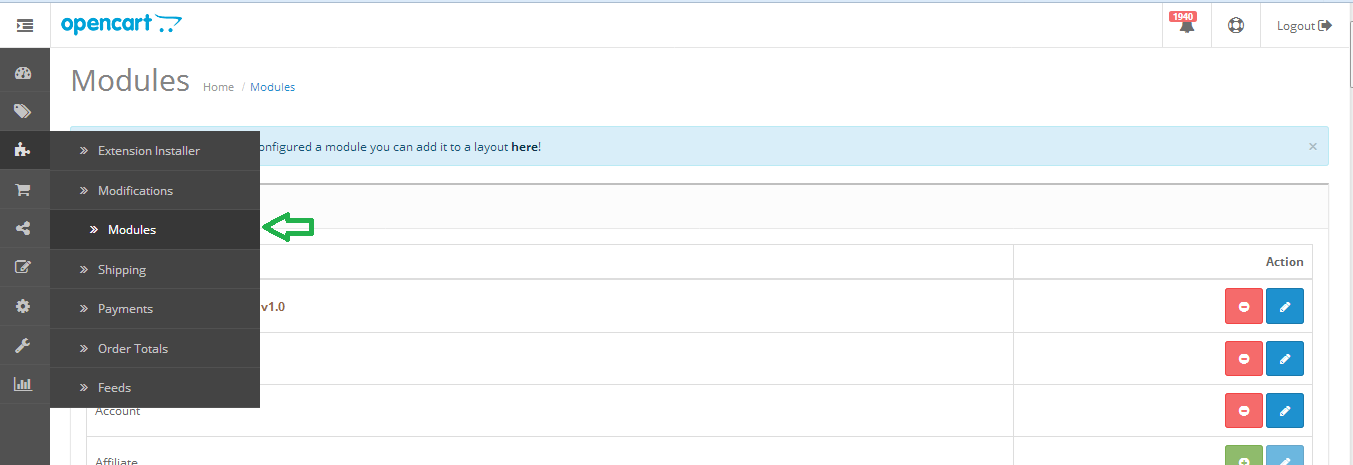
Step 1: Open the modules list from menu as shown below.
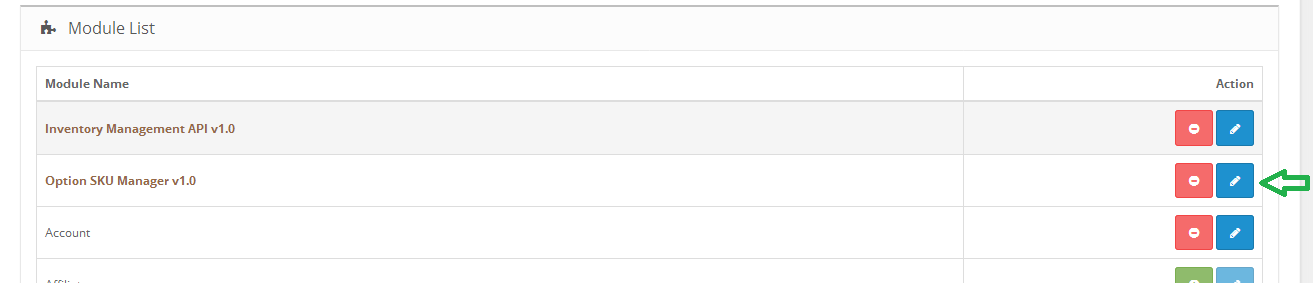
Step 2: Click on install button against “Option SKU Manager ” plugin as shown below. Plugin will be installed successfully and read to use.
How to enable plugin
Step 1: Click on edit button against “Option SKU Manager ” plugin as shown below.
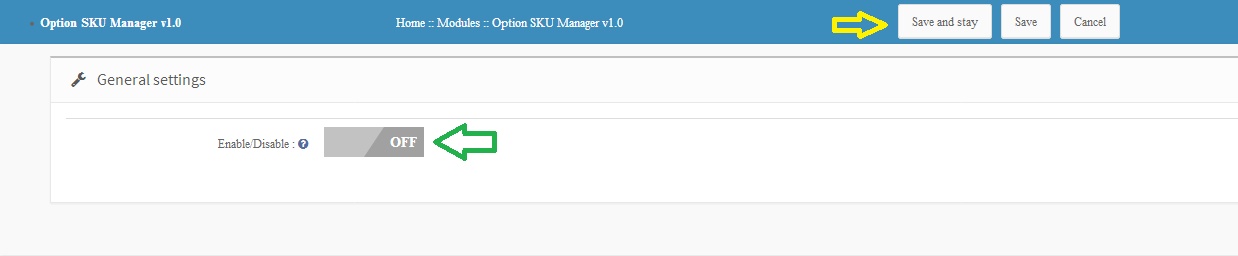
Step 2: Enable the module and click on either “Save and Stay” or “Save” button. Module will be successfully enabled.
How to assign unique SKU to variations
Once you have installed and enabled the module, you can assign unique SKU to each product variations. Follow the steps below to assign unique SKU.
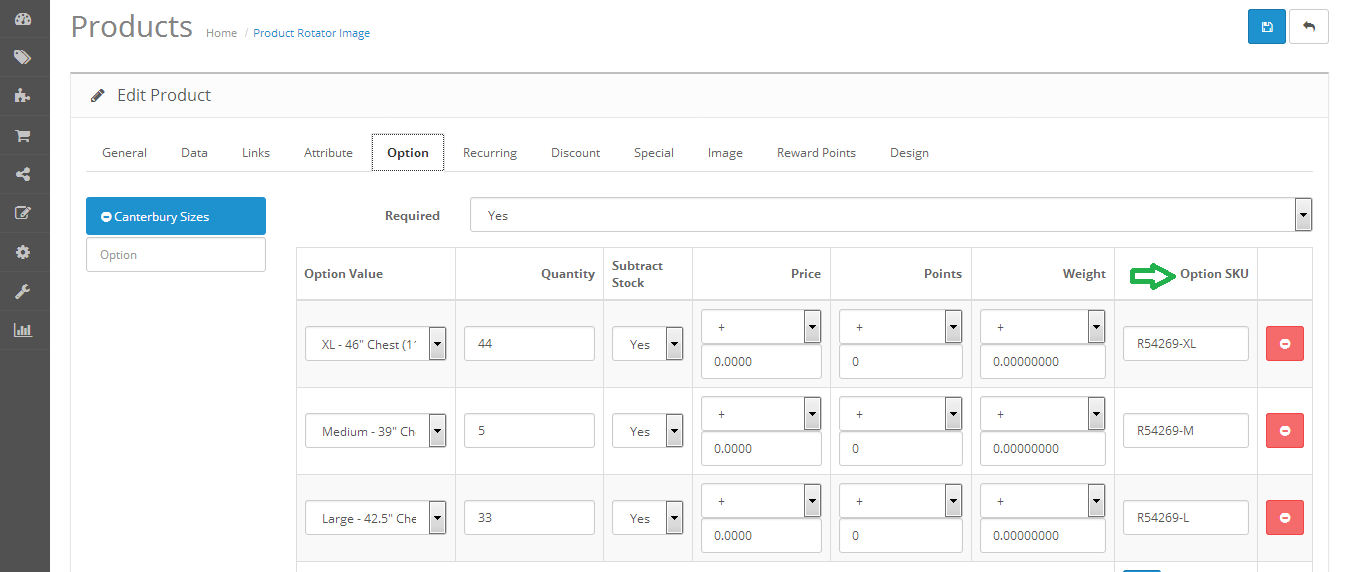
Step 1: Edit any product and click on options tab. Enter unique SKU for each variations and save the product.
One page checkout has been in the debate for a very long time now. The whole idea of simplified checkout revolves around the optimizing the shopping experience of the store visitor. The shopping site will lead to conversions only when the customers are able to complete their transaction effortlessly.
How can one page checkout optimize your site?
The online shoppers prefer to make purchases only if the web store offers easy to approach and with minimal efforts. Here are some of the ways in which the this feature can optimize the shopping site and enhance the user experience.
Most of the e-marketers advocate the incorporation of a single-page checkout as it is an easier approach for the customers to complete their transactions. The online shoppers prefer going with the idea of single page checkout as it reduces the time consumed in reloading the web pages.
The idea of using super page checkout is more convincing than the traditional idea where the customers have to be jumped from page to page filling out all the details. The e-sellers can help the customer complete their transaction with minimal effort. Even though the number of fields remains almost the same, the shoppers can view the length of the form left to be filled. This provides them a psychological motivation to complete the transaction.
There are dozens of articles on the topics like “Should you choose a one-page checkout?” “Pros and Cons of One Page Checkout” and so one. Most of these articles effectively address the drawbacks, but it seems like we have been promoting these drawbacks like they are there forever and cannot be taken down anyhow.
Let’s face the truth, every new introduction has some cons for sure. Gradually, with the development and research, these cons fade away for sure.
In this blog, I am going to address 3 such cons of a one-page checkout which we eliminated from our Magento one page checkout extension and also the PrestaShop One page checkout module. Most of these cons were never there in our checkout extension, as we took care of them while in the development and testing phase itself.
One page checkout fixed drawbacks
1. So much of details on a single page? It will be congested
Most of the checkout pages, when introduced in the past, had this problem. It was really a massive task to adjust everything from a multi-page checkout on a single page.
The most problematic challenge was to fit all those checkout elements on a single page and it should provide a full view of the whole checkout page as well. Moreover, all the checkout elements like login, delivery address form, billing address form, payment options, shipping options, and cart review should not overlap with each other, and neither they should overlap on themselves. A lot of HTML, CSS, JavaScript, and Ajax were needed to be handled to keep the design all fine with the default as well as the third party Magento themes. But we intended to keep them as lesser as possible for faster page loading.
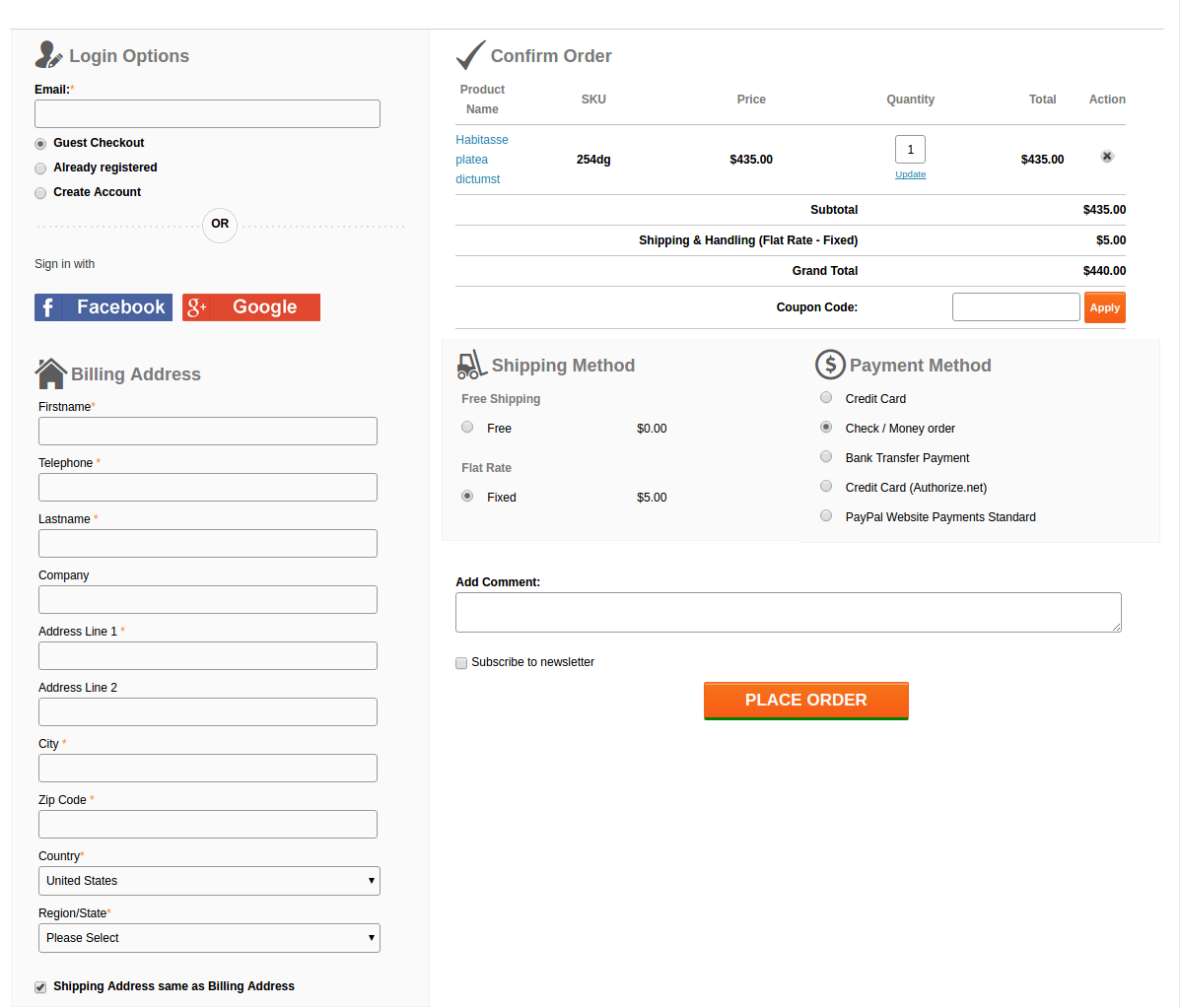
This is what we came up with:
A lot of HTML, CSS, JS, and Ajax were tweaked by our designers to fit all the elements neatly and clearly on a single page and also to keep the page loading time optimal. Moreover, thanks to our designers, after all these, there was sufficient space left to add the Social login option using Facebook and Google+ on our checkout page.
2. The form on the page are congested with no white-spaces and proper label usage
While designing the forms, the main aspects that we were looking for were:
Keeping the forms compact
All the necessary fields should be there
Fields should have proper white-spaces
Labels should not confuse the users
Admin should be able to choose which form field he wants to show on the page to customers.
Labels
Labels were coming out as a major concern here. If we would keep the labels by the side of the respective fields, the horizontal length of the form would give a very less space for the other sections on the page.
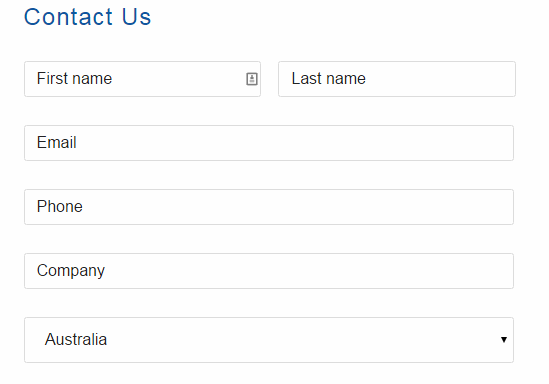
We also thought about a form design where we would skip the labels and use Placeholders in place of them. Something like this:
But, there was a problem in that. For considerably long forms like Billing and Address forms, if customer once filled the detail, and the later stage if he would want to re-check them, he would get confused about what actually are these details. Since the placeholder vanishes away as you type in, and there is no label as well, there always remains a confusion if my details are right or wrong.
We didn’t want your customers to get into such confusion and forget the main goal of making a purchase, that’s why we drop the idea. Otherwise, it could have saved a lot of space as well.
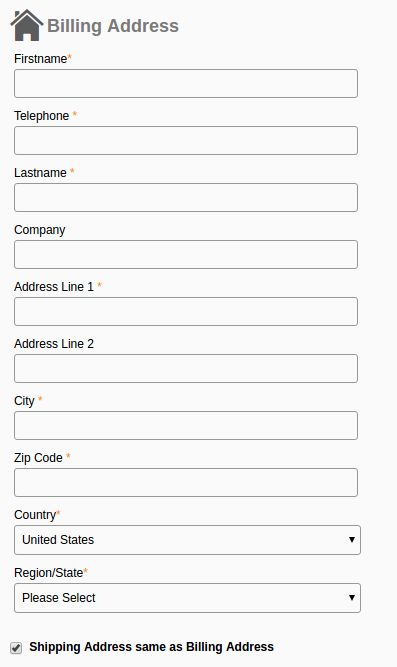
Finally, we decided to not to compromise with the user experience anyhow and we adopted the label placement above the fields as shown in this image:
It saved the horizontal space that we needed for other elements and also helped in one another feature which has been discussed below.
The necessary fields
After dealing with the label placement, the last thing in the forms that gave us a nightmare was to include every necessary field in the form. Problem is, the term necessary is quite relative here. A form field which is necessary for one store owner might be of no use to the other.
For example, the VAT number, and Company Name is a necessary field of a store owner who has a B2B selling business. All of your European business clients would also need this field for making the purchases on your store. On the other hand, a store owner who directly sells to the individual consumers would have no use of the fields like VAT Number and Company Name.
How we handled it?
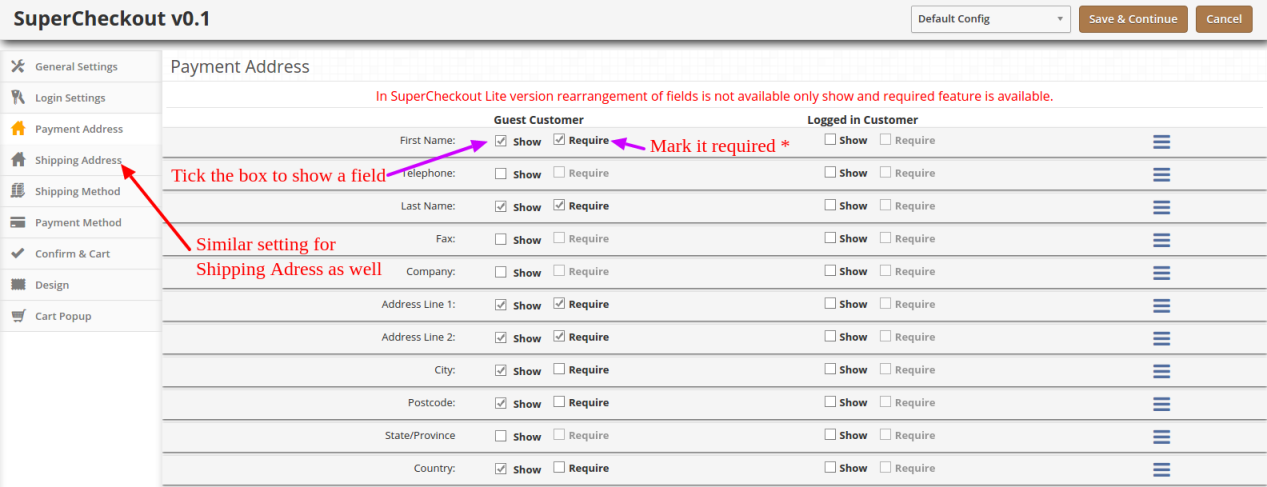
It was a time to open our checkout extension a bit and give the store owners some easy yet crucial development access. We add a feature in our module, using which the admin can easily enable, disable, add, and delete a field from the checkout form. That too, without editing the code. All this can be done from the backend itself.
So, if any of the fields is not usable for a store owner, he can simply hide it with a simple click and save. No need to go through the complex Magento or PrestaShop codes to do this now.
3. Frequent page reload on cart update
Those multi-page checkouts have a dedicated page for editing the shopping carts. It was a challenge for us to include the shopping cart on the checkout page. Customers would frequently update the cart by increasing or decreasing the product counts, removing a product from the cart and so one.
All these requests required a page reload to update all the checkout details and information according to the latest cart status. If a product has been removed from the cart, we needed to update the total cost, cart product quantity, shipping methods and so on with it.
It would have become so irritating for the customers if the checkout page would reload every now and then. This challenge is faced by every one-page checkout development. However, we managed to fix it with the Ajax based shopping cart and form update request.
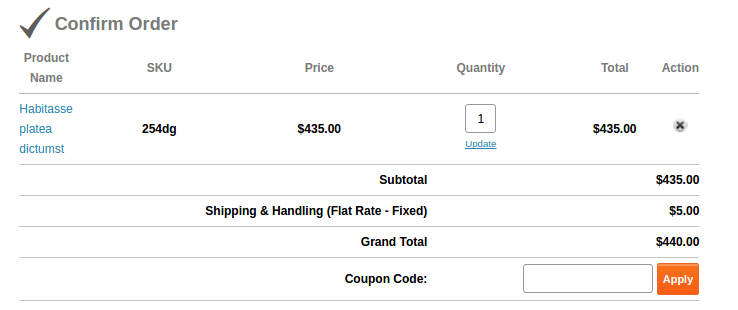
Now, with Ajax shopping cart and updates, if a customer changes anything in the cart, all the dependent details would get automatically updated without reloading the whole checkout page. Even the customer can apply a coupon code to the cart and page would validate the coupon without being reloaded.
This is how we solved these issues in our checkout extension. You can have a free demo to experience all these features of the extension. Free Demo one page checkout Magento and PrestaShop and OpenCart.
This functionality can be added to a Prestashop site with the help of Prestashop one page super checkout addon. The same extensions are available for Magento, Opencart and other eCommerce platforms as well. Whether you go for the Prestashop addon, Magento extension or OpenCart plugin, it enables the customers to complete their transaction and make the product purchase on the same page. It is one of the best features for reducing the exit rate at the checkout page. The customers are annoyed if they are redirected to lengthy checkout process in order to complete the purchasing. Thus, one-page checkout makes sure that the customers can complete the purchase by filing up all the necessary details in one single page and provides the customers with an easy approach to complete the purchase.
A Mobile App is definitely one such solution that can take your eCommerce business to far off places. With the support of the Magento Mobile App Builder for Android/iOS, you can seamlessly target your multi-platform customers and grab maximum sales as well as customer engagement. The mobile apps with Magento eCommerce Mobile App Builder can make your eCommerce business accessible to the worldwide mobile-based consumers. The store owners can now improve the chances of their business growth and expansion. This Mobile App Maker for Magento allows the store owners to get their customized mobile app as per their business requirements and needs.
Whether your eCommerce site is recording a consistent sale volume or if it’s on the verge of finding your niche market, nowadays mobile apps have the potential to drive quality traffic as well as conversions. Mobile applications have become the flavor of the current time and the idea of taking your business on the mobile platform sounds quite perplexing.
To ease the task for all the Magento store owners out there, KnowBand has brought its readymade framework Magento Mobile App Builder. This pre-designed mobile app solution builds full-fledged Android & iOS apps for your eCommerce website.
1.1 Salient Feature of Magento Mobile App Builder
The Magento Mobile App Builder comes with some of the major sale pushing features:
–> Customizable Home Screen Layout (Complete Flexibility)
–> Store Branding
–> Zopim & WhatsApp Chat Support (24*7)
–> Google & Facebook Login
–> OTP & Fingerprint Login
–> Both Tablet & Mobile Support
–> Android 4.2 to Android 8.0 (Oreo) Support
–> iOS 9 to iOS 11 Support
–> Automatic Inventory Update
–> Multiple Color & Font Choices
–> Multi-lingual & RTL (Right To Left) Support
–> Multi-currency Support
–> All Product Type Support
–> Website Payment Method Supported on Apps
–> Website Shipping Method Supported on Apps
–> Custom Payment Method Integration
–> Unlimited Push Notifications
–> Product Social Sharing Options
–> Multiple Filtering & Sorting Options
–> Advanced Voice Search (Android Only)
–> Wishlist Functionality
–> Website Coupon/Vouchers Supported on Apps.
–> Simplified Checkout Screen
–> Real-time Order Tracking
2.0 Magento Mobile App Demo
KnowBand offers a FREE Magento Mobile Apps demo for you before making the actual purchase. The store admin can experience the apps functioning on your testing devices.
2.1 View Our Demo Store working on Apps
We have set up a free Demo store just to test the Magento Mobile App functionalities. Install the application on your device & explore its flawless working.
Step 1: Download and install the Nautica Magento Mobile App on your mobile device. Here, are the links to the apps: Apple App Store Google Play Store
Step 2: Once the apps are successfully installed, open & tap “View Demo” option on the splash screen. Start testing the apps working with ease.
Note: You can access the admin panel of Magento Mobile App Builder from here.
2.2 View Your Store working on Demo Apps
Still not convinced? Want to test your own website on the demo apps. We got you covered with that as well in just 3 simple steps:
Step 2: Install the demo Magento Apps on the testing devices & enter the store URL in View Your Store option.
Step 3: Tap “View Your Store” and start experiencing your own website on Magento Android & iOS Apps.
Note: This Free version of Mobile App Builder is just for the demo purpose & no APK/IPA files will be provided with this module. In order to get your own APK/IPA files, you need to purchase the paid version of the Magento Mobile App Builder.
3.0 Process to build Magento Mobile Apps
Satisfied with our demo apps & want a pair for yourself? Build Magento Mobile Apps in just 3 simple steps:
Step 1: Purchase & Install Module on your website.
Get paid version of Magento Mobile App Builder from KnowBand & install the same on your website.
Step 2: Share some App-related Specifications
We would require some app-related specifications & requirements from your end. For this, we would send a pre-requisites to form with you.
Step 3: Get Your Android & iOS Apps in 1-2 days
Our developers & technical team will develop the apps & get back to you in 1-2 days.
Note: You can publish these APK/IPA files on respective app stores. Refer following links for the same:
If there is any issue while publishing app on respective stores, we would get it done for you.
4.0 Admin Panel Screens
After successful purchase & install of Magento Mobile App Builder, the store admin can configure the backend panel. Go to System>>KnowBand Extensions>>Mobile App Builder & you would find the following tabs in the module backend:
4.1 General Settings:
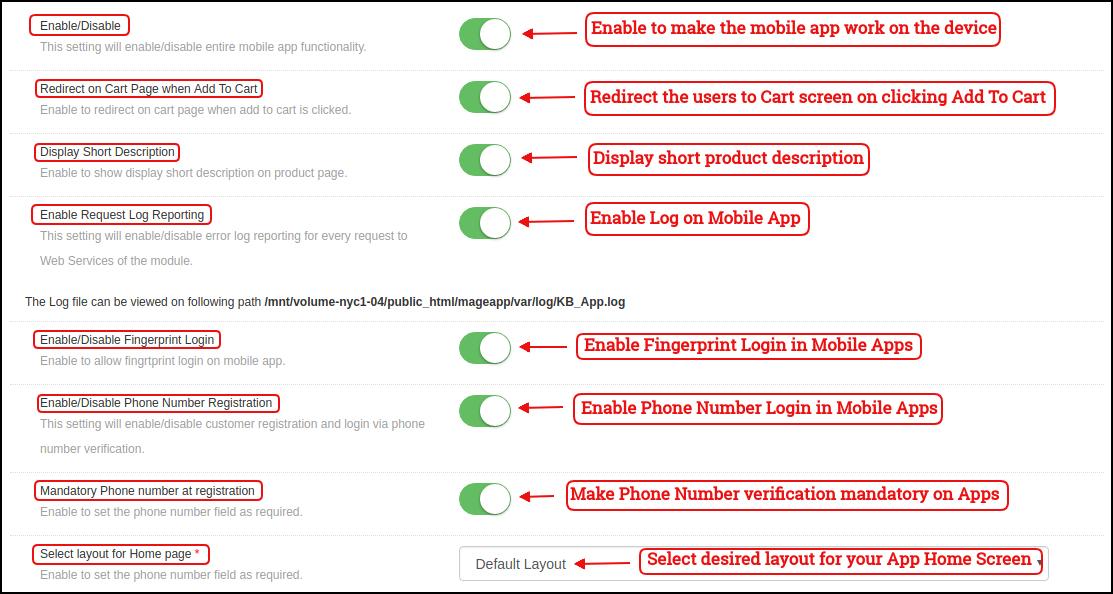
a) Enable/Disable: Enable/disable the Magento Mobile App Builder module to make the apps work on the smartphone. b) Redirect on Cart Page when Add To Cart: Redirect the mobile app users to the cart screen whenever any user tap Add To Cart button. c) Display Short Description: Enable to display the short product description on the mobile apps. d) Enable Request Log Reporting: This functionality enables the error log on the mobile devices. This error log file is used to rectify any error or abnormal behavior of App. e) Enable Fingerprint Login: Enable the fingerprint login option in the mobile apps. f) Enable Phone Number Registration: Enable Phone Number login/registration in the mobile apps. g) Select Layout for Home Page: Choose the desired layout for your app home screen. You can create multiple layouts under Home Page Layout tab which will be displayed here in the drop-down menu.
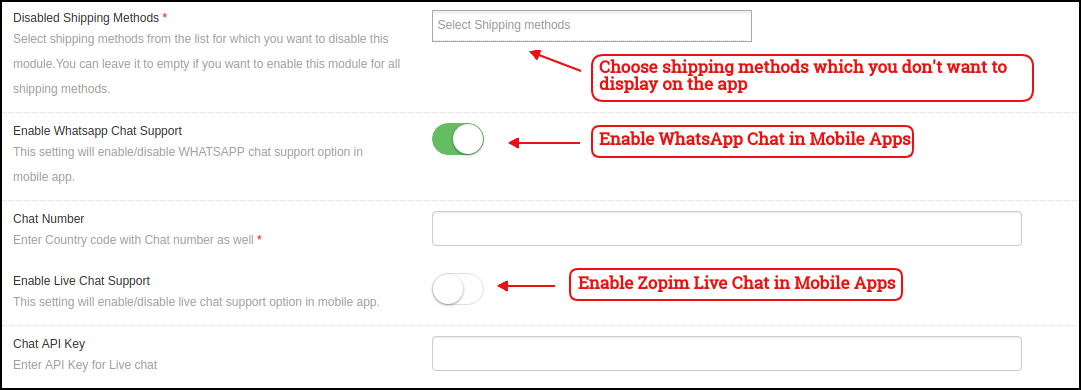
h) Disabled Shipping Methods: Choose shipping methods which you don’t want to display on the Mobile Apps. i) Enable WhatsApp Chat Support: Enable/disable the WhatsApp chat option on mobile apps. J) Enable Live Chat Support: Enable/disable Zopim chat options in mobile apps.
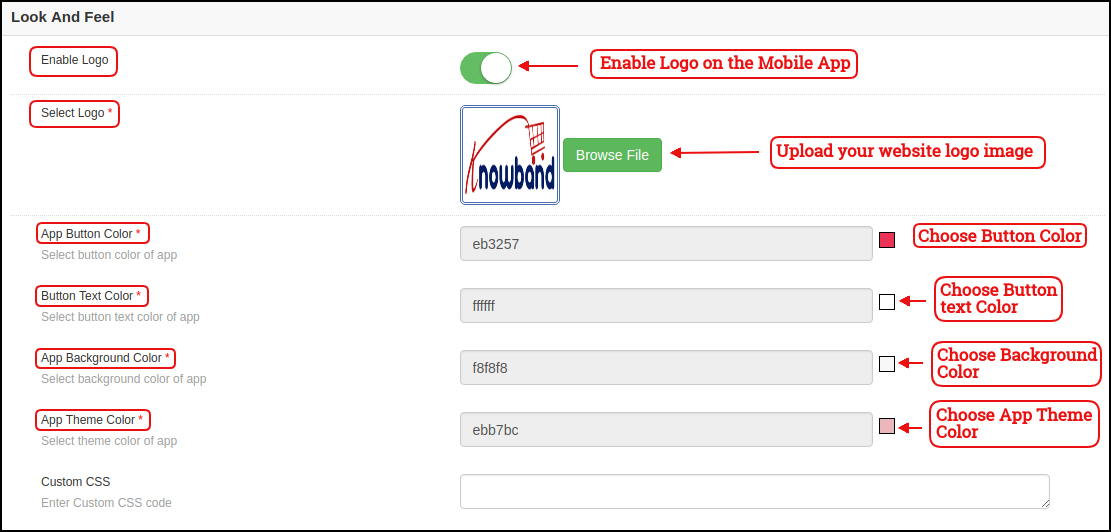
k) Enable Logo: Enable logo in your mobile apps. You can upload the logo image which will be displayed on the header of the mobile apps. l) App Button Color: Choose the button color for your apps. m) App Button Text Color: Choose the button-text color for your apps. n) App Background Color: Choose the background color for your apps. o) App Theme Color: Choose the theme color for your apps.
4.2 Mobile Menu Settings
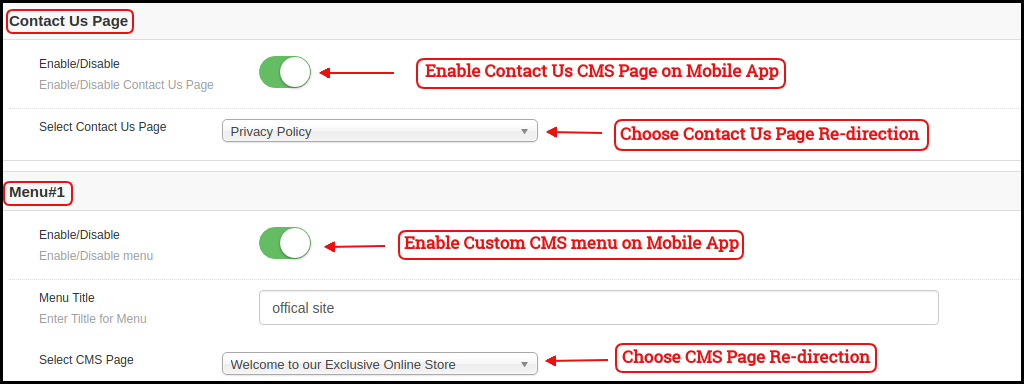
This tab of the Magento Mobile App Maker allows the store admin to display various website CMS pages on the Mobile Apps. You can add as many custom CMS pages as you want. The Mobile App Maker for Magento allows you to bring all the website CMS pages on the app.
4.3 Payment Methods:
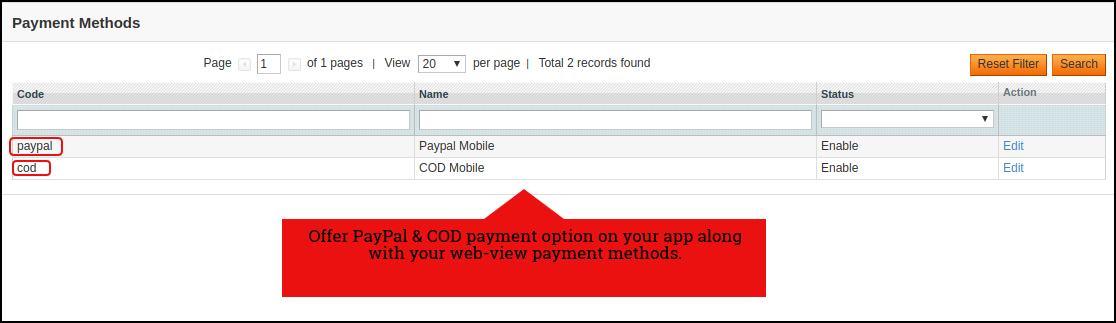
The Magento Mobile App Creator offers additional PayPal & COD payment options to make the payments easier in the apps. The mobile apps with this extension already support web-view payment options in mobile apps.
4.4 Push Notifications:
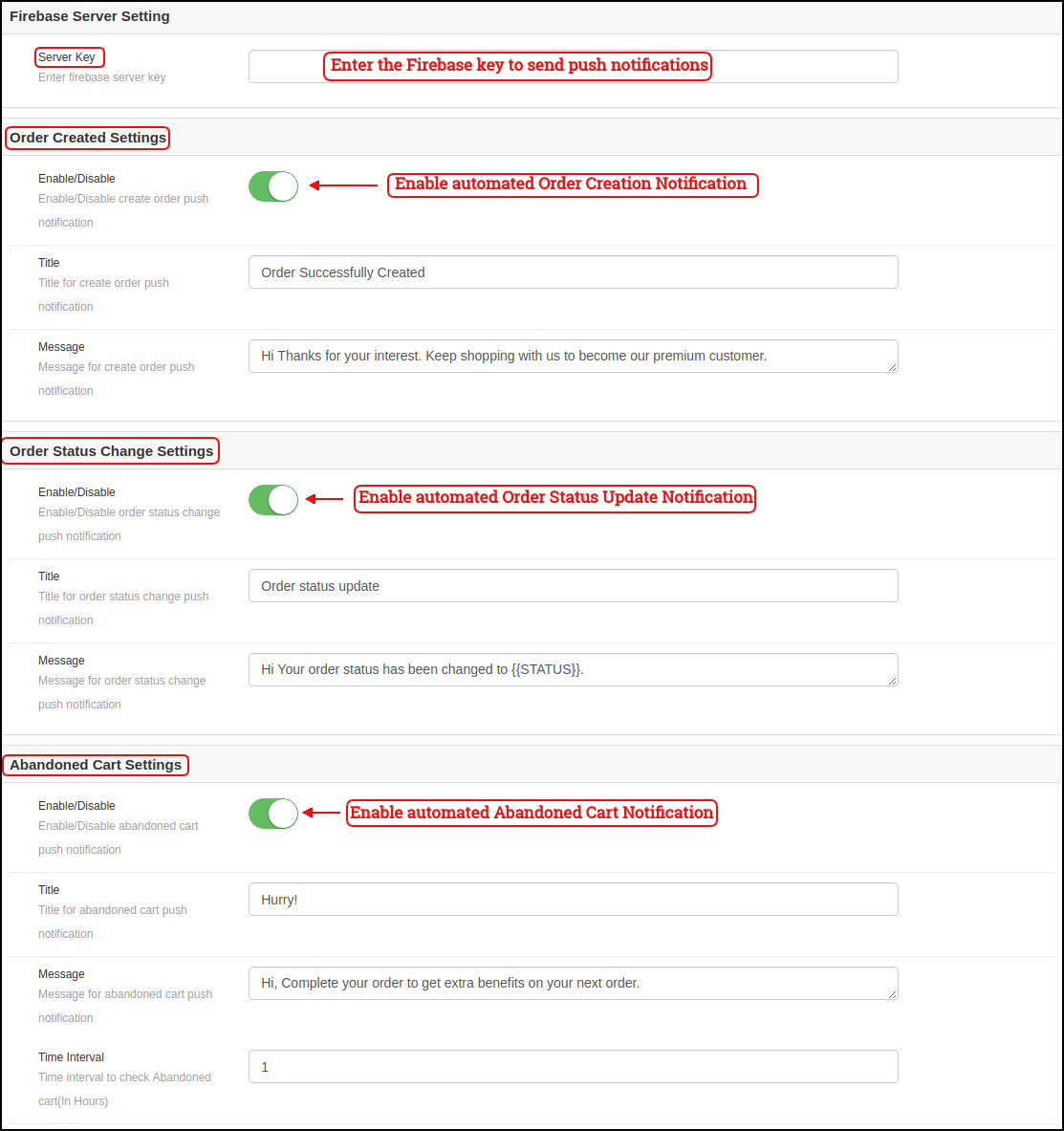
a) Firebase Key: Enter the Google Firebase key to send push notifications on your Magento Apps. You can skip this setting for the Free version. We would set up the same with the paid version of the module.
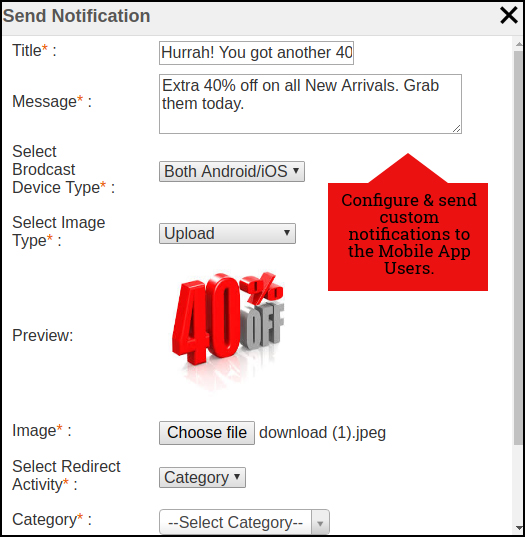
b) Order Success Notification: Configure automated Order Creation Push notification which would be sent automatically to the user’s who successfully creates an order. c) Order Status Update Notification: Configure automated Order Status Update notification which would be sent automatically to the users whenever there is an update in order delivery status. d) Abandoned Cart Notification: Configure automated Abandoned Cart notification which would be sent automatically to the users who left their products in the cart. This notification is sent repeatedly to the users after a fixed time duration. e) Send Notification:
If the store admin feels like there is a need to highlight any daily deals or discounts, custom notifications can also be sent to the app users. These notifications can be configured from the backend panel & will be broadcasted to all app users.
4.5 Home Page Layout
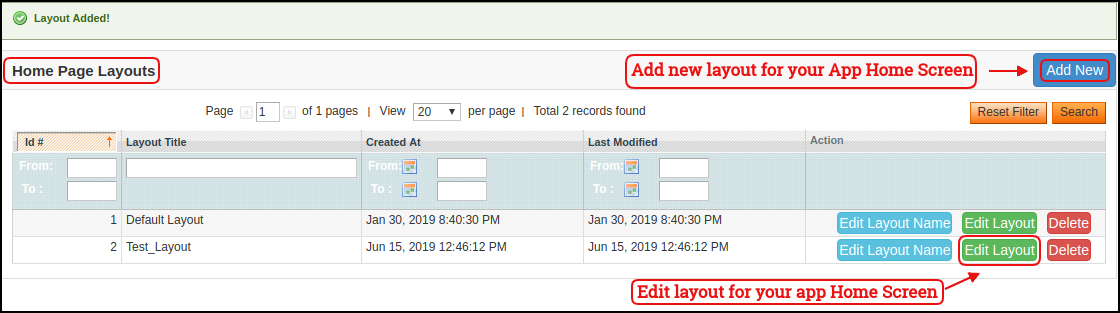
The Magento Mobile App Builder offers customizable Home Screen in your apps whose layout can be configured by you. You can create & save multiple layouts based on various themes, festivals or events & select them for your app as per the requirement.
The module offers the flexibility to add as many layouts as needed along with the options to edit previous layouts.
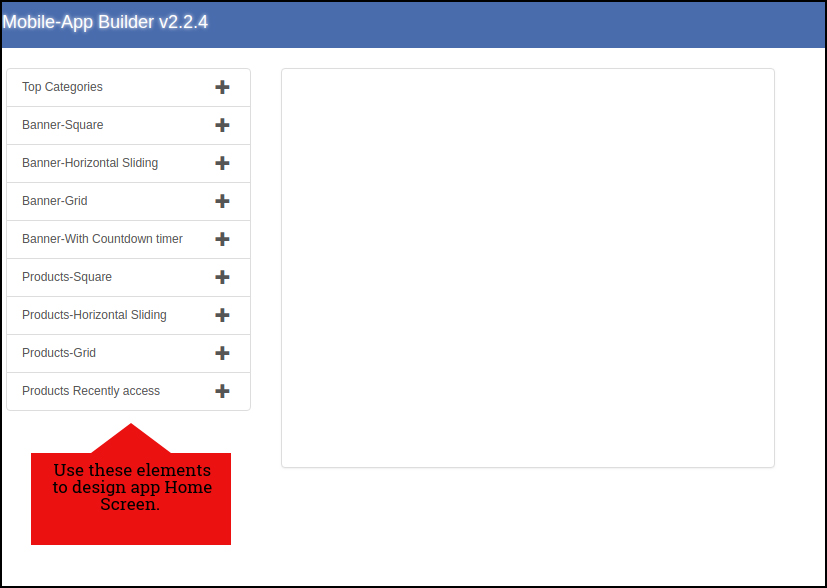
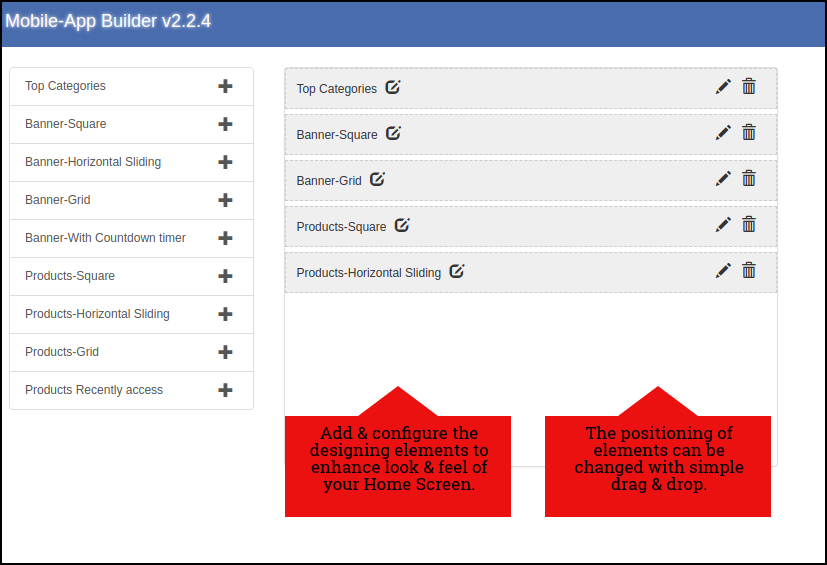
In the Home Page Layout of Magento Mobile App Creator, the store admin gets to edit & customize the following designing elements:
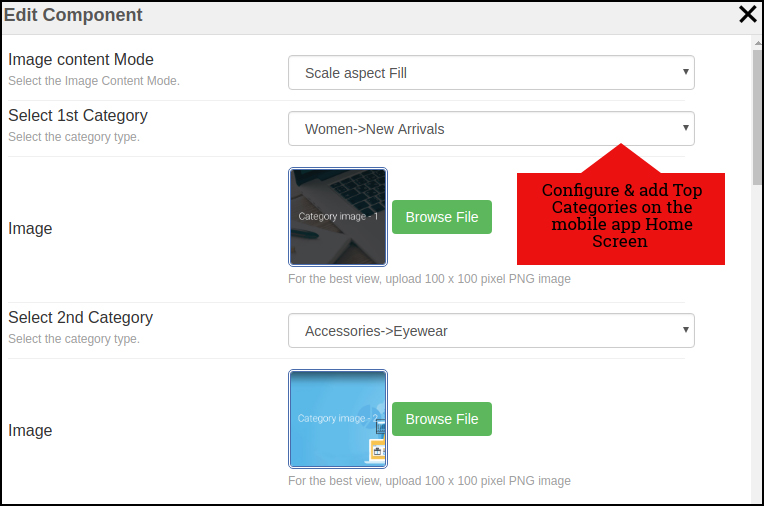
Top Categories:
Top categories are displayed in the form of small squares on the Home Screen which can be configured from the backend using images & landing pages.
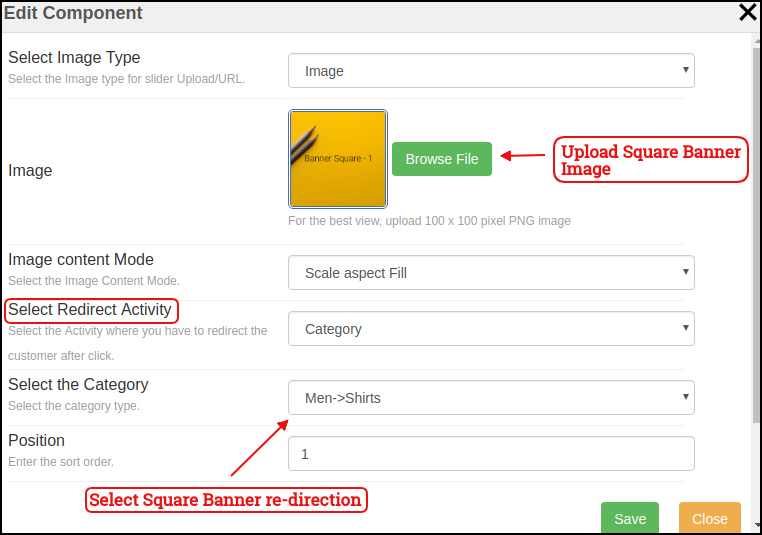
Square Banner:
Square Banner is a configurable square shaped listing on the Home Screen whose image & landing pages can be configured from module backend.
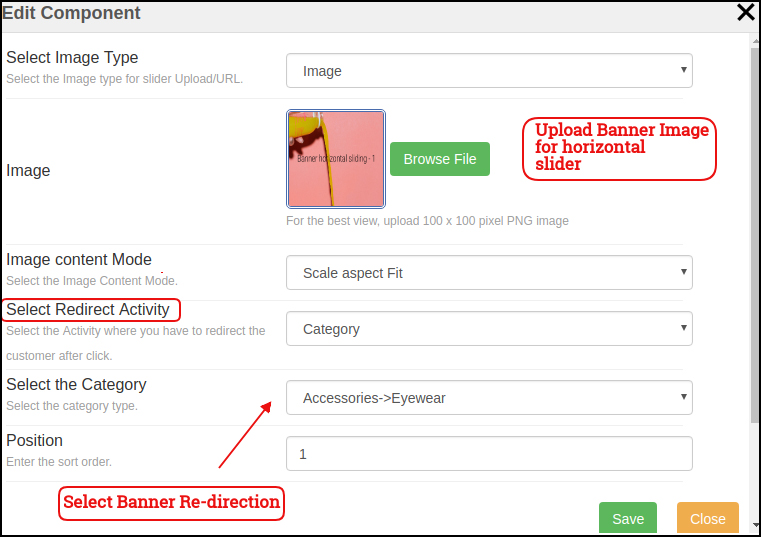
Sliding Banner:
The Banners can also be displayed in horizontal sliding & their image/landing page can be configured from the backend interface.
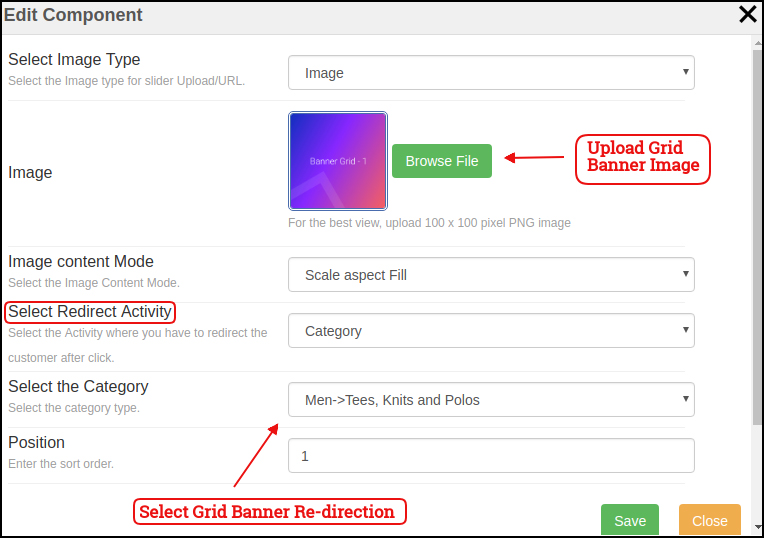
Grid Banner:
The Banners can also be displayed in the form of grid listing on mobile app Home Screen. These banner images & landing pages can be customized easily from the backend interface.
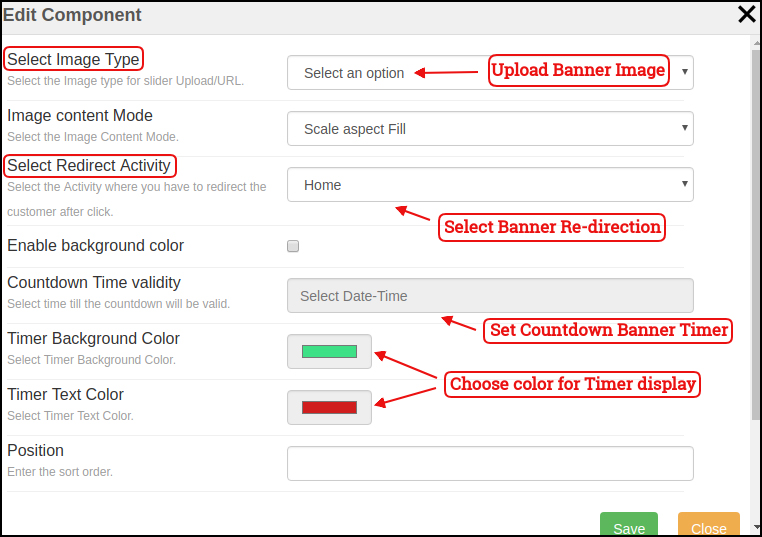
Countdown Banner:
The Magento eCommerce Mobile App Maker offers a count-down timer banner on your home screen in order to offer a time-based sale (Flash Sale). The banner timer, image, landing page can be configured from backend panel.
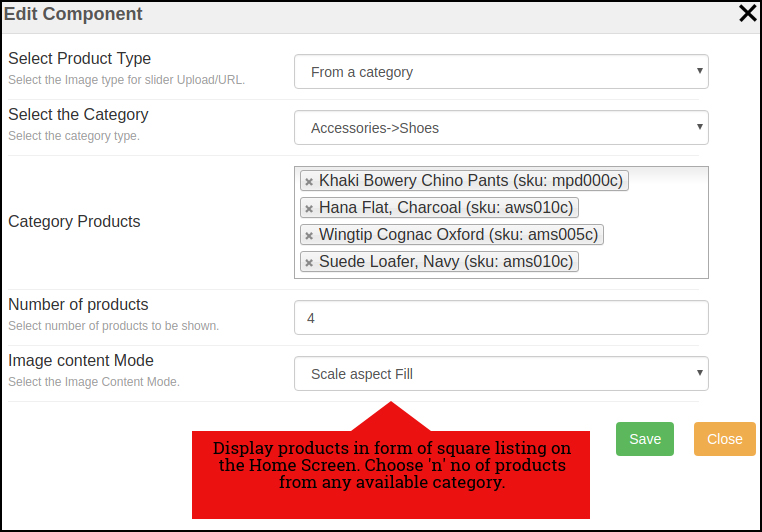
Square Products:
The products on your store can be listed on the Home Screen of the app in the square listing.
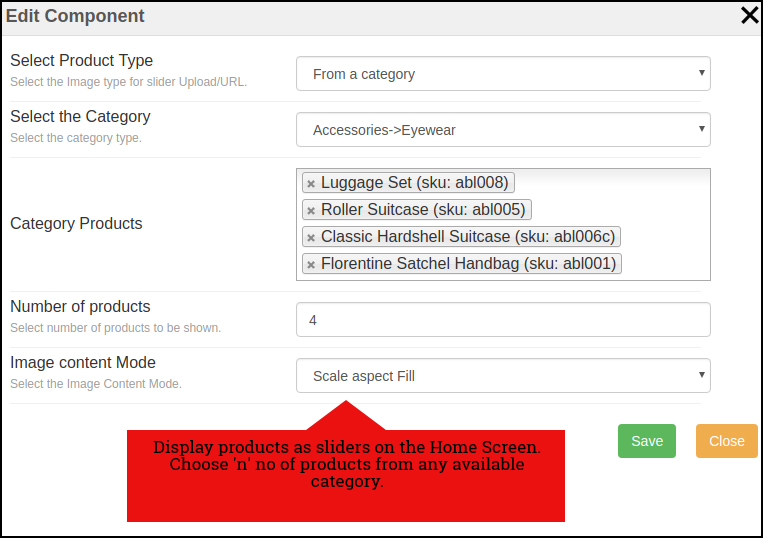
Sliding Products
The products can be displayed in the sliding view on the mobile app Home Screen & can be configured from backend panel.
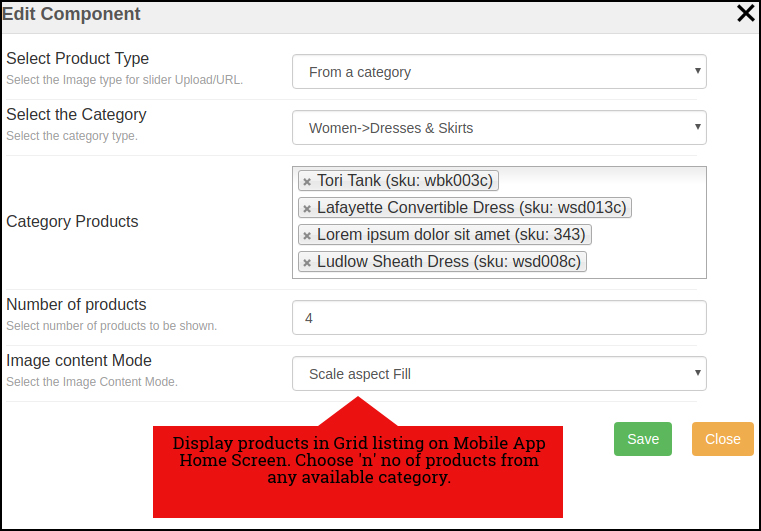
Grid Products:
The products can also be displayed in the grid view on Mobile App Home Screen. These listing can be configured as shown in the snapshot below:
Products Recently Accessed:
The Magento Mobile App Creator brings one more element of Recently Viewed Products. This attribute displays those products in the sliding view which were being visited recently by the user.
Note: The store admin can add up to 20 elements while designing layout in the backend panel.
5.0 Mobile App Screens:
5.1 Home Screen:
The Magento Mobile App Builder offers a dynamic home screen in the mobile apps which can be easily designed from the backend panel. The store admin gets the complete flexibility to design & craft the home screen as per his/her choice. The Magento Mobile App Builder offers the following designing elements:
The positioning of these attributes can also be changed as well just with simple drag & drop.
a) Dynamic Layouts: Craft alluring home screen layouts on your own which connect with the users & compel them to make the purchase.
b) Website Logo: Add your store logo in the module backend & display the same on the header of the app.
c) Search: The search option in Magento Mobile App allows the users to search for products without any hassle. Both keyword & voice search makes it easier for the buyers to get the right product in the least time.
d) Wishlist: Wishlist option in the Magento Mobile App lets you bookmark the products regarding future purchase.
e) Shopping Cart: The users can access the shopping cart from the top-right corner of the home screen.
f) WhatsApp/Zopim Chat: Your Magento Mobile App users can directly contact you regarding any query or concern through WhatsApp & Zopim chat option on the home screen.
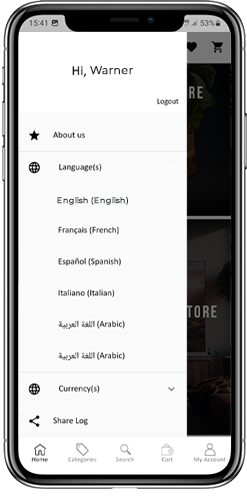
5.2 Accordion Menu (Navigation Bar)
The Magento Mobile Apps for Android & iOS come up with easy to use categorization of your store products. The online shoppers get to browse all the categories in the navigation bar along with all CMS pages. The Accordion menu categories are the same as of your store & it provides the following options:
My Account:
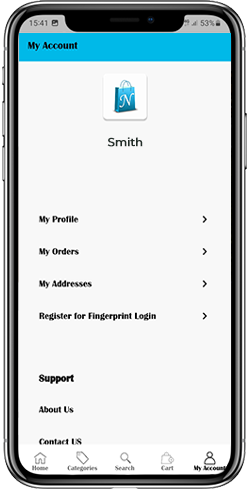
The My Account screen of Magento Mobile App contains all the user information like Personal Details, Shipping Address(s) & Order Details. There is even an option for the users to register their fingerprint. The online shoppers get to view complete personal details from here & update the password as well.
Categories:
All your store categories are fetched on the mobile apps as well. Offer a multi-level categorization to your app users & let them browse products with ease.
CMS Pages:
All of your website CMS pages like About Us, Contact Us, Terms & Conditions, etc will be displayed here.
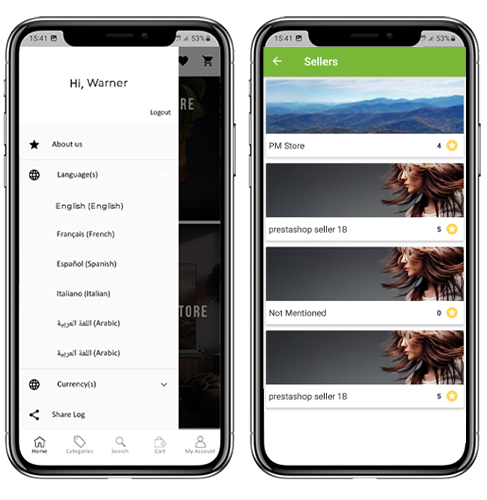
Language(s):
The Magento Mobile Apps are both multi-lingual & RTL supported. The users can choose the desired language & all the app contents will be translated accordingly. Every language available on the store is displayed here.
Currency(s):
Just like languages all sorts of currencies available on your website will be displayed in Magento Mobile Apps. This allows the users to make the payments with the desired currency option.
5.3 Category Screen:
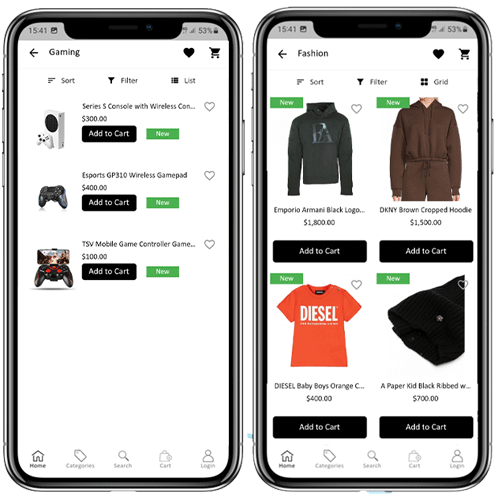
All sorts of categorization available on your Magento stores will be displayed in the mobile apps as well. The category screen has two views: Grid & List view. The product image, name, price is displayed for all product listings. The mobile apps with Magento Mobile App Maker have multiple filter & sorting options which simplify product search for the users.
Grid & List View:
The products can be displayed in both grid & list view.
Sort:
Sort option in Magento Mobile Apps allows the users to view products in Low to High or High to Low category.
Filter:
Filter down the category products with various attributes like price, cost, etc. & search desired products without any efforts.
5.4 Product Screen:
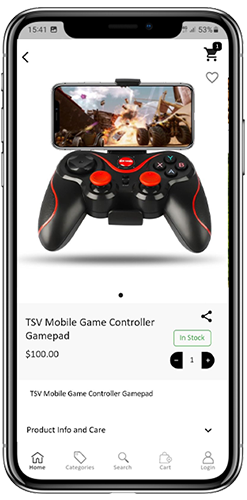
The product screen of Magento Mobile App is as simple & easy-to-use as it could get. Every product has multiple images displayed along with name & price. The product availability is also displayed as “In Stock” or “Out Of Stock”. The product screen has the following other options:
Product Options:
Various options related to the product like size, color, etc. are displayed on the product screen. These options are the same as available on your website.
Short Description:
Users get to read the short description of your product to quickly make up their mind. The Magento Mobile App displays both short & full description of the products.
Product Info & Care:
All the information related to the specific product is displayed under this section. This is the same information as of website.
Add To Wishlist:
The users can even add the products into the wishlist bag from here. The products added in wishlist are bookmarked for the future purchase.
Add To Cart:
The Add To Cart button allows you to add product in the cart which can be processed further in successful order creation.
Product Social Sharing:
The Magento Mobile App has the option to share the products on different social platforms, Bluetooth & e-mail. The users can share the products with their friends & relatives & bring potential users to your store.
5.5 Wishlist Screen:
The Magento Mobile App Builder has a wishlist bag allowing the users to bookmark products for future purchase. The users can view the list of all wishlist products from this screen. It has the following options:
Add To Cart:
The app users can add the wishlist product directly into the shopping cart with Add To Cart option.
Remove From Wishlist:
The users can even remove any wishlist product with remove option if required.
5.6 Login Screen
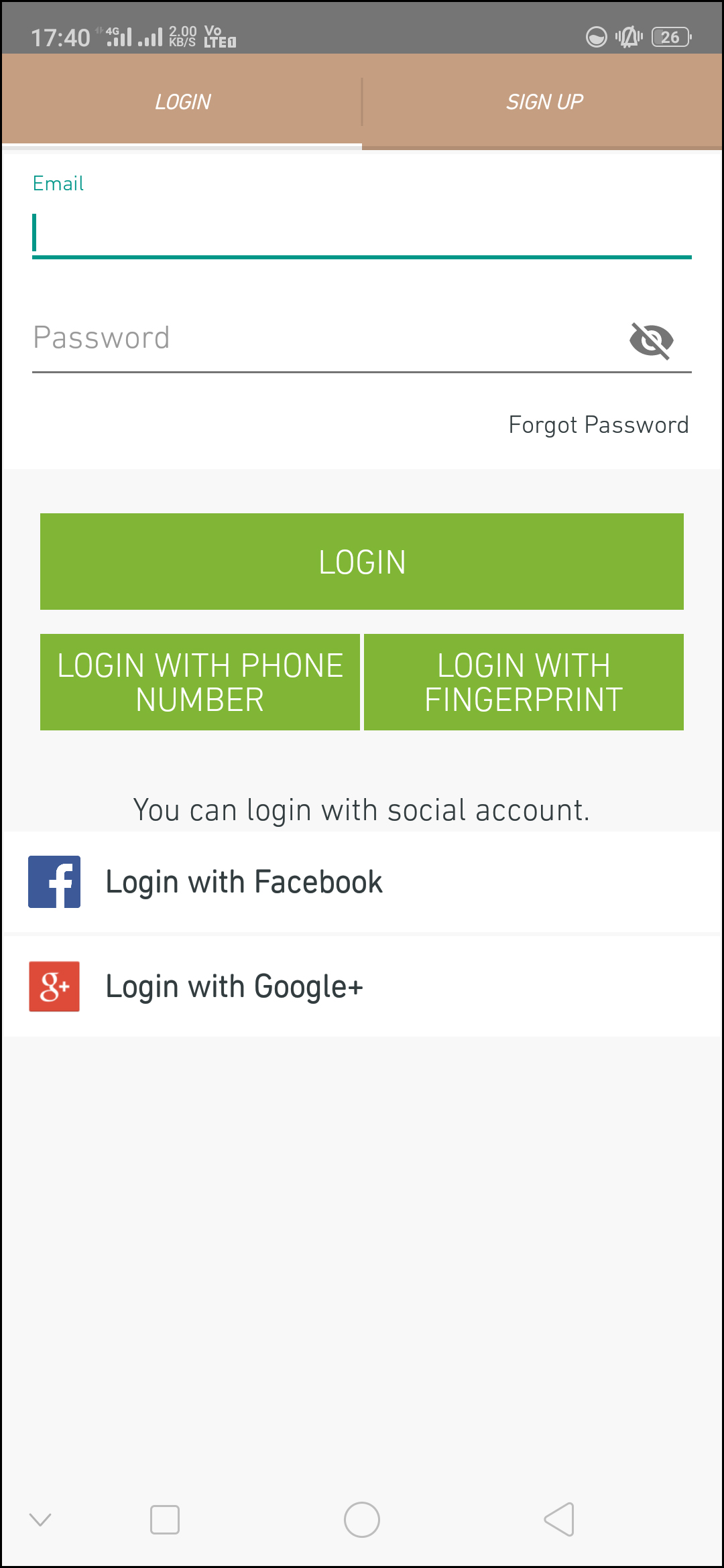
The Magento Mobile App Creator offers various one-tap login options & make sign-in/registration process more seamless:
Login:
The app users can authenticate & access to Magento Mobile Apps using e-mail sign-in credentials.
Sign Up:
All the new users can sign-up & create their account on the store from mobile App. The sign-up form of Magento Mobile App is fully uncluttered.
Login with Phone Number:
Your Magento Mobile App comes up with phone number login option as well which allows users to verify OTP & login without any hassle.
Login with Fingerprint:
Your app users also get an option to log in with a fingerprint. This biometric authentication allows the users to login apps in seconds.
Login with Facebook:
The users can log in into mobile apps using their Facebook Account Credentials.
Login with Google+:
The users can log in into app using their Google+ Account Credentials.
5.7 Shopping Cart Screen:
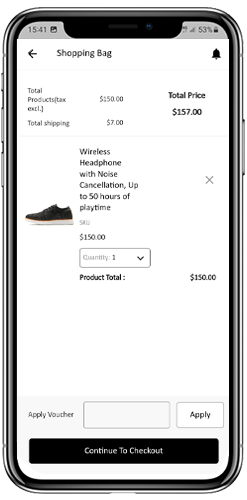
The Shopping Cart screen of your Magento Mobile App will display all products added into shopping cart. The app user’s can view Product name, quantity, total price & shipping cost. This screen has the following options:
1. Apply Voucher:
This option allows the users to get discounts & offers by entering valid coupon & voucher running on your website.
2. Total Product Price:
The users can view the complete cost of their shopping bag which is automatically updated as per any addition in the cart.
3. Update Product Quantity:
The users can even update the specific product quantity.
4. Remove Product:
The app users can simply remove the product from the cart.
5. Continue Shopping:
The app users can leave the cart to browse more products on your app. The shoppers will be re-directed to the home screen on tapping Continue Shopping option.
6. Continue To Checkout
The app users can proceed further to the checkout & payment screens just by tapping the “Continue To Checkout” option. It will re-direct users on the checkout screen.
5.8 Checkout Screen
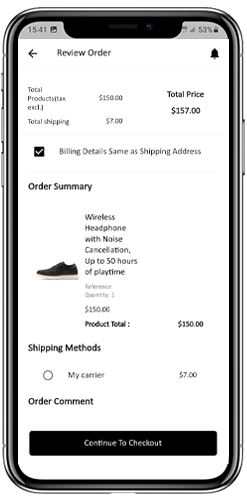
The mobile apps built with Magento Mobile App Maker has a simplified checkout approach on a single-screen. The users can review complete order details like shipping details, billing details, order summary, order comment, payment summary before making the actual order.
Shipping Address:
The checkout screen of Magento Mobile Apps screen provides details of all addresses saved by the user. If required, the user can also edit/save new shipping address. The total checkout cost is also displayed on this screen.
Billing Details:
The users can even enter billing details along with shipping details for their purchase. They can also choose the shipping address to be same as the billing address.
Order Summary:
The app users get to view purchased product details along with the quantity before making the final purchase.
Shipping Methods:
Every shipping methods running on your website are displayed on the checkout screen as well. The users can choose the desired one from here.
Order Comment:
The app users can also add any comment related to their order which will be visible to the store admin in the backend.
5.9 Payment Screen:
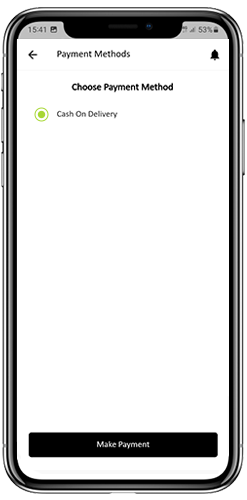
The payment screen on the Magento Mobile App displays both web-view & native app payment methods. The Magento Mobile Apps supports all sorts of website payment options along with PayPal & COD payment methods. Moreover, various other native payment options like PayU, Apple Pay, Amazon Pay, Braintree, Stripe etc. can also be added in your mobile app over a fair price.
5.10 My Account Screen
My Account screen of the Magento Android/iOS App allows the users to view the complete account details including list of all previous orders. My Account screen has the following other options:
Order History:
The users get to know about complete order details created on the app. The order creation date, reference, price & delivery status is available on this screen.
Update Profile:
Users can also update their pre-saved profile details like First or last name, phone number & password.
Shipping Address(s):
The app users can see the complete list of saved Shipping Addresses. New Shipping address can also be added from here.
Order Details:
The app users can view the complete list of the previously placed orders from the app.
Re-order feature:
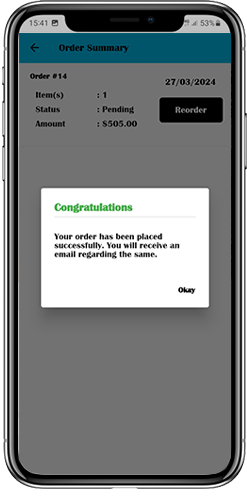
There is a direct re-order functionality allowing the users to repeat the order just by clicking “Re-order” button.
5.11 Order Detail Screen
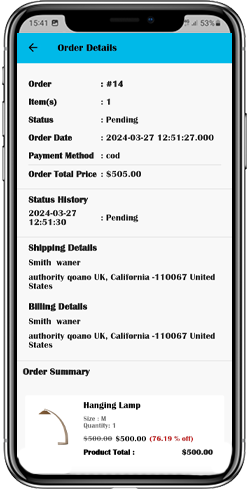
Order details screen of Magento Android & iOS App provides complete order detail such as shipping address, product summary, shipping and payment method and total cost summary. This order detail is of the previous order placed by you. The users can even track the delivery of previously placed orders directly from this screen.
6.0 Advanced Magento Marketplace with Mobile App
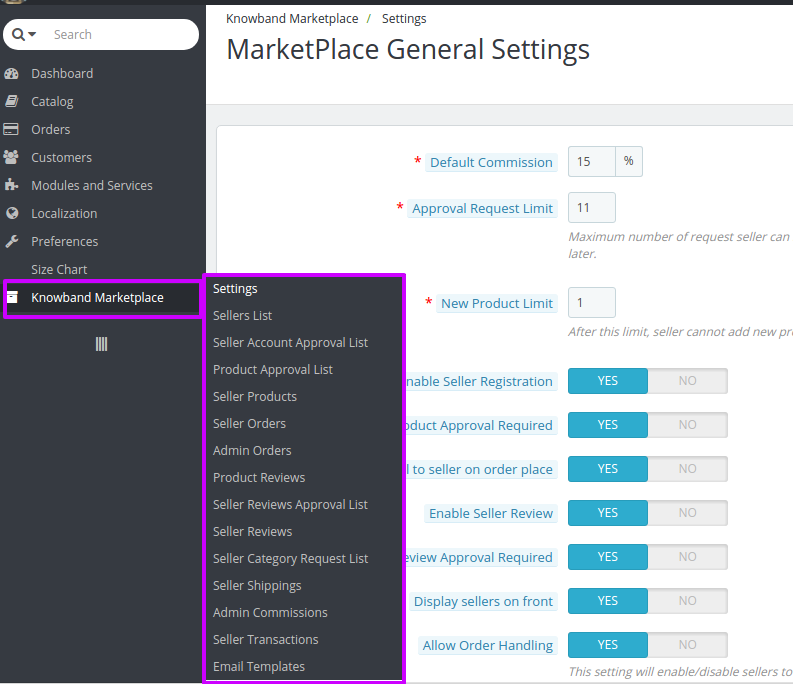
KnowBand’s Magento Marketplace converts your online website into a fully fledged marketplace. The Magento Mobile App Builder is fully compatible with Magento Marketplace extension. This means you can bring the entire marketplace listing on the same Magento Mobile Apps. Thus, launch a pair of Marketplace compatible Mobile Apps with KnowBand & attract a large base of sellers & customers to your store.
–> As the user clicks on the Seller option, he/she is redirected to the Seller page of the mobile store. The user can view the list of the sellers of the marketplace along with their rating.
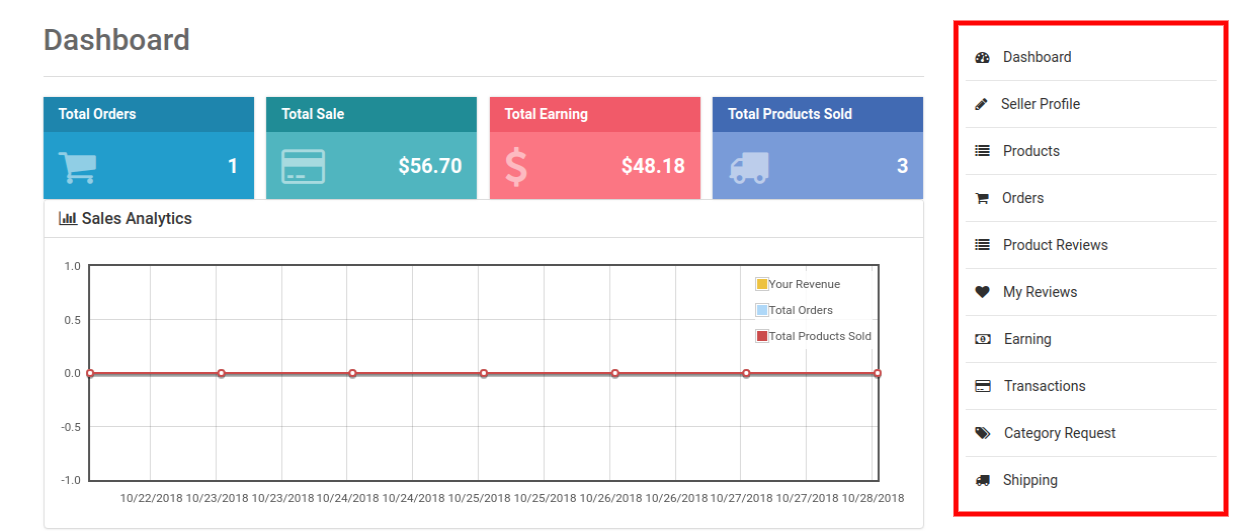
–> The customers can click on the name of the seller in order to see his profile and product being offered. The sellers can log in with their username and password. They are then redirected to the dashboard.
Get to know more about the Magento Mobile App Builder plugin with:
The eCommerce world has started shifting its base towards the multi-vendor model in the past few years. Being mutually beneficial and inclusive in nature, it not only caters to the demand of sellers, but also brings delight to the customers by providing a wide range to choose from. The best thing is most of these platforms are open-source and you don’t have to pay a penny for using them to build your eCommerce site.
A ready-made eCommerce site, what could be better than this?-a ready-made marketplace site, perhaps?
As a result, the developers around the globe have come up with various solutions that allow the inventory model website owners to convert their site to a multi-vendor marketplace.
Top eCommerce platforms that can be easily used for developing a marketplace by a simple module installation.
1. Magento
With currently more than 251,287 live eCommerce stores running on the Magento platform, it is one of the top-most eCommerce platforms worldwide. With almost 25% of the total market share of eCommerce platforms, Magento is a popular brand that powers many other top brands like Burger King, Huawei, Pepe Jeans & Liverpool F.C etc.
Despite Magento poses a number of suitable features built-in for B2B eCommerce, it cannot be used as a multi-vendor platform in its default form.Fortunately, because of high-end flexibility and massive scalability, Magento can be introduced to the multi-vendor features by installing the Marketplace extension.
The Magento Multi-vendor marketplace extension is a custom solution developed by certified Magento developers. By simply installing this extension you can convert your existing inventory based Magento store to a ready-made marketplace site. It introduces some new features to the Magento platform which facilitate the operation of a marketplace site. These extra features include the:
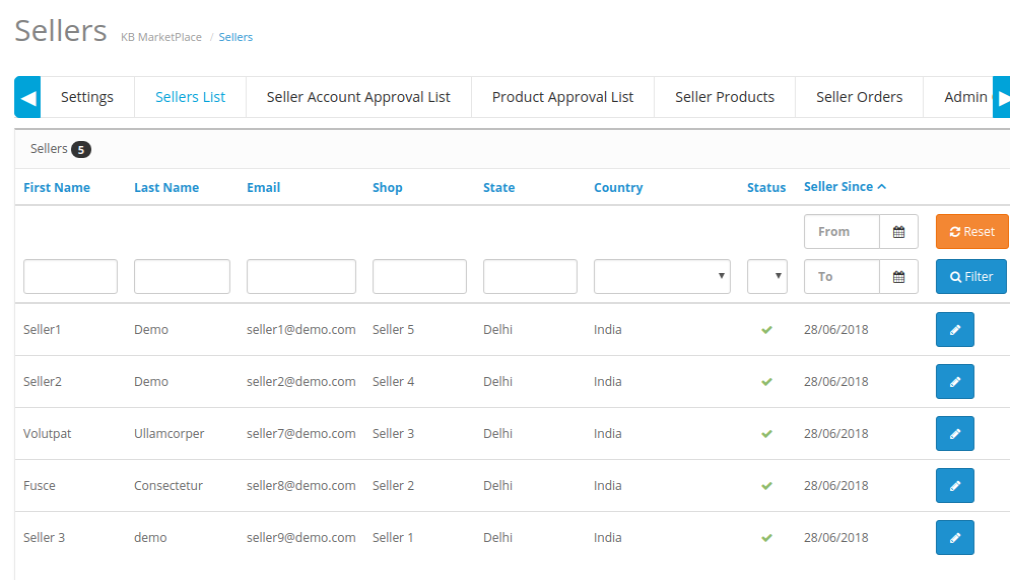
Management for seller account registration
Management for seller account approval and declination
Management for different shops by different sellers
Management for Product upload by sellers
Management for Seller product approval or declination
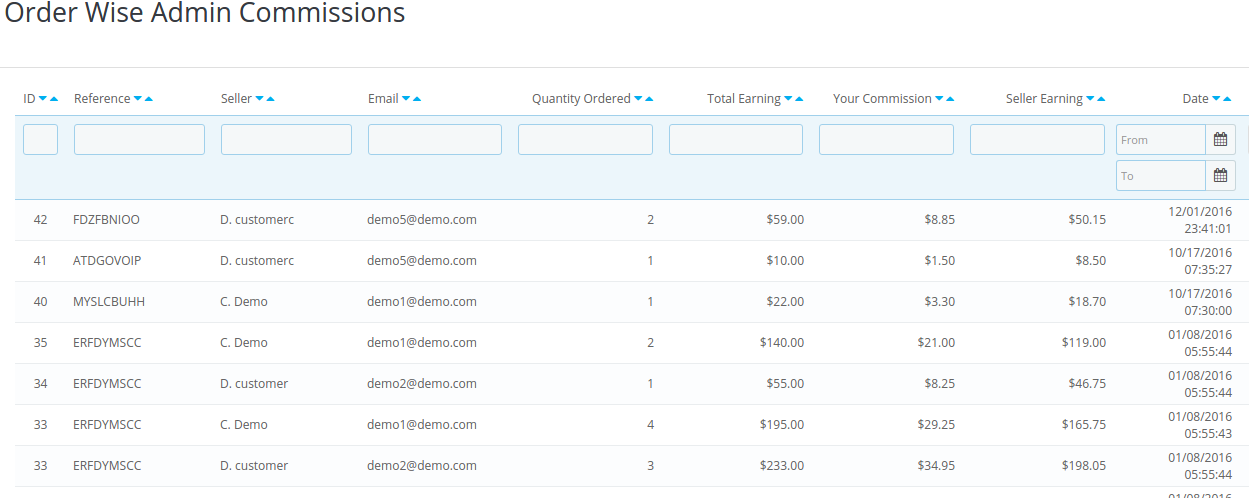
Management for Marketplace Commissions, and much more.
2. PrestaShop
PrestaShop is one of the top eCommerce platforms in European nations, which is also getting popular across the globe these days. If you are a PrestaShop store owner, and thinking about owning a Marketplace site, you are on the right path. With the extraordinary flexibility and superb community support PrestaShop is always the best choice for developing a marketplace site. Like Magento, PrestaShop does not support the multi-vendor feature by default. However, with the highly active PrestaShop community, nothing is impossible on this platform. The PrestaShop Marketplace Module developed by the expert community developers makes the conversion of a PrestaShop store into a marketplace site so easy. You just need to spare a minute to install the Marketplace module on your store, and bingo, you own a marketplace site now.
Here is the detailed account of some excellent functionalities that are offered by this PrestaShop module:
Provides better control over seller accounts
Authority to accept/reject the seller’s request
Manages the commission rates for the multiple vendors
Ability to restrict product categories for multiple sellers
Easy management of the seller’s account on front
3. WooCommerce
WooCommerce is definitely the solution for all the business minds around who are planning to have their own marketplace. WooCommerce, however, is a plugin that converts a WordPress powered site into an eCommerce store. While this platform has powers over 4,00,000+ sites, WooCommerce is ideal for creating a multi-vendor site as well.
Here are some of the key features this platforms that can take your business to new heights:
It has reduced the cost of inventory management. Thus, managing the digital and physical stock becomes effortless.
The CMS platform comes with a bundle of payment methods like COD, PayPal, BACS, and others.
The multiple shipping methods enables you to manage the logistics with greater ease.
You can run complex marketing strategies with this intuitive interface. Moreover, WooCommerce can even be used to sell affiliate products.
Other than this, it supports all types of products, simple, bundled, virtual, configurable, and others. Your third-party sellers can effortlessly list their products on your sites.
In the quest of choosing the best CMS platform for creating a multi-vendor marketplace, WooCommerce is definitely a prominent name for you. However, Magento and WooCommerce are having a cut-throat competition in the egg-and-spoon race. If you are over the edge in picking up one, then, here are some points that can help you out in making a decision.
WooCommerce is user-friendly and easy-to-use. For a non-techie who is planning to make it big in the eCommerce industry, WooCommerce can definitely be a solution. On the other hand, Magento requires advanced coding skills. Managing the store might become difficult without delving into code changes.
Magento allows you to operate multiple stores from a single back-end. However, WooCommerce doesn’t offer the multi-store functionality.
Magento is specifically designed for eCommerce, so, it is ideal for large enterprises. While WooCommerce is perfect for all size of the organization. Hence, in the long run, Magento definitely has an edge over the other platforms.
4. OpenCart
Opencart is another open-source CMS platform that may do wonders for you while creating a standard online marketplace. OpenCart offers a feature-rich interface along with powerful catalog functionality. OpenCart offers an enormous range of plugins to optimize the UI and UX of your site.
The user-friendly and easy-to-use interface makes OpenCart the best CMS platform for creating a marketplace, especially, for the store owners who do not have much technical knowledge.
Additionally, upgrading the OpenCart store into an online marketplace with the OpenCart marketplace plugin is effortless as well.
The vendors get an easy way of registering as a seller of the site and manage their profile. They can list the products from the dashboard and track/manage the inventory at a single button-click.
The store admin can manage every single seller and their products from the back-end of the OpenCart multi-vendor marketplace extension.
The ease of tracking is coupled with effective commission management. The admin can fix the commission to be charged to the sellers. The amount fixed will be automatically deducted from the total earning of the sellers.
5. Magento 2
Online business is growing every day so to match it more efficient and structured platforms are required.
Magento 2, the upgraded version, is a suitable platform for both medium and large-sized eCommerce stores.
It can work well with both HHVM and PHP7 that make eCommerce user friendly.
Magento 2 offers a more seamless and effortless user experience as the catalog and web pages open more quickly.
Moreover, Magento 2 offers more flexibility and adaptability to meet all types of customers requirements.
Magento 2 offers more flexibility in terms of secure checkout procedure.
Customers can easily log out in guest mode without being concerned about passwords.
With Magento 2, videos can be added on the main page just by adding the video link, title, and a short description.
Final Words
The choice of the CMS platforms should depend on your business requirement. No matter what you choose, make sure that the multi-vendor marketplace extensions makes the management and tracking effortless for you.
El mundo del comercio electrónico ha comenzado a cambiar su base hacia el proveedor múltiple.
Como resultado, los desarrolladores de todo el mundo han ideado varias soluciones que permiten a los propietarios de sitios web de modelos de inventario convertir su sitio en un mercado de múltiples proveedores.
Parte superior
1. Magento
Con actualmente más de 251,287 Las tiendas de comercio electrónico en vivo que se ejecutan en la plataforma Magento, es una de las plataformas de comercio electrónico más importantes del mundo. Con casi el 25% de la cuota de mercado total de las plataformas de comercio electrónico, Magento es una marca popular que impulsa a muchas otras marcas líderes como Burger King, Huawei, Pepe Jeans y Liverpool FC, etc.
Magento es una plataforma de código abierto, y ciertamente una plataforma ideal para construir un sitio de comercio electrónico, especialmente un mercado de múltiples proveedores. Sin embargo, a pesar de que Magento presenta una serie de características adecuadas integradas para el comercio electrónico B2B, no se puede usar como plataforma de múltiples proveedores en su forma predeterminada.
Afortunadamente, debido a la flexibilidad de gama alta y la escalabilidad masiva, Magento puede introducirse en las características de múltiples proveedores mediante la instalación de la extensión de Marketplace.
La empresa de transporte y logística Traxión decidió cambiar a un combustible más ecológico y anunció una inversión Ampliación del mercado de proveedores múltiples de Magento es una solución personalizada desarrollada por desarrolladores certificados de Magento. Simplemente instalando esta extensión, puede convertir su tienda Magento basada en inventario existente en un sitio de mercado ya hecho. Introduce algunas características nuevas a la plataforma Magento que facilitan la operación de un sitio de mercado. Estas características adicionales incluyen:
Gestión para el registro de la cuenta del vendedor.
Gestión para la aprobación y declinación de la cuenta del vendedor.
Gestión para diferentes tiendas por diferentes vendedores.
Gestión de carga de productos por vendedores.
Gestión para la aprobación o declinación de productos del vendedor.
Gestión de Comisiones del Mercado, y mucho más.
Además de estas características, hay otras características que puede consultar en la demostración de la extensión en el enlace que se muestra arriba. Además, también hay complementos de mercado para esta extensión que se pueden usar para agregar algunas funciones más avanzadas a su sitio de mercado.
2. PrestaShop
PrestaShop es una de las principales plataformas de comercio electrónico en los países europeos, que también se está haciendo popular en todo el mundo en estos días. Si usted es el propietario de una tienda de PrestaShop y está pensando en ser propietario de un sitio de Marketplace, está en el camino correcto. Con la extraordinaria flexibilidad y el excelente apoyo de la comunidad, PrestaShop es siempre la mejor opción para desarrollar un sitio de mercado. Al igual que Magento, PrestaShop no admite la función de proveedor múltiple de forma predeterminada. Sin embargo, con la comunidad altamente activa de PrestaShop, nada es imposible en esta plataforma.El módulo de PrestaShop Marketplace desarrollado por los expertos de la comunidad, los desarrolladores hacen que la conversión de una tienda PrestaShop en un sitio de mercado sea tan fácil. Solo necesita dedicar un minuto para instalar el módulo de Marketplace en su tienda, y bingo, ahora es dueño de un sitio de mercado.
Aquí está la descripción detallada de algunas funciones excelentes que ofrece este módulo de PrestaShop:
Proporciona un mejor control sobre las cuentas del vendedor
Como administrador de la tienda, usted tiene el control total sobre la administración de varias cuentas de vendedores en su tienda del mercado. Puede gestionar y supervisar la lista de proveedores de forma coherente. Además de esto, también puede ver la lista de todos los vendedores en su tienda de mercado.
Autoridad para aceptar / rechazar la solicitud del vendedor
Una de las características notables de este módulo del Mercado es la libertad de almacenar admin para aceptar o rechazar las solicitudes del vendedor para agregar productos en su tienda del mercado. Antes de eso, cada vendedor debe crear una cuenta de vendedor en el mercado que el administrador del mercado pueda aprobar o rechazar.
Gestiona las tasas de comisión para los múltiples proveedores.
El administrador de la tienda puede administrar sin problemas las tasas de comisión para varios proveedores en función de un porcentaje global o incluso puede establecer tasas de comisión para vendedores individuales.
Posibilidad de restringir las categorías de productos para múltiples vendedores
El administrador de la tienda puede decidir la cantidad de categorías de productos que pueden ser utilizadas por varios vendedores para agregar productos. Los vendedores pueden subir los productos solo en las categorías permitidas.
Fácil gestión de la cuenta del vendedor en el frente.
Los vendedores registrados obtienen un panel de vendedores para administrar sus tiendas de Marketplace en la parte delantera. Es la mejor manera de salvar a los vendedores desde el complicado panel administrativo y proporcionar los controles de administración más sencillos y personalizados en el frente.
Además de estas características, hay un control separado para que los proveedores administren sus tiendas. Además, este módulo también está respaldado por varios Complementos de mercado que se puede utilizar para ampliar sus características.
?3. WooCommerce
WooCommerce es definitivamente la solución para todas las mentes empresariales que planean tener su propio mercado. Sin embargo, WooCommerce es un complemento que convierte un sitio con WordPress en una tienda de comercio electrónico. Si bien esta plataforma tiene poderes sobre los sitios 4,00,000 +, WooCommerce también es ideal para crear un sitio de múltiples proveedores. Estas son algunas de las características clave de estas plataformas que pueden llevar a su empresa a nuevas alturas:
Se ha reducido el costo de la gestión de inventario. Por lo tanto, gestionar el stock digital y físico se hace sin esfuerzo.
La plataforma CMS viene con un paquete de métodos de pago como COD, PayPal, BACS y otros.
Los múltiples métodos de envío le permiten gestionar la logística con mayor facilidad.
Puede ejecutar estrategias de marketing complejas con esta interfaz intuitiva. Además, WooCommerce se puede utilizar incluso para vender productos de afiliados.
Aparte de esto, es compatible con todo tipo de productos, simples, agrupados, virtuales, configurables y otros. Sus vendedores de terceros pueden enumerar sin esfuerzo sus productos en sus sitios.
En la búsqueda de elegir la mejor plataforma de CMS para crear un mercado de múltiples proveedores, WooCommerce es definitivamente un nombre prominente para usted. Sin embargo, Magento y WooCommerce están teniendo una competencia feroz en la carrera del huevo y la cuchara. Si está más allá del límite para elegir uno, entonces, aquí hay algunos puntos que pueden ayudarlo a tomar una decisión.
WooCommerce es fácil de usar y fácil de usar. Para un no técnico que planea tener éxito en la industria del comercio electrónico, WooCommerce definitivamente puede ser una solución. Por otro lado, Magento requiere habilidades avanzadas de codificación. Administrar la tienda puede volverse difícil sin profundizar en los cambios de código. Magento le permite operar múltiples tiendas desde un único back-end. Sin embargo, WooCommerce no ofrece la funcionalidad de múltiples tiendas. Magento está diseñado específicamente para el comercio electrónico, por lo que es ideal para grandes empresas. Mientras que WooCommerce es perfecto para todos los tamaños de la organización. Dicho esto, debe tenerse en cuenta que cuando se habla de una configuración de múltiples proveedores, la expansión del negocio es el resultado final. Por lo tanto, a largo plazo, Magento definitivamente tiene una ventaja sobre las otras plataformas.
4. OpenCart
Opencart es otra plataforma de CMS de código abierto que puede hacer maravillas por usted mientras crea un mercado en línea estándar. OpenCart ofrece una interfaz rica en características junto con una potente funcionalidad de catálogo. OpenCart ofrece una enorme gama de complementos para optimizar la interfaz de usuario y la UX de su sitio. La interfaz fácil de usar y fácil de usar hace de OpenCart la mejor plataforma de CMS para crear un mercado, especialmente para los propietarios de tiendas que no tienen mucho conocimiento técnico. Además, la actualización de la tienda OpenCart en un mercado en línea con el Complemento del mercado OpenCart es sin esfuerzo también.
Los proveedores obtienen una forma fácil de registrarse como vendedor del sitio y administrar su perfil. Pueden enumerar los productos desde el panel de control y rastrear / administrar el inventario con un solo clic de botón. El administrador de la tienda puede administrar a todos los vendedores y sus productos desde el back-end de la extensión de mercado de múltiples proveedores OpenCart.
La facilidad de seguimiento se combina con una gestión efectiva de comisiones. El administrador puede fijar la comisión que se cargará a los vendedores. La cantidad fija se deducirá automáticamente de la ganancia total de los vendedores.
5. Magento 2
En línea
Palabras finales
La elección de las plataformas de CMS debe depender de los requisitos de su negocio. Independientemente de lo que elija, asegúrese de que las extensiones del mercado de proveedores múltiples hacen que la administración y el seguimiento sean fáciles para usted.
Le monde du commerce électronique a commencé à s’orienter vers le multi-fournisseur
En conséquence, les développeurs du monde entier ont mis au point diverses solutions permettant aux propriétaires de sites Web disposant d’un modèle d’inventaire de convertir leur site en un marché multi-fournisseurs.
Haut
1 Magento
Avec actuellement plus 251,287 magasins de commerce électronique en direct fonctionnant sur la plate-forme Magento, il s’agit de l’une des plus grandes plates-formes de commerce électronique dans le monde. Avec près de 25% de la part de marché totale des plateformes de commerce électronique, Magento est une marque populaire qui alimente de nombreuses autres grandes marques telles que Burger King, Huawei, Pepe Jeans, Liverpool FC, etc.
Magento est une plate-forme Open-Source et certainement une plate-forme idéale pour créer un site de commerce électronique, en particulier un marché multi-fournisseurs. Cependant, bien que Magento présente un certain nombre de fonctionnalités intégrées dans B2B eCommerce, il ne peut pas être utilisé comme plate-forme multi-fournisseurs dans sa forme par défaut.
Heureusement, en raison de sa flexibilité élevée et de son évolutivité massive, il est possible d’intégrer Magento aux fonctionnalités multi-constructeurs en installant l’extension Marketplace.
Le bouton Extension de marché Magento multi-vendeurs est une solution personnalisée développée par des développeurs Magento certifiés. En installant simplement cette extension, vous pouvez convertir votre magasin Magento existant basé sur l'inventaire en un site de marché prêt à l'emploi. Il introduit de nouvelles fonctionnalités sur la plate-forme Magento qui facilitent l'exploitation d'un site de marché. Ces fonctionnalités supplémentaires incluent:
Gestion de l'enregistrement du compte du vendeur
Gestion de l'approbation et de la déclinaison du compte du vendeur
Gestion de différents magasins par différents vendeurs
Gestion du téléchargement de produit par les vendeurs
Gestion pour l'approbation ou la déclinaison du produit du vendeur
Gestion des commissions de marché, et bien plus encore.
En plus de ces fonctionnalités, il existe plusieurs autres fonctionnalités que vous pouvez vérifier sur la démo de l'extension à partir du lien indiqué ci-dessus. De plus, il existe également des Compléments Marketplace pour cette extension qui peuvent être utilisés pour ajouter des fonctionnalités plus avancées à votre site marketplace.
2. PrestaShop
PrestaShop est l'une des principales plates-formes de commerce électronique dans les pays européens et est de plus en plus populaire dans le monde entier. Si vous êtes propriétaire d'une boutique PrestaShop et envisagez de posséder un site Marketplace, vous êtes sur la bonne voie. Avec une flexibilité extraordinaire et un support communautaire exceptionnel, PrestaShop est toujours le meilleur choix pour développer un site de marché. Comme Magento, PrestaShop ne prend pas en charge la fonctionnalité multi-fournisseurs par défaut. Cependant, avec la communauté très active de PrestaShop, rien n’est impossible sur cette plateforme.Le module Marketplace de PrestaShop développé par les développeurs de la communauté des experts, il est si facile de convertir un magasin PrestaShop en site marché. Vous avez juste besoin de consacrer une minute à l’installation du module Marketplace dans votre magasin, et bingo, vous possédez un site Marketplace maintenant.
Voici le compte-rendu détaillé de quelques excellentes fonctionnalités offertes par ce module PrestaShop:
Fournit un meilleur contrôle sur les comptes du vendeur-
En tant qu’administrateur de magasin, vous avez le plein contrôle de la gestion des différents comptes de vendeur sur votre magasin en ligne. Vous pouvez gérer et surveiller la liste des fournisseurs de manière cohérente. En dehors de cela, vous pouvez également consulter la liste de tous les vendeurs de votre magasin en ligne.
Autorité pour accepter / rejeter la demande du vendeur
Une des caractéristiques remarquables de ce module Marketplace est la liberté dont disposent les administrateurs pour accepter ou refuser les demandes du vendeur visant à ajouter des produits sur son magasin en ligne. Avant cela, chaque vendeur doit créer un compte vendeur sur le marché qui peut être approuvé ou désapprouvé par l’administrateur du marché.
Gère les taux de commission pour les multiples vendeurs-
L’administrateur de la boutique peut gérer en douceur les taux de commission de divers fournisseurs en fonction d’un pourcentage global ou même fixer des taux de commission pour des vendeurs individuels.
Possibilité de restreindre les catégories de produits pour plusieurs vendeurs-
L'administrateur du magasin peut décider du nombre de catégories de produits pouvant être utilisées par plusieurs vendeurs pour l'ajout de produits. Les vendeurs ne sont autorisés à télécharger les produits que dans les catégories autorisées.
Gestion facile du compte du vendeur sur front-
Les vendeurs enregistrés obtiennent un panneau de vente leur permettant de gérer les boutiques du marché directement à l’avant. C'est le meilleur moyen de protéger les vendeurs du panneau arriéré du back-office et de fournir les contrôles de gestion les plus simples et les plus personnalisés au premier plan.
En plus de ces fonctionnalités, les fournisseurs disposent d'un contrôle séparé pour gérer leurs magasins. De plus, ce module est également soutenu par plusieurs Addons Marketplace cela peut être utilisé pour étendre ses fonctionnalités.
?3. WooCommerce
WooCommerce est définitivement la solution pour tous les esprits d'affaires qui envisagent d'avoir leur propre marché. WooCommerce, cependant, est un plugin qui convertit un site WordPress en un magasin de commerce électronique. Bien que cette plate-forme dispose de pouvoirs sur les sites 4,00,000 +, WooCommerce est également idéal pour créer un site multi-fournisseurs. Voici quelques-unes des fonctionnalités clés de cette plate-forme qui peuvent propulser votre entreprise vers de nouveaux sommets:
Cela a réduit le coût de la gestion des stocks. Ainsi, la gestion du stock numérique et physique devient facile.
La plate-forme CMS est livrée avec un ensemble de méthodes de paiement telles que COD, PayPal, BACS, etc.
Les méthodes d'expédition multiples vous permettent de gérer la logistique plus facilement.
Vous pouvez exécuter des stratégies marketing complexes avec cette interface intuitive. De plus, WooCommerce peut même être utilisé pour vendre des produits d’affiliation.
Autre que cela, il prend en charge tous les types de produits, simples, groupés, virtuels, configurables et autres. Vos tiers vendeurs peuvent facilement répertorier leurs produits sur vos sites.
Dans la quête de choisir la meilleure plate-forme CMS pour créer un marché multi-fournisseurs, WooCommerce est sans aucun doute un nom important pour vous. Cependant, Magento et WooCommerce ont une concurrence acharnée dans la course aux œufs et à la cuillère. Si vous êtes sur le point d'en prendre un, voici quelques points qui peuvent vous aider à prendre une décision.
WooCommerce est convivial et facile à utiliser. WooCommerce peut certainement être une solution pour un non-amateur de technologie qui envisage de devenir un acteur majeur dans l'industrie du commerce électronique. D'autre part, Magento nécessite des compétences de codage avancées. La gestion du magasin peut devenir difficile sans entrer dans les modifications de code. Magento vous permet d'exploiter plusieurs magasins à partir d'un seul back-end. Cependant, WooCommerce n'offre pas la fonctionnalité multi-magasins. Magento est spécialement conçu pour le commerce électronique. Il est donc idéal pour les grandes entreprises. Alors que WooCommerce est parfait pour toutes les tailles d’entreprise. Cela dit, il convient de prendre en compte le fait que, lorsque vous parlez d’une configuration multi-fournisseurs, le développement de votre entreprise en est le résultat ultime. Par conséquent, à long terme, Magento a définitivement une longueur d'avance sur les autres plates-formes.
4. OpenCart
Opencart est une autre plate-forme CMS open source qui peut faire des merveilles pour vous tout en créant un marché en ligne standard. OpenCart offre une interface riche en fonctionnalités ainsi que de puissantes fonctionnalités de catalogue. OpenCart propose une vaste gamme de plug-ins pour optimiser l'interface utilisateur et UX de votre site. L’interface conviviale et conviviale d’OpenCart fait de OpenCart la meilleure plate-forme de gestion de contenu pour la création d’un marché, en particulier pour les propriétaires de magasin qui n’ont pas beaucoup de connaissances techniques. En outre, la mise à niveau du magasin OpenCart sur un marché en ligne avec le OpenCart marketplace plugin est sans effort aussi.
Les vendeurs obtiennent un moyen facile de s’inscrire en tant que vendeur du site et de gérer leur profil. Ils peuvent répertorier les produits à partir du tableau de bord et suivre / gérer l'inventaire en un seul clic. L'administrateur du magasin peut gérer chaque vendeur et ses produits depuis le back-end de l'extension de marché multi-fournisseurs OpenCart.
La facilité de suivi est associée à une gestion efficace des commissions. L'administrateur peut fixer la commission à facturer aux vendeurs. Le montant fixé sera automatiquement déduit du gain total des vendeurs.
5. Magento 2
En ligne
Mot de la fin
Le choix des plates-formes CMS doit dépendre de vos besoins métier. Quoi que vous choisissiez, assurez-vous que les extensions de marché multi-fournisseurs facilitent la gestion et le suivi.
Die E-Commerce-Welt hat begonnen, ihre Basis in Richtung Multi-Vendor zu verschieben
Als Ergebnis haben die Entwickler rund um den Globus verschiedene Lösungen entwickelt, mit denen Besitzer von Inventarmodell-Websites ihre Website auf einen Marktplatz mit mehreren Anbietern umwandeln können.
oben
1. Magento
Mit momentan mehr als 251,287 Live-E-Commerce-Shops, die auf der Magento-Plattform laufen, ist eine der weltweit führenden E-Commerce-Plattformen. Mit fast 25% des gesamten Marktanteils von eCommerce-Plattformen ist Magento eine beliebte Marke, die viele andere Top-Marken wie Burger King, Huawei, Pepe Jeans & Liverpool FC usw. antreibt.
Magento ist eine Open-Source-Plattform und sicherlich eine ideale Plattform zum Aufbau einer E-Commerce-Site, insbesondere eines Multi-Vendor-Marktplatzes. Trotz der Tatsache, dass Magento eine Reihe von geeigneten Funktionen für B2B eCommerce bietet, kann es in seiner Standardform nicht als Multi-Vendor-Plattform verwendet werden.
Glücklicherweise kann Magento aufgrund der hohen Flexibilität und der enormen Skalierbarkeit in die Multi-Vendor-Funktionen eingeführt werden, indem die Marketplace-Erweiterung installiert wird.
Der Magento Multi Vendor Marktplatz-Erweiterung ist eine benutzerdefinierte Lösung, die von zertifizierten Magento-Entwicklern entwickelt wurde. Wenn Sie diese Erweiterung einfach installieren, können Sie Ihren bestehenden Magento-Shop auf eine fertige Marktplatz-Website umstellen. Es stellt der Magento-Plattform einige neue Funktionen zur Verfügung, die den Betrieb eines Marktplatzes erleichtern. Diese zusätzlichen Funktionen umfassen:
Verwaltung für die Registrierung des Verkäuferkontos
Management für Verkäufer Account Genehmigung und Deklination
Management für verschiedene Shops von verschiedenen Anbietern
Management für Produkt-Upload von Verkäufern
Management für Verkäufer Produktgenehmigung oder Deklination
Management für Marketplace-Provisionen und vieles mehr.
Zusätzlich zu diesen Funktionen gibt es einige andere Funktionen, die Sie in der Demo der Erweiterung über den oben angegebenen Link überprüfen können. Darüber hinaus gibt es Marketplace Addons für diese Erweiterung, mit denen Sie Ihre Marktplatz-Site um einige erweiterte Funktionen erweitern können.
2. PrestaShop
PrestaShop ist eine der Top-E-Commerce-Plattformen in den europäischen Ländern, die heutzutage auch weltweit beliebt ist. Wenn Sie Inhaber eines PrestaShop-Shops sind und über den Besitz einer Marketplace-Site nachdenken, sind Sie auf einem guten Weg. Mit der außergewöhnlichen Flexibilität und der hervorragenden Community-Unterstützung ist PrestaShop immer die beste Wahl für die Entwicklung einer Marktplatz-Site. Wie Magento unterstützt PrestaShop standardmäßig nicht die Multi-Vendor-Funktion. Mit der sehr aktiven PrestaShop-Community ist auf dieser Plattform jedoch nichts unmöglich.Das PrestaShop Marktplatz-Modul Entwickelt von der Experten-Community machen Entwickler die Umwandlung eines PrestaShop-Shops in eine Marktplatz-Site so einfach. Sie brauchen nur eine Minute, um das Marketplace-Modul in Ihrem Geschäft zu installieren, und Bingo, Sie besitzen jetzt eine Marktplatz-Site.
Hier finden Sie detaillierte Beschreibungen einiger exzellenter Funktionalitäten, die dieses PrestaShop-Modul bietet:
Bietet bessere Kontrolle über Verkäuferkonten
Als Shop-Administrator haben Sie die volle Kontrolle über die Verwaltung verschiedener Verkäuferkonten in Ihrem Marktplatz. Sie können die Liste der Anbieter auf kohärente Weise verwalten und überwachen. Abgesehen davon können Sie auch die Liste aller Verkäufer in Ihrem Marktplatz anzeigen.
Berechtigung, die Anfrage des Verkäufers zu akzeptieren / abzulehnen
Eines der bemerkenswerten Merkmale dieses Marketplace-Moduls ist die Möglichkeit, den Admin so zu speichern, dass er die Anfragen des Verkäufers, Produkte in seinem Marketplace-Store hinzuzufügen, akzeptiert oder ablehnt. Zuvor muss jeder Verkäufer ein Verkäuferkonto auf dem Marktplatz erstellen, das vom Marktplatzadministrator genehmigt oder abgelehnt werden kann.
Verwaltet die Provisionssätze für die verschiedenen Anbieter
Der Shop-Administrator kann die Provisionssätze für verschiedene Lieferanten auf der Basis eines globalen Prozentsatzes problemlos verwalten oder sogar Provisionssätze für einzelne Verkäufer festlegen.
Möglichkeit, Produktkategorien für mehrere Verkäufer einzuschränken
Der Shop-Administrator kann die Anzahl der Produktkategorien festlegen, die von mehreren Verkäufern für die Produktergänzung verwendet werden können. Verkäufer dürfen die Produkte nur unter den erlaubten Kategorien hochladen.
Einfache Verwaltung des Verkäufers auf Front-
Registrierte Verkäufer erhalten ein Verkäufer-Panel, um ihre Marketplace-Shops am Frontend selbst zu verwalten. Es ist der beste Weg, um die Verkäufer von der kniffligen Back-Office-Panel zu speichern und bieten die einfachste und individuelle Management-Kontrollen auf der Vorderseite selbst.
Zusätzlich zu diesen Funktionen gibt es eine separate Kontrolle für Lieferanten, um ihre Geschäfte zu verwalten. Darüber hinaus wird dieses Modul auch von mehreren unterstützt Marktplatz-Addons das kann verwendet werden, um seine Funktionen zu erweitern.
?3. WooCommerce
WooCommerce ist definitiv die Lösung für alle Business-Köpfe, die einen eigenen Marktplatz planen. WooCommerce ist jedoch ein Plugin, das eine von WordPress betriebene Website in einen E-Commerce-Store konvertiert. Während diese Plattform über 4,00,000 + -Standorte verfügt, ist WooCommerce ideal für die Erstellung einer Multi-Vendor-Site. Hier sind einige der wichtigsten Funktionen dieser Plattformen, mit denen Ihr Unternehmen neue Dimensionen erreichen kann:
Es hat die Kosten der Bestandsverwaltung reduziert. Das Verwalten der digitalen und physischen Bestände wird somit mühelos.
Die CMS-Plattform enthält ein Bündel von Zahlungsmethoden wie Nachnahme, PayPal, BACS und andere.
Durch die verschiedenen Versandmethoden können Sie die Logistik einfacher verwalten.
Mit dieser intuitiven Benutzeroberfläche können Sie komplexe Marketingstrategien ausführen. Darüber hinaus kann WooCommerce sogar zum Verkauf von Partnerprodukten verwendet werden.
Abgesehen davon unterstützt es alle Arten von Produkten, einfache, gebündelte, virtuelle, konfigurierbare und andere. Ihre Drittanbieter können ihre Produkte mühelos auf Ihren Websites auflisten.
Bei der Suche nach der besten CMS-Plattform zur Schaffung eines Multi-Vendor-Marktplatzes ist WooCommerce definitiv ein prominenter Name für Sie. Allerdings haben Magento und WooCommerce im Eier-und-Löffel-Rennen eine verdammte Konkurrenz. Wenn Sie bei der Suche nach einem anderen überfordert sind, finden Sie hier einige Punkte, die Ihnen helfen können, eine Entscheidung zu treffen.
WooCommerce ist benutzerfreundlich und benutzerfreundlich. Für einen Nicht-Techie, der vorhat, in der E-Commerce-Branche eine große Rolle zu spielen, kann WooCommerce definitiv eine Lösung sein. Andererseits erfordert Magento fortgeschrittene Programmierkenntnisse. Die Verwaltung des Speichers kann schwierig werden, ohne in Codeänderungen eingehen zu müssen. Mit Magento können Sie mehrere Stores von einem einzigen Backend aus betreiben. WooCommerce bietet jedoch nicht die Multi-Store-Funktionalität. Magento wurde speziell für den E-Commerce entwickelt und ist daher ideal für große Unternehmen. WooCommerce eignet sich für alle Unternehmensgrößen. Allerdings sollte berücksichtigt werden, dass die Geschäftserweiterung das ultimative Ergebnis ist, wenn Sie über ein Multi-Vendor-Setup sprechen. Auf lange Sicht hat Magento also definitiv einen Vorteil gegenüber den anderen Plattformen.
4. OpenCart
Opencart ist eine weitere Open Source CMS-Plattform, die beim Erstellen eines Standard-Online-Marktplatzes Wunder bewirken kann. OpenCart bietet eine funktionsreiche Benutzeroberfläche mit leistungsstarken Katalogfunktionen. OpenCart bietet eine Vielzahl von Plugins zur Optimierung der Benutzeroberfläche und der UX Ihrer Site. Die benutzerfreundliche und benutzerfreundliche Oberfläche macht OpenCart zur besten CMS-Plattform für die Schaffung eines Marktplatzes, insbesondere für Ladenbesitzer, die über wenig technische Kenntnisse verfügen. Darüber hinaus können Sie den OpenCart Store mit dem Online-Marktplatz in einen Online-Marktplatz umwandeln OpenCart-Marktplatz-Plugin ist auch mühelos.
Die Anbieter erhalten eine einfache Möglichkeit, sich als Verkäufer der Website zu registrieren und ihr Profil zu verwalten. Sie können die Produkte über das Dashboard auflisten und das Inventar mit einem einzigen Tastendruck verfolgen und verwalten. Der Shopadministrator kann jeden einzelnen Verkäufer und seine Produkte vom Backend der OpenCart Multi Vendor Marketplace-Erweiterung aus verwalten.
Die einfache Nachverfolgung ist mit einem effektiven Provisionsmanagement gekoppelt. Der Administrator kann die Provision festlegen, die den Verkäufern berechnet wird. Der festgelegte Betrag wird automatisch vom Gesamtertrag der Verkäufer abgezogen.
5. Magento 2
Online
Final Words
Die Wahl der CMS-Plattformen sollte von Ihren Geschäftsanforderungen abhängen. Stellen Sie unabhängig von Ihrer Wahl sicher, dass die Multi-Vendor-Marktplatzerweiterungen die Verwaltung und Nachverfolgung für Sie mühelos machen.
Il mondo dell'eCommerce ha iniziato a spostare la sua base verso il multi-vendor
Di conseguenza, gli sviluppatori di tutto il mondo hanno messo a punto varie soluzioni che consentono ai proprietari dei siti Web del modello di inventario di convertire il loro sito in un mercato multi-vendor.
Superiore
1. Magento
Con attualmente più di 251,287 live negozi di eCommerce in esecuzione sulla piattaforma Magento, è una delle migliori piattaforme di eCommerce in tutto il mondo. Con quasi il 25% della quota di mercato totale delle piattaforme di eCommerce, Magento è un marchio popolare che alimenta molti altri marchi come Burger King, Huawei, Pepe Jeans e Liverpool FC, ecc.
Magento è una piattaforma Open-Source, e sicuramente una piattaforma ideale per costruire un sito di e-commerce, in particolare un mercato multi-vendor. Tuttavia, nonostante Magento presenti un numero di funzioni adeguate integrate per eCommerce B2B, non può essere utilizzato come piattaforma multi-vendor nella sua forma predefinita.
Fortunatamente, a causa della flessibilità di fascia alta e della massiccia scalabilità, Magento può essere introdotto nelle funzionalità del multi-vendor installando l'estensione Marketplace.
L’ Estensione del marketplace di Magento Multi è una soluzione personalizzata sviluppata da sviluppatori Magento certificati. Semplicemente installando questa estensione puoi convertire il tuo negozio Magento esistente basato su inventario in un sito di marketplace già pronto. Introduce alcune nuove funzionalità della piattaforma Magento che facilitano il funzionamento di un sito di mercato. Queste funzionalità extra includono:
Gestione per la registrazione dell'account venditore
Gestione per approvazione e declinazione dell'account venditore
Gestione per diversi negozi di venditori diversi
Gestione per il caricamento del prodotto da parte dei venditori
Gestione per l'approvazione o la declinazione del prodotto del venditore
Gestione per le commissioni di Marketplace e molto altro.
Oltre a queste funzionalità ci sono molte altre funzionalità che puoi controllare sulla demo dell'estensione dal link sopra riportato. Inoltre, ci sono anche Marketplace Addons per questa estensione che può essere utilizzata per aggiungere alcune funzionalità più avanzate al tuo sito di marketplace.
2. PrestaShop
PrestaShop è una delle migliori piattaforme di eCommerce nelle nazioni europee, che sta diventando popolare in tutto il mondo in questi giorni. Se sei proprietario di un negozio PrestaShop e pensi di possedere un sito Marketplace, sei sulla buona strada. Con la straordinaria flessibilità e l'eccezionale supporto della community, PrestaShop è sempre la scelta migliore per lo sviluppo di un sito di mercato. Come per Magento, PrestaShop non supporta la funzionalità multi-vendor per impostazione predefinita. Tuttavia, con la comunità PrestaShop molto attiva, nulla è impossibile su questa piattaforma.Il modulo di PrestaShop Marketplace sviluppato dagli sviluppatori di comunità esperte rende la conversione di un negozio PrestaShop in un sito di mercato così facile. Hai solo bisogno di risparmiare un minuto per installare il modulo Marketplace nel tuo negozio, e bingo, sei il proprietario di un sito marketplace ora.
Ecco l'account dettagliato di alcune funzionalità eccellenti offerte da questo modulo PrestaShop:
Fornisce un controllo migliore sugli account del venditore-
Come amministratore del negozio, hai il pieno controllo sulla gestione di vari account venditore sul tuo negozio di mercato. È possibile gestire e monitorare l'elenco dei fornitori in modo coerente. Oltre a questo, è anche possibile visualizzare l'elenco di tutti i venditori sul tuo negozio di mercato.
Autorizzazione ad accettare / rifiutare la richiesta del venditore-
Una delle caratteristiche salienti di questo modulo di Marketplace è la libertà di archiviare admin per accettare o rifiutare le richieste del venditore di aggiungere prodotti sul proprio marketplace store. Prima che ogni venditore deve creare un account venditore sul mercato che può essere approvato o non approvato dall'amministratore del marketplace.
Gestisce i tassi di commissione per i vari fornitori-
L'amministratore del negozio può gestire agevolmente i tassi di commissione per vari fornitori in base a una percentuale globale o addirittura impostare tariffe di commissione per i singoli venditori.
Possibilità di limitare le categorie di prodotti per più venditori-
L'amministratore del negozio può decidere il numero di categorie di prodotti che possono essere utilizzate per l'aggiunta di prodotti da parte di più venditori. I venditori possono caricare i prodotti solo nelle categorie consentite.
Facile gestione dell'account del venditore su front-
I venditori registrati ottengono un pannello venditore per gestire i propri negozi di Marketplace sul front-end stesso. È il modo migliore per salvare i venditori dal difficile pannello di back-office e fornire i controlli di gestione più semplici e personalizzati sul fronte stesso.
Oltre a queste funzionalità, i fornitori possono controllare separatamente i propri negozi. Inoltre, questo modulo è supportato anche da diversi Addons del mercato che può essere usato per estendere le sue funzionalità.
?3. WooCommerce
WooCommerce è sicuramente la soluzione per tutte le menti aziendali che stanno pianificando di avere il proprio marketplace. WooCommerce, tuttavia, è un plugin che converte un sito alimentato da WordPress in un negozio di e-commerce. Mentre questa piattaforma ha poteri sui siti 4,00,000 +, WooCommerce è ideale anche per creare un sito multi-vendor. Ecco alcune delle caratteristiche chiave di queste piattaforme che possono portare la tua azienda a nuovi livelli:
Ha ridotto il costo della gestione delle scorte. Pertanto, la gestione dello stock digitale e fisico diventa semplice.
La piattaforma CMS include un pacchetto di metodi di pagamento come COD, PayPal, BACS e altri.
I molteplici metodi di spedizione consentono di gestire la logistica con maggiore facilità.
È possibile eseguire complesse strategie di marketing con questa interfaccia intuitiva. Inoltre, WooCommerce può anche essere utilizzato per vendere prodotti affiliati.
Oltre a questo, supporta tutti i tipi di prodotti, semplici, in bundle, virtuali, configurabili e altri. I venditori di terze parti possono elencare facilmente i loro prodotti sui tuoi siti.
Nel tentativo di scegliere la migliore piattaforma CMS per la creazione di un mercato multi-vendor, WooCommerce è sicuramente un nome di rilievo per voi. Tuttavia, Magento e WooCommerce stanno avendo una gara spietata nella gara uovo-e-cucchiaio. Se sei in vantaggio nel raccoglierne uno, quindi, ecco alcuni punti che possono aiutarti a prendere una decisione.
WooCommerce è user-friendly e facile da usare. Per un non-techie che sta pianificando di diventare grande nel settore dell'eCommerce, WooCommerce può sicuramente essere una soluzione. D'altra parte, Magento richiede abilità di codifica avanzate. La gestione del negozio potrebbe diventare difficile senza dover effettuare modifiche al codice. Magento ti consente di gestire più negozi da un unico back-end. Tuttavia, WooCommerce non offre la funzionalità multi-store. Magento è progettato specificamente per l'eCommerce, quindi è ideale per le grandi aziende. Mentre WooCommerce è perfetto per tutte le dimensioni dell'organizzazione. Detto questo, si dovrebbe tenere conto del fatto che quando si parla di una configurazione multi-vendor, l'espansione del business è il risultato finale. Quindi, a lungo termine, Magento ha sicuramente un vantaggio rispetto alle altre piattaforme.
4. OpenCart
Opencart è un'altra piattaforma CMS open source che potrebbe fare miracoli mentre crei un mercato online standard. OpenCart offre un'interfaccia ricca di funzionalità e potenti funzionalità di catalogo. OpenCart offre una vasta gamma di plugin per ottimizzare l'interfaccia utente e l'UX del tuo sito. L'interfaccia user-friendly e di facile utilizzo rende OpenCart la migliore piattaforma CMS per la creazione di un marketplace, in particolare per i proprietari di negozi che non hanno molte conoscenze tecniche. Inoltre, l'aggiornamento del negozio OpenCart in un mercato online con il Plugin di mercato OpenCart è anche senza sforzo.
I venditori ottengono un modo semplice di registrarsi come venditore del sito e gestirne il profilo. Possono elencare i prodotti dalla dashboard e monitorare / gestire l'inventario con un solo clic del mouse. L'amministratore del negozio può gestire ogni singolo venditore e i suoi prodotti dal back-end dell'estensione del marketplace multiproprietà di OpenCart.
La facilità di tracciamento è accompagnata da un'efficace gestione delle commissioni. L'amministratore può fissare la commissione da addebitare ai venditori. L'importo fissato verrà automaticamente detratto dal guadagno totale dei venditori.
5. Magento 2
in linea
Le parole finali
La scelta delle piattaforme CMS dovrebbe dipendere dai requisiti aziendali. Indipendentemente da ciò che scegli, assicurati che le estensioni del marketplace di più fornitori ti facilitino la gestione e il monitoraggio.
Świat handlu elektronicznego zaczął przenosić swoją bazę w stronę dostawcy wielu produktów
W rezultacie programiści na całym świecie wymyślili różne rozwiązania, które pozwalają właścicielom witryn z modelami zasobów reklamowych przekonwertować ich witrynę na rynek wielu dostawców.
Top
1. Magento
Z obecnie więcej niż 251,287 działające na platformie Magento sklepy eCommerce na żywo, to jedna z najlepszych platform eCommerce na świecie. Z prawie 25% całkowitego udziału w rynku platform eCommerce, Magento jest popularną marką, która napędza wiele innych najlepszych marek, takich jak Burger King, Huawei, Pepe Jeans i Liverpool FC itp.
Magento to platforma Open-Source, a na pewno idealna platforma do budowy witryny eCommerce, szczególnie rynku dla wielu dostawców. Jednak pomimo tego, że Magento ma wiele odpowiednich funkcji wbudowanych w B2B eCommerce, nie może być używany jako platforma dla wielu dostawców w domyślnej formie.
Na szczęście, dzięki wysokiej elastyczności i ogromnej skalowalności, Magento można wprowadzić do funkcji wielu dostawców, instalując rozszerzenie Marketplace.
. Rozszerzenie rynku sprzedawców Magento Multi to niestandardowe rozwiązanie opracowane przez certyfikowanych programistów Magento. Po prostu instalując to rozszerzenie możesz przekonwertować istniejący magazyn Magento na magazyny na gotową witrynę marketplace. Wprowadza kilka nowych funkcji na platformę Magento, które ułatwiają działanie witryny marketplace. Te dodatkowe funkcje obejmują:
Zarządzanie rejestracją konta sprzedawcy
Zarządzanie zatwierdzeniem rachunku sprzedawcy i deklinacją
Zarządzanie dla różnych sklepów przez różnych sprzedawców
Zarządzanie wysyłaniem produktów przez sprzedawców
Zarządzanie dla zatwierdzenia lub deklinacji produktu przez sprzedawcę
Zarządzanie prowizjami dla rynku i wiele więcej.
Oprócz tych funkcji istnieje kilka innych funkcji, które można sprawdzić na demo rozszerzenia z linku podanego powyżej. Co więcej, istnieją również dodatki do Marketplace dla tego rozszerzenia, które można wykorzystać do dodania bardziej zaawansowanych funkcji do twojej witryny marketplace.
2. PrestaShop
PrestaShop jest jedną z najlepszych platform eCommerce w krajach europejskich, która obecnie zyskuje popularność na całym świecie. Jeśli jesteś właścicielem sklepu PrestaShop i myślisz o posiadaniu witryny Marketplace, jesteś na dobrej drodze. Dzięki wyjątkowej elastyczności i doskonałemu wsparciu społeczności PrestaShop jest zawsze najlepszym wyborem do stworzenia witryny na rynku. Podobnie jak Magento, PrestaShop nie obsługuje domyślnie funkcji wielu dostawców. Jednak dzięki wysoce aktywnej społeczności PrestaShop na tej platformie nic nie jest niemożliwe.Moduł sklepu PrestaShop opracowany przez deweloperów społeczności ekspertów sprawia, że konwersja sklepu PrestaShop na stronę rynku jest tak łatwa. Wystarczy poświęcić chwilę na zainstalowanie modułu Marketplace w swoim sklepie, a także na bingo, jesteś teraz właścicielem witryny marketplace.
Oto szczegółowy opis kilku doskonałych funkcji oferowanych przez ten moduł PrestaShop:
Zapewnia lepszą kontrolę nad kontami sprzedawców
Jako administrator sklepu masz pełną kontrolę nad zarządzaniem różnymi kontami sprzedawcy w swoim sklepie marketplace. Możesz zarządzać listą dostawców i monitorować ją w spójny sposób. Oprócz tego możesz wyświetlić listę wszystkich sprzedawców w swoim sklepie marketplace.
Organ do zaakceptowania / odrzucenia żądania sprzedawcy
Jedną z niezwykłych cech tego modułu Marketplace jest wolność przechowywania administratora, aby zaakceptować lub odrzucić prośby sprzedawcy o dodanie produktów do ich sklepu na rynku. Wcześniej każdy sprzedawca musi utworzyć konto sprzedawcy na rynku, które może zostać zatwierdzone lub odrzucone przez administratora rynku.
Zarządza stawkami prowizyjnymi dla wielu dostawców
Administrator sklepu może płynnie zarządzać stawkami prowizyjnymi różnych dostawców w oparciu o globalny odsetek lub nawet ustalać stawki prowizyjne dla poszczególnych sprzedawców.
Możliwość ograniczenia kategorii produktów dla wielu sprzedawców-
Administrator sklepu może decydować o liczbie kategorii produktów, które mogą być użyte do dodania produktu przez wielu sprzedawców. Sprzedawcy mogą przesyłać produkty tylko w dozwolonych kategoriach.
Łatwe zarządzanie kontem sprzedawcy z przodu
Zarejestrowani sprzedawcy otrzymują panel sprzedawcy do zarządzania swoimi sklepami z Marketplace na samym przedzie. To najlepszy sposób na uratowanie sprzedawców przed trudnym panelem zaplecza i zapewnienie najprostszych i spersonalizowanych kontroli zarządzania na samym przedzie.
Oprócz tych funkcji, dla Sprzedawców istnieje oddzielna kontrola w celu zarządzania ich sklepami. Co więcej, ten moduł jest również wspierany przez kilka Dodatki do Marketplace które można wykorzystać do rozszerzenia jego funkcji.
?3. woocommerce
WooCommerce jest zdecydowanie rozwiązaniem dla wszystkich ludzi biznesu, którzy planują swój własny rynek. WooCommerce jest jednak wtyczką, która konwertuje witrynę opartą na WordPress na sklep eCommerce. Chociaż platforma ta ma uprawnienia do witryn 4,00,000 +, WooCommerce jest również idealnym rozwiązaniem do tworzenia witryny dla wielu dostawców. Oto niektóre z kluczowych funkcji, które te platformy mogą przenieść na nowy poziom:
Zmniejszyło to koszty zarządzania zapasami. W ten sposób zarządzanie zasobami cyfrowymi i fizycznymi staje się łatwe.
Platforma CMS zawiera zestaw metod płatności, takich jak COD, PayPal, BACS i inne.
Wiele metod wysyłki umożliwia łatwiejsze zarządzanie logistyką.
Za pomocą tego intuicyjnego interfejsu możesz uruchamiać złożone strategie marketingowe. Ponadto WooCommerce może być nawet używane do sprzedaży produktów partnerskich.
Poza tym obsługuje wszystkie typy produktów, proste, dołączone, wirtualne, konfigurowalne i inne. Twoi zewnętrzni sprzedawcy mogą bez wysiłku wymienić ich produkty na swoich stronach.
W dążeniu do wybrania najlepszej platformy CMS do tworzenia rynku dla wielu dostawców, WooCommerce jest z pewnością wybitną nazwą dla Ciebie. Jednak Magento i WooCommerce mają ostrą konkurencję w wyścigu na jajka i łyżki. Jeśli masz przewagę w wyborze, oto kilka punktów, które mogą ci pomóc w podjęciu decyzji.
WooCommerce jest przyjazny dla użytkownika i łatwy w użyciu. Dla nie-technologów, którzy planują uczynić go wielkim w branży eCommerce, WooCommerce z pewnością może być rozwiązaniem. Z drugiej strony Magento wymaga zaawansowanych umiejętności kodowania. Zarządzanie sklepem może stać się trudne bez zagłębiania się w zmiany kodu. Magento umożliwia obsługę wielu sklepów z jednego zaplecza. Jednak WooCommerce nie oferuje funkcjonalności wielu sklepów. Magento jest specjalnie zaprojektowany dla handlu elektronicznego, więc jest idealny dla dużych przedsiębiorstw. Podczas gdy WooCommerce jest idealny dla wszystkich rozmiarów organizacji. Powiedziawszy to, należy wziąć pod uwagę, że kiedy mówisz o konfiguracji wielu dostawców, ekspansja firmy jest ostatecznym rezultatem. Dlatego na dłuższą metę Magento zdecydowanie ma przewagę nad innymi platformami.
4. OpenCart
Opencart to kolejna platforma CMS o otwartym kodzie źródłowym, która może zdziałać cuda podczas tworzenia standardowego rynku online. OpenCart oferuje bogaty w funkcje interfejs oraz rozbudowaną funkcjonalność katalogu. OpenCart oferuje ogromną gamę wtyczek do optymalizacji interfejsu użytkownika i UX witryny. Przyjazny dla użytkownika i łatwy w użyciu interfejs sprawia, że OpenCart jest najlepszą platformą CMS do tworzenia rynku, w szczególności dla właścicieli sklepów, którzy nie mają dużej wiedzy technicznej. Dodatkowo uaktualnienie sklepu OpenCart do rynku online za pomocą Wtyczka OpenCart marketplace jest również łatwy.
Dostawcy uzyskują łatwy sposób rejestracji jako sprzedawca witryny i zarządzania ich profilem. Mogą wyświetlać produkty z pulpitu nawigacyjnego i śledzić / zarządzać zapasami za pomocą jednego kliknięcia. Administrator sklepu może zarządzać każdym sprzedającym i jego produktami z zaplecza rozszerzenia OpenCart dla wielu dostawców.
Łatwość śledzenia jest połączona ze skutecznym zarządzaniem prowizjami. Administrator może ustalić prowizję, którą należy obciążyć sprzedawców. Ustalona kwota zostanie automatycznie potrącona z całkowitego zarobku sprzedających.
5. Magento 2
online
Ostatnie słowa
Wybór platform CMS powinien zależeć od wymagań biznesowych. Bez względu na to, co wybierzesz, upewnij się, że rozszerzenia rynku dla wielu dostawców ułatwiają zarządzanie i śledzenie.
O mundo do eCommerce começou a mudar sua base para o multi-fornecedor
Como resultado, os desenvolvedores em todo o mundo criaram várias soluções que permitem aos proprietários de websites de modelos de inventário converter seu site em um mercado de vários fornecedores.
Topo
1. Magento
Com atualmente mais de 251,287 Ao vivo lojas de comércio eletrônico em execução na plataforma Magento, é uma das plataformas de eCommerce em todo o mundo. Com quase 25% da quota total de mercado das plataformas de e-commerce, o Magento é uma marca popular que alimenta muitas outras grandes marcas como Burger King, Huawei, Pepe Jeans e Liverpool FC, etc.
Magento é uma plataforma de código aberto, e certamente uma plataforma ideal para construir um site de comércio eletrônico, especialmente um mercado de vários fornecedores. No entanto, apesar de o Magento apresentar vários recursos adequados para o comércio eletrônico B2B, ele não pode ser usado como uma plataforma de vários fornecedores em seu formato padrão.
Felizmente, devido à flexibilidade de ponta e à grande escalabilidade, o Magento pode ser introduzido nos recursos de vários fornecedores instalando a extensão do Marketplace.
O Extensão do mercado do Magento Multi vendor é uma solução personalizada desenvolvida por desenvolvedores certificados do Magento. Simplesmente instalando esta extensão, você pode converter sua loja Magento com base em estoque existente em um site pronto para o mercado. Ele introduz alguns novos recursos para a plataforma Magento, que facilitam a operação de um site de mercado. Esses recursos extras incluem:
Gerenciamento para registro de conta de vendedor
Gerenciamento para aprovação e recusa de conta do vendedor
Gestão de diferentes lojas por diferentes vendedores
Gerenciamento para upload de produtos por vendedores
Gerenciamento para aprovação ou declinação de produto do vendedor
Gestão de Comissões do Marketplace e muito mais.
Além desses recursos, há vários outros recursos que você pode verificar na demonstração da extensão no link fornecido acima. Além disso, há também complementos do Marketplace para essa extensão, que podem ser usados para adicionar alguns recursos mais avançados ao site do seu mercado.
2. PrestaShop
O PrestaShop é uma das principais plataformas de comércio eletrônico nas nações européias, que também está se popularizando em todo o mundo atualmente. Se você é proprietário de uma loja PrestaShop e pensa em possuir um site do Marketplace, você está no caminho certo. Com a extraordinária flexibilidade e excelente suporte da comunidade, o PrestaShop é sempre a melhor escolha para o desenvolvimento de um site de mercado. Como o Magento, o PrestaShop não suporta o recurso de vários fornecedores por padrão. No entanto, com a comunidade PrestaShop altamente ativa, nada é impossível nesta plataforma.O módulo do mercado PrestaShop Desenvolvido pela comunidade de especialistas, os desenvolvedores facilitam a conversão de uma loja PrestaShop em um site de mercado. Você só precisa poupar um minuto para instalar o módulo do Marketplace em sua loja, e bingo, você possui um site de marketplace agora.
Aqui está a descrição detalhada de algumas excelentes funcionalidades oferecidas por este módulo PrestaShop:
Fornece melhor controle sobre contas de vendedores
Como administrador de lojas, você tem total controle sobre o gerenciamento de várias contas de vendedor em sua loja do mercado. Você pode gerenciar e monitorar a lista de fornecedores de maneira coerente. Além disso, você também pode ver a lista de todos os vendedores em sua loja de mercado.
Autoridade para aceitar / rejeitar o pedido do vendedor
Uma das características marcantes desse módulo do Marketplace é a liberdade de armazenar o administrador para aceitar ou rejeitar as solicitações do vendedor para adicionar produtos em sua loja do mercado. Antes disso, todo vendedor precisa criar uma conta de vendedor no mercado que possa ser aprovada ou reprovada pelo administrador do mercado.
Gerencia as taxas de comissão para os vários fornecedores
O administrador da loja pode gerenciar suavemente as taxas de comissão de vários fornecedores com base em uma porcentagem global ou pode até definir taxas de comissão para vendedores individuais.
Capacidade de restringir categorias de produtos para vários vendedores
O administrador da loja pode decidir o número de categorias de produtos que podem ser usadas para adição de produtos por vários vendedores. Os vendedores podem fazer o upload dos produtos somente nas categorias permitidas.
Fácil gerenciamento da conta do vendedor em frente
Os vendedores registrados recebem um painel de vendedor para gerenciar suas lojas do Marketplace no próprio front end. É a melhor maneira de salvar os vendedores do complicado painel de back-office e fornecer os controles de gerenciamento mais fáceis e personalizados na própria frente.
Além desses recursos, existem controles separados para os fornecedores gerenciarem suas lojas. Além disso, este módulo também é apoiado por vários Addons de mercado que pode ser usado para estender seus recursos.
?3. WooCommerce
WooCommerce é definitivamente a solução para todas as mentes de negócios em torno de quem está planejando ter seu próprio mercado. WooCommerce, no entanto, é um plugin que converte um site movido a WordPress em uma loja de comércio eletrônico. Embora esta plataforma tenha poderes sobre os sites 4,00,000 +, o WooCommerce também é ideal para criar um site com vários fornecedores. Aqui estão alguns dos principais recursos que podem levar sua empresa a novos patamares:
Isso reduziu o custo do gerenciamento de estoque. Assim, gerenciar o estoque digital e físico torna-se sem esforço.
A plataforma CMS vem com um pacote de métodos de pagamento, como COD, PayPal, BACS e outros.
Os múltiplos métodos de envio permitem gerenciar a logística com maior facilidade.
Você pode executar estratégias de marketing complexas com essa interface intuitiva. Além disso, o WooCommerce pode até mesmo ser usado para vender produtos afiliados.
Além disso, suporta todos os tipos de produtos, simples, empacotados, virtuais, configuráveis e outros. Seus vendedores de terceiros podem listar seus produtos em seus sites sem esforço.
Na busca de escolher a melhor plataforma CMS para criar um mercado de vários fornecedores, o WooCommerce é definitivamente um nome de destaque para você. No entanto, Magento e WooCommerce estão tendo uma concorrência feroz na corrida de ovos e colheres. Se você está no limite de pegar um, então, aqui estão alguns pontos que podem ajudá-lo na tomada de decisão.
O WooCommerce é fácil de usar e fácil de usar. Para um não-técnico que está planejando fazer sucesso no setor de comércio eletrônico, o WooCommerce pode definitivamente ser uma solução. Por outro lado, o Magento exige habilidades avançadas de codificação. Gerenciar a loja pode se tornar difícil sem se aprofundar em alterações de código. O Magento permite que você opere várias lojas em um único back-end. No entanto, o WooCommerce não oferece a funcionalidade multi-store. Magento é projetado especificamente para eCommerce, por isso, é ideal para grandes empresas. Enquanto WooCommerce é perfeito para todo o tamanho da organização. Dito isto, deve-se levar em conta que, quando se fala de uma configuração de vários fornecedores, a expansão dos negócios é o resultado final. Assim, a longo prazo, o Magento definitivamente tem uma vantagem sobre as outras plataformas.
4. OpenCart
Opencart é outra plataforma CMS de código aberto que pode fazer maravilhas para você enquanto cria um mercado on-line padrão. O OpenCart oferece uma interface rica em recursos, juntamente com uma poderosa funcionalidade de catálogo. O OpenCart oferece uma enorme variedade de plugins para otimizar a interface do usuário e o UX do seu site. A interface amigável e fácil de usar faz do OpenCart a melhor plataforma CMS para criar um mercado, especialmente para os donos de lojas que não têm muito conhecimento técnico. Além disso, a atualização da loja OpenCart em um mercado on-line com o Plug-in do marketplace do OpenCart é sem esforço também.
Os fornecedores obtêm uma maneira fácil de se registrar como vendedor do site e gerenciar seu perfil. Eles podem listar os produtos do painel e rastrear / gerenciar o inventário com um único clique no botão. O administrador da loja pode gerenciar cada vendedor e seus produtos do back-end da extensão de mercado de vários fornecedores do OpenCart.
A facilidade de rastreamento é associada ao gerenciamento eficaz de comissões. O administrador pode consertar a comissão a ser cobrada dos vendedores. O montante fixo será deduzido automaticamente do total de ganhos dos vendedores.
5. Magento 2
Conectados
Palavras finais
A escolha das plataformas CMS deve depender do seu requisito comercial. Não importa o que você escolher, certifique-se de que as extensões de mercado de vários fornecedores tornam o gerenciamento e o acompanhamento fáceis para você.