PrestaShop 9.2 Ask AI vs AI Admin Assistant: Which Is Better for Store Management?

PrestaShop’s new Ask AI, introduced with PrestaShop 9.2, is a promising sign of where the platform is headed a native assistant built right into the back office that lets you query your store in plain language. It’s tied to PrestaShop 9.2 specifically, and it relies on two companion modules, the PrestaShop MCP Server and MCP Tools, being installed and configured alongside it before it can see any of your store’s data.

In practice, opening Ask AI drops a chat panel into the corner of whichever admin page you’re on, and it remembers your previous conversation the next time you reopen it. Ask something like “Which products are out of stock right now?” and it doesn’t just answer quietly in the background it shows its work: the specific MCP tool it’s about to call, a “Tool approved” confirmation step, a stated goal, and its reasoning before handing back the answer as a formatted list. That’s a genuinely nice trust signal, though the trade-off is no visible SQL you see the tool call and the goal, not the underlying query.

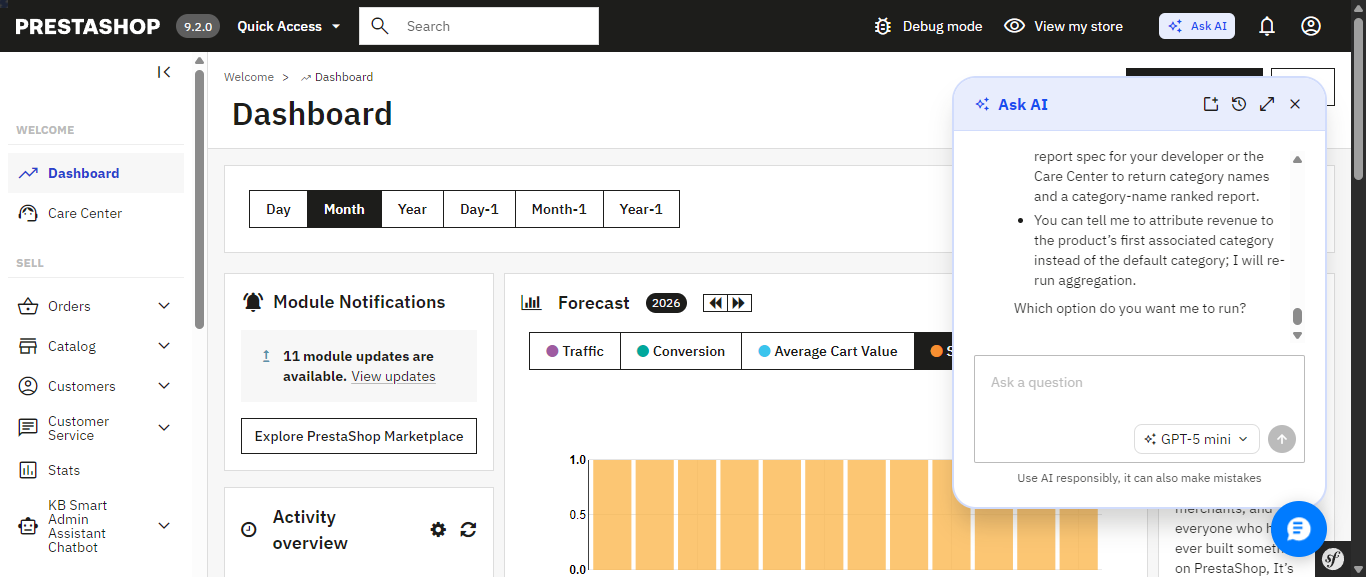
PrestaShop’s native Ask AI panel, opened from the top admin bar it remembers the previous conversation across sessions.

Ask AI shows its work: the MCP tool it calls, a tool-approval step, and its stated reasoning before answering.

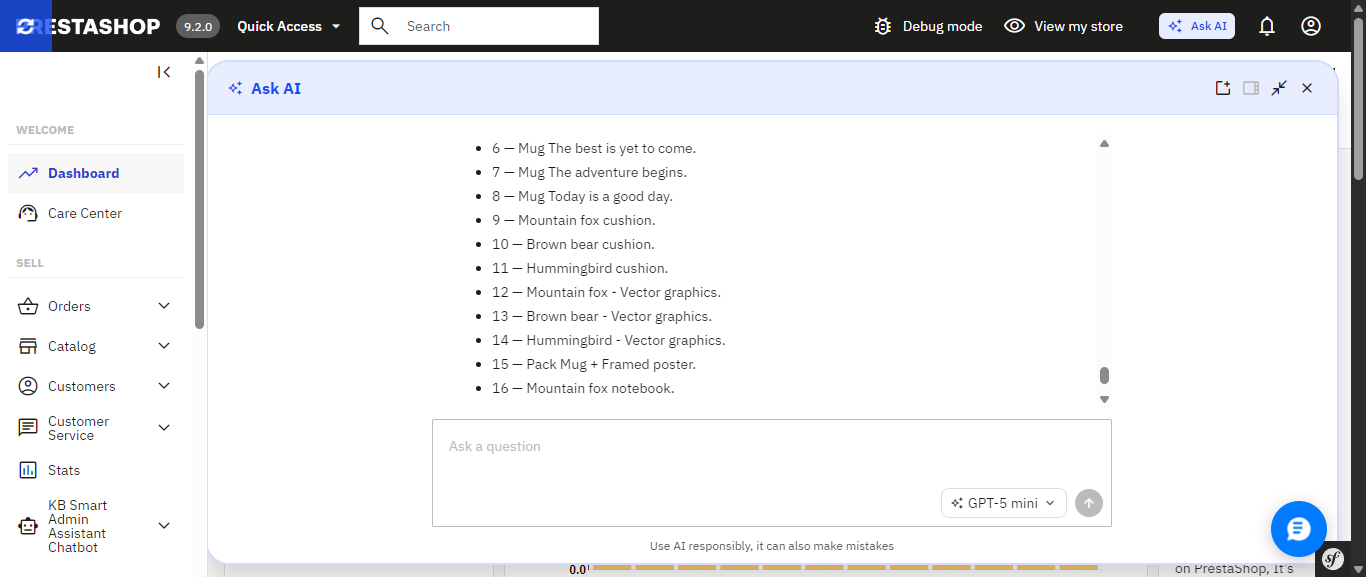
The finished answer, expanded to full width a plain list of out-of-stock products with a follow-up question box ready.

If you’d rather skip that setup, or you’re running an earlier PrestaShop version where Ask AI isn’t an option at all, there’s a module you can install today that already delivers a natural-language AI assistant and builds a good deal more around it, much of which Ask AI simply doesn’t include yet. It’s called Smart AI Admin Assistant.
 

PrestaShop Ask AI vs Knowband Smart AI Admin Assistant

Feature PrestaShop Ask AI Knowband Smart AI Admin Assistant
PrestaShop version support 9.2 1.7.x to 9.x.x
Setup requirements Requires the separate PrestaShop MCP Server and MCP Tools modules Install the module, add your API key, and start asking questions
How it accesses your data Through the PrestaShop MCP Server using defined tool calls Natural-language-to-SQL against curated, read-only database views
Taking action on your store Can execute actions with explicit confirmation required Read-only; blocks DELETE, DROP, UPDATE, INSERT and TRUNCATE
Query transparency MCP tool calls; SQL is not directly visible ✓ View, edit and re-run the generated SQL
Built-in analytics dashboard Not Available ✓ 44 widgets covering revenue, orders, stock, best sellers and more
Data export Not Available ✓ Excel and CSV exports, including full-dataset exports
Voice input Not Available ✓ Browser-based speech recognition
Quick-access shortcuts Context-aware suggestions on Product, Order and Customer pages ✓ Editable quick-query chips for common questions
Employee access control Not Available ✓ Role-based, per-employee configuration
Audit logging 30-day conversation history per user; no SQL or action-level log ✓ Timestamped query and audit log, including executed SQL

Ask AI’s confirmation-before-action design and its native integration into PrestaShop’s core are real strengths, and worth keeping an eye on. But most of what makes Smart AI Admin Assistant a complete toolkit the dashboard, the exports, the access control, the audit trail, the voice input is territory Ask AI hasn’t entered yet.

The Problem that AI Assistant

Every PrestaShop store owner knows this routine: check yesterday’s revenue, scroll through orders looking for anything stuck, check which products are running low, maybe export something to send to a partner. None of it is hard. All of it is repetitive, and all of it eats into the hours you’d rather spend on the parts of the business that actually need your judgment.

Smart AI Admin Assistant replaces that routine with a conversation. You type or speak a question the way you’d ask a colleague, and you get a precise, live answer straight from your store’s database. No dashboards to navigate. No report builder. No SQL. Just a question and an answer, in seconds.

Ask Anything, Get a Real Answer

And this is what the entire module is based upon: an engine that will help analyze the language in the question regarding orders, customers, products, sales, inventory, and coupons without requiring any technical background whatsoever. There’s no need to fill in forms or make choices from a drop-down menu; all one has to do is:

  • “How many orders were placed today?”
  • “Show me low stock products.”
  • “Which customers spent the most this month?”
  • “What’s my revenue this week compared to last week?”
  • “Which products are missing descriptions or images?”
  • “What are my top 10 best-selling products this quarter?”

Both Ask AI and Smart AI Admin Assistant let you ask this kind of question in plain language that part isn’t unique to either one. The difference shows up in everything built around it, starting with how each one actually reaches your data.

Choose the AI Model That Fits the Question. Ask AI Doesn’t Offer This Level of Control

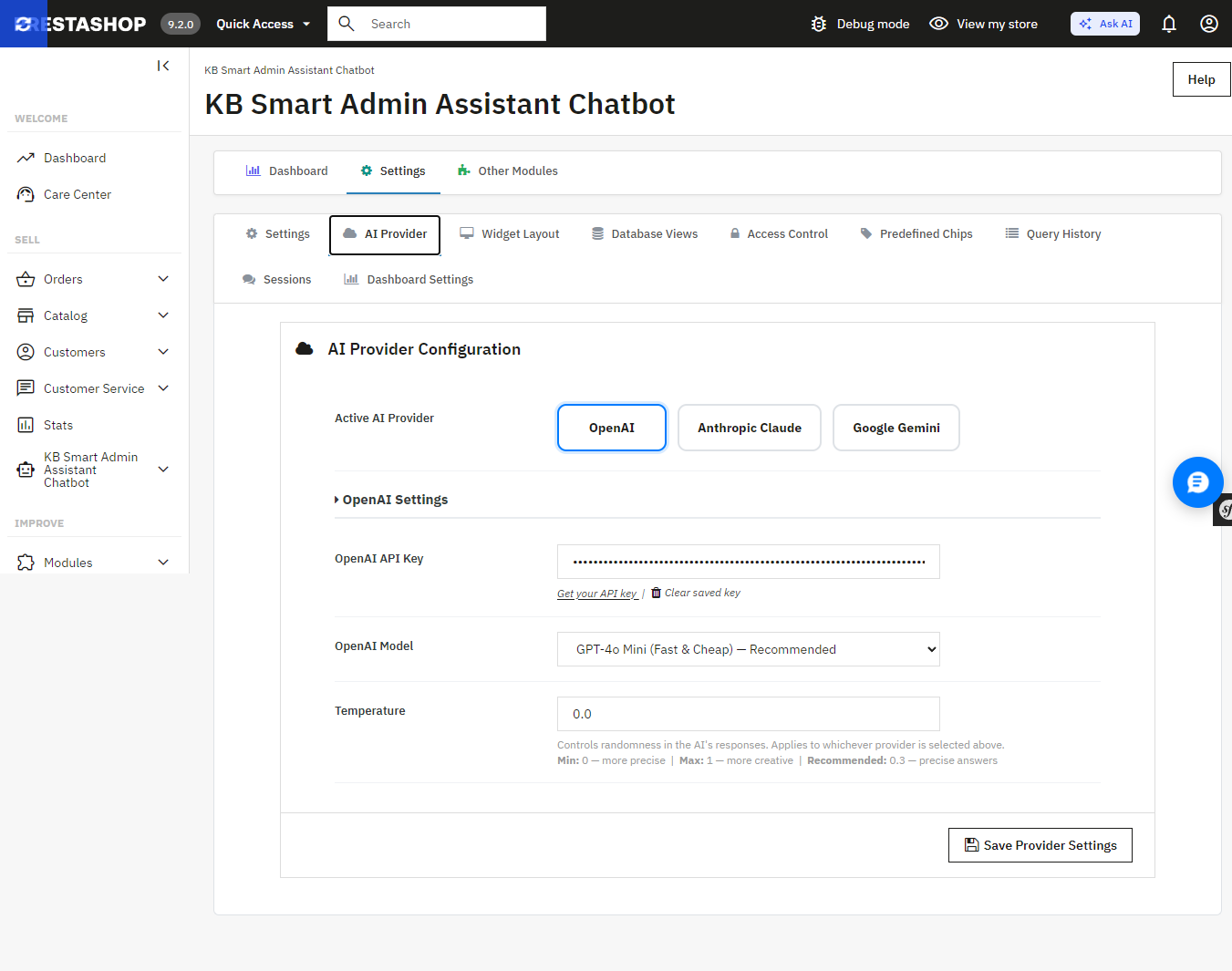
Smart AI Admin Assistant provides a true choice between the providers and the tier models without changing the code, using one settings panel:

  • OpenAI GPT-4o Mini, GPT-4o, or GPT-5.5
  • Anthropic Claude Haiku 4.5, Sonnet 4.6, or Opus 4.7
  • Google Gemini 3.5 Flash or 3.1 Flash-Lite

Want fast, low-cost answers for quick daily checks? Point it at a lighter model. Want the deepest possible breakdown of a slow sales month? Switch to a flagship tier for that one query. Ask AI, by contrast, connects to whichever single provider key you’ve configured it doesn’t offer this kind of tier-by-tier switching from within the assistant itself.
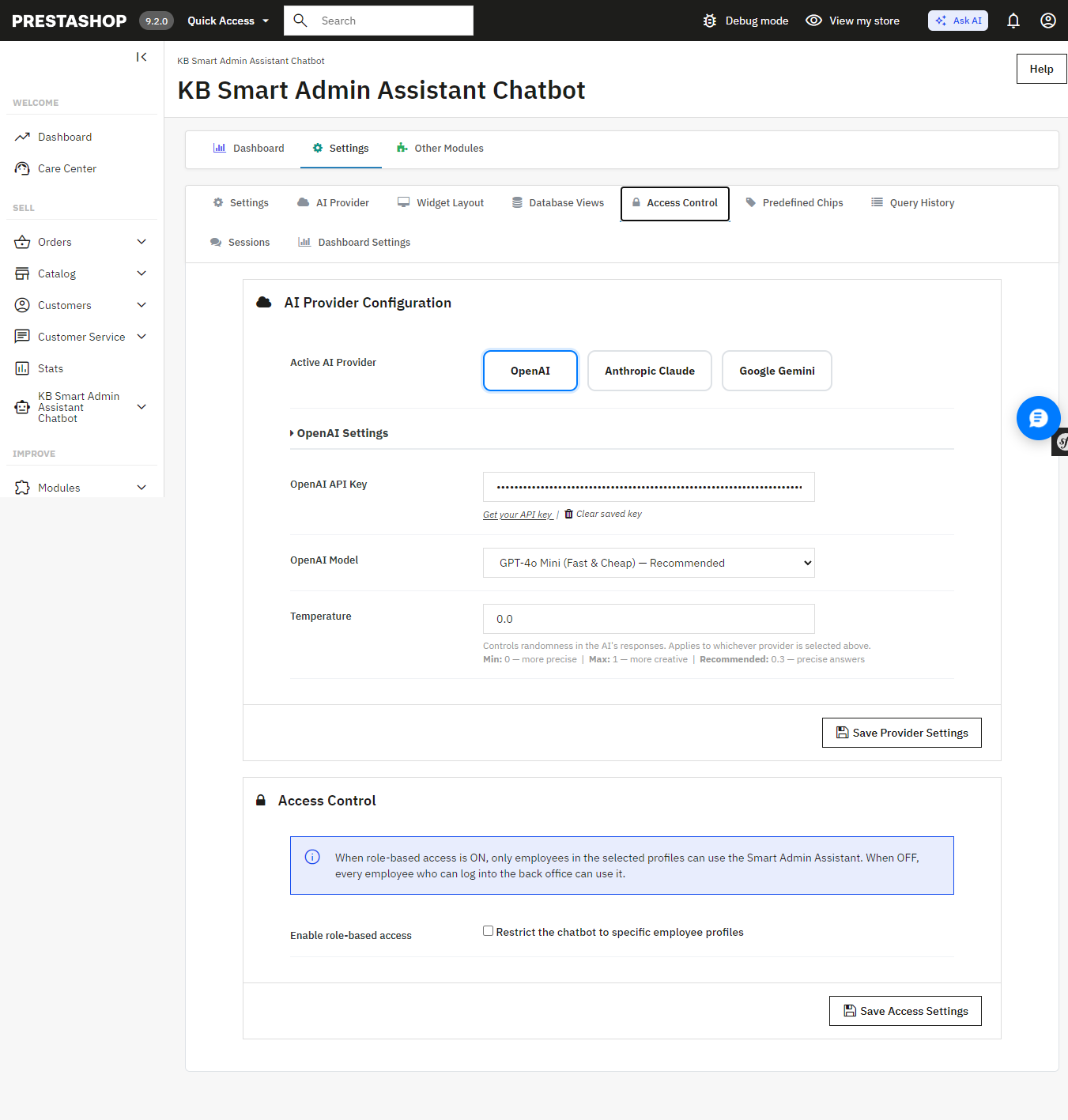
 

Smart AI Admin Assistant’s AI Provider settings switch between OpenAI, Anthropic Claude, and Google Gemini, and pick a model tier for each.

An Answer, Not Just a Table of Numbers
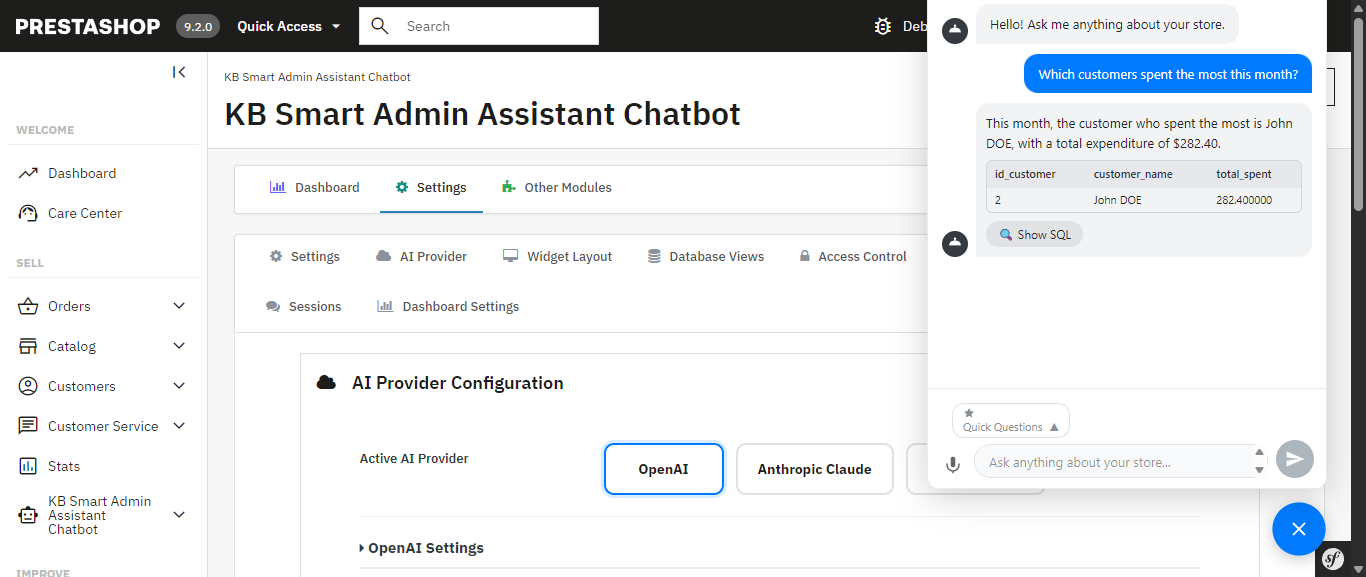
 

Every query comes back with more than raw data the assistant generates a plain-language summary alongside it, calling out the trend or number that actually matters. Ask about your inventory and you don’t just get a table; you get told which products are about to become a problem.

Smart AI Admin Assistant for Prestashop answering “Which customers spent the most this month?” with a plain-language summary and the underlying data.

A Full Analytics Dashboard Comes Built In Something Ask AI Doesn’t Have
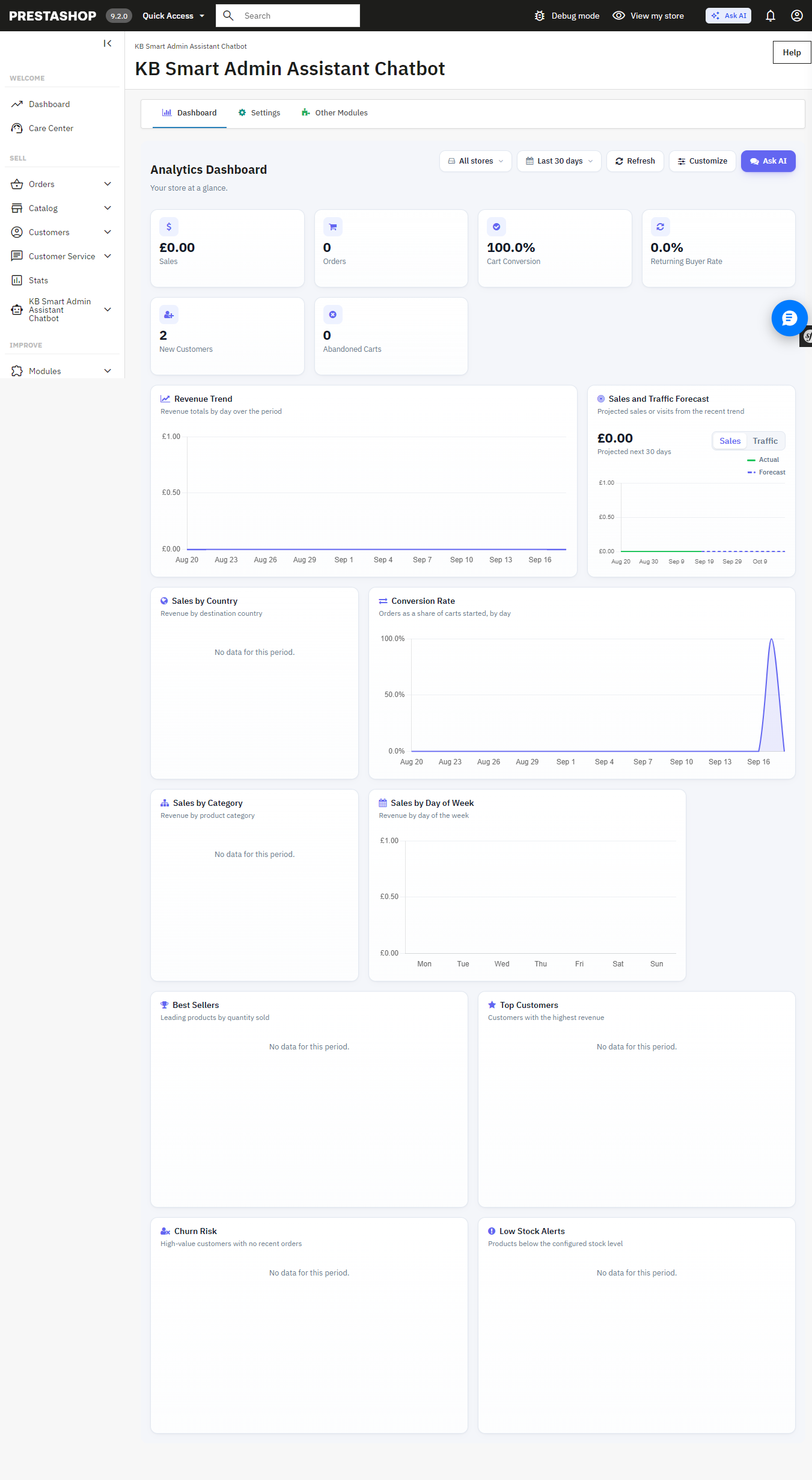
Beneath the chat interface is the full back office analytics dashboard with 34 widgets such as revenue analytics, order quantity, cart conversion rates, customer retention rates, inventory alerts at product level, best sellers, churn rate analytics, sales by countries, categories, payment methods, time slots, etc. Each of these widgets is easily toggleable and reorderable to create your perfect dashboard view. It can also be used as the PrestaShop back office home page.

The built-in Analytics Dashboard revenue, orders, cart conversion, and more, all on one page.

Answers You Can Export, Share, and Verify Not Available in Ask AI
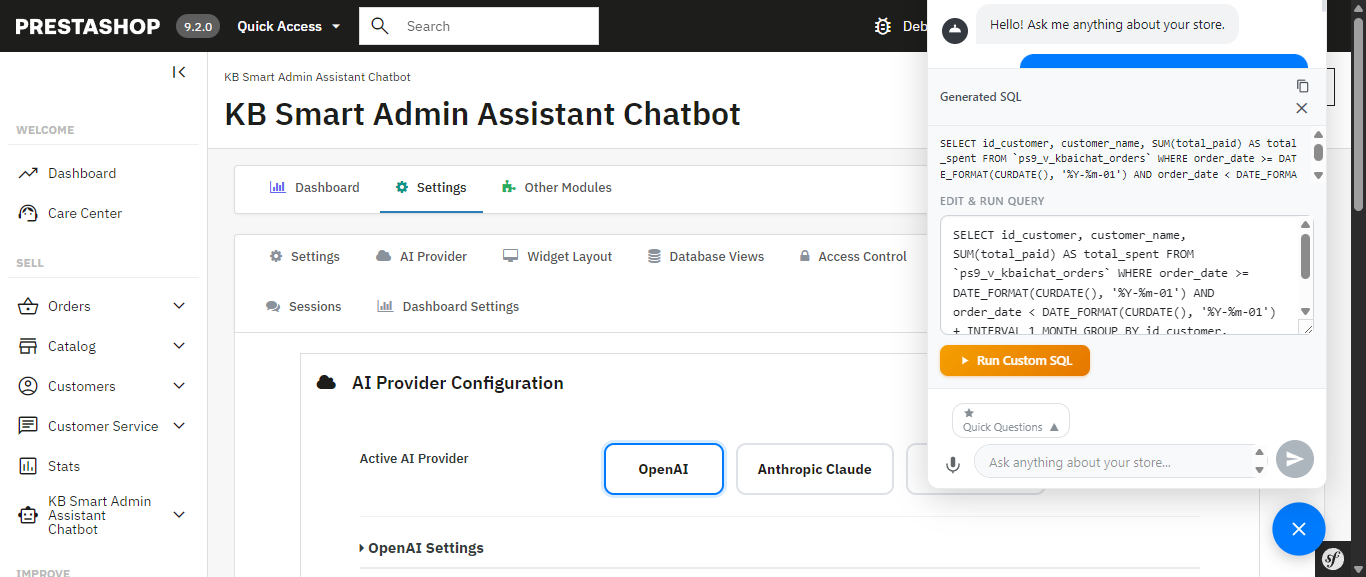
The exact generated SQL is visible, editable, and re-runnable nothing is a black box.
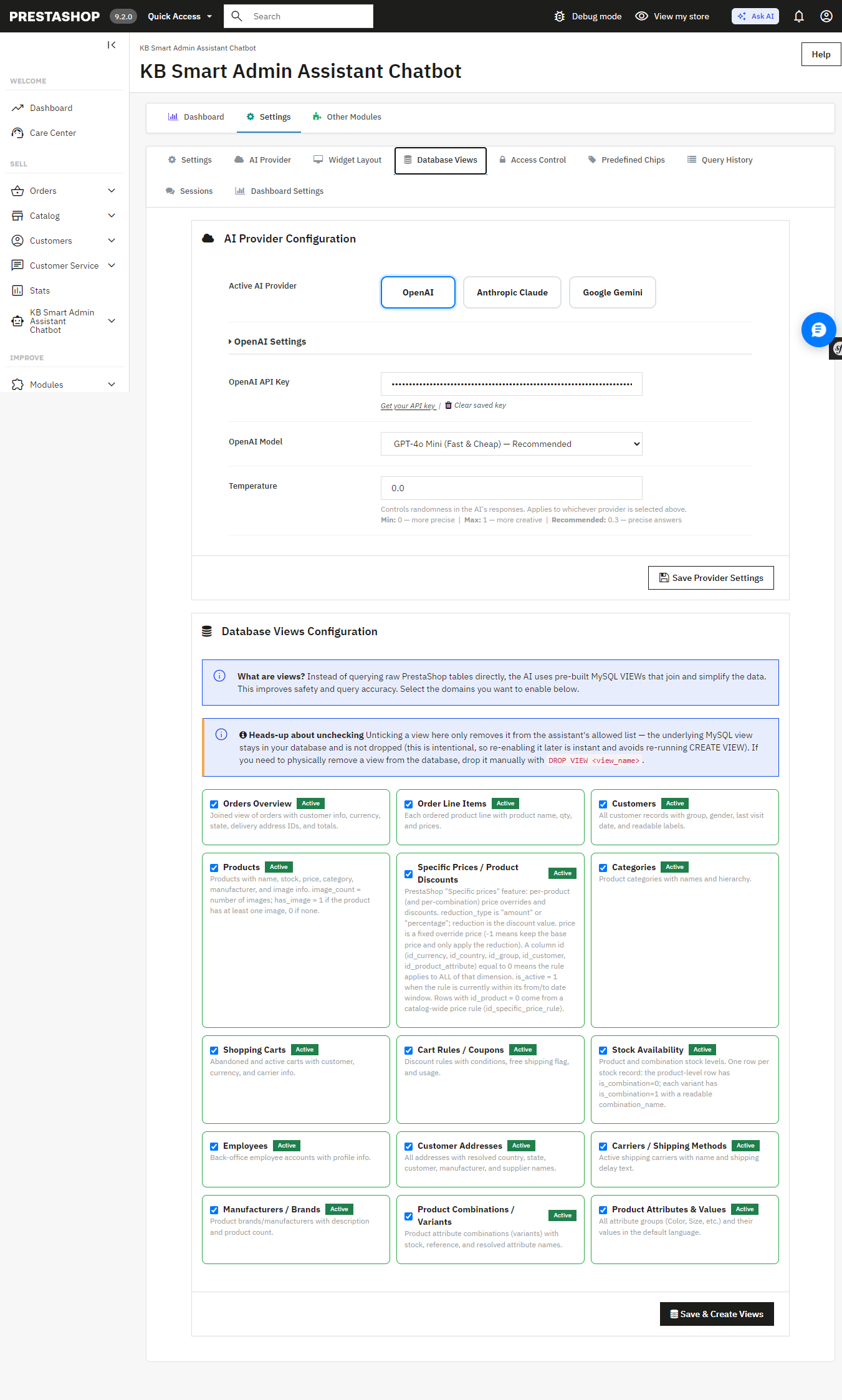
Database Views configuration the AI queries curated, read-only MySQL views instead of raw tables I

Get a result you need to hand off? Export it instantly to Excel or CSV full datasets, not just the rows visible on screen. Ask AI has no export functionality; any data it surfaces stays inside the chat conversation.

Allowing the assistant access to your database must be carefully considered, and the module has been designed with this in mind: strict restrictions on DELETE, DROP, UPDATE, INSERT, and TRUNCATE ensure that the assistant can only access your information, not write to it.. Multi-statement execution is blocked and SQL-injection patterns are screened automatically and unlike Ask AI, which works through MCP tool calls with nothing to inspect, you can view, edit, and re-run the exact SQL Smart AI Admin Assistant generated yourself. Nothing runs as a black box.

The exact generated SQL is visible, editable, and re-runnable nothing is a black box.

Database Views configuration the AI queries curated, read-only MySQL views instead of raw tables.

Built for Teams, Not Just Solo Store Owners Ask AI Has No Equivalent

If you have a shop with several admins or you manage this on behalf of your clients as an agency, the module comes with role-based employee access controls, and you get to determine precisely which employees have access to the assistant and what they are permitted to ask. All queries will be timestamped and recorded to provide you with a full audit trail. The Ask AI platform provides 30 days of chat history for each individual; however, it does not provide user permissions and an audit trail per query.

Access Control restricts the assistant to specific employee profiles.

Query History a full, timestamped audit log of every question asked, including the generated SQL.

Speak Instead of Type Ask AI Doesn’t Support Voice Input

Voice input, built on the browser’s native speech recognition, lets you ask your question out loud instead of typing it useful on a warehouse floor, during a busy order-processing morning, or anytime your hands are full. Ask AI is text-only.

Quick-Access Shortcuts for the Questions You Ask Every Day More Flexible Than Ask AI’s Suggestions

The Prestashop AI Admin Assistant ships with ready-to-use “quick query chips”: Total Orders Today, Revenue This Month, Low Stock Products, Abandoned Carts (Last 30 Days), Top Customers by Revenue, and more that you can fully edit and customize. Ask AI offers contextual suggestions on Product, Order, and Customer pages, but they aren’t something you can edit or add to.

Get Started

If you’re ready to stop digging through admin screens and start just asking your store what you need to know, Smart AI Admin Assistant is available, with live admin and front-end demos and a full user manual so you can see exactly what you’re getting before you buy:

Get PrestaShop Smart AI Admin Assistant

How to Turn Your OpenCart Blog Into a Revenue-Generating Content Strategy

Having a blog is easy. Making it contribute to store growth is where most ecommerce businesses struggle. Article writing without a defined goal may get some visitors, but it won’t result in any sales automatically. The key is to create a content strategy that helps a customer go from having a problem to its solution, and then to the product.

Here is an effective workflow for making the OpenCart Blog Extension by Knowband your sales solution.

Step 1: Begin With Customers’ Needs

Identify the questions that people have when thinking about purchasing a certain product.

Analyze enquiries, questions, reviews, search queries, and objections, and divide them into the following topics: buying advice, comparison, education, use cases, and troubleshooting.

Implementation: Make a list of content ideas based on the customers’ needs and not based on your guesswork.

Expected impact: You build content around real search intent, giving your store more opportunities to reach potential customers before they are already comparing products.

Step 2: Give Every Article a Specific Job

Do not make every article responsible for “getting traffic.” Think about what you would like the reader to do next.

An awareness article might introduce a problem. A buying guide can help someone compare options. A product-focused article can remove doubts before purchase. A tutorial is used to enhance the experience of an existing customer by providing them with more value from the product.

Implementation: Assign each article a particular function – to attract, to inform, to compare, to convert, to support, or to retain.

Impact expected: Your blog will become a part of the customer journey strategy and not a bunch of random articles.

Step 3: Create Content at Various Purchasing Intent Levels

Once you know the purpose, create content for different levels of purchase intent.

For example:

  • Awareness: “What to Consider Before Choosing…”
  • Research: “How to Choose the Right…”
  • Consideration: “[Option A] vs [Option B]”
  • Decision: “Best [Product Type] for [Use Case]”
  • Post-purchase: “How to Set Up and Use…”

At this point, using an OpenCart Blog Builder can be beneficial for you. It allows you to arrange all kinds of content according to your purposes and publish accordingly.

Impact expected: The customers have several ways to come across your store in the purchasing process, and increase the likelihood of going from informational content to the discovery of a product.

Step 4: Associate Useful Content With Relevant Products

It’s great when a customer reads an article, but it’s much better if there is a way for them to shop for a product that really helps to solve their problem.

Suppose an article explains how to choose between different product types. Once the reader understands what to look for, introduce relevant products that match those requirements.

Do not turn the article into a catalogue. The product should appear because it is useful during the customer’s decision-making process.

Expected impact: Reduce the distance between organic traffic and your catalogue, giving informational visitors a clear route toward products.

Knowband’s OpenCart Blog Extension can support this connection between informational content and product discovery within the store.

Step 5: Create Content Using Customer Objections

Some of the most valuable content ideas might be sitting right there in your inbox.

Whenever you get asked by multiple people if a product will work for an application, how two products compare, or how something works, you need to provide a permanent answer.

Implementation: Use frequently asked questions to create FAQ posts, comparison articles, buying guides, tutorials, or articles related to a certain product.

Expected result: You handle objections before they prevent the purchase, but you also create content that covers topics that matter to your customers.

OpenCart Blog Extension approach to blog management can help merchants bring this content into the same store workflow instead of managing a separate publishing process.

Step 6: Build a Content Path Instead of Isolated Articles

One useful article should lead naturally to another.

A broad buying guide could link to a comparison. The comparison could point to a specific use-case article. That article could then introduce relevant products.

Think of it as:

Search → Article → Related Content → Product → Purchase

Use related posts and internal links where they genuinely help the reader continue researching.

Expected impact: Visitors have more reasons to explore your store, while your content develops stronger connections between related topics and important product pages.

This is one of the areas where the OpenCart Blog Plugin by Knowband can support a more organised content structure.

Step 7: Optimise Before You Publish, Not Months Later

Even a good article still needs to be easily readable for both search engines and customers.

Before publication, consider search intent, title, description, URL, headings, images, internal links, categories, and any product relation.

Do not stuff keywords into every paragraph. Create a clear page first, then add SEO elements that accurately describe its contents.

Expected result: Each piece of content gets more chances to be found and read instead of being SEO optimized after the fact.

Knowband’s OpenCart Blog Builder brings content and SEO management together so merchants can handle these publishing requirements within their OpenCart workflow.

Step 8: Use AI to Produce More Articles Without Losing Focus

AI could speed up content production, yet producing more articles should not be the purpose.

Utilize AI in those areas where it replaces routine work: writing the first draft, developing the outline further, translating content, or working on SEO features. Keep your strategy and the final check with your team.

Expected result: A small marketing team can keep a consistent schedule of publications without transforming its blog into an endless flow of generic articles.

The OpenCart Blog Plugin by Knowband provides assistance in content generation, translation, development, and optimization in the context of the blog workflow.

Step 9: Measure What the Content Actually Does

Do not judge the entire blog by page views.

Look at what happens after someone arrives:

  • Do visitors reach product pages?
  • Which articles assist conversions?
  • Which topics attract relevant traffic?
  • Which posts keep users exploring?
  • Which articles need updating?
  • What are other customer questions left unanswered?

Expected result: You will be able to spend more time on content that brings value to your business and less on low-value articles using the OpenCart Blog Extension.

Turn Your Workflow Into a Repetitive Process

The purpose is not to publish more. It is to create a system that improves with every cycle:

Research customer needs → Plan content → Create → Optimise → Connect to products → Publish → Measure → Update → Repeat

Updated September 30, 2026: The OpenCart Blog Manager helps you organize categories, tags, authors, related posts, and linked products from your store’s admin panel. It also includes SEO fields, multilingual publishing, AI-powered content generation with OpenAI and Google Gemini, and an auto-updated XML sitemap for your blog posts. Read our guide on how to organize OpenCart blog categories, tags, authors, and related posts to see the full introduction and features.

With an OpenCart Blog Extension, this process can become part of your regular ecommerce workflow rather than a separate content project.

The full OpenCart Blog Manager – AI Content & SEO Optimization by Knowband is designed to support this kind of workflow, bringing content management, SEO, product connections, multilingual publishing, imports, and AI-assisted content work into the OpenCart environment.

The important part, however, is not the number of tools available. It is what you do with them.

Ask the right question. Create the right content. Connect it to the right product. Measure the result. Then improve the next piece.

This is how the blog for a store can transform from just posting articles to a useful channel of discovery, consideration, and profit generation.

Why Knowband’s Prestashop Mobile App Builder Is a Mobile Sales Game-Changer in 2026

In today’s mobile-first world, having a responsive website alone is no longer enough. Customers now expect seamless shopping on their smartphones. That’s why the Prestashop Mobile App steps in to transform your store into a fully functional Android and iOS app without any coding headaches.

With the Mobile App Builder Module for Prestashop, you can launch your Prestashop Mobile App quickly and start capturing mobile sales. As a result, you keep customers engaged while boosting conversions effortlessly.

Let’s explore why the Prestashop Android and iOS Mobile App Builder Addon can be essential for your business growth.

Important Update
PrestaShop Mobile App Builder now supports Prestashop AI chatbot module integration, so mobile shoppers get instant answers about products, orders, and support right inside the app. Combined with a native Android and iOS shopping experience, this improves engagement and conversions with 24/7 AI assistance. See the complete introduction and features of the PrestaShop Mobile App Builder on PrestaShop Marketplace.

Why Choose the Prestashop Mobile App Builder?

1️. Real-Time Synchronisation

To begin with, the Prestashop Mobile App Builder Module ensures your app and store remain perfectly synchronised. Whenever you update product details, prices, or inventory in your backend, the app reflects these changes instantly. Therefore, you can eliminate manual updates and keep customers informed with accurate information at all times.

2️. Fully Customizable Designs

Furthermore, branding plays a crucial role in customer retention. With the Mobile App Builder Module for Prestashop, you can easily customise layouts, banners, colours, and fonts to match your store’s branding. As a result, your app delivers a consistent and trustworthy shopping experience to your customers.

3. Smooth User Experience

Additionally, the Prestashop Android and iOS Mobile App Builder Addon delivers a sleek, mobile-friendly interface that adapts smoothly to any device. Customers can browse products, explore categories, and complete purchases with ease. Consequently, your store reduces cart abandonment and increases customer satisfaction.

4️. Multi-Language and Currency Support

On top of that, expanding globally becomes easier with the Prestashop eCommerce Mobile App. This Addon offers multi-language and multi-currency support, allowing you to reach customers worldwide while providing a localised shopping experience.

5️. Push Notifications

In addition, staying connected with your customers becomes seamless. Using push notifications, you can send personalised messages about order updates, exclusive offers, and abandoned carts to re-engage shoppers and recover potentially lost sales.

Opencart Mobile App Builder

Create and launch your app using Knowband’s Opencart Mobile App Builder.


Try the Demo

6️. Offline Mode Support

Furthermore, the Prestashop Android and iOS Mobile App Builder Module include offline browsing capabilities. Even if customers lose internet connectivity, they can continue browsing products and adding items to their cart, ensuring a consistent shopping journey.

7️. Simplified Checkout

Above all, a smooth checkout process is crucial for conversions. The Mobile App Builder Module for Prestashop offers a secure, fast, and simplified checkout with multiple payment gateway support, which helps reduce cart abandonment and builds customer trust.

Advanced Features for Higher Engagement in Prestashop Mobile App 

Apart from the essentials, the Prestashop Mobile App Maker comes equipped with advanced features to boost engagement, including:

  • Automated banner sliders showcase your deals and current promotions effectively.
  • Social login options for quick sign-ins with Google or Facebook.
  • Order tracking lets customers easily keep an eye on their purchases.
  • Wishlist functionality for customers to save products for future purchases.

As a result, these features create a personalized shopping journey and encourage repeat visits. Before purchasing, we also offer a free mobile app builder Addon that helps you explore all the functionalities and evaluate the app’s performance

Dedicated Support for a Smooth Journey

Besides providing a powerful Module, Knowband offers reliable support to make your app journey hassle-free. Their team guides you from installation to app publishing, ensuring you launch confidently. Additionally, detailed manuals and prompt assistance help address any concerns effectively.

Final Words

The Prestashop Mobile App Builder is a must-have Module for merchants who want to thrive in the mobile commerce space. By using the Prestashop Android and iOS Mobile App Creator Module, you can increase customer engagement, streamline the shopping process, and drive higher conversions effortlessly.

This is the ideal moment to transform your store into a mobile app. Launch your Prestashop Mobile App today and position your business for long-term growth in the mobile-driven eCommerce landscape.

For a detailed tutorial, watch out our complete guide on YouTube.

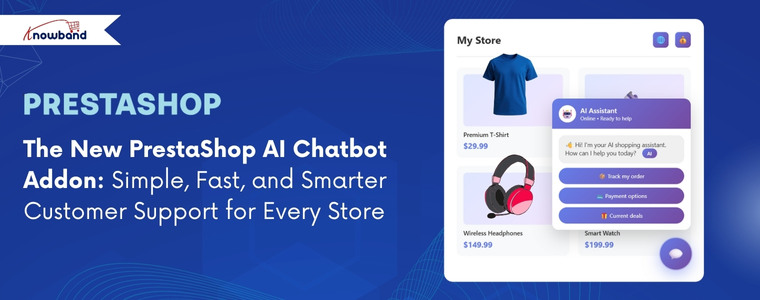
The New PrestaShop AI Chatbot Addon: Simple, Fast, and Smarter Customer Support for Every Store

It is challenging to operate an online store when customers want quick answers all the time. The majority of the visitors require immediate help with stock, product information, delivery status, order history, or product suggestions. If they don’t receive the information in time, they just walk out. This reduces engagement, conversion, and increases drop-offs.

[New Update] This Prestashop AI Chatbot Module v1.0.2 has been released with a new version, which includes features like Chatbot Availability Scheduling, Chat Logs and IP Blocking feature.

Furthermore, this for Prestashop AI Chatbot Addon has been upgraded with the latest Popular AI Models like DeepSeek, Claude and Gemni with the existing  ChatGPT.

To solve this problem, Knowband has introduced the PrestaShop AI Chatbot Addon. A modern, intelligent chat assistant available in your store 26/7 to help. This AI helper stays active on all pages and appears as a small icon in the lower-right corner of the webpage, which opens to a clean and modern chat window whenever the customer clicks on it.

The chatbot can understand all questions easily, reply immediately, help customers to compare products, find similar products, check stock, view prices in their chosen currency, and even provide updates on order history & new orders. Hence, it acts as a quick-access information center that the customers can rely on without going through multiple pages.

Why a PrestaShop AI Chatbot Module Matters More Than Ever

Today’s shoppers expect fast communication. They do not want to fill out the forms and wait for a human agents to resolve their queries. They want answers right away. The PrestaShop AI Chatbot provides a solution to this problem as simply as possible. It speaks clearly, reacts immediately, and sounds natural because it uses highly advanced AI engines like GPT-4o and GPT-4o-mini.

When the customers receive all the help they require inside the chat window, they remain longer and communicate more. This enhances interaction and increases the probability of an increase in conversion rate. Moreover, the PrestaShop AI Chat Integration reduces the stress of the support team. Most of the frequently asked questions, like the delivery date or product details, are answered by the ChatGPT Bot.

This PrestaShop Support Chatbot Module is even more helpful for international stores. It supports several languages and several currencies. The chatbot can respond in any language that is selected by the user. And if the customer changes the currency on the website, the chatbot will also display all the product prices in that currency.

Overall, the PrestaShop AI-powered chatbot will help the store owner to provide a modern, fast, and useful shopping experience with minimal extra effort.

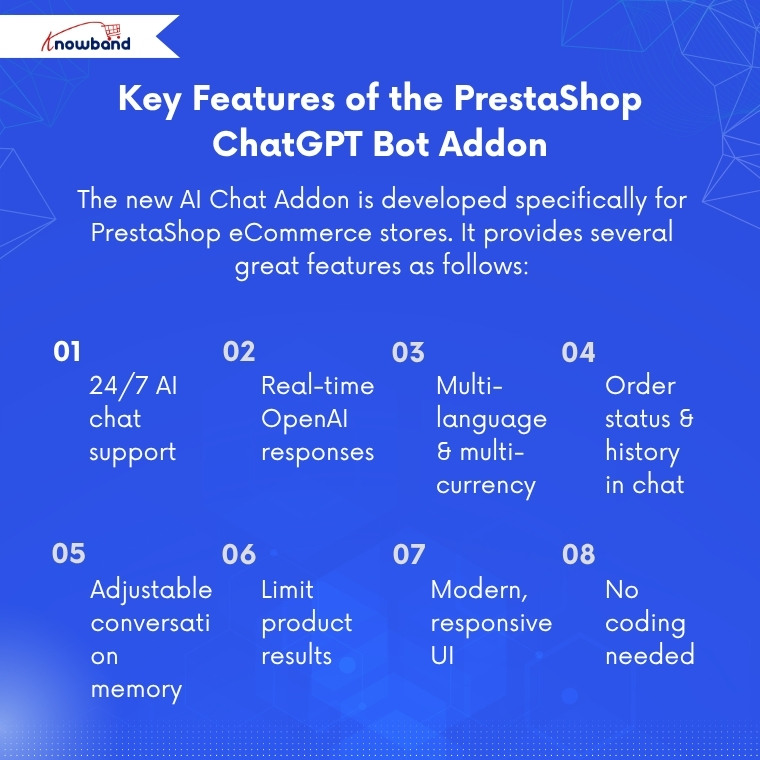
Key Features of the PrestaShop ChatGPT Bot Addon

The new AI Chat Addon is developed specifically for PrestaShop eCommerce stores. It provides several great features as follows:

  • An AI-driven chat assistant that is available 24/7.
  • Moreover, the AI helper provides real-time responses using OpenAI technology.
  • The module also supports Multiple languages and multiple currencies.
  • The PrestaShop AI Chatbot Addon provides the status of orders and order history right on chat.
  • Moreover, the admin can easily control the conversation memory of the chatbot.
  • Store owners can also select the maximum number of products to show on a search.
  • The interface of the PrestaShop Chat Assistant Module is modern and smooth across all devices.
  • In addition, the implementation of this AI Assistant requires no coding, no complex setup, and no design.

Thus, regardless of the type of product that the store is selling, like electronics, clothes, home goods, or any other type of product. The PrestaShop AI Chat Integration Addon will accurately respond to the real store data.

Benefits of the PrestaShop Chat Assistant Module for Store Owners

There are multiple benefits of this simple chat icon in the shop for store owners, as follows:

Modern and User-Friendly Shopping Experience

The addon makes the store feel modern and updated. The visitors will feel more comfortable when the store provides quick and reliable answers.

Improved Customer Engagement and Retention

Moreover, the customer engagement increases as they do not need to browse through several pages to find a product; they can get what they need in seconds through the chatbot. Hence, this helps to reduce frustration and ensures the visitors spend more time.

Higher Conversion Rates with Instant Assistance

The conversion rates increase since the chatbot helps the customers find the products that they would not have found otherwise. Hence, the users will not give up during the search as they receive instant results within the chat.

Reduced Support Costs through Automation

In addition, store owners can minimize the support cost because many questions no longer require a human agent. The PrestaShop support chatbot addresses the majority of the basic questions on its own.

Hence, the PrestaShop AI Chatbot Addon by Knowband becomes a great advantage for busy stores and their customers.

How the PrestaShop Chatbot Addon Works

The Knowband ChatGPT Module for PrestaShop is very simple to set up. The store owners install the module and open the configuration settings. Then, the first step is to enter the OpenAI API key to get the chatbot running in the frontend. Next, admins can choose the AI model of their choice between the two existing choices, GPT-4o-mini and GPT-4o.

The store owner will then select the number of products that the chatbot should give back to the customer on request. For example, if there are ten similar products but the admin sets the limit to seven, the chatbot will display only seven.

Lastly, the store owner will select the number of conversation histories that the chatbot will remember while communicating with a customer. The admin can select any number between 0-20. And to disable this feature, they simply need to enter 0.

After saving these simple settings, Knowband’s PrestaShop AI Chatbot Addon becomes fully active in the frontend. It will work across all pages and will respond to all queries instantly.

AI technology is being used more and more by ecommerce stores in order to make product discovery, immediate responses, and even the process of buying easier for their clients. By adding an AI-based chatbot to their PrestaShop store, merchants will not only make the process of shopping more interactive but also assist their clients with purchasing decisions.

Learn more about how a PrestaShop AI chatbot for conversions can support the customer journey and contribute to a better ecommerce experience. ( Updated September 30, 2-26)

Convert Your PrestaShop Store into a Powerful Mobile App

Boost engagement and conversions with a smooth shopping experience, instant push notifications, and fully optimized mobile navigation.


SHOP NOW


Conclusion

PrestaShop AI Chatbot Addon by Knowband is not just a small feature. It transforms how customers interact with a store. Quick responses, enhanced product search, in-built multilingual support, real-time shipment status, and a modern user interface create a smoother and smarter shopping experience.

Knowband has made this chatbot easy to install, easy to operate, and capable enough to manage actual customer queries. In today’s world, this chatbot is among the best solutions that any store owner can use to enhance customer service.

If you want to experience how this works on your own store, you can try the PrestaShop AI chatbot demo. And you will know why the PrestaShop AI Chatbot Addon by Knowband can change the way customers interact with your shop.

Increase Your Sales This Black Friday & Thanksgiving with Product Stickers

This festive season, make your store the top-selling store in your category. Running an online store requires strategies that grab attention and boost conversions. Consequently, Knowband’s PrestaShop Product Sticker Module allows you to showcase special offers, bestsellers, and new arrivals effectively. Furthermore, its intuitive interface and versatile options make it an essential plugin for any eCommerce strategy. So, whether you are on prestashop or opencart, we have got you covered.

Why Product Stickers Are Important in Online Stores

Stickers and labels attract customers and motivate them to make a purchase. A sticker on a product signals that it’s on sale, discounted, or part of a special seasonal promotion. To help store owners increase sales this festive season, Knowband has introduced the Prestashop Product Sticker & Label Module. This module allows store owners to add different types of stickers to products, whether it’s for Black Friday, Thanksgiving, or Christmas sales.

Key Features of Knowband’s PrestaShop Product Sticker Module

You can set the product sticker module up easily, design custom stickers, automate scheduled campaigns, and be creatively in charge.

Quick & Easy Setup

No coding skills are required! After purchasing the module from Knowband, store owners can install it and configure their products in just a few minutes. Even beginners will find it easy to use.

Customizable Stickers

You can adjust stickers to perfectly suit your promotions or brand identity. Whether you want to modify colors, text, or style, the module allows full customisation of predefined stickers.

Strategic Placement

Place stickers where they get the most attention—product pages, category listings, or homepage banners. This ensures your promotional messages reach customers at the most impactful touchpoints during their shopping journey.

Scheduled Promotions

Plan ahead by scheduling stickers to appear and disappear automatically. This feature makes holiday promotions stress-free, allowing you to set up your entire campaign in advance while the module handles the rest.

Advanced Control

Modify sticker size, position, and transparency, or add custom stickers that match your brand’s visual style. Moreover, this Prestashop Product Sticker Module gives you complete creative freedom to design stickers that resonate with your target audience.

Targeted Application

Apply stickers to specific products or entire categories, ensuring relevance and preventing clutter while maintaining a professional appearance.

Benefits of Using This Powerful Module

You can get attention, increase conversions and brand consistency with the Product Sticker Module.

Boost Product Visibility

Make important products stand out with attention-grabbing labels. Featured items will receive significantly more views and engagement from potential customers.

Increase Conversions

Urgency-driven labels like “Only a Few Left” encourage faster purchasing decisions. This creates a sense of urgency that motivates customers to buy immediately rather than postponing their purchase.

Save Time

During the festive season, you can schedule stickers in advance, freeing up time to focus on other aspects of your business, such as inventory management and customer service. Automation also reduces the risk of human error when updating promotional displays.

Maintain Brand Consistency

Full control over design and placement ensures that stickers always align with your store’s look and feel, keeping your brand identity strong and recognizable across all customer touchpoints.

Maximize Impact

Display stickers on high-visibility pages to attract maximum attention. This increases exposure for your most important products and promotions while guiding customers toward high-value purchases.

Conclusion

Knowband’s PrestaShop Product Sticker Module is a smart solution for store owners who want to highlight offers, boost sales, and improve the customer experience. With its ease of use, flexible customisation, and automation features, it’s a valuable addition to any online store.

Make your products stand out and drive more sales this holiday season. Try Knowband’s Product Sticker Module for PrestaShop today and watch your conversions soar during Black Friday and Thanksgiving. Investing in this powerful plugin will help you maximise revenue during the year’s most profitable shopping period.

Maximise Your WooCommerce Store’s Potential with Knowband’s Advanced Analytics Solution

Building an eCommerce business demands more than attractive products and competitive prices. Furthermore, successful online retailers understand that data-driven decisions separate profitable stores from struggling ones. However, implementing comprehensive analytics can seem overwhelming for many store owners. Therefore, choosing the right solution becomes critical for long-term success. Moreover, Knowband has developed a powerful WooCommerce gtag Integrator solution that transforms complex analytics into simple, actionable insights. Additionally, this comprehensive plugin eliminates technical barriers while providing enterprise-level tracking capabilities. Consequently, store owners can focus on growing their business rather than wrestling with complicated code.

Revolutionary Features of Knowband’s Analytics Integration

Seamless Tag Management Implementation

First and foremost, Knowband’s WooCommerce Google Tag Manager Plugin revolutionizes how you handle analytics tracking. Subsequently, this unified WooCommerce GTM Plugin centralizes all your marketing tags in one intuitive dashboard. Furthermore, the Google Tag Manager for WooCommerce integration eliminates the need for manual code modifications.

Additionally, even non-technical users can implement sophisticated tracking systems effortlessly. Therefore, small business owners gain access to the same analytics capabilities used by major eCommerce brands.

Comprehensive Marketing Integration Capabilities

Similarly, the WooCommerce Google Marketing Integration feature connects your store seamlessly with major marketing platforms. Consequently, you can track campaign performance across multiple channels with unprecedented accuracy. Furthermore, the WooCommerce Google Marketing Integration Plugin provides detailed attribution data for every marketing dollar spent.

Additionally, this integration reveals which marketing channels generate the highest-quality customers. Therefore, you can optimize your advertising budget for maximum return on investment.

Advanced Event Tracking System

Meanwhile, the Custom Event Tracking WooCommerce Plugin functionality monitors every crucial customer interaction automatically. For instance, it captures product views, cart additions, and purchase completions in real-time. Moreover, the GTM WooCommerce Plugin provides granular insights into customer behavior patterns throughout the shopping journey.

Furthermore, the WooCommerce Google Event Tracker Plugin helps identify conversion bottlenecks before they impact your revenue. As a result, you can optimize your store’s performance based on actual customer data.

Next-Generation WooCommerce Google Analytics Implementation

Complete Google Analytics Integration

Furthermore, the WooCommerce Google Analytics Integration component delivers comprehensive data collection across your entire store. Subsequently, the WooCommerce Google Analytics Integration Extension ensures accurate tracking on every page and interaction. Additionally, the WooCommerce Google Analytics Integration Plugin handles complex eCommerce scenarios automatically.

Therefore, you receive detailed insights into customer demographics, shopping preferences, and behavioral patterns. Moreover, this data enables informed decisions about inventory management, pricing strategies, and marketing campaigns.

Advanced GA4 Implementation

In addition, the WooCommerce GA4 Integration brings cutting-edge analytics capabilities to your store. Similarly, the WooCommerce GA4 Integration Plugin provides enhanced tracking features unavailable in previous versions. Furthermore, the WooCommerce GA4 Integration Extension ensures your analytics remain future-proof as platforms evolve.

Consequently, you benefit from improved data accuracy, enhanced privacy controls, and machine learning insights. Additionally, GA4’s predictive capabilities help forecast customer behavior and business trends.

Enhanced Gtag Integration Features

Moreover, the WooCommerce gtag Integrator streamlines your tracking implementation without compromising site performance. Subsequently, the WooCommerce gtag Integration Plugin maintains optimal loading speeds while collecting comprehensive data. Furthermore, the WooCommerce gtag Integrator offers flexible configuration options for diverse business needs.

Therefore, you can maintain excellent user experience while gathering valuable analytics insights.

Comprehensive eCommerce Tracking Capabilities

Detailed Event Monitoring System

Additionally, WooCommerce GA4 eCommerce Events provide precise transaction tracking and revenue attribution. For instance, you can monitor purchase patterns, product performance, and customer lifetime value accurately. Furthermore, these events help identify your most profitable products and customer segments.

Granular Control Over Tracking Events

Furthermore, Knowband’s solution offers complete control over specific tracking events. Consequently, you can enable or disable monitoring based on your unique business requirements:

Customer Journey Tracking: Monitor page views to understand navigation patterns, while category views reveal popular product sections. Additionally, product detail tracking shows which items generate the most interest.

Purchase Behavior Analysis: Moreover, add-to-cart events provide purchase intent data, while cart removal tracking identifies potential obstacles. Similarly, checkout progression monitoring helps optimize your conversion funnel.

Customer Engagement Insights: Meanwhile, login and registration tracking reveals customer loyalty patterns. Similarly, discount code usage monitoring evaluates promotional campaign effectiveness.

Advanced Analytics Features: Additionally, internal search tracking captures valuable keyword data, while UTM parameter collection ensures accurate campaign attribution across all marketing channels.

Comprehensive Measurement Solutions

Furthermore, the WooCommerce gtag Integrator provides advanced analytics specifically designed for online retailers. Subsequently, you can track sophisticated metrics including customer acquisition costs, repeat purchase rates, and seasonal trends. Therefore, strategic business decisions become data-driven rather than assumption-based.

Key Benefits for WooCommerce Store Owners

Simplified Implementation Process

Most importantly, this comprehensive solution eliminates technical complexity from advanced analytics implementation. Instead of hiring expensive developers, you can deploy enterprise-level tracking yourself. Therefore, businesses of all sizes can access professional-grade analytics capabilities.

Enhanced Decision-Making Capabilities

Moreover, accurate data collection transforms how you make business decisions. As a result, you can optimize marketing campaigns, improve product offerings, and enhance customer experiences based on real performance data rather than guesswork.

Improved Marketing ROI

Additionally, comprehensive tracking identifies your most profitable marketing channels and campaigns. Hence, you can focus resources on strategies that generate the highest returns while eliminating wasteful spending on underperforming initiatives.

Simple Setup and Configuration

User-Friendly Installation Process

First, this WooCommerce gtag Integrator features straightforward installation procedures with step-by-step guidance. Additionally, intuitive configuration wizards walk you through the entire setup process. Therefore, you can start collecting valuable analytics data within minutes of installation.

Moreover, the WooCommerce No-Code Google Tag Manager Integration provides beginner-friendly instructions requiring zero technical knowledge. Furthermore, store administrators can easily access Google Tag Manager and Google Analytics consoles to retrieve necessary integration credentials.

Ongoing Support and Optimization

Moreover, regular monitoring ensures your tracking remains accurate and comprehensive. Furthermore, continuous optimization helps identify new opportunities for improvement and growth.

Conclusion

In conclusion, implementing comprehensive analytics integration is essential for modern WooCommerce store success. Therefore, investing in the right tracking solution provides long-term benefits that far exceed initial implementation costs. Moreover, the combination of simplified setup and powerful insights makes this solution invaluable for serious retailers.

Additionally, with features including automated event tracking, advanced eCommerce measurement, and seamless platform integration, this plugin addresses every aspect of store analytics. Furthermore, it provides the solid foundation necessary for data-driven growth strategies that deliver sustainable results.

Finally, whether you’re launching a new venture or scaling an existing store, comprehensive analytics integration remains crucial for understanding your customers and maximizing your eCommerce potential.

Expand Your Store’s Reach by Integrating eBay, Etsy, and Google Shopping with Knowband’s Connectors

In the fast-paced world of eCommerce, reaching the right audience is crucial for the success of your online store. With fierce competition on platforms like Prestashop, OpenCart, WooCommerce, and Magento 2, relying solely on your website may limit your sales potential. That’s where multichannel selling comes into play, allowing you to expand your store’s visibility across leading platforms like eBay, Etsy, and Google Shopping.

If you’re looking to seamlessly integrate your online store with these platforms, Knowband offers powerful solutions. Our eBay Connector for Prestashop, Etsy Connector, and Google Shopping Connector extensions enable effortless integration, helping you unlock the full potential of multichannel selling.

Let’s explore how these connectors can help you scale your business and maximize profits.

Why Multichannel Selling Matters!

Before diving into the benefits of Knowband’s connectors, it’s essential to understand why multichannel selling is a game-changer for eCommerce stores.

Increase Visibility:

Listing your products on multiple platforms increases your store’s exposure. Moreover, platforms like eBay, Etsy, and Google Shopping attract millions of shoppers daily, ensuring your products reach a broader audience.

Diversify Revenue Streams:

Relying on a single sales channel can be risky. On the other hand, by expanding to multiple platforms, you reduce the risk and tap into new revenue streams.

Build Trust and Credibility:

Established platforms like eBay and Etsy offer a trusted shopping experience. Thus, by listing your products there, you gain instant credibility with potential buyers.

Targeted Audiences:

Each platform has its own user base. Instance, eBay attracts bargain hunters, Etsy appeals to handmade and vintage enthusiasts, while Google Shopping is ideal for comparison shoppers. By listing on these platforms, you can target different segments of shoppers.

Streamline Your Multichannel Selling with Knowband’s Connectors:

At Knowband, we understand the challenges of managing products, inventory, and orders across multiple platforms. That’s why we’ve developed easy-to-use connectors for eBay, Etsy, and Google Shopping that seamlessly integrate with your Prestashop, OpenCart, WooCommerce, and Magento 2 stores.

Let’s look at each connector and how it can help you grow your business.

eBay Connector: Unlock the Multi-channel Selling on eBay!

eBay remains one of the most popular online marketplaces globally, with over 180 million active buyers. Therefore, by integrating your store with eBay using Knowband’s eBay Connector for Prestashop, you can tap into this vast marketplace without the hassle of managing two separate platforms.

Key Features:

  • Bulk Product Upload: Save time by uploading multiple products at once from your store to eBay.
  • Automated Sync: Sync product details, pricing, and inventory between your store and eBay in real time.
  • Order Management: Manage all your eBay orders directly from your eCommerce platform’s back office which eliminates the need to switch between multiple dashboards.
  • Customization: Tailor product listings for eBay with custom pricing and inventory rules.

By using the eBay Connector, you’ll be able to maintain a unified inventory, avoid overselling, and effortlessly expand your store’s reach to millions of eBay shoppers.

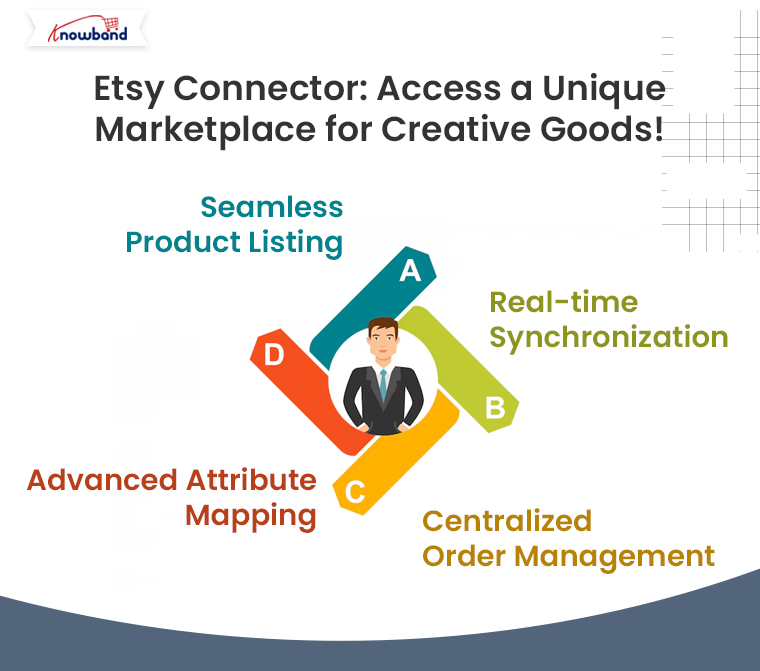
Etsy Connector: Access a Unique Marketplace for Creative Goods!

Etsy is the go-to platform for buyers seeking unique, handmade, vintage, and craft items. If your store specializes in these types of products, the Etsy Connector is a perfect solution to showcase your goods to Etsy’s dedicated audience of more than 80 million active buyers.

Key Features:

  • Seamless Product Listing: Effortlessly upload your store’s products to Etsy, complete with titles, descriptions, and pricing.
  • Real-time Synchronization: Keep your store’s product data in sync with Etsy, ensuring accurate inventory and pricing across platforms.
  • Centralized Order Management: Process all Etsy orders from your eCommerce store’s backend for streamlined order fulfillment.
  • Advanced Attribute Mapping: Map your store’s attributes with Etsy’s specific product requirements to ensure proper product categorization.

With the Prestashop Etsy Connector Addon, your store can tap into Etsy’s niche market, helping you reach customers who appreciate craftsmanship, artistry, and creativity.

Google Shopping Connector: Boost Your Product Visibility on Google!

With Google Shopping, your products can appear in front of millions of shoppers actively searching for items like yours. Moreover, Knowband’s Google Shopping Connector for Prestashop helps you showcase your store’s products on Google Shopping effortlessly.

Key Features:

Product Feed Management: Easily create and upload a Google Shopping product feed with all the necessary data (product titles, descriptions, prices, etc.).

  • Automated Sync: Ensure real-time updates for product information and pricing across your store and Google Shopping.
  • Category Mapping: Map your store’s categories with Google Shopping’s requirements for better targeting.

By using Knowband’s Google Shopping Connector, you’ll increase your product’s visibility across Google’s powerful shopping ads, driving more traffic to your store and boosting your sales.

How Knowband’s Connectors Simplify Your Multichannel Selling?

Using Knowband’s connectors offers numerous advantages for businesses of all sizes:

  • Time Efficiency: No need to manually upload products or update inventory. Furthermore, the automated synchronization keeps everything in order, freeing up time to focus on other aspects of your business.
  • Accuracy: Eliminate the risk of overselling with real-time inventory updates.
  • Improved Order Management: All orders, whether from your store or other platforms, are managed in one place, simplifying fulfillment and customer service.
  • Easy Setup: Our connectors are designed for ease of use. With intuitive interfaces, you can quickly set up the integration without technical expertise.

Take Your Store to New Heights with Knowband’s Connectors!

If you want to expand your store’s reach and tap into the enormous potential of platforms like eBay, Etsy, and Google Shopping, Knowband’s connectors offer the perfect solution. By integrating your eCommerce store with these platforms, you can increase your visibility, reach more customers, and ultimately, grow your sales.

You may also like to read:
See how this free connector simplifies Etsy integration for your PrestaShop store and enhances marketplace reach. Read More

Why Marketplace is in trend?

Właściciel sklepu musi poszukać wszystkich dostępnych możliwości i korzyści oferowanych przez nich przed wykonaniem jakiegokolwiek ruchu. Administrator nie jest łatwy do podjęcia decyzji, gdzie wymienić produkty. Rynek jest główną opcją, jeśli chodzi o handel online. Od dnia rynek Pojawiła się koncepcja, która rozpowszechniła szum wśród właścicieli eCommerce. Wiele korzyści, którym towarzyszy Marketplace, zachęcają właścicieli sklepów do przejścia na Marketplace z jednego sklepu dostawcy. Nie możemy ignorować wzrostu branży eCommerce, której świadkiem jest w ostatnich latach. Etsy, eBay itp. są dobrze znanym przykładem udanego rynku. Online Marketplace pomaga dostawcy w zwiększeniu ruchu, zarabianiu na różnorodności i wzniesieniu biznesu na nowy poziom.Model rynku jest obecnie przyjmowany przez wiele krajów. Główne funkcje realizowane przez Marketplace to to, że spełnia wymagania wszystkich użytkowników i zwiększa liczbę docelowych odbiorców.

Jakie są komponenty modelu Marketplace?

Elementy struktury Marketplace, które odgrywają ważną rolę w sukcesie Twojej firmy, to:

1. Włączenie natury

Model rynkowy umożliwia wielu sprzedawcom łatwe rejestrowanie ich sklepu. Sprzedawcy muszą przestrzegać prostej procedury wystawiania swoich produktów na Marketplace. Wielu dostawców prosi o swoją stronę profilu w Marketplace. Sprzedawcy mogą dodawać szczegóły swojego profilu i zarządzać swoimi produktami za pomocą tego interfejsu strony profilu.

2. Opinie i recenzje

W Marketplace klienci muszą skontaktować się bezpośrednio ze sprzedawcami, aby uzyskać wszelkie opinie i sugestie. Rynek wielu dostawców pozwala klientom przesyłać cenne opinie za pomocą ich konta lub identyfikatora e-mail.

3. Funkcja łatwego wyszukiwania

W pełni funkcjonalny rynek pozwala klientom wyszukiwać pożądane produkty w sposób bezproblemowy. Usprawnij procedurę wyszukiwania, zwiększając szanse na konwersję.

4. Zarządzanie cenami

Rynek obejmuje dużą liczbę sprzedawców, którzy sprzedają swoje produkty. Wyższa jest szansa, że ​​dany produkt będzie dostępny w innej cenie na Rynku. Skuteczny rynek pomoże sprzedawcom w utrzymaniu ceny produktu wraz z funkcjami. Ponadto administrator rynku generuje wysoką prowizję poprzez sprzedaż towarów od zewnętrznych dostawców.

5. Idealny

The

W jaki sposób Rynek wielu dostawców może być korzystny dla administratora?

Oto niektóre z czynników, które z pewnością pomogą ci zrozumieć znaczenie Rynek wielu dostawców Platformy w szczegółach i pomogą w wyborze najlepszego rozwiązania dla Twojej firmy:

1. Rozszerzenie w każdym aspekcie:

Dwa ważne systemy wsparcia Marketplace to sprzedający i klienci. Giełda zalewa klientów dzięki produktom reklamowym wielu sprzedawców detalicznych na tej samej platformie. Firma Marketplace zwiększa zasięg docelowych odbiorców i zwiększa sprzedaż. Większy wybór towarów oferowanych na giełdzie zwiększa prawdopodobieństwo, że odwiedzający zamienią się w lojalnych klientów. To naprawdę ważne, aby przyciągnąć użytkowników do swojego produktu i przekonwertować ich na potencjalnych nabywców. Sprzedaż za pośrednictwem witryny zapewnia swobodę wyświetlania produktów zgodnie z własnym wyborem, ale zasięg produktu ogranicza się tylko do ograniczonych klientów.

2. Penetracja rynku:

Marketplace pomaga zwiększyć zasięg sklepu i zarabiać w różnych regionach, zapewniając wczesną wysyłkę do klientów. Sprzedawcy różnych lokalizacji integrują się, by sprzedawać swoje produkty lub usługi w Marketplace. Usługi mogą być świadczone klientom w możliwie najkrótszym czasie, ponieważ sprzedający mogą z łatwością zaspokoić swoje wcześniejsze potrzeby związane z przesyłką.

3. Zarządzanie kosztami:

Głównymi korzyściami, jakie oferuje administratorowi poprzez budowanie swojego Rynku, jest to, że Rynek odbiera odpowiedzialność za zarządzanie zapasami, aktualizację produktu i stopniowanie SKU. Koszty potrzebne do zarządzania zapasami zmniejszają się, nawet nie zakłócając działalności.

4. Wydajność:

W przeciwieństwie do pojedynczej jednostki biznesowej, rynek obejmuje podział obowiązków i pracy. Marketplace zapewnia płynne i szybkie usługi w efektywny sposób. Dzięki Multi sprzedawcy Marketplace, usługi pakowania i wysyłki mogą być oferowane klientom w szybki sposób.

5. Satysfakcja konsumenta:

Marketplace oferuje klientom szeroką gamę opcji do wyboru. Główną intencją budowania Rynku jest integracja wielu sprzedawców wraz z ich różnorodnymi usługami pod jednym dachem. Zapewnienie klientom możliwości wyboru szerokiej gamy produktów i zaspokojenia ich potrzeb zwiększa współczynnik konwersji w sklepach.

6. Zwiększenie gospodarki:

Zapewniając takie korzyści, jedyną rzeczą, którą model rynkowy robi w milczeniu, jest jego wkład w gospodarkę. Poprzez sprowadzanie różnych dostawców i wspólne uruchamianie, daje to impuls do bazy ekonomicznej. Zwłaszcza w krajach rozwijających się, gdzie duża część rynku jest przechwytywana przez start-upy, budowa Rynku nie tylko zwiększy sprzedaż, ale zwiększy przychody.

7. Zwiększona retencja klientów:

Rynek oferuje towary i usługi wielu dostawców klientom na tej samej platformie. Marketplace umożliwia administratorowi zidentyfikowanie ich klientów, buduj relacje z nimi i przynosi nowych klientów z podobnymi wyborami i preferencjami. Klienci otrzymują szeroką gamę produktów do wyboru, podczas gdy sprzedający mają dostęp do większego grona odbiorców. Z drugiej strony strona internetowa handlu elektronicznego ma różne korzyści pod względem redukcji kosztów, zadowolenia klientów, zwiększonego współczynnika konwersji i prowizji ze strony sprzedawców.

8. Bez bólu Zarządzanie czystymi zapasami

Teraz

Zobacz, jak działa Marketplace?

?

Wnioski:

Właściciele sklepów zawsze szukają wzrostu i rozwoju swojej działalności. Wzajemne korzyści, zarządzanie kosztami, zwiększony ruch, zwiększone współczynniki konwersji i integracyjny charakter modelu budują sytuację, w której win-win dla administratora. Na rynku dostępne jest różne oprogramowanie, które może bezproblemowo zbudować Twój Rynek. Rozszerzenia do budowania Rynku dla wielu dostawców są dostępne dla PrestaShop, Magento, Magento 2 i OpenCart sklepy. Nie ma wątpliwości, że Marketplace może poprawić wydajność i współczynnik konwersji Twojego sklepu e-commerce. Ale nie czekaj na cud, który przyspieszy rozwój Twojej firmy, zamiast tego przejdź do Marketplace i zostań właścicielem Marketplace, jak Etsy i eBay. Aby uzyskać więcej informacji, skontaktuj się z support@Knowband.com

Powiązane historie:


Rozszerzenie Magento Store Locator i Pickup-User Manual

1.0 Wprowadzenie

Administrator sklepu online może teraz wyświetlać fizyczne sklepy na stronie za pomocą Magento Google Maps Lokalizator sklepów i odbiór rozszerzenie oferowane przez Knowband. W pełni funkcjonalna wtyczka Magento Google Maps Store Locator umożliwia administratorowi wyświetlanie nazwy sklepu, lokalizacji sklepu, kierunku, danych kontaktowych i identyfikatora poczty. Użytkownicy online mogą wyświetlić lokalizację sklepu na stronie głównej witryny lub kliknąć link, aby wyświetlić lokalizacje sklepów. To rozszerzenie lokalizatora sklepu Magento wyświetla również czas przechowywania. Klienci mogą przeglądać wskazówki dotyczące sklepu i odwiedzać je łatwo. Dzięki temu lokalizatorowi i rozszerzeniu sklepu Magento administrator sklepu może zaoferować klientom odbiór w sklepie. Klienci mogą wyświetlić szczegóły sklepu na stronie kasy i wybrać sklep do odbioru. Administrator może również pobierać opłatę za tę usługę odbioru w sklepie.

1.1 Podstawowe funkcje rozszerzenia lokalizatora Magento Store

  • Właściciel sklepu internetowego może pokazać najbliższe sklepy fizyczne klientom w ich witrynie przy użyciu rozszerzenia lokalizacji Magento Google Maps Store.
  • Administrator sklepu może wygenerować klucz API mapy Google i użyć go do integracji z mapą Google.
  • Klienci mogą uzyskać wskazówki dotyczące dowolnego sklepu na mapie Google dostępnej na stronie.
  • Wtyczka Magento Google Maps Store Locator umożliwia ustawienie obrazu znacznika mapy Google i poziomu powiększenia mapy w celu ułatwienia nawigacji.
  • Właściciel sklepu Magento może wprowadzić nazwę sklepu, numer kontaktowy, godziny pracy, adres i identyfikator poczty z interfejsu administratora rozszerzenia lokalizacji Magento Google Maps Store.
  • Wtyczka Magento Store Locator umożliwia wybranie jednostek odległości w kilometrach lub milach.
  • Administrator sklepu internetowego może wyświetlić link do stopki lokalizatora sklepu, a także ustawić tekst, klienci mogą kliknąć ten link, aby wyświetlić lokalizacje sklepów.
  • Administrator może łatwo zainstalować, skonfigurować i dostosować rozszerzenie lokalizatora Magento Store bez żadnych kłopotów.
  • Moduł Magento Store Locator oferuje przyjazny dla użytkownika interfejs.
  • Lokalizator sklepu Magento i rozszerzenie odbioru umożliwiają pokazanie obrazu na stronie docelowej lokalizatora sklepu.
  • Administrator sklepu może wybrać obszary z interfejsu administratora tego lokalizatora sklepu i modułu odbioru Magento do oferowania opcji odbioru w sklepie.
  • Magento store locator i pickup plugin pozwalają administratorowi oferować w sklepie odbiór w sklepie.
  • Administrator może również pobierać opłatę za oferowanie w sklepie odbioru w sklepie.
  • Magento Google Maps Store Locator Module umożliwia ustawienie różnych ilości odbioru dla różnych sklepów.
  • Wtyczka Magento do odbioru w sklepie umożliwia zbiorcze przesyłanie szczegółów sklepu.
  • Klienci mogą przesłać plik Excel z interfejsu administratora tej wtyczki Magento.

Instalacja 2.0

Sprzedawca sklepu internetowego może zainstalować Rozszerzenie lokalizacji sklepu Magento łatwo, wykonując następujące kroki:

1. Administrator musi pobrać pakiet rozszerzeń ze sklepu Knowband.

2. Po pobraniu pakietu rozszerzeń właściciel sklepu otrzyma spakowany plik. Rozpakuj pakiet w folderze głównym instalacji Magento za pomocą menedżera FTP (np. Filezilla lub WinSCP

3. Rozszerzenie jest teraz zainstalowane i gotowe do użycia. W panelu administratora przejdź do "System> Knowband Extensions> Magento store locator extension".

Teraz administrator sklepu może teraz używać i konfigurować lokalizator sklepu Magento i rozszerzenie odbioru.

Interfejs administracyjny 3.0

Po pomyślnej instalacji można zastosować ustawienia, aby wyświetlić lokalizator sklepu w interfejsie front-end. W interfejsie administratora będą dostępne opcje dostosowywania, jak pokazano poniżej:

  • Ustawienia ogólne
  • Dodaj / Edytuj sklep

Ustawienia ogólne 3.1

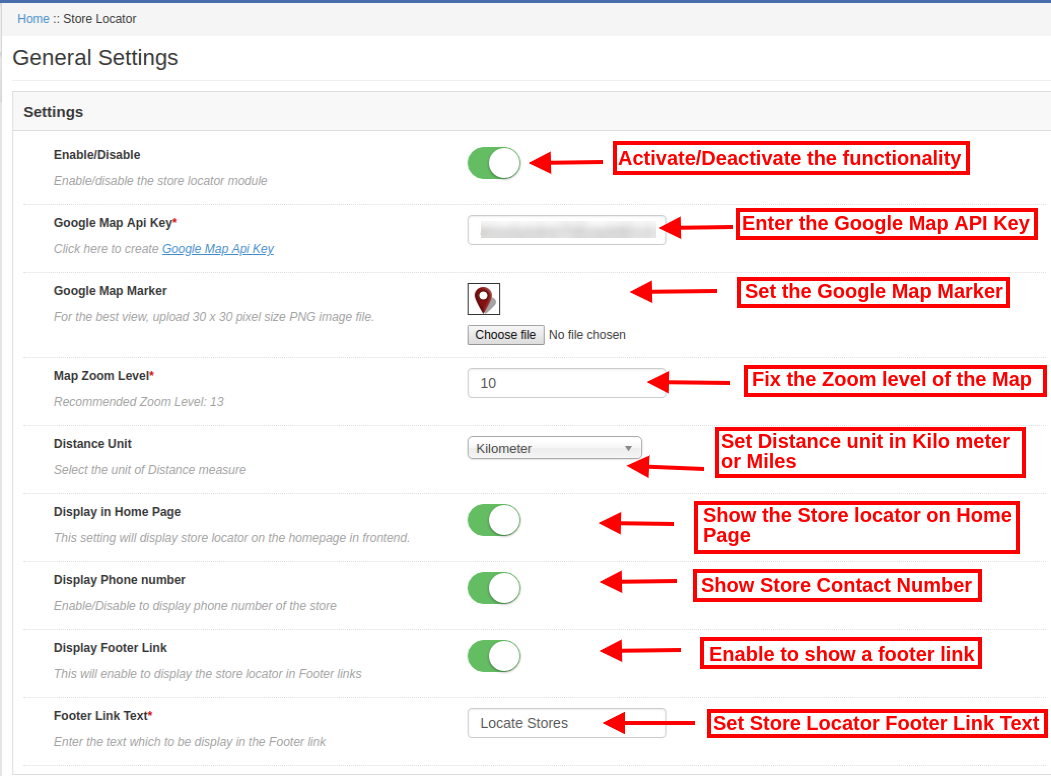
W ustawieniach ogólnych dostępne są opcje dostosowywania wyświetlania lokalizatora sklepu na stronie internetowej. różne pola są pokazane poniżej:

  • Włącz / wyłącz: Aktywuj lub dezaktywuj funkcję z interfejsu administratora tego lokalizatora sklepu Magento i rozszerzenia odbioru.
  • Klucz API Map Google: Wprowadź klucz Google API, aby włączyć mapę Google do pokazania lokalizacji sklepu. Zapoznaj się z sekcją 3.1.1, aby zobaczyć kroki generowania klucza API Map Google.
  • Znacznik mapy Google: Ustaw znacznik mapy Google, by wyświetlał dokładną lokalizację sklepu użytkownikom online w witrynie.
  • Poziom powiększenia mapy: Ustaw poziom powiększenia mapy. Moduł lokalizacji Magento Google Maps Store zaleca administratorowi ustawienie poziomu powiększenia mapy jako 13.
  • Jednostka odległości: Możesz wybrać jednostkę miary odległości w kilometrach lub milach.
  • Wyświetl na stronie głównej: Możesz włączyć to ustawienie, aby wyświetlać lokalizator sklepu na stronie głównej.
  • Wyświetl numer telefonu: Włącz tę opcję, jeśli chcesz wyświetlić numer kontaktowy ze szczegółami sklepu.
  • Wyświetl link stopki: Włącz opcję menu wyświetlania łącza stopki lokalizatora sklepu na stronie internetowej.
  • Tekst linku stopki: Wprowadź tekst, który będzie wyświetlany na stronie internetowej. Klienci mogą kliknąć tutaj, aby wyświetlić lokalizacje sklepów.

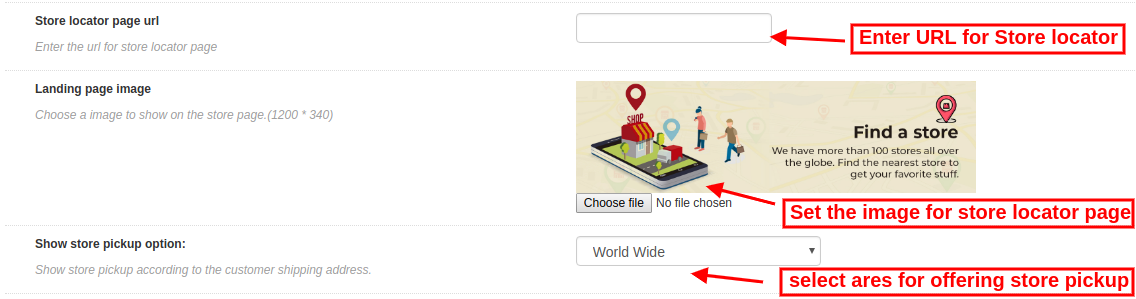
  • Zapisz adres strony lokalizatora: Tutaj administrator sklepu może wprowadzić adres URL strony lokalizatora sklepu.
  • Obraz strony docelowej: Wybierz dowolny obraz do wyświetlenia na stronie lokalizatora sklepu.
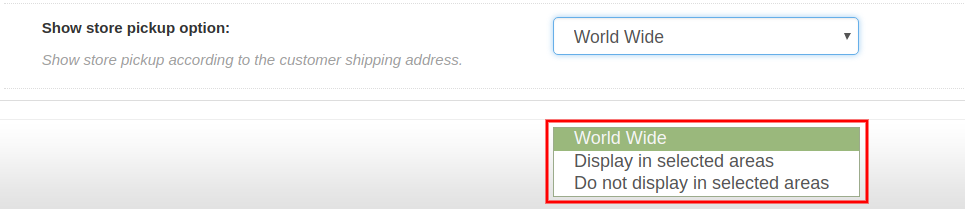
  • Pokaż opcję odbioru sklepu: Administrator może pokazać opcję odbioru w sklepie na całym świecie lub wybranych obszarach. Ten plugin Magento z lokalizatorem sklepu i pickupem oferuje również opcję wyboru obszarów, w których administrator nie chce oferować w sklepie odbioru.

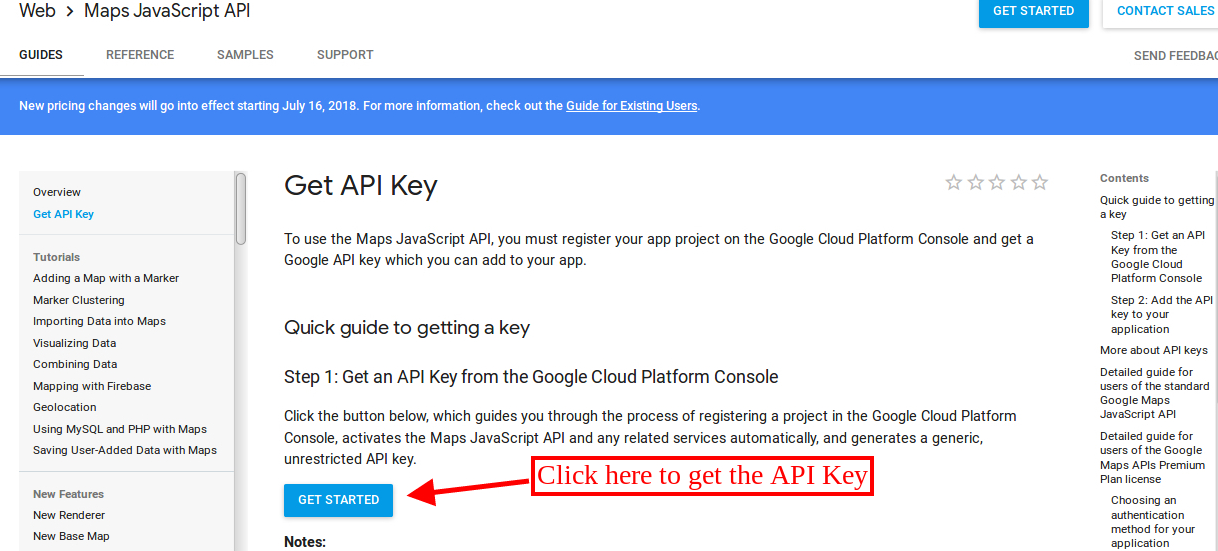
3.1.1 Jak wygenerować klucz API Map Google

Aby wygenerować klucz Google API, wykonaj następujące czynności:

Przede wszystkim kliknij na powyższy link.

  • Kliknij przycisk "Rozpocznij":Kliknij ten przycisk, aby uzyskać klucz API mapy Google.

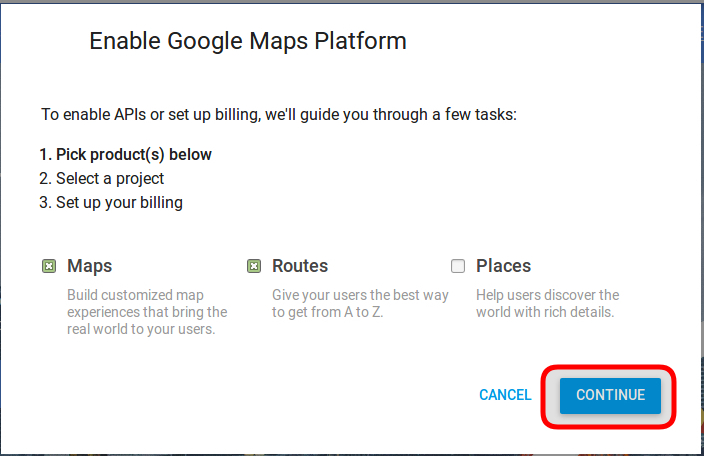
  • Odbiór produktów:Po kliknięciu przycisku "Rozpocznij" wyświetli się okno podręczne.

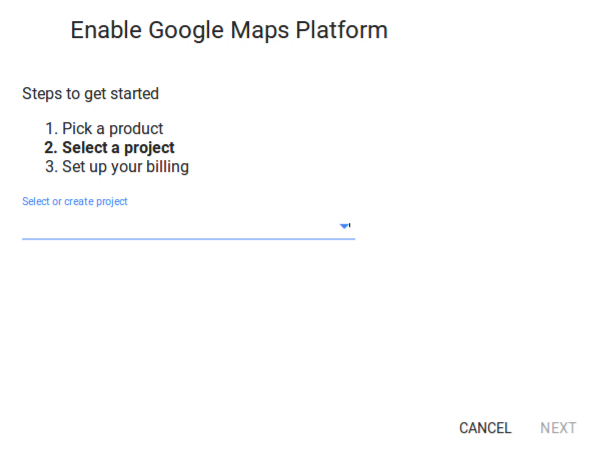
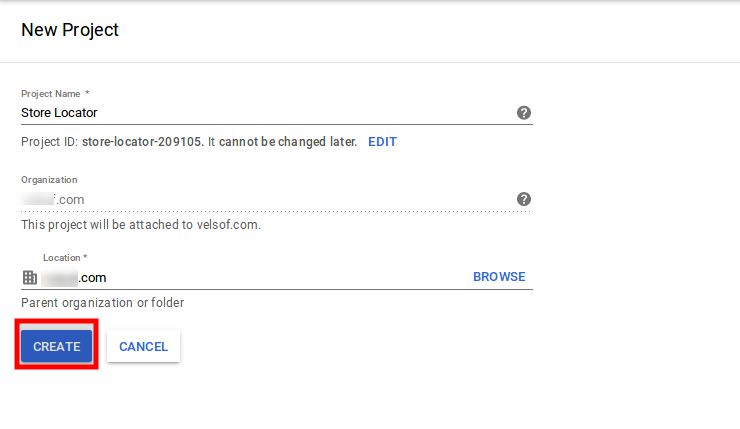
  • Wybór projektu:?Here, you can select or create a project.

1. Wybierz projekt:

2. Utwórz nowy projekt:

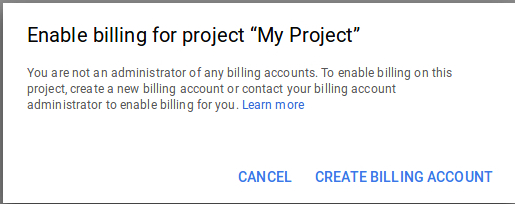
  • Skonfiguruj rozliczenia:?After that, you need to set up the billing.

Po rozliczeniu administrator sklepu może uzyskać klucz API mapy Google.

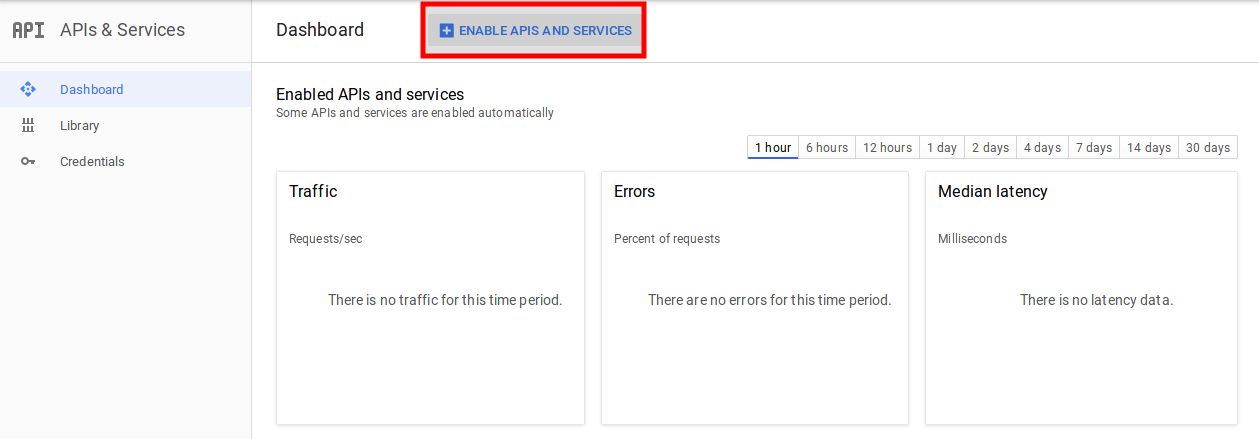
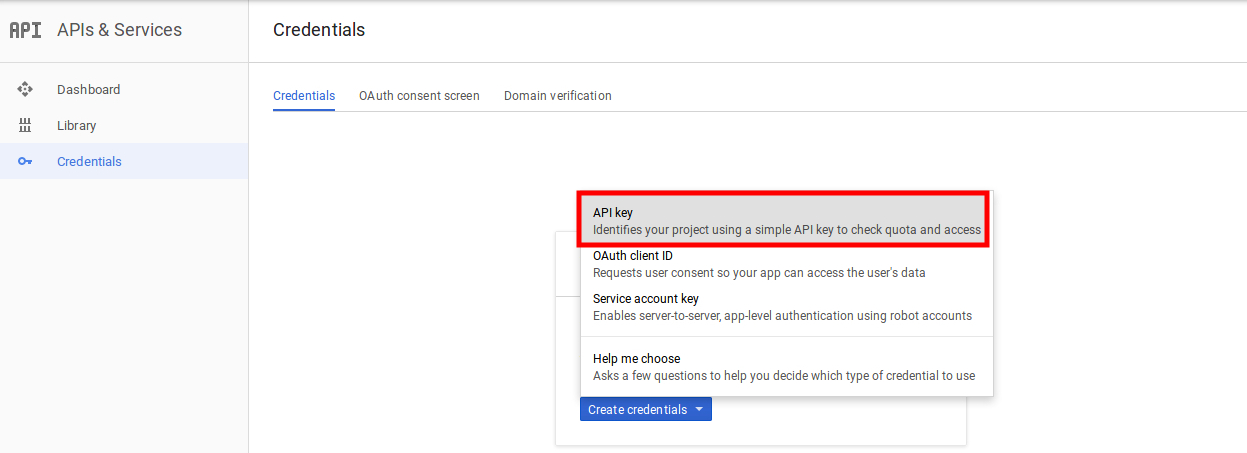
NaStrona z danymi logowania, możesz dostaćKlucz API:

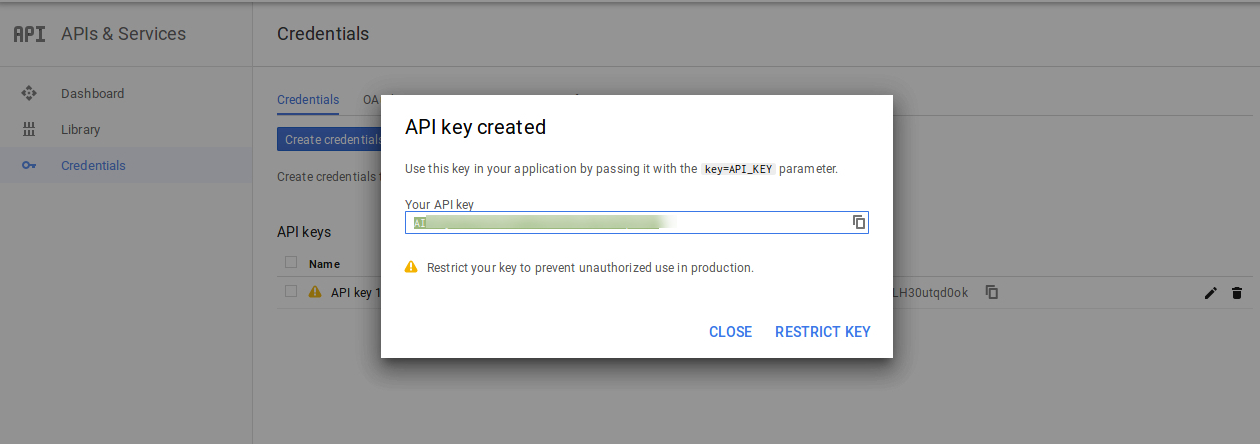
Administrator sklepu może wybrać opcję klucza API:

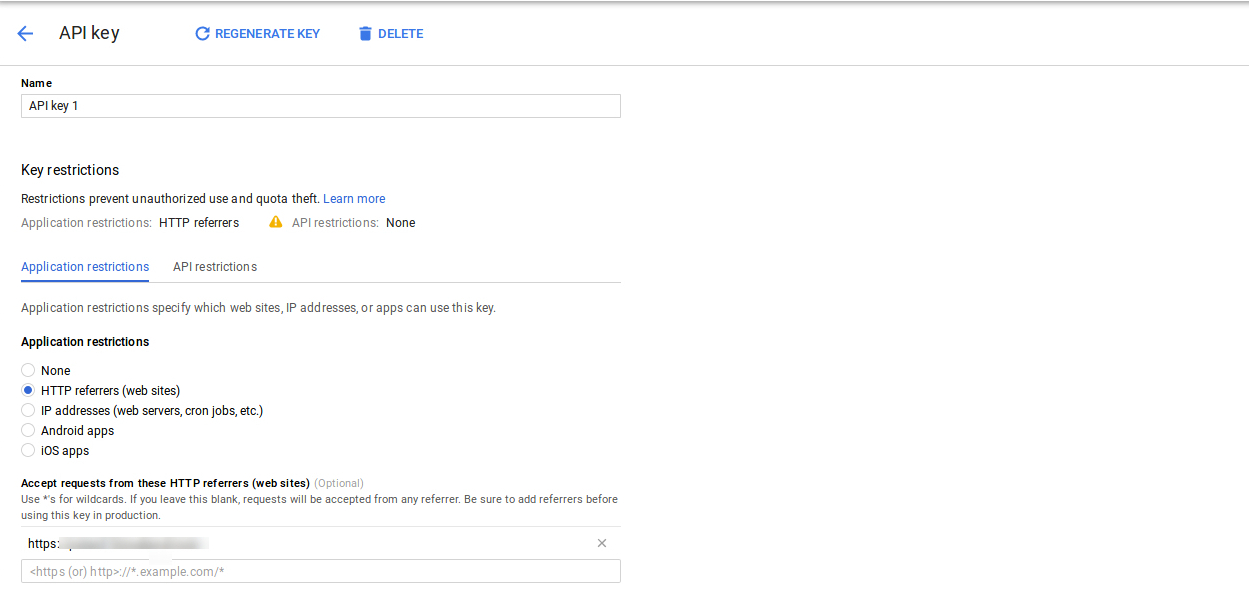
Administrator może wybrać opcję klucza ograniczenia w oknie dialogowym, aby ustawić ograniczenie przeglądarki dla klucza API.

wSekcja ograniczenia klucza administrator sklepu może wybraćOdsyłacze HTTP(strony internetowe), a następnie postępuj zgodnie z instrukcjami wyświetlanymi na ekranie, aby ustawić stronę odsyłającą.

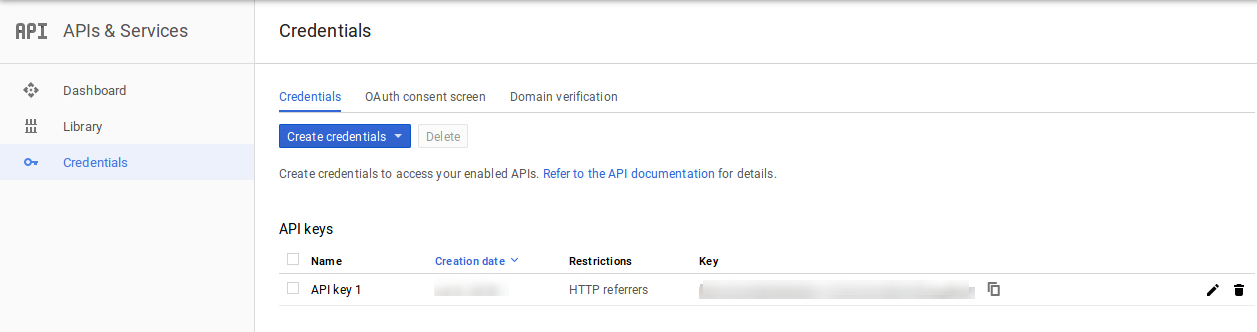
W ten sposób administrator może ustawić klucz API mapy Google.

3.2 Dodaj lub edytuj sklep

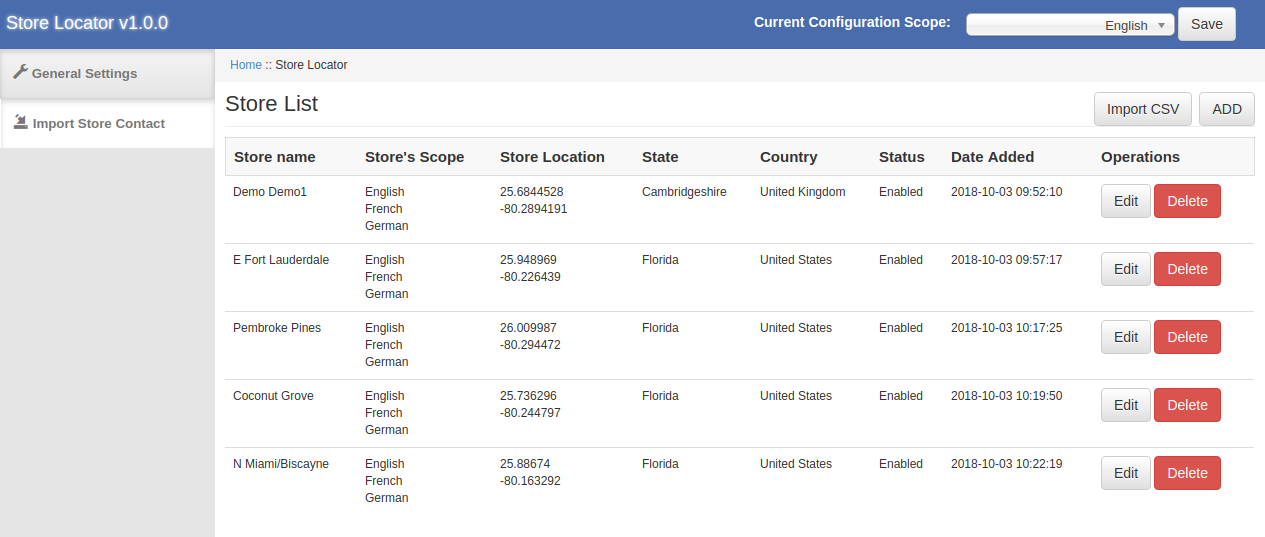
W tej sekcji menu pojawi się lista dostępnych sklepów. Możesz dodać nowe szczegóły sklepu, edytować szczegóły sklepu, a także usunąć dowolny magazyn z listy. Sekcja jest pokazana poniżej:

3.2.1 Jak dodać nowe szczegóły sklepu

Aby dodać nowe szczegóły sklepu, wykonaj następujące kroki:

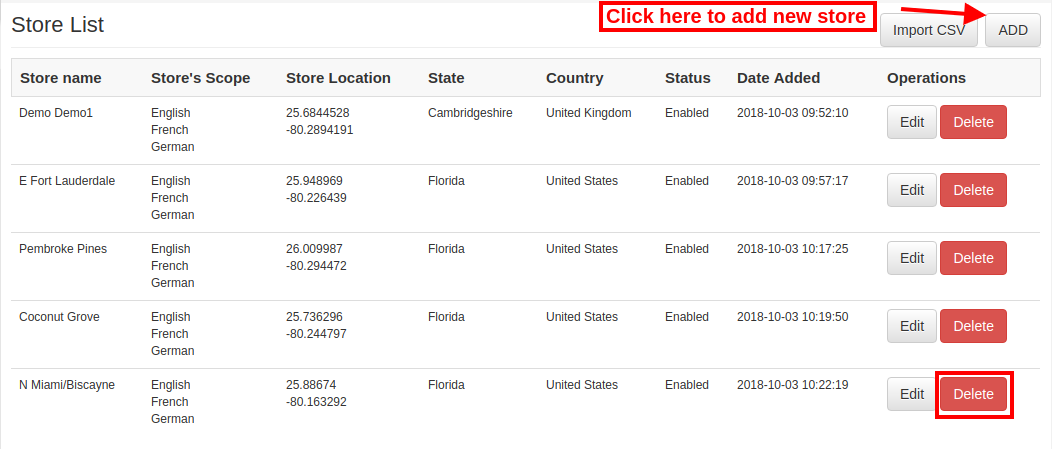
Przede wszystkim kliknij przycisk "dodaj", aby dodać nowy magazyn na liście.

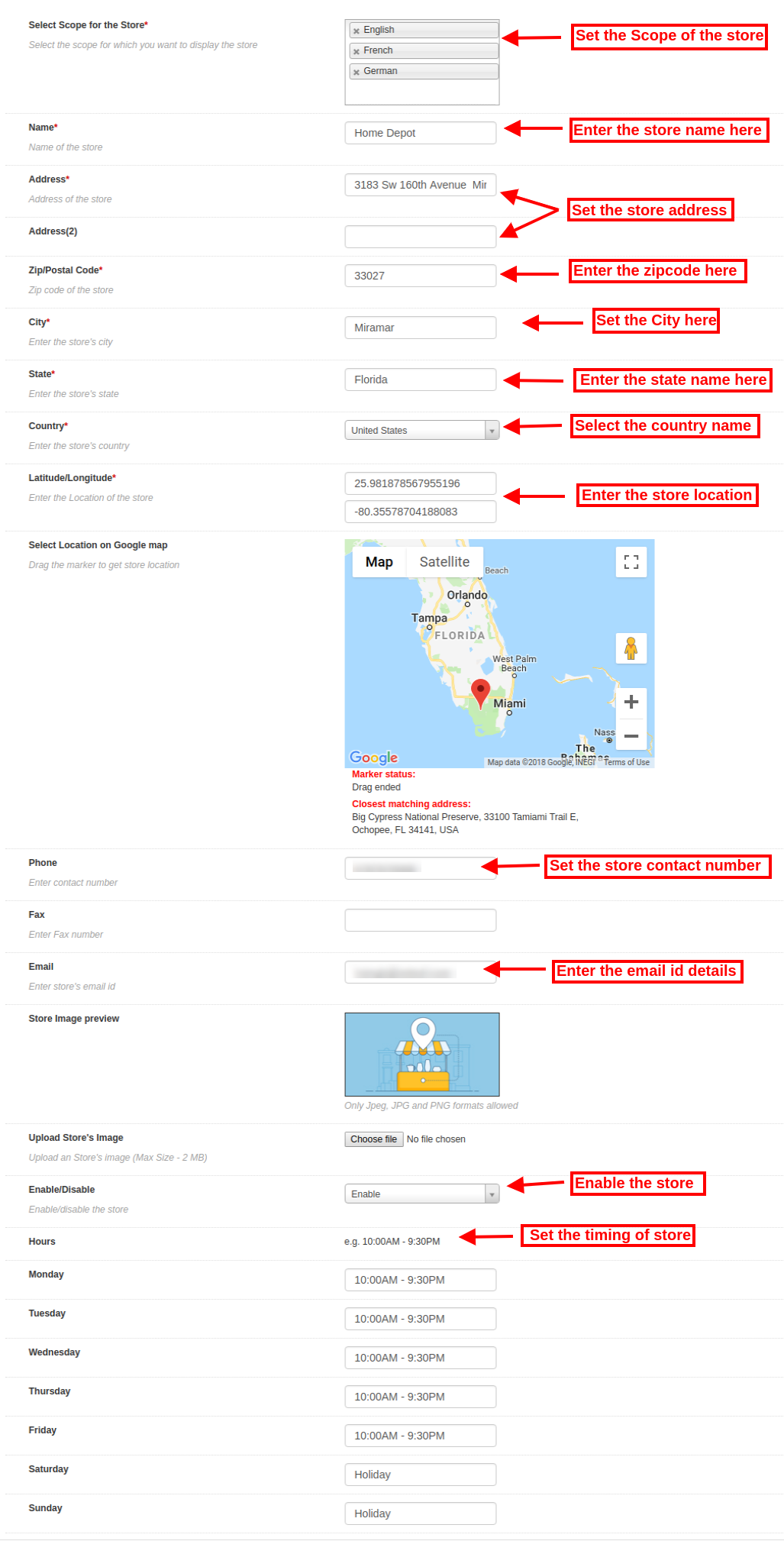
Po kliknięciu "Dodaj" przycisk, możesz zobaczyć niektóre opcje dostosowywania w interfejsie administratora rozszerzenia Magento Google Maps Store Locator.

Poniżej wymienione opcje dostosowywania:

The

  • Wybierz zakres dla sklepu: Wybierz zakres, dla którego chcesz wyświetlić ten nowy magazyn.
  • Nazwa: Tutaj możesz dodać nazwę swojego sklepu.
  • Adres i adres 2: Tutaj musisz podać adres sklepu.
  • Zip / Postal Code: Wprowadź kod pocztowy sklepu.
  • Miasto: Wprowadź szczegóły dotyczące miasta tutaj.
  • Stan: Wprowadź nazwę stanu, w którym znajduje się sklep.
  • Kraj: Wybierz nazwę kraju z rozwijanej listy.
  • Długości i szerokości geograficznej: Administrator może tutaj wprowadzić dokładną szerokość i długość geograficzną sklepu.
  • Wybierz Lokalizacja na mapie Google: Ustaw lokalizację sklepu na mapie Google, przeciągając znacznik do tej lokalizacji.
  • Strona internetowa: Sprzedawca sklepu może również wejść na stronę sklepu z interfejsu administratora tej wtyczki Magento do odbioru w sklepie.
  • Telefon: Wprowadź dane kontaktowe tutaj.
  • Faks: Wprowadź numer faksu, jeśli taki istnieje.
  • e-mail: Wprowadź tutaj identyfikator e-mail sklepu.
  • Zapisz podgląd obrazu: Podgląd sklepu będzie wyglądał tak, jak pokazano.
  • Prześlij obraz sklepu: Administrator może wprowadzić tutaj obraz sklepu.
  • Włącz / wyłącz: Administrator może wybrać opcję aktywacji lub dezaktywacji sklepu.
  • Włącz odbiór ze sklepu: Administrator sklepu może aktywować lub dezaktywować ustawienie opcji pobierania sklepu.
  • Włącz kwotę odbioru: Administrator może naliczyć kwotę za oferowanie obiektu odbioru w sklepie.
  • Typ odbioru: Administrator może pobierać kwotę odbioru za produkt, za ilość lub na podstawie całego zamówienia.
  • Ilość: Administrator może wprowadzić kwotę, którą chce pobrać za usługę odbioru.
  • Godziny pracy: Administrator może łatwo wejść do sklepu z poziomu interfejsu administratora tego rozszerzenia Magento Google Maps Store.

3.2.2 Jak edytować szczegóły sklepu

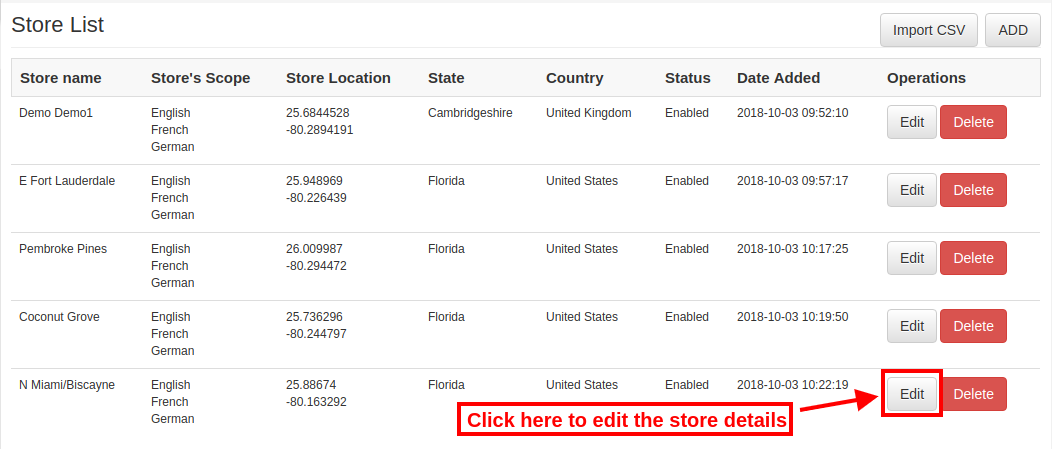
Właściciel sklepu może edytować dane sklepu za pomocą interfejsu administratora modułu lokalizacyjnego Magento Google Maps Store. Kliknij przycisk "Edytuj", aby zaktualizować szczegóły sklepu.

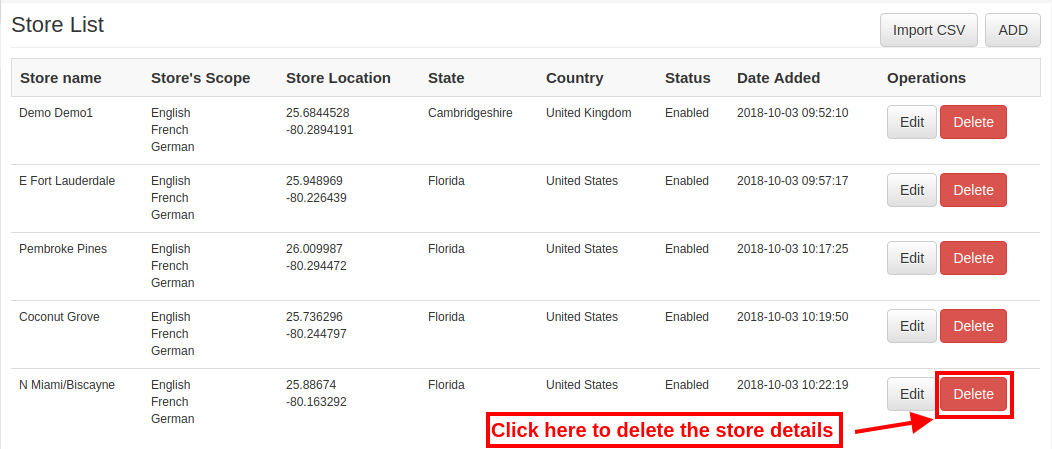
3.2.3 Jak usunąć szczegóły sklepu

Kliknij przycisk "Usuń", aby usunąć dowolny sklep. Następnie określony sklep nie będzie wyświetlany na stronie internetowej.

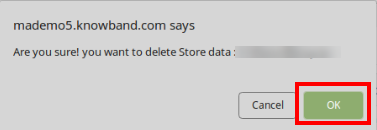
Po kliknięciu przycisku usuwania pojawi się okienko z potwierdzeniem na tej samej stronie.

Administrator musi kliknąć przycisk „ok”, aby potwierdzić usunięcie.

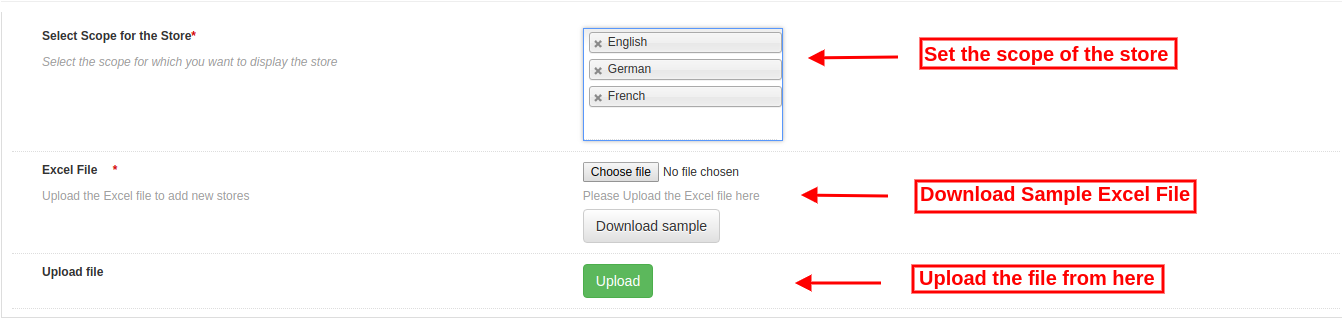
3.3 Import Excel

Możesz także przesłać zbiorczo plik Excel ze szczegółami sklepu.

Moduł lokalizatora sklepu Magento umożliwia łatwy i bezproblemowy sposób przesyłania informacji o sklepie hurtowo.

Oto opcje konfiguracji dostępne w tej sekcji:

  • Wybierz zakres dla sklepu: Wybierz zakres sklepu. Możesz wybrać języki jeden po drugim.
  • Plik Excel: Administrator może przesłać plik Excela, jeśli go posiada. Administrator może również pobrać przykładowy plik Excel i wprowadzić szczegóły sklepu w tym samym formacie dostępnym w pliku Excel.
  • Przesyłanie pliku: Administrator może przesłać plik Excel stąd.

Następnie szczegóły sklepu dostępne w pliku Excel będą również wyświetlane w sklepie.

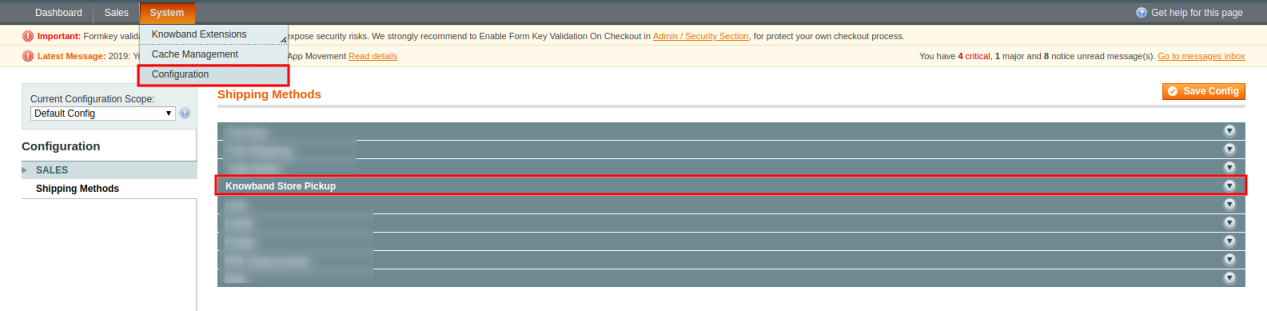
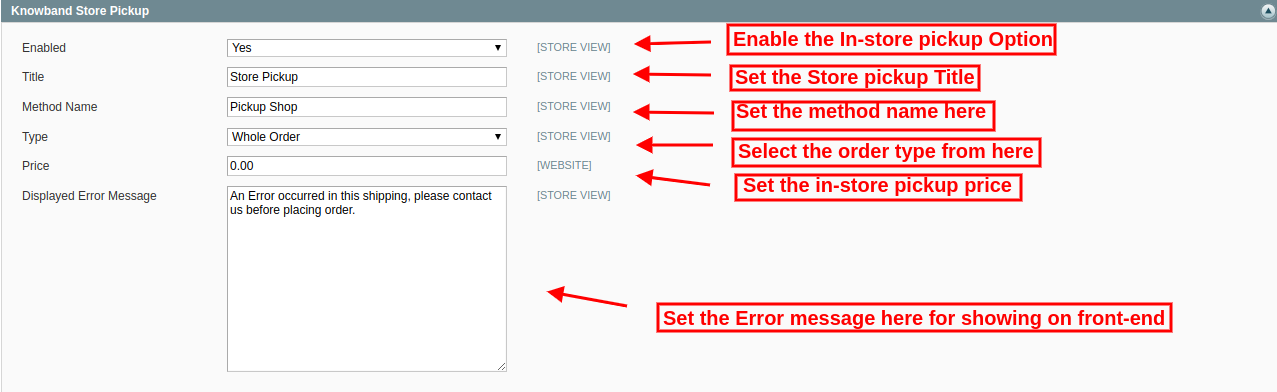
3.4 Store Pickup Global Setting

Administrator sklepu internetowego może również zastosować ustawienia globalne do odbioru w sklepie. Aby zastosować ustawienia globalne, przejdź do System> Ustawienia, jak pokazano poniżej:

Tutaj zobaczysz opcję „Knowband Store Pickup”. Po kliknięciu otrzymasz sekcję konfiguracji.

W przypadku ustawień globalnych otrzymasz wymienione poniżej opcje:

Włącz: Włącz opcję odbioru sklepu tylko jednym kliknięciem.

Tytuł: Ustaw tytuł funkcji pobierania sklepu.

Nazwa metody: Ustaw nazwę metody zgodnie z wymaganiem.

Rodzaj: Ustaw typ odbioru w sklepie, do którego chce ładować. Administrator może wybierać spośród produktów, całego zamówienia i ilości.

Cena: Ustaw tutaj cenę odbioru w sklepie.

Wyświetl komunikat o błędzie: Administrator może ustawić tekst błędu do wyświetlenia na stronie internetowej w przypadku jakiegokolwiek błędu podczas składania zamówienia w sklepie na podstawie odbioru.

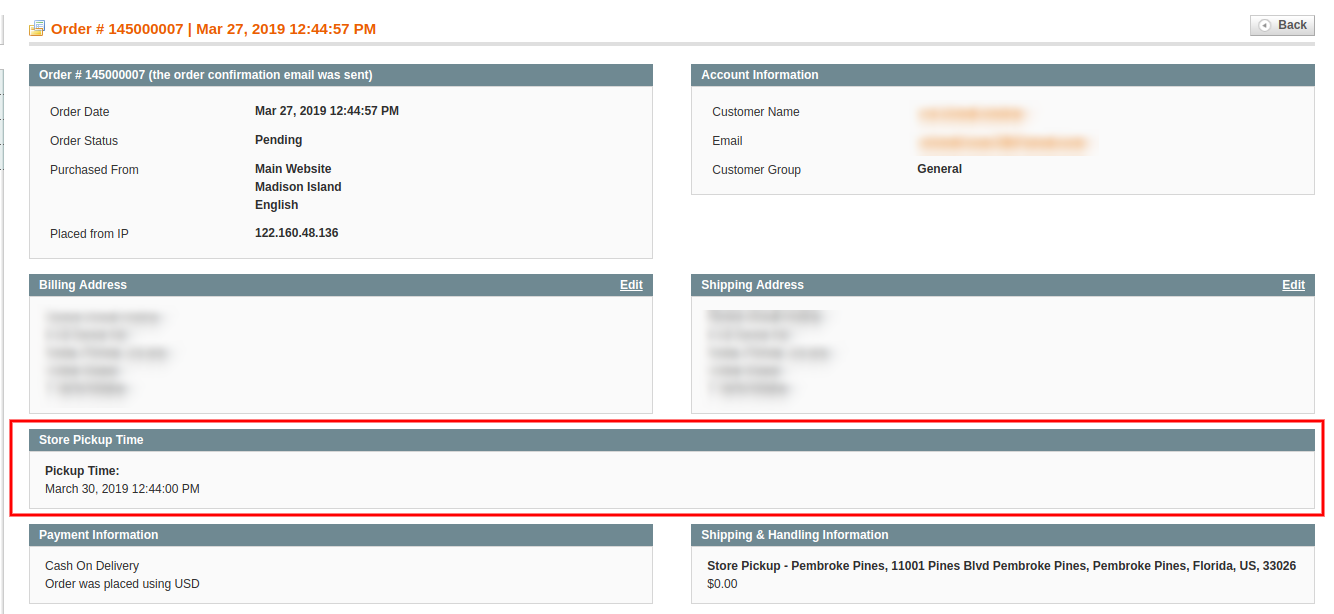
Administrator może przeglądać zamówienia w sklepie w oparciu o interfejs administratora:

Administrator sklepu może wyświetlać informacje o czasie i dacie odbioru klientów z interfejsu administratora. Aby wyświetlić preferowaną datę i godzinę dostawy, administrator może przejść do menu zamówień i kliknąć opcję „zobacz”. Tutaj administrator sklepu może wyświetlić szczegóły dotyczące czasu i daty, jak pokazano poniżej:

Interfejs użytkownika 4.0

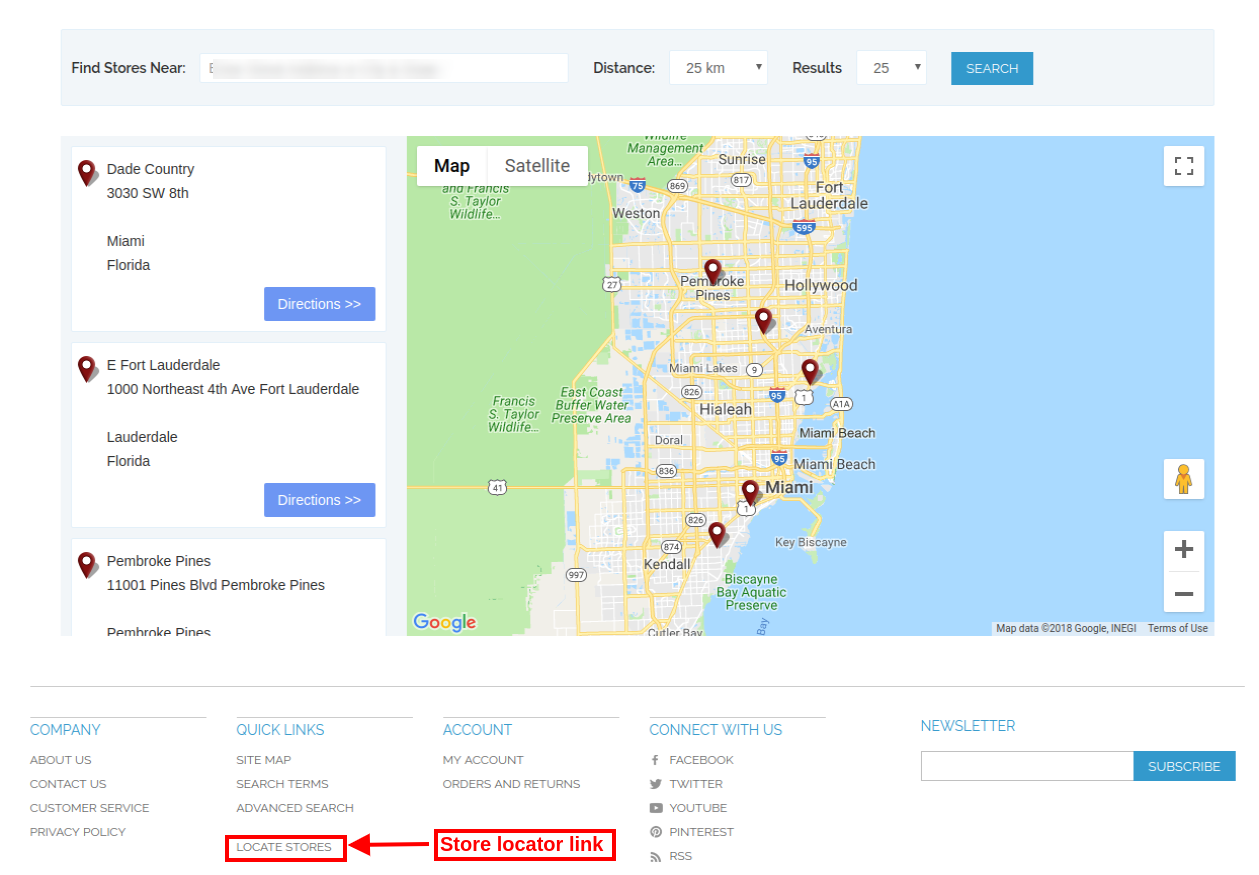
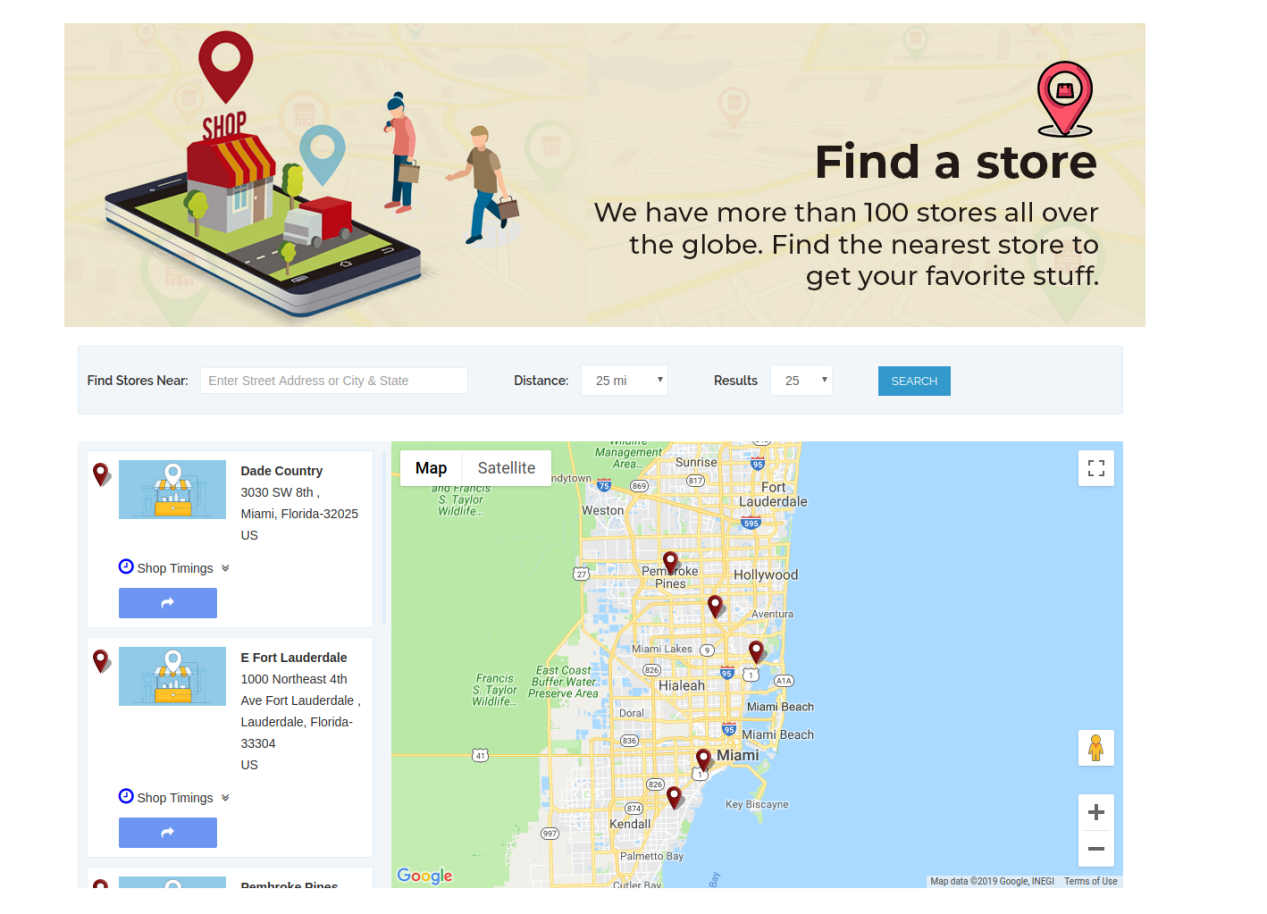
Użytkownicy online mogą wyświetlać lokalizator sklepu na stronie głównej witryny. Mogą również kliknąć link lokalizatora sklepu, aby wyświetlić lokalizacje sklepów.

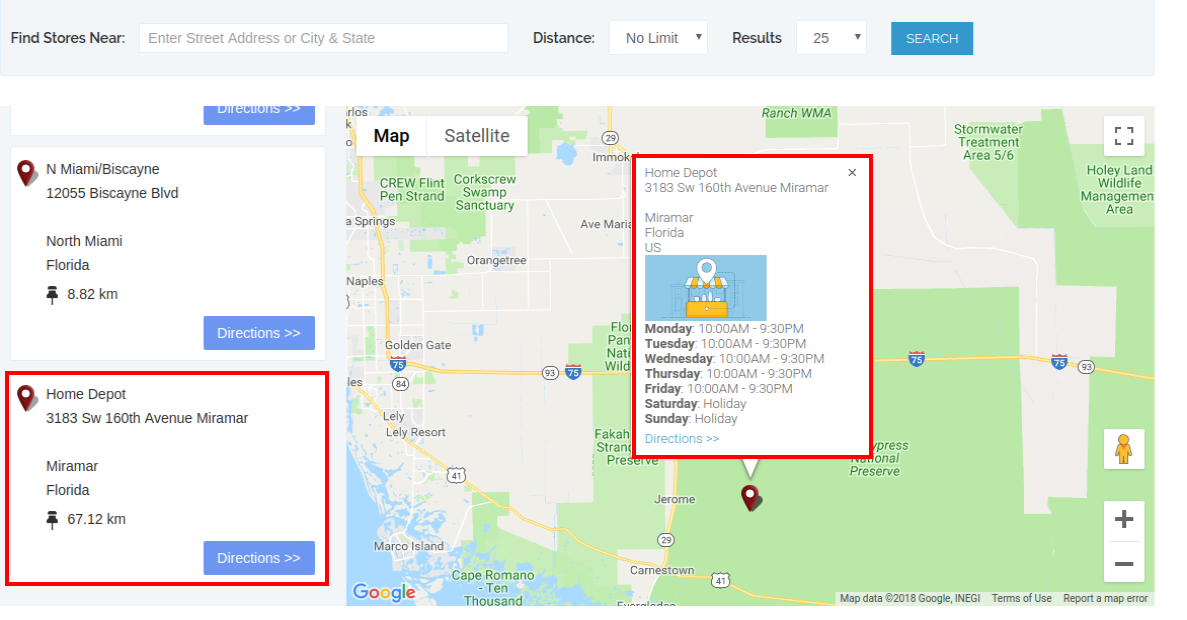
Użytkownicy online mogą wprowadzić lokalizację i odległość, aby wyświetlić najbliższe sklepy. Użytkownicy mogą również przeglądać dostępne sklepy, adres sklepu i dane kontaktowe.

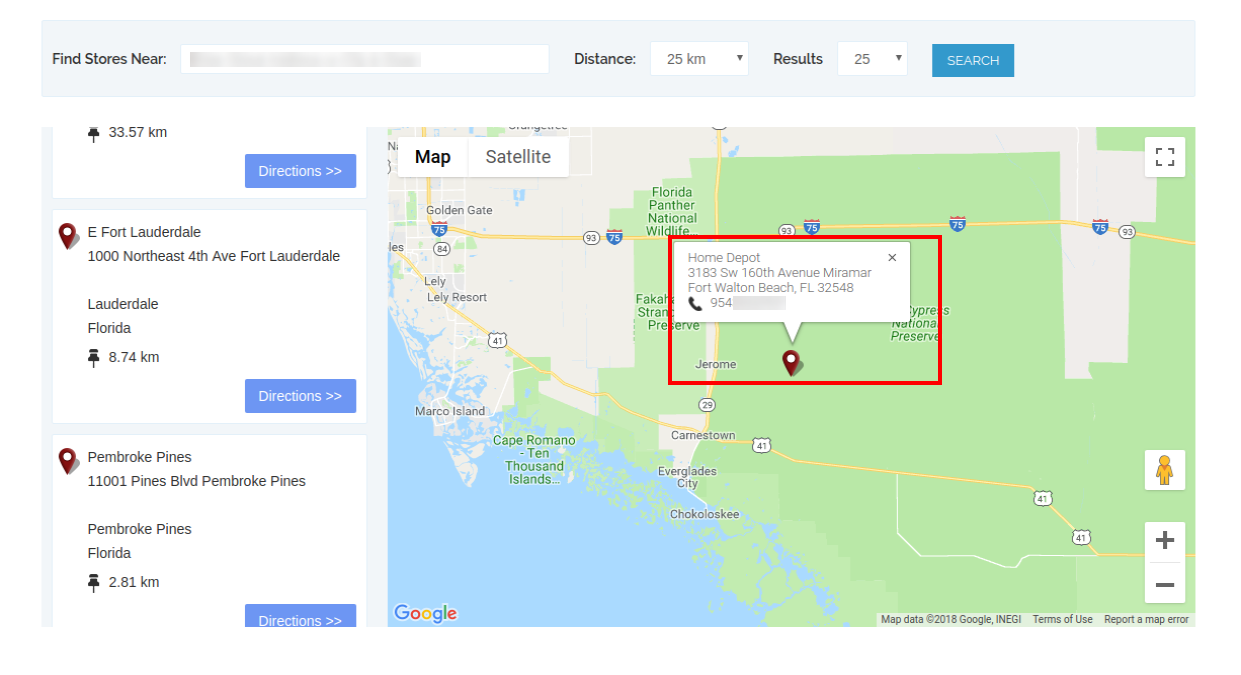
Aby uzyskać więcej informacji, klienci mogą kliknąć na liście sklepów. Tutaj mogą uzyskać czas przechowywania i link do wskazówek.

Strona lokalizatora sklepu będzie wyglądać tak, jak pokazano poniżej:

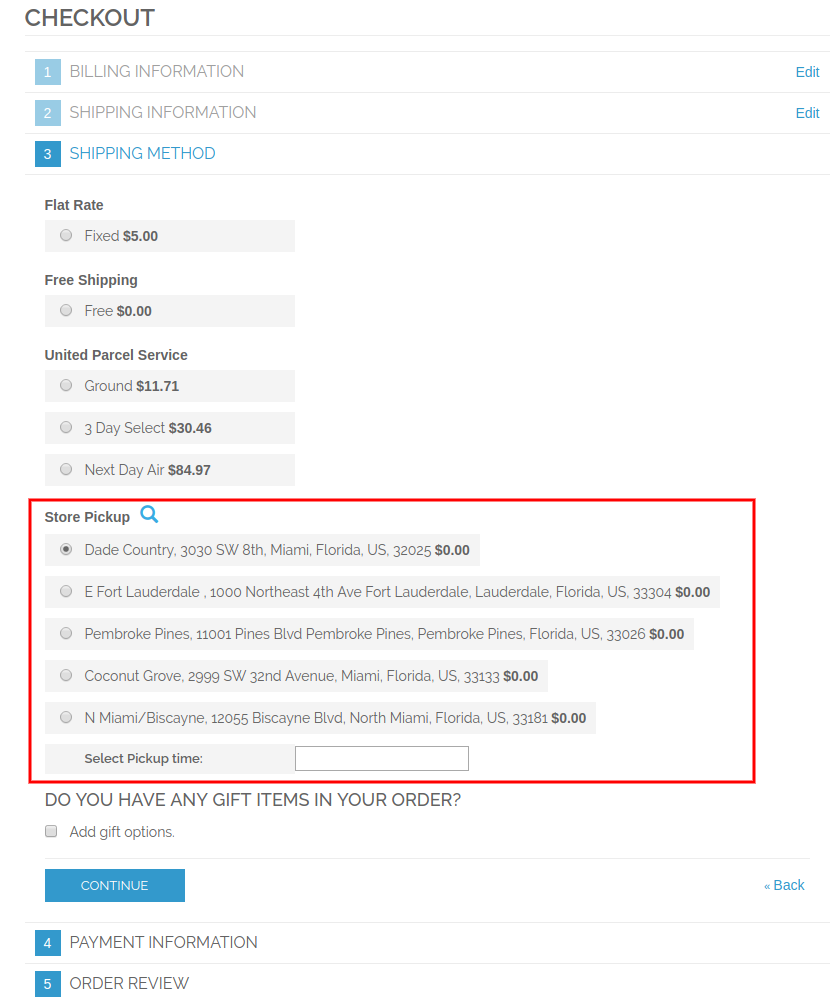
Klienci mogą wyświetlać opcję odbioru w sklepie na stronie kasy, jak pokazano poniżej:

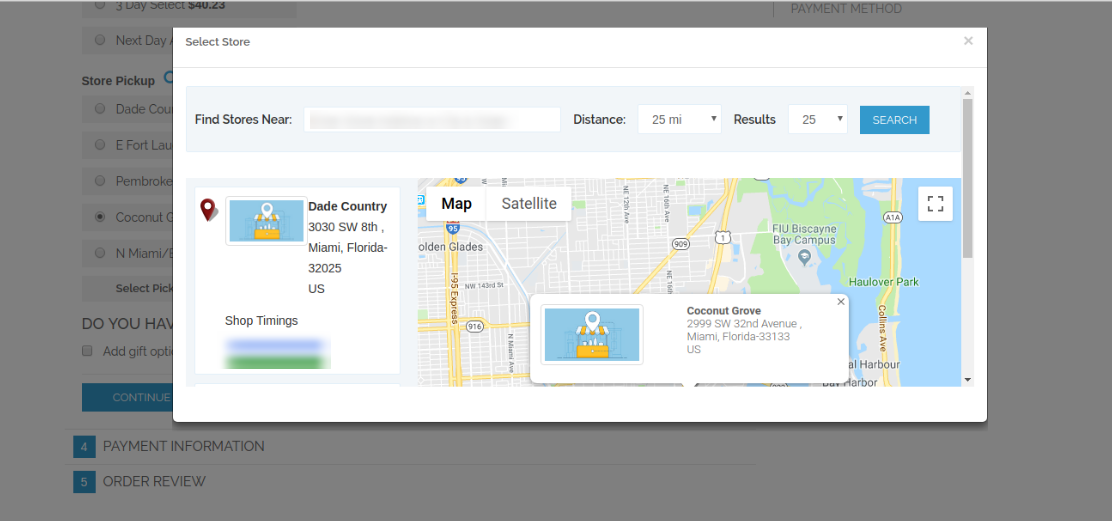
Klienci mogą kliknąć ikonę „Szukaj”, aby wyświetlić dostępne sklepy w najbliższej lokalizacji. Mogą wybrać preferowany sklep do odbioru w sklepie.

Klienci mogą wybrać sklep i czas odbioru. Klienci mogą teraz wybrać zamówiony produkt z wybranego sklepu bez płacenia kosztów wysyłki. Po złożeniu zamówienia klienci online mogą zobaczyć czas odbioru sklepu na rachunku faktury i historii zamówień.

W szczegółach zamówienia klienci mogą zobaczyć szczegóły odbioru w sklepie, jak pokazano poniżej:

W ten sposób, za pomocą rozszerzenia Magento Google Locator Store, administrator może łatwo wyświetlać fizyczne sklepy na stronie.

Aby uzyskać więcej informacji, odwiedź tutaj:

Magento Google Maps Store Locator plugin Strona produktu.

Magento Google Maps Store Rozszerzenie lokalizatora Admin Demo link.

Magento Google Maps Store Moduł lokalizatora Demo z przodu.