How to Optimize Your Website for Better SEO?

Optimizing your website for search engines is SEO. The goal of website optimization is to make websites easier for search engines to understand and rank. To ensure that your website and its content are visible on search engine results pages, you can utilize a variety of strategies, all of which are collectively referred to as “SEO.” When owning a website, SEO is something you should get good at. Your website’s position in search results on Google and other search engines is continuously changing. Moreover, if you want to outperform the competition, you must have the latest information on SEO.

What Are the Methods of Website Optimization?

Capitalizing on Website Traffic
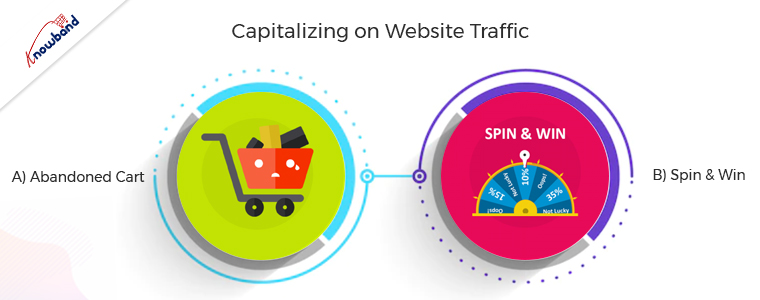
This method is very important because benefits come from users who come to the website. The conversion of the incoming traffic to the website is possible only if they stay long enough on the website and for this, various methods are possible. Apart from the engagement, it is very important to follow up with the customers if they are abandoning the cart.

A) Abandoned Cart

The abandoned cart module is very useful for following up with customers who are visiting the website but are not purchasing. Customers sometimes leave the website without completing their purchase. Furthermore, sending a reminder for the abandoned cart is important to remind them of their basket. The users receive email follow-ups for completing the purchase with a discount which entices the customers.

B) Spin to Win
The email subscription popup comes in handy to increase the number of subscribers to the website and also to increase sales. The gamified email subscription popup provides the customers with free discount codes or gifts, which entices the customers. The users have the excitement to spin the wheel when they know they will receive awards for doing so. Visitors do not hesitate to enter their email addresses when using this gamified plugin to subscribe to the website. The Spin and Win modules are not like other subscription popups, which irritate the users. Additionally, it encourages customers to subscribe to the online store.

Optimize The Website for Mobile

It is very important to optimize the website for mobile, as mobile apps are gaining preference over websites. Furthermore, online businesses are always looking to have a streak of growth. Additionally, after properly establishing the website for the online store, the customers launch the mobile app for their business. Mobile apps are very trending for eCommerce businesses these days, and customers also prefer to purchase mobile apps. A major number of sales come from mobile apps only if a business has them in active condition. The navigation of mobile apps is easy, and they are easily accessible, which makes them preferable.

Speed Up the Checkout Page

A successful checkout integration is necessary for any online store to function properly. Customers become irritated with the traditional and lengthy checkout process. Customers should have an easy time completing the checkout procedure and feel at ease doing so. Customers can complete their purchases quickly and easily with the help of our one-page checkout module. Our single-step checkout makes it simple for the user on the checkout page by providing all the information on one page. The checkout process requires you to browse through several pages, which is annoying. Customers do not like to spend a lot of time on checkout, and this causes cart abandonment. As seen in our customers’ reviews, our one-page checkout has been effective in preventing such problems. The single-page checkout module lets the customer checkout within one minute, whereas the default checkout takes over two minutes.

Give The Customers What They Expect and Desire
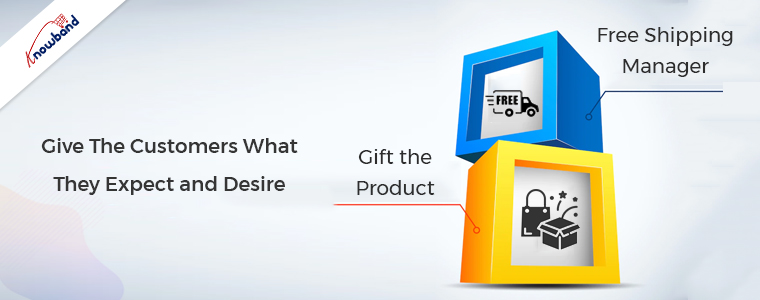
Whenever customers visit the store, they should receive free shipping and goodies. Additionally, it will make their experience better in the store and boost customer retention.

A) Free Shipping Manager

The overall price of the cart affects the conversion rate drastically. When you enable the free shipping manager plugin, it provides customers with free shipping for their orders. Customers tend to add more products to their cart when they see that they can offset the shipping cost by adding some products. The free shipping module is used to define the terms under which users can receive free shipping. The users gain motivation if they see a free shipping option on their purchase, which makes them come back for more shopping.

B) Gift the Product

Customers like physical gifts, and when they receive them for free, they will surely be joyful. The gifts are available to select depending on customers’ cart value. The customers will surely be wanting to receive the gifts for free, which will make them increase their shopping cart value. The gift the product plugin is sure to increase the overall sales of the online store as it makes the customer increase their cart value. Moreover, users will be happy when they receive the gifts for free, which makes them want to purchase from the store more often.

In the End

In this article, we have been discussing the ideas of optimizing the website. In case you have any concerns related to the above methods then you can connect with us at support@knowband.com. We provide custom developments depending on the business requirements, so we can help you with your specific demands as well. Moreover, we want to inform you that if you want to add some functionalities to our module, then we can do the same for you as well. Kindly let us know in case of any concerns or issues related to our module.

Top Reasons Why Social Media Marketing Is Crucial for A Business!!

Nowadays, social media marketing is considered one of the most effective promotional methods. Not only social marketing is trending in the market. But also, it ensures the quickest results for businesses. There are various reasons behind the success of social media marketing. Although if you are doing social media marketing for your eCommerce business. You may have to pay some amount to the respective platform. Yet, spending on social media marketing entirely justifies the expenses because of the assured success rate.

Thus, following the same, in this article, we are going to spread some light on why social media marketing is crucial for online businesses.

What is Social Media Marketing?

In simple words, social media marketing is a modern marketing method in which a brand/user uses social media platforms to promote their eCommerce business. For example, some of the best social media platforms to promote a business are. Instagram, Facebook, Snapchat, TikTok, etc.

Social media marketing ensures promising benefits by getting a business noticed in front of a vast customer audience.

Why it is So Important?

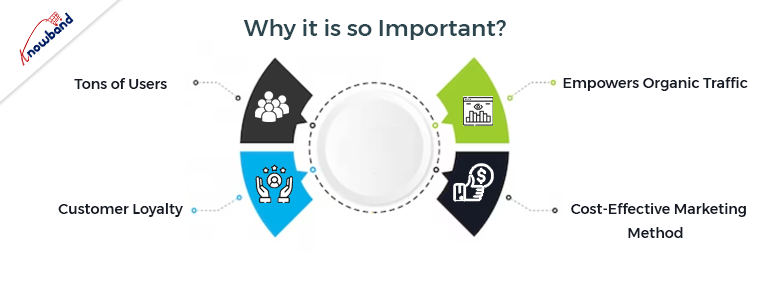
1. Tons of Users:

One of the most sounding reasons for using social media marketing for a brand’s promotion is that. There are tons of social platform users available worldwide. Moreover, social platforms such as Snapchat, Instagram, and WhatsApp are some of the online places where modern users love to spend their quality time.

As an online business owner, it is advantageous for you to get a chance to represent your brand in front of a vast audience. Thus, the first reason for choosing social media marketing for promoting an online business is that. Social platforms have millions of users waiting for their favorite content. The same creates a huge opportunity for small business to show off their inventory.

2. Customer Loyalty:

The other major advantage of social media marketing is that it helps a brand to gain brand loyalty from customers. How? If you are posting your marketing content online, then there are huge chances that customers will have queries regarding the same.

Now, the other benefits of social platforms are that anyone can raise a query to a respective page/account. Thus, while promoting your business online on social media platforms, you can directly keep in touch with your customers can ensure their peace of mind against all sorts of concerns/queries.

In the following way, it is much easier for a brand to gain customer loyalty using social media marketing for promoting their business.

3. Empowers Organic Traffic:

Building an enchanting business page on social media platforms impacts the organic customer traffic for a website. In case you are providing valuable and eye-catching content on your Instagram page, there is a huge chance that users might like your content and further would love to visit your website.

In the following way, social media platforms are securing huge opportunities for online business to enhance their customer traffic by just following a few simple steps.

4. Cost-Effective Marketing Method:

Well, it might sound a bit awkward. Yet, SMM (Social media marketing) is one of the most cost-effective promotional methods available in the market. On top of that, SMM ensures the lowest customer acquisition cost for online businesses. For those, who are unaware, CAQ (Customer Acquisition Cost) entirely defines the effectiveness of a marketing method.

Thus, not only you can boost and easily enhance your brand reputation using Social Media Marketing but also SMM is going to be quite pocket friendly for your business.

In the End,

Amongst all the others, Social Media Marketing is one of the most effective marketing strategies that are playing important role in the growth of eCommerce businesses. Following the same, SMM is becoming the favorite all-time marketing method for the eCommerce community. Moreover, if you are using SEO and SMM together, you can easily get the eyes of your desired customer base.  You can also check out our other recent content about how SEO is empowering online businesses.

7 Ways to Increase Your Website Traffic

Website traffic is an integral part of any eCommerce business. Without it, the business holds little to no value. Is there any point of having a website if it is not receiving any traffic?

No web traffic means no customers, and hence no sales.

What is Web Traffic?

Web Traffic or Website Traffic is the number of web users who visit your website. Any time a visitor lands on your website, it counts as a visit or a session.

Website owners or marketers try various strategies to increase the traffic on their website, and today in this article, we will be talking about those tactics. I will be covering 7 simple yet effective ways to increase website traffic.

How to Boost Website Traffic?

Take a quick look at the 7 important tips that I will be sharing with you.

  1. On-Page SEO

  2. Social Media

  3. Paid Advertisement

  4. Start a Blog

  5. Write Quora Answers

  6. Guest Blogging

  7. Email Marketing

1. On-Page SEO

This might seem an obvious one but cannot be overlooked. If there’s one thing that matters the most when it comes to increasing the website traffic, it is the On-Page SEO. I mean SEO is all about driving traffic to your website.

If your website is SEO-optimized, you can expect quality organic traffic. So, make sure that all your web pages are optimized for search engines which will make it easier for the search engine bots to crawl your website, understand your niche and put your website in front of those web users whose queries match your business offerings.

2. Social Media

Promoting content is as important as creating it. How would people know that your brand even exists if you are not promoting it much or not leveraging the platforms which could help you in driving traffic to your website?

Social media is arguably the best platform to boost your website traffic. Facebook and Instagram can prove ideal if you are into B2C business whereas Twitter and LinkedIn are more beneficial for B2B businesses.

If you haven’t marked your presence yet on social media, now is the time. Your competitors there are already driving a handsome amount of traffic on their website through social media.

Related: Social Media Marketing for eCommerce: Strategies and Best Practices

3. Paid Advertisement

Paid advertisement is also one of the ways to promote your website in front of a large audience and driving them to your website. It becomes crucial if you have just started out your online business because you need to spend some bucks to get your brand noticed.

Google Adwords is one of the best tools that will help you with search engine marketing. You will have to bid for the keywords that you want your website to rank for, on the top in the search engine.

Besides you can also take help of social media ads such as Facebook Ads and Instagram Ads. Make sure to target the right audience, which means the right age group and the right regions where you want to display your ads.

4. Start a Blog

A majority of websites have a blog section, and you should have it too. Start a blog as soon as possible.

When you focus on topics around your niche and start writing about them, you have a very good chance of ranking your blog posts on the search engine and driving traffic through it, considering that the content is of high quality and contains the required keywords.

Later, you can promote your posts on various platforms and bring the audience to your blog.

5. Write Quora Answers

Quora is one of the popular Q&A platforms where people ask different types of questions and seek answers for them. It is very likely that your niche’s audience is already there and looking for some answers which you could provide.

Create a Quora profile, search questions related to your niche and start answering them. One thing to keep in mind that Quora is a platform to discuss, not to promote, So, keep your answer as genuine as you can. Write detailed answers, add a link to your website without sounding promotional.

If Quora identifies that you are there just to promote your business, they will block you from their platform.

6. Guest Blogging

There are many websites over the Internet that allows Guest Blogging. It provides a great opportunity for you to attract the audience of those platforms to your website. Besides, it enhances your brand image as well.

Reach out to a guest blogging website. Tell them that you want to create content on their platform. Just follow their guidelines and you won’t find any problems.

7. Email Marketing

Every small business follows email marketing. If you have a good number of email subscribers, you can drive a decent amount of traffic on your website.

Focus on building your email list. Acquire email address of your visitors and then send them newsletters, marketing emails, offers and promotions or other important information and bring them on your website.

Final Thoughts

There is no fixed limit to the number of ways to increase your website traffic. As I earlier said, businesses try and implement multiple strategies to boost the traffic on their website.

Keep looking for different ideas and do whatever you feel can be helpful in bringing users to your website.

PrestaShop SEO Optimizer- Clean URLs & 301/302/303 Redirection Module- User Manual

1.0 Introduction

A higher ranking on the search result page of the search engines like Google, Bing, and others is the biggest challenge for an online business. With a higher ranking, the chances of better sales also increase. In order to improve the search ranking, it is mandatory for the store owners to follow the guidelines issued by the search engines. SEO (Search Engine Optimization) is the way to increase your online presence for a better ranking on the SERPs. The On-Page SEO activities involve – website optimization, meta tag optimization, SEO-friendly URLs, keyword density and more. Among these factors, one factor is the SEO-friendly URLs which play an important role in the ranking. As per Google guidelines, Google recommends that the URL structure of a website should be as simple as possible. SEO-friendly URL is also useful for indexing process flow by the search engine bots.  In clear words, comprising SEO-friendly URLs for a website increases the chances for a website to get higher ranks in the search results. The default URL structure of PrestaShop SEO Optimizer Module includes the product id in the product page URL, Category page URL in the category page URL.

To help the store admin to create SEO-friendly URLs, Knowband has developed the URL Cleaner (SEO-friendly) Module. This PrestaShop SEO Optimizer – URL Cleaner Addon automatically generates the SEO-friendly URL by removing the ID from the URLs of products, categories, suppliers, manufacturers, CMS and all other pages of your store. It allows the admin to implement the 301, 302 or 303 redirection as per the requirement.

1.1 Features of the Prestashop URL Cleaner (SEO-friendly) Addon:

1. PrestaShop SEO-friendly URL Addon is a module that automatically converts the default URL into SEO-friendly URL.

2. The Knowband PrestaShop Rewrite URL Module removes the auto-generated ID from the URLs of the products, categories, suppliers, manufacturers, CMS and all other pages of your store.

3. With the help of this PrestaShop Fixed Duplicate URL Addon, the admin can view the duplicate URL list and modify or remove the URL as per the need.

4. PrestaShop URL Cleaner Module provides an option to the store merchant to redirect the old URL to the new URL. The Store admin has 3 choices on redirects i.e. 301 redirects, 302 redirects, and 303 redirects.

5. SEO URL PrestaShop extension is a module that helps the store merchant in improving SEO.

6. This PrestaShop URL Rewriting Module by Knowband helps the eCommerce owner to improve the website SEO.

7. The PrestaShop store admin can set the URLs to end with or without .html by using this Prestashop URL Cleaner Addon.

8. PrestaShop URL Id Remover Module is multi-store compatible.

9. SEO-friendly Prestashop URL Cleaner Module back-end interface extremely easy to use.

10. With this PrestaShop 301/302/303 Redirect Module, the admin can redirect the N no. of the old URLs to new URLs.

Technology for Development

Language: PHP

FrameWork: PrestaShop

2.0 Steps For Installation

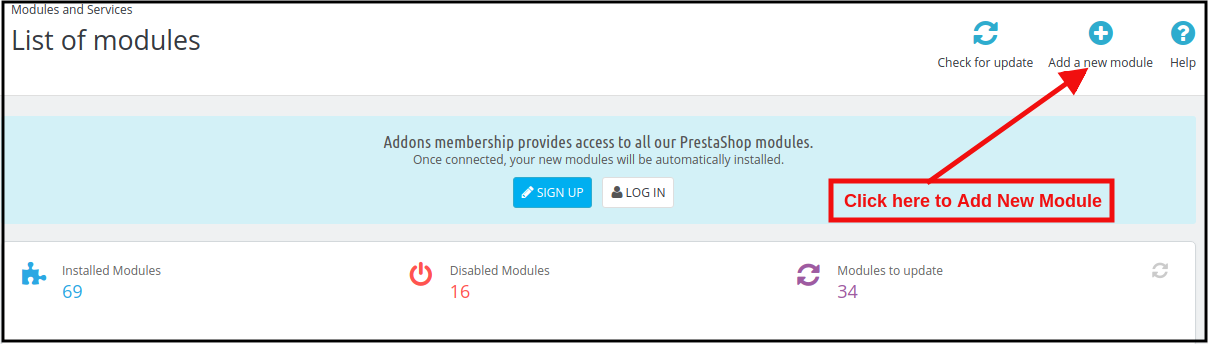
1. To upload the module click on the “Add a new module” button.

2. After clicking on Add New Module now select the module zip file.

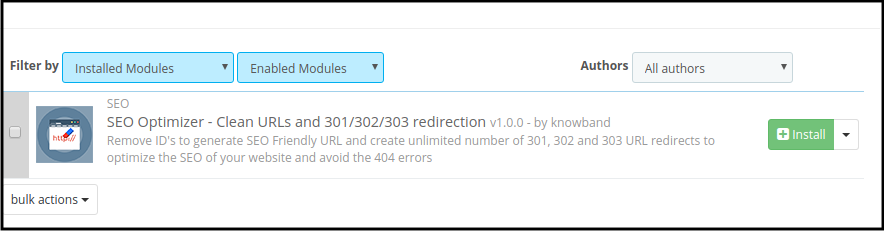
3. Now, You can find the PrestaShop SEO Optimizer Module in the module list and Click on the Install link to install the plugin.

4. After installing the module, the admin will be able to configure the module.

3.0 Admin Interface

After installing the module in the PrestaShop store, the store owner can make the changes without any hassles. There are the following sections available to the admin interface:

1. Module Configuration
2. Duplicate URL Rewrite Products
3. URL Redirection List

Each interface of this PrestaShop URL Cleaner (SEO-friendly) Module is explained below.

3.1 Module Configuration

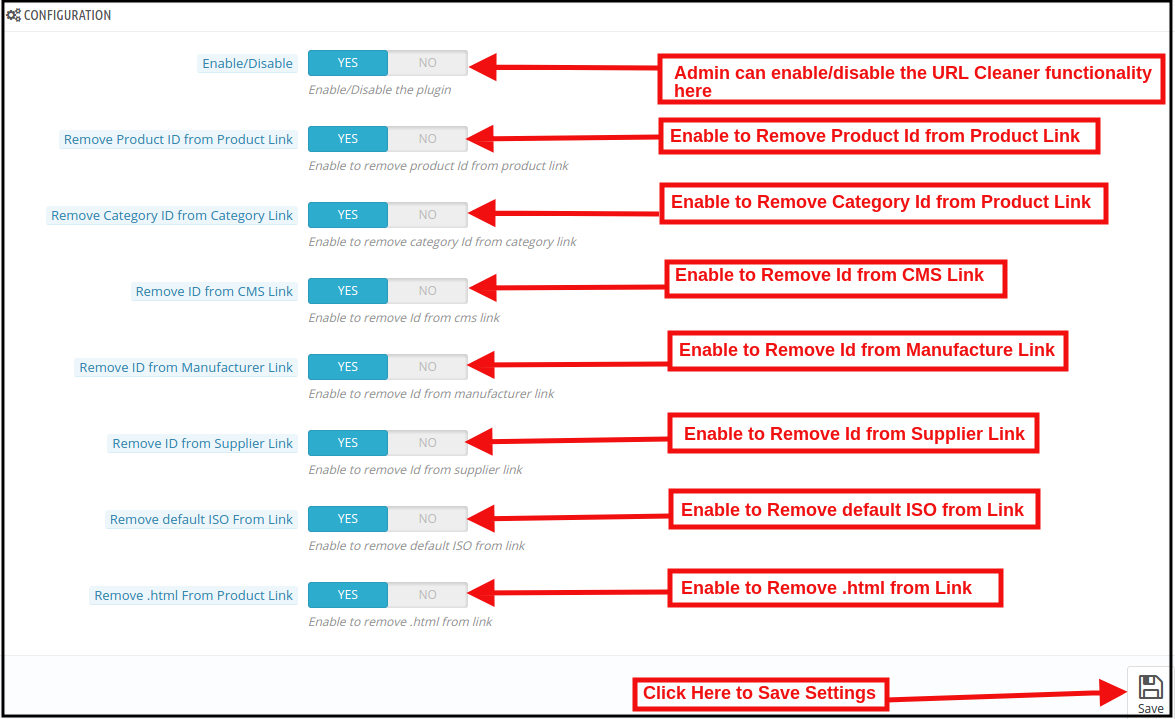
On clicking on the configure link on PrestaShop 301/302/303 Redirect Module, the system will open Configuration tabs of this Prestashop plugin by default as shown in the screen below:

Initially, the fields of this PrestaShop URL Cleaner(SEO-friendly) Addon in the above form will be already filled with their default values.
Enable/Disable: This field will enable the URL Cleaner feature. If enabled, the PrestaShop URL Cleaner will automatically convert the default store URL to SEO-friendly URLs.

Remove Product ID from the Product Link:

The default URL structure of the PrestaShop product page contains a product id and a URL like https://psm.knowband.com/urlcleaner/16/en/casual-dresses/3-printed-dress.html. As you can see the default product URL has the product id. After enabling this feature, the PrestaShop URL Cleaner Module will automatically remove the product id from the product link and the updated link will appear like this:

https://psm.knowband.com/urlcleaner/16/blouses/blouse

https://psm.knowband.com/urlcleaner/16/casual-dresses/printed-dress.html

Remove Category ID from the Category Link:

The default category page link contains the category id and a URL like https://psm.knowband.com/urlcleaner/16/8-dresses. This URL is complex and not SEO-friendly. By enabling this remove category option, the PrestaShop URL Id Remover Module removes the category id from the category link and after removing the category, the updated URL will appear like this:                  https://psm.knowband.com/urlcleaner/16/women/dresses

Remove ID from the CMS Link

The standard URL structure of the PrestaShop CMS page contains numeric values like

https://psm.knowband.com/urlcleaner/16/content/4-about-us. Using this option of PrestaShop SEO-friendly URL Module, the admin can enable this setting to remove the id from the CMS link and the automatic generated URL would look like:

https://urlcleaner16.knowband.com/content/about-us

Remove ID from Manufacture Link

By default, the Manufacture URL contains the Manufacture id in the manufacture URL. With the help of this extension, the admin can remove the id from the manufacturing link.

Remove ID from Supplier Link

PrestaShop does not have the feature to remove supplier link from the URL. After enabling this option, PrestaShop URL Cleaner Module automatically removes the id from the Supplier link.

Remove default ISO from Link

PrestaShop URL Cleaner (SEO-friendly) Module removes the default language’s ISO code from URLs and removes the language ISO code from shop’s default language. So, in this case, it will remove /es/ from all Spanish URLs, but other languages in your shop will still have ISO code in the URL.

For example: By default, the product URLs are like

https://urlcleaner16.knowband.com/en/casual-dresses/printed-dress after enabling the option URL would look like:

https://urlcleaner16.knowband.com/casual-dresses/printed-dress

Remove .html from Product Link: By enabling this option, the PrestaShop SEO Optimizer – Clean URLs & 301/302/303 redirection module remove the .html from the default product URL.

3.2 Duplicate URL Rewrite Products

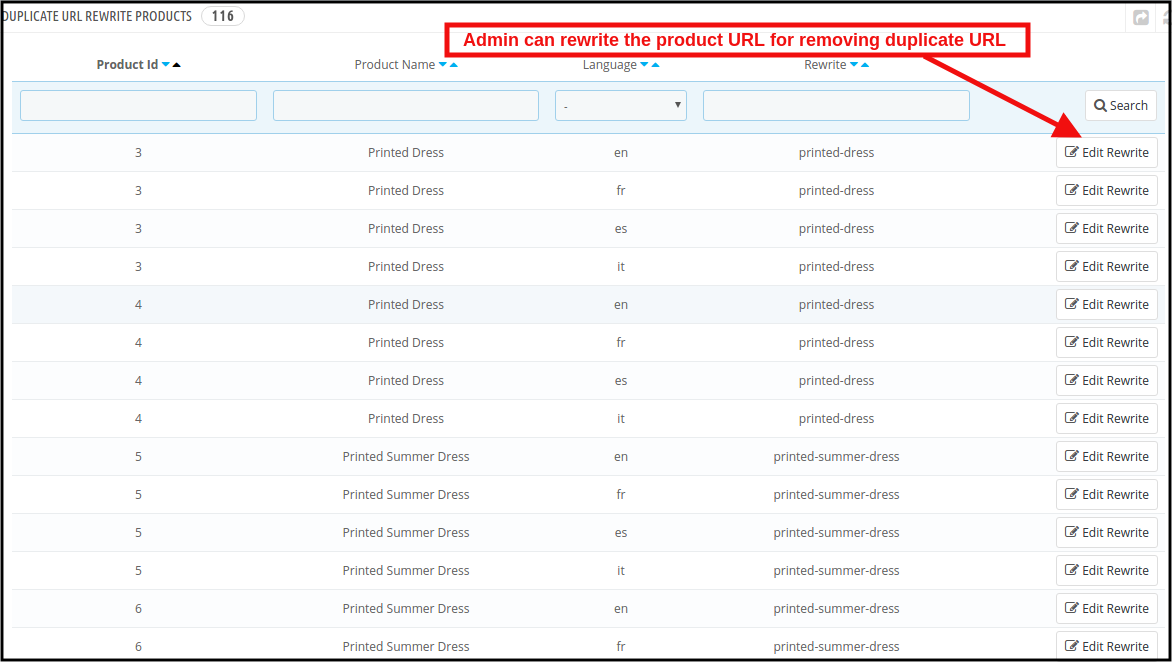
In case after removing the product ID from the product’s URL, if there are any two product’s URLs are same.

For example, The two product’s URL contains different Id like:

https://psm.knowband.com/urlcleaner/16/en/casual-dresses/3-printed-dress.html
https://psm.knowband.com/urlcleaner/16/en/casual-dresses/4-printed-dress.html

After enabling the remove product id option, the module removes the product id from the URL and product URL like:

https://psm.knowband.com/urlcleaner/16/en/casual-dresses/printed-dress.html

Then this product’s URL list will show on this tab. Find below the attached image:

In this tab, the admin can view all the Duplicate URLs and they can update rewrite value the products as per their convenience.

3.2.1 How to edit the Duplicate URL?

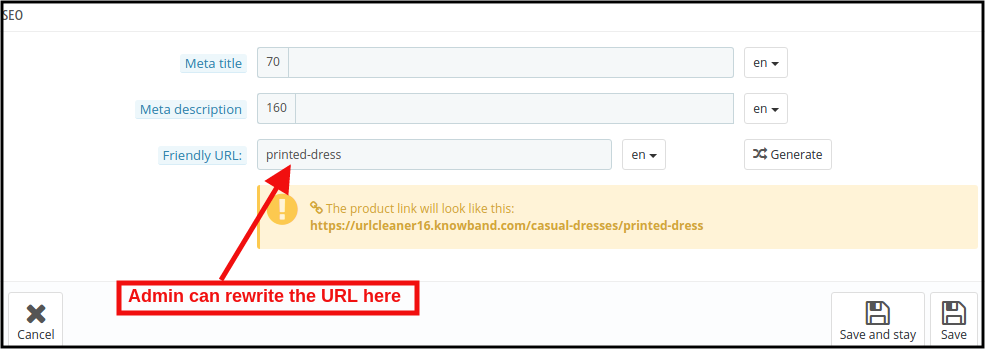
When the store admin clicks on the rewritten link, the PrestaShop URL Redirects Module will redirect the admin to the below-mentioned page:

Here, the store admin can rewrite the duplicate URLs. As soon as the admin will make changes to the URLs, these URLs get removed from the duplicate URL list.

3.3PrestaShop SEO Optimizer Module URL Redirection List

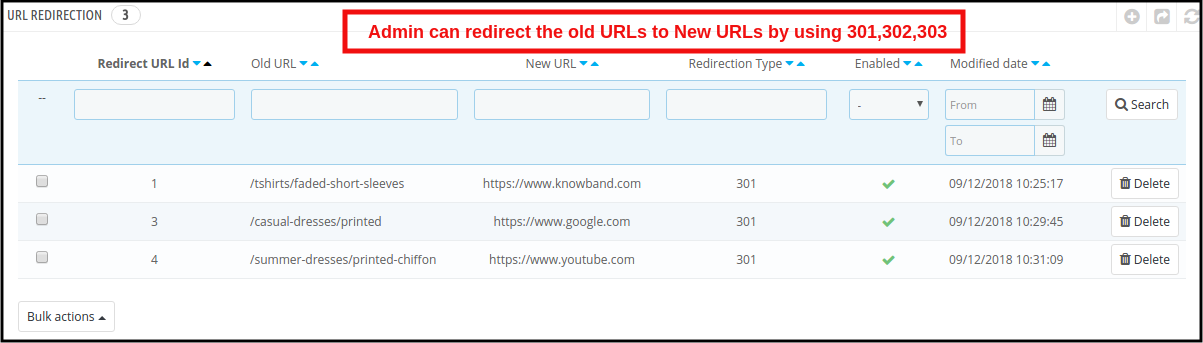
If the store admin changes the URL of any particular product page, the online retailer needs to redirect the old URLs to the new URLs. This PrestaShop 301/302/303 Redirect Module allows the PrestaShop store admin to redirect the old URLs to new ones. This PrestaShop SEO Optimizer Module offers the three redirection options including 301, 302 and 303 to the store owner.

3.3.1 How can Admin Redirect the Old URLs to New URLs?

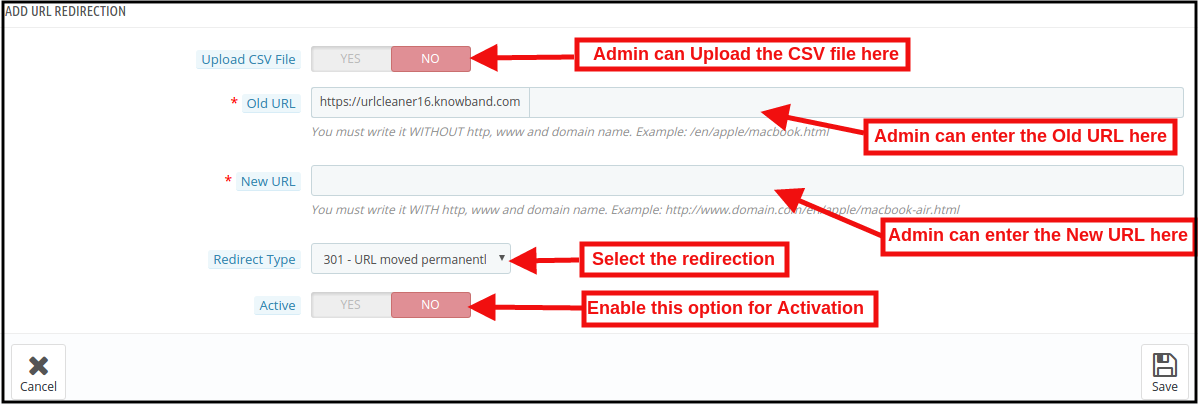
For the redirection of the old URLs to the New URLs, the store admin needs to click on the “Add New” button. After clicking on the Add New button, the below mentioned page open:

Here, the store admin can enter the Old URLs and New URLs, select the redirection from 301 (for permanent redirection), 302 (for temporary redirection) and 303 (to get the method used to retrieve information).

The admin can easily redirect the Old URLs to the New URLs.

URL Redirection through CSV file

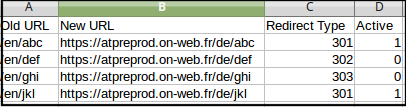
Upload CSV file: In order to redirect the multiple URLs. You can enable the Upload CSV file option. After enabling this option, the admin will be able to download sample CSV file and as per the fields defined in CSV file, the admin needs to enter the details in the CSV and upload the same.

After enabling CSV upload option, the below mentioned page open:

Choose CSV File: The Store admin can upload the sample CSV here for redirecting the products page.

Sample CSV File Format:

4.0 Front End

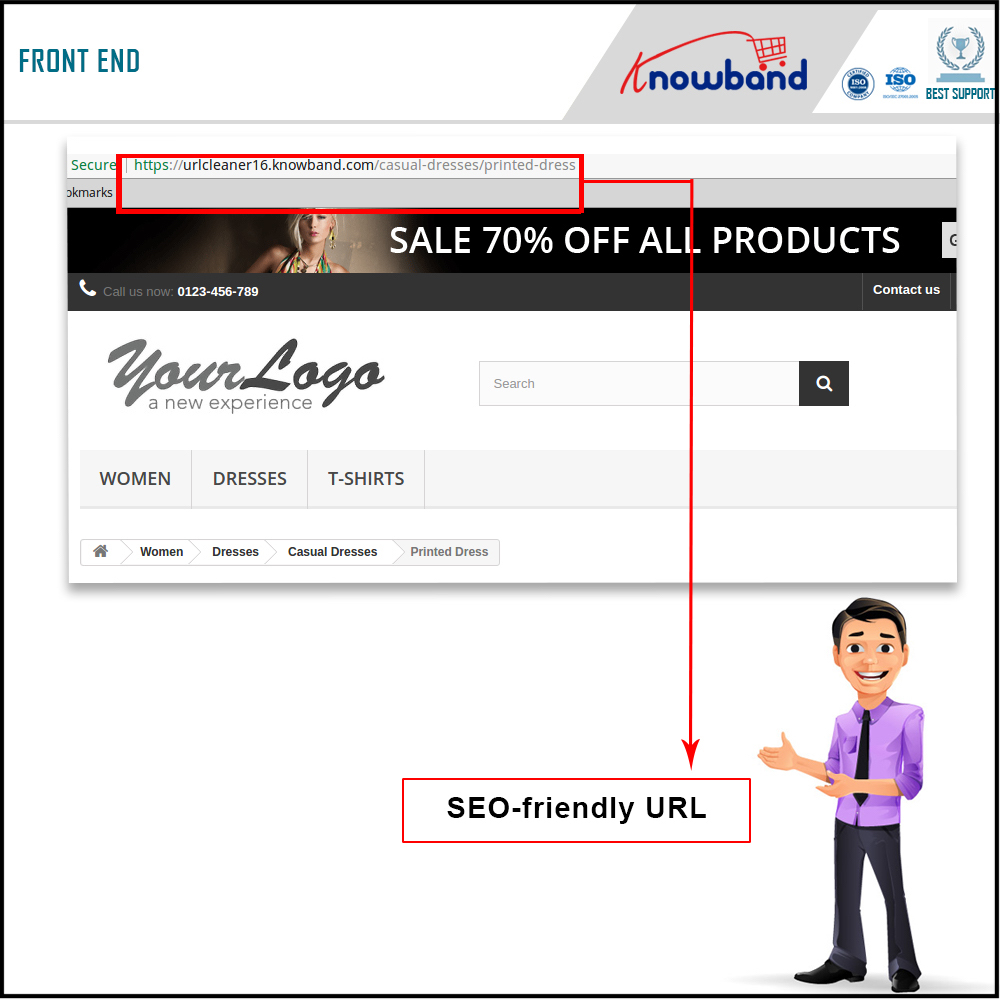
After enabling the PrestaShop URL Id Remover Module by Knowband at the front-end, the users will be able to see an SEO-friendly URL that will clearly highlight the purpose of the page. Google also recommends “A site’s URL structure should be as simple as possible. Consider organizing your content so that URLs are constructed logically and in a manner that is most intelligible to humans (when possible, readable words rather than long ID numbers).” This will also help the admin in improving the search results of the website.

The SEO-friendly URL would appear as follows:

For more information about PrestaShop SEO Optimizer- Clean URLs &301/302/303 Redirection Module:

PrestaShop SEO Optimizer- Clean URLs &301/302/303 Redirection Module Admin Demo

PrestaShop SEO Optimizer- Clean URLs &301/302/303 Redirection Module Front Demo