Don’t we all as e-merchants want our customers to shop some or the other thing from our stores? Even after a providing a seamless experience to the visitors, it gets difficult to convince them to buy products from your website. If you are looking for a fix that can help reduce your bounce rate and convert the visitors into customers by making them hit the buy button, there are a number of module extensions that you should check out. The exit popup is one of the best ways that can help you save your visitor from leaving your store.
If you want to control the exit rate from your website, you should go ahead and read the blog. The following popups are designed to provide the visitors with offers when they’ve made up their mind to leave the site that will make them re-think about their exit.
Wheelio
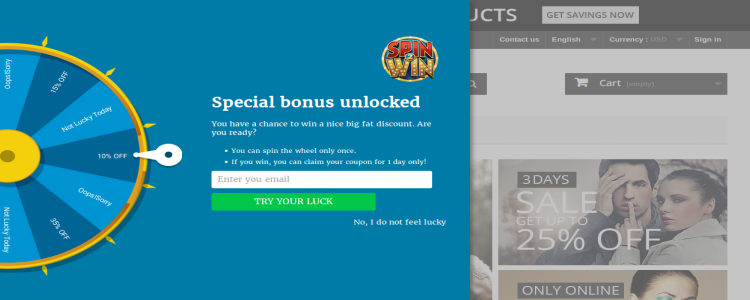
This is the world’s first interactive exit intent popup that lets the visitors spin the virtual wheel and grab attractive offers. The spin the when appears on the page just when the visitor is leaving and lets them have their last chance to stay back and shop with the discount coupon that they get after spinning the wheel. The admin is responsible to put in the different offers on the wheel and can also give away free gifts of spending a certain amount. Being a fun and interactive way to engage your customer as well as stopping them from leaving your store, you can actually witness your conversion rate increasing with this exit popup plugin. Designed to be responsive to the laptops as well as smartphones, tablets and more, this Spin the Wheel supports multiple languages. The Prestashop spin and win module is available for the Prestashop stores. There are similar Magento spin & win and OpenCart spin wheel plugin available for Magento and OpenCart respectively.
Easy exit popup
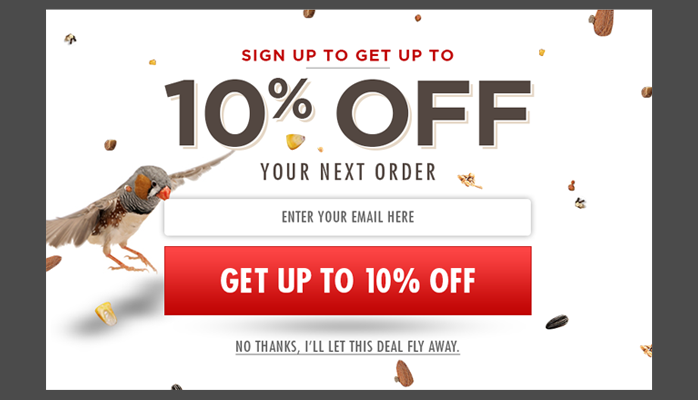
The easy exit popup is a perfect exit popup plugin that you can use on your website to share promotional texts, discount coupons and also special offers. The exit popup plugin serves as a seamless way for the shoppers to have an optimized buying experience. For the merchants, you can also customize the background images of this exit popup in order to provide a personalized look to the visitors. What more? You can also customize the size of the fonts as well as windows, colors of the buttons, and much more in this exit popup module. If you want your visitors to subscribe to your newsletter and signup, this is the best exit popup. Prestashop exit popup is one such solution available for Prestashop eCommerce stores.
Make an offer
Did you know that some businesses have started to engage customers by providing them the bargaining technique? The “Make an Offer” is one such exit popup plugin that allows the customers to make their offer on the respective product they want to buy. For example, when a visitor come looking for a product and is about to leave the website without buying the same, the e-merchants let them put forward their buying price. Make an Offer is an offbeat and interactive exit popup that lets the merchant and the visitor interact and settle on a price that’s feasible for both of them. Moreover, this exit popup module reduces cart abandonment.
With a responsive design, the exit popup module works for every device including laptops, mobile phone, and tablets also.
Exit coupon – Coupon Popups
One of the simplest ways to stop your visitor from leaving the website is to offer them an exit coupon. The Exit Coupon – Coupon Popups will popup on the screen as soon as the shopper is on the way to leave your website without buying anything. In addition, this exit popup plugin comes with numerous popup window styles for you to choose from. This way, you can pick the one that works for your store. These exit popups can even be used as email subscription popups.
Popups, Promos & Banners – Pixelpop
In order to stop your customer from leaving empty handed, the Popups, Promos & Banners – Pixelpop will let you share a coupon code, free shipping or even the latest promotion. The exit popup module offers a responsive design and comes with a full-screen editor. Some other features of the exit popup module include – live preview, analytics to let you track the clicks and conversions and much more.
Which app would you prefer to have on your website?? Do let us know in the comments below.
In the present time, the Online shoppers are always looking for exciting shopping offers and deals that can give them ample reasons to indulge in online shopping. If you have this Knowband Opencart Scratch Coupon extension that displays a scratch coupon on the front-end where the store visitors can scratch the coupon with their mouse and win alluring discounts.
The Opencart Extensions enable the store owner to allow the system to give discount coupons to endpoint customers and analyze the customer’s need by tracking discount coupons. As we know that customers attract to any shopping sites on the base of attractive offers and various type discounts. So, with keep in mind these points, this Opencart coupon email extension will generate discount coupon on the front end to all visited customers, based on defined discount criteria by the Opencart store owner.
1.1 Benefits for the store owner
1. The Opencart coupon email plugin can be installed and customized without any hassle.
2. The Opencart scratch coupon module allows the online merchant to enable/disable it with a by toggling the button.
3. The mouse cursor is used to scratch the coupon on the front end.
4. The Opencart scratch card enables the Opencart store admin can send a personalized email with the coupon code.
5. The Admin can add the own rules and he/she can be customized as per requirement. For example, the shipping cost to be added or not.
6. The Store admin can track the use of the coupon codes and more with the help of Opencart Scratch Coupon pop up module.
7. The Opencart coupon generator module by Knowband allows the eCommerce merchant to set the discount amount, the eligible time period to avail coupon code and much more.
8. The Opencart scratch card pop up by Knowband allows the e-merchant to customize the messages on the scratch card, button text and input field from the back-end of the Opencart plugin.
9. The Admin has an option to customize the look, feel, and text of the front block from back-end itself.
10. The Opencart Scratch Coupon module provides free technical support and assistance.
11. The Opencart scratch coupon extension by Knowband is compatible with various types of online stores and themes.
12. The Opencart Scratch Coupon pop up module offers free technical support service and updates.
13. The Opencart scratch card can be installed and configured in a seamless manner.
1.2 Benefits for the Customer:
1- This Opencart scratch coupon extension by Knowband give the attractive offer to the customer.
2- This Opencart scratch coupon pop up module is mobile responsive and enables the customers to scratch the coupon on their mobile phones and desktop.
2.0 Installation
After purchasing the Knowband Opencart scratch coupon pop up plugin you will get following files as listed below:
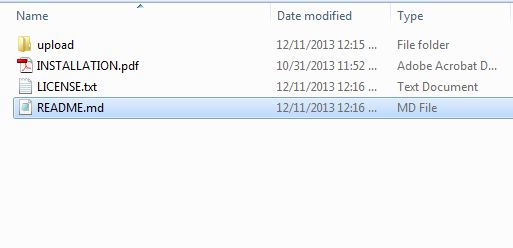
1. Compressed File in ZIP format (contains source code of the module)
2. User Manual
How to install OpenCart Scratch Coupon plugin on your server
1. Folder structure of the Opencart scratch coupon module folder.
2. Open the upload folder and you will find the following folder structure:
You must have VQMOD installed for this plug-in to work. IfVQMOD is not installed please download and install from the URL below:
https://code.google.com/p/vqmod/
3. Select all the folder and drag and drop them to the root directory of your OpenCart store through FTP.
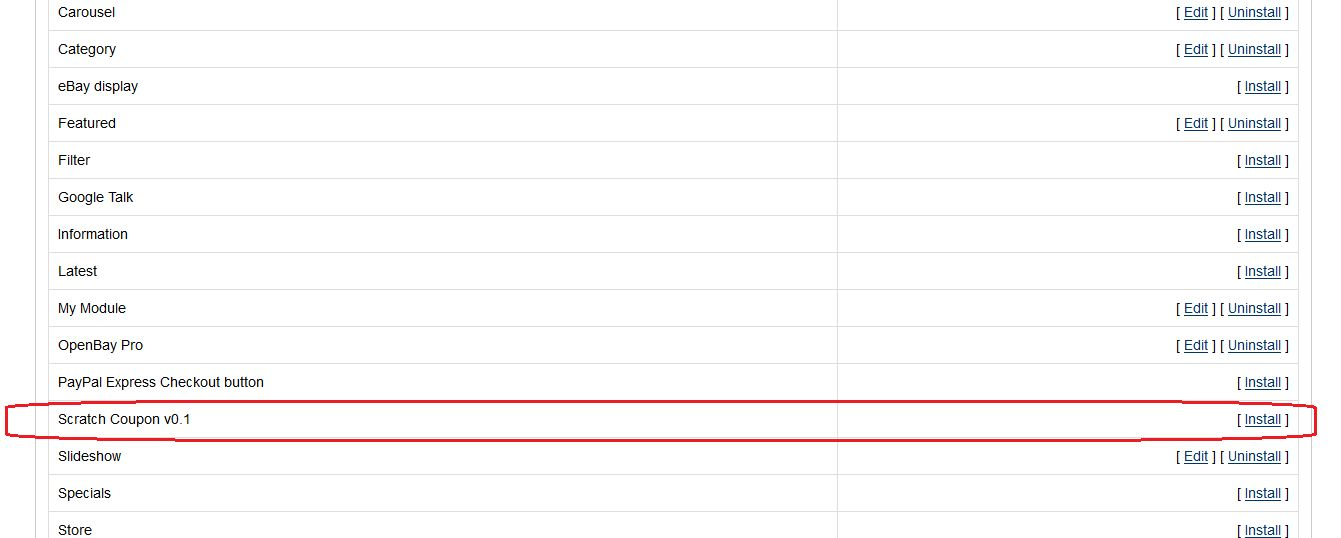
4. You will be able find the Opencart coupon email extension plug-in ready to be installed in the Modules in your OpenCart store as shown below.
5. Click on the Install link to install the Opencart scratch coupon pop up module. This will also add a dropdown option in your menu bar which will list all plug-ins by Velocity installed on your store for fast navigation. This dropdown also has a message box, using which we can inform you about new launched plug-in or new update.
6. Delete the Vqcache files from the vqmod/vqcache folder.
7. To access Smart Sort Order Opencart extension click on edit button in module section.
8. On clicking edit button the Opencart coupon generator extension for Opencart plug-in will open. It contains navigational bar at top, menu at left and main content at center as shown below.
3.0 Admin Module
After installing Opencart scratch coupon extension into store, the Opencart extension will provide following interface:
1.General Settings
2.Report Analysis
3.Get Support
Each interface is explained below:
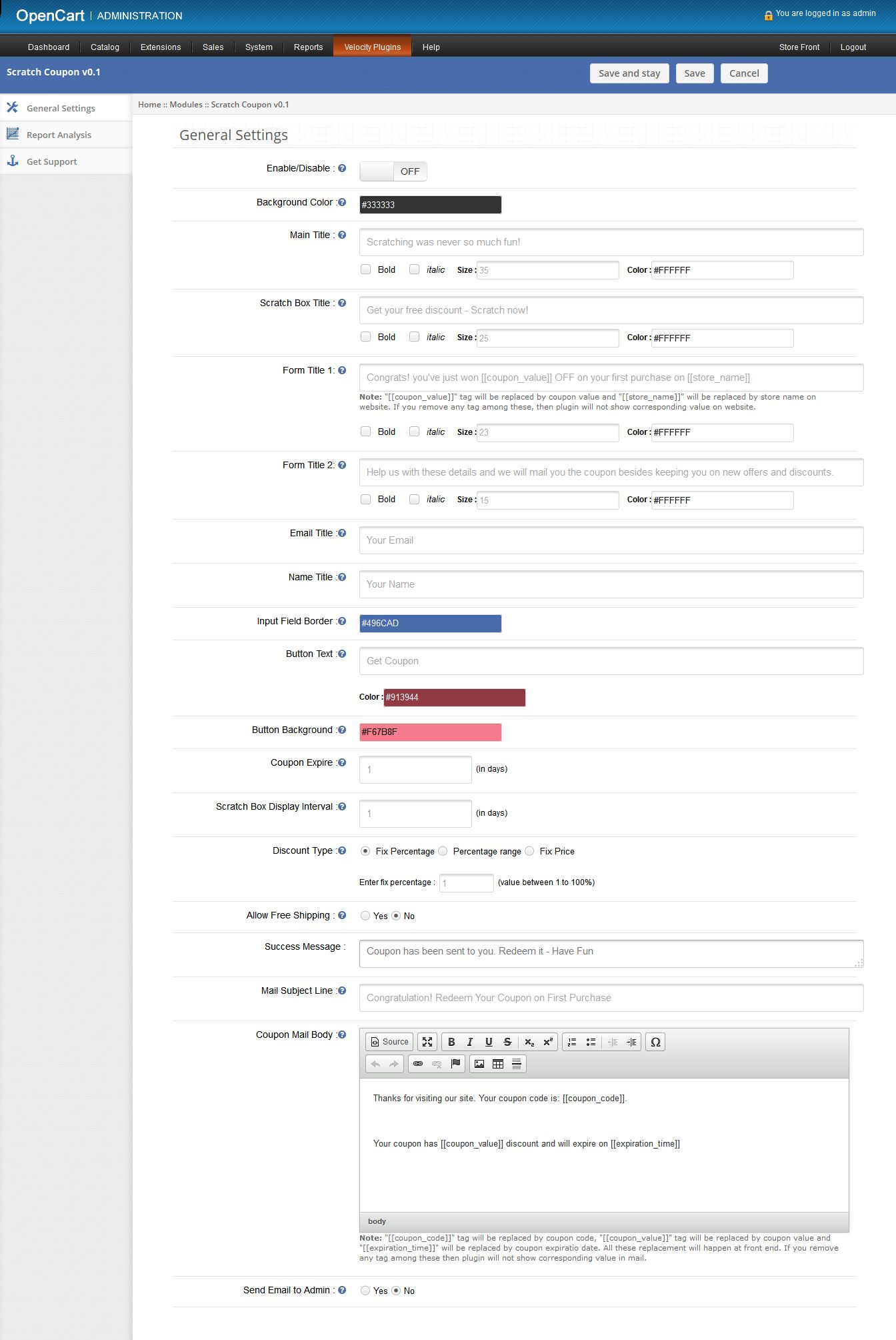
On clicking on edit link on module listing page, the system will open general settings tabs by default as shown in the screen below:
3.1 General Settings
On clicking on edit link on Opencart module listing page, system will open general settings tabs by default as shown in screen below:
1. Enable/Disable: Initially, this will be “OFF”. User can enable/disable Opencart scratch coupon extension functionality by turning ON/OFF this setting.
2. Background Color: This field will be used to define background color of scratch coupon box on front end. On clicking this input, a color picker will pop up from where user can change the color of background color. There is no option to blank this field.
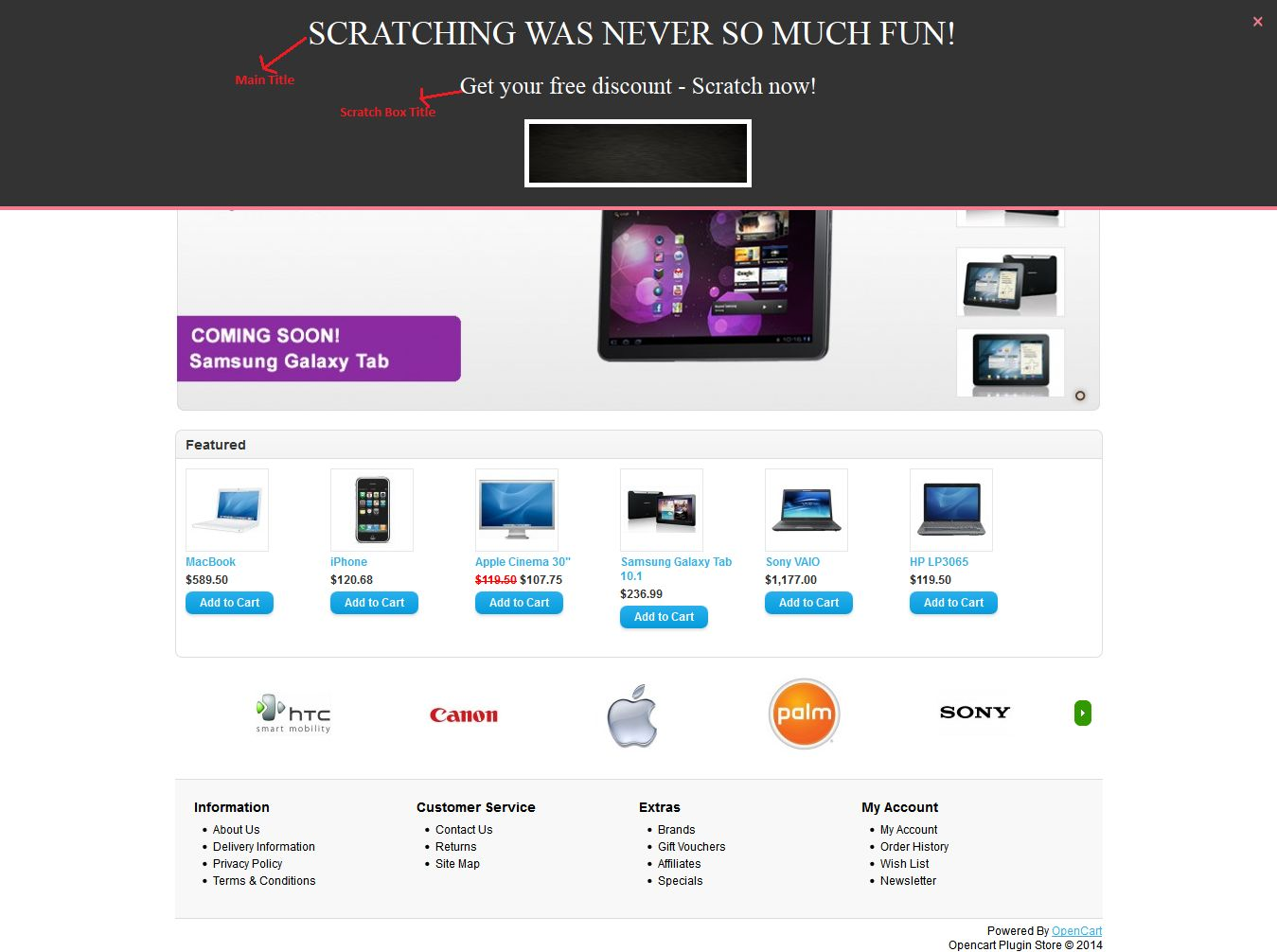
3. Main Title: Mandatory. This is the title showing on the top of the coupon box on front. User can make this title stylish as setting following options:
Bold: To darken the title.
Italic: to italic the title
Size: to increase/decrease the size of the title.
Color: To set the color of the title.
4. Scratch Box Title: Mandatory. This title will be show just above the scratch area on front end.User can also make stylish this title with style options.
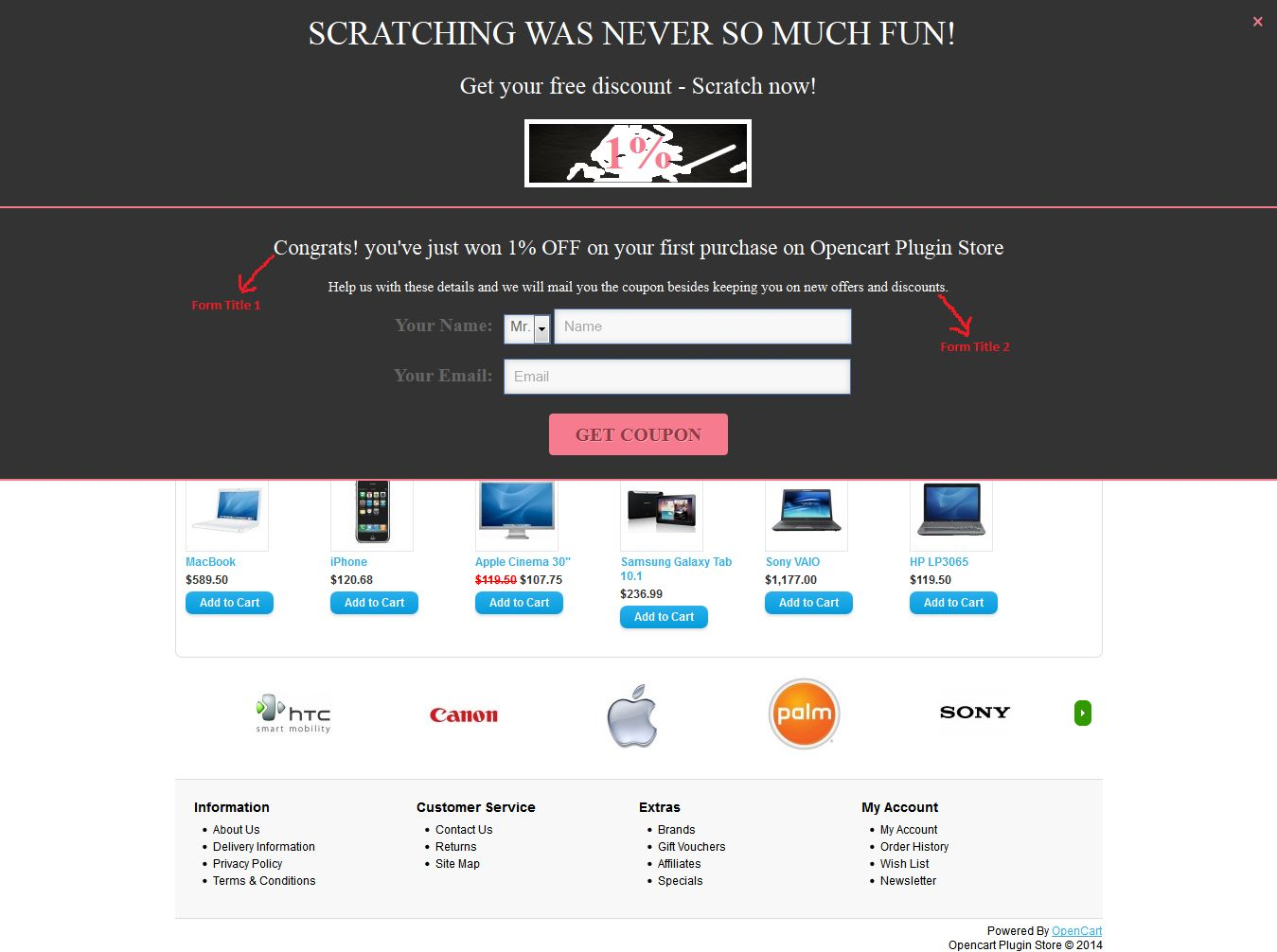
5. Form Title 1: Mandatory. After little scratching of discount, Opencart scratch card module will open a form to submit name and email id to get coupon. This title will be shown on top of this opened box.
6. Form Title 2: Mandatory. This title will be displayed just above the email input form and below the After Scratch Title on front end. User can also stylish this title with various style options.
7. Email Title: Mandatory. In this field user can set name of the email input field, showing with “email input” on front.
8. Name Title: Mandatory. In this field user can set the name of name input field, showing with “name input” on front.
9. Input Border Field: Use to style the border of input fields on front end. We recommend that use opposite color of background color to clearly show the input fields on front end.
10. Button Text: Mandatory. Here user can set the title of button. User can also change the color of button text by setting the color into corresponding color field.
11. Button Background Color: Mandatory. Here user can set the background color of button. This color will also be used for setting the color of separator between scratch coupon box and input form box. Also use for setting color of close(X) button, which will be used for close the coupon box on front end.
12. Coupon Expire: Mandatory and must be number greater than 0. This field will be used for defining the expiration date of coupons. In this field, user can set after how many days coupon will be expired. The expiration date will be set at the time of coupon generation.
13. Scratch Box Display Interval: Mandatory and must be number greater than 0. This field will be used to, after how many days; scratch box will be displayed again on the same system.
14. Discount Type: Mandatory. Here user can set the type of discount to customers. There are three options to set the discount type. They are as follow:
a. Fix Percentage: By default, this option will be selected. Here user can set the fix percentage discount. Fix percentage value will lie between 1 and 100. On front end,each coupon will have fix discount percentage.
b. Percentage Range: On selecting this option. Two inputs will be shown as shown in screen below:
Here user can set the range of percentage. By setting this option, plug-in will randomly generate discount within percentage range on front end.
c. Fix Price: If user set fix amount discount instead of percentage. Then this option will fulfill this need. Here user can set fix amount in USD.
15. Allow Free Shipping: By default No will be selected. On selecting Yes. Free shipping will be allowed on the generated coupons.
16. Success Message: Mandatory. This message will be shown after sending coupon to corresponding customer.
17. Mail Subject Line: Mandatory. Use to set the subject line of coupon mail send to customers.
18. Mail Body: Mandatory. Mail body of coupon.
19. Send Email to Admin: By default “No” will be selected. This option will enable Opencart scratch coupon extension to send same email to admin or not.
3.2 Report Analysis tab
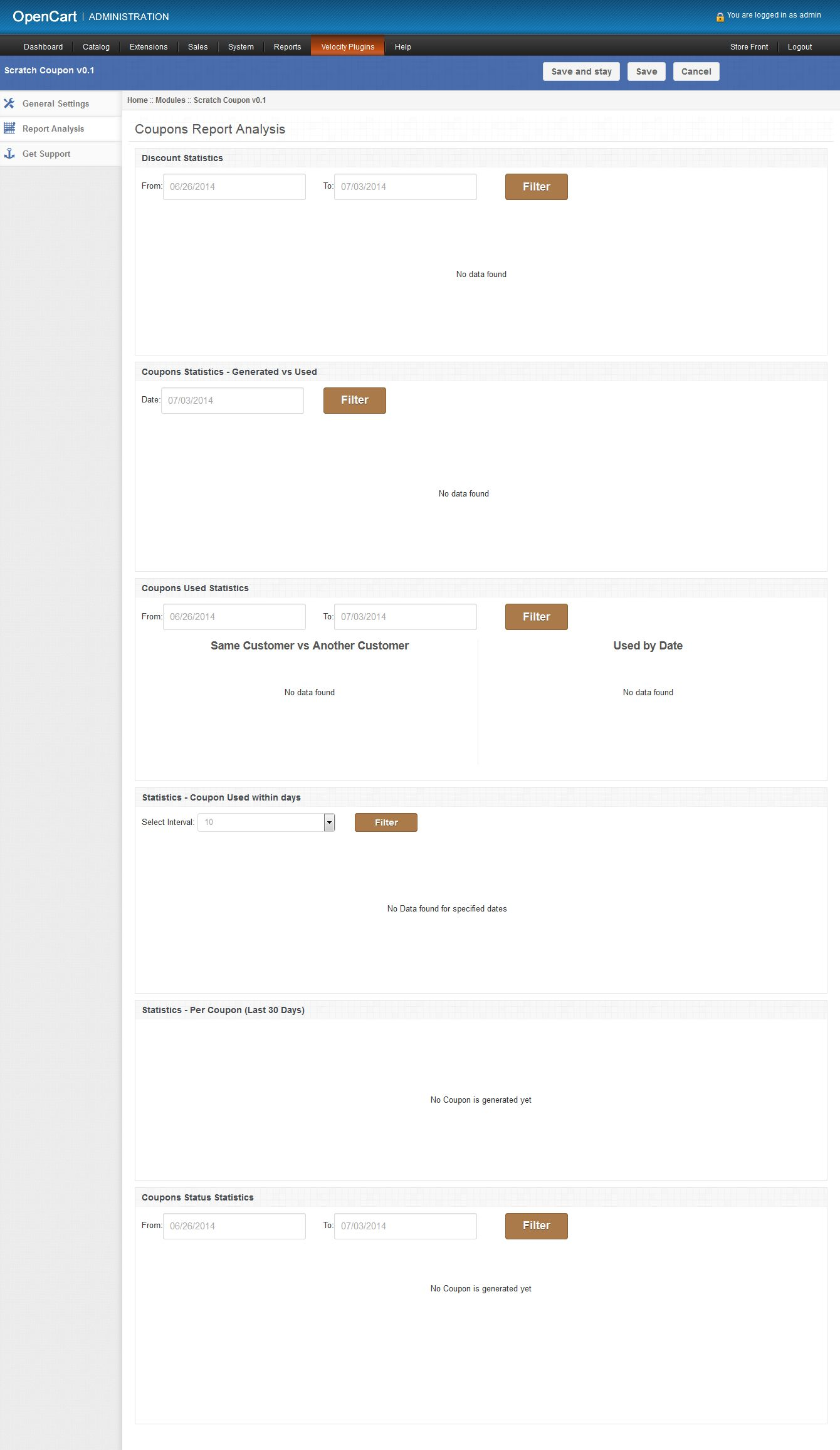
In this tab, Opencart generate coupon extension will show the coupons and discount statistics in graphical form. With the help of these statistics, user will able to analysis customers need in form of discounts and time as shown in screen below:
There are following graphs will be shown into this tab:
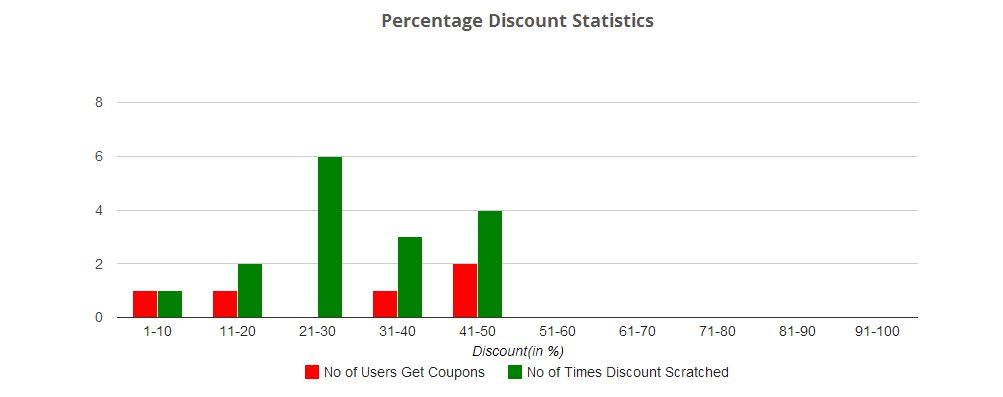
1. Discount Statistics: In this, Opencart scratch coupon pop up plugin will show, how many number of customers applied for which discount range and how many times coupon is scratched for which discount range. As there are two types of discount: percentage and fixed amount; in a system. The opencart extension will show a separate graph for both discount types as follows:
a. Percentage discount statistics: This will be a bar graph, in which discount interval will be of 20% upto 100%. Below is the sample screen of this statistics:
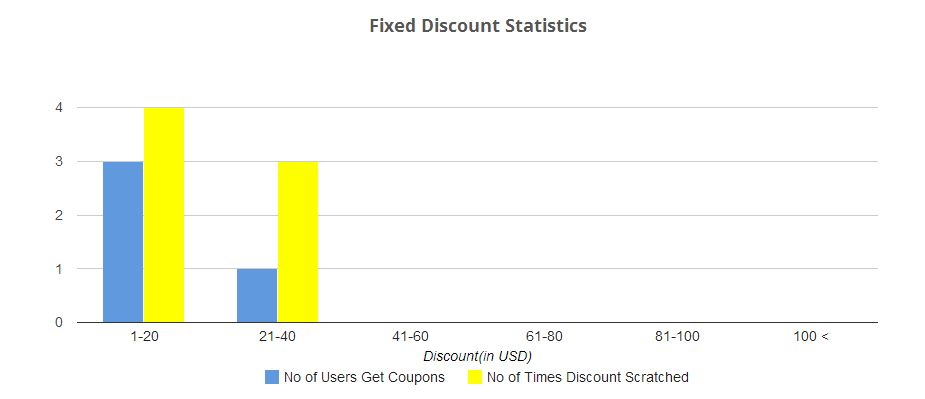
b. Fixed Amount discount statistics: This will also be a bar graph, in which discount interval will be of $20 and 6 intervals will be shown. Below is the sample screen of this statistics:
With the help of these above two graphs, the user can track the customer’s needs in terms of discounts. Information gathers in these statistics will be helpful in attracting more customers by offering preferred discounts and increase store sales. The user can also filter these graph by selecting dates.
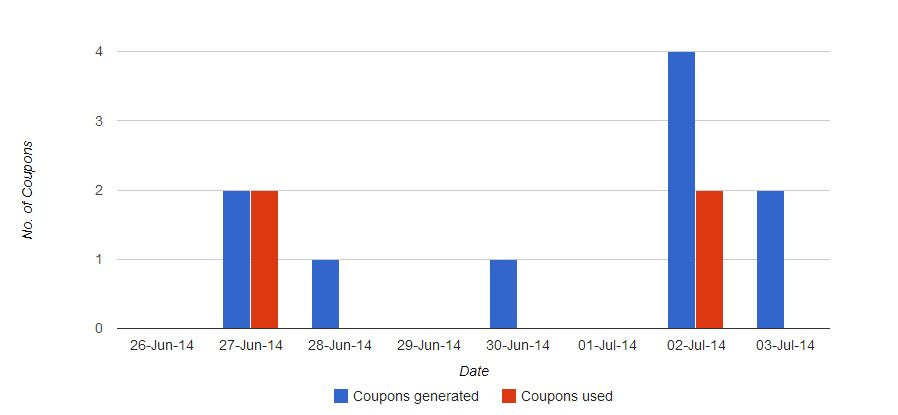
2. Coupon Statistics Generated Vs Used: This will be bar graph and will show the coupons generated and same coupons used within last 7 days. This graph will be helpful to analyze the customers that the customers used the coupons on the same day or on another day. The user can also filter graph by selecting a date. Following is the sample screenshot of statistics:
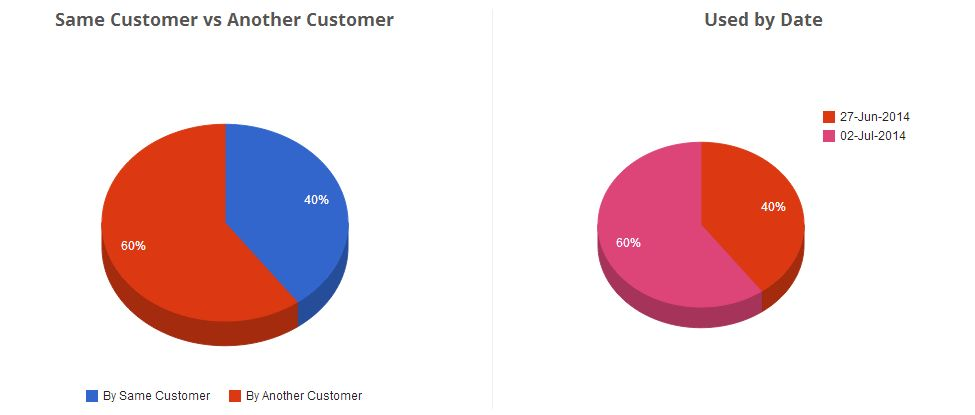
3. Coupon Used Statistics: In this, Opencart scratch coupon extension will show that how many coupons used in term of percentage on the date and how many coupons in terms of percentage will be used by same customer and another customer. Data will be shown in the form of the pie chart. By default, Opencart module will show last 7 days statistics. The following screen is shown below as a sample:
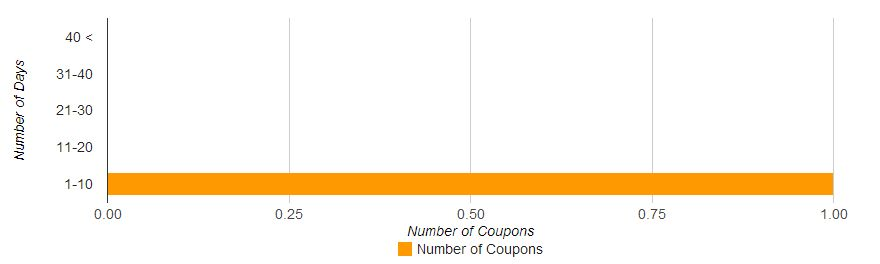
4. Coupon Used within days: This bar graph will help the user to analyze that, in how many days coupon is used after assigning to the customer. By default, Opencart coupon email extension will show coupons within the interval of 10 days. The user can increase days interval by selecting interval from drop-down menu. Below is the sample screenshot of this statistics:
5. Statistics-Per Coupon (Last 30 Days): Here Opencart scratch card will show each coupon statistics in a tabular format.Opencart plugin will show only last 30 days data. This tabular format will show following data:
Coupon: Coupon code
Assignee Name: Name of the customer to which coupon is assigned.
Assignee Email: Email id of the customer on which coupon sent.
Gender: Show gender (M/F) of customers.
Assigned date: On which date coupon was assigned to the corresponding customer.
Expire Date: On which date coupon will expire.
Used By: Email id of the customers who will use this coupon. If the coupon is not used yet, then this will show NA.
Used Date: Date on which coupon was used. If not used, then this will show NA.
Status: Status of the coupon.
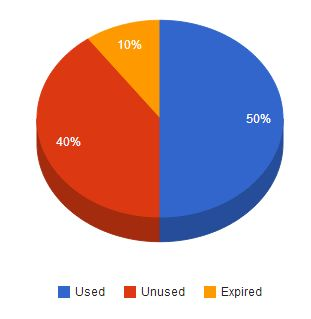
6. Coupon Status Statistics: Here Opencart scratch coupon module will show status of coupons generated within last 7 days in form of a pie graph. Coupon statuses are: Used, Unused and Expired. If coupon of any status not find, then Opencart extension will not show it in pie graph. Following is the sample screenshot of this statistics:
3.3 Get Support tab
If user have found any issue regarding and wants any type of support, then via this link, the user can create the ticket for any query on our helpdesk support.
Scratch Coupon description
On front, the Knowband Opencart scratch coupon extension will only be displayed on home page after enabling it from admin panel. This scratch coupon box will show on top of the homepage. Following is the screen of scratch coupon box with default values:
After scratching coupon area above 30%, an input form will be open just below the coupon box as shown in screen below:
After providing name and email into form, Opencart scratch coupon module will send the coupon with discount showing in above screen to the corresponding customer. After sending email to the customer, a success message will be displayed as shown in below screen:
The above message will disappear after 5 seconds and next discount will be shown on the same system after defined (set through admin panel ) days
Tracking Information
On the front end, this Opencart coupon email extension by Knowband will track following information to create analysis reports in the form of graphs:
1. Discount Scratch Tracking: Whenever customer scratches discount upto 10% of the scratchable area, then Opencart coupon generator extension will track that event and save into DB, after that disable the tracking process until the browser will not reopen again on the same system.
2. Coupon Tracking: To get a coupon of scratched discount, the customer must have to provide his name and email. After providing it, Opencart scratch card pop up will generate a coupon randomly and send it to the corresponding customer. After sending, Opencart extension will save coupon data and to which customer this coupon is assigned into the database.
3. Send Email to Admin: If store owner allows email to admin, then Opencart scratch coupon pop up extension will also send the same email to admin.
4. Enable discount coupon again: After sending coupon to customer, Opencart Scratch Coupon plug-in will not re-generate discount on the same system till days defined by the store owner in the admin panel.
You can try Knowband’s Opencart scratch coupon extension for on your Opencart store. Opencart generate coupon module helps you increase customer engagement to your store and give the better user experience to your eCommerce customer.
Getting customers attention towards your e- commerce organization and making them purchase your advertised products is a herculean task due to the emergence of numerous players in the e- commerce business segment. But, what can act as a magnet for your site customers are the interesting shopping coupons or offers that can increase the interest of your customers towards your business organization. By providing your customers an ideal shopping opportunity, e- commerce organizations can easily improve product sales on their site. Some of the features that have made this Prestashop Scratch Coupon Addon a huge success among e- commerce organizations are discussed as follows:
Effective reporting system-
Now, store admin can easily track the number of scratch coupon that are being used by the customers, total number of coupons that are generated by the organization and the coupons that have expired ultimately without being used. All this crucial information is provided effectively through statistical data in the form of charts and graphs. Due to this information, business organizations can make necessary changes in their marketing strategies to improve the utilization of their scratch coupons and to increase their conversion rates.
Easy utilization of the coupon codes-
This Prestashop Scratch Coupon module solves the impending problem of the e- commerce organizations that often complained of having limited coupon codes for customers for providing discounts on various advertised products. But, with this scratch coupon module, it is now easy for the customers to avail discounts from e- commerce store. They just have to scratch coupon code and after scratching their coupons, they will be prompted for an email address. By providing their email address at the requested place, the customers can become eligible for getting the shopping discounts mentioned on the coupon code.
Compatibility with multiple stores-
One of the amazing feature of this scratch coupon plugin is its ability to be used with multiple e- commerce stores. You can easily generate site maps for your different stores and the scratch coupon module can thus detect your multiple e- commerce stores seamlessly. So, it is essentially a one stop solution for all your e- commerce stores catering to different types of potential customers.
Helps in strengthening the appeal and popularity of your store-
By providing various eligible shopping discounts to your customers through these scratch coupon, e- commerce organizations can easily increase the interest and attention of your targeted customers towards your e- commerce site. The scratch coupon will also contribute immensely in completing your earlier abandoned shopping orders and will help in improving your conversion rates to a great extent.
So, scratch coupon is a good opportunity for all those e- commerce organizations that are struggling hard to increase their product sales on their respective e- commerce sites. Just order this wonderful scratch coupon Prestashop Module from our e- commerce site knowband now and improve your conversion rates to a great extent.
Online customers are always eager to hear about new exciting deals to satisfy their shopping craze. They are always looking for excellent shopping schemes to splurge their money and to go on a shopping spree. But, often they are not able to satiate their fondness for shopping due to unexciting shopping offers and deals. But, with this Prestashop Scratch Coupon, business organizations can easily attract shopaholics towards their e- commerce store to increase their conversion rates. Some of the excellent features of this scratch coupon module that has made it a huge worldwide rage among the numerous e- commerce organizations are as follows:
Wonderful feature rich admin panel-
The scratch coupon module provides great power to the site admin regarding the overall appearance of your site. With the great features of the scratch coupon, site admin can make necessary changes in the design, content and layout of their web page. The scratch coupon provides great control to the site admin who can decide how their website needs to appear to their targeted customers.
Easy installation and configuration facility-
The customers do not require the assistance of any external help while installing this scratch coupon module on their site. It can be easily installed through administration area or can be installed automatically by using the hosted directory of the Prestashop. Further, the scratch coupon module can be installed manually through FTP or can also be uploaded from the server site.
Effective targeting of the mobile customers-
The scratch coupon module is specifically designed to target the mobile based customers as more and more people are doing online shopping through mobile devices. The scratch coupon module has a responsive design that makes it ideal to be used on multiple platforms like desktop, laptop, mobile phones and tablets. This Prestashop Scratch Coupon Addon is truly made for mobile customers.
Support for multiple languages-
The developers have tried to increase the global appeal and usability of the scratch coupon module by providing support to multiple languages. With this feature of the scratch coupon module, more and more people belonging to different geographical areas and linguistic regions can use this Prestashop scratch coupon module to increase the conversion rates of their e- commerce store. The scratch coupon module is made for a wide range of global audience that speaks multiple languages.
Helps in improving conversion rates-
By providing attractive scratch coupons to your targeted customers, business organizations can easily increase chances of business growth. With these scratch coupons, e- commerce organizations can encourage their customers to complete their pending shopping orders and can increase their product sales and conversion rates.
So, explore the rich features of this Scratch Coupon Prestashop Addon and improve your business growth drastically among your rivals. Further, the scratch coupon module is a wonderful way to attract more customers towards your e- commerce store and helps in encouraging them to make online purchase through your site.