Mobile apps are of great importance especially for online businesses (eCommerce) that are willing to launch their new mobile application. Having the right eCommerce mobile apps with all the right set of features & functionalities is something that every such business wishes to have. Although in some scenarios, some businesses may not feel satisfied with their mobile application & may want to modify it or they may even wish to get their money refunded.
Well, that’s what this write-up is about. On all of our eCommerce Mobile App Builder extensions, we are offering a 30-day Money-back Guarantee. The extension is available for following eCommerce platforms:
Based on the feedback from a few of our clients, we realized that some clients may need some time to figure out if the app builder extension is right for their needs. We have various guides in the form of articles, video tutorials, admin demo links & free version of our eCommerce Mobile App Builder extensions. Despite that, some unawareness may still persist which may lead to dissatisfaction with the app builder. This 30-day money-back guarantee will be favorable to them.
For some clients with a different or unique business model, the generalized layout of our e-commerce app builder extensions may not be suitable or it may not be suitable for them to get their general layout app modified to turn it into a mobile app suitable for their needs. This 30-day money-back guarantee can also help to a huge extent.
Note: With this offer, we will create and send APK to you for review. Money-back is only valid if you are not satisfied and don’t publish it on Google Play Store. If the app is published, we won’t offer you a refund.
We have been regularly updating & upgrading our eCommerce Mobile App Builder extensions to equip it with the latest technologies & features. Both on the frontend as well as the backend, we intensively test our extensions to avoid any bugs or glitches so that we serve the best to our clients. This has left us with positive reviews & feedback from the majority of our clients.
It’s not just us but our clients who have labeled our eCommerce mobile app builder extensions as one of the most efficient & cost-effective app builder solutions for eCommerce domains. We are proudly confident in all of our eCommerce Mobile App Builder extensions & introducing a money-back guarantee proves it even more.
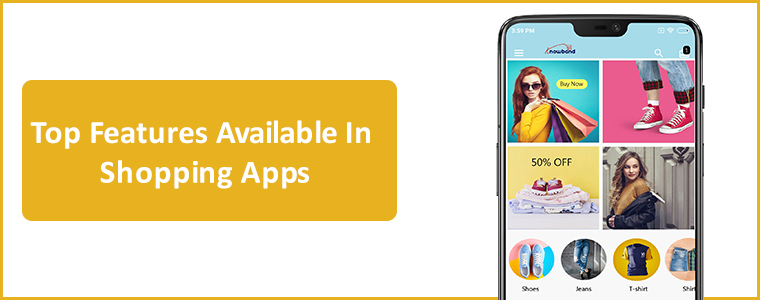
[Great Deal] Top Features You Will Get In Shopping Apps:
The shopping apps for websites built on PrestaShop, OpenCart, Magento 2 & WooCommerce comes with all basic and necessary eCommerce features and functionalities. Here are listed some of the major ones to thrive your business with no hindrance:
#1. Unlimited Push Notifications:
For any sort of eCommerce mobile apps, push notifications are kind of a must. Their dominance over traditional email marketing approaches and growing sales figures are solid reasons for how mobile push notifications are worthy of every business.
In shopping apps as well, push notifications to play a huge role in boosting customer engagement, retention & sales. This feature is something that you will get in our eCommerce app & many of these notifications can also be configured to be scheduled or automated. Some examples of those are abandoned cart notifications, order status notifications, etc.
KnowBand’s Mobile App Builder even offers custom notification in the admin panel which can be sent to the users and motivate them for more sales. All running deals and offers can be promoted via mobile push notifications.
To expand the audience reach, more & more online shopping businesses are including support for multiple languages & currencies. To cater to such businesses & to make app launching more convenient for them, most shopping apps nowadays support these features.
It wasn’t facile to take your business to cross borders and sell products like your store was there only. Our Mobile Apps helps in achieving the same. The native eCommerce Apps come with all languages support including RTL ones like Arabic, Hebrew, Urdu, Persian, etc. Hence, whatever languages on your eCommerce store, same will be on the mobile apps as well.
It’s a must-have feature for any sort of app including shopping apps. With this feature, both the mobile as well as the website always remains in live synchronization with each other. This way store admins don’t have to manage their mobile app separately.
Often, eCommerce store owners complain of problems managing their huge inventory on both websites and apps. To reduce the manual efforts, we have offered 100% synchronization in our apps allowing automatic realtime updates in the app inventory whenever any new additions or changes done on the store.
No eCommerce business wants its customers to get frustrated due to lengthy checkout processes. To aid that the ‘One-Page Checkout’ feature is common in almost every online shopping app these days.
The users get a simplified checkout experience with easy order submission with quick review of details related to purchase.
Live-Chat options are the frontline of customer support for every online shopping application. In the eCommerce Mobile App Builder extensions, Whatsapp & Zopim Chat Support is provided by default. These are two very popular platforms. Especially, Whatsapp is something every netizen uses these days.
All of the features mentioned above and even more are available in our E-Commerce Mobile App Builder extensions for platforms like PrestaShop, OpenCart, Magento & WooCommerce. We aim to put the best & the latest in our extensions & will continue to do so to cater to our clients in a better way.
We hope you find our eCommerce Mobile App extensions even more helpful & convenient. As always, you can reach out to us at support@knowband.com for any of your queries or assistance.
With a change in the eCommerce business scenario, the revenue of online stores has also been affected. Mobile optimization has become quite an essential requirement for eCommerce website sites nowadays. From conversion rate optimization to search engine optimization, no expert will tell you that targeting mobile customers is not beneficial. In fact, you will remain in a disadvantage against your rivals by not considering mobile customers in your marketing plan. In this write-up, I am going to tell you the easiest way to own a pair of native mobile apps. Earlier, you either required to learn the coding/programming or hire a professional to create eCommerce Mobile App. But, now all you need to go for automated solutions and launch fully synced eCommerce apps for your business.
KnowBand has brought one such solution with Mobile App Builder plugin. This is a readymade solution to provide you native Android/iOS apps for your store. It is designed in such a way that all the functionalities of the app can be controlled from the backend panel without making any code changes. The eCommerce Mobile App Creator is available for following CMS platforms:
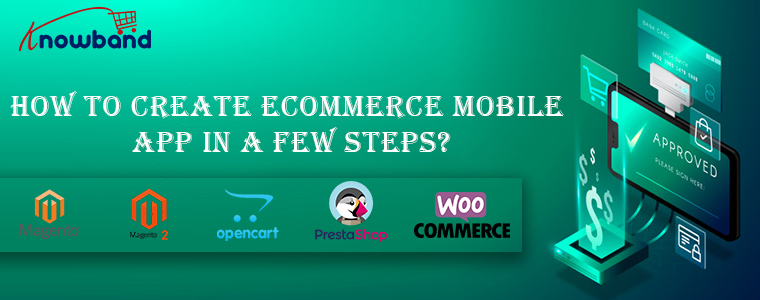
How to create eCommerce mobile app in a few steps?
In order to utilize the services of Mobile App Builder extension, you need to follow the following steps:
Step 1: Purchase the Module
Visit the above links as per your eCommerce website platform. Purchase the module and install the zip file on your store. Once installed you get the complete admin panel access to control the app. Open it and enable the respective Mobile App Builder.
Step 2: Share your App Specifications
After purchasing the module, you will receive an email having a small questionnaire that you need to fill and respond back. In the questionnaire, you will be asked to share some information regarding your app. Based on which, the development team will develop and customize the app.
Step 3: Publish APK/IPA on App Stores
After the development is complete, the team will share the APK file of the app with you. Now, you need to publish this APK on Google Play to make your App available to your customers. You can publish the app by yourself, or it can also be done by Knowband for a small fee.
That’s all with the process to create your own mobile app with KnowBand. You can even test your store on our demo app before going for the actual module purchase. Let’s find out how?
How to test your store on our demo Mobile App for free?
In case you want to see how your mobile app would look like, there are free versions of the Mobile App builder that you can try. The free version of the Mobile App Builder lets you see how your eCommerce store will look and work on the App. You need to implement the following steps that are mentioned below for having a free demo:
Step 1: Visit any of the links below according to your eCommerce platform:
Step 4: Open the App and enter your store URL in the field. Make sure you enter the full store URL of your store i.e. https://www.example.com/
Step 5: You have successfully completed the initial setup of the demo app. Now you can experience your store as a mobile app and test it as you want.
That’s all! Now, analyze your app functionalities. You can even find the detailed testing process from here.
Why own a pair of native eCommerce mobile app?
In addition to having a mobile responsive site, mobile apps have come up as a more advanced way to target mobile users. No doubt you still need a mobile site to come in the good eyes of Google and your mobile customers. But, all of your rival sites know this too, and that’s why they have already started the mobile optimization for their stores. So, what else do you need to have an upper hand against your competitors? A mobile app for sure. Let’s take a look at some of the major benefits of tapping into mobile commerce:
1. Improved Usability for online shoppers-
Downloading and installing the app is a one-time process. After that, your customers can visit your store anytime in just a single click. This ease of visiting your store improves the interactivity of the customers with your business and ensures a 24X7 availability. The exclusive mobile app interface makes navigation through your store quite easy, quick, and interactive. Furthermore, mobile apps can be presented as per your will. You can design the home screen and highlight popular products of your store as well.
2. Leverage built-in Smart Phone features-
The Android and iOS platforms provide a number of built-in features on smartphones. Mobile apps can adapt to these built-in features and leverage them for providing a more engaging user experience to the customers. For example, you can use the GPS location tracking to present the location-based shopping experience to your customers. You can leverage microphone to provide voice-based app search for faster-searching experience.
3. Users always prefer mobile apps over the mobile site-
Apps make the shopping experience faster, interactive, more secure, and reliable. Users don’t have to remember an URL or log in each time they visit the store. Sites having both mobile apps and mobile sites receive more qualified traffic on the mobile app than on the mobile sites.
4. Mobile app push notifications is a boon-
You don’t have to depend only on email marketing for communicating with your customers. Through mobile apps push notifications, you can always and instantly send messages to your users that too in a more personalized way. You can’t integrate push notifications to boost sales if you don’t have an app. Push notifications are more hardware features that are based on GPS, secure connection and some API and it’s not available for websites.
5. Brand loyalty will enhance user engagement-
Nothing can be more useful for putting your products and brand in the center of attraction than a mobile app. Apps are the shortest route to your business available for 24X7. Just a single click on the app icon and customer is on your business center. Mobile apps are useful tools for creating a more loyal section of customers who love online shopping anytime from anywhere. Showcasing your brand logo on the mobile app leave your professionalism on the shoppers.
Over To You
So, this is how you can get a mobile app for your eCommerce store without doing much of the complex tasks. KnowBand’s Mobile app builder is the easiest way to get a native Android/iOS app for your store. Moreover, I have also explained how you can try a free demo of the app to experience your store as a mobile app. Leverage this useful service and get your app developed today by the expert eCommerce and mobile app developers.
The mobile Commerce has come way ahead than online eCommerce in the past few years. It has proved its worth as the most effective way to drive your business conversions and sales. We can witness today that every individual has access to the smartphones and internet facility, new doors of business opportunities and growth have opened. So, if you are currently running an OpenCart store but have not yet geared up for mobile shopping apps as well, you need to consider KnowBand’s OpenCart Mobile App Builder.
How Mobile App Builder extension is the right solution for you?
The OpenCart Mobile App Builder is an innovative & automated framework through which you can easily create native Android & iOS shopping apps. This extension saves you from any sort of technicalities or coding involvement neither for developing or managing.
This native eCommerce Mobile App Maker keeps your website sync with apps in real-time. Thus, you need not manage the app inventory on a manual basis. All the website details & info will be automatically fetched on apps. Moreover, the friendly module backend allows you to control the designing & workflow of apps on your own. Let’s explore more about how this plugin works.
OpenCart Mobile App Builder: Free Vs Paid Versions
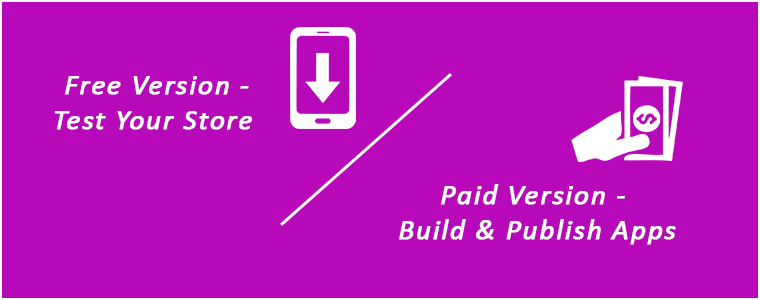
FREE Version – To Test Your Store on Demo Apps:
Want to check how your store will look on mobile apps? Use KnowBand’s OpenCart Mobile App Maker free version & get satisfied even before purchase. Follow these simple steps in order to test the same:
Step 1: Install module on your store
You just need to get a FREE module from here. You will receive a zipped file in your downloads section. Install the same on your store using FTP details. After successful installation, enable the module from backend.
Open the app & enter your website URL. That’s it, now your store will run on our apps.
PAID Version – To Build & Publish Your Own Apps:
Creating and getting Android & iOS App was never this easy as it is now with OpenCart Mobile App Builder. Its just a matter of 3 simple steps:
Step 1: Purchase our Module from here. Step 2: Fill our pre-requisites form. Step 3: Get final apps in 2-3 days.
Apart from this, the module provides a complete backend control along with 3 months of free support. We would even publish the apps free of cost for you.
Top Features with Mobile App Builder Extension:
1. Customize & Design App Home Screen:
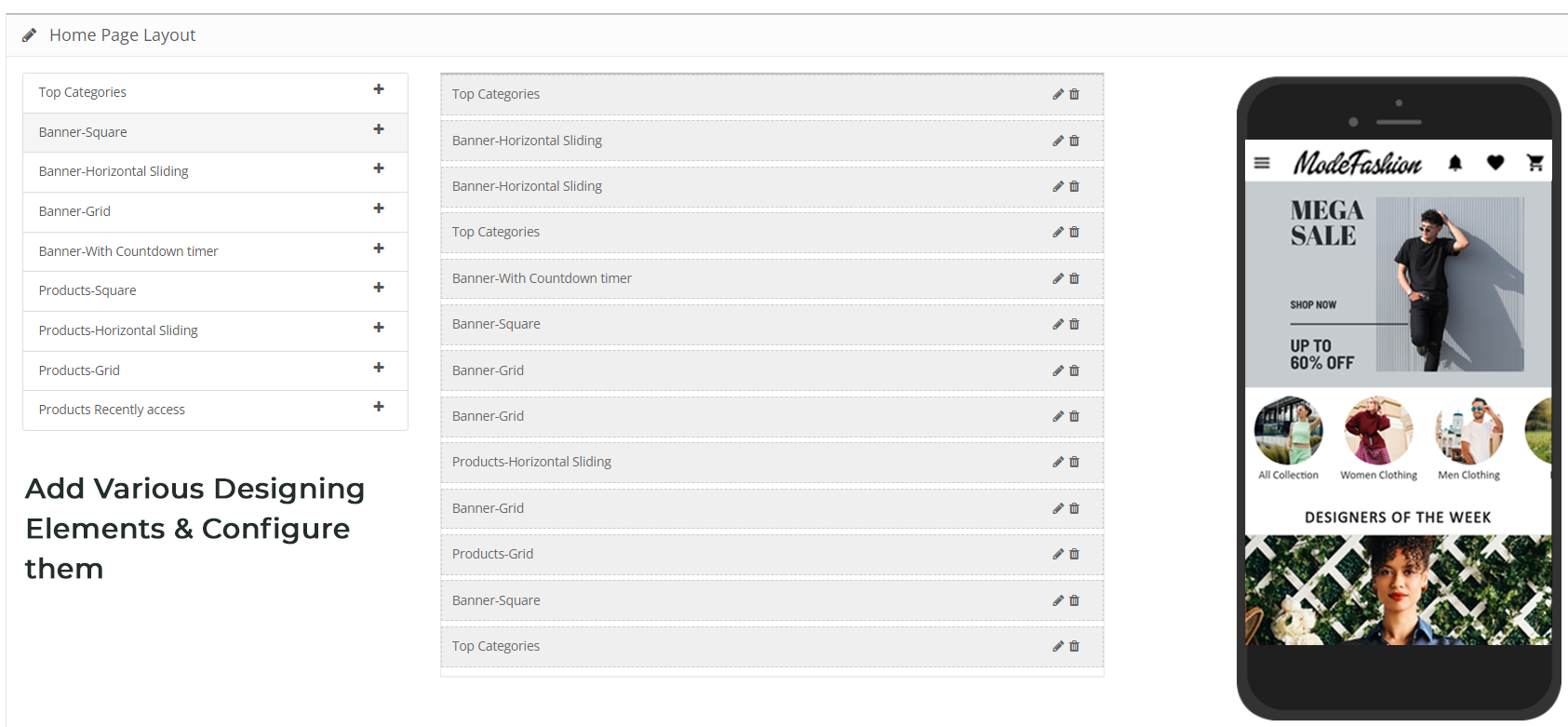
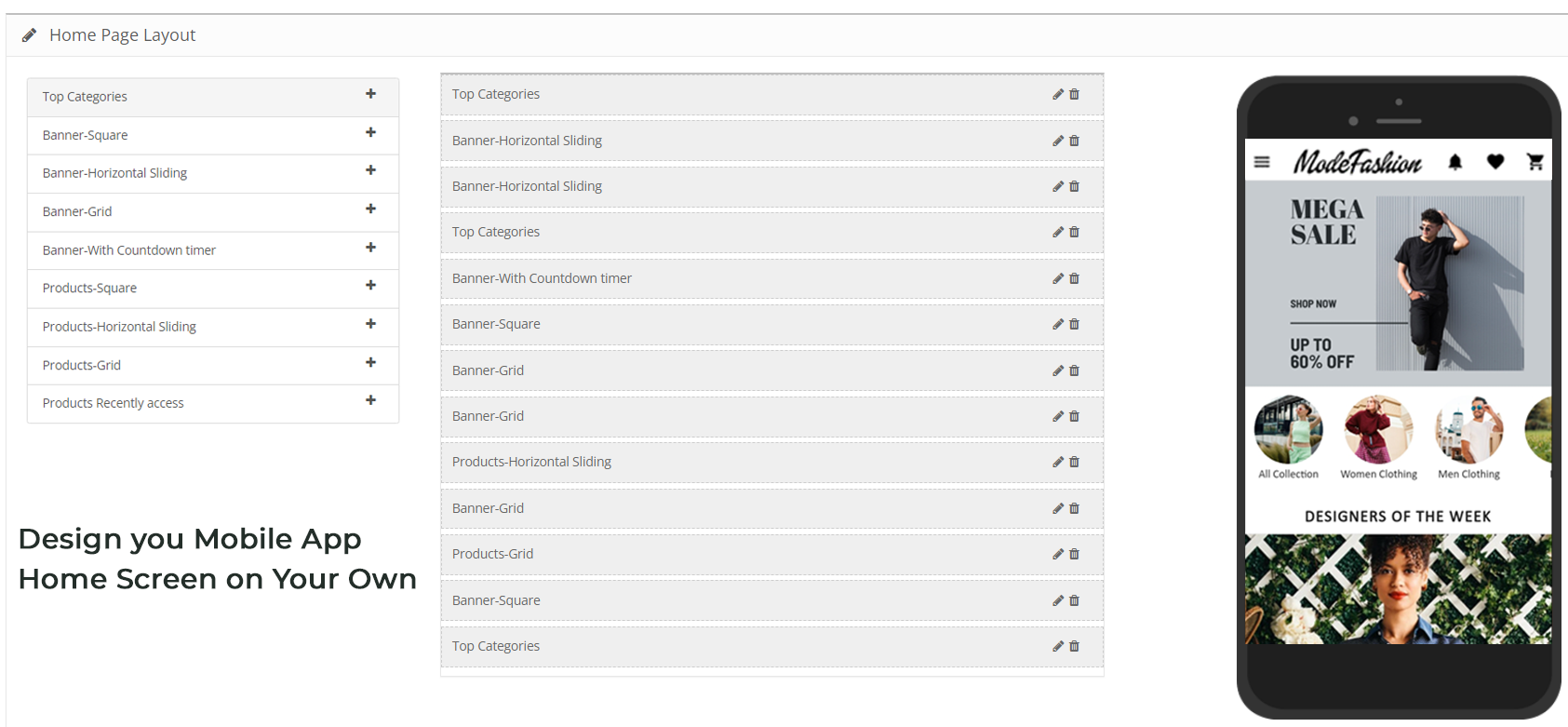
The OpenCart store admin gets the option to customize & create multiple layouts in the module backend. With this functionality, you can design the home screen as per various occasions & festivals. You can even edit the pre-saved layouts whenever required. Here, is the list of available designing elements in the backend:
Top Categories (Square shaped category icons)
Square Banners (Square shaped banners)
Horizontal Sliders (Rectangular sliders)
Grid Banners (Multiple banners in Grid form)
Countdown Timer Banner (Timer-based flash sale banner)
Square Products (Square shaped product listings)
Horizontal Sliders (Rectangular shaped product sliders)
Grid Products (Multiple products in Grid form)
Recent Products (Products which user visited recently)
2. Real-time Synchronization:
Keeping everything synced is a tough yet necessary task for an eCommerce store admin. Our OpenCart Mobile App Builder establishes perfect sync between website & apps which brings the entire inventory on mobile apps.
3. Complete Backend Access:
The OpenCart Mobile App Builder gives you the complete backend control to make the changes in app & manage it on your own. You can easily customize the design of your mobile Apps and other functionalities over a few mouse clicks.
4. Simplified login Process:
The Mobile App Builder for OpenCart comes up with various login options like Google, Facebook, Phone number(OTP) and Fingerprint which makes it easier for the users to enter your app & browse products.
5. Provide Direct Zopim & WhatsApp Chat:
Solving your user queries promptly is much easier with inbuilt Zopim(formerly known as Zendesk) & WhatsApp chat in your mobile apps.
6. Multi-lingual & RTL Support:
It is difficult to develop different Apps in different languages. By developing the Android & iOS apps with OpenCart Mobile App Maker, you can easily expand your reach worldwide. The mobile apps support both multiple languages including RTL ones.
7. Personalized Push Notifications:
You can easily send unlimited manual and automatic push notifications to app users from the backend of OpenCart Mobile App Builder. This promotional tool helps in driving engagement, sales, and revenue on your store.
8. Shipping Methods Support:
The OpenCart Mobile App Builder supports all sorts of website shipping methods on mobile apps. You can offer the same shipping to app users as of website.
9. Complete White Label:
Your OpenCart Mobile Apps will be branded as per your website. You can use your own splash screen, icon etc. on app. The store logo can also be added on the header of mobile apps.
10. Easier Mobile Promotions:
The OpenCart Mobile App Builder module brings personalized push notification feature through which the store admin can send sale & promotional push notifications to the users & improve user retention & revenue.
11. Enhanced Layered Navigation:
The OpenCart Mobile Apps offers the easiest navigation with filter/sort, keyword/voice search. The smooth screen flow guides the users to the desired products in no time.
12. Include Multi-payments:
The OpenCart Mobile App Maker brings all your website payment methods on mobile apps along with Paypal & COD in addition. Furthermore, any other native payment can also be integrated into the app over a fair price. The apps even support multiple currencies as well.
13. Coupons & Vouchers Support:
Every discount/offer coupon or voucher code which is active on your website will also work on mobile apps as well.
14. Simplified Checkout for Easy Orders:
With a single screen checkout process, the OpenCart Android & iOS apps make the order submission seamless for mobile shoppers. This helps in improving the shopping experience of the users & ultimately sales.
15. Real-time Order Tracking:
The Mobile Apps with OpenCart Mobile App Builder have the functionality to view the previous app order delivery status. The order status gets updated on the app as of website automatically.
You can offer an e-mail subscription pop-up on your app having a gamified spin-win interface. This helps in capturing the user data which can be used for re-marketing purposes afterward. You need to just install OpenCart Spin & Win extension on your store. The same pop-up will also work on your website as well.
Our mobile apps are even compatible with OpenCart multi-vendor marketplace plugin. The entire marketplace can be brought on the same mobile apps without any effort. You can visit this combo module (Marketplace + Mobile App) for more details:
It’s time to catch up the speed & mobile apps could be the missing accelerator for your website. So, go ahead & launch a full-fledged pair of shopping apps today.
Develop FlutterOpenCart Mobile App for your eCommerce store with KnowBand’s OpenCart Mobile App Builder & start observing a sudden growth in your store conversions & sales.
1.0 Introduction
If you are an OpenCart website owner & currently selling products on your website, try KnowBand’s automated mobile apps solution & take your business to the mobile world. The OpenCart Mobile App Builder is the pre-configured framework designed to develop FlutterAndroid & iOS apps for your online website. This ready-to-go mobile app solution is the most advanced & smartest solution to own a pair of fully functional Android & iOS stores without any coding or technical skills.
KnowBand has made a mark in the eCommerce industry as a leading mobile app provider for almost all the major eCommerce platforms. Its OpenCart Mobile App Builder is the easiest way to build feature-packed OpenCart Mobile Apps in just 3 simple steps:
2. Share the app-related specifications & requirements.
3. Get your own FlutterOpenCart Apps in 2-3 days.
We, at KnowBand, are an exceptionally skilled and proficient pool of programmers, designers, and other involved professionals. We can deliver an OpenCart mobile app that closely matches your personal expectations and business requirements. If you are not sure about the utility of this mobile app for your OpenCart store, let us throw some light on this amazing OpenCart Mobile App Builder.
Latest Enhancements in Opencart Mobile App Builder v4.8
The OpenCart Mobile App Builder Extension now introduces two powerful new integrations with the AI-Powered Chatbot Extension and the Opencart VideoMate Extension. These latest integrations significantly improve customer engagement, automate support, and enhance product presentation within your mobile application.
The Opencart AI Chatbot Extension leverages popular and advanced AI models of 2026, such as OpenAI ChatGPT, Google Gemini, Claude, and DeepSeek, enabling intelligent, real-time customer interaction directly inside the mobile app.
The Opencart Video Manager Extension transforms the shopping experience with immersive video carousels and a floating video player, helping merchants showcase products in a more engaging and conversion-driven format.
Together, these features make the OpenCart Mobile App Builder a complete AI-powered mobile commerce solution for modern eCommerce stores.
1.1 Prominent Features of OpenCart Mobile App Builder:
The following are some of the major features you’ll get in your OpenCart Mobile Apps:
–> Customizable Home Screen Layout (Complete Flexibility)
1.2 Recent Enhancements in Opencart Mobile App Builder!
1. Dynamic Position of the Signup-Login Popup in Home Page Layout: Admins can now customize the position of the signup-login popup on the home page, offering a more flexible user experience.
2. Enhanced Review Pages:
Write Review: Simplified process for customers to leave feedback.
Read Review: Improved interface for browsing reviews.
Review on Product Page: Reviews are now more accessible directly on product pages.
3. Video in Banner Elements: We have introduced video options in the banners available for the app’s home page layout. Now, the admin can add a YouTube video or can also upload a video below 2 MB for the square, horizontal, grid, and countdown banner components.
4. Push Notification Updates: Recently Firebase has officially deprecated the older cloud messaging API. Due to that the admin configurations now support uploading Firebase key JSON files for better management.
5. CMS and Layout Redirection in Banners and Category Elements: Banners and category elements available in the home page layout now support redirection to CMS and multi-layered layouts.
6. Automatic Banner Sliding in Horizontal Banner Slider: Horizontal banner sliders now feature automatic sliding, improving user engagement. The admin can also add the time difference on which he wants to slide the banners automatically.
7. List and Grid View for Product Listing Screen: Users can toggle between list and grid views on the product listing screen for more convenient browsing. This new feature not only improves the UI but also provides more convenience to the customers while browsing the products.
8. Common Notification by Admin: Admins can now send common notifications to all users, ensuring important messages reach everyone. Furthermore, customers can check all the past notifications in the notification tab available in the app.
9. Custom Banner Element in Home Page Layout: Now, the Opencart admin can upload banners of any size, offering greater customization of the home page.
10. Redirection in Top Category Element: Top category elements now support redirection to specific layouts, improving user navigation.
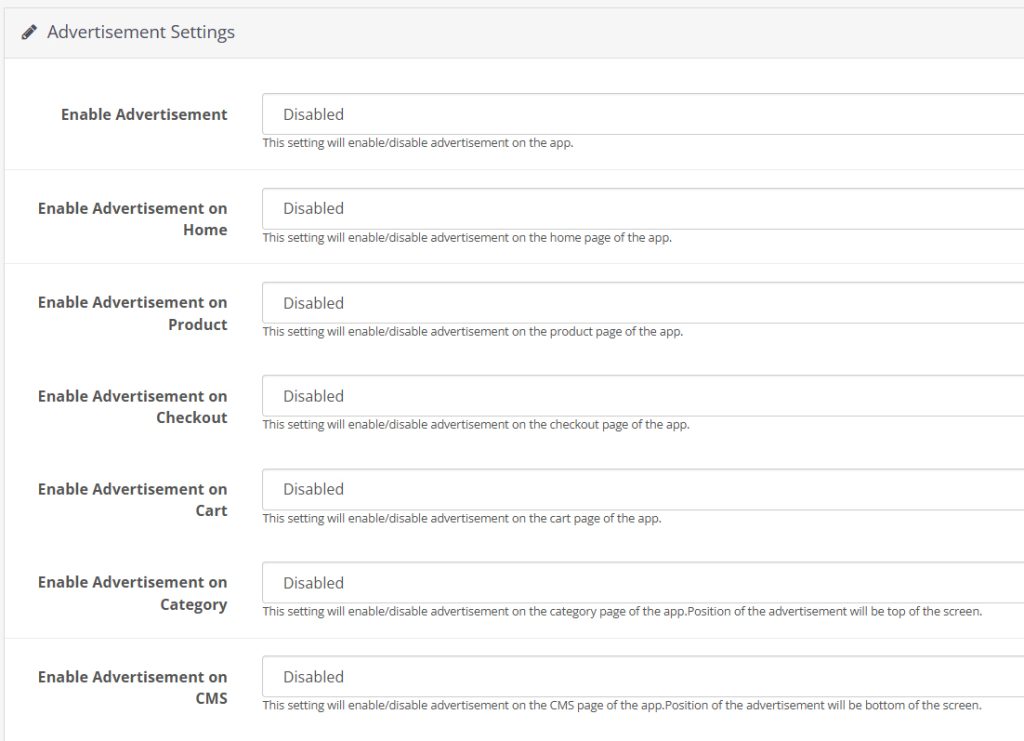
11. Advertisement Setting: The enhanced OpenCart Mobile App Builder allows store admins to turn their apps into revenue-generating channels by incorporating in-app advertisements. With Google AdMob integration, admins can now display banner ads on various app pages, creating a seamless way to generate additional income while keeping users engaged.
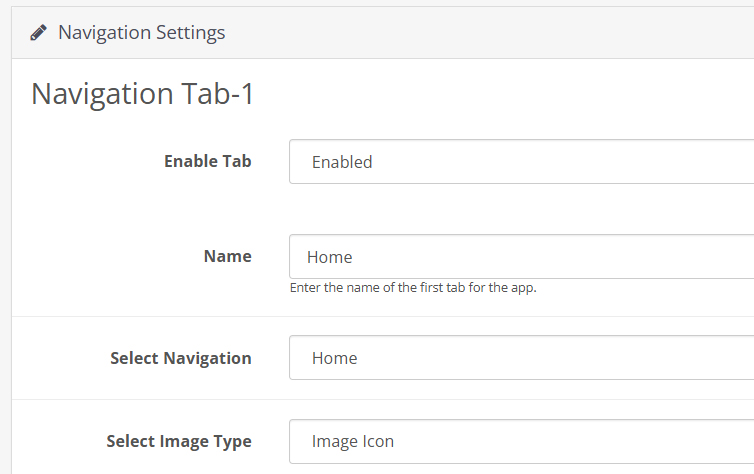
12. Navigation Setting: With flexible customization options, the store admin can adjust the look and feel of the tab bar layout. Now, the modules allow the admin to choose the names, set redirections, choose icons, and personalize color schemes, offering a unique and branded app experience that aligns with their store’s style.
Knowband’s OpenCart Mobile App Builder
The OpenCart Mobile App Builder by Knowband helps you create a mobile app for your store without coding. Easily turn your website into a user-friendly app!
KnowBand offers a demo of OpenCart Mobile Apps before actual mobile app development. We have brought free of cost demo for all the eCommerce store owners out there.
2.1 View Our Demo Store working on Apps
Take a look at our app functionalities with our demo OpenCart Mobile Apps. We have integrated our demo store with the app in order to let you explore the app working. All you need to do is to follow these simple instructions:
Step 1: Download and install the Nautica OpenCart Mobile App on your testing device. Here, are the links to OpenCart Demo Apps:–> Apple App Store–> Google Play Store
Step 2: Open the App and tap the “View Demo” button being displayed on the splash screen. Enter some relevant details like Name, E-mail & Store URL & experience our demo store running on the demo app.
Note: To access the Admin Panel of KnowBand’s OpenCart Mobile App Builder on our demo store, visit here.
2.2 View Your Store working on Demo Apps
Want to test your own store on the demo apps. Well, we made even that possible with 3 simple steps:
Step 2: Install the Demo Apps (links in the previous section) on your mobile testing device. Open the App & enter your website URL in “View Your Store”.
Step 3: Tap “View Your Store” and start experiencing your own store on OpenCart Demo apps.
Note: This Free version of Mobile App Builder is just for the demo purpose & no APK/IPA files will be provided with this module. In order to get your own APK/IPA files, you need to purchase the paid version of the OpenCart Mobile App Builder.
3.0 Build OpenCart Mobile App in 3 Simple Steps
Once you are satisfied with the demo apps working, it’s time to build your own mobile apps. The process to develop mobile apps with OpenCart Mobile App Builder is only a matter of these 3 simple steps:
Step 1: Purchase & Install Module on your website.
If there is any issue while publishing the app on respective stores, we would get it done for you.
4.0 Admin Panel Screens
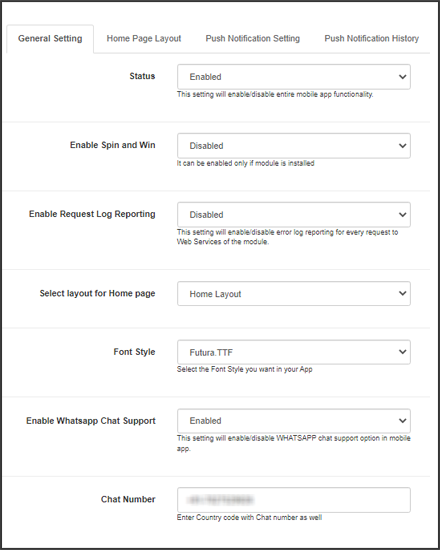
Once the OpenCart Mobile App Builder is installed on the website, let’s take a look at its backend panel configuration. First of all, go to Extensions>>Modules>>KnowBand Mobile App Creator & click on configure option. It will bring the following interfaces to you:
4.1 General Settings:
a) Status: Enable/disable the OpenCart Mobile App Builder module to make the apps work on mobile devices.
b) Enable Back in Stock: This option allows the admin to enable/disable Knowband’s back-in-stock module in the apps.
c) [New] Enable Spin & Win: This option allows the admin to enable or disable the Knowband’s Spin & Win Module in the mobile app.
d) [New] Enable AI Chatbot: You can now enable the AI Chatbot on your mobile app using the Opencart AI Chatbot Extension.
e)[New] Enable Videomate: Now, admins can easily add the instagram reels, shorts, videos in trending vidgets using the Opencart Videomate Extension
f) Font Style: This option provides multiple font styles to suit your app’s appearance.
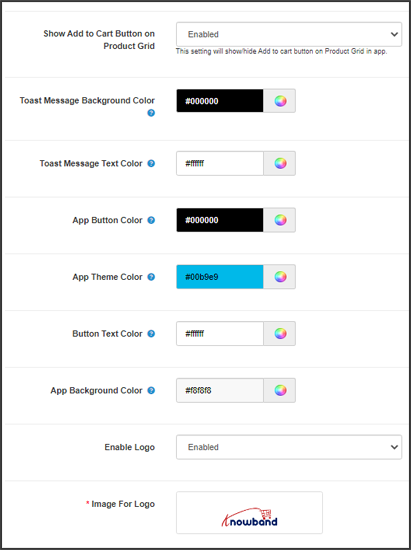
g) Show Add to Cart Button on Product Grid: If you want to show/hide the “add to cart” button from the product listing pages, you can manage the same from this button.
h) Mandatory Phone Number at Registration: Make the mobile number field optional/mandatory on the app’s sign-up page from here.
i) Redirect on Cart Page when Add to Cart: If you want users to directly redirect to the cart page upon clicking on the “add to cart” button, you can enable this option from here.
j) Enable Notification List Feature: This button allows the store admin to enable/disable the notification feature in the Android and iOS apps.
k) Enable Sing-up Pop-up: You can enable/disable the login pop-up for the non-logged-in customers in the app.
l) Enable Request Log Reporting: Enable the error log on mobile apps. This log file is used when the app shows any error or abnormal behaviour.
m) Select Layout for Home Page: Choose the desired layout for your app home screen. You can create multiple layouts under the Home Page Layout tab.
n) Enable WhatsApp Chat Support: Enable/disable the WhatsApp chat option on mobile apps.
o) App Button Color: Choose the button color for your apps.
p) App Theme Color: Choose the theme color for your apps.
q) App Button Text Color: Choose a button-text color for your apps.
r) App Background Color: Choose a background color for your apps.
p) Enable Logo: Enable the logo in your mobile apps. You can upload the logo image which will be displayed on the header of the mobile apps.
q) Fingerprint Login: Enable/disable fingerprint login in mobile apps.
r) Phone Number Login: Enable/disable phone no login in the mobile apps.
s) Disabled Shipping Methods: Disable the shipping methods that you do not want to display in the apps.
4.2 Payment Methods:
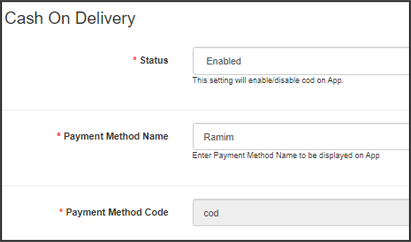
The OpenCart Mobile App Creator offers additional COD payment option to make the payments easier in the apps. The mobile apps with this extension already support web-view payment options in mobile apps.
4.3 Push Notifications:
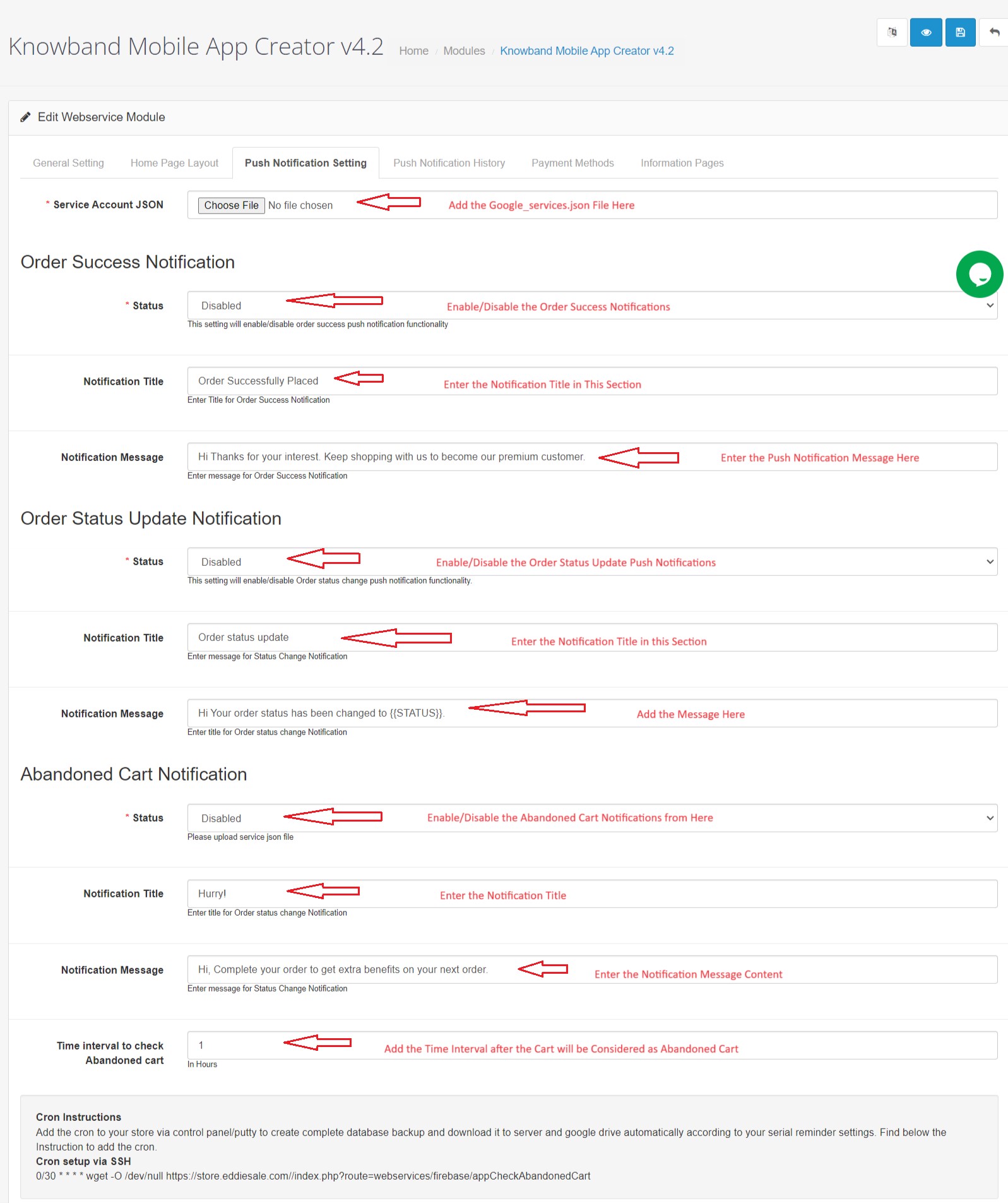
a) Service Account Json: In order to set-up the push notification in both the Android and iOS app, you will have to add the google_services.json file in this section. You can get the same in your Firebase account or can also ask the Knowband support team for the JSON file for your Firebase project.
b) Order Success Notification: Configure an automated order creation push notification which would be sent automatically on the user’s apps who successfully create an order.
c) Order Status Update Notification: Configure an order status update notification which would be sent automatically to the users whenever there is an update in order delivery status.
d) Abandoned Cart Notification: Configure automated abandoned cart notification which would be sent automatically to the users who left their products in the cart.
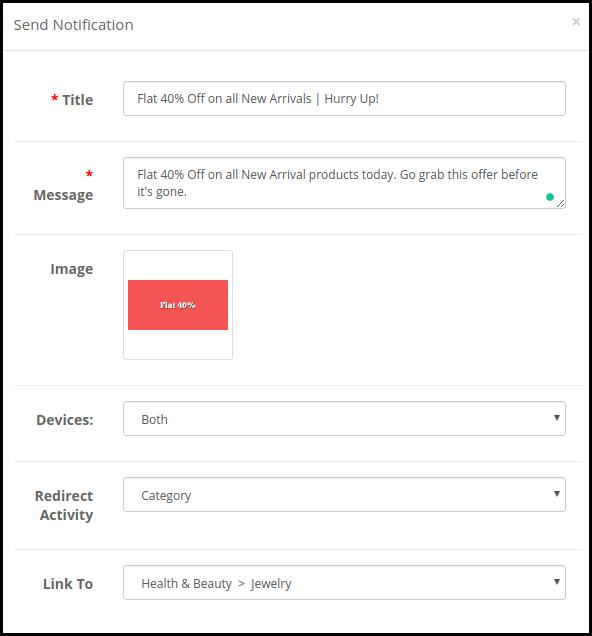
e) Send Notification: The store admin can even send manual notifications & highlight any deal or discount to the mobile app users.
4.4 Information Pages:
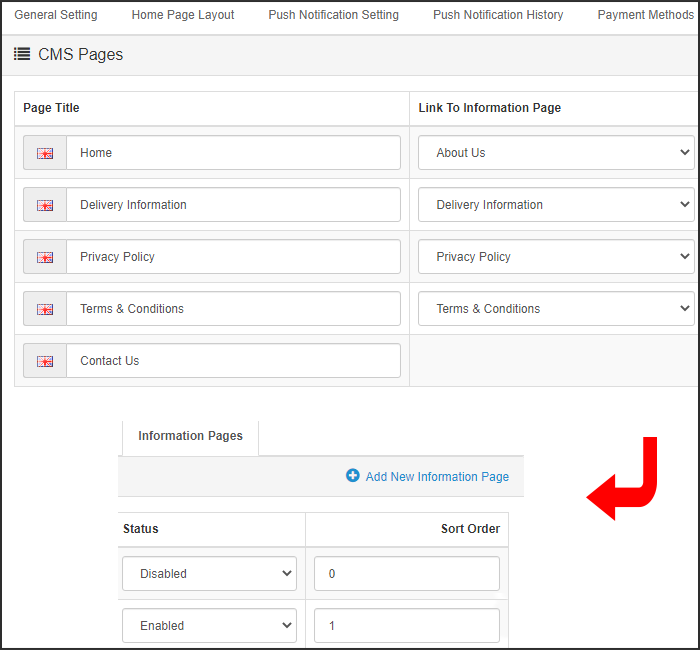
This tab of the OpenCart Mobile App Maker allows you to manage the CMS pages on the apps. You can customize the name and landing page of various CMS along with their sort order. New pages can also be added from here if there is a requirement.
4.5 Home Page Layout:
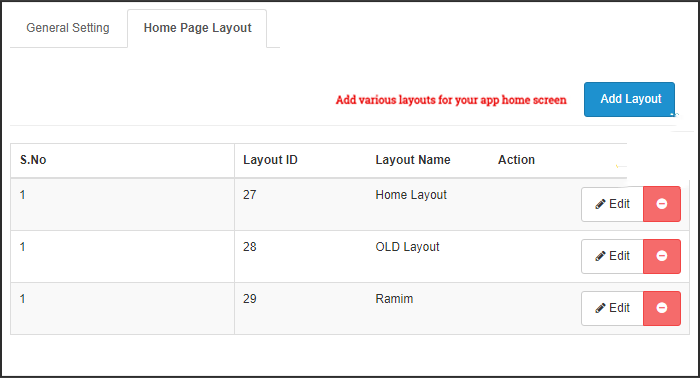
The OpenCart Mobile App Builder allows you to create & save various intuitive & appealing layouts for your mobile app home screen.
After adding the layout, click on Edit option & start adding & configuring various elements for your app home screen.
The store admin can configure the following design elements on the mobile app home screen:
Top Categories:
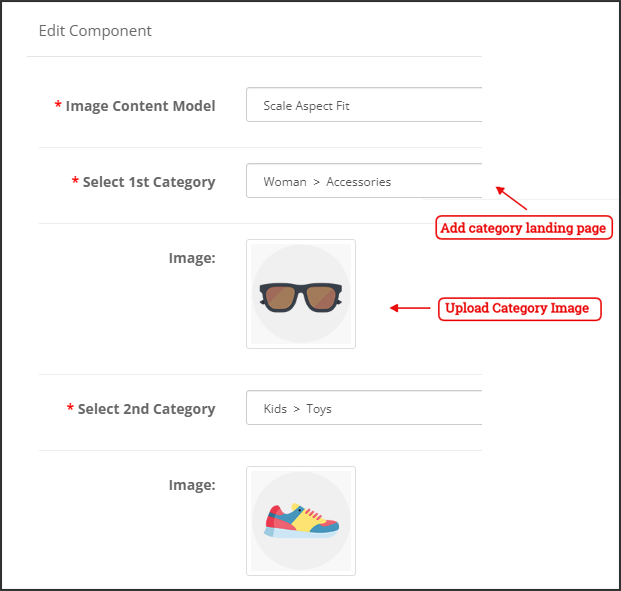
These are the categories displayed on the top of the home screen in the form of squares. You can configure their images & landing pages from the backend. Maximum 8 such categories are added of which 4 are mandatory.
Square Banner:
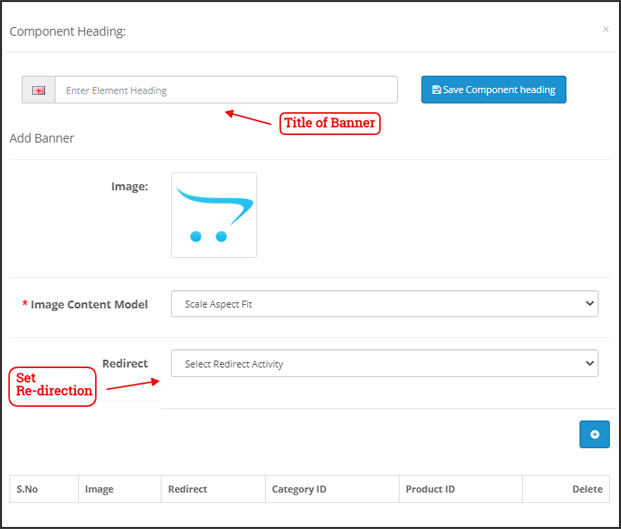
You can offer a square-shaped banner on the home screen of OpenCart Mobile App whose image & landing page link can set from the backend.
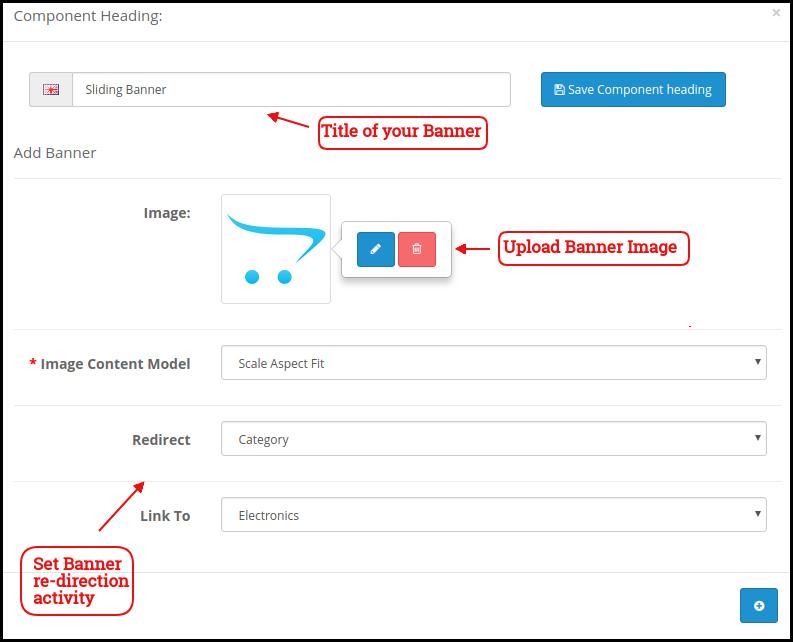
Sliding Banner:
These are the sliders for your home screen which can be configured from the module backend.
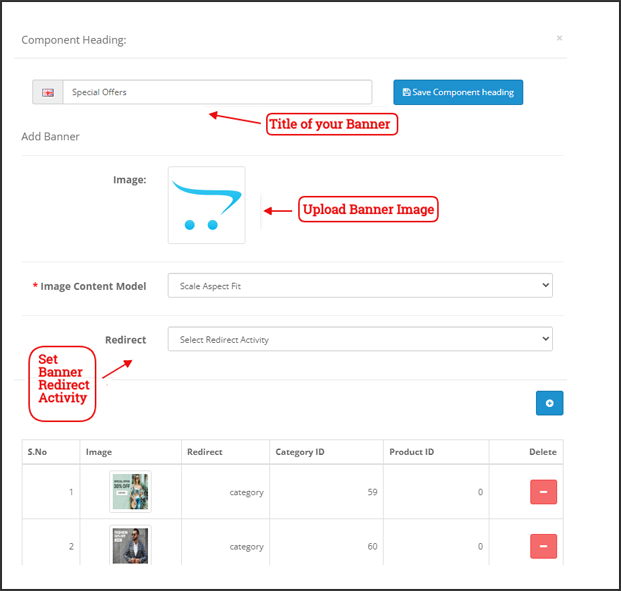
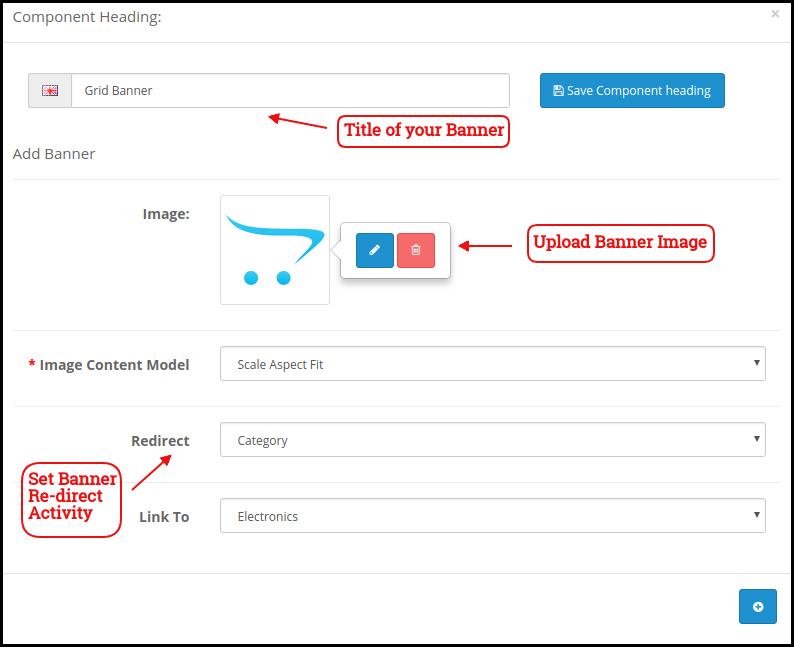
Grid Banner:
These are the banners for the app home screen displayed in the form of a grid listing & can be customized accordingly.
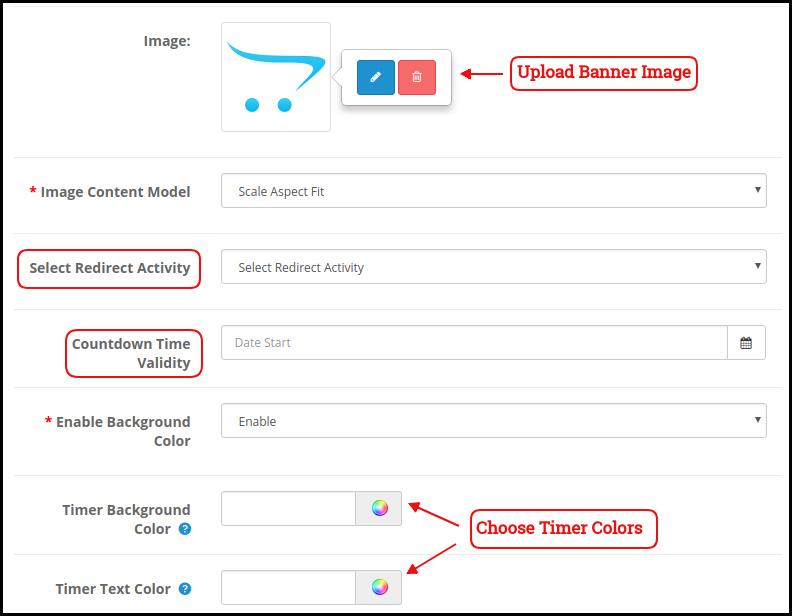
Countdown Banner
The OpenCart Mobile App Maker offers a count-down timer banner in your mobile apps. You can configure the banner image, landing page, and timer from the backend.
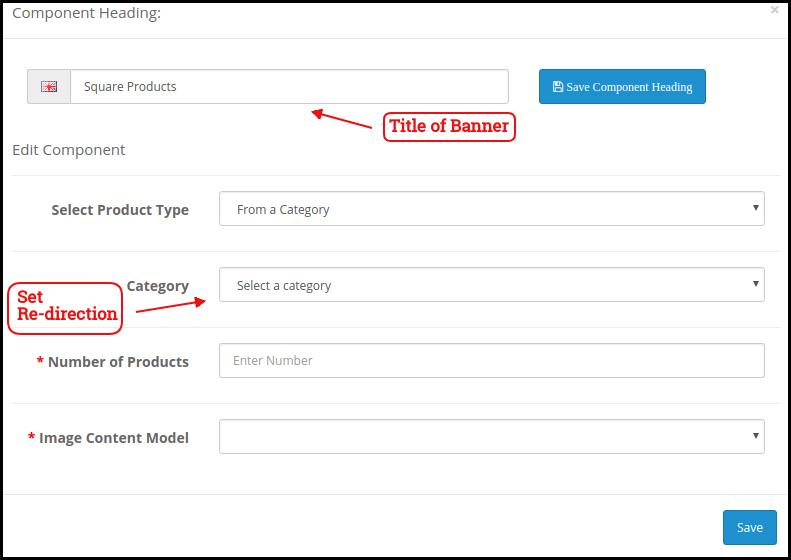
Square Products:
You can even list the products in square listing on the mobile app home screen.
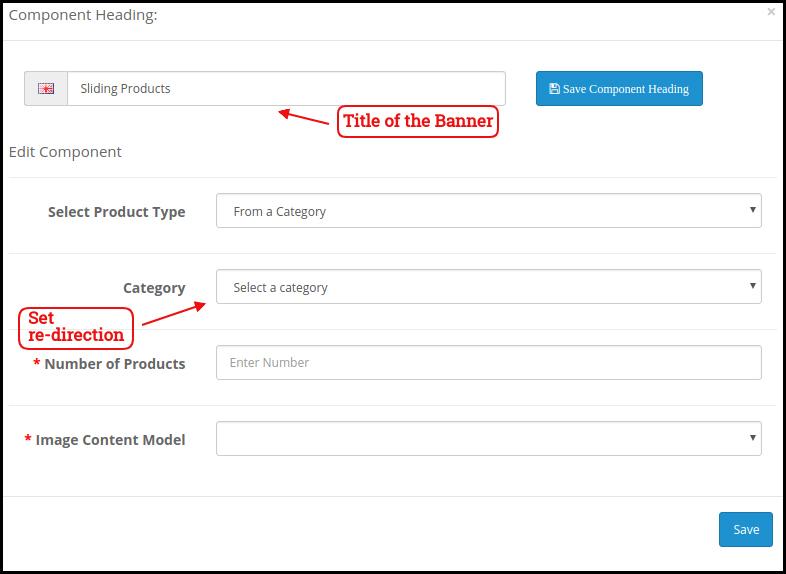
Sliding Products
The products can be displayed in the slider view on the mobile app Home Screen & can be configured from backend panel.
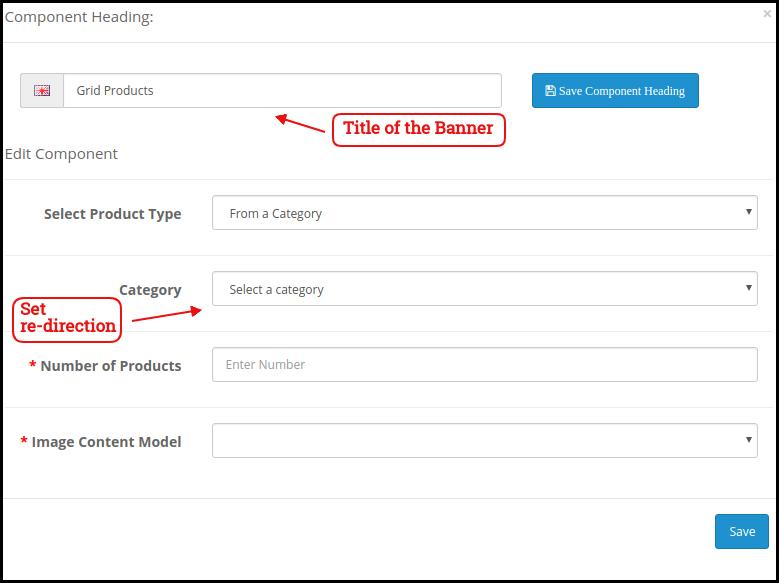
Grid Products:
The products can be displayed in the grid view on the home screen.
Products Recently Accessed:
The OpenCart Mobile App Creator offers the recent products tab on the mobile app home screen which displays recent products viewed by the user. You can just add the element in your layout to display the same on the home screen.
Login/Sign up Pop-up:
The Opencart admin can encourage the customers to keep their account logged in in the apps by showing a dynamic login/sign-up pop-up on the home page of the app.
Advertisement Banner:
The Opencart App admin can select the position of the advertisement banner on the home page with this layout component.
Note: The store admin can add up to 20 elements while designing the layout in the backend panel.
4.6 Advertisement Setting:
The updated Opencart App Maker allows the store admin to use their apps as an additional income channel by providing in-app advertising features in the apps. The new app comes with Google AdMob integration that allows the admin to show banner advertisements on the different pages of the app.
Enable Advertisement:
This setting will enable/disable the advertisements in the apps.
Enable Advertisement on Home:
If you want to enable/disable the advertisement feature on the home page of the app, you can use the following button.
Home Ad Unit ID:
The admin can find the Ad Unit ID on the Google AdMob console. Once done, you can enter the unit ID in the following section.
Enable Advertisement on Product:
This button will enable/disable the advertisement on the product page of the app.
Product Ad Unit ID:
Enter the Product Ad Unit ID in this section.
Select Product Position:
Using this option, the store admin can select the position of the Ad on the product page. This feature allows the admin to select from the below product image and description or above the add to cart button or related product section, providing more flexibility to the store admin.
Enable Advertisement on Checkout:
Using this button, the store admin can enable/disable the Advertisements on the checkout page.
Checkout Ad Unit ID:
Enter the Unit ID here.
Select Checkout Position:
Select the Advertisement position from here. The store admin can select from various options like top of the screen, bottom of the screen, above the products, and below the shipping methods.
Enable Advertisement on Cart:
Enable/Disable the advertisement on the cart page with this button.
Cart Ad Unit ID:
Enter the Unit ID for the banner on the cart page.
Select Cart Position:
The store admin can select the ad position from here. This option allows the admin to select from below the products or above the products option.
Enable Advertisement on Category:
This feature will enable/disable the Advertisement on the category page.
Category Ad Unit ID:
Enter the category Ad Unit ID.
Enable Advertisement on CMS:
Enable/Disable the advertisement on the CMS pages from here.
CMS Ad Unit ID:
Add the CMS Ad Unit ID.
4.7. Navigation Setting:
The Opencart Mobile App Builder provides the admin with the option to modify the look and feel on the bottom navigation bar of the app. Using the built-in features, the store admin can modify the name, redirection, icon, and color combinations of the tab bar layout.
Here is a detailed overview:
Enable Tab:
The store admin can enable/disable the bottom navigation icons from the following option.
Name:
Enter the navigation icon name here.
Select Navigation:
Select the redirect activity from home, cart, category, search, and profile from here.
Select Image Type:
The store admin can select if he wants to upload a custom image for the navigation bar components or the option to select built-in images is also there under the configurations.
In total, the app provides 5 different bottom navigation bar icons that can be configured with the help of the above-mentioned guide.
5.0 Mobile App Screens:
5.1 Home Screen:
The OpenCart Mobile App Builder offers a dynamic home screen in the mobile apps which can be easily designed from the backend panel. The store admin gets the complete flexibility to design & craft the home screen as per his/her choice. The OpenCart Mobile App Builder offers the following designing elements:
–> Top Categories
–> Square Banners
–> Sliding Banners
–> Grid Banners
–> Square Products
–> Sliding Products
–> Grid Products
–> Countdown Timer Banner
–> Recently Viewed Products
-> Login/sign up Pop-up.
The positioning of these attributes can also be changed as well just with simple drag & drop.
a) Dynamic Layouts: Craft alluring home screen layouts on your own which connect with the users & compel them to make the purchase.
b) Website Logo: Add your store logo in the module backend & display the same on the header of the app.
c) Search: The search option in the OpenCart Mobile App allows the users to search for products without any hassle. Keyword makes it easier for the buyers to get the right product in the least time.
d) Wishlist: Wishlist option in the OpenCart Mobile App lets you bookmark the products regarding future purchase.
e) Shopping Cart: The users can access the shopping cart from the top-right corner of the home screen.
f) WhatsAppYour OpenCart Mobile App users can directly contact you regarding any query or concern through WhatsApp chat option on the home screen.
5.2 Accordion Menu (Navigation Bar)
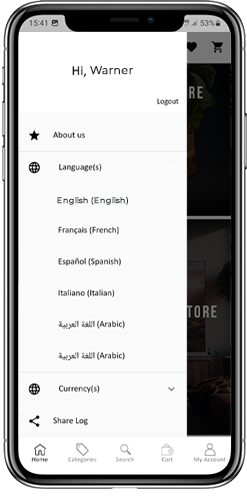
The OpenCart Mobile Apps for Android & iOS come up with easy to use categorization of your store products. The online shoppers get to browse all the categories in the navigation bar along with all CMS pages.
The Accordion menu categories are the same as of your store & it provides the following options:
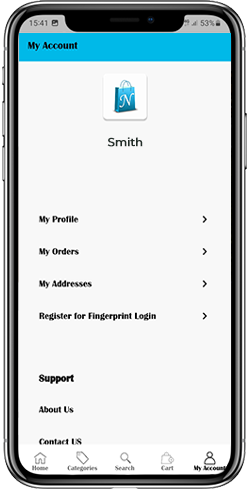
My Account: The My Account screen of OpenCart Mobile App contains all the user information like Personal Details, Shipping Address(s) & Order Details. There is even an option for the users to register their fingerprints. The online shoppers get to view complete personal details from here & update the password as well.
Categories: All your store categories are fetched on the mobile apps as well. Offer a multi-level categorization to your app users & let them browse products with ease.
CMS Pages: All of your website CMS pages like About Us, Contact Us, Terms & Conditions, etc will be displayed here.
5.3 Category Screen:
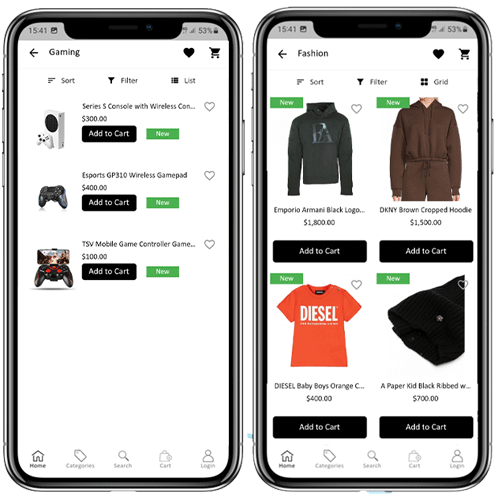
All sorts of categorizations available on your the OpenCart stores will be displayed in the mobile apps as well. The category screen has two views: Grid & List view. The product image, name, and price is displayed for all product listings. The mobile apps with OpenCart Mobile App Maker have multiple filter & sorting options which simplify product search for the users.
Sort: Sort option in OpenCart Mobile Apps allow the users to view products in Low to High or High to Low category.
Filter: Filter down the category products with various attributes like price, cost etc. & search desired products without any efforts.
5.4 Product Screen:
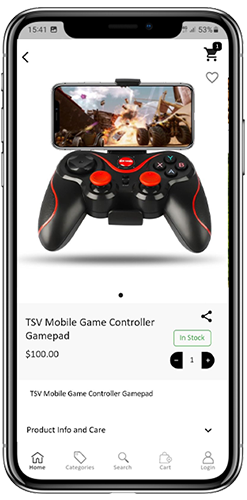
The product screen of the OpenCart Mobile App is as simple & easy-to-use as it could get. Every product has multiple images displayed along with its name & price. The product availability is also displayed as “In Stock” or “Out Of Stock”. The product screen has the following other options:
Product Options: Various options related to the product like size, color, etc. are displayed on the product screen. These options are the same as available on your website.
Short Description: Users get to read the short description of your product to quickly make up their minds. The OpenCart Mobile App displays both short & full descriptions of the products.
Product Info & Care: All the information related to the specific product is displayed under this section. This is the same information as of the website.
Add To Wishlist: The users can even add the products into the wishlist bag from here. The products added in wishlist are bookmarked for the future purchase.
Add To Cart: The Add To Cart button allows you to add product in the cart which can be processed further in successful order creation.
Product Social Sharing: The OpenCart Mobile App has the option to share the products on different social platforms, Bluetooth & e-mail. The users can share the products with their friends & relatives & bring potential users to your store.
5.5 Wishlist Screen:
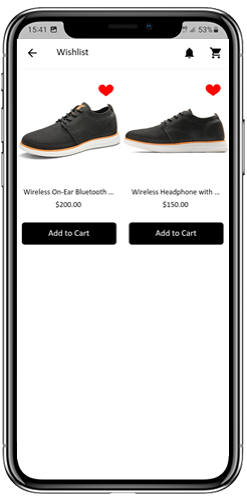
The OpenCart Mobile App Builder has a wishlist bag allowing the users to bookmark products for future purchases. The users can view the list of all wishlist products from this screen. It has the following options:
Add To Cart:
The app users can add the wishlist product directly into shopping cart with Add To Cart option.
5.6 Login Screen
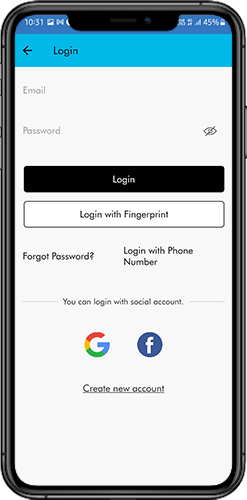
The OpenCart Mobile App Creator offers various one-tap login options & make sign-in/registration process more seamless:
Login: The app users can authenticate & access OpenCart Mobile Apps using e-mail sign-in credentials.
Sign Up: All the new users can sign-up & create their account on the store from the mobile App. The sign-up form of the OpenCart Mobile App is fully uncluttered.
Login with Phone Number: Your OpenCart Mobile App comes up with a phone number login option as well which allows users to verify OTP & log in without any hassle.
Login with Fingerprint: Your app users also get an option to log in with a fingerprint. This biometric authentication allows the users to login apps in seconds.
Login with Facebook: The users can log in into mobile apps using their Facebook Account Credentials.
Log in with Google: The users can log in into app using their Google Account Credentials.
5.7 Shopping Cart Screen:
The Shopping Cart screen of your OpenCart Mobile App will display all products added into shopping cart.
The app user’s can view Product name, quantity, total price & shipping cost. This screen has the following options:
1. Apply Voucher:This option allows the users to get discounts & offers by entering valid coupons & voucher running on your website.
2. Total Product Price:The users can view the complete cost of their shopping bag which is automatically updated as per any addition in the cart.
3. Update Product Quantity:The users can even update the specific product quantity.
4. Remove Product:The app users can simply remove the product from the cart.
6. Continue To CheckoutThe app users can proceed further to the checkout & payment screens just by tapping the “Continue To Checkout” option. It will re-direct users on the checkout screen.
5.8 Checkout Process:
There is a simplified checkout process in the OpenCart mobile app builder. Details like shipping details, billing details, order numbers, order comments, and others are available for customers in the checkout process of the mobile app.
Orders can be placed by just following a few easy steps on the eCommerce mobile apps.
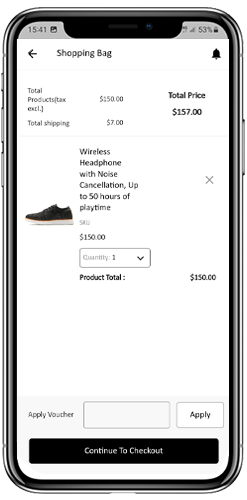
Users can choose a product and add it to their cart. After clicking on the shopping bag, the customer can select the appropriate amount of a product. In addition, mobile app users can view the total number of products and shipping prices.
At the bottom of the same page, the customer also gets the option to apply any vouchers and coupon codes.
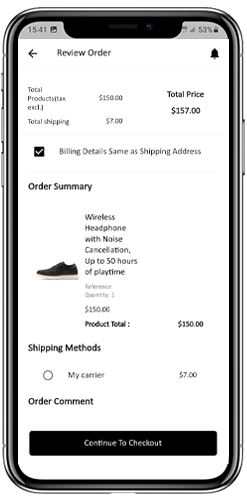
2. The user can review the order after selecting the Continue to Checkout option and can see various details. Such as product pricing, shipping cost, shipping address (editable on the same page), order summary (number of products), and total price.
Moreover, the customer can choose their preferred shipping method on the same page. In addition, the user can specify any particular requests or requirements in the order comment field at the bottom of the screen.
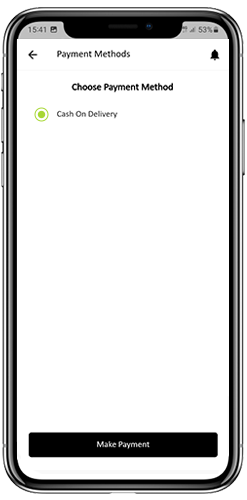
3. After clicking on the continue to checkout option, the front end mobile app user will be redirected to the payment method screen. On this screen, customers can choose from all the payment alternatives available on the e-commerce website. The Android and iOS apps consist of a cash-on-delivery payment option by default.
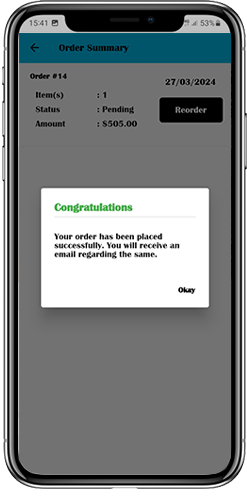
4. Once the user has completed the online payments, he or she will be forwarded to the order summary screen. In which, the customer can view the order status, order number, and amount, along with other information. The order confirmation popup message will also appear on the screens of mobile app users.
5.9 Payment Screen:
The payment screen on OpenCart Mobile App displays both web-view & Flutterapp payment methods. The OpenCart Mobile Apps supports all sorts of website payment options along with PayPal & COD payment methods. Moreover, various other native payment options like PayU, Apple Pay, Amazon Pay, Braintree, Stripe etc. can also be added in your mobile app over a fair price.
5.10 My Account Screen
My Account screen of the OpenCart Android/iOS App allows the users to view the complete account details including a list of all previous orders by just tapping on my orders option. My Account screen has the following other options:
Order History:The users get to know about complete order details created on the app. The order creation date, reference, price & delivery status is available on this screen.
Update Profile:Users can also update their pre-saved profile details like First or last name, phone number & password.
Shipping Address(s):The app users can see the complete list of saved Shipping Addresses. New Shipping address can also be added from here.
Order Details:The app users can view the complete list of the previously placed orders from the app.
Re-order feature:There is a direct re-order functionality allowing the users to repeat the order just by clicking the “Re-order” button
5.11 Order Detail Screen
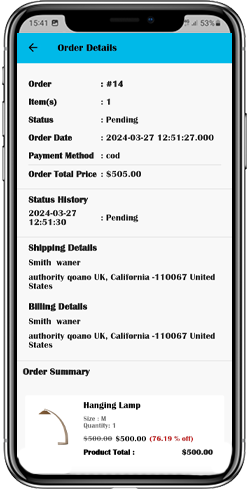
Order details screen of OpenCart Android & iOS App provides complete order detail such as shipping address, product summary, shipping and payment method, and total cost summary. This order detail is of the previous order placed by you. The users can even track the delivery of previously placed orders directly from this screen.
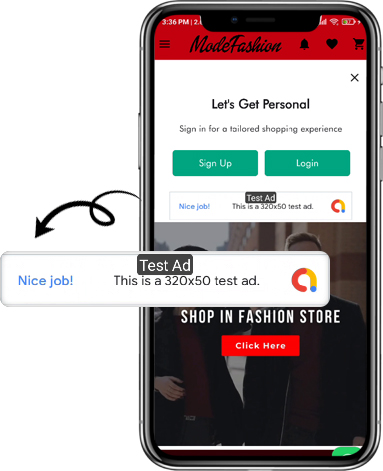
5.12. In-App Advertisement Samples:
The admin can set the advertisement banners on the different pages of the app. Here’s how it will look to your customers.
6.0 Advanced OpenCart Marketplace with Mobile App
KnowBand’s OpenCart Marketplace converts your online website into a fully-fledged marketplace. The OpenCart Mobile App Builder is fully compatible with OpenCart Marketplace extension. This means you can bring the entire marketplace listing on the same OpenCart Android & iOS Mobile Apps. Thus, launch a pair of Marketplace-compatible Mobile Apps with KnowBand & attract a large base of sellers & customers to your store.
–> As the user clicks on the Seller option, he/she is redirected to the Seller page of the mobile store. The user can view the list of the sellers of the marketplace along with their ratings.
–> The customers can click on the name of the seller in order to see his profile and the product being offered. The sellers can log in with their username and password. They are then redirected to the dashboard.
7.0 OpenCart Mobile App Builder for Android and iOS – Video Tutorial
This video tutorial walks you through the complete configuration of the OpenCart Mobile App Builder extension by KnowBand. Learn how to set up your app from backend to frontend with step-by-step guidance on:
General Settings
Push Notification Settings
Payment Methods
Home Page Layout
And many more essential configurations
By the end of this tutorial, you’ll be able to fully configure your OpenCart mobile app for both Android and iOS, ensuring a smooth and professional setup.