Magento 2 Mobile App Builder – User Manual

1.0 Introduction

Have you recently migrated to Magento 2.x from Magento 1.x? It’s time to build native Apps for your store. We all are aware that eCommerce mobile apps are one of the most unavoidable needs of online businesses today. So, if you are a Magento 2 store owner and planning to take your website to the Mobile platform, KnowBand has made the job simpler for you. Find out how?

The Magento 2 Mobile App Builder extension lets you upgrade your eCommerce store into a pair of featured & flawless Mobile Apps. The fully functional Android & iOS apps developed with Magento 2 Mobile App Maker would definitely fulfill all the requirements for the growth of your store. This is the most seamless solution for mCommerce development. All you need to do is to specify your business requirements and leave the rest to our skilled development team.
The Mobile Apps for Magento 2 stores developed by this ready-to-go solution provide a flawless and reliable shopping experience to the users. This will definitely boost conversions & sales of your store.

1.1 New Updates:

a) Home Screen Layout Backend Preview:

In the latest version (v1.0.6) of Magento 2 Mobile App Creator, the store admin can preview the home screen layout there only while setting up it from the admin panel. No need to open the app, refresh every time to visualize the changes. Just design your home screen with more ease and change it whenever required.

b) Flutter Update:

We have recently updated our both Android and iOS Mobile Apps to the latest Mobile App Development technology Flutter. Now, users can experience robust speed with all the updated features.

c) QR Code/Bar Code Scanner:

Now, the mobile app users can also search their favourite data by searching via QR/Bar codes. Android and iOS App users can find the updated option on the search page.

d) Video Banner Elements:

Knowband’s Magento 2 Mobile App Builder now includes video banner components on the home page. This feature allows store admins to showcase engaging videos by uploading them directly or embedding YouTube videos, enhancing the visual appeal and user experience of the app’s home page.

e) List/Grid View:

With Knowband’s Magento 2 Native Mobile App Builder for Android and iOS, app users can seamlessly switch between list and grid views while browsing products. This feature enhances the overall shopping experience by offering a flexible and visually appealing way to explore products. Users can easily toggle between the views using the list/grid button available on the product listing pages.

f) Video/Banner Options on Category Product Listing Pages:

The updated Knowband Mobile App Maker for Magento 2 now allows store admins to enhance category product listing pages with video and banner upload options. Admins can upload videos (under 2 MB) or directly showcase YouTube videos, offering a more engaging and dynamic browsing experience. This feature provides greater UI control for the store admin while significantly improving customer interaction and experience.

g) Automated Banner Sliders:

The latest Knowband Magento 2 Mobile App Builder introduces an automated banner slider feature, enabling store admins to configure the sliding interval directly from the module backend. This functionality is particularly useful for the “Banner Horizontal Sliders” on the home page, where admins can add both video and image banners for a dynamic and engaging display.

h) Enhanced Review Section:


The Knowband mobile app offers an enhanced review section. Approved reviews are now displayed with an improved UI, providing a visually appealing and seamless experience for both Android and iOS app users.

i) Login and Sign-up Pop-up option:


Capturing the visitors’ emails is one of the biggest challenges in eCommerce. However, we have simplified this process by introducing the login/sign-up pop-up in the recent Mobile App Builder version.
The store admin can add a login pop-up that will appear for non-logged-in customers, increasing the email opt-in chances by providing simple login options to the users.

1.2 Module Installation

The steps to install the Magento 2 Mobile App Creator module are mentioned below:

  • Buy the Magento 2 Mobile App Builder module from KnowBand.
  • The package has a zipped file that contains the user manual and the source code of the Mobile App Builder Extension. Unzip the package.
  • Create a folder{Magentoroot}/app/code/Knowband/Mobileappbuilder
    Upload the extracted content in the above folder via FTP manager (like Filezilla or WinSCP – download here: https://filezilla-project.org/).
  • Now run the below commands to install the plugin:
    php -f bin/magento module:enable –clear-static-content Knowband_Mobileappbuilder
    php -f bin/magento setup:upgrade
    php -f bin/magento setup:di:compile
    php bin/magento setup:static-content:deploy

The extension is now installed and ready for use. In Admin Panel go to “Knowband > Mobile App Builder”. You can now configure and use the Magento 2 Mobile App Builder module.

2.0 Magento 2 Mobile App Demo

Before going for the purchase of the Magento 2 Mobile App Maker extension, it’s better to test our demo apps.

2.1 View Our Demo Store working on Apps

We have developed two demo apps & set us a demo store for seamless testing of the module before actual Mobile App development. Follow the steps mentioned below:

Step 1: Download and install Nautica Magento 2 Mobile Apps on your testing device. Here, are the links to Magento 2 Android & iOS Apps:
Apple App Store  
Google Play Store

Step 2: Open the App and tap “View Demo” option. That’s it, you can easily test all the app functionalities now.

Note: To access the Admin Panel of KnowBand’s Magento 2 Mobile App Builder on our demo store, visit here.

2.2 View Your Store working on Demo Apps

Want to test your own website on these demo Mobile Apps? We even made that possible in just 3 simple steps:

Step 1: Download & install FREE Magento 2 Mobile App Builder plugin on your Magento 2 website.

Step 2: Install the Demo Apps (links in the previous section) on your mobile device. Open the App & enter your website URL in the “View Your Store” option.

Step 3: Tap “View Your Store” and start analyzing your own website working on our demo apps.

Note: This Free version of Mobile App Builder is just for the demo purpose & no APK/IPA files will be provided with this module. In order to get your own APK/IPA files, you need to purchase the paid version of the Magento 2 Mobile App Builder.

3.0 Build your own Magento 2 Mobile Apps

After successful testing of Magento 2 Mobile App Builder, build a pair of mobile apps for your website. KnowBand has made it as simple as it could get.

Step 1: Purchase & Install Module on your website.
Purchase Magento 2 Mobile App Builder & install the same on your store using your store FTP details.

Step 2: Share your App Specifications
Share some details regarding app development with us through a pre-requisite form.

Step 3: Get Your Android & iOS Apps in 1-2 days
The final APK & IPA files can be shared with you in just 2-3 days. You can review the same & suggest changes (if any).

Note: You can publish these APK/IPA files on respective app stores. Refer to the following links for the same:

How to publish Android app on Google Play Store?
How to publish iOS app on the Apple App Store?

If there is any issue while app publishing, we would get it done for you.

4.0 Admin Panel Screens

After the successful installation of Magento 2 Mobile App Builder, the store admin will get the following tabs for customization:

4.1 General Settings:

  1. Enable the Extension: Enable the Magento 2 Mobile App Builder to make the mobile apps work on the user’s devices.
  2. Redirect to Cart Page when Add To Cart: Whenever any user clicks on Add To Cart button, it will be redirected to the shopping cart screen.
  3. Display Short Description: Enable to display of the short product description on the product screen.
  4. Enable Request Log Reporting: Enable the error log on the mobile apps which is used to identify & rectify any abnormal behavior of the mobile apps.
  5. Show App Preview: This option will show/hide a preview of the app.

  1. Enable/Disable Spin and Win: If you are using Knowband’s Spin and Win module, this option will enable/disable the spin and win pop-up in the apps.
  2. Enable Social Login: This option will enable/disable social login options in the apps.
  3. Enable/Disable Fingerprint Login: Enable Fingerprint login on the Mobile Apps.
  4. Enable/Disable Phone Number Login: Enable Phone Number login on the Mobile Apps.
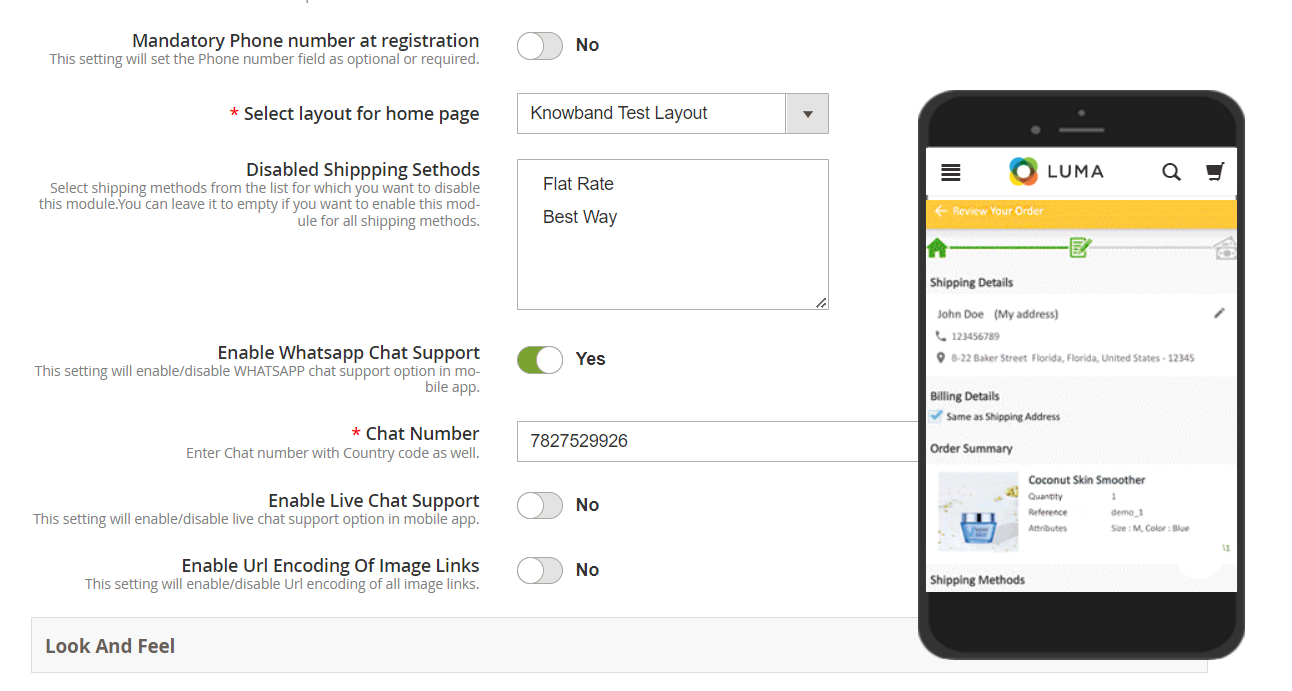
  5. Mandatory Phone number at registration: The store admins can make the mobile number optional/mandatory by the help of the following button.
  6. Select Layout for Home Page: Choose the desired Home Screen layout for the mobile apps.
  7. Display Notifications in App: Show/Hide Notification tab in the app for the customers.
  8. Enable/Disable Login Pop-up: The admin can enable the login pop-up on the home page with this button.

  1. Disabled Shipping Methods: The admins can disable specific shipping methods for the app only from the following button.
  2. Enable Live Chat Support: Enable/disable Zopim(Zendesk) chat option on mobile apps. You need to enter the chat API key provided along with the final apps.
  3. Enable WhatsApp Chat Support: Enable/disable the WhatsApp chat option on mobile apps.
  4. Enable Logo: Enable logo on your mobile apps. You can upload the logo image which will be displayed on the header of the mobile apps.
  5. Select Font of the apps: With the help of the following button, the admins can change the fonts of both Android and iOS Apps.
  6. App Button Color: Choose the button color for your apps.
  7. App Theme Color: Choose the theme color for your apps.
  8. App Button Text Color: Choose the button-text color for your apps.
  9. App Background Color: Choose the background color for your apps.
  10. App Icon Theme Color: Choose the app icon theme color.

4.2 Menu Settings:

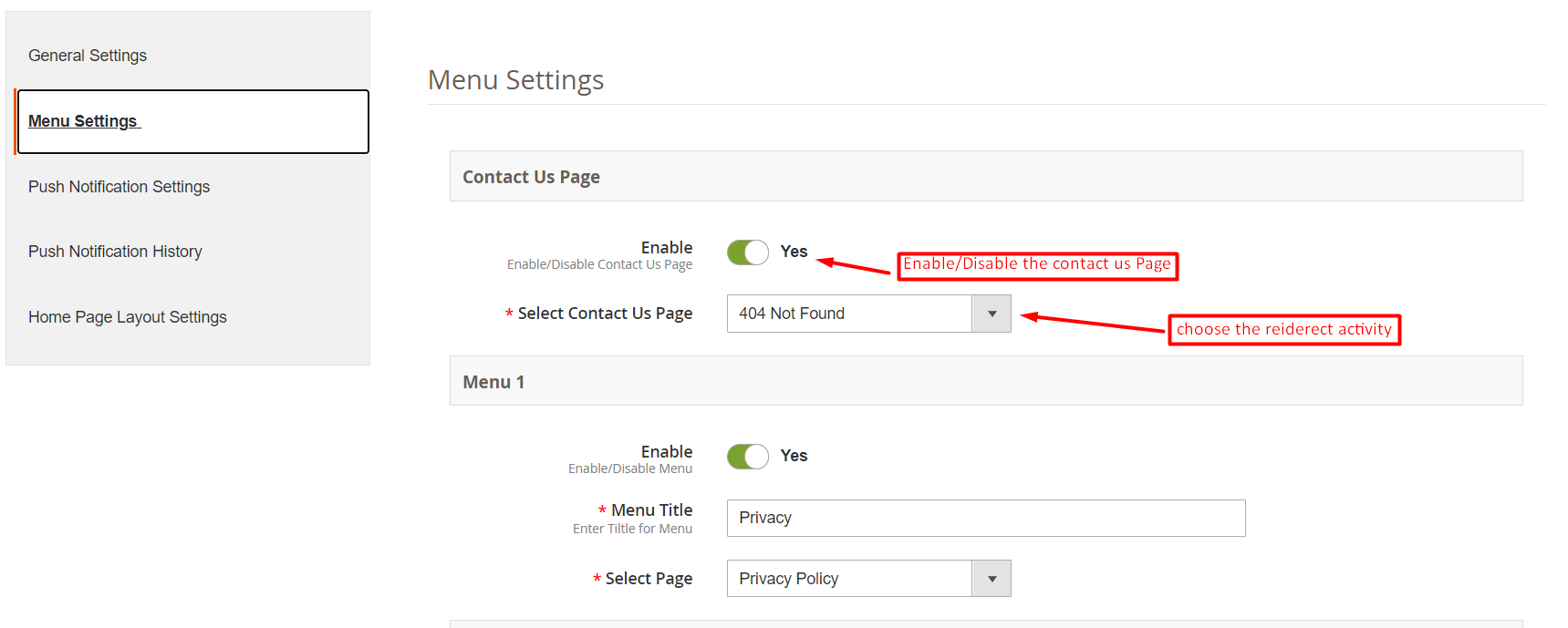
With the Menu Settings tab in Magento 2 Mobile App Maker, you can easily add and manage CMS pages on your mobile app. The Contact Us page can be enabled or disabled as per your preference, and you can also add new CMS pages to the menu. This allows you to provide your customers with easy access to important information such as your store policies, FAQs, and more. Additionally, you can customize the order of the menu items to make it easier for your customers to navigate through the app.
4.3 Push Notifications:

  1. Service Account JSON: With the deprecation of the traditional Firebase push messaging API, it has been replaced by a Service Account JSON file. This section allows admins to configure the JSON file obtained from their Firebase account. You can either set this up on your own, or we will provide the Service Account JSON file during the app creation process for your convenience.
  2. Order Success Notification: Configure automated Order Creation push notification which would be sent automatically to the user’s apps who successfully create an order through your app.
  3. Order Status Update Notification: Configure Order Status Update notification which would be sent automatically to the users whenever there is an update in order delivery status.
  4. Abandoned Cart Notification: Configure automated Abandoned Cart notification which would be sent automatically to the users who left their products in the cart.

4.4 Push Notifications History:

In the following tab, we have provided the option to check all the previously shared notifications along with the date and time. Moreover, by clicking on the send a new notification, the users can also send new notifications to the app users.
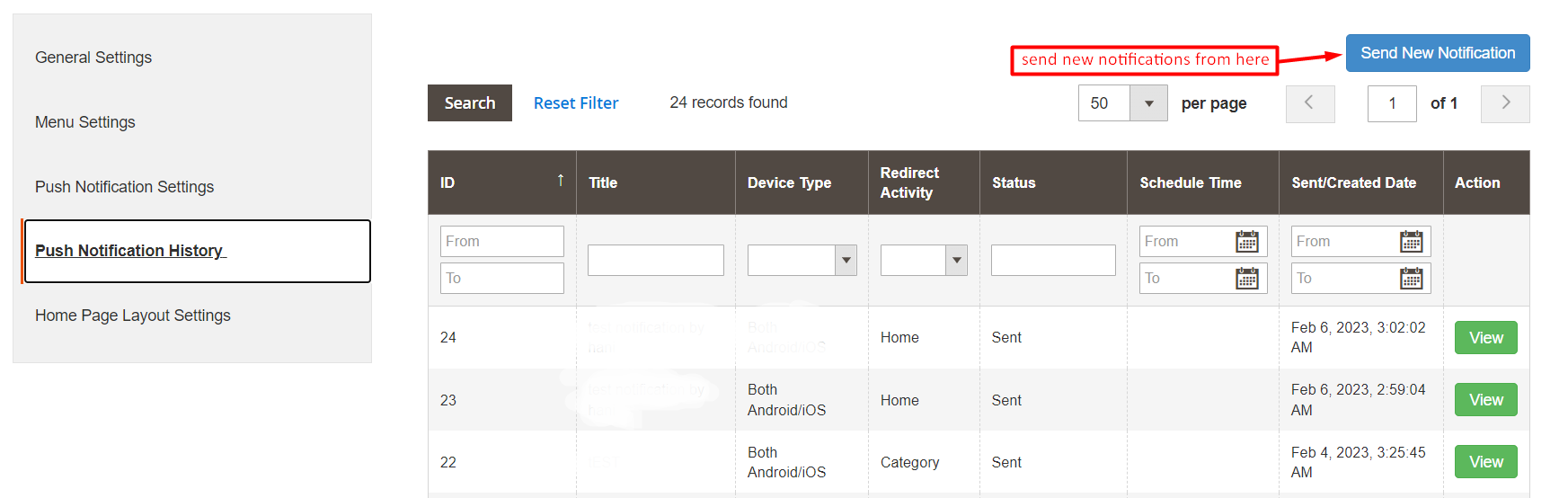
We have also added a special feature in the Magento 2 mobile app Builder module. Now the admins can send new notifications immediately or can also schedule them for the future.  

4.5 Home Page Layout

The Magento 2 Mobile App Builder offers a customizable Home Screen with all sorts of design elements in the module backend. You can create any layout for your mobile app’s Home Screen & offer it to your users.
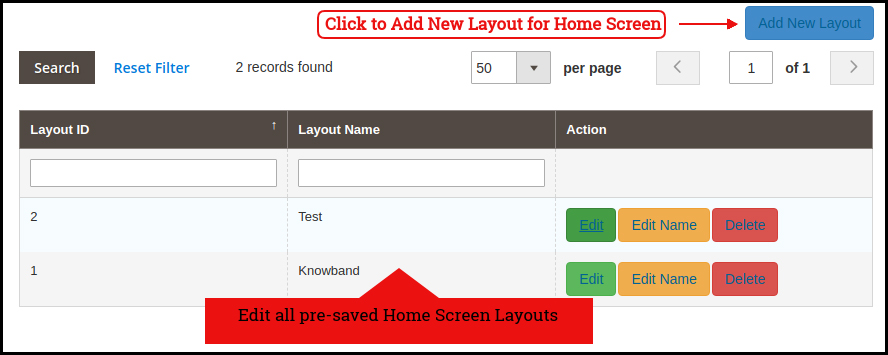
After adding the layout, click on the Edit option & start configuring various designing attributes for your Magento 2 App Home Screen.

The store admin can configure the following design elements under the Home Page Layout tab of the Magento 2 Mobile App Builder:

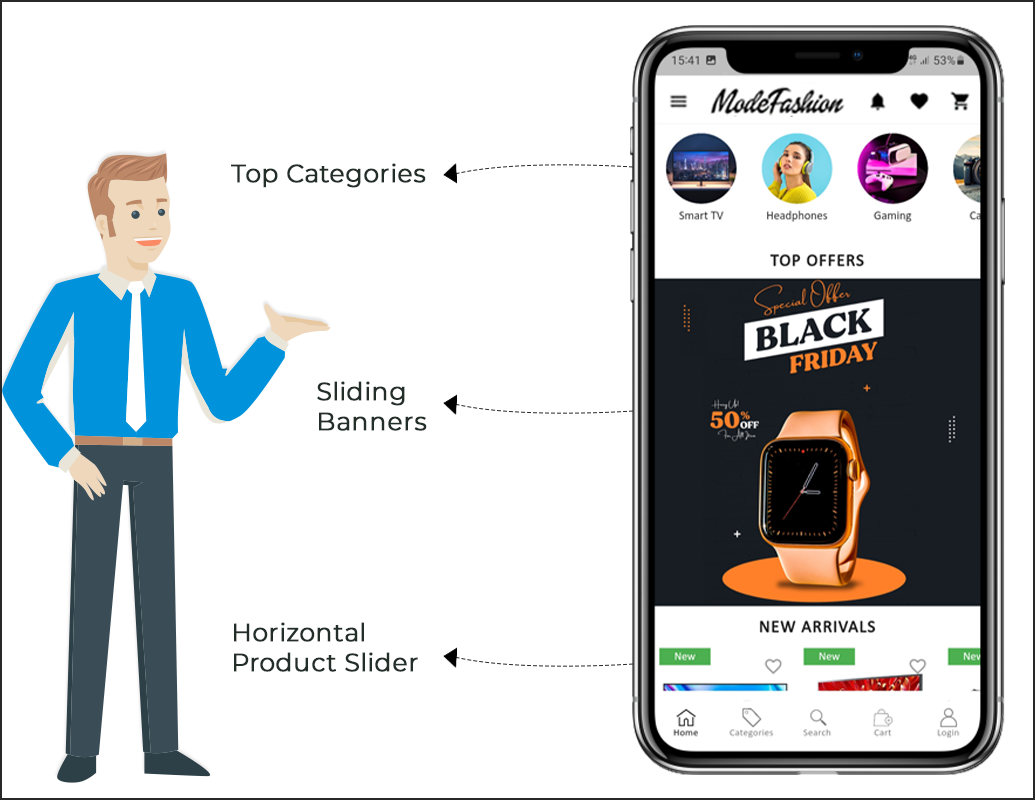
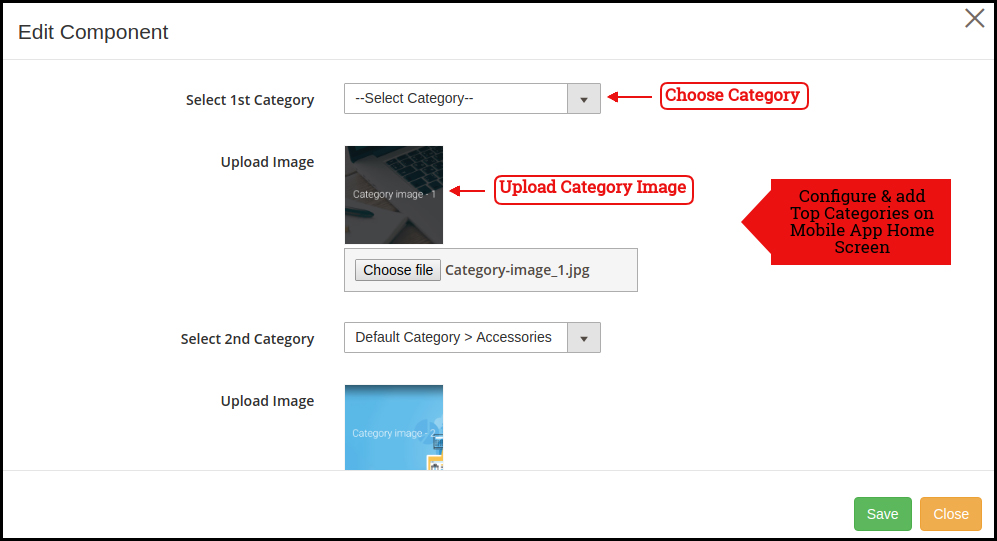
Top Categories:

These square-shaped categories can be used to highlight all the major categories of your website on the Home Screen. These categories can be added from the module backend as shown in the below snapshot:
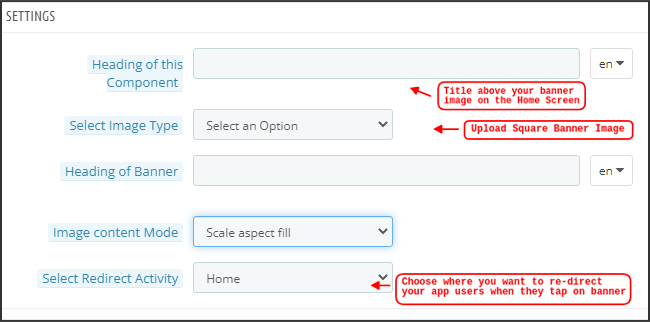
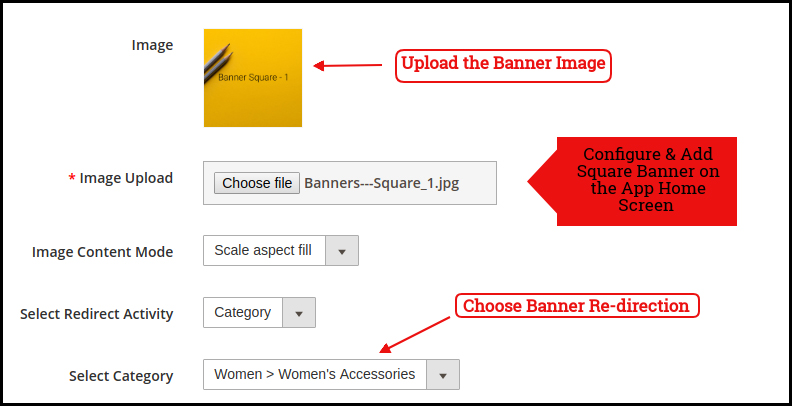
Square Banner:

The Banner can be displayed in square form on the Mobile App Home Screen. Now, the store admin can add or upload YouTube videos for the banner square layout components with the relevant options provided in the redirect activity section. The landing page, image can be configured as shown in the below snapshot:
Sliding Banner:

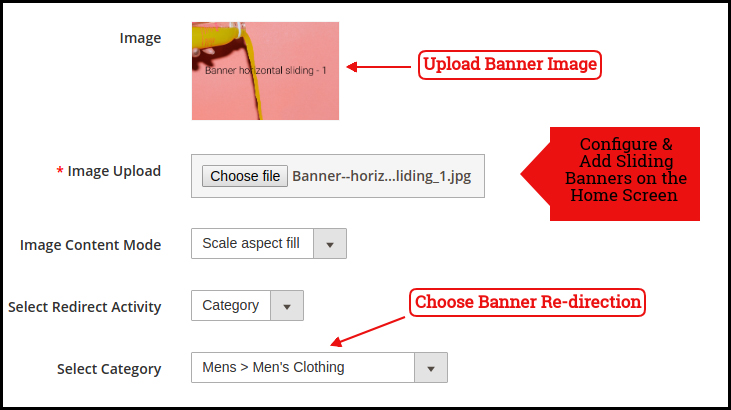
The Magento 2 store admin can also add video elements in the horizontal sliders. We have also provided a time interval section in the recent updates that will allow the admin to configure the interval for the automated banner sliders.
The sliding banners can be displayed on the mobile app Home Screen which can be configured as shown in the snapshot below:
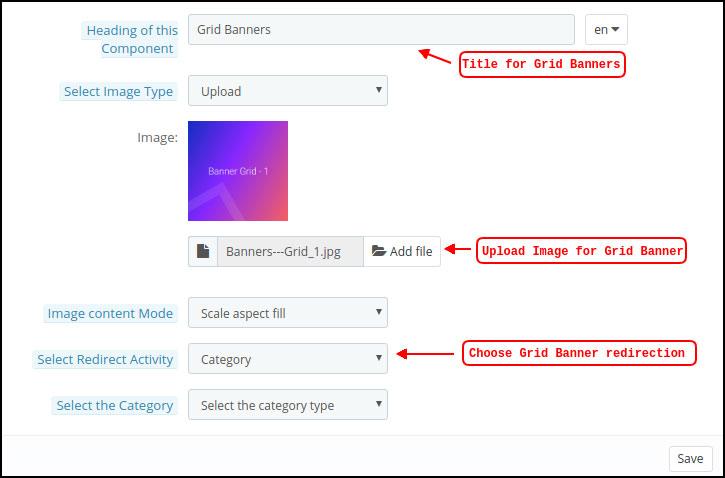
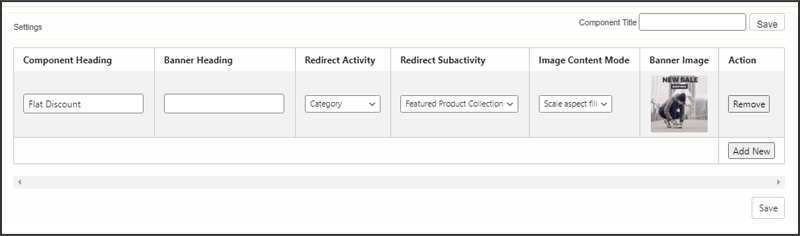
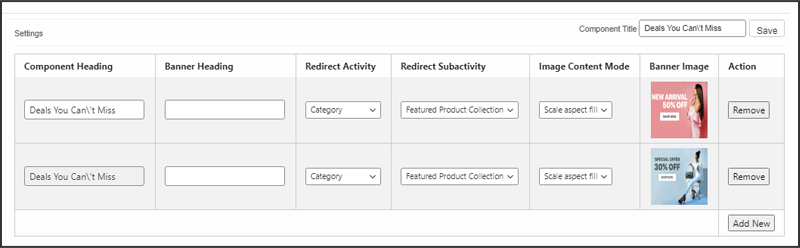
Grid Banner:

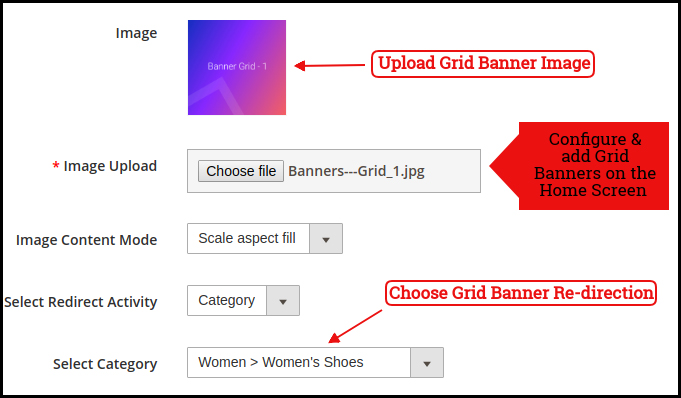
Like horizontal banner sliders, the store admin can also add videos in the grid banner layout components. These are the banners for the app home screen displayed in the form of a grid listing & can be customized as shown in the below snapshot:
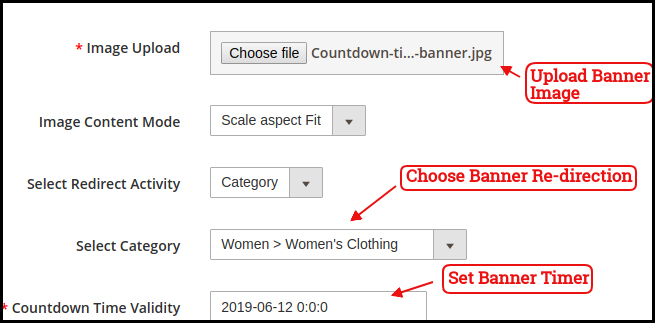
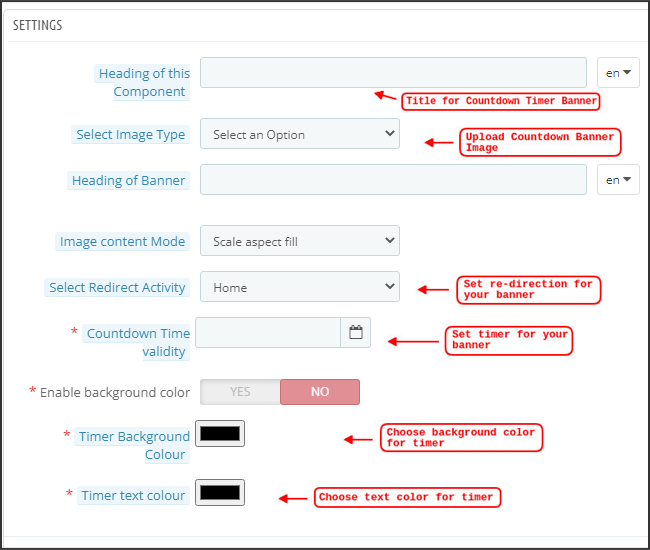
Countdown Timer Banner

Display a countdown timer banner on Magento 2 Mobile App home screens & offer a time-based/flash sale to your users:
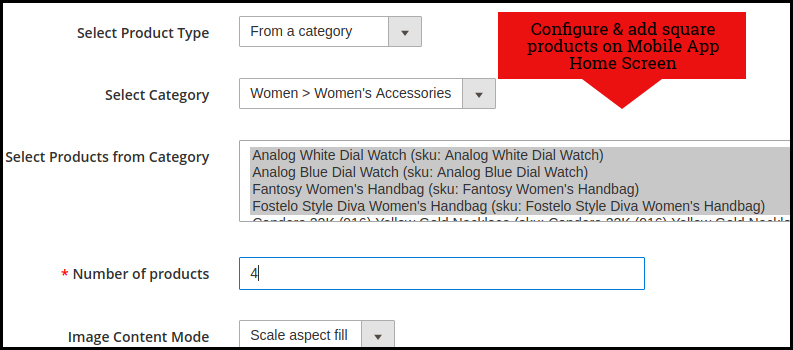
Square Products:

The products can also be listed in the square listing on the Mobile App Home Screen. This can be configured as shown in the snapshot below:
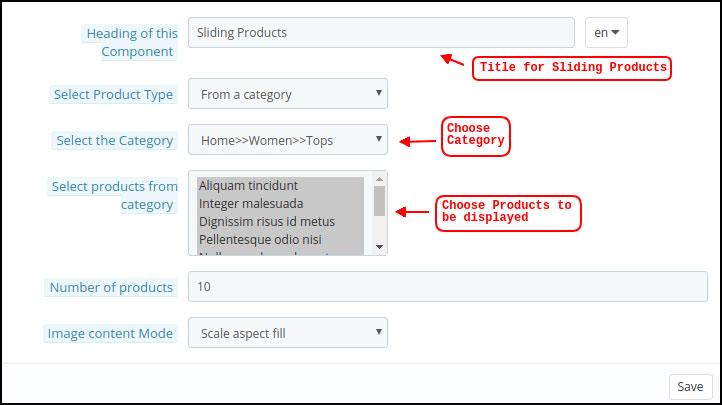
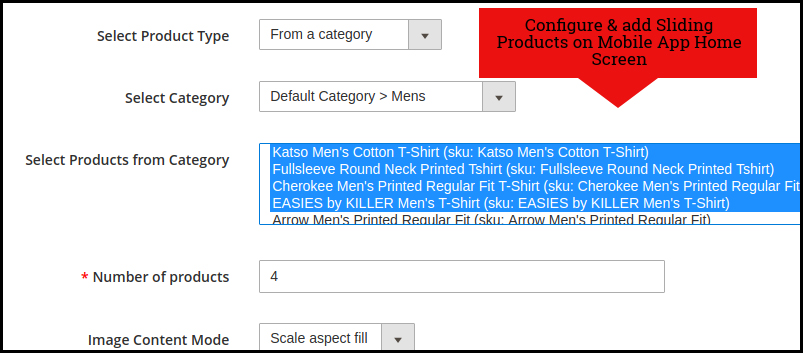
Sliding Products

The products can be displayed in the slider view on the mobile app Home Screen & can be configured from backend panel.
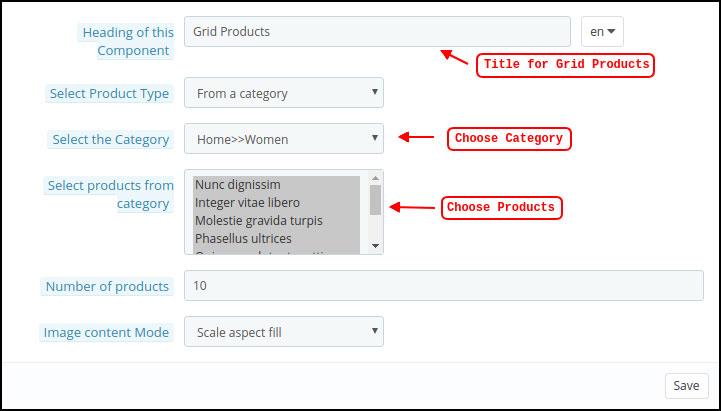
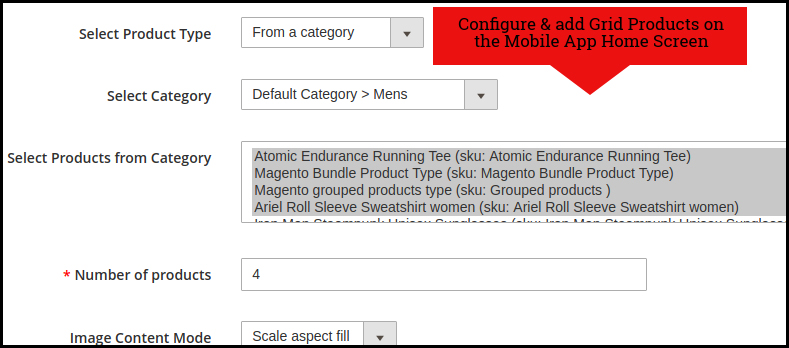
Grid Products:

The products can be displayed in the grid view on the Mobile App Home Screen:
Products Recently Accessed:

The Magento 2 Mobile App Creator offers the recent products tab on the mobile app home screen which displays recent products viewed by the user. You can just add the element in your layout to display the same on the home screen.

Login Pop-Up:

The enhanced Magento 2 Mobile App Maker comes with a login pop-up on the home page. With the help of this layout component, the admin can showcase a login pop-up on the home screen of the app. This pop-up will only appear for non-logged-in users.

Note: The store admin can add up to 20 elements while designing a layout in the backend panel.  

5.0 Mobile App Screens

5.1 Home Screen:

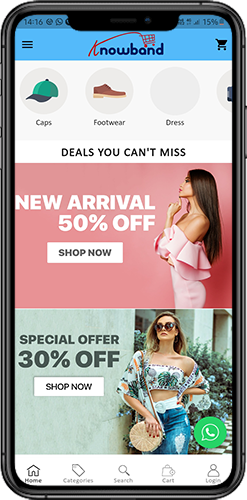
The Magento 2 Mobile App Builder brings the complete flexibility to design the mobile app Home Screen on your own. The Android & iOS mobile apps can be designed from the backend panel using the following designing attributes:
–> Top Categories
–> Square Banners
–> Sliding Banners
–> Grid Banners
–> Square Products
–> Sliding Products
–> Grid Products
–> Countdown Timer Banner
–> Recently Viewed Products
–> Login Pop-Up.
–> Video Banner Elements
–> Enhanced Review Page.
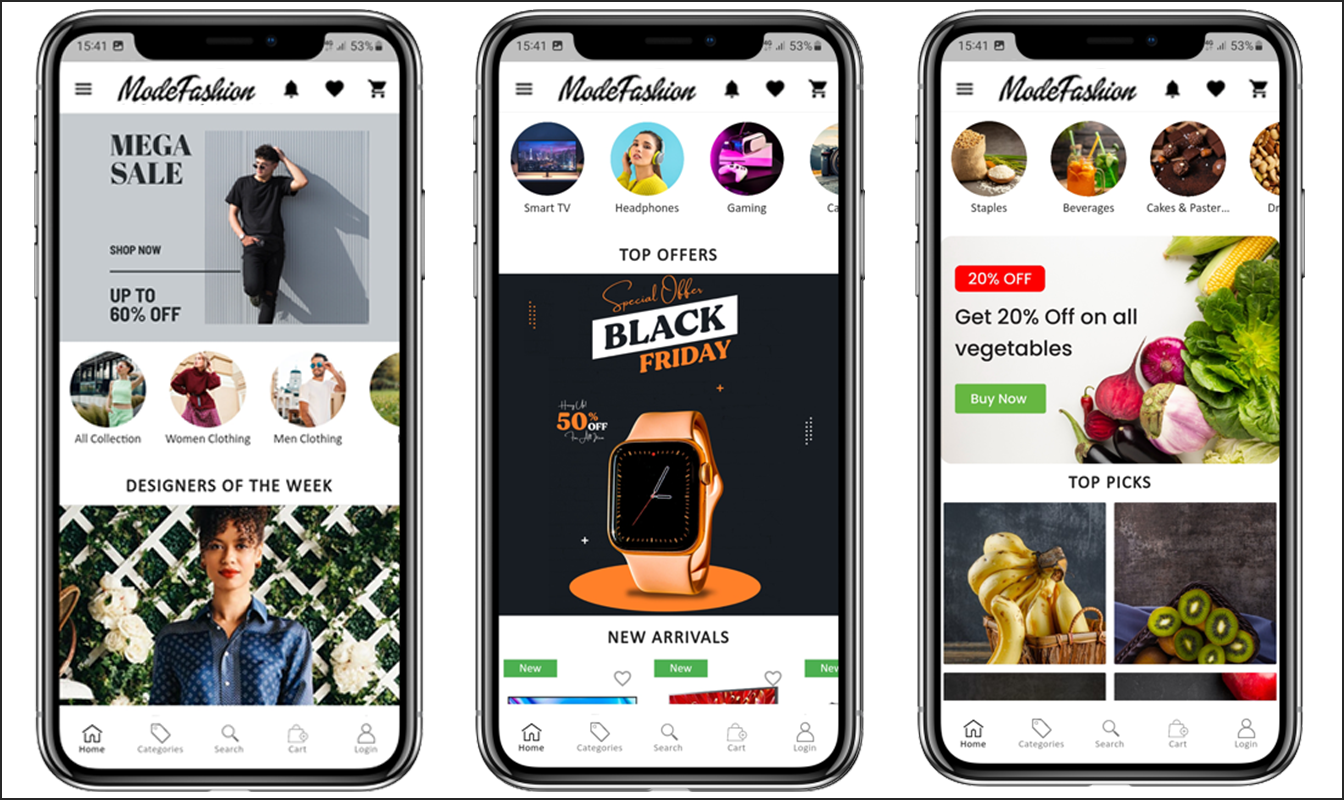
The positioning of all the elements can be changed with a simple drag & drop.

a) Dynamic Layouts: Create & save various alluring & intuitive layouts in the backend & change your app’s look & feel in just one click.

b) Store Logo: Add your store logo image in the module backend & display the same on the header of the apps.

c) Search: The Magento 2 Mobile Apps have keyword search options that allow users to search for products without any hassle. Along with Keywords, the users can also search products via QR and Bar code scanner.

d) Wishlist: Wishlist option in Magento 2 Mobile App lets you bookmark the desired products for future purchases.

e) Shopping Cart: The users can easily access the shopping cart from the top-right corner of the home screen.

f) WhatsApp: The Magento 2 Mobile App Maker offers two live chat options in mobile apps with Zopim & WhatsApp. The app users can directly message you regarding any issue or query regarding purchase.

g) Login-in Pop-up: We have recently introduced the all new login-signup pop-up in Magento 2 Android and iOS Apps. If the customer is not logged in, he simply complete the login/signup buttons provided under the sing-up pop-up.

5.2 Accordion Menu (Navigation Bar)

The Magento 2 Mobile App Maker offers an Accordion Menu in the mobile apps which displays the store categories on the Mobile Apps. Your app users can easily browse all the categories from this menu & access all CMS pages. This menu has the following options:
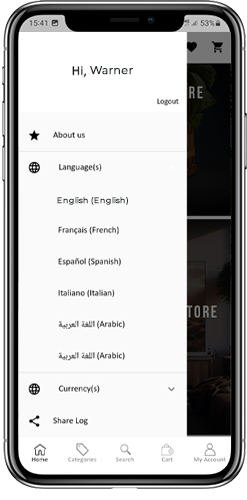
Categories: All sorts of categories on your store are fetched on the Android & iOS mobile apps as well. The apps even offer a multi-level categorization & allow the users to browse products with ease.

CMS Pages: All CMS pages on your store like About Us, Contact Us, Terms & Conditions, etc will be displayed on this Menu.

Language(s): The Magento 2 eCommerce Mobile Apps are both multi-lingual & RTL languages supported. The users can choose the desired app language & the entire app contents will be translated accordingly. Every sort of language available in the store is displayed here under this menu.

Currency(s): Just like multiple languages, all sorts of currency options running on your website will be displayed in Magento 2 Mobile Apps. This allows app users to make payments with the desired currency option.

5.3 Category Screen:
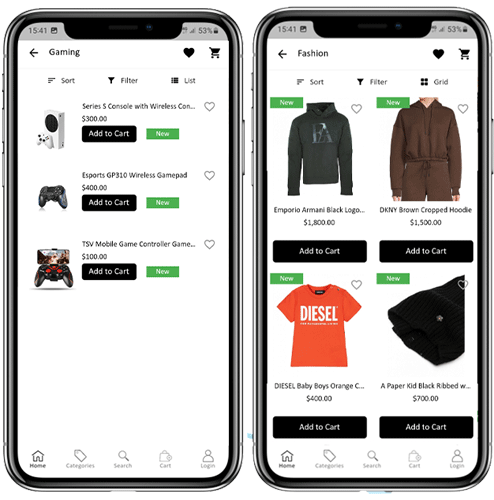
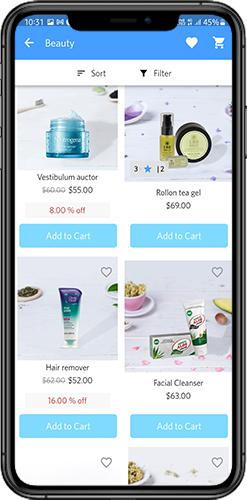
All categories on your Magento 2 website are fetched on the Magento 2 Mobile Apps as well. The category screen of the Magento 2 Mobile App has two views: Grid & List view. This screen has the following options:

Grid & List View:

The products can be displayed in both grid & list view.

Sort:

The sort option in Magento 2 Mobile Apps allows the users to view products in the Low to High or High to Low categories.

Filter:

Filter down the category products with various attributes like price, cost, etc. & search for desired products without any effort.

5.4 Product Screen:

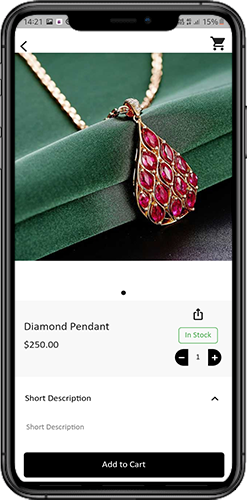
The Magento 2 Mobile App product screen is completely clutter-free & appealing. Every product has multiple images displayed along with its name & price. The product availability is also displayed as “In Stock” or “Out Of Stock” along with the price discounts. The Product Screen has the following options:
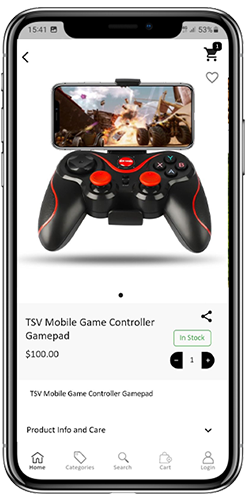
Product Options:
Various options related to the product like size, color, etc. are displayed on the product screen. These options are the same as those available on your website.

Short Description:
Users get to read the short description of your product to quickly make up their minds. The Magento 2 Mobile App displays both short & full descriptions of the products.

Product Info & Care:
All the information related to the specific product is displayed in this section. This is the same information as on the website.

Add To Wishlist:
The users can even add the products to the wishlist bag from here. The products added to the wishlist are bookmarked for future purchases.

Add To Cart:
The Add To Cart button allows you to add products to the cart which can be processed further in successful order creation.

Product Social Sharing:
The Magento 2 Mobile App has the option to share the products on different social platforms, Bluetooth & e-mail. The users can share the products with their friends & relatives & bring potential users to your store.

5.5 Wishlist Screen:
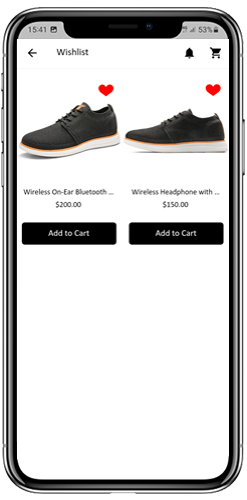
The Magento 2 Mobile App Builder offers a wishlist bag allowing the users to bookmark products for future purchases. The app users can view the list of all wishlist products from this screen. It has the following options:

Add To Cart:
The app users can add the wishlist product directly into the shopping cart with Add To Cart option.

Remove From Wishlist:
The users can even remove any wishlist product with a remove option if required.

5.6 Login Screen

The Magento 2 Mobile App Maker offers various one-tap login with the following options:
1. E-mail Login
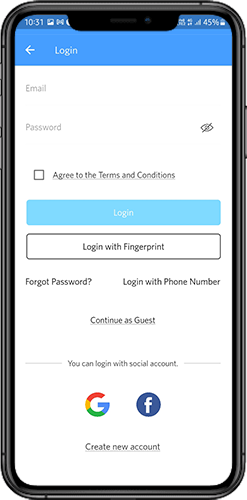
2. Google & Facebook Login
3. OTP & Fingerprint Login

Login:
The Magento 2 App users can authenticate & access using e-mail sign-in credentials.

Sign Up:
All the new users can sign-up & create their account on the store from the mobile App. The sign-up form for the Magento 2 Mobile App is fully seamless.

Login with Phone Number:
Your Magento 2 Mobile App comes up with a phone number login option allowing the users to verify OTP.

Login with Fingerprint:
Your app users also get an option to log in with a fingerprint. This biometric authentication makes the app log in just a matter of a few seconds.

Login with Facebook:
The users can log in to mobile apps using their Facebook Account Credentials.

Log in with Google+:
The users can log in to the app using their Google+ Account Credentials.

5.7 Shopping Cart Screen:

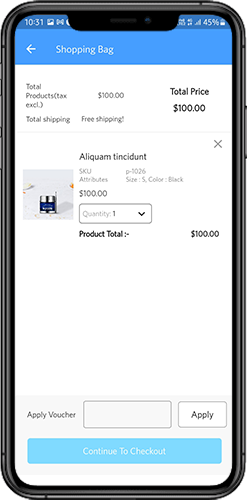
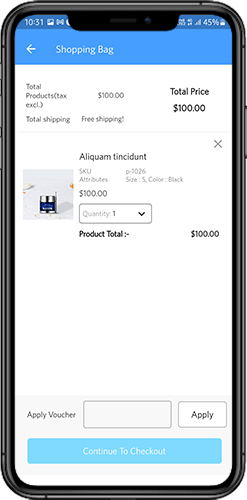
The Shopping Cart screen of the Magento 2 Mobile App will display all products added to the shopping cart. The mobile app users can view Product name, quantity, total price & shipping cost from the cart. The Shopping Cart screen has the following options:
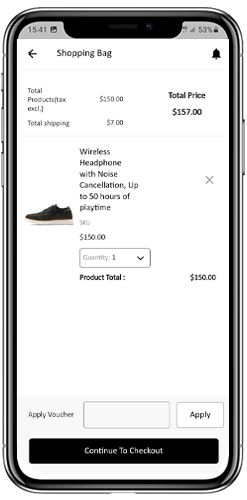
Apply Voucher:
This option allows the users to get discounts & offers by entering valid coupons & vouchers running on your website.

Total Product Price:
The users can view the complete cost of their shopping bag which is automatically updated as per any addition to the cart.

Update Product Quantity:
The users can even update the specific product quantity.

Remove Product:
The app users can simply remove the product from the cart.

Continue Shopping:
The app users can leave the cart to browse more products on your app. The shoppers will be redirected to the home screen by tapping the Continue Shopping option.

Continue To Checkout:
The app users can proceed further to the checkout & payment screens just by tapping the “Continue To Checkout” option. It will redirect users to the checkout screen.

5.8 Checkout Process

The Magento2 mobile app Builder consists of a simplified checkout process. The front-end mobile app users have the option to select shipping details, billing details, order numbers, order comments, and so on in the checkout process of the mobile app.

Users of the Android and iOS apps only need to follow a few simple steps to place their orders.

1. Customers can select the desired product and add it to the shopping cart. After clicking on the shopping bag, he or she can also select the desired product quantity. Moreover, the front-end mobile app users can see the total number of products and shipping costs.

The customer also has the option to apply any voucher and coupon code at the bottom of the same page.

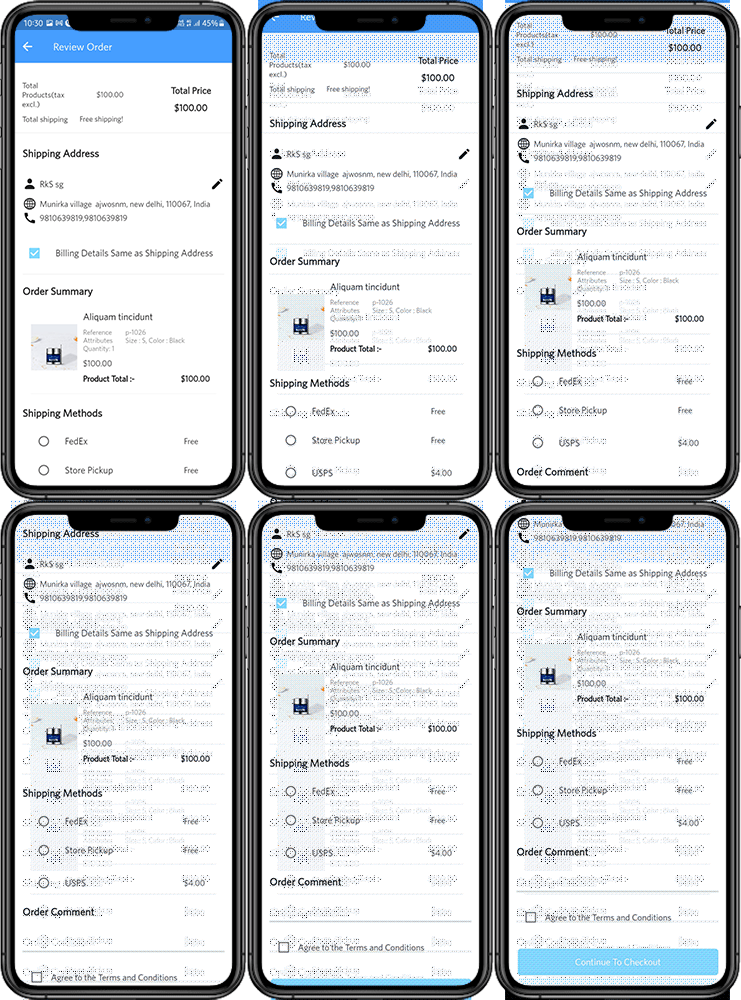
2. After clicking on the Continue to Checkout option, the user can review the order where he or she can see several details. Such as product price, shipping cost, shipping address (It can be edited on the same page), order summary (Number of the products), total price, and so on.

Additionally, the customer has the option to select their preferred mode of shipping on the same page. The user can also put his or her special request or requirement in the order comment option appearing at the bottom of the screen.
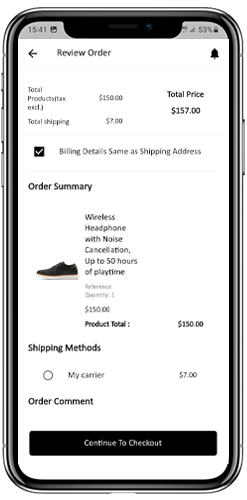

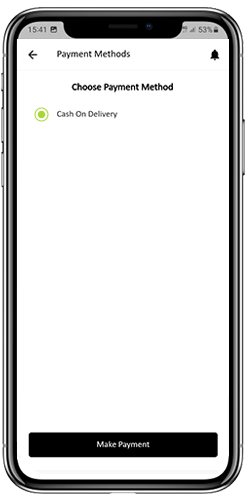
The user will be redirected to the payment method screen after clicking on the continue to checkout option.

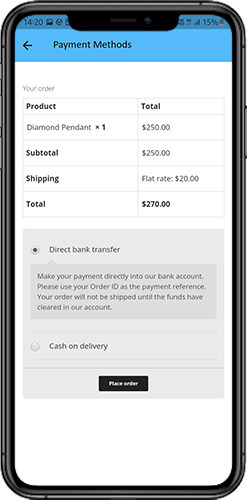
On this screen, users have the option to select from all of the website payment options. By default, the shopping app consists of a cash-on-delivery option as a mode of payment.

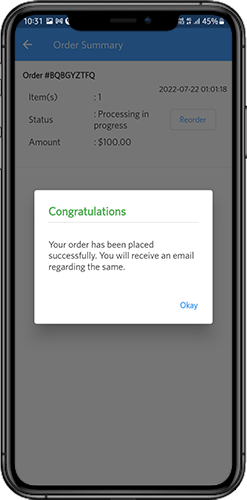
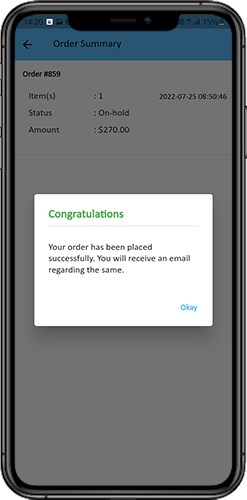
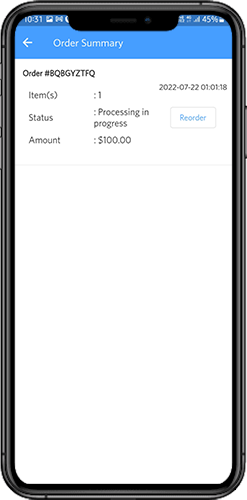
When the user performs the payment activity, then he or she will be redirected to the order summary screen. where the customer can see the order status, order number, amount, and so on. The front-end mobile app users will get the order confirmation popup message on their mobile phone screens as well.
5.9 My Account Screen

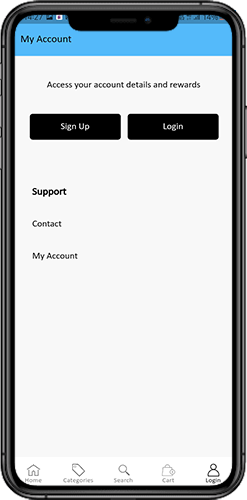
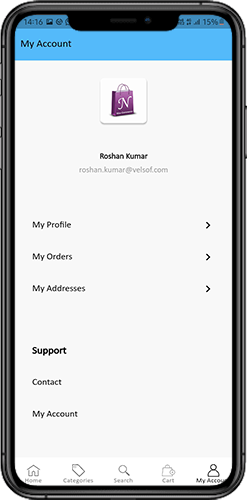
My Account screen of the Magento 2 Android/iOS App allows the users to view the complete account details including a list of all previous orders. This screen has the following options:
Order History:

The users can view the complete details of their past orders, including the date of submission, order reference, pricing, and delivery status.

Update Profile:

The users can update their profile details, such as their first and last name, phone number, and password, using the app’s account settings.

Shipping Address(s):

The users can view all the saved shipping addresses in the Magento2 Mobile App, and they can also add a new shipping address from this screen.

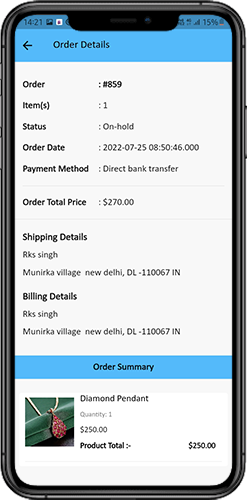
Order Details:

The Magento2 Mobile App allows users to view their order history in the app. The users can see a list of all their previous orders, along with the order date, order number, order status, and total cost. They can also view the details of each order, including the products ordered, shipping and billing address, payment method, and delivery status. This feature makes it easy for users to keep track of their past purchases and reorder products if needed.

6.0 Order Detail Screen

The Order Details screen in your Magento2 eCommerce App displays the complete order details, including the shipping address, product summary, shipping and payment method, and total cost summary. The app users can track the delivery of previously placed orders directly from this screen, providing them with a hassle-free shopping experience.

7.0 Advanced Magento 2 Marketplace with Mobile App

KnowBand’s Magento 2 Marketplace converts your online website into a fully-fledged marketplace. The Magento 2 Mobile App Builder is fully compatible with Magento 2 Marketplace extension. This means you can bring the entire marketplace listing on the same Magento 2 Mobile Apps. Thus, launch a pair of Marketplace-compatible Mobile Apps with KnowBand & attract a large base of sellers & customers to your store.

–> As the user clicks on the Seller option, he/she is redirected to the Seller page of the mobile store. The user can view the list of the sellers in the marketplace along with their ratings.

–> The customers can click on the name of the seller in order to see his profile and the product being offered. The sellers can log in with their username and password. They are then redirected to the dashboard.

Get to know more about Magento 2 Marketplace with Mobile App from here.

That’s it! For More Info on KnowBand’s Magento 2 Mobile App Builder, refer the following links:

Magento 2 Mobile App Builder
Magento 2 Mobile App Builder Admin Demo
Magento 2 Android App Demo
Magento 2 iOS App Demo
Watch how this plugin works?

WooCommerce Mobile App Builder – User Manual

Get fully Flutter Android & iOS apps for your WooCommerce website & start selling your products on Mobile Apps!

1.0 Introduction

This is the user manual for WooCommerce Mobile App Builder’s cutting-edge and ready-made Flutter mobile app solution. This eCommerce website plugin was created and expertly crafted to help you create flawless and feature-rich Android and iOS shopping apps.

1.1 Introduction to WooCommerce Mobile App Builder

The most sophisticated and automated way to expand your online business to mobile platforms is with the WooCommerce Mobile App Builder. It turns your entire website into a mobile app with features and enables you to sell products on mobile devices in addition to the traditional website. The app’s features and operation perfectly mirror those of the website and are compatible with both Android and iPhone devices.

The pre-configured framework used by our WooCommerce Mobile App Builder was created by experts and professionals to create two Flutter eCommerce apps (Android and iOS). The apps can bring every item in your store to the user’s fingertips and increase sales and revenue. Therefore, this is your best opportunity if you are a WooCommerce store merchant looking for a complete mobile app solution. To get complete information on WooCommerce Mobile App Development, read the article in its entirety.

Additionally, the Multi-vendor Marketplace plugin is fully compatible with our WooCommerce Mobile App Builder extension. The same Mobile Apps can be used to access the entire marketplace listing. Even better, we provide a bundle that includes both WooCommerce Advanced Marketplace With Mobile App and WooCommerce Multi-Vendor Marketplace.

Moreover, You would be persuaded to choose this Flutter app solution if you considered the following advantages of WooCommerce Mobile App Maker:

  1. A mobile app solution with no coding.
  2. A welcoming administrative panel with full access.
  3. Free assistance for three months
  4. Completely Flutter remedies (Android & iOS)
  5. Synchronization of your apps and website at all times
  6. Extremely flexible in terms of design and operation.
  7. Uses practical marketing tools to boost user engagement.
  8. Increases your store’s revenue and traffic.

Top Qualities of the WooCommerce Mobile App Builder:

The following is a list of some of the major features that your apps with WooCommerce Mobile App Builder will include:

  • The layout of the home screen can be changed (Complete Flexibility)
  • Store Identities
  • (24/7) WhatsApp Chat Support
  • OTP and fingerprint login for both tablets and smartphones with Google and Facebook
  • Support iOS 9 and subsequent iOS versions, as well as Android 4.2, and up versions support.
  • automatic inventory updates.
  • Numerous Font & Color Options
  • bilingual and RTL (Right To Left)
  • Support All Product Types
  • Support Multi-currency
  • Support Website Shipping Method Supported on Apps
  • Support Website Payment Method
  • Push Notifications indefinite
  • Options for Product Social Sharing
  • Numerous options for sorting and filtering
  • Wishlist Functionality
  • Internet coupons or vouchers backed by apps.
  • Checkout Screen with Fewer Details
  • Live Order Monitoring
  • Unbroken Accordion Menu
  • Clear-cut Category & Product Screen

Latest Version Updates in WooCommerce Mobile Apps:

With an integrated “Add To Cart” button for products on the Home & Category screen, the WooCommerce Mobile App has been made more usable for online shoppers. By simply tapping the cart button, users can quickly add products to the cart.

The category screen of mobile apps also features an Add To Cart button. Users only need to scroll to the bottom of the page to browse the products and keep adding items to their shopping cart by tapping the Add To Cart button.

A) App Reviews for Products

Our WooCommerce Mobile App is currently compatible with WooCommerce’s built-in Product Comments module. The user can now post product reviews on the website, and those reviews will also show up on the app. The user has access to both read and write reviews on the app.

b) Related App Store Products

The Automatic Related Products module is now compatible with the WooCommerce Mobile App Builder. On the product page of the website and mobile app, related products can be shown. This compatibility can be a wonderful tool for your company to increase cross-selling.

C) Deep Linking: A deep linking feature is built into the WooCommerce Mobile App. Now, when a link is shared, the user will be taken to the application rather than the website. Installing the app on the mobile device is the only requirement. The user will even be directed to the appropriate app screen by the shared link.

D) Accessibility in Offline Mode: With this extension, eCommerce mobile apps will now function even when there is no internet connection. Users are able to browse any time the pages that were loaded while the internet was active. Products, categories, the cart screen, etc.

–> Explore WooCommerce GDPR Module

E) Spin & Win (Gamified Email Subscription) Compatibility:

The WooCommerce Spin & Win extension is also compatible with the WooCommerce Mobile App Creator. On the web store, a spin-wheel interactive pop-up that can be scheduled for entry or exit display is provided by the gamified email subscription pop-up. The same pop-up will now be automatically displayed on the apps thanks to this integration. The extension only needs to be installed on your website.

F) Video Banner Elements: Knowband’s WooCommerce Mobile App Builder now supports video banners on the home page. Store admins can upload videos directly or embed YouTube videos, making the home page more visually appealing and improving the user experience.

G) List/Grid View: Knowband’s WooCommerce 2 Native Mobile App Builder for Android and iOS allows app users to easily switch between list and grid views while browsing products. This feature improves the shopping experience by providing a flexible and attractive way to explore products. Users can toggle between views using the list/grid button on the product listing pages.

H) Automated Banner Sliders: The latest Knowband Magento 2 Mobile App Builder includes an automated banner slider feature. Store admins can easily set the sliding interval from the module’s backend. This is especially helpful for “Banner Horizontal Sliders” on the home page, allowing admins to add both video and image banners for a more dynamic and engaging display.

I) Enhanced Review Section: The Knowband mobile app features an improved review section. Approved reviews are displayed with a better user interface, offering a more visually appealing and seamless experience for both Android and iOS users.

–> Investigate the WooCommerce Spin Win Module

This is not the end of the list. Learn more about the features in-depth from this page.

2.0 Demo of the WooCommerce mobile app

KnowBand is aware of your hesitation to use the solution and has provided all owners of eCommerce stores with a free demo in order to allay your worries. The merchants can see their store operating on our demo apps as well as our demo store operating on mobile devices.

2.1 Check Out Our Demo Store for Apps

Want to see the features of the eCommerce app? In order for you to explore the app and see all of its features, we have integrated our demo store with it. Just adhere to the guidelines below:

Step 1: Your mobile device can be used to download and install the Nautica WooCommerce Mobile App. The following are links to download trial versions of the following apps:

Apple App Store  – https://testflight.apple.com/join/mrvIRLfw

Google Play Store- https://play.google.com/store/apps/details?id=com.velsof.woocommercegenericapp

Secondly, the Click the view demo button after launching the Nautica WooCommerce App.

I’m done now! On the demo app, you will see our demo store operating. You can browse it, test out every feature, place orders, etc.

Note: Click here to access the KnowBand Mobile App Builder Admin Panel on our demo store.

2.2 Watch Your Store Operate with Demo Apps

Not content? Do you wish to test the demo apps on your store? We have everything covered for you, though. On our demo app, you can also experience your store, and at no cost. You only need to follow these 3 steps to achieve the same results:

  • Install the FREE WooCommerce Mobile App Builder plugin on your store as the first step.
  • Install the Demo Apps on your mobile device in step 2 (links are in the previous section). Open the app and type in the store URL.
  • Click “View Your Store” to begin using demo apps to explore your store.
  • Type your store’s URL into the box that appears.

For instance, see https://www.example.com/

Note: No APK or IPA files will be provided with this module; this Free version of Mobile App Builder is only for demonstration purposes. You must buy the WooCommerce Mobile App Builder’s paid version in order to obtain your own APK/IPA files.

3.0 Create a mobile WooCommerce app in 3 easy steps

We hope you enjoyed the WooCommerce Mobile Apps demo and discovered what you were looking for. So now is the perfect time to add a pair of Flutter apps to your store. An eCommerce mobile app can be created in the most straightforward manner possible. Your app will be ready in just 3 easy steps and 1-2 working days.

First, add the module to your website.

Install WooCommerce Mobile App Builder on your store after downloading it.

Step 2: Share the details of your application

Use our prerequisites form to share your app’s specifications.

Step 3: In 1-2 days, receive your apps

Our knowledgeable and experienced developers create your apps precisely in accordance with the shared details. In 1-2 days, we would reply with APK/IPA files.

Note: These APK/IPA files can be published on the appropriate app stores.


Still a problem? Tell us, and we’ll help you publish the apps. Furthermore, you can contact us at support@knowband.com if you have any questions or suggestions.

4. Installation of Module

You will receive the files listed below once you have purchased the WooCommerce Mobile App Builder module:

1. ZIP-formatted compressed file (contains the source code of the addon)

2. User Guide

You can now continue the installation process in one of the two ways listed below:

Details of module installation via FTP

Installing a module using admin details

5.0 Screens for the admin panel

It’s time to set up the WooCommerce Mobile App Creator’s Admin Panel after it has been successfully installed on your website. You will see the following tab with user-friendly interfaces as soon as you select the “Configure” option on the KnowBand Mobile App Builder. Let’s eliminate each one individually.

5.1 General settings:

The settings needed for users’ devices to run your mobile app are all covered under the General Setting tab. This tab has every generalized option required to sync the app.

A) Enable Plugin: To make your mobile app functional on users’ devices, enable the WooCommerce Mobile App Creator plugin.

B) Enable Spin and Win: When any user opens the app, enable the display of a gamified spin-wheel pop-up on the home screen. It can be used to provide discounts and deals in exchange for their email addresses, which are then used for marketing. The Spin and Win module from Knowband must be installed on your website in order for this functionality to function.

The Spin and Win Module will only function if the plugin has been installed in your store end.

C) Redirect on Cart Page when Add To Cart: This feature enables you to manage the “Add To Cart” button’s navigation. When a user taps the Add To Cart button, you have the option of sending them to the shopping cart or keeping them on the product page. This increases the likelihood of making additional purchases.

D) Display Short Description: Allow the short description of the product to appear on the product screen alongside the full description and other information.

E) Choose Layout: Pick the Home Page Layout you want for your WooCommerce app. According to different holidays and themes, you can create a variety of home screen layouts in the backend and use them as needed for your store.

Choose the preferred button color for your WooCommerce Mobile App under Option

F) App Theme Color: Pick your WooCommerce Mobile App’s preferred theme color.

G) Logo image: Put your store’s logo on the app’s top header by uploading it. This helped your brand gain recognition among global mobile customer s.

H) Disabled Shipping Methods: Select the shipping options you want to be hidden from the WooCommerce Mobile App.

I) Enabled CMS Pages: Select the CMS pages you want to appear on mobile apps.

J) Enable Request Log Reporting: Enable the log feature on mobile apps to learn more about any unusual behavior exhibited by your app.

K) Enable WhatsApp Chat Support: On your WooCommerce Mobile Apps, enable the WhatsApp chat option. Your WhatsApp number entered in the backend can be used by users to get in touch with you directly.

L) Enable/disable Phone Number Registration: In your WooCommerce Mobile App, enable the Phone Number login option and enable OTP authentication for your users.

M) Enable URL encoding for Image Links: Turn on this feature to allow the app to support characters other than ASCII.

N) Show Add to Cart Button on Product Block: The admin can show/hide the “add to cart” button for the product listing pages with the help of this button.

O) Enable Notification List Feature: The button allows the admin to enable the notification listing features for the app users. If this option is disabled, the notification tab will not appear in the app.

P) Enable Sign In Login Popup: The admin can enable or disable the login/sign-up pop-up for the new customers with this option.

5.2 Settings for Push Notifications

The Google Primary Services for the Push Notification to Mobile Devices are used by the WooCommerce Mobile App Creator for Android and iOS to harness the power of push notifications. It provides this practical marketing tool to increase sales by grabbing users’ attention right away. With the help of your WooCommerce Mobile App, you can easily highlight your current specials and offers. WooCommerce Mobile App Maker offers both automated and customized notifications.

A) Service Account JSON: With the deprecation of the traditional Firebase push messaging API, it has been replaced by a Service Account JSON file. In this section, admins can configure the JSON file from their Firebase account. You can either set it up yourself, or we can provide the Service Account JSON file during the app creation process for your convenience.

B) Order Creation Notification Enable/Disable: Enable/Disable automated Push Notification sent to app users upon successful order creation.

–> Title and Message for Push Notification: To create an order successfully, enter the title and message in the push notification setting.

C) Order Status Changed Notification: Users of the app can choose whether to receive automated Push Notifications when their previous order’s delivery status changes.

-> Title and Message for Push Notification: Enter the title and message whenever the delivery status of an earlier order is updated on the push notification setting.

D) Enable/Disable Abandoned Cart Notification: Enable/Disable automated push notifications that are sent to users whose carts have been abandoned but no successful purchase has been made.

Enter the title and message for the push notification sent to app users who have abandoned their carts.

E) Time Interval: The amount of time (in hours) between which app users who have abandoned their carts without making a purchase will receive Push Notifications.

5.3 History of Push Notifications

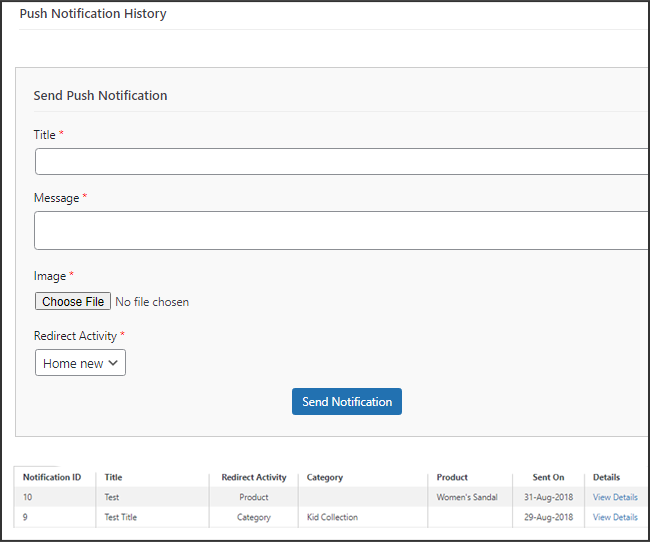
This tab includes a history of each type of push notification that was sent to a user with relevant information. The retailer has access to all previously sent notifications. Additionally, a custom notification created in the backend can be sent to the users using this tab. Through manually sent notifications, you can easily inform customers about any information or discounts pertaining to the store.

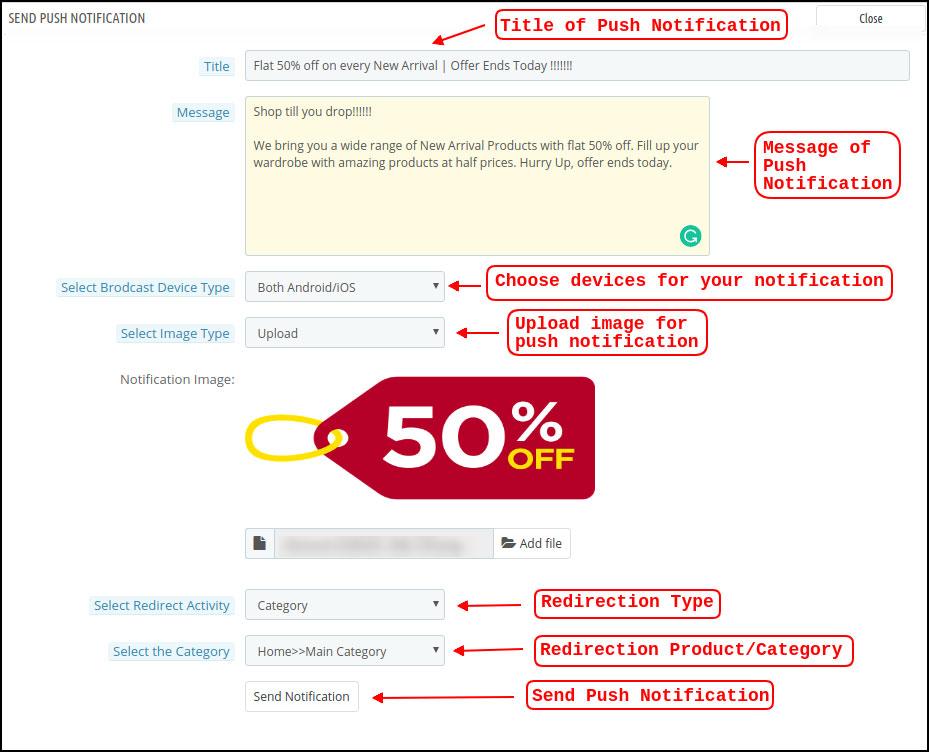
Send Notification: You can choose to manually send a notification to app users using this option. According to the screenshot below, you can customize the notification’s title, message, landing page, image, etc.

a) Push Notification Title: This is the name of the manual Push Notification you will be sending to app users.

b) Push Notification Message: The text of your manual notification that needs to be sent to app users.

c) Device Type: You can specify which users on Android, iOS, or both platforms you want to receive your manual push notification.

d) Image Type: You are able to upload the banner or image you want to use to support your notification. The banner image can be used directly through a URL or uploaded.

e) Notification Image: The store administrator is given the opportunity to preview the notification image and assess how it will appear on users’ apps.

The actual URL of the notification image that will be sent to app users is listed under item f.

f) Redirection Activity: Here, you can select from the Home Screen, Any Category, or Any Product to redirect your notification. Your users will be directed to whatever you specify when they tap the push notification.

g) Choose the Category/Product: For your notification, you can select any relevant category/product screen.

h) Send Notification: After creating and previewing your notification, it’s time to send it to your apps.

5.4 Payment Procedures

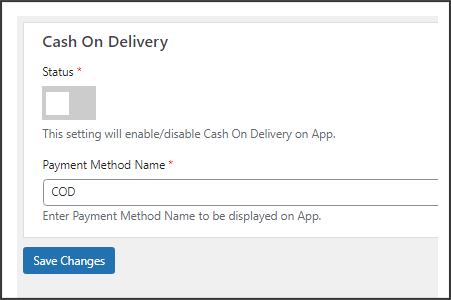
All types of website payment methods are supported by the WooCommerce Mobile App Creator for Android & iOS apps. It also includes the option for COD payments and the flexibility to include additional Web-View payment methods.

In our mobile app, the only available payment option is cash on delivery by default. Disable the COD method from the module’s back end, though, if you want to add the same payment methods as on your WooCommerce store. All of the payment options that are available on your website will work as intended in your mobile apps after the COD method is disabled.

.

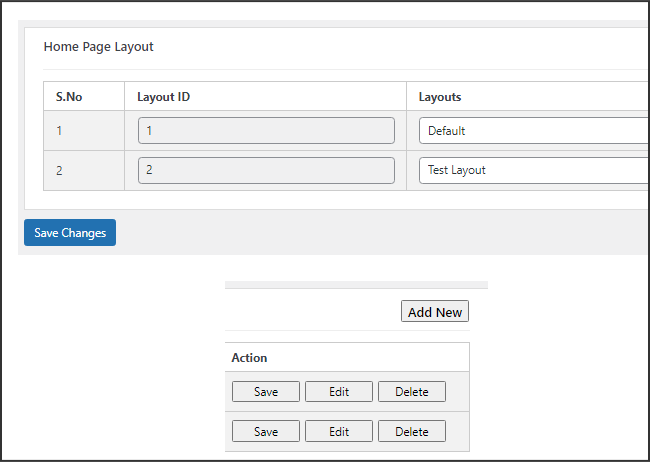
5.5.1 Home Page Design

The WooCommerce Mobile App Builder plugin’s ability to design and create multiple home screen layouts using different designing attributes and elements is one of its most amazing features. As can be seen in the screenshot below, this tab contains a list of home screen layout that has been previously configured using different themes & fonts:

The following elements are available in the back-end to configure the home page layouts:

  • Top categories
  • Square Banner
  • Horizontal Sliding Banner
  • Grid Banners
  • Countdown Banner
  • Grid Products
  • Horizontal Sliding Products
  • Recently Accessed Products
  • Add YouTube videos/upload videos on the home page layout.
  • Login/sign-up pop-up for the non-logged-in users.
  • Add custom banners with custom dimensions.

Any of these attributes can be set up by the store merchant and used to create and save multiple layouts. These layouts can be utilized based on the theme and specifications. Additionally, using just a drag and drop functionality, different elements’ positions can be changed.

Top Categories:

Top categories can be configured, including their image and landing categories or products, and are shown as small squares on the home screen. Maximum categories available through the WooCommerce Mobile App Maker are 8, with a minimum of 4 required.

Square Banner:

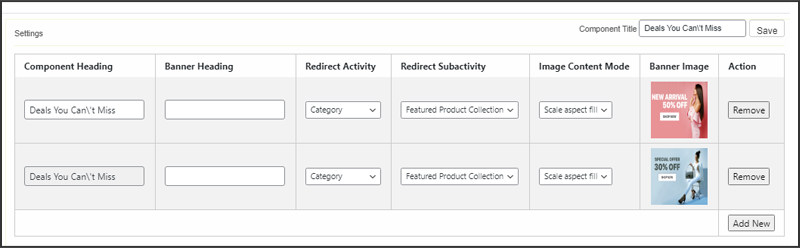
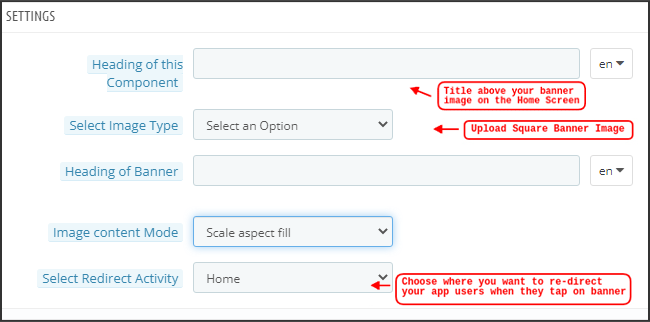
Top categories can be configured, including their image and landing categories or products, and are shown as small squares on the home screen. Maximum categories available through the WooCommerce Mobile App Maker are 8, with a minimum of 4 required.
In the recent updates, we have also provided the option to showcase different videos with the YouTube Video/Video Upload section added in the “Select Image Type” section.

Horizontal Sliding Banner:

These rectangular sliding doors are available and fully customizable from the backend. Like banner squares, the admin can also highlight the banner sliders by adding video elements. Furthermore, now the admin can get the option to enter the time that he wants to set for the automated banner sliding.

Grid Banners:

These are square-shaped banners that are listed in a grid format on the home screen. On the home screen, you can place as many banners as you like. You can also change the landing page’s image as needed.

Countdown Timer Banner:

A countdown timer is available on the banner provided by the WooCommerce Mobile App Builder. You can choose the landing page and banner image, as well as set a timer for when you want to display the banner. The banner will automatically disappear when the timer expires.

Square Products:

Regarding banners, the WooCommerce Mobile App Creator provides products to show as square listings on the home screen.

Horizontal Sliding Products

The products can be added as horizontal sliders. The products chosen may fall under any one particular category or may be highlighted as Best Sellers, Featured Products, etc.

Grid Products:

Grid listings of the products can also be added to the home screen. Any category can be used to select the goods.

Products Recently Viewed: The WooCommerce Mobile App Creator offers the recent tab element, which shows the most recent products the user has viewed. To display the element on your home screen, simply include it in your layout.

Sign-Up Pop-Up: Capturing visitors’ emails is a major challenge in eCommerce. To simplify this, the latest version of the Magento 2 Mobile App Builder includes a login/sign-up pop-up feature. Store admins can add a pop-up that appears for non-logged-in customers, making it easier to collect emails by offering simple login options and increasing the chances of email opt-ins.

Note: When designing a layout in the backend panel, the store administrator can add up to 20 elements.

6.0 Screens for Mobile Apps

6.1 Home Screen

Your WooCommerce Mobile App’s Home screen will be exactly how you want it to be. You have complete creative control over how to design and create a home screen with the WooCommerce Mobile App Maker. You can create user-friendly home screen layouts using a variety of banners (Square, Grid, Sliding), products (Square, Grid, Sliding), countdown timer banners, and recent products tabs in the backend.


Additionally, different design elements’ placements can be changed based on the situation.

1. Dynamic Layouts: You can create and save different layouts in the backend and reuse them for different events and festivals by using a variety of elements. Your app’s home screen can be created and customized dynamically.

2. Brand Logo: The WooCommerce Mobile App’s top header’s left-middle section displays your store’s logo. The logo can be enabled or disabled, as well as having its image changed, from the module backend.

3. Search: The search feature enables mobile app users to find what they’re looking for quickly and easily. The WooCommerce Mobile App offers two ways to search for products: On the WooCommerce Mobile App’s bottom tab bar layout, there is a search option.

–> Text: Users of your app can search for desired products by entering a few relevant keywords. The WooCommerce Mobile App will display results for that keyword that are pertinent.

4. Wishlist Bag: The wishlist bag, which contains all bookmarked products, is visible on the top header of your WooCommerce Mobile App. Users of the app can store their wishlist items in a bag for potential future purchases.

5. Shopping Cart: The Shopping Cart can be found on the app’s home screen in the top-right corner.

The users can get to know about the products added to their cart right from there.

6. WhatsApp:

A live seller-buyer chat option can be found at the bottom right of the home screen. Customers who use your mobile app can easily and directly message you with any questions, and you can answer them right away.

6.2.1 An Accordion Menu (Navigation Bar)

On the website, there are WooCommerce Mobile Apps for Android & iOS that have been developed with accurate product categorization. Mobile shoppers can browse a variety of products with ease. The Accordion Menu is also available for all CMS pages. It offers the following alternatives:


1. My Account

All user data, including personal details, shipping addresses, and order details, can be found on the My Account screen. The customers have access to all of their information and can update both their login credentials and personal information.

2. Categories

These categories match those on your website exactly. For easy browsing, you can map them appropriately and provide a 3-level categorization to app users.

3. CMS Pages

Here, a variety of CMS pages from your website, including About Us, Contact Us, Terms & Conditions, etc., are displayed. From the WooCommerce Mobile App Builder backend, you can select the one you want to be shown on the mobile app.

4. Language

Your users can view the WooCommerce Mobile app in their native language using the language selection option.

5. Currencies(s)

The WooCommerce Mobile App also shows all currencies that are offered on your e-commerce website. Customers can view and buy products for the price in the currency of their choice.

6. Sign in/Sign out

This option makes it simple for your users to log in and out of the WooCommerce Mobile App.

6.3 Category Screen:

Your WooCommerce Mobile App includes all of the associated categories, parent categories, and subcategories. The category screen is created with minimal clutter in

1.Two fundamental views:

Grid and List. In every listing, the product name, image, price, and discount are shown along with a button to add them to your wishlist bag. Layered navigation on mobile apps created with the WooCommerce Mobile App Builder makes finding products much easier. The category screens offer the following choices:


2. Sort:

Customers can choose the preferred order for sorting the category product pricing using this option. Your apps have two sorting options: Price: Low to High and Price: High to Low.

3. Filter:

The users can filter out the products using various selection options provided under the filter tab.

6.4 Product Screen:

Your WooCommerce Mobile App’s product screen is straightforward and interesting. Along with the name and price, various images of the same item are displayed. Depending on inventory status, the product availability is also indicated as “In Stock” or “Out Of Stock”. It includes the next additional items.

1. Options

Product Options: This screen shows all available options for the product, including size, color, and so forth. The product choices here match those on the website.

2. Brief Description

Users can quickly decide after reading the brief description of your product.

3. Product Details and Care

This page displays all of the product information that is listed on the website. Users of the app can access this page for detailed product information.

4. Add To Wishlist: By tapping “Add To Wishlist” on the left bottom of the product screen, users of the mobile app can directly bookmark the product.

5. Add To Cart: As the name implies, clicking the “Add To Cart” button adds the product directly to the shopping cart, allowing users to continue with the transaction.

6. Product Social Sharing

On this screen, you have the option to share your product on various social networks, including Bluetooth and email. Users of the app can invite many users to your app by sharing the products with their friends and family on various social media platforms.

6.6 Login Screen

The WooCommerce Mobile App Creator streamlines the sign-in/registration process and provides a variety of one-tap login options:

1. Login

Using their email addresses as sign-in credentials, app users can authenticate and access apps.

2. Register

The mobile app allows all new app users to register and create an account on the store. Only pertinent information is requested on the WooCommerce Mobile App sign-up form.

3. Use Phone Number to Log In

The easier and more reliable phone number login option that your mobile app offers makes it simpler for users to login and verify their OTP.

4. Use your fingerprint to log in

Additionally, your users have the option of using fingerprint authentication to sign in. Users can now quickly access apps thanks to this.

5. Login with Facebook

Users can access the app by logging in with their Facebook credentials.

6. Login with Google

The users can log in to the app using their GoogleAccount within no time.

7. Shopping Cart Screen:

All of the items in your shopping cart are displayed on the WooCommerce Mobile App’s shopping cart screen. The product’s name, quantity, total price, and shipping cost are all visible to app users.

1.Use Voucher

By entering active coupons and vouchers that are currently active on your website, this option enables users to receive discounts and offers.

2. The full product cost

Users can access this page to view the full cost of their shopping bag. It is automatically updated whenever there is a change in the quantity of a product or an addition.

3. Revision of Product Quantity

With the “Update Quantity” option, app users can even change the product quantity.

4. Remove the item

Users of the app can easily remove a product from their cart by selecting “Remove” from the menu.

6. Continue To Checkout

By selecting “Continue To Checkout,” front-end mobile app users can continue to the checkout & payment screens. On the checkout screen, they will receive a redirect.

6.8 Checkout Process

The checkout process in the WooCommerce mobile app Builder is made simple. In the mobile app’s checkout process, front-end users have the option to choose the shipping details, billing details, order numbers, order comments, and so forth.

Orders can be placed using just a few easy steps on the Android and iOS apps.

1. Customers can choose and add the desired item to their shopping carts. When the shopping bag is clicked, the user can also choose the desired product quantity. Users of the mobile front-end app can also view the total number of products and shipping costs.

At the bottom of the same page, the customer can also choose to use any coupon or coupon code.

2. The user can review the order and see several details after selecting the Continue to Checkout option. such as the cost of the product, the cost of shipping, the shipping address (which can be changed on the same page), the order summary (the number of products), the total cost, and so forth.

On the same page, the customer can also choose their preferred method of shipping. The order comment option that appears at the bottom of the screen allows the user to also include any special requests or requirements.

3. After selecting the option to “continue to checkout,” the user will be taken to the screen that asks for their payment method.

Users can choose from all of the website’s payment options on this screen. The shopping app includes a cash-on-delivery option as a standard form of payment.

The user will be taken to the order summary screen after completing the payment activity. where the customer can view the status, cost, and other information regarding their orders. Users of the front-end mobile apps will receive the order confirmation popup messages on their mobile phone screens as well.

6.9 My Account Screen

Users of the Android/iOS eCommerce app can view all account information, including a history of previous orders, on the My Account screen. The following options are available on the My Account screen:

  1. Order History

The users learn all the details of the earlier-placed order. The date the order was submitted, the order number, the price, and the delivery status are all visible to the users screen.

2. Update Profile:

Users can also update their previously saved profile information, such as their first or last name, phone number, and password.

3. Delivery Address (s)

Users of the app have access to the full list of saved shipping addresses. From here, you can also add a new shipping address.

4. Order Details:

The complete list of previously placed app orders is available to app users.

5. Reorder function

By selecting the “Reorder” button, you can directly reorder a product. By pressing a single button, all previous orders will be added to the cart.

6.10 Order Detail Screen

The WooCommerce eCommerce App’s order details screen shows every aspect of the order, including the shipping address, a summary of the products, the shipping and payment options, and the total cost. From this screen, users can even follow the delivery of previously placed orders.

7.0 Video Tutorials

Why does your eCommerce business need its own mobile app?

The mCommerce is expected to become as big as the eCommerce. Hence, having an eCommerce mobile app for the shopping site is not a luxury anymore, but an inevitable aspect. While most of the companies have already started upgrading their sites into a complete eCommerce mobile app, a wide gap still exists.

In a world where there a lot of competition at every step, having a website isn’t going to get you the desired revenue. You might have optimized your website to make it mobile responsive, but have you ever thought of having an eCommerce mobile app? Are you still on the fence for trying your hands in mCommerce? Here are some stats that can convince you to have your own eCommerce mobile app.

In case you are intimidated by the complexities involved in eCommerce mobile creation, then, you need not worry anymore.

These alluring statistics are enough to motivate the e-merchants to upgrade their online stores from desktop to the mobile platform. If not, then, here are some of the reasons that make eCommerce mobile apps are a must-have. Check them out.

Change in the consumption behavior

Along with the stats mentioned above regarding the buying behavior of the shoppers, the numbers related to mobile commerce is something the eCommerce store owners need to watch out for. The m-commerce is expected to make up to 50% of the total online purchase. Moreover, Google has brought forth the ‘Right now’ expectation of the mobile phone users has increased. As per a report shared by thingwithgoogle.com, “53% of visits are abandoned if a mobile site takes longer than three seconds to load.… We’ve actually seen that for every one-second delay in site load time, conversions fall by 12%”. Keeping this in mind, eCommerce mobile apps is surely one of the solutions to deal with the changing behavior of the customers.

Mobile experience can affect your branding

Latest research have proved that the mobile brand experiences are crucial to customer satisfaction. Speed, relevance and personalized contents are few of the factors that affect the overall user experience. Besides, people today have twice as much interaction with brands on mobile devices than the other medium such as desktop computers, TV and others. Thus, the eCommerce mobile app is one of the most intuitive media for the marketers to build their brand equity. Every time a consumer has a good experience with your mobile store, it raises the bar of your brand image. In addition, it even raises the expectation of the consumers. Countering this expectation of the online shoppers is easier with an eCommerce mobile app. Easy browsing, simple navigation, filters and site search saves the time and effort. Thus, boosting the brand recognition of the store. Moreover, the easy accessibility of the store increases with an eCommerce mobile app. Thus, it boosts the chances of store browsing as well as conversion.

Cultivate customer loyalty

Customer interaction and engagement is one of the best ways to get the much-needed customer loyalty. This loyalty, in turn, is the key factor in the customer retention. Bringing the entire eCommerce store in the pockets of the customers is one of the best ways to engage them. The options like reward points, gift cards and others are some of the features that are built around to cultivate the loyalty. The online shoppers are increasingly making last minute plans. Keeping pace with the expectation of the customers who wants everything at their fingertips is nearly impossible without an eCommerce mobile app store. In addition, 46% of the consumers say that they would buy if they find the mobile experience uninterrupted. Achieving this loyalty is not an easy task when it comes desktop websites.

Tap the gen-next target audience

The online companies need to focus on the tech-savvy younger generation. They make the marginal portion of the target audience. The issues such as fat-finger problem and others are not a concern for the next-generation shoppers. This is when a mobile app can come handy for the eCommerce store owners. Along with the factors like load time and easy navigation, there are many other expectations that can be fulfilled with the help of a mobile app. The voice search technology, location-based searches, incorporated GPS are some of the features that can be catered with the help of a mobile store. So, upgrade your site with a robust eCommerce mobile app maker and tap this customer base.

A better promotion tool

The fact is that the handheld devices is the quickest means to reach out to the customers makes it the most proactive marketing tool. In addition, the mobile app includes the option of push notification. It may be considered as annoying by some, but is still the most effective promotional tool. Other than this, the social sharing options can even enhance the visibility of your store on the social media platform. There are some mobile apps that can even work offline. Thus, it provides a 24/7 interface to keep the customers informed about the offerings of your store.

Outperform the competitors

The number of eCommerce websites is on the rise. However, not every site is upgrading for the mobile platform. Thus, the store owners who have already tried their hands in the m-commerce scenario has an undefined edge. The mobile apps not just boost the businesses, but it can even help you find the competitive advantage. With the ease of online transaction and personalized marketing strategies, you can outperform your customers who have still not entered in this field effortlessly.

Apps vs mobile sites

If your goal is to offer user-friendly content to the widest range of target audience, then, a mobile website is perfect. Mobile websites have a broader reach and are accessible across platforms. Online shoppers want web pages to load quickly. However, mobile browsing is usually accused to be slow. This is one of the reasons what gives an edge to the native eCommerce mobile apps. Moreover, the hardware features of the mobile devices are accessible with the apps. The features and like animations and high-resolution images may take a bit longer to load when it comes to websites. An app is an easy means to incorporate them. 10 major reasons why mobile apps are better than mobile websites are discussed here.

Excellent direct marketing channel

One of the biggest positive points of the eCommerce mobile app is that it offers a direct marketplace channel to the store owners. With an app, you can constantly stay in touch with your prospective customers. Moreover, the push notifications of the eCommerce mobile app is a much easier option to reach out to the shoppers regarding the various offerings of the store. Investing in an eCommerce mobile app will definitely cost you a lot in the beginning, but as a long-term investment, the benefits that you’ll have are countless. Moreover, there are budget-friendly solutions available allows the CMS based sites to have their own mobile app. There is eCommerce mobile app maker for Android/iOS for Prestashop, Magento, OpenCart and other platforms. The Prestashop Android/iOS mobile app builder, Magento mobile app maker, OpenCart eCommerce mobile app maker can effortlessly create an eCommerce mobile for the respective platforms. Top ways in which push notifications can increase the sales of your store are discussed here.

Better connectivity with your customers

The motive of your online business apart from converting the visitors into customers which can be achieved only by keeping them actively engaged with your site. While designing an eCommerce mobile app,  try to go for such responsive UI which keeps you stay connected with your customers. If you look closely, you can stay connected with your customers through Push Notifications about the fabulous deals currently being offered to the shoppers. In fact, personalized offers and discount coupons are a part of mobile apps that make your customers return to you time and again.

Final words

Can you deny the fact that the world has gone mobile? You won’t deny that the majority of shopping and browsing is generally done on smartphones. With the newer technologies available in smartphones, people have stopped spending a lot of time on laptops and desktops. If you take a look at the stats, you’d know the number of apps on Google Play, Apple App Store, and others has increased remarkably. This makes sense because people are going mobile and in order for companies to reach out to their potential customers, a mobile app is absolutely necessary.

It won’t be wrong to state that a mobile application can rekindle the user experience of an eCommerce store. KnowBand understood this concern and has brought automated Mobile App Builder plugin for various eCommerce platforms like PrestaShop, OpenCart, Magento, Magento 2, WooCommerce and Shopify. All the eCommerce store owners out there who are running their online business on these platforms can now easily go mobile. With such pre-configured solutions, they get complete access to design the mobile app and control every bit of its working. Here, is the simplest process to create an eCommerce mobile app in a few clicks:

Step 1: Purchase the automated Mobile App Builder module from the KnowBand store.

Step 2: Share all the specifications/requirements regarding the app with us.

Step 3: Get the APK/IPA in no time for publishing the same on app stores.

Moreover, for hassle-free publishing of mobile apps on Google Play Store and Apple App Store, refer the following articles:

How to publish an app on Google Play Store?
How to publish an app on the Apple App Store?

Get along with some other informative articles:

A OpenCart Free Extension to Create Mobile Apps for Your Business

The mobile Commerce has come way ahead than online eCommerce in the past few years. It has proved its worth as the most effective way to drive your business conversions and sales. We can witness today that every individual has access to the smartphones and internet facility, new doors of business opportunities and growth have opened. So, if you are currently running an OpenCart store but have not yet geared up for mobile shopping apps as well, you need to consider KnowBand’s OpenCart Mobile App Builder.

How Mobile App Builder extension is the right solution for you?

The OpenCart Mobile App Builder is an innovative & automated framework through which you can easily create native Android & iOS shopping apps. This extension saves you from any sort of technicalities or coding involvement neither for developing or managing.

This native eCommerce Mobile App Maker keeps your website sync with apps in real-time. Thus, you need not manage the app inventory on a manual basis. All the website details & info will be automatically fetched on apps. Moreover, the friendly module backend allows you to control the designing & workflow of apps on your own. Let’s explore more about how this plugin works.

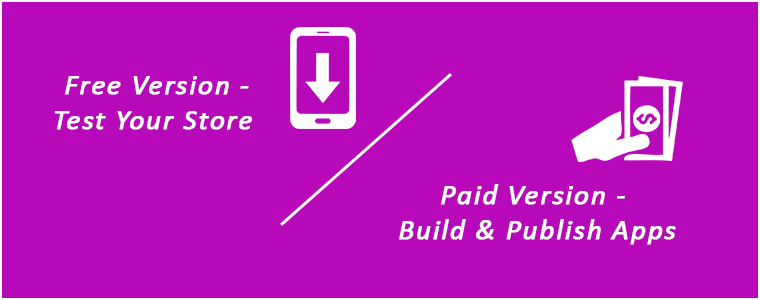
OpenCart Mobile App Builder: Free Vs Paid Versions

FREE Version – To Test Your Store on Demo Apps:

Want to check how your store will look on mobile apps? Use KnowBand’s OpenCart Mobile App Maker free version & get satisfied even before purchase. Follow these simple steps in order to test the same:
Step 1: Install module on your store

You just need to get a FREE module from here. You will receive a zipped file in your downloads section. Install the same on your store using FTP details. After successful installation, enable the module from backend.

Step 2: Install demo apps on your device

Now, download our demo apps on your testing device from below links:
Android: https://play.google.com/store/apps/details?id=com.velsof.genericapp
iOS: https://apps.apple.com/in/app/opencart-nautica-app-builder/id1290687460

Step3: Open App & Test

Open the app & enter your website URL. That’s it, now your store will run on our apps.

PAID Version – To Build & Publish Your Own Apps:

Creating and getting Android & iOS App was never this easy as it is now with OpenCart Mobile App Builder. Its just a matter of 3 simple steps:

Step 1: Purchase our Module from here.
Step 2: Fill our pre-requisites form.
Step 3: Get final apps in 2-3 days.

Apart from this, the module provides a complete backend control along with 3 months of free support. We would even publish the apps free of cost for you.

Top Features with Mobile App Builder Extension:

1. Customize & Design App Home Screen:

The OpenCart store admin gets the option to customize & create multiple layouts in the module backend. With this functionality, you can design the home screen as per various occasions & festivals. You can even edit the pre-saved layouts whenever required. Here, is the list of available designing elements in the backend:

Top Categories (Square shaped category icons)
Square Banners (Square shaped banners)
Horizontal Sliders (Rectangular sliders)
Grid Banners (Multiple banners in Grid form)
Countdown Timer Banner (Timer-based flash sale banner)
Square Products (Square shaped product listings)
Horizontal Sliders (Rectangular shaped product sliders)
Grid Products (Multiple products in Grid form)
Recent Products (Products which user visited recently)

2. Real-time Synchronization:

Keeping everything synced is a tough yet necessary task for an eCommerce store admin. Our OpenCart Mobile App Builder establishes perfect sync between website & apps which brings the entire inventory on mobile apps.

3. Complete Backend Access:

The OpenCart Mobile App Builder gives you the complete backend control to make the changes in app & manage it on your own. You can easily customize the design of your mobile Apps and other functionalities over a few mouse clicks.

4. Simplified login Process:

The Mobile App Builder for OpenCart comes up with various login options like Google, Facebook, Phone number(OTP) and Fingerprint which makes it easier for the users to enter your app & browse products.

5. Provide Direct Zopim & WhatsApp Chat:

Solving your user queries promptly is much easier with inbuilt Zopim(formerly known as Zendesk) & WhatsApp chat in your mobile apps.

6. Multi-lingual & RTL Support:

It is difficult to develop different Apps in different languages. By developing the Android & iOS apps with OpenCart Mobile App Maker, you can easily expand your reach worldwide. The mobile apps support both multiple languages including RTL ones.

7. Personalized Push Notifications:

You can easily send unlimited manual and automatic push notifications to app users from the backend of OpenCart Mobile App Builder. This promotional tool helps in driving engagement, sales, and revenue on your store.

8. Shipping Methods Support:

The OpenCart Mobile App Builder supports all sorts of website shipping methods on mobile apps. You can offer the same shipping to app users as of website.

9. Complete White Label:

Your OpenCart Mobile Apps will be branded as per your website. You can use your own splash screen, icon etc. on app. The store logo can also be added on the header of mobile apps.

10. Easier Mobile Promotions:

The OpenCart Mobile App Builder module brings personalized push notification feature through which the store admin can send sale & promotional push notifications to the users & improve user retention & revenue.

11. Enhanced Layered Navigation:

The OpenCart Mobile Apps offers the easiest navigation with filter/sort, keyword/voice search. The smooth screen flow guides the users to the desired products in no time.

12. Include Multi-payments:

The OpenCart Mobile App Maker brings all your website payment methods on mobile apps along with Paypal & COD in addition. Furthermore, any other native payment can also be integrated into the app over a fair price. The apps even support multiple currencies as well.

13. Coupons & Vouchers Support:

Every discount/offer coupon or voucher code which is active on your website will also work on mobile apps as well.

14. Simplified Checkout for Easy Orders:

With a single screen checkout process, the OpenCart Android & iOS apps make the order submission seamless for mobile shoppers. This helps in improving the shopping experience of the users & ultimately sales.

15. Real-time Order Tracking:

The Mobile Apps with OpenCart Mobile App Builder have the functionality to view the previous app order delivery status. The order status gets updated on the app as of website automatically.

16. Gamified Spin Win (E-mail Subscription pop-up):

You can offer an e-mail subscription pop-up on your app having a gamified spin-win interface. This helps in capturing the user data which can be used for re-marketing purposes afterward. You need to just install OpenCart Spin & Win extension on your store. The same pop-up will also work on your website as well.

17. Multi-Vendor Marketplace (Custom Integration):

Our mobile apps are even compatible with OpenCart multi-vendor marketplace plugin. The entire marketplace can be brought on the same mobile apps without any effort. You can visit this combo module (Marketplace + Mobile App) for more details:

OpenCart Advanced Marketplace with Mobile App

Conclusion

It’s time to catch up the speed & mobile apps could be the missing accelerator for your website. So, go ahead & launch a full-fledged pair of shopping apps today.

Related Stories: