Web Push Notification is a widely adopted method used by eCommerce merchants to reach out to the prospects and drive more conversions. It creates a communication channel between the brand and the customers to deliver important or useful information to the latter. Through this article, we will try to understand the tactics behind using Web Push Notifications and how marketers are using this channel to boost eCommerce conversions.
What are Web Push Notifications?
Web Push Notifications, also known as the Browser Notifications or Web Browser Push Notifications are messages that appear on a subscriber’s device even if he or she is not present at your website. Web Push Notification is a smart marketing strategy to engage with your audience(subscribers) and increase conversions without being an annoyance.
Browsers that currently support Web Push Notifications are Chrome, Firefox, Opera and Safari. These notifications can be sent across mobiles and desktops.
How Do Web Push Notifications work?
For Website Push Notifications to work, your visitors/users need to subscribe to your notifications. When they land on your website, a popup appears asking users to allow/approve or deny receiving updates from your end, and only if they click on the latter, you would be able to send them notifications. Web Push Notifications do not require users to provide their email address.
Web Push Notifications- Best Practices to Increase Conversions
Having an eCommerce website? Here are the 5 best practices for marketers to increase conversions and scale-up their revenue using Browser Push Notifications.
1. Announcing a Limited-time Sale
Online shoppers do get a bit excited when they hear about a flash sale, especially from a store from where they shop regularly. You can use this to your advantage and announce a limited-time sale as soon as the sale goes live.
You can create urgency to purchase by mentioning how long will the sale last, in your notifications. It increases the open rate and maximizes the chances of conversion. You can also try adding the coupon code too in the same if there’s any.
2. Announcing New Arrivals
Another one in the best practices for web push notifications would be making your subscribed audience aware of your newly introduced products. Not only it provides free marketing but also generates curiosity in the online shoppers to check out what’s new in the store.
For example, if you deal with electronics or mobile gadgets, you can send web push notifications regarding the arrival of new smartphones on your store.
3. Let Customers know when a product is Back in Stock
Loyal customers wait patiently for the product to be available again in the store. And nothing gives them more happiness than seeing the product which was out of stock earlier, back in stock. Though there is a sense of excitement to see the “Buy Now” option, there is also the fear of missing out on the purchase. You never know when a product goes out of stock again.
Website push notifications make sure that your customers are not missing out on the product that they wished to buy, and they are informed as soon as it is back in stock. This pushes the customer to make a quick purchase, enhancing your conversion rate.
4. Recover Abandoned Carts
Adding to the list of best practices for web push notifications is sending out alerts to the abandoned cart users. Many times, a user just adds an item to the cart but does not buy. This leads to cart abandonment. Though there can be multiple reasons for cart abandonment, you can take a follow-up by asking the abandoned cart users to complete the purchase by sending out notifications regarding the pending items in the cart.
Abandoned Cart Web Push Notifications make a great way to recover the lost sales and increase conversions.
Customers have an option to negotiate the product price in a brick-and-mortar store. Unfortunately, such an option is not available for an online store. This is why customers rejoice when they witness a price drop while shopping online. Through browser push notifications, you can let the prospects know as soon as the price drops below than what it was during their last visit.
These types of notifications are very effective to trigger impulse buying, encouraging customers to buy their desired product at a price lower than the original price. It leads to more conversions and creates higher sales.
The Bottom Line
Web Push Notifications create higher engagement and this is the reason why they are also known as engaging push notifications. They are effective and provide you with excellent opportunities to make the best use of it to increase conversions in your eCommerce website.
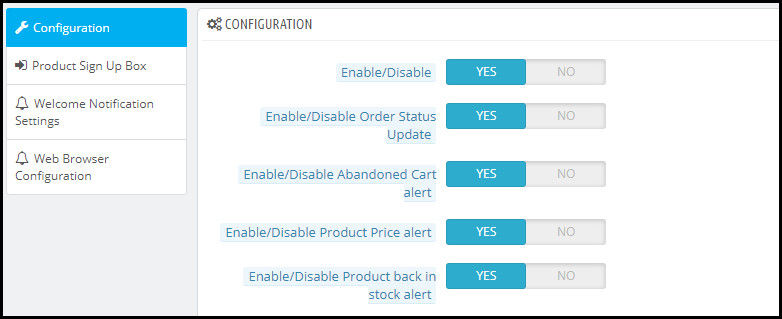
Looking to add the Web Push Notifications functionality on your website? Check out Knowband’sWeb Push Notification module that will cover almost all your major requirements. The Web Push Notification lets you send-
Flash Sale Notifications
Product Price Alert Notifications
Product Back in Stock Alert Notifications
Abandoned Cart Reminder Notifications
Order Status Update Notifications
Apart from this, you can create multiple web push notification templates of your own choice. You also get the option to send a notification immediately or at a fixed time.
KnowBand currently offers this module to Prestashop, Magento, and Magento 2 platforms. Check out to know their complete features and benefits:
Hope you liked knowing about the “Web Push Notifications Best Practices to Increase Conversions” and got an idea of different types of web push notifications you can use for your website.
Shopping cart abandonment is a global issue that has been creating problems for online retailers all over the world. Cart abandonment has a huge impact on the sales and conversions of any eCommerce store. Even with the passing time, the problem looms large over the eCommerce platforms.
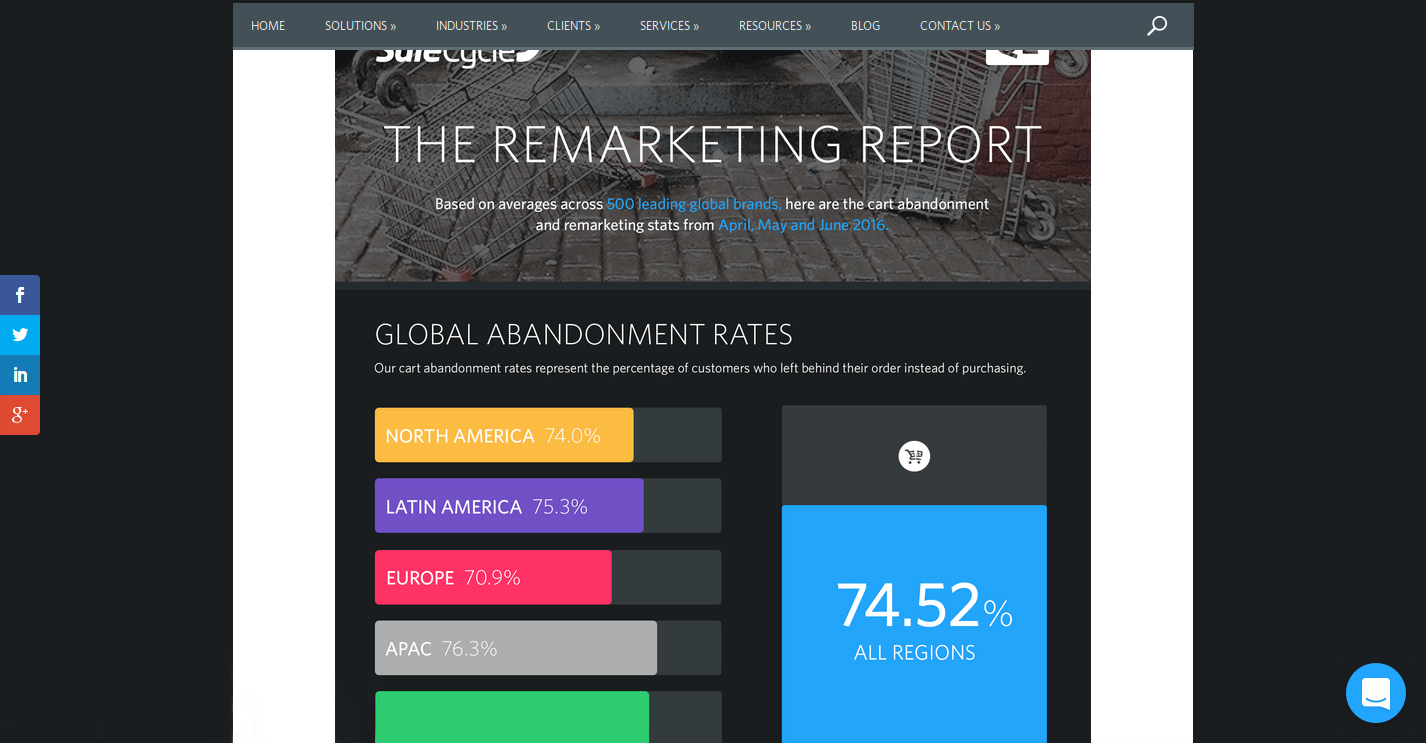
“The Remarketing report” prepared by the SaleCycle, a behavioral marketing company, shows the graveness of the situation. Here are the important insights regarding the same report.
The report shows the shopping cart abandonment trends across regions and industries.
As per the SaleCycle’s research on 500 leading global brands in the second quarter of the year 2016, the following crucial trends were observed.
The shopping cart abandonment was seen to be different for different regions of the world. While it was 74.0% for North American countries, the figure went a little higher for Latin American countries with 75.3%. Similarly, for European countries, the cart abandonment rates were found to be 70.9% while it was 76.3% for the APAC countries.
The overall cart abandonment rate comprising of all the regions was found to be 74.52%.
Apart from the region, the shopping cart abandonment varied considerably as per the industries involved. The rate of shopping cart abandonment for retail was found to be 74.6%, 80.1% for travel related industry and 68.8% for fashion-specific industries.
For the first quarter of 2018, the global cart abandonment rate was found to be 75.6% across all sectors.
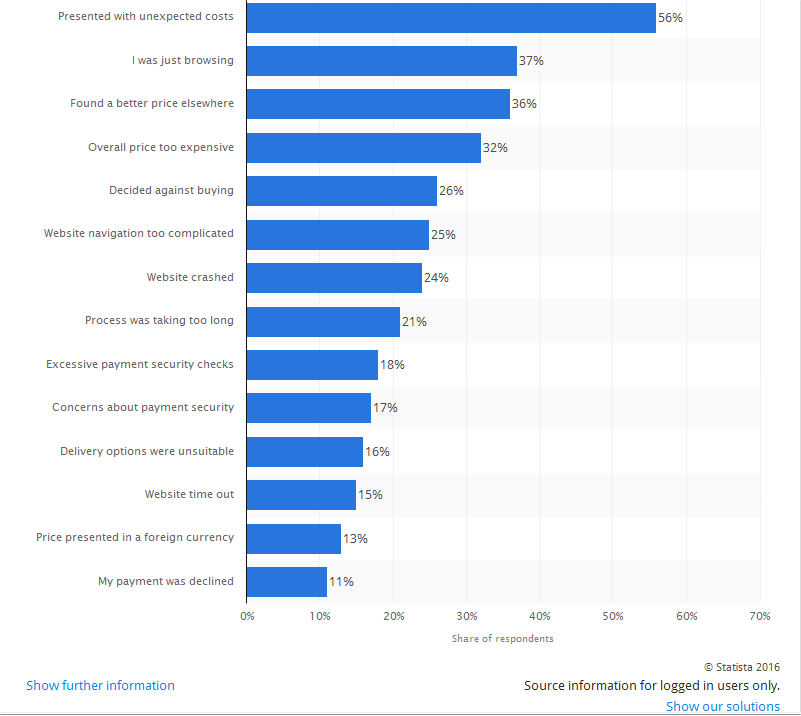
According to another eCommerce report by Statista, a statistics portal company, the shopping cart abandonment is based on a number of factors and problems faced by the online shoppers on an eCommerce store. The list of all the factors that lead to abandoned carts on an online store is explained in the statistical graph as shown below:
Take action against all the factors mentioned in the graph for reducing shopping cart abandonment.
Considering the reasons for shopping cart abandonment and the cart abandonment rate across regions among a wide range of industries, the problem can’t be left ignored at all if a retailer wishes to avoid cart abandonment and improves sales and conversions on their eCommerce store. Here are some of the tips that can help in reducing the shopping cart abandonment on an online store.
1. Reduce overhead expenses on your store
In a competitive business environment, the availability of products at an appealing price is the only thing that can drive conversions and sales in bulk. However, the cost of a product is often increased by the unknown overhead expenses that are present on an eCommerce site.
Some of the common examples of the overhead expenses on an online store are online transaction charges levied by third-party payment gateways, credit card transaction fees, order processing fees, commission amount charged by online marketplaces.
No doubt, it is impossible to run a business on a non-profit basis for any online store but certainly, you can cut down the additional costs in order to avoid cart abandonment. Be precise about the product price. Do not compel your consumers to abandon their cart with hidden charges. Specify your product pricing prominently for grabbing maximum customer engagement and sales.
2. Add Exit-intent popup
Exit popups provide you an excellent opportunity to reduce the cart abandonment rate and maximize conversions. Exit popups work when it is detected that a user is intending to exit the store and presents them a popup containing a deal or an offer.
Let’s say a user is trying to abandon his/her cart and almost ready to take an exit from your store, you can, then, make the user stay by offering them the discount on that product, encouraging them to complete the purchase.
3. Provide Guest checkout
A majority of the consumers bounce back from the store if they are presented a mandatory sign-up during the checkout. This isn’t a great move if you wish to reduce the cart abandonment rate on your store.
Avoid the mandatory sign-up and provide a Guest checkout option to your visitors so that they do not face any hurdle in between their checkout.
4. Establish trust with security badges
When customers provide you their confidential payment details, they put their trust in you. Similarly, you can win their trust by displaying the security badges/logos somewhere on the payment page to give them an assurance that their data is secure.
5. Enhance the functionality of your shopping cart
It is important to have a shopping cart that is capable of performing cart changes in a quick manner. Some of the key features that need to be present in an eCommerce platform for enhancing the functionality of a shopping cart are described below:
It needs to offer large, detailed and functional images of the products.
Easy and quick navigation facility for a better online shopping experience.
Functionality to include product reviews from customers.
Ability to apply discount coupons and gift cards.
E-commerce platform like OpenCart offers a wide range of above-mentioned shopping cart functionalities to improve the online shopping experience of customers. Utilize the functionality of this shopping cart for encouraging more customers towards your online store. Take a dashboard view of the OpenCart platform that allows store owners to perform desired functions on their eCommerce store.
Use an eCommerce platform that can improve the functionality of your online store. Try to enhance the experience of your customers. If you are on standard shopping carts, you may use Shopping Cart extensions and Checkout Extensions, or, you may get the custom implementation for your website.
6. Improve the loading time of your online store
As per the recent report of Hosting Facts, “A single second delay in your website loading time can result in a 7% loss in conversion, and 40% of web users will abandon a website if it takes longer than 3 seconds to load”. This statement itself explains that people are not patient enough when it comes to the website loading time. The average loading time of a website is said to be around 2–3 seconds which can keep the customers engaged, otherwise, the visitor is likely to leave the website.
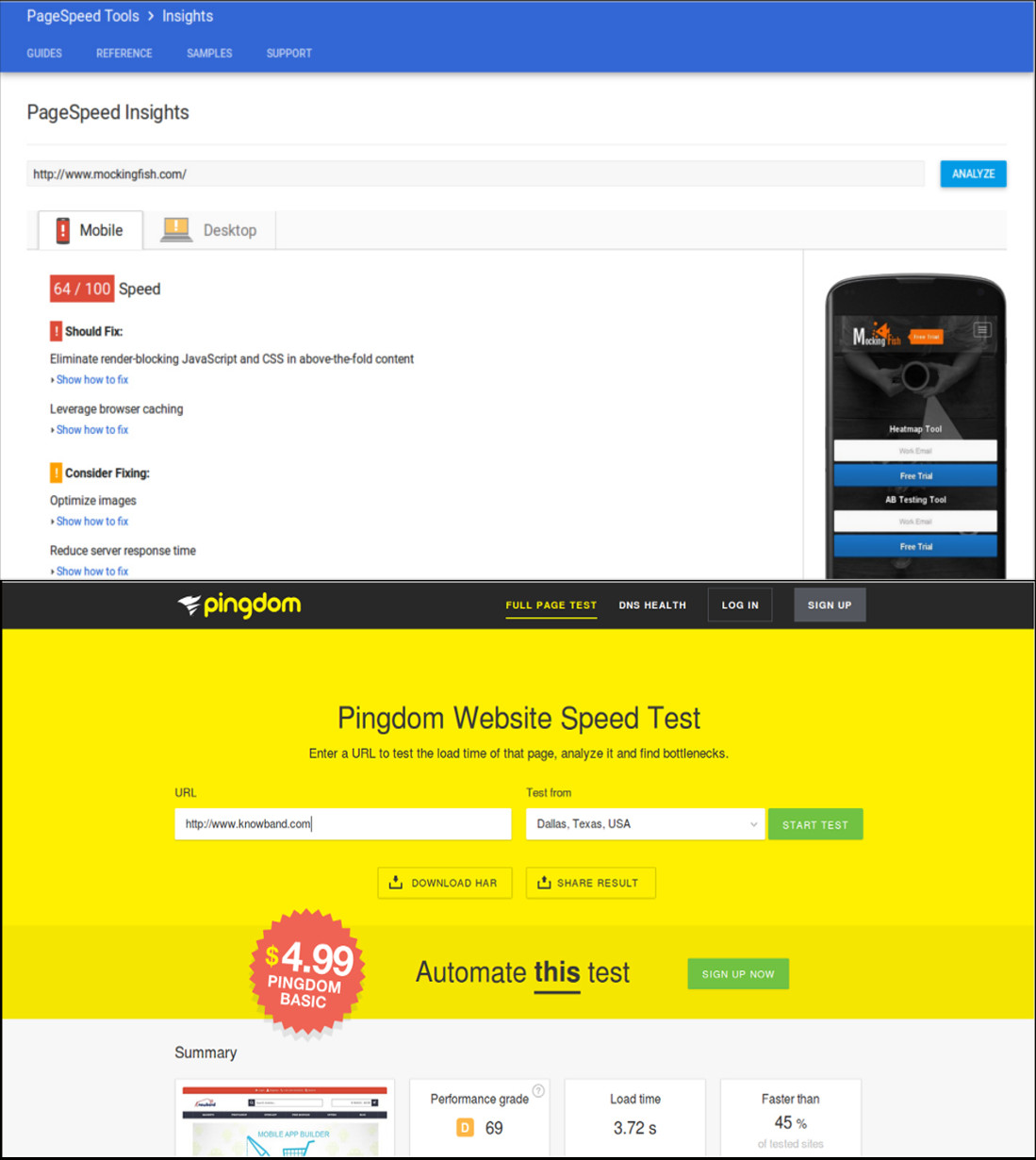
This is definitely a huge setback for eCommerce store owners as a slow loading website can hurt their conversions and sales. In order to improve the loading time of your eCommerce site, the following site optimization techniques need to be implemented at the earnest level.
Minimize the number of HTTP requests to avoid delay in website loading.
Compress and optimize large size images for your eCommerce site with the help of image and data compression tools/programs like Gzip, JPEG Optimizer, TinyJPG, Caesium, and such others.
Enhance the utility of your CSS files by eliminating browser specific codes and applying shorthand codes.
7. Enhance the website design and accessibility across multiple devices
The global pattern of online shopping has changed drastically with the more number of purchases on an online store made through mobile devices instead of desktops and laptops.
To understand the above scenario, the number of mobile devices (smartphones and tablets) shipped worldwide is estimated to a total of 343.3 million as per the Worldwide Quarterly Mobile Phone Tracker report of International Data Corporation (IDC) for the second quarter of the year 2016. To target such a huge mobile based users, you need to take the required steps to make your website accessible and user-friendly on various devices and screen types. Below are some of the quick fixes that can make your site more accessible and user-friendly.
Use mobile web development technologies like HTML5, CSS3, JavaScript and mobile responsiveness for better site reach and performance.
Enhance the usability of the CTA button on mobile devices by selecting an appropriate size and placement.
Include optimized and reduced page size for mobile content.
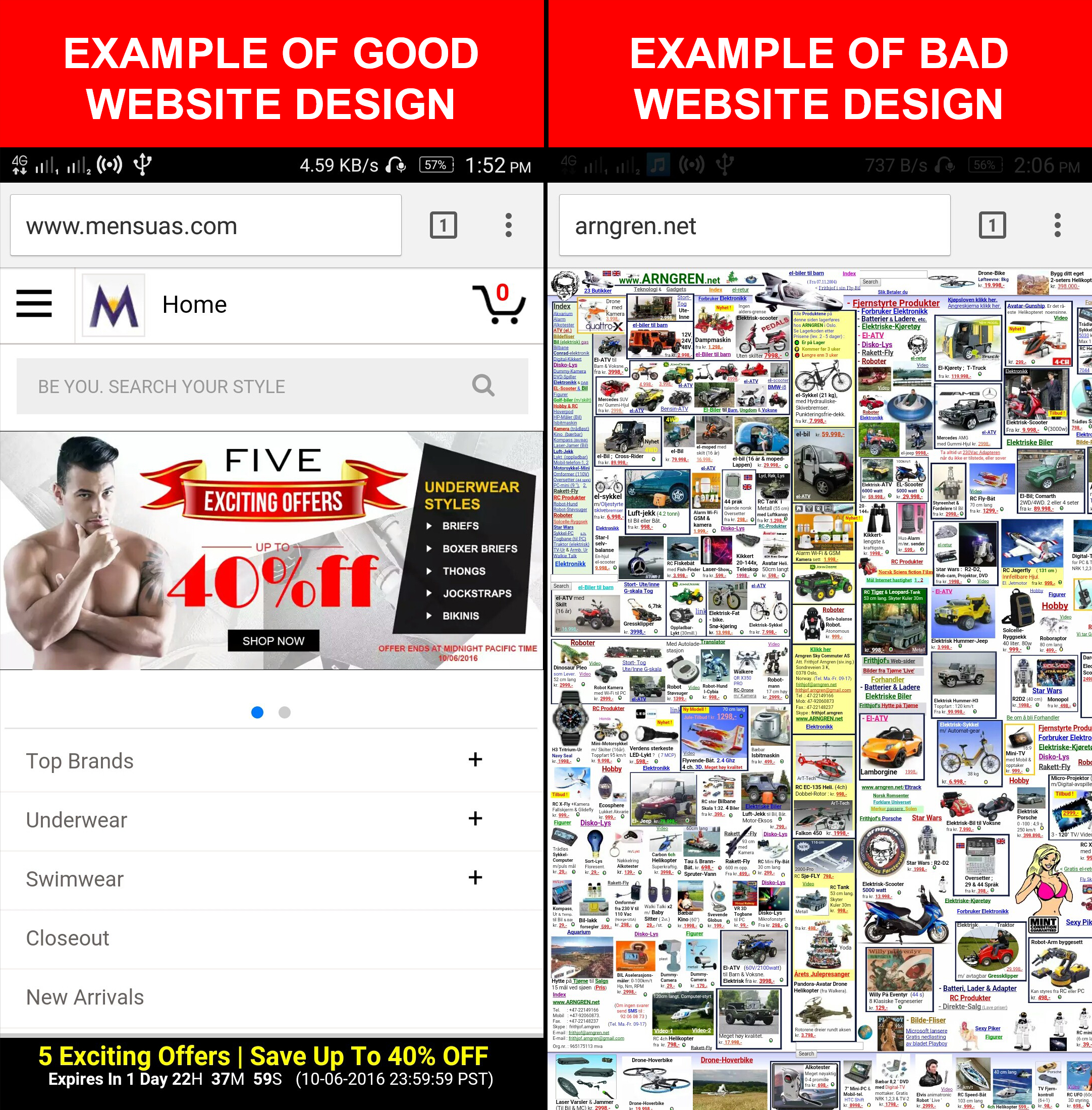
If you want to understand the importance of web design in eCommerce, here is the example for you. Take a look at these two mobile designs that provide a complete insight into a good and bad mobile website design and their impact on the conversions of a website. A good mobile website design encourages customers to browse a website whereas a bad mobile website design completely deviates a visitor and results in shopping cart abandonment along with an increase in the bounce rate.
Focus on the design of your mobile website for grabbing maximum conversions and sales from your customers.
8. Make the checkout process simplified
Make your checkout process more simplified by restricting the number of checkout fields.
People prefer to shop online due to the ease of purchasing products, a variety of options available at a place, the option of product delivery at the customer’s premises and much more. However, if this is robbed from online shoppers, it is certainly going to affect the sales of an online store.
An easy and quick checkout process encourage online shoppers to make a product purchase through a particular eCommerce site. So, ignoring it would be the biggest mistake for any eCommerce store owner.
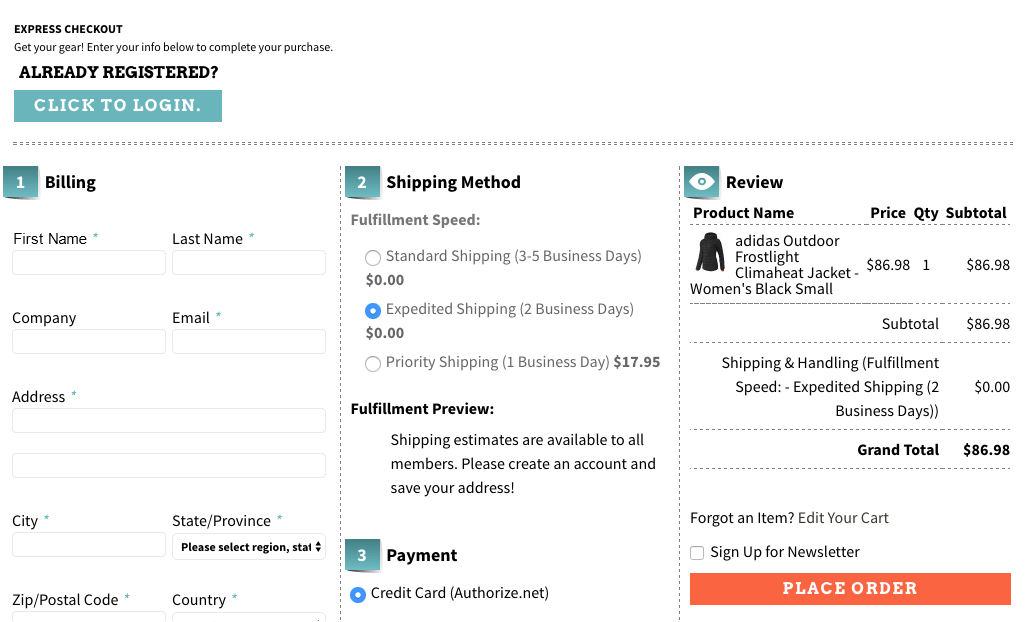
To improve the checkout process, you need to provide accurate product status, one page checkout process, quick cart customization facility, availability of contact details, easy product return requests, social login facility, the addition of security and trust badges and other such perks to customers.
Here is a checkout page of the website Art.com that simplifies the online shopping experience of the customers by providing various features and functionalities.
Offer a simplified checkout process to your customers for improving conversion rates and sales.
9. Bring back abandoned carts through customer re-targeting
Email Marketing can take your business to a long way by encouraging customers to complete their pending shopping orders and can provide you promising results in terms of conversions. These emails are also an important tool for customer re-targeting provided they are engaging, sent at a regular interval of time and provide customers enough reasons to complete their pending shopping orders. E-Commerce store owners need to schedule reminder emails to customers at a regular interval of time in order to remind them about their abandoned shopping carts. They can take the help of email marketing software like MailChimp, ConstantContact, GetResponse, AWeber, etc. that can provide contact details of customers for better customer re-targeting.
10. Offer products at an affordable price
Drive more revenue to your store by pricing your products more effectively. When the competition is too high in a particular business segment, it makes sense to present your products in the most competent manner. You need to have a clear idea about the price of your competitors and should reprice your products accordingly. Once, the customers find your products as most affordable, they will love to buy from your online store irrespective of the competitors available in the market, providing you are not compromising with the quality.
In case, you wish to involve customers directly in the pricing strategies, there are certain eCommerce Extensions that can help customers make a wish about their product price. Make an offer that they can’t resist. In this way, eCommerce store owners can directly know about the interested price segment of their targeted customers.
11. Add multiple payment and shipping options
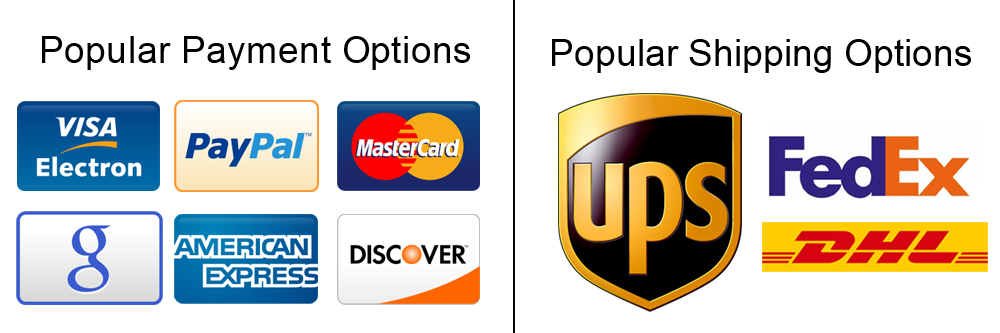
Include multiple payment and shipping options on your eCommerce store for improved checkout experience.
At the final checkout process, numerous online shoppers leave the site when they are unable to find their required payment and shipping options. This is a serious issue and has reduced the conversion rates and sales on various online stores to a significant level.
To overcome this critical situation, store owners need to offer multiple payment and shipping options to reduce the rate of eCommerce abandoned carts. Make a list of the popular payment and shipping options by taking insight from the customer surveys and include them in your online store. Some of the well-known payment methods are PayPal, Visa, MasterCard, Google Checkout, Wire Transfer, SagePay, Boleto. Similarly, you need to include these shipping options such as USPS, DHL, FedEx, USPS to improve the online shopping experience of your store visitors.
12. Use Web Push Notifications
Web Push Notifications is the latest approach followed by online businesses to target the users abandoning their cart. With the help of web push notifications, you can send the abandoned cart notifications to the users not completing their purchase and remind them about the items pending in the cart.
There are many more ways to avoid the cart abandonment on an e-commerce store, however, you will find the above-mentioned methods as the right approach. Take the proactive steps now and perform some major makeover of your eCommerce site to reduce abandoned carts. It’s difficult to get the customers to your website in the first place, and then seeing them leave without buying is even more painful. The best time to act on Abandoned Carts is now, do not miss it.