After reading this blog we will be able to add the html attribute in “Terms and Condition” link to open it in new tab.
Current Scenario
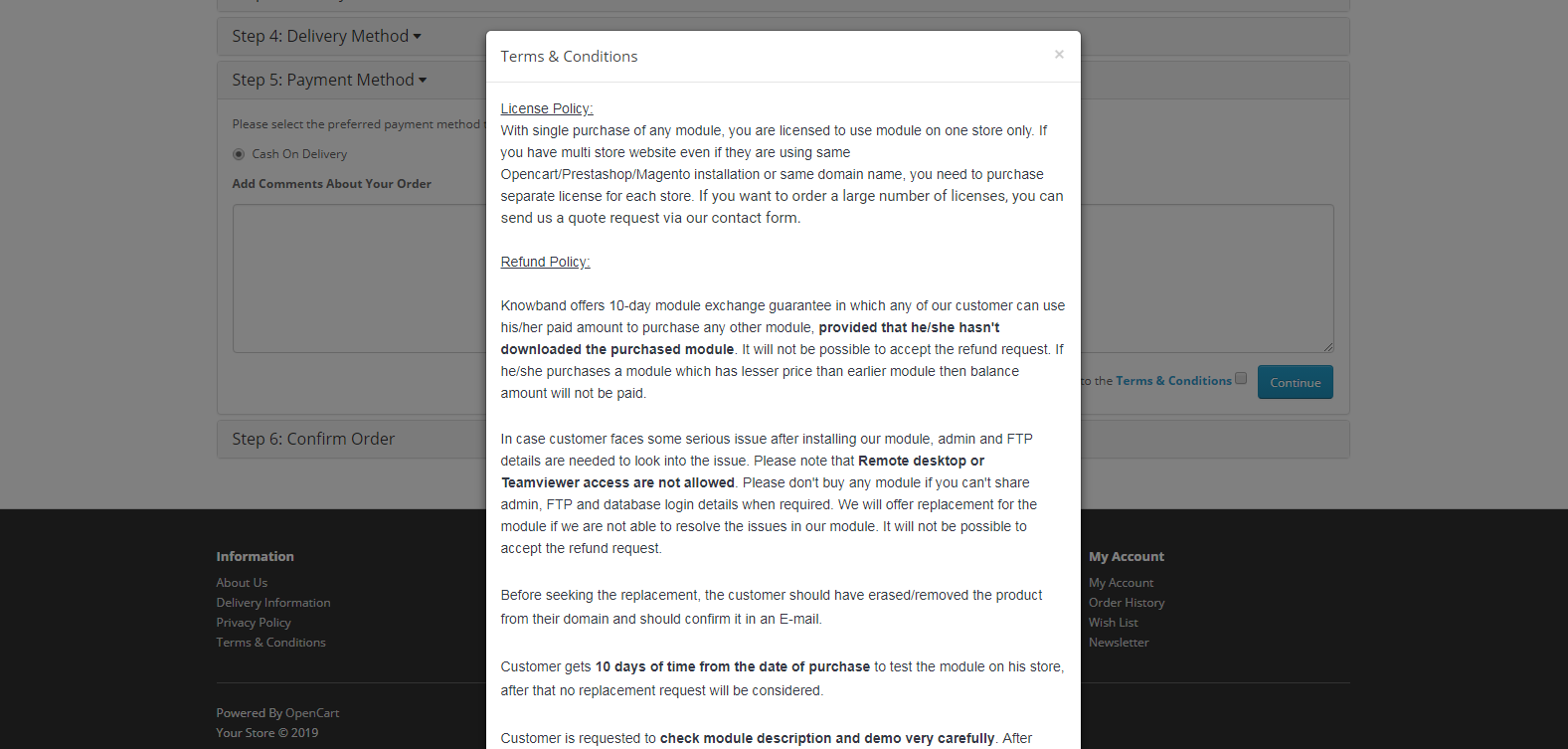
Presently, The “Terms & Conditions” link shows entire page in a popup window on checkout page of Opencart. But for “Terms & Conditions” having custom texts and html we want to open the same link in new tab as the content of page may not look appropriate in pop-up.
Refer below screenshot for the same-
Procedure:
STEP 1:-
Terms and Conditions link displayed on default checkout page resides in catalog/view/theme/default/template/checkout/payment_method.tpl, Block of code used for link is as below :
which contains header, footer and other content in the page.
STEP 2 :-
Lastly, you have to edit the definition of link in catalog/language/en-gb/checkout/checkout.php
In above file location there would be a definition as below : –
$_['text_agree'] = 'I have read and agree to the <a href="%s" class="agree"><b>%s</b></a>';
We have to add a attribute target=”_blank” and remove class=”agree” in above anchor tag to open the link in new tab. The new definition of text_agree key would be as follow:-
$_['text_agree'] = 'I have read and agree to the <a href="%s" target="_blank"><b>%s</b></a>';
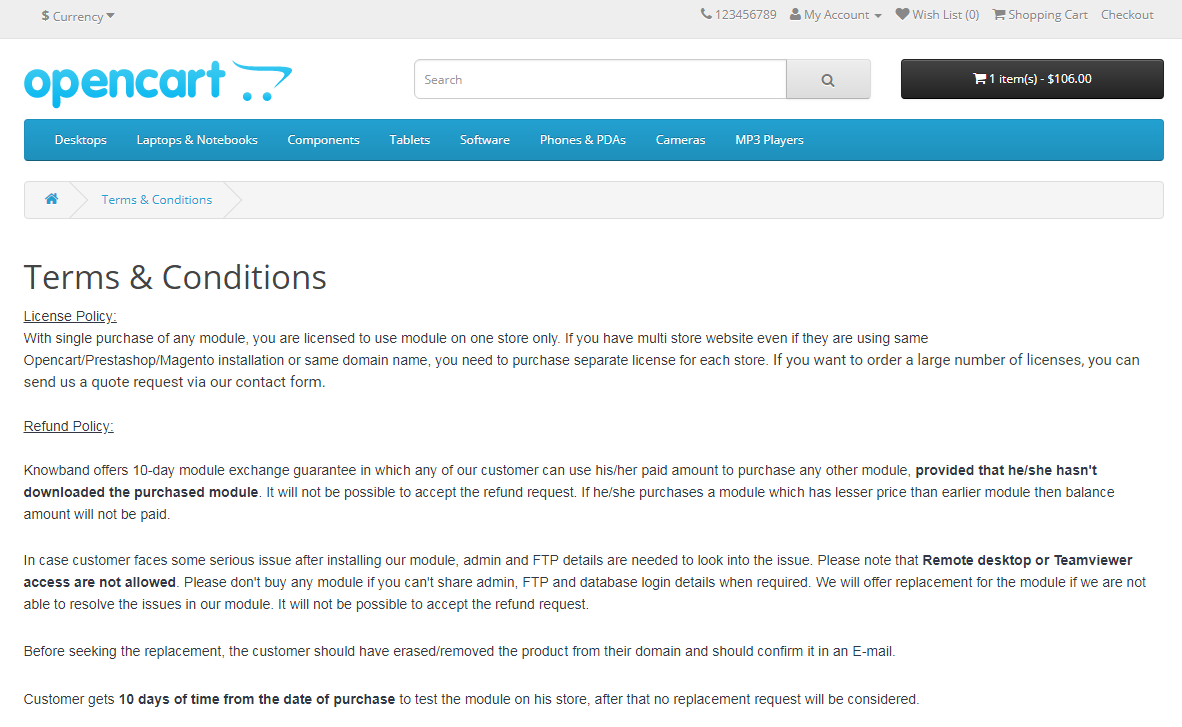
After saving the above changes, we will be able to open the “Terms & Conditions” link in a new tab on checkout page.
Please refer to the screenshot below :-
Summary:
After following above changes, we will be able to open the “Terms & Conditions” link in a new tab on checkout page.
NOTE: This demonstration is for default template but this will work same for other templates having similar code.
The checkout page is the conversion deciding factor for any eCommerce website. If you are driving a good amount of traffic on your store but the conversions are hitting very low, there are probably some flaws in your checkout page.
Though checkout is not the only barrier (there can be some other factors as well such as the website UX), it is the most vital element among other elements on your eCommerce website.
A huge difference can be made in eCommerce conversions if online businesses rectify their checkout page mistakes. In this article, I have listed out 8 checkout page mistakes that may be killing your eCommerce conversions, along with their solutions.
Mistake 1 : No Guest Checkout option
Mandatory registration on the checkout page adds to the topmost reasons for shopping cart abandonment. Online shoppers feel annoyed when presented with a sign-up form during the checkout process.
Forcing visitors to create an account only increases the number of fields to be covered before making the payment. Some of the eCommerce stores even ask users to verify their account, leading to a troublesome checkout experience.
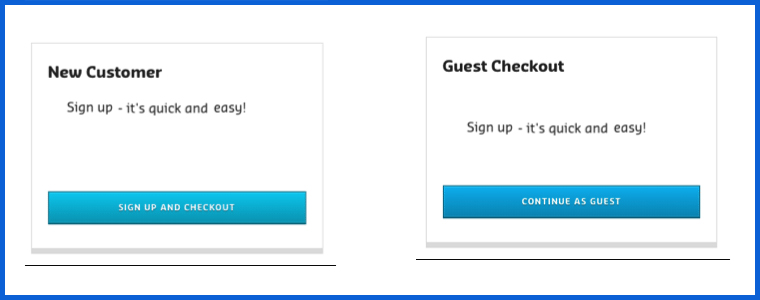
This can be avoided by offering the Guest Checkout facility. Guest Checkout allows users to get rid of the registration process and helps them make a quick checkout, enhancing your conversion rate.
Mistake 2: Not offering Social Login
Almost every eCommerce website today provides users with the facility to sign in using their social media accounts. Not having the social login option on the checkout page can affect your eCommerce conversions.
Providing the social login option eases up the registration task (single-click registration), maintains the checkout flow and allows users to get rid of remembering the password.
Most people remain logged in on their Facebook or Instagram. Hence, a social login option reduces the extra efforts put during the sign-up process by allowing users to sign-up with their existing social information.
Mistake 3: Not using the Progress Bar on the Checkout Page
Shoppers might give up the purchase idea if they are unaware of the number of checkout steps involved in the checkout process.
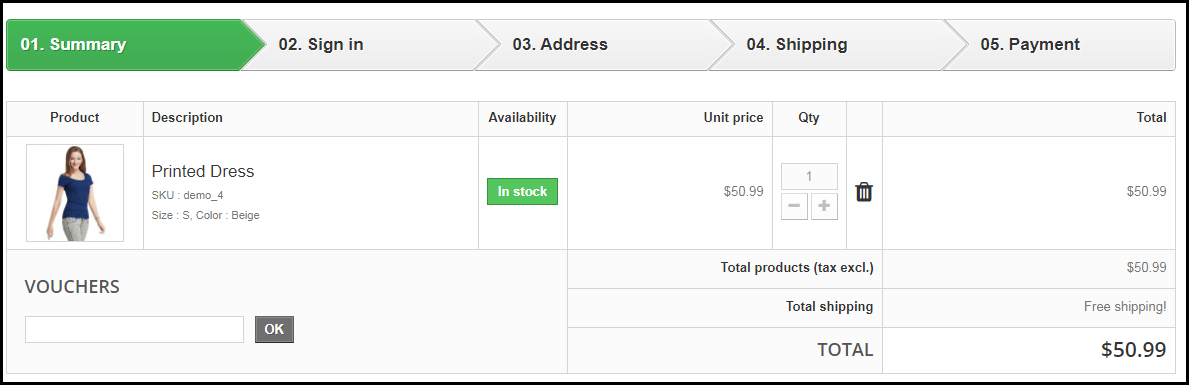
It is important to display which stage a customer is at present when they are on the track of completing their purchase. Showing the progress of the checkout puts up a clear picture in front of the user regarding how many fields they have covered and how many more they would have to go through before they could finally place their order.
Mistake 4: No Trust Factor
With too many online frauds taking place nowadays, online shoppers do not put their trust on a website so easily while making the payment. No matter how amazing your website looks, if customers feel a trust issue, they won’t make the payment. As simple as that.
To build customer’s trust, show off the security badges on the checkout page, and make customers feel relaxed. Add an additional security layer by making your website SSL certified.
Mistake 5: Not having a Proper Return Policy
Online shoppers do have concerns regarding the products they purchase. There is always a doubt regarding a defective or an incorrect order getting delivered. And customers want to ensure what would happen in such cases.
This is where your return policy plays its part. If it is not satisfying enough from the customer’s point of view, they will not proceed further in their checkout.
Pay attention to your return policy and make sure they encourage users to make a purchase.
If you are still stuck with Credit Card and Debit Card only, you are surely missing out on huge eCommerce conversions. Limited payment options would not help you in the long run. Online shoppers look for varieties, be it for products or for the payment methods.
With digital wallets in trend, it would be wise to implement the major e-wallets in your store. It would provide your customers with a number of payment options to choose from and help them choose the preferred payment option while making the payment.
Mistake 7: Not having a User-Friendly Checkout
A lengthy and complicated checkout process involving unnecessary fields adds to the frustration among online shoppers which is followed by cart abandonment.
It is, therefore, crucial to optimize your checkout page and make it user-friendly. One of the ways to do so is by upgrading your multi-step checkout to a one page checkout. A single page checkout puts all the checkout fields at one place.
Knowband’s One Page Checkout is amongst our highest-selling modules that lets you simplify your checkout page and grab more eCommerce conversions. Check out this module for various eCommerce platforms-
The majority of online shoppers these days browse a website through handheld devices. This is the reason why mobile apps are gaining huge popularity. However, with limited storage space, people avoid installing a lot of apps.
For shoppers using mobile devices to make a purchase, it is important to make the checkout page mobile responsive. For your information, around 1.6 billion people use mobile devices to shop online globally, says a report by Invesp. So you can imagine the impact it can have on your conversions.
Make sure that the checkout process works as conveniently on a mobile device as it does on the desktop.
Final Word
Put your feet in your customer’s shoes and think what could be the possible areas for improvement on your checkout page. Are you feeling satisfied? Is it hampering your checkout experience? If so, work on those factors to simplify the checkout experience of online shoppers.
Keep an eye on these 8 checkout page mistakes that could possibly kill your eCommerce conversions.
OpenCart 2.x checkout page asks the customers to fill up several details and address information during the checkout process. However, sometimes, to simplify the checkout process, we wish to remove some fields from the checkout page that we think are not important to us. As these fields might be unnecessarily making the checkout complex and lengthy. So, in this article, I will discuss how to remove unwanted fields from the OpenCart2.x checkout page. Moreover, I’ll use the OpenCart version 2.x to explain how can you remove such fields from the Guest and registered checkout process.
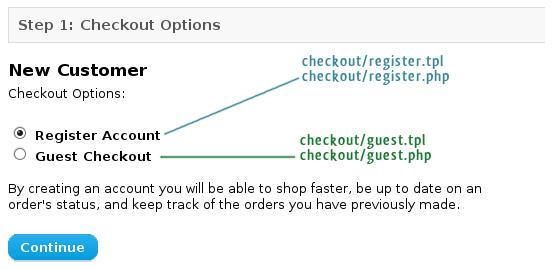
OpenCart uses two template files to show and control the fields on checkout
As an example, I will remove the “Fax” field from the guest checkout and Register Account. Also, you can use the same approach to remove any other field too.
The codes for input field in checkout are handled by two main OpenCart templates:
catalog/view/theme/themeXXX/template/checkout/register.tpl – for Register Account
catalog/view/theme/themeXXX/template/checkout/guest.tpl – for Guest Checkout
PS: I would suggest you not edit these files directly. First, take a backup of the original files first by copying these files from your web server or wherever they are located. Next, keep them with you so that you can always revert in case of any mistake. Then, take another copy of these same files and perform the editing on these files, later replacing them with the original files on the site after editing.
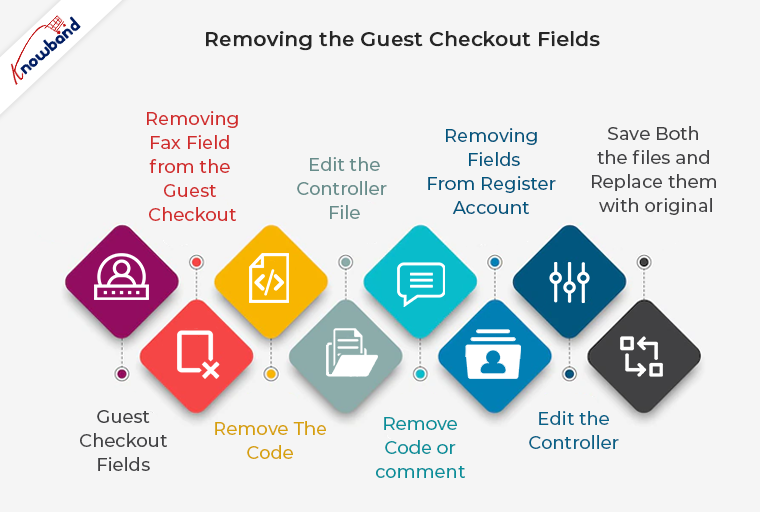
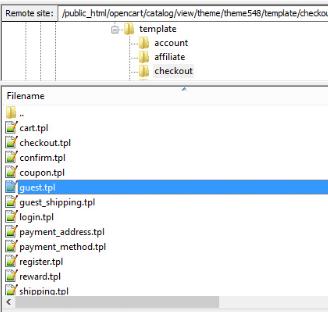
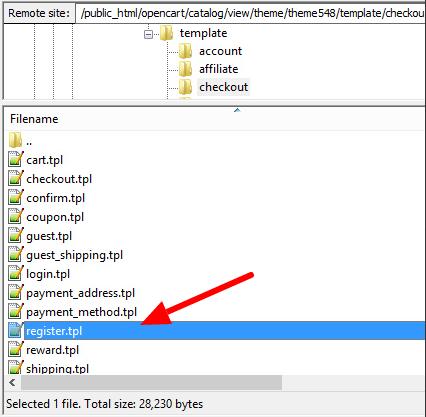
1. We will start with editing the Guest Checkout fields. So, the first step you need to follow here is to navigate to the following file directory and open the file:
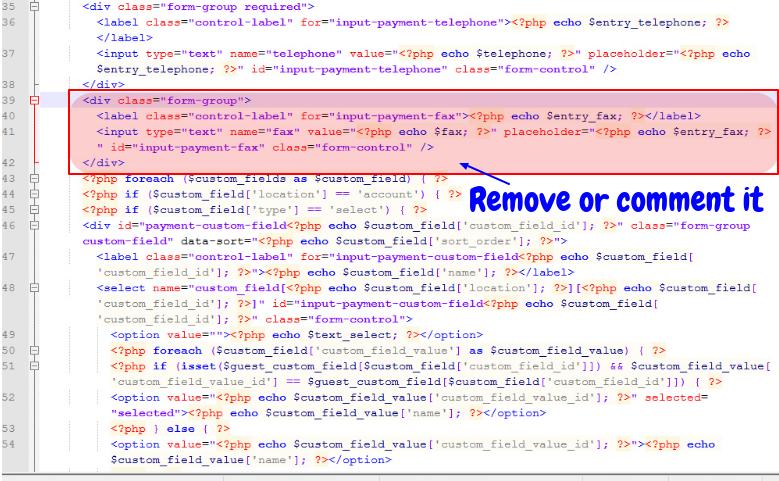
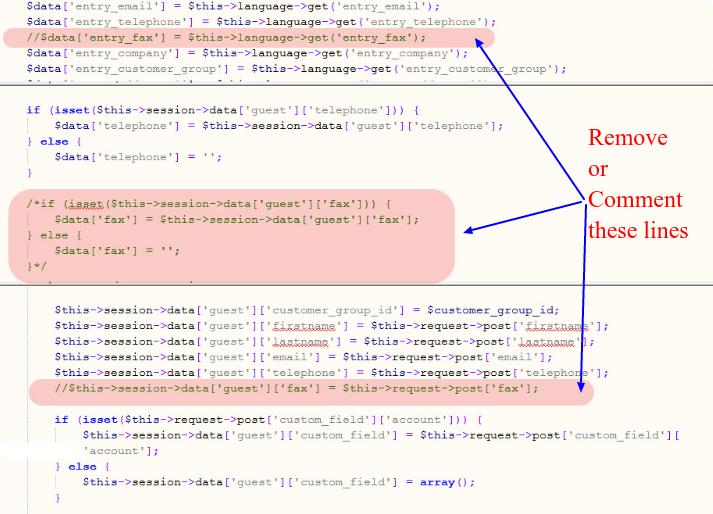
2. We are removing the Fax field from the guest checkout here. So, find the following lines of code in the file you have just opened:
3. Remove this code from the file or you can also just comment on it to disable the code.
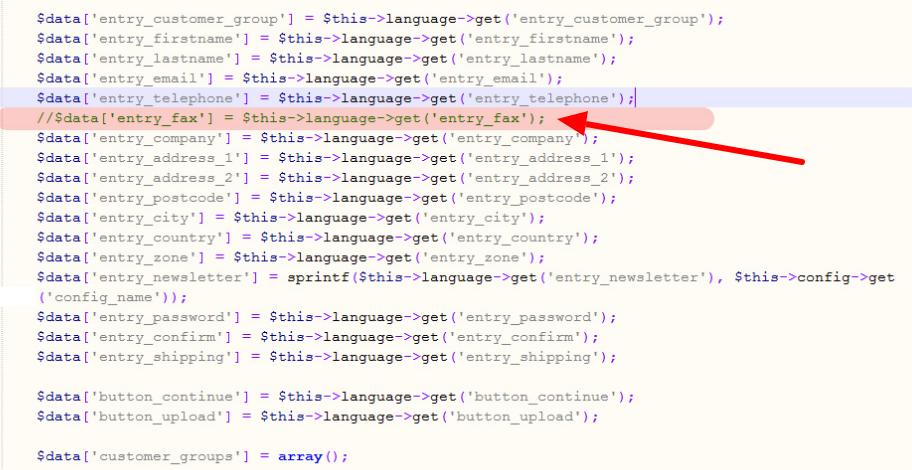
Remove or comment on the code in the guest.the file
4. Next, we need to edit the controller file to make sure this removal will not show any “Undefined index” later. So, navigate to the following file directory and open the file to edit the controller:
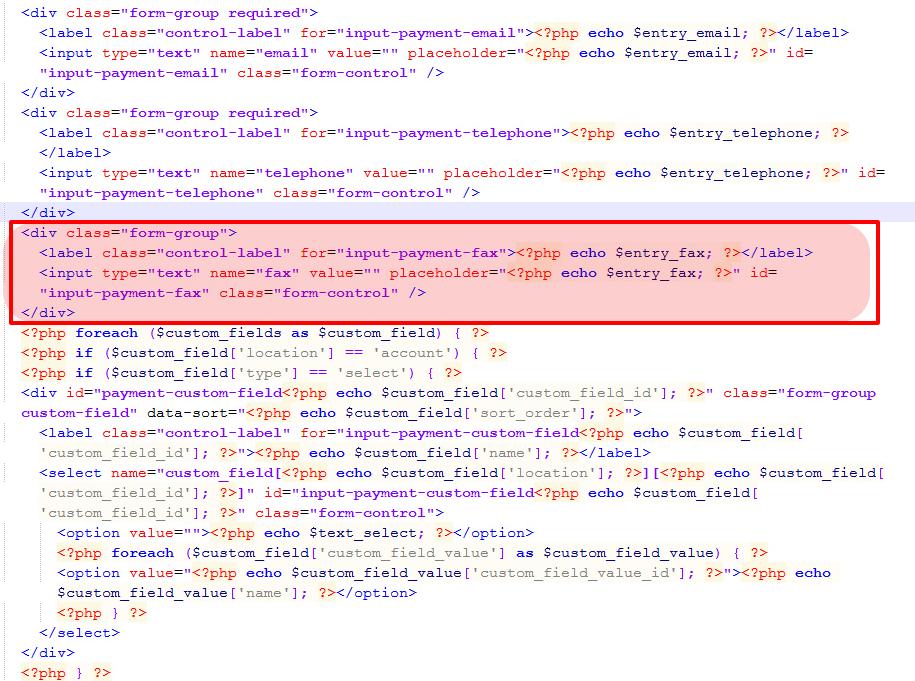
9. Find and remove the following lines of code in the file you have just opened
Remove or comment on the code in the register.the file
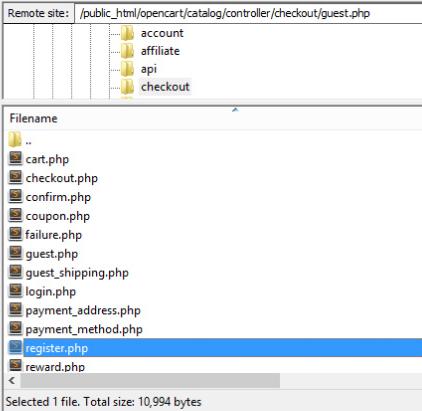
10. Next, we need to edit the following controller to make sure no “Undefined index” error is shown in the later part.
catalog/controller/checkout/register.php
Open register.php file
11. Find the following line of code and remove it. You can also comment on it instead.
Remove or comment the code in the register.php file
12. Save both the files now, and replace them with original files on the site.
So, this is how you can remove a field like “Fax” from both the Guest checkout and Account Register form. Moreover, you can follow a similar approach to remove any kind of field from the OpenCart checkout. Also, just do not forget to keep the backup of the original files before you edit them.
Editing the core files is not a recommended way to perform the changes on your OpenCart 2.x site. Some of us might suggest the use of vQmod or OCMOD to reduce the risk, but these methods are too complicated for website owners with no or less technical knowledge.
As an alternate solution, you can choose to switch to our OpenCart One Page checkout extension which is even compatible with OpenCart 2.x. It is a one-page checkout extension that removes the unnecessary elements from OpenCart 2.x and has loads of features to make your checkout conversion friendly.
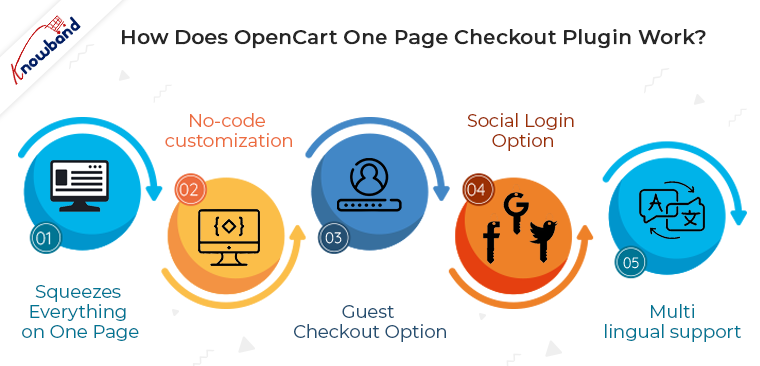
How does the OpenCart One Page Checkout plugin work?
The One Page checkout extension for OpenCart replaces the multi-step checkout option with a single-page checkout. Since without getting you into the fuzzy the code changes it incorporates all the features that an optimized checkout page is expected to have. So, all you need to do is to install the OpenCart v2.x One Page Checkout module in your store. Moreover, the configuration changes are done at a few button clicks from the back-end and the changes will be reflected in the front end of your site.
Listed below are some of how the OpenCart Single Page checkout can help you remove unwanted elements:
Squeezes everything on one page
Instead of going with multiple checkout steps, the OpenCart One Page Checkout extension squeezes all the processes on a single page. With the reduction in the number of web pages, the code of the site becomes simpler.
No-code customization
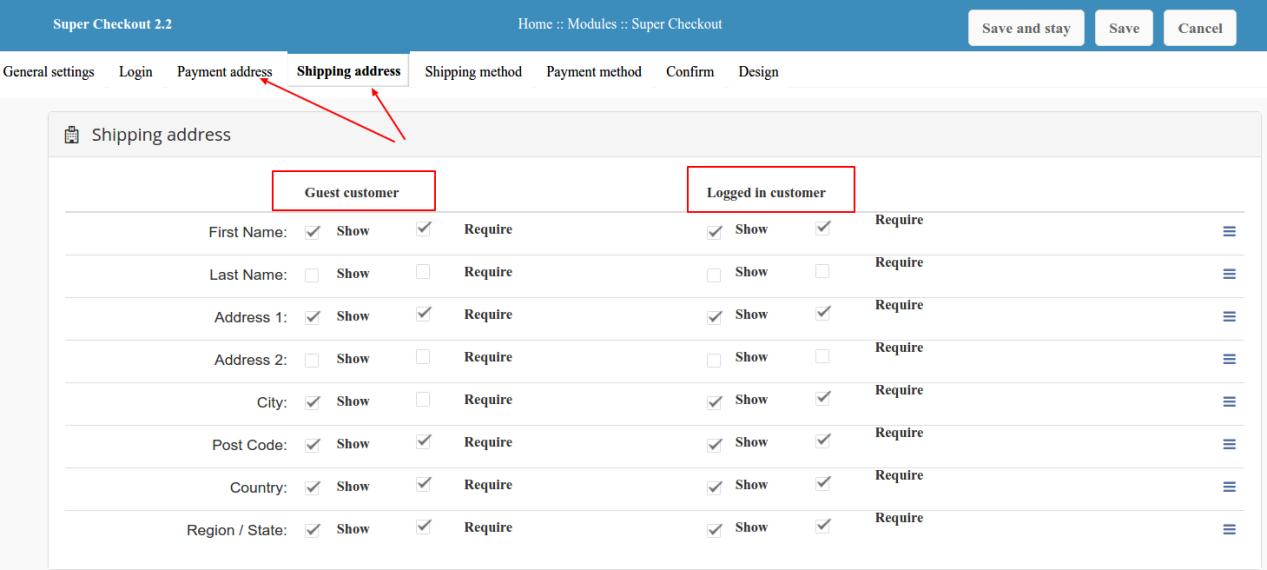
You can “Hide” or “Display” any of the fields from the checkout page by simply changing the settings from the extension’s backend configuration. Plus you can change the orders of fields by just dragging and dropping. Along with this, the OpenCart one-page checkout module for versions 2.x and 1.x offers an additional comment section that can be removed at a button click if required.
Most of the store owners do not have the technical knowledge to code and make field configurations. This Opencart module brings great ease to them in setting up the checkout page layout as they require for their site. The number of fields and their position over the checkout page is fully customizable from the back office.
Guest checkout option
Without making any code changes, the OpenCart One Page Checkout module for v2.x enables the guest checkout option on the site. Not just this, you need not make any code changes as mentioned above if want to remove the guest checkout at any point. This can be done just by toggling a single button from the back-end of the OpenCart single-page checkout plugin.
You can even register those customers who do guest checkout at your store. Additionally, you can allow your customers to set their passwords while performing guest checkout.
You need not integrate the social signup options via coding. The OpenCart One Page checkout plugin comes with built-in social login options. You get Facebook and Google login options. All you need to do is to obtain the API details and share them in the back-end of the OpenCart plugin.
Multi-lingual support
If the site contents are displayed in multiple languages for different locations, then, some extra coding is required to be done. The OpenCart One Page checkout extension eases out this aspect for you. The extension offers multi-lingual support and the admin can upload the contents of the sites in as many languages as they wish. The respective contents are uploaded in one go without getting you indulged in any site changes.
Set Default Options
Most of the websites provide customers with the default option of “Login” considering that the user already has their account on the store. Likewise, you can also mark default options out from “Register”, “Login” or “Guest”.
Customizable Fields
The fields provided to the customer on the shipping and payment page are fully customizable from the backend panel.
In the customer-centric environment, a flawless user experience is key to staying ahead of the competition. One of the ways to do so is to keep everything precise and as combat as possible. So, this is when a single-step checkout process can help you out without getting you into the complication of code optimization. To increase the profitability of their business, every store owner wants to give their customers a simple and quick shopping experience.
Since the Page Checkout module lessens the clients’ additional work. Hence, Checkout became the focal point of this procedure. So, One Page Checkout Addon is a remedy for this problem as a result. In addition to OpenCart One Page Checkout Extension, Knowband offers a One Page Checkout Module for other platforms like PrestaShop and Magento 2. Thus, it enables the store admin to finish the checkout process on a single page, lowering the rate of cart abandonment.