Moments Precieux: A Success Story with Knowband Prestashop Etsy Integration Addon

In today’s market, startups and cutting-edge businesses are striving to reach new heights by expanding their online presence. Not all businesses are able to make their way through the competitive e-commerce market. The Moments Precieux is one such inspiring success story. Their remarkable growth is consistently establishing new standards in the eCommerce industry. This business is expanding continuously, and emerging enterprises can use their roadmap as a guide to achieve success in this field.

This business underlines how Knowband Prestashop Etsy API Integrator played a pivotal role in its journey towards e-commerce excellence. This story of empowerment and growth demonstrates the transformative impact of integrating the right tools and technology. The Moment Precieux is based in Paris, France, and is among the top brands in its domain.

About Moments Precieux:

Moments Precieux is an online boutique specializing in exquisite handmade jewelry and accessories. Further, the website features a wide range of unique, artisan-crafted products that cater to a huge customer base. Everyone endears having a personalized gift on special occasions. Further, the website sells handcrafted and engraved jewelry prepared with the love and expertise of the team of experts of Moments-Preceiux.com.

The Moments Precieux is one of the top and rapidly growing businesses in Paris, France. The business founder Fanny was always passionate about her liking towards jewelery design. This jewelry business is one of the top brands in Paris due to its quality products and personalization of ornaments.

Although Moments Precieux, had mastered their craft, they faced the challenge of reaching a broader audience. Their solution came in the form of Etsy, a globally renowned e-commerce platform known for its handmade and vintage products. However, integrating their PrestaShop-based website with Etsy was a complex process until they discovered Knowband Etsy Prestashop Connector.

Some Of The Challenges Faced By Moments Precieux:
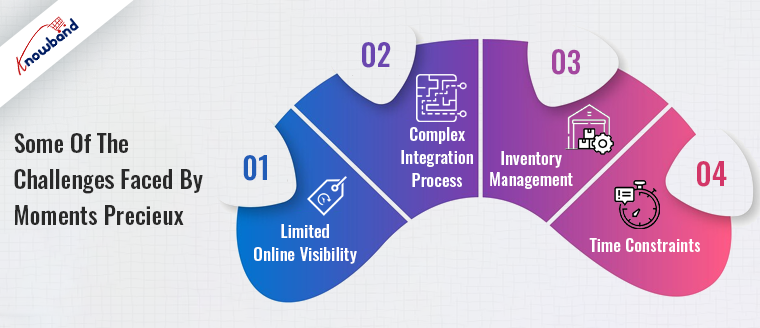
 

Every business faces ups and downs in its journey to embark on the way toward success. The business figured out a way to tackle their challenges with business success which was integration with Etsy. But still, there were some challenges faced by Moments Precieux:

Limited Online Visibility: 

Fanny’s website boasted an impressive array of high-quality products, but it suffered from limited online visibility. They were struggling to attract traffic and convert it into sales.

Complex Integration Process: 

Etsy has stringent listing requirements, and manually managing product listings and data entry was time-consuming and prone to errors. They needed a seamless solution to list and manage their products on Etsy.

Inventory Management: 

The business faced difficulties in effectively tracking inventory across both its website and Etsy. Further, ensuring accurate stock levels was essential to avoid overselling and maintain customer satisfaction.

Time Constraints: 

Like many small business owners, Fanny had limited time to devote to complex technical integrations. They preferred focusing on their craft and customer service.

Solution To Moments Precieux: Knowband Prestashop Etsy Marketplace Integration Addon
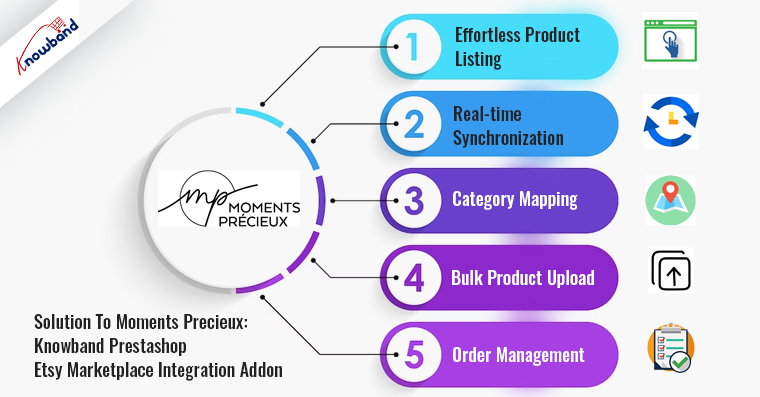
 

The challenges to the business were resolved in an instant after having Knowband for assistance, and the answer to their challenges lay in Knowband Prestashop Etsy Connector. This integration offered a number of benefits, enabling the smooth connection of their PrestaShop-based website with Etsy.

Effortless Product Listing: 

The Etsy Integration streamlined the product listing process, allowing them to list products directly from their PrestaShop website to Etsy. It simplified the creation of product listings, automatically transferring product details, images, and pricing.

Real-time Synchronization: 

The integration ensured real-time synchronization of inventory levels across their website and Etsy store, eliminating the risk of overselling and enhancing customer satisfaction.

Category Mapping: 

Moments Precieux could map their PrestaShop website categories to Etsy categories. This made it easier for customers to find their products on the Etsy platform.

Bulk Product Upload: 

The integration allowed them to upload multiple products to Etsy simultaneously, saving them valuable time.

Order Management: 

Seamlessly managing Etsy orders directly from their PrestaShop website’s admin panel was possible with Knowband Etsy Prestashop Integrator. Further, it helped streamline their order processing and made it more efficient.

Journey of Moments-Precieux With Knowband:

The journey of Moments-Precieux.com with Knowband Etsy Prestashop Integration Addon exemplifies the power of efficient e-commerce integration. The module not only helped them overcome the challenges of limited online visibility and complex integration but also significantly improved their overall operations. As a result, Moments-Precieux.com enjoyed increased sales, higher customer satisfaction, and a stronger online presence on Etsy. Fanny’s journey is a testament to how businesses can grow in the e-commerce landscape with the right tools and support.

Knowband Prestashop Etsy Integration Plugin empowered Moments-Precieux.com to harness the full potential of Etsy’s vast customer base. It helped them in turning their dream of expanding their online business into a reality. This success story shows how a well-executed e-commerce integration can transform an online boutique into a thriving enterprise, enabling businesses to grow and reach new horizons in the digital age.

Winding Up!!

Success stories such as Moments Precieux business serve as a source of inspiration for others pursuing their business goals. They started with an idea and diligently turned it into a reality through hard work and dedication. The remarkable success of businesses like this one was made possible by utilizing modules offered by Knowband, which played a crucial role in driving their overall business expansion.

As this business successfully expanded its customer base through the use of these plugins, you too can achieve similar results. Get in touch with Knowband to discover the right plugins for your online store, as these modules have the potential to substantially enhance your business.




The Psychology of eCommerce: How to Influence Customer Behavior!

In the vast world of eCommerce, understanding the psychology behind customer behavior is crucial for achieving success. With millions of online stores competing for attention, knowing how to influence and guide your customers can make all the difference. Thus, in this article, we’ll delve into the fascinating world of consumer psychology and provide actionable strategies to help you boost conversions and sales.

The Power of Perception:

Visual Appeal: 

The first impression matters, and it’s often visual. Ensure your website design is clean, aesthetically pleasing, and aligned with your brand. Furthermore, the Colors, fonts, and imagery also play a significant role in shaping the perception of your brand.

Thus, always make navigation and information retrieval effortless. Customers should quickly find what they’re looking for without confusion. Simplify the purchasing process to reduce friction.
Moreover, to provide your customers with relevancy in exploring your website, you should always include a sitemap.  


The Influence of Social Proof:

Reviews and Testimonials: 

Positive reviews and testimonials are potent social proof. Thus, you can encourage satisfied customers to leave feedback and prominently display these on your product pages. Honest opinions from real people build trust. And guess what, people are well aware of what’s fake and what’s real.

Scarcity and Urgency: 

Create a sense of urgency by showcasing limited-time offers or low stock levels. When customers feel like they might miss out, they’re more likely to make a purchase.

The Principle of Reciprocity:

As an eCommerce store admin, you should always provide valuable content, such as informative blog posts, tutorials, or free resources. Because, when customers receive something valuable without an immediate expectation of return, they are more likely to reciprocate by making a purchase.

The Role of Cognitive Biases:

Anchoring: 

Use anchor prices to influence perception. Display the original price alongside a discounted price to make the discount seem more significant.

Furthermore, you can also highlight what customers might lose by not making a purchase. For instance, “Don’t miss out on this exclusive offer!” triggers loss aversion.

Personalization and the Power of Connection!

Personalized Recommendations: 

Analyze customer behavior and use it to suggest products they might like. Personalization creates a sense of connection and enhances the shopping experience.

You can also share your brand’s story and values. Create an emotional connection with customers by showcasing how your products can improve their lives.

Building Trust and Reducing Risk!

Security and privacy are the two most important components of a process. The following thumb rule also applies while shopping online. Thus, as an eCommerce store owner, you can invest in robust security measures to protect customer data.

Also, a flexible return policy reduces the perceived risk of making a purchase. Make the return process hassle-free to build trust.

The Power of Incentives!

Loyalty Programs: 

Reward loyal customers with exclusive discounts or early access to sales. Loyalty programs foster a feeling of belongingness while also stimulating recurring purchases. Furthermore, if you are a Prestashop or Opencart store owner, you can also check Knowband’s Prestashop Loyalty points addon to incentivize your customers with lucrative offerings and the User manual of the Prestashop Loyalty points system.

Furthermore, set a minimum purchase amount for free shipping. Customers are more likely to add items to their cart to reach that threshold.

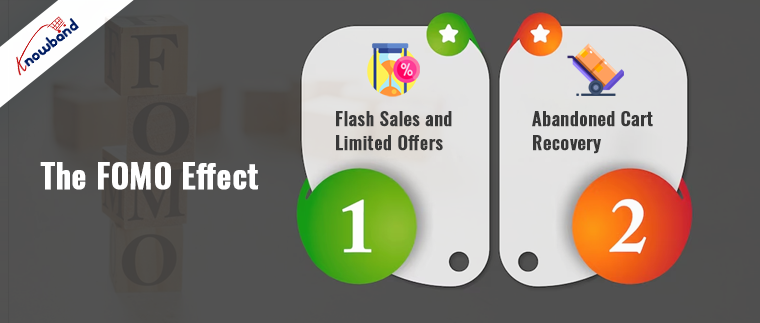
The FOMO Effect:


Flash Sales and Limited Offers: 

Announce flash sales or limited-time offers through email and social media. These create a sense of urgency and fear of missing out (FOMO).

Abandoned Cart Recovery: 

Implement abandoned cart recovery emails to remind customers of the products they left behind. Offer an incentive to encourage them to complete the purchase.

Conclusion!

Understanding the psychology of eCommerce is a powerful tool for influencing customer behavior. By leveraging principles such as perception, social proof, reciprocity, cognitive biases, personalization, trust-building, incentives, and FOMO, you can create a shopping experience that resonates with your customers and drives conversions. Keep in mind that these strategies should align with your brand and values, providing genuine value to your customers and building lasting relationships. 

Furthermore, you can also reach out to our support staff at support@knowband.com for more amazing eCommerce tips.


Prepare Your PrestaShop Store for the Holiday Season with the PrestaShop Mobile App Builder!

The holiday season is one of the most lucrative times of the year for online retailers. Shoppers are in a festive mood and ready to spend on gifts and treats for their loved ones.
If you have a PrestaShop store, you can capitalize on this opportunity by making your products easily accessible to mobile users. With Knowband’s PrestaShop Mobile App Builder, you can create a powerful mobile app for your PrestaShop eCommerce store and reach a wider audience of potential customers. Furthermore, the fun part is that you do not require any sort of coding or technical skills to create your Android and iOS app with Prestashop App Builder.

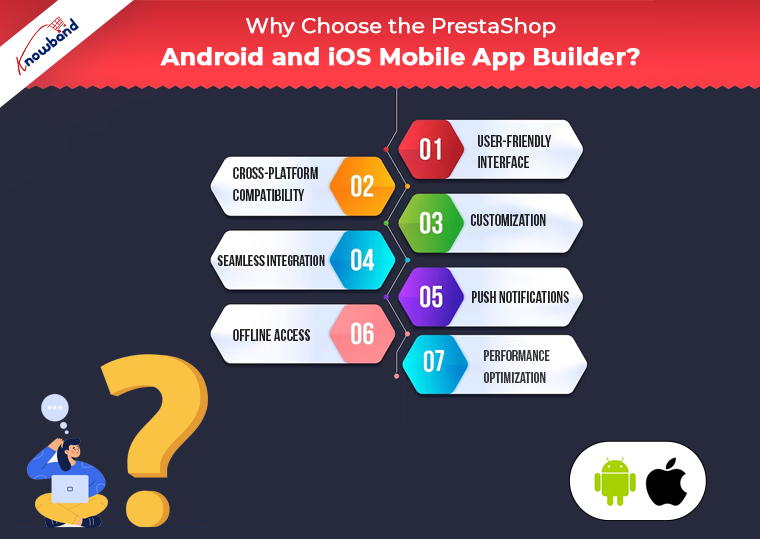
Why Choose the PrestaShop Android and iOS Mobile App Builder?


The PrestaShop Mobile App Builder is a versatile tool designed to help PrestaShop store owners create Android and iOS apps effortlessly. Whether you are a tech-savvy entrepreneur or a non-technical store owner, the Knowband Prestashop Android app builder plugin is perfect for you.

User-Friendly Interface:

The PrestaShop Mobile App Maker offers an intuitive and user-friendly interface, allowing you to design your mobile app without any coding knowledge. You can create a stunning app that matches your brand’s aesthetics.

Cross-Platform Compatibility:

With the Prestashop app maker, you can simultaneously have both Android and iOS apps. This cross-platform compatibility ensures that your app reaches the widest possible audience, regardless of the device they use.

Customization:

Tailor your app to meet your specific business needs. You can customize the app’s layout, colors, fonts, and more to reflect your brand identity. Make your app unique and engaging to your customers.

Seamless Integration:

The PrestaShop iOS Mobile App Builder seamlessly integrates with your PrestaShop store, ensuring that your products, categories, and customer data are synchronized between your website and the app.

Push Notifications:

Stay in touch with your customers by sending them personalized push notifications. You can alert them about special holiday offers, discounts, and promotions, driving more sales to your store. Furthermore, the push notifications not only help in promotional campaigns but also it will keep your customers updated about the order details and other updates.

Offline Access:

Your customers can browse and make purchases from your app even when they are offline. This feature is essential for holiday shoppers who may not always have a stable internet connection.

Performance Optimization:

The app builder is designed to deliver optimal performance, ensuring fast loading times and smooth user experiences. This is crucial for retaining customers during the holiday rush.

How to Get Started with the PrestaShop Mobile App Builder!

Creating your PrestaShop mobile app with Knowband’s PrestaShop Mobile App Builder is a straightforward process.

Install the Addon:

Begin by installing the Prestashop Android and iOS Mobile App Builder Addon or the Prestashop Android and iOS Mobile App Maker Addon, depending on your preference.

Configuration:

Configure the addon settings to match your store’s requirements. You can set up the app’s name, logo, splash screen, and other essential details.

Design Your App:

Customize the app’s appearance and layout to align with your brand. You can choose from various themes and templates or create your own design.

Integration:

The mobile app builder provides automated inventory, products, and customer data synchronization between both the apps and the stores. Thus, you will not have to make any changes manually.

Testing:

Before launching your app for the holiday season, thoroughly test it on different devices to ensure a smooth user experience.

Promotion:

Promote your mobile app through your website, social media, and email marketing to inform your customers about this convenient shopping option.

Enjoy Increased Sales:

With your PrestaShop mobile app ready, you can now reap the benefits of increased sales and customer engagement during the holiday season.

In the End!

In conclusion, the PrestaShop Mobile App Builder is a powerful tool that can help you prepare your PrestaShop store for the holiday season. With its user-friendly interface, cross-platform compatibility, and customization options, you can create a mobile app that enhances your customers’ shopping experience and boosts your holiday sales. Furthermore, you can also get in touch with the technical support staff at our official email address support@knowband.com in case of queries or suggestions.


PrestaShop to Shopify Migration: Things to Consider before Moving Your Store Platform

In the ever-evolving world of e-commerce, businesses must adapt to changing market trends and customer expectations to remain competitive. One crucial decision that online store owners may face is whether to migrate from their current platform to a new one. In recent years, PrestaShop to Shopify migration has gained popularity due to Shopify’s user-friendly interface and robust features. However, before making the leap, there are several essential factors to consider.


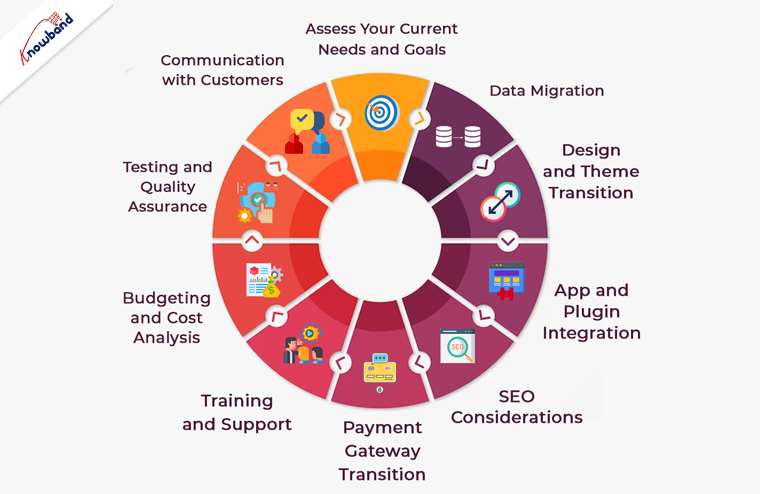
1. Assess Your Current Needs and Goals:

Before initiating a migration, it’s vital to understand your current e-commerce needs and long-term goals. Moreover, you should take a close look at your PrestaShop store and identify any shortcomings or limitations.

You can consider factors like scalability, customization options, and the ability to implement future changes. Furthermore, Shopify offers a wide range of features, but it’s essential to ensure they align with your specific business requirements.

2. Data Migration:

One of the most critical aspects of migrating from PrestaShop to Shopify is data transfer. This encompasses product listings, client details, past order records, and additional data. Therefore, ensure that your data is organized and cleaned before the migration process begins. Moreover, Shopify provides several tools and services to facilitate data migration, but a meticulous approach is necessary to avoid data loss or inaccuracies during the transition.

3. SEO Considerations:

Maintaining your website’s SEO ranking is crucial during a platform migration. Be prepared to update and redirect your URLs to prevent any loss in search engine visibility. Make a list of all your PrestaShop URLs and set up 301 redirects in your new Shopify store. Additionally, create an XML sitemap and submit it to search engines to help them index your new site quickly.

4. Design and Theme Transition:

The look and feel of your online store play a significant role in customer engagement. If you have a custom PrestaShop theme, you’ll need to recreate or find a similar one for Shopify.Shopify provides a diverse selection of themes, which include both free and premium choices.Thus, you can ensure that the selected theme aligns with your brand identity and provides an excellent user experience.

5. App and Plugin Integration:

Both PrestaShop and Shopify have their ecosystems of apps and plugins to extend functionality. Therefore, as an eCommerce shop admin you should always identify the essential Prestashop addons and integrations your business relies on and check if they are available on the Shopify platform. While Shopify has an extensive app store, some specific apps may not be available, which could impact your business operations.

6. Payment Gateway Transition:

The processing of payments is a vital element of every e-commerce establishment.Shopify supports various payment gateways, but the ones you were using on PrestaShop may not be the same.
Research the available payment options on Shopify and ensure they meet your business needs. Additionally, plan for a seamless transition to minimize any disruption in your revenue stream.

7. Training and Support:

Shopify is known for its user-friendly interface, but it’s essential to invest time in learning the platform thoroughly. Take advantage of Shopify’s extensive documentation and support resources to familiarize yourself with its features and capabilities. Consider providing training to your staff if necessary to ensure a smooth transition.

8. Budgeting and Cost Analysis:

Migrating from PrestaShop to Shopify involves various costs, including subscription fees, theme purchases, app subscriptions, and potential design and development expenses.
Thus, create a detailed budget to account for these costs and assess whether the benefits of moving to Shopify justify the investment.

9. Testing and Quality Assurance:

Before making your Shopify store live, thoroughly test all aspects of the website, including functionality, design, and data accuracy. Test the checkout process, navigation, and user accounts to ensure a seamless customer experience. Address any issues or glitches promptly to avoid customer dissatisfaction.

10. Communication with Customers:

Keep your customers informed throughout the migration process. Notify them in advance of any planned downtime or temporary disruptions to your online store’s services. Provide clear instructions on how they can access your new Shopify-based website. Effective communication can help maintain customer trust and loyalty during the transition.

In the End!

In conclusion, migrating from PrestaShop to Shopify can be a beneficial move for your e-commerce business if done thoughtfully and strategically.
Furthermore, careful planning, attention to detail, and thorough testing are essential to ensure a successful transition. By considering these key factors, you can make the migration process as smooth as possible and position your online store for growth and success in the competitive e-commerce landscape.
At Knowband with 13+ years of technical expertise in Web and App development, we also offer custom development and platform migration services. In case you have any queries, you can also find us at our official email address support@knowband.com. 

You can also visit:

Prestashop eBay Marketplace Integration Extension

Prestashop Google Shopping Integration Addon

Prestashop Etsy Integration Addon


The Role of Social Media in eCommerce: Tips for Success!

In today’s digital landscape, the fusion of social media and eCommerce has transformed the way businesses connect with customers and drive sales. Furthermore, with billions of active users on platforms like Facebook, Instagram, and Twitter. It’s essential for eCommerce businesses to harness the power of social media effectively. Thus, In today’s article, we’ll explore the pivotal role of social media in eCommerce and provide valuable tips for success.

The Impact of Social Media on eCommerce!


1. Increased Exposure and Reach:

Social media platforms provide an expansive audience for your eCommerce business. By sharing compelling content and engaging with your audience, you can extend your brand’s reach and attract potential customers. Moreover, it will not only help in getting more leads but also will enhance your brand image.

2. Enhanced Customer Engagement:

Social media provides the opportunity for direct communication with your audience. Furthermore, you can respond to inquiries, address concerns, and build meaningful relationships with customers, fostering trust and loyalty.

3. Targeted Advertising:

Social media platforms offer robust advertising tools that enable you to target specific demographics and interests. Such precise targeting has the potential to yield increased conversion rates and a more favorable return on investment (ROI). Furthermore, as an eCommerce store admin, you can use Facebook Business Manager to showcase your products to a vast targeted audience.

4. Social Proof and Reviews:

Positive reviews and user-generated content on social media can significantly influence purchasing decisions. Encouraging customers to share their experiences can boost your credibility and sales.
Therefore, you can encourage your customers to leave positive reviews on social platforms.

5. Sales Channels:

Some social platforms, like Instagram and Facebook, offer direct shopping features that allow users to purchase products without leaving the platform. This simplifies the buying process and increases conversion rates. Therefore, you can take advantage of the same and grab an additional sales channel by presenting your products in front of a vast customer base.

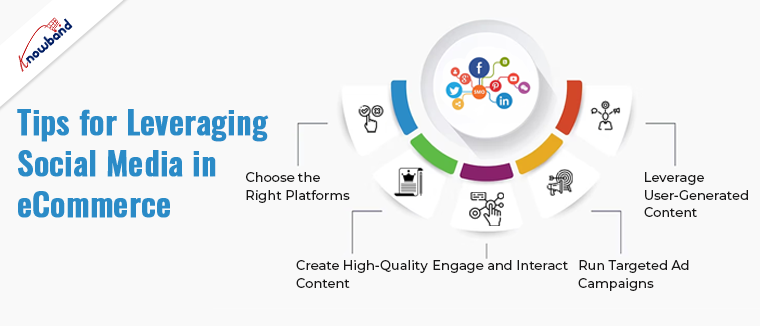
Tips for Leveraging Social Media in eCommerce!


1. Choose the Right Platforms:

Concentrate your efforts on the social media platforms that match your target audience. Various platforms cater to distinct demographics and interests. Thus, initially, you can create Facebook, Instagram, and Twitter pages for your business and share the information and updates with your customers via the same.

2. Create High-Quality Content:

Quality content matters way more than content in quantity. Share visually appealing and informative content, including product images, videos, blog posts, and customer testimonials. Furthermore, you should always avoid over-promotion of your brand and keep more information in your social reach.

3. Engage and Interact:

Proactively interact with your audience by ensuring swift responses to comments, messages, and mentions. Furthermore, this one-on-one conversation with the customers will not only help the customers regarding their queries but also will enhance customer trust in your business.
4. Run Targeted Ad Campaigns:

Utilize social media advertising tools to reach your ideal customers. Furthermore, as an eCommerce store admin, you can experiment with different ad formats and targeting options to find what works best for your business.

5. Leverage User-Generated Content:

Promote the sharing of customer experiences with your products by encouraging reviews, testimonials, and user-generated content. Report this content to build trust.

The Power of Social Media Stories!

One of the most dynamic features on many social media platforms is Stories. Platforms like Instagram, Facebook, and Snapchat have embraced this ephemeral content format, and businesses are finding innovative ways to leverage it for e-commerce success.

Measuring Success and Adapting:

To ensure your social media efforts are paying off, it’s crucial to track key performance metrics. Most social media platforms offer built-in analytics tools that allow you to monitor engagement, reach, and conversion rates.

Furthermore, you can also check Knowband’s plugins such as WhatsApp Live Chat Manager and Social Loginizer/ social media login plugins for better social reach and enhanced customer experience.

In conclusion 

The role of social media in eCommerce cannot be overstated. It’s a dynamic platform that offers extensive opportunities for increasing exposure, engaging customers, and driving sales. By following these tips and embracing the power of social media Stories, you can harness the full potential of social media to achieve eCommerce success.


Mobile Shopping Made Easy: Knowband’s Opencart App Builder’s Top Features!

In today’s fast-paced digital world, mobile commerce has become a dominant force in the e-commerce industry. Furthermore, modern shoppers are increasingly turning to their smartphones and tablets to browse, shop, and make purchases.
Recognizing this trend, at Knowband we offer Opencart Mobile App Builder which empowers online store owners to create feature-rich mobile apps for their businesses.
Thus, in this article, we will explore the top features of the Opencart Android and iOS App Builder and how it can make mobile shopping a breeze for your customers.

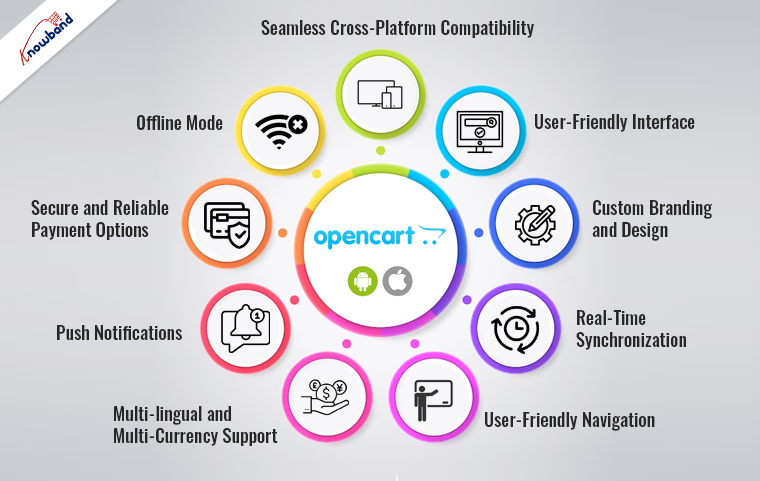
1. Seamless Cross-Platform Compatibility:

The Opencart Mobile App Builder by Knowband is designed to cater to a wide audience by offering compatibility with both Android and iOS platforms. Moreover, with a single plugin, you can create mobile apps for both major mobile operating systems. Ensuring that you don’t miss out on any potential customers.

2. User-Friendly Interface:

Designing a mobile app for your Opencart store is made easy and user-friendly by the Opencart App Builder, eliminating the need for advanced technical skills or coding knowledge. Its intuitive interface enables effortless customization, making it accessible even to non-technical users.

3. Custom Branding and Design:

Your mobile app represents your brand, and it should mirror your website’s branding. Therefore, Knowband’s Opencart Mobile App Builder lets you customize the app’s appearance, including the logo, color scheme, and layout, ensuring that your app aligns perfectly with your brand identity.

4. Real-Time Synchronization:

One of the standout features of the Opencart Mobile App Maker is its real-time synchronization with your Opencart store. This means that any changes you make on your website, such as product updates, pricing changes, etc. are instantly reflected in your mobile app. This ensures that your customers always have access to the latest products and information.

5. User-Friendly Navigation:

Navigation is a critical factor in ensuring a smooth shopping experience. Opencart App Creator provides user-friendly navigation menus and filters, making it easy for customers to explore your product catalog and find what they’re looking for quickly.

6. Multi-lingual and Multi-Currency Support:

In the era of global e-commerce, it’s essential to cater to a diverse customer base. Therefore, the Opencart eCommerce Mobile App offers multi-lingual and multi-currency support. Allowing you to reach a broader international audience. This feature helps you expand your business to new markets effortlessly.

7. Push Notifications:

Engaging with your customers is vital for building brand loyalty and increasing sales. Opencart Android and iOS App Builder Plugin includes push notification functionality. You can send personalized messages, promotions, and updates directly to your app users, keeping them informed and engaged.

The Android and iOS apps also provide a notification tab for the customers. Furthermore, the app users can check all the recent notifications in a single place, ensuring seamless information and updates for the customers.

8. Secure and Reliable Payment Options:

Online shopping requires top-notch security measures. Opencart App Maker integrates with secure payment gateways, ensuring that your customer’s payment information is safe and transactions are processed smoothly. This trust in payment security can boost customer confidence and increase conversions.

9. Offline Mode:

Sometimes, customers may have limited or no internet connectivity. Opencart Mobile App Builder includes an offline mode that allows users to browse and add products to their cart even without an internet connection. Once online, the app syncs the data with your store, providing a seamless shopping experience.

10. Login-Sign Up Pop-Up:

The mobile apps streamline the login process by presenting a convenient login/sign-up pop-up directly on the app’s home screen. This feature not only simplifies the login experience for users but also aids e-merchants in collecting customer emails for marketing initiatives.

Conclusion!

In the ever-evolving world of e-commerce, having a mobile app is no longer an option; it’s a necessity. The Opencart Mobile App empowers Opencart store owners to tap into the mobile shopping revolution with ease. Moreover, its user-friendly interface, cross-platform compatibility, and feature-rich capabilities make it a valuable tool for enhancing the mobile shopping experience for both you and your customers.

Stay ahead of the competition, expand your reach, and provide your customers with the convenience they desire. Mobile shopping has never been easier thanks to the Opencart App Builder.

Opencart Search Auto Suggest Extension – User Manual

Do you know that search is one of the most important features of an eCommerce website? Not only does it help the customers to hover over their desired results but also suggests various relatable search results. Due to the following reasons, enhancing the search feature on your website becomes a must. Now with our Opencart Search Auto Suggest Extension, you can elevate your online store’s user experience to new heights. Furthermore, Knowband’s search autocomplete extension for Opencart enhances search functionality, delivering lightning-fast, intelligent search suggestions that help customers find products quickly. 

With customizable design options and visual product previews, the Opencart search autocomplete extension captivates users, boosting conversion rates. Revolutionize your e-commerce website’s search experience and stay ahead of the competition with Knowband’s cutting-edge solution.


2.0. Features Offered by Knowband’s Opencart Search Auto Suggest Extension:

The Opencart Search Autocomplete module provides tons of useful features that enhance customer experience conveniently. 

Instant Search Suggestions: 

With the help of Opencart Elastic search the store admin can display real-time product suggestions as users type their search queries. 

Smart Keyword Prediction: 

The OpenCart Ajax Search Plugin utilizes intelligent algorithms to predict and offer relevant search results, enhancing user satisfaction.

Customizable Design: 

The Opencart store admin can customize the appearance of the search auto-suggest dropdown to match the website’s branding and design preferences.

Multi-language Support: 

The Opencart Search Auto-Complete extension caters to a diverse audience by supporting multiple languages, ensuring a user-friendly experience for customers worldwide.

Responsive Design: 

The Opencart Search Auto Suggest Extension feature works flawlessly on various devices, including desktops, tablets, and mobile phones.

Effortless Installation: 

The Opencart Search Auto Suggest Extension comes with easy installation and configuration processes, minimizing the time and effort required to implement the plugin.

Advance Search Options: 

The Opencart store retailers can manage the search results based on SKU, product description, categories, based on stock, etc.


3.0. Benefits Offered by Opencart Advance Search Plugin:

Improved User Experience: 

Enhanced search functionality offers a more user-friendly and efficient experience for your customers, making it easier for them to find the products they’re looking for.

Increased Conversion Rates: 

Furthermore, the quick and accurate search suggestions generated with the Opencart Search Autocomplete module lead to higher conversion rates as customers can find and purchase products more easily.

Higher Customer Satisfaction: 

When users can quickly locate products and relevant information, they are more likely to have a positive shopping experience and return to your site in the future.

Enhanced Mobile Usability: 

With mobile shopping on the rise, the responsive search auto-suggest feature ensures that users on smartphones and tablets can easily navigate and find products.

Reduced Bounce Rates: 

Users are less likely to leave your website if they find what they’re looking for promptly, resulting in lower bounce rates and extended session durations. 

Cross-selling Opportunities: 

By displaying related or complementary products in the search suggestions, you can effectively cross-sell and upsell, increasing the average order value.

Enhanced Branding: 

The Opencart Search Auto Suggest Plugin’s customizable design options allow you to align the search auto-suggest feature with your brand’s aesthetics, contributing to a consistent and professional appearance.

Competitive Advantage: 

Offering advanced search functionality with Knowband’s Opencart Search Auto Suggest Extension sets your online store apart from competitors, positioning your business as a leader in customer experience.

Increased Customer Loyalty: 

A seamless and intuitive search experience can foster customer loyalty, encouraging repeat purchases and brand advocacy.


4.0 Installation Guide

To install the OpenCart Ajax Search Plugin, please follow the following steps:
Purchase the OpenCart Extension from the Knowband store. You’ll get the following files:

  • Zipped File containing the source code of the OpenCart advance search plugin.
  • User Manual of OpenCart Product search autosuggest plugin.

Follow the steps below to install the OpenCart Extension in the OpenCart store:

  1. Unzip the zipped. You’ll get the folders as shown in the image below:
  2. Copy all the files and folders of the zip file in the Root Directory of OpenCart setup via FTP manager.
  3. The OpenCart Autosuggest is now installed and is ready to use. Go to Admin -> Main Menu -> Extensions as shown in the image below:
  4. Select Opencart search suggest Module from the list of modules and click on the Edit button as shown in the image below:

5.0. Admin Interface Overview: Knowband Opencart Search Auto-Suggest Plugin:

The Opencart Advance search plugin provides an easy-to-manage admin interface to manage all the search settings. From search conditions to the look and feel of search, the store admin can manage all the details on the go. 

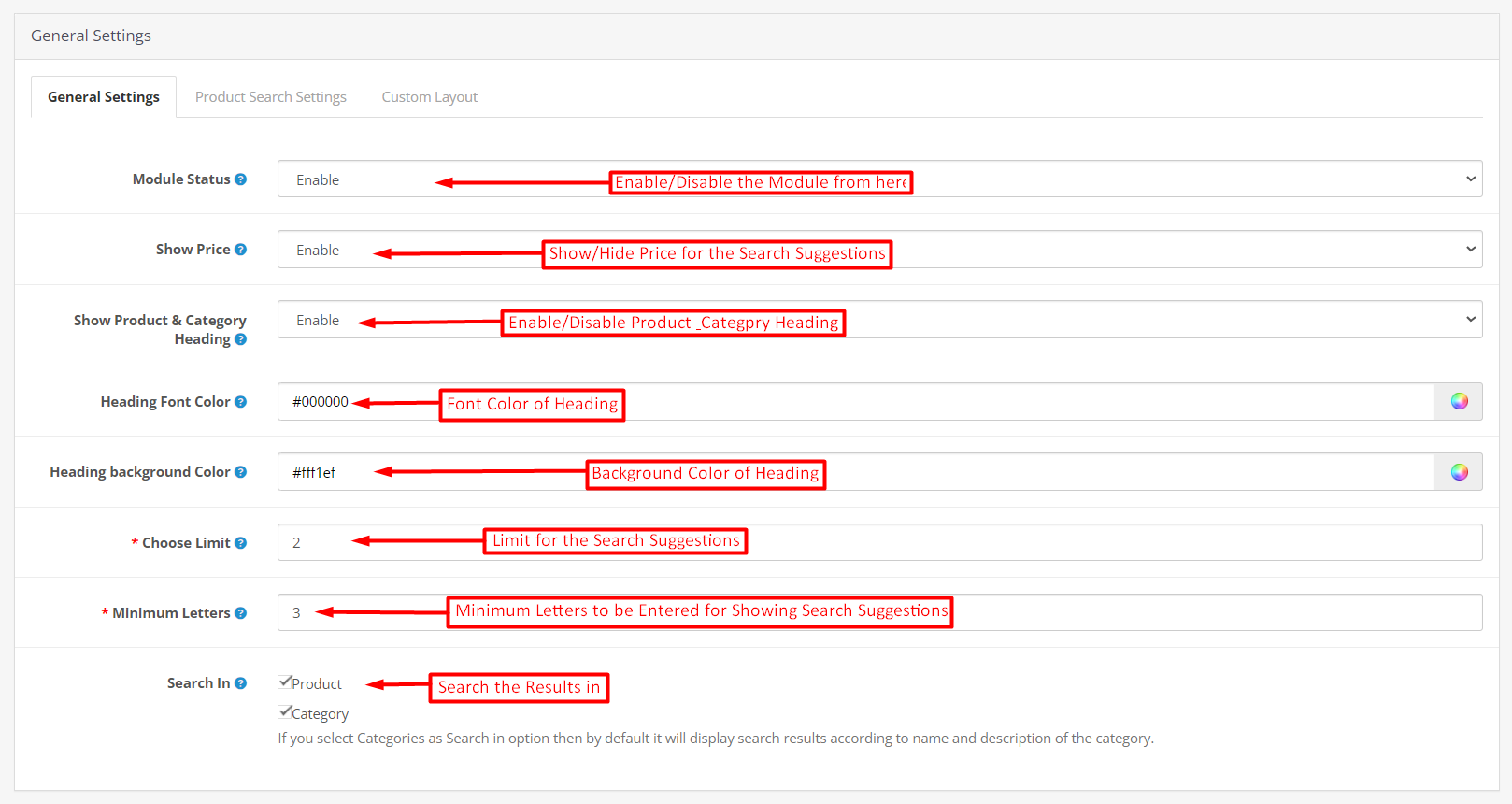
5.1. General Setting:


  • Module Status: The Opencart store admin can enable/disable the module from this particular button. 
  • Show Price: Using the following button the store admin can enable/disable prices along with search suggestions. 
  • Show Product & Category Heading: This button manages the headings “Product” and “Categories” on the search suggestion pages. 
  • Heading Font Color: The admin can modify the font color of the suggestion base component (category or product).
  • Heading Background Color: From this button, the Opencart store admin can select the background color of the suggestion heading. 
  • Choose Limit: Here, the store admin can enter the number of maximum suggestions he wants to show to the front-end visitors. 
  • Minimum Letters: The following text field is provided for entering the minimum number of letters for which the search suggestions will start to appear.
  • Search In: You can select search in option as “Product” or “Category” or in both (Product and Category) for the search suggestions for the customers. 

5.2. Product Search Setting:


The Product search setting tab provided in Knowband’s Opencart Ajax search Plugin provides the store admin with the option to modify the search setting of the website.

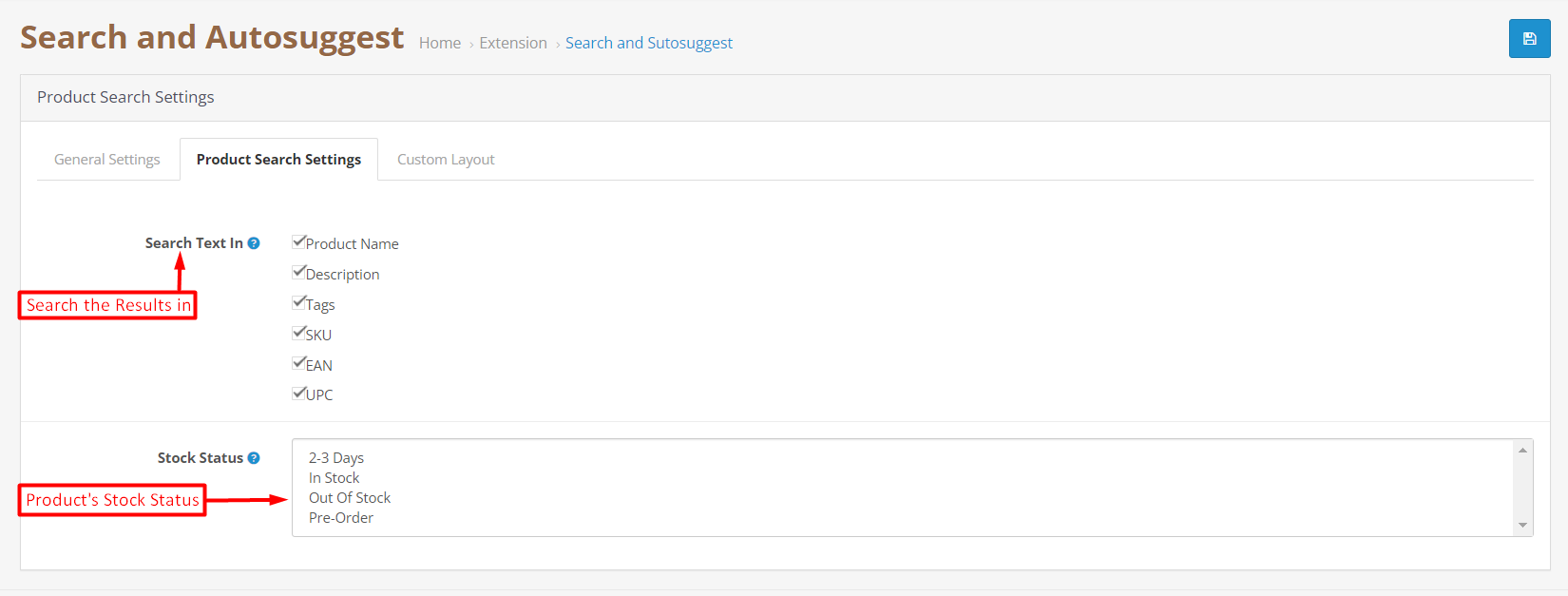
  • Search Text In:  We have provided here the option for finding the search results in product name, description, tags, SKU, EAN, and UPC. Further, the search results on the website’s front end will be shown based on the selected option in this tab.
    For example, if you have selected the option “description” from here, in case a customer visits the website’s front end and enters a particular keyword, the Opencart search Auto Suggest module will perform and show the results after searching only in the product description.
  • Product Stock Status: The Opencart Advance search Plugin also allows the store admin to show the search suggestions based on the product status. For example, we have provided the option for selecting the product status “in-stock”, “out-of-stock”, “2-3 days”, and “pre-order”. 

5.3. Custom Layout:


The following tab is provided for the look and feel management of the search auto-suggestion tab. 

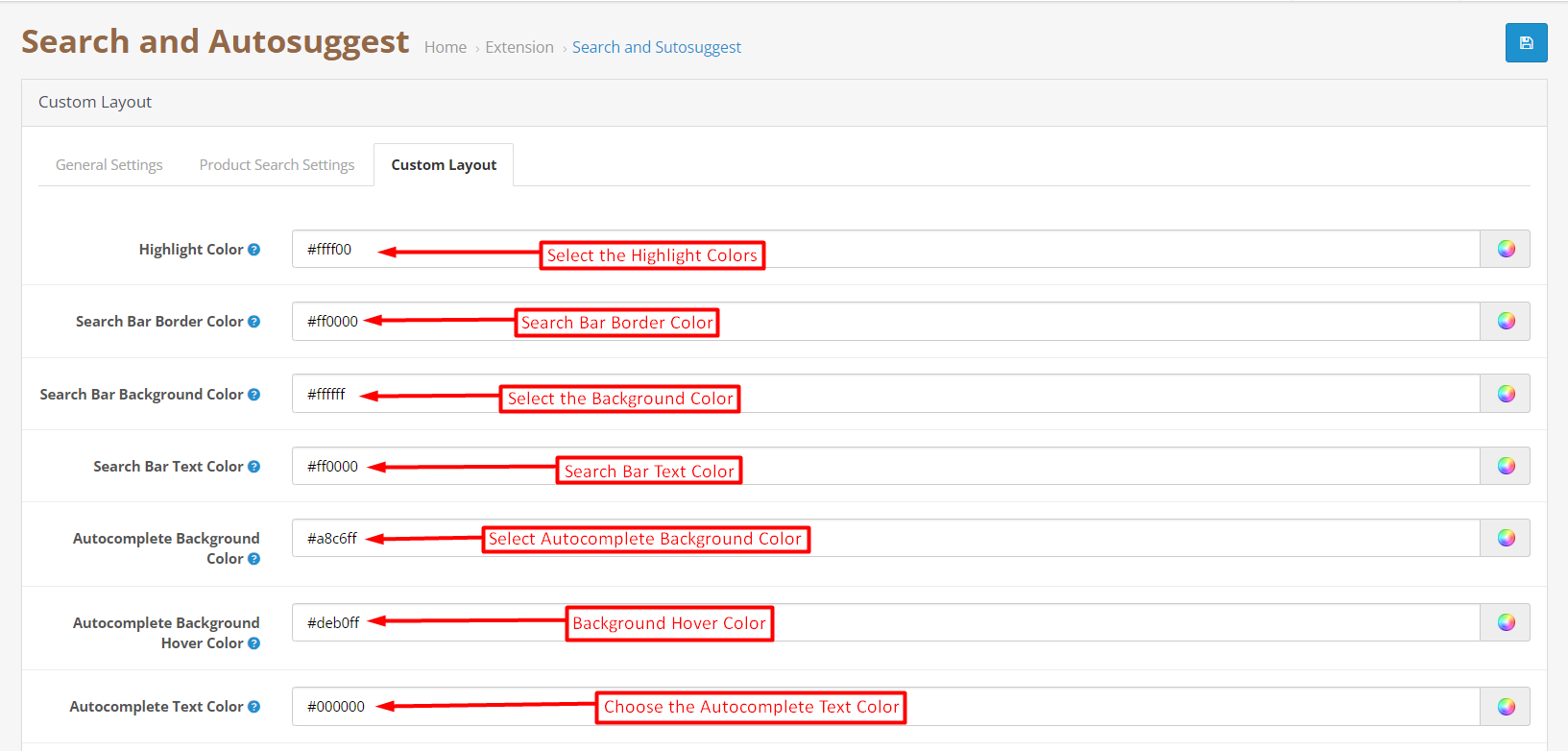
  • Highlight Color: The following option allows the admin to customize the color for the highlight in the search suggestion tab.
  • Search Bar Border Color: This button will customize the color of the search bar border. 
  • Search Bar Background Color: The store admin can select the background color of the search bar using this button.
  • Search Bar Text Color: This option will define the color of the search bar text.
  • Autocomplete Background Color: The Opencart store retailer can manage the autocomplete background color from here. 
  • Autocomplete Background Hover Color: When the users hover over the background of the search suggestion, the selected color from here will be reflected on the storefront.
  • Autocomplete text color: This particular option will define the color of autocomplete text.


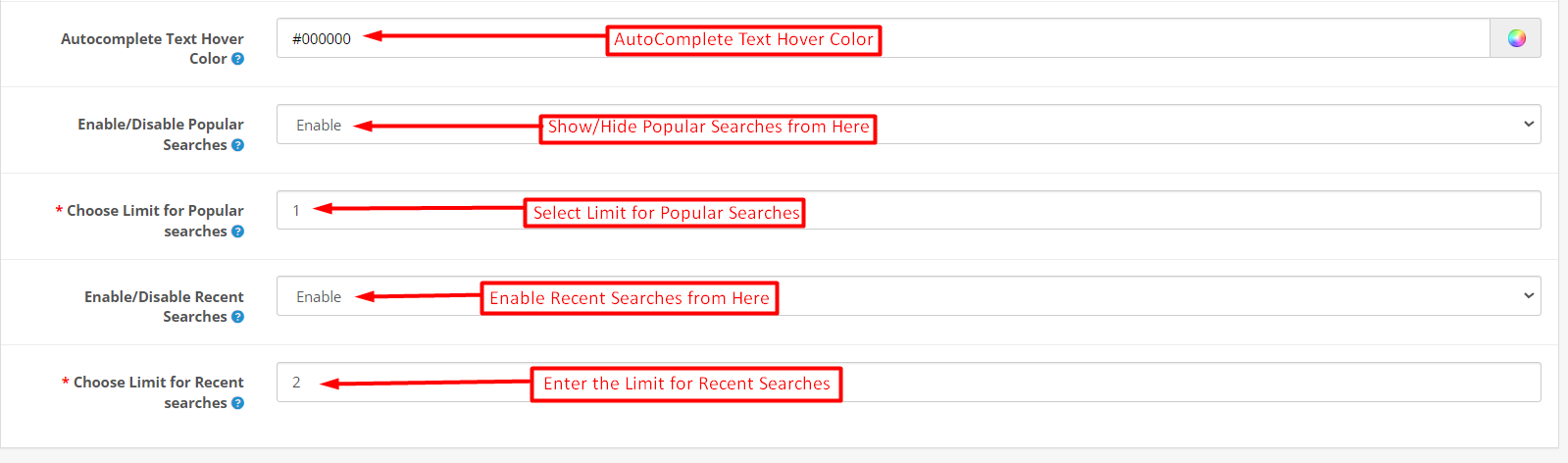
  • Autocomplete Text Hover Color: The store admin can manage the autocomplete text hover color from this option.
  • Enable/Disable Popular Searches: The Opencart auto-correct search module saves the data when customers perform the searches on the store’s front end. If the following option is disabled from here the module with not collect the popular search information.
  • Choose Limit for Popular Searches: Here the store admin can enter the limit for the popular search results. 
  • Choose Limit for Recent Searches: The Opencart Google Custom Search extension will be showing recent searches based on the number entered in the following text field. 

6.0. Front End Overview: Opencart Search Auto Suggestion: 

With the assistance of this Opencart auto-correct search extension, the eCommerce store administrator can enhance the shopping experience for both store visitors and customers. Customers can effortlessly discover their desired products without having to input the complete product name. This Opencart search suggestion module offers a user-friendly interface.

Online users can receive search suggestions while conducting product searches using the website’s search box. This makes it easier for customers to find their desired products, thereby enhancing their overall shopping experience. The eCommerce store administrator also can display price details along with product suggestions. The Opencart auto-suggest extension is highly customizable, allowing the store administrator to choose whether to display search results from specific categories or products. Additionally, the Opencart fast search extension provides an option to exclude out-of-stock products from the search suggestions list.


Enhance Your OpenCart Shop with Search Auto-Suggest: A Win-Win for You and Your Customers!

In the fast-paced world of e-commerce, where convenience and efficiency reign supreme, providing a seamless shopping experience is key to attracting and retaining customers.
One powerful tool that can significantly enhance your OpenCart shop’s usability is the search auto-suggest feature. This feature, which provides instant search suggestions as users type in the search bar, offers a myriad of benefits that make it a valuable addition to any online store.


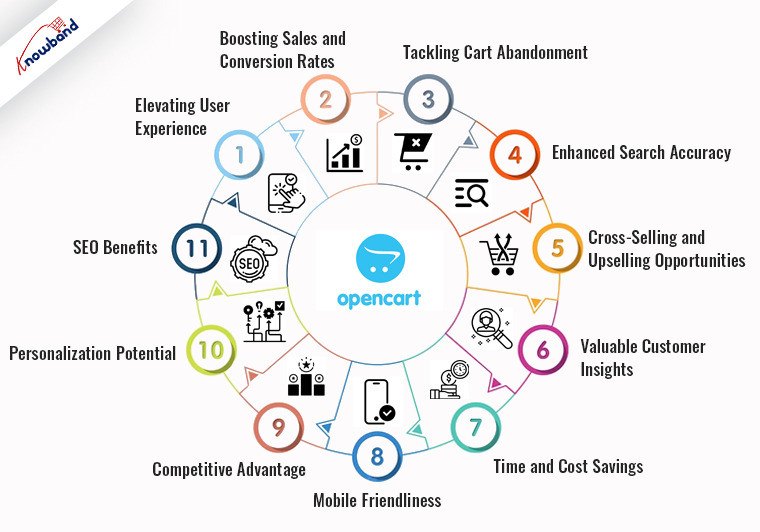
1. Elevating User Experience:

Imagine this scenario: A potential customer visits your OpenCart shop with a specific product in mind, but they’re unsure of the exact name or spelling.
Thus, without auto-suggest, they might need to guess the correct keyword or scroll through numerous search results. Frustration could lead to them leaving your site in search of a more user-friendly alternative. Here comes Knowband’s Search auto-suggest extension in the game.

The Opencart search auto-suggest eliminates this hassle by providing real-time suggestions as users type. It guides them toward relevant products, ultimately simplifying their shopping journey and enhancing their overall experience on your site.

2. Boosting Sales and Conversion Rates:

In the world of e-commerce, every click and interaction counts. When customers can easily find what they’re looking for, they’re more likely to make a purchase. Knowband’s Search Auto-Complete for Opencart helps you capitalize on these valuable micro-moments, leading to increased sales and higher conversion rates.

3. Tackling Cart Abandonment:

One of the leading causes of cart abandonment is difficulty finding desired products. Customers often abandon their carts if they can’t locate specific items quickly. Furthermore, auto-suggest addresses this issue head-on, reducing the likelihood of abandoned carts and potentially saving numerous sales.

4. Enhanced Search Accuracy:

Typographical errors are common in search queries. With auto-suggest, your OpenCart shop can correct these errors and offer suggestions for similar or related products. Moreover, it ensures that customers find what they want, even if they don’t input the exact search term.

5. Cross-Selling and Upselling Opportunities:

Auto-suggest isn’t limited to merely displaying search results. You can leverage this feature to promote related or complementary products. When customers see these suggestions, they may be inclined to add more items to their carts, increasing the average order value.

6. Valuable Customer Insights:

The search queries generated by the OpenCart custom search engine extension feature provide a goldmine of data about what products or keywords your customers are most interested in. Analyzing this data can inform your marketing strategies and product development decisions, helping you cater to your audience’s preferences effectively.

7. Time and Cost Savings:

By reducing the need for customers to perform multiple searches or browse through countless pages, auto-suggest saves them time. Moreover, it not only improves their experience but also potentially reduces customer support inquiries related to finding products, saving your business time and resources.

8. Mobile Friendliness:

In an era where mobile shopping is on the rise, optimizing your OpenCart shop for mobile users is crucial. Auto-suggest is particularly beneficial for users on smaller screens who may find typing and navigating more challenging. It streamlines the search process and improves the overall mobile shopping experience.

9. Competitive Advantage:

Not all e-commerce stores offer advanced search features like auto-suggest. Implementing this feature can set your OpenCart shop apart from competitors who may not provide the same level of search functionality. It demonstrates your commitment to customer satisfaction and convenience.

10. Personalization Potential:

Over time, you can take your auto-suggest feature a step further by implementing personalization. By analyzing a customer’s past behavior and preferences, you can tailor search results and suggestions to each individual, further enhancing their shopping experience.

11. SEO Benefits:

A well-implemented auto-suggest feature can boost your site’s search engine optimization (SEO). By directing users to relevant pages and products, you can improve your search engine rankings and visibility, driving more organic traffic to your OpenCart shop.


In the End:

In conclusion, incorporating a search auto-suggest feature on your OpenCart shop with Knowband’s Opencart search auto-suggest Extension is a smart move that offers numerous advantages. Furthermore, it elevates the user experience, boosts sales, reduces cart abandonment, and provides valuable insights into customer behavior.

Thus, by enhancing search accuracy, offering cross-selling opportunities, and streamlining the mobile experience, you can gain a competitive edge in the e-commerce landscape. Moreover, the potential for personalization and SEO improvements ensures that auto-suggest remains a valuable tool in your arsenal for years to come.

So, why wait? Make your OpenCart shop even more customer-centric and competitive by implementing the search auto-suggest feature today! Your customers will thank you with increased loyalty and higher sales.

The Mobile Shopping Revolution: How Knowband Extensions Enhance M-commerce!

In recent years, mobile commerce, or M-commerce, has taken the eCommerce world by storm. With the proliferation of smartphones and the convenience they offer, consumers are increasingly turning to their mobile devices to shop online.
Furthermore, this mobile shopping revolution presents a golden opportunity for businesses to expand their reach and boost sales. Following the same, in this article, we’ll explore how Knowband extensions can play a pivotal role in enhancing M-commerce for your online store.

The Rise of M-commerce:

Mobile devices have become an integral part of our daily lives. From browsing social media to checking emails, and, most importantly, shopping, our smartphones are always within arm’s reach. For the same reason, the number of mobile users is far more than the number of desktop ones. Moreover, according to recent statistics, mobile devices now account for a significant portion of eCommerce sales.
As a savvy eCommerce business owner, it’s crucial to tap into this growing trend to stay competitive.

Why M-commerce Matters:

Accessibility: 

Mobile shopping allows customers to browse and purchase products from anywhere, at any time. Therefore, this level of accessibility is unparalleled and can lead to increased sales.

User Experience: 

Smartphones offer touchscreens, making navigation and product selection more intuitive. A seamless user experience is vital for keeping customers engaged and encouraging repeat business. Therefore, user experience is the second most important factor that makes investing in M-commerce a must.

Speed: 

With high-speed mobile networks and responsive websites, the loading times for mobile stores have drastically improved. This contributes to a positive shopping experience and reduces bounce rates.

Push Notifications: 

M-commerce apps can send push notifications to users, notifying them of discounts, promotions, or abandoned carts, further boosting sales opportunities.

Knowband Extensions for M-commerce Enhancement!


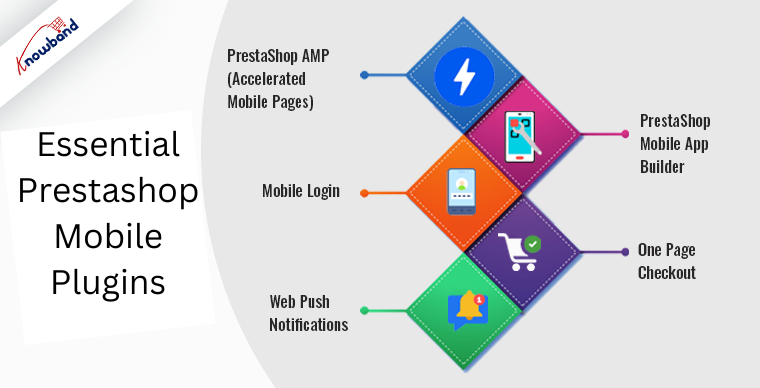
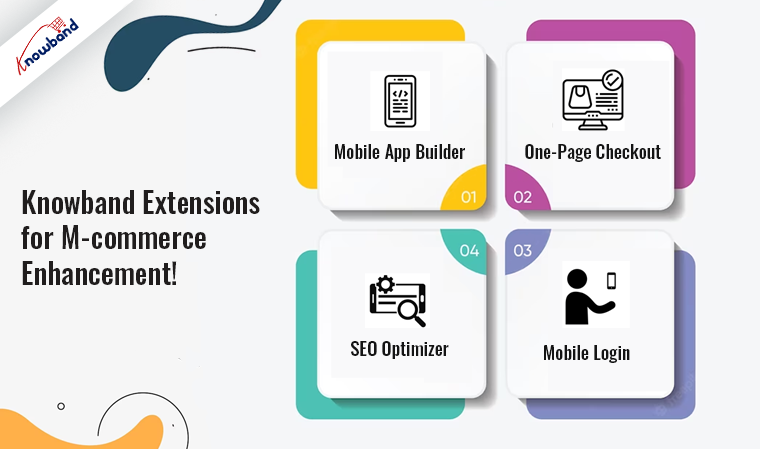
Knowband offers a wide range of eCommerce extensions designed to optimize your online store for M-commerce. These extensions are tailored to various eCommerce platforms, ensuring compatibility with popular systems like PrestaShop, WooCommerce, Magento, and Opencart. Let’s delve into how these extensions can benefit your M-commerce strategy:

1. Mobile App Builder: 

The first step you should take as an eCommerce store admin for enhancing M-commerce is to create a mobile app for your online store. Providing a dedicated shopping experience for mobile users. At Knowband, we offer no-code mobile app builders for eCommerce platforms Prestashop, Opencart, WooCommerce, Magento, and Magento 2. This extension enhances user engagement and allows you to send push notifications, and many more incredible features, increasing customer retention.

2. One-Page Checkout: 

Simplify the checkout process on mobile devices with Knowband’s one-page checkout extension. Reduce cart abandonment rates and boost conversions.

3. Mobile Login: 

Streamline the login and registration process for mobile users, enhancing user convenience and security. Also, visit Mobile Login Extension.

4. SEO Optimizer: 

Improve your store’s visibility on mobile search engines with the SEO Optimizer extension by Knowband. Because the higher mobile search rankings can lead to increased traffic and sales.

Conclusion!

In the era of the mobile shopping revolution, adapting to the preferences and behaviors of your customers is essential. Knowband extensions provide a comprehensive suite of tools to enhance your M-commerce strategy. By optimizing your online store for mobile devices, you can tap into the growing M-commerce market, increase customer satisfaction, and ultimately boost your sales.

Stay ahead in the eCommerce game by embracing M-commerce with Knowband extensions. Transform your online store into a mobile shopping destination that captures the attention and loyalty of mobile-savvy customers. Don’t miss out on the mobile shopping revolution – take advantage of Knowband’s M-commerce solutions today!