How to Get Google API Keys from Google Developer Console

In the digital world, integrating Google services into web applications has become commonplace. Google APIs offer a wide range of functionalities, from Maps to Analytics, that can enhance the user experience. However, to use these APIs, developers need to obtain API keys. In this guide, we’ll walk you through the process of obtaining Google API keys from the Google Developer Console, step by step.

What are Google API Keys?

Google API keys are unique identifiers that allow access to various Google services and APIs (Application Programming Interfaces). These keys are used to authenticate and authorize requests made to Google’s APIs, such as Google Maps API, Google Places API, API Constant console, and many others.

With a Google API key, developers can integrate Google services into their applications, websites, or software products, enabling functionalities like displaying maps, retrieving location data, accessing user information, and interacting with Google’s cloud services.

API keys help Google track and manage usage, enforce usage limits, and provide security by allowing control over which services and resources can be accessed. Developers typically obtain API keys by registering their projects with the Google Cloud Platform Console and enabling the specific APIs they intend to use.

Step 1: Sign in to Google Cloud Console

To get API keys, you need to sign in to the Google Cloud Console.


If you don’t have an account, you’ll need to create one.

Step 2: Create a new project or select an existing one.

Once signed in, click on the project drop-down menu at the top of the page.


Select the existing project or create a new project by clicking on “New Project.”


Enter a name for your project and click “Create.”


Step 3: Enable APIs for your project

With your project selected, navigate to the “APIs & Services” by clicking on the  “APIs & Services”  as shown in the image.


Here, you have to click on “ENABLE APIS AND SERVICES” to enable the API you want to use.


The Search page will be open. Here, you can search for the APIs you want to use, such as Maps JavaScript API or Google Analytics API.


Click on the API you want to enable and then click the “Enable” button.

Step 4: How to Create Credentials

After enabling the APIs, go to the “Credentials” section in the left sidebar under “APIs & Services.” 


Click on the “Create credentials” button and select “API key” or “OAuth Client ID” from the dropdown menu.


On clicking on “API Key” you can create an API key Whereas on clicking “OAuth Client ID” you can create a Client ID and Client secret.

Step 5: Restrict the API Key (Optional but Recommended)

For security purposes, it’s recommended to restrict the usage of your API key. Click on the “Restrict Key” button and set restrictions based on your needs. You can restrict the key by IP address, referrer, or even by API.

Conclusion:

Obtaining Google API keys from the Search Console is a straightforward process that involves creating a project, enabling APIs, and creating credentials. By following these steps, you can easily integrate Google services into your web applications, enhancing their functionality and user experience.

Remember to keep your API keys secure and to follow Google’s best practices for API usage to avoid any issues with quota limits or security.

NOTE: 

Apart from that, the API key has different uses for different purposes for Google Shopping, We need to enable different sets of the Library(Content API for Shopping). Similarly for the Google Maps, We need to enable a different set(Maps). For the Google Login, We don’t need to enable anything.

By following these steps, you can effectively access and utilize the Google Search Console API to extract essential data and gain deeper insights into your website’s search performance. Remember to stay updated with the Search Console API documentation for any changes or updates to the API’s functionality.

Do You Know?

You can explore and purchase Knowband’s wide range of marketplace integrators directly through their site. Check out our Multi-vendor Marketplace Module for PrestaShop, OpenCart, Magento 2, and WooCommerce to start expanding your shop’s reach on one of the world’s most unique marketplaces.

Additionally, to optimize your online store’s visibility and enhance sales, consider integrating the Google Shopping module by Knowband. This plugin enables you to effectively manage and sync your products with Google Shopping, boosting your marketing efforts.



Redefine the Conversion & User Experience with the Prestashop One Page Checkout Module by Knowband!

Checkout is one of the most important aspects of the order process. It not only defines the hassle-free process for the customers but also impacts the bounce order rate by a huge margin.
For the same reason, in today’s fast-paced e-commerce environment, optimizing the checkout process is crucial for eCommerce websites. Not only does an enhanced checkout process maximize conversions but also it enhances the customer experience.
Thus, in today’s article, we have the Prestashop One Page Checkout by Knowband to streamline the checkout experience on your website. Let’s delve deep and have a quick overview of all the amazing features.

Where the Default Five-Step Checkout Loses Orders – Update (September 29, 2026)

PrestaShop’s default checkout runs five steps, and each page load is a chance to leave. Forced account creation is usually the biggest drop-off, followed by shipping costs appearing on a separate page. A one-page checkout with guest and social login fixes both.

It also supports popular payment gateways such as PayPal, Stripe, Klarna, Amazon Pay and Mollie, and carriers such as DHL, UPS, FedEx, DPD and GLS. With Ship2Pay, you can show only the payment methods that suit the delivery option the customer picks. The quick checkout addon to reduce checkout steps article explains the fix and how to test it in preview mode before going live.

Streamline Your Checkout with the PrestaShop One-Page Checkout Addon


Single-page checkout, social login, customizable layout, and MailChimp integration at no cost. A solid starting point before moving to the full premium version.

Explore the One Page Checkout Addon

Streamlined Checkout Process:

The Prestashop One Page Checkout Extension by Knowband revolutionizes the typical multi-page checkout process by consolidating all crucial elements into a single page. Furthermore, this approach not only speeds up the checkout flow but also makes it more user-friendly. Thus, with the One-page checkout installed on the website, customers can now view the cart, edit quantities, and enter shipping and payment details all on one page. This factor significantly reduces the time and hassle involved in navigating through multiple pages. As a result, the customers can complete the checkout easily and the bounce rate can be reduced immensely.

Enhanced User Experience:

While designing the supercheckout extension for Prestashop, we have focused on user experience. Moreover, its responsive design ensures that the checkout page looks great and functions smoothly across all devices, including smartphones and tablets.
This is particularly important as mobile commerce continues to grow. The Prestashop responsive one-step checkout addon adapts to any screen size, providing a seamless experience for mobile users. Therefore, the following factor not only enhances the user experience but also ensures cross-platform usability for your customers.

Increased Conversion Rates:

The confusing checkout process is one of the most sounding reasons for checkout abandonment. Customers usually get frustrated by filling in different order information on different pages. On the other hand, the One Step Checkout Prestashop Extension effectively reduces cart abandonment by minimizing the steps required to complete a purchase.
The quicker and simpler process encourages customers to complete their purchases, leading to higher conversion rates for businesses. On top of that, the intuitive layout of the Prestashop fast checkout addon, where all elements are visible at once, also helps in reducing customer confusion and decision fatigue.

Customizable and Flexible:

The Prestashop Quick Checkout Addon offers extensive customization options to fit the unique needs of your business. You can adjust the layout, fields, and even the colors to match your store’s branding. This level of customization ensures that the checkout experience not only feels integrated but also emphasizes your brand identity.

Improved Trust and Security:

The Prestashop One Page Checkout makes security a priority. Therefore, it integrates seamlessly with various secure payment methods, ensuring that customer payment information is handled safely.
This security aspect is vital in building trust with your customers, encouraging repeat business, and enhancing the reputation of your store.

Features and Benefits:

  • Consolidates the checkout into a single page, reducing clicks and page loads, which streamlines shopping and lowers cart abandonment rates.
  • Responsive design ensures a smooth checkout on any device, which is crucial for capturing the growing mobile shopper demographic.
  • Simplifies the buying process, reducing friction and decision fatigue, which can lead to higher sales conversions.
  • We provide numerous options to tailor the checkout to your brand, improving the aesthetic and functional alignment with your business needs.
  • The one-page supercheckout module supports secure payment integrations to safeguard customer information, fostering trust and encouraging repeat business.
  • The module comes with social login, guest checkout, and auto-address fill to enhance user convenience and transaction speed.

In the END!

By incorporating these advanced features, the Prestashop One Page Checkout Module by Knowband not only simplifies the checkout experience but also transforms it into a competitive advantage for your e-commerce store, driving both customer satisfaction and business growth.

👉Explore the Module with Our Video Guide


Power of Communication with Customer – Knowband’s WhatsApp Live Chat Manager!

In today’s competitive eCommerce landscape, effective customer communication is more than a luxury—it’s a critical component of success. The reason behind the same is that modern customers just do not buy something by just looking into it. Moreover, it is crucial for them to have a proper idea of the service/product they are going to purchase before reaching a decision.

Furthermore, modern shoppers expect immediate and personalized responses when they encounter issues or have questions. Thus, integrating a powerful communication system on an eCommerce website can transform customer service dynamics by offering a direct, convenient communication line.

Following the same, we are here to present the WhatsApp Live Chat Manager module to streamline your communication with the customers. However, before starting it is important to understand the importance of live communication with the visitors.

Importance of Effective Communication in eCommerce:

Effective communication transcends simple interactions; it builds relationships and fosters trust between the customer and the brand.
Therefore, in the context of eCommerce, this could be the deciding factor between a finalized sale and an abandoned cart.
Live chat systems notably increase conversion rates by as much as 20%, as they provide reassurances to customers at critical decision-making stages of the purchasing process. Moreover, the live chat tools on a website play a vital role in customer retention, with consistent, helpful interactions encouraging customers to return.

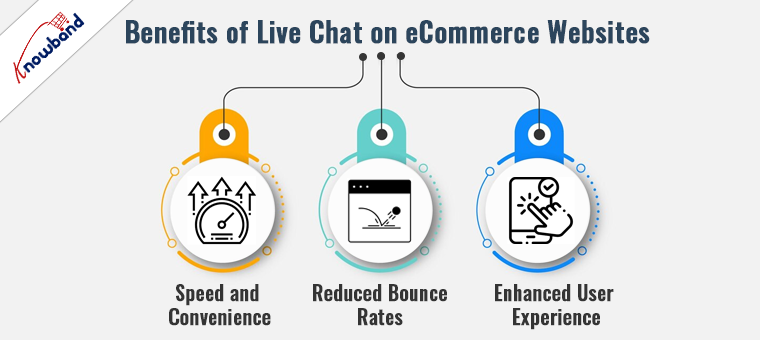
Benefits of Live Chat on eCommerce Websites!

The introduction of live chat on eCommerce sites revolutionizes customer interactions by offering several tangible benefits:

Speed and Convenience:

The Live chat option provides immediate answers to customer inquiries, which is far superior to the delays often associated with email and phone support. Moreover, it also helps in addressing customer’s queries and helps them in decision-making.

Reduced Bounce Rates:

By promptly addressing concerns and guiding customers through their purchase decisions, live chat significantly reduces the likelihood of customers leaving the site without making a purchase.

Enhanced User Experience:

Live chat adds a human element to shopping online, which can enhance the overall user experience, leading to increased customer loyalty and repeat business. Moreover, the query resolution at the time of purchase reduces the need to return and other hassles in the purchase journey.

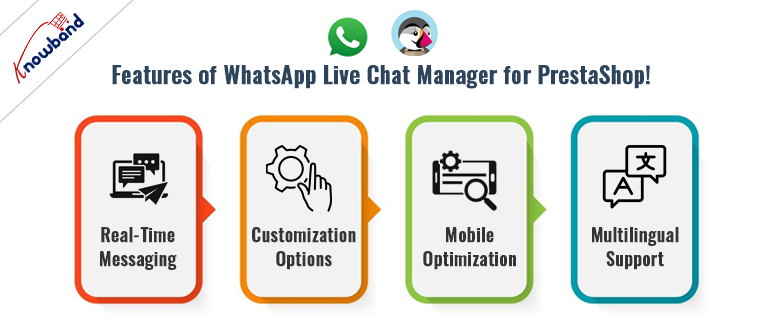
Features of WhatsApp Live Chat Manager for PrestaShop!

Knowband’s Prestashop WhatsApp Live Chat Manager Addon is designed with the modern eCommerce framework in mind. Its key features include:

Real-Time Messaging:

This core feature ensures no customer query goes unanswered, providing a seamless communication flow. This eliminates the need for unnecessary delays in communication and helps the customers to get their queries addressed during live chat sessions.

Customization Options:

Businesses can customize the chat interface to reflect their branding, making the shopping experience more personal and consistent.

Furthermore, we have also provided an option to manage the chat appearance in particular locations. Thus, as an eCommerce admin, you can select which products/categories the customers will be getting live chat support.

Mobile Optimization:

Given the increasing use of mobile devices for shopping, Knowband’s WhatsApp Chat for Prestashop ensures that the chat experience is smooth across all devices.

Multilingual Support:

Catering to a global audience is easier as the module supports multiple languages. This eliminates the need for manual translations and helps businesses to communicate more effectively with customers.

Leveraging Live Chat for Strategic Customer Engagement:

Beyond its basic functionality, the WhatsApp Live Chat Manager can be leveraged as a strategic tool in various ways:

Proactive Engagement:

Instead of waiting for customers to initiate contact, businesses can use live chat to proactively message customers who appear to be hesitating in their purchase journey.

Gathering Customer Insights:

Live interactions provide a wealth of data about customer preferences and pain points, which can be used to refine marketing strategies and product offerings.

Boosting Sales through Upselling:

Operators can use the context of the chat to suggest additional purchases that complement the customer’s current selection, subtly increasing the average order value.

Conclusion!

Incorporating the WhatsApp Live Chat Manager into your PrestaShop store is not just about keeping up with eCommerce trends—it’s about setting a standard for customer service excellence. Thus, by enabling real-time, personalized communication, you empower your business to meet modern shoppers’ expectations head-on, enhancing their experience and boosting your sales.

Empower Your PrestaShop Store Security with Knowband’s Top PrestaShop Modules!

Website security is one of the most important foundations of any successful online business. A secure store protects sensitive customer data, prevents financial losses, and preserves the reputation you have worked hard to build. As cyber threats continue to grow in sophistication, relying on basic security measures is no longer sufficient. For PrestaShop store owners, taking a proactive approach to blocking malicious bots, unwanted traffic, and suspicious IPs is essential to maintaining both performance and customer trust. A well-secured store also signals credibility to shoppers, which directly supports customer retention and long-term sales growth. Investing in the right security tools is not just about defense; it is about building a store that customers feel confident shopping in.

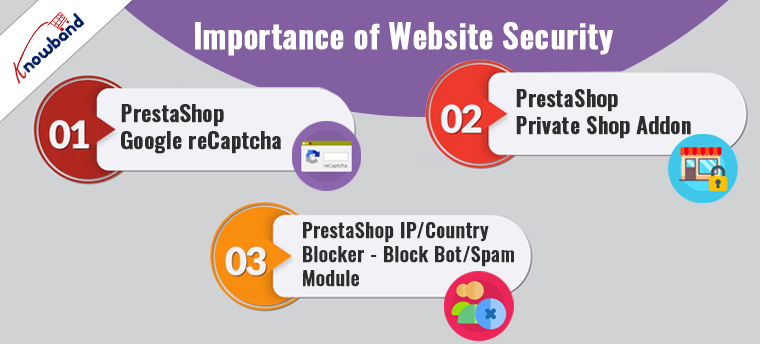
Importance of Website Security:

For businesses using PrestaShop, enhancing security doesn’t just protect against threats but also boosts customer confidence and ensures compliance with data protection laws. When it comes to website security, the topic covers several aspects, including SSL configurations, protection from spam and Bots, disabling shop access from particular countries, etc.
Here, we spotlight three essential PrestaShop modules designed to fortify your store’s security framework: PrestaShop Google reCAPTCHA, PrestaShop Private Shop Addon, and PrestaShop IP/Country Blocker.

🛡️ Related Read


How the IP Blocker for PrestaShop Shields Your Store Against Bots and Unwanted Traffic


Block malicious bots, spam accounts, and unwanted visitors by IP address, country, or user agent, a complete look at how the PrestaShop IP Blocker keeps your store secure and performing at its best.

Explore More About the IP Blocker Module

1. PrestaShop Google reCaptcha:

The internet is a vast space where security threats like bots and spam are ever-present. To safeguard your store from such nuisances, integrating the PrestaShop Google reCaptcha addon is a strategic move. Moreover, Knowband’s Prestashop v2 and v3 reCaptcha addon implements the advanced technology of Google reCAPTCHA, which distinguishes between human users and automated systems.

The beauty of Google reCAPTCHA is that it provides a seamless user experience by requiring minimal input from users, thus ensuring security without sacrificing usability. On top of that, the customers get an option to choose between Google reCaptcha v2 & reCaptcha v3 which are some of the most advanced captcha modules from Google. Thus, by adding this layer of security, you can prevent malicious activities and ensure that your interactions come from genuine users.

2. PrestaShop Private Shop Addon:

Privacy is a significant concern for many online shoppers. Following the same, Knowband’s PrestaShop Private Shop Addon caters to this need by allowing you to create an exclusive shopping environment. Furthermore, this module enables you to restrict access to your shop or specific products, making them accessible only to registered users.
Prestashop private shop module is an ideal solution for stores dealing with high-value goods, B2B transactions, or exclusive merchandise.
Additionally, it can serve as a tool for managing VIP customer experiences by providing access to special collections or promotions. Implementing this module not only enhances security but also gives you control over who views and purchases your products.

3. PrestaShop IP/Country Blocker – Block Bot/Spam Module:

Last but not least, to further enhance your store’s security posture, the PrestaShop IP/Country Blocker module is indispensable. The IP Blocker addon for Prestashop allows you to block access based on IP addresses or geographic locations.
Moreover, its primary function is to prevent bots and spam from harming your site, which can be particularly useful if you face frequent attacks from specific regions or need to comply with regional compliance requirements. Therefore, with the ability to customize restrictions, you can tailor security settings to best fit your business needs, ensuring that your store remains secure and compliant with international laws.

In the END!

In conclusion, strengthening your PrestaShop store with these top security modules can drastically reduce vulnerabilities and enhance customer trust. By implementing Google reCaptcha, creating a private shopping experience, and blocking unwanted IP addresses or countries, you ensure that your PrestaShop store remains a secure, trustworthy, and compliant digital shopping destination. Invest in these security enhancements to protect your business and provide your customers with a safe and enjoyable shopping experience.
Moreover, if you have any queries/suggestions regarding our website security special extensions, you can reach out to us at our email address support@knowband.com.

Clean Your Store URLs with Knowband’s Prestashop SEO URL Cleaner Module!

In the bustling world of e-commerce, where competition is just a click away, the importance of SEO cannot be overstated. Even Search engine optimization is one of the most important factors for any website. SEO not only depends on off-page factors but also on-page optimization plays a vital role in the rankings of a site.

Further, one crucial aspect of SEO that often gets overlooked is the structure and cleanliness of URLs. Due to an imbalanced URL structure, the website often gets ignored by the Google Search Engine Optimization algorithms.  

Following the same, for PrestaShop users, the “Prestashop SEO URL Cleaner Module” developed by Knowband offers a powerful solution to optimize your store’s URLs, making them not only SEO-friendly but also more appealing to potential customers. However, before starting, it is crucial to have an idea about why clean URLs play a vital role in the SEO success of a website.

Why Clean URLs Are Important!

Clean URLs are vital for several reasons. They enhance the user experience by providing clear and easy-to-understand links, which are crucial for gaining customer trust and improving site navigation. Moreover, clean and readable URLs are essential for SEO since search engines prefer URLs that are descriptive and free of clutter.
This is where Knowband’s Prestashop SEO URL Cleaner addon comes into play, ensuring that your URLs are optimized for both search engines and users.


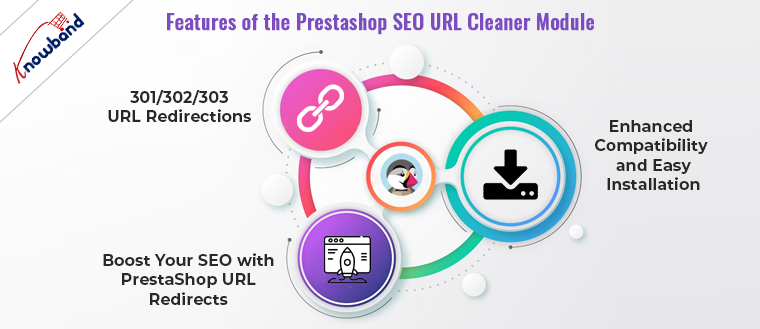
Features of Knowband’s Prestashop SEO URL Cleaner Module!

The Prestashop SEO Optimizer Module offers a range of features designed to improve your website’s SEO performance. Furthermore, one of the standout features is its ability to remove IDs and numbers from URLs, which makes them cleaner and more descriptive.
Additionally, the module supports the creation of PrestaShop SEO Friendly URL Addons, which are crucial for improving your website’s search engine ranking.

301/302/303 URL Redirections:


Furthermore, another significant feature of the Prestashop SEO Optimizer Addon is its robust redirection capabilities. The module allows you to set up Prestashop Clean URLs & 301/302/303 redirections effortlessly. This means if you ever have to change your URL structures, the module helps in redirecting old URLs to new ones, preserving your SEO efforts and avoiding the dreaded 404 errors that can harm your search engine visibility.

Enhanced Compatibility and Easy Installation:


Developed by Knowband, known for its reliable and user-friendly e-commerce solutions, the Prestashop SEO URL Cleaner Module is compatible with various versions of PrestaShop. The Prestashop SEO 301/302/303 redirect module is easy to install and configure, which means you don’t need extensive technical knowledge to get started. Once installed, you can start modifying the URL structure of your store by replacing your old lengthy URLs with SEO-friendly new ones.

Boost Your SEO with PrestaShop URL Redirects:


The module not only cleans up URLs but also provides extensive support for URL redirects.
With the PrestaShop URL Redirects feature, store owners can ensure that all visitors are directed to the correct page, even if a URL has been changed or removed. This feature is particularly useful for maintaining the integrity of your SEO rankings and ensuring a seamless user experience.

Conclusion!

The Prestashop SEO URL Cleaner Module by Knowband is an essential tool for any PrestaShop store owner looking to boost their SEO efforts. With features like SEO-friendly URL generation, easy 301/302/303 redirections, and compatibility with the latest PrestaShop versions, it offers a comprehensive solution to enhance your store’s online presence. Thus, by investing in this module, you’re not just cleaning up URLs; you’re setting the stage for increased traffic, better customer engagement, and ultimately, higher sales. Optimize your store today with Knowband’s Prestashop SEO Optimizer Module and watch your e-commerce business reach new heights.

Check out our recent video on the “Power of SEO URLs” here:

Stay Tuned: The Enhanced Knowband’s OpenCart Mobile App Builder v3.0.8 Coming Soon!

In the fast-paced world of digital commerce, staying ahead means continuously enhancing the functionality and user experience of your mobile applications. Ensuring the fact, that the latest upgrades to the OpenCart Mobile App Builder Plugin are designed to do just that. We are going to offer exciting new features that help businesses optimize their online presence. This blog post explores these new functionalities and their impact on your business’s mobile commerce strategy.

Automated Banner Sliders: Dynamic Visual Engagement

The new automated banner sliders in the OpenCart Mobile App Builder allow for the scheduling of rotating banners directly from the module backend. This feature is a significant enhancement for businesses looking to automate and optimize their mobile app visuals for promotions and announcements.
Moreover, in the upcoming module update, we are going to provide an option to the admin to enter the time for the automated banner sliders. This will ensure the seamless synchronization between the backend and the mobile apps.

Key Benefits:

  • Dynamic Content: Keep the app content fresh and engaging with timely banner updates.
  • Strategic Promotions: The OpenCart store admin can schedule banners in alignment with your marketing campaigns for maximum impact.
  • Ease of Use: Set up and forget functionality allows for effortless content management.

Seamless Login/Sign-Up: Enhancing User Onboarding

Capturing the customers’ email addresses is one of the most important aspects for eCommerce businesses. These emails can not only be used for marketing campaigns but also to increase the customer database. Thus, enhancing user experience, the OpenCart eCommerce Mobile App will feature a login/sign-up pop-up for non-logged-in users. Furthermore, this addition streamlines the transition from guest browsing to active customer engagement, potentially boosting conversion rates and enhancing customer retention.

Key Benefits:

  • Streamlined Access: The login/sign-up pop-up for non-logged-in customers simplifies the onboarding process for new app users.
  • Increased Engagement: Lower barriers to entry increase the likelihood of user registration and retention.
  • Valuable Insights: Capture essential data on user preferences and behaviors from the outset.

Notifications Feature: Keep Your Customers Engaged

The introduction of the notification features in the OpenCart Android and iOS Mobile App Builder Plugin represents a strategic tool for maintaining customer engagement. Furthermore, this functionality allows businesses to send personalized updates and offers, keeping users connected and informed.

Therefore, customers can also check all the previous notifications with clicks right in their mobile app.

Key Benefits:

  • Direct Engagement: Utilize notifications to inform users about new products, offers, and updates directly.
  • Boosted Retention: Regular notifications can significantly enhance user return rates and app engagement. Moreover, customers can check notifications and offer anytime in the upcoming notification tab in the Android and iOS App maker for OpenCart.
  • Customized Messaging: Tailor notifications to user behaviors for more effective communication.

CMS Pages and Layouts: Streamlined Content Management

The latest update enriches the OpenCart iOS App Maker by integrating CMS pages and layout as new redirect activities. This enhancement improves content management capabilities, allowing for better structured and more navigable app interfaces.

Key Benefits:

  • Enhanced User Experience: Users enjoy smoother navigation and easier access to important information.
  • Cohesive Branding: Maintain a consistent look and feel throughout the app with integrated CMS pages.
  • Flexible Content Options: Manage and present diverse content types more effectively within the app.

Conclusion!

The upcoming enhancements to the Mobile App Builder Plugin for OpenCart significantly improve both the aesthetic appeal and functionality of your mobile eCommerce platform.
Thus, by upgrading, businesses not only enhance the user experience but also bolster engagement and sales conversions. Consider these advancements in the OpenCart Android and iOS Mobile App Creator Plugin to maintain a competitive edge in the dynamic marketplace of today.

Moreover, if you have any queries/suggestions regarding upcoming Opencart Mobile app builder enhancements, you can also reach out to our support team at our email address support@knowband.com.


Important Alert by Knowband: Universal Analytics to be Phased Out by Google!

Google is calling on users to swiftly transition to Google Analytics 4 (GA4) to avoid losing valuable data. As the digital landscape evolves, Google has announced its plan to discontinue all Universal Analytics (UA) services and application programming interfaces (APIs) by July 1. Furthermore, this move signifies a pivotal shift towards Google Analytics 4 (GA4), marking the end of access to UA properties through both the Google Analytics interface and its APIs starting in July.

For users who have not yet embraced GA4, Google emphasizes the urgency of migrating.
The transition is not just a technical necessity but an opportunity to harness more sophisticated analytics capabilities offered by GA4. Unlike its predecessor, GA4 focuses on privacy-compliant data collection and offers a more intuitive user interface, enhanced machine learning models, and cross-platform tracking capabilities. Moreover, these features are designed to provide deeper insights into user behavior and improve the accuracy of data-driven decisions.

Why Immediate Action is Essential!

Data is one of the most important assets for an online website. For the same reason, it becomes essential to protect the same.
Delaying the migration process poses a significant risk of data loss, which could irreversibly impact the effectiveness of marketing strategies and campaign performances. Thus, to facilitate a smooth transition, Google has made available a comprehensive migration guide that outlines step-by-step instructions.

Data Preservation Techniques!

Preserving historical data is crucial. Google Analytics Help Center details several methodologies for exporting data from UA properties. For those with Universal Analytics 360 properties looking to export historical data through BigQuery, it’s imperative to begin this process immediately. Post-transition, exported data will continue to be accessible within BigQuery, ensuring continuity of data analysis and reporting.

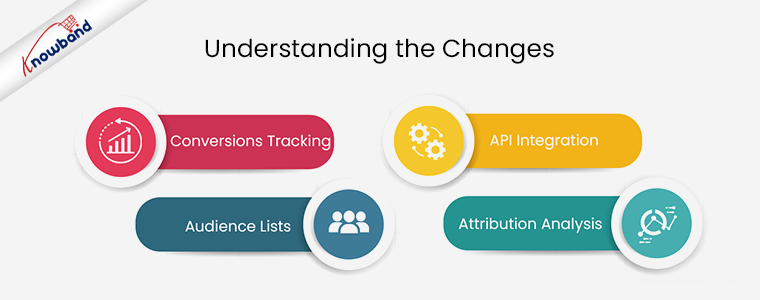
Understanding the Changes:

Conversions Tracking:

The discontinuation of UA will halt the tracking of new conversions. This could significantly affect the optimization of ad campaigns, particularly for those utilizing Google’s Smart Bidding strategies.

Audience Lists: 

With the closure of Universal Analytics, custom audience lists used for targeting in advertising campaigns will become unavailable, potentially diminishing campaign effectiveness. However, you can access more advanced features with GA4.  

API Integration: 

Post-UA, API requests related to Universal Analytics will not be processed. This includes data deletion requests via the User Deletion API, affecting the functionality of analytical tools like Looker Studio.

Attribution Analysis: 

The sunsetting of Attribution Projects within Google Analytics highlights the need for marketers to adapt their attribution modeling in GA4. It will ensure the continued understanding of customer touchpoints and conversion paths.

In the END!

Transitioning to GA4 is not just a mandatory shift but an opportunity to leverage advanced analytics that can drive more nuanced and effective marketing decisions. The comprehensive features of GA4, designed to meet the demands of a privacy-first digital environment, offer businesses the tools to thrive in an increasingly competitive online space.


The “ParfumuriArabesti.ro” Success Story: A Fragrance of Digital Triumph!

In the realm of digital commerce, where technology and consumer expectations evolve at a breakneck pace, Knowband has positioned itself as a beacon of innovation and reliability.
Our suite of add-ons for the PrestaShop eCommerce platform is designed to empower retailers to meet and exceed these evolving demands. Therefore, among the myriad success stories we’ve nurtured, “ParfumuriArabesti.ro” stands out as a paragon of digital strategy done right. The app achieved over 10,000 downloads on the Play Store, setting up not only a milestone but also an example for newcomers.

Furthermore, this milestone was achieved using the PrestaShop Mobile App Builder, a tool that has redefined the mobile commerce landscape for our clients.

The Olfactory Journey of “ParfumuriArabesti.ro”:

The inception of “ParfumuriArabesti.ro” was guided by a vision to democratize access to high-quality perfumes in Arabic countries. Recognizing the burgeoning potential of mobile commerce, the brand sought to transcend the conventional boundaries of eCommerce. Moreover, the PrestaShop Android and iOS Mobile App Builder was the catalyst for this transformation, facilitating a seamless leap from a traditional online store to a dynamic mobile app.

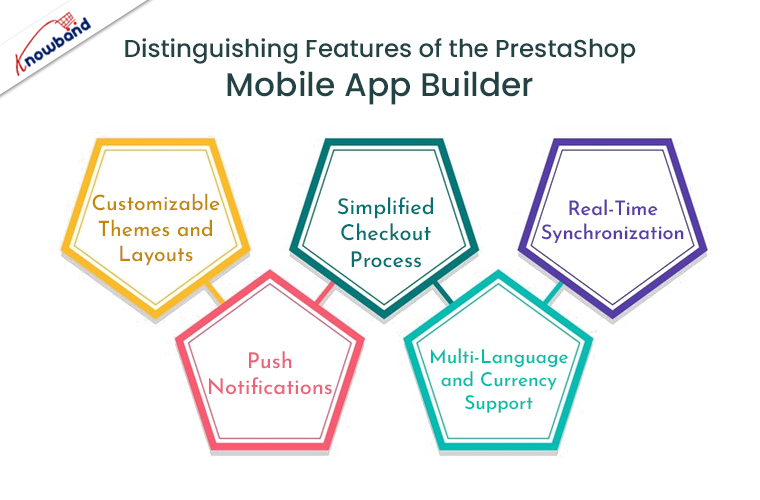
Distinguishing Features of Knowband’s PrestaShop Mobile App Builder:

The PrestaShop Mobile App Builder is not just a tool; it’s a gateway to unlocking the full potential of mCommerce. Here are some of its standout features that played a pivotal role in the success of “ParfumuriArabesti.ro”:

Customizable Themes and Layouts: 

The ParfumuriArabesti.ro Android and iOS apps offer a range of customizable themes and layouts. Furthermore, this helped “ParfumuriArabesti.ro” to mirror its brand’s aesthetic and ethos within the app, ensuring a consistent and immersive user experience.

Simplified Checkout Process: 

Understanding the importance of a hassle-free checkout, the module incorporates a streamlined checkout process, significantly reducing cart abandonment and enhancing user satisfaction. Not only does it enhance the customer experience but also ensures the cake-like running apps.

Real-Time Synchronization: 

The app remains in perfect harmony with the website, thanks to real-time synchronization. This feature ensures that any changes to the product catalog or prices are immediately reflected in the app, providing a cohesive shopping experience.

Push Notifications: 

A powerful tool for engagement, push notifications enabled “ParfumuriArabesti.ro” to keep its users informed about new arrivals, exclusive offers, and personalized deals, directly contributing to increased user retention and sales.

Multi-Language and Currency Support: 

Catering to a global audience, the Mobile App Builder supports multiple languages and currencies, making “ParfumuriArabesti.ro” accessible and user-friendly to customers across different regions.

Therefore, it increased the global usability of the apps and allowed worldwide customers to place orders via the apps.

A Scent of Success: The Impact on “ParfumuriArabesti.ro”

The implementation of the PrestaShop Mobile App Builder has heralded a new era for “ParfumuriArabesti.ro,” not just in terms of downloads but also in enriching the customer experience and broadening the brand’s market reach. Moreover, the customer testimonials have highlighted the ease of navigation, the personalized shopping experience, and the security of transactions as key factors in their satisfaction.

The Fragrance of Future Innovations!

As “ParfumuriArabesti.ro” continues to thrive in the mobile commerce arena, its journey from a fledgling online store to a mobile app powerhouse exemplifies the transformative potential of the PrestaShop Mobile App Builder.

This story serves as an inspiration and a blueprint for other retailers aspiring to make their mark in the digital marketplace.

Knowband remains dedicated to pushing the boundaries of eCommerce solutions, ensuring that our clients, like “ParfumuriArabesti.ro,” are equipped with the tools they need to succeed in an ever-evolving digital landscape. The future smells like innovation, and we’re here to make sure it’s as fragrant as the finest perfumes sold on “ParfumuriArabesti.ro.

5 Compelling Reasons to Sell on Etsy in 2026: Prestashop Seller Guide by Knowband!

In the dynamic world of e-commerce, platforms like Etsy have carved out a niche for artisans, crafters, and vintage sellers. Due to the wide seller base, Etsy is a kind of marketplace that emphasizes unique, handmade, and bespoke items. Thus, if you are willing to purchase any handmade or art-category products, the first thought will be checking on Etsy.

Etsy marketplace holds one of the most colossal customer bases in the market. This factor not only indicates the potential for newcomers but also highlights the marketplace’s popularity.

Therefore, for Prestashop sellers looking to expand their reach and tap into Etsy’s vibrant community, the Prestashop Etsy Marketplace Connector by Knowband emerges as an indispensable tool. Thus, in the following guide, we will delve into five compelling reasons to leverage this powerful module in 2024, unlocking new avenues for growth and success.


1. Access to a Global Marketplace:

Etsy’s platform is synonymous with a global audience passionate about supporting independent sellers and unique products. By integrating your Prestashop store with Etsy via the Prestashop Etsy Integration Addon, you can showcase your products to millions of potential customers.

Furthermore, this not only amplifies your brand’s visibility but also significantly boosts sales opportunities beyond local boundaries.

2. Streamlined Operations and Synchronization:

Managing inventory and orders across multiple platforms can be daunting. And, this factor sometimes triggers the thought of business management in two different places.

On the other hand, the Prestashop Etsy Synchronization Addon simplifies this process by ensuring seamless synchronization between your Prestashop inventory and your Etsy shop. Moreover, the real-time updates on stock levels, order statuses, and product listings prevent overselling and ensure a smooth operational flow, letting you focus more on product development and customer service.

3. Enhanced Brand Recognition:

Selling on Etsy through the Prestashop Etsy Integration Extension provides an excellent opportunity for brand exposure. Therefore, Etsy’s community of buyers appreciates the story behind each product and seller, allowing you to create a more personalized shopping experience. Thus, by leveraging Etsy’s platform, you can narrate your brand’s story, connect with your audience on a deeper level, and cultivate customer loyalty that transcends the transactional nature of typical online sales.

4. Efficient Use of Resources:

For Prestashop sellers, utilizing Knowband’s Prestashop Etsy Integration Module means more than just accessing a new sales channel; it’s about optimizing resources.

The integration facilitates automatic listing creation, updates, and order management, significantly reducing the manual effort and time investment required to manage multiple sales channels. Moreover, this efficiency allows sellers to allocate their resources more effectively, focusing on strategic growth areas such as marketing, product development, and customer engagement.

5. Competitive Edge in a Niche Market:

Etsy offers a platform for products that might not compete as effectively on more generalized e-commerce sites.

With the Prestashop Etsy API Integrator, sellers can tap into this niche market, where the demand for handmade, vintage, and unique items thrives. The specialized nature of Etsy’s marketplace allows Prestashop sellers to stand out more easily, catering to specific customer interests and trends, and building a loyal customer base that values the uniqueness and quality of their products.

🛍️ Also on OpenCart?


A Beginner’s Guide to Connecting Your OpenCart Store with Etsy Using the Integration Module


Running an OpenCart store? The Etsy Integration Module by Knowband is available for OpenCart too, bulk product uploads, automated inventory sync, centralised order management, shipping template sync, and custom Etsy-specific product listings. Compatible with 4.x

Explore the OpenCart Etsy Integration Module

Conclusion!

Entering the Etsy marketplace in 2024 with the help of the Prestashop Etsy Marketplace Connector offers a plethora of advantages for Prestashop sellers. From accessing a global customer base and streamlining operations to enhancing brand recognition, efficiently using resources, and gaining a competitive edge in a niche market. The benefits are clear. Integrating your Prestashop store with Etsy is not just about expanding your sales channels; it’s about embracing an opportunity to grow your brand in a community that values authenticity and creativity. Whether you’re a seasoned seller or new to e-commerce, leveraging the Prestashop Etsy Integration Plugin could be your next strategic move toward achieving your business goals. ( Updated October 5, 2026)