PrestaShop Back in Stock Module- Unique Approach to Capture Lost Sales

Notify customers when products are back in stock, and your PrestaShop revenue will increase quickly. Use the PrestaShop Back in Stock module to start recapturing missing revenue. Send notifications to consumers as soon as the products return to stock. It takes just 5 minutes to set up.

PrestaShop Back-in-Stock – Unique Approach to Capture Lost Sales

Back-in-stock alerts are a perfect way for PrestaShop stores to boost sales. Don’t miss out on sales because the products are out of stock. Increase your sales with web push notifications for back-in-stock products. You can send an initial email when a customer subscribes for a back-in-stock alert, low-stock alerts, and a final notification email with the Back-in-stock message.

We’ve all discovered things that were out of stock but we don’t go back to the store to see if it’s still there. Why do you expect your customers to do it? Influence them using emails and send push notifications to bring them back to your online store. You will get more sales and observe a boost in conversion rate.

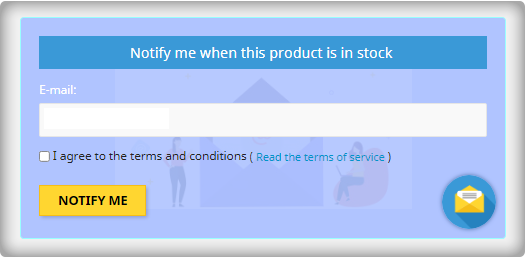
Adding an email opt-in to your subscriber list will help you grow your list

The majority of low stock and back-in-stock warning forms only obtain the customer’s email address to inform them when a product returns to stock. Take advantage of the fact that they’re paying attention by asking them to join your email list at the same time. Sellers who use this strategy see a large improvement in their email subscriber list size, which leads to increased sales.
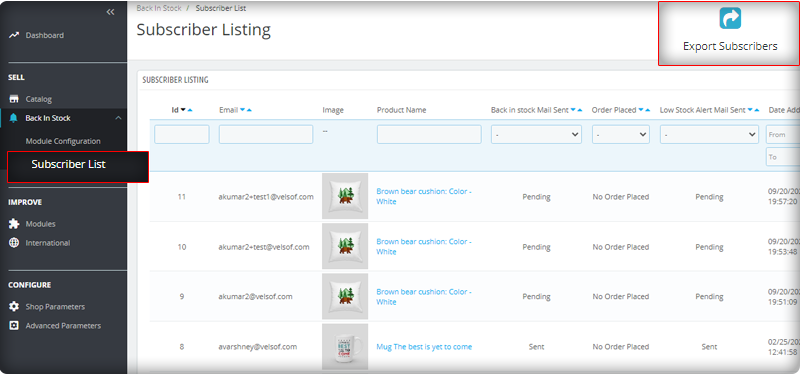
You can observe the subscriber listing on the admin panel at the left menu where all the installed modules are listed.
V3 Google reCaptcha is integrated with PrestaShop Back in Stock module to keep away the spammers and bots.

Add Custom Field in the Back in stock Subscription Box

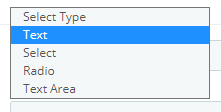
Collecting information from customers to send personalized emails will be easier. PrestaShop Back in stock addon provides an option to add custom fields in the subscription box. You can now add text, radio option, and other custom fields to gather more details about the customers.
Send automated emails for Low-stock and Back-in-stock

The PrestaShop Back-in-stock Module is a tool for email marketing. Customers usually receive hundreds of promotional emails and most of them are ignored but an email with a catchy subject line has more chances of getting opened. The module allows sellers to send a customized email with tailored text and subject lines. Along with an initial welcome email, you can send low-stock alerts to the subscribers and notify them about the restocked products.

Add related products to email template and cross-sell

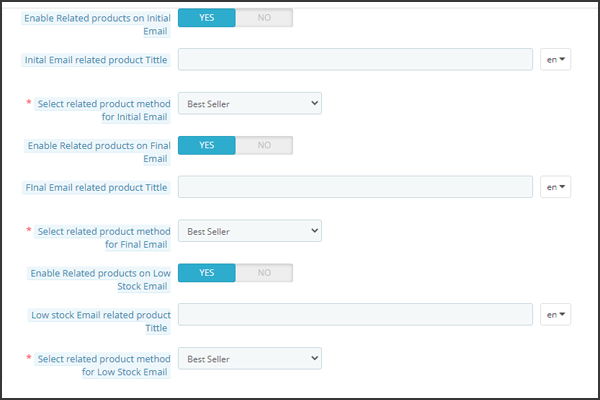
Heard the phrase ‘killing two birds from one stone, the module works the same way. It lets you send back in stock alerts as well as has an option to send related products. A seller can add details like bestsellers, products of the same category, specific products, etc. If a seller opts for the Specific products option, then he will have to specify the products in the respective tab as shown in the image below.
Send alerts via your email provider like Mailchimp

It is critical that you build your brand, and one way to do so is to ensure that the emails you send are sent from your domain. You’ll be able to use a variety of features to boost the success of your back in stock campaigns if you use an advanced eCommerce email provider like Mailchimp, Klavio, or Sendinblue. And, the PrestaShop back-in-stock module allows you to do so.

Real-time Analytics for PrestaShop

View a full report on customers who have subscribed to web push alerts for back-in-stock products. To increase sales, identify the most successful items, maximize inventory, and run promotional campaigns.
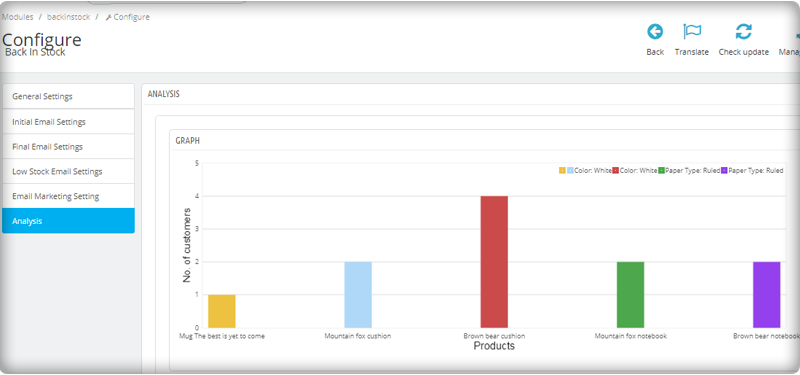
The new version has UTM Parameters

The UTM parameters are short text codes, you insert into URLs (or links) to monitor the success of a webpage or a campaign. Built-in analytics are available on social media sites. These allow you to track key metrics such as likes, shares, and website clicks. You can add UTM parameters to the PrestaShop Back in stock module and take advantage.

To wrap up: The Back-in-Stock emails are one-of-a-kind alerts as they create curiosity, influence the buying motives, and increase the chances of sales. If you are not sending alerts like low-stock or back-in-stock to your customers, you are making a huge mistake. Get your ‘Back-in-stock’ module today to grab your lost sales.

For eCommerce website development, module requirements, or mobile app development for your online store, KnowBand has experts and ready-made tools. Visit us at www.knowband.com or drop a message at support@knowband.com.

Recommended Reads:
OpenCart Extension to Send Back-In-Stock and Low Stock Alerts

Ecommerce companies always look for options that can bring more and more sales. Store optimization for speed, engagement, customer acquisition, and retention rates are on the top of the list. To add to this, KnowBand launched a super easy-to-handle OpenCart plugin for Back-in-stock alerts and low stock notifications. The Back in Stock alerts notify customers about the subscribed products when they are available in stock and increase customer retention rate.

OpenCart Back-in-Stock plugin- Unique way to Capture Lost Sales

Does every customer like to receive emails from the eCommerce website? Is it worth sending alerts to all the customers visiting your store? Are your ongoing campaigns working well?

If your answer is ‘No’ for any of the questions asked, you must stick to this article and read further. Let me give you a brief about the plugin and how you can boost sales with this tool

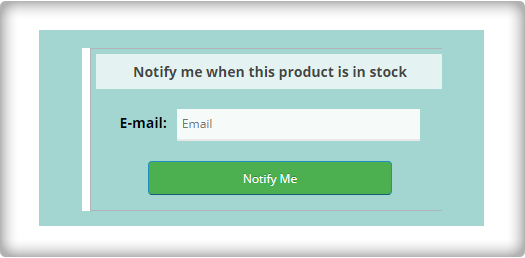
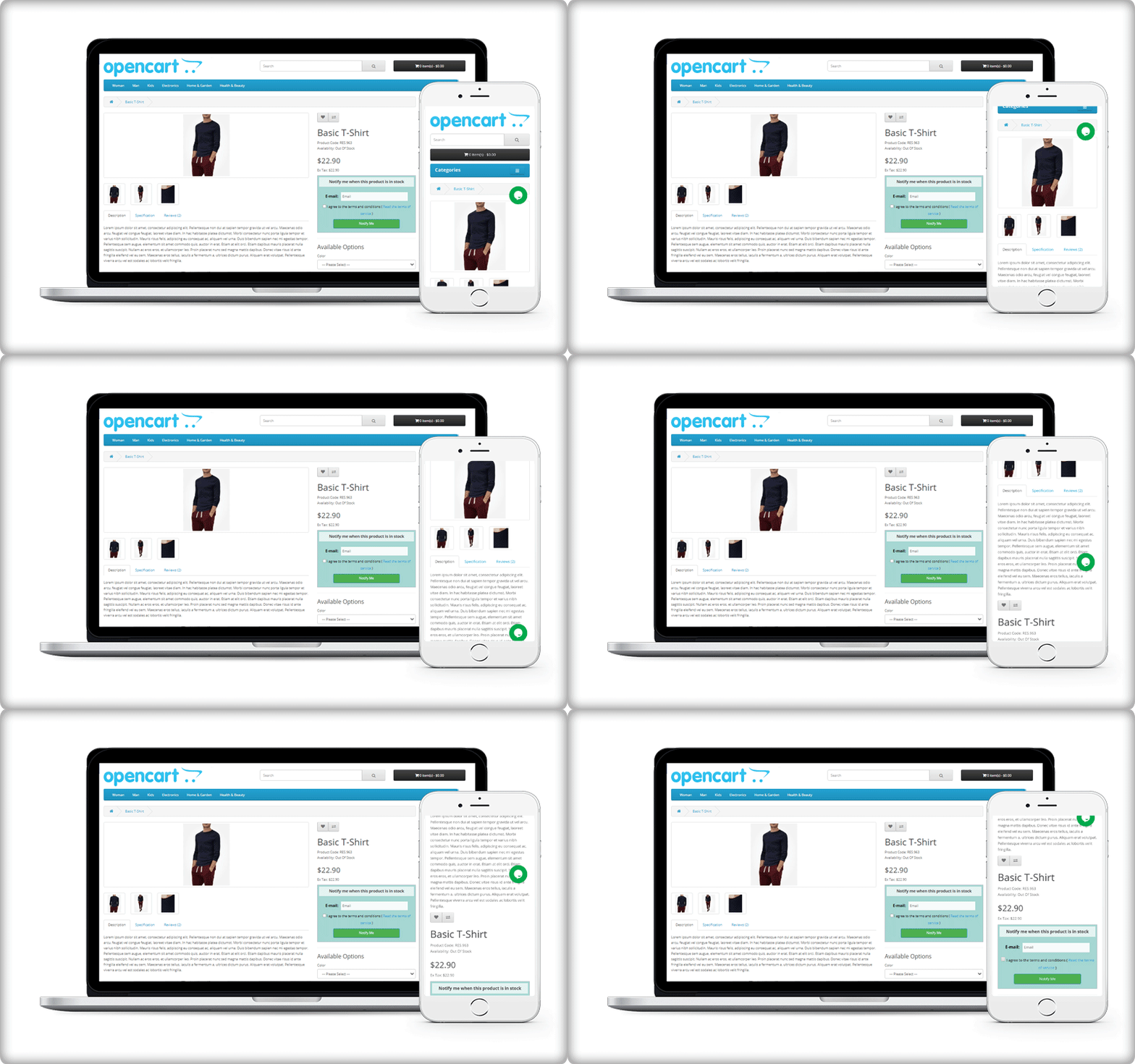
Display a subscription box on the product page

On your website, you must have added pop-ups for email subscriptions to grow your email list. But, it won’t tell you if the customer is interested in any particular product. For this, you can use the OpenCart Back-in-Stock plugin. With this, a customer can subscribe for back-in-stock alerts for a specific product on your OpenCart store.

OpenCart Back-in-stock alert is a 3-in-1 extension. It allows you to send alerts at three different points in time

  • Send initial subscription email: As the customer subscribes to your custom alerts, you can send a customized welcome email with a text that states about the subscribed product.
  • Notify customer with a low-stock alert: If the subscribed product is low in quantity, a low-stock notification will be sent automatically with the OpenCart Back-in-stock plugin.
  • Send an email with ‘Back-in-stock’ custom text: The third email category is Back-in-stock. Make the best use of the OpenCart back-in-stock plugin when the product is again available in your store.

Auto-trigger Low stock and Back-in-stock alerts

Every time you send an email, there are chances that you miss out on some of the other details.

The OpenCart extension for low stock or back-in-stock allows the sender to save the default email templates. The template options are available for all three, the initial email, low-stock email, and the back-in-stock email.

In addition, it has cron functionality that sends your email alerts automatically to subscribers. For instance, set the low-stock alert quantity to 4, it will auto-trigger an email as the quantity reaches 4.

Real-time Analytics for Opencart

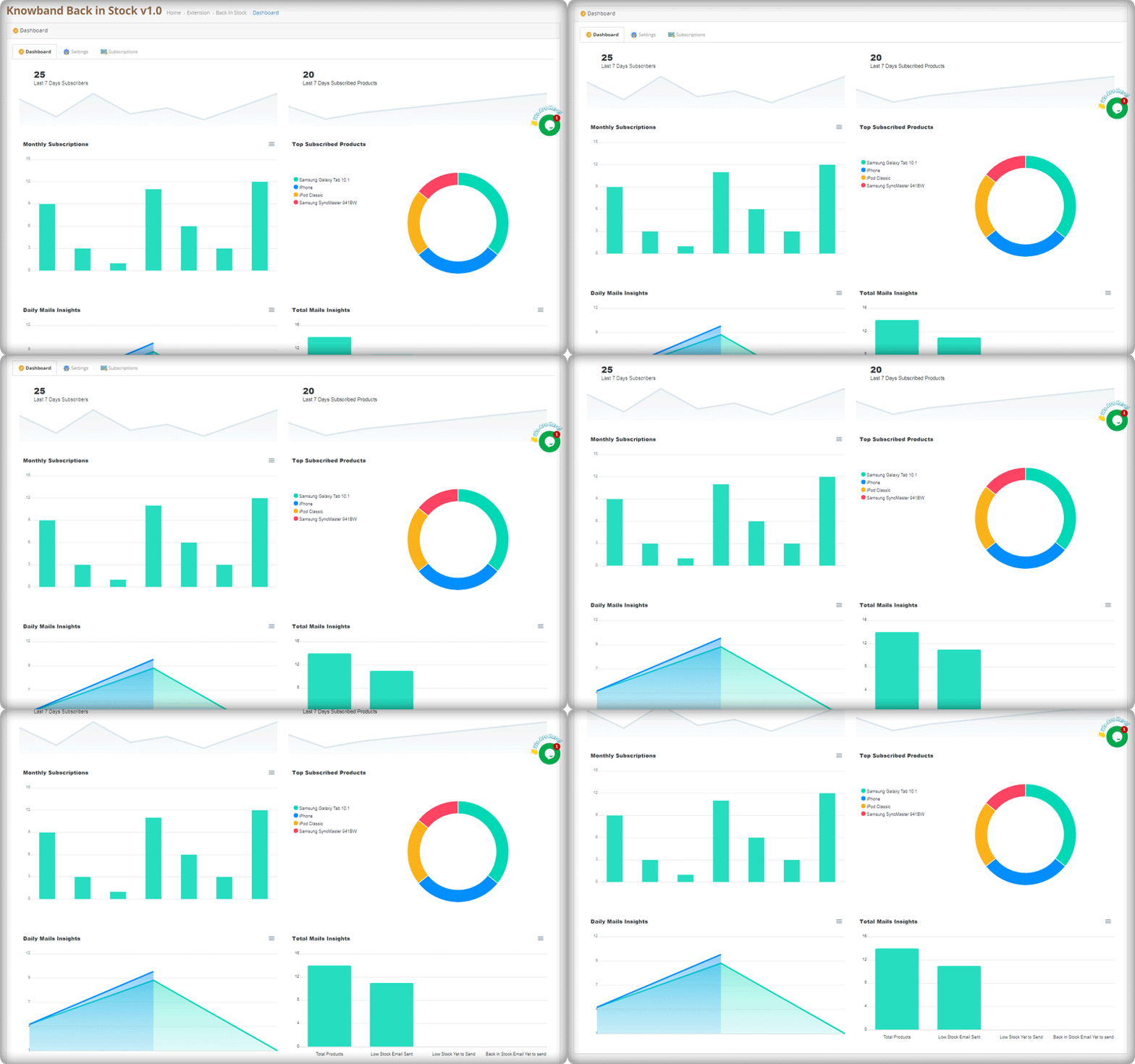
The best part of this extension is its analytical reports. Data gives you an insight into everything.

The graphical reports with pie diagrams display the number of subscribers (weekly), monthly subscription data, number of products subscribed, top subscribed products, and daily reports of the subscriptions.

The OpenCart Back-in-stock plugin gives well-analyzed reports. Anyone with or without an analytics degree can depict the results by looking at those colorful graphs.

Send alerts via your email provider like Mailchimp

Use this as an opportunity to run your email marketing campaign. The MailChimp synchronization with the module will build up your email list. Use this data for every other marketing campaign you run by email. Why just the stock alerts, but you can send welcome emails, discounted emails, abandoned cart alerts, and a lot more. If you haven’t started with email marketing, it’s time to buckle down.

If you have a marketplace on the OpenCart platform, you can use this plugin to never lose a potential customer. Marketplaces have a huge audience base. This is a marketplace guide to create yours on the OpenCart platform with a Multi-vendor vendor marketplace extension.

Conclusion:

This all-in-one email subscription and back-in-stock alert extension is a must-have for every OpenCart eCommerce store. You can send as many alerts as you want! Create customized templates for email and the product page subscription block. Customers won’t miss out on their favorite products and the merchant won’t lose any sales.

If there’s a feature you desire on your OpenCart site, there’s a good chance an Opencart plugin will let you achieve it; if you can’t find one, you can always contact us for custom plugin creation.

A Definitive Guide to Effective Email Marketing in 2020

The most common form of online marketing over the years has been Email Marketing. Even though it has become conventional, it is still one of the most preferred communication channels for marketers.

There has been a huge shift in the way marketing is done, especially with the introduction of social media. But does that mean email marketing is no longer effective?

No! Even today, email marketing is quite effective but just like every other thing that requires improvisation or a change over time, email marketing, too, requires a change in its approach.

In this write-up, I am going to share how to do email marketing the right way in 2020. Let’s begin.

What is Email Marketing?

In the simplest words, making use of emails to promote your products or services is what we call as Email marketing. But it doesn’t just involve promotion.

Email marketing is the beginning of your relationship with your potential customers, and to make that relationship successful, it needs to be given time and effort plus you need to provide some value to your prospects.

It requires regular communication to understand your clients so that you could pitch them your products as per their response.

Email Marketing Best Practices 2020

Follow the below mentioned best practices for email marketing.

1. Let your subject line arouse Curiosity

If you want your email subscribers to pay attention to your emails, the subject line has a major role to play. The email content inside would not even matter if your subject line does not stand out. And that way your email would either remain unopened or land in the spam folder after some time.

To have a high email open rate, make sure the subject line is catchy and arousing curiosity to open it, but at the same time, it should not be vague or misleading like a click-bait.

2. Show a bit of Creativity in the Email Content

The job does not end if you have successfully made your prospects open your emails with a tempting subject line. The email content is equally important. Both of them complement each other. If the content is not interesting, the email subjects can lose their importance over time.

Imagine for a second. Impressed by the subject line, your subscribers opened your email expecting the content to be as amazing as the subject but after a while, they find it too boring.

What would happen? First, you will have low click rates. Second, they might even unsubscribe. Third, they would not fall for the subject line in the future.

But if your content is amazing that keeps them engaged, they will be waiting to receive your email updates. This way, you will have a higher open rate as well as higher click rate.

To write awesome content, keep it as crisp as you can. Write in plain and easy to understand English. Keep a flow and add a bit of humour element in it as well. Yes, you should be professional but too much of it can kill the interest. There should be friendliness.

3. Segment your Audience

It is important that your emails are delivered to the right audience instead of any random subscriber. While it can be useful to some, it can be totally irrelevant to others. This does not leave a good impression and can often lead to your subscribers unsubscribing from your emails.

So what should you do? Segmentation is the answer. Segment your email database into relevant categories and target them accordingly. There is no point sending emails to those prospects for whom the email is not relevant.

4. Do not Spam

A normal user receives a heck of emails every day. And no one has this much time to open every single email. Thus, you should restrict yourself from sending emails too often. Continuous messaging can land your messages in the spam folder.

Understand that people have subscribed to you because they feel it is something valuable. If you bombard them with emails, the value declines. And remember quality always matters over quantity.

Limit your email frequency and maintain the quality.

5. Remove Inactive Subscribers

There will be many in your email subscribers’ list who never respond to your emails. They do not even open your emails, let alone paying attention to the inside content.

So, it would be better if you clean them off your list. I am sure you would have tried many attempts to engage them but got no sign. In such cases where your subscribers have not shown any kind of indication in the past six months or a year maximum, removing them would make more sense.

Email Marketing Trends and Strategy 2020

Let’s check out the email marketing strategies and trends that would help you in your email marketing campaigns in 2020.

1. Go Mobile

The count of mobile phone internet users is exceeding rapidly. Majority of the people today are using hand-held devices to browse the Internet, be it for surfing social media or checking their emails.

So if you have not made your emails mobile-friendly, you can face a downfall in mobile traffic. When you are sending emails, make sure that the text, as well as the visuals, fit well both in desktop and mobile. Sometimes, visuals do not look as appealing on mobile as they look on desktop. They take time to load and do not fit properly with the screen. It often leads to users bouncing off within a fraction of seconds.

Optimize your emails for mobile. It has a higher potential to increase your email open rate.

2. Add testimonials in your Email content

It’s a good move to showcase what your customers think about your products or services in your emails. Whatever you are trying to pitch to your potential customers, try adding some testimonials related to it inside the email. Testimonials are influential and can bring positive results.

You have very limited time to impress your prospects. And within that time, you need to hit your point right. By displaying testimonials, you can develop interest inside them and make them keen to check it out.

3. Personalize your Emails

Adding a personal touch to your emails can deliver much better results than without it. You need to make your subscribers feel that it is them whom you are talking to in personal else it sounds like an automated message that has been set same for all.

For example, if I am receiving an email that says Hey or Dear Customer and there is another email that starts with Hey Manish or Dear Manish, the latter would catch my attention immediately. This is what you need to do as well.

And it does not mean that you need to reach out to every prospect individually. You can make use of your customer data and put a first name tag on your emails. Almost every email marketing tool provides email personalization.

Personalized email marketing has been in the trend for quite some time now and it is here to remain in 2020 as well.

4. A/B Testing

A/B testing always helps when you are running an email marketing campaign. It helps you find out which kind of emails users are finding more helpful. You can know which email at what time is having more open and click rates as compared to the other. It provides you with an opportunity to improvise your approach and make changes accordingly.

5. Set your timing right

Ok, let’s say you have subscribers from all around the world. Will sending emails to all at one time make sense? Definitely No! There would be no point of sending an email to a subscriber who is receiving it at 4 am or 11 pm.

This is why I previously mentioned that it is important to segment your subscribers so that emails are delivered to the right audience at the right time.

The Bottom Line

Email Marketing is not going anywhere. It is here to stay not just even in 2020 but for many upcoming years. Just go with the trend, notice the changes in the approach and try to come up with some creative thoughts every now and then instead of following a mainstream approach every time.

What’s your take on email marketing for the year 2020? Do let me know in the comments below.

You might also like:

8 Email Popup Best Practices to Grow Email List and Boost Conversions

6 Effective Ways to Build and Grow your Email List

5 Conventional Mistakes that are Killing your Email Subscriptions

How to drive eCommerce Conversions through email marketing?

7 email marketing software for small businesses