Looking for an email that can boost customer engagement?
A tailored welcome email can do the thing.
And there are different ways you can make your welcome emails more effective.
These emails, when used correctly, set the tone for the type of relationship you will have with your email subscribers.
Unfortunately, many marketers ignore the impact of welcome emails.
What is a welcome email? It is the first email a subscriber receives after signing up for your email list is known as a welcome email. These messages are usually sent right after someone subscribes to a newsletter or completes a popup form on a website.
Why do you need a welcome email?
You’re making a first impression on behalf of your brand when you send a welcome email to a new blog or newsletter subscriber, or a new client. Videos, special offers, a sign-up form, or just a friendly hello can all be included in welcome emails to help build a relationship with a new customer. A well-crafted welcome email ensures that you make the best first impression possible.
Some Welcome Email Statistics to look upon
Research says, after opt-ins and within the first 24 hours, 45 percent of subscribers make purchases.
They have a higher open rate than any other marketing email, ranging from 50 to 60%.
When compared to standard marketing emails, welcome emails have a 4x open rate and a 5x click-through rate.
40% of the subscribers read every mail who has read the welcome email.
The welcome email can be very effective and is the first step for building the relationship between your brand and the client. Then why miss the chance?
How to write an effective welcome email?
To create an impactful email, it is necessary to prepare a template that can be used now and in the future. Here is the guide to craft a tailored welcome email.
Before creating your first email, you need to understand your clients and know them to make a better impression.
A welcome email will help you confirm that your subscribers are willing and able to purchase. The aim of this data collection should be to obtain a comprehensive understanding of your subscribers and customers.
Now is the time to write a welcome email that will turn your subscribers into new clients. Never make any mistake in the confirmation email because this is your first email and first impression matters.
When writing a welcome email, keep the following points in mind.
Add a catchy subject line
To entice your recipients, use high-quality visuals and advanced elements,
as well as a compelling email copy and value proposition,
Focus on the client’s pain points and provide solutions
It should have a converting call to action.
While interacting with the client through a welcome email, concentrate on the client’s problems and what solution or service you can provide to help them solve them. Whether you have used the popup for subscription or if they subscribed to the newsletter that clearly says that they are interested in your services.
What’s the best way to get welcome emails to work for you?
Welcome emails can be a powerful tool for increasing subscriber engagement when used correctly.
Whether it’s a simple newsletter, lead magnet, contest, or content update, use them to welcome new subscribers to your email list.
With a welcome email, you can boost customer engagement on your online store and a wonderful copy will help you build a strong list of subscribers.
Don’t just send a confirmation email but welcome your customers and turn this into an opportunity.
How to get more email subscribers?
Sometimes, getting new email subscribers is not less than a task. Leverage pop-up forms using pop-up modules on your eCommerce store. KnowBand has designed a few modules for customer engagement and newsletter subscribers. Modules that can offer discounts or deals are a trick that always works in online shopping. To claim these offers, the customer is required to enter the email address and will be motivated to avail the benefits by making a purchase on your online store. Let’s take a look.
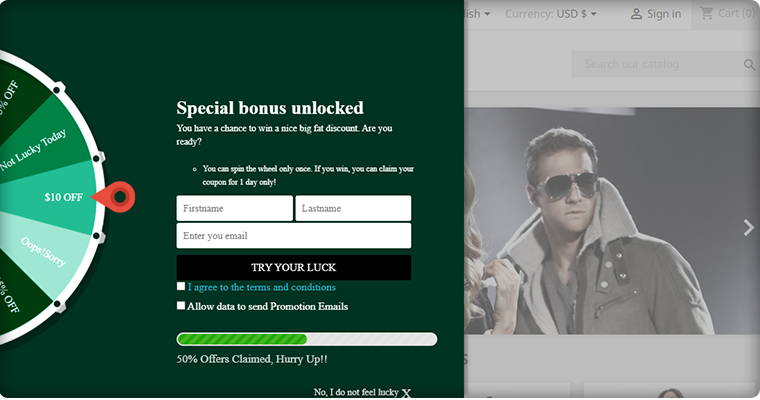
Add gamification plugin Spin to Win, this is the most effective email subscription module and it can boost customer engagement as well as the conversion rate on your eCommerce store. Click here to explore the module.
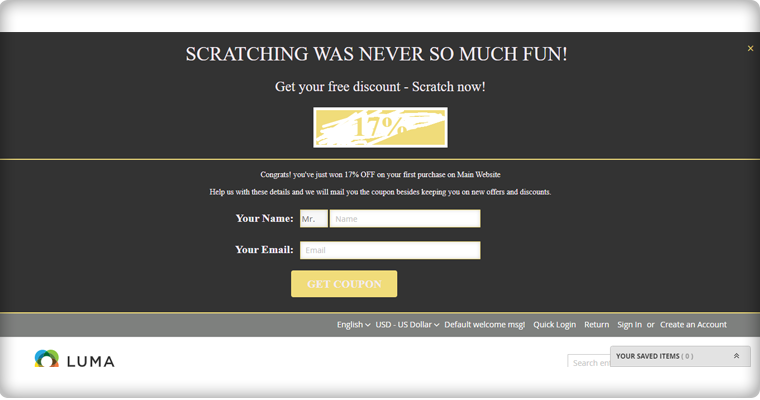
2. Entice them with Scratch off Coupons that contain a discount code or a flat percentage discount. And, to avail the offer, the customer has to enter the email address.
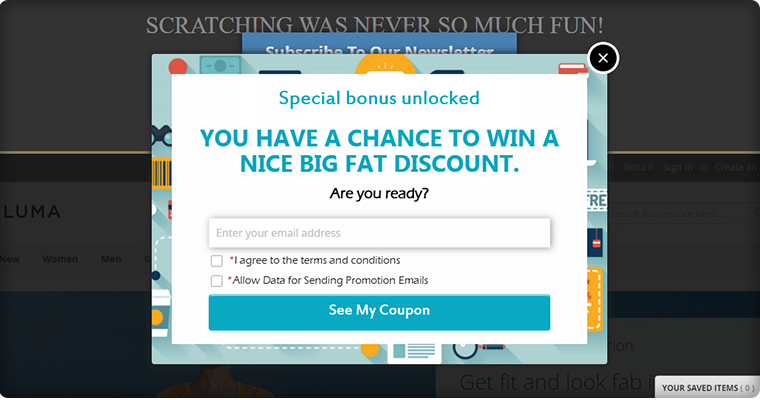
3. You can also use entry/exit pop-up with greetings and coupon codes at the entry point or on any other page of the website. Pop-ups are very popular for entry and exit pages.
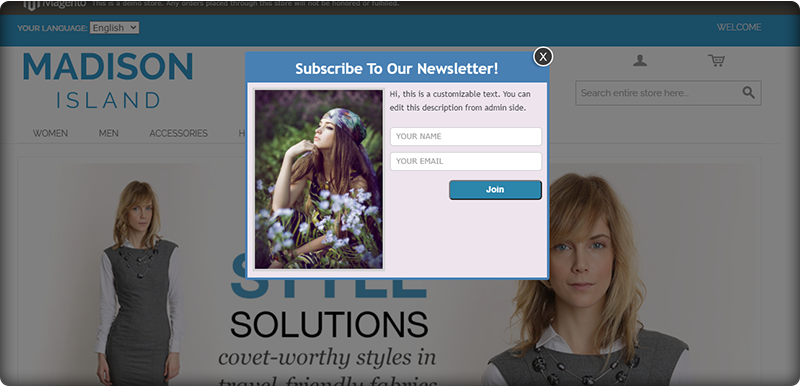
4. I have added the auto-subscribe plugin to the list as it allows the store owner to start the first conversation with the prospect. A visitor who can become a customer soon.
On online platforms, any interaction with the customer starts when they come to your landing page and all these modules add an entry pop-up window on the landing page of your website. These amazing plugins can help you in building your email subscribers list that can be used for welcome email now but in the future for your brand’s marketing.
Finally,
A healthy list of email subscribers is best for email marketing but before jumping to promotional emails, start with a crafted welcome email. This will be your chance to shine and convert the subscriber into a client. Businesses can’t afford to overlook the value of welcome emails. Following the guidelines outlined above will assist you in accomplishing this goal.
1. Introduction to Prestashop Abandoned cart addon
Have you ever gone shopping for products online? Further, have there been times when you add the products to your cart and leave? Moreover, leave the store without buying them. Further, the process of leaving the cart without completing the purchase refers to as shopping cart abandonment. In fact, as per the report from Baymard, the average online shopping cart abandonment rate is 69.23%. Therefore, let us not talk about the Prestashop Abandoned cart (Email Follow up) Addon
Converting abandoned carts is a tough task. However, what if we can convince the owners of 20% of those abandoned carts to come back? Moreover, complete their purchases. Yes, it is difficult but possible.
Prestashop Abandoned cart addon by Knowband helps PrestaShop store owners to convert these abandoned carts. Further, into sales by regular email follow-up. Additionally, the “Abandon Cart Serial Reminders” addon sends automated emails with discount coupons. Furthermore, to the customers who abandoned their carts, thereby increasing the chances of conversion.
Prestashop Abandoned cart email follow up addon is very effective. Furthermore, when it comes to shopping cart abandonment. In fact, this Prestashop email follow up module by Knowband sends automated or manual follow up emails. Further, to the customers who abandoned their shopping carts. The Prestashop abandoned cart addon allows Prestashop store owners to create N number of Discounted and Non – Discounted Email templates. Further, they are for sending to the customers. The Admin can set the number of days after which the shopping cart is assumed abandoned. Moreover, the follow up email triggers.
Prestashop abandoned cart addon is now compliant with the GDPR. Further, the GDPR settings are available in the module. In fact, using which the Prestashop admin can comply with the rules of the GDPR. Additionally, please refer to the General Settings to know more about the GDPR.
What’s New?
Prestashop abandoned cart reminder provides the store owners to enable a reminder popup. Further, the customers will see as soon as they sign in to the store. Further, the display popup will contain the list of the abandoned cart items. Additionally, a discount coupon code so that the customers make purchases.
PrestaShop Reduce Cart Abandonment addon allows the store owner to send web browser push notifications to the visitors. In fact, even if they are not present on your website.
With the additional cron log functionality, the PrestaShop admin can check if the cron executes or not. In addition, they can also look for the abandoned cart details as well.
1.1 Prestashop Abandoned Cart Email Follow up- How it works
1. A customer visits your PrestaShop store.
2. He browses your store and adds products to his shopping cart.
3. During Checkout (sometimes before) the customer has to give the name and email address.
4. But due to some reason, they left your store without completing the purchase.
5. After some time their shopping cart, the admin assumes it to be abandoned.
6. After a defined time, you will send them the follow-up email. Further, reminding them about their left items in their shopping carts.
7. Some will visit your PrestaShop store again and convert, and some will ignore your follow up email.
8. After a few days of sending the first follow up email, you will send another email with the discount this time.
9. The customer proceeds to checkout and completes the purchase.
1.2 Key Features of Prestashop Abandoned cart addon:
The Knowband Prestashop abandoned cart reduces shopping cart abandonment.
Boost sales and conversion by convincing the owners of up to 30% of abandoned shopping carts on your PrestaShop store.
The Prestashop abandoned cart addon tracks abandoned carts of both Guest as well as Registered customers.
The Admin can send the abandoned cart to follow up emails with discount coupon codes. Further, all the changes can be done from the backend of the Prestashop email follow up addon.
Prestashop store admin can set the time after which the shopping cart abandons.
Admin can view details of the customers. For instance, their name, email id, IP Address, Time & Date from the back office.
The Prestashop abandoned cart addon by Knowband provides the test mode option for the admin to test the module. Furthermore, before making it live on the Prestashop store.
With the help of the Prestashop abandoned cart addon, the merchants can send the trigger to follow up emails. In fact, he can send them Manually or Automatically using cron.
The Prestashop email follow up module offers readymade email templates to the admin. In fact, the Prestashop store Admin can add and customize many more.
The Prestashop Abandoned cart recovery email addon facilitates the seller to view the abandoned and converted carts with ease.
Prestashop store admin can view the abandoned products in the shopping cart of the customers. Further, he can do it from the backend of the Prestashop reduce cart abandoned extension.
The Prestashop abandoned cart extension by Knowband enables the store merchant to analyze the store conversion rates. How? By analyzing the converted carts.
Prestashop Admin can analyze which products result in most shopping cart abandonment from the Prestashop email follow up addon backend.
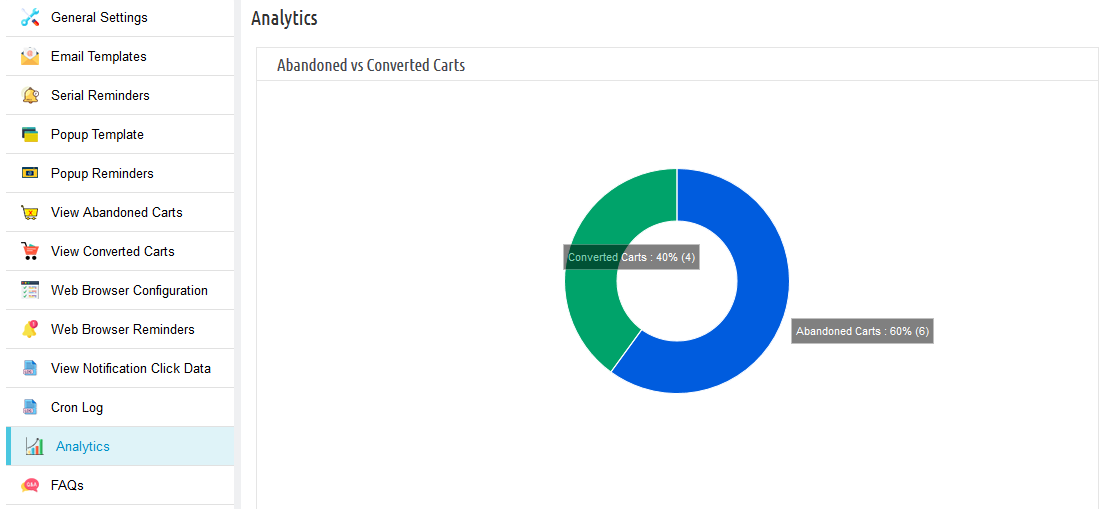
The Prestashop Abandoned cart has an interactive pie chart to compare the Abandoned and Converted carts.
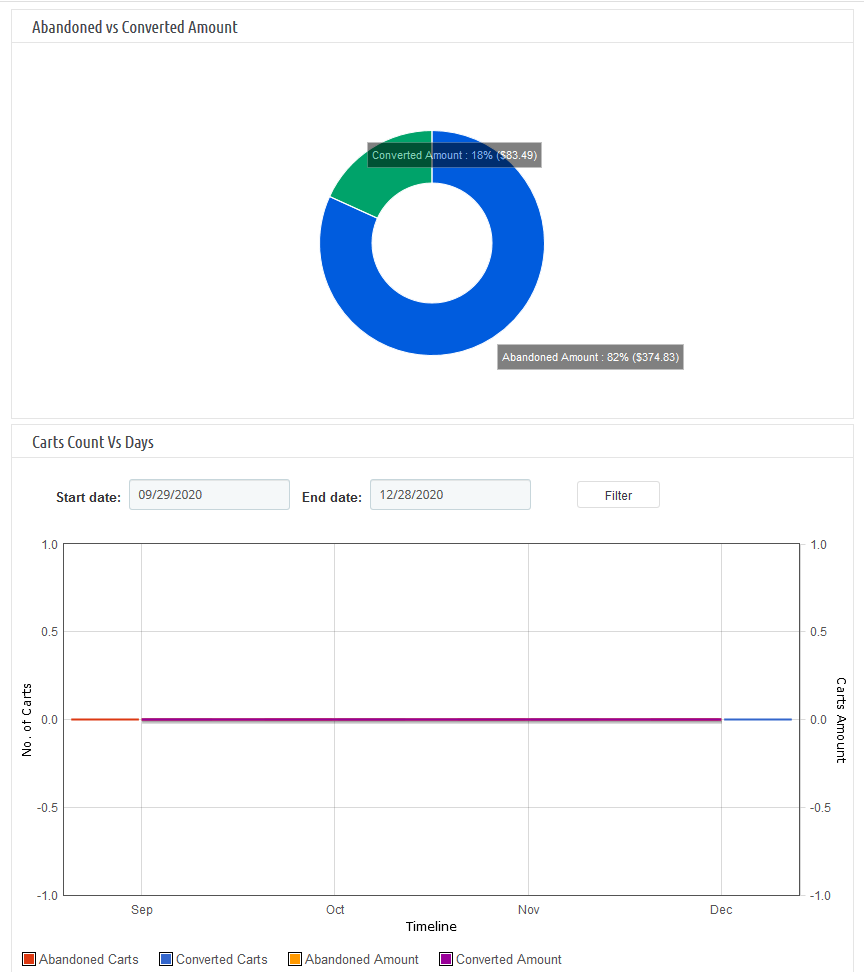
Interactive pie charts to compare the Abandoned and Converted amounts.
This Prestashop abandoned cart module by Knowband supports Multiple languages.
Prestashop email follow up addon is compatible with every theme.
The Prestashop cart abandoned addon is desktop, mobile, and desktop responsive design.
Prestashop email follow up addon is compatible with the GDPR module.
With the Prestashop abandoned cart module, the store owner can now display a popup reminder to the customers. Further, as soon as they visit the website. In fact, in this popup, the store admin can highlight the products. Furthermore, the ones that they left in the cart and can also highlight coupon codes.
The store owner can send the customers web browser notification reminders to customers to remind them about their incomplete purchase.
2. Installation Guide of Prestashop Abandoned cart addon
Extract the “abandonedcart” zip file.
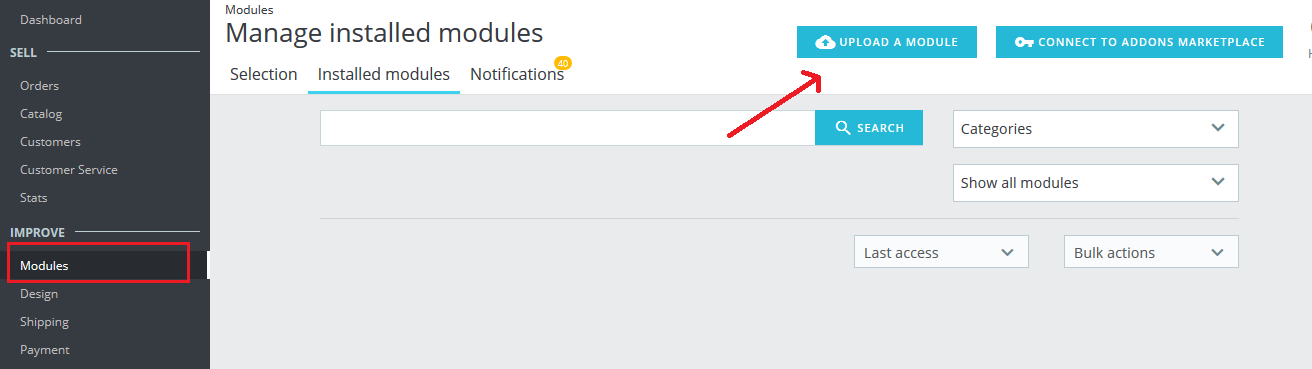
Go to the “Modules” section and click on the “Upload a Module” button. Select the “abandonedcart” file. Moreover, the Prestashop abandoned cart addon will be ready for installation in the “Modules” (Module Listing Page) in your Prestashop store admin panel as shown below.
After successful installation, the system will redirect you to the module configuration page. Moreover, when you come back to the module listing page, the “install” button will be replaced by the “Configure” button.
Suppose, you don’t see the plugin displaying on your module listing page. Further, search it by filtering the module with the following details:
Keyword: Prestashop Abandoned Cart
Author: Knowband
Category: Checkout
Filter by: Installed & Not Installed/Enabled & Disabled
3. Useful Cron Instructions
3.1 Reasons/Cases when the email is not sent to the customers
A. Email Id is not available(Guest customer)
B. If the cart does not satisfy the condition of serial reminders
If the minimum cart value is greater than the abandoned cart value. For example, the minimum cart amount is $50 and the abandoned cart amount is $45. It will not send a reminder in this case.
If the delay is set to one day, the reminders will not be sent to the customers. Further, whose carts are abandoned for less than a day.
C. The Prestashop Abandoned cart email follow-up addon will not add the abandoned carts with the cart amount 0.00.
D. If you have not set up the Cron properly or if the Cron is not working.
3.2 Types of Crons
There are two types of cron that run every hour.
1. Cron to update the Abandoned cart: This cron runs every hour.
For instance, the cron runs at 11:05, 12:05… and so on. In addition, you have set “Mark Abandoned Cart” as 1 hour. When cron runs at 11:05 it will add all the abandoned carts created between 9:05 to 10:05. For instance, you have set “Mark Abandoned Cart” as 0 hours. Further, it will add all the abandoned carts created between 10:05 to 11:05.
2. Cron to send a reminder email: This cron also runs after every hour.
For example, suppose the cron runs at 11:11, 12:11…..and so on and you have set the Reminder for 1 day. Suppose, the cron runs at 11:11. Further, the emails will be sent to all the abandoned carts between 10:11 to 11:11 of the previous day. In fact, if you have set Reminder for 2 days then the emails will be sent to all the abandoned carts. Moreover, between 10:11 to 11:11 of the day before yesterday.
3. Cron to send reminder notifications: This cron also runs after every hour.
For instance, if you have set marked abandoned cart as 1 hour. Moreover, suppose the cron runs at 3:14. Further, all the visitors who have created abandoned carts between 1:14 to 2:14 will get a reminder notification.
3.3 Procedure to configure CRON job
3.3.1 What is a cron?
A cron is a service that allows a user to automatically execute a script at a specific time.
For instance, you can set a particular PHP script to automatically executes every day at midnight.
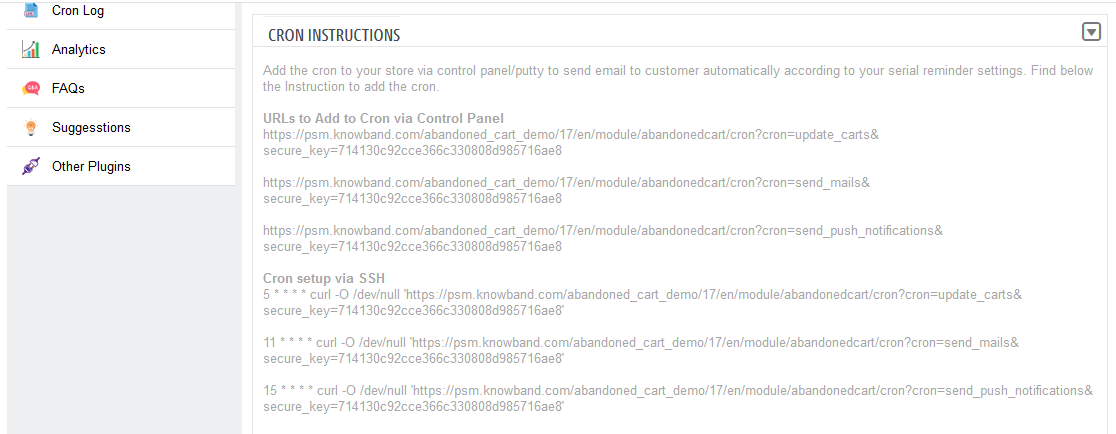
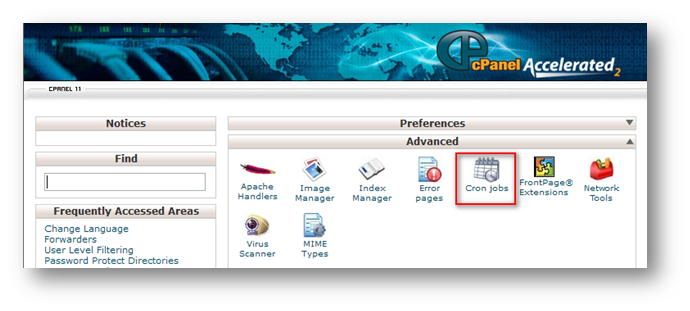
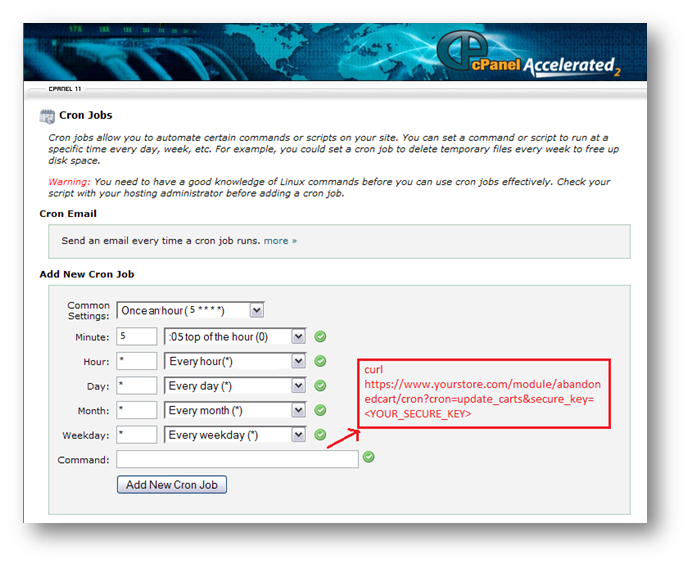
To set CRON for Abandoned Carts the following 2 URLs are supposed to add to the crontab of your server:
Note: Make sure to enter the proper command and the full path to the file.
2. By adding the CRON instructions to the crontab of your server (through Terminal/SSH)
For this method to work you are supposed to have crontab on your server. In fact, in case it is not installed then please contact the hosting provider.
– Login to the terminal (or SSH) of your server
– Run the following command: crontab -e
– It will list all the CRON jobs on the server in editing mode.
These lines will execute the desired CRON Jobs every hour.
– Save the crontab file.
4. Workflow of Prestashop Abandoned cart (Email Follow up) Addon
The Knowband Prestashop cart abandoned module configuration page will display the following tabs to configure the module as desired:
1. General Settings
2. Email Templates
3. Serial Reminders
4. Popup Templates
5. Popup Reminders
6. View Abandoned Carts
7. View Converted Carts
8. Web browser Configuration
9. Web browser reminders
10. View Notification Click Data
11. Cron Log
12. Analytics
13. FAQs
14. Suggestions
15. Other Plugins
Each interface is in form of a tab and each tab contains some specific settings that can be changed according to the need. In fact, each tab is explained below.
4.1 General Settings of Prestashop Abandoned cart addon
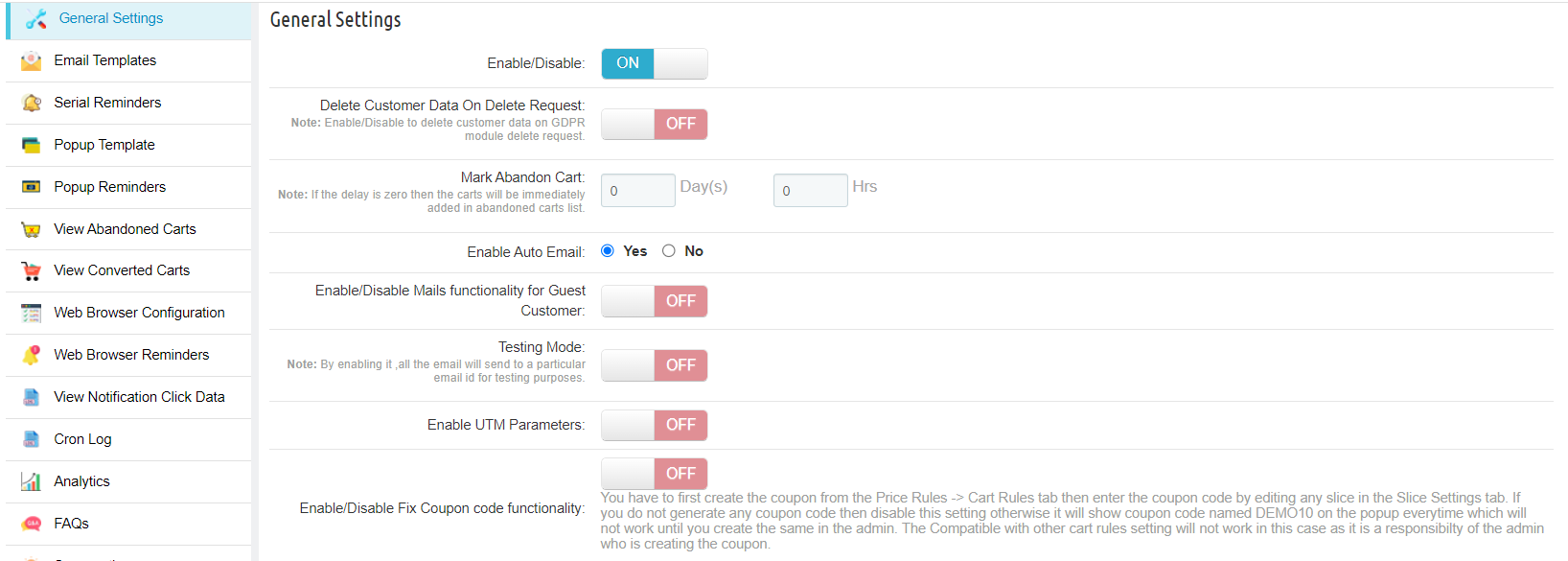
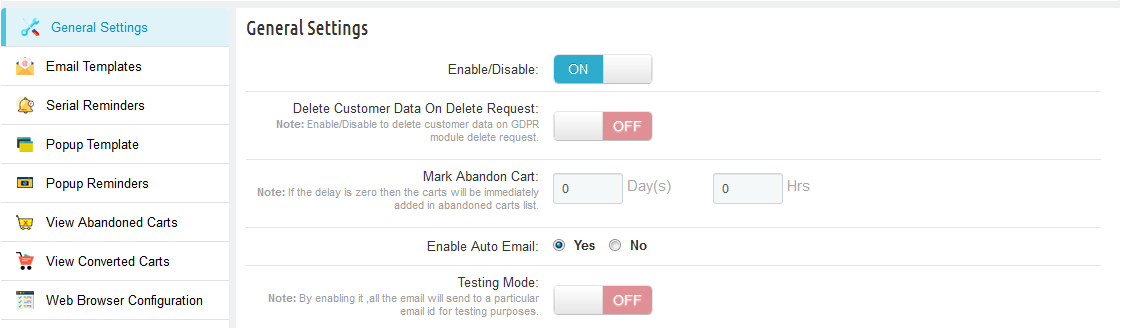
The General Settings tab of Prestashop abandoned cart module has the following options:
Enable/Disable: Prestashop store admin can Enable or Disable Abandoned cart module. In fact, if disabled, the cart abandonment will not be tracked and no coupon codes will be sent to the customers. Further, apart from this, the user can not see the content in other tabs.
Delete Customer Data on Delete Request: The Admin can enable the GDPR option. Furthermore, after enabling this option, the customer requests the admin to delete the data from their store. Therefore, the Module deletes the subscriber details automatically.
Note: If you are using the official GDPR module then you must need to enable this setting. Furthermore, the main purpose of this feature is to export and delete user data on PrestaShop GDPR module requests. In fact, it is also compatible with Prestashop GDPR Module developed by Knowband.
Mark Abandon Cart: The Delay time of Prestashop abandoned cart email follow up extension by Knowband is the period after which the cart considers to be abandoned. Further, the admin can mark the days after which the addon is assumed abandoned.
Enable Auto Email: This feature of Prestashop Abandoned cart recovery email addon will allow admin to schedule (Cron Setup) coupon email sending task or not.
Enable/Disable Mails functionality for Guest Customer: The functionality in question allows the administrator to share non-discount emails with guest customers when enabled.
Enable Testing Mode: Admin also has a Test mode feature to test the working of the module before making it live. Furthermore, add an email to the test mode section. In addition, mark the abandoned cart to 0 days and 0 hours to see the working of the Prestashop abandoned cart email follow up addon.
Enable UTM Parameters: Enable this by adding the UTM parameter in the module links so that customers can track the performance of the mail Google Analytics.
Enable/Disable Fix Coupon code functionality: The administrator can establish a fixed coupon code paired with a specific discount value. This ensures that each time a discount is shared via email, the system will exclusively consider the associated coupon code in the shared discount mail.
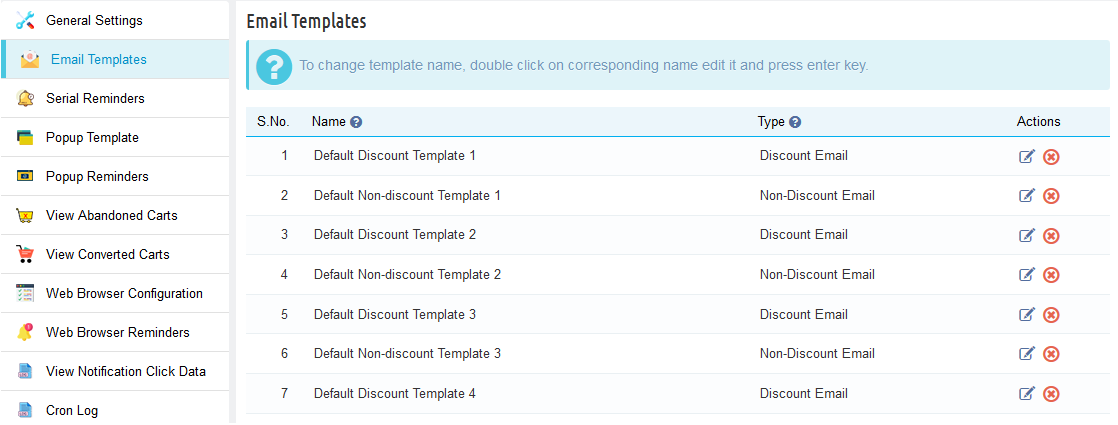
4.2 Email Templates- Readymade Email Templates
The Email Template tab of the Prestashop abandoned cart addon by Knowband has is the format of the email that will be sent to the customers. Further, this field of Prestashop reduces cart abandoned module contains some placeholders. In fact, whose values will be replaced when the email will be sent.
Prestashop abandoned cart addon offers 20 readymade email templates. Further, that can be sent to the customers. In fact, 10 with discount and 10 without discount.
Prestashop store admin can even add and customize N number of email templates. In fact, he can do it from the back-end of the Prestashop email follow up module.
4.2.1 Discount Email Template
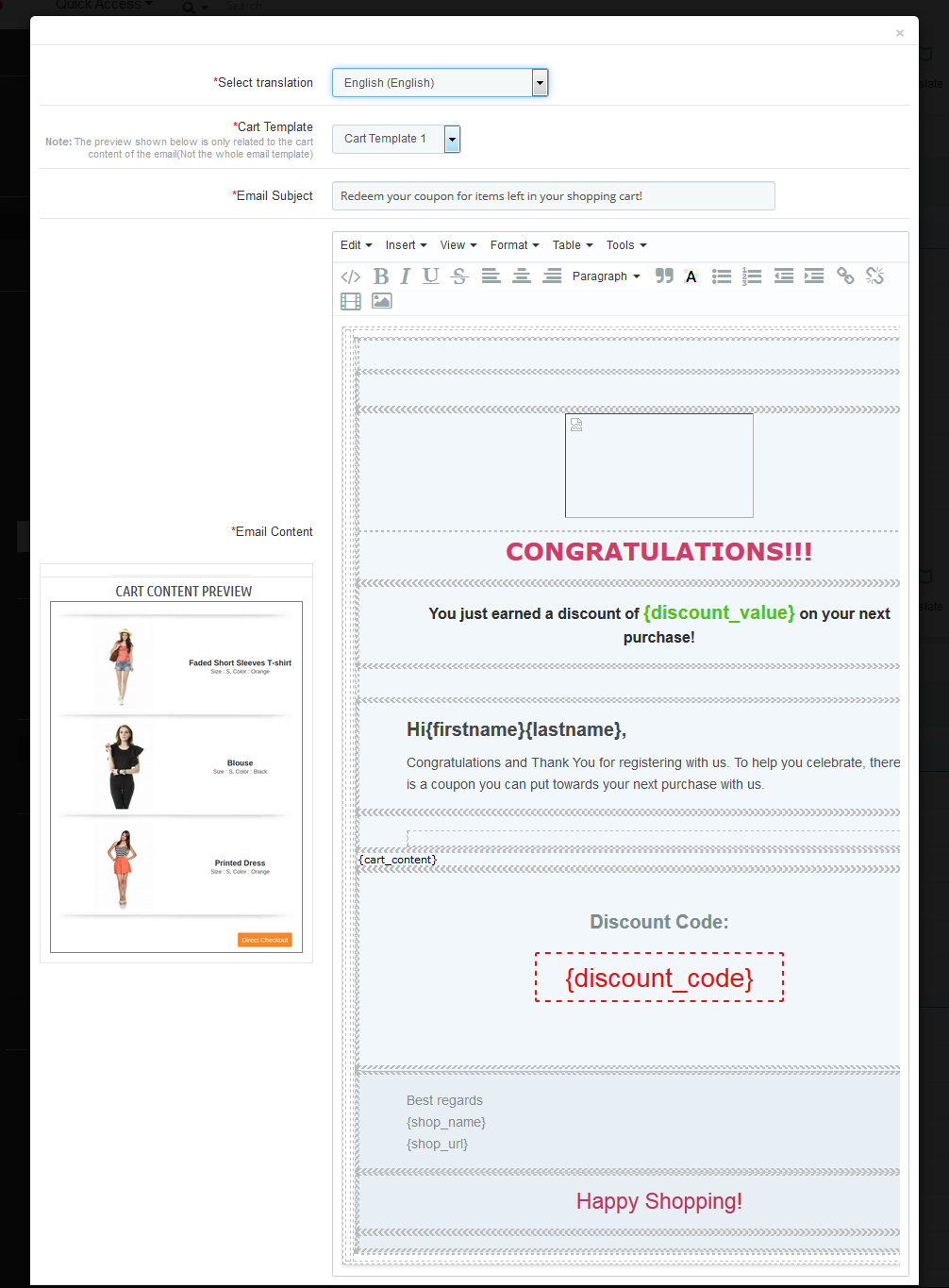
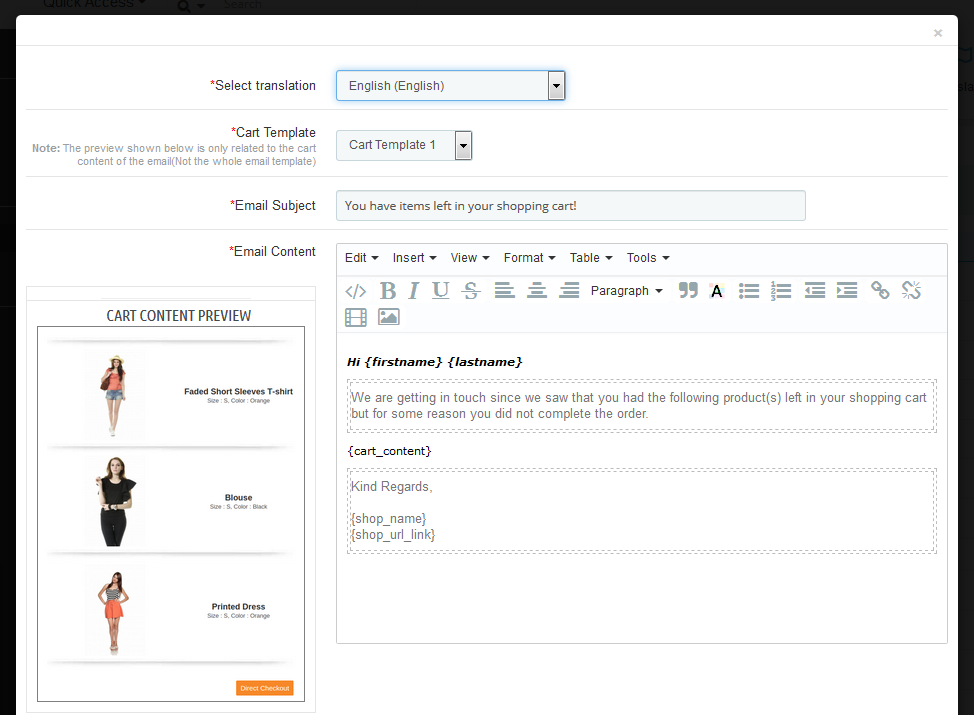
Discount Follow up Email Template will contain the information about the Abandoned products along with the coupon details like coupon discount, Coupon code, validity, etc.
On choosing the template type the form for the email template will appear, this form will have the default template content by default and the Prestashop admin can change it as desired and then click on the “Save” button to save the changes.
Prestashop Admin can also choose the type of cart template which he/she wants to use the email template. This Prestashop cart abandoned addon are 10 different cart templates which the admin can use to make the templates look good.
4.2.2 Non-discount Email template
Non Discount Email Template will contain information about the Abandoned products. These emails are used as a follow up to the customers who abandon the shopping carts.
After saving the email template, it will appear at the bottom of the list of email templates, and to edit or translate the same the Prestashop admin has to click on the edit link in front of that email template.
Once the admin adds the email template, he has to translate it if there are any other languages (other than English) in the system by clicking on the edit button in front of the email template and choosing the desired translation language.
Note:
The Prestashop abandoned cart addon by Knowband provides an only English translation of the email templates, the admin has to manually translate the templates to any other language that is required.
4.3 Serial Reminders
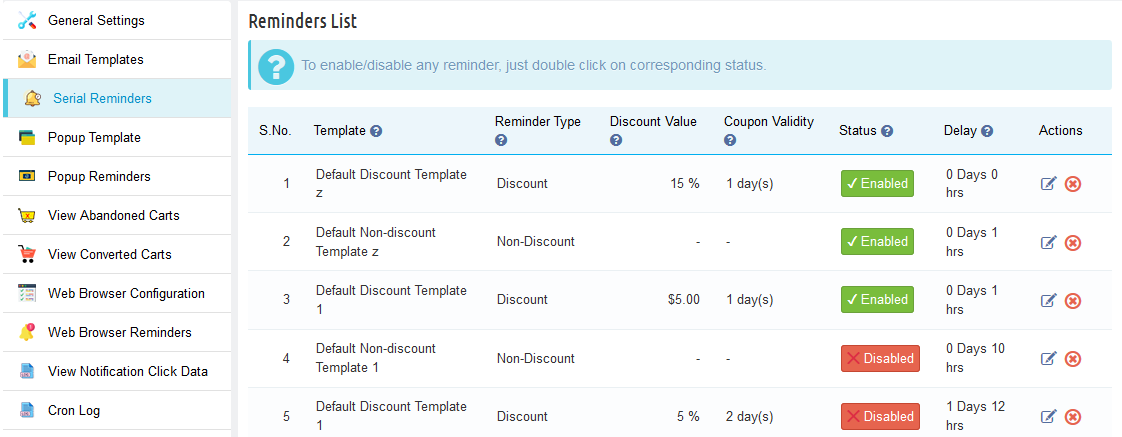
There are two types of reminders that are addable to the Knowband Prestashop cart abandoned cart addon:
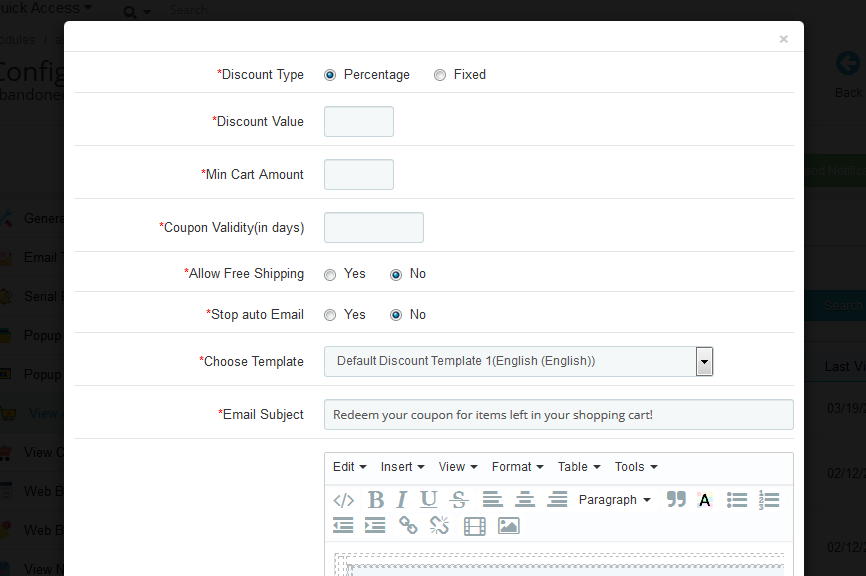
Reminder with a discount (This type of reminder contains a discount coupon with a discount type email template attached to it).
Reminder without discount (This type of reminder is just a regular follow-up to the customer about the abandoned cart. In addition, have a non-discount type email template attached to it).
In the “Serial Reminders” tab the Prestashop admin can add various reminders (both discount and non-discount) as desired. This tab contains a list of all the serial reminders present in the system.
Prestashop store admin can edit or remove any reminder by clicking on the Edit or Remove action button in front of the reminder.
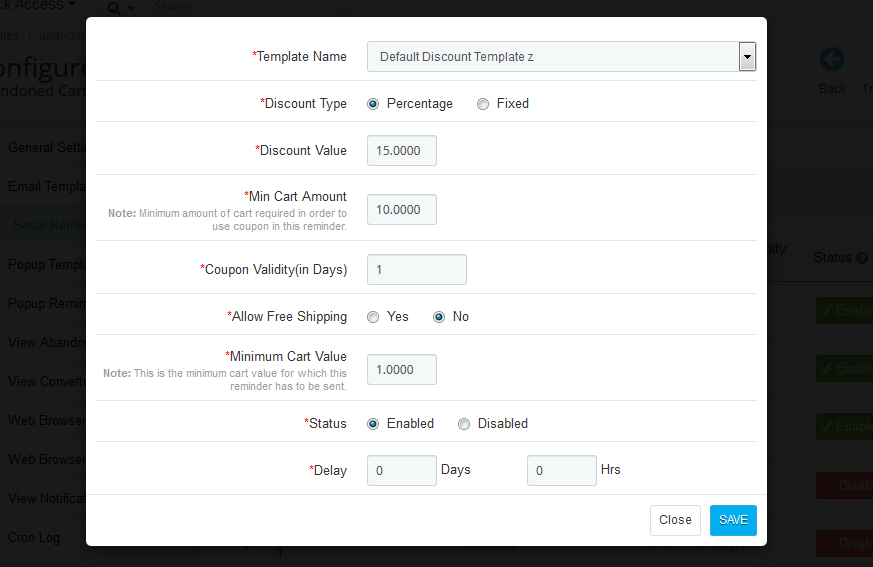
On clicking on the button, you’ll get a pop-up as shown below:
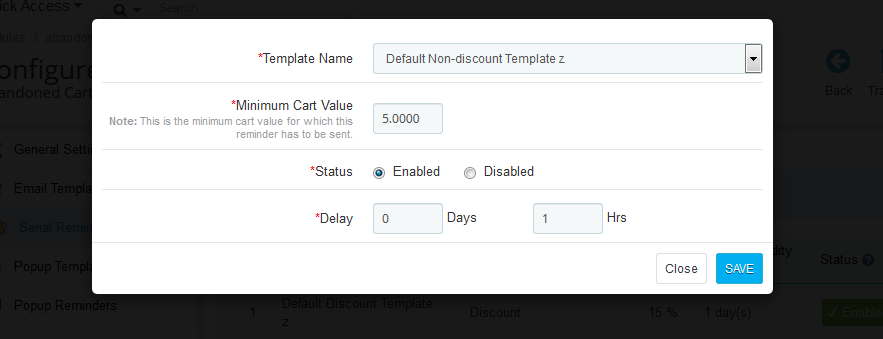
Non-Discounted Serial Reminder Template:
Template Name: The templates created in the Email Template tab of the Prestashop abandoned cart module by Knowband will list here. Select anyone from the drop-down list.
Discount Type: This field of Prestashop abandoned cart email follow up extension allows the admin to select any one option from, Percentage or Fixed type.
Discount Value: This field of Prestashop abandoned cart addon by Knowband enables the admin to enter the discount amount or percentage that you want to offer.
Min. Cart Amount: In this field of Prestashop cart abandoned addon by Knowband, the store seller will have to enter the minimum cart amount required to avail of the offer.
Coupon Validity: This field of the Prestashop abandoned cart module offers the admin to enter the number of days for which the coupons will be valid.
Allow Free Shipping: Select whether you want to allow free shipping or not.
Minimum Cart Value: This tab allows you to add a minimum cart value to use the coupon code in the reminder.
Status: Select Enabled this option of Prestashop abandoned cart addon, if you want to enable this serial reminder.
Delay: This field of Prestashop email follow up extension provides the admin to enter some details. For instance, the number of days, from the day when the customer adds the product in his/her cart, and, after which this reminder will be sent.
4.4 Popup Templates
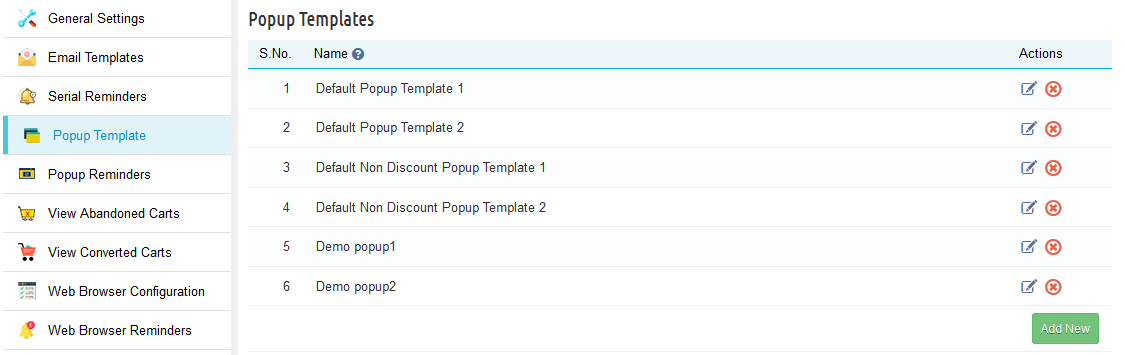
The Popup Template tab of the Prestashop abandoned cart addon by Knowband has is the format of the popup reminder that will display to the customers when they are on the site.
Prestashop Abandoned cart addon allows the PrestaShop admin to create as many popup templates as they want. They get in total 4 templates, out of which 2 are default templates and the other 2 are non-discounted templates.
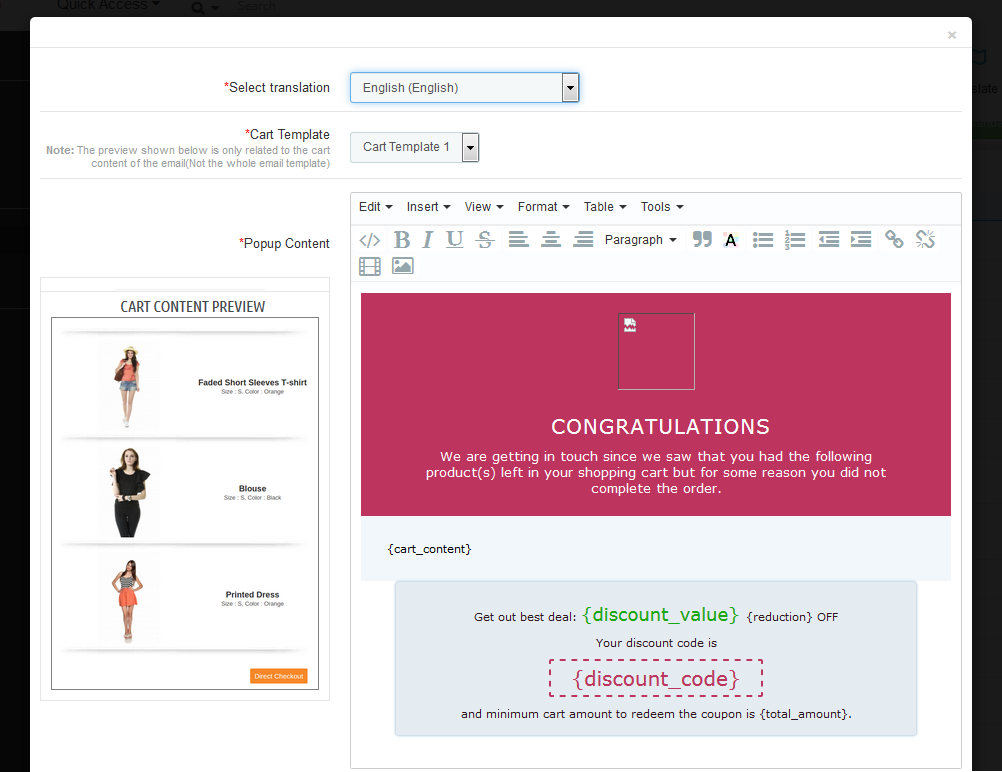
4.4.1 Discounted Template:
On selecting the discounted template, a template form will appear, in which the admin will have to choose a translation language and cart template which he wants to display on the store. They can also customize the content of the popup the way they like.
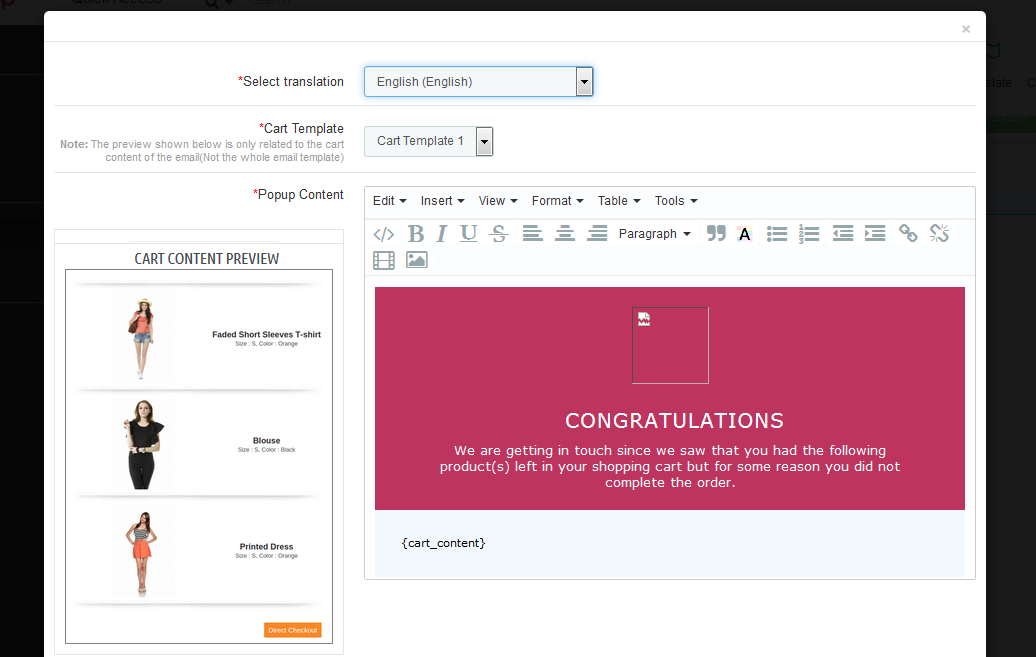
4.4.2 Non-Discounted Template
If the admin wants to send a non-discounted popup reminder then he can select the non-discounted template and customize it accordingly.
4.5 Popup Reminders
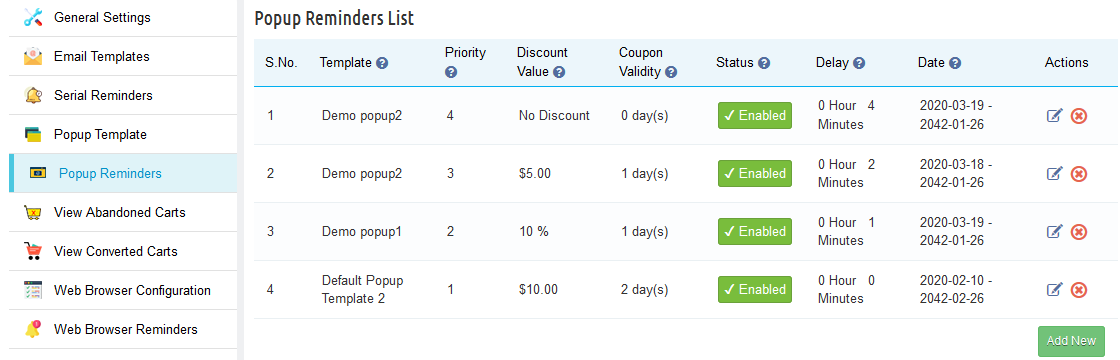
Prestashop abandoned cart reminder addon offers to track the popup reminders templates active on the store front end. Here the admin can create as many popup reminders as they want.
On clicking the add new button, the admin will see a popup as shown below:
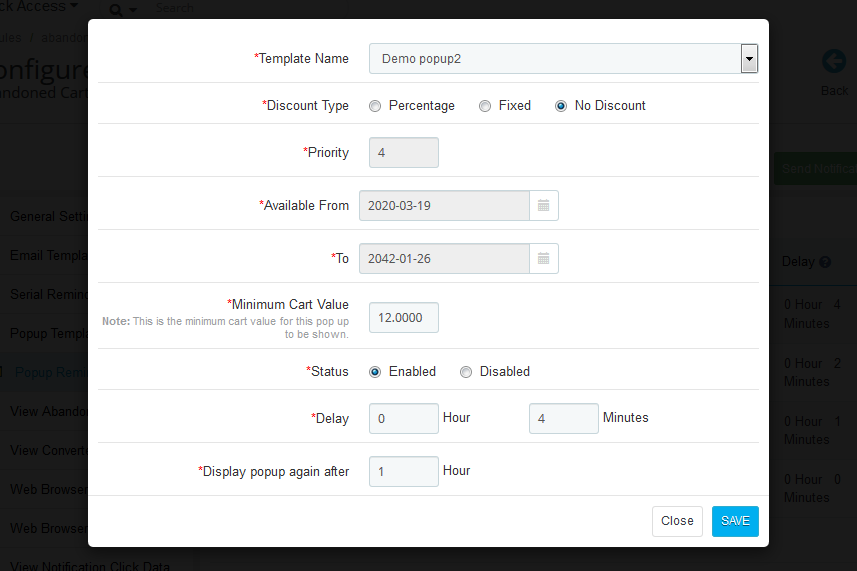
To create a popup reminder, the admin has to click on add new after which he has to fill in the following criteria
Template Name: The templates created in the Popup Template tab of the Prestashop abandoned cart module will list here. Select anyone from the drop-down list.
Discount Type: This field of Prestashop Abandoned cart addon allows the admin to select any one option from, Percentage, Fixed, or no discount type.
Discount Value: This field of Prestashop abandoned cart addon by Knowband enables the admin to enter the discount amount or percentage that you want to offer.
Priority: The admin can set the priority value of the reminder as well. For example, if they set the priority as 1 then this popup reminder will display 1st to the customers.
Available from and to: In here, the PrestaShop admin has to enter the validity period of the discount.
Coupon Validity: This field of the Prestashop abandoned cart module offers the admin to enter the number of days for which the coupons will be valid.
Allow Free Shipping: The admin can customize whether you want to allow free shipping or not.
Min. Cart Amount: In this field, the store seller will have to enter the minimum cart amount required to avail of the offer.
Status: Select Enabled if you want to enable the popup reminder otherwise disable it.
Delay: This field of PrestaShop email follow up extension provides the admin to enter the number of days, from the day when the customer adds the product to his/her cart, after which the popup reminder will display to the customers when they visit the store.
Display popup again after: The admin can choose to display the popup to the same customer after a certain number of hours. Further, by filling it in this field.
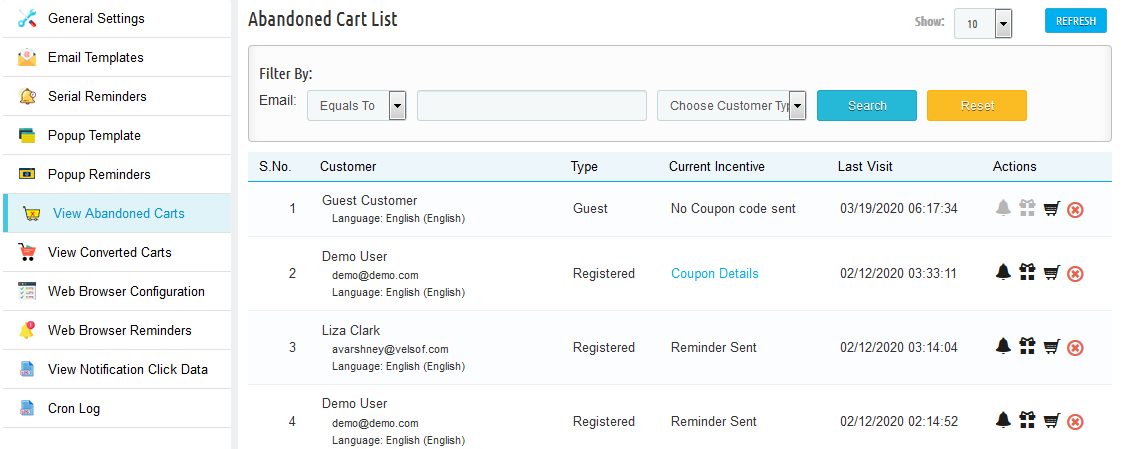
4.6 View Abandoned Carts
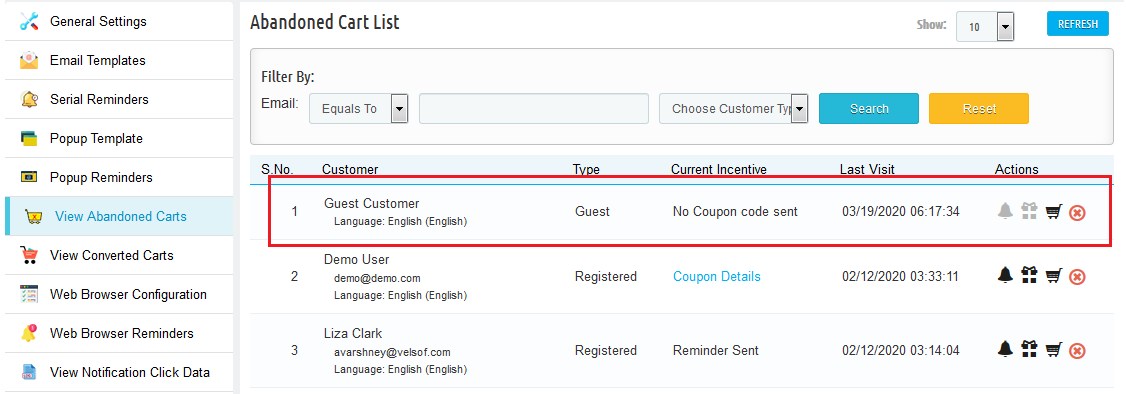
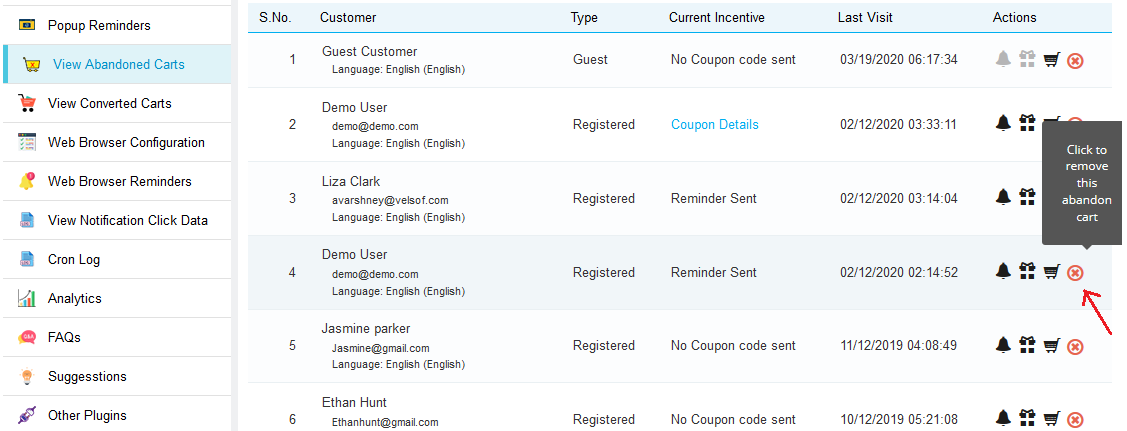
The abandoned cart tab contains a list of all the abandoned shopping carts in your store. Furthermore, the syncing of the list is done through Cron Instruction. Further, based on the delay time set for abandoned cart by the admin.
The list can also sync by clicking on the “Refresh” button at the top of the list.
The list contains pagination and several filters as well to sort and view the list more efficiently.
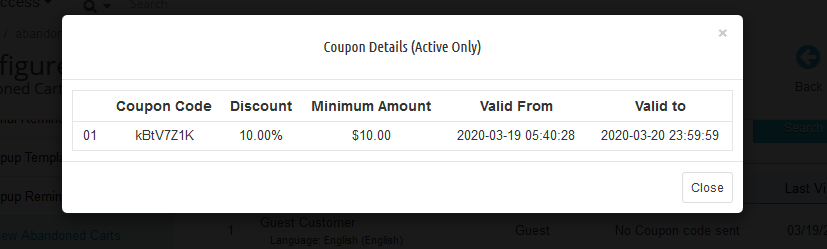
View Coupon Details
The details of the coupon sent to the customer are visible by clicking on the “Coupon Details” link in front of the abandoned cart.
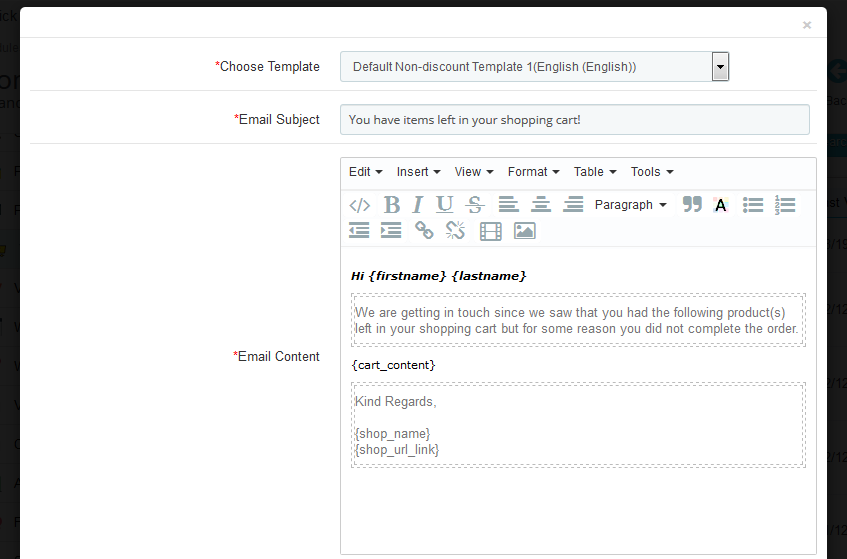
Send Follow up EMail without Coupon
Click on the bell icon of this Prestashop abandoned cart addon. Furthermore, the admin can send reminders regarding the products saved in the cart of the customers. In fact, on clicking the same a pop-up will appear having all the fields that will be sent in the follow-up email.
Send follow up Email with Coupon
To send the follow-up email to the customer regarding the shopping cart abandonment with a discount coupon the admin has to click on the “Gift Icon” in front of the desired abandoned cart. In fact, on clicking the same a pop-up will appear having all the fields that will be sent in the follow-up email.
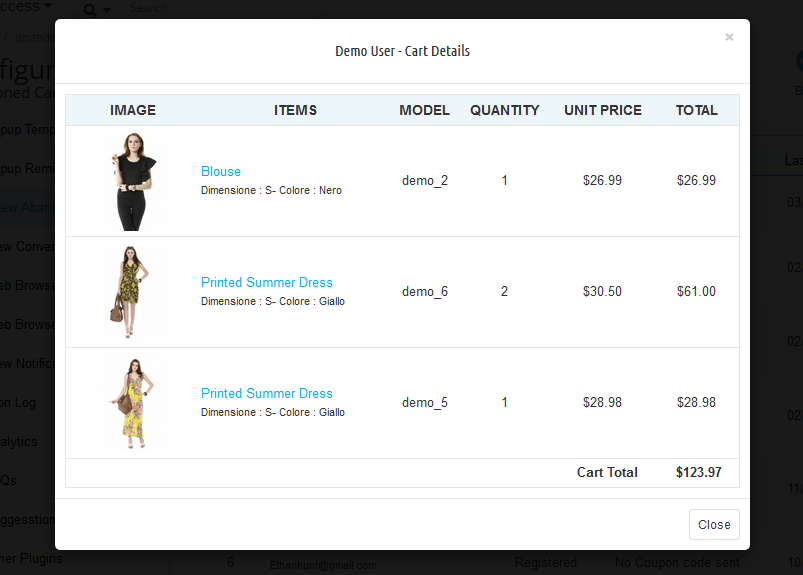
View Cart Details
To view the details about the abandoned cart the admin has to click on the “Cart Icon” in front of the desired cart. Further, a pop-up will appear having all the details of the cart.
Delete Abandoned Cart
To delete any abandoned cart, the admin has to click on the “Remove Button” in front of the desired cart. Therefore, a confirmation pop-up will appear asking for confirmation of the deletion. Further, once confirmed the abandoned cart will be gone forever.
4.7 Converted Carts
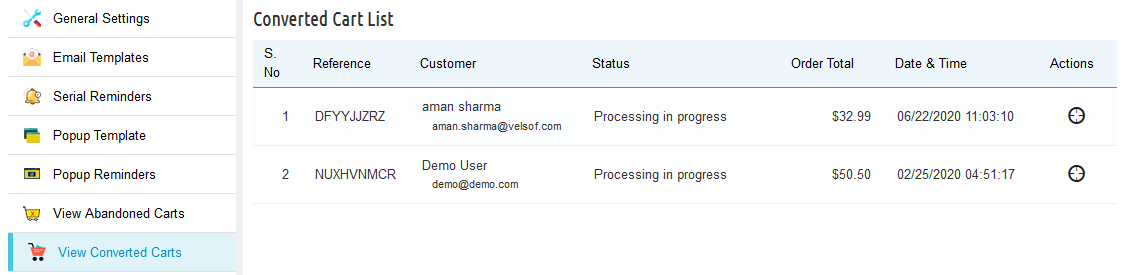
The Conversion Rate tab of Prestashop abandoned cart addon by Knowband enlists all converted orders for registered customers. Further, or we can say that the abandoned carts for whom the order has been placed after the reminder mail are sent.
Note: The abandoned cart is considered as converted only if the customer places an order for that cart after a reminder mail has been sent.
4.8 Web Browser Configuration
Abandoned Cart Serial Reminder module offers to configure a web browser reminder. The admin can integrate a web browser reminder by generating an API Key. To configure a firebase API following are the steps:
1. Visit the URL: https://console.firebase.google.com/u/0/?pli=1
2. Click on ‘Create a Project’
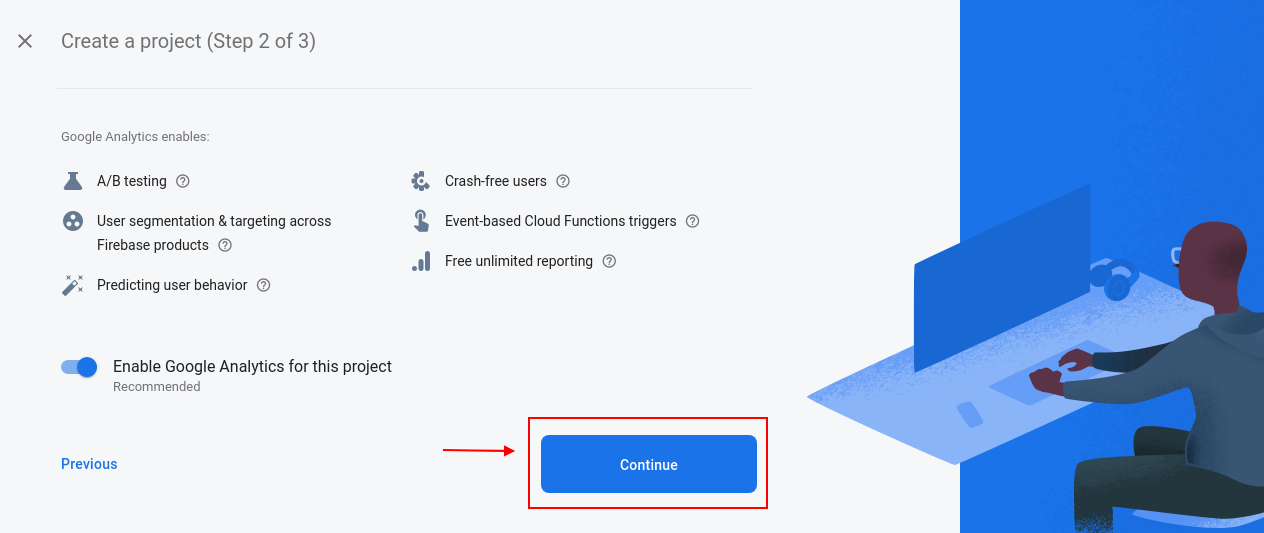
3. Enter your project name, check the terms and conditions. In addition, click on the continue button as pointed in the below screenshot.
4. Click again on the continue buttons pointed in the screenshot below.
5. Select your location. Further, hover on the? Mark to display the description and click on the continue button as pointed in the below screenshot.
6. Click on continue again
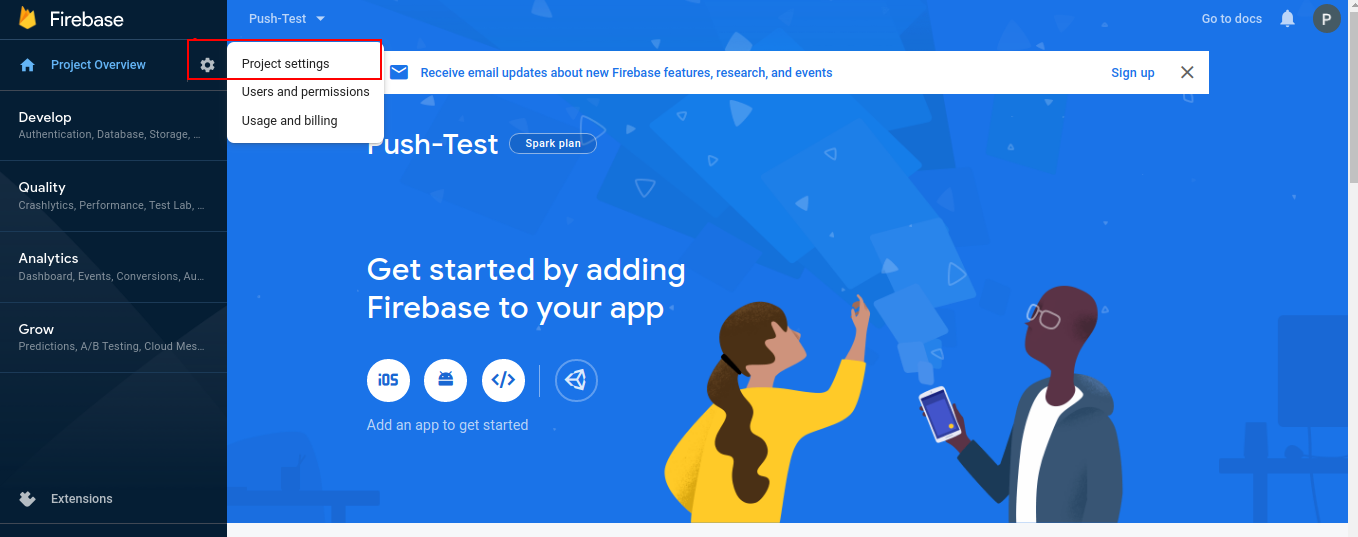
7. Click on the Project Setting button as pointed in the screenshot below.
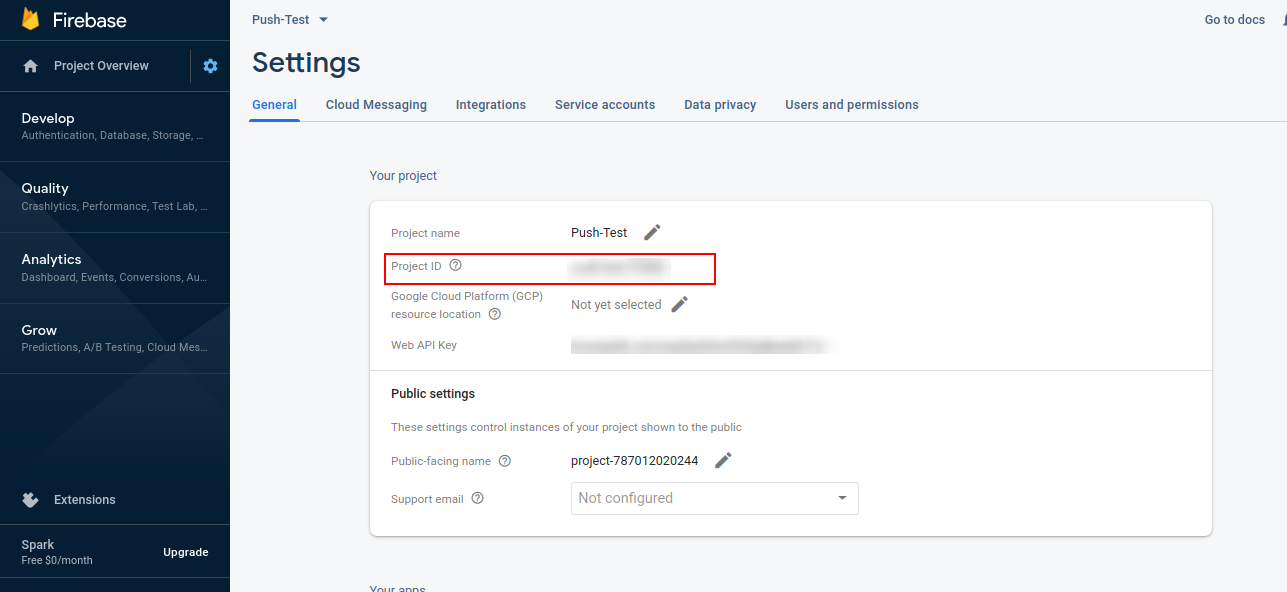
8. Copy the project ID from here and paste it into [ Web browser configuration Project ID ]
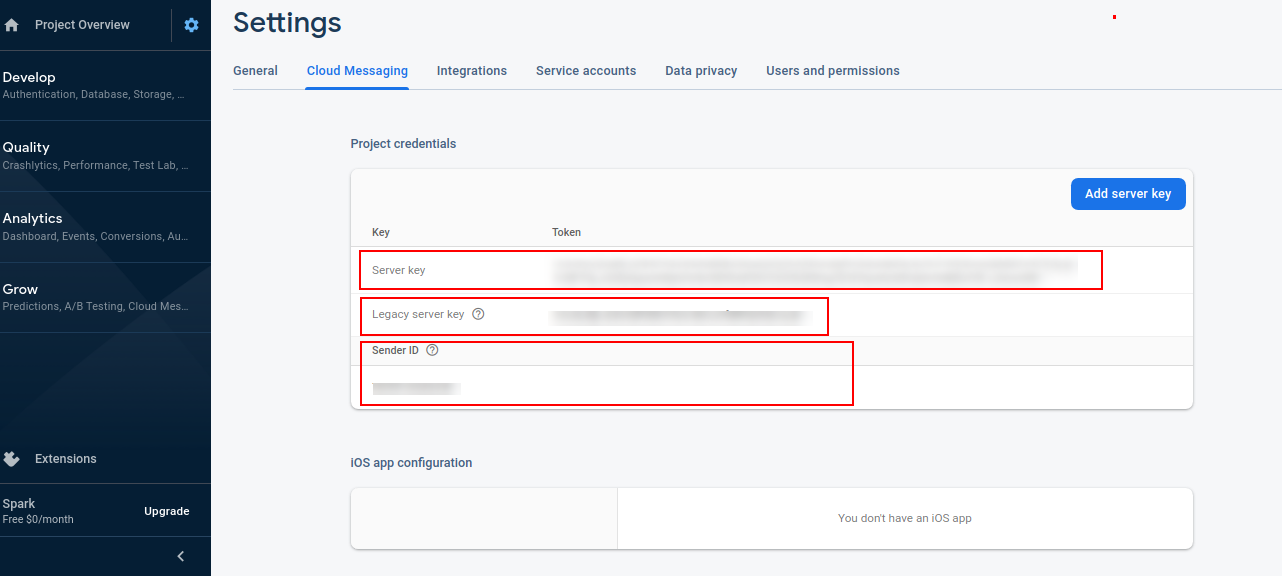
9. Copy the server key and paste it into [ web browser configuration- server key]
10. Copy the legacy server key from here and paste it into [ web browser configuration- API Key]
11. Copy the sender ID from here and paste it into [ Web browser configuration- Messaging sender ID]
4.9 Web Browser Reminders
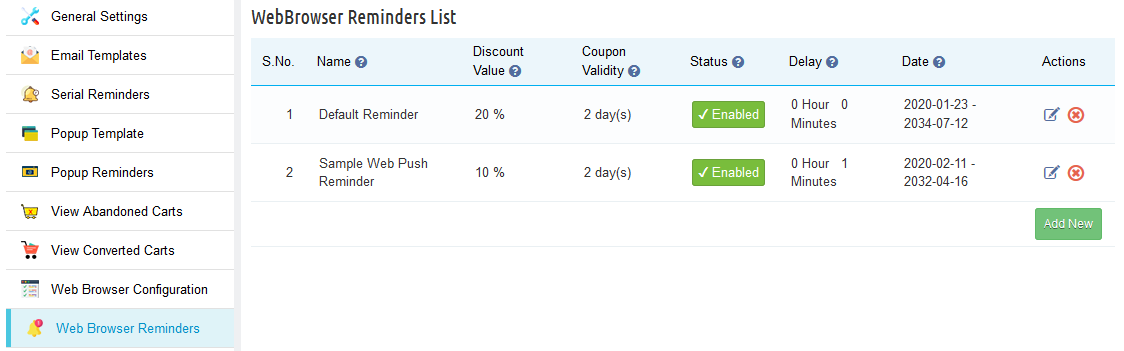
In the “Web Browser Reminders” tab the Prestashop admin can add various reminders (both discounted and non-discounted) as desired. In fact, this tab contains a list of all the web browser reminders present in the system.
Furthermore, the Prestashop store admin can edit or remove any reminder by clicking on the Edit or Remove action button in front of the reminder.
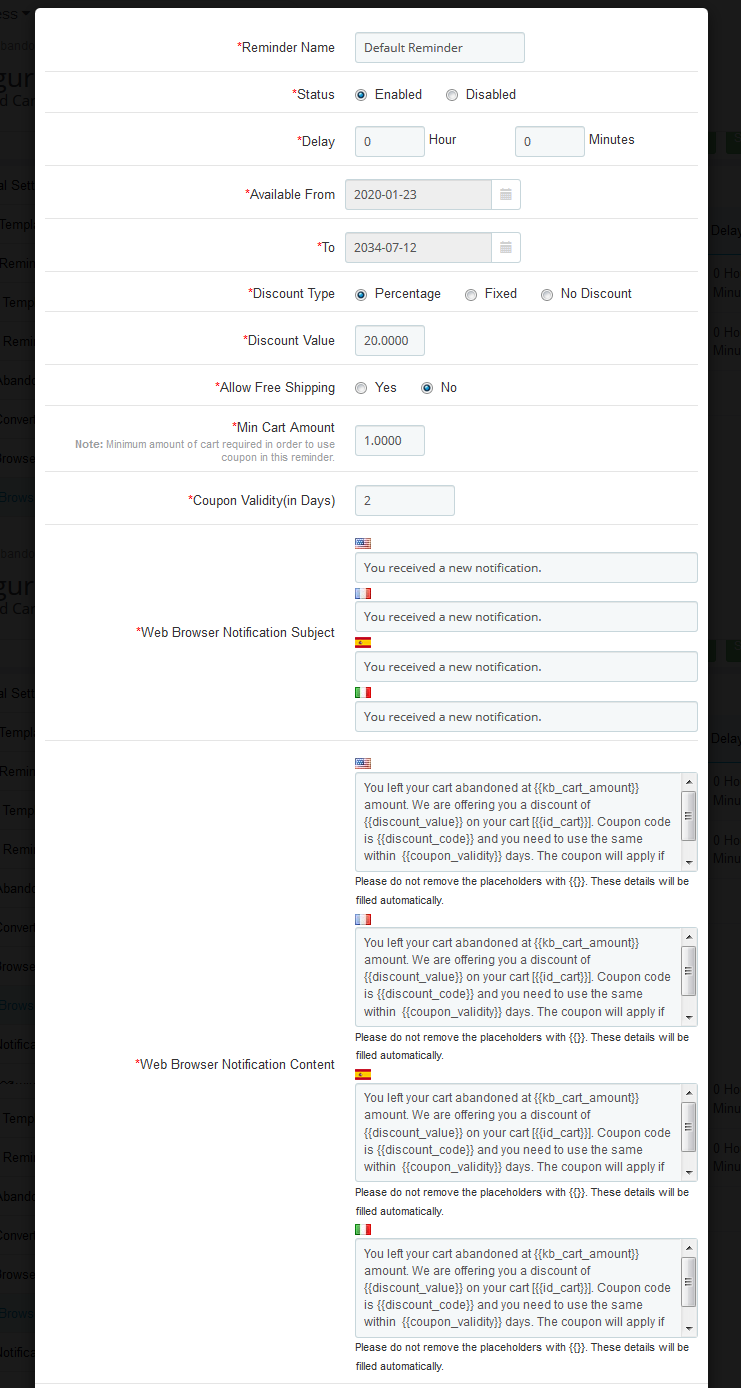
On clicking on the button, you’ll get a pop-up as shown below:
On choosing a reminder list form will appear. Further, the admin has to choose a reminder name. In fact, this form has the default notification subject and notification content. Moreover, the Prestashop admin can change it as desired. Furthermore, then click on the “Save” button to save the changes. Therefore, the Prestashop Abandoned cart addon offers multi-lingual support to the merchants. In fact, they can customize the subject and content in 3 different languages.
4.10 View Notification Click Data
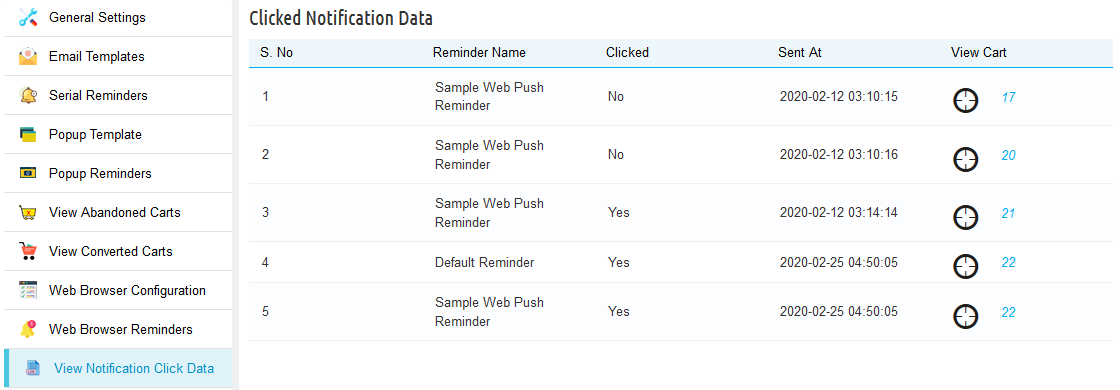
Here, the admin can view if the customers have taken any action on seeing the browser popup. Further, they can check if the customers have clicked on the reminder popup or not, and more. For instance, the time of sending the popup, and the cart summary which will include customer information, products in their cart.
4.11 Cron Log
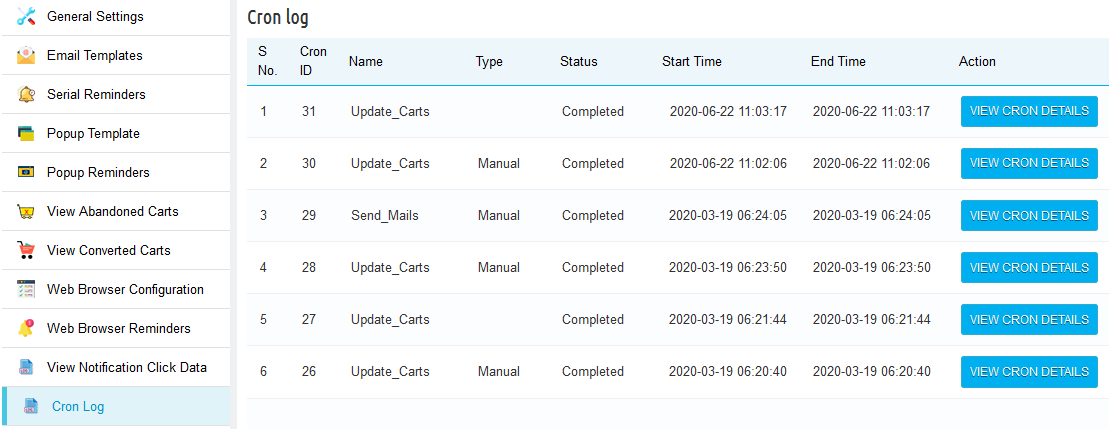
Prestashop abandoned cart reminder provides a cron log functionality to check if the cron executes successfully or not. In fact, they can also check the cart details of the customers as well.
4.12 Analytics – Shopping cart abandonment
The Analytics tab of the Prestashop email follow up module shows the overall insights of the store in a graphical interface.
4.12.1 Abandon cart vs Converted cart and Amount
This graph of Prestashop Abandoned cart recovery email addon by Knowband shows a do-nut chart which will display the information. For instance, the percentage of abandoned shopping carts on the store. Moreover, the percentage of abandoned shopping carts converted into orders.
4.12.2 Number of Carts and Cart Amount VS Time Interval
This chart of Prestashop abandoned cart addon by Knowband gives the overview of the total abandoned carts vs the carts converted. In addition, the amount abandoned vs the amount converts in the given period.
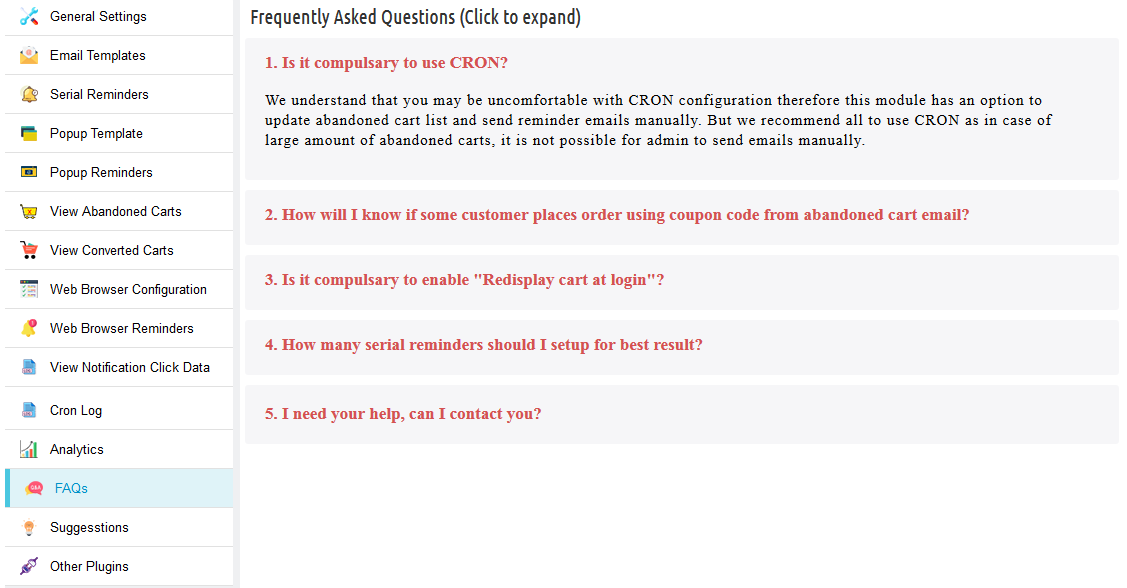
4.13 FAQs
This Prestashop abandoned cart addon by the Knowband tab contains several questions (with answers to them) that the customers ask. In fact, we recommend you go through the questions before raising any ticket for this addon.
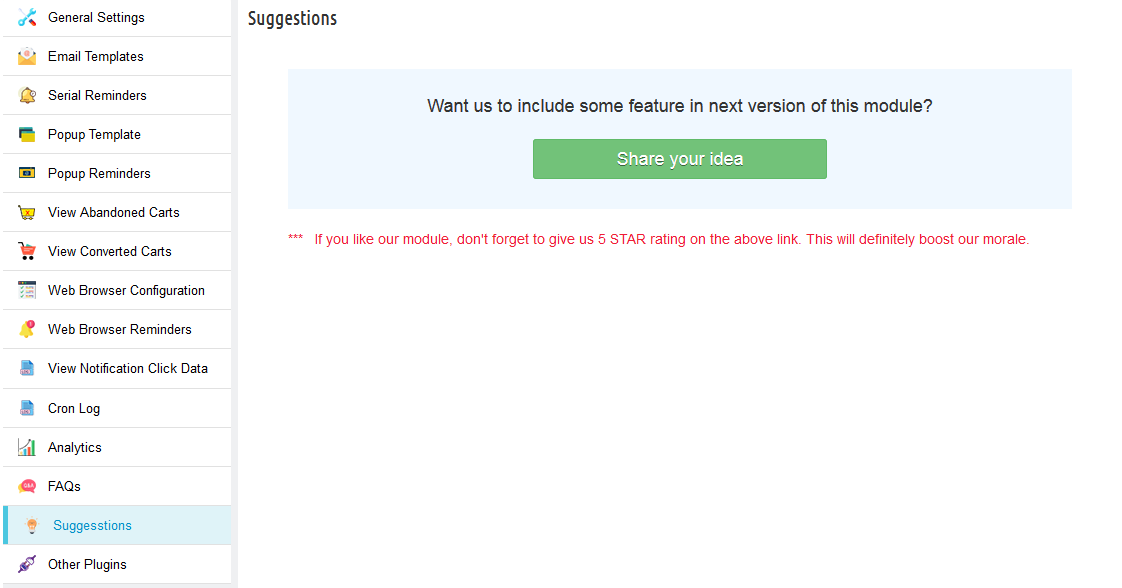
4.14 Suggestions
In case you want to give any suggestions for some new features to be included in the new version of this Knowband Prestashop cart abandoned module then you can use this tab.
4.15 Other Plugins
This Prestashop email follow up by the Knowband tab redirects to our developer page having a list of other plugins developed by us. In fact, if you like this Knowband Prestashop abandoned cart addon then you can try our other addons as well.
5. Recommendations
– If Prestashop Abandoned cart email follow-up addon is not working after installation then please check permissions on modules folder. Further, the folder should be writable. Please make the folder permission to 755.
– It is necessary to add the CRON instructions to your cron without that this Prestashop abandoned cart addon is not as useful.
– Make sure that the Cart Re-Display Setting (Preferences -> Customers -> Cart re-display at login) is ON otherwise the Prestashop email follow up addon will not work as expected.