PrestaShop Back in Stock Module- Unique Approach to Capture Lost Sales

Notify customers when products are back in stock, and your PrestaShop revenue will increase quickly. Use the PrestaShop Back in Stock module to start recapturing missing revenue. Send notifications to consumers as soon as the products return to stock. It takes just 5 minutes to set up.

PrestaShop Back-in-Stock – Unique Approach to Capture Lost Sales

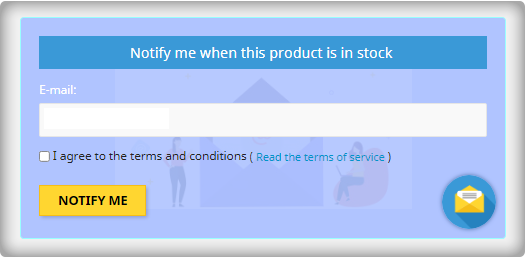
Back-in-stock alerts are a perfect way for PrestaShop stores to boost sales. Don’t miss out on sales because the products are out of stock. Increase your sales with web push notifications for back-in-stock products. You can send an initial email when a customer subscribes for a back-in-stock alert, low-stock alerts, and a final notification email with the Back-in-stock message.

We’ve all discovered things that were out of stock but we don’t go back to the store to see if it’s still there. Why do you expect your customers to do it? Influence them using emails and send push notifications to bring them back to your online store. You will get more sales and observe a boost in conversion rate.

Adding an email opt-in to your subscriber list will help you grow your list

The majority of low stock and back-in-stock warning forms only obtain the customer’s email address to inform them when a product returns to stock. Take advantage of the fact that they’re paying attention by asking them to join your email list at the same time. Sellers who use this strategy see a large improvement in their email subscriber list size, which leads to increased sales.
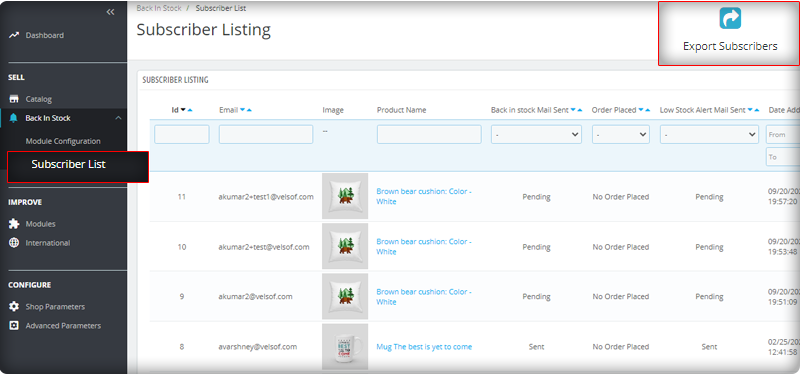
You can observe the subscriber listing on the admin panel at the left menu where all the installed modules are listed.
V3 Google reCaptcha is integrated with PrestaShop Back in Stock module to keep away the spammers and bots.

Add Custom Field in the Back in stock Subscription Box

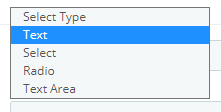
Collecting information from customers to send personalized emails will be easier. PrestaShop Back in stock addon provides an option to add custom fields in the subscription box. You can now add text, radio option, and other custom fields to gather more details about the customers.
Send automated emails for Low-stock and Back-in-stock

The PrestaShop Back-in-stock Module is a tool for email marketing. Customers usually receive hundreds of promotional emails and most of them are ignored but an email with a catchy subject line has more chances of getting opened. The module allows sellers to send a customized email with tailored text and subject lines. Along with an initial welcome email, you can send low-stock alerts to the subscribers and notify them about the restocked products.

Add related products to email template and cross-sell

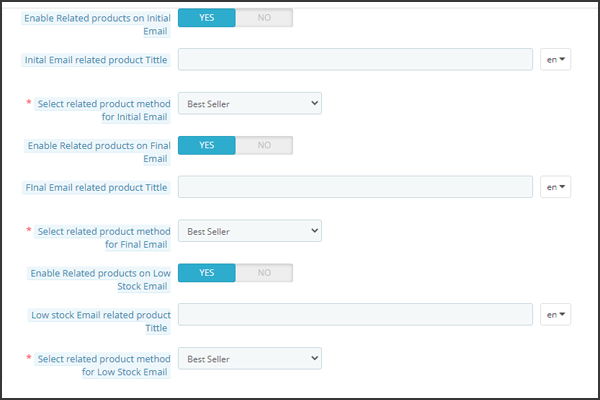
Heard the phrase ‘killing two birds from one stone, the module works the same way. It lets you send back in stock alerts as well as has an option to send related products. A seller can add details like bestsellers, products of the same category, specific products, etc. If a seller opts for the Specific products option, then he will have to specify the products in the respective tab as shown in the image below.
Send alerts via your email provider like Mailchimp

It is critical that you build your brand, and one way to do so is to ensure that the emails you send are sent from your domain. You’ll be able to use a variety of features to boost the success of your back in stock campaigns if you use an advanced eCommerce email provider like Mailchimp, Klavio, or Sendinblue. And, the PrestaShop back-in-stock module allows you to do so.

Real-time Analytics for PrestaShop

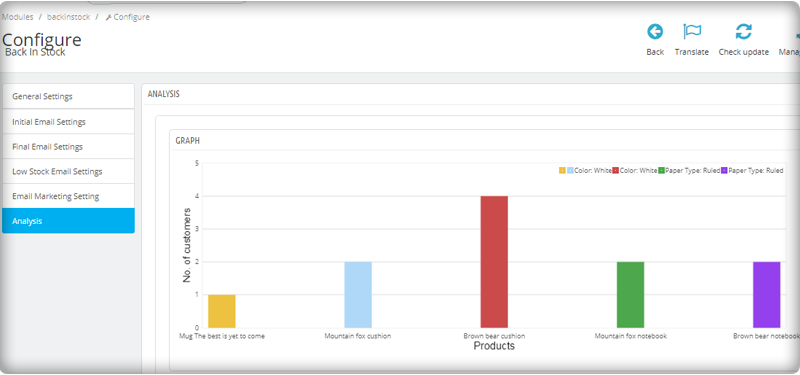
View a full report on customers who have subscribed to web push alerts for back-in-stock products. To increase sales, identify the most successful items, maximize inventory, and run promotional campaigns.
The new version has UTM Parameters

The UTM parameters are short text codes, you insert into URLs (or links) to monitor the success of a webpage or a campaign. Built-in analytics are available on social media sites. These allow you to track key metrics such as likes, shares, and website clicks. You can add UTM parameters to the PrestaShop Back in stock module and take advantage.

To wrap up: The Back-in-Stock emails are one-of-a-kind alerts as they create curiosity, influence the buying motives, and increase the chances of sales. If you are not sending alerts like low-stock or back-in-stock to your customers, you are making a huge mistake. Get your ‘Back-in-stock’ module today to grab your lost sales.

For eCommerce website development, module requirements, or mobile app development for your online store, KnowBand has experts and ready-made tools. Visit us at www.knowband.com or drop a message at support@knowband.com.

Recommended Reads:
Strategies to Drive more Organic Traffic to your eCommerce Store

The word “organic traffic” is used as a result of unpaid (“organic”) search results to refer to visitors landing on your website. After using a search engine like Google or Bing, visitors who are deemed organic find your website, so they are not “referred” by any other website.

Across the board, online revenues are soaring. Because of that, all the time, new eCommerce businesses spring up. But in this highly competitive marketplace, how can you stay on top of the pack and set your company up for success? Working on driving organic traffic to your online store is one of the key things you’ll need to do.

Can you really boost sales without purchasing Ads?

Most of the users think that to stand above the tough competitors they often have to rely on purchased ads. Larger distributors with big budgets prefer to throw cash at their marketing concerns.

So, smaller retailers could feel at a disadvantage without unlimited marketing and advertising funds. Fortunately, without breaking the bank, there are several ways of driving traffic and attracting customers.

So, if your online store hasn’t been built for organic growth, you’re probably missing out on a huge chunk of potential buyers. We have put together this list of effective techniques to help you, which you can follow with ease.

Imagine — you finally launch your online store and the only person who visits is your mom. The worst nightmare, isn’t it?

You’ll need to create brand awareness and enthusiasm for your product in order to ensure that you have organic traffic from the very beginning of your business.

1.     Understand the Social Media Game

The quickest way to get the word out is through social media in today’s society, thanks to the increased usage of mobile devices and smartphones. As it’s free to use, it’s also a cost-effective option!

Popular social media platforms are Twitter, Facebook, Instagram, Pinterest, and LinkedIn. Orient your marketing efforts on the channel where you are most involved with your target audience.

For instance, Pinterest has a unique feature that allows users to search for items directly from the Pinterest platform and purchase them.

When it comes to advertisements or direct connections, many social media sites are pay-for-play. This Pinterest feature will not cost you anything so far.

Read: Social Media Trends to Follow In the Year 2021

2.     Strategize SEO

We all know that SEO is important, and yet sometimes we let it happen “by accident” rather than paying the attention it deserves.

A search engine accounts for 93 percent of web traffic, and fewer than 5 percent of web searchers go to the second page of returned search results. With your specific value proposition in mind, content should always be written.

Pay attention to keywords for the product that you should be using, Domain name, when creating content, using a keyword tool like Ubersuggest, and review your pay-per-click (PPC) and campaign results in Google Adwords if you want to put the budget for it.

To direct you to the right list of terms that are most important to your product, use a tool like the Google Keyword Planner.

3.     Referral Marketing

It is worth firing one up if you do not have a referral program in place for your e-commerce shop.

81 percent of consumers claim that their purchase decisions are strongly affected by a recommendation from a friend or family member.

It needn’t be elaborate.

Include an easy way to view feedback and suggestions for buyers, as well as to recommend your brand to others.

KnowBand’s affiliate and referral marketing tool can help you bring organic traffic to your eCommerce store.

4.     Add social proofs

Testimonials and feedback on your website can convert huge organic traffic to your store.

92% of customers trust a peer’s recommendation, and 70% trust a complete stranger’s recommendation.

Exactly what it sounds like is social truth. It’s evidence that your peers trust a company enough to buy from it (or at least a significant chunk of the population).

On every single product page, in the form of reviews, Amazon uses social shreds of evidence and users spend more time reading them before making a purchase decision.

Read: Best OpenCart Rating, Review and Incentive Extension to Reward your Customers

5.     Research your competitors

Check your website: User experience – The website of a competitor is a good starting point to assess how well it is doing online.

Try to search for different keywords and see if your competitors appear on Google, Yahoo, and Bing in the sponsored listings. Review their reviews and citations, including their social media handles.

Dig into the content they are posting on the website and how much organic traffic their content is driving.  To discover insights about your competitors, there are numerous resources like SEMRush that you can use.

You can also find out from which websites they get backlinks and approach them to get connections back to your e-commerce store as well. This will enhance the backlink profile and give strength to your website.

Read: Why Competitor Analysis is Important for an eCommerce Store

6.     Test your Call to Action

Most often, a CTA refers to the use of words or phrases that can be included in sales scripts, advertising messages, or web pages that compel an audience to behave in a particular way.

With an uncomplicated structure and clear CTAs, organize your site.

Ensure that shoppers can navigate your site easier to find what they are looking for.

Add a prominent “Shop Now” or “Start Shopping” button that leads customers there if your product catalog is not directly on the homepage of your website.

7.     Go for PWA or Mobile Application

60 percent of mobile users have bought something on their mobile device online. Do not forget to optimize your site for mobile shoppers, whatever you do.

If you want to know if you’re on the right track after you start adding features, enter your URL on a page like the Google Mobile-Friendly Test to see how it stacks up. Also, a mobile responsive website ranks higher in Google Search Results.

PWAs (Progressive mobile apps) are another best way to optimize your website for organic traffic. They don’t affect the ranking directly but running a well-designed PWA means that you provide a better user experience that helps you win in SEO.

It’s the better user experience that influences your ability to rank in search engines better. Convert your website into PWAs with powerful PWA Modules and create a mobile application with KnowBand’s Mobile App Extension.

Read: Success Story – Briko Bike Mobile App for E-Commerce

Wrap-up:

It is not about spending bucks from your bank account but what plan will be working for you. There are different methods of driving traffic organically. The top ones are listed above but if this doesn’t work for you then opt for email marketing, optimize your web pages, and speed regularly. Write your content with focused keyword research and always keep up the hopes. There has never been a better time to think outside of the conventional ad-spend box and stand out in the e-commerce crowd, with all the digital outreach resources available to retailers.

Recommended Read: