Top 7 Email Strategies to Win Back Abandoned Carts Using Knowband

Nearly every e-commerce business struggles with customers leaving items in their carts without completing the purchase. Customers add products but leave without purchasing, resulting in lost sales and engagement opportunities. Therefore, Knowband’s PrestaShop Abandoned Cart Module, PrestaShop Spin & Win Module, and PrestaShop Back In Stock Module offer a powerful way to recover these potential sales through emails.

Here are seven effective email strategies to bring those customers back.
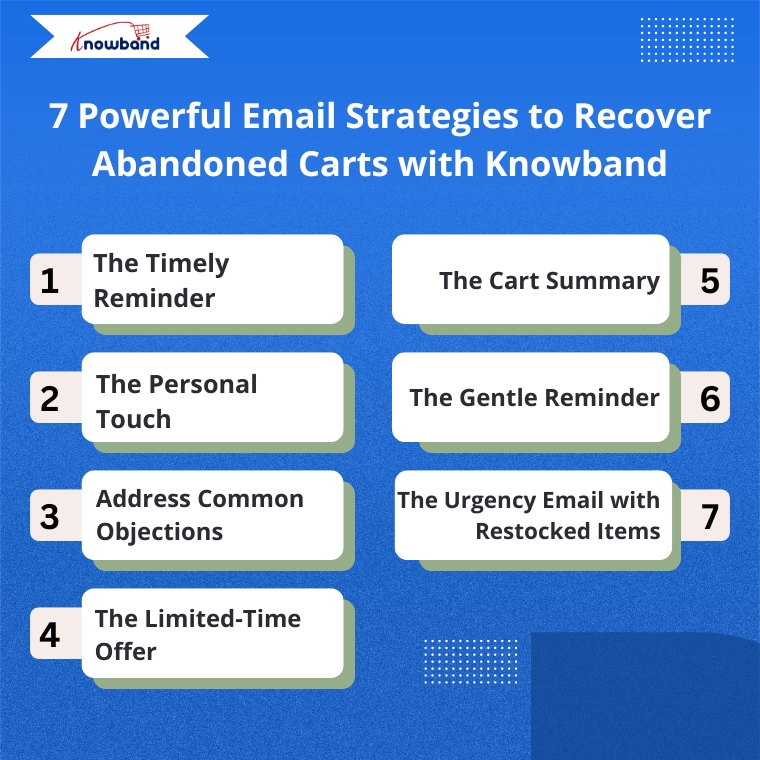
1. The Timely Reminder

Timing is everything when recovering abandoned carts. Therefore, the Abandoned Cart Addon for PrestaShop allows you to send the first reminder email within 1-3 hours after abandonment when your store is still fresh in the customer’s mind. Moreover, Knowband’s Abandoned Cart Addon allows you to set up automated sequences with precise timing, maximizing your chances of recovery.

2. Targeted Email Engagement

One way is to address customers by name and reference specific items they left behind.  Knowband’s PrestaShop Abandoned Cart Module automatically captures this information, allowing you to create personalized emails that show customers you value their individual shopping experience.

3. Address Common Objections

There can be many reasons for abandoned carts, like product cost, shipping cost, payment, or technical issues. So, Knowband’s Spin & Win module allows the admins to add coupon discounts, which can motivate the customers to go back and make purchases. 

4. The Limited-Time Offer

Create urgency with time-sensitive offers. The Abandoned Cart module allows you to include discount and coupon emails, and expiration dates on discount codes, encouraging quick action. For example, a 10% discount that expires within 24 hours can be the perfect motivation to complete a purchase.

5. The Cart Summary

Provide a clear summary of the abandoned cart in your email. This includes product images, names, quantities, and prices, making it easy for the customer to recall what they were interested in. The Abandoned Cart Module for PrestaShop by Knowband sends the email when the user abandons the cart, so keep the email template concise and visually appealing to spark interest and remind them of the value they were about to purchase

Integrate Your Opencart Shop with Abandoned Cart Module

No Coding Skills Required

SHOP NOW

6. The Gentle Reminder

Sometimes, customers abandon their carts by mistake or forget they left items behind. A gentle reminder email can be sent a day after abandonment using Knowband’s Abandoned Cart Module and can impact them without being too pushy. Additionally, this email should be friendly and polite, encouraging them to return and complete their purchase

7. The Urgency Email with Restocked Items

If an item that was abandoned is back in stock, the store owner can send an email informing the customer that their desired item is available again. This can be achieved by implementing the PrestaShop Back In Stock Module by Knowband, which can help create urgency, especially when products are in limited supply or high demand, and can drive the customer to act quickly.

How These Modules Operate

The Abandoned Cart Module helps you track, manage, and recover incomplete purchases through automated, personalized email campaigns. Moreover, the Prestashop Abandoned cart email follow-up addon enables store owners to set up smart reminders, offer discounts, show product images, and include one-click recovery links, making it easy for customers to return and complete their orders.

The Spin & Win Module for PrestaShop, on the other hand, helps prevent abandonment before it even happens. Moreover, this interactive pop-up module for Prestashop captures visitor emails by offering them a chance to win attractive discounts through a gamified interface. Moreover, this not only adds fun to the user experience but also provides coupons for purchases and grows your email list for future marketing.

The Back In Stock Module for PrestaShop allows your customers to subscribe to restock alerts for out-of-stock products. Furthermore, as soon as an item is available again, customers receive an automated email notification, giving them a chance to return and complete their purchase even without any manual effort from your side.

Putting It All Together with Knowband

Implementing these strategies becomes simple with Knowband’s PrestaShop Abandoned Cart Module, PrestaShop Spin & Win Pop, as well as PrestaShop Back In Stock.

 These modules offer:

  • Automated email sequences with custom timing
  • Personalized content for each customer
  • Built-in discount code generator
  • Detailed analytics to refine your approach
  • One-click cart recovery links
  • Mobile-responsive email templates

Furthermore, these PrestaShop modules by Knowband are user-friendly add-ons that allow you to track recovery rates and revenue gained, helping you continuously improve your abandoned cart strategy.

Start Recovering Lost Sales Today

Cart abandonment doesn’t have to mean lost revenue. With Knowband’s PrestaShop Abandoned Cart Module, PrestaShop Spin & Win Entry Pop-Up Module, PrestaShop Back in Stock, and these seven email strategies, you can effectively bring customers back and increase your conversion rates significantly.

Therefore, install Knowband’s PrestaShop Modules today and transform abandoned carts into completed orders with these proven email strategies.

For more details, check out the Prestashop Abandoned Cart E-mail Reminder Module which is available for PrestaShop, OpenCart, Magento, and WooCommerce.


12 Ways to Reduce Shopping Cart Abandonment

“This write-up talks about Cart Abandonment and covers sub-topics such as cart abandonment reasons, cart abandonment stats, and it also provides you with cart abandonment solutions that will help you reduce shopping cart abandonment on your website.”

Abandoned Carts are a headache for website owners. It is painful to see shoppers adding items into the cart, but then deciding to give up the purchase on the checkout page. Though it is not in our hands to control abandoned carts, however, there are certain ways to reduce shopping cart abandonment.

What is Cart Abandonment?

When a user adds an item to his/her shopping cart but leaves in between without completing the purchase, it is known as Shopping Cart Abandonment.

Cart Abandonment Reasons

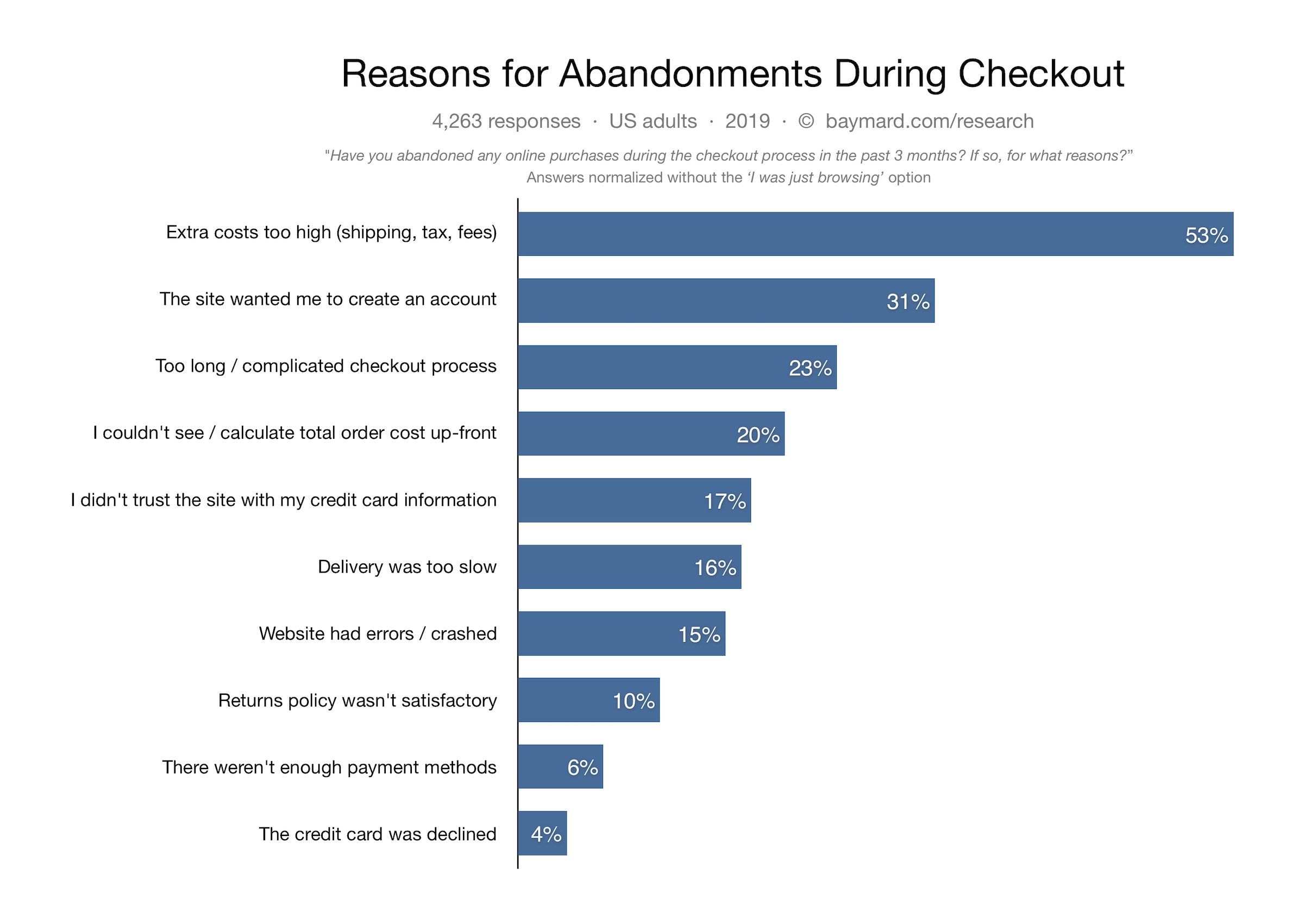
Below are some of the primary reasons for cart abandonment as per Baymard Institute.

High Shipping Cost

Mandatory Sign-up

Lengthy and Complicated Checkout

Internal Website errors

Security Issues

Late Delivery

Unsatisfactory Return Policy

Not enough payment options

Image Source: Baymard Institute

Cart Abandonment Statistics

Baymard Institute collected the cart abandonment stats of various eCommerce websites and found the average cart abandonment rate to be nearly 70%, i.e. every 7 out of 10 shoppers abandon their cart for some reason.

Statista also confirms the same. And as per the stats shared by Barilliance, abandoned carts are majorly seen in mobile devices.

How to Reduce Shopping Cart Abandonment?

How irking it would be to see hundreds or thousands of visitors on the checkout page but leaving without buying anything. Being a website owner, it feels bad to lose out on those prospects.

But hey! It happens with every online business and like everyone, you should also look for some ways to minimize abandoned carts. After knowing the reasons behind shopping cart abandonment, let’s check out how you can reduce the cart abandonment rate on your eCommerce website.

1. Provide a Clear Vision of the Overall  Cost

People usually do not expect the cart value to exceed very higher on the payment page. But sometimes, the additional charges like shipping cost, delivery charges, tax charges, hidden costs and surcharges create a huge difference between the product value and the cart value. Make sure to avoid this.

Be transparent about the overall costs. Display it upfront at the time of purchase. By doing so, at least you do not surprise your customers later and are giving them a clear idea of the total price beforehand.

Or you can simply offer free shipping. This is one of the best ways to reduce shopping cart abandonment. To adjust the shipping cost, you can slightly increase the product price.

Related: Free Shipping Strategies: Why to Offer? How to Offer? When to Offer?

2. Build Trust through Security Badges

Another solution for reducing cart abandonment is displaying security badges.

Online shoppers are highly concerned about sharing their card details. With online frauds rising rapidly in the Internet world, it is not easy for consumers to put their trust into an online business, especially if it is the one with whom they are interacting for the first time.

Consumers have a fear of losing their hard-earned money. Hence, it is important to make customers feel secure about their payment-related stuff.

What is the solution?

Add security logos to your checkout page. Something like Norton Secured, McAffe secure can boost the confidence inside customers and reduce the cart abandonment possibility. Besides, consider making your website SSL certified if it isn’t. By adding an SSL certificate to your domain, your site looks authoritative.

3. Take help of Exit Pop-ups

Exit pop-ups are probably one of the best ways to recover abandoned carts. What’s exciting about them is that they provide you with an opportunity to convert a visitor into customer right when they are about to leave your website.

Through exit popups, you can draw visitors’ attention towards your offerings at the very last moment and encourage them to use it on their purchase. The appearance of an exit popup when the user is trying to exit, leaving the cart abandoned, can bring a significant change in your cart abandonment rate.

This last-minute try can boost your conversions if your offers are convincing. Want to implement the exit popup functionality on your website? Try out the Exit Intent Popup by Knowband which is available for various eCommerce platforms-

PrestaShop Exit Popup

OpenCart Exit Popup

Magento Exit Popup

Magento 2 Exit Popup

4. Add Guest Checkout and Social Login

Forcing customers to create an account at the checkout page is one of the major reasons for cart abandonment. I seriously do not understand the point of adding this hurdle in between a successful checkout.

I do understand that you want to acquire the customer data but asking for it by breaking the checkout flow is not the ideal way.

So what should you do?

Offer a Guest Checkout as well as Social login. By having these two options on your checkout page, not only you will reduce the cart abandonment rate but also enhance the user experience.

Let users check out as a guest if they are not comfortable signing up. Social login, on the other hand, encourages quick signup.

Related: 10 Benefits of Social Login in eCommerce

5. Simple and User-Friendly Checkout

A lengthy and complicated checkout is one of the primary reasons for shopping cart abandonment. When a shopper is on the checkout page, he wants to check out as quickly as possible. The longer you make your customers wait, higher will be the chances of cart abandonment.

Keep the checkout form short, simple and clean. Avoid filling it with unnecessary elements. Ask for the necessary information only. To make the checkout experience of your visitors smoother, you can go for a One Page Checkout. A one page checkout places all the checkout fields on a single page and lets customers checkout comfortably. Try out Knowband’s One Page Checkout-

PrestaShop One Page Checkout

OpenCart One Page Checkout

Magento One Page Checkout

Magento 2 One Page Checkout

Related: One Page Checkout vs Multi-Page Checkout

6. Display Checkout Progress

It can be frustrating for consumers to be at the checkout page but with no endpoint in sight. They keep filling the information and keep moving to the next pages only to find out that it is a very long and time-consuming process. This eventually leads to customers abandoning their cart.

Use a progress bar to indicate where the visitor is present. A progress bar displays the overall steps a customer needs to go through to complete their checkout and fills as soon as they move further.

It’s better to tell your customers beforehand what all will be required to enter before they could take an exit.

7. Provide Easy Navigation

Make it easy for the visitors to navigate around your website. Do not clutter it with clunky designs. The smoother the journey of your visitors, lesser will be the abandoned carts.

It is still seen in many eCommerce websites that when a user clicks on the back button after filling out a particular page, the entire information is removed and customers are asked to fill their details again. This is annoying for the users.

Make sure that the buck button is fully functional and does not erase the already entered information.

8. Chase Abandoned Carts

Shoppers abandoned their cart? No issues. Go after them. You might not be able to convert all but at least a few of them will surely convert. And if the cart abandonment rate drops by even a small percentage, it can add a significant amount to your revenue.

Knowband’s Abandoned Cart Module

Check out the Abandoned Cart module by Knowband. This lets you track your abandoned cart users and helps you recover lost sales. Through this module, you can specify a duration after which the cart is automatically assumed as abandoned, and then you can remind those users through follow-up emails. You can add a coupon code inside your emails and there are a lot more functionalities in this module. Check out

PrestaShop Abandoned Cart

OpenCart Abandoned Cart

Magento Abandoned Cart

Magento 2 Abandoned Cart

9. Increase Payment Options

You just cannot disappoint your customers with the lack of payment options on the checkout page. And it will be heartbreaking to see a customer abandoning the cart because of the unavailability of the desired payment option or not having enough payment options.

People have switched to digital wallets, also called as e-wallets. Thus, having only limited payment options like Credit Card and Debit Card would not be enough. The more options you provide to your customers, the more comfortable they would be while making the payment.

10. Make your Website Mobile-Friendly

M-commerce has already surpassed eCommerce. A majority of people are now using their mobile devices to shop online. This makes it necessary to have a mobile-friendly version of your website. If your website looks appealing on the desktop, make sure it looks the same and is responsive on handheld devices as well. Failing to do so can result in a higher bounce rate and higher cart abandonment rate. Optimize your website.

11. Improve the loading speed of your Web Pages

If your web pages, specifically the checkout pages, are taking a lot of time to load, it isn’t a great sign for conversions, it could severely affect your sales. The slow loading in a website frustrates the customers and he/she ultimately ends up in leaving the cart abandoned.

So, optimize your checkout page and improve its quality and speed. For faster loading of web pages on mobile devices, you could take the help of Google Accelerated Mobile Pages or simply AMP. Knowband provides AMP module for PrestaShop and OpenCart.

PrestaShop AMP addon

OpenCart AMP extension

Related: Benefits of Google AMP for eCommerce

12. Have a clear Return Policy

Many a time, shoppers abandon their cart because they are not satisfied with the business’ return policy. There is a desire to purchase but due to an unsatisfactory return policy, shoppers decide not to go for the purchase.

Have a good and clear return policy. Provide them sufficient days to return the product if it has got some defects. Users will be more confident while making a purchase.

Related: 6 Pieces of Advice for an Effective eCommerce Return Policy

Final Word

That’s it. The above-mentioned tips will surely help you reduce cart abandonment rate on your website. Over time, you may find some new tactics as well.

If you want to add something that you feel is missing from this article, do drop a comment below. For any kind of assistance in the modules, contact us at support@knowband.com

What’s your take on reducing cart abandonment?