How to Setup SEO-Friendly URLs for your PrestaShop Store – A Comprehensive Guide

PrestaShop is a powerful eCommerce platform that enables businesses to create and manage online stores efficiently. One crucial aspect of running a successful online store is ensuring your website is optimized for search engines. A significant part of SEO (Search Engine Optimization) is creating clean, descriptive, and user-friendly URLs. In this guide, we’ll explore the steps to set up SEO-friendly URLs for your PrestaShop store.

Why Are SEO-Friendly URLs Important?

SEO-friendly URLs are crucial for improving visibility on search engines and enhancing user experience:

  • Improved Rankings: Search engines rely on URLs to interpret a page’s content. You can boost your search rankings by adding more descriptive URLs with relevant keywords
  • User Experience: Clean and readable URLs help users understand what to expect on a page.
  • Increased Click-Through Rates: Well-structured URLs encourage users to click on your links in search results.

Steps to Create SEO-Friendly URLs in PrestaShop

1. Enable Friendly URLs in PrestaShop

PrestaShop includes a built-in feature to generate friendly URLs. Follow these steps to enable it:
Log in to your PrestaShop Admin Panel.

Navigate to Shop Parameters > Traffic & SEO.

Scroll down to the Set Up URLs section.

Toggle the Friendly URL option to “Yes.”
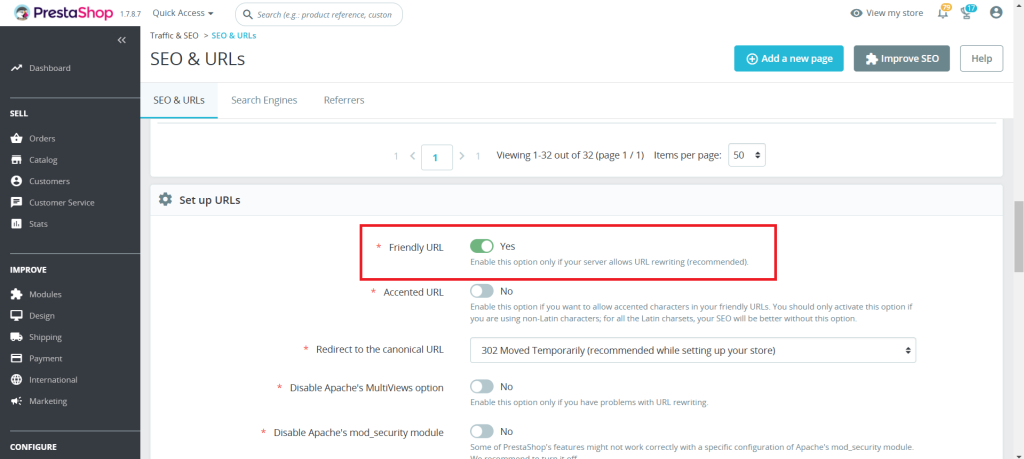
Click Save.

2. Configure URL Settings

1. In the same Traffic & SEO page, you can configure:

  • Accented URL: Decide if your URLs should include special characters.
  • Redirect to the Canonical URL: Enable this to avoid duplicate content issues.

2. Customize the Base URLs for your store’s language preferences if you run a multilingual store.

3. Optimize Individual Product URLs

PrestaShop allows you to manually edit URLs for products, categories, CMS pages, and more. Below are the steps showing how to make the Product URLs SEO-Friendly:

1. In the Admin panel, Open Catalog > Products:
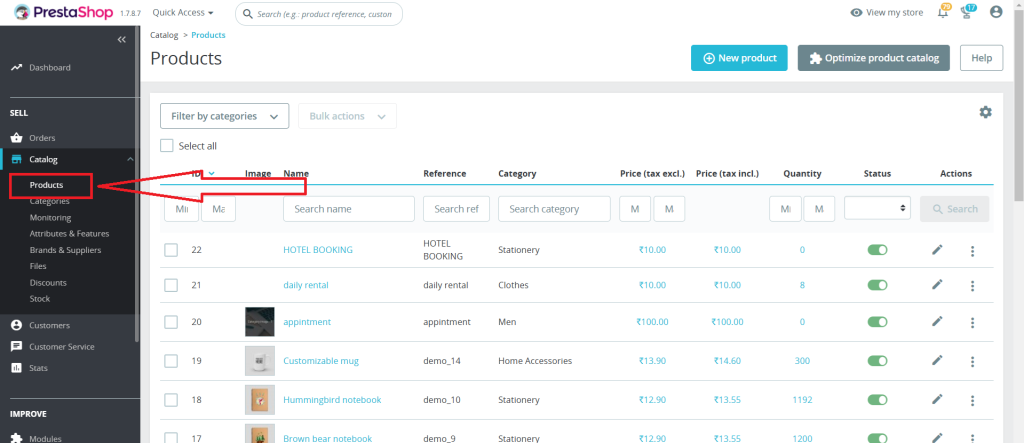
2. Select the product you want to edit.
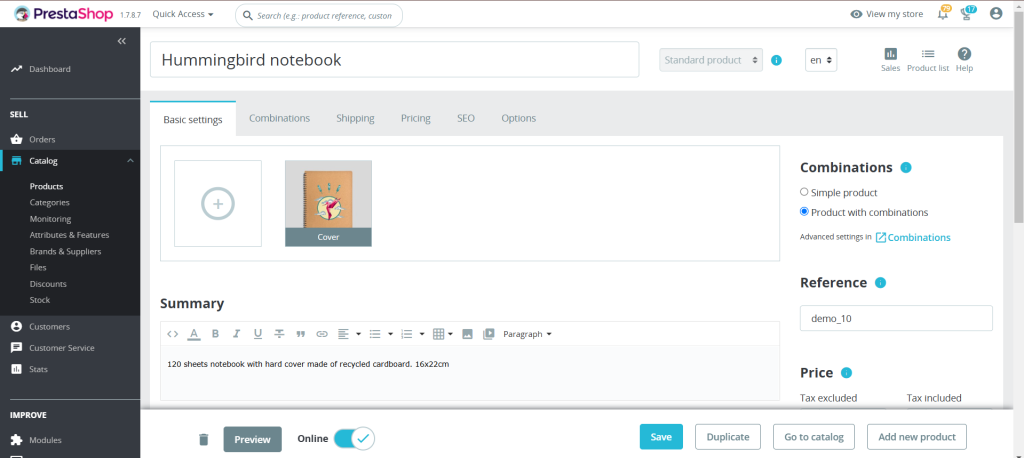
3. Navigate to the SEO tab.
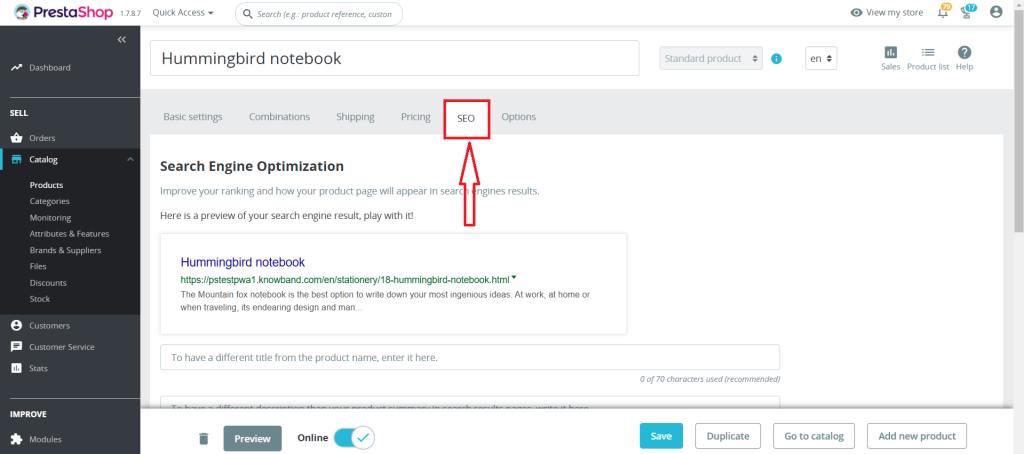
4. Optimize the Friendly URL field by using a concise, keyword-rich URL.
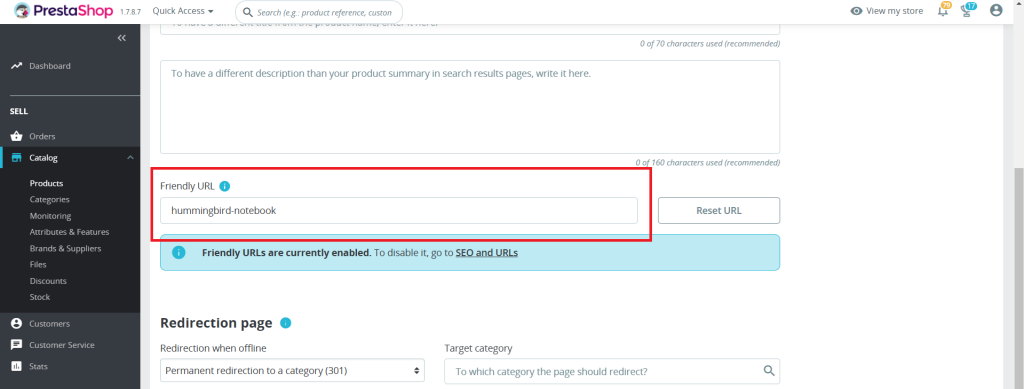
For example:
Instead of the product?id=123, use handmade-ceramic-mug.

5. Save your changes.

Add Clean URLs & 301/302/303 redirection

SHOP NOW

4. Use Keywords Strategically

When crafting your URLs:

  • Include primary keywords related to the page’s content.
  • Avoid stuffing URLs with unnecessary words or repetitive terms.
  • It is recommended to use hyphens (-) for separating the words instead of underscores (_).

5. Avoid URL Parameters

Dynamic URLs with parameters like ?id=123&ref=456 are harder for search engines and users to understand. Use PrestaShop’s friendly URL feature to replace these with clean, descriptive URLs.

6. Redirect Old URLs to New Ones

Implementing a 301 redirect from the old URL to the new one is an essential step that one should ensure while updating the SEO URLs. This helps maintain SEO rankings and prevents users from encountering 404 errors. Redirects can be managed through your server’s .htaccess file or an SEO module.

7. Test Your URLs

After configuring your URLs:

  • Verify they are working correctly.
  • Use online tools like Google’s URL Inspection Tool to check how search engines view your URLs.
  • Test for broken links and resolve them promptly.

Additional Tips for SEO-Friendly URLs

  • Use Lowercase Letters: URLs are case-sensitive. Stick to lowercase letters for consistency.
  • Avoid Stop Words: Words like “and,” “or,” “the” can be omitted unless necessary for clarity.
  • Limit URL Length: Keep URLs concise while still descriptive.
  • Update Sitemap: After making changes, update your sitemap and submit it to Google Search Console.

Recommended Modules for SEO in PrestaShop

To enhance your SEO efforts, consider using these modules:

Conclusion

SEO-friendly URLs are a cornerstone of an effective eCommerce SEO strategy. By following this guide, you can ensure your PrestaShop store’s URLs are optimized for search engines and user-friendly. Regularly review and update your URLs to maintain their effectiveness as your store grows.

Adopting these practices can significantly improve your website’s visibility on search engines, drive higher volumes of targeted traffic, and ultimately lead to an increase in conversions and overall engagement.
Happy optimizing!

Appendix: Common Issues and Troubleshooting

Friendly URLs Not Working

  • Ensure that your server supports URL rewriting (mod_rewrite for Apache).
  • Verify that the .htaccess file is correctly configured and writable.
  • Check permissions for the /var/www/html/ folder if hosted on a Linux server.

Broken Links after URL Changes

  • Whenever you modify URLs on your website, promptly update your sitemap to reflect these changes and resubmit it to Google Search Console. This ensures that search engines quickly discover, crawl, and index the updated URLs, preserving your site’s visibility and SEO performance.
  • Use a redirect manager module or .htaccess to map old URLs to new ones seamlessly.

3. Multilingual Store Challenges

  • Incorporate language-specific keywords in your URLs to enhance localization.
  • Make sure each language version of your store has a unique URL structure.

4. Duplicate Content Due to Canonical Issues

  • Enable “Redirect to Canonical URL” in Traffic & SEO settings.
  • Review all indexed pages using tools like Screaming Frog to detect duplicates.

PrestaShop Starter Pack: Must-Have PrestaShop Modules To Start Your Store

If you have just built your eCommerce website on the PrestaShop platform, you would be looking around for some PrestaShop plugins that you should integrate on your website as a beginner. Your search ends here.

In this article, I have put forward some of the basic yet effective PrestaShop modules to start with. We also call this the PrestaShop starter pack. Check them out.

1. One Page Checkout

PrestaShop One Page Checkout converts the default multi-step checkout process of your PrestaShop based website into a One Page Checkout. It aims to improve the checkout experience of your customers besides boosting your conversions by encouraging a quick and hassle-free checkout.

The module provides Guest Checkout, Facebook, Google and PayPal Login, option to customize checkout fields, multiple shipping services and payment methods support, layout customization, and much more. You can also display a free shipping banner on the top of the checkout section that helps to increase the average order value. It is a GRPR compatible module.

One Page Checkout has been downloaded 5000+ times on the official addon store and more than 2500+ times on our Knowband store.

2. Abandoned Cart

PrestaShop Abandoned Cart addon lets you track the abandoned carts on your website and provides you with the opportunity to convert those users into customers. The module aims to recover lost sales and helps you reduce the cart abandonment rate on your website.

Talking about some of its key features, it lets you create an abandoned cart alert; you need to specify the duration after which the cart is automatically assumed to be abandoned and a reminder email is sent to the user. The email functionality can be customized from the back-end configurations.

It also offers different types of discount email templates through which you can persuade the abandoned cart users to complete their purchase by providing a discount code inside the email.

3. Spin and Win

PrestaShop Spin and Win adds a Gamification element to your website in the form of a Spin and Win popup. The module focuses on certain aspects like increasing user engagement, reducing website’s bounce rate, boosting the average site time but most importantly, it is an email subscription popup that helps you grow your email list and scale-up your conversions.

With the help of this module, you can customize the look and feel of the popup and the text on it. Besides, you can configure the popup display settings like the display frequency, when to show, where to show, on which pages to show the popup, etc. It also provides you with the option to customize the popup slices as per the way you want.

4. Affiliate and Referral Program

PrestaShop Affiliate and Referral Program addon is an exciting way to boost your brand awareness and acquire new customers. The module allows users to register as an affiliate on your website, after approval of which they can earn rewards/incentives upon referring the website to others.

The user can share his/her referral code with others which they can use during the sign-up process. They can also share a direct referral link to sign-up and also share the link directly on their social media platforms or on someone’s email address.

The referral is considered successful if a new user has registered or made a purchase; depending on the configurations set from the back-end. Upon successful referral, the rewards are provided to the affiliate which can be claimed in the form of a discount voucher or the affiliate customer can raise a payout request.

5. SEO Optimizer

PrestaShop SEO Optimizer also referred to as URL redirect or URL cleaner module helps you convert the URLs of your website into SEO-friendly URLs. You can rewrite duplicate URLs and perform three types of redirect; 301 redirect, 302 redirect and 303 redirect. The module helps you improve the performance of your website on the search engine.

It’s a multi-lingual module, is SSL compatible, and also has multi-store compatibility.

6. SEO Wizard

PrestaShop SEO Wizard addon helps you manage the SEO of your web pages. The module automatically updates interlink and metadata on your website after the cron is executed from the back-end. The optimization is offered for four different web pages that include Product pages, Category pages, CMS pages and Manufacturer pages.

For any kind of assistance or query, reach out to us at support@knowband.com and our support team will reach out to you to the earliest.

You May Also Like:

10 Must-have Addons to Optimize Prestashop Product Pages

6 Must-Have Social Media Addons For Your PrestaShop Store

Top 10 PrestaShop addons to boost your Holiday sales

How to add an SEO friendly URL for any controller in PrestaShop?

With the introduction of the friendly URL and customized URL, PrestaShop revolutionized the control of URLs in its update PrestaShop v1.5. Later in the PrestaShop v1.7, it added the feature of URL dispatcher to enhance the URL rewriting in PrestaShop. With this update, PrestaShop made the URL rewriting or URL customization for modules very easy.

An SEO URL structure is a special customized URL which simplifies the complex structure of the URL to a very simple and easy to understand structure.

For example :

Say you have new module called “yourmodule”. Let say it has two main functions.

1. Page list of commands for any user

2. Using “yourmodule” to see the order details.

Now if the friendly URL is Disabled, you will see your page list URL something like this:

https://www.yourrstore.com/index.php?fc=module&module=monmodule&controller=orders&module_action=listing

If Friendly URL is enabled you will see the same page list with this URL:

https://www.yourrstore.com/module/monmodule/orders?module_action=listing

As we can see that the second case presents the more simplified and understandable URL structure and this is because of the Friendly URL being active on your site.

Friendly URLs are nice to have on your site. A clean, SEO friendly URL is more understandable and easily readable by the search engines. Adopting a friendly URL is one of the pre-development SEO approaches.

How to get the Friendly URL for your front controller pages?

Follow these simple steps to get an SEO Friendly URL for your module controller:

Step 1: Login to your Back office.

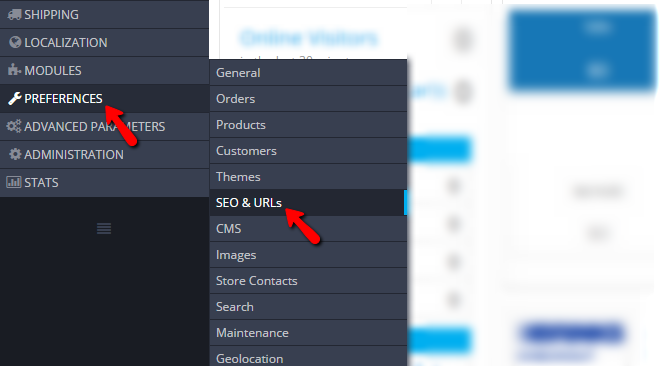
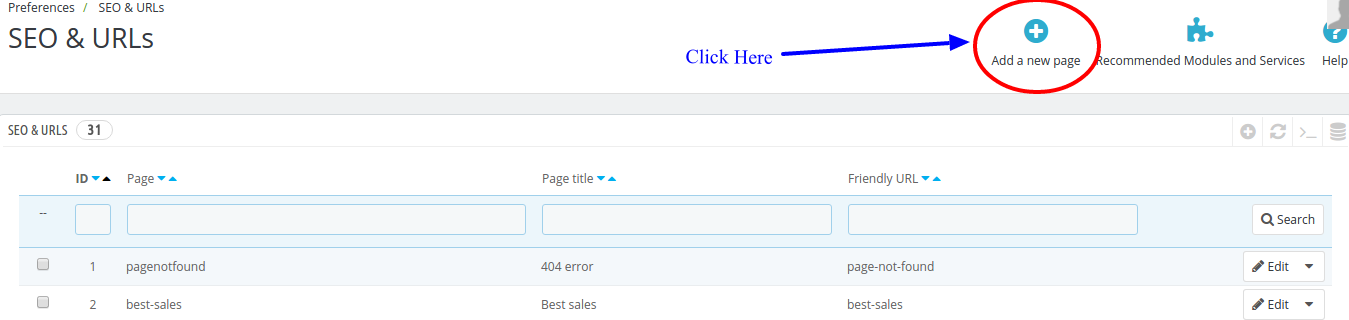
Step 2: Navigate to Preferences>>SEO & URLs

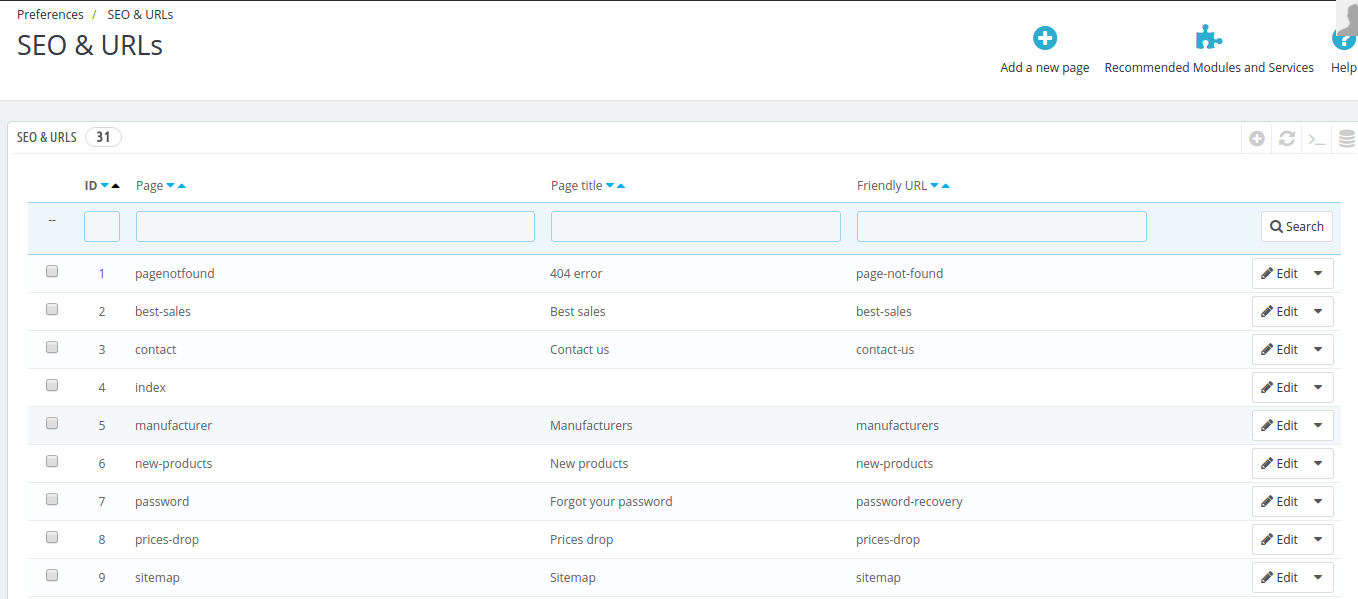
Step 3: You will see the configuration page “SEO & URLs”.You will see the list of front pages, Page Title, and their URL.

Something like the below screenshot:

Step 4: Now, click on “Add new Page” as shown in the screenshot below:

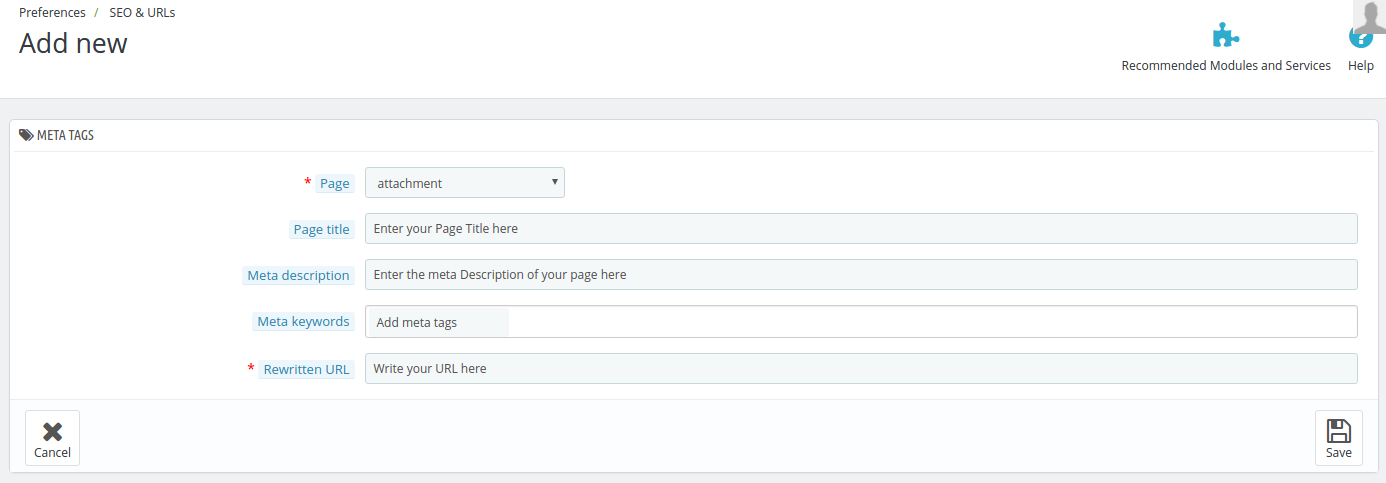
You will be redirected to a page which looks something like below:

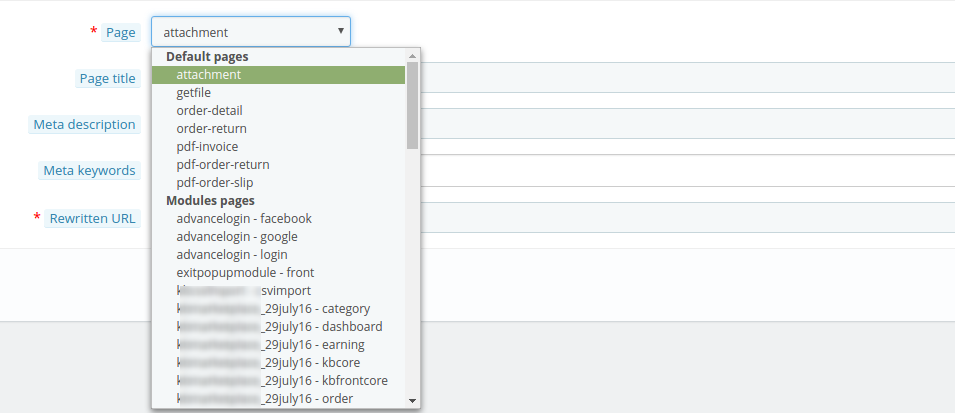
Step 5: When you click on the tab “Page”, it will open a drop down list of all the pages that are created on your website. Select the page from the list for which you want to rewrite the URL.

Step 6: Enter the details asked in the form above and also mention your custom URL in the “Rewritten URL” tab. Click “Save” to store your settings.

You have done the the task of rewriting the URL after you saved the form. But in some cases you will need to perform the following additional operations.

1. Clear the cache: Sometimes cache won’t let the new URL show on the front end. To avoid this you need to go to Advance Parameter>>Performance  and clear the cache from there.

2. Make sure in Preferences >> SEO & URLs >> SET UP URLS, the “Friendly URL is turned on”. You can also disable the “Accented URL”; it’s optional.

An alternate way of implementing SEO-friendly URL

Knowband offers an alternative and easier method of making the URLs of your store user-friendly. PrestaShop SEO Optimizer – Clean URLs & 301/302/303 redirection Module offered by Knowband IDs from all the URLs of the stores in one go. By removing the product and category ID, the links of the landing pages becomes SEO optimized. Additionally, you can even remove the default ISO and .html from the links without making any manual changes. Not just this, you can retrieve the list of the URLs redirected to a new link or the links that are redirecting to 404 error by using PrestaShop 301/302/303 Redirect.

What are the features offered by Knowband’s Prestashop URL cleaner addon?

Some of the admin features offered by this Prestashop SEO optimizer extension are mentioned below:

  • With PrestaShop SEO URL Addon, you can optimize the URLs of your site from SEO point-of-view and improve the website ranking in the Google SERP results.
  • No manual changes are required to be done with PrestaShop SEO Friendly URL module.
  • The Prestashop addon lists out the URLs that have 301/302/303 redirection as well as the links that redirects to 404 error.
  • You can remove .html and default ISO from the URLs if required with Prestashop SEO Friendly URL extension.

Why you should have SEO-friendly URLs?

Having discussed the various ways of implementing SEO-optimized URL, the question of why you need to have one in the first place might come to your mind. So, listed below are some of the reasons for the same.

URLs with a structured hierarchy are preferred by GoogleBot. Such URLs make it easier for the crawler to crawl pages throughout the site.

If you links with structured hierarchy, then, the webpages will get indexed easily. Not just this, such pages are displayed in search results faster.

Even in case of indexed links, the recrawling becomes easier.

With a SEO friendly URL structure, it becomes easier to promote your site.

Moreover, it is a preferred option from the end-users’ point-of-view. It is easier for the user to remember the links of the landing pages.

So, here we learned that how we can rewrite the URL of any front page on our PrestaShop site. The support for Friendly URLs is really a nice feature in PrestaShop which also acts used as a competitive advantage against other CMS systems.