The Prestashop Mobile App Builder – a must-have tool for going mobile!

Long back everyone used their computers and laptops to browse the internet and shop online. Because of their mobility and user-friendliness, online clients are opting to shop on their mobile devices. Most eCommerce organizations have made themselves recognizable and accessible on mobile platforms. Further, to remain conscious of this change. Moreover, offering a Mobile App using a Prestashop mobile app builder, allows businesses to achieve new heights. That too, in a shorter amount of time and with less effort.

In this article, we’ll show you how to use your own Prestashop mobile app to take your Prestashop store mobile. Building and distributing an unmistakable eCommerce purchasing app is more favorable and smarter for the pocket now, thanks to technological developments and simpler techniques.

Brief description of the Prestashop eCommerce mobile app

Mobile apps for eCommerce, often known as native shopping apps, are the most prominent type of apps. The shoppers can simply download the apps from the Google Play Store/Apple App Store. Moreover, install them on their mobile device. If you decide to release your Prestashop Mobile App, you’ll submit/distribute your APK file to the Play Store and your IPA file to the App Store. You won’t have to worry about creating or distributing app data for your Prestashop business. The Prestashop iOS app handles all and takes care of everything for you.

How can you launch the native app using the Prestashop mobile app builder?

  • Buy the Prestashop Mobile App Creator from Knowband.
  • Set up the module. Moreover, fill app pre-imperative form.
  • Check the apps even before you deliver them to the App Stores.

The store owners get a complimentary 3-month support period for the Prestashop mobile app maker. Therefore, you can contact Knowband’s support team for any help without worrying about overspending.

The Prestashop eCommerce mobile app module has a lot of impressive features that you should be aware of before diving in.
The Features of the Prestashop mobile app maker by Knowband


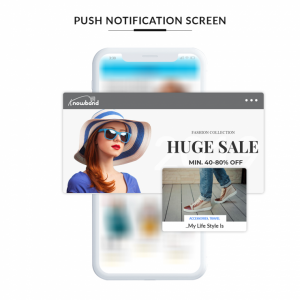
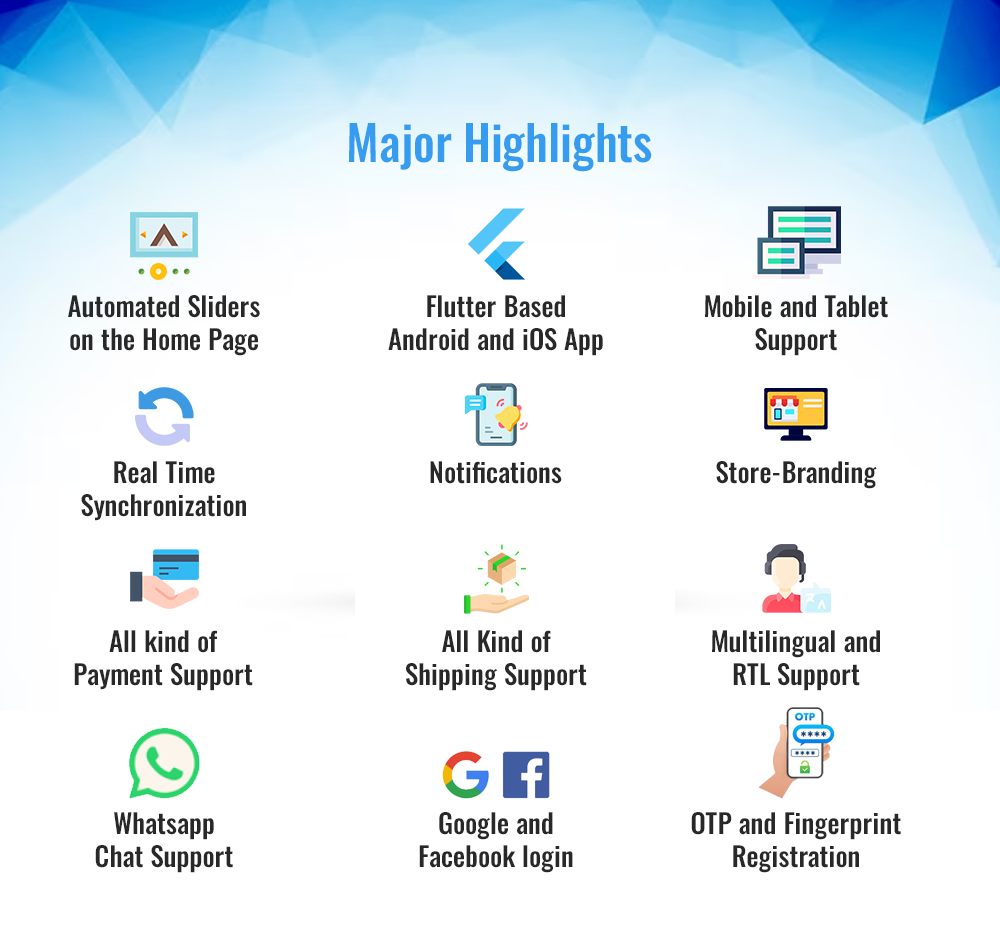
  • Push Notifications

The mobile apps produced with the Prestashop Android app builder provide the support for push notifications. There’s an advantage of this Prestashop Prestashop iOS app builder. Furthermore, it allows administrators to send unlimited push alerts to app users when he needs to.

  • Support for several currencies and languages

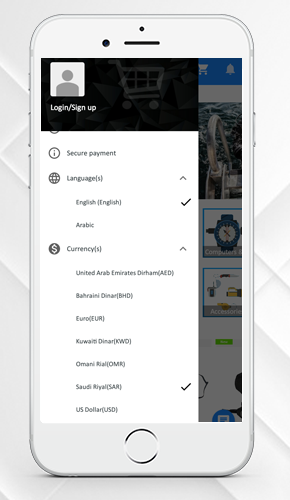
Prestashop addon supports a variety of international monetary systems as well as their respective languages. This Prestashop plugin also supports RTL content. For instance, Arabic and Persian.

  • Synchronization in Real-Time

The store manager need not worry about dealing with their app and website. Your mobile app will link with the website because of the Prestashop mobile app builder. This also keeps the stock management system programmed.

  • Payment and shipping options 

With the Prestashop module, all the payment and shipping options that are dynamic on your Prestashop site will be fluid on your mobile app as well.

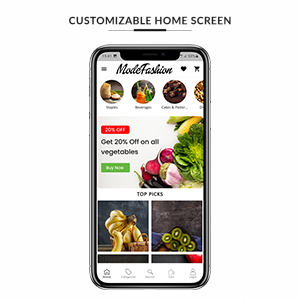
  • Mobile App is customizable

Whether you choose to build a native shopping app with their plugin or not, you’ll want to use the reorganized backend of the module to tweak and change your eCommerce mobile app. The DIY Home-Page editor allows store administrators to change the homepage format (with a live preview).

  • Using an image for a search

Knowband added the ‘search by image’ feature to the module in one of the most recent releases. The admin can use this to allow consumers to browse the catalog using photos. They can also use photographs from their phone’s gallery or other sources.

  • The use of deep links

When you share a link with a customer, it leads him or her to the merchandise. In reality, it doesn’t mince words and allows the buyer to land exactly where he or she should.

  • On the Home Page and Category Pages, you can add items to your cart

Customers save time and effort by using the Add to Cart button on the Home page and Category Pages. They can even skip the product page and go to the checkout.

  • The functionality of Related Products

Prestashop Automatic Related Products module is now compatible with the module. As a result, the administrator can show relevant products to clients. This will increase the likelihood of possible sales.

The Prestashop eCommerce mobile app module comes with a lot more features. For instance, social login, social sharing, and improved layered navigation. Don’t be hesitant to have a look.

This Mobile app module also works with Prestashop marketplace module.

Let us wind up!

The popularity and demand for shopping applications have grown. Moreover, the cost and complexity of developing and deploying an eCommerce Mobile App have lowered. The Prestashop mobile app builder assists store owners in converting their business to a mobile app without the need to spend time coding and surveying. If you’ve been considering something similar, take a look at the options before launching your app. To learn more about the Prestashop module, check out the Knowband website. Moreover, you can drop in your queries at support@knowband.com as well.

👉Explore the Module with Our Video Guide


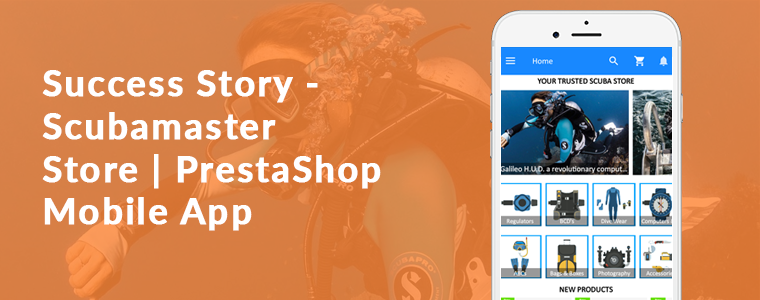
Success Story – Scubamaster Store | PrestaShop Mobile App Builder

This article is a toast to the success story of the Prestashop Mobile App for Scubamaster store developed using the Mobile App Builder plugin. Consider using KnowBand’s Mobile App Builder Module to develop Android & iOS Mobile app for the PrestaShop store. The Mobile App Builder offers the following advantages to the store admin:

  • No coding skills required
  • One Time Payment
  • Real-time synchronization between PrestaShop store and Mobile App
  • Supports all major payment methods
  • Supports all major shipping methods
  • Customizable Home Screen
  • Push Notifications
  • For the complete list of the feature please click here
  • Our technical team will assist you to submit the app at Google and Apple Play Store

Aside from growing your product sales and company exposure, a mobile app enhances customer retention. Each time users view it, an application guarantees the same presentation of goods and services. Customers, no matter which page they visit, will go through the same user experience. A mobile app allows you to get in touch with your customers quickly.

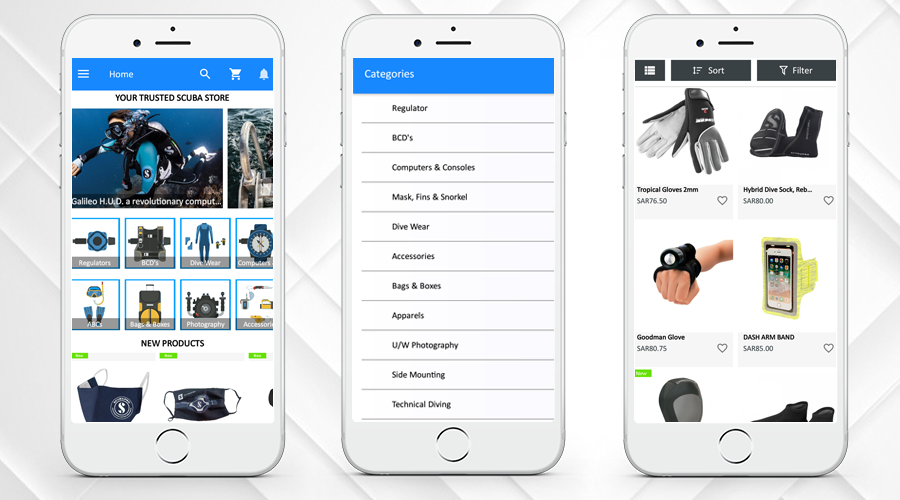
ScubaMaster Store created their mobile app with various functionalities that are required. With the aid of Mobile App Builder, they have customized the theme and added all the needful categories and menus in the App. Along with that, Prestashop Mobile App for Scubamaster store has an order return feature that is incorporated additionally using Return Manager PrestaShop Module. They have options like Gift Card for every occasion and an Affiliate and Referal Program to incentivize the users.

Let’s dive deep into the Prestashop Mobile App for Scubamaster store’s success story!

About PrestaShop Scubamaster store

The ScubaMaster Store is Bahrain’s and Saudi’s one-stop-shop for diving’ for the east coast. In the Kingdom of Bahrain and the Kingdom of Saudi Arabia, ScubaMaster is proud to be the number one diving center. They have the widest collection of scuba equipment under one roof from top brands that cater to specialist and advanced equipment for scuba divers’ basic needs.

You will find top-quality products, the best customer service, and a broad selection of PADI courses from beginners to expert levels. From beginners to advanced levels, they have male and female instructors who teach a wide variety of PADI courses, which makes the ScubaMaster the only PADI 5 Star Dive Center in Bahrain. To keep the game going and to deliver a superior user experience, they have asked KnowBand to develop a full-fledged mobile app.

-> Click on the link to visit the ScubaMaster Website

-> Download the ScubaMaster Mobile App  from Playstore

ScubaMaster is quite popular in Bahrain. It has 10K Instagram followers! Whoa!

-> Follow on Instagram @scubamasterco

Prestashop Mobile App for Scubamaster store-Top features

The Prestashop Mobile App for Scubamaster store is a versatile app with all the necessary features. Some of the top-notch functionalities are discussed in this section.

1.     Home Screen, Product Page, and Categories

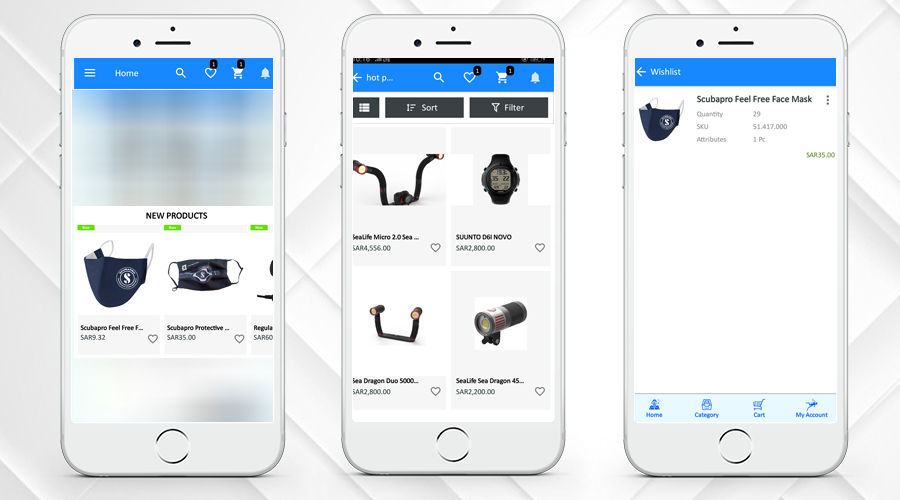
By using the eCommerce Web App Builder plugin, store owners get a personalized app. Scubamaster store has designed the home page of their app easily using different home page editor tools provided on the backend of the Prestashop Mobile App for the Scubamaster store. Several categories can be added to the store’s navigation.

The home page design can be customized and the admin can add the banners, products, or other blocks to the home screen to offer a better customer experience. The Android Mobile App Creator for PrestaShop has an easy-to-manage admin interface that helps the admin to create attractive home screens.

2.     Multiple languages and Currency Support

Developing a different mobile app for different languages is not possible for the store administrator. The user can select and check any desired language on the app in their preferred language. Take a look at the multi-lingual and multiple currency support features of the ScubaMaster Store Mobile App. The PrestaShop Mobile App Builder supports multi-lingual functionality and also supports RTL language.

3.     New Product, Bestsellers, Hot Products, Wishlist features

Clear navigation for new products, best sellers, and hot products keeps the customer engaged. The admin can select the products like New Arrivals, Best Sellers, Special Products, Products from a category, or Custom Products to showcase on the home screen that will help the customers to make their purchase decision.

Another interesting feature that you should have in your mobile app for eCommerce is the wishlist. The Mobile App Creator’s built-in wishlist feature enables customers to add the product to the wishlist and access it for later purchase.

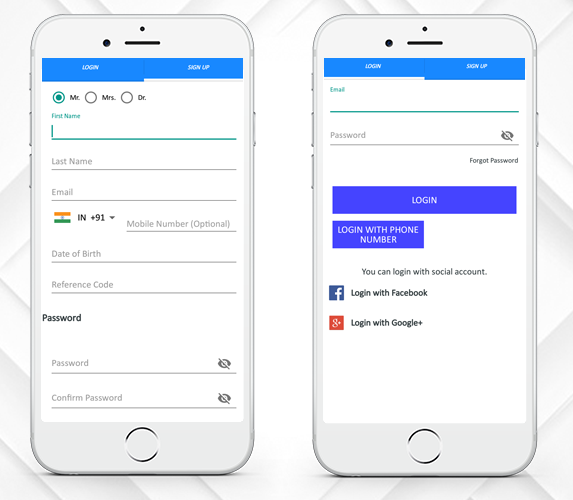
4.     Easy Sign-up and Login

Prestashop Mobile App for Scubamaster store provides multiple login options. Now users can login with Google, and Facebook, email & Phone Number. Users of the mobile app will simply log in to the app and conveniently access the items and categories. Users can easily share products on social media.

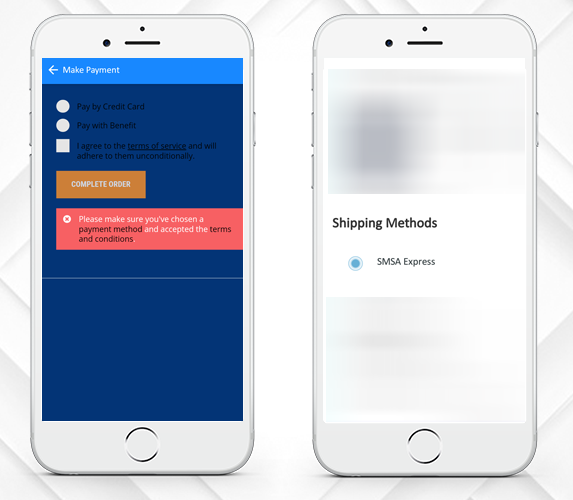
5.     Supports Various Payment and Shipping Methods

The ScubaMaster is offering various payments and shipping options that enhance the urge to buy more. On the website and mobile apps, the front-end mobile shopper will find the same kind of checkout experience.

ScubaMaster Store Mobile App has more PrestaShop modules for store management and to boost sales

6.     Affiliate and Referral Program

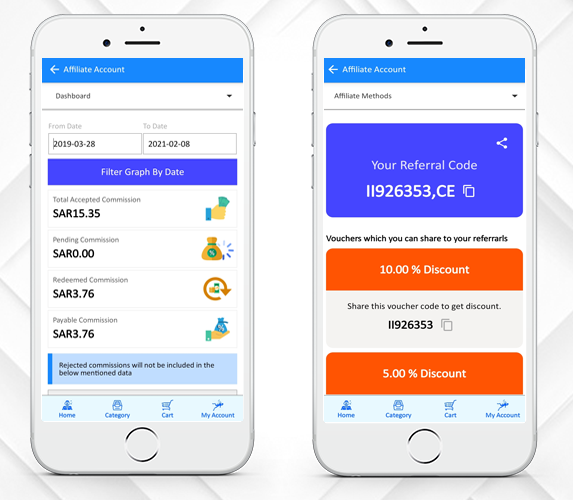
The ScubaMaster Store has incorporated the Affiliate and Referral Program. Affiliates promote the link on their website, blog, or YouTube channel of your store products, etc. The affiliates get a small commission on every sale through their affiliate link.

A visitor or customer shares your products with their people in the Referral marketing program. When people make purchases from your store, you provide them with some kind of referral reward. A customer can choose to share the link or voucher code for the product.

7.     Return Manager

Return Manager Module by KnowBand is another successful tool used by ScubaMaster to manage the order returns on their store. they can track the return from the backend.

They have also customized this module to work well with the mobile app. KnowBand added this custom feature at the client’s request. Customers can place return, order cancellation requests, or refund requests from ScubaMaster Store Mobile App.

8.     Gift Card Manager-Gift Card for your loved ones

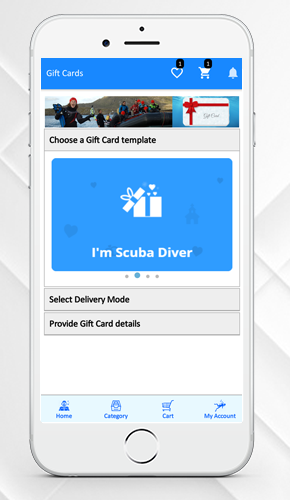
Digital Gift Cards, also referred to as electronic gift cards or e-gift cards, contain a branded gift code and are sent via email. All over the world, e-gift cards can be sent to anyone. The same has been added to the ScubaMaster Store Mobile App.

The module adds a gift card section and provides pre-existing customizable gift card templates. Use these templates for various occasions such as Halloween, Christmas, New Year, Mother’s Day, Birthday, Anniversary, etc. For any desired occasion, you can add new gift card templates so that you do not miss out on any important event.

Why build a mobile app for your business?

Nowadays, for almost every purpose you can think of, like selling products and rendering utilities, mobile app development services have been used to create iOS and Android mobile apps.

The mobile device consumer population currently stands at over 1 billion worldwide. The reasons why every business owner wants a mobile app for his or her company are below.

Mobile Applications improves customer experience; it increases customer engagement on your store and adds value to your customers. Along with that, mobile apps play a crucial role in building a brand’s identity.

The purpose of mobile apps is to reinforce and inform the client about your brand. The more he likes you, the more he listens to you and your sales pitches and ultimately commits himself to your brand.

PrestaShop Android & Ios Mobile App Builder Module

Without any coding, you can create an eCommerce mobile app for your PrestaShop store. The Mobile App Builder Module helps the shop administrator to launch the shopping app under its website/business name and value. To make the shopping app look attractive and enticing for front-end shoppers, there are intuitive color and font options.

The iOS and Android mobile app let you send infinite push notifications. You can customize the entire home screen and look and feel of the PrestaShop mobile app front-end. It is most useful for the store admin to design the home screen layout of the mobile app. Only select the required banners, sliders, categories, products, etc., and to change them, use drag & drop. It is possible to modify and customize locations, headings, names, etc. from the admin panel at any time. These adjustments on the app will be mirrored in real-time on the apps.

Please visit the link below for details:

PrestaShop Mobile App Builder

For any further details, feel free to contact us. Please drop an email to support@knowband.com.

More Success Stories to celebrate:

Success Story – Briko Bike Mobile App for E-Commerce

What if we told you that there is a simple way to increase your profits, improve your customer base, and give your brand a boost? It is all possible by developing a smartphone app for your online store. The eCommerce Mobile App is now taking over the industry, drawing many users and racking up huge profits. The number of users who choose to shop on mobile devices is increasingly rising and with that the growth of mobile e-commerce is surplus.

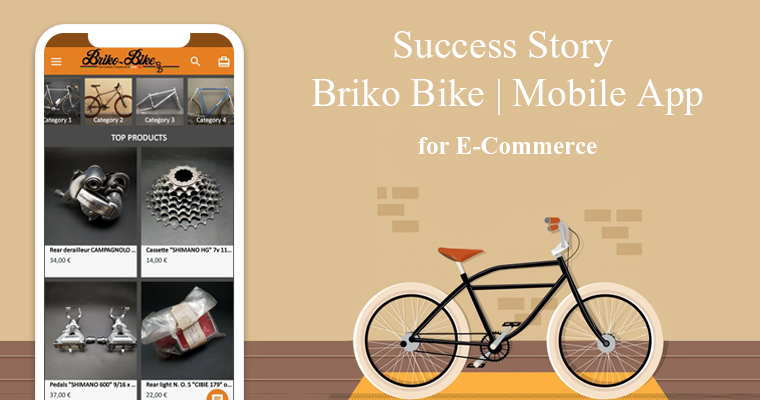
This article is to celebrate the success story of our client ‘Briko Bike’, an eCommerce store which was established in 2008 in France. They built a shopping native mobile app using KnowBand’s eCommerce Mobile App Creator plugin. The app builder plugin automatically creates a shopping app using the data from the website & its APK & IPA files are released on the Google Play Store & Apple App Store. Store owners only have to install the app plugin on their website.

About Briko Bike:

Briko Bike’s store owner is a great enthusiast and old bike collector and he converted the hobby into his profession. You can find a collection of spare parts of the old vintage bikes on the Briko Bike’s website and the Mobile App that was created using KnowBand’s Mobile App Plugin.

Services offered by Briko Bike:

At Briko Bike store, they provide accessories for road bikes, mountain bikes, BMX old school parts, and all the parts from a brake shoe to luggage storage bag. Briko Bike is one of the exclusive stores that sell such products online.

–> Click here to visit Briko Bike Website

–> Click here to Install Briko Bike Mobile Application from Play Store

–> Click here to Install Briko Bike Mobile Application from Apple Store

Top Features of Briko Bike Mobile App:

1. Home-Page, Menu & Category Page:

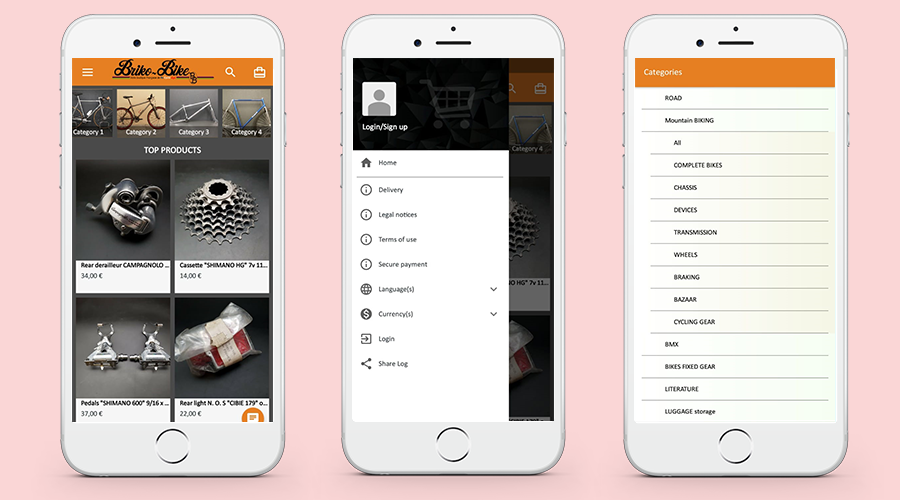
These app screens are from the Mobile App of ‘Briko Bike’. The Home Page, Navigation Menu, and the Category Tab are shown on the 3 screens above. Store owners get a customized app by using the eCommerce Web App Creator plugin. Using various home page editor tools given on the backend of the eCommerce Mobile App Creator plugin, they can design the home page of their app easily.

2. Categories and Sort Filters for Product Page:

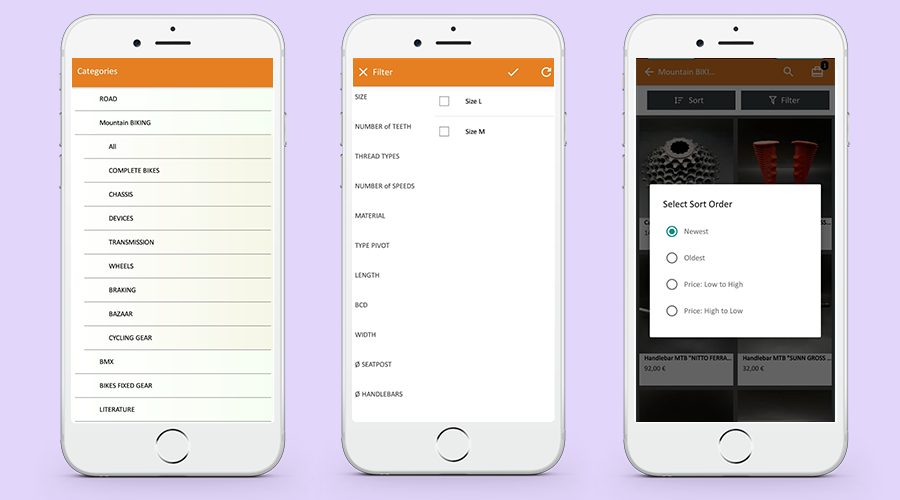
While making a purchase, sometimes it is difficult to find the right product. To simplify the search results, the mobile app is integrated with the category selection and sorting menu as shown in the pictures below. From the listed categories, customers can select desired ones and sort them accordingly.

3. Shopping Cart Design:

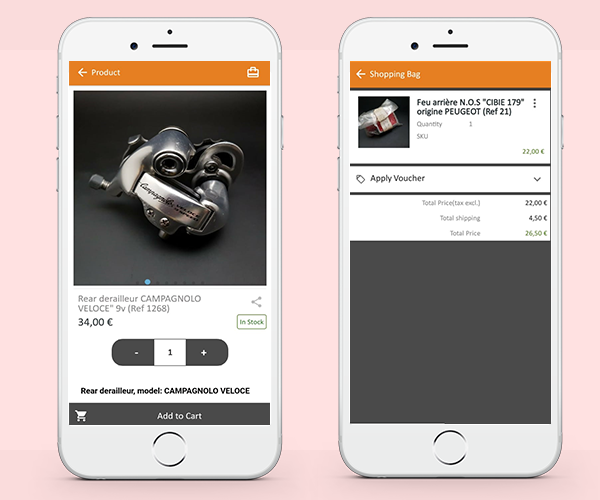
The shopping cart is used by e-commerce websites not only to promote a customer’s shopping experience but also to boost sales. Briko Bike Mobile Application has a custom shopping cart. Customers can add one or more products to the cart and purchase them immediately.

4. Clear CTAs:

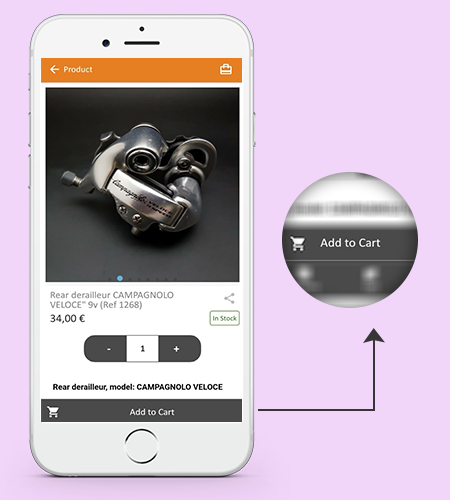
A lot of emphases is put on the homepage when developing an online shop, which is the first thing visitors see when they arrive. The product page of the Mobile App is highly responsive and its design is drool-worthy that can easily convert. It has a clear ‘CTA’ (Call to Action) button that allows the user to add the product to the cart.

5. Easy Sign-up, log in, and Guest Checkout:

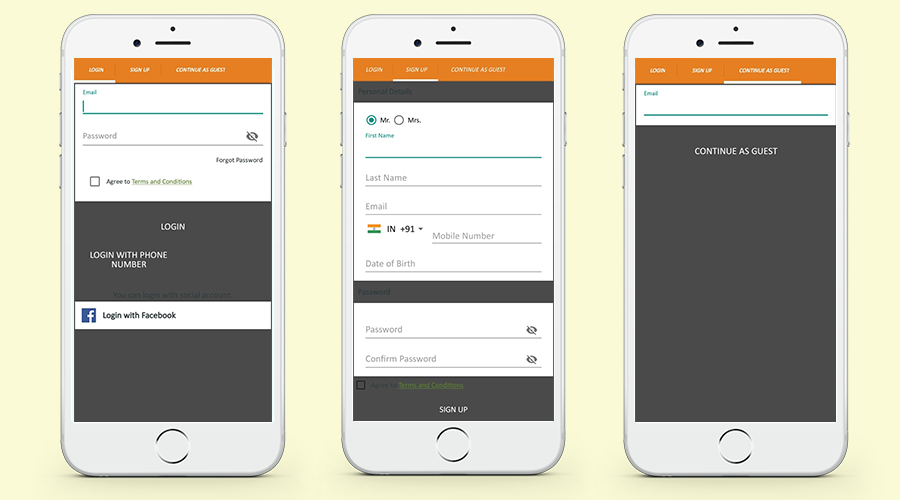
Briko Mobile Application created by KnowBand’s Mobile App Builder provides 3 checkout options for the user. Customers can register by filling up the registration form, log in via Facebook (Social Media Account), and can also opt for a Guest checkout by inserting the email ID. These features are provided by the Mobile App and can be customized as per the user requirements.

Message from Briko Bike:

After long researching and testing different ways to create an application for my Prestashop site, I finally decided on the BUILDER APP module which perfectly matched my expectations.

The main advantage of this module is that you buy it only once and you have no other costs, unlike other solutions which take a percentage on the sale of your products !!!!

This solution is very easy to implement without knowing how to code to obtain a nice and modern application, I still called on the Knowband technical service for some specific improvements which were carried out very quickly according to my request.

I would like to thank the entire Knowband team for their quality work and their reactivity during our exchanges of messages.

I would also like to point out that the Android and Apple applications are put online by the technical service on the stores, let you guide;)

About PrestaShop Android & iOS Mobile App:

KnowBand offers more than 60 PrestaShop modules that are also listed on the official PrestaShop addon store. Some top-notch PrestaShop modules developed by KnowBand are- One Page Checkout Module, Abandoned Cart Module, Return Manager Module, Marketplace Integration modules (eBay, Etsy, Google Shopping), Multi-vendor Marketplace & Android & iOS Mobile app.

The Android & iOS Mobile app module allows the PrestaShop store admin to create a mobile app for the existing PrestaShop store. The store manager needs to purchase the Mobile app module (One-time payment) and along with that he/she has to submit the prerequisite form. As per the shared details, the mobile app development team of the KnowBand will share the app for review and as per the final approval, the APK and IPA files will be shared. These APK and IPA files can be used to list the module on Google and Apple App store. All the data available on the website will get sync to the mobile App automatically in real-time.

For more details please visit the link below:

PrestaShop Mobile App Builder

Feel free to contact us for any further details. Please drop an email to support@knowband.com.

How easy is it to send Push Notifications on PrestaShop Mobile Apps?

Keeping the customers always interested & engaged is what every online eCommerce business wishes for. Having a native mobile app (Android/iOS) is gonna ease the online shopping for users. User engagement has always been a prime requirement and to fulfill the same mobile apps have come up with the Push Notification tool.

Push notifications are directly received by the app users on their mobile devices. The only condition is that the app must be installed on the device. Push Notifications have been noted to perform way better in terms of engaging app users and retaining them when compared to email reminders/ newsletters & campaigns.

Push Notifications with PrestaShop Mobile App Builder

KnowBand offers personalized push notifications feature in PrestaShop Mobile App Builder. The module aims to launch Android and iOS apps for running PrestaShop store without any coding knowledge. This write-up will introduce you to the backend settings to configure and send Push Notifications on the user’s devices.

While keeping your app in sync with the website, this app maker module provides a wide array of front-end & back-end features. The ones for Push Notifications are stated below. Follow this article to know how you can create, automate & send these notifications with utter ease.

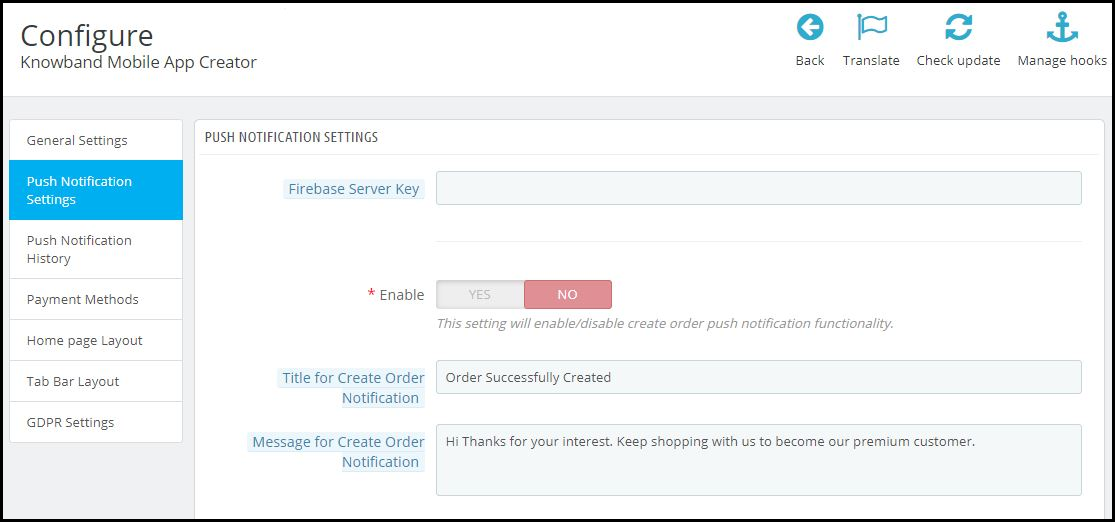
On the backend of your PrestaShop website, where you have the Mobile App Builder installed, hit ‘configure’. Now, from the backend of this module, navigate to the Push Notification Settings Tab from the side menu.

Push Notification Settings:

From the backend, you only need to enter your Firebase Server key (which will be provided along with apps), the rest is set for you to proceed. The PrestaShop Mobile App Builder by KnowBand provides an unlimited number of push notifications that e-merchants & admins can send to their app users.

Some of the automated Push Notifications are already provided by default for your convenience. These notifications can even be disabled/ enabled with just a toggle switch. Apart from those, you can create any other kind of Push Notification from this backend as well. Here is how you can configure them.

A) Successful Order Notification:

Using this notification setting, the store owner or the admin can set the title & message for successful orders. Each time an app user successfully places an order on the app, he/she will be greeted with this notification.

B) Order Status Push Notification:

This informs your customers about any status update on their active orders. Some examples of these are ‘order packed’, ‘order shipped’, ‘on the way’, ‘delivered’, ‘canceled’, etc.

Use the variable ‘{{STATUS}}’ anywhere in the message body to form your order status push notification.

C) Abandoned Cart Push Notification:

Automate the abandoned cart notification by setting the timer provided in this push notification setting. Every time an app user leaves his/her cart abandoned, then automatically this push notification is sent to him/her after the specified time.

Custom Push Notifications:

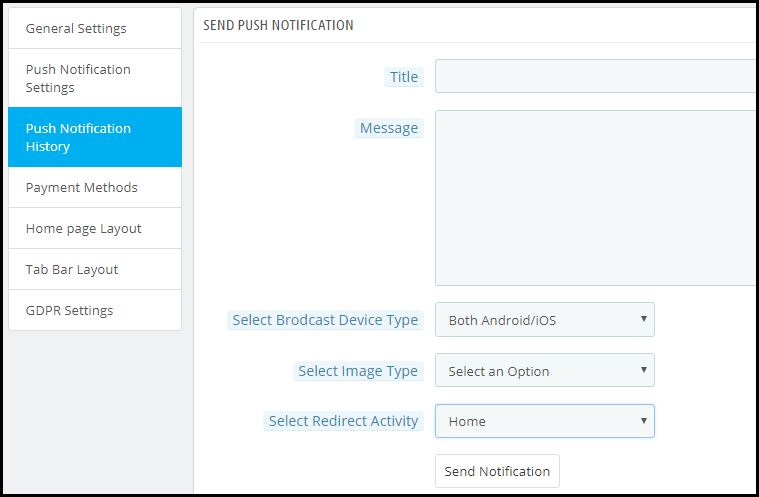
Apart from the above three pre-defined notifications elaborated above, admins can create any kind of self-designed Push Notification from this setting. From the side menu of this app maker module, select ‘Push Notification History’. Then using the ‘Send Notifications’ button on the top right of the page, create a new notification according to your needs.

You can even choose to selectively send these notifications to any of android/ iOS devices. Use attractive images to get more customer engagement using these notifications. Choose the redirecting activity to be any of the categories/ subcategories/ products or even the homepage of the app. These notifications get sent to all the app users once you hit send.

Push Notification History:


Keep a record of your previously sent notifications & their configurations by accessing the ‘Push Notification History’. You can even filter out the ones you want to view from the advanced search bar as shown in the screenshot above.

Conclusion:

Mobile push notifications are a major feature that makes an app stand out from the website. When used properly, these can lead to an exponential increase in customer retention & engagement rate. They help store owners to effortlessly boost their sales.

To make it even more convenient & effortless for the app admins, this PrestaShop Mobile App Maker module, by KnowBand, has most of the settings automated. Hence, the store owners don’t need to make even the slightest effort to yield great results.

For any further queries related to this module, reach out to the experts at KnowBand by emailing us at support@knowband.com. We would be delighted to assist you.

Also Read:

How easy is it to design Home-Page of PrestaShop Mobile App?