Jakie są zalety i wady korzystania z platformy OpenCart?

OpenCart to jedna z platform eCommerce, która zyskała ogromną popularność i uwagę, co wyjaśnia jej świetlaną przyszłość w nadchodzących latach. Chociaż sklepy eCommerce mają wiele opcji do wyboru, ale dokonanie właściwego wyboru sprawi, że Twoja firma online we właściwym kierunku. Możesz nie uznać go za ważną część scenariusza biznesowego eCommerce, ale zła decyzja dotycząca platformy eCommerce może spowodować poważną niesprawiedliwość w Twoim sklepie pod względem zaangażowania klienta, współczynników konwersji i sprzedaży produktów.

Jeśli nie jesteś w stanie dojść do właściwego wniosku dotyczącego wyboru platformy OpenCart dla witryn eCommerce, musisz przeanalizować zalety i wady tej szeroko stosowanej platformy eCommerce. Oto niektóre zalety i wady tej platformy OpenCart, wyjaśnione w następujący sposób:

Zalety OpenCart

Platforma jest otwarta i darmowa

Platforma OpenCart jest platformą typu open source, co oznacza, że ​​można ją łatwo modyfikować i dostosowywać zgodnie z wymaganiami biznesowymi. Właściciele sklepów mogą korzystać ze wspaniałych funkcji i funkcjonalności tej platformy eCommerce, nie wydając nawet jednego grosza, ponieważ jest on dostępny bezpłatnie.

Składa się z ogromnej, aktywnej społeczności programistów OpenCart

Problem na platformie eCommerce jest prostą rutyną, ale często staje się wyzwaniem, jeśli problem ten pozostaje nierozwiązany. Dzięki ogromnej, doświadczonej społeczności programistów OpenCart i programistów, którzy mogą zapewnić wsparcie techniczne dla użytkowników OpenCart przez całą dobę.

Brak technicznych

Sklep

Platforma ma ogromną bibliotekę tematów i modułów

Ta platforma eCommerce ma szeroki zakres tematów i modułów OpenCart, które mogą poprawić wydajność każdego sklepu internetowego. Oprócz wbudowanych modułów, użytkownicy mogą również korzystać z niesamowitej strony trzeciej Moduły OpenCart ze sklepu Knowband, który jest pełen wielu funkcji i funkcjonalności.

Zarządzanie wieloma sklepami z jednego pulpitu nawigacyjnego

Kompatybilność z wieloma sklepami to jedna z największych zalet OpenCart. Posiadanie i zarządzanie wieloma sklepami może być bardzo skomplikowane i czasochłonne. Jednak zdarzają się sytuacje, w których posiadanie więcej niż jednego sklepu staje się nieuniknione. OpenCart pozwala budować wiele sklepów eCommerce i zarządzać nimi z jednego interfejsu. Możesz oceniać bieżące zamówienia, śledzić klientów, sprzedaż itp. Wszystko to dzieje się w tej samej sekcji witryny.

Znakomity dla początkujących, małych i średnich firm eCommerce

Platforma OpenCart to bogaty w funkcje pakiet eCommerce, który oferuje swoim klientom eCommerce proste usługi zarządzania sklepem. Jeśli jesteś początkującym eCommerce, posiadasz małe i średnie sklepy eCommerce, ta platforma OpenCart jest zdecydowanie właściwym wyborem dla Twojego biznesu online.

Wymogi korzystania z OpenCart

Dostosowywanie i zmiany w OpenCart są trudne

W rzeczywistości trudno jest wprowadzić dowolne zmiany na platformie OpenCart ze względu na brak skutecznego systemu Event. W rzeczywistości wydarzenia zostały właśnie włączone do Wersja OpenCart 2.0 i są tylko we wczesnej fazie rozwoju. vQmod to kolejna alternatywa do przeprowadzenia wymaganych zmian na platformie OpenCart, ale często powoduje problem w plikach podstawowych. To ważne zadanie wymaga pomocy skutecznego eksperta OpenCart.

Nie jest to idealne rozwiązanie dla klientów korzystających z wielu języków

Platforma OpenCart nie jest przeznaczona do obsługi wielu klientów wielojęzycznych ze względu na problem powodowany interpretacjami. Dzięki tej funkcji niezwykle trudno jest dotrzeć do klientów posługujących się wieloma językami. Jeśli masz sklep eCommerce, który ma klientów na całym świecie w różnych językach, musisz znaleźć inną alternatywę poza tą platformą OpenCart.

Nieoptymalizowany pod kątem SEO

OpenCart ma wiele mil, jeśli chodzi o SEO. Jest to jeden z najważniejszych aspektów sukcesu sklepu eCommerce, co może mieć negatywny wpływ na dłuższą metę. Jak na ekspertów, nie

Ze względu na wszystkie omówione wyżej zalety nie będzie błędem stwierdzenie, że OpenCart pozostaje jednym z najpopularniejszych rozwiązań eCommerce.

Rozszerzenia OpenCart, które mogą zwiększyć funkcjonalność Twojego Sklepu

Rzuć okiem na niektóre z tych ręcznie wybranych wtyczek, które poprawią interfejs użytkownika i UX twojej witryny OpenCart.

OpenCart Spin and Win
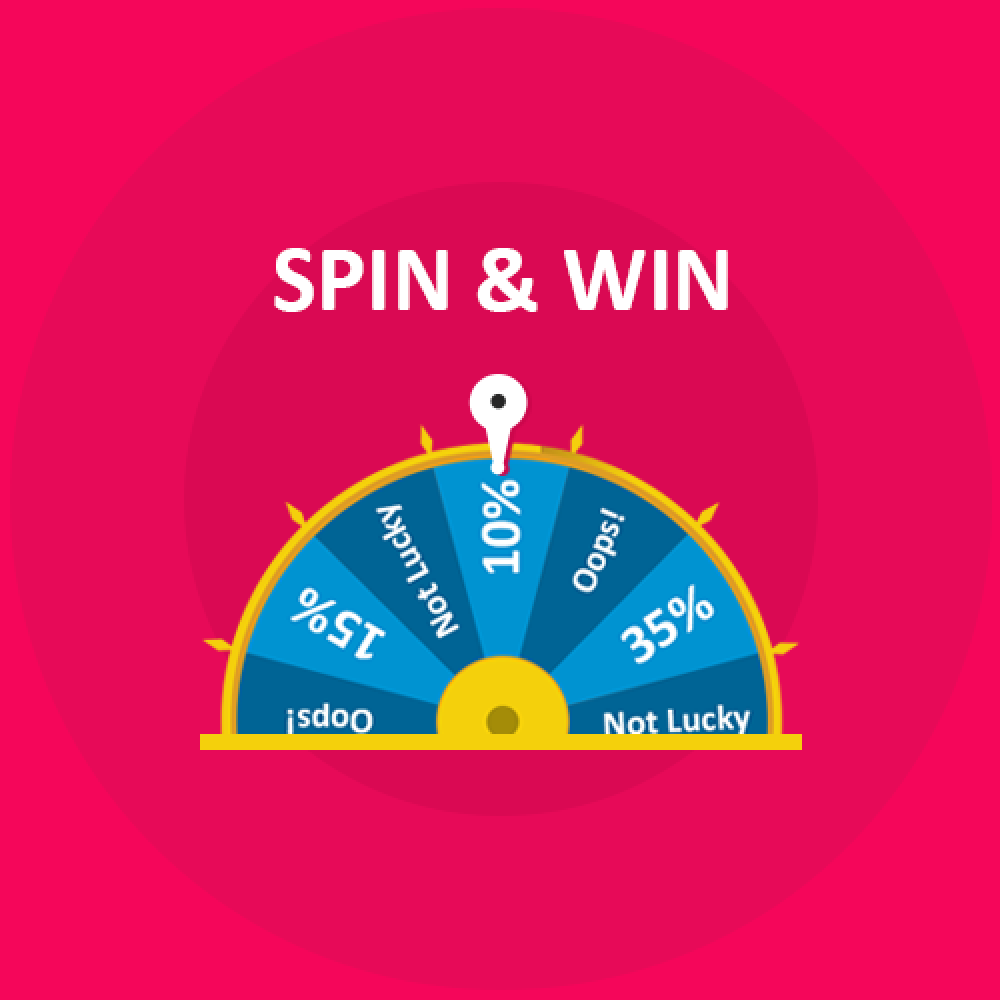
Dzięki tak wielu opcjom internetowym możesz sprawić, że interfejs użytkownika Twojej witryny będzie wystarczająco atrakcyjny, aby utrzymać klientów w tajemnicy. Rozszerzenie OpenCart i Win?incorporates a gamified spin the wheel interface in the front-end of the site. This roulette-type popup can be placed anywhere on the site and can even be used as an exit popup. The alluring approach is one of the ways to curb the exit-intent of the customers and compel them to spend some more time on your site. So, if you are looking to earn some credits for the look and feel of your site straight-away, this is the smartest solution for you.

Social Loginizer OpenCart


Począwszy od momentu, w którym klienci wchodzą na stronę do momentu, w którym się wymeldują, zakupy muszą być bezbłędne. Społeczności OpenCart Wtyczka do logowania to jedna z takich opcji, które mogą zawierać opcje logowania społecznościowego w Twojej witrynie. Klienci online najczęściej nie są fanami długich procesów rejestracji. Opcje szybkiego logowania sprawiają, że rejestracja to kwestia chwili.

OpenCart Search Więcej rozszerzenia


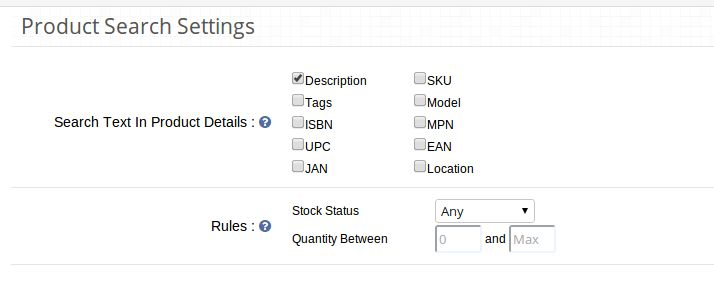
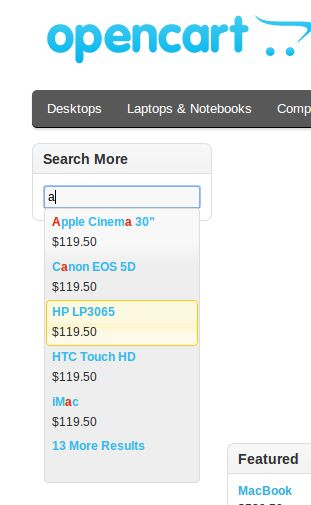
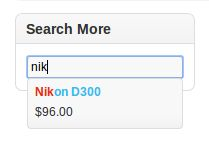
Przejście na strony kategorii, co czyni nawigację witryny łatwiejszą dla odwiedzających sklep, jest kolejnym ważnym czynnikiem. OpenCart Search More plugin ułatwia nawigację. Klienci mogą wyświetlać sugerowane produkty zaraz po wpisaniu pierwszych kilku liter w polu wyszukiwania. Dzięki łatwej nawigacji możesz bez wysiłku zwiększyć zaangażowanie użytkowników i czas sesji.

Wideo produktu OpenCart


Strony produktów to miejsca, w których oferowany jest rzeczywisty podział sprzedaży. Dlatego powinien on być łatwo zaprojektowany, aby oferować klientowi jak najlepsze informacje. Wtyczka wideo produktu OpenCart umożliwia administratorowi wyświetlanie wideo produktu i innych powiązanych filmów na stronie internetowej bez wprowadzania jakichkolwiek zmian w kodzie w witrynie. Zapewnij klientom rzeczywisty styl produktu i zwiększ szanse na konwersję.

OpenCart One Click Checkout (Kup teraz)


OpenCart One Click Checkout (Kup teraz) wtyczka dodaje przycisk Kup teraz na stronie produktów. Klienci mogą płacić za pomocą jednego produktu bez usuwania produktów zapisanych w koszyku, klikając ten przycisk. Bezproblemowe kasowanie powoduje natychmiastową decyzję zakupową klientów.

Zachęty do przeglądu OpenCart


Opinie i ocena stron produktów to kolejne kluczowe czynniki motywujące klientów do złożenia zamówienia. Z pomocą OpenCart Review Incentive extensionadministrator sklepu może zaoferować zachęty klientom w zamian za ich recenzje. Jest to jeden ze sposobów na zwiększenie liczby recenzji na stronie produktu. Zwiększ ocenę produktów i zmotywuj coraz więcej odwiedzających stronę do realizacji transakcji.

Rozszerzenie na stronę OpenCart One page


Skomplikowany proces kasowania może podnieść liczbę porzuconych koszyków Twojej witryny. Uprość proces zakupu swojej witryny za pomocą Wtyczka do kasy OpenCart One page. Kasa z pojedynczą stroną wprowadzona przez rozszerzenie oferuje również opcje logowania społecznościowego i logowania gościa. Jest to więc jeden ze sposobów optymalizacji ścieżki konwersji w witrynie.

Alert cenowy OpenCart


Droższy produkt nie powinien oznaczać utraconego klienta. Zmotywuj odwiedzających sklep do powrotu na stronę, którzy porzucili koszyk ze względu na koszt produktu Rozszerzenie Alertów cenowych OpenCart. Rozszerzenie OpenCart pozwala odwiedzającym sklep zapisać się do alertu, gdy nastąpi zmiana produktu. Administrator sklepu może wysyłać przypomnienia dotyczące zmiany cen produktu. Dzięki zautomatyzowanemu podejściu możesz zmotywować klientów do powrotu i złożenia zamówienia na produkt, który zostawili.

OpenCart Mobile App Builder


W dzisiejszych czasach klienci wolą korzystać z aplikacji mobilnych na stronach sklepów. Najwyższy czas, aby właściciele sklepów zrobili krok naprzód i dotrzymali kroku trendom i postępowi technologicznemu. OpenCart Android / iOS Mobile App Builder może pomóc w stworzeniu w pełni funkcjonalnego sklepu mobilnego za pomocą kilku kliknięć. Właściciele sklepów OpenCart mogą teraz korzystać z urządzeń przenośnych i z łatwością korzystać z większej bazy odbiorców.

Wtyczka OpenCart Multi marketplace marketplace

Jeśli posiadasz już sklep eCommerce oparty na OpenCart, możesz mieć taki rynek, jak eBay, Etsy i inne. Nie wymaga to żadnych zmian kodu. Rozszerzenie rynku OpenCart może włączyć funkcję wielu sprzedawców w Twojej witrynie bez wprowadzania zmian w kodzie podstawowym witryny. Wraz z aktualizacją witryny na rynek, moduł marketplace z wieloma sprzedawcami OpenCart sprawia, że ​​zarządzanie jest łatwe. Sprzedawcy zewnętrzni i ich produkty, a także sprzedaż mogą być śledzone i zarządzane z jednego interfejsu. Nie tylko to, nawet sprzedawcy mogą łatwo zarządzać swoim sklepem z samego pulpitu. Zarządzanie profilem, produktami i sprzedażami odbywa się z jednego interfejsu. W zamian za wynajęty obszar administrator sklepu może pobierać prowizję od sprzedających. Ta prowizja jest ustalana za pomocą kliknięcia przycisku. Stała lub procentowa kwota jest automatycznie potrącana z przychodów dostawcy. Ważne jest, aby mieć jasny obraz wszystkich możliwości i ograniczeń platformy eCommerce, aby nie musieć później żałować swojego wyboru. Nie próbuj dziko odgadnąć, wybierając platformę eCommerce do swojego sklepu internetowego, ale przeanalizuj tę platformę eCommerce pod kątem właściwej decyzji. Zrozum aktualny scenariusz biznesowy eCommerce i sięgnij po platformę OpenCart bez namysłu.

To również Cię zainteresuje:


Quali sono i pregi e i demeriti dell'utilizzo di una piattaforma OpenCart?

OpenCart è una delle piattaforme di eCommerce che ha riscosso un'immensa popolarità e attenzione che spiega il suo futuro luminoso nei prossimi anni. Anche se i negozi di e-commerce hanno numerose opzioni tra cui scegliere, ma fare la scelta giusta imposterà il tuo business online nella giusta direzione. Potresti non considerarlo come una parte importante in uno scenario di eCommerce, ma una decisione sbagliata riguardo alla piattaforma di eCommerce può causare gravi ingiustizie al tuo negozio in termini di coinvolgimento del cliente, tassi di conversione e vendite di prodotti.

Se non si è in grado di giungere a una conclusione adeguata in merito alla selezione della piattaforma OpenCart per i siti di e-commerce, è necessario analizzare i pro e i contro di questa piattaforma eCommerce ampiamente utilizzata. Ecco alcuni dei meriti e dei demeriti di questa piattaforma OpenCart che viene spiegata come segue:

Meriti di OpenCart

La piattaforma è open source e gratuita

La piattaforma OpenCart è una piattaforma open source che significa che può essere facilmente modificata e personalizzata secondo i requisiti aziendali. I proprietari del negozio possono usufruire delle meravigliose funzionalità e funzionalità di questa piattaforma eCommerce senza nemmeno spendere un solo centesimo in quanto è disponibile gratuitamente.

Consiste in una grande comunità attiva di sviluppatori OpenCart

Avere un problema in una piattaforma di e-commerce è una routine semplice ma spesso diventa difficile se quel problema rimane irrisolto. Grazie all'enorme community di sviluppatori e programmatori OpenCart in grado di fornire supporto tecnico agli utenti OpenCart 24 ore su 24.

No tecnico

Memorizzare

La piattaforma ha una vasta libreria di temi e moduli

Questa piattaforma eCommerce ha una vasta gamma di temi e moduli OpenCart che hanno il potenziale per migliorare le prestazioni di qualsiasi negozio online. Oltre ai moduli integrati, gli utenti possono anche usufruire della straordinaria terza parte Moduli OpenCart dal negozio Knowband che è ricco di numerose funzionalità e funzionalità.

Gestione di più negozi da un'unica dashboard

La compatibilità multi-store è uno dei maggiori vantaggi di OpenCart. Avere e gestire più negozi può essere molto complicato e richiede molto tempo. Tuttavia, ci sono momenti in cui avere più di un magazzino diventa inevitabile. OpenCart ti consente di creare più store eCommerce e gestirli da un'unica interfaccia. Puoi valutare i tuoi ordini correnti, monitorare i tuoi clienti, le vendite ecc. Tutto ciò avviene dalla stessa sezione del sito web.

Eccellente per i principianti, le piccole e medie imprese di eCommerce

La piattaforma OpenCart è un pacchetto di eCommerce ricco di funzionalità che offre facili servizi di gestione dei negozi ai suoi clienti eCommerce. Se sei un principiante eCommerce, ha negozi eCommerce di piccole e medie dimensioni, questa piattaforma OpenCart è sicuramente la scelta giusta per il tuo business online.

Demeriti dell'utilizzo di OpenCart

Fare la personalizzazione e le modifiche in OpenCart è difficile

In realtà è molto difficile apportare le modifiche desiderate in una piattaforma OpenCart a causa dell'assenza di un sistema di eventi efficace. In effetti, gli eventi sono stati appena incorporati nel Versione OpenCart 2.0 e sono solo nella fase iniziale di sviluppo. vQmod è un'altra alternativa per eseguire le modifiche richieste in una piattaforma OpenCart ma spesso crea un problema nei file core. Questo compito critico richiede solo l'assistenza di un esperto di OpenCart.

Non è l'ideale per supportare i clienti multilingue

La piattaforma OpenCart non è pensata per la ristorazione di clienti multilingue a causa del problema causato dalle interpretazioni. Con questa funzione, diventa estremamente difficile rivolgersi a clienti multilingue. Se hai un negozio di e-commerce che ha clienti in tutto il mondo con lingue diverse, devi scoprire qualsiasi altra alternativa oltre a questa piattaforma OpenCart.

Non ottimizzato per SEO

OpenCart ha miglia per andare quando si tratta di SEO. Questo è uno degli aspetti più importanti per il successo del negozio eCommerce può portare ad un impatto negativo a lungo termine. Come per gli esperti, lì

A causa di tutti i meriti discussi sopra, non sarà sbagliato affermare che OpenCart rimane una delle soluzioni di e-commerce più popolari.

Estensioni OpenCart in grado di potenziare le funzionalità del tuo negozio

Dai uno sguardo ad alcuni di questi plugin selezionati che miglioreranno l'interfaccia utente e la UX del tuo sito OpenCart.

OpenCart Spin e Win

Con così tante opzioni online da scegliere, rendi l'interfaccia utente del tuo sito abbastanza attraente da mantenere i tuoi clienti coinvolti. Estensione OpenCart Spin and Win?incorporates a gamified spin the wheel interface in the front-end of the site. This roulette-type popup can be placed anywhere on the site and can even be used as an exit popup. The alluring approach is one of the ways to curb the exit-intent of the customers and compel them to spend some more time on your site. So, if you are looking to earn some credits for the look and feel of your site straight-away, this is the smartest solution for you.

OpenCart Social Loginizer


A partire dal momento in cui i clienti accedono al sito al momento del check out, l'esperienza di acquisto deve essere impeccabile. OpenCart social Il plugin loginizer è una di queste opzioni che può incorporare le opzioni di accesso social sul tuo sito. Gli acquirenti online non sono per lo più un fan di lunghi processi di registrazione. Le opzioni di accesso rapido rendono l'iscrizione una questione di momento.

OpenCart Cerca più estensione


Passare alle pagine delle categorie, semplificando la navigazione del sito per i visitatori del negozio è un altro fattore importante. OpenCart Cerca altro plug-in facilita la navigazione I clienti possono visualizzare i prodotti suggeriti subito dopo aver digitato prima diverse lettere nella casella di ricerca. Con la navigazione facile, puoi aumentare senza sforzo il coinvolgimento dell'utente e il tempo di sessione.

OpenCart Product Video


Le pagine dei prodotti sono dove viene offerto l'attuale pitch di vendita. Quindi, dovrebbe essere prontamente progettato per offrire le migliori informazioni possibili al cliente. Plug-in video prodotto OpenCart consente all'amministratore di visualizzare il video del prodotto e altri video correlati nella pagina Web senza apportare modifiche al codice nel sito. Fornire la sensazione di vita reale del prodotto ai clienti e aumentare le possibilità di conversioni.

OpenCart One Click Checkout (Acquista ora)


OpenCart One Click Checkout (Acquista ora) plugin aggiunge un pulsante Acquista ora nella pagina dei prodotti. Cliccando su questo pulsante, i clienti possono effettuare il checkout con un singolo prodotto senza rimuovere i prodotti salvati nel carrello. Il check-out senza problemi fa scattare la decisione immediata di acquisto dei clienti.

OpenCart Review Incentive


Le recensioni e la valutazione delle pagine dei prodotti sono un altro fattore chiave per motivare i clienti a effettuare l'ordine. Con l'aiuto di Estensione di Incentive di OpenCart Review, l'amministratore del negozio può offrire incentivi ai clienti in cambio delle loro recensioni. Questo è uno dei modi per aumentare il numero di recensioni sulla pagina del prodotto. Migliora la valutazione dei prodotti e motiva sempre più visitatori alla pagina di pagamento.

OpenCart Estensione per il controllo di una pagina


Un processo di checkout complicato può aumentare il tasso di abbandono del tuo sito. Semplifica la procedura di checkout del tuo sito con OpenCart Plugin per il controllo di una pagina. Il checkout di una singola pagina incorporato dall'estensione offre anche opzioni di accesso social e accesso ospite. Pertanto, questo è uno dei modi per ottimizzare la canalizzazione di conversione del tuo sito.

OpenCart Price Alert


Un prodotto costoso non dovrebbe significare un cliente perso. Motivare i visitatori del negozio a tornare al sito che ha abbandonato il carrello a causa del costo del prodotto Estensione OpenCart Price Alert. L'estensione OpenCart consente ai visitatori del negozio di iscriversi per un avviso ogni volta che si verifica un cambiamento nel prodotto. L'amministratore del negozio può inviare promemoria relativi alla modifica del prezzo del prodotto. Con l'approccio automatizzato, puoi motivare i clienti a tornare indietro e inserire l'ordine del prodotto che hanno lasciato.

OpenCart Mobile App Builder


In questi giorni i clienti preferiscono utilizzare le app mobili sui siti di shopping. È giunto il momento che i proprietari dei negozi facciano un passo avanti e siano al passo con le tendenze e i progressi tecnologici. Estensioni OpenCart per Android / iOS Mobile App Builder può aiutarti a creare un negozio mobile completamente funzionale con pochi clic del mouse. I proprietari dei negozi OpenCart ora possono spostarsi su dispositivi mobili e attirare una base di pubblico più ampia con estrema facilità.

OpenCart Multi marketplace plug-in per venditori

Se possiedi già un negozio eCommerce basato su OpenCart, puoi persino avere un marketplace come eBay, Etsy e altri. Non sono richieste modifiche al codice per questo. Estensione del mercato OpenCart può abilitare la funzionalità multi-venditore nel tuo sito senza apportare modifiche al codice di base del sito. Insieme all'aggiornamento del sito in un mercato, il modulo di mercato multiprodotto OpenCart rende persino la gestione semplice. I venditori di terze parti, i loro prodotti e le vendite possono essere monitorati e gestiti da un'unica interfaccia. Non solo, anche i venditori ottengono un'opzione semplice per gestire il loro negozio dalla dashboard stessa. Il profilo, il prodotto e la gestione delle vendite sono fatti da un'unica interfaccia. In cambio dello spazio affittato, l'amministratore del negozio può addebitare commissioni dai venditori. Questa commissione è fissata con un clic del tasto. L'importo fisso o percentuale viene automaticamente detratto dalle entrate dei venditori. È importante avere una visione chiara di tutte le possibilità e le limitazioni di una piattaforma di e-commerce in modo da non dover più pentirsi della scelta in seguito. Non fare ipotesi selvagge mentre selezioni una piattaforma di e-commerce per il tuo negozio online, ma analizza questa piattaforma di e-commerce per la decisione giusta. Comprendi l'attuale scenario di eCommerce e vai su questa piattaforma OpenCart senza pensarci due volte.

Questo ti interesserebbe anche:


Was sind die Vor- und Nachteile einer OpenCart-Plattform?

OpenCart ist eine der eCommerce-Plattformen, die immense Popularität und Aufmerksamkeit gewonnen hat, die ihre glänzende Zukunft in den kommenden Jahren erklärt. Obwohl E-Commerce-Shops zahlreiche Optionen zur Auswahl haben, wird die richtige Wahl Ihr Online-Geschäft in die richtige Richtung lenken. Sie betrachten es möglicherweise nicht als wichtigen Bestandteil eines E-Commerce-Geschäftsszenarios, aber eine falsche Entscheidung in Bezug auf die E-Commerce-Plattform kann Ihrem Geschäft in Bezug auf Kundenbindung, Conversion-Raten und Produktverkäufe schwere Ungerechtigkeiten zufügen.

Wenn Sie bei der Auswahl der OpenCart-Plattform für eCommerce-Websites nicht zu einem richtigen Ergebnis kommen, müssen Sie die Vor- und Nachteile dieser weit verbreiteten eCommerce-Plattform analysieren. Hier sind einige der Vorzüge und Nachteile dieser OpenCart-Plattform, die wie folgt erklärt wird:

Verdienste von OpenCart

Die Plattform ist Open Source und kostenlos

Die OpenCart-Plattform ist eine Open-Source-Plattform, was bedeutet, dass sie leicht an Ihre Geschäftsanforderungen angepasst und angepasst werden kann. Die Ladenbesitzer können die wunderbaren Eigenschaften und Funktionalitäten dieser eCommerce-Plattform nutzen, ohne sogar einen einzigen Pfennig ausgeben zu müssen, da dieser kostenlos zur Verfügung steht.

Es besteht aus einer riesigen aktiven Community von OpenCart-Entwicklern

Ein Problem in einer E-Commerce-Plattform zu haben ist eine einfache Routine, aber es wird oft schwierig, wenn dieses Problem ungelöst bleibt. Dank der großen, erfahrenen Gemeinschaft von OpenCart-Entwicklern und -Programmierern, die OpenCart-Benutzern rund um die Uhr technischen Support bieten können.

Keine technischen

Geschäft

Die Plattform verfügt über eine umfangreiche Bibliothek mit Themen und Modulen

Diese eCommerce-Plattform bietet eine große Auswahl an Themen und OpenCart-Modulen, die das Potenzial haben, die Leistung jedes Online-Shops zu verbessern. Abgesehen von den eingebauten Modulen können Benutzer auch die erstaunliche dritte Partei in Anspruch nehmen OpenCart-Module aus dem Knowband-Shop, der zahlreiche Funktionen und Funktionalitäten bietet.

Multi-Store-Management von einem einzigen Dashboard aus

Die Multi-Store-Kompatibilität ist einer der größten Vorteile von OpenCart. Das Speichern und Verwalten mehrerer Stores kann sehr kompliziert und zeitaufwändig sein. Es gibt jedoch Zeiten, in denen es mehr als ein Geschäft hat, unvermeidlich zu sein. Mit OpenCart können Sie mehrere eCommerce-Stores erstellen und über eine einzige Benutzeroberfläche verwalten. Sie können Ihre aktuellen Bestellungen auswerten, Ihre Kunden, Ihren Umsatz usw. nachverfolgen. All dies geschieht im selben Bereich der Website.

Hervorragend für Anfänger, kleine und mittlere E-Commerce-Unternehmen

Die OpenCart-Plattform ist ein funktionsreiches eCommerce-Paket, das seinen E-Commerce-Kunden einfache Shop-Management-Services bietet. Wenn Sie ein E-Commerce-Anfänger sind, kleine und mittlere E-Commerce-Shops haben, ist diese OpenCart-Plattform definitiv die richtige Wahl für Ihr Online-Geschäft.

Nachteile der Verwendung von OpenCart

Anpassungen und Änderungen in OpenCart sind schwierig

Es ist in der Tat sehr schwierig, Änderungen an einer OpenCart-Plattform vorzunehmen, da kein effektives Event-System vorhanden ist. Tatsächlich wurden die Ereignisse gerade in die OpenCart 2.0-Version und sind nur in der frühen Entwicklungsphase. vQmod ist eine weitere Alternative, um die erforderlichen Änderungen in einer OpenCart-Plattform durchzuführen, verursacht jedoch häufig ein Problem in den Kerndateien. Diese kritische Aufgabe benötigt nur die Unterstützung eines effektiven OpenCart-Experten.

Es ist nicht ideal für die Unterstützung von mehrsprachigen Kunden

Die OpenCart-Plattform ist aufgrund des Problems, das in den Interpretationen verursacht wird, nicht dazu gedacht, mehrsprachige Kunden zu bedienen. Mit dieser Funktion wird es extrem schwierig, mehrsprachige Kunden anzusprechen. Wenn Sie einen eCommerce-Shop haben, der Kunden auf der ganzen Welt mit verschiedenen Sprachen hat, müssen Sie außer dieser OpenCart-Plattform jede andere Alternative herausfinden.

Nicht für SEO optimiert

OpenCart hat noch einiges zu tun, wenn es um SEO geht. Dies ist einer der wichtigsten Aspekte für den Erfolg des eCommerce-Stores und kann auf lange Sicht negative Auswirkungen haben. Wie von Experten dort

Aufgrund all der oben diskutierten Vorzüge ist es nicht falsch zu behaupten, dass OpenCart weiterhin eine der beliebtesten E-Commerce-Lösungen ist.

OpenCart-Erweiterungen, die die Funktionalität Ihres Shops verbessern können

Schauen Sie sich einige dieser handverlesenen Plugins an, die die Benutzeroberfläche und die UX Ihrer OpenCart-Site verbessern.

OpenCart Spin und Win

Mit so vielen Online-Optionen, die Sie auswählen können, machen Sie die Benutzeroberfläche Ihrer Website attraktiv genug, um Ihre Kunden zu begeistern. OpenCart Spin und Win Erweiterung?incorporates a gamified spin the wheel interface in the front-end of the site. This roulette-type popup can be placed anywhere on the site and can even be used as an exit popup. The alluring approach is one of the ways to curb the exit-intent of the customers and compel them to spend some more time on your site. So, if you are looking to earn some credits for the look and feel of your site straight-away, this is the smartest solution for you.

OpenCart Social Login


Von der Zeit, wenn die Kunden die Website betreten, bis zu dem Zeitpunkt, zu dem sie auschecken, muss das Einkaufserlebnis einwandfrei sein. OpenCart sozial logisizer plugin ist eine solche Option, die die sozialen Login-Optionen auf Ihrer Website integrieren kann. Die Online-Shopper sind meist kein Fan langwieriger Registrierungsprozesse. Die schnellen Login-Optionen machen die Anmeldung zu einer Frage des Augenblicks.

OpenCart Search Weitere Erweiterung


Ein weiterer wichtiger Faktor ist der Wechsel zu den Kategorieseiten, damit die Websitennavigation für die Shop-Besucher einfacher wird. OpenCart Search Mehr Plugin erleichtert die Navigation. Die Kunden können die vorgeschlagenen Produkte direkt nach dem Eingeben der ersten Buchstaben in das Suchfeld anzeigen. Mit einfacher Navigation können Sie die Benutzerbindung und die Sitzungszeit mühelos erhöhen.

OpenCart Produktvideo


Auf Produktseiten wird das eigentliche Verkaufsgespräch angeboten. Daher sollte es leicht entworfen werden, um dem Kunden bestmögliche Informationen zu bieten. OpenCart-Produktvideo-Plugin ermöglicht es dem Administrator, das Produktvideo und andere ähnliche Videos auf der Webseite anzuzeigen, ohne Codeänderungen auf der Website vorzunehmen. Geben Sie den Kunden das echte Gefühl des Produkts und erhöhen Sie die Chancen von Conversions.

OpenCart One Click Checkout (Jetzt kaufen)


OpenCart One Click Checkout (Jetzt kaufen) Das Plugin fügt auf der Produktseite eine Schaltfläche "Jetzt kaufen" hinzu. Die Kunden können mit einem einzigen Produkt auschecken, ohne die in ihrem Warenkorb gespeicherten Produkte zu entfernen, indem sie auf diese Schaltfläche klicken. Der reibungslose Checkout löst die sofortige Kaufentscheidung der Kunden aus.

OpenCart Review Incentive


Die Bewertungen und Bewertungen der Produktseiten sind weitere wichtige Faktoren, um die Kunden zur Bestellung zu motivieren. Mit der Hilfe von OpenCart Review Incentive-Erweiterungkann der Shop-Administrator den Kunden als Gegenleistung für ihre Bewertungen Anreize bieten. Dies ist eine Möglichkeit, die Anzahl der Bewertungen auf der Produktseite zu erhöhen. Verbessern Sie die Bewertung der Produkte und motivieren Sie immer mehr Besucher zur Checkout-Seite.

OpenCart Eine Seite Kasse Erweiterung


Ein komplizierter Checkout-Prozess kann die Warenkorbrate Ihrer Website erhöhen. Vereinfachen Sie den Checkout-Prozess Ihrer Website mit OpenCart Ein Seiten-Checkout-Plugin. Der Checkout für die einzelne Seite, der von der Erweiterung integriert wird, bietet auch die Optionen für die soziale Anmeldung und die Anmeldung beim Gast. Dies ist eine der Möglichkeiten, den Conversion-Trichter Ihrer Website zu optimieren.

OpenCart-Preisalarm


Ein hochpreisiges Produkt sollte keinen verlorenen Kunden bedeuten. Motivieren Sie die Ladenbesucher, auf die Seite zurückzukehren, die den Einkaufswagen aufgrund der Produktkalkulation mit aufgegeben hat OpenCart-Preisalarm-Erweiterung. Die OpenCart-Erweiterung ermöglicht den Shop-Besuchern, sich bei einer Änderung des Produkts für eine Benachrichtigung zu registrieren. Der Shop-Administrator kann Mahnungen bezüglich der Änderung der Produktpreise senden. Mit dem automatisierten Ansatz können Sie die Kunden motivieren, zurückzukehren und die Bestellung des Produkts, das sie verlassen haben, zu platzieren.

OpenCart Mobile App Builder


Die Kunden bevorzugen heutzutage mobile Apps über die Shopping-Sites. Es ist höchste Zeit für die Ladenbesitzer, einen Schritt voraus zu sein und sich über Trends und technologischen Fortschritt auf dem Laufenden zu halten. Erweiterungen für OpenCart Android / iOS Mobile App Builder kann Ihnen helfen, mit wenigen Klicks ein voll funktionsfähiges mobiles Geschäft zu erstellen. Die Inhaber des OpenCart-Geschäfts können jetzt mobil gehen und mit Leichtigkeit auf eine größere Zielgruppe zugreifen.

OpenCart Multi-Anbieter-Marktplatz-Plugin

Wenn Sie bereits einen auf OpenCart basierenden E-Commerce-Shop besitzen, können Sie sogar einen Marktplatz wie eBay, Etsy und andere betreiben. Es sind keine Codeänderungen dafür erforderlich. OpenCart-Marktplatzerweiterung kann die Multi-Seller-Funktion auf Ihrer Website aktivieren, ohne Änderungen am grundlegenden Code der Website vorzunehmen. Neben dem Upgrade der Website zu einem Marktplatz macht das MultiCares-Marketplace-Modul von OpenCart das Management sogar mühelos. Die Drittanbieter und ihre Produkte sowie der Verkauf können über eine einzige Schnittstelle verfolgt und verwaltet werden. Nicht nur das, auch die Anbieter haben eine einfache Möglichkeit, ihren Shop über das Dashboard selbst zu verwalten. Das Profil-, Produkt- und Vertriebsmanagement erfolgt über eine einzige Schnittstelle. Als Gegenleistung für die gemieteten Flächen kann der Geschäftsadministrator den Verkäufern Provisionen berechnen. Diese Provision wird durch Klicken auf die Schaltfläche festgelegt. Der feste oder prozentuale Betrag wird automatisch von den Einnahmen der Anbieter abgezogen. Es ist wichtig, einen Überblick über alle Möglichkeiten und Einschränkungen einer E-Commerce-Plattform zu haben, damit Sie Ihre Entscheidung später nicht bereuen müssen. Lassen Sie sich bei der Auswahl einer E-Commerce-Plattform für Ihren Online-Shop nicht wild raten, sondern analysieren Sie diese E-Commerce-Plattform für die richtige Entscheidung. Machen Sie sich mit dem aktuellen E-Commerce-Geschäftsszenario vertraut und entscheiden Sie sich für diese OpenCart-Plattform, ohne darüber nachzudenken.

Das würde Sie auch interessieren:


Quels sont les avantages et inconvénients d'utiliser une plate-forme OpenCart?
OpenCart est l'une des plates-formes de commerce électronique qui a acquis une popularité et une attention considérables, ce qui explique son avenir prometteur dans les années à venir. Bien que les magasins de commerce électronique disposent de nombreuses options, le choix judicieux orientera votre activité en ligne dans la bonne direction. Vous ne le considérez peut-être pas comme un élément important dans un scénario de commerce électronique, mais une mauvaise décision concernant la plate-forme de commerce électronique peut causer une grave injustice à votre magasin en termes d’engagement des clients, de taux de conversion et de vente de produits.

Si vous ne parvenez pas à une conclusion appropriée concernant le choix de la plate-forme OpenCart pour les sites de commerce électronique, vous devez analyser les avantages et les inconvénients de cette plate-forme de commerce électronique largement utilisée. Voici quelques avantages et inconvénients de cette plate-forme OpenCart, expliqués ci-dessous:

Mérites d'OpenCart

La plateforme est open source et gratuite

La plate-forme OpenCart est une plate-forme open source, ce qui signifie qu'elle peut être facilement modifiée et personnalisée selon les besoins de votre entreprise. Les propriétaires de magasin peuvent se prévaloir des merveilleuses fonctionnalités de cette plate-forme de commerce électronique sans même dépenser un sou, car ils sont disponibles gratuitement.

Il se compose d'une vaste communauté active de développeurs OpenCart

Avoir un problème sur une plate-forme de commerce électronique est une routine simple, mais il devient souvent difficile si ce problème reste non résolu. Merci à la vaste communauté expérimentée de développeurs et de programmeurs OpenCart capables de fournir un support technique aux utilisateurs OpenCart 24 heures sur 24.

Aucune technique

le magasin

La plate-forme dispose d'une vaste bibliothèque de thèmes et de modules

Cette plate-forme de commerce électronique comporte une vaste gamme de thèmes et de modules OpenCart susceptibles d’améliorer les performances de tout magasin en ligne. Outre les modules intégrés, les utilisateurs peuvent également faire appel à l'incroyable tiers Modules OpenCart de la boutique Knowband qui regorge de nombreuses fonctionnalités.

Gestion multi-magasins à partir d'un seul tableau de bord

La compatibilité multi-magasins est l'un des principaux avantages d'OpenCart. Avoir et gérer plusieurs magasins peut être très compliqué et prendre beaucoup de temps. Cependant, il arrive parfois que plusieurs magasins deviennent inévitables. OpenCart vous permet de créer plusieurs magasins de commerce électronique et de les gérer à partir d’une seule interface. Vous pouvez évaluer vos commandes en cours, suivre vos clients, vos ventes, etc. Tout cela se passe dans la même section du site.

Excellent pour les débutants, les petites et moyennes entreprises de commerce électronique

La plate-forme OpenCart est un paquet de commerce électronique riche en fonctionnalités qui offre des services de gestion de magasin faciles à ses clients du commerce électronique. Si vous êtes un débutant en commerce électronique et que vous avez des magasins de commerce électronique de petite et moyenne taille, cette plate-forme OpenCart est sans aucun doute le bon choix pour votre activité en ligne.

Démérites d'utilisation d'OpenCart

Il est difficile de personnaliser et de modifier OpenCart.

En fait, il est très difficile d’apporter les modifications souhaitées à une plate-forme OpenCart en raison de l’absence d’un système Event efficace. En fait, les événements viennent d’être intégrés au Version OpenCart 2.0 et ne sont qu'au début de la phase de développement. vQmod est une autre alternative pour effectuer les modifications requises sur une plate-forme OpenCart, mais cela crée souvent un problème dans les fichiers principaux. Cette tâche critique nécessite l'assistance d'un expert OpenCart efficace.

Ce n'est pas idéal pour aider les clients multilingues

La plate-forme OpenCart n'est pas destinée aux clients multilingues de la restauration en raison du problème causé par les interprétations. Avec cette fonctionnalité, il devient extrêmement difficile de cibler des clients multilingues. Si vous avez un magasin de commerce électronique qui compte des clients de différentes langues dans le monde entier, vous devez trouver une alternative à cette plateforme OpenCart.

Non optimisé pour le référencement

OpenCart a encore beaucoup à faire en matière de référencement. C’est l’un des aspects les plus importants du succès de la boutique en ligne qui peut avoir un impact négatif à long terme. Selon les experts, il

En raison de tous les avantages discutés ci-dessus, il ne sera pas faux de dire qu'OpenCart reste l'une des solutions de commerce électronique les plus populaires.

OpenCart Extensions pouvant augmenter les fonctionnalités de votre magasin

Jetez un coup d'œil à certains de ces plugins sélectionnés à la main qui amélioreront l'interface utilisateur et l'expérience utilisateur de votre site OpenCart.

OpenCart Spin and Win

Avec autant d'options en ligne à choisir, vous rendez l'interface utilisateur de votre site suffisamment attrayante pour fidéliser vos clients. OpenCart Spin and Win extension?incorporates a gamified spin the wheel interface in the front-end of the site. This roulette-type popup can be placed anywhere on the site and can even be used as an exit popup. The alluring approach is one of the ways to curb the exit-intent of the customers and compel them to spend some more time on your site. So, if you are looking to earn some credits for the look and feel of your site straight-away, this is the smartest solution for you.

OpenCart Social Loginizer


À partir du moment où les clients entrent sur le site jusqu'au moment de leur départ, l'expérience d'achat doit être sans faille. OpenCart social Le plugin loginizer est l'une de ces options qui peut intégrer les options de connexion sociale de votre site. Les acheteurs en ligne ne sont généralement pas fans des longs processus d'inscription. Les options de connexion rapide facilitent l'inscription.

OpenCart Search Plus d'extension


Un autre facteur important consiste à passer aux pages de catégories, facilitant la navigation du site pour les visiteurs du magasin. OpenCart Search Plus plugin facilite la navigation. Les clients peuvent voir les produits suggérés juste après avoir tapé plusieurs lettres dans le champ de recherche. Avec une navigation facile, vous pouvez augmenter sans effort l'engagement de l'utilisateur et le temps de session.

Vidéo produit OpenCart


Les pages de produits sont où l’argument de vente réel est offert. Par conséquent, il devrait être facilement conçu pour offrir la meilleure information possible au client. Plugin vidéo produit OpenCart permet à l'administrateur d'afficher la vidéo du produit et d'autres vidéos connexes sur la page Web sans modifier le code du site. Fournissez aux clients la sensation réelle du produit et augmentez les chances de conversion.

OpenCart One Click Checkout (Acheter maintenant)


OpenCart One Click Checkout (Acheter maintenant) plugin ajoute un bouton Acheter maintenant sur la page des produits. Les clients peuvent passer à la caisse avec un seul produit sans supprimer les produits enregistrés dans leur panier en cliquant sur ce bouton. La caisse sans tracas déclenche la décision d'achat instantanée des clients.

OpenCart Review Incentive


Les avis et l'évaluation des pages de produits sont un autre facteur clé pour motiver les clients à passer la commande. Avec l'aide de OpenCart Review Incentive extension, l’administrateur du magasin peut offrir des incitations aux clients en retour de leurs commentaires. C'est l'un des moyens d'augmenter le nombre de commentaires sur la page du produit. Améliorez le classement des produits et motivez de plus en plus de visiteurs sur la page de paiement.

OpenCart Extension d'une page à la caisse


Un processus de paiement compliqué peut augmenter le taux d'abandon du panier de votre site. Simplifiez le processus de paiement de votre site avec OpenCart One page checkout plugin. La validation d'une seule page incorporée par l'extension offre également des options de connexion sociale et de connexion invité. C'est donc l'un des moyens d'optimiser l'entonnoir de conversion de votre site.

Alerte de prix OpenCart


Un produit à prix élevé ne devrait pas signifier un client perdu. Motiver les visiteurs du magasin à revenir sur le site qui a abandonné le panier en raison du coût du produit avec Extension OpenCart Price Alert. L'extension OpenCart permet aux visiteurs du magasin de s'abonner à une alerte chaque fois que le produit change. L'administrateur du magasin peut envoyer des rappels concernant le changement de prix du produit. Avec l'approche automatisée, vous pouvez motiver les clients à revenir et à passer la commande du produit qu'ils ont quitté.

OpenCart Mobile App Builder


De nos jours, les clients préfèrent utiliser les applications mobiles aux sites commerciaux. Il est grand temps que les propriétaires de magasins prennent une longueur d’avance et se tiennent au courant des tendances et des avancées technologiques. Extensions OpenCart Android / iOS Mobile App Builder peut vous aider à créer un magasin mobile entièrement fonctionnel en quelques clics. Les propriétaires de magasins OpenCart peuvent désormais passer à la téléphonie mobile et s'adresser facilement à un public plus large.

OpenCart Multi Market Marketplace plugin

Si vous possédez déjà un magasin de commerce électronique basé sur OpenCart, vous pouvez même avoir un marché comme eBay, Etsy et autres. Il n'y a aucun changement de code requis pour cela. OpenCart marketplace extension pouvez activer la fonctionnalité multi-vendeurs sur votre site sans modifier le code de base du site. Parallèlement à la transformation du site en marché, le module marché OpenCart pour vendeurs multiples simplifie même la gestion. Les tiers vendeurs et leurs produits ainsi que les ventes peuvent être suivis et gérés à partir d’une seule interface. Non seulement cela, même les vendeurs obtiennent une option facile pour gérer leur boutique à partir du tableau de bord lui-même. La gestion des profils, des produits et des ventes s’effectue à partir d’une interface unique. En échange de la surface louée, l’administrateur du magasin peut facturer une commission aux vendeurs. Cette commission est fixée à un clic de bouton. Le montant fixe ou en pourcentage est automatiquement déduit du revenu du fournisseur. Il est important d’avoir une vision claire de toutes les possibilités et des limites d’une plate-forme de commerce électronique afin de ne pas avoir à regretter votre choix plus tard. Ne faites pas de suppositions folles lorsque vous sélectionnez une plate-forme de commerce électronique pour votre boutique en ligne, mais analysez cette plate-forme pour prendre la bonne décision. Comprenez le scénario commercial actuel du commerce électronique et optez pour cette plate-forme OpenCart sans hésiter.

Cela vous intéresserait également:


¿Cuáles son los méritos y desventajas de usar una plataforma OpenCart?

OpenCart es una de las plataformas de comercio electrónico que ha ganado gran popularidad y atención, lo que explica su brillante futuro en los próximos años. Aunque, las tiendas de comercio electrónico tienen numerosas opciones para elegir, pero tomar la decisión correcta establecerá su negocio en línea en la dirección correcta. Puede que no lo considere como una parte importante en un escenario de negocio de comercio electrónico, pero una decisión equivocada con respecto a la plataforma de comercio electrónico puede ser una grave injusticia para su tienda en términos de compromiso con el cliente, tasas de conversión y ventas de productos.

Si no puede llegar a una conclusión adecuada con respecto a la selección de la plataforma OpenCart para los sitios de comercio electrónico, debe analizar los pros y los contras de esta plataforma de comercio electrónico ampliamente utilizada. Estos son algunos de los méritos y desventajas de esta plataforma OpenCart que se explican a continuación:

Méritos de OpenCart

La plataforma es de código abierto y gratuita.

La plataforma OpenCart es una plataforma de código abierto, lo que significa que puede modificarse y personalizarse fácilmente según sus requisitos comerciales. Los propietarios de las tiendas pueden aprovechar las maravillosas características y funcionalidades de esta plataforma de comercio electrónico sin siquiera gastar un centavo, ya que está disponible de forma gratuita.

Consiste en una gran comunidad activa de desarrolladores de OpenCart.

Tener un problema en una plataforma de comercio electrónico es una rutina simple, pero a menudo se convierte en un desafío si ese problema sigue sin resolverse. Gracias a la gran comunidad de desarrolladores y programadores de OpenCart que pueden brindar soporte técnico a los usuarios de OpenCart durante todo el día.

No técnico

Almacenar

La plataforma cuenta con una vasta biblioteca de temas y módulos.

Esta plataforma de comercio electrónico tiene una amplia gama de temas y módulos OpenCart que tienen el potencial de mejorar el rendimiento de cualquier tienda en línea. Aparte de los módulos incorporados, los usuarios también pueden hacer uso del increíble tercero Módulos OpenCart de la tienda Knowband que está repleta de numerosas características y funcionalidades.

Gestión multi-tienda desde un único panel.

La compatibilidad de múltiples tiendas es una de las mayores ventajas de OpenCart. Tener y administrar varias tiendas puede ser muy complicado y llevar mucho tiempo. Sin embargo, hay ocasiones en que tener más de una tienda se hace inevitable. OpenCart le permite crear múltiples tiendas de comercio electrónico y administrarlas desde una única interfaz. Puede evaluar sus pedidos actuales, rastrear a sus clientes, ventas, etc. Todo esto sucede en la misma sección del sitio web.

Excelente para principiantes, pequeñas y medianas empresas de comercio electrónico.

La plataforma OpenCart es un paquete de comercio electrónico repleto de características que ofrece servicios de administración de la tienda a sus clientes de comercio electrónico. Si usted es un principiante del comercio electrónico, tiene tiendas de comercio electrónico pequeñas y medianas, esta plataforma OpenCart es definitivamente la mejor opción para su negocio en línea.

Deméritos del uso de OpenCart

Hacer la personalización y los cambios en OpenCart es difícil

En realidad, es mucho más difícil realizar los cambios deseados en una plataforma OpenCart debido a la ausencia de un sistema de eventos efectivo. De hecho, los eventos acaban de ser incorporados al Versión OpenCart 2.0 y están en la fase temprana de desarrollo solamente. vQmod es otra alternativa para realizar los cambios necesarios en una plataforma OpenCart, pero a menudo crea un problema en los archivos principales. Esta tarea crítica solo necesita la ayuda de un experto en OpenCart efectivo.

No es ideal para apoyar a clientes multilingües.

La plataforma OpenCart no está diseñada para atender a clientes multilingües debido al problema causado en las interpretaciones. Con esta función, resulta extremadamente difícil dirigirse a clientes multilingües. Si tiene una tienda de comercio electrónico que tiene clientes en todo el mundo con diferentes idiomas, necesita encontrar alguna otra alternativa además de esta plataforma OpenCart.

No optimizado para SEO

OpenCart tiene millas por recorrer cuando se trata de SEO. Este es uno de los aspectos más importantes para el éxito de la tienda de comercio electrónico puede llevar a un impacto negativo a largo plazo. Según los expertos, hay

Debido a todos los méritos mencionados anteriormente, no será un error afirmar que OpenCart sigue siendo una de las soluciones de comercio electrónico más populares.

Extensiones OpenCart que pueden aumentar la funcionalidad de su tienda

Eche un vistazo a algunos de estos complementos seleccionados a mano que mejorarán la interfaz de usuario y la UX de su sitio OpenCart.

OpenCart Spin and Win

Con tantas opciones en línea para elegir, usted hace que la IU de su sitio sea lo suficientemente atractiva como para mantener a sus clientes enganchados. Extensión OpenCart Spin and Win?incorporates a gamified spin the wheel interface in the front-end of the site. This roulette-type popup can be placed anywhere on the site and can even be used as an exit popup. The alluring approach is one of the ways to curb the exit-intent of the customers and compel them to spend some more time on your site. So, if you are looking to earn some credits for the look and feel of your site straight-away, this is the smartest solution for you.

OpenCart Social Loginizer


Desde el momento en que los clientes ingresan al sitio hasta el momento de la salida, la experiencia de compra debe ser impecable. OpenCart Social El complemento loginizer es una de esas opciones que puede incorporar las opciones de inicio de sesión social en su sitio. La mayoría de los compradores en línea no son fanáticos de los largos procesos de registro. Las opciones de inicio de sesión rápido hacen que la inscripción sea una cuestión de momento.

OpenCart Search Más extensión


Pasar a las páginas de categorías, hacer que la navegación del sitio sea más fácil para los visitantes de la tienda es otro factor importante. OpenCart Search Más plugin facilita la navegación Los clientes pueden ver los productos sugeridos justo después de escribir las primeras letras en el cuadro de búsqueda. Con una navegación sencilla, puede aumentar sin esfuerzo la participación del usuario y el tiempo de la sesión.

Video del producto OpenCart


Las páginas de productos son donde se ofrece el argumento de venta real. Por lo tanto, debe diseñarse fácilmente para ofrecer la mejor información posible al cliente. Complemento de video del producto OpenCart permite que el administrador muestre el video del producto y otros videos relacionados en la página web sin realizar ningún cambio de código en el sitio. Proporcione a los clientes la sensación del producto en la vida real y aumente las posibilidades de conversión.

OpenCart One Click Checkout (Comprar ahora)


OpenCart One Click Checkout (Comprar ahora) complemento agrega un botón comprar ahora en la página de productos. Los clientes pueden realizar el pago con un solo producto sin eliminar los productos guardados en su carrito haciendo clic en este botón. El pago sin complicaciones activa la decisión de compra instantánea de los clientes.

OpenCart Review Incentive


Las revisiones y la calificación de las páginas del producto son otros factores clave para motivar a los clientes a realizar el pedido. Con la ayuda de Extensión OpenCart Review Incentive, el administrador de la tienda puede ofrecer incentivos a los clientes a cambio de sus revisiones. Esta es una de las formas de aumentar el número de revisiones en la página del producto. Mejore la calificación de los productos y motive a más y más visitantes a la página de pago.

Extensión de pago de página de OpenCart One


Un proceso de compra complicado puede aumentar la tasa de abandono del carrito de su sitio. Simplifique el proceso de pago de su sitio con OpenCart One page checkout plugin. La comprobación de una sola página incorporada por la extensión ofrece también opciones de inicio de sesión social e inicio de sesión de invitado. Por lo tanto, esta es una de las formas de optimizar el embudo de conversión de su sitio.

OpenCart Price Alert


Un producto de alto precio no debe significar un cliente perdido. Motive a los visitantes de la tienda a regresar al sitio que abandonó el carrito debido al costo del producto con Extensión de alerta de precio de OpenCart. La extensión OpenCart permite a los visitantes de la tienda suscribirse para recibir una alerta cada vez que se produce un cambio en el producto. El administrador de la tienda puede enviar recordatorios sobre el cambio en el precio del producto. Con el enfoque automatizado, puede motivar a los clientes a que regresen y hagan el pedido del producto que dejaron.

OpenCart Mobile App Builder


Los clientes en estos días prefieren usar aplicaciones móviles en los sitios de compras. Es hora de que los propietarios de las tiendas den un paso adelante y se mantengan al tanto de las tendencias y los avances tecnológicos. Extensiones OpenCart para Android / iOS Mobile Builder Puede ayudarlo a crear una tienda móvil totalmente funcional con unos pocos clics. Los propietarios de la tienda OpenCart ahora pueden ir a dispositivos móviles y aprovechar una mayor base de audiencia con gran facilidad.

Complemento de mercado de múltiples proveedores OpenCart

Si ya posee una tienda de comercio electrónico basada en OpenCart, entonces, incluso puede tener un mercado como eBay, Etsy y otros. No hay cambios de código requeridos para ello. Extensión del mercado OpenCart puede habilitar la función de vendedor múltiple en su sitio sin realizar cambios en el código básico del sitio. Junto con la actualización del sitio a un mercado, el módulo de mercado de vendedores múltiples de OpenCart incluso hace que la administración sea fácil. Los vendedores de terceros y sus productos, así como las ventas, se pueden rastrear y gestionar desde una única interfaz. No solo esto, incluso los proveedores obtienen una opción fácil de administrar su tienda desde el propio panel de control. El perfil, el producto y la gestión de ventas se realizan desde una única interfaz. A cambio del espacio alquilado, el administrador de la tienda puede cobrar una comisión a los vendedores. Esta comisión se fija en un clic del botón. El monto fijo o porcentual se deduce automáticamente de los ingresos de los proveedores. Es importante tener una visión clara de todas las posibilidades y limitaciones de una plataforma de comercio electrónico para que no tenga que lamentar su elección más adelante. No haga adivinanzas al seleccionar una plataforma de comercio electrónico para su tienda en línea, sino analice esta plataforma de comercio electrónico para tomar la decisión correcta. Comprenda el escenario comercial actual del comercio electrónico y vaya a esta plataforma OpenCart sin pensarlo dos veces.

Esto también te interesaría:


What are the merits and demerits of using a OpenCart platform?

OpenCart is one of the eCommerce platforms that has gained immense popularity and attention which explains its bright future in the years ahead. Although, eCommerce stores have numerous options to choose from but making the right choice will set your online business in the right direction. You may not consider it as an important part in an eCommerce business scenario but a wrong decision regarding eCommerce platform can do a grave injustice to your store in terms of customer engagement, conversion rates and product sales.

If you are unable to arrive at a proper conclusion regarding the selection of OpenCart platform for eCommerce sites, you need to analyze the pros and cons of this widely used eCommerce platform. Here are some of the merits and demerits of this OpenCart platform which is explained as follows:

Merits of OpenCart

The platform is open source and free

The OpenCart platform is an open source platform which means it can be easily modified and customized as per your business requirements. The store owners can avail the wonderful features and functionalities of this eCommerce platform without even spending a single penny as it is available for free of cost.

It consists of a huge active community of OpenCart developers

Having a problem in an eCommerce platform is a simple routine but it often becomes challenging if that problem remains unresolved. Thanks to the huge experienced community of OpenCart developers and programmers that can provide technical support to OpenCart users round the clock.

No Technical Knowledge is required

Store admin can focus more on their business with OpenCart CMS platform. The store admin with little or no technical background can easily add, manage and edit information on their store built using OpenCart platform

The platform has a vast library of themes and modules

This eCommerce platform has a vast range of themes and OpenCart modules that have the potential to improve the performance of any online store. Apart from the built-in modules, users can also avail the amazing third party OpenCart modules from Knowband store which is packed with numerous features and functionalities.

Multi-store management from a single dashboard

The multi-store compatibility is one of the biggest advantages of OpenCart. Having and managing multiple stores can be very complicated and time consuming. However, there are times when having more than one stores becomes inevitable. OpenCart allows you to build multiple eCommerce store and manage them from a single interface. You can evaluate your current orders, track your customers, sales etc. All of this happens from the same section of the website.

Excellent for beginners, small and medium eCommerce businesses

The OpenCart platform is a feature-packed eCommerce package that offers easy store management services to its eCommerce customers. If you are an eCommerce beginner, has small and medium eCommerce stores, this OpenCart platform is definitely the right choice for your online business.

Demerits of Using OpenCart 

Making customization and changes in OpenCart is difficult

It is actually much difficult to make any desired changes in an OpenCart platform due to the absence of an effective Event system. In fact, events have just been incorporated into the OpenCart 2.0 version and are in the early development phase only. vQmod is another alternative to perform the required changes in an OpenCart platform but it often creates a problem in the core files. This critical task needs the assistance of an effective OpenCart expert only.

It is not ideal for supporting multi lingual customers

The OpenCart platform is not meant for catering multi lingual customers due to the problem which is caused in the interpretations. With this feature, it becomes extremely difficult to target multi lingual customers. If you are having an eCommerce store which has customers all around the world with different languages, you need to find out any other alternative apart from this OpenCart platform.

Not optimized for SEO

OpenCart has miles to go when it comes to SEO. This being one of the most important aspects for the success of eCommerce store may lead to some negative impact in the long run. As per experts, there were flaws with SEO in the OpenCart versions 1.5 to version 2.2, and it’s possible that in OpenCart 3.0 will have the same issues.

Owing to all the merits discussed above, it won’t be wrong to state that OpenCart remains one of the most popular eCommerce solutions. In addition to it, there are OpenCart extensions available that can optimize your site in accordance to the latest technologies and as per the expectation of customers. If you already have an OpenCart store or are planning to have one, then, you should simultaneously start thinking of the optimizing the setup.

OpenCart Extensions that can Boost the Functionality of your Store

Take a look at some of these hand-picked plugins that’ll improve the UI and UX of your OpenCart site.

OpenCart Spin and Win

With so many online options to choose, you make the UI of your site attractive enough to keep your customers hooked. OpenCart Spin and Win extension incorporates a gamified spin the wheel interface in the front-end of the site. This roulette-type popup can be placed anywhere on the site and can even be used as an exit popup. The alluring approach is one of the ways to curb the exit-intent of the customers and compel them to spend some more time on your site. So, if you are looking to earn some credits for the look and feel of your site straight-away, this is the smartest solution for you.

OpenCart Social Loginizer


Starting from the time when the customers enter the site to the moment when they check out, the shopping experience has to be flawless. OpenCart social loginizer plugin is one such option that can incorporate the social login options on your site. The online shoppers are mostly not a fan of lengthy registration processes. The quick login options make the sign up a matter of moment.

OpenCart Search More extension


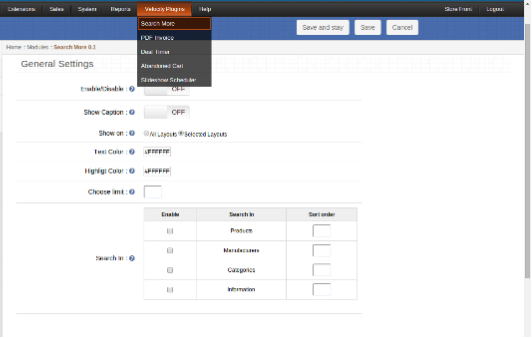
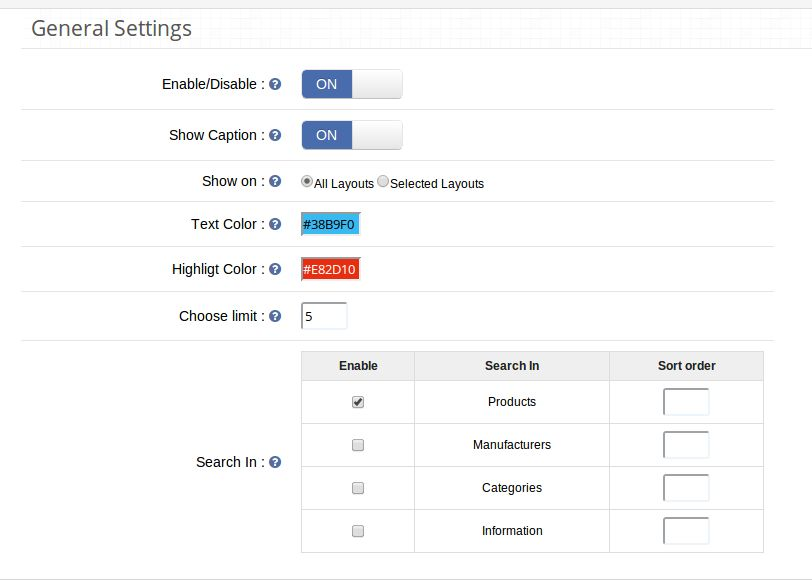
Moving on to the category pages, making the site navigation easier for the store visitors is another important factor. OpenCart Search More plugin makes navigation easier. The customers can view the suggested products right after they type first several letters in the search box. With easy navigation, you can effortlessly boost the user engagement and the session time.

OpenCart Product Video


Product pages are where the actual sales pitch is offered. Hence, it should be readily designed to offer best possible information to the customer. OpenCart product video plugin allows the admin to display the product video and other related videos on the web page without making any code changes in the site. Provide the real-life feel of the product to the customers and enhance the chances of conversions.

OpenCart One Click Checkout (Buy Now)


OpenCart One Click Checkout (Buy Now) plugin adds a buy now button on the products page. The customers can checkout with a single product without removing the products saved in their cart by clicking on this button. The hassle-free checkout triggers the instant purchase decision of the customers.

OpenCart Review Incentive


The reviews and rating of the product pages are another key factors to motivate the customers to place the order. With the help of OpenCart Review Incentive extension, the store admin can offer incentives to the customers in return of their reviews. This is one of the ways to boost the number of reviews on the product page. Enhance the rating of the products and motivate more and more visitors to the checkout page.

OpenCart One page checkout extension


A complicated checkout process can raise the cart abandoned rate of your site. Simplify the checkout process of your site with OpenCart One page checkout plugin. The single page checkout incorporated by the extension offers social login and guest login options as well. Thus, this is one of the ways to optimize the conversion funnel of your site.

OpenCart Price Alert


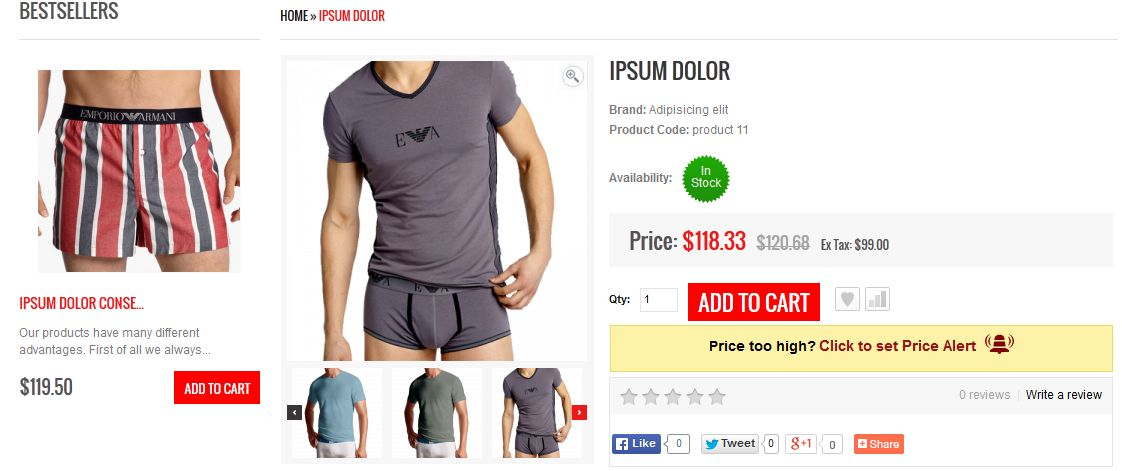
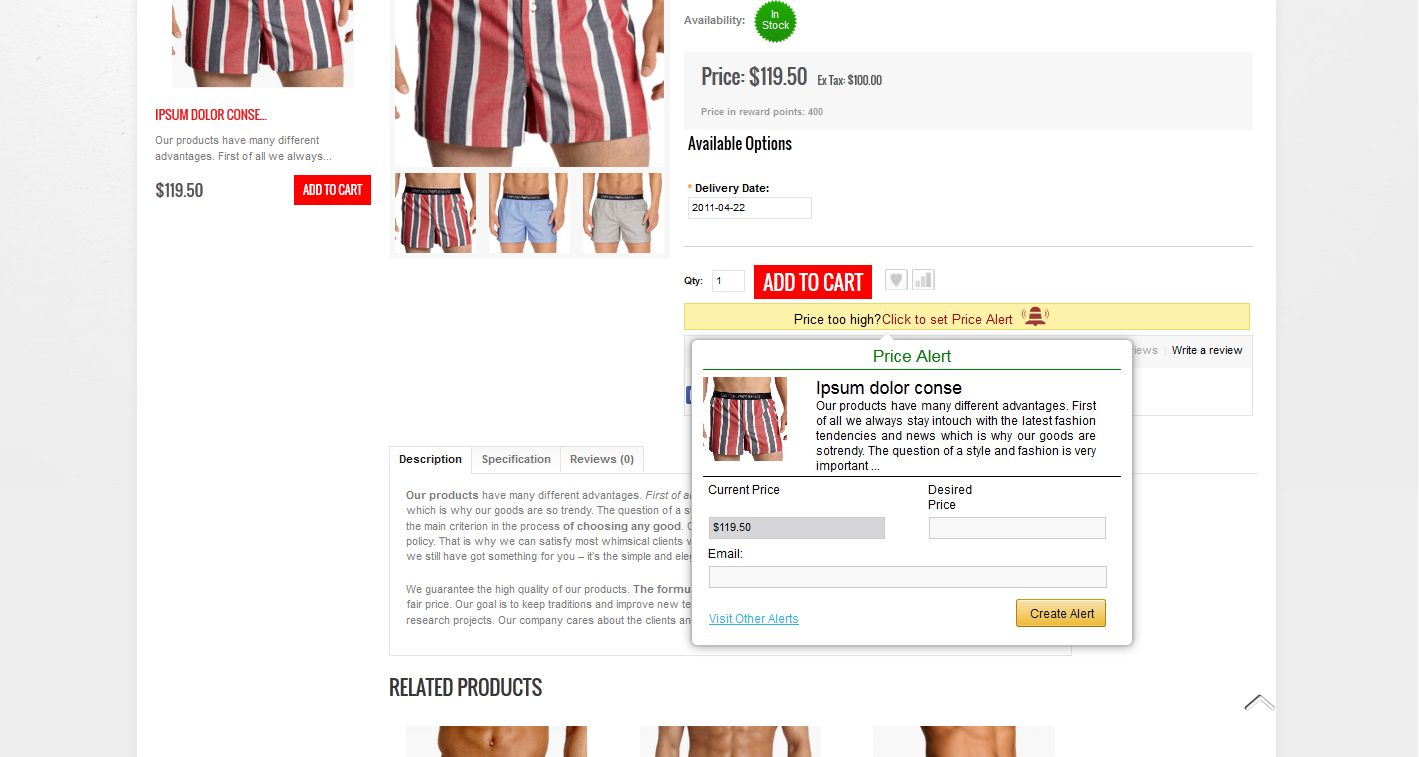
A high-priced product shouldn’t mean a lost customer. Motivate the store visitors to return back to the site who abandoned the cart because of the product costing with OpenCart Price Alert extension. The OpenCart extension allows the store visitors to subscribe for an alert whenever there is a change in the product. The store admin can send reminders regarding the change in the product pricing. With the automated approach, you can motivate the customers to return back and place the order of the product that they left.

OpenCart Mobile App Builder


The customers these days prefer using mobile apps over the shopping sites. It is high time for the store owners to take a step ahead and stay abreast of the trends and technological advancement. OpenCart Android/iOS Mobile App Builder extensions can help you create a fully-functional mobile store at a few button clicks. The OpenCart store owners can now go mobile and tap a larger audience base with great ease.

OpenCart Multi vendor marketplace plugin

If you already own a eCommerce store based on OpenCart, then, you can even have a marketplace like eBay, Etsy and others. There are no code changes required for it. OpenCart marketplace extension can enable the multi-seller feature in your site without making any changes in the basic code of the site. Along with upgrading the site into a marketplace, the OpenCart multi seller marketplace module even makes the management effortless. The third-party sellers and their products as well as sales can be tracked and managed from a single interface. Not just this, even the vendors get an easy option to manage their shop from the dashboard itself. The profile, product and sales management are done from a single interface. In return of the rented space, the store admin can charge commission from the sellers. This commission is fixed at a button click. The fixed or percentage amount is automatically deducted from the vendors’ revenue.

It is important to have a clear view of all the possibilities and limitations of an eCommerce platform so that you don’t have to regret your choice later on. Don’t make wild guesses while selecting an eCommerce platform for your online store but analyze this eCommerce platform for the right decision. Understand the current eCommerce business scenario and go for this OpenCart platform without any second thought.

This Would Also Interest You:

OpenCart Price Alert – User Manual

How to install OpenCart Price Alert plugin on your server

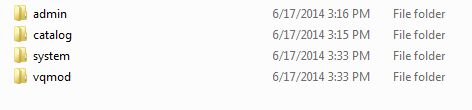
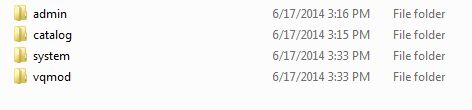
1. Download the zip from OpenCart & unzip into a folder. After unzip folder structure of Price alert plugin will be similar to shown in below screen.

2. Open the upload directory and you will see following folder structure.

3. Login via FTP & Drag drop all the folders into your server root directory. You don’t have the change the default theme folder name to your theme folder name.
You must have VQMOD installed for this plug-in to work. IfVQMOD is not installed please download and install from the URL below:
https://code.google.com/p/vqmod/

4. You will find the plugin ready to be installed in the Modules of your OpenCart.

5. Click on Install link to install the plugin.

6. Delete the vqcache files from the vqmod/vqcache folder.

7. To access Price Alert, Click on Pricealert link which is just to the right of Report Menuas shown below.

8. On clicking Price alert link the module for plug in will open. It contains navigational bar at the top, menu at the left and main content in the center as shown below.

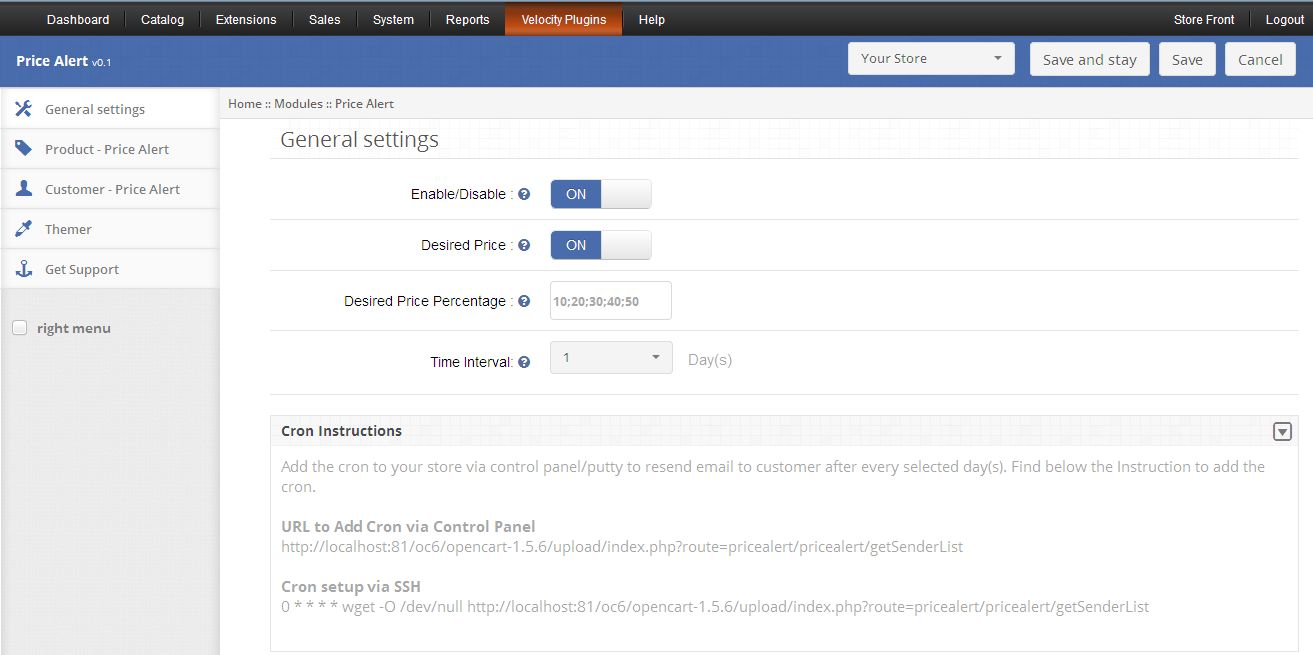
1. General Settings

1. To enable the plug in, switch the enable button from OFF to ON which is just to the right of Enable/Disable label.

2. To enable Desired Price display on customer side, switch the button from OFF to ON which is just to the right of Desired Price label.

3. If you enable Desired Price then you must fill Desired Price Percentage field else error will come. You can give up to five percentage values here which will be shown to customers and these percentage must be separated by semicolon (;) as shown below:

4.E-mail Resend Days option enable admin to set number of days after which Price Alert will be send again to the customer. If its value is none then Price Alert will be sent only once, but if you set it to 4 days, then Price Alert will be sent repeatedly after every 4 days.

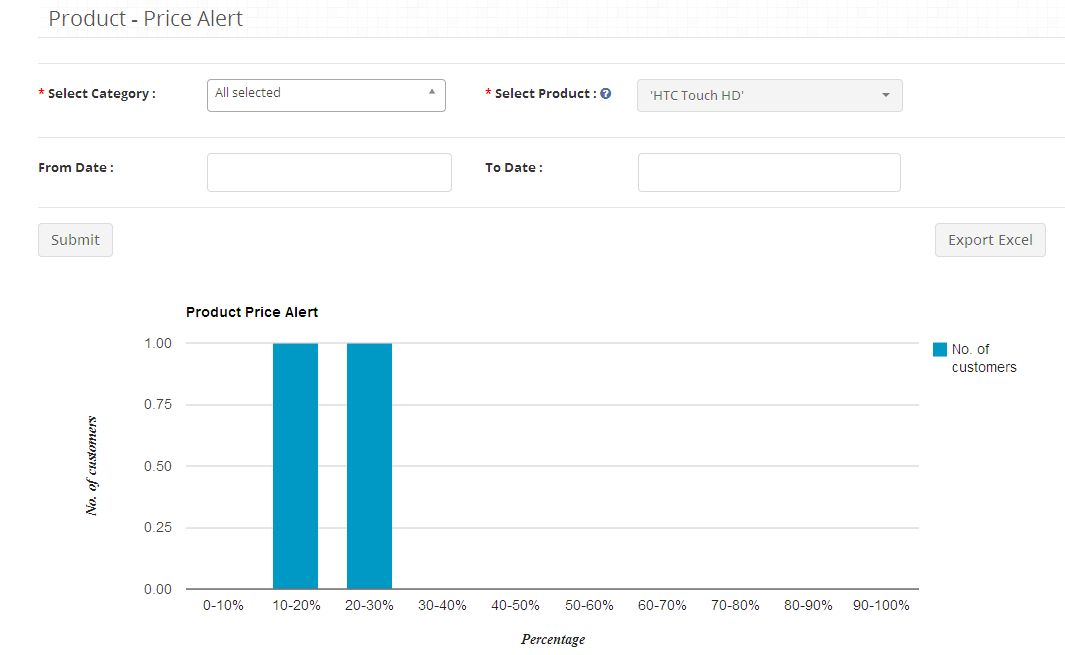
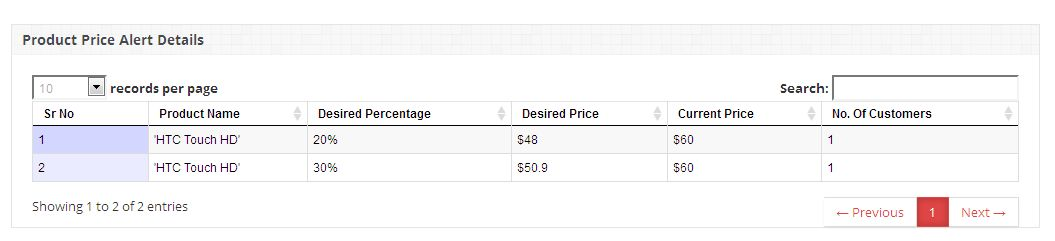
2. Product Price Alert Report

1. This tab shows admin, the Product Price Alert Report in tabular and chart form. Admin can set filter to fetch report for specific period of time or for a particular product.


2. You can also export the tabular report data in Excel format by clicking on export button.

3. Customer Price Alert Report

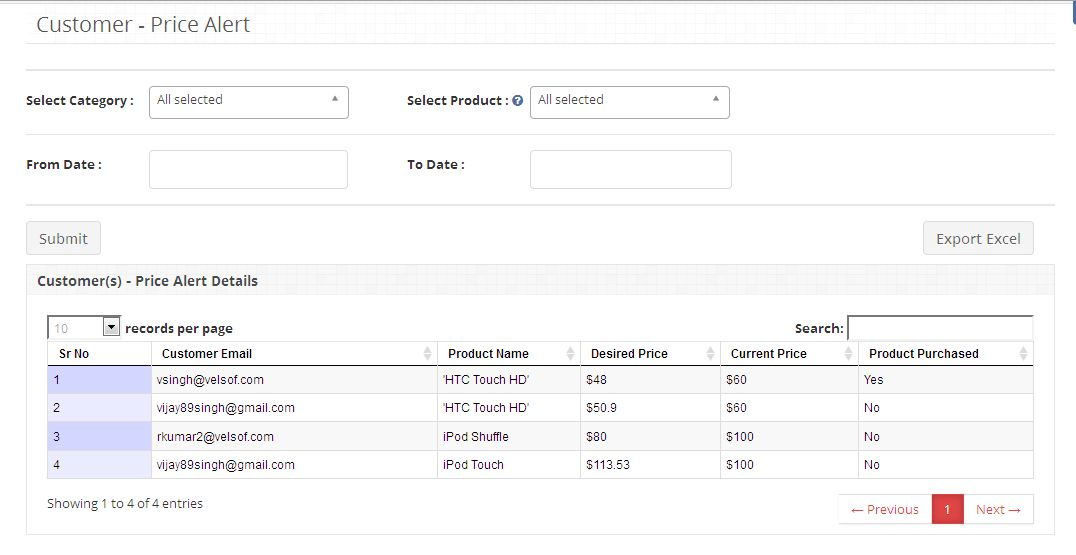
1. This tab shows admin, the Customer Price Alert Report in tabular form. Admin can set filter to fetch report for specific period of time or for a particular product.


2. You can also export the tabular report data in Excel format by clicking on export button.

4. Reports tab

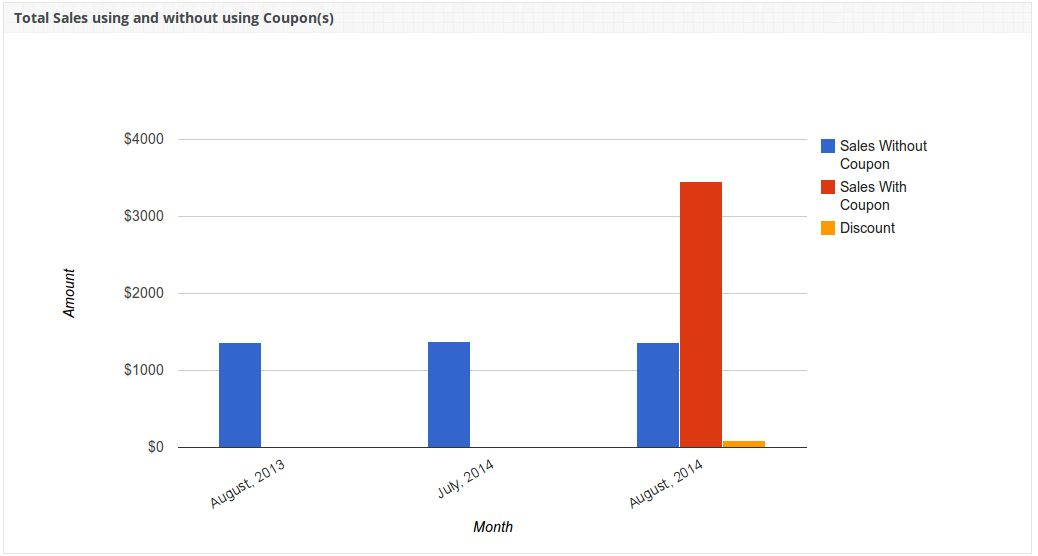
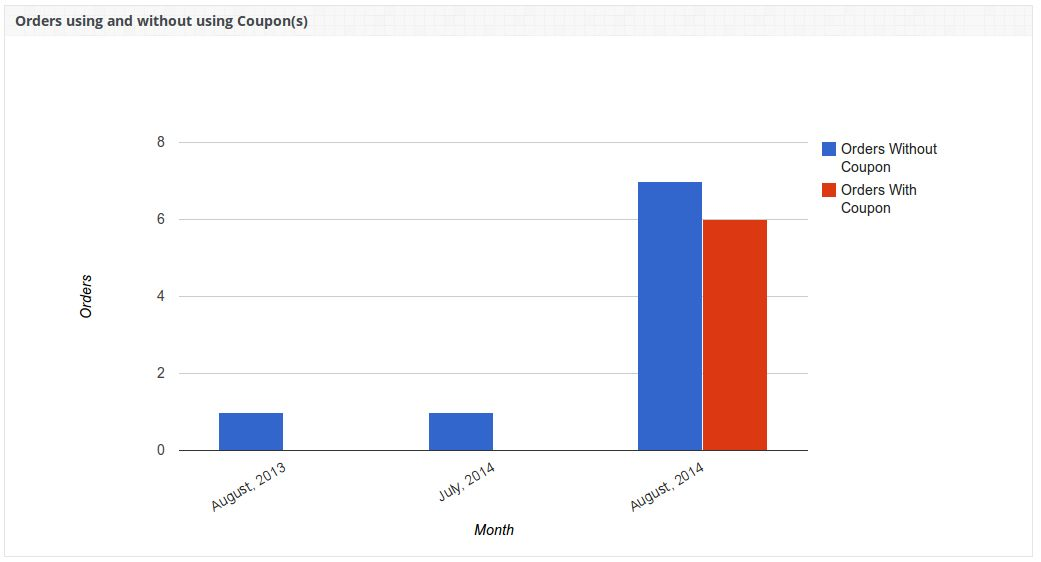
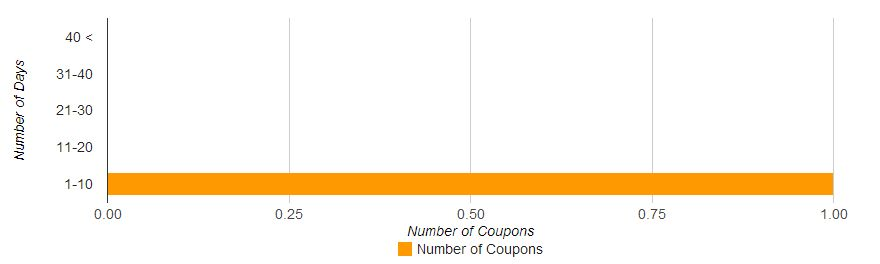
The Reports tab shows the following column graphs:
1.Total Sales using and without using coupons and total discount given.


2.Total Orders using and without using coupons.

CRON Setup (Email Setting)

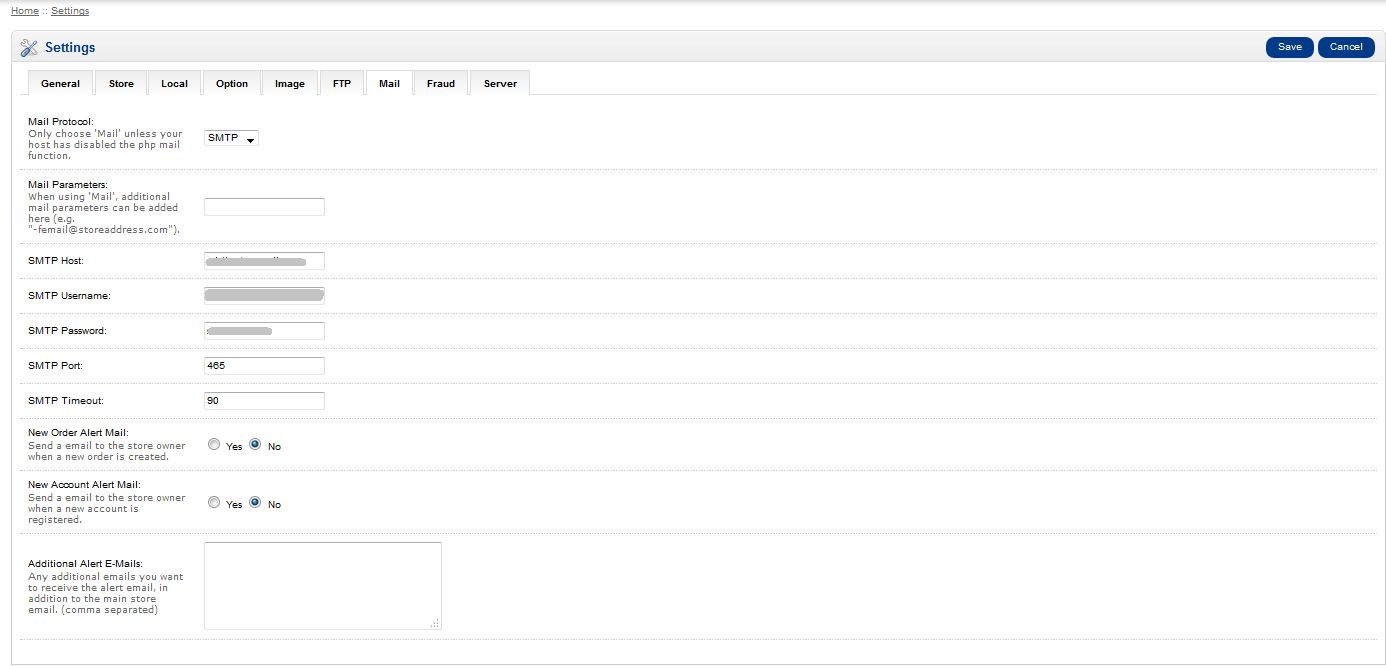
For sending Price Alert via Email to all customers who have set Price Alerts, you must configure OpenCart and CRON as follow:
1.For setting up email on OpenCart open the Admin Panel and click on System->Settings.

2.After that click on Edit button against your store and then under mail setting, fill all required details and save.


3. You also need to set a CRON job for the following URL. We recommend you to run this CRON only once a day.
https:///index.php?route=pricealert/pricealert/getSenderList/

Customer Panel

Customer will be able to create Price Alert for any product by clicking on Click to set Price Alert which will be there on every product page.


1. When customer will click on Click to set Price Alert a popup will be shown to him where he has to enter his email-id and desired price to set Price Alert.

2. On this popup when customer enters Desired Price text field then some predefined desired price values will be suggested to him. These values are predefined by Admin. Customer cannot enter his own desired price. He has to select any one from these suggestions. Admin can disable desired price field in that case, customer will only need to enter Email-id to create Price Alert.

3. Once customer clicks on Create Alert button after entering required fields, Price Alert will be created in his account for that product and a notification message will be shown to him. Now whenever admin will change price for that product then a Price Alert will be sent to that customer via Email only if his entered desired price is greater than or equal to new price. And in case admin has disabled desired price field then price alert will be sent to that customer, every time when there is any change in the price of that product.

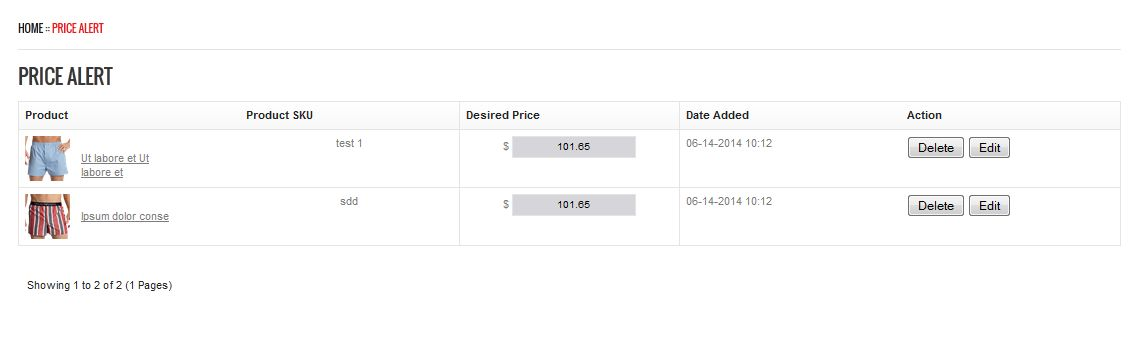
4. If customer is logged in then he can see all Price Alert created by him for different products by clicking on Visit Other Alerts link.

5. Customer can update or delete any Price Alerts.

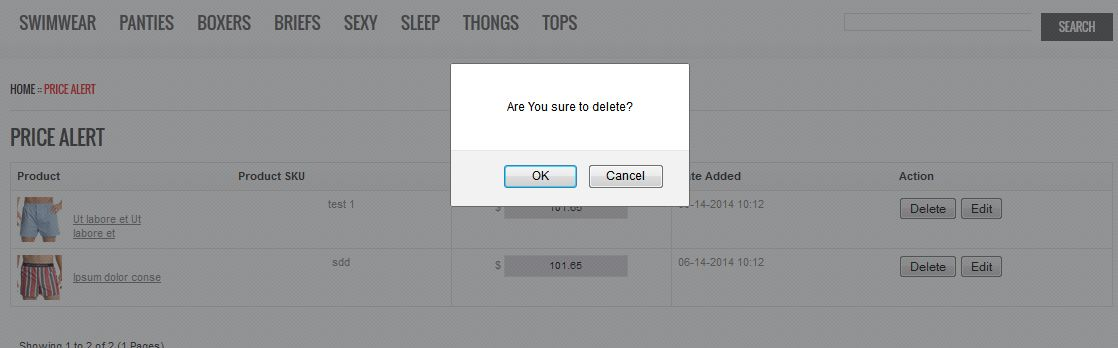
6. Customer can delete any Price Alert using Delete button against respective Price Alert.

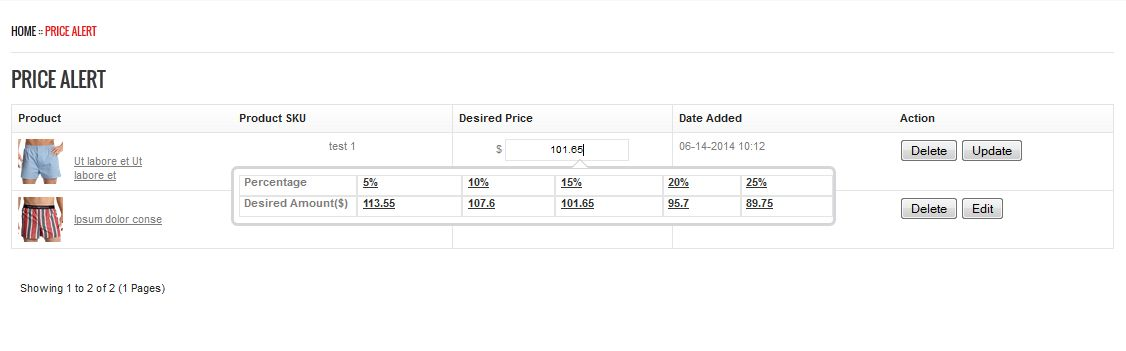
7. Customer can edit any Price Alert by clicking on Edit button, this will enable the Desired Price text field. Using this field he can change his Desired Price value. His changed price will be updated once he clicks on Update button as shown below.


OpenCart Scratch Coupon – User Manual

1. 0 Introduction

In the present time, the Online shoppers are always looking for exciting shopping offers and deals that can give them ample reasons to indulge in online shopping. If you have this Knowband Opencart Scratch Coupon extension that displays a scratch coupon on the front-end where the store visitors can scratch the coupon with their mouse and win alluring discounts.

The Opencart Extensions enable the store owner to allow the system to give discount coupons to endpoint customers and analyze the customer’s need by tracking discount coupons. As we know that customers attract to any shopping sites on the base of attractive offers and various type discounts. So, with keep in mind these points, this Opencart coupon email extension will generate discount coupon on the front end to all visited customers, based on defined discount criteria by the Opencart store owner.

1.1 Benefits for the store owner

1. The Opencart coupon email plugin can be installed and customized without any hassle.
2. The Opencart scratch coupon module allows the online merchant to enable/disable it with a by toggling the button.
3. The mouse cursor is used to scratch the coupon on the front end.
4. The Opencart scratch card enables the Opencart store admin can send a personalized email with the coupon code.
5. The Admin can add the own rules and he/she can be customized as per requirement. For example, the shipping cost to be added or not.
6. The Store admin can track the use of the coupon codes and more with the help of Opencart Scratch Coupon pop up module.
7. The Opencart coupon generator module by Knowband allows the eCommerce merchant to set the discount amount, the eligible time period to avail coupon code and much more.
8. The Opencart scratch card pop up by Knowband allows the e-merchant to customize the messages on the scratch card, button text and input field from the back-end of the Opencart plugin.
9. The Admin has an option to customize the look, feel, and text of the front block from back-end itself.
10. The Opencart Scratch Coupon module provides free technical support and assistance.
11. The Opencart scratch coupon extension by Knowband is compatible with various types of online stores and themes.
12. The Opencart Scratch Coupon pop up module offers free technical support service and updates.
13. The Opencart scratch card can be installed and configured in a seamless manner.
1.2 Benefits for the Customer:
1- This Opencart scratch coupon extension by Knowband give the attractive offer to the customer.
2- This Opencart scratch coupon pop up module is mobile responsive and enables the customers to scratch the coupon on their mobile phones and desktop.

2.0 Installation

After purchasing the Knowband Opencart scratch coupon pop up plugin you will get following files as listed below:

1. Compressed File in ZIP format (contains source code of the module)
2. User Manual

How to install OpenCart Scratch Coupon plugin on your server

1. Folder structure of the Opencart scratch coupon module folder.

2. Open the upload folder and you will find the following folder structure:


You must have VQMOD installed for this plug-in to work. IfVQMOD is not installed please download and install from the URL below:

https://code.google.com/p/vqmod/

3. Select all the folder and drag and drop them to the root directory of your OpenCart store through FTP.

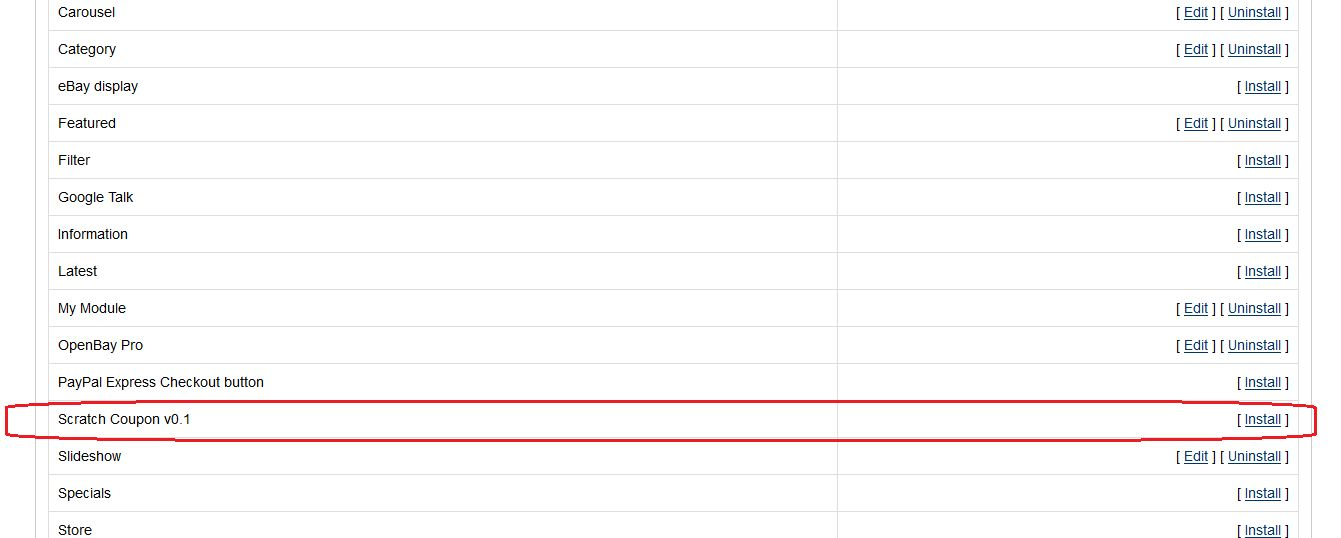
4. You will be able find the Opencart coupon email extension plug-in ready to be installed in the Modules in your OpenCart store as shown below.

5. Click on the Install link to install the Opencart scratch coupon pop up module. This will also add a dropdown option in your menu bar which will list all plug-ins by Velocity installed on your store for fast navigation. This dropdown also has a message box, using which we can inform you about new launched plug-in or new update.

6. Delete the Vqcache files from the vqmod/vqcache folder.

7. To access Smart Sort Order Opencart extension click on edit button in module section.

8. On clicking edit button the Opencart coupon generator extension for Opencart plug-in will open. It contains navigational bar at top, menu at left and main content at center as shown below.


3.0 Admin Module

After installing Opencart scratch coupon extension into store, the Opencart extension will provide following interface:

1.General Settings
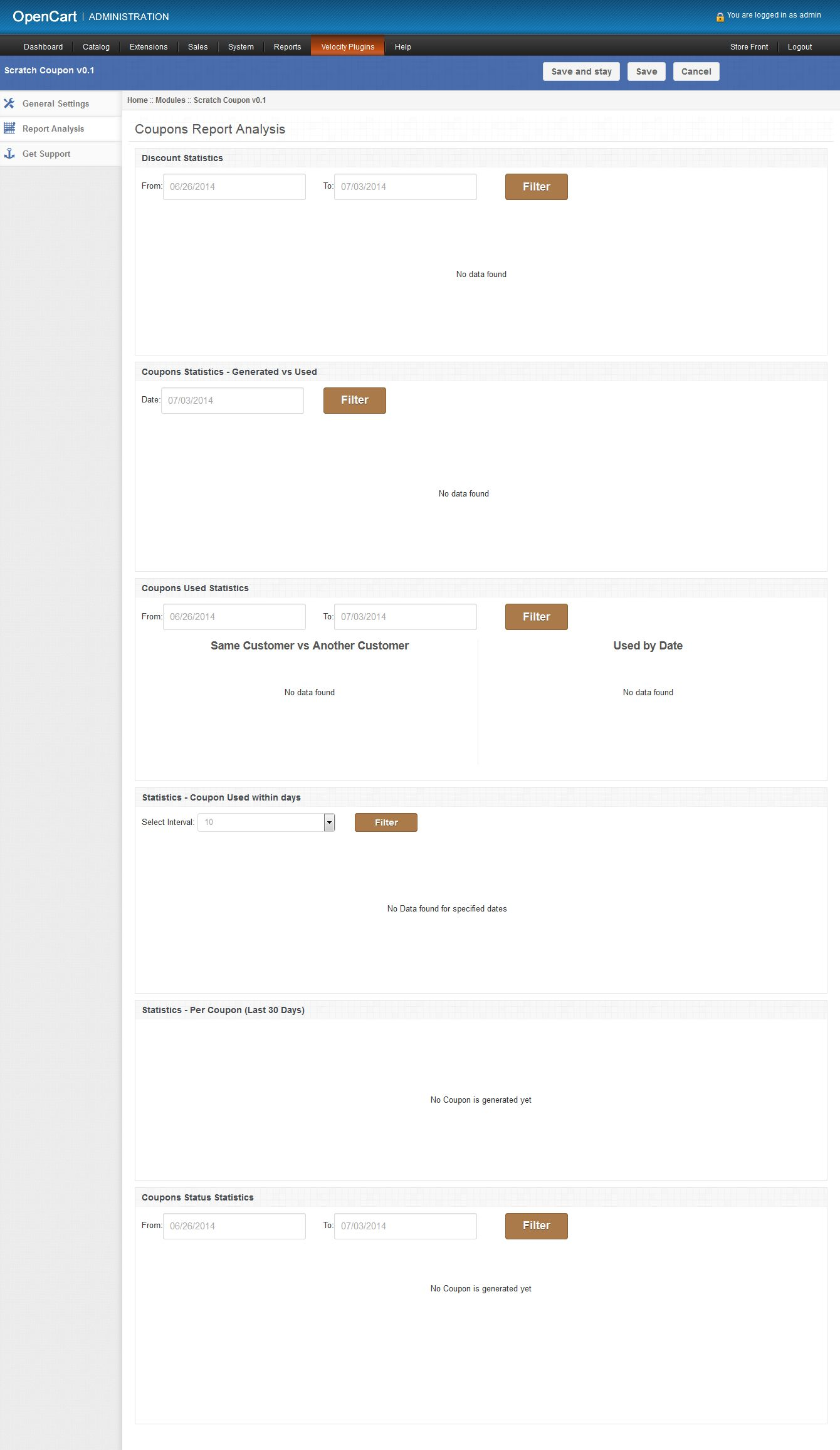
2.Report Analysis
3.Get Support

Each interface is explained below:

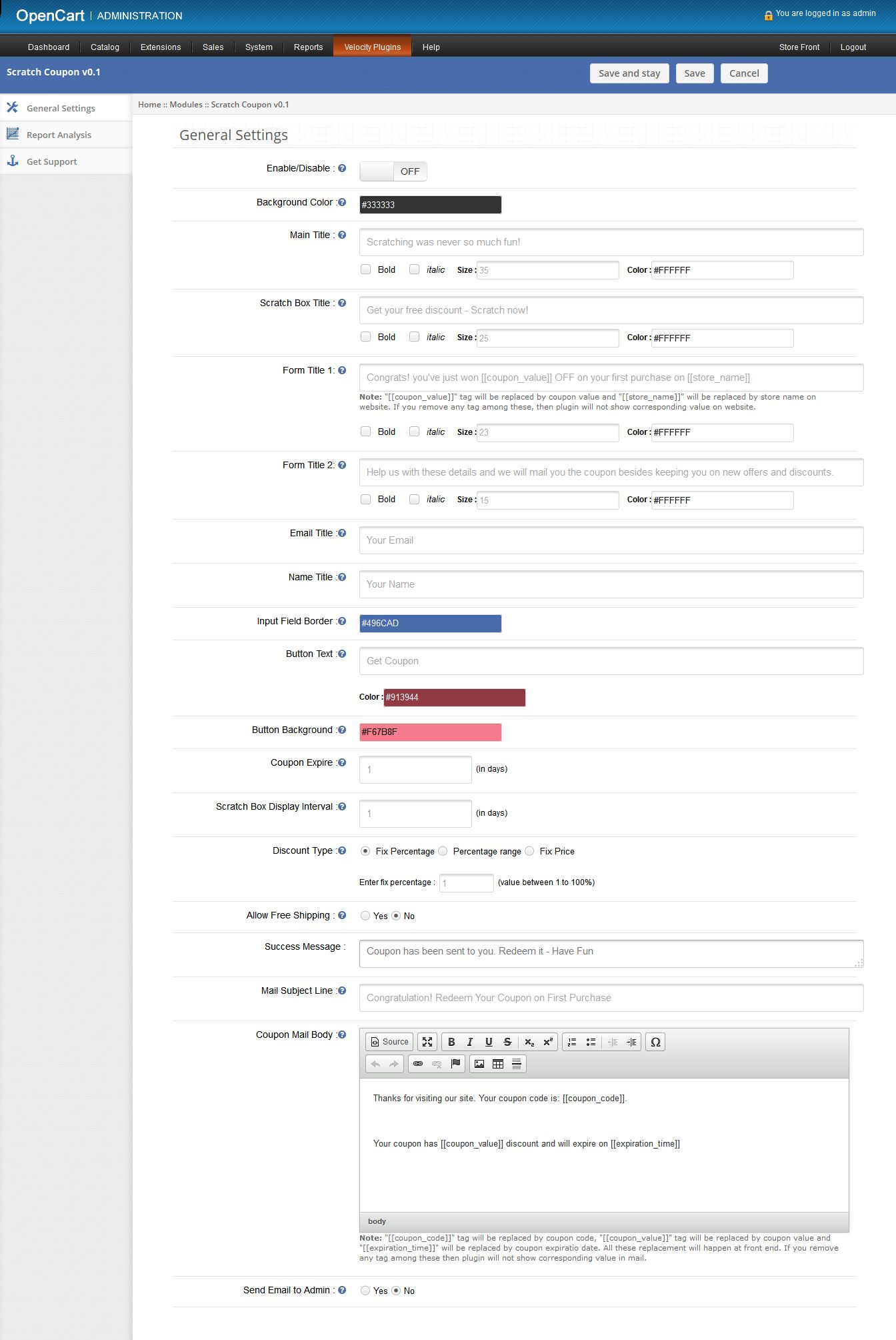
On clicking on edit link on module listing page, the system will open general settings tabs by default as shown in the screen below:

3.1 General Settings

On clicking on edit link on Opencart module listing page, system will open general settings tabs by default as shown in screen below:

1. Enable/Disable: Initially, this will be “OFF”. User can enable/disable Opencart scratch coupon extension functionality by turning ON/OFF this setting.

2. Background Color: This field will be used to define background color of scratch coupon box on front end. On clicking this input, a color picker will pop up from where user can change the color of background color. There is no option to blank this field.

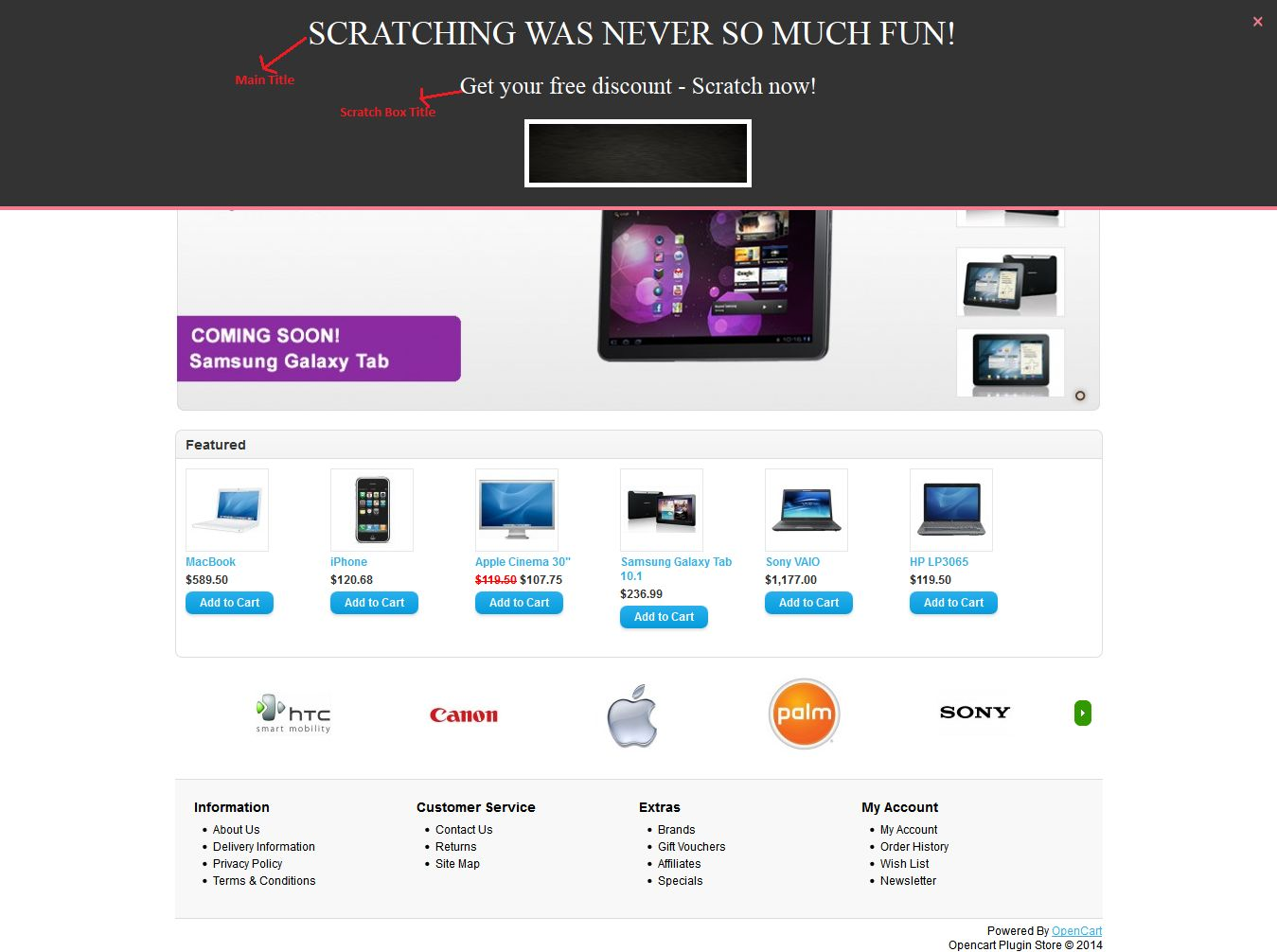
3. Main Title: Mandatory. This is the title showing on the top of the coupon box on front. User can make this title stylish as setting following options:

  • Bold: To darken the title.
  • Italic: to italic the title
  • Size: to increase/decrease the size of the title.
  • Color: To set the color of the title.

4. Scratch Box Title: Mandatory. This title will be show just above the scratch area on front end.User can also make stylish this title with style options.

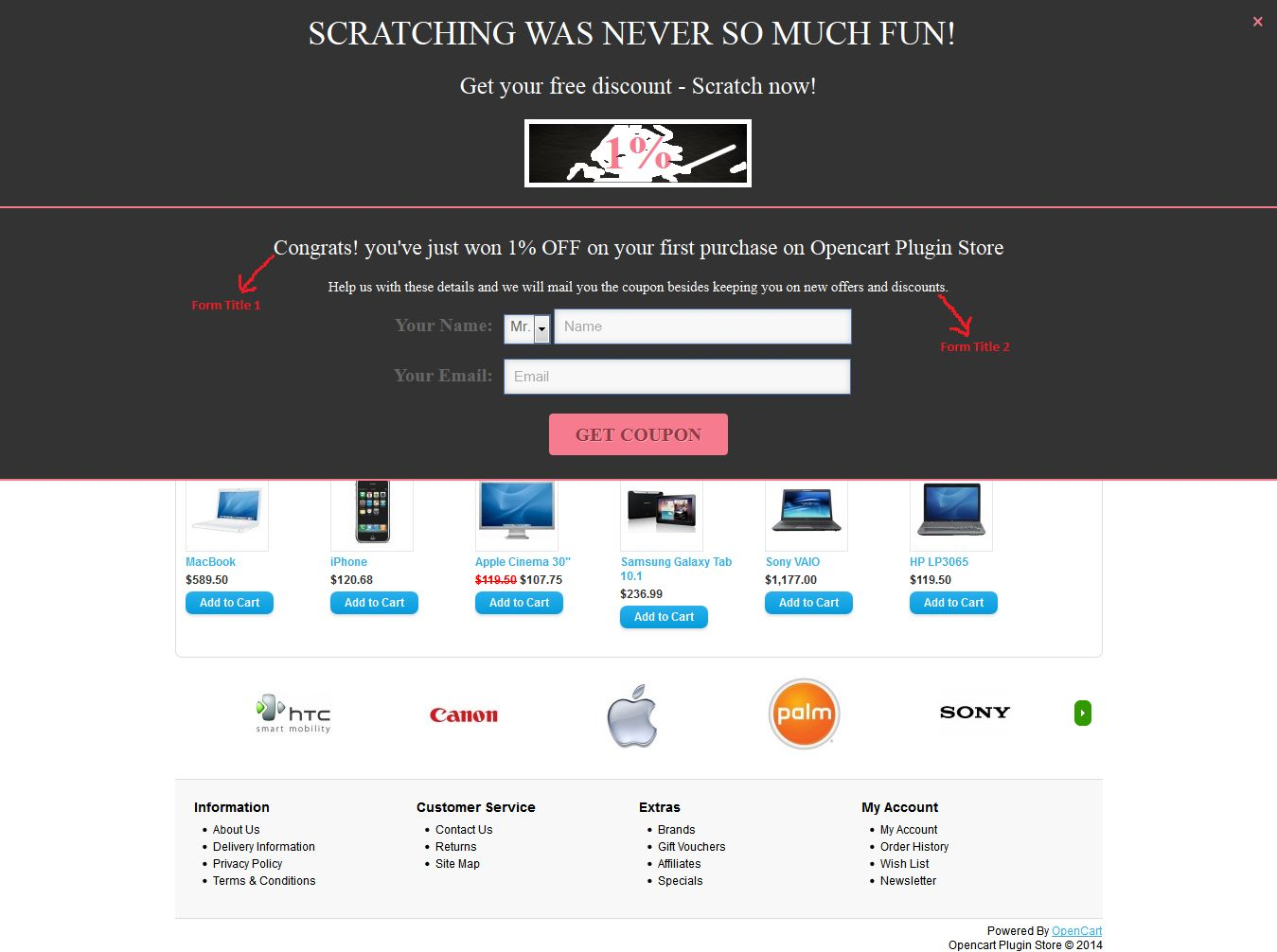
5. Form Title 1: Mandatory.  After little scratching of discount, Opencart scratch card module will open a form to submit name and email id to get coupon. This title will be shown on top of this opened box.

6. Form Title 2: Mandatory. This title will be displayed just above the email input form and below the After Scratch Title on front end. User can also stylish this title with various style options.

7. Email Title: Mandatory. In this field user can set name of the email input field, showing with “email input” on front.

8. Name Title: Mandatory. In this field user can set the name of name input field, showing with “name input” on front.

9. Input Border Field: Use to style the border of input fields on front end. We recommend that use opposite color of background color to clearly show the input fields on front end.

10. Button Text: Mandatory. Here user can set the title of button. User can also change the color of button text by setting the color into corresponding color field.

11. Button Background Color: Mandatory. Here user can set the background color of button. This color will also be used for setting the color of separator between scratch coupon box and input form box. Also use for setting color of close(X) button, which will be used for close the coupon box on front end.

12. Coupon Expire: Mandatory and must be number greater than 0. This field will be used for defining the expiration date of coupons. In this field, user can set after how many days coupon will be expired. The expiration date will be set at the time of coupon generation.

13. Scratch Box Display Interval: Mandatory and must be number greater than 0. This field will be used to, after how many days; scratch box will be displayed again on the same system.

14. Discount Type: Mandatory. Here user can set the type of discount to customers. There are three options to set the discount type. They are as follow:

a. Fix Percentage: By default, this option will be selected. Here user can set the fix percentage discount. Fix percentage value will lie between 1 and 100. On front end,each coupon will have fix discount percentage.

b. Percentage Range: On selecting this option. Two inputs will be shown as shown in screen below:
Here user can set the range of percentage. By setting this option, plug-in will randomly generate discount within percentage range on front end.

c. Fix Price: If user set fix amount discount instead of percentage. Then this option will fulfill this need. Here user can set fix amount in USD.

15. Allow Free Shipping: By default No will be selected. On selecting Yes. Free shipping will be allowed on the generated coupons.

16. Success Message: Mandatory. This message will be shown after sending coupon to corresponding customer.

17. Mail Subject Line: Mandatory. Use to set the subject line of coupon mail send to customers.

18. Mail Body: Mandatory. Mail body of coupon.

19. Send Email to Admin: By default “No” will be selected. This option will enable Opencart scratch coupon extension to send same email to admin or not.

3.2 Report Analysis tab

In this tab, Opencart generate coupon extension will show the coupons and discount statistics in graphical form. With the help of these statistics, user will able to analysis customers need in form of discounts and time as shown in screen below:

There are following graphs will be shown into this tab:

1. Discount Statistics: In this, Opencart scratch coupon pop up plugin will show, how many number of customers applied for which discount range and how many times coupon is scratched for which discount range. As there are two types of discount: percentage and fixed amount; in a system. The opencart extension will show a separate graph for both discount types as follows:

a. Percentage discount statistics: This will be a bar graph, in which discount interval will be of 20% upto 100%. Below is the sample screen of this statistics:

b. Fixed Amount discount statistics: This will also be a bar graph, in which discount interval will be of $20 and 6 intervals will be shown. Below is the sample screen of this statistics:


With the help of these above two graphs, the user can track the customer’s needs in terms of discounts. Information gathers in these statistics will be helpful in attracting more customers by offering preferred discounts and increase store sales. The user can also filter these graph by selecting dates.

2. Coupon Statistics Generated Vs Used: This will be bar graph and will show the coupons generated and same coupons used within last 7 days. This graph will be helpful to analyze the customers that the customers used the coupons on the same day or on another day. The user can also filter graph by selecting a date. Following is the sample screenshot of statistics:

3. Coupon Used Statistics: In this, Opencart scratch coupon extension will show that how many coupons used in term of percentage on the date and how many coupons in terms of percentage will be used by same customer and another customer. Data will be shown in the form of the pie chart. By default, Opencart module will show last 7 days statistics. The following screen is shown below as a sample:

4. Coupon Used within days: This bar graph will help the user to analyze that, in how many days coupon is used after assigning to the customer. By default, Opencart coupon email extension will show coupons within the interval of 10 days. The user can increase days interval by selecting interval from drop-down menu. Below is the sample screenshot of this statistics:

5. Statistics- Per Coupon (Last 30 Days): Here Opencart scratch card will show each coupon statistics in a tabular format.Opencart plugin will show only last 30 days data. This tabular format will show following data:

  • Coupon: Coupon code
  • Assignee Name: Name of the customer to which coupon is assigned.
  • Assignee Email: Email id of the customer on which coupon sent.
  • Gender: Show gender (M/F) of customers.
  • Assigned date: On which date coupon was assigned to the corresponding customer.
  • Expire Date: On which date coupon will expire.
  • Used By: Email id of the customers who will use this coupon. If the coupon is not used yet, then this will show NA.
  • Used Date: Date on which coupon was used. If not used, then this will show NA.
  • Status: Status of the coupon.

6. Coupon Status Statistics: Here Opencart scratch coupon module will show status of coupons generated within last 7 days in form of a pie graph.  Coupon statuses are: Used, Unused and Expired. If coupon of any status not find, then Opencart extension will not show it in pie graph. Following is the sample screenshot of this statistics:

3.3 Get Support tab

If user have found any issue regarding and wants any type of support, then via this link, the user can create the ticket for any query on our helpdesk support.

Scratch Coupon description

On front, the Knowband Opencart scratch coupon extension will only be displayed on home page after enabling it from admin panel. This scratch coupon box will show on top of the homepage. Following is the screen of scratch coupon box with default values:

After scratching coupon area above 30%, an input form will be open just below the coupon box as shown in screen below:

After providing name and email into form, Opencart scratch coupon module will send the coupon with discount showing in above screen to the corresponding customer. After sending email to the customer, a success message will be displayed as shown in below screen:

The above message will disappear after 5 seconds and next discount will be shown on the same system after defined (set through admin panel ) days

Tracking Information

On the front end, this Opencart coupon email extension by Knowband will track following information to create analysis reports in the form of graphs:

1. Discount Scratch Tracking: Whenever customer scratches discount upto 10% of the scratchable area, then Opencart coupon generator extension will track that event and save into DB, after that disable the tracking process until the browser will not reopen again on the same system.

2. Coupon Tracking: To get a coupon of scratched discount, the customer must have to provide his name and email. After providing it, Opencart scratch card pop up will generate a coupon randomly and send it to the corresponding customer. After sending, Opencart extension will save coupon data and to which customer this coupon is assigned into the database.

3. Send Email to Admin:  If store owner allows email to admin, then Opencart scratch coupon pop up extension will also send the same email to admin.

4. Enable discount coupon again: After sending coupon to customer, Opencart Scratch Coupon plug-in will not re-generate discount on the same system till days defined by the store owner in the admin panel.

You can try Knowband’s Opencart scratch coupon extension for on your Opencart store. Opencart generate coupon module helps you increase customer engagement to your store and give the better user experience to your eCommerce customer.

Module Link: https://www.knowband.com/opencart-scratch-coupon
Admin Demo link: https://ocdemo.knowband.com/?url=admin/index.php?route=module/scratch_coupon&token=a261b78f42e6ddd5a8dbd9a17bd60825
Front demo Link: https://ocdemo.knowband.com/?url=index.php?route=common/home

Please contact us at support@knowband.com for any query or custom change request as per your business requirement.

3 Must have OpenCart extensions for Increasing Sales

Online businesses come across numerous tools or plugins to optimize their store and improve sales. If you run a store on the OpenCart platform, this article will help you in taking your store sales to the next level. In this article, we will brief you about the 3 must have OpenCart extensions for increasing sales on your OpenCart store.

Any business, be it offline or online, requires sales to survive in the competitive e-commerce market. To grow as a brand, e-retailers look for various ways to increase sales on the digital commerce platform. There are a number of factors that merchants look after to boost up sales, for example, reducing cart abandonment and e-commerce returns, improving user experience, etc. OpenCart extension.

Check out the 3 must have OpenCart extensions for your OpenCart store:

1. OpenCart One Page Checkout

OpenCart One Page Checkout extension is designed to reduce the number of steps in the standard multi-step checkout process. This OpenCart extension puts together all the checkout steps in one single page and makes the checkout flow convenient for the online shoppers.

Important Features of OpenCart One page checkout

  • Guest checkout- Store visitors can check out from your store as a guest, hence no need to follow the mandatory sign-up process.
  • Social login- Allow your users to log in or sign-up on your store with the help of social login. This avoids the manual process of filling out the account registration form.
  • Multiple layouts to customize the look of your checkout page.
  • Responsive Design- Works on all devices including smartphone, tablet, desktop and laptop
  • Easy to use– OpenCart one-page checkout is easy to integrate and fully compatible with your OpenCart store
  • Supports multiple shipping and payment method– OpenCart Advance checkout extension supports multiple payment modes (Credit Card, Debit Card, COD, Bank transfer, etc) and shipping services (FedEx, USPS, etc.)

Benefits for customers

  • Customers can log in via their social network profiles like Facebook and Google+
  • Option to enter coupon codes on the checkout page
  • Complete checkout process on a single page
  • Update product quantity on the checkout page itself

Benefits for store owners

Installing this OpenCart extension will improve the functionality of your store by maximizing conversions and increasing user engagement. By making your customer’s checkout easier and reducing the time needed to fill out a lengthy checkout page, you will also be able to decrease shopping cart abandonment.

Also, look out for OpenCart One Page Advanced checkout

2. OpenCart Abandoned Cart

Opencart Abandoned Cart extension allows you to send emails to those customers who abandon their carts, thereby allowing you to recover sales. This works as a reminder to make a user complete his/her purchase. Add restore links, promotions, discount coupons in abandoned cart emails to motivate customers to come back and finish the incomplete purchase.

Features of OpenCart Abandoned Cart extension

  • Set a time period after which the cart is assumed to be abandoned.
  • Send reminder emails to your store visitors who abandon their carts by creating appealing personalized emails featured with coupon codes, discounts and a link to the product page. This helps you in increasing the number of returned customers and encourages sales on your website.
  • Select the type of discount that you want to provide to abandoned cart users, for example, some flat discount or some percentage off in the product amount.
  • Convert abandoned carts into sales by a single-click recovery feature with this OpenCart extension. Consumers can review the entire content of their cart with just a single click. It removes the hassle to add items to the bag again from scratch.
  • View complete details regarding the abandoned cart users under “View Abandoned Cart.”
  • Check how many of the abandoned cart users got converted under the “View Conversion rate”.
  • OpenCart Abandoned Cart extension provide amazing analytics view to compare your abandoned carts and converted carts

Benefits of OpenCart Abandoned Cart extension

  • Increase user engagement on your site by offering discounts and coupons in your abandoned cart mails.
  • Reduce cart abandonment rate by sending follow up email automatically within the minutes of abandoned carts
  • Increase successful orders by sending a reminder of pending orders, cancelled orders, closed orders, etc.

3. OpenCart Social Loginizer

The OpenCart Social Loginizer extension provides you the functionality to enable the social login facility on your OpenCart store to enhance the user experience, acquire customers and increase sales. The functionalities of this extension allow your customers to log in or sign-up to your site using Facebook or Google+ social networks.

Features of OpenCart Social login

Increase conversions by simplifying the registration process

Get rid of long and complicated forms by allowing users to sign up with their existing social networking account.

Gather rich and real-time demographic details about your customers without requiring them to fill out any lengthy form. By asking users to sign up with social logins, you will be able to increase user sign-ups, utilize their social data to personalize your email marketing campaigns and increase sales.

Eliminates the issues of forgotten usernames and passwords

Failing to provide a social login option to your visitors might make them reluctant to leave your store if in case they forget their password, but now with the social login option, consumers get rid of remembering passwords.

Conclusion

For capturing more sales on your OpenCart store, make sure to keep a strict check on the possibilities that could hinder your sales. Figure out the points that you can work upon, and most importantly, keep the user experience your topmost priority. Always remember to have those features which people wish for their convenience. If consumers are not converting into customers, figure out ways to convert them. Installing the above OpenCart extensions will surely help you increase your store sales.

This Would Also Interest You:

Knowband OpenCart Search More Module – User Manual

Introduction:

Knowband offers OpenCart more search module which helps you to make product searching easy for your website store customers. This OpenCart plugin implements a special functionality which auto-completes search. Thus the store visitors can get search suggestions without any hassle. When customer type anything, at the same time-related search suggestions, appears as a suggestion.

Features:

  • Check out the salient features of this OpenCart search mechanism:
  • The OpenCart search products module is absolutely easy to install and configure.
  • It is very simple to enable/disable this OpenCart plugin.
  • It offers you to display product price and caption in search results.
  • The OpenCart search mechanism is highly customizable.
  • You can implement this functionality without any codes changes.
  • OpenCart refined search offers hassle-free implementation.
  • You can choose the layouts on which you want to display search suggestions.
  • You can manage the look and feel.
  • Allows editing the color of highlight text in the search results.
  • You can show/hide out of stock products in search suggestions.
  • You can decide the number of search suggestions at a time.
  • You can view the total number of top ten searched keywords.
  • It provides search results at the same time of searching.
  • It offers fast AJAX product search for better user experience.
  • The OpenCart improve filter is fully mobile responsive.
  • This plugin allows searching products in the product description, tags, SKU, UPC etc.

How to install OpenCart Search More plugin on your server

1. Folder structure of the Slideup Promotion plug-in folder.

2. Open the upload folder and you will find the following folder structure:

You must have VQMOD installed for this plug-in to work. If VQMOD is not installed please download and install from the URL below:
https://code.google.com/p/vqmod/

3. Select all the folder and drag and drop them to the root directory of your OpenCart store through FTP.

4. You will be able find the plug-in ready to be installed in the Modules in your OpenCart store as shown below.

5. Click on the Install link to install the plug-in. This will also add a dropdown option in your menu bar which will list all plug-ins by Velocity installed on your store for fast navigation. This dropdown also has a message box, using which we can inform you about new launched plug-in or new update.

6. Delete the Vqcache files from the vqmod/vqcache folder.

7. To access Slideup Promotion plug-in click on edit button in module section as shown below:

8. On clicking edit button the module for plug-in will open. It contains navigational bar at top, menu at left and main content at center as shown below.

1. General Settings tab

General Settings tab will have following options:

1. Enable/Disable :

This is the main switch to enable/disable the entire Module

2. Show Caption:

You can show captions below each search result. You can also show the price of the products.Admin can choose the show or hide price along with the name of the product in the search result. In case of manufacturers, category, and information, a caption can be shown or hidden instead of price.

3. Choose layouts to be shown on :

You can choose to show the show more search box on layouts of your choice, you have two options to choose from :

a) All Layouts

b) Selected Layouts.

In case option b) is selected, another field will start appearing with a multiple selection box with list of all layouts. User may select any number of layouts here.

4. Choose Text color for search results:

Admin can choose text color for the search result to come up with when used on the front end.

5. Choose highlight color for search results:

Admin can choose highlight color for the search result to come up with when used on the front end.

6. Choose search results limit:

Admin can choose max limit for the search results.

7. Show caption:

Admin can choose show or hide price along with the name of the product in search result. In case of manufacturers, category and information, a caption can be shown or hidden instead of price.

8. Search In:

Here you can choose to search not only products but also categories , manufacturers and Information. That is, if someone for example types a character in search box, search result will come up showing not only products but also name of manufacture

2. Product Search Settings tab

This tab will help admin decide on what basis should products be searched.

1. Search Products in:
Here you will get number of options, out of which you can select as many as you want to. These options will be in form of check boxes. Some of the options being Description, Tags, Model, SKU, UPC, EAN, JAN, ISBN, MPN etc.

Note that, in case product search has been selected, search term will be searched in a products name.

2. Rules:

In order to improve search results, admin can use these filters/rules :

A. Stock Status: This will be a dropdown field with all possible stock statuses as options to choose from.

B. Quantity between: This field essentially has two text boxes that only allow numeric values. You can type in the min and max values or leave them blank if you don’t want to filter on basis of quantity.

3. Search Statistics tab

Using this module, you can not only search fast and better, but also view the most searched keywords. A detailed list of keywords will be listed in this tab of admin panel where admin can view the most searched keywords , count, date when it was last searched, date when it was first searched.

Also, you can view upto 10 most searched keywords in form of a pie chart for better visualization.

Store Front

On the front end, the default search box will be replaced by the new search box which will display products along with there price via auto-suggest functionality on basis of the options selected in admin panel.

Also, in a module too search results can be seen via auto-suggest.

Search word highlight:

When the user will type in any characters and search results are displayed on basis of the search characters, the search characters will be highlighted in all the search results. The characters will be highlighted in the configured color.

Clicking on any of the search results will redirect user on the appropriate page. Clicking a products name will land you on that products page, clicking on a manufacturers page will land you on that manufacturers page and similarly for category and information.

For more details please visit:

Module Link: https://www.knowband.com/opencart-search-more

Admin Demo Link:

https://ocdemo.knowband.com/?url=admin/index.php?route=module/searchMore&token=a261b78f42e6ddd5a8dbd9a17bd60825

Front Demo: https://ocdemo.knowband.com/1.5/index.php?route=common/home

Please contact us at support@knowband.com for any query or custom change request as per your business requirement.