Magento Facebook Wall Post Extension – User Manual

1.0 Introduction

Post your products on your Facebook page automatically with the help of Magento Facebook Wall Post Extension by Knowband. This Facebook Wall Post Extension Magento lets the admin boost their brand visibility on one of the most engaged social media platforms, Facebook, where billions of users come daily. The advanced and easy to configure Facebook Wall Post Magento Extension boosts the users’ engagement and helps in increasing the traffic of the website as well.

1.1 Merchant benefits of Magento Facebook Wall Post Extension

  • Facebook Wall Post Extension Magento helps in increasing the visibility of your products/brand on social media platform.
  • Facebook Wall Post Magento Extension helps in increasing the overall traffic of the website by redirecting the users from Facebook to the site.
  • Magento Facebook Post Extension increases customer’s engagement even while they are surfing their Facebook account.
  • Magento Facebook Wall Post Extension provides an easier way to showcase your products, new arrivals and coupon codes to the target audience.

1.2 Features of Magento Facebook Wall Post Extension

  • The Facebook post extension for Magento offers the admin to post their category(s) and products automatically..
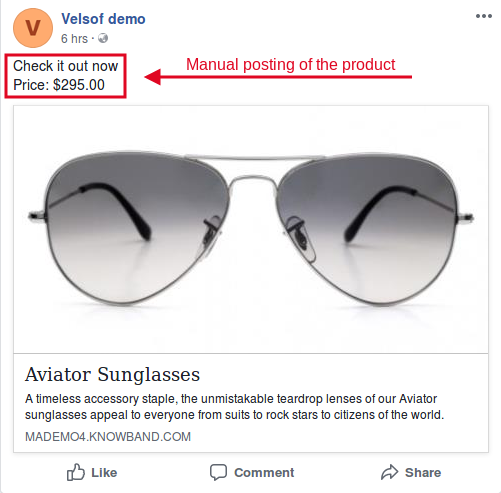
  • The Magento Facebook Post extension offers the admin to post the products manually as well.
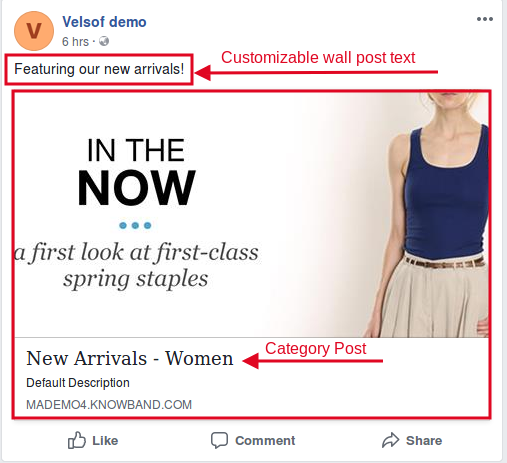
  • The admin can post the choice of the category(s) on the Facebook wall.
  • The Magento Facebook wall post extension allows the admin to select which type of description he wants to display on the Facebook wall, i.e long description, short or meta description.
  • The Magento Facebook wall post extension allows the admin to display the product price along with the wall post.
  • The Facebook post description is fully customizable. The admin can post his choice of description just in one click.
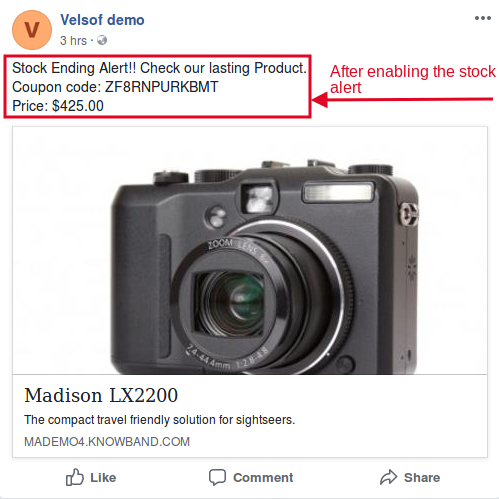
  • The Magento FB post module offers the admin to display the stock alert on Facebook post.
  • The Magento FB Post extension provides the admin to enter the desired quantity, below which the stock alert will be shown on the Facebook post.
  • The Facebook post extension for Magento also generates coupon for the stock alert.
  • The Magento Facebook wall post extension allows the admin to customize the coupon/voucher code as per his preferences.
  • The Facebook wall post extension Magento offers the feature to customize the voucher name, type, validity, and value as well.
  • The Magento FB post module offers two types of voucher to be given to the customers, i.e. Absolute or Percentage based.
  • The FB wall post extension Magento is easy to install, configure, and understand as well.

2.0 Installation Steps of Magento Facebook Post Extension

The steps to install the Magento Facebook Wall Post Extension are mentioned below:

  • Buy the Facebook Wall Post Extension Magento from Knowband. You can download the extension package.
  • The package has a zipped file that contains the user manual and the source code of Magento Facebook Wall Post Extension. Unzip the package.
  • Create a folder {Magento root}/app/code/Knowband/fbwallpost
  • Upload the extracted content in the above folder via FTP manager (like Filezilla or WinSCP – download here: https://filezilla-project.org/).
  • Now run below commands to install the Magento Facebook Wall Post Extension :
    php -f bin/magento module:enable –clear-static-content Knowband_ fbwallpost
    php -f bin/magento setup:upgrade
    php -f bin/magento setup:di:compile
    php bin/magento setup:static-content:deploy
  • The extension is now installed and ready for use. In Admin Panel go to “Knowband Extensions > FB Wall Post”.

You can now configure and use the Facebook Wall Post Extension Magento.

3.0 Admin Interface of the Facebook Wall Post Magento Extension

Magento Facebook Wall Post Extension offers following interfaces to be configured:
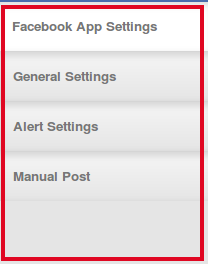
Magento Facebook Wall Post - Admin Interface

  • Facebook App Settings
  • General Settings
  • Alert Settings
  • Manual Post

Below is the detailed description of all the tabs of this Facebook Wall Post Extension Magento.

3.1 Facebook App Settings:
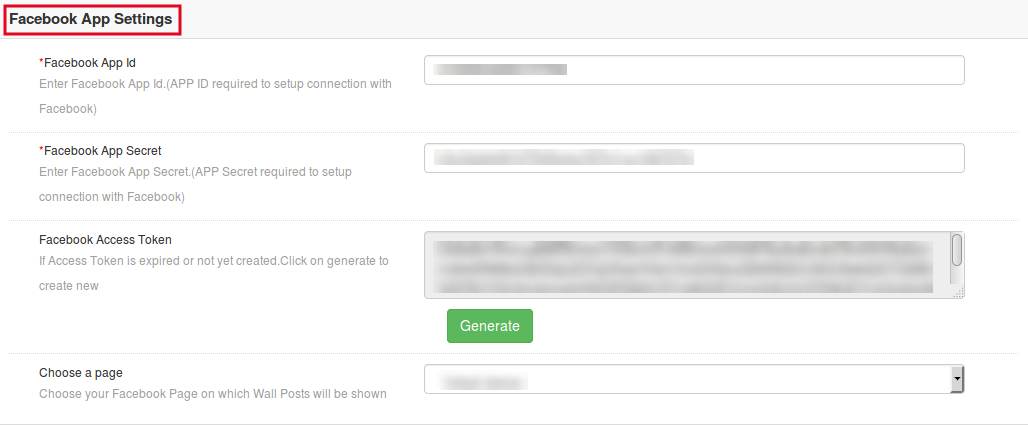
This interface of the Facebook Wall Post Magento Extension contains following fields to be configured:

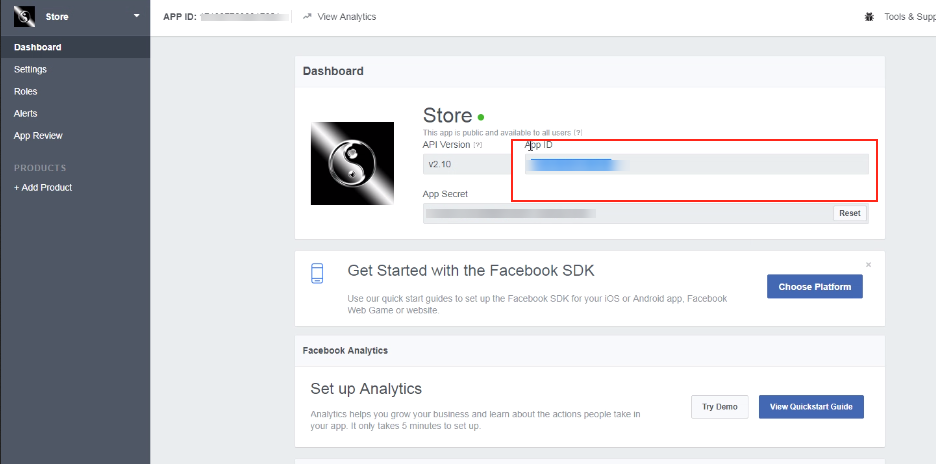
Facebook App ID: In this field of the Facebook Wall Post for Magento, enter your Facebook App ID that is required to set up the connection with Facebook. In order to find the App id, go to the dashboard of your Facebook App. Copy the app id from the column shown in the image below and paste it in the setup page of the module.
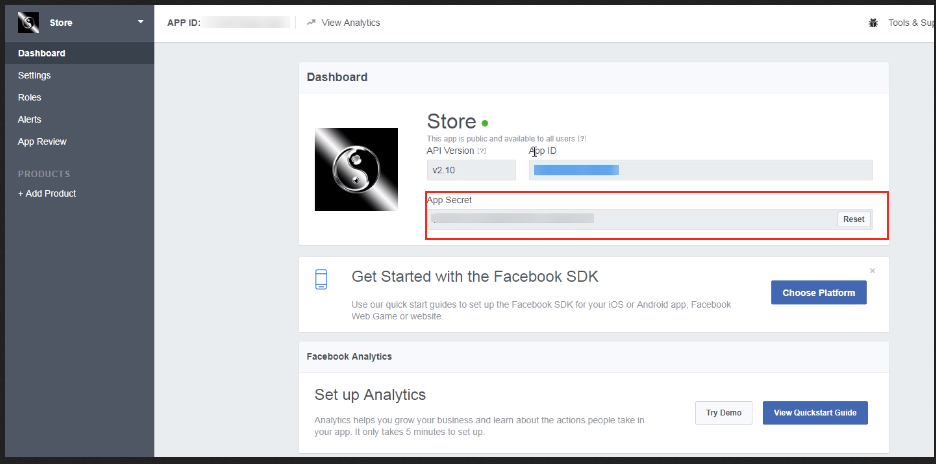
Facebook App Secret: In this field of Magento Facebook Post Extension, the admin needs to enter the Facebook App Secret. Copy the App Secret from the next column as shown in the image below.
Facebook Access Token: After entering the Facebook App ID and App Secret, the admin will need to generate the Facebook Access token. The Facebook Wall Post for Magento allows the admin to generate the Facebook Access Token just by clicking on “Generate” option of the Magento Facebook Post Extension.
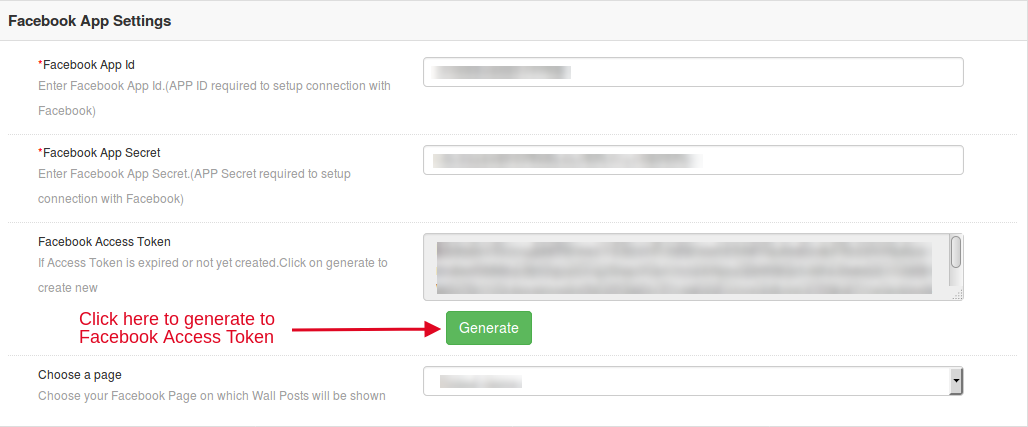
Choose A Page: This field of Magento Facebook Wall Post Extension allows the admin to select the desired Facebook page on which he wants to display the wall posts.

3.2 General Settings of the Facebook Wall Post Extension Magento

This interface of the Facebook Wall Post Magento Extension contains following fields to be configured:
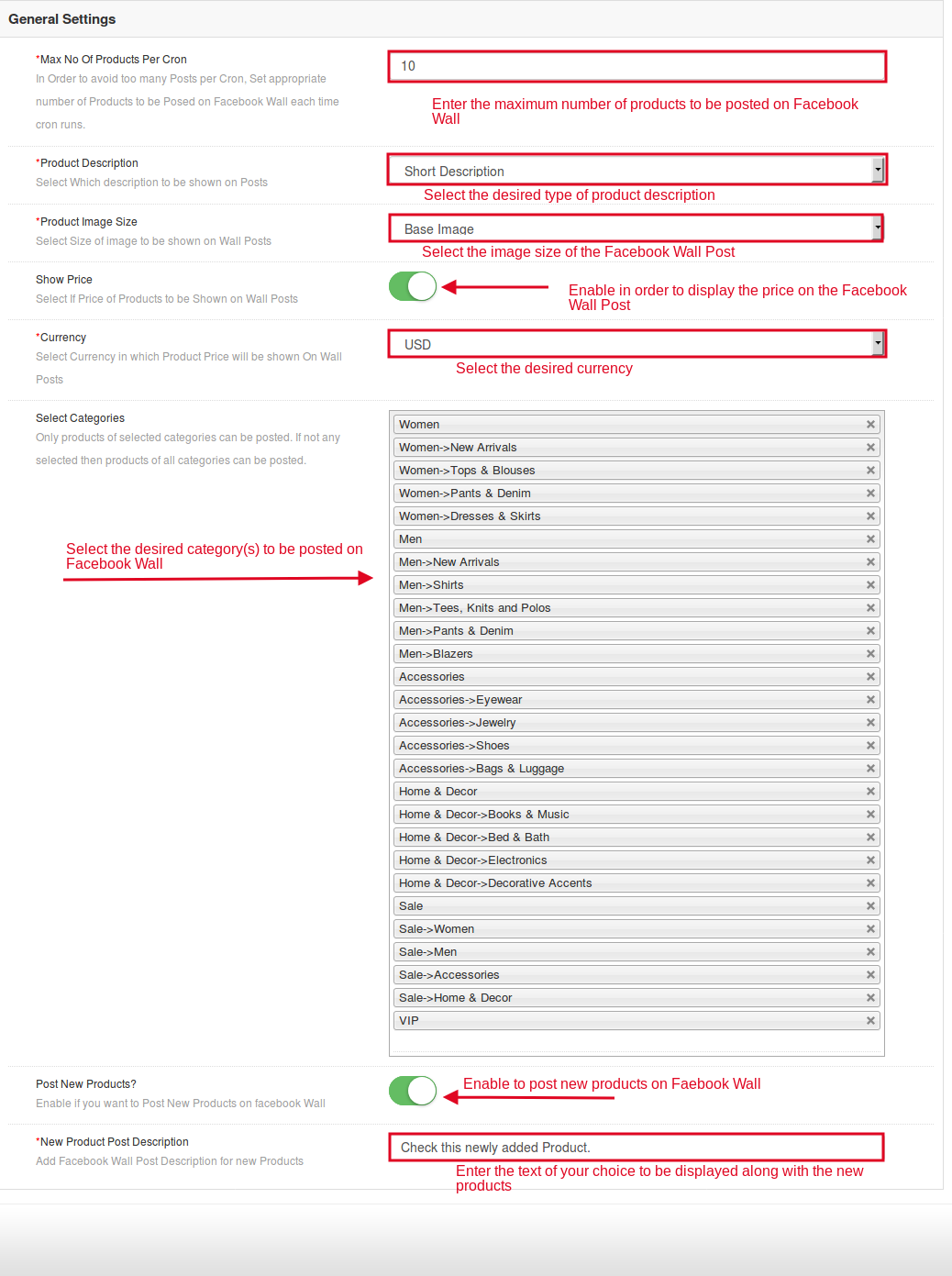
  • Max No Of Products Per Cron:  The admin can set the maximum number of products that has to be posted after the cron is executed. This field of the Facebook Wall Post for Magento offered the admin to avoid too many posts per cron. Magento Facebook Post Extension allows the admin to set the appropriate number of the products to be posted on the Facebook wall each time cron runs.
  • Product Description: This field of the Magento Facebook Wall Post Extension allows the admin to select the type of product description that they want to display in the Facebook wall post. It can be Short, Long or Meta Description.
  • Product Image Size: The Magento Facebook Wall Post Extension offers the admin to select the size of the image to be shown on the Facebook wall post.
  • Show Price: If the admin wants he can display the price of the products at the Facebook wall post.
  • Select Currency: The Facebook Wall Post Extension Magento provides the e-merchants to select the desired currency to be displayed on the Facebook wall post.
  • Select Categories: This Facebook Wall Post Magento Extension lets the admin to select the categories. The products of the selected category will be posted on the Facebook wall. If the admin will not select any of the category then products of all categories can be posted.
  • Post New Products: This field of Facebook Wall Post for Magento allows the admin to post the new products. In order to do so, he just need to toggle a button.
  • New Product Post Description: The admin can even change the description that will be displayed along with the wall post of new products. With the help of this field of the Magento Facebook Post Extension, the admin can do the same quickly.

3.3 Alert Settings of the Facebook Wall Post for Magento

In the alert settings of the Magento Facebook Post Extension, there are following fields to be configured:
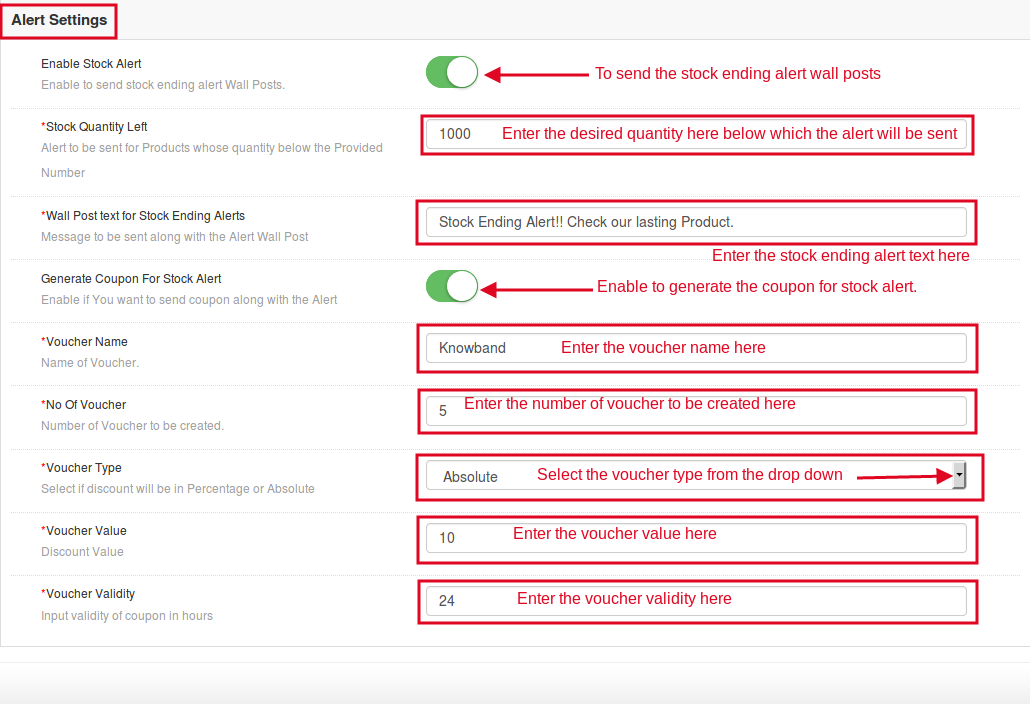
  • Enable Stock Alert: Enable this button of the Magento Facebook Wall Post Extension in order to display stock ending alert at the Facebook wall posts.
  • Stock Quantity Left: In this field of Facebook Wall Post Extension Magento, enter the quantity, below which the stock alert will be displayed at the Facebook wall post.
  • Wall Post text for Stock Ending Alerts: In this field of the Facebook Wall Post Magento Extension, the admin can enter the text of his choice that would be displayed along with the stock alert. The stock alert message can trigger instant purchase intention of the prospective customers.
  • Generate Coupon For Stock Alert: This field of the Facebook Wall Post for Magento allows the admin to display the coupon code along with the stock alert.
  • Voucher Name: In this field of Magento Facebook Wall Post Extension offers the admin to enter the voucher name as per his preferences.
  • No Of Voucher: This field of Facebook Wall Post Extension Magento allows the admin to enter the number of voucher to be created.
  • Voucher Type: The Facebook Wall Post Extension Magento offers the e-merchants to select which type of voucher he wants to display at the Facebook wall. The admin can display whether vouchers with Absolute or percentage based discounts.
  • Voucher Value: This field of the Facebook Wall Post for Magento lets the admin enter the voucher value as per requirement.
  • Voucher Validity: This field of the Magento Facebook Post Extension allows the admin to enter the validity of the voucher as per his preferences.

3.4 Manual Post Settings of the Facebook Wall Post Extension Magento

This interface of the Magento Facebook Wall Post Extension has following fields for the manual posting of products:
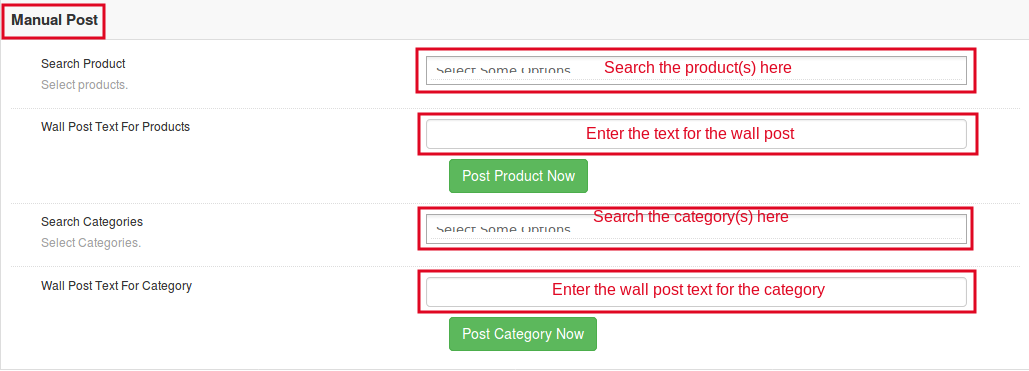
  • Search Products: This field of the Magento Facebook Post Extension allows the admin to search for the desired product(s) to be posted on Facebook wall. The Facebook Wall Post for Magento offers the admin to post multiple products at a time.
  • Wall Post Text for Products: The Facebook Wall Post Magento Extension allows the admin to enter the text of his choice that would be displayed along with the product(s) on Facebook wall.
  • Search Categories: This field of the Facebook Wall Post Extension Magento allows the admin to search for the categories. The products of the selected category will be posted on Facebook wall. The admin can post multiple categories at a time.
  • Wall Post Text For Category: The Magento Facebook Wall Post Extension offers the admin to enter the text of his choice to be displayed along with the selected category post.

4.0 Front End of the Magento Facebook Wall Post Extension

Below is the screen shot of how the Facebook Wall Post will look like after configuring all the settings of the Magento Facebook Wall Post Extension.

When the product is posted manually:
When the products of desired category is posted:
When the stock alert is enabled:
Find more details about this Magento Facebook Wall Post Extension by Knowband below:

Magento Facebook Wall Post Extension Link: https://www.knowband.com/magento-fb-wall-post
Magento Facebook Wall Post Extension Admin Demo: https://mademo4.knowband.com/index.php/fbwallpost/adminhtml_index/index/key/f10f62778e25ddecb095bbbe2627bcee/
Magento Facebook Wall Post Extension Front Demo: https://www.facebook.com/Velsof-demo-506088173059178/

“Also, explore more Magento Extensions for your Magento store as well.“

How can F-Commerce Help you Stay Ahead of Competition?

Well, to start with, how it would feel like to promote the product on a platform which has over 4 billion user? Isn’t it amazing? The increasing trend of social media has gained an ultimate rise in the last decade. At present, if we take a closer look, then, we can easily realize that almost every internet user is using some kind of social media. The popularity of Facebook is one of top rated among all the social media platforms. Hence, F-commerce is one of the better opportunity to stay ahead of competition in the eCommerce world.

The approach to grow your web store’s presence on Facebook is not that difficult. The eCommerce owners can now make their presence on this social media platform as well. With Facebook store, the customer can place their orders while surfing their profile. The Facebook store is a smaller version of the original eCommerce website.

The primary aim of any web store owners is to reach out to the potential buyers and try to connect with them. A better connection ensures the web stores with more sales and at the same time higher rate of conversions. The trend of using the social media platform specifically Facebook as the mean of selling the products is new and very effective. According to a survey, “46% of the online buyers wants the websites to provide their services on Facebook, but only 23% provide it”. Thus, the demand for an online store on Facebook is quite high and the results corresponding to the Facebook store are quite positive. It won’t be wrong to say that F-commerce is the future of online selling.

Let us discuss some of the ways in which F-Commerce can help you in staying ahead in the eCommerce field.

1. Increase user Engagement

One of the important factor which plays a vital role in popularizing the product would be the user engagement. The power of Facebook is not unknown. Most of the people from the age group 13-70 prefers to stay active on Facebook. Thus, the online shops have better chances to reach out to maximum buyers on the platform. The Facebook shop helps the e-merchants to grow more and get better engagement from the customers. The more engagement a platform is able to create the better are the chances of making a sale.

2. Better access for the users

How about getting a chance to explore your favorite shopping site from your favorite social media platform? The thought may brings a big smile on the faces of the customers. The customers don’t have to access the website separately and can check on their favorite products from the social media platform itself. The Facebook shop helps the customers in making instant purchase decision. The idea of shopping through Facebook is quite exciting and it compels the customers to look out for better products using the social media platform.

3. Rising trend

It has been observed that the sites which provided their services using the F-Commerce has an abrupt rise of 33% on the sales made. Thus, opting for the better options is never a waste of efforts for the eCommerce store owners. Though F-Commerce may seem an additional job for the website owners, but the result are more fruitful than the overall effort of launching a Facebook store.

4. Easy promotion

The idea of promoting any eCommerce business is quite troublesome, but F-Commerce has made it quite easy. The Facebook shop even provides the option of social sharing. The option has proved to be one of the most efficient way in making sure that the products are promoted to the farthest of the customers. The advantage of using Facebook as a source of marketing is that the visitors in Facebook can share the products that they like with their friends and so a chain of free promotion starts which enables the web store owners to make better sales on the promoted products.

5. Increased conversions

The rate of conversions is one of the deciding factor in any eCommerce store. Every online vendor wants to get better conversion rates. Thus, Facebook shop proves to be an efficient step in achieving his target. The reach of Facebook is quite large, hence, it makes it possible for the eCommerce owners to reach out to maximum potential buyers. Thus, bringing about a significant rise in the total number of effective conversions.

6. Enhanced word-of-mouth

The important factor which leads to the growth of any business is an idea. All the web store owners are in search of various ideas and opportunities to promote their web store and their products. The idea of utilizing Facebook in order to get more popularity and at the same time better coverage is one of the added advantage that drives the web store owners to make better profits. Most of the customers have already know about Facebook and to access a web store using Facebook all they need is to click on a post, which is not a difficult task. The web store owners can make better use of the Facebook by making use of various modules such as FB wall post module which adds more convenience to the users.

Conclusion

The trend is shifting from the restricted media platform to social media. Most of the people are quite aware with the concept of social media. If the web store needs to get higher conversion rates and also make better sales than picking the F-Commerce route will suit best to them. The optimization of the web store to meet customer requirements help in reaching out to more buyers. It is well set up, people can access it easily and most of all it provides the feature of social sharing. Hence, the web store owner must not care much about the social promotion of the product.

Prestashop FB Store is one such addon for the Prestashop eCommerce stores that can help the e-merchants set up their shop on this platform. So, the store owners can now cater a larger audience with minimal effort.

Liked This? You’ll Like These Too:

The Aspects that Makes FB Wall Post a must-have for eCommerce Stores

With the large number of people using social media platforms like Facebook, Twitter and Instagram, it has led the eCommerce owners to shift their concerns to the very important aspect of social media marketing. The seller needs to keep their customers updated about the products, running offers and different discounts. The customers are more likely to check the discounts offered by store if they are presented in intriguing way. Moreover, one of the better way of providing the customer with the product information is through the FB wall post.

According to a survey by Huffington Post, “On an average more number of people interacted with their content through Facebook than the actual app itself”. So, it encourages the store owners more to promote their product on Facebook.

Therefore, Prestashop FB wall post module enables the Prestashop site owners to promote their products on Facebook via wall post.

If you are running a Prestashop site and feel like your product is not reaching the target audience than this module might help you. Try the module and see the rise in your sales.

The FB wall post may boost your sales in following ways-:

Store Visibility

The Prestashop Facebook share module helps you in generating automatic wall post for Facebook. It will help you to promote your store on Facebook. As the popularity of Facebook is quite large among the people hence, it becomes easy to promote a product using this platform. More people are likely to visit the store, if they tend to see it though interactive platform. The FB wall post enables you to spread out words about your store, offers available and the ongoing sales. It is much better approach than the traditional marketing. You can post your product images, categories, brands as well as the discount coupons being offered by the store. This creates a curiosity among the users and gives the web store a better visibility.

Increase Customer Engagement

The module enables the customers to check the eCommerce store products, offers and discounts without visiting the store. The convenience of getting information through the social media post makes it more approachable for the web stores to engage the customers and gather their attention towards the web store. Therefore, it serves as a better alternative to checking the web store itself. Moreover, the wall post provides the customers with the option to make purchase, so, it saves them a lot of time. The module engages the customer by offering them all the information without letting them leave their social media platform, this acts as one of the major advantage of using the Facebook wall post to promote the web store without putting the customers out of their comfort zone.

Target the Right Audience

The FB wall post plugin allows you to generate automatic as well as manual wall post. Therefore, the seller is free to promote his products on Facebook, depending upon the web traffic at a particular time. The seller can generate automatic posts to keep new visitors informed about the store and offers. The manual post can be generated when the seller the traffic of potential buyers is maximum, thus, providing engagement for the users based upon their preferences. Moreover, it is easier to identifying the purchase behavior of the customers on Facebook. You can easily identify the products that they find interesting by tracking their likes and share. Hence, it is an effortless way to target the right audience.

Easy Synchronization

The module provides the seller with the advantage of easy synchronization between the wall post and the actual web store. It helps the web store to auto sync the post to the FB wall without having to give a second look on the FB wall post separately. The seller can post all the products, offers and low stock counts on Facebook via wall post. The easy synchronization makes it quite efficient. In case, if any customer is willing to avail the offer than they can be easily redirect to the web store from the wall post itself. The customers can browse all the features of the web store through the wall post by some simple clicks. This feature helps the web stores to provide easy and simple approach to reach out to maximum potential buyers without putting more efforts.

Add-on Features

The module is multi-lingual compatible and supports more than 14 languages. It helps the seller to promote their brand or products to people with different ethnicity. Therefore, a larger number of audience can be covered by the web stores in order to make a sale. It also helps the customers to relate themselves better with the website.  The module is compatible with all the Prestashop themes which makes it work with all the themes making the website look more attractive. The seller can optimize the look of their wall post to look more engaging and interactive. The key point of providing a better UI to the customers can be fulfilled by making the use of this module. Moreover, this plugin doesn’t conflict with other Prestashop plugins and is easy to use and configure.

Social Sharing

The power of social media is undetermined. It can turn people into celebrities and products into a trend. Therefore, one of the main advantage of using the module is to get more coverage. Most of the people tend to like one or more products in the web store via the wall post. In this case, if the viewer think that the product is worth mentioning to one of their known ones, they can share the post with them. This way a chain of promotion is formed which eventually leads on to a better promotion of the product for the web store. The more coverage received by the products increased its chances of making a sale. This is definitely one of the ways to facilitate referral marketing and spread the word-of-mouth.

Final Say

In order to keep the customers informed about the products and offers, sellers must follow the social media trends that may change eCommerce. It helps the customers to be informed about the products and as well as increase the sale of your products.

You Might Also Like: