Giving Customers a Personalized Shopping Experience can Boost Online Sales

When exploring your Instagram or Facebook, you always see feeds that are of interest.  Google’s discover feed also shows you the content which you like and would like to spend time on.  Naturally, this makes you feel exclusive, and you spend more time without keeping the time track. 

Can you give the same experience to your customers while shopping? Ecommerce brands like Myntra or Amazon try to target their inactive leads with personalized email marketing. Giving your customer a personalized shopping experience in this competitive environment could be the right plan to survive in a long race.

Understand the shopping journey of buyers with data and use it well for customer experience personalization. With that, customers who get exclusive treatment will do word-of-mouth marketing.

As an eCommerce store owner, you might have given thought to this. But, you may struggle with How to do it? 

Know your customer personally

When you are spending a lot of time and money on focused target marketing, you just don’t need a customer who will make a one-time purchase but your business demands a loyal one. For target marketing, you can consider gathering demographic and psychographic details from a customer. The demographic information can be collected from registration forms but for psychographic information you need more data. To get the details like the interests, values, profession, and lifestyle, you can add custom fields to your registration page.

Proving your customer with loyalty points or rewards at every step of the form filling process will encourage them to fill it. This way, you can get more relevant information for future marketing and product personalization.

You can always ask for:

  •         Their first name 
  •         Birthday  
  •         products they’re interested in
  •         A preferred channel of communication

Some might like receiving emails but in a limited number while other millennials prefer receiving an SMS just after the purchase is made. It is good to ask the preferred channel of communication for targeted marketing. You can even ask for their interests and genre if a person is buying a book from your store.

A large number of people have no issues if a company spoof into the customer’s information which can provide them with a wow experience. From a report, it has been found that 76% of customers expect companies to understand their demands and requirements. So, people like getting a personalized experience, and it is now a trend that can be followed by an eCommerce store owner to compete with others in the market. Personalization can lead to impulsive buying.

Better to communicate with your customers

Remind your customers about the products they liked to buy or visited but did not make the purchase. You can send a push notification for back-in-stock products. You can ask them to look into their wishlist to reduce the abandoned cart.

It has been found that 95% of millennials do shopping while doing other things. Most of them shopped while watching TV or chatting with a friend. Half of the people bought when they are bored with waiting for someone, and some do it when they are traveling.

It is crucial to choose the right means of communication for interacting with your customer. The selection of a communication channel should be based on the data you have collected. Customers often receive promotional emails and notifications which grab their attention and make them shop more.

Putting efforts in the right direction can help you boost conversion rates and customer retention. Millennials prefer texting overcall. You can use a chat app to provide a solution to their queries. This will be a great deal to give them more customer experience personalization.

Effective use of data for persona

You have the data in your system and what a waste if you are not using it well. Your system knows your customer better than you do.

  •         Have you ever been in a situation when you called a person with the wrong name? This happened to me once, and I never want that to happen again. It instantly loses trust in a relationship. Send emails or greet them in-store by calling their name. This builds up an interactive connection between you and your customer.
  •         You can take the help of segment email marketing by categorizing your customers according to their psychographic data
  •         You can enhance the customer experience by offering them products related to their last purchase. A study says, 44% of the customers intended to buy from the same brand or company after getting a personalized shopping experience.
  •         Understand the need of your customer as per their geographic location. Implement geolocation-based marketing strategies. Add a store locator to your website. In-store shopping is still a trend in millennials.

PrestaShop modules you should not miss on

Do you know that you can enhance the personalized customer experience by adding extensions to it?

It is challenging to keep your customers at a checkout page or the product page when they are doing two things at a time. You must have some striking, captivating website features which will keep them attentive and focused on their purchase. Why not with personalized features that you can add with these modules?

Collect more information

With PrestaShop Custom Registration Fields, the owner of the PrestaShop store will collect information about the customer by adding custom fields to the registration form of the website. Additional Order Forms/Field Manager addon for PrestaShop is another module that can help you gather more information. Custom fields on the order form can be generated with this PrestaShop Additional Order Forms Manager without making any adjustments to the code on the web page.

How to use it?

You can ask your customer to fill up the details which can be optional. You can add this field to the registration form. This way you can collect information about birthdays, anniversaries, or any of the interests which can help you promote your products. You can send a personalized message on their birthday with a greeting or any discount coupon. Store owners can use additional information to develop their services and eventually make more profit from their company.

Celebrate birthdays or anniversaries

You can give discount vouchers or coupons to your customers on their Birthday. Birthday Coupon -PrestaShop addon is a module that can inspire your customers to shop from your store on their birthdays.

How to use it?

You can send an email with a personalized message on their special day. This email will include the birthday coupon or discount voucher. The voucher sent through the mail will be valid for a limited time. The addon comes with multiple default templates. You can use it for various occasions.

Make them loyal customers

It is a dream for brands to have loyal customers. From research, it is found that about 30% of people like to buy the same brand and around 40% choose the same brand if they are offering personalized products.  For customer retention and conversions, you can give loyalty points or reward points to your customers.

The PrestaShop Reward Points addon incorporates the reward points feature into your PrestaShop store and allows the admin to offer the rewards point to online shoppers every time they purchase items. 
How to use it?

Store owners can give reward points to the customer after every purchase they do. This comes with a set of terms and conditions. The module helps the admin to add multiple rules for redeeming those points. Customers can redeem those points at some point of purchase which will keep them engaged in your store.

Another extension that can help you with customer retention and customer conversion is PrestaShop Loyalty Point Module.
How to use it?

There are some rules like Cart Rule, Product Rule, and Behaviour rule for loyalty points. Store owners can offer loyalty points on a specific cart amount, product quantity, based on the payment method, particular product or category, shipping services, etc. It can be given to new customers while placing their first order.

Display recently viewed items

Automatic Related Products addon for the PrestaShop store can help you show the relevant products to your customers. This feature can be added to multiple pages of your eCommerce store.

How to use it?

The feature will show related products to your customers, and this will motivate them to see more and more on your eCommerce store. If they are not satisfied with the one product, they can see more until they get the one.

Add more product details

Admin can add n number of details for a product with Advance Product Attribute/Field – PrestaShop Addon. This module allows you to show descriptive information about the product. 
 

How to Use it?

It has a simple configuration, and the admin can ask customers to provide more information about the product. If they like the product or not? If they need any modifications?  By collecting additional customer details, the sellers can better represent them. As a result, online shoppers will have the same user experience with this PrestaShop Additional Field Module on the Product tab.

Attractive email subscription module

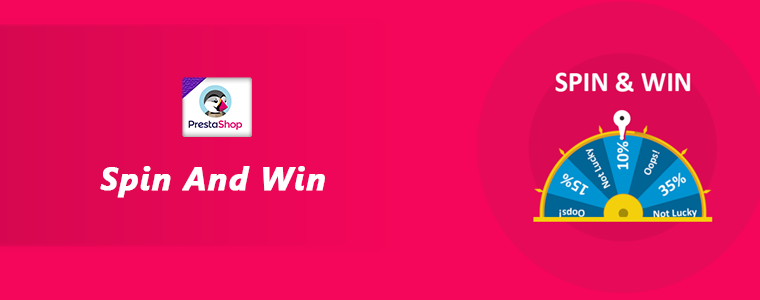
Spin And Win – Entry, Exit, and Email Subscription Popup by PrestaShop have a gamified interactive look. It attracts the buyer’s attention and allows them to win offers like discount coupons or free shipping. This is one of the best sellers of PrestaShop and a fantastic module to collect the email addresses of your customer.
 How to use it?

You can Get Personal in Email Marketing and send personalized Emails using the information which is provided by the customers. The emails should be sent based on customer behavior. You can go for a personal recommendation to offer a personalized customer experience to your customer. Try to re-engage your leads with promotional messages or pop-up notifications. Email marketing is a free and reliable option to give a customer personalization experience to users.

Greet your customer

Greetings are most valuable when you are building a relationship. Customer-trader relationship is most important when it comes to business. You can use a Better thank you page module for your PrestaShop store.
 

How to use it?

Add a Better thank you page module to your PrestaShop store and use it to show a pop-up when the customer is leaving your store or after the successful purchase. Also, you can add customized banners or discount coupons for their next purchase. This way, it can help you boost customer retention and make your customer satisfied.

Final thoughts

Increase your sale by providing a personalized shopping experience to your customers. In this era of millennials, Personalisation is the only way to attract a loyal customer base to your store. Create Special Campaigns Based on user behavior and make them feel unique. They don’t like to be treated as a number but an individual. So, It’s time to boost your sales with a customer experience by providing personalization. 

Recommended Reads:

How to Simplify the Online Shopping Experience of Customers?

Give Best Infinite/Endless Scrolling Experience to Your eCommerce Customers

Tips To Customize PrestaShop Website For Good Friday & Easter Sale

In most of the holiday seasons, e-shoppers are very active & excited when it comes to online shopping. Irrespective of the religion, online shopping is something every netizen engages in. The upcoming festival is Easter & Good Friday, & we have already started to see some eCommerce websites giving teasers of their holiday season based sale. For all eCommerce website owners, here are some of the PrestaShop website customization that should be tried out for sale boosting strategies in the e-store.

This article is helpful for eCommerce businesses with their website built on PrestaShop. With PrestaShop, it becomes very convenient for e-store admins to customize their website in-line with the theme of Easter / Good-Friday. Some of those useful customizations are mentioned below:

1. PrestaShop Hooks for Easter & Good Friday:

Hooks in PrestaShop are images that can be used just for display or as a hyperlink too. Hooks are something that is primarily utilized to highlight anything. To highlight the offers, new arrivals, Easter goodies, etc. use various hooks on your home-page, footer, sidebar, etc. & keep the user informed.

a) Action Hooks:

These sorts of hooks allow the images to have hyperlinks. So, these hooks are clickable & hence can be used to redirect the site visitor to a relevant page. Use easter images & redirect the user to a specific product/ category page. These kinds of hooks also act like a CTA ( Call to Action ) & must be placed strategically to get better click-through-rate & hence conversions.

b) Display Hooks:

Just as its name suggests, display hooks are merely just plain images. These hooks don’t allow adding of hyperlinks & are simply to display only. For your Easter sale, use the images with some informative & catchy text to let your users know about various ways they would benefit from your Easter Sale. Show your coupon codes, promotional offers & more on these display hooks.

Apart from creating these hooks, a good amount of attention must be given to their placement as well. Some common areas where hooks can be placed are:
a) Multiple areas on the homepage.
c) Left/ Right widget areas.
d) Footer.

2. Top Side Banner Customizations:

PrestaShop has the top banner configured by default which e-store admins can simply enable & disable. You must be having any special discounts or easter coupon codes for sale. Display them to the users on this top banner. This thin banner, on the extreme top of the page, is easily visible to your site visitors.

3. Notify Your Customers:

Using web notifications, push notifications & emails, let your customers know the reasons why they shouldn’t miss out on the Easter / Good Friday Sale. Lure them with promotional offers & referral programs. From the backend of your PrestaShop site, you can create & send these notifications to your existing customers. If you own a PrestaShop Mobile App as well, send in-app Push Notifications to your Mobile App users.

Wondering how to build a PrestaShop App from your website? Try the PrestaShop Mobile App Builder module to launch an eCommerce Mobile App.

4. Offer Limited-Time Discounts As Well:

Keep your easter special discounts & coupons valid only for a limited time duration & keep your site visitors aware of that. This is one of the instances why sales during such festivals go high. You can also design a time-based countdown banner. Seeing the countdown timer running, more e-shoppers are likely to engage with it & the offers mentioned on it.

5. Gamify Some Easter Based CTAs:

Rather than using simple CTA (Call To Action) elements on your page, use a few gamified versions of them. Such as the ‘Spin & Win Discount Wheel’ or an interactive Easter Bunny kind of lottery quiz.

You can also add a PrestaShop Scratch card to your eCommerce store to increase customer engagement. Since Easter is celebrated for the resurrection of Jesus, why not design the scratch card with an Easter theme that attracts visitors.

Another way to show your warmth on the day of Easter is by offering reward points or loyalty points to your PreatShop customer. Customers will relish the opportunity and with the right eligibility rules, this also increases the average cart value and accelerates your business.

Wrap Up

There were some of the PrestaShop Customization tips that, I hope, can help you in preparing your PrestaShop website for the upcoming sale season. With PrestaShop being an open-source module, you can make many more customizations by simply utilizing various of its backend features & 3rd party modules, or even custom-designed codes. Now it’s up to you to make the best out of this festival & to serve your customers in delightful ways this Easter.

Hence, for any such requirement, drop us a message at support@knowband.com or visit KnowBand.

Top Customization On PrestaShop Website For Good Friday Sale Strategy

With major festivals comes great sale opportunities. Ones at the doorstep this year are Easter & Good Friday. Online shoppers are already showing excitement for holiday season sales. If you are running an eCommerce business, then utilize PrestaShop website customization to give a boost in sales & revenue. No matter what products are being offered on the website, holiday sale strategies can be utilized to make the most of the outcome.

In this article, we will be covering various tips on the customization of the PrestaShop website to be motivated to achieve results in the Easter sale. Be sure to go through the entire article until the end to know the best possible approaches in the year 2020.

#1. Catchy Web/Push Notifications:

It is a must to make your customers aware of the Easter/Good Friday offers and benefits they would receive. So, make sure to send web notifications & push notifications to your existing customers before & during the sale. Lure the users by notifying them about your special coupons and vouchers with limited-time offers. Rather than using simple text notifications, send themed graphical notifications to compel them for successful purchases.

The store owner can easily create, automate & send such notifications to your existing customers from the backend of your PrestaShop site. In case, if you own a PrestaShop Mobile App, you can send in-app push notifications to app users.

Are you thinking of building a PrestaShop Mobile App for the online website? Try the PrestaShop Mobile App Builder module.

#2. Easter Theme Home Page:

The home-page is the face of a website, Hence, it must reflect all the relevant information that is not only useful for the visitors but also beneficial for the business. Keeping that in consideration, customize the home-page images aka display hooks & action hooks according to the Easter/Good Friday theme.

On the images, use action hooks where you want to add hyperlinks to specific categories/ products. For simply displaying an image (without any hyperlinks) on the home-page, use display hooks. These hooks can be placed anywhere on the homepage including the footer.

#3. Run A Mini Easter Contest:

Use interactive & gamified interfaces such as ‘Spin & Win Discount Wheel’ or any lottery for sale. Rather than having just a regular banner or button, use the CTAs in the form of a contest & games so that it not only boosts your sales but also increases customers’ interest & engagement.

#4. Labels Or Ribbons On Special Products:

Attach labels such as “Easter Special”, “Limited Time Offer”, “New Arrival”, etc. on the selected set of products. Adding such labels increase the CTRs & purchase of those products. Label products according to online shopper needs.

#5. Customize Filters:

If you sell products that are directly relevant for Easter, like candies, then update filter of that category to have easter relevant options. For example- Candies category could have filters of ‘New Arrivals’, ’ Easter Candies’, ‘Popularity’, ‘Flavors’, ‘Brands’, ‘Customer Ratings’, etc. Likewise, for various other categories as well, similar approaches can be adapted to make it easier for your customers to reach their desired products.

Conclusion:

All these additions on the PrestaShop website are just a few instances of how your holiday season sale approach can be optimized. Based on business type & client’s requirements, you can make many other sorts of PrestaShop website customizations as well. Just make sure they are implemented wisely and by only professionals. They not only make shopping convenient for users but also help in growing sales numbers.

Got any customization required for the PrestaShop store? Visit KnowBand or drop us an email at support@knowband.com.

Best Tips To Customize A PrestaShop Website

Selling products on an eCommerce website rely on the presentation & personalization of the products. In simple words, the functionalities, products, features, etc. should be matching to front-end client requirements. PrestaShop online store customization is all about adding new features and functionalities. While doing so, you must be taking some precautionary measures which will help in branding a unique image to the website without cluttering in any possible way.

The majority of the PrestaShop e-retailers happen to make at least some sort of custom change in their e-store. This is, in fact, a necessity for e-businesses to have a distinctive & unique touch to their eCommerce website. Most businesses opt for this to keep the look & feel of their website in-line with their own unique theme of their business. These customizations not only enhance the graphical design of a website but also contribute to adding more functionalities & improve the shopping experience.

Here are few such factors discussed below that can help you with customizing your eCommerce PrestaShop website.

#1. Customization Using Hooks:

Hooks are basically images that can be used for displaying informative images & also act like CTA sources. We can categorize them into two basic options:

A) Action Hooks:

These hooks are clickable & hence can be used to redirect the site visitor to a relevant page. These kinds of hooks require strategic configuration as their CTR would influence more engagement and sales.

B) Display Hooks:

These hooks are plain images simply for the purpose of displaying various things. Some common areas where hooks are placed:

a) Multiple positions on the homepage.
c) Left/ Right-aligned hooks.
d) Footer’s bottom area.

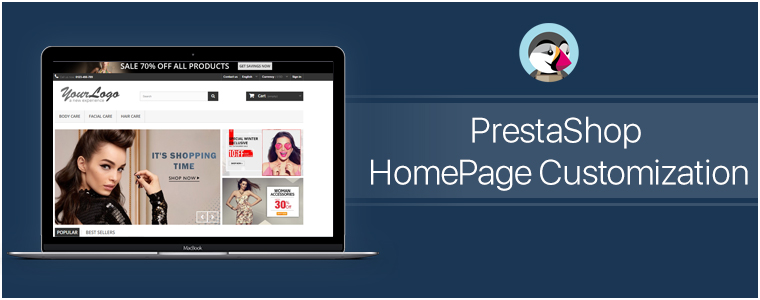
#2. PrestaShop HomePage Customization:

Generally, on the home-page, the area ‘above the fold’ is what gets the first view on a website. Similar to newspapers, websites also have the most important news highlights on the top half of their home page, such an approach to design & customize the PrestaShop homepage helps to engage customers in a more productive way. Some of the home-page designs that can be customized include:

● Sticky Navigation Menu/ Bar with Company Logo, Signup link, search box, etc.
● Slider Images with hyperlinks to relevant topics.
● Banner Images of selected categories of the products being sold on the e-store.
● Hyperlinked Infographic for sale, lotteries, offers, coupons, time-based flash-sale, new arrivals, brand launches.
● Widgets/ add-ons for social accounts like a Facebook block with like/share/follow buttons.
● Static/ dynamic chatbots.
● Gamified CTA (Call to Action) like ‘spin & win’ discount wheels or gamified newsletter/ notification subscriptions.
● Banners for top-seller/ top-brand.
By now, you would have probably realized how these additions would not only make such an e-store stand out for looks & functionalities but also serve the purpose of growing conversions.

A lot of these modifications can be made using the PrestaShop Modules. And because PrestaShop is an open-source eCommerce platform even more edits can be made by manually coding the required functionalities. So the eCommerce businesses on PrestaShop automatically get an additional advantage here to build their site according to their own unique business needs.

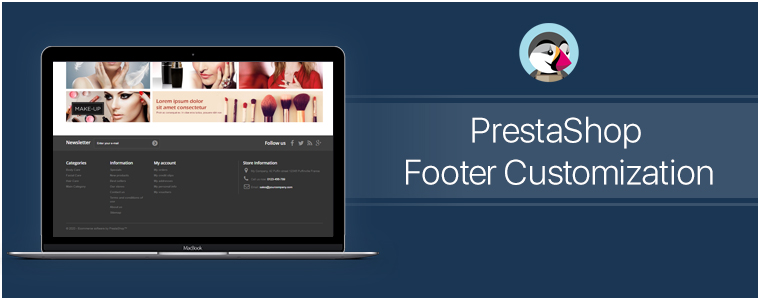
#3. PrestaShop Footer Customization:

The footer of the PrestaShop website enables the e-store admins to showcase various widgets & functionalities. Some can be added via PrestaShop Add-on Modules while some come pre-installed. Even more, can be added via coding or customization.

Footer, for all the webpages, is mostly kept common. So, it is crucial to have all the important things available in it. It offers instant access to your customers for all necessary links & information no matter where they’re displayed on the Prestashop website.

Few common footer customizations are listed below:
● Newsletter Signup Segment
● Social Channel Icons
● Sitemap (HTML Sitemap)
● Company Certifications & Payment Methods
● Quick Navigation Links
● Sign-in /Sign-up Links / ‘My Account’ section
● Contact details of the Company

#4. Other Customizations:

A) CMS Icons:

To display extra information about your PrestaShop store such as payment options, refund policies, etc, admin can use the CMS icons. Clicking them takes the user to the relevant page.

B) Top Side Banner:

This is a default feature that admins can enable/disable. This adds a thin banner on the extreme top of the page with the purpose to show the special offers, discounts, limited-time shipping, etc.

C) Social Sharing Icons/ Links:

With these icons, your e-shoppers can share the link of their choice of products with their friends, family & acquaintances. Prefer to add the links for Facebook, Pinterest, Whatsapp, etc.

Conclusion:

As they say, often little things make the biggest impact. Adding more customized functionalities to your store would help in the growth of the business. These just are a few examples of how PrestaShop Customization can be utilized. Apart from these, there are unlimited numbers of customizations that can be implemented. Feel free to discuss with us on support@knowband.com and get a quote for the required customizations.

Visit KnowBand Plugins to get eCommerce plugins for all platforms.