How PrestaShop Delivery Boy Mobile App can help you with Seamless Delivery Management?

The PrestaShop Delivery Boy App is a robust delivery management system that allows store managers to manage home deliveries fast and hassle-free. The framework is designed and developed considering the struggle of eCommerce store owners after receiving the orders.

It is often a major turn-off for the store customers whenever the product delivery gets delayed. There could be a number of reasons behind the cause.  It’s not necessary that the store admin or team is to be blamed every time. Instead, this could be due to poor delivery management.

That’s where KnowBand PrestaShop Delivery Boy App comes as a savior. The module allows the store admin to add unlimited delivery boys to the store. Once added and approved, the delivery boys will be able to login into Delivery Boy App and manage deliveries of those orders which are assigned to them. The admin can keep a keen eye on the progress and thus PrestaShop Delivery Boy App will save the store owner from any mismanagement.

Both the admin and delivery boys have access to this app. Henceforth, enabling order deliveries to be easily allocated and handled. This is a ready-made, time-saving solution that makes the delivery process safe and secure.

Currently, it is available for two eCommerce platforms: PrestaShop and OpenCart

Prime Features of PrestaShop Delivery Boy App

The Delivery Boy Mobile App for eCommerce is developed to make the difficult task of timely deliveries simpler. With the aid of the delivery boy app, the admin can track all the orders and delivery boys can see the order status.

  • Admin can register delivery boys by adding their details.
  • Delivery boy can log-in with the email address and password assigned.
  • The delivery boy can see the order status from the dashboard.
  • Delivery boy can see the navigation map for order tracking.
  • Delivery Boy can mark the order as assigned, in progress & delivered.
  • Sorting of orders is possible: date wise and according to order status.
  • Delivery process validation with OTP
  • Admin and Delivery boy both can see the commission earned by the delivery boy.
  • The app can be published on the Apple store for iOS users and Google Play store for Android users.

1. Register Delivery Boys

The process for registering a delivery boy on the Delivery Boy App is straightforward. The admin will have to add personal details like the name of the delivery boy, email address, verified image, vehicle details, and other required information.

Once the process of registration is completed, the new registered delivery boy will receive the log-in credentials like and User ID and password for further processing.

2. Proficient dashboard for delivery boys

The proficient dashboard displays order information along with assigned, pending & delivered orders to the delivery boy.

3. Google map integration

There will be a navigation system integrated with Google Maps on the app with a marker to pick the desired spot.

4. Delivery boy app has orders listing screen

The delivery boy can see the orders listed on the order listing including all the assigned, pending, and delivered orders.

The delivery boy has the sorting and filtering options for convenience. He can sort the orders for a time like recent and earlier orders first or by price like low to high or high to low.

Other filter options present in the delivery order listing are Order ID, After Date (Orders created after this date), Till Date (Orders created till this date), and Order status (Assigned, pending, or delivered)

5. Interactive App Interface

The app has an interactive screen layout and its quick and simple navigation makes the screen switching easier for delivery boys.

6. Easy Navigation on the app

For the convenience of the delivery agents, a very easy to navigate menu is provided on the App. From here, any sub-pages on the app can be reached by the delivery agent.

With the navigation menu, the delivery boy can jump to the dashboard, order page, configuration tab, or can also log out from the application.

7. One-Time-Password Verification
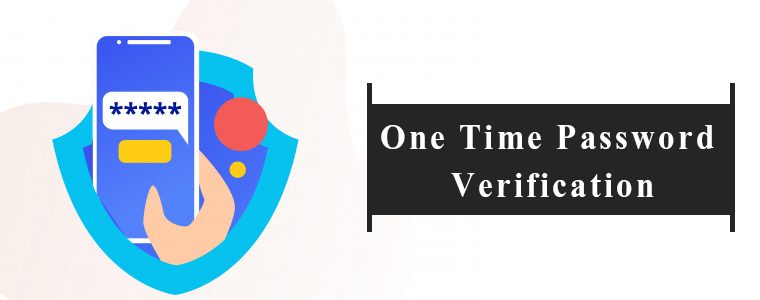
When the order has been picked up by the agent, the customer will receive a push notification/email informing about the order status.

The customer shall receive an OTP, which they shall provide to the delivery agent at the time of successful delivery. Then only the order status will be marked as shipped.

8. Super smooth delivery management

PrestaShop Delivery Management App also increases customer loyalty by keeping the delivery theme up to date by live monitoring and chatting with store administrators and delivery agents.

9. Order Delivery Management
This section helps the managers of the store to keep track of all the orders and the delivery men assigned to them. Based on the status of the orders, i.e. ‘Available’,’ Allocated’,’ Shipped’ & ‘Pending’, the administrators can handle the distribution assignment automatically as well as manually.

10. Delivery Boy Management

The store admin can track the delivery boy’s position and manage them with ease. This helps the administrator to most systematically handle all their distribution agents.

The store administrator can monitor the status of the delivery boys in a tabular form using order ID, order date, order delivery date, order amount, or other necessary details.

Also, the admin may activate or disable the status of the agent. The admin will view the information of orders shipped or declined by this agent on this agent’s details screen.

The administrator is also able to add filters on the table that allow the delivery boy to calculate the commission.

11. Delivery Location Management

It may happen that the real-time location and the delivery locations are not the same. In that case, the app allows the customers to add the delivery location which the delivery boy needs to follow.

The store administrator can also handle this if needed. The admin may also enter the delivery location manually and the delivery agent will be informed of the same.

12. Accept/Reject Orders

The delivery boy can accept or reject the orders assigned but he has to specify a reason if rejected.

13. Email notification

The customers and the delivery boy will be informed with a push notification or email notifications. The email will be sent for order status like order picked, in progress, or delivered.

14. Mobile App compatibility and other benefits

One benefit of this “delivery boy app” module is that if the store’s mobile app has been designed using the “PrestaShop Mobile App Builder” module, its corresponding “Delivery Boy App” will provide live monitoring of the shipped orders by default.

Simply quoting, the orders can be tracked using the delivery boy app if the PrestaShop store is using our Knowband’s Mobile App Builder.

Read more in detail from:

PrestaShop Mobile App Builder is compatible with Delivery Boy App 

Conclusion:

Both module and app have been designed by our technical experts. It is a one-stop solution for businesses looking forward to offering home delivery. You can start various businesses like food delivery business, grocery delivery, medicine home delivery, or any other on-demand delivery hyperlocal business with Delivery Boy App on an eCommerce store.

Need to discuss or got any questions? Drop us an email at support@knowband.com.

Recommended Reads:

[Version 2.0.2 Released] New Features Added To PrestaShop Mobile Apps

Having all the latest features in a mobile app is something that every business is concerned about these days. The same is the case with eCommerce businesses too. To cater to the app users in the best possible way, shopping apps must be laced with the latest features as they help improve the UI & UX of the app.

For PrestaShop, a popular open-source eCommerce platform, mobile applications have become more efficient now. With the addition of 3 new features described below, KnowBand Plugins have rejuvenated their PrestaShop Mobile App Builder module.

Simple Steps To Launch A PrestaShop Mobile App:

1. Purchase PrestaShop Mobile App Builder module.

2.  Fill the app pre-requisite form. (We need these details to create apps)

3. Review your final app before confirm to publishing it on the app stores.

Note: We only publish apps with your developer accounts (Google Play and Apple App store) without any extra charges at our end.

Quick Glance to New Feature Additions:

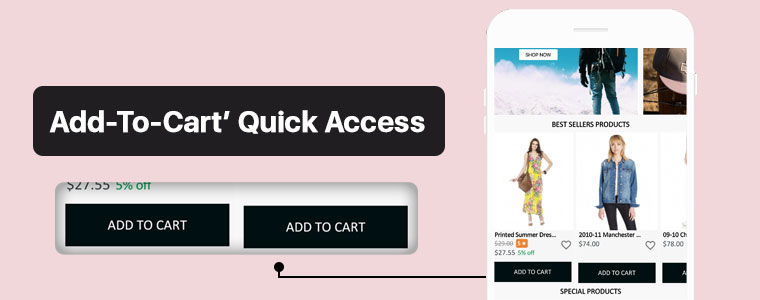
#1. ‘Add-To-Cart’ Quick Access:

This new feature adds the ‘Add-To-Cart’ button on the Category Page & also on the Home-Page wherever product blocks are used. This way, app users won’t have to open the individual product pages in order to add that product to their cart. App users can quickly add their choice of products from the category or home-page.

Now, the user can simply browse the app and keep on adding products into cart seamlessly.

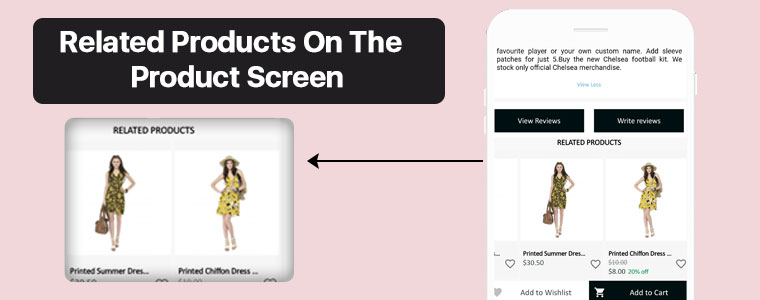
#2. Related Products On Product Screen:

On an eCommerce product page, one great way to motivate the customers’ to shop more is to show some products related to the main product on that page. To serve this purpose, now the PrestaShop Mobile App Builder is compatible with our Automatic Related Products module.

Now, it’s way simple to showcase related products on both website and apps and improve revenue through cross-selling.

#3.  Product Reviews and Ratings:

On the product page, app users can rate the products & write & submit their product reviews. Upon approval, they are displayed on the product page so that others can view it for reference. The PrestaShop Mobile App Builder is compatible with the default Product Comments Module.

Now, showcase user reviews & ratings for products on app and motivate new buyers for more purchases.

Compatibility With Other PrestaShop Modules:

1. Multi-vendor Marketplace Module:

With the use of this module, store owners can easily transition their single-vendor PrestaShop App to a multi-vendor PrestaShop App. Because the Mobile App Builder module is compatible with the Marketplace module (both by KnowBand Plugins), all of the processes are automatic. All you need to do is install the marketplace module on your PrestaShop website.

Having a marketplace allows the store owner to have multiple sellers on his/her store, each with a unique vendor panel. Store owners can sell their own products too on a marketplace & also make profits by taking commissions from the vendors.

–> Check out combo pack of (Multi-vendor Marketplace + Mobile App) below:

https://www.knowband.com/prestashop-advanced-marketplace-with-mobile-app

2. Booking & Rental Module:

This module by KnowBand allows eCommerce stores to have all the functionalities & layout of a booking or a rental app/ website. Now, this module is also compatible with the PrestaShop Mobile App Builder module by KnowBand.

–> Check out combo pack of (Booking and Rental + Mobile App) below:

https://www.knowband.com/prestashop-booking-and-rental-mobile-app

3. Image Search Module:

The Image Search module allows the app user to search for products of your e-store using any reference image that they either clicked with their phone camera or using any reference image from their phone’s gallery. You can also enable this feature automatically in your PrestaShop App by installing this module on your PrestaShop website.

–> Check out Image Search Module from below:

https://www.knowband.com/prestashop-image-search

4.‘Spin & Win’ Module:

Using this module, store owners can show a ‘spin & win’ discount wheel which the customers can spin to avail any one of the discounts mentioned on the pie wheel. Enable this feature on your PrestaShop App by installing this ‘Spin & Win’ module on your PrestaShop website & configure it & then simply set its toggle switch to ‘ON’ (from the App Builder module).

–> Check out Spin-win module from below link: 

https://www.knowband.com/prestashop-spin-and-win

5. Related Products Module:

This PrestaShop module, by KnowBand, displays a list of products related to the main product (on the product page). When an app user is shopping for a particular product, he/she will be able to see related products when they scroll down on that product page. Equip your PrestaShop Mobile App with this feature by simply installing the ‘Related Products’ module on your PrestaShop website.

–> Check out Related Products from below link: 

https://www.knowband.com/prestashop-automatic-related-product

Now that all the new features, compatible modules & installation steps are covered, let’s take a look at core features of the PrestaShop Mobile App Builder module & learn how it can benefit your business.

Core Features & Benefits Of The PrestaShop Mobile App Builder:

#1. Multi-Lingual & Multi-Currency Support:

This app maker module is great for businesses who are willing to launch a PrestaShop App that supports multiple languages & currencies. It can help with localization & even with expansion to multiple countries.

#2. DIY Home-Page Editor:

This feature allows the store admins to design their app’s homepage without having to code. All the tools provided in the DIY Homepage editor of this module are easy-to-use. Admins can add, rearrange & configure various components like sliders, banners, grids, recent product tab, count-down timer, etc. Admins can make multiple layouts & enable anyone of them at a time. This again saves them from designing at the last moment.

Regularly updated & re-designed homepage keeps the app users engaged & allows the business to display the most relevant & in-trend content on their homepage.

#3. Unlimited Push Notifications:

Your app users who have enabled push notifications on your app will be able to receive the notifications that you (admin) create & send from the backend of this PrestaShop Mobile App Builder module.
There is no limitation with this module because store admins can send an unlimited number of push notifications to their app users. Push notifications help to re-engage the app users & remind them about any abandoned cart items, order status, upcoming sale & its benefits & a lot more.

#4. Offline Mode Working:

The PrestaShop Mobile Apps are made to work in offline mode as well i.e. under slow internet or no internet connectivity. Online shoppers get to browse apps with pre-loaded screens without actually needing the internet.

#5. Admin Panel Control:

The mobile apps for PrestaShop can be fully controlled by the friendly admin panel. The store admin can make a few clicks and button toggles and make the app work as per the requirement. The flexibility and customizable options with this extension make it the most preferred choice for store owners.

Drop us an email at support@knowband.com or check all such amazing features in detail from:

https://www.knowband.com/prestashop-mobile-app-builder

[Success Story – Goldengrocery] Grocery Mobile App for E-Commerce

Online shopping has now become a major part of almost everyone’s life. Be it apparels, or electronics, or even groceries, more & more netizens are preferring to shop online now. One major reason for this preference is mobile applications. Mobile devices like smartphones & tablets have become a staple for almost every person worldwide. This factor makes it high time for eCommerce businesses to bring their store to a mobile app.

In this write-up, we will elaborate on a Grocery Shopping Native Mobile App that has been built using an eCommerce Mobile App Builder plugin developed by KnowBand. This plugin is meant to be installed on the eCommerce website. Using the data of that website, the app builder plugin automatically builds a shopping app & its APK & IPA files are published on the Google Play Store & Apple App Store.

One of the grocery shopping apps built using KnowBand’s eCommerce Mobile App Builder is ‘Golden Grocery’. The ‘Golden Grocery’ mobile app is a feature-rich native application both on the frontend as well as the backend. Take a look at the user-end of the ‘Golden Grocery’ Native Mobile App.

Website Link: https://goldengrocery.in/

Mobile App Link: https://play.google.com/store/apps/details?id=com.goldengrocery.androidapp&hl=en_US

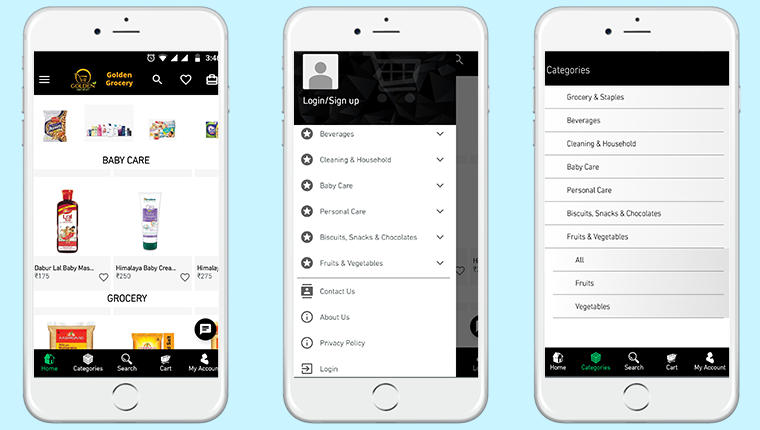
Home-Page, Menu & Category Page:


These app screens are of ‘Golden Grocery’ Mobile App. The 3 screens above display the HomePage, Navigation Menu & the Category Page respectively. Using the eCommerce Mobile App Builder plugin, store owners get a customizable app. They can easily design their home-page of their app using various home-page editor tools provided on the backend of the eCommerce Mobile App Builder plugin.

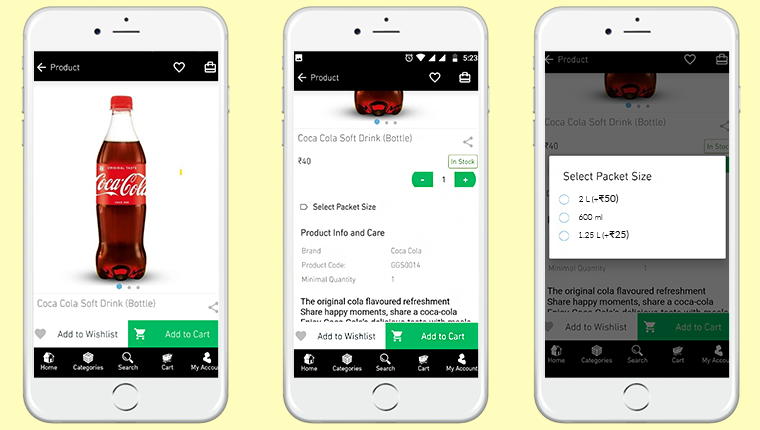
Product Page:


Shown above is the product screen of the ‘Golden Grocery’ Native Mobile App. It includes multiple product displays, page sharing icon (for multiple platforms), product quantity stepper, product specifications, description, wishlist button, ‘Add-to-Cart’ button & much more.

From the backend of the eCommerce Mobile App Builder, store admin can even select whether clicking the ‘Add-to-Cart’ button would send the app user directly to the cart page or whether it would keep the user on the same product page for break-free shopping.

We are grateful to have received great feedback about our eCommerce Mobile App Builder extension from our client (Golden Grocery). We are glad that they found our plugin easy to use & were able to launch their new app without any hassle & in the least time possible.

As a leading eCommerce solution provider, we, at KnowBand, will continue to provide the best tools & services to various eCommerce businesses around the world. Take a look at our range of Native eCommerce Mobile App Builder extensions:

PrestaShop Mobile App Builder 

OpenCart Mobile App Builder 

Magento Mobile App Builder 

Magento 2 Mobile App Builder

WooCommerce Mobile App Builder 

Features Of The E-Commerce Mobile App Maker Extension:

#1. Multi-Lingual Support:

This feature makes your shopping app support various international languages. It is ideal for businesses that serve internationally or in a language other than English. RTL languages like Arabic, Persian are also supported.

#2. Support For Multiple Currencies & Payment Gateways:

This feature allows your app to support various international currencies & payment gateways. As the eCommerce Mobile App builder plugins by KnowBand are open-source solutions, even more currencies & payment gateway support can be added as per business requirements.

#3. Live Chat Support:

This equips your Shopping App with in-app Whatsapp/ Zopim Chat Support. It connects your app users to your chat support team.

#4. Push Notifications:

From the backend of the eCommerce Mobile App Builder, store admins can create, automate & send an unlimited number of Push Notifications to their app users. It’s highly useful for e-retailers as these notifications play a huge role in boosting customer retention & to reduce the cart abandonment rate.

#5. Simplified Logins:

For a smoother onboarding, visitors can be made to sign-in into your app via fingerprint authentication or via their social accounts i.e. Google, Facebook, etc.

#6. Live Synchronization:

Both the website & the app remain in-sync with each other because Mobile App, created using this shopping app maker plugin, uses the same database as that of its equivalent website. This also ensures automatic inventory management.

#7. Complete Technical Support:

With the paid version of this extension, you get a free 3 month support period. This support includes assistance in building, optimizing, & launching your eCommerce App. If required, your app can further be customized according to your needs- such as setting up returns & refunds, etc.

#8. Simplified Backend:

Store admins can instantly make changes in their app by editing/ re-configuring the App Builder plugin from their website backend. This helps a lot with instantly customizing the app’s home page, or to create/ automate/ send push notifications, customize the tab-bar, etc. All these re-edits take just a minute to make & they instantly show up on the mobile app as well..

Conclusion:

Apart from all the features mentioned above, a lot more features are provided by default. Some of them are- one-page checkout, Offline accessibility, pre-saved addresses, social sharing options for multiple platforms, compatibility with ‘Spin & Win’ plugin, compatibility with Image Search Plugin, etc.

Hence, if you own a Grocery store on PrestaShop, OpenCart, Magento, or WooCommerce, drop us an email at support@knowband.com to discuss more.

How to boost downloads of your eCommerce Mobile App?

Successfully launched an eCommerce Mobile App & start selling products on shopping apps along with the website. Now, what’s next?

Getting your native Android & iOS shopping app to overcrowded Google Play Store & Apple App Store is just the beginning in the world of mobile commerce. There is much more beyond from here. Being an eCommerce merchant, now two options left for you. One is to wait & let the users discover about your app on their own and the other one is to do something about it & promote the app in the right manner. The later one can be a game-changer for you.

Nowadays, the majority of developers are facing the problem of fewer downloads, after the app is published on App stores. The eCommerce industry itself has huge competition and is growing with each passing day. To get expected downloads will require some efforts & understanding from you. Before getting into that detailing first, let’s discuss how marketing exactly works in the world of mobile apps.

You probably would be aware of the term ASO (App Store Optimization) which is responsible for ranking/position of your app in app stores. App stores have their own ranking criteria which are quite similar to search engine rankings algorithms. Let’s know more about ASO:

#1 App Store Optimization

ASO works like SEO. It handles the ranking of apps in app store search results. This fact is quite obvious that the better ranking of your app will rise both visits & downloads. Developers should optimize the right keywords for the app to make it rank higher in search results. Here are some checklist points for this technique:

1. App Title:

The name of a mobile app plays a vital role in its success. You should go for some catchy yet descriptive title without missing the core value of the brand. Always remember that the name will have an everlasting impression on users. Before finalizing the app name, you should always have a look at the name of your competitor apps. And, the keyword with the highest search volume should be used in the app name.

Apple App Store provides 255 characters to write a title. Whereas, Google Play Store has lowered title limit to 30 char & allows putting keywords in the description instead of the name.

2. Keywords/Tags:

Choose the right keyword for your app & use them in the tags/keywords field of app listing. Apple store allows 100 char limit to insert keywords while the Google Play store allows to add them the long description of 4000 characters.

Just like SEO, keywords will only be beneficial if they are well-suited & match your business domain. So, do proper keyword research & analysis & sneak into some competitor as well if required. It would not harm.

Also, there should be a check on keyword performance as well. If they aren’t able to give downloads after some time, it’s a signal to update them.

2. App Description:

The description for the app plays the same role as a landing page for a website. Description could be a compelling factor for the user reading it to end up with app installation. Both Google Play & Apple App store offers 4000 char description to put them wherever you like.

You should write the description with the thought-process that user isn’t aware of the app at all. For an eCommerce store, the app would have no download charges yet users hesitate to download it for free, why? That’s where your description plays its role to impact their decision.

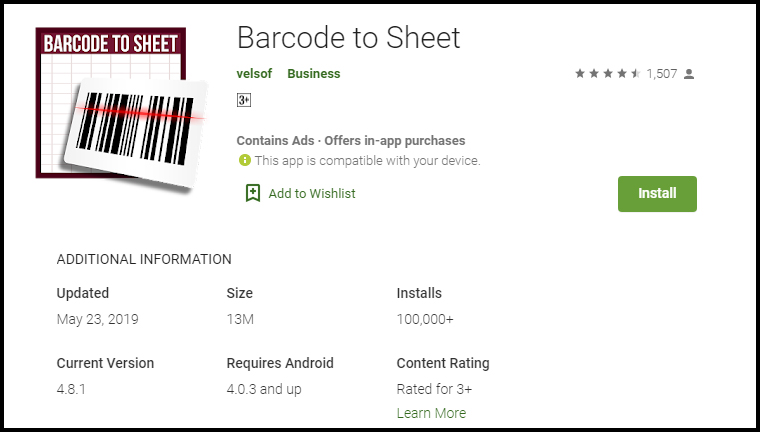
Try to list down all the features & benefits with proper keywords to make the most out of it. For the visual part, make sure the screenshots are appealing and have relevant information. For instance, take a look at how clear & self-explanatory screenshots are of Barcode To Sheet mobile app. The interactive app preview video gives complete info in just 2 minutes.

4. App Downloads:

You should always keep a track of the downloads of your app. It should always keep increasing. The more downloads you will get the higher ranking you will get. Even, the app store also shows the visitors ranking of the tops app In their respective category which majorly depends on the app downloads.

Somehow, if your app is lacking downloads in the initial launch phase, you can even try some third-party promotion to get a rise. The downloads depict the authenticity of your app & help in ranking as well.

5. App Ratings & Reviews:

Being in the retail industry, you would be aware of the potential of ratings & reviews. That works for your app as well. Keep your user reviews positive & ratings higher for better ranking.

Launching a beta version of your app is a way to make sure that it is user-friendly & match expectations. You can even get happy & satisfied reviews from the beginning. In order to simplify this task, try to get fully genuine & real reviews.

Also Read:
The Mobile App Effect in eCommerce Industry during Holiday Season
Tips to create app icon for your eCommerce app

#2 Google Search Optimization:

Yes, Google search it is. You can use it to rank the app in Google searches & get it installed in the user’s devices. The process is quite simple, you just need to optimize app listing page & link it to your website.

1. Interlink Store & Apps:

There should be a proper interlinking between store & app listings. Keep the brand name in app title & description which should have a back-link to your website.

Also, highlight app links on your website homepage for better usability & increased downloads.

2. Allow App Indexing:

Indexing signals Google Bot to crawl the content of a specific web-page. Make sure that indexing is allowed for your app listing page as well.

This will let crawlers go through app description & keywords which will ultimately help in Google ranking of apps. You should even keep an eye on the content of app web-page & update it from time to time.

Actually indexing of application is slightly different from the web-pages. Along with app description, the content available on app screens can also be brought to crawling with deep linking app indexing & firebase app indexing.

3. QR code for App Install:

Display compressed QR codes on your website & let users land straightly to app download option on scanning. This not only improves usability, but also it is a future trend which could affect rankings in coming time.

These QR codes on the home page of the website will grab the user’s attention & straightly lead them to apps for better browsing & hassle-free purchase. Click here to create a low-density QR code.

#3 App Promotion on Social Platforms

As far as eCommerce mobile apps are concerned, social media networks are an effective channel for promotion. You can increase the visibility of your app & get potential no of downloads from there.

Majorly there are two ways to do that. One is to promote the app through your social business profiles on Facebook, Twitter, Instagram, etc. Another one is to run Facebook ads for your app.

Also Read: Social media strategies to take your business next level.

#3 App Analytics

Often it happens that developers focus is just on the download numbers. It’s good, but there should be a check on the user’s behavior & app performance as well. Your app will be uninstalled from user’s devices whenever they face any sort of abnormal behavior.

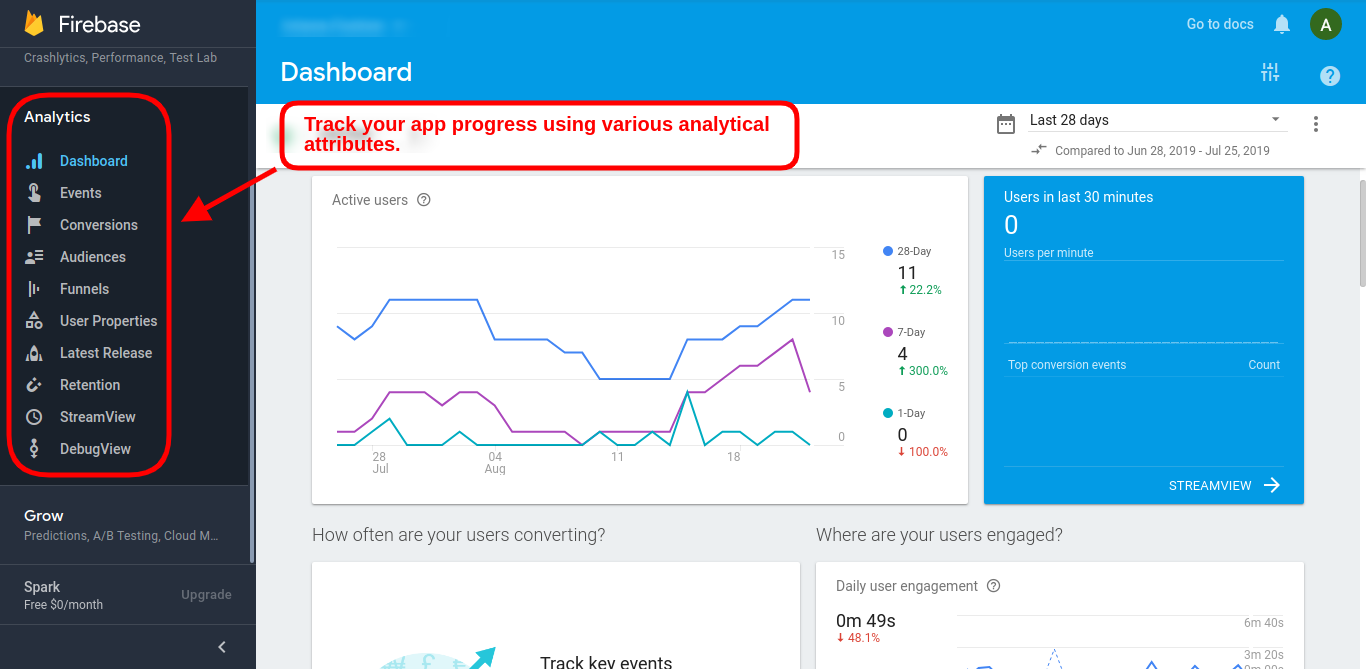
You can use Google’s Firebase Analytics to learn more about user’s demands in real-time & plan on how to deliver them accordingly.

Similarly, the Apple store has also its analytics tool with App Analytics which also used to measure performance & set new goals. The Google Firebase tracking can also be added in Google Analytics in order to keep a check on app performance & growth.

#4 Press Releases for App Launch

Before launching an eCommerce Mobile App for the online store, you should release a press release on different digital media networks as an announcement. This campaign will voice out about future app presence & get initial downloads in beta version as well.

The developers can even go to influencers & reviewers to get genuine feedback/review for their apps. The reviews get published on multiple websites which grabs user attention with a quality back-link to your app listing web-page. This approach has worked for various leading names when it comes to increasing downloads.

A pre-launch campaign can gain exposure for your app. Pre-announcement about ongoing app development & will be available soon is the best thing to do instead of just waiting for launch day. A blog post about development updates maybe even published for better interaction with users. It will help in building eagerness in users regarding your app.

For all the eCommerce merchants out there, if you haven’t taken your store to the mobile platform & start generating heavy leads, here is the most advanced & automated Mobile App Builder plugin available for all major platforms. Check them out:

PrestaShop Mobile App Builder
OpenCart Mobile App Builder
Magento Mobile App Builder
Magento 2 Mobile App Builder
WooCommerce Mobile App Builder

Final Comments:

The answer to successful app downloads lies in the preliminary strategies we choose. The above-discussed tips will be a booster for your app downloads, but you can also opt for any other technique as well if it works for you. In the wide eCommerce industry, multiple domains have a variable audience, so there isn’t any foolproof way to get numbers. But, yeah these points have worked for a majority of developers in the past & would hopefully bring recognition & downloads for your app as well.