The best way to keep customers is to delight them and create an emotional bond with them. The Prestashop Birthday Coupon addon will assist you in forming a bond with your loyal customers. Coupons are a perfect way to supplement your online marketing efforts. Although these discounts or deals can go unnoticed at times, the personalized message will easily capture the attention of consumers. You can now expand the scope of your eCommerce store with email wishes.
Give special promo codes to customers to wish them a happy birthday. On a specific date, the module will send out emails with warm greetings and discounts. Not only for your customers but also for your brand, birthdays can be a real treat. Take the time to build campaigns that will make the customers feel good on their special day.
PrestaShop Birthday Coupon Addon
Send emails to customers on their birthdays using PrestaShop Birthday Coupon addon. The email triggers may be sent on the birthday itself, or a few days before or after their birthday. Also, send them an email congratulating them on their one-year anniversary of account formation.
This is one of the ways to keep in touch with your customers and give them a reason to come back to your shop. As a result, it’s an excellent tool for consumer satisfaction and providing promotional deals on special occasions.
Some of the best features of this amazing addon are compiled here for your reference.
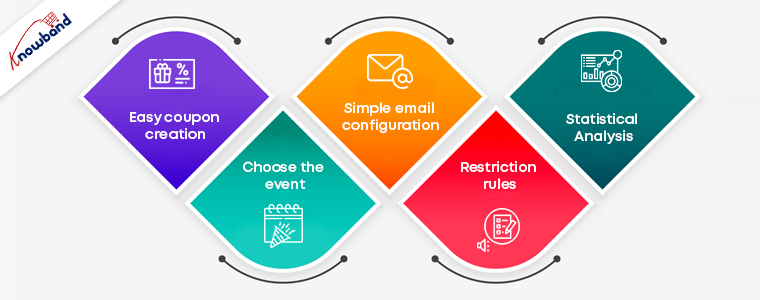
Easy coupon creation: The Prestashop Birthday coupon addon makes it simple for the administrator to generate coupons or gift vouchers. As a token of gratitude, you can give a discount on the next purchase or a free product. In just a few simple steps, you can set the discount number, percentage, and free gifts. You may also specify how long the coupons will be valid.
Choose the event: With the Prestashop birthday vouchers module, you can send email triggers for two separate occasions. You can submit it on the customers’ birthdays or when their accounts have been open for a year. In either case, the coupons and emails can be created and personalized in a few simple steps.
Simple email configuration: The Prestashop birthday coupon addon comes with a variety of default email templates to choose from. The administrator can also personalize the emails and make any adjustments he or she wants. You can submit your wishes in a variety of languages thanks to the multilingual compatibility.
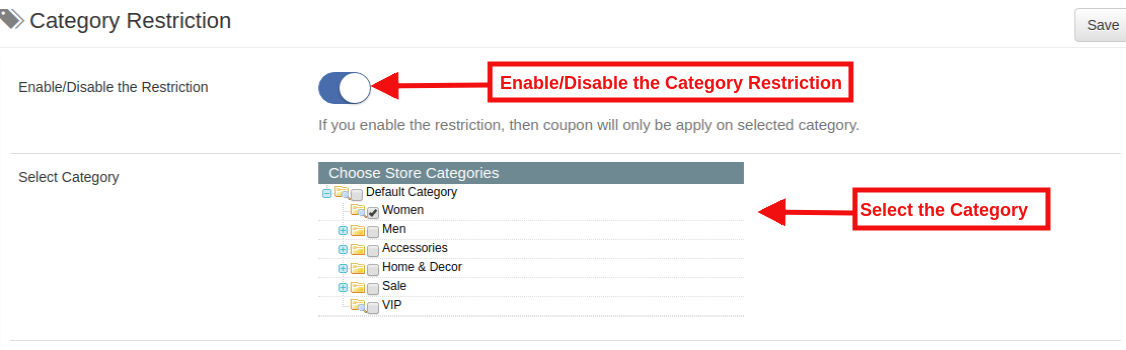
Restriction rules: You can limit which countries can take advantage of the deals as required. You may also eliminate categories that you don’t want to give discounts on. All you have to do now is choose the groups to which the restrictions will be applied.
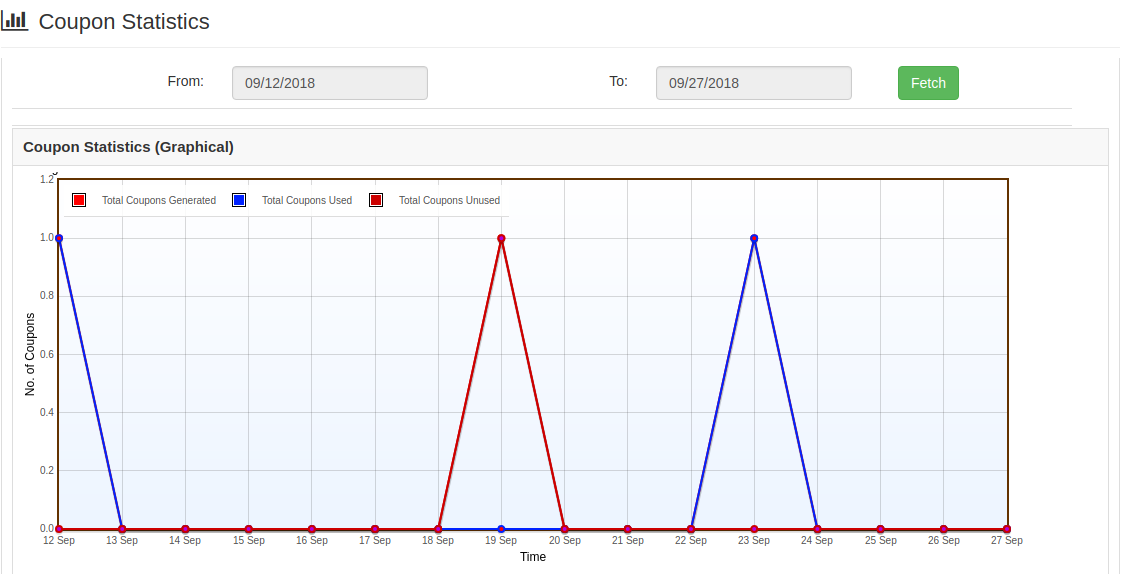
Statistical Analysis: The administrator has access to the whole marketing strategy report. Both graphical and tabular representations of the coupons produced and their status are available.
Benefits offered by Birthday Coupon Addon
Make your customers feel special on their special day to establish a personal bond.
On their birthdays, giving a personalized experience to customers will enhance brand loyalty.
Customers shop more from the online store if they receive free coupons on their birthday.
They can find it easier to complete their purchase with the ready-to-use coupon codes.
Use Code NEW20 to get an additional 20% off on the instant purchase of this module.
Give your customers a satisfactory experience on their Birthday and make them feel special on their special day! For any assistance on eCommerce modules, reach out to us at support@knowband.com.
Certainly, coupons are an enticing way to maximize volume and revenue. It can easily build your customer data and temporarily improve your conversion rates by integrating them into your marketing mix. Although there is no real substitute for offering quality goods and reasonable pricing, when the market heats up or customer expectation determines it, coupons do a great job supporting those efforts. To automate the coupon discounts on your OpenCart store, you can add ‘Sales Coupon Enhancer – OpenCart Extensions’ developed by KnowBand.
Coupons and discounts enhance sales by increasing conversions. Let’s explore the functionalities and learn how to use coupons to create discounts on the OpenCart store.
In creating coupon code, the sales coupon enhancer plugin offers admin all the options he ever wanted. It has several helpful features that are not available by default in OpenCart.
The OpenCart Sales Enhancer Extension makes it possible for the store administrator to create several coupons based on different categories. Through the OpenCart coupon code generator extension, store admin can generate coupons for a particular brand, client, payment method, shipping methods, etc.
This OpenCart Extension gives the administrator the ability to display all coupons produced without any trouble. The store administrator will set the coupon code rules and create random coupon codes through the OpenCart coupon code generator.
It allows setting conditions to apply to the coupon at the checkout page. One Page Checkout extension has a field for coupon code entry and the Coupon Code Enhancer is compatible with One Page Checkout.
Key features of OpenCart Sales Coupon Enhancer
Create Coupon Codes
You can create several coupon codes for customer groups, shipping methods, and payment methods using the OpenCart promotional vouchers. For instance, choose XYZ bank payment and avail a 10% discount’
Set Coupon Code Validity Rules
The number of rules to validate the coupon code can be applied through the OpenCart coupon generator will be defined by the store manager.
Generate random coupons with OpenCart coupon code generator
The OpenCart coupon code generator extension has a choice for generating random coupon codes, or you can enter your own code as well. Like for Christmas, the coupon code be SANTA25′
Create Code for Categories and Brands
The OpenCart sales coupon enhancer gives you the option of creating coupon codes specifically for a brand, category, consumer, shipping method, payment method, etc.
Compatibility
The OpenCart coupon code generator extension is compatible with Multi-Store. The default coupon code scheme does not interfere with the OpenCart coupon code generator extension.
Detailed Data Reports
OpenCart coupon generator gives you various reports to give you a glance over the coupon used orders and who did not use coupon codes while placing the orders.
The difference in the default coupon creation and coupon creation from the module:
Some benefits of offering Coupon Code discounts:
It has a fantastic interface that helps clients to quickly access and understands where code can be applied.
Easy to create coupon codes: Generate coupon codes for every occasion and event. Like on a particular product, category, shipping method, specific payment gateway, etc.
Apply rules: Apply rules based on products, cart quantity, type, etc., and configure your coupons with the OpenCart coupon code generator extension accordingly.
Fully customizable: The extension of the OpenCart coupon code generator can be completely modified from the backend.
Increase sales: 96% of consumers use coupons when making an order, which will increase the web store’s sales.
Display Reports: You can easily view reports and statistics of the total coupons generated and the number of coupons discounted. With the support of OpenCart coupon code generator extension graphs, you can also view the orders that used coupon codes and which did not use them.
Wrap-up: The coupon code extension can be easily applied to any of the OpenCart stores and is compatible with the journal theme. The coupon code generator extension is super easy to install and configure. Adding coupon codes The OpenCart coupon generator gives you free support and free updates for the future. KnowBand provides free installation of the OpenCart coupon generator.
But sometimes, when we go through PrestaShop forum, we stumble across many questions where merchants put forward their requirements which we can be fulfilled by the modules which aren’t popular or which they are not aware of.
In this write-up, I will be covering those useful but highly underrated modules that can be fruitful for the PrestaShop merchants.
1. Preferred Delivery Time
We get queries where merchants want such a module through which their customers can get the product delivered on the desired date. PrestaShop Preferred Delivery Time module is the one you need.
With the help of this module, you can allow customers to pick a desired date and time slot for their order delivery. So, if they want to gift someone something on a specific date or want to receive the order for themselves at a specific date and time, this module will help them do so.
From the back-end, you can adjust the time-slots, specify the non-delivery days and also allow customers to update the delivery date and time even after placing the order.
2. Advanced One Page Checkout
If you do not want your customers to go through multiple steps/pages before they complete their checkout, PrestaShop Advanced One Page Checkout is the module you should consider.
It makes your checkout process static which means shoppers do not need to load multiple pages. A responsive checkout popup is added to your website and customers can switch between fields without the URL getting changed.
You should definitely give it a try once.
3. Quick Login Popup
PrestaShop Quick Login Popup enhances the login/sign-up experience of your site visitors. When a visitor lands on your website, he/she does not need to go to the registration page separately in order to log in or create their account.
Clicking on the “Sign in” button will open a registration popup without the URL getting changed. The popup can also be closed immediately; users do not need to hit the back button. You can customize the popup display and also highlight your deals or specify the benefits indicating why a visitor should register on your website.
4. Store Locator and Pickup
PrestaShop Store Locator and Pickup module encourages the in-store pickup facility and allows your customers to self-pickup the items from your stores at a specific date and time slot. They can search the nearby stores and choose accordingly. Due to COVID-19 pandemic, many merchants have initiated the pick-up facility on their website.
From the back-end, you can add your stores, adjust the pick-up timings, notify stores via email as soon as a customer places the order and perform various other tasks.
5. Additional Order Forms/Field Manager
With the help of PrestaShop Additional Order Forms module, you can add additional fields on the checkout page without making any code changes. You can add a text field allowing customers to add a note related to the order, place a checkbox, and many other custom fields.
6. Custom Registration Fields
PrestaShop Custom Registration Fields module lets you customize or add additional fields to your registration page. You can enable validation on custom fields to display an error if the input is wrong and perform many other customizations.
7. Birthday Coupon
One of the best ways to call your customers back to your store to shop is by offering them a coupon code and there cannot be a better day to call them than their birthday.
With PrestaShop Birthday Coupon module, you can make your customers’ birthday special by providing them with an exclusive coupon code to shop. This not only helps you retain that customer but also improves customer loyalty.
Various customizations can be made from the back-end.
8. Page Maker
PrestaShop Page Maker module allows website owners to create and customize N number of web pages on their site without making any changes in the code file. You can display multiple blocks like Best Sellers, New Arrivals, Featured Products on the same page. It provides an SEO-friendly URL to the newly created web pages.
9. Advance Product Attribute
With the help of PrestaShop Advance Product Attribute module, website owners can add additional fields on the product page. You can place a checkbox option, comment box, warranty option and much more.
This allows you to improve the purchase experience of shoppers and also makes your product page user-friendly.
10. Login as Customer
PrestaShop Login as Customer module allows store admins to log in to the customer’s account without requiring a password to get insights if a customer reports any kind of problem. This helps you resolve customer issues in a matter of moment.
For any queries or assistance regarding the modules, kindly contact us at support@knowband.com
One of the biggest challenges for the eCommerce store owners is to achieve customer retention. Of course, acquiring new leads is great, but retaining existing customers should be your primary focus. Studies have found that 68% of sales come from existing customers. In order to increase customer retention, Knowband offers the Magento Birthday discount module for Magento store owners. Magento Birthday coupon is an effortless way to please your customers by offering the discount coupon or free gifts to the customers on their birthday or on completion of a year of account creation. By sending a personalized birthday message with the discounted coupon code, the store admin can encourage the customer to return to the store and shop again. This is really helpful to develop a strong bond between the brand and the customers.
Alternatively, this Magento Birthday coupon addon can also be used for sending the THANK YOU message to the customer on completion of one year.
1.1 Features
Magento Birthday discount module by Knowband automatically sends discount coupons to the customers on their birthday.
The Birthday Coupon Extension for Magento even enables the store admin to send the discount email to the customers after one year of account creation.
The admin can change the prefix of the Birthday coupons from the back-end of the Magento Birthday Coupon plugin.
By using this Magento Birthday Coupon Module, the admin can set the name of the Birthday Coupon which will be displayed in the cart summary and as well as on the invoice.
The admin in Magento Birthday gift addon can select the occasion for the sending the discount coupons.
Birthday Present extension for Magento offers an option to the admin to set coupon code validity in days.
The Magento store owner in Magento Birthday gift module can set the minimum cart value required for the customer to use the coupon code. Below the specified amount the coupon code will not be valid.
With the help of this Magento Birthday Voucher Extension, the online retailer can set the number of days before the Birthday when you want to send the email (send an email before given number of day(s) from the birth date or registration date).
Knowband Magento Birthday coupon addon allows the store admin to customize the email template subject line and content as per need.
Magento Birthday Gift Module by Knowband offers the Country and Category restriction option. The store admin can select the country and category where they want to offer these discounts.
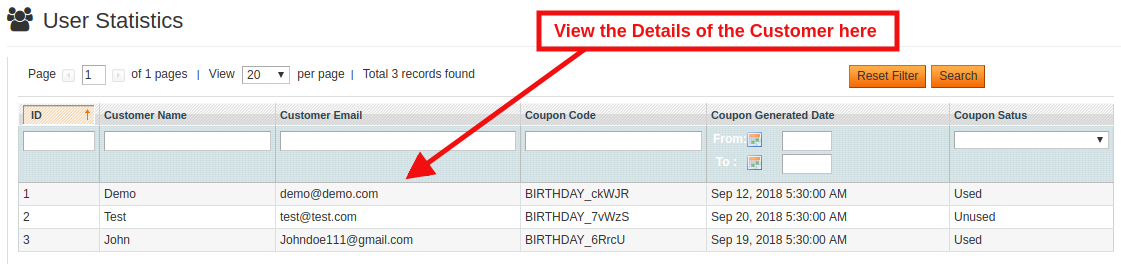
In Magento Birthday gift module, the Admin can view the statistics of the Birthday Coupon received by the customers.
Knowband Magento Birthday Coupon Extension gives an option to the admin to view the entire report of the marketing campaign. The coupons generated and the status of the same can be viewed in both graphical and tabular form.
Magento Birthday Present Module is extremely easy to use back-end interface.
2.0 Installation
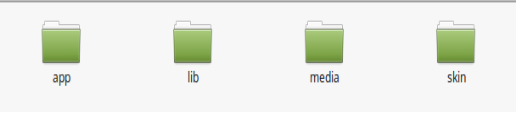
The folder structure of the Magento Birthday Coupon Module is shown below:
2. Copy all the folders into Magento root directory and clear the cash (if enabled).
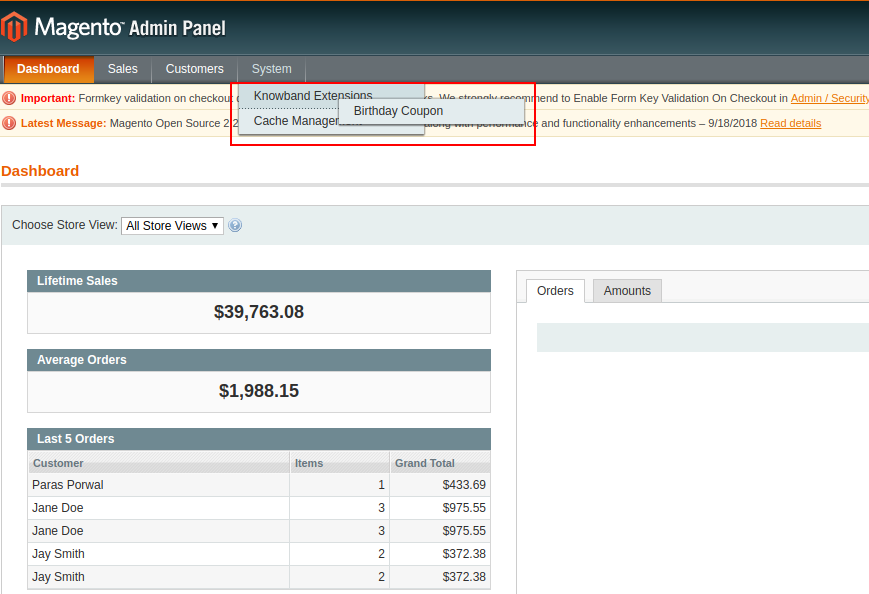
3. You will be able to find the “Birthday Coupon” option inside the “System > Knowband Extensions > Birthday Coupon”.
3.0 Admin Interface
After installing the Birthday Coupon Extension into the Magento store, the online merchant can easily manage the settings. The store owner can make basic changes in the coupons, email triggers and can even set restrictions on the offers. The various configuration options in Magento Birthday gift addon are mentioned below:
General Settings
Email Settings
Country Restrictions
Category Restrictions
User Statistics
Coupon Statistics
CRON Configuration
Each section of Birthday Present Extension for Magento is discussed in details:
3.1. General Settings
The General Settings tab of Magento Birthday coupon addon by Knowband offers the basic configuration options to the store admin. These options are listed below:
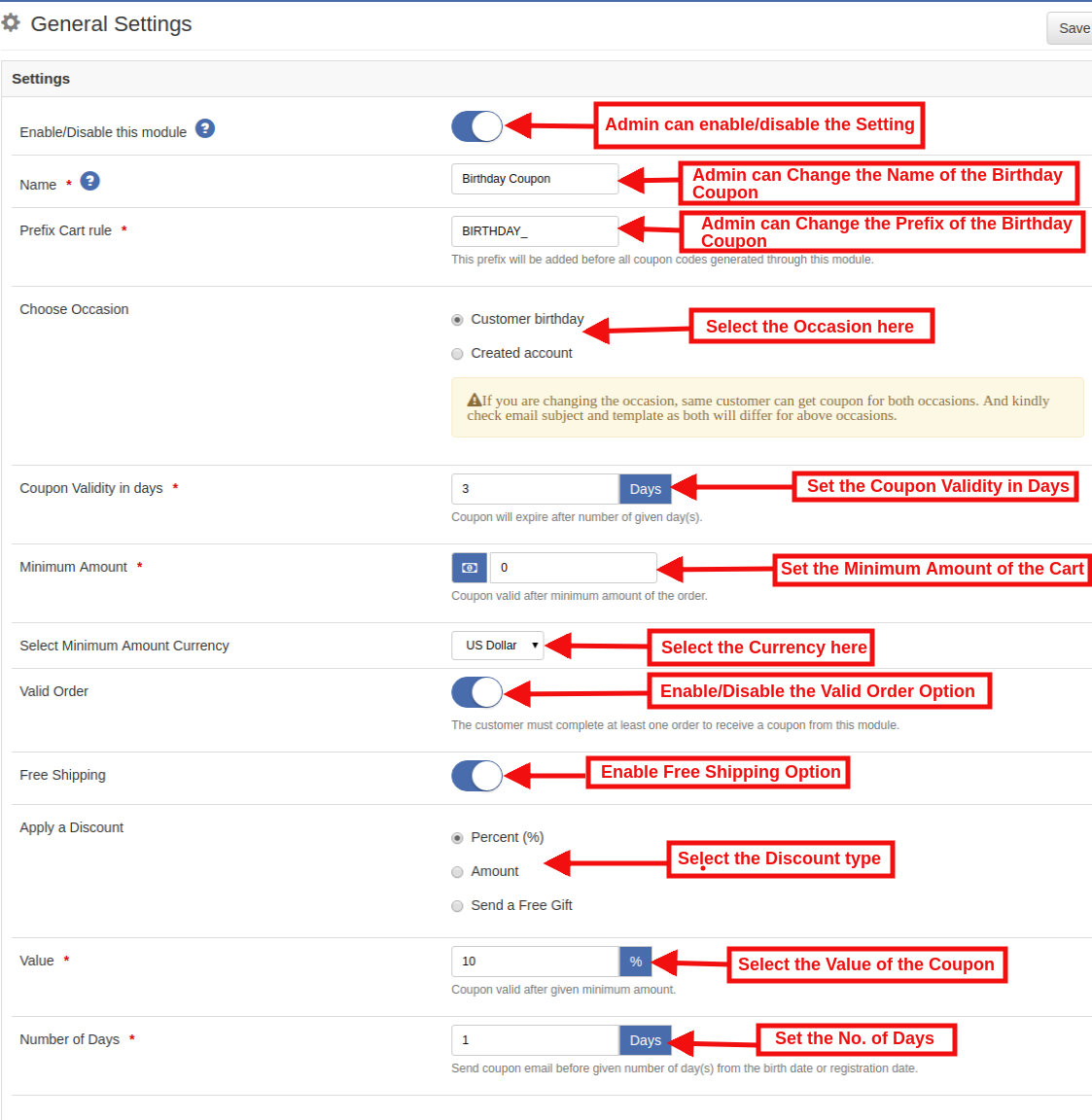
Enable/Disable the module: In this section of Magento Birthday Coupon Extension, the admin can enable/disable the birthday coupon settings.
Name: Enter the name of the Birthday Coupon. This name will be visible in the shopping cart summary as well as the invoice.
Prefix Cart Rule: In this field, the admin can set the prefix of the Birthday coupon.
Choose Occasion: In Magento Birthday gift addon, admin can select the occasion for sending the coupon. They can select anyone from the ‘Birthday Coupon’ option or ‘Created Account’ option.
Coupon Validity in Days: In this field, the store admin has to set the validity of the coupons in days.
For example, in case, the admin has set voucher validity for 10 days. Then, the discount coupon will valid for 10 days from the day the mail was sent.
Minimum Amount: In this field of Magento Birthday discount module by Knowband, the Magento store admin has to enter the minimum cart value required for the store admin to use the coupon code. Below the specified amount, this coupon code will not be applicable on the checkout page.
Select Minimum Amount Currency: The Magento Birthday Gift Extension enables the admin to select the currency from the drop-down list of the minimum amount value.
Valid Order: This validates the eligibility of the customers for availing the offers. If it is enabled, then, the customer must have completed at least one order in order to get the offers.
Free Shipping: The Admin in Magento Birthday coupon addon can select the free shipping option if they want to offers this setting.
Apply a Discount: In this field, the online eCommerce merchant has to select the discount type.
Percent Discount: In this field admin can set the percentage value.
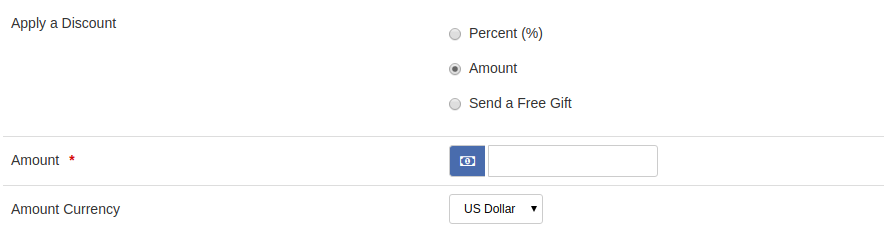
Amount: In this field of Magento Birthday Coupon Extension, the admin can set the amount option and enter the value and then select the currency in which you want to offer the discount.
Send a Free Gift: In this section of Birthday Gift for Magento, the admin can select the send a free option, after selecting this option, the admin gift a product for free to the customer. The admin can search the product as shown in the image below:
Value: The Admin can select the value of the coupon. Coupon will be valid after given minimum amount.
Number of Days: With the help of this Magento Birthday Voucher Extension, the online retailer can set the no of days before the Birthday when you want to send the email.(send coupon email before given number of day(s) from the birth date or registration date.)
3.2 Email Settings
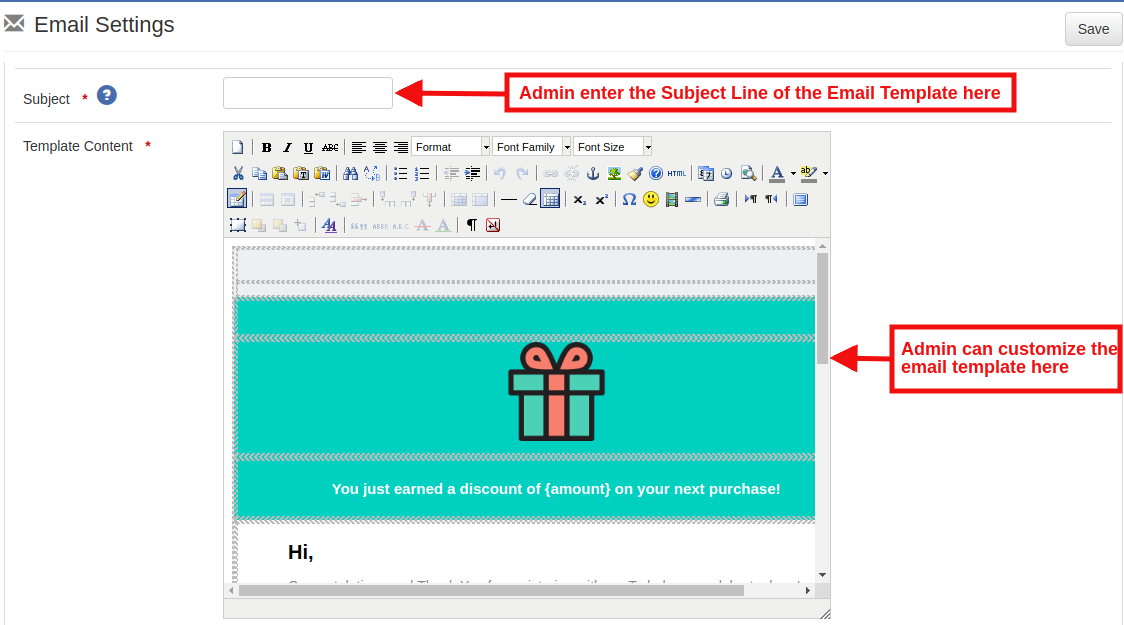
In this tab of Magento Birthday Coupon Extension, the store admin can define the subject of the email. Even, the admin can customize the email template as per the requirement. The admin has the option to change the image and text of the email body.
3.3 Country Restriction
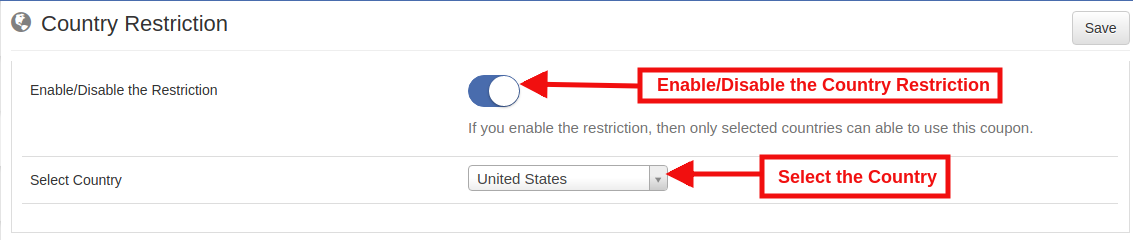
In this section of Magento Birthday Coupon Extension, the admin can select a particular country where they want to offers this option. Enable the button as shown below and select the country from the list. The offer will then be applicable for the selected countries only.
For example: If you select the Country United States the sent coupon code can be used by the customer’s only United States cities.
3.4 Category Restriction
In this section of Knowband’s Magento Birthday Present Extension, the admin can select the category for coupon code validity. The coupon code offered to the customer in Magento Birthday voucher addon will be applicable to all the categories available in the site if no category restriction is applied. If the Magento store owner wants to send birthday coupon applicable to a particular category, then, they have to enable this category restriction functionality and select the desired category. The coupon will apply only to the selected categories.
3.5 User Statistics
In this tab of Magento Birthday Coupon Extension, the admin can view details of the customers who have ordered on the store and used the birthday gift voucher after receiving the email.
3.6 Coupon Statistics
The Magento Birthday Coupon Module offers a detailed report of the coupon. In the admin interface of the Magento Birthday gift module, the store admin can find the entire list of the coupon generated as well as the status of the coupons in the Statistic tab. The report is generated in both tabular and graphical format.
3.7 CRON Configuration
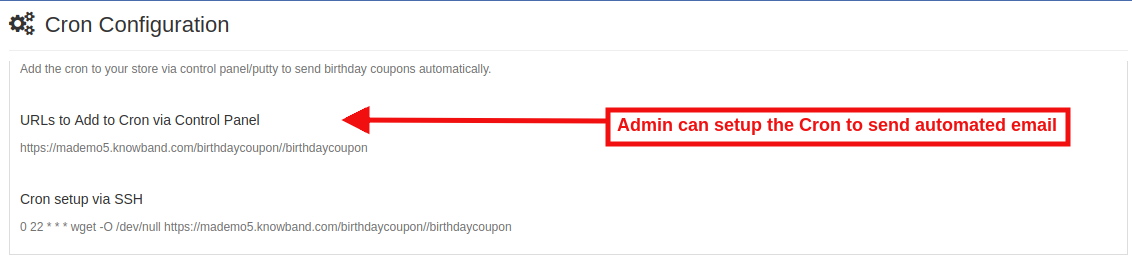
In order to automate the settings, the store can run the CRON manually.
Add the Cron to your store via control panel/putty to send birthday coupons automatically.
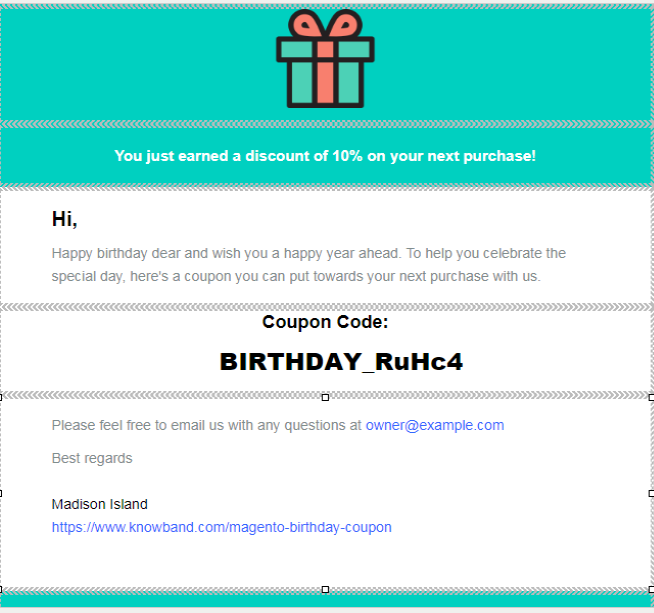
After configuring the settings, when customers registered your website at the same they fill the date of birth respective. As per the settings enabled by admin in Magento Birthday discount module, the automatic coupon code will be sent to their Birthday via email. Below find the screenshot of the Birthday Coupon email:
Note: As per the requirement store admin in Magento Birthday voucher addon can customize the email template.
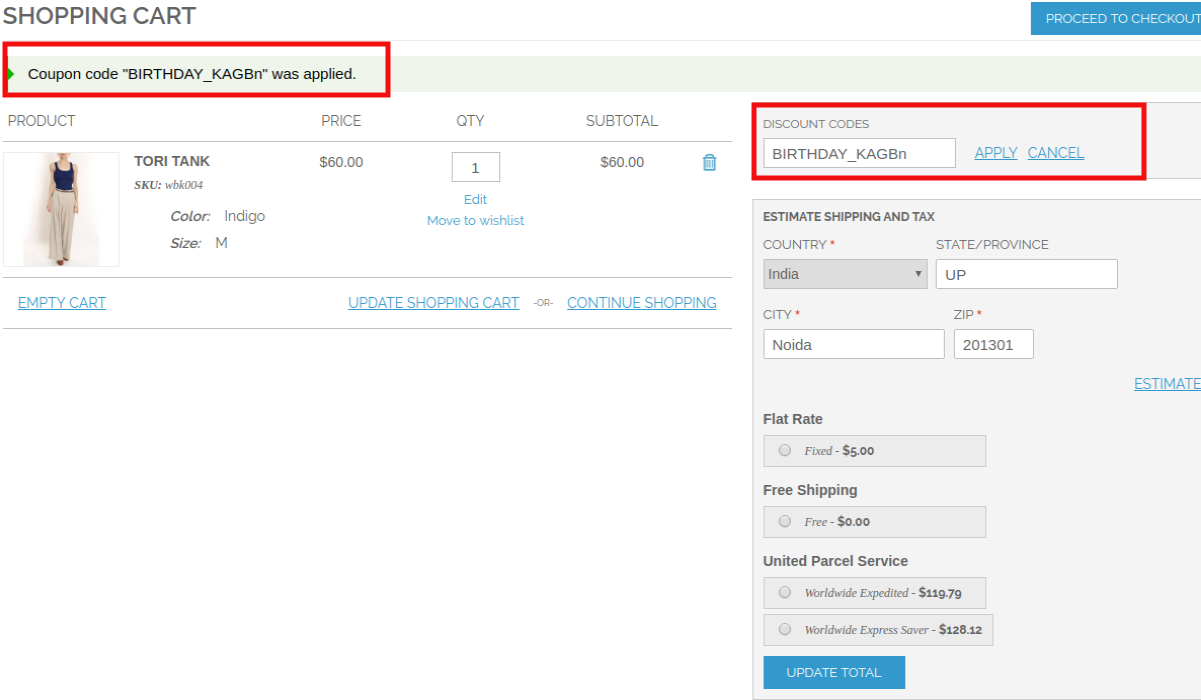
After getting the coupon the customer would like to redeem the coupon. So they can apply the coupon at the checkout page and get the discount of the total amount. Below find the screenshot: