Are you among the OpenCart sellers who are facing a lot of cart abandonment? It is difficult to avoid shopping cart abandonment when customers have a variety of products available online.
The mood of the people is very unpredictable and it is difficult to keep them engaged in an online store for a long time.
If visitors don’t find the desired product or service on a site, they will not think twice about leaving a site.
This gives rise to shopping cart abandonments that can create a severe impact on the business fortunes of your OpenCart store.
Although, there is no guarantee to avoid abandoned carts on an online store you can take the help of the OpenCart Abandoned Cart module from the Knowband store for minimizing the effect of this problem.
Here are the various features and functionalities of OpenCart Abandoned Cart Extension that can be a great help for your online store.
Provides Freedom to store admin
The module offers a wide range of functionality to store admin such as, check abandoned carts, customization in an email template, view information about abandoned orders, number of orders, setting the delay time of reminder emails, and other such activities. With a wide range of features for site admin, it will not be much difficult to improve sales and conversions on your site.
Investigate User Behavior
With the OpenCart Abandoned Cart extension, you can keep track of your abandoned carts, better understand your customers’ buying preferences and needs, and present them with a useful solution.
Increase the number of conversions
You can potentially enhance conversions on your site by lowering the high cart abandonment rate with the OpenCart Abandoned Cart addon.
Customer Feedback of OpenCart Abandoned Cart Extension
Fantastic Analytical View
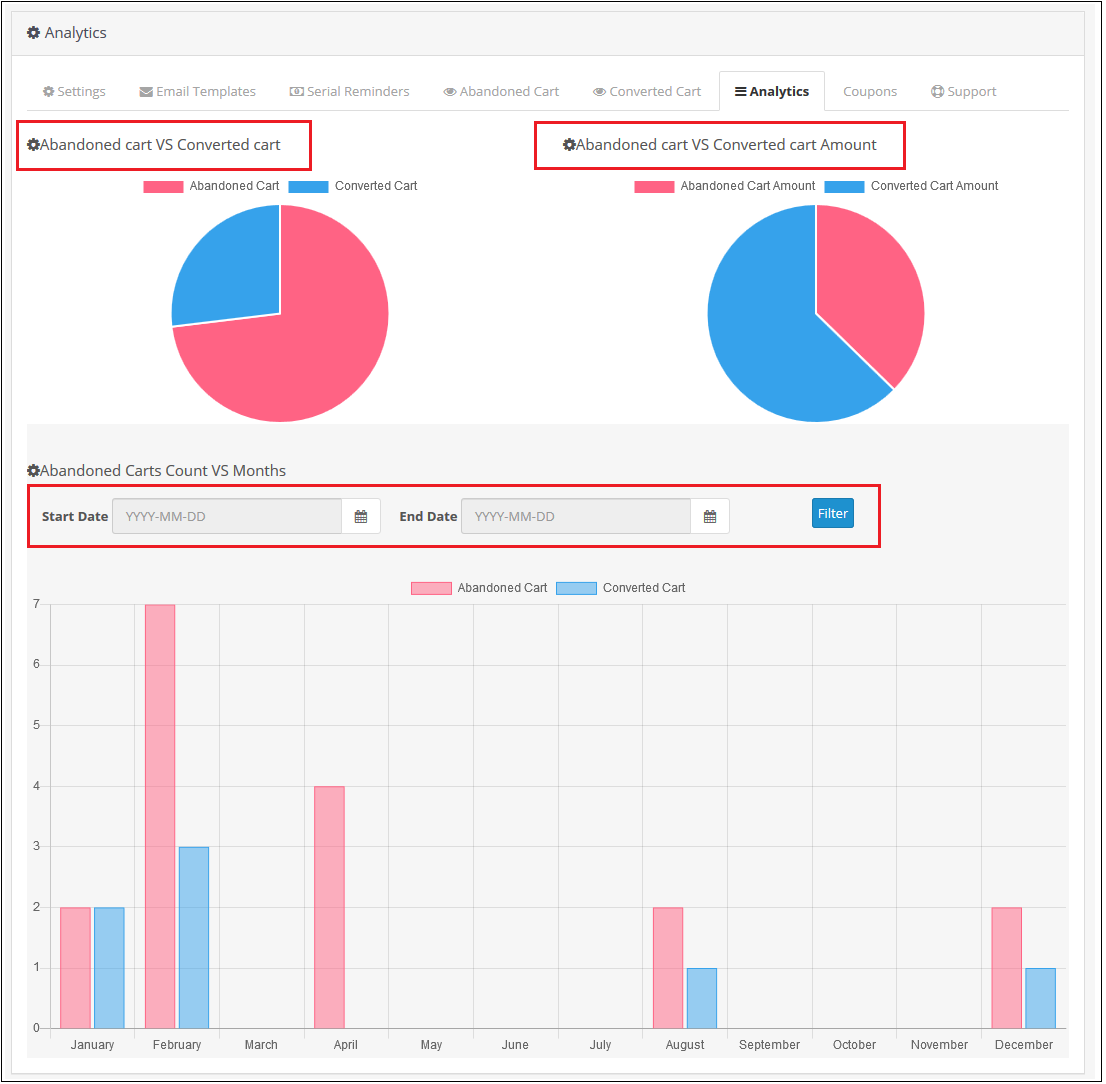
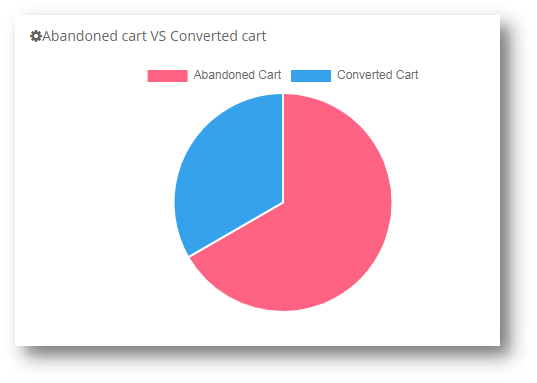
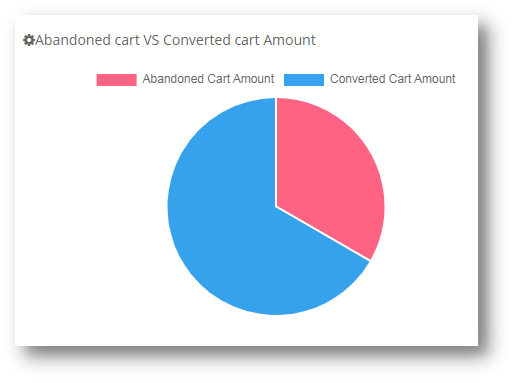
Abandoned Cart vs Converted Cart and Abandoned Cart Amount vs Converted Cart Amount are two comparisons provided by the OpenCart Abandoned Cart plugin in the form of pie charts.
It also shows a bar graph of abandoned and converted carts throughout the year. You can also exclude data from a certain time period.
Increase the efficiency of reminder emails through custom settings
Sending Reminder emails is easy with ready-made templates
For informing customers about their pending orders, you need to send them reminder emails at a regular time interval. With OpenCart Abandoned Cart Extension, it is easy to do customization in your email templates as desired.
This helps you in grabbing maximum customer attention and to recover sales quickly. Store admin can easily add various variables like customer name, product information, discount, and other related offers into their reminder emails to improve their overall impact.
Set the time limit for marking the cart as abandoned
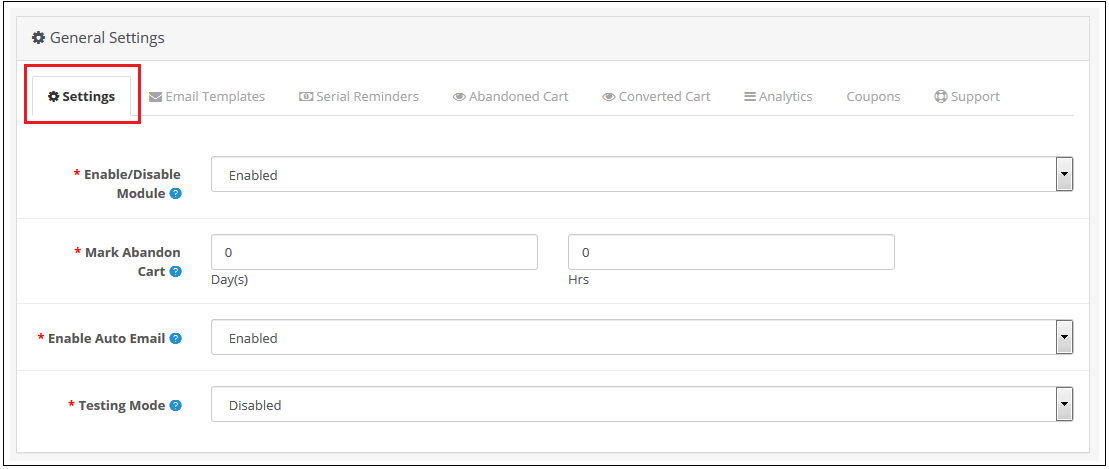
You can define a time interval after which the cart is automatically designated as abandoned using the OpenCart abandoned cart reminder plugin. Hours or days could be chosen as the duration.
Email Follow-Ups on Autopilot
The OpenCart Abandoned Cart email follow-up extension allows you to automatically send reminder emails after a certain amount of time has passed.
Send discounted and Non-discounted emails
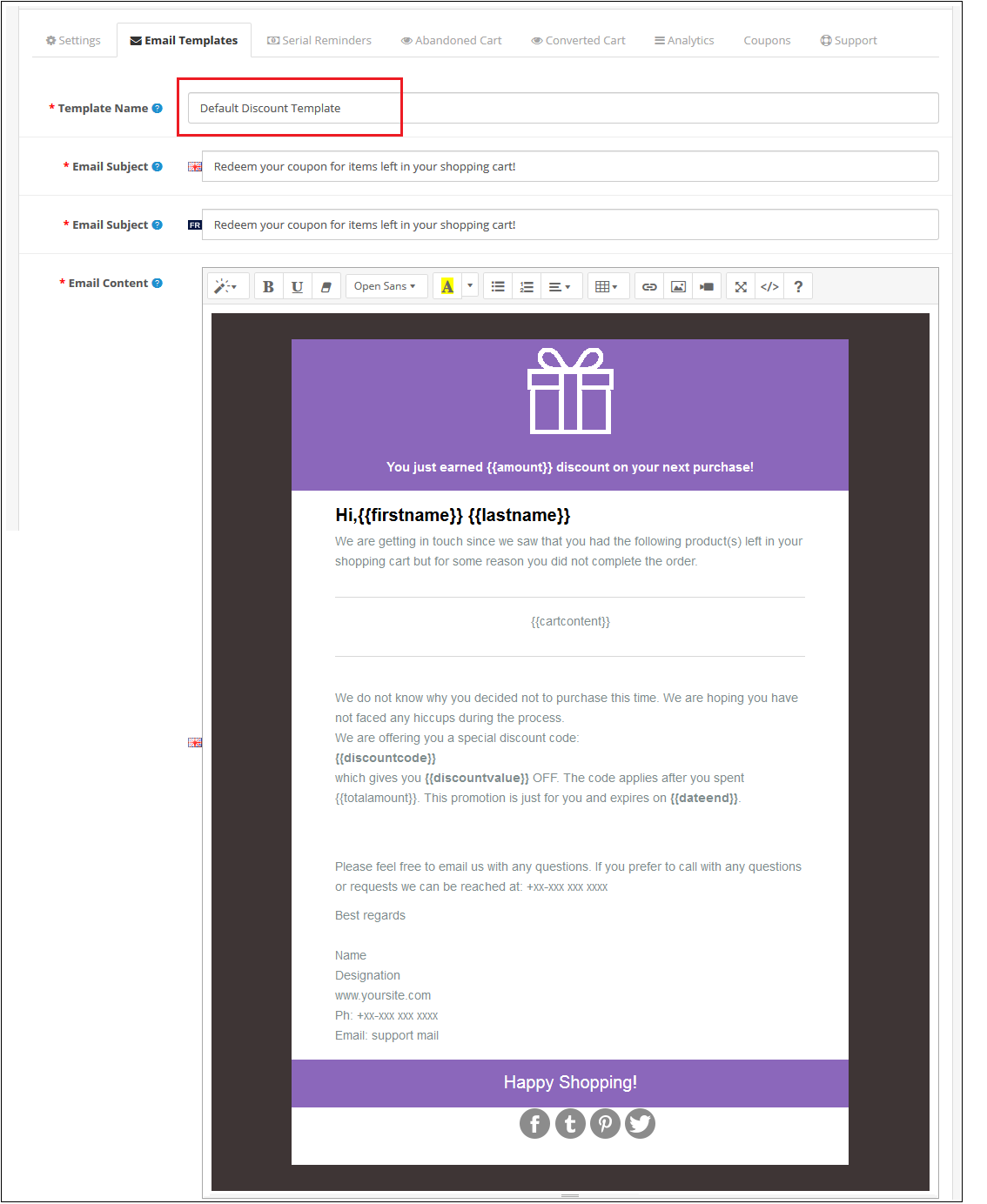
You can create discounted and non-discounted emails with the OpenCart Abandoned Cart Serial Reminder addon. The first email is a generic reminder, whereas the second includes a promotional code to entice the consumer to make a purchase.
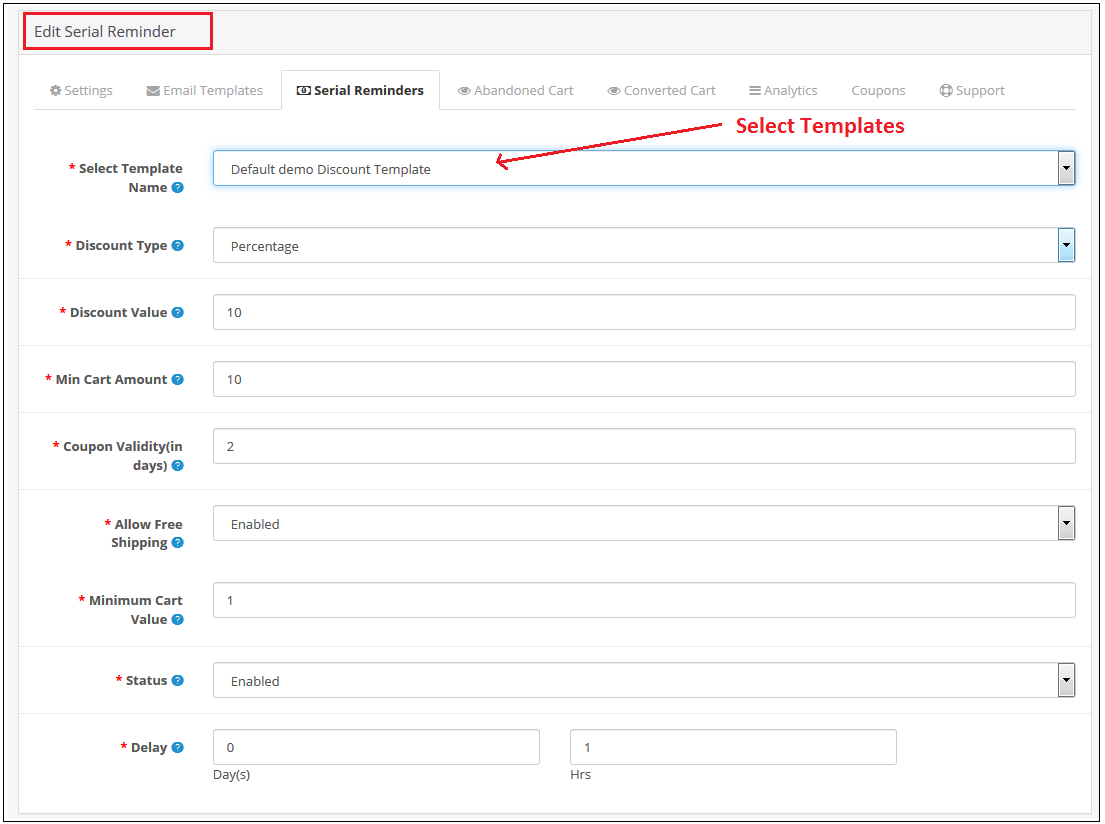
The discounted email includes all of the non-discounted email choices. In addition, you can select the discount type (fixed or %), the coupon value, the coupon validity, and the free shipping option.
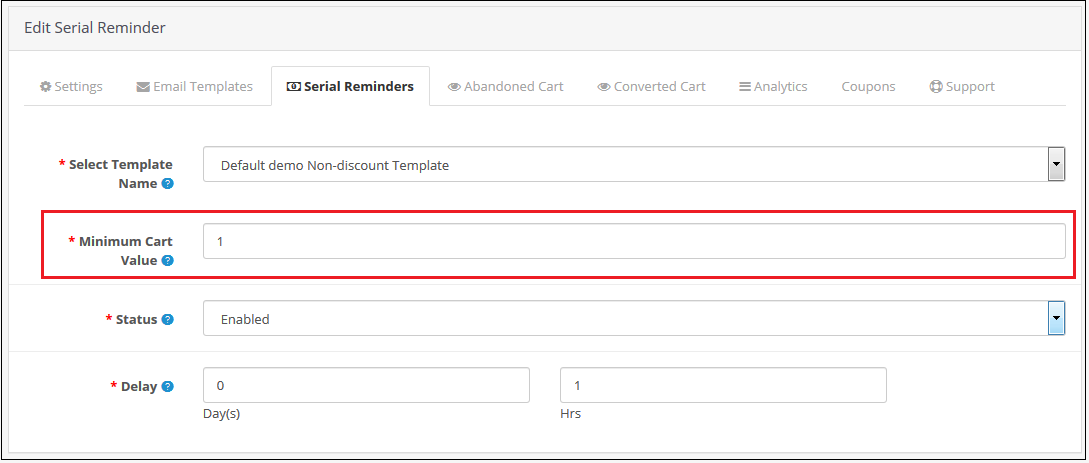
Set the minimum cart value as well as the delay time.
You can select the minimum cart value required to send a specific email type. Also, you can fix a delay time after which the emails will be sent automatically to abandoned carters. This is the best extension to send reminder emails to your customers.
Customers get quick access to abandoned shopping carts in a single click
To recover abandoned carts on a store quickly, you can divert abandoned customers towards their shopping cart with a single click. To do that, the module provides you the freedom to send email alerts with the cart link. Moreover, they don’t have to add products into their shopping carts from scratch which saves a lot of their time and effort.
Keeps a track of the abandoned carts on your site
Tracking abandoned carts on your OpenCart store is now much easy with the help of this OpenCart Abandoned cart module. It can provide important information such as the number of abandoned carts/orders, order numbers. Also, number of abandoned carts that have been converted, and other such details can help in minimizing the shopping cart abandonments on a site.
This module can ensure gold mine of information that can play a critical role in the recovery of abandoned carts.
Wrapping-up
It is now much easy to reduce abandoned carts on an eCommerce site due to the presence of this feature-loaded module for OpenCart stores. Don’t just wait and watch to reduce abandoned carts on your site but take the right steps with the help of this OpenCart Abandoned Cart extension. You have to take the final call by purchasing this OpenCart module from the Knowband store as things won’t fix for themselves.
For better conversion on your eCommerce store, click here.
If you want to know how you can improve customer engagement during holidays, click here.
You might be spending a lot of money on bringing more visitors to your store via social media advertisements or other paid marketing plans, yet not receiving potential traffic?
If that sounds like you then you need to figure out the hole in your leaky bucket.
What does that mean? Your system of driving traffic isn’t working well. Maybe you have a poor UI or you are not giving them the personalized experience that they deserve. Or, you are just not doing it right.
Did you know that 75 percent of shoppers abandon their carts in mind-numbing ways? This costs an estimated $260 billion in lost sales for online retailers every single year!
You will begin to combat this phenomenon through the implementation of an abandoned cart email strategy.
Sending an abandoned cart reminder email allows you to recover some of your previously lost sales and potentially convert more of the traffic to the website that you attract.
What is an abandoned cart email?
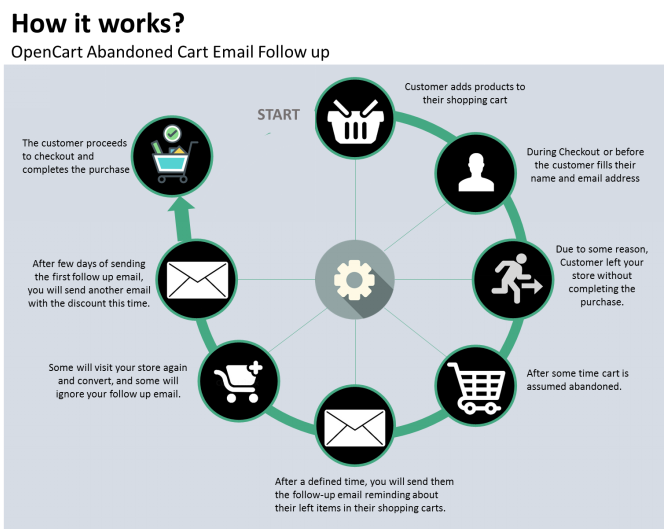
An abandoned cart email is a cornerstone of e-commerce. It is a follow-up email sent to someone who has added products to their cart and proceeded through a portion of the checkout and left the site without buying them.
For the 3 (out of every 4) shoppers who leave a website without completing the checkout process, an abandoned cart email is intended.
The tremendous advantage of abandoned cart reminder email? They are auto-triggered. You can set up a series that goes all on its own and gets money back that would have vanished otherwise.
Why you should send an abandoned cart reminder email?
The thing is, about 75 percent of people who leave their carts usually intend to come back, so you’re leaving serious money on the table if you don’t send abandoned cart emails to jog their minds.
Statistics reveal that most of the customer converts after receiving 3rd abandoned cart reminder email. If you are still not working on your abandoned cart recovery process then you are losing out on a lot.
What strategy you should follow?
You should send an abandoned cart email reminder to your customers who have left your website without completing the purchase. You can send the follow-up email in the sequence.
First, after a specified time delay
Second, after few hours from the time you have sent the first abandoned cart email reminder
Third, a reminder after a day
Fourth, after a few days and
Fifth, in 7 days with a catchy subject line
Now you know when to send the emails but what content will actually work is the major question to ask. Customers won’t convert with the old traditional email tactics but your email should be more personalized, engaging and it should have the capability to convert.
What type of abandoned cart reminder email you should send?
It is easy to build abandoned cart emails and go a great length to bring back reluctant customers.
We’ve addressed ways to decrease shopping cart abandonment in the past. One of the main strategies is to alert shoppers with an abandoned cart email strategy that there’s something in the cart. Always include a reminder of what they have abandoned and prepare a great copy with features highlighted.
1. Show your product features
Since you know what product you sell you are clear with your niche. In the very first abandoned cart email, you can highlight the features of the abandoned product.
The mail should have a personalized touch. You can use the user’s name in the subject line.
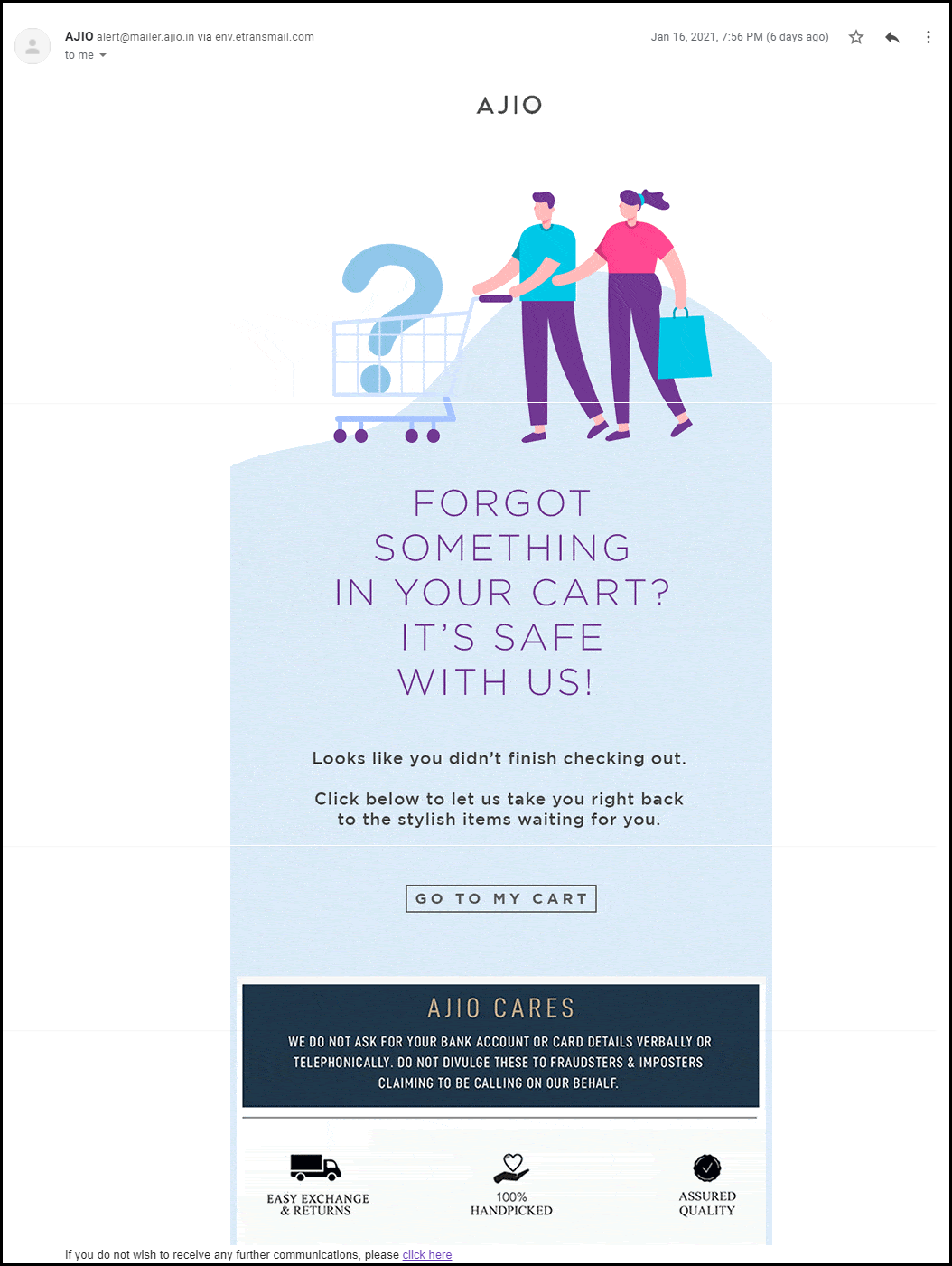
Netflix always uses this tactic when following up with their customers. Also, the subject line clearly defined the purpose of their email.
Calling the customer with a name build loyalty and adds personalization to your abandoned cart reminder email.
When it comes to the subject line, it should be catchy and this definitely grabs the customer’s attention.
2. Add social proofs, reviews, and testimonials
When sharing a second reminder email to your abandoned carters, remember to add social proofs. Reviews, testimonials work great when it comes to conversion.
It is human behavior that they trust what others say and when it comes to shopping, most of the customers spend more time on reading reviews than on the product description itself.
If you have a digital product like an App or any software then you can add the total number of downloads like ‘Abandoned Cart Module have 8000+ Downloads’
You can add average star reviews of the product with the abandoned cart email copy.
3. Include video content and catchy graphics
Video marketing is a fancy and most engaging way of digital marketing. The third email, that you will send the other day should have a short video clip with the unpacking of the product by customers or any review video shared by your customers on your social media handle.
Video can be very effective if it’s done right. You can include GIFs or links to your social media handles where customers can see more such videos. It will enhance the customer experience. Use the graphic image that goes well with the product images, use the colors thoughtfully and use genuine product images while sending the reminder email for abandoned cart recovery.
4. Discount coupon code
Most people abandoned their carts due to their prices. Since the final price is more than what they expected, clients abandon their carts.
If people think about how much they’re going to spend, the prices of each item they add to the cart usually add up. They don’t really care about taxes or delivery, and sometimes lowball the figures if they do.
And there is an easy way to recover the clients who were frightened by the final price: issue a discount.
You can also put a timer that creates the FOMO. Add some catchy lines like
Happy Hour Sale!
Grab your offer before it goes away!
Special Discount on Your Cart!
Use the Coupon Code XYZ and avail of this limited-time discount offer!
5. Make a Bundle to up-sell
Your customer isn’t coming back even after the discount? We have another plan for you. In the 5th reminder of abandoned cart email, offer them products that can be clubbed together.
If a person is having eyeliner in their abandoned shopping cart then you can make a bundle of mascara, kajal, and eyeliner and offer them a good deal like a discount or buy-1-Get-1 offer.
I am sure this will make them visit your store again.
If the customer did not convert after these many reminders then it’s your hard luck! But, you should always try. Along with abandoned cart emails, you can also share back in stock alerts with them using the Back-in Stock module and also offer deals on the products they have put on their wishlist.
How Abandoned Cart Extension From KnowBand Can Help You Achieve Your Business Goals?
The abandoned cart reminder emails can be automated by using a third-party extension. The Abandoned Cart Reminder Email Extension by KnowBand is incorporated with the automation feature. The shopping cart recovery emails will be sent to the customer automatically after a specified time delay.
All the benefits of abandoned cart reminder email can be availed by adding the Abandoned Cart Module in your eCommerce store. It has several features that you can use to bring back your lost sales.
Send Automated reminder emails with OpenCart Abandoned Cart Extension
The Abandoned Cart Email extension developed for the OpenCart platform allows store merchants to send automated reminder emails by tracking the abandoned carts.
With daily email follow-ups, the store admin can now turn the abandoned cart users into clients. You can use the strategies discussed in this article to recover your sales.
The store admin can easily analyze the abandoned cart of the store visitors and give them reminders by email with the aid of the Abandoned Cart Recovery module.
The OpenCart module allows you to send discounted and non-discounted emails. Admin can set minimum cart value to auto-trigger the emails and specify delay time for the same.
It has several customizable email templates that can be used time-to-time for sending reminder emails to abandoned carters.
PrestaShop Abandoned Cart module has some additional advantages
The PrestaShop Abandoned Cart module allows the store owner to send automated reminder emails after the specified time lapse. This PrestaShop module has various other features.
What is extra? The PrestaShop Abandoned Cart Recovery Module allows you to send reminders in three ways.
Send discounted or non discounted reminder emails
Send Push Notification for abandoned carts
Display abandoned cart reminder pop-up to the visitor
In addition, it gives you the entire report of abandoned carts and provides customer behavior data that can be used for sending personalized reminder emails.
Discounted and Non-discounted emails can be sent through the module and you can choose any email template from the listed ones.
It allows you to create your own custom abandoned cart reminder email template for sending series of follow-up emails.
Fringe Benefits of sending Abandoned Cart Reminders
The follow-up reminder for abandoned cart makes it easy for merchants to reduce cart abandonment and improve overall store conversions. More conversion means more sales! The emails with personalized content will enhance the overall customer experience.
The abandoned cart recovery module by KnowBand has several happy customers. You can check out the demo of the extension and visit the product page where customers have shared their reviews.
The module is available for all the major eCommerce platforms like OpenCart, PrestaShop, Magento stores.
As a shopper, you’ve probably abandoned plenty of carts yourself. As a retailer, you often wish that more people would actually complete a purchase instead of leaving their carts behind. But can you do anything about eCommerce cart abandonment, and win back some of those lost sales?
You certainly can, but there are a lot of different areas to navigate and improve.
What is cart abandonment?
Cart abandonment is when an online shopper adds at least one product to their cart and then exits without making a purchase. Abandonment rates are staggeringly high — demonstrating the huge revenue opportunity to win back these shoppers and make a sale.
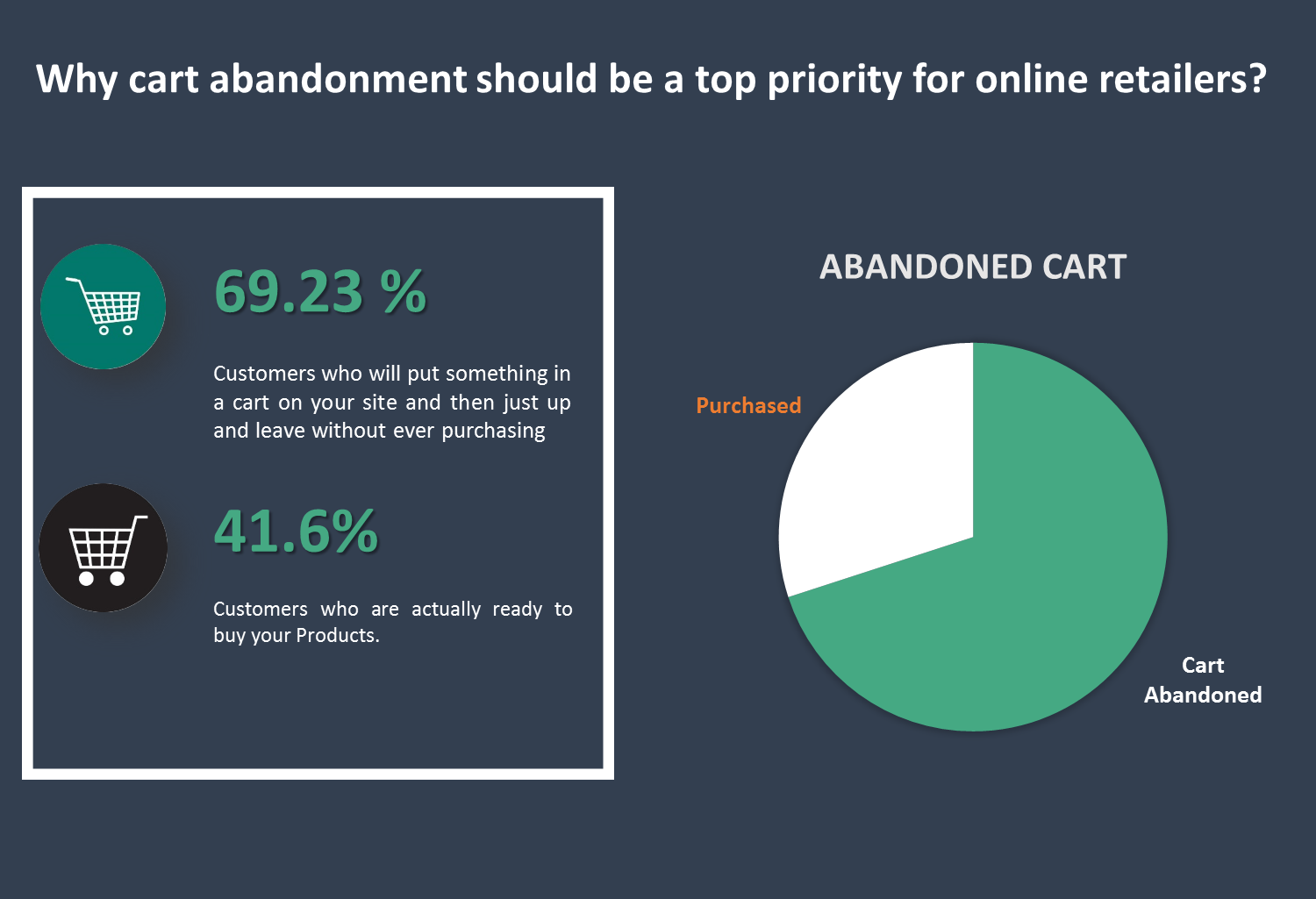
Why cart abandonment should be a top priority for online retailers? 69.23% –– that’s the average percentage of the customers who will put something in a cart on your site and then just up and leave without ever purchasing. 58.6% –– that’s the percentage of people who say they’ve abandoned a cart within the last 3 months because “I was just browsing / not ready to but”. These people likely won’t ever even initiate your checkout flow.
But for the 41.6% of other abandoned carts, many people will begin your checkout flow. Why does this matter? Because when a customer begins the checkout flow, they must first enter their email. And, when you have their email, you can trigger an abandoned cart series to bring that customer back and earn their sale.
To convert the abandoned cart into purchases is a difficult task and requires a lot of efforts.
Here by Opencart Abandoned cart module we simplify this process for you. This module allows the Admin to view all the abandoned carts and take actions accordingly. Admin can create their own e-mail template, be it a discounted e-mail or non-discounted e-mail and send it to the customer automatically through this module.
Salient Features of the OpenCart Abandoned Cart extension:
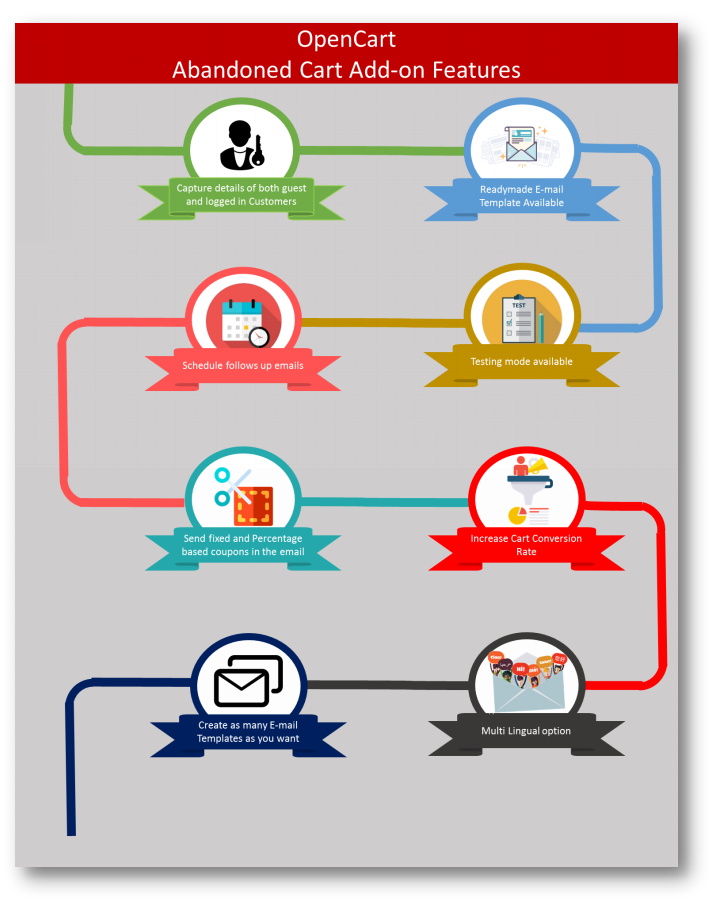
The extension analyzes the behavior of the online shoppers and tracks and marks the abandoned carts on the online store.
With the extension, the store admin can modify the follow-up email templates and can make as many new templates as he wants from the admin interface.
The extension offers discounted and non-discounted email templates. The admin can highlight an attractive discount and a coupon code in the email to convince buyers to purchase the products.
The store admin has to set a time-delay after which the extension automatically sends the follow-up email to the customers. The store admin doesn’t have to send the reminder emails manually.
The e-merchant can check and see all the captured abandoned carts and the converted carts through sending emails in the back-end of the extension.
With the awesome Analytics tab, the store owner can compare the total abandoned carts with the total converted carts and can make new strategies to increase the converted carts.
The extension offers a Test mode option by which the store admin can test and review the reminder emails by sending them to a given test email address.
The extension is mobile responsive and offers multi-language support.
The e-merchant can also view and check all the coupons which are generated by the extension. The admin can check how many coupons have been used by the customers and how many are still unused.
2.0 Installation Guide
Before starting the installation process, you have to buy the Abandoned Cart Serial Reminders by the Knowband store. Once purchased, you will receive the following files on your registered email.
Source code of Opencart Abandoned cart extension in zipped file format.
User Manual of Opencart Abandoned cart extension.
Now in order to install this on your online shop, follow the given steps:
Step 1: Unzip the zip file. You will get the folders as shown in the image below
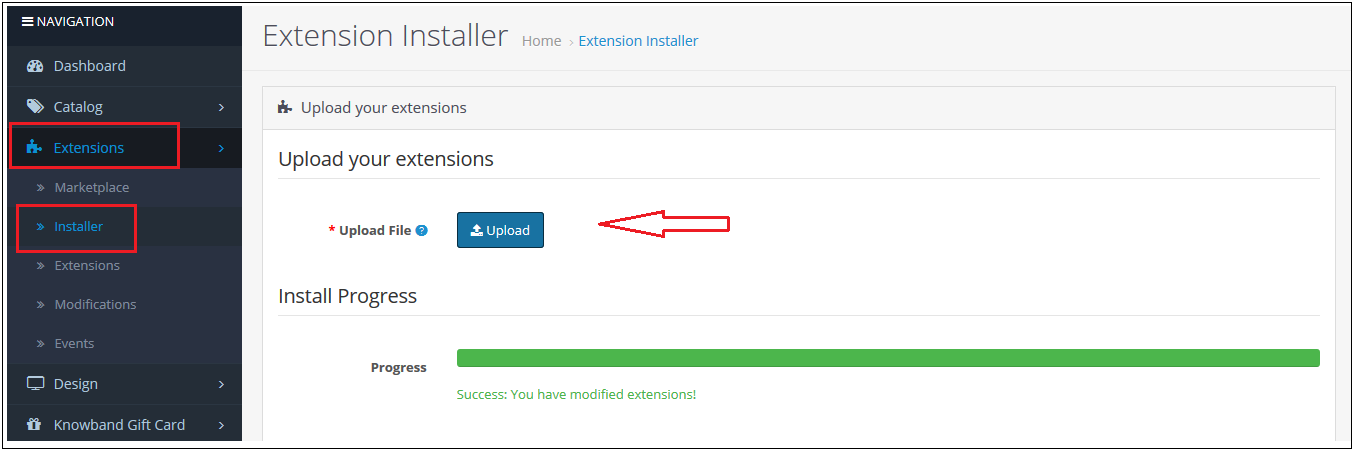
Step 2: Go to Extensions and then Installer. From here, you can upload the “kbabandoned_cart.ocmod” file and install the extension.
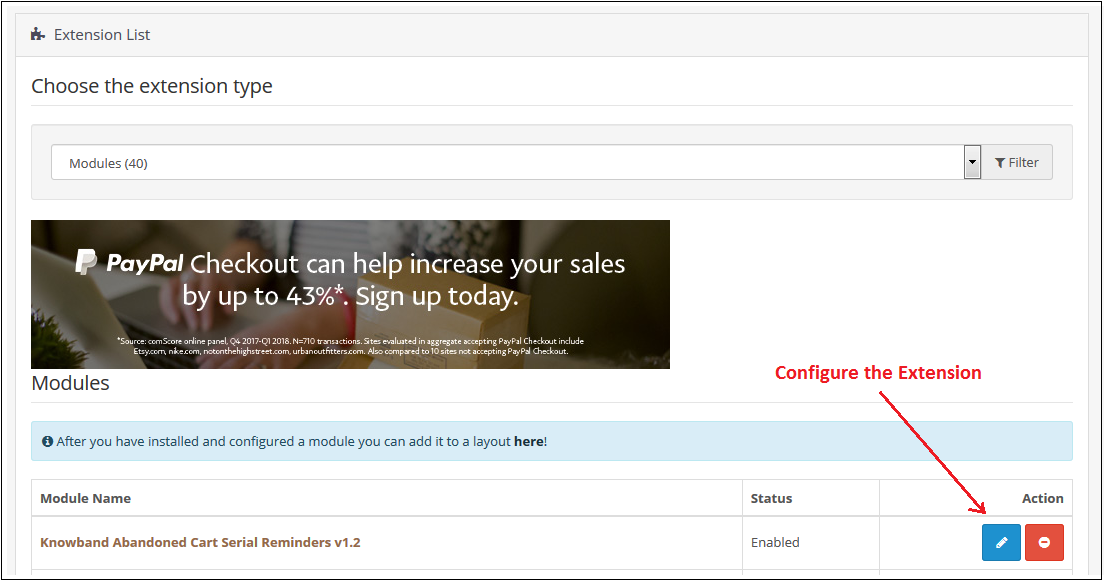
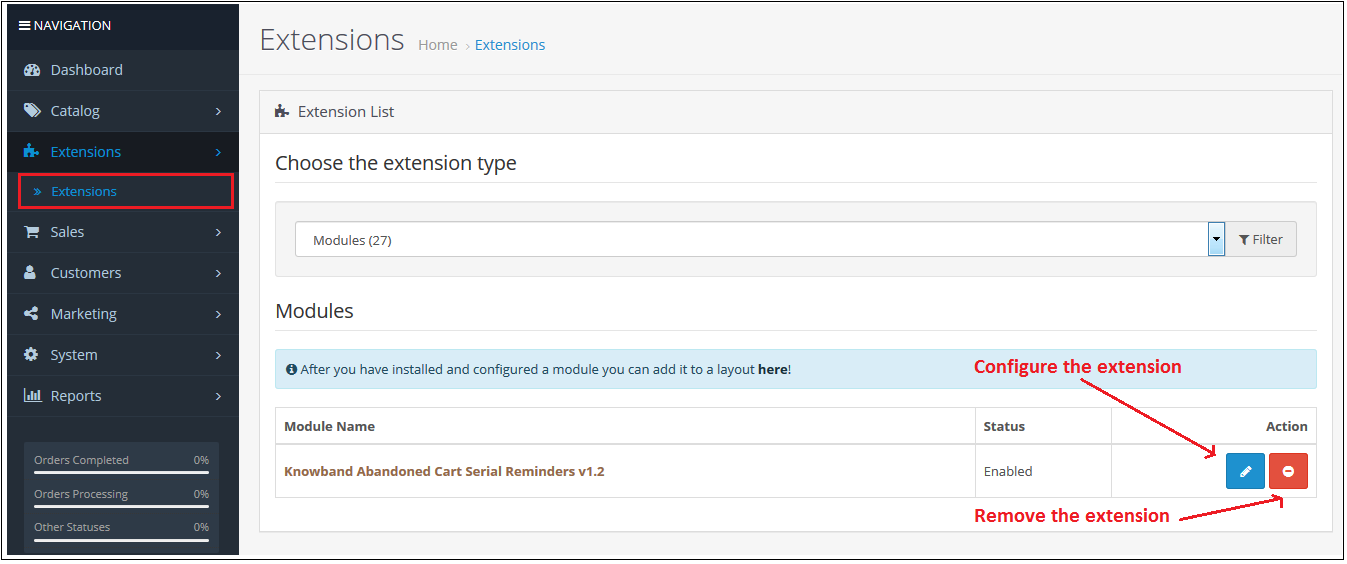
So Opencart Abandoned cart Module, is now successfully installed and is ready to use at your store. Go to the admin menu and click on the extensions. Choose the Extension Type as Modules. You will find a list of modules. Select the Knowband Abandoned Cart Serial Reminders.
3.0 Useful Cron Instructions
3.1 Reasons/Cases when the email is not sent to the customers
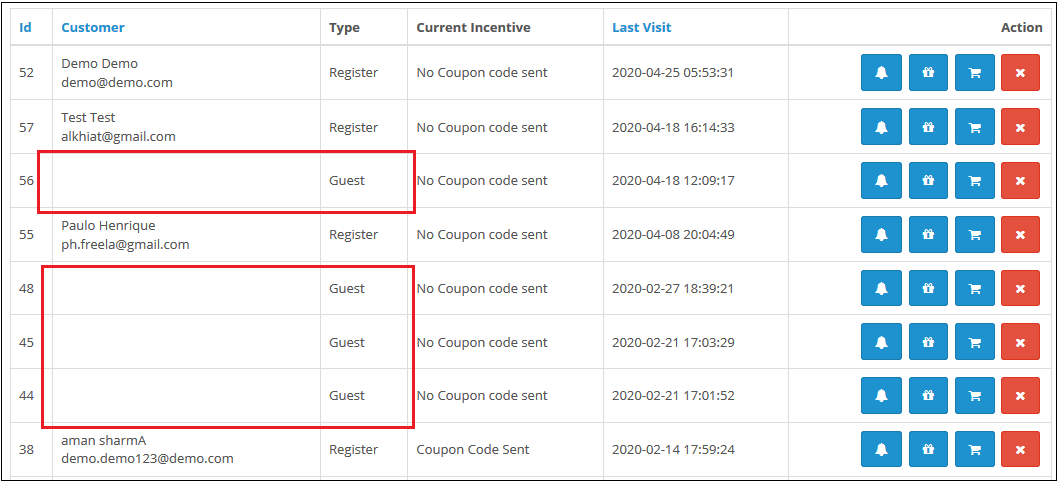
A. Email Id is not available (Guest customer)
B. If the cart does not satisfy the condition of serial reminders
If the minimum cart value is greater than the abandoned cart value. For example, the minimum cart amount is $50 and the abandoned cart amount is $45. It will not send a reminder in this case.
If the delay is set to one day, so the reminders will not be sent to the customers whose carts are abandoned for less than a day. C. If you have not setup the Cron properly or if the Cron is not working.
3.2 Types of Crons
There are two types of cron that run every hour.
1. Cron to update the Abandoned cart: This cron runs every hour.
For example, suppose if the cron runs at 11:05, 12:05…..and so on and you have set “Mark Abandoned Cart” as 1 hour. When cron runs at 11:05 it will add all the abandoned cart created between 9:05 to 10:05. If you have set “Mark Abandoned Cart” as 0 hours then it will add all the abandoned cart created between 10:05 to 11:05.
2. Cron to send a reminder email: This cron also runs after every hour.
For example, suppose the cron runs at 11:11, 12:11…..and so on and you have set the Reminder for 1 day and ‘Mark Abandoned Cart’ as 1 Hour. When cron runs at 11:11 then the emails will be sent to all the abandoned carts between 9:11 to 10:11 of the previous day. If you have set Reminder for 2 days and ‘Mark Abandoned Cart’ as 0 hour then the emails will be sent to all the abandoned cart between 10:11 to 11:11 of the day before yesterday.
3.3 Procedure to configure CRON job
3.3.1 What is a cron?
A cron is a service that allows a user to automatically execute a script at a specific time.
For example, you can set a particular PHP script to be automatically executed every day at midnight.
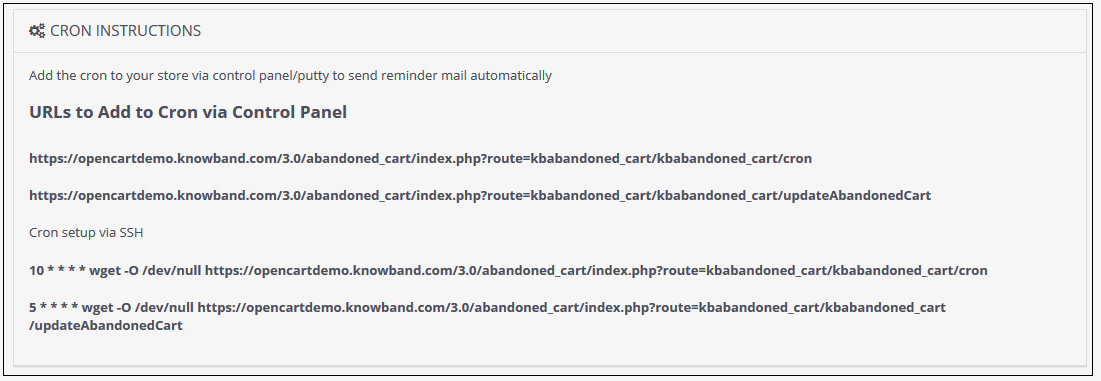
Add the cron to your store via control panel/putty to send reminder mail automatically Example URLs to Add the Cron via Control Panel
4.0 Admin Interface of OpenCart Abandoned cart extension
To configure the Abandoned cart email follow-up extension for OpenCart, Navigate the settings in the following order:
Admin Panel > Extensions >Modules> Abandoned Cart Serial Reminders
The Admin Interface of OpenCart Abandoned cart recovery email extension includes the following main settings:
General Settings
E-mail Templates
Serial Reminders
View Abandoned Cart
View Converted Cart
Analytics
Coupons
Support
4.0.1 General Settings
Through this setting of OpenCart Abandoned Cart Serial Reminder, you can enable/disable the whole module by just one click. The screen will look like as shown below:
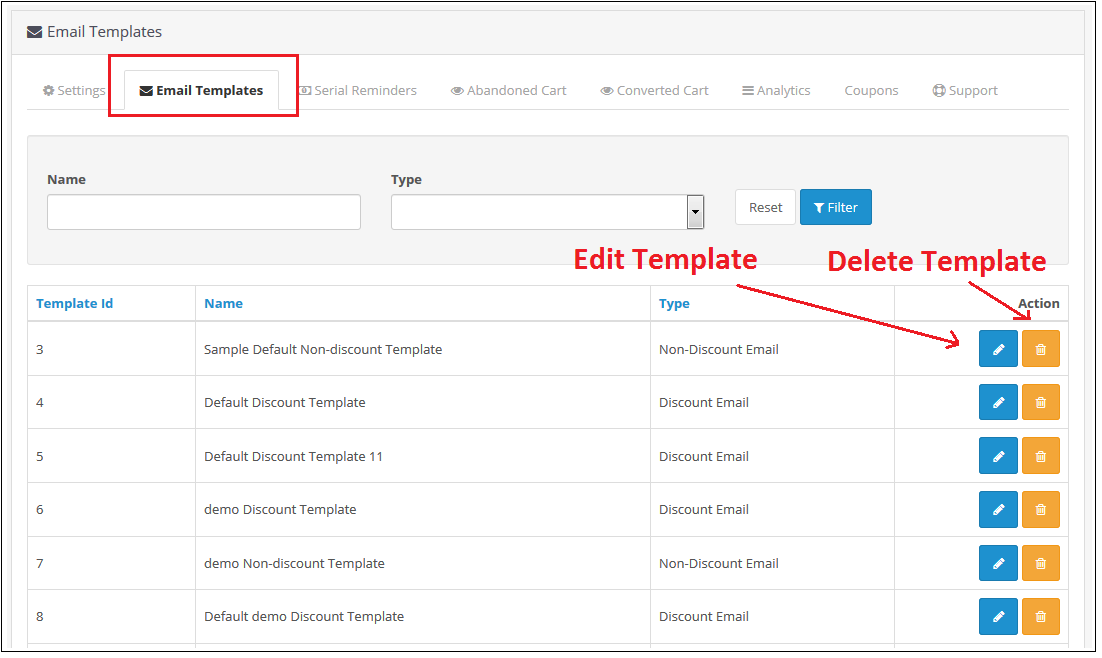
4.0.2 E-mail Templates
Through this setting of OpenCart Abandoned Cart Serial Reminder, you can add an e-mail Template in the module which will be used when you sent an e-mail reminder to your customers. The screen will look like as shown below:
Edit an E-mail Template: You can Edit an existing E-mail Template using the Edit option. The screens for Editing E-mail Template will be same as Adding an E-mail Template. The only difference will be that Edit will have the fields already filled. Delete an E-mail Template: You can delete an E-mail Template by clicking on the ‘Trash’ Icon. A pop up will show up asking for the Confirmation. You can click yes and the E-mail Template will be deleted. Add an E-mail Template: You can add an E-mail Template by Clicking on the option provided on the Top of the Page. The following screen will show up:
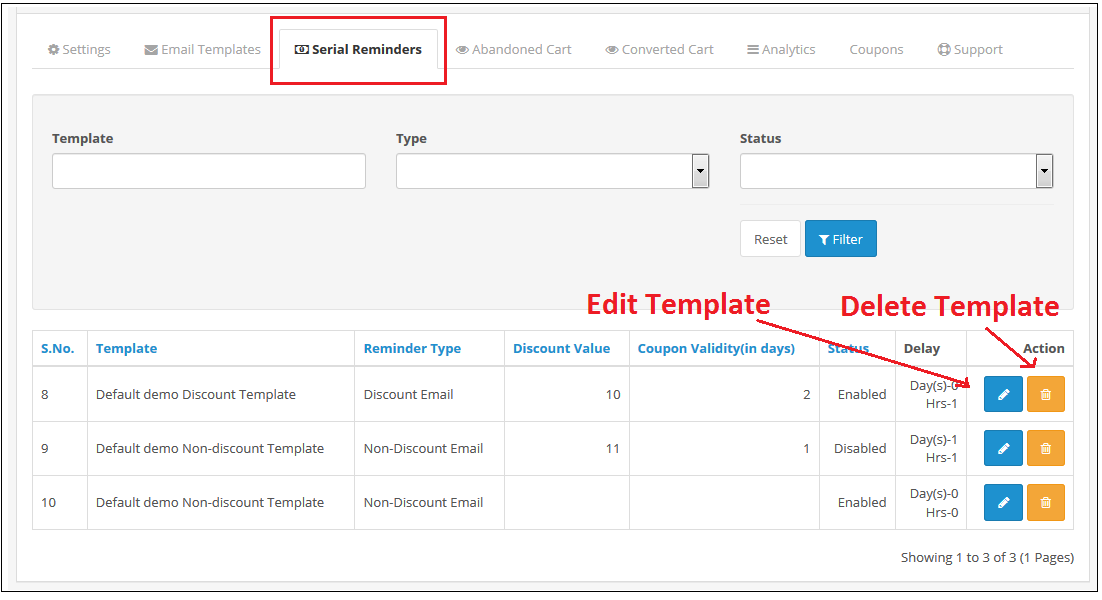
4.0.3 Serial Reminders
This setting of OpenCart Abandoned Cart Serial Reminder allows you to send e-mail reminders to your customers after a specific time (which will be set by you) of their Cart Abandonment.
The screen will look like as shown below:
Edit a Serial Reminder: You can Edit an existing Serial Reminder using the Edit option. The screens for Editing Serial Reminder will be same as Adding a Serial Reminder. The only difference will be that Edit will have the fields already filled. Delete a Serial Reminder: You can delete a Serial Reminder by clicking on the ‘Trash’ Icon. A pop up will show up asking for the Confirmation. You can click yes and the Serial Reminder will be deleted. Add a Serial Reminder: You can add a Serial Reminder by Clicking on the option provided on the Top of the Page. The following screen will show up if the E-mail Type is Discount:
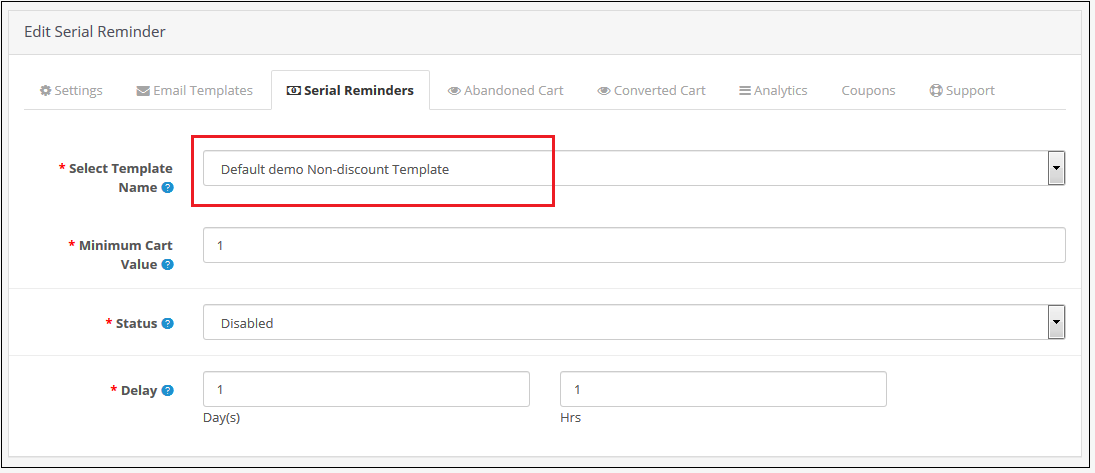
The following screen will show up to Add a Serial Reminder in Opencart Abandoned cart email follow-up extension if the E-mail Template type is Non-Discount:
4.0.4 Abandoned Cart
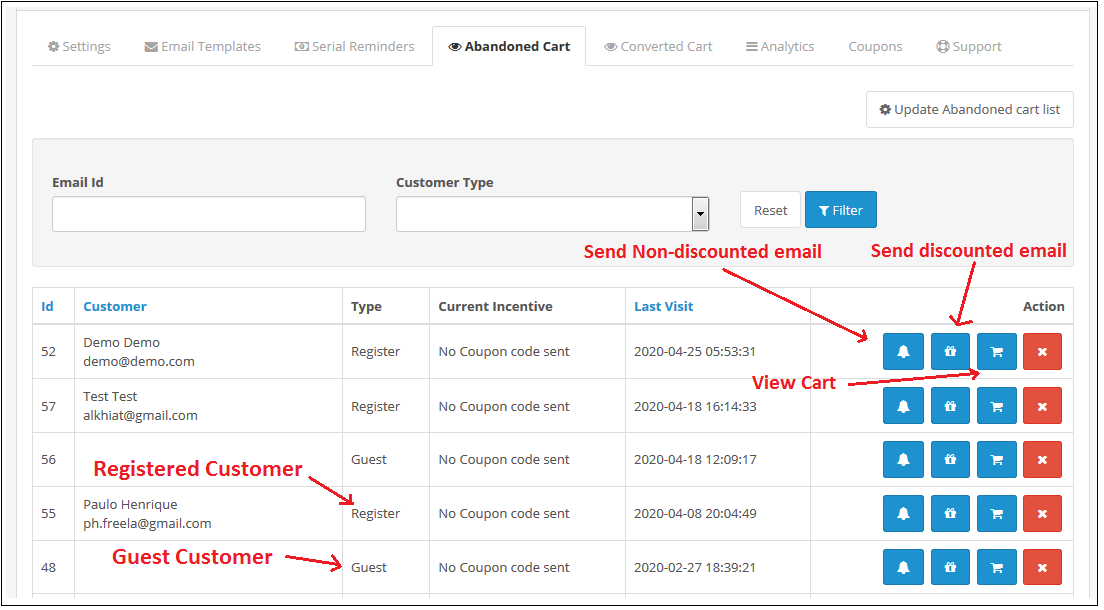
Through this setting of OpenCart Abandoned cart recovery email extension, you can send e-mails to the customers who have left their cart abandoned. You can view the list of all the abandoned cart customers in this setting and send them Discounted/ Non-Discounted E-mails. The screen will look like as shown below:
Update Abandoned Cart: This button is given at the Top of the Settings. You can click on this button to run Cron and the number of Products in abandoned cart will be shown to you. This number will be the updated number since you last updated the Abandoned Cart List.
After clicking on the Button you need to refresh the Page and the updated list will be shown to you.
Send Non-Discounted E-mail: When you will click on the bell Icon, then a pop up will show on the screen from where you can send a Non-Discounted e-mail to the customer. This e-mail will act as a reminder to the customer reminding them of the products they have left in their cart. The following screen will show up when you will click on the Icon:
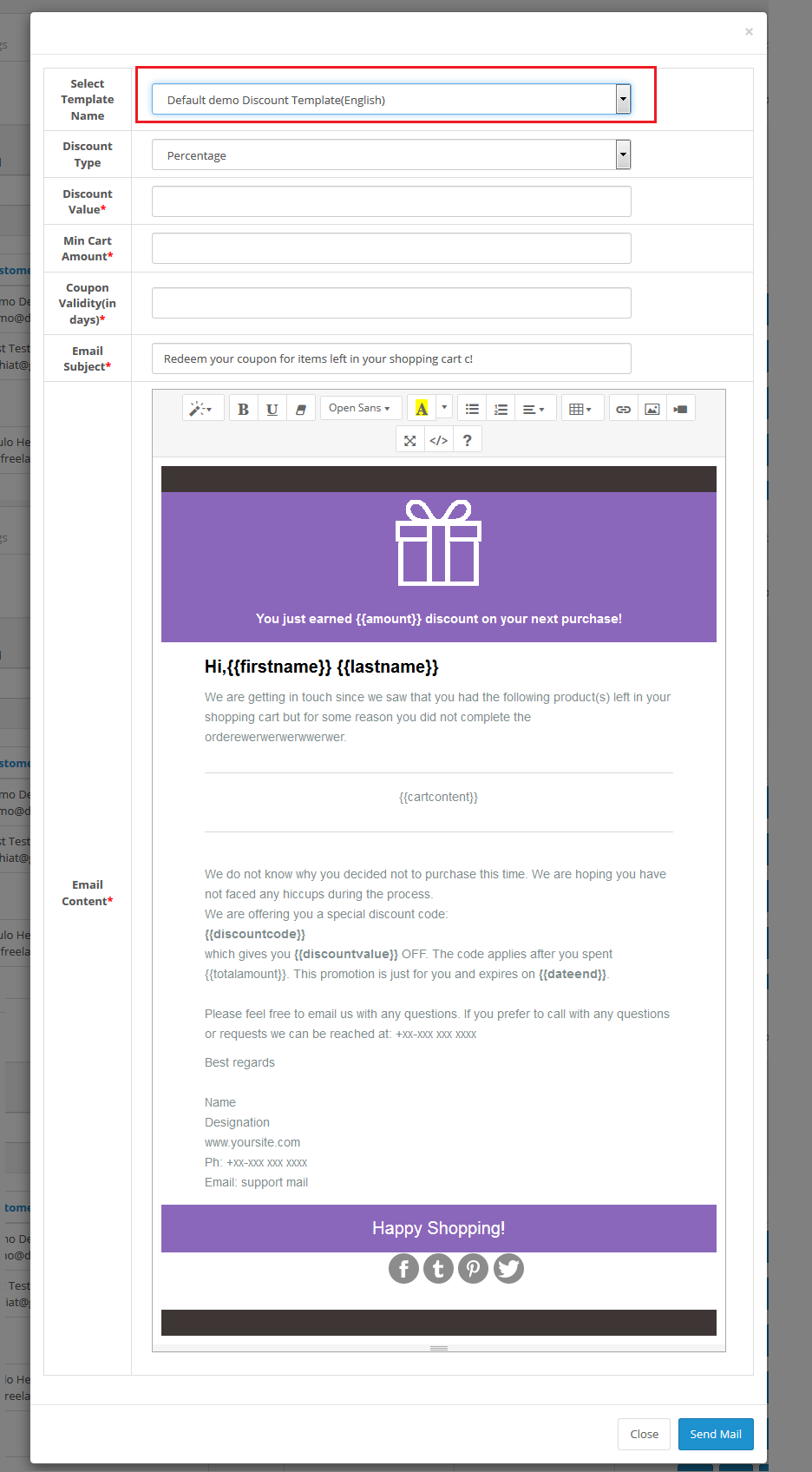
Send Discounted E-mail: When you will click on the Gift Icon, then a pop up will show on the screen from where you can send a Discounted e-mail to the customer. The following screen will show up when you will click on the Icon:
View Customer’s Cart: When you will click on the cart Icon of OC Abandoned Cart Serial Reminder, then a pop up will show on the screen from where you can view the products in the customer’s Cart. The following screen will show up when you will click on the Icon:
Delete an Abandoned Cart: You can delete an Abandoned Cart by clicking on the ‘Cross’ Icon. A pop up will show up asking for the Confirmation. You can click yes and the Abandoned Cart will be deleted.
4.0.5 Converted Carts
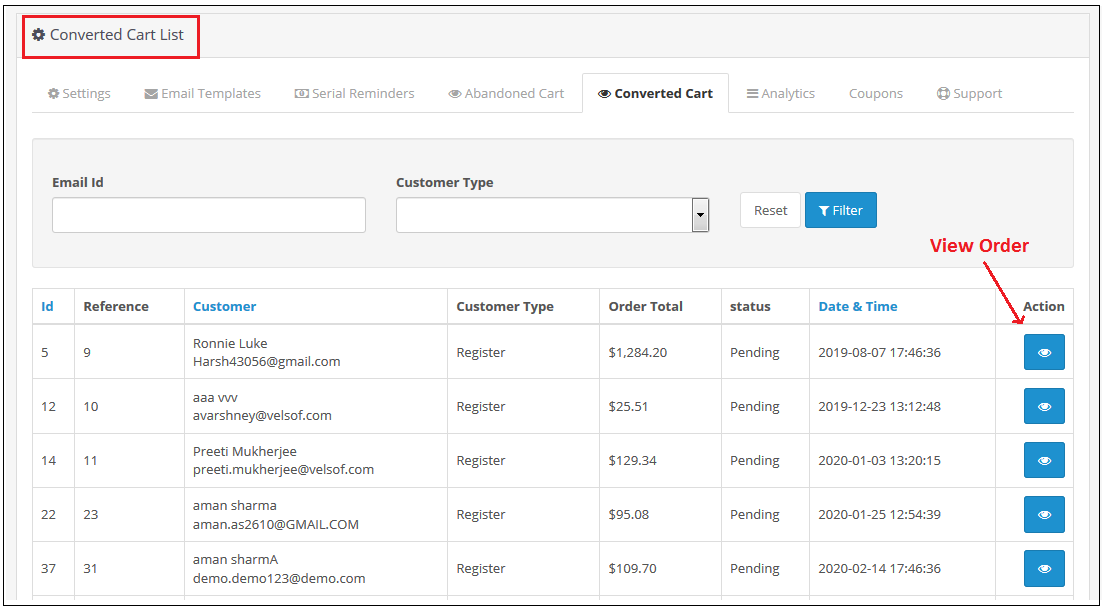
The Converted Cart tab of Opencart Cart Abandoned extension by Knowband, enlists all converted orders for registered customers or we can say that the abandoned carts for whom order has been placed after the reminder mail are sent. The screen will look like as shown below:
You can also view the details of the order that is placed using the abandoned cart by clicking on the “Action Button” in front of the desired converted cart.
4.0.6 Analytics
Analytics setting of OpenCart Abandoned cart recovery email extension will show the graphical representation of comparison for Abandoned Vs Converted Cart. Through this setting, you will not have to calculate anything, you can view the comparison in easy graphical format. The following graphs will be show to you:
Number of Abandoned Cart Vs Converted Carts:
Abandoned Cart Amount Vs Converted Cart Amount:
Abandoned Cart Count Vs Converted Cart Count Monthwise:
4.0.7 Coupons
Through this setting of Opencart Abandoned cart email follow-up extension, you can view the list of all the coupons which are sent to the customers in the E-mail.
You can filter out the Coupons on the basis of Used and Unused. The screen will look like as shown below:
4.0.8 Support
In case of any issue, drop an email to support@knowband.com OR click here to raise the ticket.
Tutorial: Watch the Video Guide
To help you set up and use the Opencart Abandoned Cart Extension, we have prepared a detailed tutorial video. This video walks you through the installation, configuration, and usage of the extension step by step.