PayU Integration in iOS using Swift

What is PayU?

PayU is an online payment method that is highly popular in the eCommerce industry. The rise in popularity of PayU money is the main reason why every eCommerce store merchant is looking to integrate this payment mode into their store. Thus, PayU is one of the fast & secure payment gateways.

The users can easily complete their transaction process with the PayU payment method. So, Let’s find out the advantages of the PayU payment mode.

Advantages of PayU Money
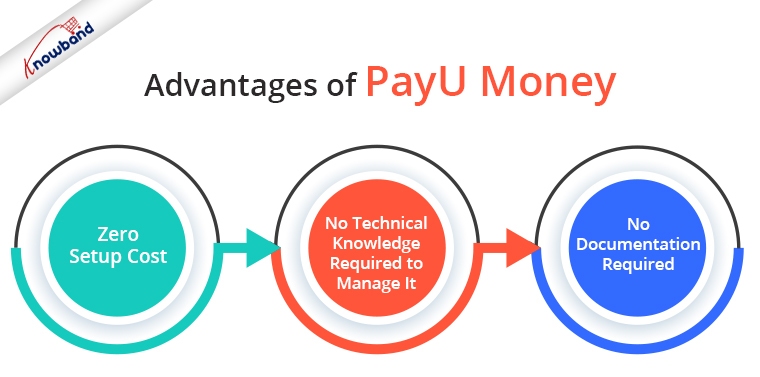
  1. Zero Setup Cost.
  2. No technical knowledge is required to manage it.
  3. No documentation is required to use PayU money as a payment gateway.

Recommended Read: How to download the Android/iOS app from the Diawi link?

Here is the complete process to integrate PayU in iOS using Swift:

1. SignUp with Payu money here.

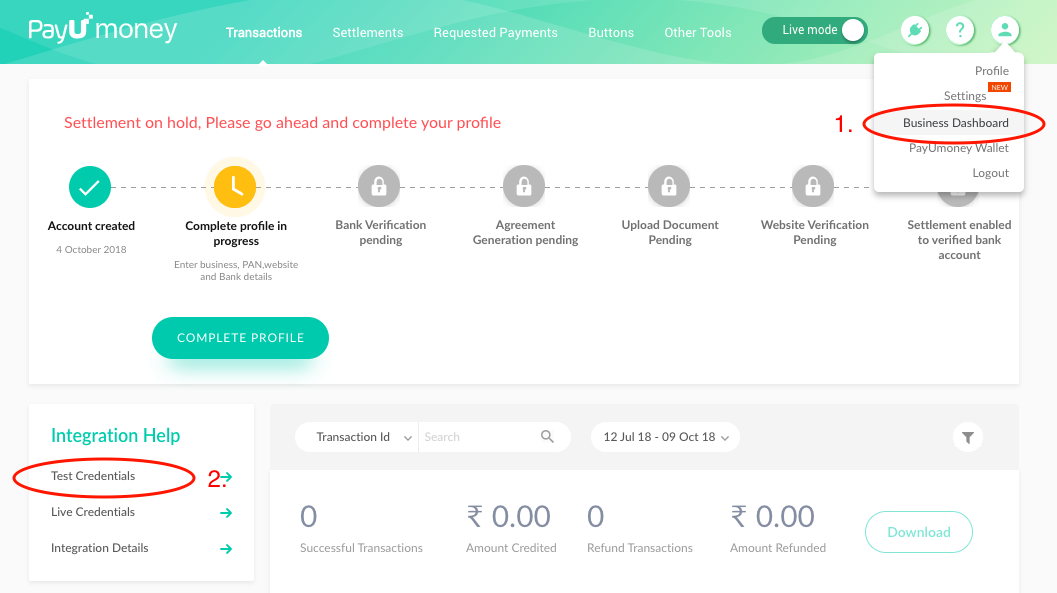
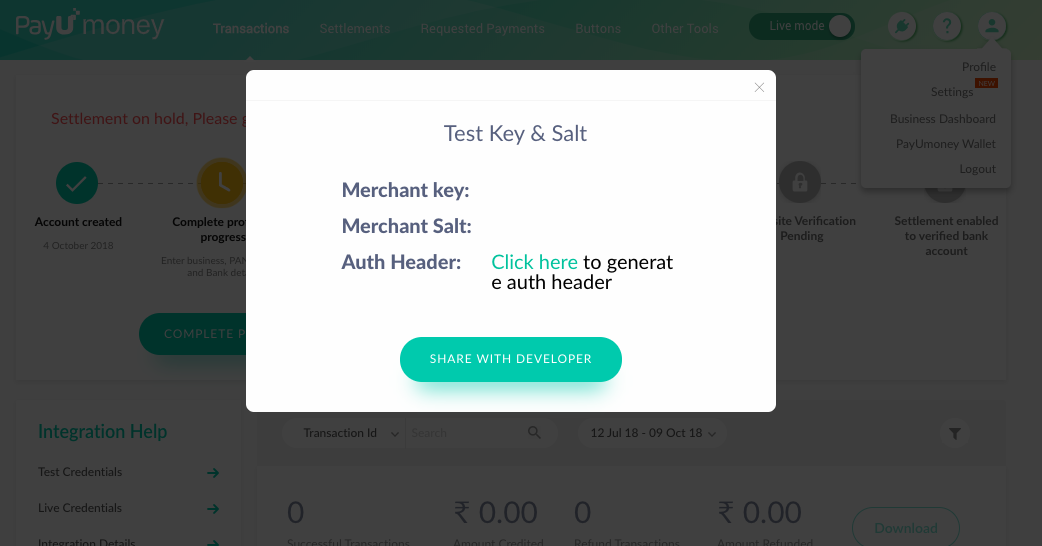
2. You can find your PayU Test Key & Salt in Business Dashboard. Check the below screenshots reference.
3. You have to download Payu SDK by using the command “$ git clone –recursive https://github.com/payu-intrepos/PayUMoney-IOS-SDK.git” in the terminal. We need Payu Frameworks from this SDK. However, it may fail sometime but it will work. For instance, for me, it failed 8-9 times.

The general error that you can face :

MacBook-Air:desktop mac$ git clone –recursive https://github.com/payu-intrepos/PayUMoney-IOS-SDK.git

Cloning into ‘PayUMoney-IOS-SDK’…

remote: Enumerating objects: 4, done.

remote: Counting objects: 100% (4/4), done.

remote: Compressing objects: 100% (4/4), done.

remote: Total 2146 (delta 0), reused 0 (delta 0), pack-reused 2142

Receiving objects: 100% (2146/2146), 50.17 MiB | 958.00 KiB/s, done.

Resolving deltas: 100% (892/892), done.

Submodule ‘Dependencies/CitrusGraphics’ (https://github.com/citruspay/citruspay-ios-sdk.git) registered for path ‘Dependencies/CitrusGraphics’

Cloning into ‘/Users/mac/Desktop/PayUMoney-IOS-SDK/Dependencies/CitrusGraphics’…

remote: Enumerating objects: 6013, done.

remote: Counting objects: 100% (6013/6013), done.

remote: Compressing objects: 100% (2573/2573), done.

error: RPC failed; curl 18 transfer closed with outstanding read data remaining

fatal: The remote end hung up unexpectedly

fatal: early EOF

fatal: index-pack failed

fatal: clone of ‘https://github.com/citruspay/citruspay-ios-sdk.git’ into submodule path ‘/Users/mac/Desktop/PayUMoney-IOS-SDK/Dependencies/CitrusGraphics’ failed

Failed to clone ‘Dependencies/CitrusGraphics’. Retry scheduled

Cloning into ‘/Users/mac/Desktop/PayUMoney-IOS-SDK/Dependencies/CitrusGraphics’…

remote: Enumerating objects: 6013, done.

remote: Counting objects: 100% (6013/6013), done.

remote: Compressing objects: 100% (2573/2573), done.

error: RPC failed; curl 18 transfer closed with outstanding read data remaining

fatal: The remote end hung up unexpectedly

fatal: early EOF

fatal: index-pack failed

fatal: clone of ‘https://github.com/citruspay/citruspay-ios-sdk.git’ into submodule path ‘/Users/mac/Desktop/PayUMoney-IOS-SDK/Dependencies/CitrusGraphics’ failed

Failed to clone ‘Dependencies/CitrusGraphics’ a second time, aborting

OR
Also, You can download the required frameworks from this link.

4. Open your Xcode project. Move PayUMoney-IOS-SDK/Dependencies/CitrusGraphics/Framework/graphics-sdk/CitrusGraphics.framework into your project. Then, remember to select Add to Targets when moving into the Xcode project.
Next, move ⁨PayUMoney-IOS-SDK/CoreSDK/PayUMoneyCoreSDK.framework into your project. After that, add to Targets when moving into the Xcode project.
Then, move ⁨⁨PayUMoney-IOS-SDK/PlugNPlay/PlugNPlay.framework into your project. Next, add to Targets when moving into the Xcode project.


5. Note:

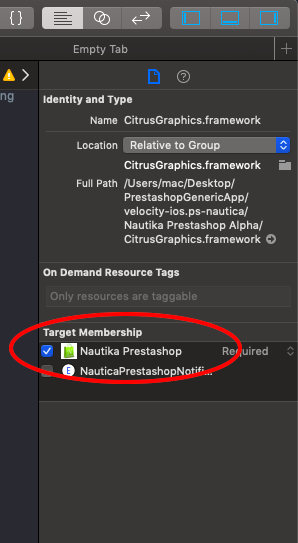
If you missed to add targets or you are getting an error that these files are missing or in case you get an Apple o linker error for these files then adds “Target Memberships” to these frameworks.
6. Add the below line in the podfile –

# For payu integration
pod ‘PayUmoney_PnP’

# For hash creation
pod ‘CryptoSwift’

7. Run command – pod install

8. After pod installation is complete make sure that you are using “project.xcworkspace” Xcode project.

Note: Please don’t use “project.xcodeproj” Xcode project.

9. To use Objective C code in Swift we need to create a Bridging header. First, you can create a new Bridging header manually and add it to Build settings > Objective -C Bridging Header.
OR
Also, you can create a new C file ( .m file or .h file). It will automatically create a new bridging header.

10. Generally Bridging Header file will be empty. You can add the below code in Bridging Header either at the bottom or at the top of the file –

#import <PlugNPlay/PlugNPlay.h>

11. Import the CryptoSwift library into your controller.
import CryptoSwift

Note: There are chances that you don’t get “CryptoSwift” in the import suggestion. Don’t worry, you can manually type the same code shown above.

12. The function below in your ViewController class where from which you will initiate the PayU transaction.

func setupPayu()

{

var kMerchantSalt = “your salt”

var txnParam = PUMTxnParam()

PlugNPlay.setDisableCompletionScreen(true)

//Set the parameters

txnParam.phone = “8802444107”

txnParam.email = “asharma@velsof.com”

txnParam.amount = “500”

txnParam.environment = PUMEnvironment.test

txnParam.firstname = “Akash”

txnParam.key = “Your Key”

txnParam.merchantid = “Your Merchant id”

txnParam.txnID = “1234567890”

txnParam.surl = “https://www.payumoney.com/mobileapp/payumoney/success.php”

txnParam.furl = “https://www.payumoney.com/mobileapp/payumoney/failure.php”

txnParam.productInfo = “iPhone7”

txnParam.udf1 = “ud1”

txnParam.udf2 = “ud2”

txnParam.udf3 = “ud3”

txnParam.udf4 = “ud4”

txnParam.udf5 = “ud5”

txnParam.udf6 = “”

txnParam.udf7 = “”

txnParam.udf8 = “”

txnParam.udf9 = “”

txnParam.udf10 = “”

/*

* Below code is used to create a formatted hashString from the Payu Transaction parameters

* **Author:** Asharma

* **Date:** 09-Oct-2018

*/

let hashString = “\(txnParam.key!)|\(txnParam.txnID!)|\(txnParam.amount!)|\(txnParam.productInfo!)|\(txnParam.firstname!)|\(txnParam.email!)|\(txnParam.udf1!)|\(txnParam.udf2!)|\(txnParam.udf3!)|\(txnParam.udf4!)|\(txnParam.udf5!)||||||\(kMerchantSalt)”

/*

* Below code is used to create dynamic hash from hashString

* **Author:** Asharma

* **Date:** 09-Oct-2018

*/

let data = hashString.data(using: .utf8)

txnParam.hashValue = data?.sha512().toHexString()
PlugNPlay.presentPaymentViewController(withTxnParams: txnParam, on: self) { (response, error, extraParam) in

print(“response”)

print(error)

}

}

13. When you want to start a PayU transaction, you can call the setupPayu() function. Then, either on the tap of a button or inside another function.
Example: I have created a button on my project. Created an IBAction of the button. This IBAction is a function that will be called on the tap or button that I created.

@IBAction func onTapBtnPay(_ sender: Any) {

setupPayu()

}

14. You have completed the integration part of PayU integration.

Recommended Read: How to save data to Firebase in swift language?

Create your eCommerce mobile app with Knowband’s mobile app builder and integrate PayU just by following these below simple steps. With KnowBand’s eCommerce Mobile App Builder, you can create and release a pair of fully native Android and iOS apps for your eCommerce website.
You may start selling on mobile devices and draw a global audience to your store with the help of our feature-rich eCommerce Mobile App Builder solution. As a producer of eCommerce mobile apps, Knowband is a well-known brand. Our major goal is to build strong, yet simple to use, eCommerce mobile apps that may provide any eCommerce enterprise with a competitive edge. The eCommerce Mobile App Builder from Knowband enables you to design a user-friendly environment and makes it simpler for e-merchants to reach their consumer base. Every handheld device is totally compatible with the lightweight, straightforward applications offered by the eCommerce mobile app provider.

Suggested Articles:

Apple Pay Integration in iOS using swift

1. The First step would be to get the Apple Merchant Id.

a) Login to your Apple Developer Account.

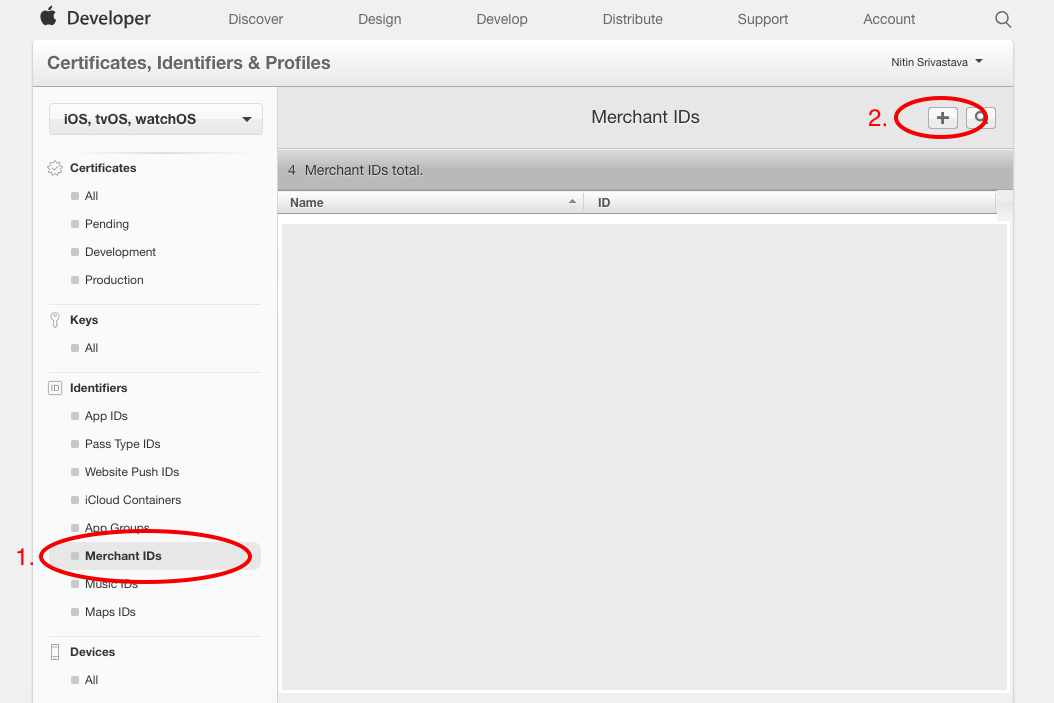
b) Go to “Certificates, Identifiers & Profiles”. Choose iOS, tvOS, and watchOS from the Navigation menu on the left.

  • Select the Merchant Id section in the same left menu.
  • Click on the “+” button.

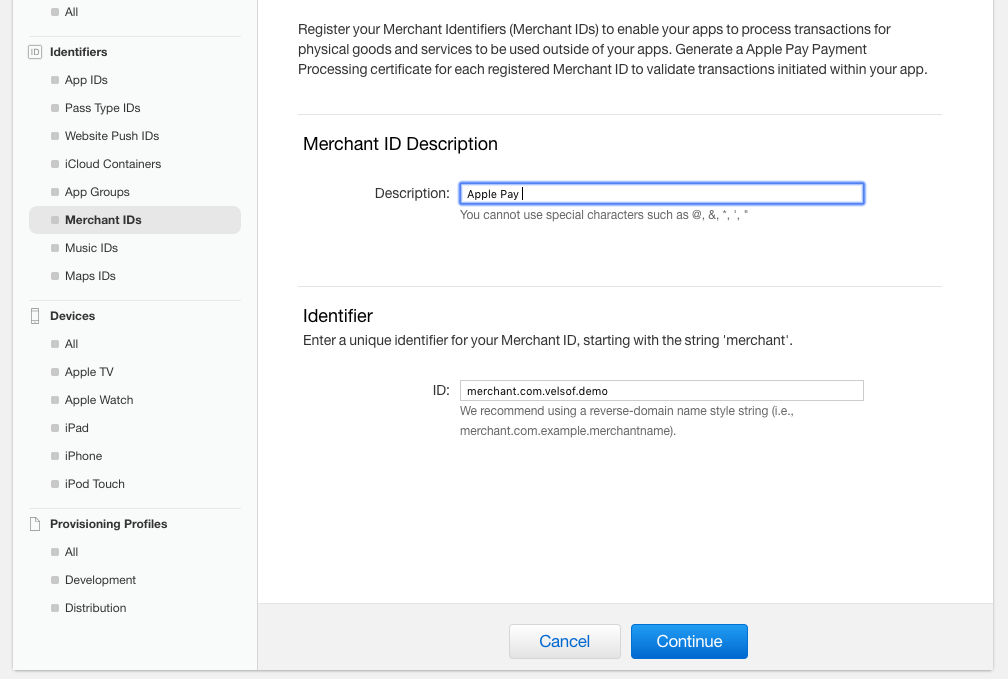
c) A new tab will open. Add Merchant Id description and a Unique Identifier and continue until the same is added. Save the Merchant Id you created.

2. Payment Processing Certificate:

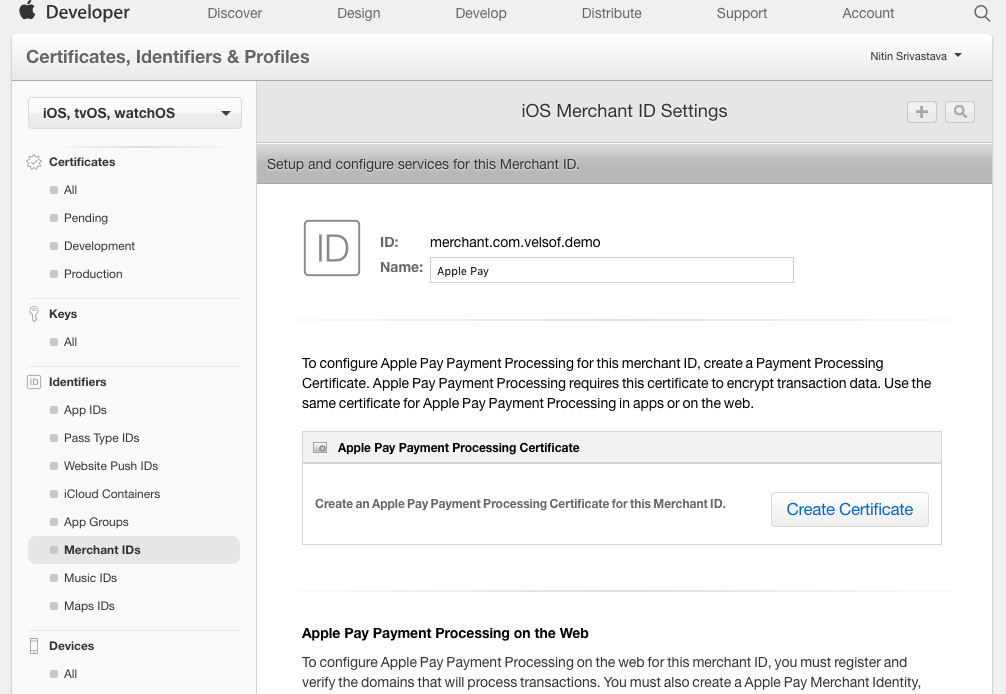
a) Tap on the merchant ID that you created earlier. A tab will open up, and select the “Edit” option.

b) A new tab will open. Tap on Create Certificate.


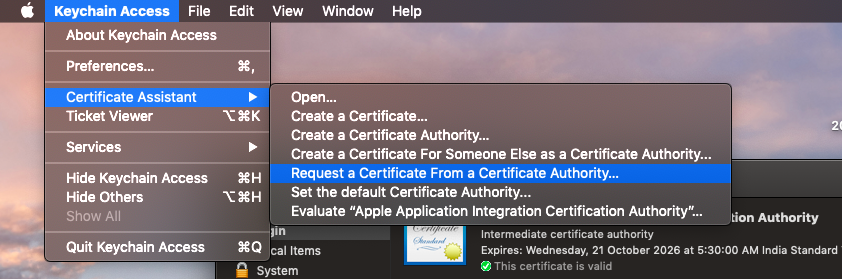
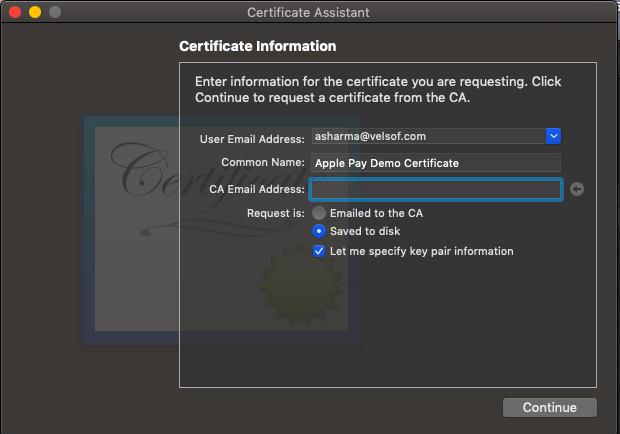
c) Open Keychain Access on your Mac using “cmd + Space”.
d) Request a new certificate from the authority.

e) Fill in the Email and Common Name fields. Check “Save to disk” and “Let me specify Key Pair Information”. Click continue.

f) Select Algorithm to “ECC” and Key Size to “256 bits”. Click Continue.

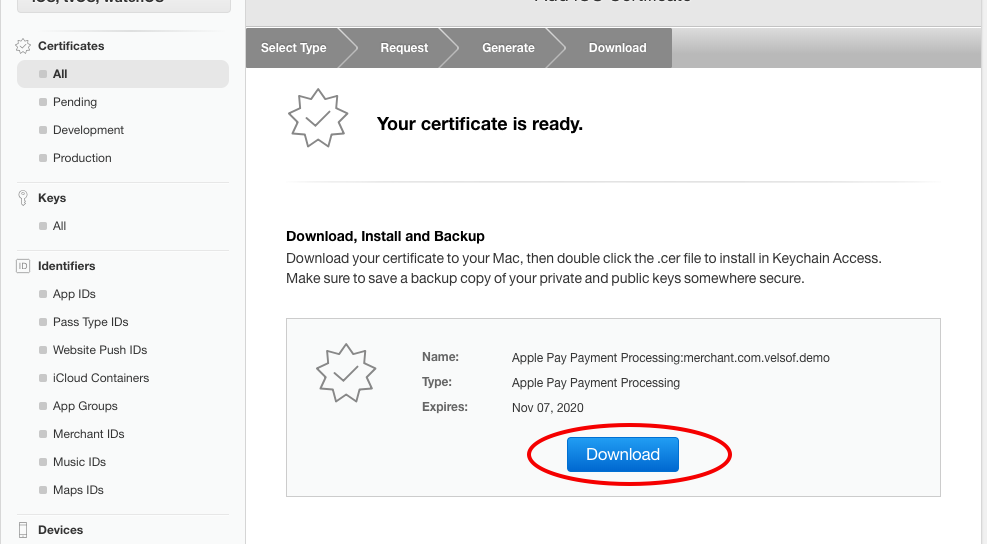
g) Continue with step 2. Upload the certificate that you have created.

h) After the upload is complete, please download the Apple-generated certificate.

Recommended Read: How to fetch data from Firebase in Swift Language (iOS)?

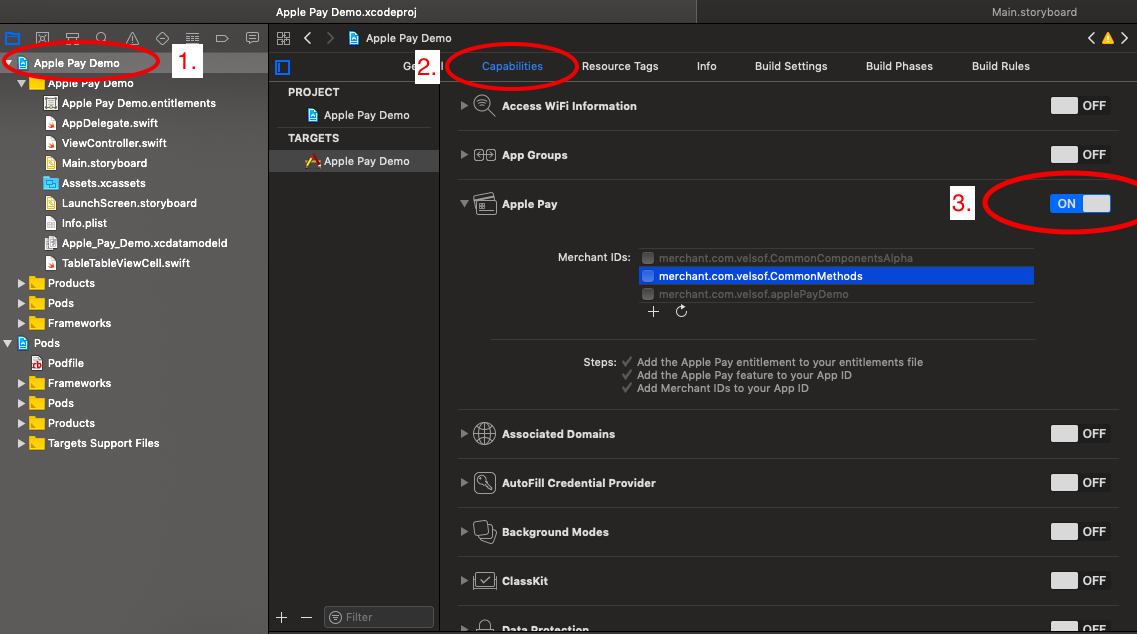
3. Configure Apple Pay :

a) Setup Apple pay in the Xcode project.

4. Add the below line into the podfile and install pods.

# Pods for Apple Pay Demo
pod ‘Stripe/ApplePay’

5. After pod installation, make sure that you are using “project. xcworkspace”.

Note: Please don’t use “project.xcodeproj”

6. Add the below code at the top of your Controller class to import pod libraries. There are chances that you don’t find these SDKs in the suggestion. Don’t worry it will take some time. Or you can type the code manually.

import Stripe
import PassKit

7. Extend your view controller class with the “PKPaymentAuthorizationViewControllerDelegate” class.

class ViewController: UIViewController, PKPaymentAuthorizationViewControllerDelegate

8. Add the below code in your controller class.

var paymentRequest: PKPaymentRequest!
var transactionId = “”
var status = “”
var amount = 100

/**
* This function is called on tap of the ApplePay Payment option on Payment Page.

* **Author:** Asharma

* **Date:** 01-Oct-2018
*/
func setupApplePay()
{
paymentRequest = PKPaymentRequest()
paymentRequest.currencyCode = “USD”
paymentRequest.countryCode = “US”
paymentRequest.merchantIdentifier = “Your Merchant Id”

// Payment networks array
let paymentNetworks = [PKPaymentNetwork.amex, .visa, .masterCard, .discover]
if PKPaymentAuthorizationViewController.canMakePayments(usingNetworks:        paymentNetworks)
{
paymentRequest.supportedNetworks = paymentNetworks
paymentRequest.merchantCapabilities = .capability3DS

let item = PKPaymentSummaryItem(label: “Order Total”, amount: NSDecimalNumber(string: “\(amount)”))

paymentRequest.paymentSummaryItems = [item]

let applePayVC = PKPaymentAuthorizationViewController(paymentRequest: paymentRequest)
applePayVC.delegate = self
self.present(applePayVC, animated: true, completion: nil)
}
else
{
// Notify the user that he/she needs to set up Apple Pay on the device
// Below code calls a common function to display an alert message. You can either create an alert or  can just print something on console.
CommonMethods.displayAlert(message: “Apple Pay is not available on this device.”, viewController: self)
print(“Apple Pay is not available on this device”)
}
}

/**
* This function is called when Apple Pay payment will be authorized.

* **Author:** Asharma

* **Date:** 01-Oct-2018
*/
func paymentAuthorizationViewController(_ controller: PKPaymentAuthorizationViewController, didAuthorizePayment payment: PKPayment, completion: @escaping (PKPaymentAuthorizationStatus) -> Void)

{
// Payment token can be found like this
print(payment.token)
// Get response from the server and set the PKPaymentAuthorizationStatus
let status = PKPaymentAuthorizationStatus(rawValue: 0)!

self.transactionId = payment.token.transactionIdentifier

switch status.rawValue {
case 0:
self.status = “approved”
// perform Functionality on Apple Pay Successfull Payment
default:
self.status = “failed”
}

}
/**
* This function is called when Apple Pay payment authorization is finished.

* **Author:** Asharma

* **Date:** 01-Oct-2018
*/
func paymentAuthorizationViewControllerDidFinish(_ controller: PKPaymentAuthorizationViewController)

{
self.dismiss(animated: true, completion: nil)
}


9. You can call the function setup apple pay() whenever you want to start an Apple Pay transaction. Either you can call the same function in viewDidLoad() or you can call this function with the tap of a button.

Example: In the case of a button tap, you need to add a button in UI, and draw the IBAction of the button. IBAction is a function that will be called on a tap of the button from which is referenced. In this action, you can call this function.

@IBAction func onTapBtnPay(_ sender: Any) {
setupApplePay()

}

Recommended Read: PayU Integration in iOS using Swift

Apple Pay Sandbox Testing

1. Create a Sandbox Tester Account.

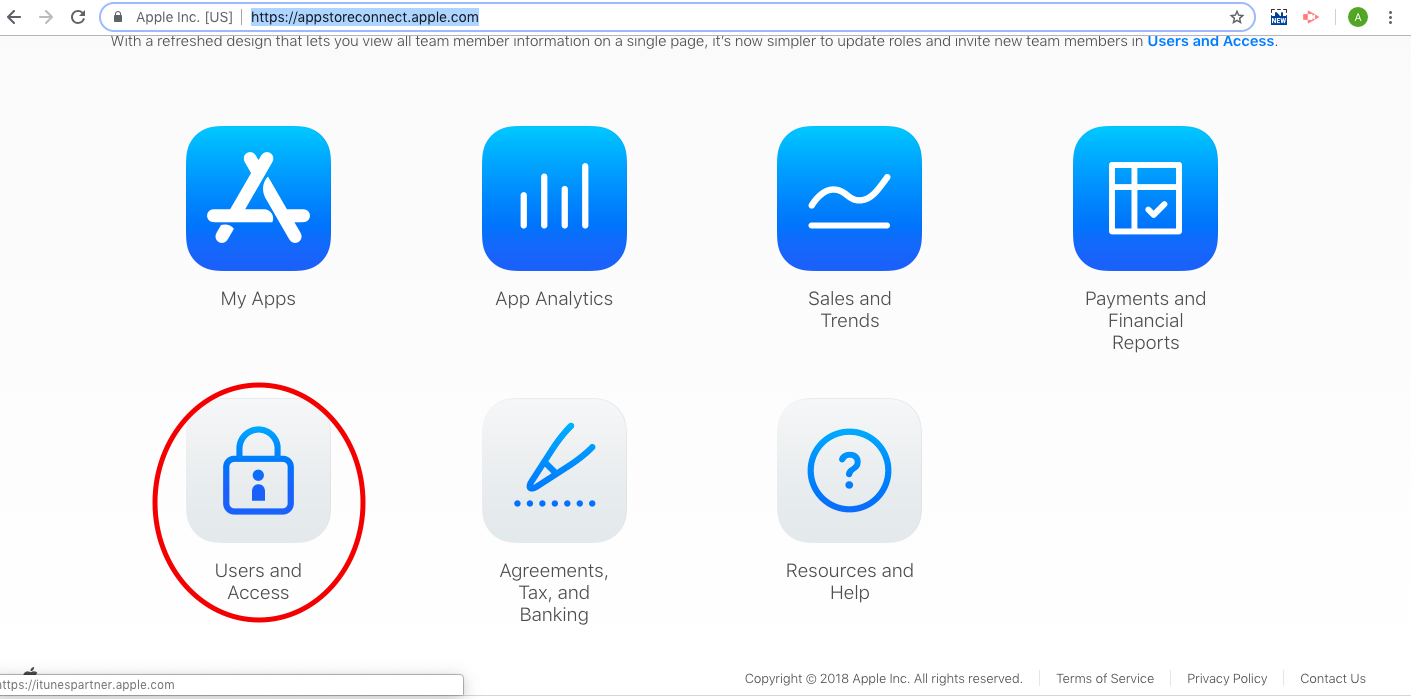
a) Login to https://appstoreconnect.apple.com/
b) Select Users and Access.

c) Go to the testers section in the left navigation menu. Then click on the “+” button.

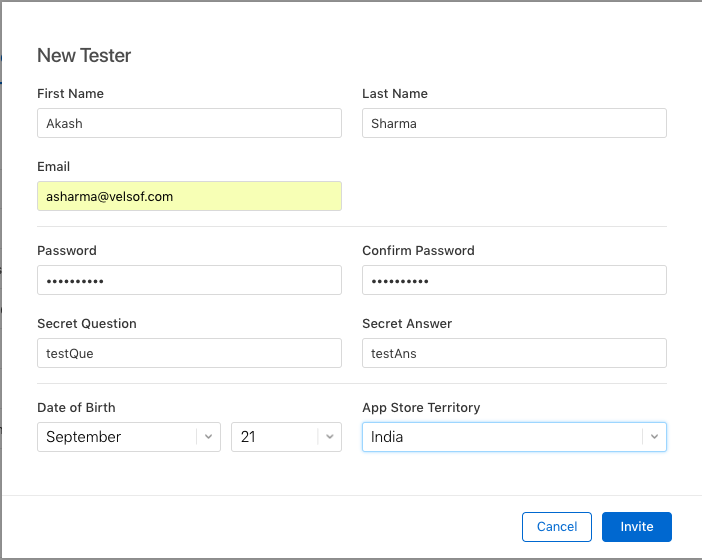
d) A popup will appear. Please fill out that form.
Note: Please use mail that is not registered with Apple.

f) Sign out of your Apple ID on all testing devices and sign back in with your new sandbox tester account.

2. Adding a test card number :

a) Make sure you have logged out from iCloud and iTunes.
b) Sign into your test device using the sandbox tester account you created.
c) Add a sandbox card.
Example :
FPAN: 4761 1200 1000 0492
Expiration Date: 11/2022
CVV: 533

You can find more cards here.

Note: The issue you might face is that the card will not be added. It will show some errors. Possible resolution maybe – you might have not logged out of the device completely. Please log out from iCloud and iTunes.

d) After adding the card, you can proceed with the Apple Pay transaction.

Wrap UP

Create your eCommerce mobile app with Knowband’s mobile app builder and integrate PayU just by following these simple steps. You can develop and publish a pair of entirely native Android and iOS apps for your eCommerce website with KnowBand’s eCommerce Mobile App Builder.

With the aid of our feature-rich eCommerce Mobile App Builder solution, you can start selling on mobile devices and attract customers from all over the world to your store. Knowband is a well-known brand that creates eCommerce mobile apps. Our main objective is to create robust yet user-friendly eCommerce mobile apps that may provide any eCommerce business with a competitive edge. You can create a user-friendly environment and make it easier for e-merchants to reach their customer base using Knowband’s eCommerce Mobile App Builder.

How to download your Android/iOS app from Diawi link?

What is Diawi?

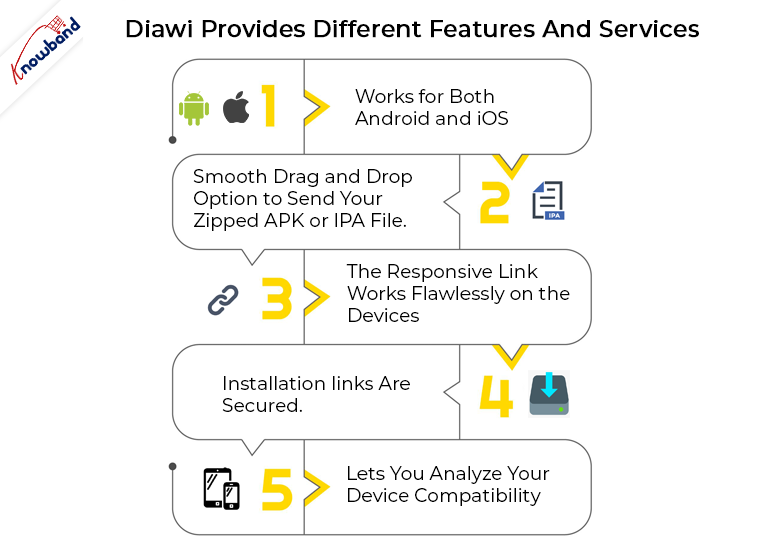
Diawi is a tool used by the developers for sending their app directly to the handheld devices. This is basically used for in-house applications. Apart from just app deployment, Diawi even provides different features and services. Let me sum them up in the following list for you:

  1. Works for both Android and iOS.
  2. Smooth drag and drop option to send your zipped APK or IPA file.
  3. The responsive link works flawlessly on the devices.
  4. Installation links are secured.
  5. Lets you analyze your device compatibility.

How does Diawi works?

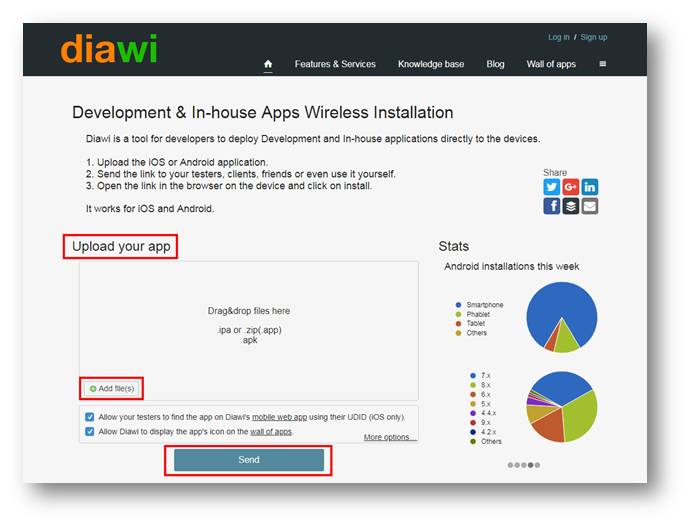
First, you are required to upload the .ipa or .zip file containing the source code of your application into Diawi tool. Once you have uploaded the file, it will take some time to process depending on the size of your application. Once the processing is complete, you can send the link to the device.

How can you install the app with the link?

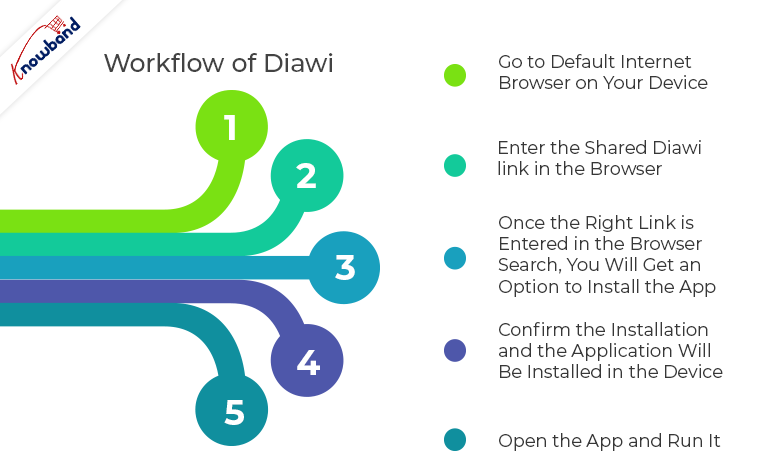
Well, the workflow of Diawi is of few simple steps. If followed correctly, the app deployment is just a matter of few screen taps. Find the steps below:

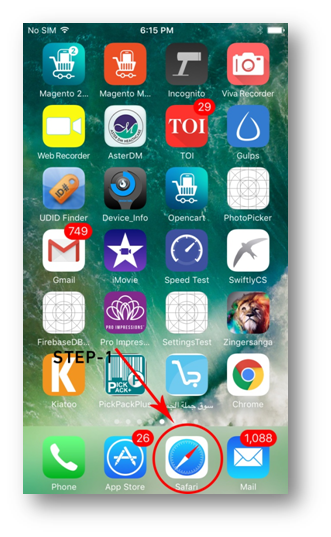
Step 1: Go to default internet browser on your device (Chrome for Android and Safari for iPhones).

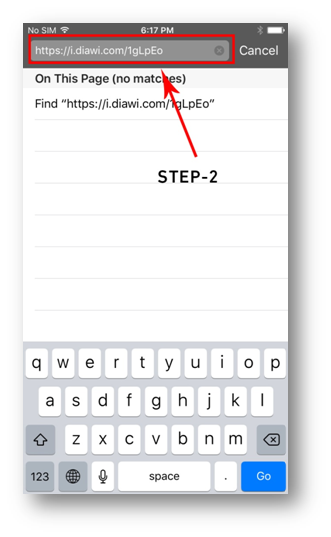
Step 2: Enter the shared Diawi link in the browser.

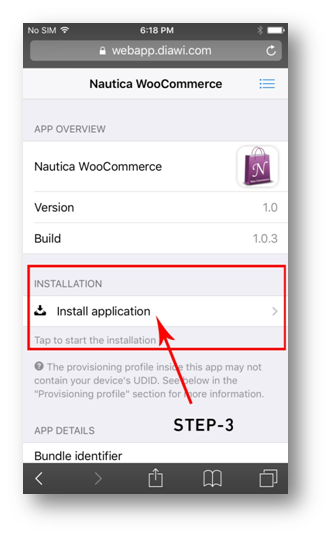
Step 3: Once the right link is entered in the browser search, you will get an option to install the app.
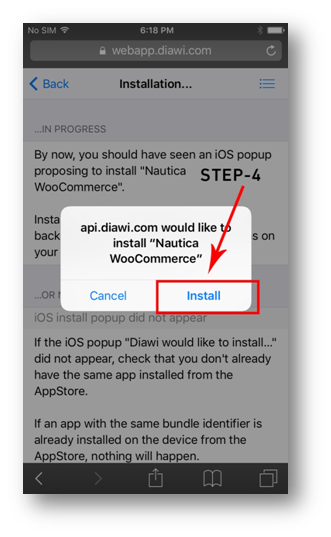
Step 4: Click on the install option and you will be redirected to the next page. Confirm the installation and the application will be installed in the device.

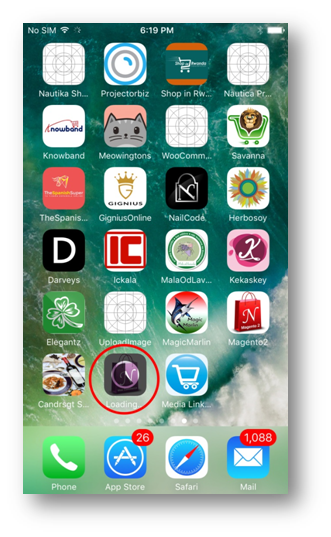
Note: You can check the installation progress on the drawer.
Step 5: Open the app and run it.

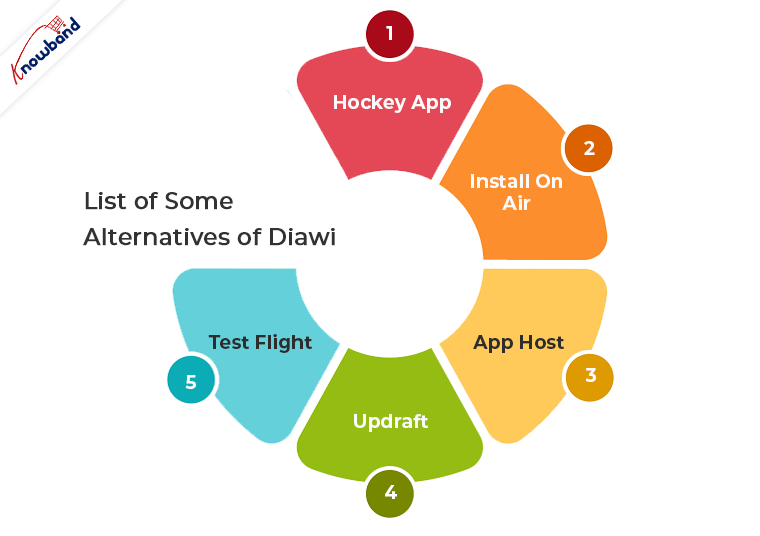
List of Some Alternatives of Diawi 

1. HockeyApp
2. Install On Air
3. App Host
4. Updraft
5. Test Flight

Related Articles

How long will the link remain active?

Diawi links get expired after a few time. The link availability depends on the following factors:

1. Last installation date

Active link duration also depends on the date of the last installation. If no installation is done with the link, then, the file upload date will be considered.

2. Number of installations left

It also depends on the number of installations left from the shared link.

3. Manual disable

You can manually disable the diawi link if it has been created using an account.

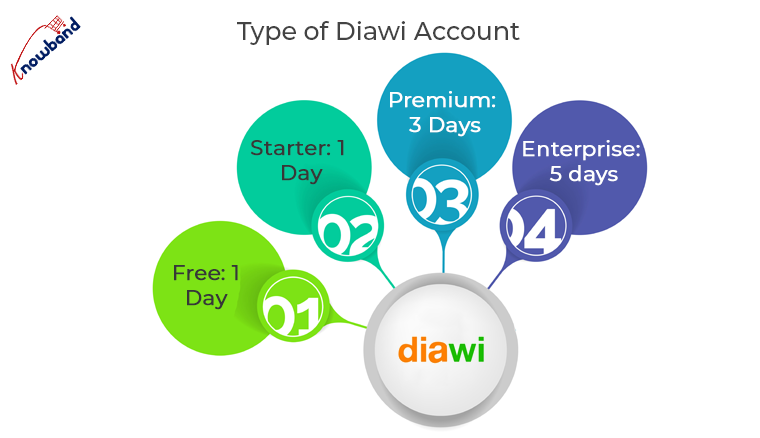
4. Type of Diawi Account:

  • Free: 1 day
  • Starter: 1 day
  • Premium: 3 days
  • Enterprise: 5 days


Conclusion

So, these were a few simple steps to deploy your app to any device with diawi. I hope this information will benefit you.

Now, you can convert your store into a Mobile App with no coding. Check the No Code Mobile App Solution provided by Knowband for all the major platforms like Prestashop, Opencart, Magento, Magento 2 and Woocommerce.

Time for some great App Marketing Campaigns from which we require to learn

Convincing customers isn’t everyone’s piece of cake. Keeping them on their toes in such a competitive market requires a lot of planning and efforts. When we think about acquiring leads through a mobile application, it just gets tougher. If we look at some of the successful marketing campaigns, they prove that with the right approach and strategy anyone can create their own success story. All required from you is to put out your best efforts, which will be understood and valued by the audience.
Whenever we market products, it simply means that we are telling a story to the users about our products which will ultimately help them in understanding our brand. So, why not be a good storyteller and make them believe in you. Yeah! marketing history has been full of such extraordinary approaches which made their mark then. Here are the few top picks among them –

1. How a social media tactic made a big difference for Starbucks?

Direct app marketing may work for one or two cases but it isn’t fruitful for every scenario. Often marketers ask people to download their app in their promotions. Well, the better way is to lure them with advanced features or content of your application. It is the easiest way to promote your app which will ultimately result in the huge number of potential downloads.

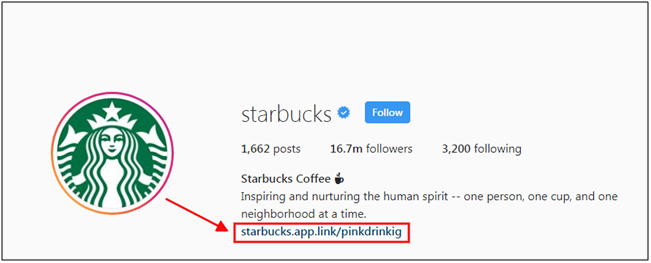
We all know Starbucks for its perfect coffee. They adopted this marketing strategy by asking the users to send images of the best Starbucks product and the best clicks were highlighted on the social media. See it for yourself:

Along with this, their Instagram bio contained the link of app installation.

Now it may seem any general promotion, but trust me it is an extraordinary one. The amazing clicks will drive the users to see more content on the page and what will they find there – app installation link in bio. It is a quite smart play to achieve more popularity.

2. How free rewards lured the Australians?

Rewards have always been a boon when it comes to motivating people. We all love receiving perks at some point in our life and so is in the marketing. The key ingredient of reward-based marketing is the free stuff which engages the everyday consumer and incentivizes them to share your brand message.

Let’s take an instance for a moment. A few years ago an Australian company Virgin came up with a Mobile App Campaign which allowed its countrymen to compete against each other in a game for $20000 reward. The results followed by the strategy were quite unexpected:

  • 40,000 active users joined the game.
  • 14,568 users entered a Virgin Mobile store to protect their in-game loot.
  • As many of 44% of users were actively engaged with the game throughout.

This cleared the picture that the combination of real-life awards and game worked pretty well for them and this approach can be used to lure users socially. Using physical and digital incentives surely grabs the user’s attention.

3. How IKEA transformed paper catalogue into the interactive platform?

In the year 2012, the Swedish based multinational group IKEA released their catalogue app and left the world to astound by bringing augmented reality into it. Perhaps, it was the most unique feature of the app to just project images of furniture into the user’s house to test its beauty and aesthetic. It basically took the shopping word to a whole new level with just a mobile app.

Well, it was obvious for the app to acquire 6.2 million users in the very same year and it also reported an average of eight minutes browsing compared to three minutes reading only the catalogue. This strategy for sure worked for IKEA and the figure jumped to 10 million in 2013. This is a perfect example where the modern technology trends could be a strong pillar in marketing.

4. How app CTA’s are leading to a huge number of downloads with nominal efforts?

What better place to promote your app than social media platforms? But, writing promotional text on the social platforms isn’t enough nowadays. So, why not opt for a more engaging strategy. That’s what in-app Call-to-action buttons are for. Many social platforms give us multiple ways to add app CTA’s. Following image will make you more clear where have you seen it:

This approach is simple yet proven to be an effective one. Marketing your app when users are checking out their social content. What can be better than this which just guides them to your app? It can get you many instant and regular downloads for your application.

The app links and CTA’s can also be added in the profile bio. This would promote your application is a most seamless way without annoying any users in the process.

5. How has Lenskart changed the Eyeglasses purchase with 3D try-on feature?

Lenskart eyewear retailer has been always been a step ahead with their marketing strategy. Let’s have a look at the latest one – 3D try-on feature. This allowed the users to try the frames and glasses directly through the app and let them buy without any efforts. This technology used face mapping which recommends the best-fit glasses for the person.

This advanced way of shopping eyewear allowed the easy purchase to users and it even benefitted Lenskart when users shared the responses on social media. They offered the maximum value to the users which compelled the audience to download the application.

6. How mobile app campaign of Subway France piled up more wins?

Subway bridged the online and offline activities with its mobile application and made an effective impact on the users. Subway, last year started a campaign ‘You’re The Chef’ which relied on delivering what people actually want to pay money for. They used behavioral data of users and established groups of regular fast food customers. This campaign was purely mobile and targeted users during the usual lunch and dinner times.

What better use could be of segmentation? This campaign also proved how push notification can enhance your business sales with nominal efforts. Another tech trend geo-fencing was also used in their app for sending a short video and showing the distance to nearest subway whenever any user is within 400 meters of a Subway sandwich bar. The video even included the call to action button, which opened the native map application in the user’s device and showed the shortest route to the store. Thus, this whole campaign was through a single application with the rich usage of push notifications.

How can you own a flawless Mobile App for your eCommerce store?

The eCommerce mobile applications serve something beyond business for the eCommerce industry. Without a doubt, the mCommerce is going to change the way the world shops in future. Most firms have thought that it was useful to have a dedicated application for a mobile platform for consumer loyalty just as an expanded business. Indeed, the benefits can go past minor shopping ease. Hence, the KnowBand presents different extensions for various platforms like – PrestaShop, Magento, Magento2, OpenCart, WooCommerce and Shopify as well.

KnowBand provides this pre-configured Mobile App Builder extension through which you can convert the website into a mobile app in a few simple steps. Even, if the store admin coming from a non-technical background can easily and efficiently transform their store into the native mobile app and improve sales on their store.

Wrap up

These were the 6 top marketing campaigns that made waves in the last few years. They are the proof of how an extraordinary marketing strategy can make a big difference in lead generation and brand awareness. It’s always a good instinct to learn from other’s success. So, next time whenever you are planning of eCommerce app development and its marketing campaign, keep them in your mind.

How are Push Notifications beneficial in driving more eCommerce sales?

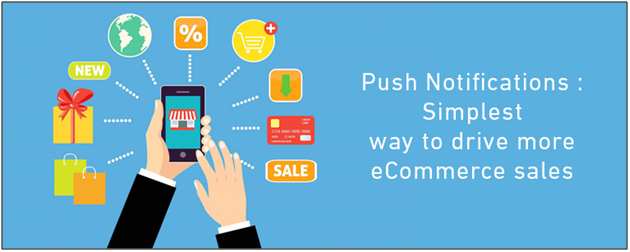
Online shopping is growing at an unprecedented rate and retaining app users isn’t easy for an e-merchant nowadays. Push notifications are the best-suited option for product marketing as they target almost every app user and motivates them for more purchases. Push notifications are actually real-time messages which go directly from online website to the user’s device. Even if the users aren’t browsing your store, the notifications will make their way to them if the app is installed in their device.

The traditional marketing channels like E-mails, messages were also good but they weren’t enough engaging if we compare them with push notifications. The personalized notification is what makes more influence on the audience. Now, when it is quite clear that the push notifications can easily aware the users, do you really think that the job is that easy? Well, no! Let’s find out how and why?

E-mail Marketing VS Push Notifications

A few times back the major marketing approach was through e-mails in the eCommerce industry. No doubt it was worth then but with the evolution of the mobile app industry, push notification became more convenient way of targeting audience. If we look at the statistical records today, average user spends approx five hours on the smartphone and that to 92% of the time in mobile apps. It clearly tells that the preference of mobile apps is way high than website browsing. An old saying” Early bird gets the worm” suits best to eCommerce marketing i.e. the faster you reach to the user, the more you stand to gain.

As it’s pretty obvious that mobile apps are the present and future of the eCommerce industry. So, why not adopt a way of targeting users before lagging behind in the race. That’s how push notification comes into the picture. How crucial they can be for your app’s success could be understood by fact that they boost app engagement by 88% on an average.

Push notifications aren’t similar to the traditional messages. Many e-merchants don’t realize the fact that this method requires proper strategy. Just sending notifications to users without getting any proper idea even annoys them as per the following report. Let’s figure out in this article how can we make the most of the effective push notifications marketing and keep yourself stay ahead of the pack.

1. The magic of power words in Push Notifications!

Words are merely a group of simple alphabets, yet carry immense power. Right words can be quite influential in the case of push notifications. You can find the list of some effective power words from here. However, the usage of the words should be justified else it could simply ruin the whole purpose.

There are even various non-power words which work quite well in attracting users. If they are used properly can easily convince the audience to open the app. So, whether the words have power or no power, they are the key to user persuasion. Thus, learning what to say and what not to say in a push notification is a must. You can surely find the foolproof power words with following steps:

Step 1: Deduce your desired action behind the push notification.

Step 2: Determine the right emotion to drive the required action.

Step 3: Choose your game of words wisely to trigger the right emotion.

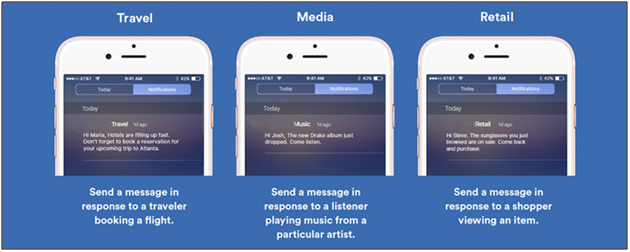
2. Personalization of push notifications can create the right spark!

Segmentation is mainly used in the push notifications to make sure that the message is delivered to the right audience. No one can deny the fact that personalization has always been fruitful for online marketing. It also works pretty well for the push notifications. As per a report, in the year 2015, personalization increased push notifications conversions by 300%.

Segmented notification is based on dividing the users into different groups on the basis of their behavior, purchase decisions, likes, dislikes etc. Now, it makes the audience targeting quite simple in segments. Along with segmentation, there are few other factors like geo-targeting etc. which could help in making the notifications more effective. Personalization is very powerful and if used in the right spot, could be the key to gain huge sales.

3. Right content could deliver the right message!

The core motive behind sending push notifications is to deliver your message to users. Well crafted content is a must to make your notification more precise to the audience. Well, often the marketers think that the right content is just text but it’s not so. Clear push content should have any catchy phrase or joke in order to make notifications more engaging.

The name of the users, their last actions on the app can also be used for marketing. If the users were interested in any product, just notify them of any progress related to them. This approach will surely develop a sense of trust between the customer and your brand.

4. Timing is the key to success with push notifications!

Timing and relevance are the two key factors of making the push notification influential. Push notifications should always be targeted at the right time. Even though it is creative and informative, no one likes being woken up at midnight or early morning.

The best time to send push notifications is in the happy hours between 10 AM and 1 PM for effective results. A study by Localytics found that sending push notification in this time can simply improve open rates by 66%. In this study, Fridays to Thursdays are said to be the best days for getting maximum conversions and leads.

Also, when there is a requirement of too many push notifications, it’s better to prioritize them before sending to users. It will even help you with the segmented push strategy. The push notifications can be on basis of what’s happening around. Any festive based or seasonal push notification should be made a priority as they can easily connect with the audience.

5. Well-timed and personalized notifications will highlight your brand!

Earlier, over 50% of all consumers considered bulk push messages as an annoying distraction. This bounded the marketers to send fewer notifications in the fear of losing potential users. But, if we look at the current stats, the number of push messages has grown by 64% per app since 2015. Now with the increased reliance on the apps, users are getting used to bulk notifications.

So, timely and personalized notifications should be sent in an appropriate number else there might be a big chance of getting drowned in the surrounding competition.

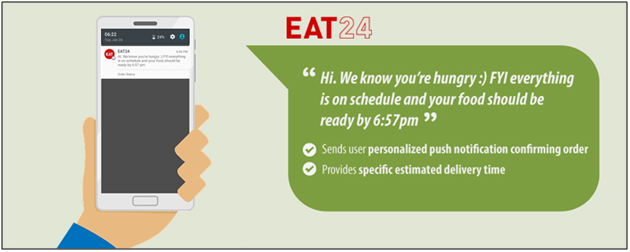
6. Creativity works in every line of work, so is to push notifications!

Just take a look on the above notification. Isn’t it is the best approach to target users? Before trying your hands on push notification, hire a creative team for the job. Entertaining and creative messages have the very high chance to grab the user’s attention. Instead of writing lengthy texts just focus on your brand and make notification a bit interactive. A buzz should be created in notifications then whether it comes from rhyme or any catchy joke.

7. A/B notification testing will eschew any upcoming mistake!

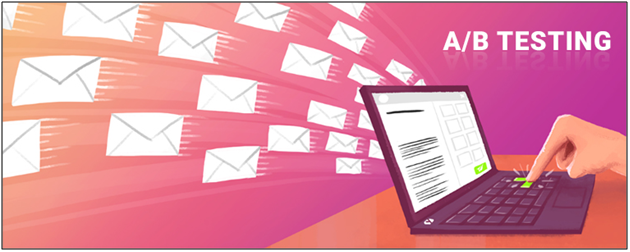
It wouldn’t be a smart play to make assumptions about how your notification will land on various devices. However, a simple one-time test will make the picture more clear. What if there is a way to test your push notification before making final for the delivery. That’s where A/B testing comes.

A/B testing is the comparison of one or more versions of a push notification to see which one performs better. The tests are sent to small random groups and the winning version is obtained with the process.

Over to you

When it comes to the mobile world, the change is paced and ineluctably foreordained. Thus the fastest and easiest marketing trend we can rely on is push notifications. Push notifications are one of the essential reasons why e-merchants are investing in mobile applications. These 7 tips discussed above will help you in sending effective push notifications to your users and ultimately should maximize the number of sales you’re making. On the safe side, make sure you have incorporated push notifications feature while creating a stunning mobile application for your business.

How to create Google Firebase Key for Push Notification?

Google provides this free service to let the users reliably deliver messages at no cost. Comparing with earlier Google’s GCM, FCM is way more developer-friendly. In the year 2016, Google announced major improvements in its Firebase platform. And that’s how FCM – Firebase Cloud Messaging came into the picture. Push notifications are one of the most important tools for seamless marketing. One should make sure to incorporate this feature while creating a mobile application. In this tutorial, you will know how to get the Google Firebase key to send push notifications to Android devices. So, let’s begin.

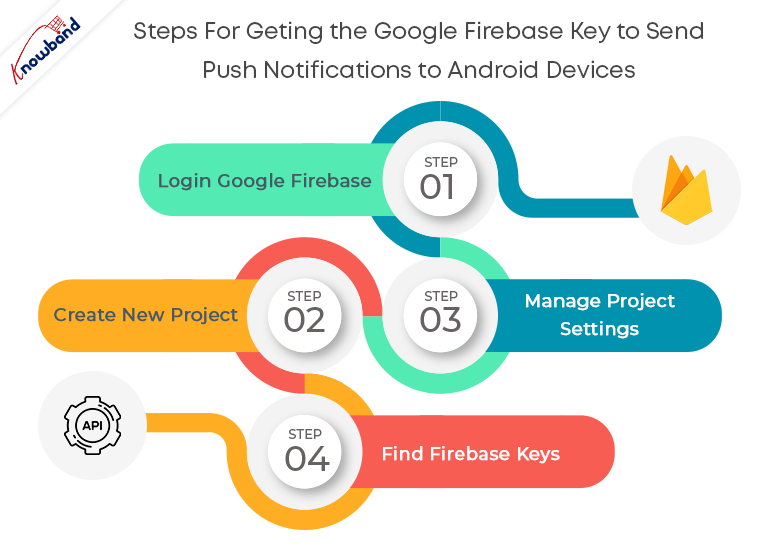
Step 1: Login Google Firebase

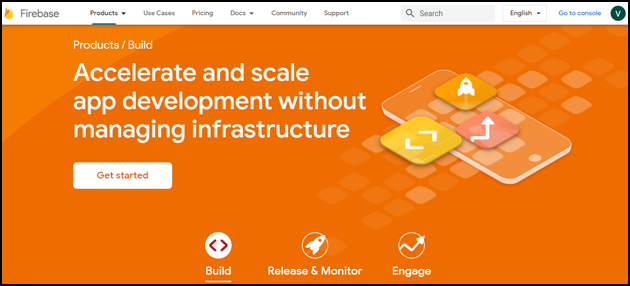
Visit the Google Firebase website and click on the Get Started button.

Get started with Create a project button.

Step 2: Create New Project

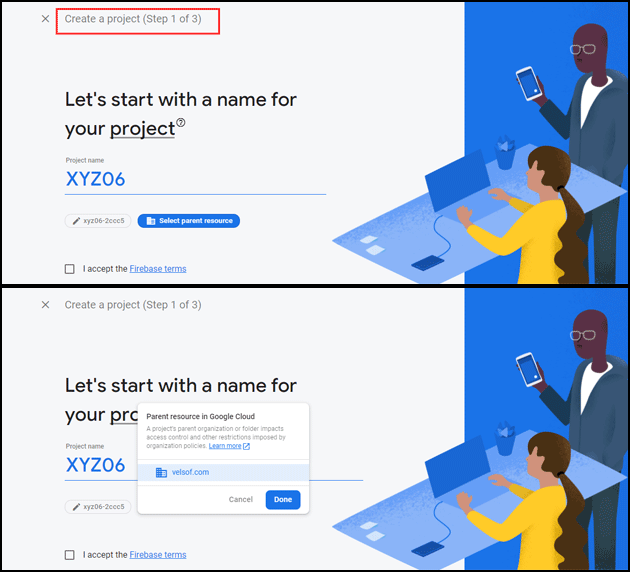
As you click on Create Project, you will have to go through a 3-step process:

Create a project (Step 1 of 3)

Provide your Project name and select the parent resource.

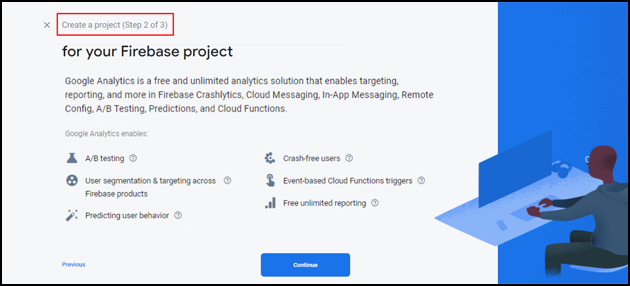
Create a project (Step 2 of 3)

Create a project (Step 3 of 3)

Choose your Google analytics account in step 3 of ‘Create a project’.

It will take a few seconds to create the project. Once the project is ready, click continue.

Step 3: Manage Project Settings

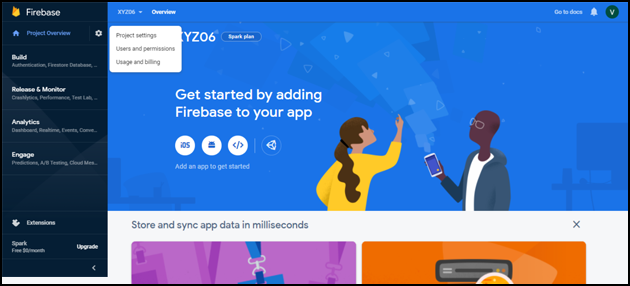
Once the project is created, click on Project settings.

Step 4: Find Firebase Keys

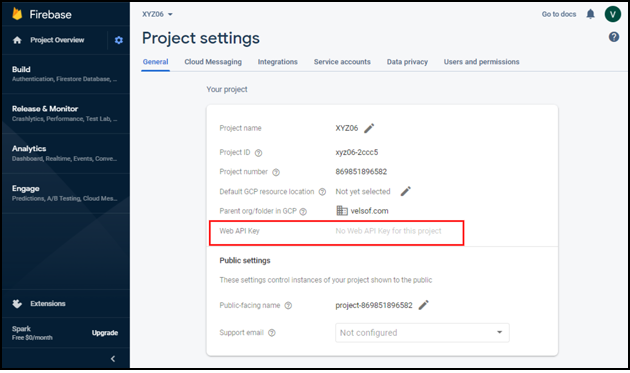
In the project settings, click on General settings. From here, you can directly get the web API key.

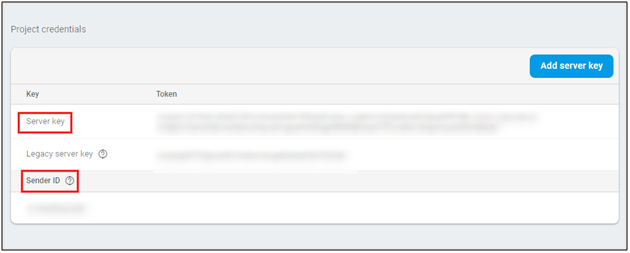
Now, click on cloud messaging settings for Server key and FCM sender ID as shown in the below snapshot:

Conclusion

And it’s done. Creating Google Firebase keys isn’t tricky in any way. If each of the above-mentioned steps is followed properly, it’s just a matter of few clicks and entries.

You can also find How to create a Facebook app for Facebook login authentication?

If you face any issues, please feel free to reach us at support@knowband.com.

Knowband provides extensions for Prestashop, Opencart, Magento, Magento 2, and WooCommerce. Check out our popular PWA module available for Prestashop, Opencart, Magento 2 and Woocommerce. Know more:


Alternatives to publishing your Android app on Google Play Store

Whenever it comes to publishing Android app, Google Play Store is usually a go-to place. Being the biggest app distributor in the mobile app market for a long time, it is the most obvious choice for the app developers. “The green robot” is way ahead of other platforms, if we look at the number of Android devices. One reason behind its popularity is that Play store is pre-installed in all the Android devices. However, there are even other stores available which allows the users to sail through the ocean of apps and can give additional downloads for your Android app.

Why look for an alternative to Google Play Store?

Now, the question arises, are we limited to just Google Play Store for app distribution? I would suggest checking for the alternatives to Google Play Store. Various other App Stores allows publishing Android app for developers. They are not as big as Play Store, yet carry a huge customer base and can easily take your app to thousands of users every day.

Publishing Android app to multiple app stores increases your app’s visibility and ultimately enhances your revenue. Exploring your options isn’t a bad deal when the growth of your application is on the line. Find some more information on the alternatives available for Google Play Store mentioned-below.

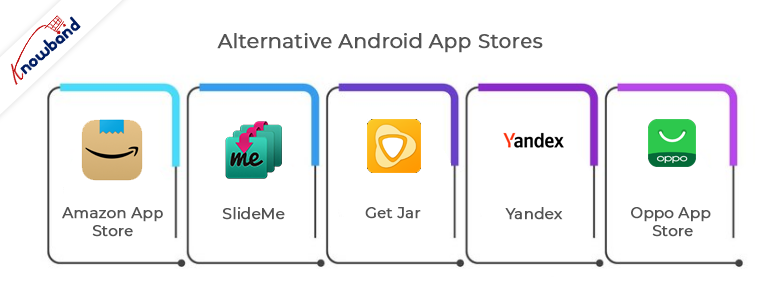
Alternative Android App Stores:

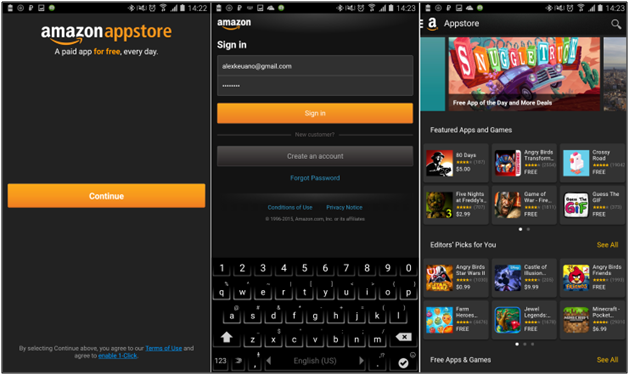
1. Amazon App Store:

Amazon app store is the most popular among all third-party platforms for sharing your Android application. Its progress can only be determined with the fact that from offering content to Kindle owners it has expanded itself to a well-flourished store.

Earlier, it became quite popular for a service ‘Free App of the Day’ in which it offers a free app to users for which they have to pay on the Google Play Store. Amazon even provided several paid titles free for publishing Android app.

Publishing Android app on the Amazon Store is pretty straightforward. For in-app purchases or paid apps, you can go to Amazon Underground Store. App submission is quite simple with the Amazon but your app has to clear an approval process. HTML 5 and web apps are also allowed in this store.

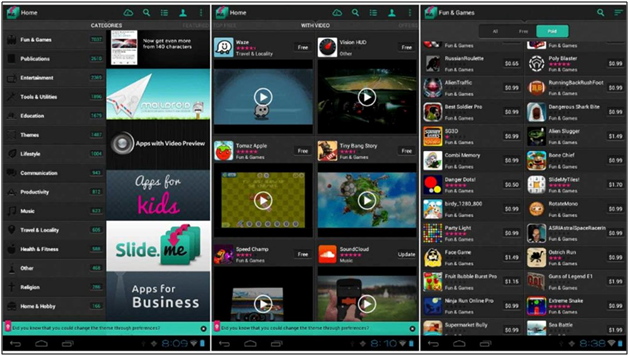
2. SlideMe

SlideMe is the oldest app store with all sort of free and paid Android apps. Its app store SAM (SlideMe App Market) got a better user interface than others. Users can simply categorize products and even look for community reviews and comments.

App publishing is quite simple with SlideMe. SlideMe takes 20% of the income of the publisher as a commission. It offers various payment modes like PayPal, which even Google Play doesn’t provide. It is even older than Google Play Store and thus connects with a huge section of android users. You should certainly give it a try.

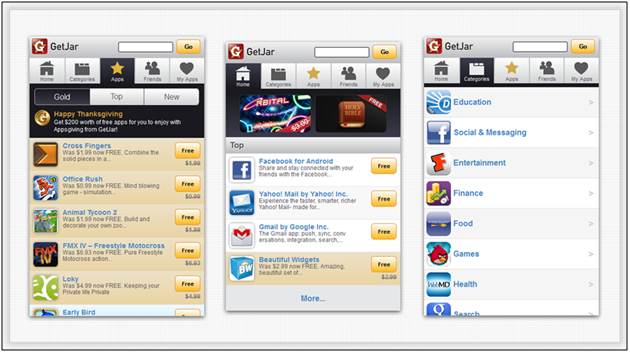
3. Get Jar

Get Jar is also one of the oldest app stores offering a wide range of apps in the Android Market. Its website and app share the same view, users can browse for the apps anywhere.

Publishing app on the Get Jar is free of cost. Developers can make an account and get full access of their application. Developers are even allowed to submit different versions of the same application and target different audience groups.

4. Yandex

Yandex, being one of the biggest search engines in Russia, provided its App Store. It is the most suitable option for the developers if they want to expose their app mainly in Russia. You just require to make a Yandex account to publish your app.

For app submission process, you just need to provide a relevant category that defines your application, target countries for your app and related images. Yandex regulators review your app before making it live on their store.

5. Oppo App Store

Chinese smartphone developer, Oppo has its own app market which recently took a leap and came to the 6th position in top 10 list of app stores. In 2015, it was out from the list. This App store has recently came ahead in the App market and made its impact by gathering huge customers.

Regarding app submission, it has few simple guidelines through which you can submit your app. Along with easy submission, your app will be among less number of apps and can mark its place along with future growth of store.

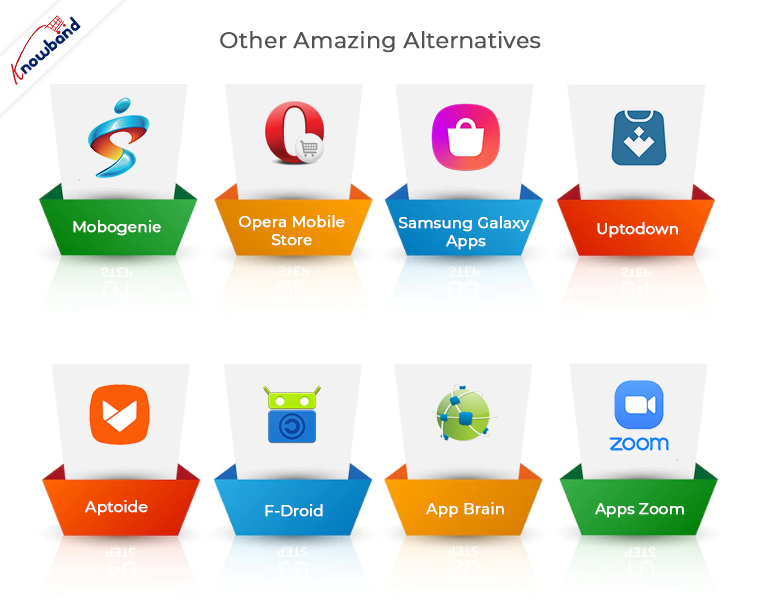
Other amazing alternatives:

6. Mobogenie

7. Opera Mobile Store

8. Samsung Galaxy Apps

9. Mobango

10. 1Mobile Market

11. Soc.io Mall

12. Apps zoom

13. App Brain

14. F-Droid

15. Aptoide

16. Uptodown

Conclusion

Creating an Android app requires a lot of efforts and its growth in the market directly depends on its distribution. Nowadays there are enough choices available for Android developers apart from the Google Play Store. They can even choose whether to target multiple stores or focus on just an independent one. Although the importance of publishing app on Google Play store is irreplaceable, yet these third-party app stores could bring you, potential users. Every app developer should try to grab the opportunities, they’re offering.

You can also find: How to share your iOS App without publishing on Apple App Store?

Knowband also provides a No Code Mobile App solution for major eCommerce platforms like Prestashop, Opencart, Magento 2 and Woocommerce. Know more:


How to share your iOS App without publishing on Apple App Store?

Now that you have created an iOS app and are ready to embark on its journey, let’s discuss the process of app publishing. The motive behind app distribution is to distribute iOS app with the right audience. Well, when it comes to app publishing, the obvious option which comes to our mind is the Apple App Store. No one can deny that the user reach of iOS store is exceptional and the services offered by it has their own perks.

Important Update in the eCommerce iOS Mobile App Builder New Versions

  1. Now, store owners can easily manage the navigation menu based on their business needs.
  2. Translation text can be updated and managed from the backend of the mobile app builder, making localisation simple and flexible.
  3. The mobile app now supports video banners, helping you present promotions and content in a more engaging way.
  4. Now users can sign in directly from the home screen for faster access.

Store owners can now upgrade to the latest version of Knowband Mobile App Builder to experience these enhancements.

Apple App Store Distribution:

The most common platform for iOS app distribution is Apple App Store. It makes your app available to every Apple user and it even helps in monetizing the app by setting in-app purchase and assigning a purchase price.

Publishing your app on the iOS store takes your app to a huge customer base. Although being an intuitive platform for the developers, the app approval process can be a bit tricky. There might be a huge delay in the approval process sometimes. In few cases, it even takes months for the apps to get an approval.

The approval process makes sure that your app follows proper guidelines. If your app has any performance issues, buggy or spammed, it will surely be rejected. You can also find the reasons behind app rejection by Apple App Store.

In case the app approval process is getting troublesome for you, then, there are various other alternatives to share iOS app. Some of the alternatives of sharing iOS app on Apple App store are discussed below:

1. Ad- hoc deployment:

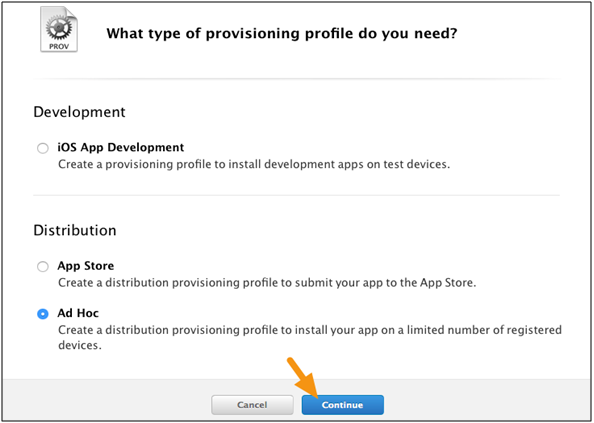
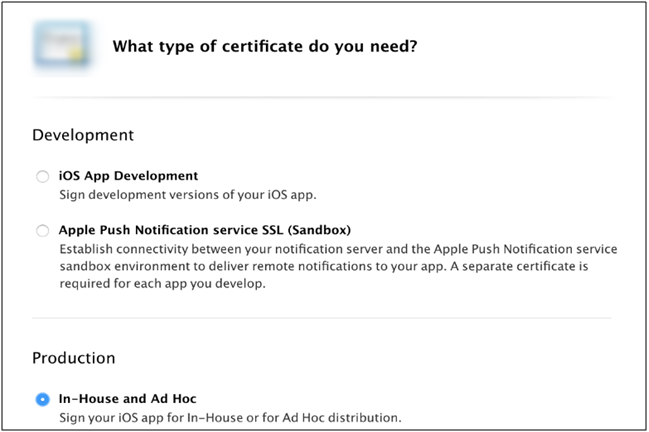
Apple provides an Ad-hoc app deployment option for the developers who want to distribute iOS app for the private beta or a temporary distribution. In this process, the app developer has to deliver the app binary to each user through e-mail or download URL. To make sure that the binary work on user’s device, developer require to add the UDID of each device and register them to Apple Member Center. App binary won’t run on any regular device until it is registered in the ways discussed above. Your ad hoc profile guarantees that test versions of your app are not copied and distributed as per your approval.

Export your application through Xcode option. Once the app binary has been exported, it can be distributed with MDM (Mobile device management). But you still need to add the UDID of each device. There is no alternative to that. After that just install the app on the device.

There are few important points which you need to know before going for this deployment option:

  1. It requires an Apple Developer Account which costs around $99 per year.
  2. This distribution process is limited to 100 iPhones, 100 iPad, and 100 iPods touch installations. Also, a developer needs to acquire the UDID of each device to share iOS app.
  3. Whenever a new UDID is being added, you need to create a new version of your application. They can be added only till yearly subscription.

Pros of Ad- hoc deployment:

  • The iOS store’s approval process for your app is not required.
  • Your app listing will not be visible to the public and they can’t purchase or install it.

Cons of Ad- hoc deployment:

  • The number of devices is limited to 100 which can be replaced only once during yearly membership.
  • The UDID (Unique Device ID) of each device must be manually registered with your provisioning profile.
  • The Apple developer profile is valid only for one year. After that, you need to rebuild your app with a new profile.

2. Enterprise In-House App Deployment:

This app distribution method came to counter the ad-hoc distribution process. Like ad-hoc, here, you don’t need to add UDID of every device. In case you have created an app and want to share iOS app internally with the staff, then, this technique will save you from the extra effort of registering UDID of every device.

Enterprise deployment comes into cause when an app is exported through Xcode and you aim to install it on any device without submission to iOS store or registering device UDID’s. Your app can be distributed through e-mail, URL or MDM.

There are few important points which you need to know before going for this deployment option:

  • Enterprise app distribution requires an Apple Enterprise Developer Account which costs around $299 per year.
  • There is no limit to the devices, but the devices must be owned by the organizations.

Pros of Enterprise In-house App Deployment:

  • The approval process of your app by iOS regulators isn’t required.
  • Your app won’t be available on the Apple Store. The public can’t purchase or install it.
  • All the users in the enterprise can use the account to share the iOS app.

Cons of Enterprise In-house App Deployment:

  • This program is only intended for employees within the small organizations.
  • The organization is fully responsible for app distribution and updates, whether done manually by email or through an MDM.
  • Cost is higher for the Enterprise Developer Account at $299 per year as compared to normal account at $99 per year.

3. B2B VPP App Deployment Method:

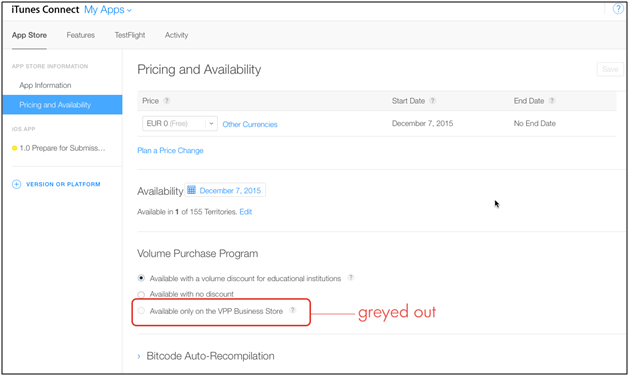
Apple’s Volume Purchase Program allows you to have a private app store for your personal business. You can build internal app binaries for every device which has joined your organization. You even have the option to share iOS app with other businesses.

This process does have an approval process, but it is flexible as your app is not available for the general audience. VPP being a private store, app distribution is handled by the program. This process is mostly used with MDM service.

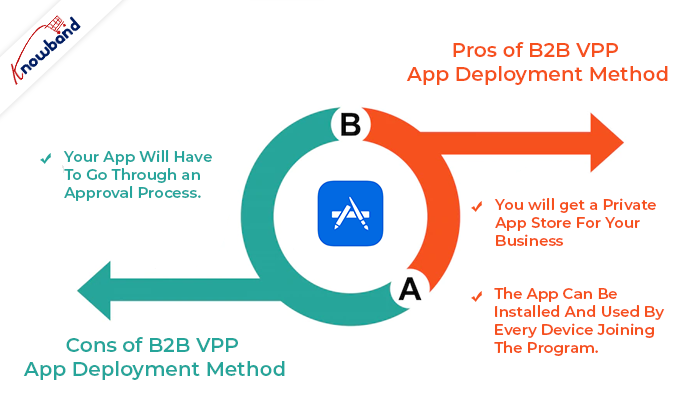
Pros of B2B VPP App Deployment Method:

  • You will get a private app store for your business.
  • The app can be installed and used by every device joining the program.

Cons of B2B VPP App Deployment Method:

  • Your app will have to go through an approval process.

Knowband also provides No Code Mobile App Builder and iOS App Maker for Prestashop, Opencart, Magento, Magento 2, and Woocommerce.

Prestashop Android and iOS Mobile App Builder Addon

Get the mobile app created for your store in a few hours with Knowband’s Android and iOS App Maker for Prestashop.

SHOP NOW

Conclusion

Choosing the right program to use is as important as the actual app deployment plan. These processes may seem daunting, but with the right approach and proper planning success of your app is ensured. Abide by the rules and guidelines mentioned above and your app will be published without undergoing through any approval process.

Apart from that, at Knowband with 13+ years of web and app development, we provide 100+ plugins for major eCommerce platforms Magento 2, Prestashop, WooCommerce, and Opencart. We provide web and app development services on various frameworks and technologies, you can get in touch with the technical support team at our official email address support@knowband.com.

Related Articles:

1. What to do if your app was declined on Apple App Store?

2. Mastering Xcode: Tips for Faster iOS App Development by Knowband!

3. Android Vs iOS App Development | All You Need to Know

10 years of growth of Mobile App Market

Mobile applications have been a part of smartphones for over a decade. Mobile App Market is the fastest growing segment in the mobile industry. There were a few app developers who were aware of the potential opportunity that app development had in the mobile industry. However, now the scenario has totally changed. With the ever-growing popularity of mobile apps, various OS providers and device vendors have even launched their own application stores.

The growing advent of mobile devices, along with apps is perhaps the biggest technical phenomena in the recent times. Smartphone with featured apps has now become the remote control for our lives and can easily boost our small business.

Integrate Your PrestaShop Store with AI Chat Support

Boost engagement and conversions with instant AI replies, multilingual support, and real-time order updates.


PrestaShop AI ChatBot Module


SHOP NOW

Evolution of smartphones: Over the last decade

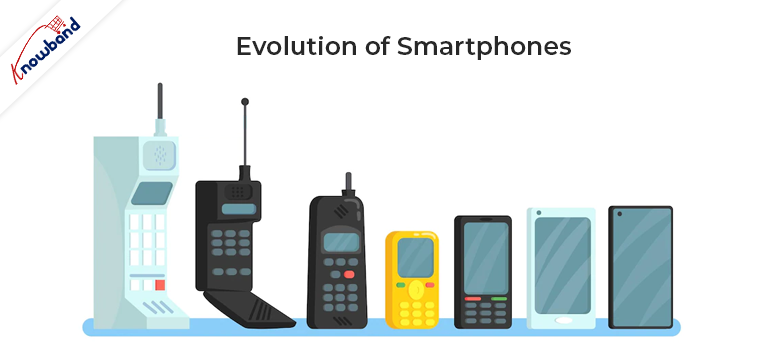
Now, It is kind of impossible to imagine our life without smartphones. Many software and hardware companies have worked off over the decade to narrow down all the features in small devices. The wondrous journey of smartphone evolution has been from the old BlackBerry to the current behemoth (iPhone X).

The smartphone makers try to make the phone as small as possible while having the biggest display of that size. From the flat small display to the curved big screens is the long road, mobile phones have came over the last ten years. This trend isn’t stopping soon as this field will always be in the state of innovation.

Growth of Mobile App Market: An overview

The app industry has seen an immense growth in the past ten years and even has no end in sight. Following figures itself says how big is this industry:

  • In the year 2012, mobile app’s financial state was around $53B and it grew up to $63.7B by the year 2016.
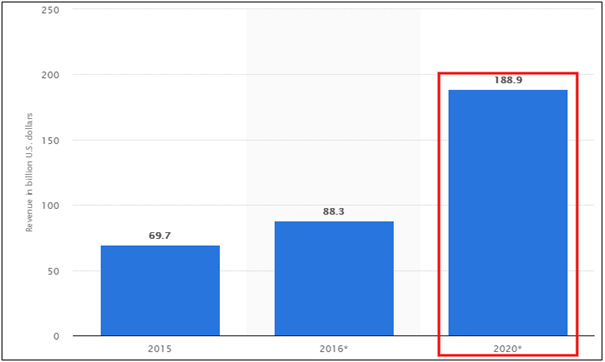
  • Various researcher even predict that mobile app economy will touch $188.9B worldwide by the year 2020

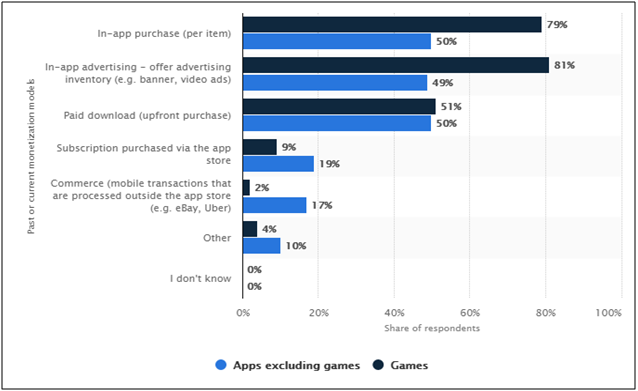
In-app ads, purchases, and other monetization models have come up immensely with the app market. According to a Forbes report, a huge rise is seen in the usage of monetization models by the app developers. Last year, In 2017, 49% of the app developers went for in-app advertising (for non-gaming apps) and 79 % chosen in-app purchases of items for gaming apps.

This growth is mainly due to a high potential of mobile applications which is acquired in various steps. Let’s see how mobile apps have managed to grab such a high place in the current economy in a short span of time.

1. Growth of smartphone users:

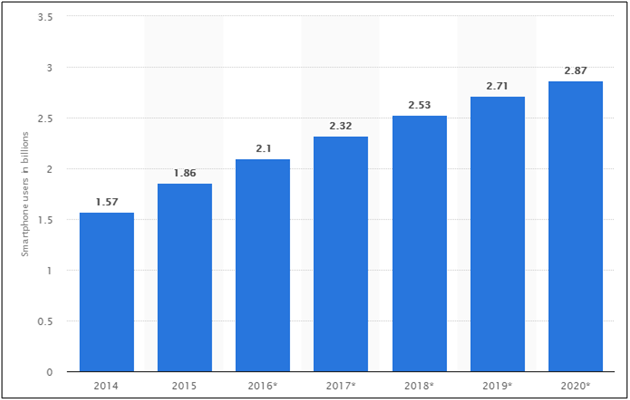
With the rise of the affordable smartphone, reduced data prices and short replacement cycles, the smartphone industry has seen rapid adoption for the past few years. The following report depicts how smartphone users have grown from 1.57B in 2014 to 2.53B in 2018 and it is expected that this data will cross the mark of 3 billion by the year 2021.

It is obvious that this graph is showing a continuous increment. Everyone nowadays wants to have a smartphone for them. Also, the one which comes up with latest market technologies and trends are being preferred more.

2. Growth of Android and iOS platforms:

Android and iOS are two giant app platforms which build their high place in the past few years. When it comes to the mobile operating system, these two players have got no replacement. In the battle between them, both offer similar kind of features apart from one major difference of being an Open and Closed source.

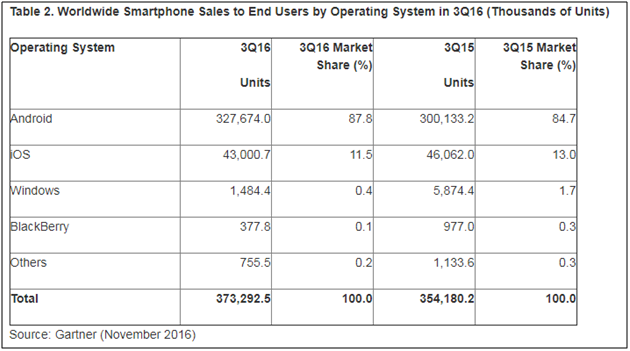
As per Gartner’s study, in the year 2016, no one can deny that Android and iOS are ruling the business:

  • Android has the biggest market share by being sold 87.8% of total business, whereas iOS also grabbed 11.5% on their side.
  • Rest other platforms showed feeble presence in the market with 1% or 2%.

Also, with constant growth, Android and iOS have removed their competitors in the process. Microsoft’s Windows phone has lately seen a big setback in the year 2014 when their sale rate falls to just 2.5%. It clearly shows the challenge of existence before Microsoft in the mobile app market.

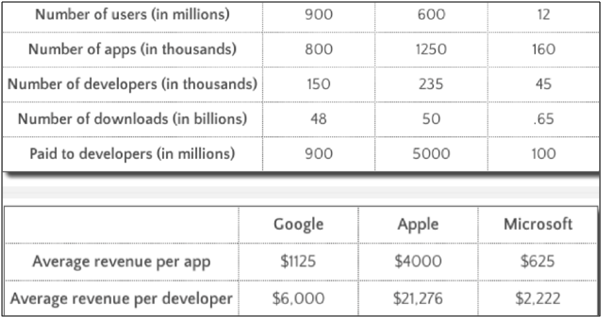
Apple’s App Store and Google’s Play Store have always been the most popular app stores. Now, they are at a place in mobile app market, that it seems impossible for any other competitor to catch up with them. The major reason behind their success is having a variety of applications and developers. Forbes shared a report illustrating the growth scope of app developers.  At the Worldwide Developer Conference, Apple talked about 1.25 million apps in the App Store and it paid $5 billion to developers last year. The average mobile app developer revenue is shown in the table below:

This data shows that why developers focus on making an app for every simple task, not only it makes our life easy but also provides them with a huge money-making option.

3. Growth in mobile app usage:

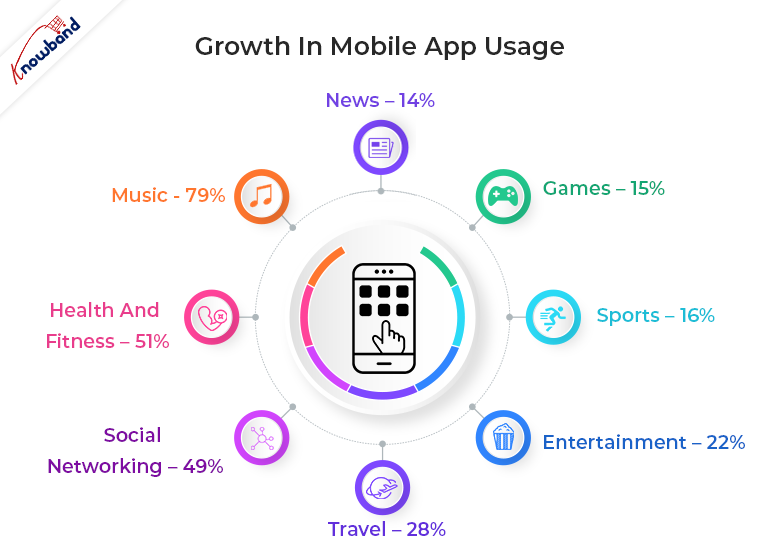
Mobile has now overpowered the position of the desktop by making it secondary touch point for the digital users. With the increase in the number of digital users, the mobile apps now grab 65% share of digital media time.

If we categorize the digital time on the basis of usage, these results follows:

  1. Music – 79%
  2. Health and fitness – 51%
  3. Social networking – 49%
  4. Travel – 28%
  5. Entertainment – 22%
  6. Sports – 16%
  7. Games – 15%
  8. News – 14%

The percentage of mobile apps that were only used once shrunk to 20% in 2015 after improving from 22% in 2014. The percentage of app usage increased by 39% in 2016. Mobile devices entice us to spend a maximum of our time on them and we seem to be doing so. The smartphone is ascendant, and every section of our society is preferring them to keep everything at their fingertips.

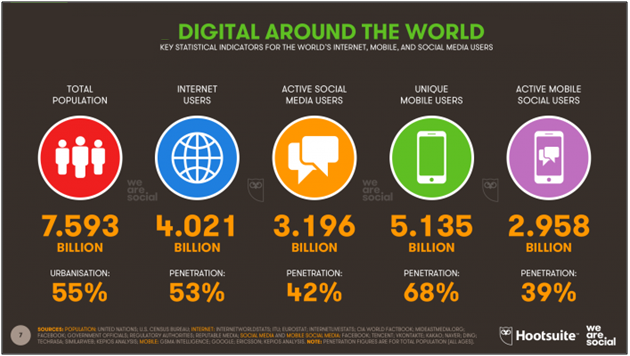
The new 2018 Global Digital Suite of reports reveals the following data related to increased internet and smartphone usage:

  • The number of internet users worldwide in 2018 is 4.021 billion, up 7 percent year-on-year.
  • The number of social media users worldwide in 2018 is 3.196 billion, up 13 percent year-on-year.
  • The number of mobile phone users in 2018 is 5.135 billion, up 4 percent year-on-year.


More time spent on mobile applications is directly proportional to their development rate. Such high data of time spent on mobile apps shows that there is no end to mobile app usage in the upcoming years. It will only see the rise.

4. Growth in mobile app downloads:

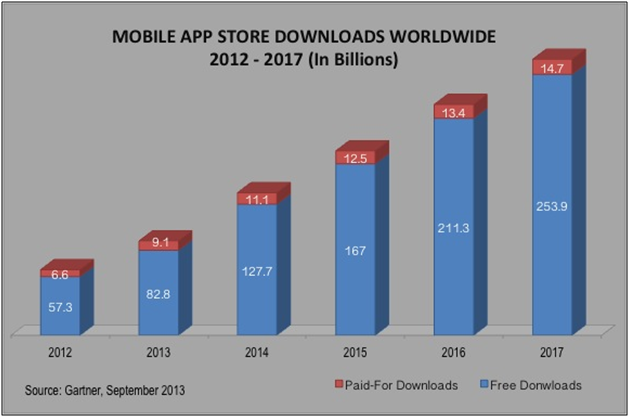
Worldwide smartphone users downloaded 60% more apps in 2017 as compared in 2015. Simplifying this data means that nearly two apps were downloaded every month per human being on the planet. Lately, in September 2016, India has also seen a rapid growth in app download with unlimited 4G access by Reliance Jio.

Gartner shared a report on how mobile app downloads have increased in the past years and this data is gradually increasing:

This data is of worldwide mobile app downloads and the graph is just getting higher and higher. By the end of this year hopefully, it would cross  the mark of 300 billion.

Current technology trends and their future scope:

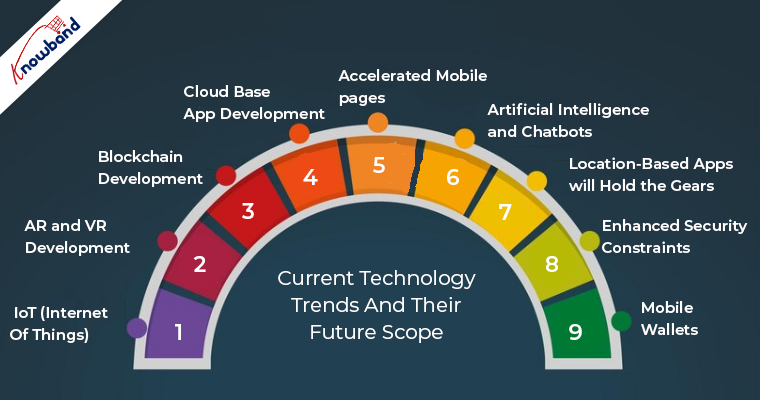
The current trend and technological advancements have changed a lot from what it used to be a few years back. Mobile apps are developed enough to resolve some major past issues like real-time management. Now, the apps target on better and focused objective. Here, are the few tech trends which hold a major spot in the reasons behind the evolution of the mobile app industry and still got a lot of room of growth:

1. IoT (Internet Of Things)

Mobile is getting out of pockets and becoming wearable. IoT has taken the networking field used in apps to a whole new level. From creating apps for devices to building apps for watches, gears is what IoT has changed around us. With IoT concept in the mobile apps, the virtual and real world came very close.

eCommerce market is witnessing a steady growth with the easy affordability of internet services and best class apps. The global retail e-commerce sales were 1.86 trillion US dollars in 2016 and are expected to reach 4.48 trillion US dollars by 2021.

2. AR and VR development

AR(Augmented Reality) and VR(Virtual Reality) will soon become the major factors of mobile app development. The latest example regarding this tech is Pokémon Go which proved that it’s time for cross-screen reality interactions. Gartner even predicted that by 2020, millions of users will use Augmented Reality. Apart from just games, soon the marketing and eCommerce apps will also experience a glimpse of this technology.

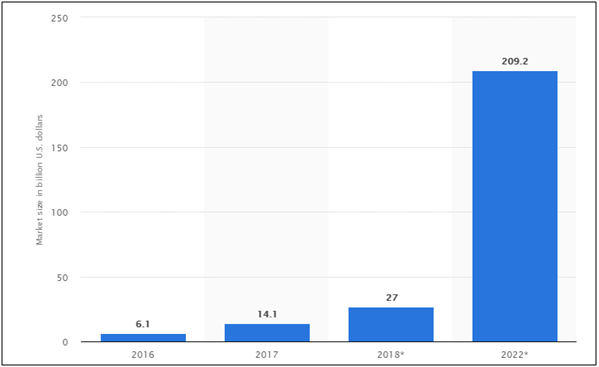
According to global AR/VR market size, It is expected to reach up to $209.2B by the year 2022. According to TechCrunch, “The mobile AR could become the primary driver of a $108 billion VR/AR market by 2021 with AR taking the lion’s share of $83 billion and VR $25 billion”.

3. Blockchain development

Blockchain technology has flourished themselves in the app market in just a few years. Right from automobiles to artificial industry, pick any of them, blockchain development is found in action. As per an IBM report, blockchain adoption is on the rise in app market.

4. Cloud base app development

Cloud base apps have grown themselves in the market over the past few years. The major advantage they have is they reduce the space occupied by the apps in the phones.

It was found out in 2014 that cloud base apps have gained more traffic than regular apps and this trend seem to be growing further. With higher traffic and reduced space size, these apps are surely a boon for eCommerce market.

5. Accelerated mobile pages

Accelerated Mobile Pages (AMP) is one such technology of Google, which aims at making the user experience better. It has brought a huge change in the way of presenting website content to the mobile users. AMP reduces the load time of web pages. AMP pages even have a high chance of ranking on Google’s SERP.  Being launched in 2016, revolutionized the app industry and aims at doing so in future.

Recently, in a report, it was confirmed that over 25 million website domains have published more than 4 million AMP’s by the year 2017.

AMP integrated apps provide you benefits of staying ahead of your competitors in the eCommerce market. With quick loading, you can sell, advertise, market your products more forcefully than the crowd.

6. Artificial Intelligence and Chatbots:

Smart prediction isn’t a row to how nowadays. With the latest AI and machine learning technologies, you can easily know what is best for your business even now when huge chunks of data is available.

AI start-up funding has been massively increased in the past years. Chat bots have been exploded in the eCommerce market. Following stats strengthen these facts:

  • As per the IDC report, by the next year, 75% of eCommerce merchants will take the help of these smart assistants to increase productivity.
  • Gartner also predicted that by the year 2020, around 85% of customer service interaction will be handled by Chatbots.

7. Location-based apps will hold the gears

The location-based services s expected to hold the gears of the mCommerce industry in the future. Even in the eCommerce industry, the location-based searches are on the rise and is expected to grow even further in the future. Moreover, 69% of Google searches include a specific location. Geo-social services are already attracting the attention of the app users. Thus, in case you are looking to standout in the crowd, then, delving into this aspect is a must.

8. Enhanced Security Constraints

The biometric security options are becoming the next big thing as per the data security aspect is concerned. The prominence of this feature has increased ever since Apple introduced Touch ID feature, the pressure of adding an extra layer of security to prevent data breach has increased. Features like biometric security, fingerprint authentication and others can simply boost the credibility of your app. In fact, this is not just a matter of offering additional features to the customers, but also the basic requirement of the current scenario.

9. Mobile Wallets

Mobile payment services have risen to gain fame and fortune in recent years. Apple Pay, Google Wallet, Alipay, Paytm, PayPal, are some of the examples that speak for their success. In the year 2017, global mobile payments exceeded $700 billion marks and there’s nothing stopping this. It is bound to grow in the future as well. It won’t be wrong to state that the sky is the limit for this particular industry.

The future of Mobile Apps in a nut-shell

With millions of mobile apps listed in at the various app stores, people might say that the industry is saturated. However, if you take a closer look at the stats, you’ll know that there is still a lot of room to grow. The gross revenue of mobile apps worldwide in the year 2015 was 96.7 billion US dollar. This figure showed a skyrocket increment in the following year and reached an amount of 88.3 billion US dollar. If you think that this is the limit, then, watch out for the future predictions. As per Statista, this figure is expected to reach 188.9 billion US dollar.

In Conclusion

Well, the last ten years have shown us the evolution of new technologies in the app industry. In my opinion, making our day-to-day life fast and easy is the major reason of empowering market. A huge amount of tech trends have been arrived in the mobile apps and yet more are to come. Mobile apps have also the reason behind growth in E-Commerce industry. Users can engage through mobile apps, which makes the communication easy and develops a bond of trust and loyalty. Mobile apps are easily accessible and contain all the required info required while product purchase.

For this, you need to create a perfect mobile app which brings your business at user’s fingertips. Apart from app development, publishing your app on the stores is also a great deal. You can find a detailed info of app distribution on Google Play and app distribution on Apple Store.

We at Knowband also offer No Code Mobile App solution for all the major CMS platforms like Prestashop, Opencart, Magento 2 and Woocommerce. Know more:


Often the store regulators even reject your app while approval process. If your application faces any such issue, find the ways to resolve them:

What to do if your Android app gets declined by Google Play Store?

What to do if your iOS app gets rejected by Apple App Store?